├── .gitignore
├── .npmignore
├── .github
└── preview.png
├── package.json
├── LICENSE
├── examples
├── buffer_input_image.json
├── base64_input_image.json
└── jimp_input_image.json
├── image
├── image.js
└── image.html
└── README.md
/.gitignore:
--------------------------------------------------------------------------------
1 | .DS_Store
2 | node_modules
--------------------------------------------------------------------------------
/.npmignore:
--------------------------------------------------------------------------------
1 | .DS_Store
2 | .git
3 | .npmrc
4 | npm-debug.log
--------------------------------------------------------------------------------
/.github/preview.png:
--------------------------------------------------------------------------------
https://raw.githubusercontent.com/rikukissa/node-red-contrib-image-output/HEAD/.github/preview.png
--------------------------------------------------------------------------------
/package.json:
--------------------------------------------------------------------------------
1 |
2 | {
3 | "name": "node-red-contrib-image-output",
4 | "version": "0.6.4",
5 | "description": "Easy way of previewing and examining images in your flows",
6 | "scripts": {
7 | "test": "echo \"Error: no test specified\" && exit 1"
8 | },
9 | "dependencies": {
10 | "jimp-compact": "~0.10.1"
11 | },
12 | "bugs": {
13 | "url": "https://github.com/rikukissa/node-red-contrib-image-output/issues"
14 | },
15 | "homepage": "https://github.com/rikukissa/node-red-contrib-image-output",
16 | "repository": {
17 | "type": "git",
18 | "url": "https://github.com/rikukissa/node-red-contrib-image-output"
19 | },
20 | "node-red": {
21 | "nodes": {
22 | "image": "image/image.js"
23 | }
24 | },
25 | "keywords": ["node-red", "image", "inspect"],
26 | "author": "Riku Rouvila",
27 | "contributors": [
28 | {
29 | "name": "Dave Conway-Jones"
30 | },
31 | {
32 | "name": "Bart Butenaers"
33 | }
34 | ],
35 | "license": "MIT"
36 | }
37 |
--------------------------------------------------------------------------------
/LICENSE:
--------------------------------------------------------------------------------
1 | MIT License
2 |
3 | Copyright (c) 2018 Riku Rouvila
4 |
5 | Permission is hereby granted, free of charge, to any person obtaining a copy
6 | of this software and associated documentation files (the "Software"), to deal
7 | in the Software without restriction, including without limitation the rights
8 | to use, copy, modify, merge, publish, distribute, sublicense, and/or sell
9 | copies of the Software, and to permit persons to whom the Software is
10 | furnished to do so, subject to the following conditions:
11 |
12 | The above copyright notice and this permission notice shall be included in all
13 | copies or substantial portions of the Software.
14 |
15 | THE SOFTWARE IS PROVIDED "AS IS", WITHOUT WARRANTY OF ANY KIND, EXPRESS OR
16 | IMPLIED, INCLUDING BUT NOT LIMITED TO THE WARRANTIES OF MERCHANTABILITY,
17 | FITNESS FOR A PARTICULAR PURPOSE AND NONINFRINGEMENT. IN NO EVENT SHALL THE
18 | AUTHORS OR COPYRIGHT HOLDERS BE LIABLE FOR ANY CLAIM, DAMAGES OR OTHER
19 | LIABILITY, WHETHER IN AN ACTION OF CONTRACT, TORT OR OTHERWISE, ARISING FROM,
20 | OUT OF OR IN CONNECTION WITH THE SOFTWARE OR THE USE OR OTHER DEALINGS IN THE
21 | SOFTWARE.
22 |
--------------------------------------------------------------------------------
/examples/buffer_input_image.json:
--------------------------------------------------------------------------------
1 | [{"id":"46ffc819.b736f8","type":"http request","z":"30fb1577.8f556a","name":"","method":"GET","ret":"bin","paytoqs":false,"url":"https://dummyimage.com/200x150/000/fff&text={{{payload}}}","tls":"","persist":false,"proxy":"","authType":"","x":610,"y":640,"wires":[["d603e881.2fa1c8"]]},{"id":"25d928c1.708098","type":"inject","z":"30fb1577.8f556a","name":"Generate next image","topic":"","payload":"","payloadType":"date","repeat":"","crontab":"","once":false,"onceDelay":0.1,"x":200,"y":640,"wires":[["878f8ec1.effe4"]]},{"id":"878f8ec1.effe4","type":"function","z":"30fb1577.8f556a","name":"image counter","func":"var count = flow.get(\"count\")||0;\n\ncount++;\n\nnode.status({fill:\"blue\",shape:\"ring\",text:\"Image \" + count});\n\n// Save the new value back to context so it will be available next time\nflow.set('count',count);\n\n// Update the message payload and return - no need to create a new msg\nmsg.payload = \"Image \" + count;\nreturn msg;","outputs":1,"noerr":0,"x":420,"y":640,"wires":[["46ffc819.b736f8"]]},{"id":"d603e881.2fa1c8","type":"image","z":"30fb1577.8f556a","name":"","width":160,"data":"payload","dataType":"msg","thumbnail":true,"active":true,"x":800,"y":640,"wires":[]}]
2 |
--------------------------------------------------------------------------------
/examples/base64_input_image.json:
--------------------------------------------------------------------------------
1 | [{"id":"46ffc819.b736f8","type":"http request","z":"30fb1577.8f556a","name":"","method":"GET","ret":"bin","paytoqs":false,"url":"https://dummyimage.com/200x150/000/fff&text={{{payload}}}","tls":"","persist":false,"proxy":"","authType":"","x":610,"y":640,"wires":[["27a53fad.5c768"]]},{"id":"25d928c1.708098","type":"inject","z":"30fb1577.8f556a","name":"Generate next image","topic":"","payload":"","payloadType":"date","repeat":"","crontab":"","once":false,"onceDelay":0.1,"x":200,"y":640,"wires":[["878f8ec1.effe4"]]},{"id":"878f8ec1.effe4","type":"function","z":"30fb1577.8f556a","name":"image counter","func":"var count = flow.get(\"count\")||0;\n\ncount++;\n\nnode.status({fill:\"blue\",shape:\"ring\",text:\"Image \" + count});\n\n// Save the new value back to context so it will be available next time\nflow.set('count',count);\n\n// Update the message payload and return - no need to create a new msg\nmsg.payload = \"Image \" + count;\nreturn msg;","outputs":1,"noerr":0,"x":420,"y":640,"wires":[["46ffc819.b736f8"]]},{"id":"27a53fad.5c768","type":"base64","z":"30fb1577.8f556a","name":"","action":"str","property":"payload","x":780,"y":640,"wires":[["d603e881.2fa1c8"]]},{"id":"d603e881.2fa1c8","type":"image","z":"30fb1577.8f556a","name":"","width":160,"data":"payload","dataType":"msg","thumbnail":true,"active":true,"x":960,"y":640,"wires":[]}]
2 |
--------------------------------------------------------------------------------
/examples/jimp_input_image.json:
--------------------------------------------------------------------------------
1 | [{"id":"27719e17.2169f2","type":"jimp-image","z":"30fb1577.8f556a","name":"","data":"payload","dataType":"msg","ret":"img","parameter1":"","parameter1Type":"msg","parameter2":"","parameter2Type":"msg","parameter3":"","parameter3Type":"msg","parameter4":"","parameter4Type":"msg","parameter5":"","parameter5Type":"msg","parameter6":"","parameter6Type":"msg","parameter7":"","parameter7Type":"msg","parameter8":"","parameter8Type":"msg","parameterCount":0,"jimpFunction":"none","selectedJimpFunction":{"name":"none","fn":"none","description":"Just loads the image.","parameters":[]},"x":770,"y":640,"wires":[["d603e881.2fa1c8"]]},{"id":"46ffc819.b736f8","type":"http request","z":"30fb1577.8f556a","name":"","method":"GET","ret":"bin","paytoqs":false,"url":"https://dummyimage.com/200x150/000/fff&text={{{payload}}}","tls":"","persist":false,"proxy":"","authType":"","x":610,"y":640,"wires":[["27719e17.2169f2"]]},{"id":"25d928c1.708098","type":"inject","z":"30fb1577.8f556a","name":"Generate next image","topic":"","payload":"","payloadType":"date","repeat":"","crontab":"","once":false,"onceDelay":0.1,"x":200,"y":640,"wires":[["878f8ec1.effe4"]]},{"id":"878f8ec1.effe4","type":"function","z":"30fb1577.8f556a","name":"image counter","func":"var count = flow.get(\"count\")||0;\n\ncount++;\n\nnode.status({fill:\"blue\",shape:\"ring\",text:\"Image \" + count});\n\n// Save the new value back to context so it will be available next time\nflow.set('count',count);\n\n// Update the message payload and return - no need to create a new msg\nmsg.payload = \"Image \" + count;\nreturn msg;","outputs":1,"noerr":0,"x":420,"y":640,"wires":[["46ffc819.b736f8"]]},{"id":"d603e881.2fa1c8","type":"image","z":"30fb1577.8f556a","name":"","width":160,"data":"payload","dataType":"msg","thumbnail":true,"active":true,"x":960,"y":640,"wires":[]}]
2 |
--------------------------------------------------------------------------------
/image/image.js:
--------------------------------------------------------------------------------
1 | module.exports = function(RED) {
2 | var Jimp = require('jimp-compact');
3 |
4 | function ImageNode(config) {
5 | RED.nodes.createNode(this, config);
6 | this.imageWidth = parseInt(config.width || 160);
7 | this.data = config.data || "";
8 | this.dataType = config.dataType || "msg";
9 | this.thumbnail = config.thumbnail;
10 | this.active = (config.active === null || typeof config.active === "undefined") || config.active;
11 | this.pass = config.pass;
12 |
13 | var node = this;
14 | var oldimage;
15 |
16 | function sendImageToClient(image, msg) {
17 | var d = { id:node.id }
18 | if (image !== null) {
19 | if (Buffer.isBuffer(image)) {
20 | image = image.toString("base64");
21 | }
22 | d.data = image;
23 | }
24 | try {
25 | RED.comms.publish("image", d);
26 | if (msg.hasOwnProperty("filename")) { node.status({text:" " + msg.filename}); }
27 | }
28 | catch(e) {
29 | node.error("Invalid image", msg);
30 | }
31 | }
32 |
33 | function handleError(err, msg, statusText) {
34 | node.status({ fill:"red", shape:"dot", text:statusText });
35 | node.error(err, msg);
36 | }
37 |
38 | function resizeJimpImage(jimpImage, msg) {
39 | // Resize the width as specified in the config screen, and scale the height accordingly (preserving aspect ratio)
40 | jimpImage.resize(node.imageWidth, Jimp.AUTO);
41 |
42 | // Convert the resized image to a base64 string
43 | jimpImage.getBase64(Jimp.AUTO, (err, base64) => {
44 | if (err) {
45 | // Log the error and keep the original image (at its original size)
46 | node.status({ fill:"red", shape:"dot", text:"Resize failed" });
47 | node.log(err.toString());
48 | sendImageToClient(oldimage, msg);
49 | }
50 | else {
51 | // Keep the base64 image from the data url
52 | base64 = base64.replace(/^data:image\/[a-z]+;base64,/, "");
53 | sendImageToClient(base64, msg);
54 | }
55 | })
56 | }
57 |
58 | function isJimpObject(image) {
59 | // For some reason "instanceof Jimp" does not always work...
60 | // See https://discourse.nodered.org/t/checking-object-instance/19482
61 | return (image instanceof Jimp) || (image.constructor && (image.constructor.name === "Jimp"));
62 | }
63 |
64 | node.on("input", function(msg) {
65 | var image;
66 |
67 | if (this.active !== true) { return; }
68 |
69 | if (node.pass) { node.send(msg); }
70 |
71 | // Get the image from the location specified in the typedinput field
72 | RED.util.evaluateNodeProperty(node.data, node.dataType, node, msg, (err, value) => {
73 | if (err) {
74 | handleError(err, msg, "Invalid source");
75 | return;
76 | } else {
77 | image = value;
78 | }
79 | });
80 |
81 | // Reset the image in case an empty payload arrives
82 | if (!image || image === "") {
83 | node.status("");
84 | sendImageToClient(null, msg);
85 | return;
86 | }
87 |
88 | if (!Buffer.isBuffer(image) && (typeof image !== 'string') && !(image instanceof String) && !isJimpObject(image)) {
89 | node.error("Input should be a buffer or a base64 string or a Jimp image (containing a jpg or png image)",msg);
90 | return;
91 | }
92 |
93 | if (node.thumbnail) {
94 | if (isJimpObject(image)) {
95 | // Use the input Jimp image straight away, for maximum performance
96 | resizeJimpImage(image, msg);
97 | }
98 | else {
99 | if (!Buffer.isBuffer(image)) {
100 | // Convert the base64 string to a buffer, so Jimp can process it
101 | image = new Buffer.from(image.replace(/^data:image\/[a-z]+;base64,/, ""), 'base64');
102 | }
103 | oldimage = image;
104 | Jimp.read(image).then(function(jimpImage) {
105 | resizeJimpImage(jimpImage, msg);
106 | }).catch(function(err) {
107 | // Log the error and keep the original image (at its original size)
108 | handleError(err, msg, "Resize failed");
109 | sendImageToClient(image, msg);
110 | });
111 | }
112 | }
113 | else {
114 | if (isJimpObject(image)) {
115 | image.getBase64(Jimp.AUTO, (err, base64) => {
116 | // Keep the base64 image from the data url
117 | base64 = base64.replace(/^data:image\/[a-z]+;base64,/, "");
118 | sendImageToClient(base64, msg);
119 | })
120 | }
121 | else {
122 | if (typeof image === "string") {
123 | sendImageToClient(image.replace(/^data:image\/[a-z]+;base64,/, ""), msg);
124 | }
125 | else { sendImageToClient(image, msg) }
126 | }
127 | }
128 | });
129 |
130 | node.on("close", function() {
131 | RED.comms.publish("image", { id:this.id });
132 | node.status({});
133 | });
134 | }
135 | RED.nodes.registerType("image", ImageNode);
136 |
137 | // Via the button on the node (in the FLOW EDITOR), the image pushing can be enabled or disabled
138 | RED.httpAdmin.post("/image-output/:id/:state", RED.auth.needsPermission("image-output.write"), function(req,res) {
139 | var state = req.params.state;
140 | var node = RED.nodes.getNode(req.params.id);
141 |
142 | if(node === null || typeof node === "undefined") {
143 | res.sendStatus(404);
144 | return;
145 | }
146 |
147 | if (state === "enable") {
148 | node.active = true;
149 | res.send('activated');
150 | }
151 | else if (state === "disable") {
152 | node.active = false;
153 | res.send('deactivated');
154 | }
155 | else {
156 | res.sendStatus(404);
157 | }
158 | });
159 | };
160 |
--------------------------------------------------------------------------------
/image/image.html:
--------------------------------------------------------------------------------
1 |
206 |
207 |
232 |
233 |
--------------------------------------------------------------------------------
/README.md:
--------------------------------------------------------------------------------
1 | # 🏞 node-red-contrib-image-output
2 |
3 | Simple image output node. Useful for previewing images (of face detecting, object recognition etc...) inside the Node-RED flow editor.
4 |
5 | 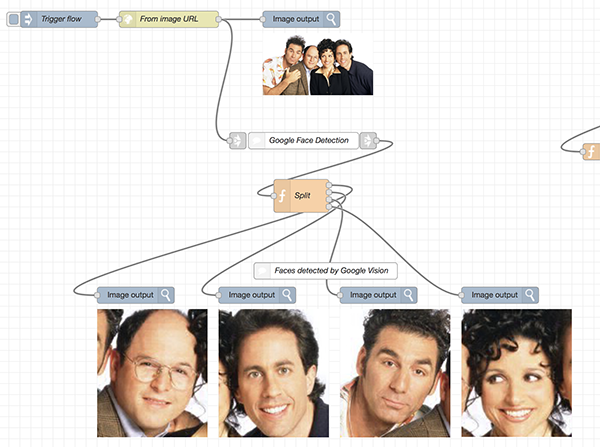
6 |
7 | The expected input should be a jpg or png image, which need to be delivered in one of the following formats:
8 | + A buffer
9 | + A base64 encoded string
10 | + A Jimp object
11 | + A url to an image
12 |
13 | ## Installation
14 | Either use the Editor - Menu - Manage Palette - Install option, or run the following npm command in your Node-RED user directory (typically `~/.node-red`):
15 | ```
16 | npm i node-red-contrib-image-output
17 | ```
18 |
19 | ## Node usage
20 | This node can be used to preview images inside the Node-RED flow editor. The following examples explain how the different kind of input image formats can be visualized. All these example flows are also available via the *'Import'* menu in the Node-RED flow editor.
21 |
22 | ### Buffer input image
23 | Apply an image as a binary Buffer (i.e. bits and bytes ...):
24 |
25 | 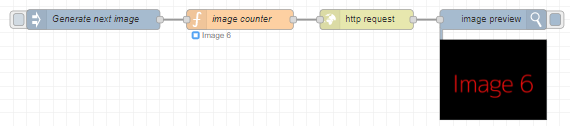
26 |
27 | ```
28 | [{"id":"46ffc819.b736f8","type":"http request","z":"30fb1577.8f556a","name":"","method":"GET","ret":"bin","paytoqs":false,"url":"https://dummyimage.com/200x150/000/fff&text={{{payload}}}","tls":"","persist":false,"proxy":"","authType":"","x":610,"y":640,"wires":[["d603e881.2fa1c8"]]},{"id":"25d928c1.708098","type":"inject","z":"30fb1577.8f556a","name":"Generate next image","topic":"","payload":"","payloadType":"date","repeat":"","crontab":"","once":false,"onceDelay":0.1,"x":200,"y":640,"wires":[["878f8ec1.effe4"]]},{"id":"878f8ec1.effe4","type":"function","z":"30fb1577.8f556a","name":"image counter","func":"var count = flow.get(\"count\")||0;\n\ncount++;\n\nnode.status({fill:\"blue\",shape:\"ring\",text:\"Image \" + count});\n\n// Save the new value back to context so it will be available next time\nflow.set('count',count);\n\n// Update the message payload and return - no need to create a new msg\nmsg.payload = \"Image \" + count;\nreturn msg;","outputs":1,"noerr":0,"x":420,"y":640,"wires":[["46ffc819.b736f8"]]},{"id":"d603e881.2fa1c8","type":"image","z":"30fb1577.8f556a","name":"","width":160,"data":"payload","dataType":"msg","thumbnail":true,"active":true,"x":800,"y":640,"wires":[]}]
29 | ```
30 |
31 | ### Base64 input image
32 | Apply an image as a base64 encoded string:
33 |
34 | 
35 |
36 | ```
37 | [{"id":"46ffc819.b736f8","type":"http request","z":"30fb1577.8f556a","name":"","method":"GET","ret":"bin","paytoqs":false,"url":"https://dummyimage.com/200x150/000/fff&text={{{payload}}}","tls":"","persist":false,"proxy":"","authType":"","x":610,"y":640,"wires":[["27a53fad.5c768"]]},{"id":"25d928c1.708098","type":"inject","z":"30fb1577.8f556a","name":"Generate next image","topic":"","payload":"","payloadType":"date","repeat":"","crontab":"","once":false,"onceDelay":0.1,"x":200,"y":640,"wires":[["878f8ec1.effe4"]]},{"id":"878f8ec1.effe4","type":"function","z":"30fb1577.8f556a","name":"image counter","func":"var count = flow.get(\"count\")||0;\n\ncount++;\n\nnode.status({fill:\"blue\",shape:\"ring\",text:\"Image \" + count});\n\n// Save the new value back to context so it will be available next time\nflow.set('count',count);\n\n// Update the message payload and return - no need to create a new msg\nmsg.payload = \"Image \" + count;\nreturn msg;","outputs":1,"noerr":0,"x":420,"y":640,"wires":[["46ffc819.b736f8"]]},{"id":"27a53fad.5c768","type":"base64","z":"30fb1577.8f556a","name":"","action":"str","property":"payload","x":780,"y":640,"wires":[["d603e881.2fa1c8"]]},{"id":"d603e881.2fa1c8","type":"image","z":"30fb1577.8f556a","name":"","width":160,"data":"payload","dataType":"msg","thumbnail":true,"active":true,"x":960,"y":640,"wires":[]}]
38 | ```
39 |
40 | ### Jimp input image
41 | Apply an image as a Jimp object. This node allows Jimp images to be previewed, which are send by other Jimp related nodes. The following example shows a Jimp image, generated by the [node-red-contrib-image-tools](https://www.npmjs.com/package/node-red-contrib-image-tools) nodes:
42 |
43 | 
44 |
45 |
46 | **Note**: the `node-red-contrib-image-tools` node should be installed, prior to importing this example.
47 |
48 | ```
49 | [{"id":"27719e17.2169f2","type":"jimp-image","z":"30fb1577.8f556a","name":"","data":"payload","dataType":"msg","ret":"img","parameter1":"","parameter1Type":"msg","parameter2":"","parameter2Type":"msg","parameter3":"","parameter3Type":"msg","parameter4":"","parameter4Type":"msg","parameter5":"","parameter5Type":"msg","parameter6":"","parameter6Type":"msg","parameter7":"","parameter7Type":"msg","parameter8":"","parameter8Type":"msg","parameterCount":0,"jimpFunction":"none","selectedJimpFunction":{"name":"none","fn":"none","description":"Just loads the image.","parameters":[]},"x":770,"y":640,"wires":[["d603e881.2fa1c8"]]},{"id":"46ffc819.b736f8","type":"http request","z":"30fb1577.8f556a","name":"","method":"GET","ret":"bin","paytoqs":false,"url":"https://dummyimage.com/200x150/000/fff&text={{{payload}}}","tls":"","persist":false,"proxy":"","authType":"","x":610,"y":640,"wires":[["27719e17.2169f2"]]},{"id":"25d928c1.708098","type":"inject","z":"30fb1577.8f556a","name":"Generate next image","topic":"","payload":"","payloadType":"date","repeat":"","crontab":"","once":false,"onceDelay":0.1,"x":200,"y":640,"wires":[["878f8ec1.effe4"]]},{"id":"878f8ec1.effe4","type":"function","z":"30fb1577.8f556a","name":"image counter","func":"var count = flow.get(\"count\")||0;\n\ncount++;\n\nnode.status({fill:\"blue\",shape:\"ring\",text:\"Image \" + count});\n\n// Save the new value back to context so it will be available next time\nflow.set('count',count);\n\n// Update the message payload and return - no need to create a new msg\nmsg.payload = \"Image \" + count;\nreturn msg;","outputs":1,"noerr":0,"x":420,"y":640,"wires":[["46ffc819.b736f8"]]},{"id":"d603e881.2fa1c8","type":"image","z":"30fb1577.8f556a","name":"","width":160,"data":"payload","dataType":"msg","thumbnail":true,"active":true,"x":960,"y":640,"wires":[]}]
50 | ```
51 |
52 | ### Hide image
53 | When the node is currently displaying an image, that image can be hidden via those values:
54 | 1. A ```null``` image (e.g. ```msg.payload = null```).
55 | 1. No image (e.g. ```delete msg.payload```).
56 | 1. An empty string image (e.g. ```msg.payload = ""```).
57 |
58 | The following demo hides the previewed image based on the ```msg.payload```:
59 |
60 | 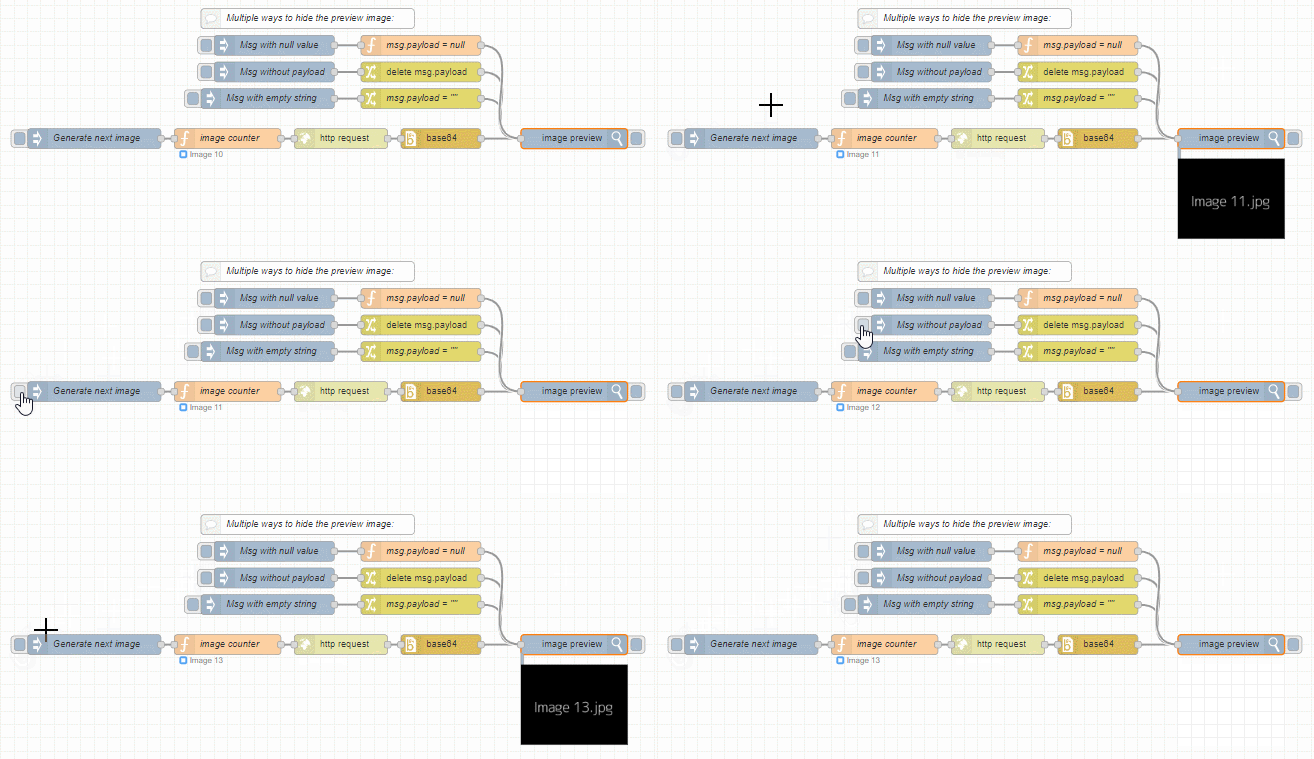
61 |
62 | ```
63 | [{"id":"acae4788.db10e8","type":"http request","z":"e2675d9d.6854e","name":"","method":"GET","ret":"bin","paytoqs":false,"url":"https://dummyimage.com/200x150/000/fff&text={{{payload}}}.jpg","tls":"","persist":false,"proxy":"","authType":"","x":570,"y":360,"wires":[["b548876a.e2f8b8"]]},{"id":"8ff5f74b.d2efb8","type":"inject","z":"e2675d9d.6854e","name":"Generate next image","topic":"","payload":"","payloadType":"date","repeat":"","crontab":"","once":false,"onceDelay":0.1,"x":200,"y":360,"wires":[["ea222193.08df9"]]},{"id":"ea222193.08df9","type":"function","z":"e2675d9d.6854e","name":"image counter","func":"var count = flow.get(\"count\")||0;\n\ncount++;\n\nnode.status({fill:\"blue\",shape:\"ring\",text:\"Image \" + count});\n\n// Save the new value back to context so it will be available next time\nflow.set('count',count);\n\n// Update the message payload and return - no need to create a new msg\nmsg.payload = \"Image \" + count;\nreturn msg;","outputs":1,"noerr":0,"x":400,"y":360,"wires":[["acae4788.db10e8"]]},{"id":"670b37d4.e67658","type":"inject","z":"e2675d9d.6854e","name":"Msg without payload","topic":"","payload":"","payloadType":"str","repeat":"","crontab":"","once":false,"onceDelay":0.1,"x":470,"y":260,"wires":[["6d9c5aa.2d5e6a4"]]},{"id":"b548876a.e2f8b8","type":"base64","z":"e2675d9d.6854e","name":"","action":"","property":"payload","x":720,"y":360,"wires":[["f8d56b3b.3bb1f8"]]},{"id":"6d9c5aa.2d5e6a4","type":"change","z":"e2675d9d.6854e","name":"","rules":[{"t":"delete","p":"payload","pt":"msg"}],"action":"","property":"","from":"","to":"","reg":false,"x":690,"y":260,"wires":[["f8d56b3b.3bb1f8"]]},{"id":"636d9da2.959fb4","type":"inject","z":"e2675d9d.6854e","name":"Msg with empty string","topic":"","payload":"","payloadType":"str","repeat":"","crontab":"","once":false,"onceDelay":0.1,"x":460,"y":300,"wires":[["6dce2d91.6158f4"]]},{"id":"c6c47147.1972a","type":"inject","z":"e2675d9d.6854e","name":"Msg with null value","topic":"","payload":"","payloadType":"str","repeat":"","crontab":"","once":false,"onceDelay":0.1,"x":470,"y":220,"wires":[["d21096f2.632ed8"]]},{"id":"6dce2d91.6158f4","type":"change","z":"e2675d9d.6854e","name":"msg.payload = \"\"","rules":[{"t":"set","p":"payload","pt":"msg","to":"","tot":"str"}],"action":"","property":"","from":"","to":"","reg":false,"x":690,"y":300,"wires":[["f8d56b3b.3bb1f8"]]},{"id":"d21096f2.632ed8","type":"function","z":"e2675d9d.6854e","name":"msg.payload = null","func":"msg.payload = null;\nreturn msg;","outputs":1,"noerr":0,"x":690,"y":220,"wires":[["f8d56b3b.3bb1f8"]]},{"id":"b99d140c.ce4448","type":"comment","z":"e2675d9d.6854e","name":"Multiple ways to hide the preview image:","info":"","x":520,"y":180,"wires":[]},{"id":"f8d56b3b.3bb1f8","type":"image","z":"e2675d9d.6854e","name":"","width":160,"data":"payload","dataType":"msg","thumbnail":false,"active":true,"x":920,"y":360,"wires":[]}]
64 | ```
65 |
66 | ### Control image stream
67 | Via the button on the right side, the image stream can be stopped or (re)started again:
68 |
69 | 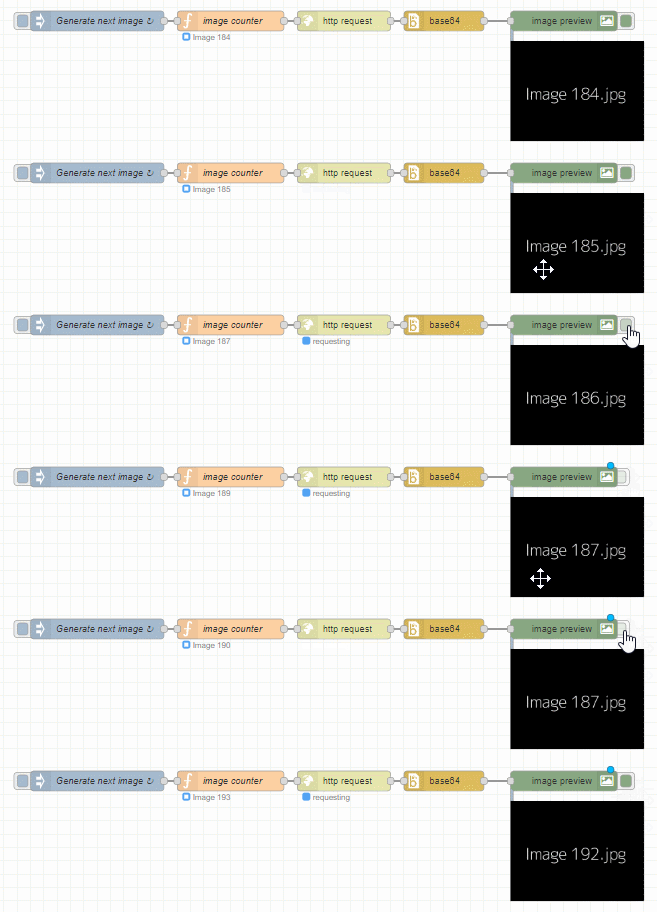
70 |
71 | Remark: the server will stop sending images to the client, so there will be no more data traffic involved!
72 |
73 | ## Node configuration
74 |
75 | ### Width
76 | The width (in pixels) that the image needs to be displayed in the flow. The height will be calculated automatically, with the same aspect ratio as the original image.
77 |
78 | ### Property
79 | Specify how the input image will be delivered to this node. By default the image needs to be delivered in the ```msg.payload``` of the input message.
80 |
81 | ### Resize images on server side
82 | By transferring smaller images the bandwith can be reduced, i.e. the number of bytes that is being send across the network. When too much data is pushed (across the websocket), the flow editor can become unresponsive.
83 |
84 | + When this option is activated, the images will be resized (to the specified width) on the server side. Then those small thumbnail images will be send to the browser, to reduce the bandwith.
85 | + When this option is not activated, the (original) large images will be send to the browser. Once they arrive there, the browser will resize them to the specified width. As a result much more data needs to be transferred between the server and the browser.
86 |
87 | **Caution**: resizing images on the server will require server-side CPU usage. So it has to be decided what is prefered: lower bandwidth or lower cpu usage on the server. This decision will depend on the use case and hardware...
88 |
89 | ### Allow image passthrough
90 | When selected this adds an output wire to the node in order to pass the original message through to a following node.
91 | This performs better than forking the wires, however it does remove the enable/disable button.
92 |
--------------------------------------------------------------------------------