├── src
├── resource
│ ├── data
│ │ └── config.json
│ ├── icon.ico
│ ├── decrypt.png
│ ├── encrypt.png
│ ├── translate.png
│ ├── wikipedia.png
│ └── markdown.svg
├── TitleBar.py
├── TextWidget.py
├── ZenNotes.py
├── main.py
└── cgi.py
├── icon.ico
├── requirements.txt
├── wheels
└── pyqtdarktheme-2.1.0-py3-none-any.whl
├── zennotes.desktop
├── zennotes.bat
├── LICENSE
├── install.py
├── README.md
├── ZenNotes-setup-x64.iss
└── .gitignore
/src/resource/data/config.json:
--------------------------------------------------------------------------------
1 |
2 |
--------------------------------------------------------------------------------
/icon.ico:
--------------------------------------------------------------------------------
https://raw.githubusercontent.com/rohankishore/ZenNotes/HEAD/icon.ico
--------------------------------------------------------------------------------
/src/resource/icon.ico:
--------------------------------------------------------------------------------
https://raw.githubusercontent.com/rohankishore/ZenNotes/HEAD/src/resource/icon.ico
--------------------------------------------------------------------------------
/src/resource/decrypt.png:
--------------------------------------------------------------------------------
https://raw.githubusercontent.com/rohankishore/ZenNotes/HEAD/src/resource/decrypt.png
--------------------------------------------------------------------------------
/src/resource/encrypt.png:
--------------------------------------------------------------------------------
https://raw.githubusercontent.com/rohankishore/ZenNotes/HEAD/src/resource/encrypt.png
--------------------------------------------------------------------------------
/src/resource/translate.png:
--------------------------------------------------------------------------------
https://raw.githubusercontent.com/rohankishore/ZenNotes/HEAD/src/resource/translate.png
--------------------------------------------------------------------------------
/src/resource/wikipedia.png:
--------------------------------------------------------------------------------
https://raw.githubusercontent.com/rohankishore/ZenNotes/HEAD/src/resource/wikipedia.png
--------------------------------------------------------------------------------
/requirements.txt:
--------------------------------------------------------------------------------
1 | PySide6
2 | PySide6-Fluent-Widgets
3 | googletrans==4.0.0rc1
4 | pyttsx3
5 | wikipedia==1.4.0
6 | pyinstaller
--------------------------------------------------------------------------------
/wheels/pyqtdarktheme-2.1.0-py3-none-any.whl:
--------------------------------------------------------------------------------
https://raw.githubusercontent.com/rohankishore/ZenNotes/HEAD/wheels/pyqtdarktheme-2.1.0-py3-none-any.whl
--------------------------------------------------------------------------------
/zennotes.desktop:
--------------------------------------------------------------------------------
1 | [Desktop Entry]
2 | Name=ZenNotes
3 | Exec=@INSTALLDIR@/main %f
4 | Icon=@INSTALLDIR@/icon.ico
5 | Type=Application
6 | Terminal=false
7 | MimeType=text/plain;
8 | Categories=Application;Utility;TextEditor;
9 | Keywords=Text;Editor;Plaintext;Write;
--------------------------------------------------------------------------------
/zennotes.bat:
--------------------------------------------------------------------------------
1 | @echo off
2 | setlocal
3 |
4 | : Set the script directory to the location of this batch file
5 | set SCRIPT_DIR=%~dp0
6 |
7 | : Start ZenNotes
8 | echo Starting ZenNotes...
9 | python "%SCRIPT_DIR%src\main.py"
10 | echo Exiting...
11 |
12 | endlocal
--------------------------------------------------------------------------------
/LICENSE:
--------------------------------------------------------------------------------
1 | MIT License
2 |
3 | Copyright (c) 2023 Rohan Kishore
4 |
5 | Permission is hereby granted, free of charge, to any person obtaining a copy
6 | of this software and associated documentation files (the "Software"), to deal
7 | in the Software without restriction, including without limitation the rights
8 | to use, copy, modify, merge, publish, distribute, sublicense, and/or sell
9 | copies of the Software, and to permit persons to whom the Software is
10 | furnished to do so, subject to the following conditions:
11 |
12 | The above copyright notice and this permission notice shall be included in all
13 | copies or substantial portions of the Software.
14 |
15 | THE SOFTWARE IS PROVIDED "AS IS", WITHOUT WARRANTY OF ANY KIND, EXPRESS OR
16 | IMPLIED, INCLUDING BUT NOT LIMITED TO THE WARRANTIES OF MERCHANTABILITY,
17 | FITNESS FOR A PARTICULAR PURPOSE AND NONINFRINGEMENT. IN NO EVENT SHALL THE
18 | AUTHORS OR COPYRIGHT HOLDERS BE LIABLE FOR ANY CLAIM, DAMAGES OR OTHER
19 | LIABILITY, WHETHER IN AN ACTION OF CONTRACT, TORT OR OTHERWISE, ARISING FROM,
20 | OUT OF OR IN CONNECTION WITH THE SOFTWARE OR THE USE OR OTHER DEALINGS IN THE
21 | SOFTWARE.
22 |
--------------------------------------------------------------------------------
/install.py:
--------------------------------------------------------------------------------
1 | import platform
2 | import sys
3 |
4 | class platformError(Exception):
5 | pass
6 |
7 | class linux:
8 | def install():
9 | import os
10 |
11 | if os.path.isdir("dist") and not os.path.exists("dist/main/main.exe"):
12 | print("Found existing build, proceeding to install it...")
13 | else:
14 | print("ERROR: No build found")
15 | os.system('rm -rf build dist *.spec')
16 | print("Building first...")
17 | import build
18 | build.run_pyinstaller()
19 | print("Build complete, installing build...")
20 |
21 | installdirDefault = "/opt/rohankishore/zennotes"
22 | installdir = input(f"Select installation directory (default {installdirDefault}, just press enter):")
23 | if not installdir:
24 | installdir = installdirDefault
25 | else:
26 | installdir = os.path.expanduser(installdir)
27 | username = os.getenv("USER")
28 | if username == "root":
29 | lnDir = "/usr/local/bin"
30 | deskDir = "/usr/share/applications"
31 | os.makedirs(lnDir, exist_ok=True)
32 | os.makedirs(deskDir, exist_ok=True)
33 | else:
34 | lnDir = f"/home/{username}/.local/bin"
35 | deskDir = f"/home/{username}/.local/share/applications"
36 | os.makedirs(lnDir, exist_ok=True)
37 | os.makedirs(deskDir, exist_ok=True)
38 |
39 | print(f"Installing to {installdir}...")
40 | os.makedirs(installdir, exist_ok=True)
41 | os.system(f"cp -r dist/main/* {installdir}/")
42 |
43 | print("Creating symlinks...")
44 | os.system(f"ln -sf {installdir}/main {lnDir}/zennotes")
45 |
46 | print("Creating desktop shortcuts...")
47 | os.system(f"cp zennotes.desktop {deskDir}/zennotes.desktop")
48 | os.system(f"sed -i 's#@INSTALLDIR@#{installdir}#g' {deskDir}/zennotes.desktop")
49 |
50 | if platform.system() == "Windows":
51 | raise platformError("We have detected that you are using Windows. Please use the Inno Setup script instead.")
52 | elif platform.system() == "Linux":
53 | linux.install()
54 | elif platform.system() == "Darwin":
55 | raise platformError("We have detected that you are using macOS. Please just use the build script to build the program, and then copy the app bundle from dist.")
56 | else:
57 | raise platformError("Unsupported platform detected. There is no installer for this platform.")
58 |
--------------------------------------------------------------------------------
/src/resource/markdown.svg:
--------------------------------------------------------------------------------
1 |
7 |
--------------------------------------------------------------------------------
/README.md:
--------------------------------------------------------------------------------
1 | ZenNotes
2 |
3 |
4 |
16 |
17 | ## ✍️ What is ZenNotes?
18 | ZenNotes is a minimalistic Notepad app with a sleek design inspired by [Fluent Design](https://fluent2.microsoft.design/). It offers the familiar look of the Windows Notepad while having much more powerful features like Translate, TTS, etc.
19 |
20 | 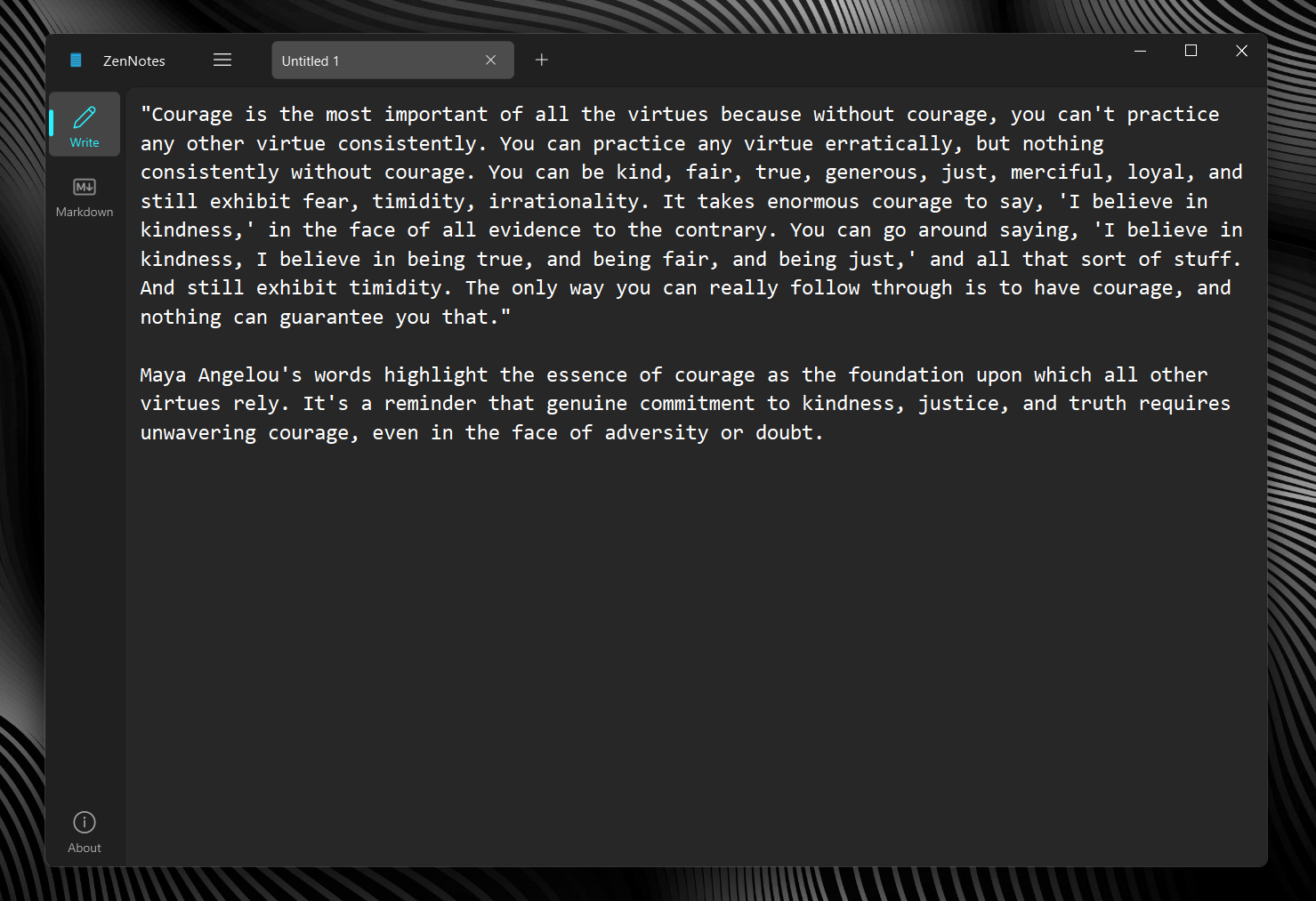
21 |
22 | 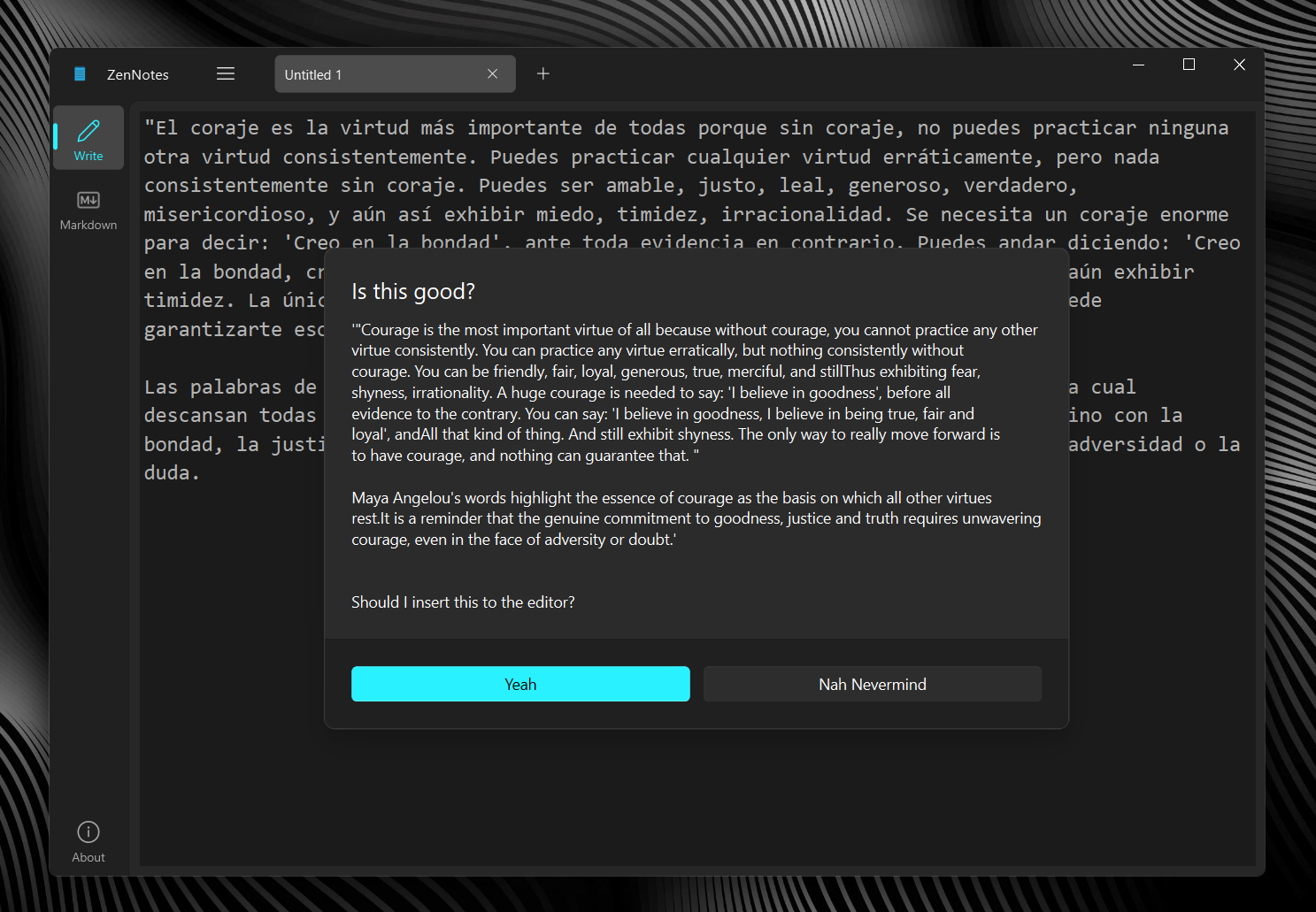
23 |
24 |
25 |
26 | ## 📃 Features
27 |
28 | - Edit files (duh)
29 | - Windows Fluent Design with Mica support
30 | - Built-in Translation
31 | - Text to Speech
32 | - Encrypt and Decrypt
33 | - Markdown support (Note: BR and HR may require closing tags to work)
34 |
35 |
36 |
37 | ## 👒 Getting Started
38 |
39 | Let's get ZenNotes set up on your PC!
40 |
41 | ### Prerequisites
42 | - Windows 10 x64 or later, a Linux distro running kernel 6.x or later, or macOS 11+
43 | - Python 3.9 or later
44 | - Python installation is bootstrapped with pip
45 | - (Recommended) A fresh venv created with `python -m venv venv` and activated with `venv\Scripts\activate`
46 | - The contents of `requirements.txt` installed via `pip install -r requirements.txt`
47 | - (If building an installer) Inno Setup 6.4.3 or later
48 |
49 | ### Installation
50 | You can download a prebuilt installer from the Releases or build one yourself. If using prebuilt installers, just skip to the use section.
51 |
52 | #### Building the installer
53 | 1. Clone the repo or download a tarball
54 | 2. Install all prerequisites
55 | 3. `python build.py` to compile the program first
56 | 4. Open up the `.iss` Inno Setup script and compile it via Ctrl+F9 or `Build > Compile` - installer can be found in `Output` folder
57 |
58 | ##### Using the installer
59 | Just run the `.exe` file, duh.
60 |
61 | ### Testing
62 | This is for people who solely just want to run without installation for mostly testing purposes.
63 |
64 | We need the prerequisites above. After getting them, you can run the program with `pythonw main.py` to run it without flooding your terminal with logging, or you can just run with `python main.py` to troubleshoot errors and debug it.
65 |
66 |
67 |
68 | ## 💖 Credits & Acknowledgements
69 |
70 | This project was made possible because of [zhiyiYp](https://github.com/zhiyiYp)'s [PyQt-Fluent-Widgets](https://github.com/zhiyiYo/PyQt-Fluent-Widgets).
71 |
72 | Icon Credit : [Fluent Icons](https://fluenticons.co/)
73 |
74 |
75 |
76 |
77 | ## 🪪 License
78 |
79 | This project is licensed under the MIT License. See LICENSE.md for more info.
80 |
81 |
--------------------------------------------------------------------------------
/ZenNotes-setup-x64.iss:
--------------------------------------------------------------------------------
1 | ; Script generated by the Inno Setup Script Wizard.
2 | ; SEE THE DOCUMENTATION FOR DETAILS ON CREATING INNO SETUP SCRIPT FILES!
3 |
4 | #define MyAppName "ZenNotes"
5 | #define MyAppVersion "1.4.0"
6 | #define MyAppPublisher "Rohan Kishore"
7 | #define MyAppURL "https://github.com/rohankishore/ZenNotes"
8 | #define MyAppExeName "main.exe"
9 | #define MyAppAssocName "Text Document"
10 | #define MyAppAssocExt ".txt"
11 | #define MyAppAssocKey StringChange(MyAppAssocName, " ", "") + MyAppAssocExt
12 |
13 | [Setup]
14 | ; NOTE: The value of AppId uniquely identifies this application. Do not use the same AppId value in installers for other applications.
15 | ; (To generate a new GUID, click Tools | Generate GUID inside the IDE.)
16 | AppId={{70CCB56D-0517-4EB0-873B-ED14C0F87631}
17 | AppName={#MyAppName}
18 | AppVersion={#MyAppVersion}
19 | ;AppVerName={#MyAppName} {#MyAppVersion}
20 | AppPublisher={#MyAppPublisher}
21 | AppPublisherURL={#MyAppURL}
22 | AppSupportURL={#MyAppURL}
23 | AppUpdatesURL={#MyAppURL}
24 | DefaultDirName={autopf}\{#MyAppName}
25 | UninstallDisplayIcon={app}\{#MyAppExeName}
26 | ; "ArchitecturesAllowed=x64compatible" specifies that Setup cannot run
27 | ; on anything but x64 and Windows 11 on Arm.
28 | ArchitecturesAllowed=x64compatible
29 | ; "ArchitecturesInstallIn64BitMode=x64compatible" requests that the
30 | ; install be done in "64-bit mode" on x64 or Windows 11 on Arm,
31 | ; meaning it should use the native 64-bit Program Files directory and
32 | ; the 64-bit view of the registry.
33 | ArchitecturesInstallIn64BitMode=x64compatible
34 | ChangesAssociations=yes
35 | DisableProgramGroupPage=yes
36 | LicenseFile=LICENSE
37 | ; Remove the following line to run in administrative install mode (install for all users).
38 | PrivilegesRequired=lowest
39 | PrivilegesRequiredOverridesAllowed=dialog
40 | OutputBaseFilename=ZenNotes-setup-{#MyAppVersion}-x64
41 | SetupIconFile=icon.ico
42 | SolidCompression=yes
43 | WizardStyle=modern
44 |
45 | [Languages]
46 | Name: "english"; MessagesFile: "compiler:Default.isl"
47 |
48 | [Tasks]
49 | Name: "desktopicon"; Description: "{cm:CreateDesktopIcon}"; GroupDescription: "{cm:AdditionalIcons}"; Flags: unchecked
50 |
51 | [Files]
52 | Source: "dist\main\{#MyAppExeName}"; DestDir: "{app}"; Flags: ignoreversion
53 | Source: "dist\main\*"; DestDir: "{app}"; Flags: ignoreversion recursesubdirs createallsubdirs
54 | ; NOTE: Don't use "Flags: ignoreversion" on any shared system files
55 |
56 | ; Disable by default
57 | ; [Registry]
58 | ; Root: HKA; Subkey: "Software\Classes\{#MyAppAssocExt}\OpenWithProgids"; ValueType: string; ValueName: "{#MyAppAssocKey}"; ValueData: ""; Flags: uninsdeletevalue
59 | ; Root: HKA; Subkey: "Software\Classes\{#MyAppAssocKey}"; ValueType: string; ValueName: ""; ValueData: "{#MyAppAssocName}"; Flags: uninsdeletekey
60 | ; Root: HKA; Subkey: "Software\Classes\{#MyAppAssocKey}\DefaultIcon"; ValueType: string; ValueName: ""; ValueData: "{app}\{#MyAppExeName},0"
61 | ;'Root: HKA; Subkey: "Software\Classes\{#MyAppAssocKey}\shell\open\command"; ValueType: string; ValueName: ""; ValueData: """{app}\{#MyAppExeName}"" ""%1"""
62 |
63 | [Icons]
64 | Name: "{autoprograms}\{#MyAppName}"; Filename: "{app}\{#MyAppExeName}"
65 | Name: "{autodesktop}\{#MyAppName}"; Filename: "{app}\{#MyAppExeName}"; Tasks: desktopicon
66 |
67 | [Run]
68 | Filename: "{app}\{#MyAppExeName}"; Description: "{cm:LaunchProgram,{#StringChange(MyAppName, '&', '&&')}}"; Flags: nowait postinstall skipifsilent
69 |
70 |
--------------------------------------------------------------------------------
/.gitignore:
--------------------------------------------------------------------------------
1 | # Byte-compiled / optimized / DLL files
2 | __pycache__/
3 | *.py[codz]
4 | *$py.class
5 |
6 | # C extensions
7 | *.so
8 |
9 | # Distribution / packaging
10 | .Python
11 | build/
12 | develop-eggs/
13 | dist/
14 | downloads/
15 | eggs/
16 | .eggs/
17 | lib/
18 | lib64/
19 | parts/
20 | sdist/
21 | var/
22 | # wheels/
23 | share/python-wheels/
24 | *.egg-info/
25 | .installed.cfg
26 | *.egg
27 | MANIFEST
28 |
29 | # PyInstaller
30 | # Usually these files are written by a python script from a template
31 | # before PyInstaller builds the exe, so as to inject date/other infos into it.
32 | *.manifest
33 | *.spec
34 |
35 | # Installer logs
36 | pip-log.txt
37 | pip-delete-this-directory.txt
38 |
39 | # Unit test / coverage reports
40 | htmlcov/
41 | .tox/
42 | .nox/
43 | .coverage
44 | .coverage.*
45 | .cache
46 | nosetests.xml
47 | coverage.xml
48 | *.cover
49 | *.py.cover
50 | .hypothesis/
51 | .pytest_cache/
52 | cover/
53 |
54 | # Translations
55 | *.mo
56 | *.pot
57 |
58 | # Django stuff:
59 | *.log
60 | local_settings.py
61 | db.sqlite3
62 | db.sqlite3-journal
63 |
64 | # Flask stuff:
65 | instance/
66 | .webassets-cache
67 |
68 | # Scrapy stuff:
69 | .scrapy
70 |
71 | # Sphinx documentation
72 | docs/_build/
73 |
74 | # PyBuilder
75 | .pybuilder/
76 | target/
77 |
78 | # Jupyter Notebook
79 | .ipynb_checkpoints
80 |
81 | # IPython
82 | profile_default/
83 | ipython_config.py
84 |
85 | # pyenv
86 | # For a library or package, you might want to ignore these files since the code is
87 | # intended to run in multiple environments; otherwise, check them in:
88 | # .python-version
89 |
90 | # pipenv
91 | # According to pypa/pipenv#598, it is recommended to include Pipfile.lock in version control.
92 | # However, in case of collaboration, if having platform-specific dependencies or dependencies
93 | # having no cross-platform support, pipenv may install dependencies that don't work, or not
94 | # install all needed dependencies.
95 | #Pipfile.lock
96 |
97 | # UV
98 | # Similar to Pipfile.lock, it is generally recommended to include uv.lock in version control.
99 | # This is especially recommended for binary packages to ensure reproducibility, and is more
100 | # commonly ignored for libraries.
101 | #uv.lock
102 |
103 | # poetry
104 | # Similar to Pipfile.lock, it is generally recommended to include poetry.lock in version control.
105 | # This is especially recommended for binary packages to ensure reproducibility, and is more
106 | # commonly ignored for libraries.
107 | # https://python-poetry.org/docs/basic-usage/#commit-your-poetrylock-file-to-version-control
108 | #poetry.lock
109 | #poetry.toml
110 |
111 | # pdm
112 | # Similar to Pipfile.lock, it is generally recommended to include pdm.lock in version control.
113 | # pdm recommends including project-wide configuration in pdm.toml, but excluding .pdm-python.
114 | # https://pdm-project.org/en/latest/usage/project/#working-with-version-control
115 | #pdm.lock
116 | #pdm.toml
117 | .pdm-python
118 | .pdm-build/
119 |
120 | # pixi
121 | # Similar to Pipfile.lock, it is generally recommended to include pixi.lock in version control.
122 | #pixi.lock
123 | # Pixi creates a virtual environment in the .pixi directory, just like venv module creates one
124 | # in the .venv directory. It is recommended not to include this directory in version control.
125 | .pixi
126 |
127 | # PEP 582; used by e.g. github.com/David-OConnor/pyflow and github.com/pdm-project/pdm
128 | __pypackages__/
129 |
130 | # Celery stuff
131 | celerybeat-schedule
132 | celerybeat.pid
133 |
134 | # SageMath parsed files
135 | *.sage.py
136 |
137 | # Environments
138 | .env
139 | .envrc
140 | .venv
141 | env/
142 | venv/
143 | ENV/
144 | env.bak/
145 | venv.bak/
146 |
147 | # Spyder project settings
148 | .spyderproject
149 | .spyproject
150 |
151 | # Rope project settings
152 | .ropeproject
153 |
154 | # mkdocs documentation
155 | /site
156 |
157 | # mypy
158 | .mypy_cache/
159 | .dmypy.json
160 | dmypy.json
161 |
162 | # Pyre type checker
163 | .pyre/
164 |
165 | # pytype static type analyzer
166 | .pytype/
167 |
168 | # Cython debug symbols
169 | cython_debug/
170 |
171 | # PyCharm
172 | # JetBrains specific template is maintained in a separate JetBrains.gitignore that can
173 | # be found at https://github.com/github/gitignore/blob/main/Global/JetBrains.gitignore
174 | # and can be added to the global gitignore or merged into this file. For a more nuclear
175 | # option (not recommended) you can uncomment the following to ignore the entire idea folder.
176 | #.idea/
177 |
178 | # Abstra
179 | # Abstra is an AI-powered process automation framework.
180 | # Ignore directories containing user credentials, local state, and settings.
181 | # Learn more at https://abstra.io/docs
182 | .abstra/
183 |
184 | # Visual Studio Code
185 | # Visual Studio Code specific template is maintained in a separate VisualStudioCode.gitignore
186 | # that can be found at https://github.com/github/gitignore/blob/main/Global/VisualStudioCode.gitignore
187 | # and can be added to the global gitignore or merged into this file. However, if you prefer,
188 | # you could uncomment the following to ignore the entire vscode folder
189 | # .vscode/
190 |
191 | # Ruff stuff:
192 | .ruff_cache/
193 |
194 | # PyPI configuration file
195 | .pypirc
196 |
197 | # Cursor
198 | # Cursor is an AI-powered code editor. `.cursorignore` specifies files/directories to
199 | # exclude from AI features like autocomplete and code analysis. Recommended for sensitive data
200 | # refer to https://docs.cursor.com/context/ignore-files
201 | .cursorignore
202 | .cursorindexingignore
203 |
204 | # Marimo
205 | marimo/_static/
206 | marimo/_lsp/
207 | __marimo__/
208 |
209 | # Inno Setup
210 | Output/
--------------------------------------------------------------------------------
/src/TitleBar.py:
--------------------------------------------------------------------------------
1 | import sys
2 | from PySide6.QtWidgets import QHBoxLayout
3 | from PySide6.QtCore import *
4 | #from PyQt6.QtGui import QIcon
5 | from qfluentwidgets import FluentIcon as FIF
6 | from qfluentwidgets import *
7 | from TextWidget import TWidget
8 |
9 |
10 | class CustomTitleBar(MSFluentTitleBar):
11 |
12 | """ Title bar with icon and title """
13 |
14 | def __init__(self, parent):
15 | super().__init__(parent)
16 |
17 | # add buttons
18 | self.toolButtonLayout = QHBoxLayout()
19 | color = QColor(206, 206, 206) if isDarkTheme() else QColor(96, 96, 96)
20 | self.menuButton = TransparentToolButton(FIF.MENU, self)
21 | #self.forwardButton = TransparentToolButton(FIF.RIGHT_ARROW.icon(color=color), self)
22 | #self.backButton = TransparentToolButton(FIF.LEFT_ARROW.icon(color=color), self)
23 |
24 | #self.forwardButton.setDisabled(True)
25 | self.toolButtonLayout.setContentsMargins(20, 0, 20, 0)
26 | self.toolButtonLayout.setSpacing(15)
27 | self.toolButtonLayout.addWidget(self.menuButton)
28 | #self.toolButtonLayout.addWidget(self.backButton)
29 | #self.toolButtonLayout.addWidget(self.forwardButton)
30 |
31 | self.hBoxLayout.insertLayout(4, self.toolButtonLayout)
32 |
33 | self.tabBar = TabBar(self)
34 |
35 | self.tabBar.setMovable(True)
36 | self.tabBar.setTabMaximumWidth(220)
37 | self.tabBar.setTabShadowEnabled(False)
38 | self.tabBar.setTabSelectedBackgroundColor(QColor(255, 255, 255, 125), QColor(255, 255, 255, 50))
39 | self.tabBar.setScrollable(True)
40 | self.tabBar.setCloseButtonDisplayMode(TabCloseButtonDisplayMode.ON_HOVER)
41 |
42 | self.tabBar.tabCloseRequested.connect(self.tabBar.removeTab)
43 | # self.tabBar.currentChanged.connect(lambda i: print(self.tabBar.tabText(i)))
44 |
45 | self.hBoxLayout.insertWidget(5, self.tabBar, 1)
46 | self.hBoxLayout.setStretch(6, 0)
47 |
48 | # self.hBoxLayout.insertWidget(7, self.saveButton, 0, Qt.AlignmentFlag.AlignLeft)
49 | # self.hBoxLayout.insertWidget(7, self.openButton, 0, Qt.AlignmentFlag.AlignLeft)
50 | # self.hBoxLayout.insertWidget(7, self.newButton, 0, Qt.AlignmentFlag.AlignLeft)
51 | # self.hBoxLayout.insertSpacing(8, 20)
52 |
53 | self.menu = RoundMenu("Menu")
54 | self.menu.setStyleSheet("QMenu{color : red;}")
55 |
56 | file_menu = RoundMenu("File", self)
57 | new_action = Action(text="New", icon=FIF.ADD.icon(QColor("white")))
58 | new_action.triggered.connect(parent.onTabAddRequested)
59 | file_menu.addAction(new_action)
60 | open_action = Action(text="Open", icon=FIF.SEND_FILL)
61 | open_action.triggered.connect(parent.open_document)
62 | file_menu.addAction(open_action)
63 | file_menu.addSeparator()
64 | save_action = Action(text="Save", icon=FIF.SAVE)
65 | save_action.triggered.connect(parent.save_document)
66 | file_menu.addAction(save_action)
67 | self.menu.addMenu(file_menu)
68 |
69 | edit_menu = RoundMenu("Edit", self)
70 | cut_action = Action(text="Cut", icon=FIF.CUT.icon(QColor("white")))
71 | cut_action.triggered.connect(lambda : TWidget.cut(parent.current_editor))
72 | edit_menu.addAction(cut_action)
73 | copy_action = Action(text="Copy", icon=FIF.COPY)
74 | copy_action.triggered.connect(lambda : TWidget.copy(parent.current_editor))
75 | edit_menu.addAction(copy_action)
76 | paste_action = Action(text="Paste", icon=FIF.PASTE)
77 | paste_action.triggered.connect(lambda : TWidget.paste(parent.current_editor))
78 | edit_menu.addAction(paste_action)
79 | edit_menu.addSeparator()
80 |
81 | find_menu = RoundMenu("Find", self)
82 | find_first_action = Action(text="Find First", icon=FIF.SEARCH)
83 | find_first_action.triggered.connect(lambda: parent.find_first())
84 | find_menu.addAction(find_first_action)
85 | find_action = Action(text="Find", icon=FIF.SEARCH)
86 | find_action.triggered.connect(lambda: parent.findWord())
87 | #find_menu.addAction(find_action)
88 | edit_menu.addMenu(find_menu)
89 |
90 | replace_action = Action(text="Replace", icon=FIF.REMOVE_FROM)
91 | replace_action.triggered.connect(lambda: TWidget.paste(parent.current_editor))
92 | #edit_menu.addAction(replace_action)
93 | goto_action = Action(text="Goto", icon=FIF.UP)
94 | goto_action.triggered.connect(lambda: parent.go_to_line())
95 | edit_menu.addAction(goto_action)
96 | edit_menu.addSeparator()
97 | dateTime_action = Action(text="Time/Date", icon=FIF.DATE_TIME)
98 | dateTime_action.triggered.connect(lambda: parent.dateTime())
99 | edit_menu.addAction(dateTime_action)
100 | self.menu.addMenu(edit_menu)
101 |
102 | selection_menu = RoundMenu("Selection", self)
103 | tts_action = Action(text="TTS", icon=FIF.SPEAKERS.icon(QColor("white")))
104 | tts_action.triggered.connect(lambda: parent.tts())
105 | selection_menu.addAction(tts_action)
106 | self.menu.addMenu(selection_menu)
107 |
108 | # Create the menuButton
109 | # self.menuButton = TransparentToolButton(FIF.MENU, self)
110 | self.menuButton.clicked.connect(self.showMenu)
111 |
112 | def showMenu(self):
113 | # Show the menu at the position of the menuButton
114 | self.menu.exec(self.menuButton.mapToGlobal(self.menuButton.rect().bottomLeft()))
115 |
116 | def canDrag(self, pos: QPoint):
117 | if not super().canDrag(pos):
118 | return False
119 |
120 | pos.setX(pos.x() - self.tabBar.x())
121 | return not self.tabBar.tabRegion().contains(pos)
122 |
123 | def test(self):
124 | print("hello")
--------------------------------------------------------------------------------
/src/TextWidget.py:
--------------------------------------------------------------------------------
1 | # coding:utf-8
2 | import base64
3 | import wikipedia
4 | from PySide6.QtGui import QFont, QAction, QIcon, Qt
5 | from PySide6.QtWidgets import *
6 | from googletrans import Translator
7 | from qfluentwidgets import FluentIcon as FIF
8 | from qfluentwidgets import RoundMenu, Action, MenuAnimationType, MessageBox
9 |
10 | translator = Translator()
11 |
12 |
13 | class TWidget(QTextEdit):
14 | def __init__(self, parent=None):
15 | super().__init__(parent=parent)
16 |
17 | # Create the main container layout
18 | container = QWidget(self)
19 | main_layout = QVBoxLayout(container)
20 | main_layout.setContentsMargins(0, 0, 0, 0)
21 |
22 | # Add the text editor
23 | self.text_editor = QTextEdit(self)
24 | self.text_editor.setFont(QFont("Consolas", 14))
25 | self.text_editor.setAcceptRichText(False)
26 | self.text_editor.setStyleSheet("QTextEdit{background-color : #272727; color : white; border: 0;}")
27 | self.text_editor.textChanged.connect(self.update_word_stats)
28 | main_layout.addWidget(self.text_editor)
29 |
30 | # Add the stats label at the bottom-right
31 | stats_layout = QHBoxLayout()
32 | stats_layout.addStretch() # Push the label to the right
33 | self.word_stats_label = QLabel("Words: 0 | Characters: 0", self)
34 | self.word_stats_label.setStyleSheet("color: white;")
35 | stats_layout.addWidget(self.word_stats_label)
36 | main_layout.addLayout(stats_layout)
37 |
38 | # Set the container layout
39 | container.setLayout(main_layout)
40 | self.setLayout(main_layout)
41 |
42 | self.textChanged.connect(self.update_word_stats)
43 |
44 |
45 | self.setFont(QFont("Consolas", 14))
46 | self.setAcceptRichText(False)
47 | self.setStyleSheet("QTextEdit{background-color : #272727; color : white; border: 0;}")
48 |
49 | def update_word_stats(self):
50 | text = self.toPlainText()
51 | words = len(text.split())
52 | characters = len(text)
53 | self.word_stats_label.setText(f"Words: {words} | Characters: {characters}")
54 |
55 | def contextMenuEvent(self, e):
56 | menu = RoundMenu(parent=self)
57 | # menu = CheckableMenu(parent=self, indicatorType=MenuIndicatorType.RADIO)
58 |
59 | # NOTE: hide the shortcut key
60 | # menu.view.setItemDelegate(MenuItemDelegate())
61 |
62 | copy_action = Action(FIF.COPY, 'Copy')
63 | copy_action.triggered.connect(lambda: self.copy())
64 |
65 | # Create an action for cut
66 | cut_action = Action(FIF.CUT, 'Cut')
67 | cut_action.triggered.connect(lambda: self.cut())
68 |
69 | # Create an action for copy
70 | copy_action = Action(FIF.COPY, 'Copy')
71 | copy_action.triggered.connect(lambda: self.copy())
72 |
73 | # Create an action for paste
74 | paste_action = Action(FIF.PASTE, 'Paste')
75 | paste_action.triggered.connect(lambda: self.paste())
76 |
77 | # Create an action for undo
78 | undo_action = Action(FIF.CANCEL, 'Undo')
79 | undo_action.triggered.connect(lambda: self.undo())
80 |
81 | # Create an action for redo
82 | redo_action = Action(FIF.EMBED, 'Redo')
83 | redo_action.triggered.connect(lambda: self.redo())
84 |
85 | # Create an action for select all
86 | select_all_action = QAction('Select All')
87 | select_all_action.triggered.connect(lambda: self.selectAll())
88 |
89 | # add actions
90 | menu.addAction(copy_action)
91 | menu.addAction(cut_action)
92 |
93 | # add sub menu for translate
94 | translation_submenu = RoundMenu("Translate", self)
95 | translation_submenu.setIcon(QIcon("resource/translate.png"))
96 |
97 | translate_selection_action = Action(FIF.CLEAR_SELECTION, 'Selection')
98 | translate_selection_action.triggered.connect(lambda: self.translate_selection())
99 |
100 | translate_full_action = Action(FIF.DOCUMENT, 'Full Document')
101 | translate_full_action.triggered.connect(lambda: self.translate_document())
102 |
103 | translation_submenu.addAction(translate_selection_action)
104 | translation_submenu.addAction(translate_full_action)
105 |
106 | encrypt_submenu = RoundMenu("Encryption", self)
107 | encrypt_submenu.setIcon(QIcon("resource/encrypt.png"))
108 |
109 | encrypt = RoundMenu('Encrypt', self)
110 | encrypt.setIcon(QIcon("resource/encrypt.png"))
111 |
112 | e_selection = Action(FIF.CLEAR_SELECTION, 'Selection')
113 | e_selection.triggered.connect(lambda: self.encrypt_selection())
114 | e_fd = Action(FIF.DOCUMENT, 'Full Document')
115 | e_fd.triggered.connect(lambda: self.encrypt_document())
116 | encrypt.addAction(e_selection)
117 | encrypt.addAction(e_fd)
118 |
119 | decrypt = RoundMenu('Decrypt', self)
120 | decrypt.setIcon(QIcon("resource/decrypt.png"))
121 | d_selection = Action(FIF.CLEAR_SELECTION, 'Selection')
122 | d_selection.triggered.connect(lambda: self.decode_selection())
123 | d_fd = Action(FIF.DOCUMENT, 'Full Document')
124 | d_fd.triggered.connect(lambda: self.decode_document())
125 | decrypt.addAction(d_selection)
126 | decrypt.addAction(d_fd)
127 |
128 | encrypt_submenu.addMenu(encrypt)
129 | encrypt_submenu.addMenu(decrypt)
130 |
131 | # submenu.addActions([
132 | # QAction('Video'),
133 | # Action(FIF.MUSIC, 'Music'),
134 | # ])
135 |
136 | # add actions
137 | menu.addActions([
138 | paste_action,
139 | select_all_action,
140 | undo_action
141 | ])
142 |
143 | # add separator
144 | menu.addSeparator()
145 |
146 | menu.addMenu(translation_submenu)
147 | menu.addMenu(encrypt_submenu)
148 |
149 | menu.addSeparator()
150 |
151 | wiki_action = Action(QIcon("resource/wikipedia.png"), "Get Summary from Wikipedia")
152 | wiki_action.triggered.connect(self.wiki_get)
153 | menu.addAction(wiki_action)
154 |
155 | menu.exec(e.globalPos(), aniType=MenuAnimationType.FADE_IN_PULL_UP)
156 |
157 | def wiki_get(self):
158 | cursor = self.textCursor()
159 | query = cursor.selectedText()
160 | try:
161 | result = wikipedia.summary(query, sentences=4, auto_suggest=False)
162 | w = MessageBox(
163 | 'Is this good?',
164 | ("'" + result + "'" + "\n" + "\n" + "\n" + "Should I insert this to the editor?"
165 | ),
166 | self
167 | )
168 | w.yesButton.setText('Yeah')
169 | w.cancelButton.setText('Nah Nevermind')
170 |
171 | if w.exec():
172 | self.append(result)
173 | except Exception as e:
174 | w = MessageBox(
175 | 'ERROR',
176 | "Unexpected Error Occured. Can't access Wikipedia right now!",
177 | self
178 | )
179 | w.yesButton.setText('Hmmm OK!')
180 | w.cancelButton.setText('Try again')
181 |
182 | if w.exec():
183 | pass
184 |
185 | def translate_selection(self):
186 | cursor = self.textCursor()
187 | start = cursor.selectionStart()
188 | end = cursor.selectionEnd()
189 | text = cursor.selectedText()
190 |
191 | a = translator.translate(text, dest="en")
192 | a = a.text
193 | w = MessageBox(
194 | 'Is this good?',
195 | ("'" + a + "'" + "\n" + "\n" + "\n" + "Should I insert this to the editor?"
196 | ),
197 | self
198 | )
199 | w.yesButton.setText('Yeah')
200 | w.cancelButton.setText('Nah Nevermind')
201 |
202 | if w.exec():
203 | self.textCursor().insertText(a)
204 |
205 | def translate_document(self):
206 | text = self.toPlainText()
207 |
208 | a = translator.translate(text, dest="en")
209 | a = a.text
210 |
211 | w = MessageBox(
212 | 'Is this good?',
213 | ("'" + a + "'" + "\n" + "\n" + "\n" + "Should I insert this to the editor?"
214 | ),
215 | self
216 | )
217 | w.yesButton.setText('Yeah')
218 | w.cancelButton.setText('Nah Nevermind')
219 |
220 | if w.exec():
221 | self.setPlainText(a)
222 |
223 | def encrypt_selection(self):
224 | cursor = self.textCursor()
225 | start = cursor.selectionStart()
226 | end = cursor.selectionEnd()
227 | sample_string = cursor.selectedText()
228 | if sample_string != "":
229 | sample_string_bytes = sample_string.encode("ascii")
230 | base64_bytes = base64.b64encode(sample_string_bytes)
231 | base64_encoded = base64_bytes.decode("ascii") + " "
232 | self.textCursor().insertText(base64_encoded)
233 |
234 | def encrypt_document(self):
235 | text = self.toPlainText()
236 | if text != "":
237 | sample_string_bytes = text.encode("ascii")
238 | base64_bytes = base64.b64encode(sample_string_bytes)
239 | base64_encoded = base64_bytes.decode("ascii") + " "
240 | self.setPlainText(base64_encoded)
241 |
242 | def decode_selection(self):
243 | cursor = self.textCursor()
244 | base64_string = cursor.selectedText()
245 | if base64_string != "":
246 | base64_bytes = base64_string.encode("ascii")
247 | sample_string_bytes = base64.b64decode(base64_bytes)
248 | sample_string = sample_string_bytes.decode("ascii") + " "
249 | self.textCursor().insertText(sample_string)
250 |
251 | def decode_document(self):
252 | text = self.toPlainText()
253 | if text != "":
254 | base64_bytes = text.encode("ascii")
255 | sample_string_bytes = base64.b64decode(base64_bytes)
256 | sample_string = sample_string_bytes.decode("ascii") + " "
257 | self.setPlainText(sample_string)
258 |
--------------------------------------------------------------------------------
/src/ZenNotes.py:
--------------------------------------------------------------------------------
1 | """
2 | The main python file. Run this file to use the app. Also, for googletrans, use the command:
3 | ` pip install googletrans==4.0.0rc1 ` since the newer versions doesnt work well with PyCharm.
4 |
5 | """
6 | import base64
7 | import datetime
8 | import os
9 | import threading
10 | from tkinter import filedialog, messagebox
11 |
12 | import pyttsx3
13 | from PySide6.QtCore import *
14 | from PySide6.QtGui import *
15 | from PySide6.QtWidgets import *
16 | from qfluentwidgets import *
17 | from qfluentwidgets import FluentIcon as FIF
18 | from qframelesswindow import *
19 |
20 | from TextWidget import TWidget
21 | from TitleBar import CustomTitleBar
22 |
23 |
24 | class MarkdownPreview(QWidget):
25 | def __init__(self, objectName):
26 | super().__init__(parent=None)
27 |
28 | self.setObjectName(objectName)
29 |
30 | # Create a vertical splitter
31 | splitter = QSplitter(self)
32 | layout = QVBoxLayout(self)
33 | layout.addWidget(splitter)
34 |
35 | stylesheet = "QTextEdit{background-color : #272727; color : white; border : 0; font-size: 16}"
36 |
37 | # Left half: Markdown editor
38 | markdown_editor = QWidget(self)
39 | markdown_layout = QVBoxLayout(markdown_editor)
40 | self.txt = QTextEdit(self)
41 | self.txt.textChanged.connect(self.updateMarkdownPreview)
42 | self.txt.setStyleSheet(stylesheet)
43 | markdown_layout.addWidget(self.txt)
44 | splitter.addWidget(markdown_editor)
45 |
46 | # Right half: Preview
47 | preview = QWidget(self)
48 | preview_layout = QVBoxLayout(preview)
49 | self.preview_txt = QTextEdit(self)
50 | self.preview_txt.setReadOnly(True)
51 | self.preview_txt.setStyleSheet(stylesheet)
52 | preview_layout.addWidget(self.preview_txt)
53 | splitter.addWidget(preview)
54 |
55 | # Set the splitter size policy to distribute the space evenly
56 | splitter.setSizes([self.width() // 2, self.width() // 2])
57 |
58 | # Set the splitter handle width (optional)
59 | splitter.setHandleWidth(1)
60 |
61 | def updateMarkdownPreview(self):
62 | txt = self.txt.toPlainText()
63 | self.preview_txt.setMarkdown(txt)
64 |
65 |
66 | class TabInterface(QFrame):
67 | """ Tab interface. Contains the base class to add/remove tabs """
68 |
69 | def __init__(self, text: str, icon, objectName, parent=None):
70 | super().__init__(parent=parent)
71 | self.iconWidget = IconWidget(icon, self)
72 | self.iconWidget.setFixedSize(120, 120)
73 |
74 | self.vBoxLayout = QVBoxLayout(self)
75 | self.vBoxLayout.setAlignment(Qt.AlignCenter)
76 | self.vBoxLayout.setSpacing(30)
77 |
78 | self.setObjectName(objectName)
79 |
80 |
81 | class Window(MSFluentWindow):
82 | """ Main window class. Uses MSFLuentWindow to imitate the Windows 11 FLuent Design windows. """
83 |
84 | def __init__(self):
85 | # self.isMicaEnabled = False
86 | super().__init__()
87 | self.setTitleBar(CustomTitleBar(self))
88 | self.tabBar = self.titleBar.tabBar # type: TabBar
89 |
90 | setTheme(Theme.DARK)
91 |
92 | # Create shortcuts for Save and Open
93 | self.save_shortcut = QShortcut(QKeySequence.StandardKey.Save, self)
94 | self.open_shortcut = QShortcut(QKeySequence.StandardKey.Open, self)
95 |
96 | # Connect the shortcuts to functions
97 | self.save_shortcut.activated.connect(self.save_document)
98 | self.open_shortcut.activated.connect(self.open_document)
99 |
100 | # create sub interface
101 | self.homeInterface = QStackedWidget(self, objectName='homeInterface')
102 | self.markdownInterface = MarkdownPreview(objectName="markdownInterface")
103 | # self.settingInterface = Settings()
104 | # self.settingInterface.setObjectName("markdownInterface")
105 |
106 | self.tabBar.addTab(text="Untitled 1", routeKey="Untitled 1")
107 | self.tabBar.setCurrentTab('Untitled 1')
108 |
109 | self.initNavigation()
110 | self.initWindow()
111 |
112 | def initNavigation(self):
113 | self.addSubInterface(self.homeInterface, FIF.EDIT, 'Write', FIF.EDIT, NavigationItemPosition.TOP)
114 | self.addSubInterface(self.markdownInterface, QIcon("src/resource/markdown.svg"), 'Markdown',
115 | QIcon("src/resource/markdown.svg"))
116 | # self.addSubInterface(self.settingInterface, FIF.SETTING, 'Settings', FIF.SETTING, NavigationItemPosition.BOTTOM)
117 | self.navigationInterface.addItem(
118 | routeKey='Help',
119 | icon=FIF.INFO,
120 | text='About',
121 | onClick=self.showMessageBox,
122 | selectable=False,
123 | position=NavigationItemPosition.BOTTOM)
124 |
125 | self.navigationInterface.setCurrentItem(
126 | self.homeInterface.objectName())
127 |
128 | self.text_widgets = {} # Create a dictionary to store TWidget instances for each tab
129 | for i in range(self.tabBar.count()): # Iterate through the tabs using count
130 | routeKey = self.tabBar.tabText(i) # Get the routeKey from tabText
131 |
132 | # Create a new instance of TWidget for each tab
133 | t_widget = TWidget(self)
134 | self.text_widgets[routeKey] = t_widget # Store the TWidget instance in the dictionary
135 |
136 | self.current_editor = t_widget
137 |
138 | # Add the TWidget to the corresponding TabInterface
139 | tab_interface = TabInterface(self.tabBar.tabText(i), 'icon', routeKey, self)
140 | tab_interface.vBoxLayout.addWidget(t_widget)
141 | self.homeInterface.addWidget(tab_interface)
142 |
143 | self.tabBar.currentChanged.connect(self.onTabChanged)
144 | self.tabBar.tabAddRequested.connect(self.onTabAddRequested)
145 |
146 | def initWindow(self):
147 | self.resize(1100, 750)
148 | self.setWindowIcon(QIcon('src/resource/icon.ico'))
149 | self.setWindowTitle('ZenNotes')
150 |
151 | w, h = 1200, 800
152 | self.move(w // 2 - self.width() // 2, h // 2 - self.height() // 2)
153 |
154 | def dateTime(self):
155 | cdate = str(datetime.datetime.now())
156 | self.current_editor.append(cdate)
157 |
158 |
159 | def showMessageBox(self):
160 | w = MessageBox(
161 | 'ZenNotes 📝',
162 | (
163 | "Version : 1.4.0"
164 | + "\n" + "\n" + "\n" + "💝 I hope you'll enjoy using ZenNotes as much as I did while coding it 💝" + "\n" + "\n" + "\n" +
165 | "Made with 💖 By Rohan Kishore"
166 | ),
167 | self
168 | )
169 | w.yesButton.setText('GitHub')
170 | w.cancelButton.setText('Return')
171 |
172 | if w.exec():
173 | QDesktopServices.openUrl(QUrl("https://github.com/rohankishore/"))
174 |
175 | def onTabChanged(self, index: int):
176 | objectName = self.tabBar.currentTab().routeKey()
177 | self.homeInterface.setCurrentWidget(self.findChild(TabInterface, objectName))
178 | self.stackedWidget.setCurrentWidget(self.homeInterface)
179 |
180 | # Get the currently active tab
181 | current_tab = self.homeInterface.widget(index)
182 |
183 | if current_tab and isinstance(current_tab, TabInterface):
184 | # Update the current TWidget
185 | self.current_editor = self.text_widgets[current_tab.objectName()]
186 |
187 | def onTabAddRequested(self):
188 | text = f'Untitled {self.tabBar.count() + 1}'
189 | self.addTab(text, text, '')
190 |
191 | # Set the current_editor to the newly added TWidget
192 | self.current_editor = self.text_widgets[text]
193 |
194 | def open_document(self):
195 | file_dir = filedialog.askopenfilename(
196 | title="Select file",
197 | )
198 | filename = os.path.basename(file_dir).split('/')[-1]
199 |
200 | if file_dir:
201 | try:
202 | with open(file_dir, "r") as f:
203 | filedata = f.read()
204 | self.addTab(filename, filename, '')
205 | self.current_editor.setPlainText(filedata)
206 |
207 | # Check the first line of the text
208 | first_line = filedata.split('\n')[0].strip()
209 | if first_line == ".LOG":
210 | self.current_editor.append(str(datetime.datetime.now()))
211 |
212 | except UnicodeDecodeError:
213 | MessageBox(
214 | 'Wrong Filetype! 📝',
215 | (
216 | "Make sure you've selected a valid file type. Also note that PDF, DOCX, Image Files, are NOT supported in ZenNotes as of now."
217 | ),
218 | self
219 | )
220 |
221 | def closeEvent(self, event):
222 | a = self.current_editor.toPlainText()
223 |
224 | if a != "":
225 |
226 | w = MessageBox(
227 | 'Confirm Exit',
228 | (
229 | "Do you want to save your 'magnum opus' before exiting? " +
230 | "Or would you like to bid adieu to your unsaved masterpiece?"
231 | ),
232 | self
233 | )
234 | w.yesButton.setText('Yeah')
235 | w.cancelButton.setText('Nah')
236 |
237 | if w.exec():
238 | self.save_document()
239 | else:
240 | event.accept() # Close the application
241 |
242 | def find_first(self):
243 | def find_word(word):
244 | cursor = self.current_editor.document().find(word)
245 |
246 | if not cursor.isNull():
247 | self.current_editor.setTextCursor(cursor)
248 | self.current_editor.ensureCursorVisible()
249 |
250 | word_to_find, ok = QInputDialog.getText(
251 | self,
252 | "Find Word",
253 | "Enter the word you want to find:"
254 | )
255 |
256 | if ok and word_to_find:
257 | find_word(word_to_find)
258 |
259 | def findWord(self):
260 | def find_word(word):
261 | if not self.current_editor:
262 | return
263 |
264 | text_cursor = QTextCursor(self.current_editor.document())
265 | format = QTextCharFormat()
266 | format.setBackground(QColor("yellow"))
267 |
268 | while text_cursor.movePosition(QTextCursor.NextWord, QTextCursor.KeepAnchor):
269 | if text_cursor.selectedText() == word:
270 | text_cursor.mergeCharFormat(format)
271 |
272 | word_to_find, ok = QInputDialog.getText(
273 | self,
274 | "Find Word",
275 | "Enter the word you want to find:"
276 | )
277 |
278 | if ok and word_to_find:
279 | find_word(word_to_find)
280 |
281 | def save_document(self):
282 | try:
283 | if not self.current_editor:
284 | print("No active TWidget found.")
285 | return # Check if there is an active TWidget
286 |
287 | text_to_save = self.current_editor.toPlainText()
288 | print("Text to save:", text_to_save) # Debug print
289 |
290 | name = filedialog.asksaveasfilename(
291 | title="Save Your Document"
292 | )
293 |
294 | print("File path to save:", name) # Debug print
295 |
296 | if name:
297 | with open(name, 'w') as file:
298 | file.write(text_to_save)
299 | title = os.path.basename(name) + " ~ ZenNotes"
300 | active_tab_index = self.tabBar.currentIndex()
301 | self.tabBar.setTabText(active_tab_index, os.path.basename(name))
302 | self.setWindowTitle(title)
303 | print("File saved successfully.") # Debug print
304 | except Exception as e:
305 | print(f"An error occurred while saving the document: {e}")
306 |
307 | def tts(self):
308 | cursor = self.current_editor.textCursor()
309 | text = cursor.selectedText()
310 |
311 | def thread_tts():
312 | engine = pyttsx3.init()
313 | engine.say(text)
314 | engine.runAndWait()
315 |
316 | thread1 = threading.Thread(target=thread_tts)
317 | thread1.start()
318 |
319 | def go_to_line(self):
320 |
321 | line_number, ok = QInputDialog.getInt(
322 | self,
323 | "Go to Line",
324 | "Enter line number:",
325 | value=1,
326 | )
327 |
328 | cursor = self.current_editor.textCursor()
329 | cursor.movePosition(QTextCursor.Start)
330 | cursor.movePosition(QTextCursor.Down, QTextCursor.MoveAnchor, line_number - 1)
331 |
332 | # Set the cursor as the new cursor for the QTextEdit
333 | self.current_editor.setTextCursor(cursor)
334 |
335 | # Ensure the target line is visible
336 | self.current_editor.ensureCursorVisible()
337 |
338 | def addTab(self, routeKey, text, icon):
339 | self.tabBar.addTab(routeKey, text, icon)
340 | self.homeInterface.addWidget(TabInterface(text, icon, routeKey, self))
341 | # Create a new TWidget instance for the new tab
342 | t_widget = TWidget(self)
343 | self.text_widgets[routeKey] = t_widget # Store the TWidget instance in the dictionary
344 | tab_interface = self.findChild(TabInterface, routeKey)
345 | tab_interface.vBoxLayout.addWidget(t_widget)
346 | self.current_editor = t_widget # Add TWidget to the corresponding TabInterface
347 |
348 |
349 | if __name__ == '__main__':
350 | app = QApplication()
351 | w = Window()
352 | w.show()
353 | app.exec()
354 |
--------------------------------------------------------------------------------
/src/main.py:
--------------------------------------------------------------------------------
1 | """
2 | The main python file. Run this file to use the app. Also, for googletrans, use the command:
3 | ` pip install googletrans==4.0.0rc1 ` since the newer versions doesnt work well with PyCharm.
4 |
5 | """
6 | import datetime
7 | import os
8 | import sys
9 | import threading
10 | from tkinter import filedialog
11 |
12 | import pyttsx3
13 | from PySide6.QtCore import *
14 | from PySide6.QtGui import *
15 | from PySide6.QtWidgets import *
16 | from qfluentwidgets import *
17 | from qfluentwidgets import FluentIcon as FIF
18 | from qframelesswindow import *
19 |
20 | from TextWidget import TWidget
21 | from TitleBar import CustomTitleBar
22 |
23 |
24 | class MarkdownPreview(QWidget):
25 | def __init__(self, objectName):
26 | super().__init__(parent=None)
27 |
28 | self.setObjectName(objectName)
29 |
30 | # Create a vertical splitter
31 | splitter = QSplitter(self)
32 | layout = QVBoxLayout(self)
33 | layout.addWidget(splitter)
34 |
35 | stylesheet = "QTextEdit{background-color : #272727; color : white; border : 0; font-size: 16}"
36 |
37 | # Left half: Markdown editor
38 | markdown_editor = QWidget(self)
39 | markdown_layout = QVBoxLayout(markdown_editor)
40 | self.txt = QTextEdit(self)
41 | self.txt.textChanged.connect(self.updateMarkdownPreview)
42 | self.txt.setStyleSheet(stylesheet)
43 | markdown_layout.addWidget(self.txt)
44 | splitter.addWidget(markdown_editor)
45 |
46 | # Right half: Preview
47 | preview = QWidget(self)
48 | preview_layout = QVBoxLayout(preview)
49 | self.preview_txt = QTextEdit(self)
50 | self.preview_txt.setReadOnly(True)
51 | self.preview_txt.setStyleSheet(stylesheet)
52 | preview_layout.addWidget(self.preview_txt)
53 | splitter.addWidget(preview)
54 |
55 | # Set the splitter size policy to distribute the space evenly
56 | splitter.setSizes([self.width() // 2, self.width() // 2])
57 |
58 | # Set the splitter handle width (optional)
59 | splitter.setHandleWidth(1)
60 |
61 | # Add a stats and export section below the editor
62 | stats_export_layout = QHBoxLayout()
63 | self.word_stats_label = QLabel("Words: 0 | Characters: 0")
64 | self.word_stats_label.setStyleSheet("color: white;")
65 | stats_export_layout.addWidget(self.word_stats_label)
66 |
67 | export_txt_button = QPushButton("Export to TXT")
68 | export_txt_button.clicked.connect(self.export_to_txt)
69 | stats_export_layout.addWidget(export_txt_button)
70 |
71 | export_html_button = QPushButton("Export to HTML")
72 | export_html_button.clicked.connect(self.export_to_html)
73 | stats_export_layout.addWidget(export_html_button)
74 |
75 | layout.addLayout(stats_export_layout)
76 |
77 | def updateMarkdownPreview(self):
78 | txt = self.txt.toPlainText()
79 | self.preview_txt.setMarkdown(txt)
80 |
81 | # Update word and character stats
82 | words = len(txt.split())
83 | characters = len(txt)
84 | self.word_stats_label.setText(f"Words: {words} | Characters: {characters}")
85 |
86 | def export_to_txt(self):
87 | file_path, _ = QFileDialog.getSaveFileName(self, "Export to TXT", "", "Text Files (*.txt)")
88 | if file_path:
89 | with open(file_path, 'w') as file:
90 | file.write(self.txt.toPlainText())
91 |
92 | def export_to_html(self):
93 | file_path, _ = QFileDialog.getSaveFileName(self, "Export to HTML", "", "HTML Files (*.html)")
94 | if file_path:
95 | with open(file_path, 'w') as file:
96 | file.write(self.preview_txt.toHtml())
97 |
98 |
99 | class Settings(QWidget):
100 | def __init__(self, markdown_preview, main_editor_widgets, parent=None):
101 | super().__init__(parent)
102 | self.markdown_preview = markdown_preview
103 | self.main_editor_widgets = main_editor_widgets
104 |
105 | layout = QVBoxLayout(self)
106 |
107 | self.markdown_stats_checkbox = QCheckBox("Enable Word Stats for Markdown")
108 | self.markdown_stats_checkbox.setChecked(True)
109 | self.markdown_stats_checkbox.stateChanged.connect(self.toggle_markdown_stats)
110 | layout.addWidget(self.markdown_stats_checkbox)
111 |
112 | self.main_editor_stats_checkbox = QCheckBox("Enable Word Stats for Main Editor")
113 | self.main_editor_stats_checkbox.setChecked(True)
114 | self.main_editor_stats_checkbox.stateChanged.connect(self.toggle_main_editor_stats)
115 | layout.addWidget(self.main_editor_stats_checkbox)
116 |
117 | def toggle_markdown_stats(self, state):
118 | self.markdown_preview.word_stats_label.setVisible(state == Qt.Checked)
119 |
120 | def toggle_main_editor_stats(self, state):
121 | for editor in self.main_editor_widgets.values():
122 | editor.word_stats_label.setVisible(state == Qt.Checked)
123 |
124 |
125 | class TabInterface(QFrame):
126 | """ Tab interface. Contains the base class to add/remove tabs """
127 |
128 | def __init__(self, text: str, icon, objectName, parent=None):
129 | super().__init__(parent=parent)
130 | self.iconWidget = IconWidget(icon, self)
131 | self.iconWidget.setFixedSize(120, 120)
132 |
133 | self.vBoxLayout = QVBoxLayout(self)
134 | self.vBoxLayout.setAlignment(Qt.AlignCenter)
135 | self.vBoxLayout.setSpacing(30)
136 |
137 | self.setObjectName(objectName)
138 |
139 |
140 | class Window(MSFluentWindow):
141 | """ Main window class. Uses MSFLuentWindow to imitate the Windows 11 FLuent Design windows. """
142 |
143 | def __init__(self):
144 | # self.isMicaEnabled = False
145 | super().__init__()
146 | self.setTitleBar(CustomTitleBar(self))
147 | self.tabBar = self.titleBar.tabBar # type: TabBar
148 |
149 | setTheme(Theme.DARK)
150 |
151 | # Create shortcuts for Save and Open
152 | self.save_shortcut = QShortcut(QKeySequence.StandardKey.Save, self)
153 | self.open_shortcut = QShortcut(QKeySequence.StandardKey.Open, self)
154 |
155 | # Connect the shortcuts to functions
156 | self.save_shortcut.activated.connect(self.save_document)
157 | self.open_shortcut.activated.connect(self.open_document)
158 |
159 | self.text_widgets = {} # Create a dictionary to store TWidget instances for each tab
160 |
161 |
162 | # create sub interface
163 | self.homeInterface = QStackedWidget(self, objectName='homeInterface')
164 | self.markdownInterface = MarkdownPreview(objectName="markdownInterface")
165 | self.settingsInterface = Settings(self.markdownInterface, self.text_widgets)
166 | self.settingsInterface.setObjectName("settingsInterface")
167 | self.tabBar.addTab(text="Untitled 1", routeKey="Untitled 1")
168 | self.tabBar.setCurrentTab('Untitled 1')
169 |
170 | self.initNavigation()
171 | self.initWindow()
172 |
173 | def initNavigation(self):
174 | self.addSubInterface(self.homeInterface, FIF.EDIT, 'Write', FIF.EDIT, NavigationItemPosition.TOP)
175 | self.addSubInterface(self.markdownInterface, QIcon("resource/markdown.png"), 'Markdown',
176 | QIcon("resource/markdown.png"))
177 | self.addSubInterface(self.settingsInterface, FIF.SETTING, 'Settings', FIF.SETTING, NavigationItemPosition.BOTTOM)
178 | # self.addSubInterface(self.settingInterface, FIF.SETTING, 'Settings', FIF.SETTING, NavigationItemPosition.BOTTOM)
179 | self.navigationInterface.addItem(
180 | routeKey='Help',
181 | icon=FIF.INFO,
182 | text='About',
183 | onClick=self.showMessageBox,
184 | selectable=False,
185 | position=NavigationItemPosition.BOTTOM)
186 |
187 | self.navigationInterface.setCurrentItem(
188 | self.homeInterface.objectName())
189 |
190 | self.text_widgets = {} # Create a dictionary to store TWidget instances for each tab
191 | for i in range(self.tabBar.count()): # Iterate through the tabs using count
192 | routeKey = self.tabBar.tabText(i) # Get the routeKey from tabText
193 |
194 | # Create a new instance of TWidget for each tab
195 | t_widget = TWidget(self)
196 | self.text_widgets[routeKey] = t_widget # Store the TWidget instance in the dictionary
197 |
198 | self.current_editor = t_widget
199 |
200 | # Add the TWidget to the corresponding TabInterface
201 | tab_interface = TabInterface(self.tabBar.tabText(i), 'icon', routeKey, self)
202 | tab_interface.vBoxLayout.addWidget(t_widget)
203 | self.homeInterface.addWidget(tab_interface)
204 |
205 | self.tabBar.currentChanged.connect(self.onTabChanged)
206 | self.tabBar.tabAddRequested.connect(self.onTabAddRequested)
207 |
208 | def initWindow(self):
209 | self.resize(1100, 750)
210 | self.setWindowIcon(QIcon('resource/icon.ico'))
211 | self.setWindowTitle('ZenNotes')
212 |
213 | w, h = 1200, 800
214 | self.move(w // 2 - self.width() // 2, h // 2 - self.height() // 2)
215 |
216 | def dateTime(self):
217 | cdate = str(datetime.datetime.now())
218 | self.current_editor.append(cdate)
219 |
220 | def showMessageBox(self):
221 | w = MessageBox(
222 | 'ZenNotes 📝',
223 | (
224 | "Version : 1.4.0"
225 | + "\n" + "\n" + "\n" + "💝 I hope you'll enjoy using ZenNotes as much as I did while coding it 💝" + "\n" + "\n" + "\n" +
226 | "Made with 💖 By Rohan Kishore"
227 | ),
228 | self
229 | )
230 | w.yesButton.setText('GitHub')
231 | w.cancelButton.setText('Return')
232 |
233 | if w.exec():
234 | QDesktopServices.openUrl(QUrl("https://github.com/rohankishore/"))
235 |
236 | def onTabChanged(self, index: int):
237 | objectName = self.tabBar.currentTab().routeKey()
238 | self.homeInterface.setCurrentWidget(self.findChild(TabInterface, objectName))
239 | self.stackedWidget.setCurrentWidget(self.homeInterface)
240 |
241 | # Get the currently active tab
242 | current_tab = self.homeInterface.widget(index)
243 |
244 | if current_tab and isinstance(current_tab, TabInterface):
245 | # Update the current TWidget
246 | self.current_editor = self.text_widgets[current_tab.objectName()]
247 |
248 | def onTabAddRequested(self):
249 | text = f'Untitled {self.tabBar.count() + 1}'
250 | self.addTab(text, text, '')
251 |
252 | # Set the current_editor to the newly added TWidget
253 | self.current_editor = self.text_widgets[text]
254 |
255 | def open_document(self):
256 | file_dir = filedialog.askopenfilename(
257 | title="Select file",
258 | )
259 | filename = os.path.basename(file_dir).split('/')[-1]
260 |
261 | if file_dir:
262 | try:
263 | with open(file_dir, "r") as f:
264 | filedata = f.read()
265 | self.addTab(filename, filename, '')
266 | self.current_editor.setPlainText(filedata)
267 |
268 | # Check the first line of the text
269 | first_line = filedata.split('\n')[0].strip()
270 | if first_line == ".LOG":
271 | self.current_editor.append(str(datetime.datetime.now()))
272 |
273 | except UnicodeDecodeError:
274 | MessageBox(
275 | 'Wrong Filetype! 📝',
276 | (
277 | "Make sure you've selected a valid file type. Also note that PDF, DOCX, Image Files, are NOT supported in ZenNotes as of now."
278 | ),
279 | self
280 | )
281 |
282 | def closeEvent(self, event):
283 | a = self.current_editor.toPlainText()
284 |
285 | if a != "":
286 |
287 | w = MessageBox(
288 | 'Confirm Exit',
289 | (
290 | "Do you want to save your 'magnum opus' before exiting? " +
291 | "Or would you like to bid adieu to your unsaved masterpiece?"
292 | ),
293 | self
294 | )
295 | w.yesButton.setText('Yeah')
296 | w.cancelButton.setText('Nah')
297 |
298 | if w.exec():
299 | self.save_document()
300 | else:
301 | event.accept() # Close the application
302 |
303 | def find_first(self):
304 | def find_word(word):
305 | cursor = self.current_editor.document().find(word)
306 |
307 | if not cursor.isNull():
308 | self.current_editor.setTextCursor(cursor)
309 | self.current_editor.ensureCursorVisible()
310 |
311 | word_to_find, ok = QInputDialog.getText(
312 | self,
313 | "Find Word",
314 | "Enter the word you want to find:"
315 | )
316 |
317 | if ok and word_to_find:
318 | find_word(word_to_find)
319 |
320 | def findWord(self):
321 | def find_word(word):
322 | if not self.current_editor:
323 | return
324 |
325 | text_cursor = QTextCursor(self.current_editor.document())
326 | format = QTextCharFormat()
327 | format.setBackground(QColor("yellow"))
328 |
329 | while text_cursor.movePosition(QTextCursor.NextWord, QTextCursor.KeepAnchor):
330 | if text_cursor.selectedText() == word:
331 | text_cursor.mergeCharFormat(format)
332 |
333 | word_to_find, ok = QInputDialog.getText(
334 | self,
335 | "Find Word",
336 | "Enter the word you want to find:"
337 | )
338 |
339 | if ok and word_to_find:
340 | find_word(word_to_find)
341 |
342 | def save_document(self):
343 | try:
344 | if not self.current_editor:
345 | print("No active TWidget found.")
346 | return # Check if there is an active TWidget
347 |
348 | text_to_save = self.current_editor.toPlainText()
349 | print("Text to save:", text_to_save) # Debug print
350 |
351 | name = filedialog.asksaveasfilename(
352 | title="Save Your Document"
353 | )
354 |
355 | print("File path to save:", name) # Debug print
356 |
357 | if name:
358 | with open(name, 'w') as file:
359 | file.write(text_to_save)
360 | title = os.path.basename(name) + " ~ ZenNotes"
361 | active_tab_index = self.tabBar.currentIndex()
362 | self.tabBar.setTabText(active_tab_index, os.path.basename(name))
363 | self.setWindowTitle(title)
364 | print("File saved successfully.") # Debug print
365 | except Exception as e:
366 | print(f"An error occurred while saving the document: {e}")
367 |
368 | def tts(self):
369 | cursor = self.current_editor.textCursor()
370 | text = cursor.selectedText()
371 |
372 | def thread_tts():
373 | engine = pyttsx3.init()
374 | engine.say(text)
375 | engine.runAndWait()
376 |
377 | thread1 = threading.Thread(target=thread_tts)
378 | thread1.start()
379 |
380 | def go_to_line(self):
381 |
382 | line_number, ok = QInputDialog.getInt(
383 | self,
384 | "Go to Line",
385 | "Enter line number:",
386 | value=1,
387 | )
388 |
389 | cursor = self.current_editor.textCursor()
390 | cursor.movePosition(QTextCursor.Start)
391 | cursor.movePosition(QTextCursor.Down, QTextCursor.MoveAnchor, line_number - 1)
392 |
393 | # Set the cursor as the new cursor for the QTextEdit
394 | self.current_editor.setTextCursor(cursor)
395 |
396 | # Ensure the target line is visible
397 | self.current_editor.ensureCursorVisible()
398 |
399 | def addTab(self, routeKey, text, icon):
400 | self.tabBar.addTab(routeKey, text, icon)
401 | self.homeInterface.addWidget(TabInterface(text, icon, routeKey, self))
402 | # Create a new TWidget instance for the new tab
403 | t_widget = TWidget(self)
404 | self.text_widgets[routeKey] = t_widget # Store the TWidget instance in the dictionary
405 | tab_interface = self.findChild(TabInterface, routeKey)
406 | tab_interface.vBoxLayout.addWidget(t_widget)
407 | self.current_editor = t_widget # Add TWidget to the corresponding TabInterface
408 |
409 |
410 | if __name__ == '__main__':
411 | app = QApplication()
412 | w = Window()
413 | w.show()
414 | app.exec()
415 |
--------------------------------------------------------------------------------
/src/cgi.py:
--------------------------------------------------------------------------------
1 | #! /usr/local/bin/python
2 |
3 | # NOTE: the above "/usr/local/bin/python" is NOT a mistake. It is
4 | # intentionally NOT "/usr/bin/env python". On many systems
5 | # (e.g. Solaris), /usr/local/bin is not in $PATH as passed to CGI
6 | # scripts, and /usr/local/bin is the default directory where Python is
7 | # installed, so /usr/bin/env would be unable to find python. Granted,
8 | # binary installations by Linux vendors often install Python in
9 | # /usr/bin. So let those vendors patch cgi.py to match their choice
10 | # of installation.
11 |
12 | """Support module for CGI (Common Gateway Interface) scripts.
13 |
14 | This module defines a number of utilities for use by CGI scripts
15 | written in Python.
16 |
17 | The global variable maxlen can be set to an integer indicating the maximum size
18 | of a POST request. POST requests larger than this size will result in a
19 | ValueError being raised during parsing. The default value of this variable is 0,
20 | meaning the request size is unlimited.
21 | """
22 |
23 | # History
24 | # -------
25 | #
26 | # Michael McLay started this module. Steve Majewski changed the
27 | # interface to SvFormContentDict and FormContentDict. The multipart
28 | # parsing was inspired by code submitted by Andreas Paepcke. Guido van
29 | # Rossum rewrote, reformatted and documented the module and is currently
30 | # responsible for its maintenance.
31 | #
32 |
33 | __version__ = "2.6"
34 |
35 |
36 | # Imports
37 | # =======
38 |
39 | from io import StringIO, BytesIO, TextIOWrapper
40 | from collections.abc import Mapping
41 | import sys
42 | import os
43 | import urllib.parse
44 | from email.parser import FeedParser
45 | from email.message import Message
46 | import html
47 | import locale
48 | import tempfile
49 | import warnings
50 |
51 | __all__ = ["MiniFieldStorage", "FieldStorage", "parse", "parse_multipart",
52 | "parse_header", "test", "print_exception", "print_environ",
53 | "print_form", "print_directory", "print_arguments",
54 | "print_environ_usage"]
55 |
56 |
57 | # warnings._deprecated(__name__, remove=(3,13))
58 |
59 | # Logging support
60 | # ===============
61 |
62 | logfile = "" # Filename to log to, if not empty
63 | logfp = None # File object to log to, if not None
64 |
65 | def initlog(*allargs):
66 | """Write a log message, if there is a log file.
67 |
68 | Even though this function is called initlog(), you should always
69 | use log(); log is a variable that is set either to initlog
70 | (initially), to dolog (once the log file has been opened), or to
71 | nolog (when logging is disabled).
72 |
73 | The first argument is a format string; the remaining arguments (if
74 | any) are arguments to the % operator, so e.g.
75 | log("%s: %s", "a", "b")
76 | will write "a: b" to the log file, followed by a newline.
77 |
78 | If the global logfp is not None, it should be a file object to
79 | which log data is written.
80 |
81 | If the global logfp is None, the global logfile may be a string
82 | giving a filename to open, in append mode. This file should be
83 | world writable!!! If the file can't be opened, logging is
84 | silently disabled (since there is no safe place where we could
85 | send an error message).
86 |
87 | """
88 | global log, logfile, logfp
89 | # warnings.warn("cgi.log() is deprecated as of 3.10. Use logging instead",
90 | # DeprecationWarning, stacklevel=2)
91 | if logfile and not logfp:
92 | try:
93 | logfp = open(logfile, "a", encoding="locale")
94 | except OSError:
95 | pass
96 | if not logfp:
97 | log = nolog
98 | else:
99 | log = dolog
100 | log(*allargs)
101 |
102 | def dolog(fmt, *args):
103 | """Write a log message to the log file. See initlog() for docs."""
104 | logfp.write(fmt%args + "\n")
105 |
106 | def nolog(*allargs):
107 | """Dummy function, assigned to log when logging is disabled."""
108 | pass
109 |
110 | def closelog():
111 | """Close the log file."""
112 | global log, logfile, logfp
113 | logfile = ''
114 | if logfp:
115 | logfp.close()
116 | logfp = None
117 | log = initlog
118 |
119 | log = initlog # The current logging function
120 |
121 |
122 | # Parsing functions
123 | # =================
124 |
125 | # Maximum input we will accept when REQUEST_METHOD is POST
126 | # 0 ==> unlimited input
127 | maxlen = 0
128 |
129 | def parse(fp=None, environ=os.environ, keep_blank_values=0,
130 | strict_parsing=0, separator='&'):
131 | """Parse a query in the environment or from a file (default stdin)
132 |
133 | Arguments, all optional:
134 |
135 | fp : file pointer; default: sys.stdin.buffer
136 |
137 | environ : environment dictionary; default: os.environ
138 |
139 | keep_blank_values: flag indicating whether blank values in
140 | percent-encoded forms should be treated as blank strings.
141 | A true value indicates that blanks should be retained as
142 | blank strings. The default false value indicates that
143 | blank values are to be ignored and treated as if they were
144 | not included.
145 |
146 | strict_parsing: flag indicating what to do with parsing errors.
147 | If false (the default), errors are silently ignored.
148 | If true, errors raise a ValueError exception.
149 |
150 | separator: str. The symbol to use for separating the query arguments.
151 | Defaults to &.
152 | """
153 | if fp is None:
154 | fp = sys.stdin
155 |
156 | # field keys and values (except for files) are returned as strings
157 | # an encoding is required to decode the bytes read from self.fp
158 | if hasattr(fp,'encoding'):
159 | encoding = fp.encoding
160 | else:
161 | encoding = 'latin-1'
162 |
163 | # fp.read() must return bytes
164 | if isinstance(fp, TextIOWrapper):
165 | fp = fp.buffer
166 |
167 | if not 'REQUEST_METHOD' in environ:
168 | environ['REQUEST_METHOD'] = 'GET' # For testing stand-alone
169 | if environ['REQUEST_METHOD'] == 'POST':
170 | ctype, pdict = parse_header(environ['CONTENT_TYPE'])
171 | if ctype == 'multipart/form-data':
172 | return parse_multipart(fp, pdict, separator=separator)
173 | elif ctype == 'application/x-www-form-urlencoded':
174 | clength = int(environ['CONTENT_LENGTH'])
175 | if maxlen and clength > maxlen:
176 | raise ValueError('Maximum content length exceeded')
177 | qs = fp.read(clength).decode(encoding)
178 | else:
179 | qs = '' # Unknown content-type
180 | if 'QUERY_STRING' in environ:
181 | if qs: qs = qs + '&'
182 | qs = qs + environ['QUERY_STRING']
183 | elif sys.argv[1:]:
184 | if qs: qs = qs + '&'
185 | qs = qs + sys.argv[1]
186 | environ['QUERY_STRING'] = qs # XXX Shouldn't, really
187 | elif 'QUERY_STRING' in environ:
188 | qs = environ['QUERY_STRING']
189 | else:
190 | if sys.argv[1:]:
191 | qs = sys.argv[1]
192 | else:
193 | qs = ""
194 | environ['QUERY_STRING'] = qs # XXX Shouldn't, really
195 | return urllib.parse.parse_qs(qs, keep_blank_values, strict_parsing,
196 | encoding=encoding, separator=separator)
197 |
198 |
199 | def parse_multipart(fp, pdict, encoding="utf-8", errors="replace", separator='&'):
200 | """Parse multipart input.
201 |
202 | Arguments:
203 | fp : input file
204 | pdict: dictionary containing other parameters of content-type header
205 | encoding, errors: request encoding and error handler, passed to
206 | FieldStorage
207 |
208 | Returns a dictionary just like parse_qs(): keys are the field names, each
209 | value is a list of values for that field. For non-file fields, the value
210 | is a list of strings.
211 | """
212 | # RFC 2046, Section 5.1 : The "multipart" boundary delimiters are always
213 | # represented as 7bit US-ASCII.
214 | boundary = pdict['boundary'].decode('ascii')
215 | ctype = "multipart/form-data; boundary={}".format(boundary)
216 | headers = Message()
217 | headers.set_type(ctype)
218 | try:
219 | headers['Content-Length'] = pdict['CONTENT-LENGTH']
220 | except KeyError:
221 | pass
222 | fs = FieldStorage(fp, headers=headers, encoding=encoding, errors=errors,
223 | environ={'REQUEST_METHOD': 'POST'}, separator=separator)
224 | return {k: fs.getlist(k) for k in fs}
225 |
226 | def _parseparam(s):
227 | while s[:1] == ';':
228 | s = s[1:]
229 | end = s.find(';')
230 | while end > 0 and (s.count('"', 0, end) - s.count('\\"', 0, end)) % 2:
231 | end = s.find(';', end + 1)
232 | if end < 0:
233 | end = len(s)
234 | f = s[:end]
235 | yield f.strip()
236 | s = s[end:]
237 |
238 | def parse_header(line):
239 | """Parse a Content-type like header.
240 |
241 | Return the main content-type and a dictionary of options.
242 |
243 | """
244 | parts = _parseparam(';' + line)
245 | key = parts.__next__()
246 | pdict = {}
247 | for p in parts:
248 | i = p.find('=')
249 | if i >= 0:
250 | name = p[:i].strip().lower()
251 | value = p[i+1:].strip()
252 | if len(value) >= 2 and value[0] == value[-1] == '"':
253 | value = value[1:-1]
254 | value = value.replace('\\\\', '\\').replace('\\"', '"')
255 | pdict[name] = value
256 | return key, pdict
257 |
258 |
259 | # Classes for field storage
260 | # =========================
261 |
262 | class MiniFieldStorage:
263 |
264 | """Like FieldStorage, for use when no file uploads are possible."""
265 |
266 | # Dummy attributes
267 | filename = None
268 | list = None
269 | type = None
270 | file = None
271 | type_options = {}
272 | disposition = None
273 | disposition_options = {}
274 | headers = {}
275 |
276 | def __init__(self, name, value):
277 | """Constructor from field name and value."""
278 | self.name = name
279 | self.value = value
280 | # self.file = StringIO(value)
281 |
282 | def __repr__(self):
283 | """Return printable representation."""
284 | return "MiniFieldStorage(%r, %r)" % (self.name, self.value)
285 |
286 |
287 | class FieldStorage:
288 |
289 | """Store a sequence of fields, reading multipart/form-data.
290 |
291 | This class provides naming, typing, files stored on disk, and
292 | more. At the top level, it is accessible like a dictionary, whose
293 | keys are the field names. (Note: None can occur as a field name.)
294 | The items are either a Python list (if there's multiple values) or
295 | another FieldStorage or MiniFieldStorage object. If it's a single
296 | object, it has the following attributes:
297 |
298 | name: the field name, if specified; otherwise None
299 |
300 | filename: the filename, if specified; otherwise None; this is the
301 | client side filename, *not* the file name on which it is
302 | stored (that's a temporary file you don't deal with)
303 |
304 | value: the value as a *string*; for file uploads, this
305 | transparently reads the file every time you request the value
306 | and returns *bytes*
307 |
308 | file: the file(-like) object from which you can read the data *as
309 | bytes* ; None if the data is stored a simple string
310 |
311 | type: the content-type, or None if not specified
312 |
313 | type_options: dictionary of options specified on the content-type
314 | line
315 |
316 | disposition: content-disposition, or None if not specified
317 |
318 | disposition_options: dictionary of corresponding options
319 |
320 | headers: a dictionary(-like) object (sometimes email.message.Message or a
321 | subclass thereof) containing *all* headers
322 |
323 | The class is subclassable, mostly for the purpose of overriding
324 | the make_file() method, which is called internally to come up with
325 | a file open for reading and writing. This makes it possible to
326 | override the default choice of storing all files in a temporary
327 | directory and unlinking them as soon as they have been opened.
328 |
329 | """
330 | def __init__(self, fp=None, headers=None, outerboundary=b'',
331 | environ=os.environ, keep_blank_values=0, strict_parsing=0,
332 | limit=None, encoding='utf-8', errors='replace',
333 | max_num_fields=None, separator='&'):
334 | """Constructor. Read multipart/* until last part.
335 |
336 | Arguments, all optional:
337 |
338 | fp : file pointer; default: sys.stdin.buffer
339 | (not used when the request method is GET)
340 | Can be :
341 | 1. a TextIOWrapper object
342 | 2. an object whose read() and readline() methods return bytes
343 |
344 | headers : header dictionary-like object; default:
345 | taken from environ as per CGI spec
346 |
347 | outerboundary : terminating multipart boundary
348 | (for internal use only)
349 |
350 | environ : environment dictionary; default: os.environ
351 |
352 | keep_blank_values: flag indicating whether blank values in
353 | percent-encoded forms should be treated as blank strings.
354 | A true value indicates that blanks should be retained as
355 | blank strings. The default false value indicates that
356 | blank values are to be ignored and treated as if they were
357 | not included.
358 |
359 | strict_parsing: flag indicating what to do with parsing errors.
360 | If false (the default), errors are silently ignored.
361 | If true, errors raise a ValueError exception.
362 |
363 | limit : used internally to read parts of multipart/form-data forms,
364 | to exit from the reading loop when reached. It is the difference
365 | between the form content-length and the number of bytes already
366 | read
367 |
368 | encoding, errors : the encoding and error handler used to decode the
369 | binary stream to strings. Must be the same as the charset defined
370 | for the page sending the form (content-type : meta http-equiv or
371 | header)
372 |
373 | max_num_fields: int. If set, then __init__ throws a ValueError
374 | if there are more than n fields read by parse_qsl().
375 |
376 | """
377 | method = 'GET'
378 | self.keep_blank_values = keep_blank_values
379 | self.strict_parsing = strict_parsing
380 | self.max_num_fields = max_num_fields
381 | self.separator = separator
382 | if 'REQUEST_METHOD' in environ:
383 | method = environ['REQUEST_METHOD'].upper()
384 | self.qs_on_post = None
385 | if method == 'GET' or method == 'HEAD':
386 | if 'QUERY_STRING' in environ:
387 | qs = environ['QUERY_STRING']
388 | elif sys.argv[1:]:
389 | qs = sys.argv[1]
390 | else:
391 | qs = ""
392 | qs = qs.encode(locale.getpreferredencoding(), 'surrogateescape')
393 | fp = BytesIO(qs)
394 | if headers is None:
395 | headers = {'content-type':
396 | "application/x-www-form-urlencoded"}
397 | if headers is None:
398 | headers = {}
399 | if method == 'POST':
400 | # Set default content-type for POST to what's traditional
401 | headers['content-type'] = "application/x-www-form-urlencoded"
402 | if 'CONTENT_TYPE' in environ:
403 | headers['content-type'] = environ['CONTENT_TYPE']
404 | if 'QUERY_STRING' in environ:
405 | self.qs_on_post = environ['QUERY_STRING']
406 | if 'CONTENT_LENGTH' in environ:
407 | headers['content-length'] = environ['CONTENT_LENGTH']
408 | else:
409 | if not (isinstance(headers, (Mapping, Message))):
410 | raise TypeError("headers must be mapping or an instance of "
411 | "email.message.Message")
412 | self.headers = headers
413 | if fp is None:
414 | self.fp = sys.stdin.buffer
415 | # self.fp.read() must return bytes
416 | elif isinstance(fp, TextIOWrapper):
417 | self.fp = fp.buffer
418 | else:
419 | if not (hasattr(fp, 'read') and hasattr(fp, 'readline')):
420 | raise TypeError("fp must be file pointer")
421 | self.fp = fp
422 |
423 | self.encoding = encoding
424 | self.errors = errors
425 |
426 | if not isinstance(outerboundary, bytes):
427 | raise TypeError('outerboundary must be bytes, not %s'
428 | % type(outerboundary).__name__)
429 | self.outerboundary = outerboundary
430 |
431 | self.bytes_read = 0
432 | self.limit = limit
433 |
434 | # Process content-disposition header
435 | cdisp, pdict = "", {}
436 | if 'content-disposition' in self.headers:
437 | cdisp, pdict = parse_header(self.headers['content-disposition'])
438 | self.disposition = cdisp
439 | self.disposition_options = pdict
440 | self.name = None
441 | if 'name' in pdict:
442 | self.name = pdict['name']
443 | self.filename = None
444 | if 'filename' in pdict:
445 | self.filename = pdict['filename']
446 | self._binary_file = self.filename is not None
447 |
448 | # Process content-type header
449 | #
450 | # Honor any existing content-type header. But if there is no
451 | # content-type header, use some sensible defaults. Assume
452 | # outerboundary is "" at the outer level, but something non-false
453 | # inside a multi-part. The default for an inner part is text/plain,
454 | # but for an outer part it should be urlencoded. This should catch
455 | # bogus clients which erroneously forget to include a content-type
456 | # header.
457 | #
458 | # See below for what we do if there does exist a content-type header,
459 | # but it happens to be something we don't understand.
460 | if 'content-type' in self.headers:
461 | ctype, pdict = parse_header(self.headers['content-type'])
462 | elif self.outerboundary or method != 'POST':
463 | ctype, pdict = "text/plain", {}
464 | else:
465 | ctype, pdict = 'application/x-www-form-urlencoded', {}
466 | self.type = ctype
467 | self.type_options = pdict
468 | if 'boundary' in pdict:
469 | self.innerboundary = pdict['boundary'].encode(self.encoding,
470 | self.errors)
471 | else:
472 | self.innerboundary = b""
473 |
474 | clen = -1
475 | if 'content-length' in self.headers:
476 | try:
477 | clen = int(self.headers['content-length'])
478 | except ValueError:
479 | pass
480 | if maxlen and clen > maxlen:
481 | raise ValueError('Maximum content length exceeded')
482 | self.length = clen
483 | if self.limit is None and clen >= 0:
484 | self.limit = clen
485 |
486 | self.list = self.file = None
487 | self.done = 0
488 | if ctype == 'application/x-www-form-urlencoded':
489 | self.read_urlencoded()
490 | elif ctype[:10] == 'multipart/':
491 | self.read_multi(environ, keep_blank_values, strict_parsing)
492 | else:
493 | self.read_single()
494 |
495 | def __del__(self):
496 | try:
497 | self.file.close()
498 | except AttributeError:
499 | pass
500 |
501 | def __enter__(self):
502 | return self
503 |
504 | def __exit__(self, *args):
505 | self.file.close()
506 |
507 | def __repr__(self):
508 | """Return a printable representation."""
509 | return "FieldStorage(%r, %r, %r)" % (
510 | self.name, self.filename, self.value)
511 |
512 | def __iter__(self):
513 | return iter(self.keys())
514 |
515 | def __getattr__(self, name):
516 | if name != 'value':
517 | raise AttributeError(name)
518 | if self.file:
519 | self.file.seek(0)
520 | value = self.file.read()
521 | self.file.seek(0)
522 | elif self.list is not None:
523 | value = self.list
524 | else:
525 | value = None
526 | return value
527 |
528 | def __getitem__(self, key):
529 | """Dictionary style indexing."""
530 | if self.list is None:
531 | raise TypeError("not indexable")
532 | found = []
533 | for item in self.list:
534 | if item.name == key: found.append(item)
535 | if not found:
536 | raise KeyError(key)
537 | if len(found) == 1:
538 | return found[0]
539 | else:
540 | return found
541 |
542 | def getvalue(self, key, default=None):
543 | """Dictionary style get() method, including 'value' lookup."""
544 | if key in self:
545 | value = self[key]
546 | if isinstance(value, list):
547 | return [x.value for x in value]
548 | else:
549 | return value.value
550 | else:
551 | return default
552 |
553 | def getfirst(self, key, default=None):
554 | """ Return the first value received."""
555 | if key in self:
556 | value = self[key]
557 | if isinstance(value, list):
558 | return value[0].value
559 | else:
560 | return value.value
561 | else:
562 | return default
563 |
564 | def getlist(self, key):
565 | """ Return list of received values."""
566 | if key in self:
567 | value = self[key]
568 | if isinstance(value, list):
569 | return [x.value for x in value]
570 | else:
571 | return [value.value]
572 | else:
573 | return []
574 |
575 | def keys(self):
576 | """Dictionary style keys() method."""
577 | if self.list is None:
578 | raise TypeError("not indexable")
579 | return list(set(item.name for item in self.list))
580 |
581 | def __contains__(self, key):
582 | """Dictionary style __contains__ method."""
583 | if self.list is None:
584 | raise TypeError("not indexable")
585 | return any(item.name == key for item in self.list)
586 |
587 | def __len__(self):
588 | """Dictionary style len(x) support."""
589 | return len(self.keys())
590 |
591 | def __bool__(self):
592 | if self.list is None:
593 | raise TypeError("Cannot be converted to bool.")
594 | return bool(self.list)
595 |
596 | def read_urlencoded(self):
597 | """Internal: read data in query string format."""
598 | qs = self.fp.read(self.length)
599 | if not isinstance(qs, bytes):
600 | raise ValueError("%s should return bytes, got %s" \
601 | % (self.fp, type(qs).__name__))
602 | qs = qs.decode(self.encoding, self.errors)
603 | if self.qs_on_post:
604 | qs += '&' + self.qs_on_post
605 | query = urllib.parse.parse_qsl(
606 | qs, self.keep_blank_values, self.strict_parsing,
607 | encoding=self.encoding, errors=self.errors,
608 | max_num_fields=self.max_num_fields, separator=self.separator)
609 | self.list = [MiniFieldStorage(key, value) for key, value in query]
610 | self.skip_lines()
611 |
612 | FieldStorageClass = None
613 |
614 | def read_multi(self, environ, keep_blank_values, strict_parsing):
615 | """Internal: read a part that is itself multipart."""
616 | ib = self.innerboundary
617 | if not valid_boundary(ib):
618 | raise ValueError('Invalid boundary in multipart form: %r' % (ib,))
619 | self.list = []
620 | if self.qs_on_post:
621 | query = urllib.parse.parse_qsl(
622 | self.qs_on_post, self.keep_blank_values, self.strict_parsing,
623 | encoding=self.encoding, errors=self.errors,
624 | max_num_fields=self.max_num_fields, separator=self.separator)
625 | self.list.extend(MiniFieldStorage(key, value) for key, value in query)
626 |
627 | klass = self.FieldStorageClass or self.__class__
628 | first_line = self.fp.readline() # bytes
629 | if not isinstance(first_line, bytes):
630 | raise ValueError("%s should return bytes, got %s" \
631 | % (self.fp, type(first_line).__name__))
632 | self.bytes_read += len(first_line)
633 |
634 | # Ensure that we consume the file until we've hit our inner boundary
635 | while (first_line.strip() != (b"--" + self.innerboundary) and
636 | first_line):
637 | first_line = self.fp.readline()
638 | self.bytes_read += len(first_line)
639 |
640 | # Propagate max_num_fields into the sub class appropriately
641 | max_num_fields = self.max_num_fields
642 | if max_num_fields is not None:
643 | max_num_fields -= len(self.list)
644 |
645 | while True:
646 | parser = FeedParser()
647 | hdr_text = b""
648 | while True:
649 | data = self.fp.readline()
650 | hdr_text += data
651 | if not data.strip():
652 | break
653 | if not hdr_text:
654 | break
655 | # parser takes strings, not bytes
656 | self.bytes_read += len(hdr_text)
657 | parser.feed(hdr_text.decode(self.encoding, self.errors))
658 | headers = parser.close()
659 |
660 | # Some clients add Content-Length for part headers, ignore them
661 | if 'content-length' in headers:
662 | del headers['content-length']
663 |
664 | limit = None if self.limit is None \
665 | else self.limit - self.bytes_read
666 | part = klass(self.fp, headers, ib, environ, keep_blank_values,
667 | strict_parsing, limit,
668 | self.encoding, self.errors, max_num_fields, self.separator)
669 |
670 | if max_num_fields is not None:
671 | max_num_fields -= 1
672 | if part.list:
673 | max_num_fields -= len(part.list)
674 | if max_num_fields < 0:
675 | raise ValueError('Max number of fields exceeded')
676 |
677 | self.bytes_read += part.bytes_read
678 | self.list.append(part)
679 | if part.done or self.bytes_read >= self.length > 0:
680 | break
681 | self.skip_lines()
682 |
683 | def read_single(self):
684 | """Internal: read an atomic part."""
685 | if self.length >= 0:
686 | self.read_binary()
687 | self.skip_lines()
688 | else:
689 | self.read_lines()
690 | self.file.seek(0)
691 |
692 | bufsize = 8*1024 # I/O buffering size for copy to file
693 |
694 | def read_binary(self):
695 | """Internal: read binary data."""
696 | self.file = self.make_file()
697 | todo = self.length
698 | if todo >= 0:
699 | while todo > 0:
700 | data = self.fp.read(min(todo, self.bufsize)) # bytes
701 | if not isinstance(data, bytes):
702 | raise ValueError("%s should return bytes, got %s"
703 | % (self.fp, type(data).__name__))
704 | self.bytes_read += len(data)
705 | if not data:
706 | self.done = -1
707 | break
708 | self.file.write(data)
709 | todo = todo - len(data)
710 |
711 | def read_lines(self):
712 | """Internal: read lines until EOF or outerboundary."""
713 | if self._binary_file:
714 | self.file = self.__file = BytesIO() # store data as bytes for files
715 | else:
716 | self.file = self.__file = StringIO() # as strings for other fields
717 | if self.outerboundary:
718 | self.read_lines_to_outerboundary()
719 | else:
720 | self.read_lines_to_eof()
721 |
722 | def __write(self, line):
723 | """line is always bytes, not string"""
724 | if self.__file is not None:
725 | if self.__file.tell() + len(line) > 1000:
726 | self.file = self.make_file()
727 | data = self.__file.getvalue()
728 | self.file.write(data)
729 | self.__file = None
730 | if self._binary_file:
731 | # keep bytes
732 | self.file.write(line)
733 | else:
734 | # decode to string
735 | self.file.write(line.decode(self.encoding, self.errors))
736 |
737 | def read_lines_to_eof(self):
738 | """Internal: read lines until EOF."""
739 | while 1:
740 | line = self.fp.readline(1<<16) # bytes
741 | self.bytes_read += len(line)
742 | if not line:
743 | self.done = -1
744 | break
745 | self.__write(line)
746 |
747 | def read_lines_to_outerboundary(self):
748 | """Internal: read lines until outerboundary.
749 | Data is read as bytes: boundaries and line ends must be converted
750 | to bytes for comparisons.
751 | """
752 | next_boundary = b"--" + self.outerboundary
753 | last_boundary = next_boundary + b"--"
754 | delim = b""
755 | last_line_lfend = True
756 | _read = 0
757 | while 1:
758 |
759 | if self.limit is not None and 0 <= self.limit <= _read:
760 | break
761 | line = self.fp.readline(1<<16) # bytes
762 | self.bytes_read += len(line)
763 | _read += len(line)
764 | if not line:
765 | self.done = -1
766 | break
767 | if delim == b"\r":
768 | line = delim + line
769 | delim = b""
770 | if line.startswith(b"--") and last_line_lfend:
771 | strippedline = line.rstrip()
772 | if strippedline == next_boundary:
773 | break
774 | if strippedline == last_boundary:
775 | self.done = 1
776 | break
777 | odelim = delim
778 | if line.endswith(b"\r\n"):
779 | delim = b"\r\n"
780 | line = line[:-2]
781 | last_line_lfend = True
782 | elif line.endswith(b"\n"):
783 | delim = b"\n"
784 | line = line[:-1]
785 | last_line_lfend = True
786 | elif line.endswith(b"\r"):
787 | # We may interrupt \r\n sequences if they span the 2**16
788 | # byte boundary
789 | delim = b"\r"
790 | line = line[:-1]
791 | last_line_lfend = False
792 | else:
793 | delim = b""
794 | last_line_lfend = False
795 | self.__write(odelim + line)
796 |
797 | def skip_lines(self):
798 | """Internal: skip lines until outer boundary if defined."""
799 | if not self.outerboundary or self.done:
800 | return
801 | next_boundary = b"--" + self.outerboundary
802 | last_boundary = next_boundary + b"--"
803 | last_line_lfend = True
804 | while True:
805 | line = self.fp.readline(1<<16)
806 | self.bytes_read += len(line)
807 | if not line:
808 | self.done = -1
809 | break
810 | if line.endswith(b"--") and last_line_lfend:
811 | strippedline = line.strip()
812 | if strippedline == next_boundary:
813 | break
814 | if strippedline == last_boundary:
815 | self.done = 1
816 | break
817 | last_line_lfend = line.endswith(b'\n')
818 |
819 | def make_file(self):
820 | """Overridable: return a readable & writable file.
821 |
822 | The file will be used as follows:
823 | - data is written to it
824 | - seek(0)
825 | - data is read from it
826 |
827 | The file is opened in binary mode for files, in text mode
828 | for other fields
829 |
830 | This version opens a temporary file for reading and writing,
831 | and immediately deletes (unlinks) it. The trick (on Unix!) is
832 | that the file can still be used, but it can't be opened by
833 | another process, and it will automatically be deleted when it
834 | is closed or when the current process terminates.
835 |
836 | If you want a more permanent file, you derive a class which
837 | overrides this method. If you want a visible temporary file
838 | that is nevertheless automatically deleted when the script
839 | terminates, try defining a __del__ method in a derived class
840 | which unlinks the temporary files you have created.
841 |
842 | """
843 | if self._binary_file:
844 | return tempfile.TemporaryFile("wb+")
845 | else:
846 | return tempfile.TemporaryFile("w+",
847 | encoding=self.encoding, newline = '\n')
848 |
849 |
850 | # Test/debug code
851 | # ===============
852 |
853 | def test(environ=os.environ):
854 | """Robust test CGI script, usable as main program.
855 |
856 | Write minimal HTTP headers and dump all information provided to
857 | the script in HTML form.
858 |
859 | """
860 | print("Content-type: text/html")
861 | print()
862 | sys.stderr = sys.stdout
863 | try:
864 | form = FieldStorage() # Replace with other classes to test those
865 | print_directory()
866 | print_arguments()
867 | print_form(form)
868 | print_environ(environ)
869 | print_environ_usage()
870 | def f():
871 | exec("testing print_exception() -- italics?")
872 | def g(f=f):
873 | f()
874 | print("What follows is a test, not an actual exception:
")
875 | g()
876 | except:
877 | print_exception()
878 |
879 | print("Second try with a small maxlen...
")
880 |
881 | global maxlen
882 | maxlen = 50
883 | try:
884 | form = FieldStorage() # Replace with other classes to test those
885 | print_directory()
886 | print_arguments()
887 | print_form(form)
888 | print_environ(environ)
889 | except:
890 | print_exception()
891 |
892 | def print_exception(type=None, value=None, tb=None, limit=None):
893 | if type is None:
894 | type, value, tb = sys.exc_info()
895 | import traceback
896 | print()
897 | print("Traceback (most recent call last):
")
898 | list = traceback.format_tb(tb, limit) + \
899 | traceback.format_exception_only(type, value)
900 | print("%s%s
" % (
901 | html.escape("".join(list[:-1])),
902 | html.escape(list[-1]),
903 | ))
904 | del tb
905 |
906 | def print_environ(environ=os.environ):
907 | """Dump the shell environment as HTML."""
908 | keys = sorted(environ.keys())
909 | print()
910 | print("Shell Environment:
")
911 | print("")
912 | for key in keys:
913 | print("- ", html.escape(key), "
- ", html.escape(environ[key]))
914 | print("
")
915 | print()
916 |
917 | def print_form(form):
918 | """Dump the contents of a form as HTML."""
919 | keys = sorted(form.keys())
920 | print()
921 | print("Form Contents:
")
922 | if not keys:
923 | print("No form fields.")
924 | print("
")
925 | for key in keys:
926 | print("- " + html.escape(key) + ":", end=' ')
927 | value = form[key]
928 | print("" + html.escape(repr(type(value))) + "")
929 | print("
- " + html.escape(repr(value)))
930 | print("
")
931 | print()
932 |
933 | def print_directory():
934 | """Dump the current directory as HTML."""
935 | print()
936 | print("Current Working Directory:
")
937 | try:
938 | pwd = os.getcwd()
939 | except OSError as msg:
940 | print("OSError:", html.escape(str(msg)))
941 | else:
942 | print(html.escape(pwd))
943 | print()
944 |
945 | def print_arguments():
946 | print()
947 | print("Command Line Arguments:
")
948 | print()
949 | print(sys.argv)
950 | print()
951 |
952 | def print_environ_usage():
953 | """Dump a list of environment variables used by CGI as HTML."""
954 | print("""
955 | These environment variables could have been set:
956 |
957 | - AUTH_TYPE
958 |
- CONTENT_LENGTH
959 |
- CONTENT_TYPE
960 |
- DATE_GMT
961 |
- DATE_LOCAL
962 |
- DOCUMENT_NAME
963 |
- DOCUMENT_ROOT
964 |
- DOCUMENT_URI
965 |
- GATEWAY_INTERFACE
966 |
- LAST_MODIFIED
967 |
- PATH
968 |
- PATH_INFO
969 |
- PATH_TRANSLATED
970 |
- QUERY_STRING
971 |
- REMOTE_ADDR
972 |
- REMOTE_HOST
973 |
- REMOTE_IDENT
974 |
- REMOTE_USER
975 |
- REQUEST_METHOD
976 |
- SCRIPT_NAME
977 |
- SERVER_NAME
978 |
- SERVER_PORT
979 |
- SERVER_PROTOCOL
980 |
- SERVER_ROOT
981 |
- SERVER_SOFTWARE
982 |
983 | In addition, HTTP headers sent by the server may be passed in the
984 | environment as well. Here are some common variable names:
985 |
986 | - HTTP_ACCEPT
987 |
- HTTP_CONNECTION
988 |
- HTTP_HOST
989 |
- HTTP_PRAGMA
990 |
- HTTP_REFERER
991 |
- HTTP_USER_AGENT
992 |
993 | """)
994 |
995 |
996 | # Utilities
997 | # =========
998 |
999 | def valid_boundary(s):
1000 | import re
1001 | if isinstance(s, bytes):
1002 | _vb_pattern = b"^[ -~]{0,200}[!-~]$"
1003 | else:
1004 | _vb_pattern = "^[ -~]{0,200}[!-~]$"
1005 | return re.match(_vb_pattern, s)
1006 |
1007 | # Invoke mainline
1008 | # ===============
1009 |
1010 | # Call test() when this file is run as a script (not imported as a module)
1011 | if __name__ == '__main__':
1012 | test()
1013 |
--------------------------------------------------------------------------------
 11 |
12 |
13 | *_ZenNotes is being ported to macOS by @matthewyang204. Check the repo [here](https://github.com/matthewyang204/ZenNotes-Mac-Binaries)_*
14 |
15 |
11 |
12 |
13 | *_ZenNotes is being ported to macOS by @matthewyang204. Check the repo [here](https://github.com/matthewyang204/ZenNotes-Mac-Binaries)_*
14 |
15 |