├── README.md ├── .gitignore ├── .gitattributes ├── Tasks ├── laud-page.png ├── Survey-Form.png ├── task-resume.jpeg ├── task-banner-1.jpg ├── task-banner-2.jpeg ├── event-update-page.jpg ├── events-home-page.jpg ├── task-newspaper-1.jpg ├── task-newspaper-2.jpg ├── task-newspaper-3.jpg ├── task-newspaper-4.jpg ├── Grid-or-flexbox design.jpg ├── ifactory-slant-design.pdf ├── Github-profile-page-design.jpg ├── technical-documentation-1.jpg ├── technical-documentation-2.jpg └── html-css-mini-project.md ├── 002-style.css ├── Basic-JS-tasks └── Readme.md ├── DOM ├── 002-dom.html ├── 001-dom.html ├── simple-row-column.html └── 002-dom-script.js ├── 003-positions.css ├── Mini-tasks ├── 003-JS-DOM.md ├── 001-HTML.md └── 002-HTML-CSS.md ├── flex-box-example ├── style.css └── index.html ├── 002.html ├── 005.html ├── 004.html ├── 006.html ├── 003.html ├── 007-bootstrap.html ├── 001.html └── task-sample └── ifactory-slant.html /README.md: -------------------------------------------------------------------------------- 1 | # HTML & CSS & DOM 2 | -------------------------------------------------------------------------------- /.gitignore: -------------------------------------------------------------------------------- 1 | ref.css 2 | sample.html 3 | .vscode -------------------------------------------------------------------------------- /.gitattributes: -------------------------------------------------------------------------------- 1 | # Auto detect text files and perform LF normalization 2 | * text=auto 3 | -------------------------------------------------------------------------------- /Tasks/laud-page.png: -------------------------------------------------------------------------------- https://raw.githubusercontent.com/rvsp/HTML-CSS/HEAD/Tasks/laud-page.png -------------------------------------------------------------------------------- /Tasks/Survey-Form.png: -------------------------------------------------------------------------------- https://raw.githubusercontent.com/rvsp/HTML-CSS/HEAD/Tasks/Survey-Form.png -------------------------------------------------------------------------------- /Tasks/task-resume.jpeg: -------------------------------------------------------------------------------- https://raw.githubusercontent.com/rvsp/HTML-CSS/HEAD/Tasks/task-resume.jpeg -------------------------------------------------------------------------------- /Tasks/task-banner-1.jpg: -------------------------------------------------------------------------------- https://raw.githubusercontent.com/rvsp/HTML-CSS/HEAD/Tasks/task-banner-1.jpg -------------------------------------------------------------------------------- /Tasks/task-banner-2.jpeg: -------------------------------------------------------------------------------- https://raw.githubusercontent.com/rvsp/HTML-CSS/HEAD/Tasks/task-banner-2.jpeg -------------------------------------------------------------------------------- /Tasks/event-update-page.jpg: -------------------------------------------------------------------------------- https://raw.githubusercontent.com/rvsp/HTML-CSS/HEAD/Tasks/event-update-page.jpg -------------------------------------------------------------------------------- /Tasks/events-home-page.jpg: -------------------------------------------------------------------------------- https://raw.githubusercontent.com/rvsp/HTML-CSS/HEAD/Tasks/events-home-page.jpg -------------------------------------------------------------------------------- /Tasks/task-newspaper-1.jpg: -------------------------------------------------------------------------------- https://raw.githubusercontent.com/rvsp/HTML-CSS/HEAD/Tasks/task-newspaper-1.jpg -------------------------------------------------------------------------------- /Tasks/task-newspaper-2.jpg: -------------------------------------------------------------------------------- https://raw.githubusercontent.com/rvsp/HTML-CSS/HEAD/Tasks/task-newspaper-2.jpg -------------------------------------------------------------------------------- /Tasks/task-newspaper-3.jpg: -------------------------------------------------------------------------------- https://raw.githubusercontent.com/rvsp/HTML-CSS/HEAD/Tasks/task-newspaper-3.jpg -------------------------------------------------------------------------------- /Tasks/task-newspaper-4.jpg: -------------------------------------------------------------------------------- https://raw.githubusercontent.com/rvsp/HTML-CSS/HEAD/Tasks/task-newspaper-4.jpg -------------------------------------------------------------------------------- /Tasks/Grid-or-flexbox design.jpg: -------------------------------------------------------------------------------- https://raw.githubusercontent.com/rvsp/HTML-CSS/HEAD/Tasks/Grid-or-flexbox design.jpg -------------------------------------------------------------------------------- /Tasks/ifactory-slant-design.pdf: -------------------------------------------------------------------------------- https://raw.githubusercontent.com/rvsp/HTML-CSS/HEAD/Tasks/ifactory-slant-design.pdf -------------------------------------------------------------------------------- /Tasks/Github-profile-page-design.jpg: -------------------------------------------------------------------------------- https://raw.githubusercontent.com/rvsp/HTML-CSS/HEAD/Tasks/Github-profile-page-design.jpg -------------------------------------------------------------------------------- /Tasks/technical-documentation-1.jpg: -------------------------------------------------------------------------------- https://raw.githubusercontent.com/rvsp/HTML-CSS/HEAD/Tasks/technical-documentation-1.jpg -------------------------------------------------------------------------------- /Tasks/technical-documentation-2.jpg: -------------------------------------------------------------------------------- https://raw.githubusercontent.com/rvsp/HTML-CSS/HEAD/Tasks/technical-documentation-2.jpg -------------------------------------------------------------------------------- /002-style.css: -------------------------------------------------------------------------------- 1 | .external-style { 2 | padding: 20px; 3 | margin: 20px; 4 | background-color: #607e60; 5 | font-family: monospace; 6 | font-size: 30px; 7 | } 8 | -------------------------------------------------------------------------------- /Basic-JS-tasks/Readme.md: -------------------------------------------------------------------------------- 1 | 2 | Convert the below image to JSON data. 3 | 4 | ![question 2](https://user-images.githubusercontent.com/21954626/126737906-d788da43-ce9d-45ec-9a84-d23c32bb7087.jpg) 5 | -------------------------------------------------------------------------------- /DOM/002-dom.html: -------------------------------------------------------------------------------- 1 | 2 | 3 | 4 | 5 | 6 | DOM-2 7 | 8 | 9 | 10 | 11 | 12 | 13 | 14 | 15 | -------------------------------------------------------------------------------- /003-positions.css: -------------------------------------------------------------------------------- 1 | #stat-pos { 2 | position: static; 3 | border: 1px solid blue; 4 | width: 600px; 5 | height: 100px; 6 | bottom: 20px; 7 | top: 50px; 8 | left: 70px; 9 | right: 0; 10 | } 11 | 12 | #rel-pos { 13 | position: relative; 14 | border: 1px solid blue; 15 | width: 300px; 16 | height: 100px; 17 | /* bottom: 20px; 18 | top: 50px; */ 19 | left: 70px; 20 | right: 0; 21 | } 22 | 23 | #abs-pos { 24 | position: absolute; 25 | border: 1px solid blue; 26 | width: 300px; 27 | height: 100px; 28 | /* */ 29 | } 30 | 31 | #fixed-pos { 32 | position: fixed; 33 | border: 1px solid blue; 34 | background-color: rgba(255, 200, 200, 0.5); 35 | width: 300px; 36 | height: 100px; 37 | } 38 | 39 | #stick-pos { 40 | position: -webkit-sticky; 41 | position: sticky; 42 | top: 20px; 43 | padding: 5px; 44 | background-color: #cae8ca; 45 | border: 2px solid #4caf50; 46 | } 47 | -------------------------------------------------------------------------------- /Mini-tasks/003-JS-DOM.md: -------------------------------------------------------------------------------- 1 | # JS, DOM Micro Tasks 2 | 3 | 1. Color a `span/div` element content when a user moves the mouse over the element. 4 | 5 | 2. Use prompt to read a value from user and display it in the span element. 6 | 7 | 3. Display the mouse X and Y coordinates in a `` tag when you click on a `

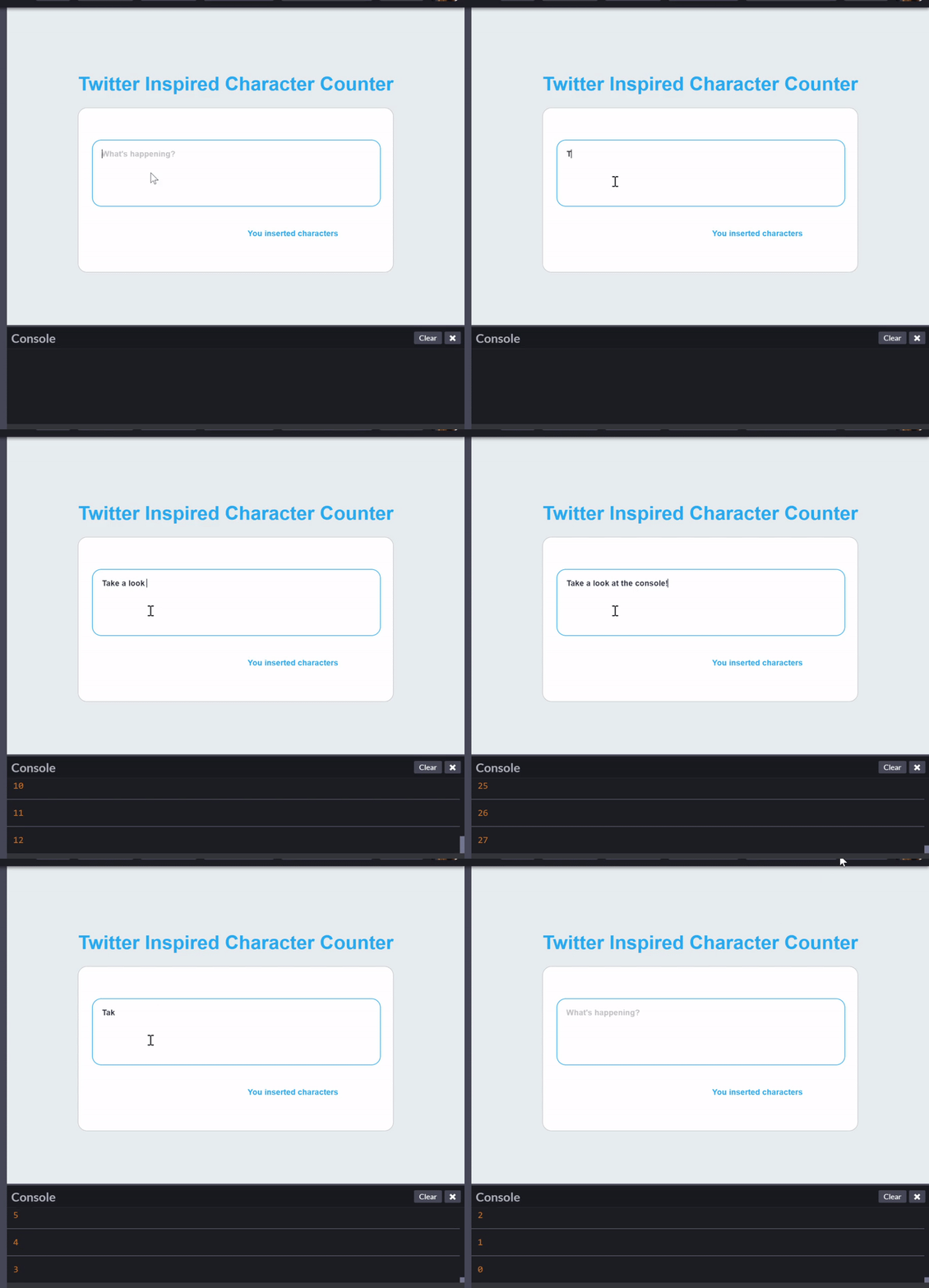
` tag which contains a paragraph. 8 | 9 | 4. Write a Javascript code for character counts in the `textarea`. 10 | 11 | # Example: ![](https://miro.medium.com/max/1600/1*1HI4NXCeCz1EiIWcIE_0iQ.gif) 12 | 13 | 5. Convert a given number from decimal to binary or hexadecimal 14 | 15 | 6. With Javascript write a simple from validation 16 | 17 | 7. In your HTML Add two buttons, where first button action for full screen mode and the second button for exit from full screen mode. 18 | 19 | 8. When user press any key in your html page show a alert that `Invalid Key Pressed`, but when user press spacebar show an alert `Thank You..!!` and close the current window. 20 | 21 | 9. When a cursor is moved over an content, allow the user to edit the content in HTML page.
22 | NOTE: Input element should not be used. 23 | 24 | -------------------------------------------------------------------------------- /flex-box-example/style.css: -------------------------------------------------------------------------------- 1 | *, 2 | *::before, 3 | *::after { 4 | box-sizing: border-box; 5 | padding: 0; 6 | margin: 0; 7 | } 8 | 9 | html, 10 | body { 11 | width: 100vw; 12 | height: 100vh; 13 | } 14 | 15 | .container { 16 | height: auto; 17 | padding: 2% 10%; 18 | } 19 | 20 | .box { 21 | position: relative; 22 | box-sizing: border-box; 23 | min-height: 1rem; 24 | margin: 2px; 25 | background: #4788c9; 26 | border-radius: 2px; 27 | overflow: hidden; 28 | text-align: center; 29 | color: #fff; 30 | padding: 20px 0; 31 | border: 2px dashed black; 32 | } 33 | 34 | .row { 35 | display: flex; 36 | width: 100%; 37 | flex-flow: row; 38 | flex-direction: row; 39 | flex-wrap: wrap; 40 | justify-content: space-around; 41 | box-sizing: border-box; 42 | } 43 | 44 | .col-12 { 45 | flex-basis: 100%; 46 | max-width: 100%; 47 | } 48 | 49 | .col-6 { 50 | flex-basis: 50%; 51 | max-width: 50%; 52 | } 53 | 54 | .col-4 { 55 | flex-basis: 33%; 56 | max-width: 33%; 57 | } 58 | 59 | .col-4 { 60 | flex-basis: 33%; 61 | max-width: 33%; 62 | } 63 | 64 | .col-1 { 65 | flex-basis: 8.33%; 66 | max-width: 8.33%; 67 | } 68 | -------------------------------------------------------------------------------- /DOM/001-dom.html: -------------------------------------------------------------------------------- 1 | 2 | 3 | 4 | 5 | 6 | DOM-1 7 | 8 | 9 | 16 | 17 | 18 | 19 | 20 | 21 | 22 |
23 |
24 |
25 |
26 | 27 | 42 | 43 | 44 | 45 | -------------------------------------------------------------------------------- /002.html: -------------------------------------------------------------------------------- 1 | 2 | 3 | 4 | 5 | 6 | HTML & CSS-1 7 | 8 | 9 | 10 | 36 | 37 | 38 | 39 | 40 |
41 | this refers to inline style 42 |
43 | 44 |
45 | this refers to internal style sheet 46 |
47 | 48 |
49 | this refers to external style sheet 50 |
51 |
52 |

Display Property

53 |
54 | display block property 55 |
56 |
57 | display inline property 58 |
59 | 60 | 61 | -------------------------------------------------------------------------------- /005.html: -------------------------------------------------------------------------------- 1 | 8 | 9 | 10 | 11 | 12 | 13 | 14 | 15 | 19 | 20 | 21 | HTML & CSS-4 22 | 23 | 24 | 25 | 26 | 27 | 32 | 33 | 34 | 35 |
36 | Lorem ipsum dolor sit amet consectetur adipisicing elit. Fugit sapiente quia amet, sint voluptatibus nostrum, 37 |
38 |

39 | praesentium et quasi cum blanditiis natus? Saepe officiis pariatur voluptates at ipsam nihil sequi doloribus. 40 |

41 |
42 |

43 | fontawesome 44 | 45 |

46 | 47 |

48 | 49 | material icon 50 | 51 | backup 52 | 53 |

54 | 55 | 56 | -------------------------------------------------------------------------------- /Mini-tasks/001-HTML.md: -------------------------------------------------------------------------------- 1 | # [Guvi Zen](https://www.guvi.io/zen/) 2 | 3 | ## HTML Task to know usage of basic tags. 4 | 5 | 1. Fix the bugs in below snippet 6 | 7 | ```HTML 8 | 9 | 10 | Document 11 | <body> 12 | guvi 13 | 14 | 15 |
16 | Lorem ipsum dolor sit amet consectetur adipisicing elit. 17 |
18 |
19 | Guvi Geek Network 20 |
21 | 22 | 23 | ``` 24 | 2. Try the below one 25 | 26 | ```HTML 27 | 28 | 29 | Document 30 | <body> 31 | guvi 32 | </head> 33 | <div> 34 | Lorem ipsum dolor sit amet consectetur adipisicing elit. 35 | <div> 36 | <div> 37 | Guvi Geek Network 38 | </div> 39 | </body> 40 | </html> 41 | ``` 42 | 43 | --- 44 | 45 | 3. Design a contact us form with all fields as required. 46 | 47 | --- 48 | 49 | 4. Use certain HTML elements to display the following in a HTML page. 50 | 51 | - Programming Language 52 | - JavaScript 53 | 1. Angular 54 | 2. React 55 | 3. Vue.js 56 | - Python 57 | 1. Django Framework 58 | 2. Flask Framework 59 | - Java 60 | 1. Spring 61 | 2. Maven 62 | 3. Hibernate 63 | - Database 64 | - MySQL 65 | - MongoDB 66 | - Cansandra 67 | 68 | --- 69 | 70 | 5. Create an element that helps you to open the https://google.com in separate new tab. 71 | 72 | --- 73 | 74 | 6. In the form, add two radio buttons with grouping them for employee type(Salaried and own business) 75 | 76 | --- 77 | 78 | 7. Design form shown in the link (http://evc-cit.info/cit040/formguide/card_0.png) 79 | 80 | --- 81 | 82 | 8. Use the table tag to design given image [Click here](https://www.bapugraphics.com/assets/img/port_upload_dir/table-4.jpg). 83 | 84 | --- 85 | 86 | 9. Write HTML input tags snippet to show default values for all Form elements. 87 | 88 | --- 89 | 90 | 10. In your, HTML page add the below line and Highlight it without using any CSS. 91 | 92 | - "HTML & CSS is awesome" 93 | 94 | --- 95 | 96 | 11. Create an HTML page, which should contain all types of input elements. 97 | -------------------------------------------------------------------------------- /004.html: -------------------------------------------------------------------------------- 1 | <!-- 2 | Drop Shadow - div 3 | Clip -applied only to absolutely positioned(position:fixed/absolute). 4 | use of px, %, cm etc. 5 | --> 6 | <html lang="en"> 7 | 8 | <head> 9 | <meta charset="UTF-8"> 10 | <meta name="viewport" content="width=device-width, initial-scale=1.0"> 11 | <title>HTML & CSS-3 12 | 28 | 29 | 30 | 31 |

32 | box shadow 33 |

34 |
35 | Lorem ipsum dolor sit amet consectetur, adipisicing elit. Laudantium beatae ipsam iusto? Velit, sed cupiditate 36 | nulla minima officiis excepturi ut aperiam vel amet in blanditiis repellendus tempore natus eveniet iure?s 37 |
38 |

39 |
40 |
41 | Lorem ipsum dolor sit amet, consectetur adipisicing elit. Incidunt doloremque ea ut corrupti quis vel 42 | necessitatibus exercitationem consectetur quod quibusdam ratione blanditiis, ad labore, et iusto quas aliquid 43 | cumque. Accusantium. 44 |
45 |

46 |
47 |
48 | 57 | 58 | guvi Geek pvt ltd 59 | 60 |
61 | 62 | Guvi Geek pvt ltd 63 | 64 |
65 | 66 | Guvi Geek pvt ltd 67 | 68 |
69 | 70 | 71 | -------------------------------------------------------------------------------- /DOM/simple-row-column.html: -------------------------------------------------------------------------------- 1 | 2 | 3 | 4 | 5 | 6 | 7 | Document 8 | 9 | 14 | 15 | 16 | 17 | 33 | 74 | 75 | 76 | 77 | -------------------------------------------------------------------------------- /006.html: -------------------------------------------------------------------------------- 1 | 2 | 3 | 4 | 5 | 6 | HTML & CSS-5 7 | 37 | 38 | 39 | 40 |

Media query

41 | 42 |
43 |
44 | row 1 45 |

Column 1

46 |

Some text..

47 |
48 |
49 | row1 50 |

Column 1

51 |

Some text..

52 |
53 |
54 |
55 |
56 | row2 57 |

Column 1

58 |

Some text..

59 |
60 |
61 | row2 62 |

Column 1

63 |

Some text..

64 |
65 |
66 |
67 | 88 | 89 | 90 | -------------------------------------------------------------------------------- /flex-box-example/index.html: -------------------------------------------------------------------------------- 1 | 2 | 3 | 4 | 5 | 6 | 7 | Flex Box - Example 8 | 9 | 10 | 11 | 12 |
13 |
14 |
15 |
12
16 |
17 |
18 | 19 |
20 |
21 |
6
22 |
23 |
24 |
6
25 |
26 |
27 | 28 |
29 |
30 |
4
31 |
32 |
33 |
4
34 |
35 |
36 |
4
37 |
38 |
39 | 40 |
41 |
42 |
1
43 |
44 |
45 |
1
46 |
47 |
48 |
1
49 |
50 |
51 |
1
52 |
53 |
54 |
1
55 |
56 |
57 |
1
58 |
59 |
60 |
1
61 |
62 |
63 |
1
64 |
65 |
66 |
1
67 |
68 |
69 |
1
70 |
71 |
72 |
1
73 |
74 |
75 |
1
76 |
77 |
78 | 79 |
80 | 81 | 82 | -------------------------------------------------------------------------------- /DOM/002-dom-script.js: -------------------------------------------------------------------------------- 1 | var row = document.createElement("div"); 2 | row.setAttribute("class", "row justify-content-center"); 3 | 4 | var col1 = document.createElement("div"); 5 | col1.setAttribute("class", "col"); 6 | 7 | var col2 = document.createElement("div"); 8 | col2.setAttribute("class", "col"); 9 | 10 | // start child column 11 | var childRow = document.createElement("div"); 12 | childRow.setAttribute("class", "row"); 13 | 14 | var childCol1 = document.createElement("div"); 15 | childCol1.setAttribute("class", "col"); 16 | childCol1.innerText = "Child column1"; 17 | 18 | var childCol2 = document.createElement("div"); 19 | childCol2.setAttribute("class", "col"); 20 | childCol2.innerText = "Child column2"; 21 | 22 | var childCol3 = document.createElement("div"); 23 | childCol3.setAttribute("class", "col"); 24 | childCol3.innerText = "Child column3"; 25 | 26 | childRow.appendChild(childCol1); 27 | childRow.appendChild(childCol2); 28 | childRow.appendChild(childCol3); 29 | 30 | // end child column 31 | 32 | var col3 = document.createElement("div"); 33 | col3.setAttribute("class", "col"); 34 | 35 | col2.appendChild(childRow); 36 | 37 | row.appendChild(col1); 38 | row.appendChild(col2); 39 | row.appendChild(col3); 40 | 41 | document.getElementById("container").appendChild(row); 42 | 43 | // query selector starts here 44 | var pTag1 = document.createElement("p"); 45 | pTag1.innerText = "Sample Text 1"; 46 | var pTag2 = document.createElement("p"); 47 | pTag2.innerText = "Sample Text 2"; 48 | var pTag3 = document.createElement("p"); 49 | pTag3.innerText = "Sample Text 3"; 50 | var pTag4 = document.createElement("p"); 51 | pTag4.innerText = "Sample Text 4"; 52 | 53 | document.getElementById("p").append(pTag1, pTag2, pTag3, pTag4); 54 | var pTags = document.querySelectorAll("p"); 55 | 56 | pTags.forEach((val) => { 57 | val.setAttribute("class", "p-tag"); 58 | }); 59 | console.log(pTags); 60 | 61 | // query selector ends here 62 | 63 | var container = document.getElementById("container"); 64 | container.appendChild(row); 65 | 66 | //append to body 67 | document.body.append(container); 68 | 69 | // get by query selector 70 | var container = document.querySelectorAll(".div"); 71 | console.log(container[0]); 72 | 73 | var firstName = document.createElement("input"); 74 | firstName.setAttribute("type", "text"); 75 | firstName.setAttribute("class", "form-control"); 76 | firstName.setAttribute("placeholder", "First Name"); 77 | firstName.setAttribute("value", "Apple"); 78 | 79 | var lastName = document.createElement("input"); 80 | lastName.setAttribute("type", "text"); 81 | lastName.setAttribute("class", "form-control"); 82 | lastName.setAttribute("placeholder", "Last Name"); 83 | lastName.setAttribute("value", "r"); 84 | row.appendChild(firstName); 85 | row.appendChild(lastName); 86 | -------------------------------------------------------------------------------- /003.html: -------------------------------------------------------------------------------- 1 | 11 | 12 | 13 | 14 | 15 | 16 | 17 | HTML & CSS-2 18 | 19 | 20 | 35 | 36 | 37 | 38 |
39 |

Padding & Margin

40 |
41 | Lorem, ipsum dolor sit amet consectetur adipisicing elit. Tempora eaque rerum facere sequi sunt autem earum, 42 | aliquam omnis voluptate reprehenderit incidunt aperiam ipsam magnam alias eos obcaecati impedit rem hic! 43 |
44 |
45 |
46 |
47 |
48 |
49 |

Float property

50 | Lorem, ipsum dolor sit amet consectetur adipisicing elit. Aliquid atque odit 51 | culpa minus earum voluptate asperiores accusantium sit eos. Possimus natus eveniet vel maiores illum dolores 52 | ratione, rerum et incidunt? 53 |
54 | 55 |
56 |
57 |
58 | 59 |

The position property

60 | 61 |
62 |

position: static;

63 | position: static. 64 |
65 | 66 | 67 |
68 |

position: relative;

69 |
70 | 71 | 72 |
73 |

position: absolute;

74 |
75 | 76 | 77 |
78 |

position: fixed;

79 |
80 | 81 |
82 |

i will stick to top

83 |
84 | 85 |
86 | Lorem ipsum dolor sit amet, consectetur adipisicing elit. Et, officiis neque culpa dolorem repudiandae non 87 | debitis distinctio minus unde ea ex est architecto incidunt corrupti tenetur in blanditiis omnis fuga! Lorem 88 | ipsum dolor sit amet consectetur adipisicing 89 | elit. Repellat omnis unde, vitae aspernatur, eos facilis, voluptas sint magni sunt consequuntur modi? Esse neque 90 | voluptatum minima voluptatem dolorem perspiciatis voluptas voluptatibus. 91 |
92 | 93 | 94 | -------------------------------------------------------------------------------- /Mini-tasks/002-HTML-CSS.md: -------------------------------------------------------------------------------- 1 | # [Guvi Zen](https://www.guvi.io/zen/) 2 | 3 | ## HTML & CSS Tasks. 4 | 5 | 1. Design the below equation using HTML & CSS 6 | 7 | ![click here to view sample equation](https://i.insider.com/4ff178a269bedd6f1800000f?width=600&format=jpeg&auto=webp) 8 | 9 | 2. Write a css rule of rounded rectangle, dashed border, grayscale for all image tags in your webpage. 10 | 11 | 3. Write a media rule to change only the font size of web page when it's resized. 12 | 13 | 4. Use HTML & CSS to display different types of cursors. 14 | 15 | 5. Write a CSS class that meets the **Box Model** requirement for all the div tags in your page. 16 | 17 | - Use certain properties padding, margin, border. 18 | 19 | 6. Write a CSS class to change size of font, color font family when mouse moves over of span tag in your webpage. 20 | 21 | 7. Write a CSS 2D rule with `translate()` property to move an element. 22 | 23 | 8. Define a CSS class to show tooltip when mouse moved over the elements. 24 | 25 | 9. For the below shown image apply `clip property` with values of right & bottom and display the output. 26 | 27 | ![](https://encrypted-tbn0.gstatic.com/images?q=tbn%3AANd9GcR1WuQLHjaoqFLQBVJTPmqVG6WfIwK2jDxf1RAycCQJJhuhjit6&usqp=CAU) 28 | 29 | 10. Design the below image using HTML & CSS. 30 | 31 | ![](https://2.bp.blogspot.com/-uBWojLXcSFs/Vk31LrbRLJI/AAAAAAAAAtI/UydMrgJ2a94/s1600/1.jpg) 32 | 33 | 11. Use the required property to reshape a div, as example shown below. 34 | 35 | ![](https://encrypted-tbn0.gstatic.com/images?q=tbn%3AANd9GcSjWqFJvJ6nFFnDbuz2-BOUWcPHZpE0fF2AiWcoBQM6JO-RPm3_&usqp=CAU) 36 | 37 | 12. Use CSS to set a background image should be centered and should not repeat. 38 | 39 | 13. Write CSS rules to set the direction of the flexible items inside the `
` element in reverse order. 40 | 41 | 14. Give the `
` element an image border using the image "border.png". Slice the image at 30px and stretch it. 42 | 43 | 15. Give the `
` element a rounded corner (25px radius) on the bottom left side. 44 | 45 | 16. Remove the transparency/opacity of the `` element when the user hovers over it with the mouse pointer. 46 | 47 | 17. Position the `
` element all the way to the right using absolute positioning. 48 | 49 | 18. Add a scrollbar to the `
` element. 50 | 51 | 19. Set a linear gradient background for the `
` element, going from the top to bottom, transitioning from "white" to "red" to "blue" to "green". 52 | 53 | 20. With the transform property, rotate the `
` element 45 degrees. 54 | 55 | 56 | ### Additional Try outs 57 | 58 | 1. 59 | 60 | ![](https://raw.githubusercontent.com/rvsp/files/master/div-row-cols.png) 61 | 62 | 2. 63 | 64 | ![](https://developer.paciellogroup.com/wp-content/uploads/2015/09/regions-typical1.png) 65 | 66 | 3. 67 | 68 | ![](https://ps.w.org/pricing-table/assets/screenshot-3.png?rev=1396861) 69 | 70 | 4. 71 | 72 | ![](https://s3-us-west-2.amazonaws.com/s.cdpn.io/429997/Screen%20Shot%202016-12-08%20at%2001.02.41.png) 73 | 74 | --- 75 | 76 | ## Practice 77 | 78 | ### Flexbox 79 | https://flexboxfroggy.com/ 80 | 81 | http://www.flexboxdefense.com/ 82 | 83 | https://flexbox.malven.co/ 84 | 85 | https://flukeout.github.io/ 86 | 87 | https://mastery.games/ 88 | 89 | ### Grid 90 | https://cssgridgarden.com/ 91 | 92 | https://learncssgrid.com/ 93 | 94 | https://grid.layoutit.com/ 95 | 96 | https://grid.malven.co/ 97 | 98 | 99 | -------------------------------------------------------------------------------- /Tasks/html-css-mini-project.md: -------------------------------------------------------------------------------- 1 | # Mini Project On HTML & CSS 2 | 3 | ## Read the given instructions given below before doing your project 4 | 5 | - The project for your HTML & CSS will be a `“mini-web site.”` Choose a topic that interests you: something that excites you, something you want to tell the whole world about. If you don’t care about the subject, your readers won’t either. 6 | 7 | - I want you to concentrate on the HTML, not on finding content, so do not choose a topic that requires lots of research. For example, unless are an expert about the subject, a web site about the kings of Sweden will need much time-consuming research. On the other hand a website about your favorite hobby won’t take much research at all. 8 | 9 | ## Here are further requirements for the assignment: 10 | 11 | 1. Your project must contain a minimum of ten original HTML5 pages (files) that you have written. A single HTML5 file with links to nine pages written by other people is not acceptable. You may not simply link to pages that you have practiced for the HTML & CSS. Your material must all be original. 12 | 13 | 2. Diagram showing links among an index page and other content pages is shown in the Sample linkage diagram. 14 | 15 | Example: 16 | 17 | 3. You must draw a diagram showing how your HTML pages link together, and the linkage must make sense. For the linkage diagram you can use any online tools to draw or you can make your diagram by hand then scan it or take a digital photo of the diagram and upload it to the `GitHub`. 18 | 19 | Note: A linkage diagram is not the same as a diagram showing. If you have many pages that are all linked to each other, just draw a line that connects them all and label it with words like “all linked to each other” rather than trying to draw dozens of lines with arrows on them. 20 | 21 | 4. Implementation of your project: 22 | 23 | - Your project must have a main page, and it must be named `index.html`. 24 | - You must use at least four `` elements, and each alt attribute must be descriptive. 25 | - You must link to at least two external sites that are related to the content of your site. 26 | - Your HTML pages should not contain any inline styles. 27 | - You may not use the deprecated elements! 28 | - Example: `` or `
` 29 | - You must have at least one
. 30 | - You must use an External/Internal stylesheet to control the appearance of all your pages. 31 | - You must have at least two `` tags. At least one of these must be used to present tabular data. 32 | - Your pages must have proper open close of HTML tags, in order to verify it [Click this link and submit your Netlify URL](http://validator.w3.org/). 33 | - The `` elements of your pages must be descriptive. (In other words, you can’t have all your pages saying `<title>`My Project``). 34 | - All your ten pages should contain a common theme which should give a pleasant look and feel. They should not be different for each HTML pages. 35 | - Example any background color or images. 36 | - Your design should not contain any audio,video or flash 37 | 38 | 5. Submission of your project: 39 | - All your work files should be uploaded to [GitHub](https://github.com/). 40 | - Deploy your project files with [Netlify](https://www.netlify.com/). 41 | - Submit your GitHub and Netlify URLs in portal. 42 | -------------------------------------------------------------------------------- /007-bootstrap.html: -------------------------------------------------------------------------------- 1 | 2 | 3 | 4 | 5 | 6 | 7 | Document 8 | 9 | 10 | 15 | 16 | 17 | 18 | 19 |
20 |
21 |
22 |
23 |
24 |
25 | 26 | 27 |
28 |
29 |
30 |
31 | 32 | 33 |
34 |
35 |
36 | 37 | 38 |
39 | 40 | 41 |
42 |
43 | 44 | 45 |
46 |
47 |
48 |
49 | 50 | 51 |
52 |
53 |
54 |
55 | 56 | 57 |
58 |
59 |
60 |
61 |
62 |
63 | 64 | 68 |
69 |
70 |
71 |
72 | 73 | 77 |
78 |
79 |
80 | 81 |
82 |
83 |
84 | 85 | 86 | 87 | 88 | 89 | 90 | 91 | 92 | -------------------------------------------------------------------------------- /001.html: -------------------------------------------------------------------------------- 1 | 2 | 3 | 4 | 5 | 6 | HTML & HTML-Forms 7 | 38 | 39 | 40 | 41 |
42 |

43 | HEADER 44 |

45 | A header element is intended to usually contain the section's heading (an h1–h6 element or an hgroup element), 46 | but this is not required. The header element can also be used to wrap a section's table of contents, a search 47 | form, or any relevant logos.
48 | header 49 |
50 | 51 |
52 |

SECTION

53 | Examples of sections would be chapters, the various tabbed pages in a tabbed dialog box, or the numbered 54 | sections of a thesis. A Web site's home page could be split into sections for an introduction, news items, and 55 | contact information.
56 | section 57 |
58 | 59 |
60 |

DIV

61 | The div element has no special meaning at all. It represents its children. It can be used with the class, lang, 62 | and title attributes to mark up semantics common to a group of consecutive elements. It can also be used in a dl 63 | element, wrapping groups of dt and dd elements.
64 | div 65 |
66 | 67 |

68 | Paragraph Tag
69 | While paragraphs are usually represented in visual media by blocks of text that are physically separated from 70 | adjacent blocks through blank lines, a style sheet or user agent would be equally justified in presenting 71 | paragraph breaks in a different manner, for instance using inline pilcrows (¶)
72 | P Tag 73 |

74 |
75 |

76 |

FORM

77 | A form is a component of a Web page that has form controls, such as text, buttons, checkboxes, range, or color 78 | picker controls. A user can interact with such a form, providing data that can then be sent to the server for 79 | further processing 80 |

81 | 82 | 83 |

85 | 86 |

87 | 88 |

90 | 91 |

92 | 93 |

94 | 95 |

96 | 97 | 98 | 99 |

100 | 101 |

102 | 103 | 105 | 106 | 107 |

108 | 109 | 110 | 111 | 112 | read about 113 | button 114 | 115 |
116 |

UL & OL tags

117 |
    118 |
  • JavaScript
  • 119 |
  • Python
  • 120 |
  • MySQL
  • 121 |
  • MongoDB
  • 122 |
123 | 124 |
    125 |
  1. JavaScript
  2. 126 |
  3. Python
  4. 127 |
  5. MySQL
  6. 128 |
  7. MongoDB
  8. 129 |
130 | 131 |
    132 |
  1. JavaScript
  2. 133 |
  3. Python
  4. 134 |
  5. MySQL
  6. 135 |
  7. MongoDB
  8. 136 |
137 | 138 |
    139 |
  1. JavaScript
  2. 140 |
  3. Python
  4. 141 |
  5. MySQL
  6. 142 |
  7. MongoDB
  8. 143 |
144 | 145 | 146 | 147 |
148 |
149 |

150 | FOOTER 151 |

152 | The footer element represents a footer for its nearest ancestor sectioning content or sectioning root element. A 153 | footer typically contains information about its section such as who wrote it, links to related documents, 154 | copyright data, and the like.
155 | footer 156 |
157 | 158 | 159 | 160 | -------------------------------------------------------------------------------- /task-sample/ifactory-slant.html: -------------------------------------------------------------------------------- 1 | 2 | 3 | 4 | 5 | 6 | 167 | 168 | 169 | 170 |
171 |
172 |
IFACTORY
173 |
174 |
175 |
176 |
177 |
178 | S 179 | CROLLING IN WEB DESIGN 180 |
181 | mouse 182 |
183 |
184 | THE LONG & THE SHORT OF IT 185 |
186 | 187 |
188 |
189 |
190 |
191 |
192 |
193 | L 194 | ONG SCROLL: 195 | THE GOOD STUFF 196 |
VISUAL CREATIVITY
197 |
198 | There’s more visual freedom in parallax website design. 199 | Rather than 200 | focusing on block style information architecture, you can create 201 | refreshing and engaging visuals such as animations or beautiful 202 | photography, that act as a continuum, ultimately inspiring users to 203 | scroll further down the page.
204 |
205 |
206 |
207 |
208 |
209 | S 210 | TORY-TELLING 211 |
OPPORTUNITIES
212 |
213 | 214 |
215 | Do you want to tell a story with your product or service? 216 | Long-scrolling lends itself well to a narrative and 217 | encourages meaningful interaction from users. 218 |
219 |
220 |
221 |
222 | 223 | 224 | 225 | 226 | --------------------------------------------------------------------------------