├── requirements.txt
├── slideshow.sh
├── auth_private_flickr.py
├── LICENSE
├── download_flickr.py
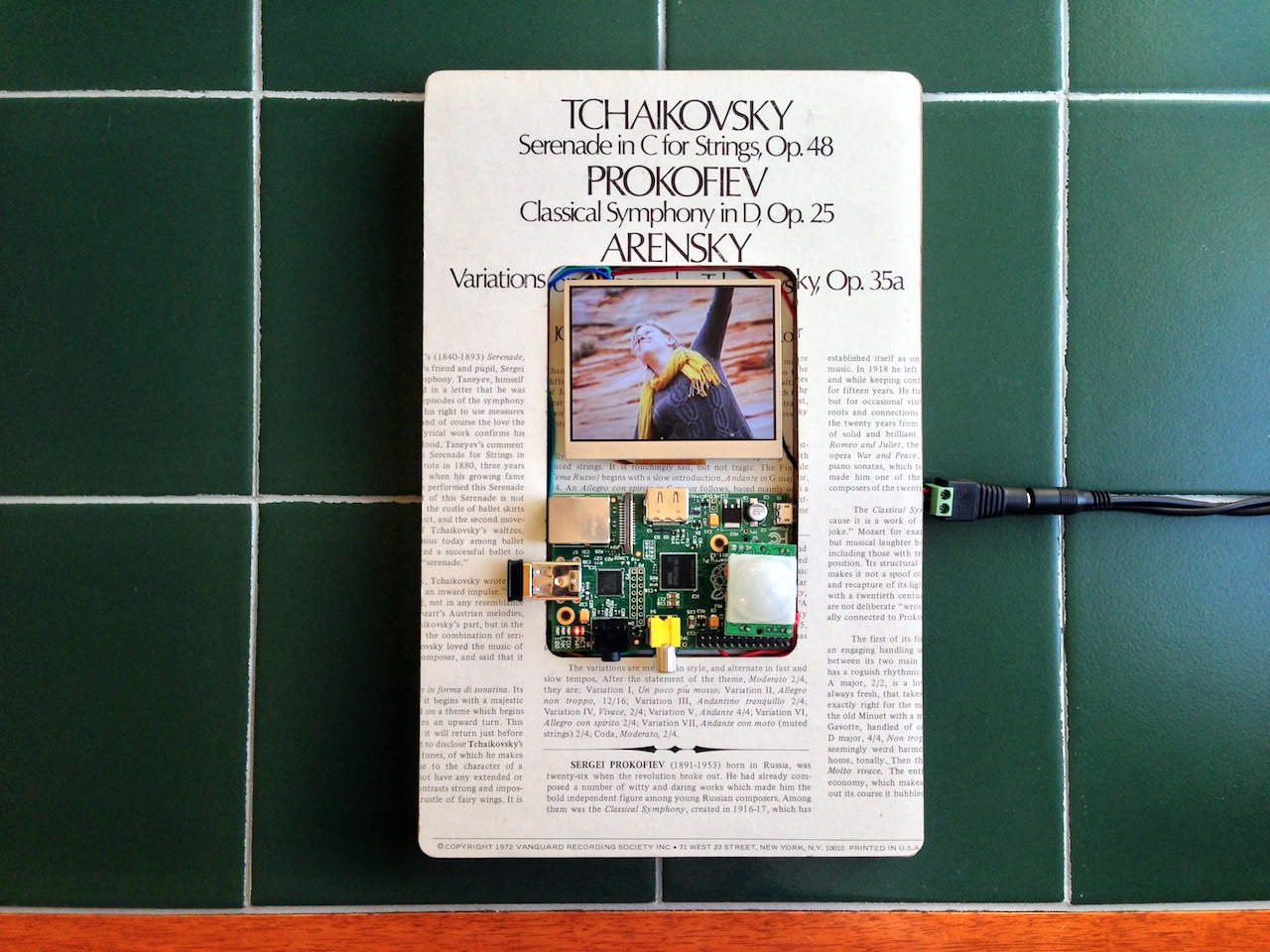
├── pir.py
├── pir_btn.py
├── download_private_flickr.py
├── download_list.py
├── download_facebook.py
└── README.md
/requirements.txt:
--------------------------------------------------------------------------------
1 | flickrapi==1.4.4
2 | requests
3 |
--------------------------------------------------------------------------------
/slideshow.sh:
--------------------------------------------------------------------------------
1 | fbi -noverbose -m 640x480 -a -u -t 6 /home/pi/art/**/*
2 |
--------------------------------------------------------------------------------
/auth_private_flickr.py:
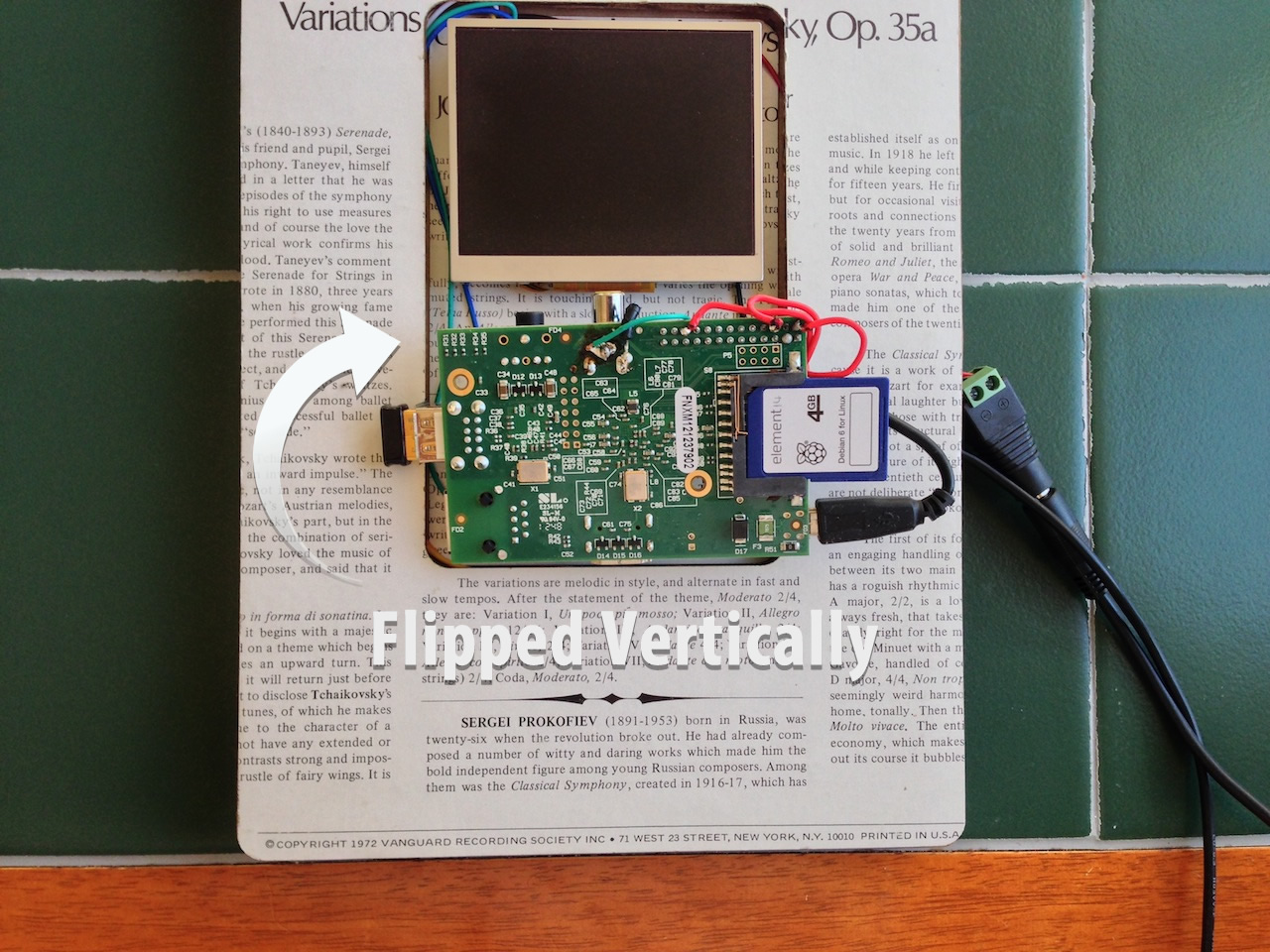
--------------------------------------------------------------------------------
1 | #!/usr/bin/env python
2 |
3 | # This script generates a permanent token so you can download photos from your private flickr account.
4 | # Use the auth token generated at the end in the download_private_flickr.py script.
5 |
6 | import flickrapi
7 | import json
8 | import hashlib
9 |
10 | api_key = '********'
11 | api_secret = '*******'
12 | perms = 'read'
13 |
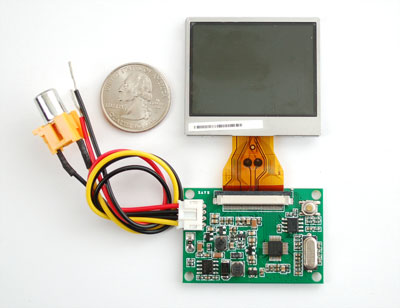
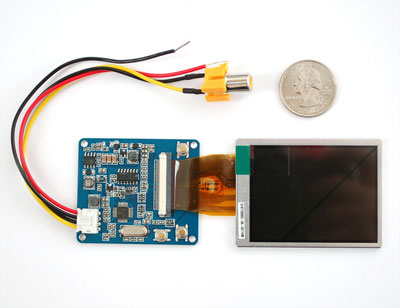
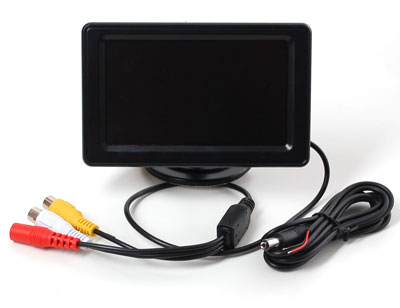
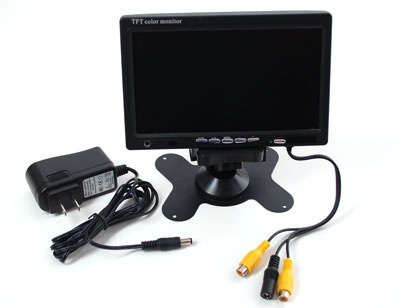
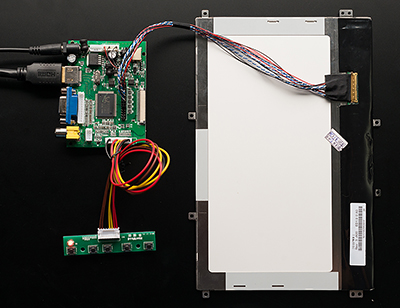
14 | flickr = flickrapi.FlickrAPI(api_key, api_secret)
15 | flickr.token.path = '/tmp/flickrtokens'
16 |
17 | responseFrob = flickr.auth_getFrob()
18 | frobToken = responseFrob.find('frob').text
19 | sig = '%sapi_key%sfrob%sperms%s' % (api_secret, api_key, frobToken,perms)
20 | m = hashlib.md5()
21 | m.update(sig)
22 | sigmd5 = m.hexdigest()
23 |
24 |
25 | url = 'http://flickr.com/services/auth/?api_key=%s&perms=%s&frob=%s&api_sig=%s' % (api_key,perms,frobToken,sigmd5)
26 | print 'Go to this url and authorise your application:\n %s' % url
27 |
28 | raw_input("Press ENTER after you authorized this program:")
29 |
30 | authResponse = flickr.get_token(frobToken)
31 | authToken = authResponse.find('token')
32 | print "AUTH_TOKEN=%s" % authToken
--------------------------------------------------------------------------------
/LICENSE:
--------------------------------------------------------------------------------
1 | The MIT License (MIT)
2 |
3 | Copyright (c) 2013 Samuel Clay
4 |
5 | Permission is hereby granted, free of charge, to any person obtaining a copy of
6 | this software and associated documentation files (the "Software"), to deal in
7 | the Software without restriction, including without limitation the rights to
8 | use, copy, modify, merge, publish, distribute, sublicense, and/or sell copies of
9 | the Software, and to permit persons to whom the Software is furnished to do so,
10 | subject to the following conditions:
11 |
12 | The above copyright notice and this permission notice shall be included in all
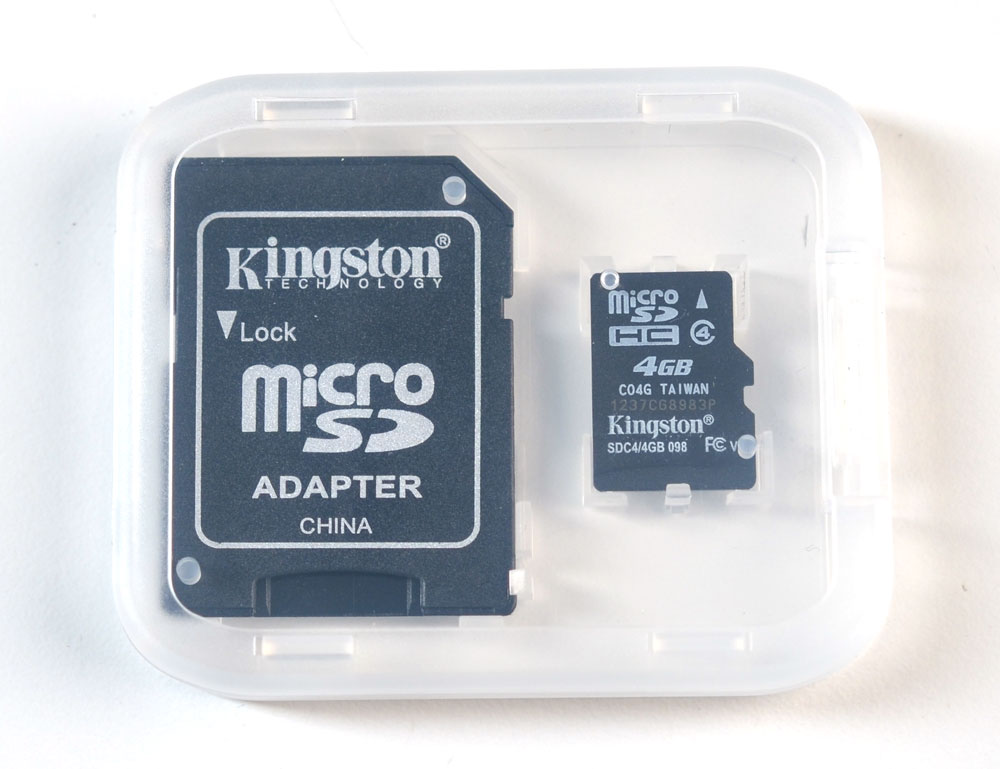
13 | copies or substantial portions of the Software.
14 |
15 | THE SOFTWARE IS PROVIDED "AS IS", WITHOUT WARRANTY OF ANY KIND, EXPRESS OR
16 | IMPLIED, INCLUDING BUT NOT LIMITED TO THE WARRANTIES OF MERCHANTABILITY, FITNESS
17 | FOR A PARTICULAR PURPOSE AND NONINFRINGEMENT. IN NO EVENT SHALL THE AUTHORS OR
18 | COPYRIGHT HOLDERS BE LIABLE FOR ANY CLAIM, DAMAGES OR OTHER LIABILITY, WHETHER
19 | IN AN ACTION OF CONTRACT, TORT OR OTHERWISE, ARISING FROM, OUT OF OR IN
20 | CONNECTION WITH THE SOFTWARE OR THE USE OR OTHER DEALINGS IN THE SOFTWARE.
21 |
--------------------------------------------------------------------------------
/download_flickr.py:
--------------------------------------------------------------------------------
1 | #!/usr/bin/env python
2 |
3 | import flickrapi
4 | import requests
5 |
6 | FLICKR_KEY = "xxxxxxxxxxxxxxxxxxxxxxxxxxxxxxxx"
7 | USER_ID = "25704617@N04"
8 |
9 | def make_url(photo):
10 | # url_template = "http://farm{farm-id}.staticflickr.com/
11 | # {server-id}/{id}_{secret}_[mstzb].jpg"
12 | photo['filename'] = "%(id)s_%(secret)s_z.jpg" % photo
13 | url = ("http://farm%(farm)s.staticflickr.com/%(server)s/%(filename)s"
14 | % photo)
15 | return url, photo['filename']
16 |
17 | def main():
18 | print " ---> Requesting photos..."
19 | flickr = flickrapi.FlickrAPI(FLICKR_KEY)
20 | photos = flickr.walk(user_id=USER_ID)
21 | for photo in photos:
22 | url, filename = make_url(photo.__dict__['attrib'])
23 | path = '/home/pi/photoframe/flickr/%s' % filename
24 | try:
25 | image_file = open(path)
26 | print " ---> Already have %s" % url
27 | except IOError:
28 | print " ---> Downloading %s" % url
29 | r = requests.get(url)
30 | image_file = open(path, 'w')
31 | image_file.write(r.content)
32 | image_file.close()
33 |
34 | if __name__ == '__main__':
35 | main()
36 |
--------------------------------------------------------------------------------
/pir.py:
--------------------------------------------------------------------------------
1 | #!/usr/bin/env python
2 |
3 | import sys
4 | import time
5 | import RPi.GPIO as io
6 | import subprocess
7 |
8 | io.setmode(io.BCM)
9 | SHUTOFF_DELAY = 60
10 | PIR_PIN = 25 # 22 on the board
11 | LED_PIN = 16
12 |
13 | def main():
14 | io.setup(PIR_PIN, io.IN)
15 | io.setup(LED_PIN, io.OUT)
16 | turned_off = False
17 | last_motion_time = time.time()
18 |
19 | while True:
20 | if io.input(PIR_PIN):
21 | last_motion_time = time.time()
22 | io.output(LED_PIN, io.LOW)
23 | print ".",
24 | sys.stdout.flush()
25 | if turned_off:
26 | turned_off = False
27 | turn_on()
28 | else:
29 | if not turned_off and time.time() > (last_motion_time +
30 | SHUTOFF_DELAY):
31 | turned_off = True
32 | turn_off()
33 | if not turned_off and time.time() > (last_motion_time + 1):
34 | io.output(LED_PIN, io.HIGH)
35 | time.sleep(.1)
36 |
37 | def turn_on():
38 | subprocess.call("sh /home/pi/photoframe/monitor_on.sh", shell=True)
39 |
40 | def turn_off():
41 | subprocess.call("sh /home/pi/photoframe/monitor_off.sh", shell=True)
42 |
43 | if __name__ == '__main__':
44 | try:
45 | main()
46 | except KeyboardInterrupt:
47 | io.cleanup()
48 |
--------------------------------------------------------------------------------
/pir_btn.py:
--------------------------------------------------------------------------------
1 | #!/usr/bin/env python
2 |
3 | import sys
4 | import time
5 | import RPi.GPIO as io
6 | import subprocess
7 | import os
8 |
9 | io.setmode(io.BCM)
10 | SHUTOFF_DELAY = 60
11 | PIR_PIN = 25
12 | BTN_PIN = 23
13 |
14 | def main():
15 | io.setup(PIR_PIN, io.IN)
16 | io.setup(BTN_PIN, io.IN)
17 | turned_off = False
18 | last_motion_time = time.time()
19 |
20 | while True:
21 | if io.input(PIR_PIN):
22 | last_motion_time = time.time()
23 | #print ".",
24 | sys.stdout.flush()
25 | while io.input(BTN_PIN):
26 | subprocess.call("/home/pi/photoframe/download.py")
27 | time.sleep(10)
28 | if turned_off:
29 | turned_off = False
30 | turn_on()
31 | else:
32 | if not turned_off and time.time() > (last_motion_time +
33 | SHUTOFF_DELAY):
34 | turned_off = True
35 | turn_off()
36 |
37 | time.sleep(.1)
38 |
39 | def turn_on():
40 | subprocess.call("sh /home/pi/photoframe/slideshow.sh", shell=True)
41 |
42 | def turn_off():
43 | cmdKill = "pkill fbi"
44 | os.system(cmdKill)
45 | subprocess.call("sh /home/pi/photoframe/monitor_off.sh", shell=True)
46 |
47 | if __name__ == '__main__':
48 | try:
49 | main()
50 | except KeyboardInterrupt:
51 | io.cleanup()
52 |
--------------------------------------------------------------------------------
/download_private_flickr.py:
--------------------------------------------------------------------------------
1 | #!/usr/bin/env python
2 |
3 | import flickrapi
4 | import requests
5 |
6 | #Using a token generated in auth_private_flickr.py this script downloads private photo files.
7 |
8 | FLICKR_KEY = "******"
9 | FLICKR_SECRET = "*****"
10 | AUTH_TOKEN = "******" #Auth token generated by auth_private_flickr.py
11 | USER_ID = "******"
12 | TAGS = "photoframe" #Example code uses tags to download private photos.
13 |
14 | def make_url(photo):
15 | photo['filename'] = "%(id)s_o-%(secret)s_o.jpg" % photo
16 | url = photo['url_o']
17 | return url, photo['filename']
18 |
19 | def main():
20 | print " ---> Requesting photos..."
21 | flickr = flickrapi.FlickrAPI(FLICKR_KEY,FLICKR_SECRET,token=AUTH_TOKEN,store_token=True)
22 | photos = flickr.photos_search(user_id=USER_ID, tags="photoframe",extras="url_o")
23 | print photos
24 | for photo in photos.find('photos'):
25 | url, filename = make_url(photo.__dict__['attrib'])
26 | path = '/home/pi/photoframe/flickr/%s' % filename
27 | try:
28 | image_file = open(path)
29 | print " ---> Already have %s" % url
30 | except IOError:
31 | print " ---> Downloading %s" % url
32 | r = requests.get(url)
33 | image_file = open(path, 'w')
34 | image_file.write(r.content)
35 | image_file.close()
36 |
37 | if __name__ == '__main__':
38 | main()
39 |
--------------------------------------------------------------------------------
/download_list.py:
--------------------------------------------------------------------------------
1 | /usr/bin/env python
2 |
3 | import os
4 | import flickrapi
5 | import requests
6 | import psutil
7 |
8 | FLICKR_KEY = "**************"
9 | USER_ID = "**************"
10 | restart = 'tmp'
11 | pid = 'tmp'
12 | flickrList = []
13 | dirList = []
14 |
15 | def make_url(photo):
16 | photo['filename'] = "%(id)s_%(secret)s_z.jpg" % photo
17 | url = ("http://farm%(farm)s.staticflickr.com/%(server)s/%(filename)s"
18 | % photo)
19 | return url, photo['filename']
20 |
21 | def dir_list():
22 | global dirList
23 | dir = '/home/pi/photoframe/flickr/'
24 | files = os.listdir(dir)
25 | for file in files:
26 | if file.endswith(".jpg"):
27 | dirList.append(file)
28 |
29 | def download_files():
30 | #print " ---> Requesting photos..."
31 | flickr = flickrapi.FlickrAPI(FLICKR_KEY)
32 | photos = flickr.walk_set('**************')
33 | global flickrList
34 | for photo in photos:
35 | url, filename = make_url(photo.__dict__['attrib'])
36 | path = '/home/pi/photoframe/flickr/%s' % filename
37 | flickrList.append(filename)
38 | try:
39 | image_file = open(path)
40 | #print " ---> Already Have %s" % url
41 | except IOError:
42 | #print " ---> Downloading %s" % url
43 | r = requests.get(url)
44 | image_file = open(path, 'w')
45 | image_file.write(r.content)
46 | image_file.close()
47 | global restart
48 | restart = 'restart'
49 |
50 | def compare_list():
51 | global dirList
52 | global flickrList
53 | global restart
54 | a = []
55 | a = list(set(dirList) - set(flickrList))
56 | dir = "/home/pi/photoframe/flickr"
57 | files = os.listdir(dir)
58 | for file in a:
59 | if file.endswith(".jpg"):
60 | os.remove(os.path.join(dir,file))
61 | restart = 'restart'
62 |
63 | def restart_slideshow():
64 | if (restart == 'restart'):
65 | PROCNAME = "fbi"
66 | global pid
67 | for proc in psutil.process_iter():
68 | if proc.name == PROCNAME:
69 | pid = proc.pid
70 | pidPath = "/proc/" + str(pid)
71 | if (os.path.exists(pidPath)):
72 | cmdKill = "pkill fbi"
73 | cmd = "fbi -T 1 -noverbose -m 640x480 -a -u -t 6 /home/pi/photoframe/flickr/**"
74 | os.system(cmdKill)
75 | os.system(cmd)
76 |
77 | if __name__ == "__main__":
78 | dir_list()
79 | download_files()
80 | compare_list()
81 | restart_slideshow()
82 |
--------------------------------------------------------------------------------
/download_facebook.py:
--------------------------------------------------------------------------------
1 | from urllib import urlopen
2 | from json import loads
3 | from sys import argv
4 | import dateutil.parser as dateparser
5 | import logging
6 |
7 | # plugin your username and access_token (Token can be get and
8 | # modified in the Explorer's Get Access Token button):
9 | # https://graph.facebook.com/USER_NAME/photos?type=uploaded&fields=source&access_token=ACCESS_TOKEN_HERE
10 | FACEBOOK_USER_ID = "YOUR_USER_ID"
11 | FACEBOOK_ACCESS_TOKEN = "YOUR_ACCESS_TOKEN"
12 |
13 | def get_logger(label='lvm_cli', level='INFO'):
14 | """
15 | Return a generic logger.
16 | """
17 | format = '%(asctime)s - %(levelname)s - %(message)s'
18 | logging.basicConfig(format=format)
19 | logger = logging.getLogger(label)
20 | logger.setLevel(getattr(logging, level))
21 | return logger
22 |
23 | def urlrequest(url):
24 | """
25 | Make a url request
26 | """
27 | req = urlopen(url)
28 | return req.read()
29 |
30 | def get_json(url):
31 | """
32 | Make a url request and return as a JSON object
33 | """
34 | res = urlrequest(url)
35 | return loads(res)
36 |
37 | def get_next(data):
38 | """
39 | Get next element from facebook JSON response,
40 | or return None if no next present.
41 | """
42 | try:
43 | return data['paging']['next']
44 | except KeyError:
45 | return None
46 |
47 | def get_images(data):
48 | """
49 | Get all images from facebook JSON response,
50 | or return None if no data present.
51 | """
52 | try:
53 | return data['data']
54 | except KeyError:
55 | return []
56 |
57 | def get_all_images(url):
58 | """
59 | Get all images using recursion.
60 | """
61 | data = get_json(url)
62 | images = get_images(data)
63 | next = get_next(data)
64 |
65 | if not next:
66 | return images
67 | else:
68 | return images + get_all_images(next)
69 |
70 | def get_url(userid, access_token):
71 | """
72 | Generates a useable facebook graph API url
73 | """
74 | root = 'https://graph.facebook.com/'
75 | endpoint = '%s/photos?type=uploaded&fields=source,updated_time&access_token=%s' % \
76 | (userid, access_token)
77 | return '%s%s' % (root, endpoint)
78 |
79 | def download_file(url, filename):
80 | """
81 | Write image to a file.
82 | """
83 | data = urlrequest(url)
84 | path = '/home/pi/photoframe/facebook/%s' % filename
85 | f = open(path, 'w')
86 | f.write(data)
87 | f.close()
88 |
89 | def create_time_stamp(timestring):
90 | """
91 | Creates a pretty string from time
92 | """
93 | date = dateparser.parse(timestring)
94 | return date.strftime('%Y-%m-%d-%H:%M:%S')
95 |
96 | def download(userid, access_token):
97 | """
98 | Download all images to current directory.
99 | """
100 | logger = get_logger()
101 | url = get_url(userid, access_token)
102 | logger.info('Requesting image direct link, please wait..')
103 | images = get_all_images(url)
104 |
105 | for image in images:
106 | logger.info('Downloading %s' % image['source'])
107 | filename = '%s.jpg' % create_time_stamp(image['created_time'])
108 | download_file(image['source'], filename)
109 |
110 | if __name__ == '__main__':
111 | download(FACEBOOK_USER_ID, FACEBOOK_ACCESS_TOKEN)
112 |
--------------------------------------------------------------------------------
/README.md:
--------------------------------------------------------------------------------
1 | Every hardware hacker has a start, and this one is mine. [My girlfriend](http://twitter.com/brittanymorgan) bought me a [Raspberry Pi](http://raspberrypi.org) for my birthday, and so I became determined to build something with it for her birthday two months later.
2 |
3 |
4 |
5 | As you can see above, I built a photo frame that has a few interesting parts. For one, the software which runs the photo frame, which I explore below, keeps the photos fresh from Instagram and Flickr. It then displays a random photo for a configurable six seconds. Secondly, there is a motion detector, built using a PIR sensor, which only turns the monitor on when somebody walks by.
6 |
7 | This photo frame is easy to build, but it does take a bit of know-how. Mainly, you should feel comfortable soldering wires and mounting the screen and Raspberry Pi to a board or other object. The hard part for me was figuring out how to turn the monitor on and off through the command line.
8 |
9 | Everything else is gravy, from configuring wifi and autoboot/auto-login on the device to attaching and setting up the motion detecting PIR sensor. You can also use the [eLinux guide](http://elinux.org/R-Pi_Hub) to Raspberry Pi and its handy [RPi Hardware Basic Setup wiki](http://elinux.org/RPi_Hardware_Basic_Setup).
10 |
11 | ## Parts
12 |
13 | ### Raspberry Pi
14 |
15 | I chose to use a Raspberry Pi for its simple wifi integration so that photos could be automatically updated. I didn't want to have to load photos on to an SD card which could then be read by an Arduino.
16 |
17 | Connecting the monitor was also trivial on a Raspberry Pi, where an Arduino, Maple, or Beagle Bone would require sourcing a connection between the monitor's composite input and an output from the device.
18 |
19 |
20 |
21 | ###### [Raspberry Pi](http://www.adafruit.com/products/1344), $29 on Adafruit.
22 |
23 | Make note of the fact that you actually don't see any of my connections on the top of the board (pictured below). In the below photo, where the Raspberry Pi is flipped vertically to show off the electrical connections, the monitor's composite cable and the motion detecting PIR sensor's red wires are soldered underneath.
24 |
25 |
26 |
27 | This way the photo frame looks cleaner. If I had connected the monitor using the yellow composite cable, it would have to be with a make-to-male composite adapter, since both the Raspberry Pi and the monitor have a male RCA connection. This would jut out about 2 inches below the device, resulting in a messy look for the frame.
28 |
29 | ### 3.5" LCD Monitor
30 |
31 |
32 |
33 | ###### [3.5" LCD Monitor](http://www.adafruit.com/products/913), $45 on Adafruit
34 |
35 | Note that if you do not plan to solder the composite cable's two wires, you will need the ugly male-to-male adapter, sold for $1.50 on Adafruit.
36 |
37 | There are a number of different sized LCD monitors:
38 |
39 |
70 |
71 | This tiny SD card comes pre-loaded with Raspbian. If you prefer to use your own SD card and want to bootload it, just follow [eLinux's Easy SD Card Setup wiki](http://elinux.org/RPi_Easy_SD_Card_Setup).
72 |
73 |
74 |
75 | ### Miniature Wifi on USB
76 |
77 |
81 |
82 | Unless you're planning to use an ugly ethernet cable, this tiny wifi USB device works perfectly. It's easy to setup as well. I followed [Adafruit's tutorial for setting up wifi on a Raspberry Pi](http://learn.adafruit.com/adafruits-raspberry-pi-lesson-3-network-setup/overview).
83 |
84 |
85 |
86 | ### Passive Infrared Motion Sensor
87 |
88 |
92 |
93 | This is a simple and inexpensive component that is responsible for turning the monitor on and off. The accuracy is great, as it never misses a beat, yet I haven't found it to accidentally trigger in the night unless we walk by. It also has two adjustable dials on the back that allow you to control its sensitivity and delay before firing. [Ladyada covers how it works](http://www.ladyada.net/learn/sensors/pir.html).
94 |
95 |
96 |
97 | ### Soldering Iron
98 |
99 |
103 |
104 | In order to connect the PIR motion detector and the composite cables, without resorting to the ugly male-to-male adapter, you will need to use a soldering iron. I chose the Aoyue 937+ Digital Soldering Station. Works great and I'm quite happy with it. I should have bought more tips, though.
105 |
106 |
107 |
108 | ### Frame
109 |
110 | This is where you get creative. You effectively just need an enclosure, but I found that picture frames offered the greatest aesthetics-to-enclosure ratio. You just need something that can have a Raspberry Pi and monitor taped to it. I used double-sided mounting tape as an adhesive, although the wires are being held up by the frame itself.
111 |
112 | ## Software
113 |
114 | ### Raspberry Pi setup
115 |
116 | You'll want to make sure you're setup with the following:
117 |
118 | * [Auto-login](http://elinux.org/RPi_Debian_Auto_Login), so your Raspberry Pi doesn't sit at a login prompt.
119 | * [Auto-wifi](http://learn.adafruit.com/adafruits-raspberry-pi-lesson-3-network-setup/setting-up-wifi-with-occidentalis), so you can download images automatically whenever your Raspberry Pi is turned on.
120 | * [Disabled sleep](http://www.cyberciti.biz/tips/linux-disable-screen-blanking-screen-going-blank.html), so your photo frame doesn't shut off when you don't want it to.
121 |
122 | ### Downloading personal photos from Flickr
123 |
124 | You'll need to [register your Flickr app](http://www.flickr.com/services/apps/create/apply/), which is a quick process. That way you can get a Flickr API key that you can then use to walk your account. You will also need your [Flickr user id](http://idgettr.com).
125 |
126 | There are two Python library dependencies for this code: _flickrapi_ and _requests_.
127 |
128 | To install, simlpy run:
129 |
130 | sudo pip install -r requirements.txt
131 |
132 | Once those are installed, save this script as `download_flickr.py`
133 |
134 | #!/usr/bin/env python
135 |
136 | import flickrapi
137 | import requests
138 |
139 | FLICKR_KEY = "xxxxxxxxxxxxxxxxxxxxxxxxxxxxxxxx"
140 | USER_ID = "25704617@N04"
141 |
142 | def make_url(photo):
143 | # url_template = "http://farm{farm-id}.staticflickr.com/
144 | # {server-id}/{id}_{secret}_[mstzb].jpg"
145 | photo['filename'] = "%(id)s_%(secret)s_z.jpg" % photo
146 | url = ("http://farm%(farm)s.staticflickr.com/%(server)s/%(filename)s"
147 | % photo)
148 | return url, photo['filename']
149 |
150 | def main():
151 | print " ---> Requesting photos..."
152 | flickr = flickrapi.FlickrAPI(FLICKR_KEY)
153 | photos = flickr.walk(user_id=USER_ID)
154 | for photo in photos:
155 | url, filename = make_url(photo.__dict__['attrib'])
156 | path = '/home/pi/photoframe/flickr/%s' % filename
157 | try:
158 | image_file = open(path)
159 | print " ---> Already have %s" % url
160 | except IOError:
161 | print " ---> Downloading %s" % url
162 | r = requests.get(url)
163 | image_file = open(path, 'w')
164 | image_file.write(r.content)
165 | image_file.close()
166 |
167 | if __name__ == '__main__':
168 | main()
169 |
170 | ### Downloading extra photos from Flickr by tag name
171 |
172 | FLICKR_TAG=koala && \
173 | wget 'http://api.flickr.com/services/feeds/photos_public.gne?tags=$FLICKR_TAG' -O- \
174 | | grep -Po 'http://[^.]+\.staticflickr[^"]+(_b.jpg|_z.jpg)' \
175 | | wget -P /home/pi/photoframe/$FLICKR_TAG -nc -i-
176 |
177 | ### Automatic downloading of new photos
178 |
179 | Add this to your crontab with `crontab -e`:
180 |
181 | 0 * * * * python /home/pi/photoframe/download_flickr.py
182 | 30 * * * * FLICKR_TAG=koala /home/pi/photoframe/download_koalas.sh
183 |
184 | ### Automatic start of the photo frame software
185 |
186 | You'll want to add this to your `.bashrc`:
187 |
188 | sudo python /home/pi/photoframe/pir.py
189 | /home/pi/photoframe/slideshow.sh
190 |
191 | Don't forget to run the `pir.py` script as root, since you'll need permissions to turn the monitor on and off.
192 |
193 | ### Detecting movement
194 |
195 | #!/usr/bin/env python
196 |
197 | import sys
198 | import time
199 | import RPi.GPIO as io
200 | import subprocess
201 |
202 | io.setmode(io.BCM)
203 | SHUTOFF_DELAY = 60
204 | PIR_PIN = 25 # 22 on the board
205 | LED_PIN = 16
206 |
207 | def main():
208 | io.setup(PIR_PIN, io.IN)
209 | io.setup(LED_PIN, io.OUT)
210 | turned_off = False
211 | last_motion_time = time.time()
212 |
213 | while True:
214 | if io.input(PIR_PIN):
215 | last_motion_time = time.time()
216 | io.output(LED_PIN, io.LOW)
217 | print ".",
218 | sys.stdout.flush()
219 | if turned_off:
220 | turned_off = False
221 | turn_on()
222 | else:
223 | if not turned_off and time.time() > (last_motion_time +
224 | SHUTOFF_DELAY):
225 | turned_off = True
226 | turn_off()
227 | if not turned_off and time.time() > (last_motion_time + 1):
228 | io.output(LED_PIN, io.HIGH)
229 | time.sleep(.1)
230 |
231 | def turn_on():
232 | subprocess.call("sh /home/pi/photoframe/monitor_on.sh", shell=True)
233 |
234 | def turn_off():
235 | subprocess.call("sh /home/pi/photoframe/monitor_off.sh", shell=True)
236 |
237 | if __name__ == '__main__':
238 | try:
239 | main()
240 | except KeyboardInterrupt:
241 | io.cleanup()
242 |
243 | ### Turning the monitor on and off
244 |
245 | pi@raspberrypi ~/photoframe $ chmod 0744 monitor_off.sh
246 | pi@raspberrypi ~/photoframe $ cat monitor_off.sh
247 | tvservice -o
248 |
249 | pi@raspberrypi ~/photoframe $ chmod 0744 monitor_on.sh
250 | pi@raspberrypi ~/photoframe $ cat monitor_on.sh
251 | tvservice -c "PAL 4:3" && fbset -depth 8 && fbset -depth 16
252 |
253 | ### Fixing the monitor edges
254 |
255 | By default, the image won't stretch to the edges of your monitor without cajoling.
256 |
257 | Here's the before photo:
258 |
259 |
260 |
261 | And here's with margin correction on the monitor:
262 |
263 |
264 |
265 | To fix this, take a look at using RPiconfig. All you need to do is edit `/boot/config.txt` directly on the Raspberry Pi. The values you need to set are:
266 |
267 | overscan_left=-6 # number of pixels to skip on left
268 | overscan_right=-6 # number of pixels to skip on right
269 | overscan_top=24 # number of pixels to skip on top
270 | overscan_bottom=24 # number of pixels to skip on bottom
271 |
272 | These are my values, but every monitor is different. In order to figure out the values, I would set the values using a binary search (set high then low then halfway between the two and repeat with the new halfway point being the high/low on the correct side), and then rebooting. Eventually I found optimal values.
273 |
274 | Note that the values will be different from the boot screen to the photo viewer. Obviously, I optimized for the photo viewer, but that means the top and bottom of the boot screen is cut off. Not much better you can expect from a tiny $50 LCD monitor.
275 |
276 | Also, if you need to rotate or flip the display, it's easy.
277 |
278 | display_rotate=0 Normal
279 | display_rotate=1 90 degrees
280 | display_rotate=2 180 degrees
281 | display_rotate=3 270 degrees
282 | display_rotate=0x10000 horizontal flip
283 | display_rotate=0x20000 vertical flip
284 |
285 | ## Troubleshooting
286 |
287 | ### Test your LED
288 |
289 | import RPi.GPIO as GPIO
290 | import time
291 |
292 | LED_PIN = 18
293 | def blink(pin):
294 | GPIO.output(pin,GPIO.HIGH)
295 | print " ---> On"
296 | time.sleep(.5)
297 | GPIO.output(pin,GPIO.LOW)
298 | print " ---> Off"
299 | time.sleep(.5)
300 | return
301 |
302 | # to use Raspberry Pi board pin numbers
303 | GPIO.setmode(GPIO.BOARD)
304 | # set up GPIO output channel
305 | GPIO.setup(LED_PIN, GPIO.OUT)
306 | for _ in range(0,3):
307 | blink(LED_PIN)
308 | GPIO.cleanup()
309 |
310 | ### SSH'ing into your Raspberry Pi
311 |
312 | You shouldn't have to rely on an external keyboard and a tiny screen to debug your Raspberry Pi.
313 |
314 |
315 |
316 |
317 |
320 |
321 |
322 |
--------------------------------------------------------------------------------
 4 |
5 | As you can see above, I built a photo frame that has a few interesting parts. For one, the software which runs the photo frame, which I explore below, keeps the photos fresh from Instagram and Flickr. It then displays a random photo for a configurable six seconds. Secondly, there is a motion detector, built using a PIR sensor, which only turns the monitor on when somebody walks by.
6 |
7 | This photo frame is easy to build, but it does take a bit of know-how. Mainly, you should feel comfortable soldering wires and mounting the screen and Raspberry Pi to a board or other object. The hard part for me was figuring out how to turn the monitor on and off through the command line.
8 |
9 | Everything else is gravy, from configuring wifi and autoboot/auto-login on the device to attaching and setting up the motion detecting PIR sensor. You can also use the [eLinux guide](http://elinux.org/R-Pi_Hub) to Raspberry Pi and its handy [RPi Hardware Basic Setup wiki](http://elinux.org/RPi_Hardware_Basic_Setup).
10 |
11 | ## Parts
12 |
13 | ### Raspberry Pi
14 |
15 | I chose to use a Raspberry Pi for its simple wifi integration so that photos could be automatically updated. I didn't want to have to load photos on to an SD card which could then be read by an Arduino.
16 |
17 | Connecting the monitor was also trivial on a Raspberry Pi, where an Arduino, Maple, or Beagle Bone would require sourcing a connection between the monitor's composite input and an output from the device.
18 |
19 |
4 |
5 | As you can see above, I built a photo frame that has a few interesting parts. For one, the software which runs the photo frame, which I explore below, keeps the photos fresh from Instagram and Flickr. It then displays a random photo for a configurable six seconds. Secondly, there is a motion detector, built using a PIR sensor, which only turns the monitor on when somebody walks by.
6 |
7 | This photo frame is easy to build, but it does take a bit of know-how. Mainly, you should feel comfortable soldering wires and mounting the screen and Raspberry Pi to a board or other object. The hard part for me was figuring out how to turn the monitor on and off through the command line.
8 |
9 | Everything else is gravy, from configuring wifi and autoboot/auto-login on the device to attaching and setting up the motion detecting PIR sensor. You can also use the [eLinux guide](http://elinux.org/R-Pi_Hub) to Raspberry Pi and its handy [RPi Hardware Basic Setup wiki](http://elinux.org/RPi_Hardware_Basic_Setup).
10 |
11 | ## Parts
12 |
13 | ### Raspberry Pi
14 |
15 | I chose to use a Raspberry Pi for its simple wifi integration so that photos could be automatically updated. I didn't want to have to load photos on to an SD card which could then be read by an Arduino.
16 |
17 | Connecting the monitor was also trivial on a Raspberry Pi, where an Arduino, Maple, or Beagle Bone would require sourcing a connection between the monitor's composite input and an output from the device.
18 |
19 | 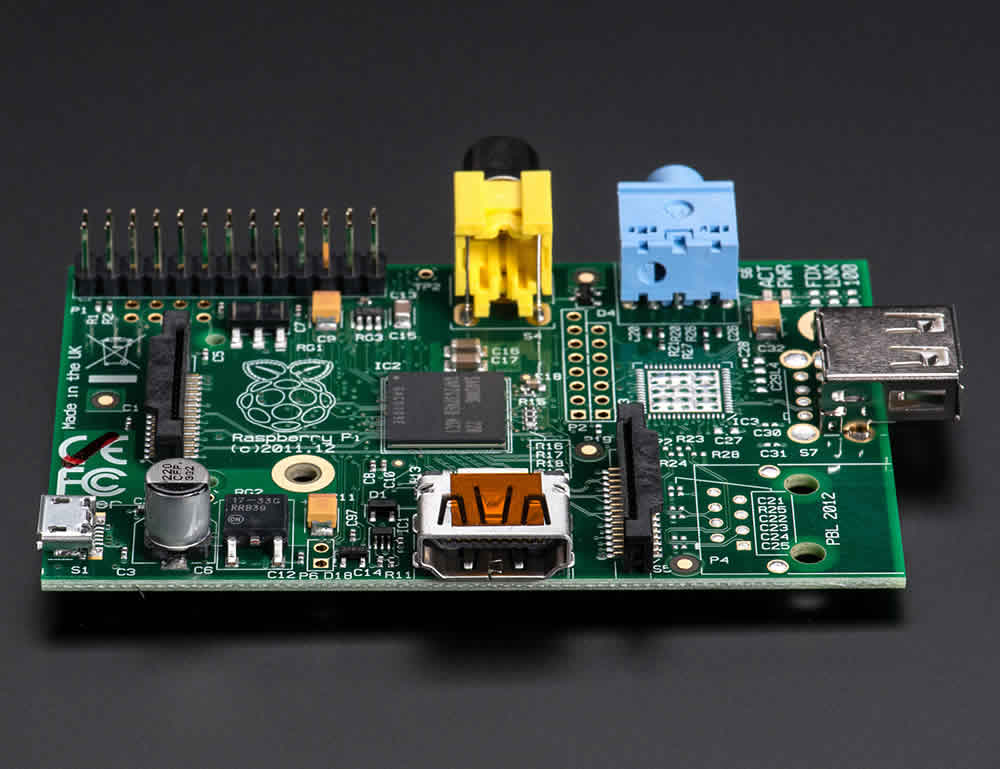 20 |
21 | ###### [Raspberry Pi](http://www.adafruit.com/products/1344), $29 on Adafruit.
22 |
23 | Make note of the fact that you actually don't see any of my connections on the top of the board (pictured below). In the below photo, where the Raspberry Pi is flipped vertically to show off the electrical connections, the monitor's composite cable and the motion detecting PIR sensor's red wires are soldered underneath.
24 |
25 |
20 |
21 | ###### [Raspberry Pi](http://www.adafruit.com/products/1344), $29 on Adafruit.
22 |
23 | Make note of the fact that you actually don't see any of my connections on the top of the board (pictured below). In the below photo, where the Raspberry Pi is flipped vertically to show off the electrical connections, the monitor's composite cable and the motion detecting PIR sensor's red wires are soldered underneath.
24 |
25 | 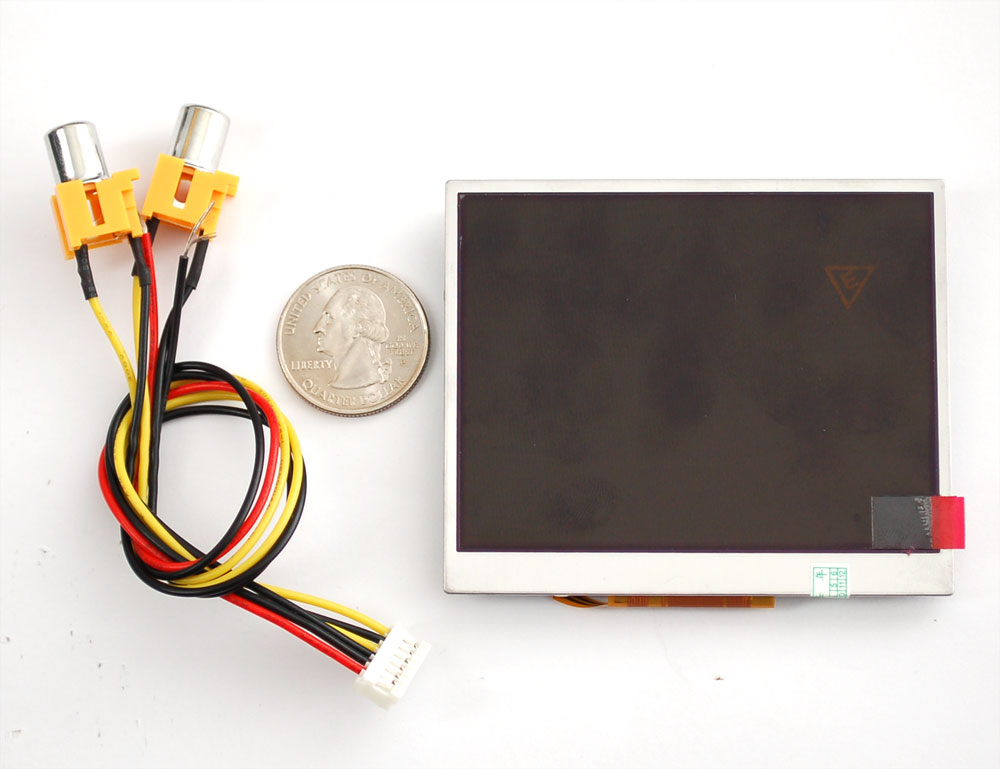 32 |
33 | ###### [3.5" LCD Monitor](http://www.adafruit.com/products/913), $45 on Adafruit
34 |
35 | Note that if you do not plan to solder the composite cable's two wires, you will need the ugly male-to-male adapter, sold for $1.50 on Adafruit.
36 |
37 | There are a number of different sized LCD monitors:
38 |
39 |
32 |
33 | ###### [3.5" LCD Monitor](http://www.adafruit.com/products/913), $45 on Adafruit
34 |
35 | Note that if you do not plan to solder the composite cable's two wires, you will need the ugly male-to-male adapter, sold for $1.50 on Adafruit.
36 |
37 | There are a number of different sized LCD monitors:
38 |
39 | 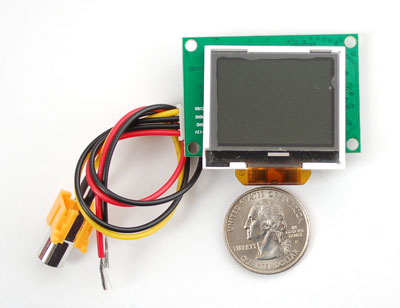
 68 |
68 | 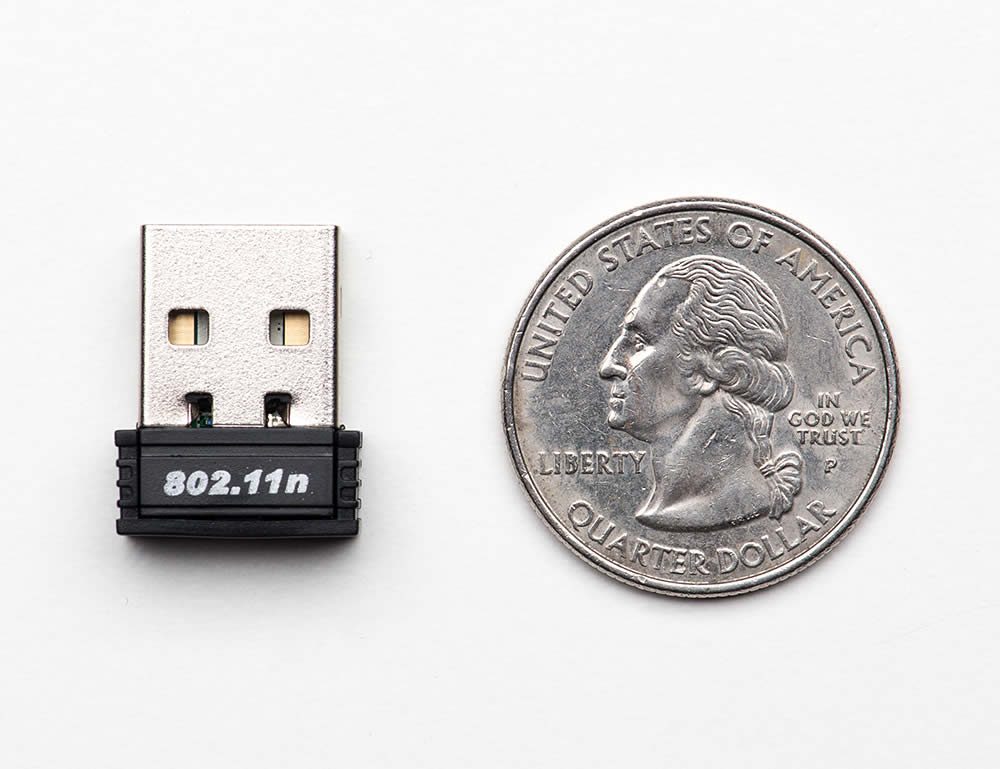 79 |
79 | 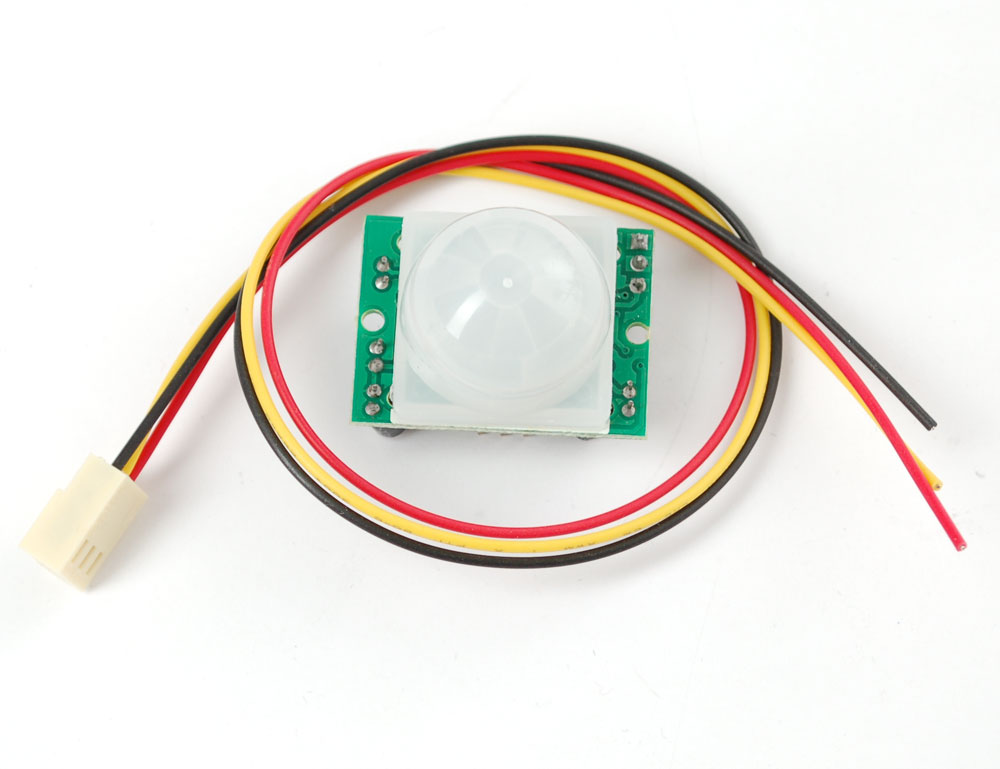 90 |
90 | 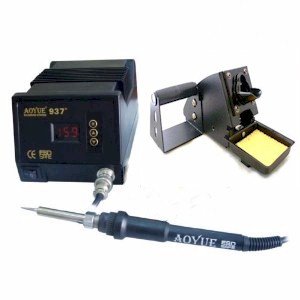 101 |
101 |  260 |
261 | And here's with margin correction on the monitor:
262 |
263 |
260 |
261 | And here's with margin correction on the monitor:
262 |
263 |