├── .ruby-version ├── CNAME ├── .ruby-gemset ├── .well-known └── appspecific │ └── com.chrome.devtools.json ├── .github └── CODEOWNERS ├── assets ├── css │ ├── docs.scss │ ├── tutorial.scss │ ├── community.scss │ └── styles.scss └── images │ ├── cover.jpg │ ├── tests.png │ ├── red-hat-logo.png │ ├── lambdatest-logo.png │ ├── scanapi-report.png │ ├── logo-white-on-transparent.png │ ├── tutorial │ ├── step03 │ │ ├── report-1.png │ │ ├── report-2.png │ │ └── report-3.png │ ├── step05 │ │ ├── report-1.png │ │ ├── report-2.png │ │ └── report-3.png │ ├── step06 │ │ ├── report-1.png │ │ └── report-2.png │ ├── step07 │ │ ├── report-1.png │ │ ├── report-2.png │ │ ├── report-3.png │ │ ├── report-4.png │ │ ├── report-5.png │ │ ├── report-6.png │ │ ├── report-7.png │ │ └── report-8.png │ ├── step11 │ │ └── report-1.png │ ├── step02 │ │ ├── registration.png │ │ ├── calculator-highlight.png │ │ └── registration-complete.png │ ├── step04 │ │ ├── report-tests.png │ │ └── report-tests-summary.png │ ├── step12 │ │ └── report-csv.png │ └── step13 │ │ ├── circleci-setup.png │ │ ├── circleci-workflow-1.png │ │ ├── circleci-workflow-2.png │ │ ├── circleci-workflow-3.png │ │ ├── github-action-overview.png │ │ ├── github-action-pipeline.png │ │ └── github-action-artifacts.png │ ├── twitter.svg │ ├── scanapi.svg │ ├── api.svg │ ├── git.svg │ ├── discord-logo.svg │ ├── github-logo.svg │ ├── confirm.svg │ └── dependency.svg ├── _data ├── doc_sections.yml └── navigation.yml ├── _config.yml ├── CODE_OF_CONDUCT.md ├── _layouts ├── community.html ├── docs.html ├── tutorial.html └── default.html ├── CONTRIBUTING.md ├── Gemfile ├── _sass ├── community.scss ├── docs.scss ├── tutorial.scss ├── syntax_highlight.scss ├── github.scss ├── _reset.scss └── _main.scss ├── _docs_v1 ├── specification │ ├── retry.md │ ├── custom_variables.md │ ├── environment_variables.md │ ├── python_code.md │ ├── chaining_requests.md │ ├── api_spec_in_multiple_files.md │ ├── api_specification_keys.md │ └── basic_structure.md └── configuration │ ├── config_file.md │ ├── scanapi_cli.md │ ├── hiding_sensitive_information.md │ └── custom_report.md ├── _tutorials ├── step01.md ├── step11.md ├── step06.md ├── step04.md ├── step12.md ├── step03.md ├── step10.md ├── step08.md ├── step05.md ├── step02.md ├── step09.md ├── step13.md └── step07.md ├── LICENSE ├── docs.md ├── .gitignore ├── README.md ├── Gemfile.lock ├── community.md ├── _includes ├── footer.html └── navigation.html └── index.html /.ruby-version: -------------------------------------------------------------------------------- 1 | 3.4.1 2 | -------------------------------------------------------------------------------- /CNAME: -------------------------------------------------------------------------------- 1 | scanapi.dev 2 | -------------------------------------------------------------------------------- /.ruby-gemset: -------------------------------------------------------------------------------- 1 | scanapi-website 2 | -------------------------------------------------------------------------------- /.well-known/appspecific/com.chrome.devtools.json: -------------------------------------------------------------------------------- 1 | {} 2 | -------------------------------------------------------------------------------- /.github/CODEOWNERS: -------------------------------------------------------------------------------- 1 | * @scanapi/core-team @scanapi/maintaners 2 | -------------------------------------------------------------------------------- /assets/css/docs.scss: -------------------------------------------------------------------------------- 1 | --- 2 | --- 3 | @import "syntax_highlight"; 4 | @import "github"; 5 | -------------------------------------------------------------------------------- /assets/css/tutorial.scss: -------------------------------------------------------------------------------- 1 | --- 2 | --- 3 | @import "syntax_highlight"; 4 | @import "github"; 5 | -------------------------------------------------------------------------------- /assets/images/cover.jpg: -------------------------------------------------------------------------------- https://raw.githubusercontent.com/scanapi/website/HEAD/assets/images/cover.jpg -------------------------------------------------------------------------------- /assets/images/tests.png: -------------------------------------------------------------------------------- https://raw.githubusercontent.com/scanapi/website/HEAD/assets/images/tests.png -------------------------------------------------------------------------------- /_data/doc_sections.yml: -------------------------------------------------------------------------------- 1 | - name: Getting Started 2 | - name: Specification 3 | - name: Configuration 4 | -------------------------------------------------------------------------------- /assets/css/community.scss: -------------------------------------------------------------------------------- 1 | --- 2 | --- 3 | 4 | @import "syntax_highlight"; 5 | @import "github"; 6 | -------------------------------------------------------------------------------- /assets/images/red-hat-logo.png: -------------------------------------------------------------------------------- https://raw.githubusercontent.com/scanapi/website/HEAD/assets/images/red-hat-logo.png -------------------------------------------------------------------------------- /assets/images/lambdatest-logo.png: -------------------------------------------------------------------------------- https://raw.githubusercontent.com/scanapi/website/HEAD/assets/images/lambdatest-logo.png -------------------------------------------------------------------------------- /assets/images/scanapi-report.png: -------------------------------------------------------------------------------- https://raw.githubusercontent.com/scanapi/website/HEAD/assets/images/scanapi-report.png -------------------------------------------------------------------------------- /assets/images/logo-white-on-transparent.png: -------------------------------------------------------------------------------- https://raw.githubusercontent.com/scanapi/website/HEAD/assets/images/logo-white-on-transparent.png -------------------------------------------------------------------------------- /assets/images/tutorial/step03/report-1.png: -------------------------------------------------------------------------------- https://raw.githubusercontent.com/scanapi/website/HEAD/assets/images/tutorial/step03/report-1.png -------------------------------------------------------------------------------- /assets/images/tutorial/step03/report-2.png: -------------------------------------------------------------------------------- https://raw.githubusercontent.com/scanapi/website/HEAD/assets/images/tutorial/step03/report-2.png -------------------------------------------------------------------------------- /assets/images/tutorial/step03/report-3.png: -------------------------------------------------------------------------------- https://raw.githubusercontent.com/scanapi/website/HEAD/assets/images/tutorial/step03/report-3.png -------------------------------------------------------------------------------- /assets/images/tutorial/step05/report-1.png: -------------------------------------------------------------------------------- https://raw.githubusercontent.com/scanapi/website/HEAD/assets/images/tutorial/step05/report-1.png -------------------------------------------------------------------------------- /assets/images/tutorial/step05/report-2.png: -------------------------------------------------------------------------------- https://raw.githubusercontent.com/scanapi/website/HEAD/assets/images/tutorial/step05/report-2.png -------------------------------------------------------------------------------- /assets/images/tutorial/step05/report-3.png: -------------------------------------------------------------------------------- https://raw.githubusercontent.com/scanapi/website/HEAD/assets/images/tutorial/step05/report-3.png -------------------------------------------------------------------------------- /assets/images/tutorial/step06/report-1.png: -------------------------------------------------------------------------------- https://raw.githubusercontent.com/scanapi/website/HEAD/assets/images/tutorial/step06/report-1.png -------------------------------------------------------------------------------- /assets/images/tutorial/step06/report-2.png: -------------------------------------------------------------------------------- https://raw.githubusercontent.com/scanapi/website/HEAD/assets/images/tutorial/step06/report-2.png -------------------------------------------------------------------------------- /assets/images/tutorial/step07/report-1.png: -------------------------------------------------------------------------------- https://raw.githubusercontent.com/scanapi/website/HEAD/assets/images/tutorial/step07/report-1.png -------------------------------------------------------------------------------- /assets/images/tutorial/step07/report-2.png: -------------------------------------------------------------------------------- https://raw.githubusercontent.com/scanapi/website/HEAD/assets/images/tutorial/step07/report-2.png -------------------------------------------------------------------------------- /assets/images/tutorial/step07/report-3.png: -------------------------------------------------------------------------------- https://raw.githubusercontent.com/scanapi/website/HEAD/assets/images/tutorial/step07/report-3.png -------------------------------------------------------------------------------- /assets/images/tutorial/step07/report-4.png: -------------------------------------------------------------------------------- https://raw.githubusercontent.com/scanapi/website/HEAD/assets/images/tutorial/step07/report-4.png -------------------------------------------------------------------------------- /assets/images/tutorial/step07/report-5.png: -------------------------------------------------------------------------------- https://raw.githubusercontent.com/scanapi/website/HEAD/assets/images/tutorial/step07/report-5.png -------------------------------------------------------------------------------- /assets/images/tutorial/step07/report-6.png: -------------------------------------------------------------------------------- https://raw.githubusercontent.com/scanapi/website/HEAD/assets/images/tutorial/step07/report-6.png -------------------------------------------------------------------------------- /assets/images/tutorial/step07/report-7.png: -------------------------------------------------------------------------------- https://raw.githubusercontent.com/scanapi/website/HEAD/assets/images/tutorial/step07/report-7.png -------------------------------------------------------------------------------- /assets/images/tutorial/step07/report-8.png: -------------------------------------------------------------------------------- https://raw.githubusercontent.com/scanapi/website/HEAD/assets/images/tutorial/step07/report-8.png -------------------------------------------------------------------------------- /assets/images/tutorial/step11/report-1.png: -------------------------------------------------------------------------------- https://raw.githubusercontent.com/scanapi/website/HEAD/assets/images/tutorial/step11/report-1.png -------------------------------------------------------------------------------- /assets/images/tutorial/step02/registration.png: -------------------------------------------------------------------------------- https://raw.githubusercontent.com/scanapi/website/HEAD/assets/images/tutorial/step02/registration.png -------------------------------------------------------------------------------- /assets/images/tutorial/step04/report-tests.png: -------------------------------------------------------------------------------- https://raw.githubusercontent.com/scanapi/website/HEAD/assets/images/tutorial/step04/report-tests.png -------------------------------------------------------------------------------- /assets/images/tutorial/step12/report-csv.png: -------------------------------------------------------------------------------- https://raw.githubusercontent.com/scanapi/website/HEAD/assets/images/tutorial/step12/report-csv.png -------------------------------------------------------------------------------- /assets/images/tutorial/step13/circleci-setup.png: -------------------------------------------------------------------------------- https://raw.githubusercontent.com/scanapi/website/HEAD/assets/images/tutorial/step13/circleci-setup.png -------------------------------------------------------------------------------- /assets/images/tutorial/step13/circleci-workflow-1.png: -------------------------------------------------------------------------------- https://raw.githubusercontent.com/scanapi/website/HEAD/assets/images/tutorial/step13/circleci-workflow-1.png -------------------------------------------------------------------------------- /assets/images/tutorial/step13/circleci-workflow-2.png: -------------------------------------------------------------------------------- https://raw.githubusercontent.com/scanapi/website/HEAD/assets/images/tutorial/step13/circleci-workflow-2.png -------------------------------------------------------------------------------- /assets/images/tutorial/step13/circleci-workflow-3.png: -------------------------------------------------------------------------------- https://raw.githubusercontent.com/scanapi/website/HEAD/assets/images/tutorial/step13/circleci-workflow-3.png -------------------------------------------------------------------------------- /assets/images/tutorial/step02/calculator-highlight.png: -------------------------------------------------------------------------------- https://raw.githubusercontent.com/scanapi/website/HEAD/assets/images/tutorial/step02/calculator-highlight.png -------------------------------------------------------------------------------- /assets/images/tutorial/step02/registration-complete.png: -------------------------------------------------------------------------------- https://raw.githubusercontent.com/scanapi/website/HEAD/assets/images/tutorial/step02/registration-complete.png -------------------------------------------------------------------------------- /assets/images/tutorial/step04/report-tests-summary.png: -------------------------------------------------------------------------------- https://raw.githubusercontent.com/scanapi/website/HEAD/assets/images/tutorial/step04/report-tests-summary.png -------------------------------------------------------------------------------- /assets/images/tutorial/step13/github-action-overview.png: -------------------------------------------------------------------------------- https://raw.githubusercontent.com/scanapi/website/HEAD/assets/images/tutorial/step13/github-action-overview.png -------------------------------------------------------------------------------- /assets/images/tutorial/step13/github-action-pipeline.png: -------------------------------------------------------------------------------- https://raw.githubusercontent.com/scanapi/website/HEAD/assets/images/tutorial/step13/github-action-pipeline.png -------------------------------------------------------------------------------- /assets/images/tutorial/step13/github-action-artifacts.png: -------------------------------------------------------------------------------- https://raw.githubusercontent.com/scanapi/website/HEAD/assets/images/tutorial/step13/github-action-artifacts.png -------------------------------------------------------------------------------- /_data/navigation.yml: -------------------------------------------------------------------------------- 1 | - name: Home 2 | link: / 3 | - name: Docs 4 | link: /docs.html 5 | - name: Tutorial 6 | link: /tutorials/step01.html 7 | - name: Community 8 | link: /community.html 9 | -------------------------------------------------------------------------------- /_config.yml: -------------------------------------------------------------------------------- 1 | collections: 2 | tutorials: 3 | output: true 4 | docs_v1: 5 | output: true 6 | 7 | markdown: kramdown 8 | 9 | kramdown: 10 | input: GFM 11 | syntax_highlighter: rouge 12 | 13 | sass: 14 | quiet_deps: true 15 | -------------------------------------------------------------------------------- /CODE_OF_CONDUCT.md: -------------------------------------------------------------------------------- 1 | # Contributor Code of Conduct 2 | 3 | As one of the repositories under the `scanapi` GitHub organization, this repository follows the 4 | [ScanAPI Code of Conduct](https://github.com/scanapi/contributors/blob/main/CODE_OF_CONDUCT.md). 5 | -------------------------------------------------------------------------------- /_layouts/community.html: -------------------------------------------------------------------------------- 1 | --- 2 | layout: default 3 | title: ScanAPI - Community 4 | --- 5 | 6 | 10 |
11 |
{{ content }}
12 |
13 | -------------------------------------------------------------------------------- /CONTRIBUTING.md: -------------------------------------------------------------------------------- 1 | # Contributing 2 | 3 | Thanks for taking the time to contribute! 🙇‍♀️🙇‍♂️ Every little bit of help counts! 4 | 5 | As one of the repositories under the `scanapi` GitHub organization, this repository follows the 6 | [ScanAPI Contributing Guideline](https://github.com/scanapi/contributors/blob/main/CONTRIBUTING.md). 7 | -------------------------------------------------------------------------------- /Gemfile: -------------------------------------------------------------------------------- 1 | # frozen_string_literal: true 2 | source "https://rubygems.org" 3 | 4 | gem "jekyll", "4.3.3" # versão estável sem nativos problemáticos 5 | gem "webrick", "~> 1.9" # já instalado 6 | gem "jekyll-sass-converter", "~> 3.1" # já instalado 7 | gem "sass-embedded" # substitui sassc 8 | gem "csv", "~> 3.3" 9 | gem "base64" 10 | gem "sassc" 11 | -------------------------------------------------------------------------------- /_sass/community.scss: -------------------------------------------------------------------------------- 1 | @import 'main'; 2 | 3 | .community { 4 | width: 100%; 5 | display: flex; 6 | min-height: 100vh; 7 | padding: 20px; 8 | 9 | .main { 10 | width: 100%; 11 | iframe { 12 | width: 420px; 13 | height: 315px; 14 | } 15 | } 16 | } 17 | 18 | @media (max-width: $screen-sm) { 19 | .community { 20 | .main { 21 | iframe { 22 | width: 100%; 23 | } 24 | } 25 | } 26 | } 27 | -------------------------------------------------------------------------------- /_docs_v1/specification/retry.md: -------------------------------------------------------------------------------- 1 | --- 2 | layout: docs 3 | title: ScanAPI - Documentation 4 | 5 | page_name: Retry 6 | active_page: retry 7 | 8 | section: Specification 9 | index: 7 10 | --- 11 | 12 | # Retry 13 | 14 | You can define a retry configuration for a request. 15 | 16 | ```yaml 17 | requests: 18 | - name: my_request 19 | path: path/to/request 20 | retry: 21 | max_retries: 3 22 | ``` 23 | 24 | This means that ScanAPI will try a maximum of 3 times to make the request before it is permanently 25 | failed. 26 | -------------------------------------------------------------------------------- /_docs_v1/specification/custom_variables.md: -------------------------------------------------------------------------------- 1 | --- 2 | layout: docs 3 | title: ScanAPI - Documentation 4 | 5 | page_name: Custom Variables 6 | active_page: custom_variables 7 | 8 | section: Specification 9 | index: 4 10 | --- 11 | 12 | # Custom Variables 13 | 14 | You can create custom variables using the syntax: 15 | 16 | ```yaml 17 | requests: 18 | - name: my_request 19 | ... 20 | vars: 21 | my_variable_name: my_variable_value 22 | ``` 23 | 24 | And in the next requests you can access them using the syntax: 25 | 26 | 27 | ```yaml 28 | ${my_variable_name} 29 | ``` 30 | -------------------------------------------------------------------------------- /_docs_v1/configuration/config_file.md: -------------------------------------------------------------------------------- 1 | --- 2 | layout: docs 3 | title: ScanAPI - Documentation 4 | 5 | page_name: Configuration File 6 | active_page: config_file 7 | 8 | section: Configuration 9 | index: 1 10 | --- 11 | 12 | # Configuration File 13 | 14 | If you want to configure the ScanAPI with a file, you can create a local `scanapi.conf` file where you are running the ScanAPI CLI or a global `scanapi.conf` file following the XDG Base Directory Specification. 15 | 16 | ```yaml 17 | project_name: DemoAPI # This will be rendered in the Report Title. 18 | spec_path: my_path/scanapi.yaml # API specification file path 19 | output_path: my_path/my-report.html # Report output path. 20 | template: my_template.jinja # Custom report template path. 21 | ``` 22 | -------------------------------------------------------------------------------- /_docs_v1/specification/environment_variables.md: -------------------------------------------------------------------------------- 1 | --- 2 | layout: docs 3 | title: ScanAPI - Documentation 4 | 5 | page_name: Environment Variables 6 | active_page: environment_variables 7 | 8 | section: Specification 9 | index: 3 10 | --- 11 | 12 | # Environment Variables 13 | 14 | You can use environment variables in your API spec file with the syntax 15 | 16 | ```yaml 17 | ${MY_ENV_VAR} 18 | ``` 19 | 20 | For example: 21 | 22 | ```bash 23 | $ export BASE_URL="http://demo.scanapi.dev/api/" 24 | ``` 25 | 26 | ```yaml 27 | endpoints: 28 | - name: scanapi-demo 29 | path: ${BASE_URL} 30 | requests: 31 | - name: health 32 | method: get 33 | path: /health/ 34 | ``` 35 | 36 | ScanAPI would call the following `http://demo.scanapi.dev/api/health/` then. 37 | 38 | **Heads up: the variable name must be in upper case.** 39 | -------------------------------------------------------------------------------- /_docs_v1/configuration/scanapi_cli.md: -------------------------------------------------------------------------------- 1 | --- 2 | layout: docs 3 | title: ScanAPI - Documentation 4 | 5 | page_name: Command Line Interface - CLI 6 | active_page: scanapi_cli 7 | 8 | section: Configuration 9 | index: 0 10 | --- 11 | 12 | # Command Line Interface - CLI 13 | 14 | ``` 15 | $ scanapi run --help 16 | Usage: scanapi run [OPTIONS] [SPEC_PATH] 17 | 18 | Automated Testing and Documentation for your REST API. SPEC_PATH argument 19 | is the API specification file path. 20 | 21 | Options: 22 | -o, --output-path PATH Report output path. 23 | -c, --config-path PATH Configuration file path. 24 | -t, --template PATH Custom report template path. 25 | -ll, --log-level [DEBUG|INFO|WARNING|ERROR|CRITICAL] 26 | Set the debug logging level for the program. 27 | -h, --help Show this message and exit. 28 | ``` 29 | -------------------------------------------------------------------------------- /_docs_v1/configuration/hiding_sensitive_information.md: -------------------------------------------------------------------------------- 1 | --- 2 | layout: docs 3 | title: ScanAPI - Documentation 4 | 5 | page_name: Hiding Sensitive Information 6 | active_page: hiding_sensitive_information 7 | 8 | section: Configuration 9 | index: 2 10 | --- 11 | 12 | # Hiding Sensitive Information 13 | 14 | If you want to omit sensitive information in the report, you can configure it in the `scanapi.conf` 15 | file. 16 | 17 | ```yaml 18 | report: 19 | hide_request: 20 | headers: 21 | - Authorization 22 | ``` 23 | 24 | The following configuration will print all the headers values for the `Authorization` key for all 25 | the request as `SENSITIVE_INFORMATION` in the report. 26 | 27 | In the same way you can omit sensitive information from response. 28 | 29 | ```yaml 30 | report: 31 | hide_response: 32 | headers: 33 | - Authorization 34 | ``` 35 | 36 | Available attributes to hide: `headers`, `params`, `body`, and `url`. 37 | -------------------------------------------------------------------------------- /_docs_v1/specification/python_code.md: -------------------------------------------------------------------------------- 1 | --- 2 | layout: docs 3 | title: ScanAPI - Documentation 4 | 5 | page_name: Python Code 6 | active_page: python_code 7 | 8 | section: Specification 9 | index: 2 10 | --- 11 | 12 | # Python Code 13 | 14 | You can add Python code to the API specification by using the syntax: 15 | 16 | ```yaml 17 | {% raw %} ${{my_python_code}} {% endraw %} 18 | ``` 19 | 20 | For example 21 | 22 | ```yaml 23 | body: 24 | uuid: 5c5af4f2-2265-4e6c-94b4-d681c1648c38 25 | name: Tarik 26 | yearsOfExperience: {% raw %} ${{2 + 5}} {% endraw %} 27 | languages: 28 | - ruby 29 | go 30 | newOpportunities: false 31 | ``` 32 | 33 | What I can use inside the {% raw %} `${{ }}` {% endraw %} syntax? 34 | Any python code that **can run inside an `eval` python command**. 35 | A short list of modules will be already available for you. They are all the imports of 36 | [this file](https://github.com/scanapi/scanapi/blob/main/scanapi/evaluators/code_evaluator.py#L1). 37 | -------------------------------------------------------------------------------- /_tutorials/step01.md: -------------------------------------------------------------------------------- 1 | --- 2 | layout: tutorial 3 | title: Setup 4 | --- 5 | 6 | # Setup 7 | 8 | Welcome to ScanAPI's tutorial! This tutorial will guide you on how to test and document an API using 9 | ScanAPI. 10 | 11 | ## Installation 12 | 13 | ScanAPI is a Python library. For installing ScanAPI, you will need: 14 | 15 | - \- [python][python] version 3.7 or higher 16 | - \- [pip][pip-installation], the standard package manager for Python 17 | 18 | If you are new to the Python world, no worries, this 19 | [Installation & Setup Guide][realpython-setup-guide] can help you with more detailed instructions. 20 | 21 | With Python and pip installed, install ScanAPI from the terminal: 22 | 23 | ```shell 24 | $ pip install scanapi 25 | ``` 26 | 27 | Check that ScanAPI is installed properly: 28 | 29 | ```shell 30 | $ scanapi --version 31 | scanapi, version 2.8.0 32 | ``` 33 | 34 | The output should return a version equal to 2.8.0 or higher. 35 | 36 | [pip-installation]: https://pip.pypa.io/en/stable/installing/ 37 | [python]: https://www.python.org/ 38 | [realpython-setup-guide]: https://realpython.com/installing-python/ 39 | -------------------------------------------------------------------------------- /LICENSE: -------------------------------------------------------------------------------- 1 | MIT License 2 | 3 | Copyright (c) 2020 ScanAPI 4 | 5 | Permission is hereby granted, free of charge, to any person obtaining a copy 6 | of this software and associated documentation files (the "Software"), to deal 7 | in the Software without restriction, including without limitation the rights 8 | to use, copy, modify, merge, publish, distribute, sublicense, and/or sell 9 | copies of the Software, and to permit persons to whom the Software is 10 | furnished to do so, subject to the following conditions: 11 | 12 | The above copyright notice and this permission notice shall be included in all 13 | copies or substantial portions of the Software. 14 | 15 | THE SOFTWARE IS PROVIDED "AS IS", WITHOUT WARRANTY OF ANY KIND, EXPRESS OR 16 | IMPLIED, INCLUDING BUT NOT LIMITED TO THE WARRANTIES OF MERCHANTABILITY, 17 | FITNESS FOR A PARTICULAR PURPOSE AND NONINFRINGEMENT. IN NO EVENT SHALL THE 18 | AUTHORS OR COPYRIGHT HOLDERS BE LIABLE FOR ANY CLAIM, DAMAGES OR OTHER 19 | LIABILITY, WHETHER IN AN ACTION OF CONTRACT, TORT OR OTHERWISE, ARISING FROM, 20 | OUT OF OR IN CONNECTION WITH THE SOFTWARE OR THE USE OR OTHER DEALINGS IN THE 21 | SOFTWARE. 22 | -------------------------------------------------------------------------------- /_layouts/docs.html: -------------------------------------------------------------------------------- 1 | --- 2 | layout: default 3 | title: ScanAPI - Documentation 4 | --- 5 | 6 | 7 |
8 |
9 | {% assign docs_pages = site.pages | where: "page_name","Quick Start" %} 10 | {% assign docs_pages = docs_pages | concat: site.docs_v1 %} 11 | {% assign sections = site.data.doc_sections %} 12 | 13 | {% for section in sections %} 14 |

{{section.name}}

15 | {% assign docs = docs_pages | where: "section",section.name %} 16 | {% assign docs = docs | sort: "index" %} 17 | {% for doc in docs %} 18 | 23 | {{ doc.page_name }} 24 | 25 | {% endfor %} 26 | {% endfor %} 27 |
28 | 29 | 30 |
31 | {{ content }} 32 |
33 |
34 | -------------------------------------------------------------------------------- /_layouts/tutorial.html: -------------------------------------------------------------------------------- 1 | --- 2 | layout: default 3 | title: Tutorial 4 | --- 5 | 6 |
7 |
8 | {% for tutorial_page in site.tutorials %} 9 | 14 | {{ tutorial_page.title }} 15 | 16 | {% endfor %} 17 |
18 | 19 |
20 | {{ content }} 21 | 31 |
32 |
33 | -------------------------------------------------------------------------------- /_sass/docs.scss: -------------------------------------------------------------------------------- 1 | @import 'main'; 2 | 3 | .docs { 4 | width: 100%; 5 | display: flex; 6 | min-height: 100vh; 7 | .sidenav { 8 | display: flex; 9 | flex-direction: column; 10 | width: 300px; 11 | margin: 30px 40px 20px 50px; 12 | padding-right: 10px; 13 | text-align: right; 14 | border-right: solid 1px #ccc; 15 | a { 16 | text-decoration: none; 17 | color: $darker-color; 18 | padding-bottom: 20px; 19 | } 20 | a:hover { 21 | opacity: 0.6; 22 | } 23 | .current { 24 | color: $primary-color; 25 | } 26 | h2 { 27 | text-transform: uppercase; 28 | font-size: 18px; 29 | } 30 | } 31 | .main { 32 | width: 100%; 33 | margin: 20px 40px 20px 0; 34 | } 35 | } 36 | 37 | @media (max-width: $screen-md) { 38 | .docs { 39 | flex-direction: column; 40 | padding: 10px; 41 | 42 | .sidenav { 43 | width: auto; 44 | margin: 0; 45 | padding: 10px; 46 | text-align: left; 47 | border: solid 1px #ccc; 48 | 49 | a { 50 | padding-bottom: 10px; 51 | } 52 | } 53 | } 54 | } 55 | -------------------------------------------------------------------------------- /_tutorials/step11.md: -------------------------------------------------------------------------------- 1 | --- 2 | layout: tutorial 3 | title: Project Name 4 | --- 5 | 6 | # Project Name 7 | 8 | You can add a title to your report, this way you can easily differentiate reports from different 9 | APIs. To do so, we need to set the `project_name` in the configuration file `scanapi.conf`: 10 | 11 | ```yaml 12 | project_name: Snippets API 13 | ``` 14 | 15 | Putting it all together: 16 | 17 | ```yaml 18 | project_name: Snippets API 19 | report: 20 | hide_request: 21 | body: 22 | - password 23 | headers: 24 | - Authorization 25 | hide_response: 26 | body: 27 | - key 28 | ``` 29 | 30 | Run ScanAPI again and reload the report: 31 | 32 | ```shell 33 | $ scanapi run 34 | ``` 35 | 36 |

37 | Report overview - project name 42 |

43 | 44 | You can check all the possible settings you can set for your project at our 45 | [Configuration File Doc][doc-config-file]. 46 | 47 | Ok, but what if you don't like the style of our report? Or if some information you'd like to see is 48 | missing? Or even if you need the report in another format other than html? Don't worry, let's see 49 | how can you create your own ScanAPI report. 50 | 51 | [doc-config-file]: /docs_v1/configuration/config_file.html 52 | -------------------------------------------------------------------------------- /_tutorials/step06.md: -------------------------------------------------------------------------------- 1 | --- 2 | layout: tutorial 3 | title: Hide Info 4 | --- 5 | 6 | # Hiding Sensitive Information 7 | 8 | We need to configure ScanAPI in order to 9 | [hide the sensitive information][docs-hide-sensitive-info] of `/login` in our report. 10 | Create a configuration file `scanapi.conf` in root directory with the following content: 11 | 12 | ```yaml 13 | report: 14 | hide_request: 15 | body: 16 | - password 17 | hide_response: 18 | body: 19 | - key 20 | ``` 21 | 22 | The folder structure should look like this now: 23 | 24 | ``` 25 | - scanapi (root directory) 26 | |── .env 27 | |── scanapi-report.html 28 | |── scanapi.conf 29 | |___ scanapi.yaml 30 | ``` 31 | 32 | Let's run ScanAPI again and reload the report: 33 | 34 | ```shell 35 | $ scanapi run 36 | ``` 37 | 38 |

39 | Hidden Credentials 44 |

45 | 46 |

47 | Hidden key 52 |

53 | 54 | Note that all sensitive fields are properly hidden now. Great, so let's make some authenticated 55 | requests using the **Authentication Token** you received in the `/login` response. 56 | 57 | [docs-hide-sensitive-info]: /docs_v1/configuration/hiding_sensitive_information.html 58 | -------------------------------------------------------------------------------- /_docs_v1/specification/chaining_requests.md: -------------------------------------------------------------------------------- 1 | --- 2 | layout: docs 3 | title: ScanAPI - Documentation 4 | 5 | page_name: Chaining Requests 6 | active_page: chaining_requests 7 | 8 | section: Specification 9 | index: 5 10 | --- 11 | 12 | # Chaining Requests 13 | 14 | Inside the request scope, you can save the results of the response to use in the next 15 | requests. For example: 16 | 17 | ```yaml 18 | requests: 19 | - name: list_all 20 | method: get 21 | vars: 22 | dev_id: {% raw %} ${{response.json()[2]["uuid"]}} {% endraw %} 23 | ``` 24 | 25 | The dev_id variable will receive the `uuid` value of the 3rd result from the devs_list_all request 26 | 27 | If the response is 28 | 29 | ```json 30 | [ 31 | { 32 | "uuid": "68af402f-1084-40a4-b9b2-6bb5c2d11559", 33 | "name": "Anna", 34 | "yearsOfExperience": 5, 35 | "languages": [ 36 | "python", 37 | "c" 38 | ], 39 | "newOpportunities": true 40 | }, 41 | { 42 | "uuid": "0d1bd106-c585-4d6b-b3a4-d72dedf7190e", 43 | "name": "Louis", 44 | "yearsOfExperience": 3, 45 | "languages": [ 46 | "java" 47 | ], 48 | "newOpportunities": true 49 | }, 50 | { 51 | "uuid": "129e8cb2-d19c-41ad-9921-cea329bed7f0", 52 | "name": "Marcus", 53 | "yearsOfExperience": 4, 54 | "languages": [ 55 | "c" 56 | ], 57 | "newOpportunities": false 58 | } 59 | ] 60 | ``` 61 | 62 | The dev_id variable will receive the value `129e8cb2-d19c-41ad-9921-cea329bed7f0` 63 | -------------------------------------------------------------------------------- /_docs_v1/specification/api_spec_in_multiple_files.md: -------------------------------------------------------------------------------- 1 | --- 2 | layout: docs 3 | title: ScanAPI - Documentation 4 | 5 | page_name: API Specification in Multiple Files 6 | active_page: api_spec_in_multiple_files 7 | 8 | section: Specification 9 | index: 6 10 | --- 11 | 12 | # API Specification in Multiple Files 13 | 14 | With `!include`, it is possible to build your API specification in multiple files. 15 | 16 | For example, these two files 17 | 18 | ```yaml 19 | # scanapi.yaml 20 | endpoints: 21 | - name: scanapi-demo 22 | path: ${BASE_URL} 23 | requests: !include include.yaml 24 | ``` 25 | 26 | ```yaml 27 | # include.yaml 28 | - name: health 29 | path: /health/ 30 | ``` 31 | 32 | would generate: 33 | 34 | ```yaml 35 | endpoints: 36 | - name: scanapi-demo 37 | path: ${BASE_URL} 38 | requests: 39 | - name: health 40 | path: /health/ 41 | ``` 42 | 43 | The same works for JSON specifications: 44 | 45 | ```jsonc 46 | // scanapi.json 47 | { 48 | "endpoints": [ 49 | { 50 | "name": "scanapi-demo", 51 | "path": "${BASE_URL}", 52 | "requests": !include include.json 53 | } 54 | ] 55 | } 56 | ``` 57 | 58 | ```jsonc 59 | // include.json 60 | [ 61 | { 62 | "name": "health", 63 | "path": "/health/" 64 | } 65 | ] 66 | ``` 67 | 68 | would generate: 69 | 70 | ```json 71 | { 72 | "endpoints": [ 73 | { 74 | "name": "scanapi-demo", 75 | "path": "${BASE_URL}", 76 | "requests": [ 77 | { 78 | "name": "health", 79 | "path": "/health/" 80 | } 81 | ] 82 | } 83 | ] 84 | } 85 | ``` 86 | -------------------------------------------------------------------------------- /assets/images/twitter.svg: -------------------------------------------------------------------------------- 1 | 2 | 3 | 5 | 6 | 7 | 15 | 16 | 17 | 18 | 19 | 20 | 21 | 22 | 23 | 24 | 25 | 26 | 27 | 28 | 29 | 30 | 31 | 32 | 33 | 34 | 35 | 36 | 37 | 38 | 39 | 40 | 41 | 42 | 43 | 44 | 45 | 46 | 47 | 48 | -------------------------------------------------------------------------------- /_layouts/default.html: -------------------------------------------------------------------------------- 1 | 2 | 6 | 7 | 8 | 9 | 10 | {{ page.title }} 11 | 13 | 14 | 15 | 16 | 17 | 18 | 19 | 20 | 21 | 22 | 26 | 35 | 36 | 37 | {% include navigation.html %} 38 | 39 |
{{ content }}
40 | {% include footer.html %} 41 | 42 | 43 | -------------------------------------------------------------------------------- /_sass/tutorial.scss: -------------------------------------------------------------------------------- 1 | @import 'main'; 2 | 3 | .tutorial { 4 | width: 100%; 5 | display: flex; 6 | min-height: 100vh; 7 | 8 | .sidenav { 9 | display: flex; 10 | flex-direction: column; 11 | width: 300px; 12 | margin: 30px 40px 20px 50px; 13 | padding-right: 10px; 14 | text-align: right; 15 | border-right: solid 1px #ccc; 16 | a { 17 | text-decoration: none; 18 | color: $darker-color; 19 | padding-bottom: 20px; 20 | font-weight: bold; 21 | } 22 | a:hover { 23 | opacity: 0.6; 24 | } 25 | .current { 26 | color: $primary-color; 27 | } 28 | } 29 | 30 | .main { 31 | width: 100%; 32 | margin: 20px 40px 20px 0; 33 | .pagination { 34 | display: flex; 35 | justify-content: space-between; 36 | font-size: 20px; 37 | a { 38 | img { 39 | width: 25px; 40 | } 41 | img.previous { 42 | transform: rotate(180deg); 43 | } 44 | } 45 | a:hover { 46 | color: $primary-color; 47 | } 48 | } 49 | } 50 | } 51 | 52 | @media (max-width: $screen-md) { 53 | .tutorial { 54 | flex-direction: column-reverse; 55 | padding: 10px; 56 | min-height: auto; 57 | 58 | .sidenav { 59 | width: auto; 60 | margin: 0; 61 | padding: 10px; 62 | text-align: left; 63 | border: solid 1px #ccc; 64 | 65 | a { 66 | padding-bottom: 10px; 67 | } 68 | } 69 | 70 | .main { 71 | .pagination { 72 | font-size: 16px; 73 | a { 74 | img { 75 | width: 18px; 76 | } 77 | } 78 | } 79 | } 80 | } 81 | } 82 | -------------------------------------------------------------------------------- /docs.md: -------------------------------------------------------------------------------- 1 | --- 2 | layout: docs 3 | title: ScanAPI - Documentation 4 | 5 | page_name: Quick Start 6 | active_page: quick_start 7 | 8 | section: Getting Started 9 | index: 0 10 | --- 11 | 12 | # Quick Start 13 | 14 | ## Requirements 15 | 16 | - [pip][pip-installation] 17 | 18 | ## How to install 19 | 20 | ```bash 21 | $ pip install scanapi 22 | ``` 23 | 24 | ## Basic Usage 25 | 26 | You will need to write the API's specification and save it as a **YAML** or **JSON** file. 27 | For example: 28 | 29 | ```yaml 30 | endpoints: 31 | - name: scanapi-demo # The API's name of your API 32 | path: http://demo.scanapi.dev/api/v1 # The API's base url 33 | requests: 34 | - name: list_all_users # The name of the first request 35 | path: users/ # The path of the first request 36 | method: get # The HTTP method of the first request 37 | tests: 38 | - name: status_code_is_200 # The name of the first test for this request 39 | assert: ${{ response.status_code == 200 }} # The assertion 40 | ``` 41 | 42 | And run the scanapi command 43 | 44 | ```bash 45 | $ scanapi run 46 | ``` 47 | 48 | Then, the lib will hit the specified endpoints and generate a `scanapi-report.html` file with the report results. 49 | 50 |

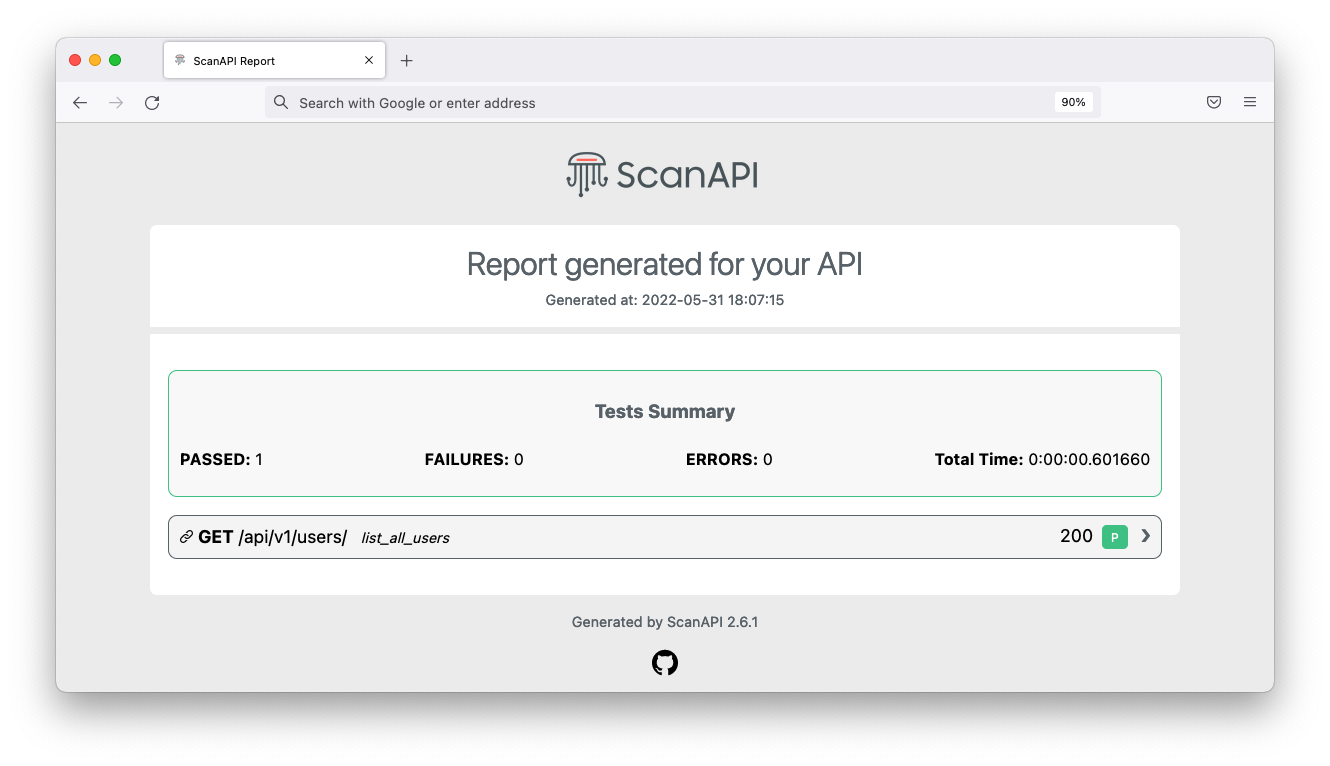
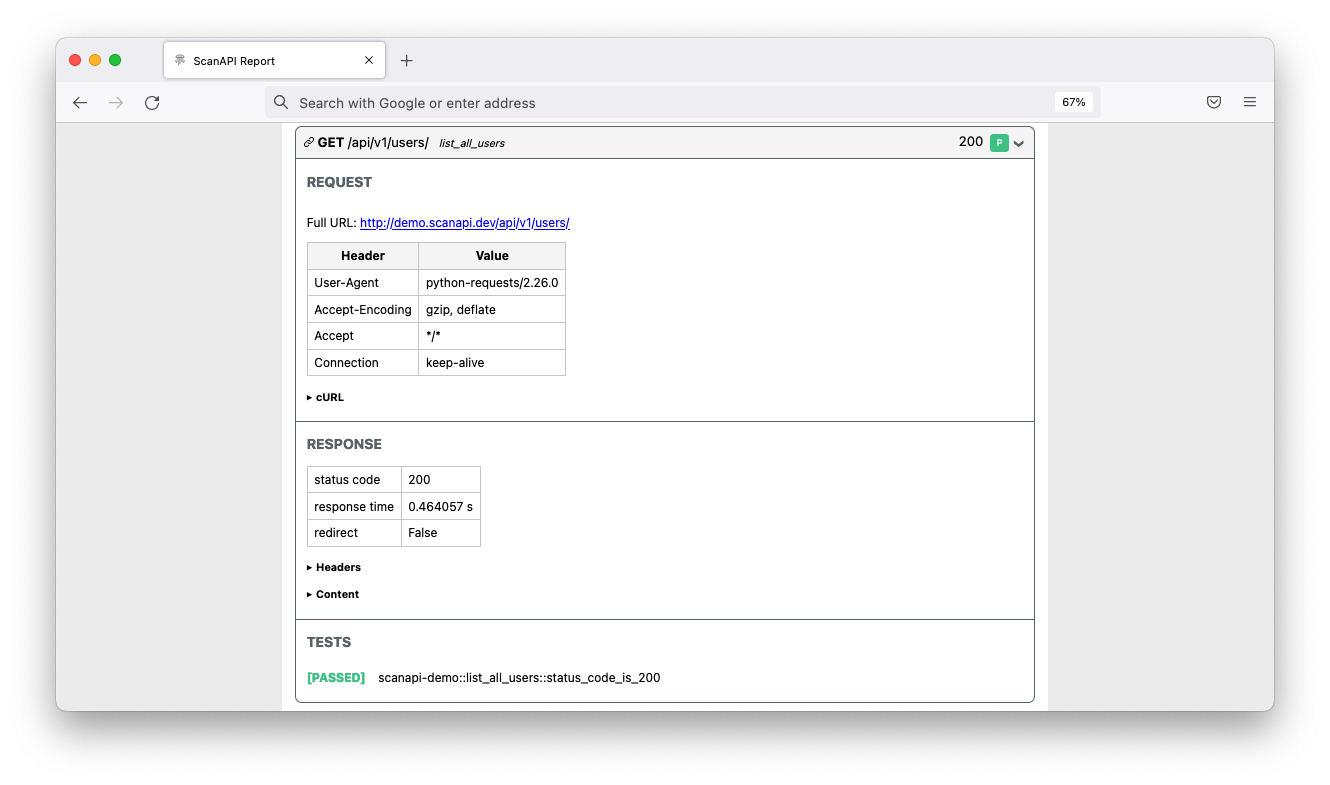
51 | An overview screenshot of the report. 56 | A screenshot of the report showing the request details. 61 |

62 | 63 | [pip-installation]: https://pip.pypa.io/en/stable/installing/ 64 | -------------------------------------------------------------------------------- /.gitignore: -------------------------------------------------------------------------------- 1 | _site/ 2 | .sass-cache/ 3 | .jekyll-cache/ 4 | .jekyll-metadata 5 | 6 | # Created by https://www.gitignore.io/api/ruby,jekyll 7 | # Edit at https://www.gitignore.io/?templates=ruby,jekyll 8 | 9 | ### Jekyll ### 10 | _site/ 11 | .sass-cache/ 12 | .jekyll-cache/ 13 | .jekyll-metadata 14 | 15 | ### Ruby ### 16 | *.gem 17 | *.rbc 18 | /.config 19 | /coverage/ 20 | /InstalledFiles 21 | /pkg/ 22 | /spec/reports/ 23 | /spec/examples.txt 24 | /test/tmp/ 25 | /test/version_tmp/ 26 | /tmp/ 27 | 28 | # Used by dotenv library to load environment variables. 29 | # .env 30 | 31 | # Ignore Byebug command history file. 32 | .byebug_history 33 | 34 | ## Specific to RubyMotion: 35 | .dat* 36 | .repl_history 37 | build/ 38 | *.bridgesupport 39 | build-iPhoneOS/ 40 | build-iPhoneSimulator/ 41 | 42 | ## Specific to RubyMotion (use of CocoaPods): 43 | # 44 | # We recommend against adding the Pods directory to your .gitignore. However 45 | # you should judge for yourself, the pros and cons are mentioned at: 46 | # https://guides.cocoapods.org/using/using-cocoapods.html#should-i-check-the-pods-directory-into-source-control 47 | # vendor/Pods/ 48 | 49 | ## Documentation cache and generated files: 50 | /.yardoc/ 51 | /_yardoc/ 52 | /doc/ 53 | /rdoc/ 54 | 55 | ## Environment normalization: 56 | /.bundle/ 57 | /vendor/bundle 58 | /lib/bundler/man/ 59 | 60 | # for a library or gem, you might want to ignore these files since the code is 61 | # intended to run in multiple environments; otherwise, check them in: 62 | # Gemfile.lock 63 | # .ruby-version 64 | # .ruby-gemset 65 | 66 | # unless supporting rvm < 1.11.0 or doing something fancy, ignore this: 67 | .rvmrc 68 | 69 | ### Ruby Patch ### 70 | # Used by RuboCop. Remote config files pulled in from inherit_from directive. 71 | # .rubocop-https?--* 72 | 73 | # End of https://www.gitignore.io/api/ruby,jekyll 74 | 75 | .idea/ 76 | -------------------------------------------------------------------------------- /assets/images/scanapi.svg: -------------------------------------------------------------------------------- 1 | 2 | 3 | 4 | 5 | 6 | 7 | 8 | 9 | 10 | 11 | 12 | 13 | 14 | 15 | 16 | 17 | -------------------------------------------------------------------------------- /README.md: -------------------------------------------------------------------------------- 1 | ![](https://github.com/scanapi/design/raw/main/images/github-hero-dark.png) 2 | [![Netlify Status](https://api.netlify.com/api/v1/badges/54affc49-c5e1-472b-b8b9-174d3300ee8a/deploy-status)](https://app.netlify.com/sites/gracious-cray-a1ce6a/deploys) 3 | 4 | # ScanAPI Website 5 | 6 | Website for [ScanAPI](https://github.com/scanapi/scanapi) testing framework. 7 | 8 | Available at: [scanapi.dev](https://scanapi.dev) 9 | 10 | ## Tech Stack 11 | - [Jekyll](https://jekyllrb.com) 12 | - Deploys by [Netlify](https://www.netlify.com) 13 | 14 | ## Development 15 | ### Install 16 | #### Ruby 17 | - It is necessary to have ruby to run jekyll, to perform the verification with the following code, run `ruby -v`, if you return the version of ruby, you have it installed on your machine, otherwise install following the steps in documentation [here](https://www.ruby-lang.org/en/downloads/) 18 | - We will not go into details of the ruby installation step by step as it is not the focus 19 | 20 | ### Jekyll 21 | - After installing ruby, [install](https://jekyllrb.com/docs/installation/) jekyll 22 | 1. Run the command `gem install bundler jekyll` 23 | 2. Check if the installation was successful by running the command `jekyll -v` 24 | 3. To execute the project live, run the command `bundle exec jekyll serve` 25 | 26 | ### ⚠️ Troubleshooting 27 | 28 | 1. Error of the outdated version of ruby, this is due to the Jekyll running only in versions >= 2.5.0. To correct it, you need to install a newer ruby version. We encourage you to use [RVM](https://rvm.io) to manage your Ruby versions. 29 | 30 | 2. Absence of `gcc`, `make`, and `rubygems`. This is due to Jekyll having pre-requisites. To verify if they are installed: 31 | - Run the comands, `ruby -v`, `gem -v`, `gcc -v`, `g++ -v` and `make -v` 32 | - [RubyGems](https://rubygems.org/pages/download), [GCC](https://gcc.gnu.org/install/) and [Make](https://www.gnu.org/software/make/) 33 | 34 | ## Run 35 | 36 | ```bash 37 | $ bundle exec jekyll serve 38 | ``` 39 | -------------------------------------------------------------------------------- /_tutorials/step04.md: -------------------------------------------------------------------------------- 1 | --- 2 | layout: tutorial 3 | title: Tests 4 | --- 5 | 6 | # Writing Tests 7 | 8 | It is time to test the response you received. Change your specification file `scanapi.yaml` to have 9 | the following content: 10 | 11 | ```yaml 12 | {% raw %}endpoints: 13 | - name: snippets-api 14 | path: http://demo.scanapi.dev/api/v1/ 15 | headers: 16 | Content-Type: application/json 17 | requests: 18 | - name: health 19 | method: get 20 | path: /health/ 21 | tests: # this is new 22 | - name: status_code_is_200 # this is new 23 | assert: ${{ response.status_code == 200 }} # this is new 24 | - name: body_equals_ok # this is new 25 | assert: ${{ response.json() == "OK!" }} {% endraw %} # this is new 26 | ``` 27 | 28 | Run ScanAPI again: 29 | 30 | ```shell 31 | $ scanapi run 32 | ``` 33 | 34 | Reload your browser and check the `TESTS` now: 35 | 36 |

37 | Test details 42 |

43 | 44 | Inside the {% raw %} `${{ }}` {% endraw %} notation, you can write pure [Python Code][python-code]. 45 | `response` is a [requests.Response][requests-response] object containing the response information 46 | of the request. 47 | 48 | Note that the `Tests Summary` brings some useful information about the tests now. 49 | If anything goes wrong or if any test fails, `scanapi` command will return an error with the 50 | corresponding exit code. 51 | 52 |

53 | Tests summary 58 |

59 | 60 | Congrats, you have documented and tested your first request! Now, it is time to start testing 61 | endpoints that need authentication. 62 | 63 | [python-code]: https://scanapi.dev/docs_v1/specification/python_code.html 64 | [requests-response]: https://docs.python-requests.org/en/latest/api/#requests.Response 65 | -------------------------------------------------------------------------------- /assets/css/styles.scss: -------------------------------------------------------------------------------- 1 | --- 2 | --- 3 | @import "reset"; 4 | @import "main"; 5 | @import "index"; 6 | 7 | /* Camada global: expõe variáveis SCSS como custom properties para uso futuro (JS, overrides temáticos) */ 8 | :root { 9 | --color-primary: #FF7163; 10 | --color-primary-light: #FCE8E6; 11 | --color-light: #FFFFFF; 12 | --color-gray-base: #232020; 13 | --color-gray-darker: #161616; 14 | --shadow-color: #AFAFAF; 15 | --font-size-normal: 18px; 16 | --font-size-large: 26px; 17 | --font-size-larger: 40px; 18 | --screen-sm: 576px; 19 | --screen-md: 768px; 20 | --screen-lg: 992px; 21 | --screen-xl: 1200px; 22 | --screen-xxl: 1400px; 23 | } 24 | 25 | /* Preferências de redução de movimento: desativa animações pesadas */ 26 | @media (prefers-reduced-motion: reduce) { 27 | *, *::before, *::after { 28 | animation-duration: 0.01ms !important; 29 | animation-iteration-count: 1 !important; 30 | transition-duration: 0.01ms !important; 31 | scroll-behavior: auto !important; 32 | } 33 | } 34 | 35 | /* Fallback para filtros drop-shadow em navegadores sem suporte */ 36 | @supports not ((filter: drop-shadow(2px 2px 4px rgba(0,0,0,.3)))) { 37 | .section__image, 38 | .features__icon, 39 | .cover__button, 40 | .section__button { 41 | /* Aproximação visual usando box-shadow */ 42 | box-shadow: 0 4px 8px rgba(0,0,0,.25); 43 | } 44 | } 45 | 46 | /* Fallback simples para gradientes (caso não suportados, mantém cor sólida) */ 47 | .no-gradient { 48 | .cover, 49 | .section--reports, 50 | .section--contributors, 51 | .section__button, 52 | .cover__button, 53 | .features__item::before { 54 | background: var(--color-primary) !important; 55 | } 56 | } 57 | 58 | /* Utilitário de acessibilidade para focus visível */ 59 | .u-focus-ring:focus, 60 | a:focus, 61 | button:focus { 62 | outline: 3px solid var(--color-primary); 63 | outline-offset: 2px; 64 | } 65 | 66 | /* Pequena correção global para imagens responsivas de tutoriais */ 67 | img[loading="lazy"] { opacity: 0; transition: opacity .3s ease; } 68 | img[loading="lazy"].is-loaded { opacity: 1; } 69 | -------------------------------------------------------------------------------- /assets/images/api.svg: -------------------------------------------------------------------------------- 1 | 2 | 3 | 4 | 5 | 6 | 7 | 8 | 9 | -------------------------------------------------------------------------------- /Gemfile.lock: -------------------------------------------------------------------------------- 1 | GEM 2 | remote: https://rubygems.org/ 3 | specs: 4 | addressable (2.8.7) 5 | public_suffix (>= 2.0.2, < 7.0) 6 | base64 (0.2.0) 7 | bigdecimal (3.3.1) 8 | colorator (1.1.0) 9 | concurrent-ruby (1.3.5) 10 | csv (3.3.5) 11 | em-websocket (0.5.3) 12 | eventmachine (>= 0.12.9) 13 | http_parser.rb (~> 0) 14 | eventmachine (1.2.7) 15 | ffi (1.17.2) 16 | forwardable-extended (2.6.0) 17 | google-protobuf (4.33.0) 18 | bigdecimal 19 | rake (>= 13) 20 | http_parser.rb (0.8.0) 21 | i18n (1.14.7) 22 | concurrent-ruby (~> 1.0) 23 | jekyll (4.3.3) 24 | addressable (~> 2.4) 25 | colorator (~> 1.0) 26 | em-websocket (~> 0.5) 27 | i18n (~> 1.0) 28 | jekyll-sass-converter (>= 2.0, < 4.0) 29 | jekyll-watch (~> 2.0) 30 | kramdown (~> 2.3, >= 2.3.1) 31 | kramdown-parser-gfm (~> 1.0) 32 | liquid (~> 4.0) 33 | mercenary (>= 0.3.6, < 0.5) 34 | pathutil (~> 0.9) 35 | rouge (>= 3.0, < 5.0) 36 | safe_yaml (~> 1.0) 37 | terminal-table (>= 1.8, < 4.0) 38 | webrick (~> 1.7) 39 | jekyll-sass-converter (3.1.0) 40 | sass-embedded (~> 1.75) 41 | jekyll-watch (2.2.1) 42 | listen (~> 3.0) 43 | kramdown (2.5.1) 44 | rexml (>= 3.3.9) 45 | kramdown-parser-gfm (1.1.0) 46 | kramdown (~> 2.0) 47 | liquid (4.0.4) 48 | listen (3.9.0) 49 | rb-fsevent (~> 0.10, >= 0.10.3) 50 | rb-inotify (~> 0.9, >= 0.9.10) 51 | mercenary (0.4.0) 52 | pathutil (0.16.2) 53 | forwardable-extended (~> 2.6) 54 | public_suffix (6.0.2) 55 | rake (13.3.1) 56 | rb-fsevent (0.11.2) 57 | rb-inotify (0.11.1) 58 | ffi (~> 1.0) 59 | rexml (3.4.4) 60 | rouge (4.6.1) 61 | safe_yaml (1.0.5) 62 | sass-embedded (1.94.0) 63 | google-protobuf (~> 4.31) 64 | rake (>= 13) 65 | sassc (2.4.0) 66 | ffi (~> 1.9) 67 | terminal-table (3.0.2) 68 | unicode-display_width (>= 1.1.1, < 3) 69 | unicode-display_width (2.6.0) 70 | webrick (1.9.1) 71 | 72 | PLATFORMS 73 | ruby 74 | 75 | DEPENDENCIES 76 | base64 77 | csv (~> 3.3) 78 | jekyll (= 4.3.3) 79 | jekyll-sass-converter (~> 3.1) 80 | sass-embedded 81 | sassc 82 | webrick (~> 1.9) 83 | 84 | BUNDLED WITH 85 | 2.7.2 86 | -------------------------------------------------------------------------------- /community.md: -------------------------------------------------------------------------------- 1 | --- 2 | layout: community 3 | title: ScanAPI - Community 4 | --- 5 | 6 | # Community 7 | 8 | ## EN 9 | 10 | ### Talks 11 | 12 | [Camila Maia - ScanAPI](https://www.youtube.com/watch?v=cypeJ3t5Uts) at 13 | [EuroPython 2020](http://www.europython.eu/). Sep 28, 2020. 14 | 15 | 16 | 17 | ### Videos 18 | 19 | [How to create end2end tests for your rest api with ScanAPI - Camila Maia](https://www.youtube.com/watch?v=JIo4sA8LHco). Oct 8, 2020. 20 | 21 | 22 | 23 | ## PT-BR 24 | 25 | ### Palestras 26 | 27 | [Como e por que automatizar testes de integração da sua API? - ScanAPI - Daniel Drumond Augusto](https://www.youtube.com/watch?v=cypeJ3t5Uts). [Python Brasil 2020](https://2020.pythonbrasil.org.br). Nov 5, 2020. 28 | 29 | 30 | 31 | ### Vídeos 32 | 33 | [Testando Autenticação com Flask & ScanAPI - Marcus Pereira](https://www.youtube.com/watch?v=5kMERqPBUZM). Ago 30, 2020. 34 | 35 | 36 | 37 | ### Lives 38 | 39 | [Sensedia Tech Show 3#: Desbravando as APIs do Trello com Scanapi](https://www.youtube.com/watch?v=cnBEVHWa_fM). [Sensedia](https://www.youtube.com/channel/UC9YYs4_5rJt2L9-hnUOWhbw). Set 24, 2020. 40 | 41 | 42 | 43 | [Conhecendo ScanAPI com Camila Maia](https://www.youtube.com/watch?v=hhZvE-CVmr8). 44 | [Live de Python](https://www.youtube.com/channel/UCAaKeg-BocRqphErdtIUFFw). Set 9, 2020. 45 | 46 | 47 | 48 | [Testando Rest Apis Com ScanAPI - Camila Maia](https://www.youtube.com/watch?v=NOV1PtNK3sI). 49 | [Marcus Pereira's Channel](https://www.youtube.com/channel/UCedHFDY78egBPEJXL2d8OiQ). Ago 30, 2020. 50 | 51 | 52 | 53 | [ScanAPI: Automatização de Testes de Integração para a sua API - Camila Maia](https://www.youtube.com/watch?v=aZ2Ry5znaDs). [Pyjamas Conf 2019](http://pyjamas.live/). Dez 14, 2019. 54 | 55 | 56 | -------------------------------------------------------------------------------- /assets/images/git.svg: -------------------------------------------------------------------------------- 1 | 2 | 4 | 7 | 8 | 10 | 37 | 38 | 39 | -------------------------------------------------------------------------------- /_includes/footer.html: -------------------------------------------------------------------------------- 1 | 69 | -------------------------------------------------------------------------------- /_tutorials/step12.md: -------------------------------------------------------------------------------- 1 | --- 2 | layout: tutorial 3 | title: Custom Report 4 | --- 5 | 6 | # Custom Report 7 | 8 | ScanAPI enables you to generate personalized reports. With the [Custom Report][doc-custom-report] 9 | feature, you can export your results in any style and format you want 10 | (`.html`, `.md`, `.txt`, `.xml`...). 11 | 12 | Let's export your ScanAPI results you have so far as a `.csv` file. For that, the first step is 13 | to create a [Jinja template][jinja] file. Create a `csv_template.jinja` file in root with the 14 | following content: 15 | 16 | ```jinja 17 | {% raw %}"project_name"{{- "," -}} 18 | "generated_at"{{- "," -}} 19 | "total_successes"{{- "," -}} 20 | "total_failures"{{- "," -}} 21 | "total_errors"{{- "," -}} 22 | "started_at"{{- "," -}} 23 | "total_time"{{- "," -}} 24 | "url"{{- "," -}} 25 | "all_tests_passed"{{- "," -}} 26 | "test_name" 27 | {% for result in results -%} 28 | {% for test in result.tests_results -%} 29 | "{{ project_name }}"{{- "," -}} 30 | "{{ now }}"{{- "," -}} 31 | {{ session.successes }}{{- "," -}} 32 | {{ session.failures }}{{- "," -}} 33 | {{ session.errors }}{{- "," -}} 34 | "{{ session.started_at }}"{{- "," -}} 35 | "{{ session.elapsed_time() }}"{{- "," -}} 36 | "{{ result.response.request.url }}"{{- "," -}} 37 | {{ result.no_failure }}{{- "," -}} 38 | "{{ test.name }}" 39 | {% endfor %} 40 | {%- endfor %}{% endraw %} 41 | ``` 42 | 43 | The folder structure should look like this now: 44 | 45 | ``` 46 | - scanapi (root directory) 47 | |── .env 48 | |── csv_template.jinja 49 | |── scanapi-report.html 50 | |── scanapi.conf 51 | |── scanapi.yaml 52 | |___ snippets.yaml 53 | ``` 54 | 55 | Let's run ScanAPI using the new csv template and sava the results in the `scanapi-report.csv` file: 56 | 57 | ```shell 58 | $ scanapi run -t csv_template.jinja -o scanapi-report.csv 59 | ``` 60 | 61 | The `.csv` result: 62 | 63 |

64 | CSV Report 69 |

70 | 71 | This should be the final folder structure: 72 | 73 | ``` 74 | - scanapi (root directory) 75 | |── .env 76 | |── csv_template.jinja 77 | |── scanapi-report.csv 78 | |── scanapi-report.html 79 | |── scanapi.conf 80 | |── scanapi.yaml 81 | |___ snippets.yaml 82 | ``` 83 | 84 | Congratulations, you have finished documenting and testing the Snippets API using ScanAPI! 🎉 85 | 86 | Great, but it is still missing one last piece. How can I add ScanAPI to my own API? How can I add 87 | ScanAPI to my project and to my pipeline? Let's go to our final lesson! 88 | 89 | [doc-custom-report]: /docs_v1/configuration/custom_report.html 90 | [jinja]: https://jinja.palletsprojects.com/en/2.11.x/ 91 | -------------------------------------------------------------------------------- /assets/images/discord-logo.svg: -------------------------------------------------------------------------------- 1 | 2 | 3 | 4 | 5 | 6 | 7 | -------------------------------------------------------------------------------- /_tutorials/step03.md: -------------------------------------------------------------------------------- 1 | --- 2 | layout: tutorial 3 | title: Run 4 | --- 5 | 6 | # Run ScanAPI 7 | 8 | It’s time to make ScanAPI work! Create a new directory for ScanAPI files and name it whatever you 9 | want. Through the rest of this tutorial we’ll refer to this directory as **root**. 10 | 11 | For example: 12 | 13 | ```shell 14 | $ mkdir scanapi 15 | ``` 16 | 17 | Let’s add your ScanAPI spec. Create `scanapi.yaml` in root with the following content: 18 | 19 | ```yaml 20 | endpoints: 21 | - name: snippets-api 22 | path: http://demo.scanapi.dev/api/v1/ 23 | headers: 24 | Content-Type: application/json 25 | requests: 26 | - name: health 27 | method: get 28 | path: /health/ 29 | ``` 30 | 31 | The folder structure should look like this now: 32 | 33 | ``` 34 | - scanapi (root directory) 35 | └── scanapi.yaml 36 | ``` 37 | 38 | And let's run ScanAPI, so it will hit and document the specified endpoint: 39 | 40 | ```shell 41 | $ scanapi run 42 | ``` 43 | 44 | From the output of the command, you can see that ScanAPI: 45 | 46 | ```shell 47 | INFO Loading file scanapi.yaml # loads the specification file you created 48 | 49 | - Making request GET http://demo.scanapi.dev/api/v1/health/ # makes a GET request to the /health path 50 | The documentation was generated successfully. 51 | It is available at -> /scanapi-report.html # generates the API documentation 52 | ``` 53 | 54 | It is time to check the results! Open the generated file `scanapi-report.html` in your browser. 55 | 56 |

57 | An overview screenshot of the report. 62 |

63 | 64 | Expand the request component to see more details. First, the details of the request itself: 65 | 66 |

67 | Request details 72 |

73 | 74 | The cURL section helps you to simulate manually the same request using the command line. You can 75 | copy its content and run it in your terminal to see the same results: 76 | 77 | ```shell 78 | curl -X GET \ 79 | -H "User-Agent: python-requests/2.24.0" \ 80 | -H "Accept-Encoding: gzip, deflate" \ 81 | -H "Accept: */*" \ 82 | -H "Connection: keep-alive" \ 83 | -H "Content-Type: application/json" \ 84 | -d 'None' http://demo.scanapi.dev/api/v1/health/ --compressed 85 | ``` 86 | 87 | And then, the response details: 88 | 89 |

90 | Response details 95 |

96 | 97 | The content section shows probably what you were searching for, the content result of you request: 98 | 99 | ``` 100 | "OK"! 101 | ``` 102 | 103 | Note that `TESTS` is empty for now. This happens because we did not write any tests for the request 104 | yet. Let's solve it, let's write some tests! 105 | -------------------------------------------------------------------------------- /assets/images/github-logo.svg: -------------------------------------------------------------------------------- 1 | 2 | 3 | 4 | 7 | 8 | 28 | 29 | 30 | 31 | 32 | 33 | 34 | 35 | 36 | 37 | 38 | 39 | 40 | 41 | 42 | 43 | 44 | 45 | 46 | 47 | 48 | 49 | 50 | 51 | 52 | 53 | 54 | 55 | 56 | 57 | 58 | 59 | 60 | -------------------------------------------------------------------------------- /assets/images/confirm.svg: -------------------------------------------------------------------------------- 1 | -------------------------------------------------------------------------------- /_tutorials/step10.md: -------------------------------------------------------------------------------- 1 | --- 2 | layout: tutorial 3 | title: Include 4 | --- 5 | 6 | # Include 7 | 8 | Using the `!include` notation, you can [split your specification into multiples files][docs-include]. 9 | Let's extract the `snippets` endpoint to a separated file. Create `snippets.yaml` in root with 10 | the following content: 11 | 12 | ```yaml 13 | {% raw %}name: snippets 14 | path: snippets/ 15 | headers: 16 | Authorization: Token ${token} 17 | requests: 18 | - name: create 19 | method: post 20 | body: 21 | title: Hello World 22 | code: "print('hello world')" 23 | style: "xcode" 24 | language: "python" 25 | vars: 26 | snippet_id: ${{response.json()["id"]}} 27 | tests: 28 | - name: status_code_is_201 29 | assert: ${{ response.status_code == 201 }} 30 | - name: details 31 | path: ${snippet_id}/ 32 | tests: 33 | - name: status_code_is_200 34 | assert: ${{ response.status_code == 200 }} 35 | - name: update_with_patch 36 | path: ${snippet_id}/ 37 | method: patch 38 | body: 39 | code: "print('hello, patch')" 40 | tests: 41 | - name: status_code_is_200 42 | assert: ${{ response.status_code == 200 }} 43 | - name: snippet_update_with_put 44 | path: ${snippet_id}/ 45 | method: put 46 | body: 47 | title: Hello World - Ruby 48 | code: "puts 'hello world'" 49 | style: "emacs" 50 | language: "ruby" 51 | tests: 52 | - name: status_code_is_200 53 | assert: ${{ response.status_code == 200 }} 54 | - name: delete 55 | path: ${snippet_id}/ 56 | method: delete 57 | tests: 58 | - name: status_code_is_204 59 | assert: ${{ response.status_code == 204 }} 60 | - name: list_all 61 | tests: 62 | - name: status_code_is_200 63 | assert: ${{ response.status_code == 200 }}{% endraw %} 64 | ``` 65 | 66 | And, let's replace all the `snippets` endpoint code in the `scanapi.yaml` by: 67 | 68 | ```yaml 69 | {% raw %} !include snippets.yaml {% endraw %} 70 | ``` 71 | 72 | The file `scanapi.yaml` should look like this now: 73 | 74 | ```yaml 75 | {% raw %} endpoints: 76 | - name: snippets-api 77 | path: http://demo.scanapi.dev/api/v1/ 78 | headers: 79 | Content-Type: application/json 80 | requests: 81 | - name: health 82 | path: health/ 83 | tests: 84 | - name: status_code_is_200 85 | assert: ${{ response.status_code == 200 }} 86 | - name: body_equals_ok 87 | assert: ${{ response.json() == "OK!" }} 88 | - name: get_token 89 | path: rest-auth/login/ 90 | method: post 91 | body: 92 | username: ${USER} 93 | password: ${PASSWORD} 94 | vars: 95 | token: ${{response.json()["key"]}} 96 | endpoints: 97 | - !include snippets.yaml {% endraw %} 98 | ``` 99 | 100 | Also, this should be the folder structure: 101 | 102 | ``` 103 | - scanapi (root directory) 104 | |── .env 105 | |── scanapi-report.html 106 | |── scanapi.conf 107 | |── scanapi.yaml 108 | |___ snippets.yaml 109 | ``` 110 | 111 | Worth noticing that you can recursively include files. In our example, the `snippets.yaml` could be 112 | composed of as many includes as you want. 113 | 114 | Awesome, the code is way more clean now. The next step is to add a title to your report! 115 | 116 | [docs-include]: /docs_v1/specification/api_spec_in_multiple_files.html 117 | -------------------------------------------------------------------------------- /_docs_v1/specification/api_specification_keys.md: -------------------------------------------------------------------------------- 1 | --- 2 | layout: docs 3 | title: ScanAPI - Documentation 4 | 5 | page_name: API Specification Keys 6 | active_page: api_specification_keys 7 | 8 | section: Specification 9 | index: 1 10 | --- 11 | 12 | # API Specification Keys 13 | 14 | | KEY | Description | Type | Scopes | 15 | | -------------------- | --------------------------------------------------------------------------------------------------- | ------ | --------------------------------- | 16 | | assert | The test assertion | dict | tests | 17 | | body | The HTTP body of the request | dict | request | 18 | | delay | Performs a delay in milliseconds before each request call. (version >= 2.1.0) | int | endpoint, request | 19 | | endpoints | Represents a list of API endpoints | list | endpoint | 20 | | headers | The HTTP headers | dict | endpoint, request | 21 | | max_retries | A fixed maximum number of retries for a request before it is permanently failed. (version >= 2.2.0) | int | retry | 22 | | method | The HTTP method of the request (GET, POST, PUT, PATCH or DELETE). If not set, GET will be used | string | request | 23 | | name | An identifier | string | endpoint, request, test | 24 | | params | The HTTP query parameters | dict | endpoint, request | 25 | | path | A part of the URL path that will be concatenated with possible other paths | string | endpoint, request | 26 | | requests | Represents a list of HTTP requests | list | endpoint | 27 | | retry | The retry configuration for a request. (Available for version >= 2.2.0) | dict | request | 28 | | tests | Represents a list of tests to run against a HTTP response of a request | list | request | 29 | | vars | Key used to define your custom variables to be used along the specification | dict | endpoint, request | 30 | | ${custom var} | Syntax to get the value of the custom variables defined at key `vars` | string | request - after `vars` definition | 31 | | ${ENV_VAR} | Syntax to get the value of an environment variable | string | endpoint, request | 32 | | $\{\{python_code\}\} | Syntax to get the value of a Python code expression | string | request | 33 | -------------------------------------------------------------------------------- /_tutorials/step08.md: -------------------------------------------------------------------------------- 1 | --- 2 | layout: tutorial 3 | title: Nested Endpoints 4 | --- 5 | 6 | # Nested Endpoints 7 | 8 | In the ScanAPI specification, each `endpoint` can have multiple endpoints nested into it. 9 | This feature makes it possible to aggregate requests that have the same route below the same 10 | endpoint. All the common attributes can be applied directly to the endpoint and they will be 11 | propagated to the endpoint's children recursively. 12 | 13 | Let's see how we could rewrite our specification file `scanapi.yaml` using nested endpoints: 14 | 15 | ```yaml 16 | {% raw %}endpoints: 17 | - name: snippets-api 18 | path: http://demo.scanapi.dev/api/v1/ 19 | headers: 20 | Content-Type: application/json 21 | requests: 22 | - name: health 23 | method: get 24 | path: /health/ 25 | tests: 26 | - name: status_code_is_200 27 | assert: ${{ response.status_code == 200 }} 28 | - name: body_equals_ok 29 | assert: ${{ response.json() == "OK!" }} 30 | - name: get_token 31 | path: /rest-auth/login/ 32 | method: post 33 | body: 34 | username: ${USER} 35 | password: ${PASSWORD} 36 | vars: 37 | token: ${{response.json()["key"]}} 38 | endpoints: 39 | - name: snippets 40 | path: /snippets 41 | headers: 42 | Authorization: Token ${token} 43 | requests: 44 | - name: create 45 | path: / 46 | method: post 47 | body: 48 | title: Hello World 49 | code: "print('hello world')" 50 | style: "xcode" 51 | language: "python" 52 | vars: 53 | snippet_id: ${{response.json()["id"]}} 54 | tests: 55 | - name: status_code_is_201 56 | assert: ${{ response.status_code == 201 }} 57 | - name: details 58 | path: /${snippet_id}/ 59 | method: get 60 | tests: 61 | - name: status_code_is_200 62 | assert: ${{ response.status_code == 200 }} 63 | - name: update_with_patch 64 | path: /${snippet_id}/ 65 | method: patch 66 | body: 67 | code: "print('hello, patch')" 68 | tests: 69 | - name: status_code_is_200 70 | assert: ${{ response.status_code == 200 }} 71 | - name: update_with_put 72 | path: /${snippet_id}/ 73 | method: put 74 | body: 75 | title: Hello World - Ruby 76 | code: "puts 'hello world'" 77 | style: "emacs" 78 | language: "ruby" 79 | tests: 80 | - name: status_code_is_200 81 | assert: ${{ response.status_code == 200 }} 82 | - name: delete 83 | path: /${snippet_id}/ 84 | method: delete 85 | tests: 86 | - name: status_code_is_204 87 | assert: ${{ response.status_code == 204 }} 88 | - name: list_all 89 | path: / 90 | method: get 91 | tests: 92 | - name: status_code_is_200 93 | assert: ${{ response.status_code == 200 }} 94 | {% endraw %} 95 | ``` 96 | 97 | Note that every attribute from the parent propagates to its children. The Authorization header, for 98 | example, was only declared at the snippet endpoint level, but it propagates to all its requests. 99 | The same happens with the `path`. Declaring `/snippets` in the parent makes that all the children 100 | have this path concatenated to its URL. 101 | 102 | If you run ScanAPI again and reload the report, the results should be similar as before. Awesome, 103 | we have already reached a better result. Still, we can keep improving on it. Let's see how we can 104 | refactor the code using the ScanAPI default values. 105 | -------------------------------------------------------------------------------- /_tutorials/step05.md: -------------------------------------------------------------------------------- 1 | --- 2 | layout: tutorial 3 | title: Env Vars 4 | --- 5 | 6 | # Environment Variables (env vars) 7 | 8 | Once you have already [register an user][docs-sign-up] for the Snippets API, you can test and 9 | document the `/login` request. 10 | 11 | It is not secure to explicitly write your API's username and password in a plain text. 12 | For this reason, let's use [environment variables][env-var-definition]. 13 | 14 | ## Setting Env Vars 15 | 16 | Let's set your env vars: 17 | 18 | ```shell 19 | $ export USER= 20 | $ export PASSWORD= 21 | ``` 22 | 23 | The username and the password should be the ones you registered in the 24 | [API Sign Up page][docs-sign-up]. Example: 25 | 26 | ```shell 27 | $ export USER=my_user 28 | $ export PASSWORD=XpoCDR36EPQxF5M 29 | ``` 30 | 31 | Your environment variables will be available in this terminal section. You can check them by 32 | running: 33 | 34 | ```shell 35 | $ echo $USER 36 | my_user 37 | $ echo $PASSWORD 38 | XpoCDR36EPQxF5M 39 | ``` 40 | 41 | Note, if you close this terminal section, you will need to export the variables again. To make this 42 | job a bit less manual, let's create a file to store these values. Create an `.env` file in root with 43 | the following content: 44 | 45 | ```shell 46 | export USER=my_user 47 | export PASSWORD=XpoCDR36EPQxF5M 48 | ``` 49 | 50 | The folder structure should look like this now: 51 | 52 | ``` 53 | - scanapi (root directory) 54 | |── .env 55 | |── scanapi-report.html 56 | |___ scanapi.yaml 57 | ``` 58 | 59 | Every time you need to load your env vars again, you can just run: 60 | 61 | ```shell 62 | $ source .env 63 | ``` 64 | 65 | > Do not commit your `.env` file, it should not be added to the version control. 66 | > To avoid any future mistakes, make sure to add `.env` to `.gitignore` so no-one accidentally 67 | > pushes the `.env` containing secrets to the repository. 68 | 69 | ## Using Env Vars 70 | 71 | It is time to use the exported env vars in the ScanAPI specification in order to access `/login`. 72 | In the `scanapi.yaml` file, add the `get_token` request: 73 | 74 | ```yaml 75 | {% raw %}endpoints: 76 | - name: snippets-api 77 | path: http://demo.scanapi.dev/api/v1/ 78 | headers: 79 | Content-Type: application/json 80 | requests: 81 | - name: health 82 | method: get 83 | path: /health/ 84 | tests: 85 | - name: status_code_is_200 86 | assert: ${{ response.status_code == 200 }} 87 | - name: body_equals_ok 88 | assert: ${{ response.json() == "OK!" }} 89 | - name: get_token # this is new 90 | path: /rest-auth/login/ # this is new 91 | method: post # this is new 92 | body: # this is new 93 | username: ${USER} # this is new 94 | password: ${PASSWORD}{% endraw %} # this is new 95 | ``` 96 | 97 | Using the [env var notation][docs-env-vars], ScanAPI will be able to access the exported values of 98 | each variable. Let's run ScanAPI again and reload the report: 99 | 100 | ```shell 101 | $ scanapi run 102 | ``` 103 | 104 | The result seems fine, the status code of the response is 200 and the login was complete 105 | successfully. 106 | 107 |

108 | Report overview 113 |

114 | 115 | But, if we look closer, the report is showing your secret information: 116 | 117 |

118 | Exposed Credentials 123 |

124 | 125 | Besides, the response content also contains sensitive information that is being exposed: 126 | 127 |

128 | Exposed Key 133 |

134 | 135 | Let's see how we can hide these values. 136 | 137 | [env-var-definition]: https://en.wikipedia.org/wiki/Environment_variable 138 | [docs-env-vars]: /docs_v1/specification/environment_variables.html 139 | [docs-sign-up]: /tutorials/page2.html 140 | -------------------------------------------------------------------------------- /_tutorials/step02.md: -------------------------------------------------------------------------------- 1 | --- 2 | layout: tutorial 3 | title: API Sign Up 4 | --- 5 | 6 | # Snippets API Sign Up 7 | 8 | This tutorial will use our demo API, Snippets API, to show how to use ScanAPI. Snippets API was 9 | built based on the [Django REST Framework's tutorial][drf-tutorial]. You can access it at 10 | [demo.scanapi.dev/](https://demo.scanapi.dev/). 11 | 12 | Certainly, you can use ScanAPI to document and test any REST API. We are only using Snippets API 13 | to demonstrate it. 14 | 15 | The main goal of this API is to manage code snippets. Each code snippet has a corresponding 16 | syntax highlight for it, based on the language, linenos and style. 17 | 18 | This is an example of a code snippet: 19 | [demo.scanapi.dev/api/v1/snippets/2/](https://demo.scanapi.dev/api/v1/snippets/2/) 20 | 21 | ```json 22 | { 23 | "url": "http://demo.scanapi.dev/api/v1/snippets/2/", 24 | "id": 2, 25 | "highlight": "http://demo.scanapi.dev/api/v1/snippets/2/highlight/", 26 | "owner": "admin", 27 | "title": "Calculator", 28 | "code": "def add(x, y):\r\n return x + y\r\n\r\ndef subtract(x, y):\r\n return x - y\r\n\r\ndef multiply(x, y):\r\n return x * y\r\n\r\ndef divide(x, y):\r\n return x / y", 29 | "linenos": true, 30 | "language": "python", 31 | "style": "emacs" 32 | } 33 | ``` 34 | 35 | and this is its highlighted version: [demo.scanapi.dev/api/v1/snippets/2/highlight/](https://demo.scanapi.dev/api/v1/snippets/2/highlight/) 36 | 37 |

38 | An overview screenshot of the report. 43 |

44 | 45 | ### Documentation 46 | 47 | You can access the Snippets API [swagger][swagger] documentation at: 48 | [demo.scanapi.dev/api/v1/swagger-ui/](https://demo.scanapi.dev/api/v1/swagger-ui/). 49 | 50 | ## Sign Up 51 | 52 | Snippets API have two types of endpoints: 53 | 54 | - \- Endpoints that does not require authentication. 55 | Ex: `GET /heath`, `GET /snippets` 56 | - \- Endpoints that requires authentication. 57 | Ex: `POST /snippets`, `DELETE /snippets/`. 58 | Authentication is required because it is important to store which user made that action. 59 | Like who created/deleted/updated a snippet code, for example. 60 | 61 | In order to be able to test the endpoints that require authentication, let's register a new user 62 | in the Snippets API. 63 | 64 | For that, visit the [Snippets API registration page][demo-api-registration] and 65 | 66 | - \- Fill the username field with a username that you like 67 | - \- Fill the email field with your email 68 | - \- Fill the password1 field with your password. 69 | - \- Fill the password2 field with the same password - it is a password confirmation. 70 | 71 | The two password fields will display plain text (the info will not be hidden with `*`), 72 | but don't worry, it will be stored in the database properly. 73 | 74 |

75 | User registration form. 80 |

81 | 82 | Hit the button `POST`. You should see a screen similar to this: 83 | 84 |

85 | User registration complete, returning the user key. 90 |

91 | 92 | The response will return a `key` to you, this is your **Authentication Token**. 93 | It is used to make requests that need authentication by sending its value in the HTTP request 94 | header: 95 | 96 | ``` 97 | Authorization: Token 98 | ``` 99 | 100 | You don't need to worry on saving this value. We will get it dynamically with ScanAPI later. 101 | You only need to remember your username and your password. 🔑 102 | 103 | Great, now that you already have an user registered, you can close the registration page. 104 | Take a look around and get familiar with the [Snippets API][snippets-api]. After feeling comfortable with it, 105 | you are ready to get started using ScanAPI! 106 | 107 | [demo-api-registration]: https://demo.scanapi.dev/api/v1/rest-auth/registration/ 108 | [demo-api-swagger]: https://demo.scanapi.dev/api/v1/swagger-ui/ 109 | [demo-api]: https://demo.scanapi.dev/ 110 | [drf-tutorial]: https://www.django-rest-framework.org/tutorial/1-serialization/ 111 | [snippets-api]: https://demo.scanapi.dev/api/v1/ 112 | [swagger]: https://swagger.io/ 113 | -------------------------------------------------------------------------------- /_docs_v1/specification/basic_structure.md: -------------------------------------------------------------------------------- 1 | --- 2 | layout: docs 3 | title: ScanAPI - Documentation 4 | 5 | page_name: Basic Structure 6 | active_page: basic_structure 7 | 8 | section: Specification 9 | index: 0 10 | --- 11 | 12 | # Basic Structure 13 | 14 | You can write ScanAPI specifications in YAML or JSON. In this guide, we use only YAML examples but JSON works equally well. 15 | 16 | A sample ScanAPI specification written in YAML looks like: 17 | 18 | ```yaml 19 | endpoints: 20 | - name: sample-api 21 | path: http://api.example.com/v1 22 | requests: 23 | - name: users 24 | path: /users 25 | method: get 26 | tests: 27 | - name: status_code_is_200 28 | assert: {% raw %} ${{ response.status_code == 200 }} {% endraw %} 29 | ``` 30 | 31 | This specification follows a tree structure. 32 | 33 | One value defined in a node will propagate to it's children, concatenating the values. 34 | 35 | In the example above, for instance, the final path of the request will be: 36 | 37 | ``` 38 | http://api.example.com/v1/users 39 | ``` 40 | 41 | Which is a result of the concatenation of the **sample-api** endpoint path `http://api.example.com/v1` with the **users** request path `/users`. 42 | 43 | ``` 44 | http://api.example.com/v1 (sample-api endpoint path) + /users (users request path) 45 | ``` 46 | 47 | ## Endpoints Section 48 | 49 | The `endpoints` key represents a new tree branch, in the form of a list. The purpose of an endpoint is to aggregate common properties of requests. You can append as many endpoints as you like. 50 | 51 | ``` 52 | endpoint = non-leaf node 53 | request = leaf 54 | ``` 55 | 56 | ### Available keys 57 | 58 | Each item of the endpoints list has the following keys available: 59 | 60 | - \- delay 61 | - \- endpoints 62 | - \- headers 63 | - \- name 64 | - \- params 65 | - \- path 66 | - \- requests 67 | - \- vars 68 | 69 | ## Requests Section 70 | 71 | The requests section represents a list of HTTP requests. Inside a request it will also be defined the expected behavior of its response. 72 | 73 | Requests can only be defined under an endpoint. 74 | 75 | ### Available keys 76 | 77 | Each item of the requests list has the following keys available: 78 | 79 | - \- body 80 | - \- delay 81 | - \- headers 82 | - \- method 83 | - \- name 84 | - \- params 85 | - \- path 86 | - \- retry 87 | - \- tests 88 | - \- vars 89 | 90 | ## Retry Section 91 | 92 | The retry section is where it will be defined the retry configuration for a request. 93 | 94 | ### Available keys 95 | 96 | - \- max_retries 97 | 98 | ## Tests Section 99 | 100 | The tests section is where it will be defined the tests for a request. 101 | 102 | ### Available keys 103 | 104 | Each item of the tests list has the following keys available: 105 | 106 | - \- assert 107 | - \- name 108 | 109 | # Specification keys 110 | 111 | ## assert 112 | 113 | Is the actual test statement. It describes the expected behavior for a response. 114 | 115 | type: string 116 | syntax: python code 117 | 118 | ## body 119 | 120 | The content that will be sent as the HTTP request body. 121 | 122 | type: dict 123 | 124 | ## delay 125 | 126 | The time in milliseconds to perform a delay before each request call. (Available for version >= 2.1.0) 127 | 128 | type: int 129 | 130 | ## endpoints 131 | 132 | It is the key word for the [endpoints section](#endpoints-section). 133 | 134 | type: list 135 | 136 | ## headers 137 | 138 | The content that will be sent as the HTTP request header. 139 | 140 | type: dict 141 | 142 | ## max_retries 143 | 144 | A fixed maximum number of retries for a request before it is permanently failed. 145 | 146 | type: int 147 | 148 | ## method 149 | 150 | The HTTP method for the request. Currently the supported methods are GET, POST, PUT, PATCH and DELETE. 151 | 152 | type: string 153 | 154 | ## name 155 | 156 | A identifier for the current resource (endpoint, request or test). 157 | 158 | type: string 159 | 160 | ## params 161 | 162 | The HTTP query parameters. 163 | 164 | type: dict 165 | 166 | ## path 167 | 168 | The request URL. 169 | 170 | type: string 171 | 172 | ## requests 173 | 174 | It is the key word for the [requests section](#requests-section). 175 | 176 | type: list 177 | 178 | ## retry 179 | 180 | It is the key word for the [retry section](#retry-section). 181 | 182 | type: dict 183 | 184 | ## tests 185 | 186 | It is the key word for the [tests section](#tests-section). 187 | 188 | type: list 189 | 190 | ## vars 191 | 192 | Key used to define your custom variables to be used along the specification. 193 | 194 | Read more about [custom variables](https://scanapi.dev/docs_v1/specification/custom_variables.html). 195 | 196 | type: dict 197 | -------------------------------------------------------------------------------- /_sass/syntax_highlight.scss: -------------------------------------------------------------------------------- 1 | .highlight table td { 2 | padding: 5px; 3 | } 4 | 5 | .highlight table pre { 6 | margin: 0; 7 | } 8 | 9 | .highlight .cm { 10 | color: #999988; 11 | font-style: italic; 12 | } 13 | 14 | .highlight .cp { 15 | color: #999999; 16 | font-weight: bold; 17 | } 18 | 19 | .highlight .c1 { 20 | color: #999988; 21 | font-style: italic; 22 | } 23 | 24 | .highlight .cs { 25 | color: #999999; 26 | font-weight: bold; 27 | font-style: italic; 28 | } 29 | 30 | .highlight .c, 31 | .highlight .ch, 32 | .highlight .cd, 33 | .highlight .cpf { 34 | color: #999988; 35 | font-style: italic; 36 | } 37 | 38 | .highlight .err { 39 | color: #a61717; 40 | background-color: #e3d2d2; 41 | } 42 | 43 | .highlight .gd { 44 | color: #000000; 45 | background-color: #ffdddd; 46 | } 47 | 48 | .highlight .ge { 49 | color: #000000; 50 | font-style: italic; 51 | } 52 | 53 | .highlight .gr { 54 | color: #aa0000; 55 | } 56 | 57 | .highlight .gh { 58 | color: #999999; 59 | } 60 | 61 | .highlight .gi { 62 | color: #000000; 63 | background-color: #ddffdd; 64 | } 65 | 66 | .highlight .go { 67 | color: #888888; 68 | } 69 | 70 | .highlight .gp { 71 | color: #555555; 72 | } 73 | 74 | .highlight .gs { 75 | font-weight: bold; 76 | } 77 | 78 | .highlight .gu { 79 | color: #aaaaaa; 80 | } 81 | 82 | .highlight .gt { 83 | color: #aa0000; 84 | } 85 | 86 | .highlight .kc { 87 | color: #000000; 88 | font-weight: bold; 89 | } 90 | 91 | .highlight .kd { 92 | color: #000000; 93 | font-weight: bold; 94 | } 95 | 96 | .highlight .kn { 97 | color: #000000; 98 | font-weight: bold; 99 | } 100 | 101 | .highlight .kp { 102 | color: #000000; 103 | font-weight: bold; 104 | } 105 | 106 | .highlight .kr { 107 | color: #000000; 108 | font-weight: bold; 109 | } 110 | 111 | .highlight .kt { 112 | color: #445588; 113 | font-weight: bold; 114 | } 115 | 116 | .highlight .k, 117 | .highlight .kv { 118 | color: #000000; 119 | font-weight: bold; 120 | } 121 | 122 | .highlight .mf { 123 | color: #009999; 124 | } 125 | 126 | .highlight .mh { 127 | color: #009999; 128 | } 129 | 130 | .highlight .il { 131 | color: #009999; 132 | } 133 | 134 | .highlight .mi { 135 | color: #009999; 136 | } 137 | 138 | .highlight .mo { 139 | color: #009999; 140 | } 141 | 142 | .highlight .m, 143 | .highlight .mb, 144 | .highlight .mx { 145 | color: #009999; 146 | } 147 | 148 | .highlight .sb { 149 | color: #d14; 150 | } 151 | 152 | .highlight .sc { 153 | color: #d14; 154 | } 155 | 156 | .highlight .sd { 157 | color: #d14; 158 | } 159 | 160 | .highlight .s2 { 161 | color: #d14; 162 | } 163 | 164 | .highlight .se { 165 | color: #d14; 166 | } 167 | 168 | .highlight .sh { 169 | color: #d14; 170 | } 171 | 172 | .highlight .si { 173 | color: #d14; 174 | } 175 | 176 | .highlight .sx { 177 | color: #d14; 178 | } 179 | 180 | .highlight .sr { 181 | color: #009926; 182 | } 183 | 184 | .highlight .s1 { 185 | color: #d14; 186 | } 187 | 188 | .highlight .ss { 189 | color: #990073; 190 | } 191 | 192 | .highlight .s, 193 | .highlight .sa, 194 | .highlight .dl { 195 | color: #d14; 196 | } 197 | 198 | .highlight .na { 199 | color: #008080; 200 | } 201 | 202 | .highlight .bp { 203 | color: #999999; 204 | } 205 | 206 | .highlight .nb { 207 | color: #0086B3; 208 | } 209 | 210 | .highlight .nc { 211 | color: #445588; 212 | font-weight: bold; 213 | } 214 | 215 | .highlight .no { 216 | color: #008080; 217 | } 218 | 219 | .highlight .nd { 220 | color: #3c5d5d; 221 | font-weight: bold; 222 | } 223 | 224 | .highlight .ni { 225 | color: #800080; 226 | } 227 | 228 | .highlight .ne { 229 | color: #990000; 230 | font-weight: bold; 231 | } 232 | 233 | .highlight .nf, 234 | .highlight .fm { 235 | color: #990000; 236 | font-weight: bold; 237 | } 238 | 239 | .highlight .nl { 240 | color: #990000; 241 | font-weight: bold; 242 | } 243 | 244 | .highlight .nn { 245 | color: #555555; 246 | } 247 | 248 | .highlight .nt { 249 | color: #000080; 250 | } 251 | 252 | .highlight .vc { 253 | color: #008080; 254 | } 255 | 256 | .highlight .vg { 257 | color: #008080; 258 | } 259 | 260 | .highlight .vi { 261 | color: #008080; 262 | } 263 | 264 | .highlight .nv, 265 | .highlight .vm { 266 | color: #008080; 267 | } 268 | 269 | .highlight .ow { 270 | color: #000000; 271 | font-weight: bold; 272 | } 273 | 274 | .highlight .o { 275 | color: #000000; 276 | font-weight: bold; 277 | } 278 | 279 | .highlight .w { 280 | color: #bbbbbb; 281 | } 282 | 283 | .highlight { 284 | background-color: #f8f8f8; 285 | } -------------------------------------------------------------------------------- /assets/images/dependency.svg: -------------------------------------------------------------------------------- 1 | 2 | 17 | 19 | 20 | 22 | image/svg+xml 23 | 25 | 26 | 27 | 28 | 29 | 31 | 55 | 59 | 63 | 67 | 71 | 75 | 79 | 82 | 85 | 88 | 91 | 94 | 97 | 100 | 103 | 106 | 109 | 112 | 115 | 116 | 117 | -------------------------------------------------------------------------------- /_tutorials/step09.md: -------------------------------------------------------------------------------- 1 | --- 2 | layout: tutorial 3 | title: Default Values 4 | --- 5 | 6 | # Default Values 7 | 8 | By default, the request method is `get`, so we can go ahead and remove all `method: get` from our 9 | spec. 10 | 11 | ```yaml 12 | {% raw %}endpoints: 13 | - name: snippets-api 14 | path: http://demo.scanapi.dev/api/v1/ 15 | headers: 16 | Content-Type: application/json 17 | requests: 18 | - name: health 19 | path: /health/ 20 | tests: 21 | - name: status_code_is_200 22 | assert: ${{ response.status_code == 200 }} 23 | - name: body_equals_ok 24 | assert: ${{ response.json() == "OK!" }} 25 | - name: get_token 26 | path: /rest-auth/login/ 27 | method: post 28 | body: 29 | username: ${USER} 30 | password: ${PASSWORD} 31 | vars: 32 | token: ${{response.json()["key"]}} 33 | endpoints: 34 | - name: snippets 35 | path: /snippets 36 | headers: 37 | Authorization: Token ${token} 38 | requests: 39 | - name: create 40 | path: / 41 | method: post 42 | body: 43 | title: Hello World 44 | code: "print('hello world')" 45 | style: "xcode" 46 | language: "python" 47 | vars: 48 | snippet_id: ${{response.json()["id"]}} 49 | tests: 50 | - name: status_code_is_201 51 | assert: ${{ response.status_code == 201 }} 52 | - name: details 53 | path: /${snippet_id}/ 54 | tests: 55 | - name: status_code_is_200 56 | assert: ${{ response.status_code == 200 }} 57 | - name: update_with_patch 58 | path: /${snippet_id}/ 59 | method: patch 60 | body: 61 | code: "print('hello, patch')" 62 | tests: 63 | - name: status_code_is_200 64 | assert: ${{ response.status_code == 200 }} 65 | - name: snippet_update_with_put 66 | path: /${snippet_id}/ 67 | method: put 68 | body: 69 | title: Hello World - Ruby 70 | code: "puts 'hello world'" 71 | style: "emacs" 72 | language: "ruby" 73 | tests: 74 | - name: status_code_is_200 75 | assert: ${{ response.status_code == 200 }} 76 | - name: delete 77 | path: /${snippet_id}/ 78 | method: delete 79 | tests: 80 | - name: status_code_is_204 81 | assert: ${{ response.status_code == 204 }} 82 | - name: list_all 83 | path: / 84 | tests: 85 | - name: status_code_is_200 86 | assert: ${{ response.status_code == 200 }}{% endraw %} 87 | ``` 88 | 89 | Also, `path` is not mandatory for a request. If you don't want to concatenate anything in the 90 | endpoint path, you can skip it. Let's remove all `path: /` from our spec. 91 | 92 | ```yaml 93 | {% raw %}endpoints: 94 | - name: snippets-api 95 | path: http://demo.scanapi.dev/api/v1/ 96 | headers: 97 | Content-Type: application/json 98 | requests: 99 | - name: health 100 | path: health/ 101 | tests: 102 | - name: status_code_is_200 103 | assert: ${{ response.status_code == 200 }} 104 | - name: body_equals_ok 105 | assert: ${{ response.json() == "OK!" }} 106 | - name: get_token 107 | path: rest-auth/login/ 108 | method: post 109 | body: 110 | username: ${USER} 111 | password: ${PASSWORD} 112 | vars: 113 | token: ${{response.json()["key"]}} 114 | endpoints: 115 | - name: snippets 116 | path: snippets/ 117 | headers: 118 | Authorization: Token ${token} 119 | requests: 120 | - name: create 121 | method: post 122 | body: 123 | title: Hello World 124 | code: "print('hello world')" 125 | style: "xcode" 126 | language: "python" 127 | vars: 128 | snippet_id: ${{response.json()["id"]}} 129 | tests: 130 | - name: status_code_is_201 131 | assert: ${{ response.status_code == 201 }} 132 | - name: details 133 | path: ${snippet_id}/ 134 | tests: 135 | - name: status_code_is_200 136 | assert: ${{ response.status_code == 200 }} 137 | - name: update_with_patch 138 | path: ${snippet_id}/ 139 | method: patch 140 | body: 141 | code: "print('hello, patch')" 142 | tests: 143 | - name: status_code_is_200 144 | assert: ${{ response.status_code == 200 }} 145 | - name: snippet_update_with_put 146 | path: ${snippet_id}/ 147 | method: put 148 | body: 149 | title: Hello World - Ruby 150 | code: "puts 'hello world'" 151 | style: "emacs" 152 | language: "ruby" 153 | tests: 154 | - name: status_code_is_200 155 | assert: ${{ response.status_code == 200 }} 156 | - name: delete 157 | path: ${snippet_id}/ 158 | method: delete 159 | tests: 160 | - name: status_code_is_204 161 | assert: ${{ response.status_code == 204 }} 162 | - name: list_all 163 | tests: 164 | - name: status_code_is_200 165 | assert: ${{ response.status_code == 200 }}{% endraw %} 166 | ``` 167 | 168 | Great, they are small changes that make the specification a bit cleaner. Let's see how can we have 169 | a huge readability improvement by splitting the specification file in multiple files. 170 | -------------------------------------------------------------------------------- /_docs_v1/configuration/custom_report.md: -------------------------------------------------------------------------------- 1 | --- 2 | layout: docs 3 | title: ScanAPI - Documentation 4 | 5 | page_name: Custom Report 6 | active_page: custom_report 7 | 8 | section: Configuration 9 | index: 3 10 | --- 11 | 12 | # Custom Report 13 | 14 | With ScanAPI you can create your own report template to show the results the way you prefer! 15 | For that, the first step is to create a [Jinja template][jinja] file. The template can have the 16 | extension you prefer: `.html`, `.md`, `.txt`, `.xml`... 17 | 18 | ## Template Context 19 | 20 | Inside you template, you have some variables and methods which you can access to have ScanAPI 21 | information. 22 | 23 | ### project_name 24 | 25 | The project_name defined in the [Configuration File][config_file]. 26 | 27 | For example: 28 | 29 | {% raw %} 30 | 31 | ```jinja 32 |
33 | {% if project_name %} {# when project_name is set in the config file #} 34 |

Report generated for {{ project_name }}

35 | {% else %} {# when project_name is not set in the config file #} 36 |

Report generated for your API

37 | {% endif %} 38 |
39 | ``` 40 | 41 | {% endraw %} 42 | 43 | ### now 44 | 45 | The current datetime 46 | 47 | For example: 48 | 49 | {% raw %} 50 | 51 | ```jinja 52 |

Report Generated at: {{now}}

53 | ``` 54 | 55 | {% endraw %} 56 | 57 | ### session 58 | 59 | The object responsible to store the ScanAPI run information. 60 | 61 | #### successes 62 | 63 | The number of `test_results` that succeed in the session. 64 | 65 | For example: 66 | 67 | {% raw %} 68 | 69 | ```jinja 70 | Number of PASSED: {{session.successes}} 71 | ``` 72 | 73 | {% endraw %} 74 | 75 | #### failures 76 | 77 | The number of `test_results` that failed in the session. 78 | 79 | For example: 80 | 81 | {% raw %} 82 | 83 | ```jinja 84 | Number of FAILURES: {{session.failures}} 85 | ``` 86 | 87 | {% endraw %} 88 | 89 | #### errors 90 | 91 | The number of `test_results` that got an error in the session. 92 | 93 | {% raw %} 94 | 95 | ```jinja 96 | Number of ERRORS: {{session.errors}} 97 | ``` 98 | 99 | {% endraw %} 100 | 101 | #### exit_code 102 | 103 | The exit code returned by the ScanAPI process. 104 | 105 | {% raw %} 106 | 107 | ```jinja 108 | The script returned the exit code: {{session.exit_code}} 109 | ``` 110 | 111 | {% endraw %} 112 | 113 | #### started_at 114 | 115 | The datetime when ScanAPI started to run. 116 | 117 | ```jinja 118 | {% raw %}Started at: {{ session.started_at }}{% endraw %} 119 | ``` 120 | 121 | #### elapsed_time() 122 | 123 | The elapsed time since the session started. 124 | 125 | {% raw %} 126 | 127 | ```jinja 128 | Total Time: {{ session.elapsed_time() }} 129 | ``` 130 | 131 | {% endraw %} 132 | 133 | ### results 134 | 135 | A [generator object][generator] containing results for each request. Each result contains the 136 | information for a request. 137 | 138 | {% raw %} 139 | 140 | ```jinja 141 | {% for result in results -%} 142 | ... 143 | {% endfor %} 144 | ``` 145 | 146 | {% endraw %} 147 | 148 | #### response 149 | 150 | The [Response object][requests_response] which contains the server’s response to the HTTP request. 151 | 152 | {% raw %} 153 | 154 | ```jinja 155 | {% for result in results -%} 156 | {% set response = result.response %} 157 | {% set request = response.request %} 158 | 159 |

Full URL: {{request.url}}

160 |

Response Status Code: {{ response.status_code }}

161 | {% endfor %} 162 | ``` 163 | 164 | {% endraw %} 165 | 166 | #### no_failure 167 | 168 | A boolean that indicates if the tests for the request didn't get any failure. True if there are no 169 | failures or errors. False if there is any failure or error. 170 | 171 | {% raw %} 172 | 173 | ```jinja 174 | {% for result in results -%} 175 | {% set endpoint_status_label = "PASS" if result.no_failure else "FAIL" %} 176 | 177 |

Status: {{ endpoint_status_label }}

178 | {% endfor %} 179 | ``` 180 | 181 | {% endraw %} 182 | 183 | #### tests_results 184 | 185 | A list object containing the results for each test. Each result contains the information of a 186 | test for the request. 187 | 188 | {% raw %} 189 | 190 | ```jinja 191 | {% for result in results -%} 192 | {% set tests = result.tests_results %} 193 | 194 | {% for test in tests -%} 195 | ... 196 | {% endfor %} 197 | {% endfor %} 198 | ``` 199 | 200 | {% endraw %} 201 | 202 | ##### name 203 | 204 | The name of the test defined in the API specification. 205 | 206 | {% raw %} 207 | 208 | ```jinja 209 | {% for result in results -%} 210 | {% set tests = result.tests_results %} 211 | 212 | {% for test in tests -%} 213 |

Test Name: {{ test.name }}

214 | {% endfor %} 215 | {% endfor %} 216 | ``` 217 | 218 | {% endraw %} 219 | 220 | ##### status 221 | 222 | The status of the test result. One of the values: `"passed"`, `"failed` or `"error"`. 223 | 224 | {% raw %} 225 | 226 | ```jinja 227 | {% for result in results -%} 228 | {% set tests = result.tests_results %} 229 | 230 | {% for test in tests -%} 231 |

Test Name: {{ test.name }}

232 |

Test Status: {{test.status|upper}}

233 | {% endfor %} 234 | {% endfor %} 235 | ``` 236 | 237 | {% endraw %} 238 | 239 | ##### failure 240 | 241 | The assertion sentence that failed. It will be empty if there is no failure. 242 | 243 | {% raw %} 244 | 245 | ```jinja 246 | {% for result in results -%} 247 | {% set tests = result.tests_results %} 248 | 249 | {% for test in tests -%} 250 |

Test Name: {{ test.name }}

251 |

Test Status: {{test.status|upper}}

252 | {% if test.failure %} 253 | {{test.failure}} is false 254 | {% endif %} 255 | {% endfor %} 256 | {% endfor %} 257 | ``` 258 | 259 | {% endraw %} 260 | 261 | ##### error 262 | 263 | The exception thrown in the test. It will be empty if there is no error. 264 | 265 | {% raw %} 266 | 267 | ```jinja 268 | {% for result in results -%} 269 | {% set tests = result.tests_results %} 270 | 271 | {% for test in tests -%} 272 |

Test Name: {{ test.name }}

273 |

Test Status: {{test.status|upper}}

274 | {% if test.error %} 275 | An error occurred: {{test.error}} 276 | {% endif %} 277 | {% endfor %} 278 | {% endfor %} 279 | ``` 280 | 281 | {% endraw %} 282 | 283 | ## Running ScanAPI with Custom Report 284 | 285 | After creating your report template, now you can run ScanAPI using it. For example: 286 | 287 | ```shell 288 | $ scanapi run -t my_template.html 289 | ``` 290 | 291 | And that is it! Now ScanAPI will use you custom template `my_template.html` instead of the default 292 | one. 293 | 294 | Also, if you want to check, this is the [default template code][default_template], it might help 295 | you! 296 | 297 | [config_file]: https://scanapi.dev/docs_v1/configuration/config_file.html 298 | [default_template]: https://github.com/scanapi/scanapi/blob/main/scanapi/templates/report.html 299 | [generator]: https://wiki.python.org/moin/Generators 300 | [jinja]: https://jinja.palletsprojects.com/en/2.11.x/ 301 | [requests_response]: https://docs.python-requests.org/en/latest/api/#requests.Response 302 | -------------------------------------------------------------------------------- /_includes/navigation.html: -------------------------------------------------------------------------------- 1 | 79 | 80 | 146 | -------------------------------------------------------------------------------- /_sass/github.scss: -------------------------------------------------------------------------------- 1 | /* 2 | Copyright (c) 2017 Chris Patuzzo 3 | https://twitter.com/chrispatuzzo 4 | 5 | Permission is hereby granted, free of charge, to any person obtaining a copy 6 | of this software and associated documentation files (the "Software"), to deal 7 | in the Software without restriction, including without limitation the rights 8 | to use, copy, modify, merge, publish, distribute, sublicense, and/or sell 9 | copies of the Software, and to permit persons to whom the Software is 10 | furnished to do so, subject to the following conditions: 11 | 12 | The above copyright notice and this permission notice shall be included in all 13 | copies or substantial portions of the Software. 14 | 15 | THE SOFTWARE IS PROVIDED "AS IS", WITHOUT WARRANTY OF ANY KIND, EXPRESS OR 16 | IMPLIED, INCLUDING BUT NOT LIMITED TO THE WARRANTIES OF MERCHANTABILITY, 17 | FITNESS FOR A PARTICULAR PURPOSE AND NONINFRINGEMENT. IN NO EVENT SHALL THE 18 | AUTHORS OR COPYRIGHT HOLDERS BE LIABLE FOR ANY CLAIM, DAMAGES OR OTHER 19 | LIABILITY, WHETHER IN AN ACTION OF CONTRACT, TORT OR OTHERWISE, ARISING FROM, 20 | OUT OF OR IN CONNECTION WITH THE SOFTWARE OR THE USE OR OTHER DEALINGS IN THE 21 | SOFTWARE. 22 | */ 23 | 24 | $primary-color: #FF7163; 25 | body { 26 | line-height: 1.6; 27 | } 28 | 29 | a { 30 | color: $primary-color; 31 | text-decoration: none; 32 | } 33 | 34 | a:hover { 35 | opacity: 0.7; 36 | } 37 | 38 | a.absent { 39 | color: #cc0000; 40 | } 41 | 42 | a.anchor { 43 | display: block; 44 | padding-left: 30px; 45 | margin-left: -30px; 46 | cursor: pointer; 47 | position: absolute; 48 | top: 0; 49 | left: 0; 50 | bottom: 0; 51 | } 52 | 53 | h1, 54 | h2, 55 | h3, 56 | h4, 57 | h5, 58 | h6 { 59 | margin: 20px 0 10px; 60 | padding: 0; 61 | font-weight: bold; 62 | -webkit-font-smoothing: antialiased; 63 | cursor: text; 64 | position: relative; 65 | } 66 | 67 | h2:first-child, 68 | h1:first-child, 69 | h1:first-child+h2, 70 | h3:first-child, 71 | h4:first-child, 72 | h5:first-child, 73 | h6:first-child { 74 | margin-top: 0; 75 | padding-top: 0; 76 | } 77 | 78 | h1:hover a.anchor, 79 | h2:hover a.anchor, 80 | h3:hover a.anchor, 81 | h4:hover a.anchor, 82 | h5:hover a.anchor, 83 | h6:hover a.anchor { 84 | text-decoration: none; 85 | } 86 | 87 | h1 tt, 88 | h1 code { 89 | font-size: inherit; 90 | } 91 | 92 | h2 tt, 93 | h2 code { 94 | font-size: inherit; 95 | } 96 | 97 | h3 tt, 98 | h3 code { 99 | font-size: inherit; 100 | } 101 | 102 | h4 tt, 103 | h4 code { 104 | font-size: inherit; 105 | } 106 | 107 | h5 tt, 108 | h5 code { 109 | font-size: inherit; 110 | } 111 | 112 | h6 tt, 113 | h6 code { 114 | font-size: inherit; 115 | } 116 | 117 | h1 { 118 | font-size: 28px; 119 | color: black; 120 | } 121 | 122 | h2 { 123 | font-size: 24px; 124 | border-bottom: 1px solid #cccccc; 125 | color: black; 126 | } 127 | 128 | h3 { 129 | font-size: 18px; 130 | } 131 | 132 | h4 { 133 | font-size: 16px; 134 | } 135 | 136 | h5 { 137 | font-size: 14px; 138 | } 139 | 140 | h6 { 141 | color: #777777; 142 | font-size: 14px; 143 | } 144 | 145 | p, 146 | blockquote, 147 | ul, 148 | ol, 149 | dl, 150 | li, 151 | table, 152 | pre { 153 | margin: 15px 0; 154 | } 155 | 156 | hr { 157 | border: 0 none; 158 | color: #cccccc; 159 | height: 4px; 160 | padding: 0; 161 | } 162 | 163 | body>h2:first-child { 164 | margin-top: 0; 165 | padding-top: 0; 166 | } 167 | 168 | body>h1:first-child { 169 | margin-top: 0; 170 | padding-top: 0; 171 | } 172 | 173 | body>h1:first-child+h2 { 174 | margin-top: 0; 175 | padding-top: 0; 176 | } 177 | 178 | body>h3:first-child, 179 | body>h4:first-child, 180 | body>h5:first-child, 181 | body>h6:first-child { 182 | margin-top: 0; 183 | padding-top: 0; 184 | } 185 | 186 | a:first-child h1, 187 | a:first-child h2, 188 | a:first-child h3, 189 | a:first-child h4, 190 | a:first-child h5, 191 | a:first-child h6 { 192 | margin-top: 0; 193 | padding-top: 0; 194 | } 195 | 196 | h1 p, 197 | h2 p, 198 | h3 p, 199 | h4 p, 200 | h5 p, 201 | h6 p { 202 | margin-top: 0; 203 | } 204 | 205 | li p.first { 206 | display: inline-block; 207 | } 208 | 209 | ul, 210 | ol { 211 | padding-left: 30px; 212 | } 213 | 214 | ul :first-child, 215 | ol :first-child { 216 | margin-top: 0; 217 | } 218 | 219 | ul :last-child, 220 | ol :last-child { 221 | margin-bottom: 0; 222 | } 223 | 224 | dl { 225 | padding: 0; 226 | } 227 | 228 | dl dt { 229 | font-size: 14px; 230 | font-weight: bold; 231 | font-style: italic; 232 | padding: 0; 233 | margin: 15px 0 5px; 234 | } 235 | 236 | dl dt:first-child { 237 | padding: 0; 238 | } 239 | 240 | dl dt> :first-child { 241 | margin-top: 0; 242 | } 243 | 244 | dl dt> :last-child { 245 | margin-bottom: 0; 246 | } 247 | 248 | dl dd { 249 | margin: 0 0 15px; 250 | padding: 0 15px; 251 | } 252 | 253 | dl dd> :first-child { 254 | margin-top: 0; 255 | } 256 | 257 | dl dd> :last-child { 258 | margin-bottom: 0; 259 | } 260 | 261 | blockquote { 262 | border-left: 4px solid #dddddd; 263 | padding: 0 15px; 264 | color: #777777; 265 | } 266 | 267 | blockquote> :first-child { 268 | margin-top: 0; 269 | } 270 | 271 | blockquote> :last-child { 272 | margin-bottom: 0; 273 | } 274 | 275 | table { 276 | padding: 0; 277 | } 278 | 279 | table tr { 280 | border-top: 1px solid #cccccc; 281 | background-color: white; 282 | margin: 0; 283 | padding: 0; 284 | } 285 | 286 | table tr:nth-child(2n) { 287 | background-color: #f8f8f8; 288 | } 289 | 290 | table tr th { 291 | font-weight: bold; 292 | border: 1px solid #cccccc; 293 | text-align: left; 294 | margin: 0; 295 | padding: 6px 13px; 296 | } 297 | 298 | table tr td { 299 | border: 1px solid #cccccc; 300 | text-align: left; 301 | margin: 0; 302 | padding: 6px 13px; 303 | } 304 | 305 | table tr th :first-child, 306 | table tr td :first-child { 307 | margin-top: 0; 308 | } 309 | 310 | table tr th :last-child, 311 | table tr td :last-child { 312 | margin-bottom: 0; 313 | } 314 | 315 | img { 316 | max-width: 100%; 317 | } 318 | 319 | span.frame { 320 | display: block; 321 | overflow: hidden; 322 | } 323 | 324 | span.frame>span { 325 | border: 1px solid #dddddd; 326 | display: block; 327 | float: left; 328 | overflow: hidden; 329 | margin: 13px 0 0; 330 | padding: 7px; 331 | width: auto; 332 | } 333 | 334 | span.frame span img { 335 | display: block; 336 | float: left; 337 | } 338 | 339 | span.frame span span { 340 | clear: both; 341 | color: #333333; 342 | display: block; 343 | padding: 5px 0 0; 344 | } 345 | 346 | span.align-center { 347 | display: block; 348 | overflow: hidden; 349 | clear: both; 350 | } 351 | 352 | span.align-center>span { 353 | display: block; 354 | overflow: hidden; 355 | margin: 13px auto 0; 356 | text-align: center; 357 | } 358 | 359 | span.align-center span img { 360 | margin: 0 auto; 361 | text-align: center; 362 | } 363 | 364 | span.align-right { 365 | display: block; 366 | overflow: hidden; 367 | clear: both; 368 | } 369 | 370 | span.align-right>span { 371 | display: block; 372 | overflow: hidden; 373 | margin: 13px 0 0; 374 | text-align: right; 375 | } 376 | 377 | span.align-right span img { 378 | margin: 0; 379 | text-align: right; 380 | } 381 | 382 | span.float-left { 383 | display: block; 384 | margin-right: 13px; 385 | overflow: hidden; 386 | float: left; 387 | } 388 | 389 | span.float-left span { 390 | margin: 13px 0 0; 391 | } 392 | 393 | span.float-right { 394 | display: block; 395 | margin-left: 13px; 396 | overflow: hidden; 397 | float: right; 398 | } 399 | 400 | span.float-right>span { 401 | display: block; 402 | overflow: hidden; 403 | margin: 13px auto 0; 404 | text-align: right; 405 | } 406 | 407 | code, 408 | tt { 409 | margin: 0 2px; 410 | padding: 0 5px; 411 | white-space: nowrap; 412 | border: 1px solid #eaeaea; 413 | background-color: #f8f8f8; 414 | border-radius: 3px; 415 | } 416 | 417 | pre code { 418 | margin: 0; 419 | padding: 0; 420 | white-space: pre; 421 | border: none; 422 | background: transparent; 423 | } 424 | 425 | .highlight pre { 426 | background-color: #f8f8f8; 427 | border: 1px solid #cccccc; 428 | font-size: 13px; 429 | line-height: 19px; 430 | overflow: auto; 431 | padding: 6px 10px; 432 | border-radius: 3px; 433 | } 434 | 435 | pre { 436 | background-color: #f8f8f8; 437 | border: 1px solid #cccccc; 438 | font-size: 13px; 439 | line-height: 19px; 440 | overflow: auto; 441 | padding: 6px 10px; 442 | border-radius: 3px; 443 | } 444 | 445 | pre code, 446 | pre tt { 447 | background-color: transparent; 448 | border: none; 449 | } -------------------------------------------------------------------------------- /_sass/_reset.scss: -------------------------------------------------------------------------------- 1 | /* http://meyerweb.com/eric/tools/css/reset/ 2 | v2.0-modified | 20110126 3 | License: none (public domain) 4 | */ 5 | 6 | html, 7 | body, 8 | div, 9 | span, 10 | applet, 11 | object, 12 | iframe, 13 | h1, 14 | h2, 15 | h3, 16 | h4, 17 | h5, 18 | h6, 19 | p, 20 | blockquote, 21 | pre, 22 | a, 23 | abbr, 24 | acronym, 25 | address, 26 | big, 27 | cite, 28 | code, 29 | del, 30 | dfn, 31 | em, 32 | img, 33 | ins, 34 | kbd, 35 | q, 36 | s, 37 | samp, 38 | small, 39 | strike, 40 | strong, 41 | sub, 42 | sup, 43 | tt, 44 | var, 45 | b, 46 | u, 47 | i, 48 | center, 49 | dl, 50 | dt, 51 | dd, 52 | ol, 53 | ul, 54 | li, 55 | fieldset, 56 | form, 57 | label, 58 | legend, 59 | table, 60 | caption, 61 | tbody, 62 | tfoot, 63 | thead, 64 | tr, 65 | th, 66 | td, 67 | article, 68 | aside, 69 | canvas, 70 | details, 71 | embed, 72 | figure, 73 | figcaption, 74 | footer, 75 | header, 76 | hgroup, 77 | menu, 78 | nav, 79 | output, 80 | ruby, 81 | section, 82 | summary, 83 | time, 84 | mark, 85 | audio, 86 | video { 87 | margin: 0; 88 | padding: 0; 89 | border: 0; 90 | font-size: 100%; 91 | font: inherit; 92 | vertical-align: baseline; 93 | } 94 | 95 | 96 | /* make sure to set some focus styles for accessibility */ 97 | 98 | :focus { 99 | outline: 0; 100 | } 101 | 102 | 103 | /* HTML5 display-role reset for older browsers */ 104 | 105 | article, 106 | aside, 107 | details, 108 | figcaption, 109 | figure, 110 | footer, 111 | header, 112 | hgroup, 113 | menu, 114 | nav, 115 | section { 116 | display: block; 117 | } 118 | 119 | body { 120 | line-height: 1; 121 | } 122 | 123 | ol, 124 | ul { 125 | list-style: none; 126 | } 127 | 128 | blockquote, 129 | q { 130 | quotes: none; 131 | } 132 | 133 | blockquote:before, 134 | blockquote:after, 135 | q:before, 136 | q:after { 137 | content: ''; 138 | content: none; 139 | } 140 | 141 | table { 142 | border-collapse: collapse; 143 | border-spacing: 0; 144 | } 145 | 146 | input[type=search]::-webkit-search-cancel-button, 147 | input[type=search]::-webkit-search-decoration, 148 | input[type=search]::-webkit-search-results-button, 149 | input[type=search]::-webkit-search-results-decoration { 150 | -webkit-appearance: none; 151 | -moz-appearance: none; 152 | } 153 | 154 | input[type=search] { 155 | -webkit-appearance: none; 156 | -moz-appearance: none; 157 | -webkit-box-sizing: content-box; 158 | -moz-box-sizing: content-box; 159 | box-sizing: content-box; 160 | } 161 | 162 | textarea { 163 | overflow: auto; 164 | vertical-align: top; 165 | resize: vertical; 166 | } 167 | 168 | 169 | /** 170 | * Correct `inline-block` display not defined in IE 6/7/8/9 and Firefox 3. 171 | */ 172 | 173 | audio, 174 | canvas, 175 | video { 176 | display: inline-block; 177 | *display: inline; 178 | *zoom: 1; 179 | max-width: 100%; 180 | } 181 | 182 | 183 | /** 184 | * Prevent modern browsers from displaying `audio` without controls. 185 | * Remove excess height in iOS 5 devices. 186 | */ 187 | 188 | audio:not([controls]) { 189 | display: none; 190 | height: 0; 191 | } 192 | 193 | 194 | /** 195 | * Address styling not present in IE 7/8/9, Firefox 3, and Safari 4. 196 | * Known issue: no IE 6 support. 197 | */ 198 | 199 | [hidden] { 200 | display: none; 201 | } 202 | 203 | 204 | /** 205 | * 1. Correct text resizing oddly in IE 6/7 when body `font-size` is set using 206 | * `em` units. 207 | * 2. Prevent iOS text size adjust after orientation change, without disabling 208 | * user zoom. 209 | */ 210 | 211 | html { 212 | font-size: 100%; 213 | /* 1 */ 214 | -webkit-text-size-adjust: 100%; 215 | /* 2 */ 216 | -ms-text-size-adjust: 100%; 217 | /* 2 */ 218 | } 219 | 220 | 221 | /** 222 | * Address `outline` inconsistency between Chrome and other browsers. 223 | */ 224 | 225 | a:focus { 226 | outline: thin dotted; 227 | } 228 | 229 | 230 | /** 231 | * Improve readability when focused and also mouse hovered in all browsers. 232 | */ 233 | 234 | a:active, 235 | a:hover { 236 | outline: 0; 237 | } 238 | 239 | 240 | /** 241 | * 1. Remove border when inside `a` element in IE 6/7/8/9 and Firefox 3. 242 | * 2. Improve image quality when scaled in IE 7. 243 | */ 244 | 245 | img { 246 | border: 0; 247 | /* 1 */ 248 | -ms-interpolation-mode: bicubic; 249 | /* 2 */ 250 | } 251 | 252 | 253 | /** 254 | * Address margin not present in IE 6/7/8/9, Safari 5, and Opera 11. 255 | */ 256 | 257 | figure { 258 | margin: 0; 259 | } 260 | 261 | 262 | /** 263 | * Correct margin displayed oddly in IE 6/7. 264 | */ 265 | 266 | form { 267 | margin: 0; 268 | } 269 | 270 | 271 | /** 272 | * Define consistent border, margin, and padding. 273 | */ 274 | 275 | fieldset { 276 | border: 1px solid #c0c0c0; 277 | margin: 0 2px; 278 | padding: 0.35em 0.625em 0.75em; 279 | } 280 | 281 | 282 | /** 283 | * 1. Correct color not being inherited in IE 6/7/8/9. 284 | * 2. Correct text not wrapping in Firefox 3. 285 | * 3. Correct alignment displayed oddly in IE 6/7. 286 | */ 287 | 288 | legend { 289 | border: 0; 290 | /* 1 */ 291 | padding: 0; 292 | white-space: normal; 293 | /* 2 */ 294 | *margin-left: -7px; 295 | /* 3 */ 296 | } 297 | 298 | 299 | /** 300 | * 1. Correct font size not being inherited in all browsers. 301 | * 2. Address margins set differently in IE 6/7, Firefox 3+, Safari 5, 302 | * and Chrome. 303 | * 3. Improve appearance and consistency in all browsers. 304 | */ 305 | 306 | button, 307 | input, 308 | select, 309 | textarea { 310 | font-size: 100%; 311 | /* 1 */ 312 | margin: 0; 313 | /* 2 */ 314 | vertical-align: baseline; 315 | /* 3 */ 316 | *vertical-align: middle; 317 | /* 3 */ 318 | } 319 | 320 | 321 | /** 322 | * Address Firefox 3+ setting `line-height` on `input` using `!important` in 323 | * the UA stylesheet. 324 | */ 325 | 326 | button, 327 | input { 328 | line-height: normal; 329 | } 330 | 331 | 332 | /** 333 | * Address inconsistent `text-transform` inheritance for `button` and `select`. 334 | * All other form control elements do not inherit `text-transform` values. 335 | * Correct `button` style inheritance in Chrome, Safari 5+, and IE 6+. 336 | * Correct `select` style inheritance in Firefox 4+ and Opera. 337 | */ 338 | 339 | button, 340 | select { 341 | text-transform: none; 342 | } 343 | 344 | 345 | /** 346 | * 1. Avoid the WebKit bug in Android 4.0.* where (2) destroys native `audio` 347 | * and `video` controls. 348 | * 2. Correct inability to style clickable `input` types in iOS. 349 | * 3. Improve usability and consistency of cursor style between image-type 350 | * `input` and others. 351 | * 4. Remove inner spacing in IE 7 without affecting normal text inputs. 352 | * Known issue: inner spacing remains in IE 6. 353 | */ 354 | 355 | button, 356 | html input[type="button"], 357 | 358 | /* 1 */ 359 | 360 | input[type="reset"], 361 | input[type="submit"] { 362 | -webkit-appearance: button; 363 | /* 2 */ 364 | cursor: pointer; 365 | /* 3 */ 366 | *overflow: visible; 367 | /* 4 */ 368 | } 369 | 370 | 371 | /** 372 | * Re-set default cursor for disabled elements. 373 | */ 374 | 375 | button[disabled], 376 | html input[disabled] { 377 | cursor: default; 378 | } 379 | 380 | 381 | /** 382 | * 1. Address box sizing set to content-box in IE 8/9. 383 | * 2. Remove excess padding in IE 8/9. 384 | * 3. Remove excess padding in IE 7. 385 | * Known issue: excess padding remains in IE 6. 386 | */ 387 | 388 | input[type="checkbox"], 389 | input[type="radio"] { 390 | box-sizing: border-box; 391 | /* 1 */ 392 | padding: 0; 393 | /* 2 */ 394 | *height: 13px; 395 | /* 3 */ 396 | *width: 13px; 397 | /* 3 */ 398 | } 399 | 400 | 401 | /** 402 | * 1. Address `appearance` set to `searchfield` in Safari 5 and Chrome. 403 | * 2. Address `box-sizing` set to `border-box` in Safari 5 and Chrome 404 | * (include `-moz` to future-proof). 405 | */ 406 | 407 | input[type="search"] { 408 | -webkit-appearance: textfield; 409 | /* 1 */ 410 | -moz-box-sizing: content-box; 411 | -webkit-box-sizing: content-box; 412 | /* 2 */ 413 | box-sizing: content-box; 414 | } 415 | 416 | 417 | /** 418 | * Remove inner padding and search cancel button in Safari 5 and Chrome 419 | * on OS X. 420 | */ 421 | 422 | input[type="search"]::-webkit-search-cancel-button, 423 | input[type="search"]::-webkit-search-decoration { 424 | -webkit-appearance: none; 425 | } 426 | 427 | 428 | /** 429 | * Remove inner padding and border in Firefox 3+. 430 | */ 431 | 432 | button::-moz-focus-inner, 433 | input::-moz-focus-inner { 434 | border: 0; 435 | padding: 0; 436 | } 437 | 438 | 439 | /** 440 | * 1. Remove default vertical scrollbar in IE 6/7/8/9. 441 | * 2. Improve readability and alignment in all browsers. 442 | */ 443 | 444 | textarea { 445 | overflow: auto; 446 | /* 1 */ 447 | vertical-align: top; 448 | /* 2 */ 449 | } 450 | 451 | 452 | /** 453 | * Remove most spacing between table cells. 454 | */ 455 | 456 | table { 457 | border-collapse: collapse; 458 | border-spacing: 0; 459 | } 460 | 461 | html, 462 | button, 463 | input, 464 | select, 465 | textarea { 466 | color: #222; 467 | } 468 | 469 | ::-moz-selection { 470 | background: #b3d4fc; 471 | text-shadow: none; 472 | } 473 | 474 | ::selection { 475 | background: #b3d4fc; 476 | text-shadow: none; 477 | } 478 | 479 | img { 480 | vertical-align: middle; 481 | } 482 | 483 | fieldset { 484 | border: 0; 485 | margin: 0; 486 | padding: 0; 487 | } 488 | 489 | textarea { 490 | resize: vertical; 491 | } 492 | 493 | .chromeframe { 494 | margin: 0.2em 0; 495 | background: #ccc; 496 | color: #000; 497 | padding: 0.2em 0; 498 | } -------------------------------------------------------------------------------- /_tutorials/step13.md: -------------------------------------------------------------------------------- 1 | --- 2 | layout: tutorial 3 | title: Add to Project 4 | --- 5 | 6 | # Add to Project 7 | 8 | Let's say that you have your own API and you want to run ScanAPI on your pipeline to test it. 9 | This is the scenario: 10 | 11 | - \- Every time a code is merged into the `main` branch, the API is deployed on staging environment. 12 | Ex: `https://your-api.staging.com` 13 | - \- Right after the previously deploy is done, you want to run ScanAPI against your staging API. 14 | 15 | > It is not recommended to run ScanAPI directly on production, since it hits the API's endpoints and 16 | > it will, in fact, change the production database if any write operation is performed. If you still 17 | > want/need to test your API on production environment, we encourage to use specific test accounts 18 | > for that. 19 | 20 | This is the folder structure: 21 | 22 | ``` 23 | - your_api (directory containing all files of your API) 24 | |── api_file_1 25 | |── api_file_2 26 | |── api_file_3 27 | |── ... 28 | |___ scanapi 29 | |── csv_template.jinja 30 | |── scanapi-report.csv 31 | |── scanapi-report.html 32 | |── scanapi.conf 33 | |___ scanapi.yaml 34 | ``` 35 | 36 | Let's see how to implement this pipeline using two different CI options: 37 | 38 | - \- [GitHub Action][gh-actions] 39 | - \- [CircleCI][circle-ci] 40 | 41 | ## GitHub Action 42 | 43 | Assuming that you have already your API's code in a GitHub repository, the first step is to create 44 | a new file in the `.github/workflows` directory named `scanapi-action.yaml`. The folder structure 45 | should look like this: 46 | 47 | ``` 48 | - your_api (directory containing all files of your API) 49 | |── .github 50 |    |___ workflows 51 |    |___ scanapi-action.yaml 52 | |── api_file_1 53 | |── api_file_2 54 | |── api_file_3 55 | |── ... 56 | |___ scanapi 57 | |── csv_template.jinja 58 | |── scanapi-report.csv 59 | |── scanapi-report.html 60 | |── scanapi.conf 61 | |___ scanapi.yaml 62 | ``` 63 | 64 | Copy the following YAML contents into the `scanapi-action.yaml` file: 65 | 66 | ```yaml 67 | {% raw %}name: Document and Test 68 | on: 69 | push: 70 | branches: [main] 71 | 72 | jobs: 73 | deploy-on-staging: 74 | runs-on: ubuntu-latest 75 | steps: 76 | - run: echo "Your staging deploy action here!" 77 | scanapi: 78 | runs-on: ubuntu-latest 79 | steps: 80 | - uses: actions/checkout@v2 81 | - name: Run automated API tests 82 | uses: scanapi/github-action@v1 83 | with: 84 | scanapi_version: '==2.3.0' 85 | arguments: run ./scanapi/scanapi.yaml -c ./scanapi/scanapi.conf -o ./scanapi/scanapi-report.html 86 | - name: Upload scanapi-report.html 87 | uses: actions/upload-artifact@v2 88 | if: ${{ always() }} 89 | with: 90 | name: ScanAPI Report 91 | path: ./scanapi/scanapi-report.html 92 | needs: [deploy-on-staging]{% endraw %} 93 | ``` 94 | 95 | If you would try to run this action, you would receive the following error: 96 | 97 | ```shell 98 | Error to make request `http://demo.scanapi.dev/api/v1/rest-auth/login/`. 99 | 'USER' environment variable not set or badly configured 100 | ``` 101 | 102 | This happens because you didn't set the environment variables `USER` and `PASSWORD` in your 103 | GitHub repository. Follow these steps to create the missing env vars: 104 | 105 | > [GitHub - Encrypted Secrets][gh-encrypted-secrets] 106 | 107 | Now, let's change `scanapi-action.yaml` to access the secrets you've just created: 108 | 109 | ```yaml 110 | {% raw %}name: Document and Test 111 | on: 112 | push: 113 | branches: [main] 114 | 115 | jobs: 116 | deploy-on-staging: 117 | runs-on: ubuntu-latest 118 | steps: 119 | - run: echo "Your staging deploy action here!" 120 | scanapi: 121 | runs-on: ubuntu-latest 122 | steps: 123 | - uses: actions/checkout@v2 124 | - name: Run automated API tests 125 | uses: scanapi/github-action@v1 126 | env: 127 | USER: ${{ secrets.USER }} # this is new 128 | PASSWORD: ${{ secrets.PASSWORD }} # this is new 129 | with: 130 | scanapi_version: '==2.3.0' 131 | arguments: run ./scanapi/scanapi.yaml -c ./scanapi/scanapi.conf -o ./scanapi/scanapi-report.html 132 | - name: Upload scanapi-report.html 133 | uses: actions/upload-artifact@v2 134 | if: ${{ always() }} 135 | with: 136 | name: ScanAPI Report 137 | path: ./scanapi/scanapi-report.html 138 | needs: [deploy-on-staging]{% endraw %} 139 | ``` 140 | 141 | It is time to run your action, it should work now! 🎉 142 | 143 |

144 | GitHub Action Overview 149 |

150 | 151 | Note that the `scanapi` job only starts after the `deploy-on-staging` ends: 152 | 153 |

154 | GitHub Action Pipeline 159 |

160 | 161 | Inside the `Artifacts` section, click in the `ScanAPI Report` to access the results: 162 | 163 |

164 | GitHub Action Artifacts 169 |

170 | 171 | > Usually, it is recommend to have a separated file with the deploy job. We kept it inside the 172 | > scanapi action for demo purposes. 173 | 174 | > For more GitHub Actions information, please check the [GitHub Actions Official Documentation][gh-actions-official-docs]. For more about the ScanAPI GitHub action, check it at the 175 | > [GitHub Marketplace][scanapi-gh-action]. 176 | 177 | ## CircleCI 178 | 179 | Assuming that you API's code is in a GitHub/Bitbucket repository and you have already a 180 | [CircleCI Account][circle-ci], create a new file in the `.circleci` directory named `config.yml`. 181 | The folder structure should look like this: 182 | 183 | ``` 184 | - your_api (directory containing all files of your API) 185 | ├── .circleci 186 |    |___ config.yml 187 | |── api_file_1 188 | |── api_file_2 189 | |── api_file_3 190 | |── ... 191 | |___ scanapi 192 | |── csv_template.jinja 193 | |── scanapi-report.csv 194 | |── scanapi-report.html 195 | |── scanapi.conf 196 | |___ scanapi.yaml 197 | ``` 198 | 199 | Copy the following YAML contents into the `config.yml` file: 200 | 201 | ```yaml 202 | {% raw %}version: 2.1 203 | 204 | workflows: 205 | main: 206 | jobs: 207 | - deploy-on-staging: 208 | filters: 209 | branches: 210 | only: 211 | - main 212 | - scanapi: 213 | requires: 214 | - deploy-on-staging 215 | filters: 216 | branches: 217 | only: 218 | - main 219 | 220 | jobs: 221 | deploy-on-staging: 222 | docker: 223 | - image: cimg/node:14.10.1 224 | steps: 225 | - run: echo "Your staging deploy job here!" 226 | scanapi: 227 | docker: 228 | - image: camilamaia/scanapi:2.3.0 229 | steps: 230 | - checkout 231 | - run: 232 | name: Run ScanAPI 233 | command: | 234 | scanapi run scanapi/scanapi.yaml -c scanapi/scanapi.conf -o scanapi/report.html 235 | - store_artifacts: 236 | path: scanapi/report.html{% endraw %} 237 | ``` 238 | 239 | Save, commit and push your changes to your `main` branch. 240 | [Setup your repo into CircleCI][circle-ci-setup], using the already using the already created 241 | `config.yml` file. 242 | 243 |

244 | CircleCi Setup 249 |

250 | 251 | If you would try to run this workflow, you would receive the following error: 252 | 253 | ```shell 254 | Error to make request `http://demo.scanapi.dev/api/v1/rest-auth/login/`. 255 | 'USER' environment variable not set or badly configured 256 | ``` 257 | 258 | This happens because you didn't set the environment variables `USER` and `PASSWORD` in your 259 | CircleCI Project. Follow these steps to create the missing env vars: 260 | 261 | > [CircleCI - Setting an Environment Variable in a project][circle-ci-env-var] 262 | 263 | Now, let's change `config.yml` to access the env variables you've just created: 264 | 265 | ```yaml 266 | {% raw %}version: 2.1 267 | 268 | workflows: 269 | main: 270 | jobs: 271 | - deploy-on-staging: 272 | filters: 273 | branches: 274 | only: 275 | - main 276 | - scanapi: 277 | requires: 278 | - deploy-on-staging 279 | filters: 280 | branches: 281 | only: 282 | - main 283 | 284 | jobs: 285 | deploy-on-staging: 286 | docker: 287 | - image: cimg/node:14.10.1 288 | steps: 289 | - run: echo "Your staging deploy job here!" 290 | scanapi: 291 | docker: 292 | - image: camilamaia/scanapi:2.3.0 293 | environment: 294 | USER: $USER 295 | PASSWORD: $PASSWORD 296 | steps: 297 | - checkout 298 | - run: 299 | name: Run ScanAPI 300 | command: | 301 | scanapi run scanapi/scanapi.yaml -c scanapi/scanapi.conf -o scanapi/report.html 302 | - store_artifacts: 303 | path: scanapi/report.html{% endraw %} 304 | ``` 305 | 306 | It is time to run your workflow, it should work now! 🎉 307 | Note that the `scanapi` job only starts after the `deploy-on-staging` ends: 308 | 309 |

310 | CircleCI Pipeline 315 |

316 | 317 |

318 | CircleCI ScanAPI job 323 |

324 | 325 | Inside the `Artifacts` tab, click in the `scanapi/report.html` to access the results: 326 | 327 |

328 | CircleCI Artifacts 333 |

334 | 335 | > For more CircleCI information, please check the 336 | > [CircleCI Official Documentation][circle-ci-official-docs]. 337 | > For more about the ScanAPI Docker Image, check it at [DockerHub][scanapi-docker-hub]. 338 | 339 | --- 340 | 341 | That is it! Congratulations, you covered the whole ScanAPI tutorial! If you have any suggestions, 342 | if there is any missing information or if you found any error in this tutorial, feel free to open 343 | an issue on our [website repository][scanapi-website-issues]. 344 | 345 | We thank you for using and supporting ScanAPI ❤️ 346 | 347 | Read more: [Official ScanAPI Documentation][scanapi-docs] 348 | 349 | [circle-ci-env-var]: http://www.circleci.com/docs/2.0/env-vars/#setting-an-environment-variable-in-a-project 350 | [circle-ci-official-docs]: https://circleci.com/docs/ 351 | [circle-ci-setup]: https://circleci.com/docs/2.0/getting-started/#setting-up-circleci 352 | [circle-ci]: http://circleci.com/ 353 | [gh-actions-official-docs]: https://docs.github.com/en/actions 354 | [gh-actions]: https://github.com/features/actions 355 | [gh-encrypted-secrets]: https://docs.github.com/en/actions/reference/encrypted-secrets 356 | [scanapi-docker-hub]: https://hub.docker.com/r/camilamaia/scanapi 357 | [scanapi-docs]: /docs.html 358 | [scanapi-gh-action]: https://github.com/marketplace/actions/scanapi 359 | [scanapi-website-issues]: https://github.com/scanapi/website/issues 360 | -------------------------------------------------------------------------------- /_tutorials/step07.md: -------------------------------------------------------------------------------- 1 | --- 2 | layout: tutorial 3 | title: Chaining Requests 4 | --- 5 | 6 | # Chaining Requests 7 | 8 | Let's create your first code snippet! In the `scanapi.yaml` file, add the `create_snippet` request: 9 | 10 | ```yaml 11 | {% raw %}- name: create_snippet 12 | path: /snippets/ 13 | method: post 14 | body: 15 | title: Hello World 16 | code: "print('hello world')" 17 | style: "xcode" 18 | language: "python" 19 | tests: 20 | - name: status_code_is_201 21 | assert: ${{ response.status_code == 201 }}{% endraw %} 22 | ``` 23 | 24 | Putting it all together: 25 | 26 | ```yaml 27 | {% raw %}endpoints: 28 | - name: snippets-api 29 | path: http://demo.scanapi.dev/api/v1/ 30 | headers: 31 | Content-Type: application/json 32 | requests: 33 | - name: health 34 | method: get 35 | path: /health/ 36 | tests: 37 | - name: status_code_is_200 38 | assert: ${{ response.status_code == 200 }} 39 | - name: body_equals_ok 40 | assert: ${{ response.json() == "OK!" }} 41 | - name: get_token 42 | path: /rest-auth/login/ 43 | method: post 44 | body: 45 | username: ${USER} 46 | password: ${PASSWORD} 47 | 48 | # ALL BELOW IS NEW 49 | - name: create_snippet 50 | path: /snippets/ 51 | method: post 52 | body: 53 | title: Hello World 54 | code: "print('hello world')" 55 | style: "xcode" 56 | language: "python" 57 | tests: 58 | - name: status_code_is_201 59 | assert: ${{ response.status_code == 201 }}{% endraw %} 60 | ``` 61 | 62 | Run ScanAPI again and reload the report: 63 | 64 | ```shell 65 | $ scanapi run 66 | ``` 67 | 68 |

69 | Report overview - failing 74 |

75 | 76 |

77 | Failing test 82 |

83 | 84 | Oops, the response is Unauthorized. That makes the test fail and also, we could not create the 85 | snippet code. To fix it, we need to send the **Authentication Token** received in the `/login` 86 | response in the Authorization headers of `/snippets`. 87 | 88 | In the `scanapi.yaml` file, in the `get_token` request, let's store the received key in the `token` 89 | variable: 90 | 91 | ```yaml 92 | {% raw %}vars: 93 | token: ${{response.json()["key"]}}{% endraw %} 94 | ``` 95 | 96 | and in the `create_snippet` request, let's send the token in via `Authorization` header: 97 | 98 | ```yaml 99 | {% raw %}headers: 100 | Authorization: Token ${token}{% endraw %} 101 | ``` 102 | 103 | Putting it all together: 104 | 105 | ```yaml 106 | {% raw %}endpoints: 107 | - name: snippets-api 108 | path: http://demo.scanapi.dev/api/v1/ 109 | headers: 110 | Content-Type: application/json 111 | requests: 112 | - name: health 113 | method: get 114 | path: /health/ 115 | tests: 116 | - name: status_code_is_200 117 | assert: ${{ response.status_code == 200 }} 118 | - name: body_equals_ok 119 | assert: ${{ response.json() == "OK!" }} 120 | - name: get_token 121 | path: /rest-auth/login/ 122 | method: post 123 | body: 124 | username: ${USER} 125 | password: ${PASSWORD} 126 | vars: # this is new 127 | token: ${{response.json()["key"]}} # this is new 128 | - name: create_snippet 129 | path: /snippets/ 130 | method: post 131 | headers: # this is new 132 | Authorization: Token ${token} # this is new 133 | body: 134 | title: Hello World 135 | code: "print('hello world')" 136 | style: "xcode" 137 | language: "python" 138 | tests: 139 | - name: status_code_is_201 140 | assert: ${{ response.status_code == 201 }}{% endraw %} 141 | ``` 142 | 143 | Run ScanAPI again and reload the report 144 | 145 |

146 | Report overview - success 151 |

152 | 153 |

154 | Response details 159 |

160 | 161 | It works now! But, it is still missing one detail. Your key is being exposed in the request details 162 | 163 |

164 | Request details - exposed key 169 |

170 | 171 | Let's also hide this information. Add the `Authorization` `headers` to the `hide_request` in the 172 | `scanapi.conf`: 173 | 174 | ```yaml 175 | report: 176 | hide_request: 177 | body: 178 | - password 179 | headers: # this is new 180 | - Authorization # this is new 181 | hide_response: 182 | body: 183 | - key 184 | ``` 185 | 186 | Run ScanAPI and reload the report again 187 | 188 |

189 | Request details - hidden key 194 |

195 | 196 | All good, the sensitive information is hidden now. Using the same idea, lets chain dynamically one 197 | more request. In the `scanapi.yaml` file, in the `create_snippet` request, let's store the `id` of 198 | the created snippet: 199 | 200 | ```yaml 201 | {% raw %}vars: 202 | snippet_id: ${{response.json()["id"]}}{% endraw %} 203 | ``` 204 | 205 | and let's create a new request to get the details of your brand new snippet: 206 | 207 | ```yaml 208 | {% raw %}- name: snippet_details 209 | path: /snippets/${snippet_id}/ 210 | method: get 211 | tests: 212 | - name: status_code_is_200 213 | assert: ${{ response.status_code == 200 }}{% endraw %} 214 | ``` 215 | 216 | Putting it all together: 217 | 218 | ```yaml 219 | {% raw %}endpoints: 220 | - name: snippets-api 221 | path: http://demo.scanapi.dev/api/v1/ 222 | headers: 223 | Content-Type: application/json 224 | requests: 225 | - name: health 226 | method: get 227 | path: /health/ 228 | tests: 229 | - name: status_code_is_200 230 | assert: ${{ response.status_code == 200 }} 231 | - name: body_equals_ok 232 | assert: ${{ response.json() == "OK!" }} 233 | - name: get_token 234 | path: /rest-auth/login/ 235 | method: post 236 | body: 237 | username: ${USER} 238 | password: ${PASSWORD} 239 | vars: 240 | token: ${{response.json()["key"]}} 241 | - name: create_snippet 242 | path: /snippets/ 243 | method: post 244 | headers: 245 | Authorization: Token ${token} 246 | body: 247 | title: Hello World 248 | code: "print('hello world')" 249 | style: "xcode" 250 | language: "python" 251 | vars: # this is new 252 | snippet_id: ${{response.json()["id"]}} # this is new 253 | tests: 254 | - name: status_code_is_201 255 | assert: ${{ response.status_code == 201 }} 256 | - name: snippet_details # this is new 257 | path: /snippets/${snippet_id}/ # this is new 258 | method: get # this is new 259 | tests: # this is new 260 | - name: status_code_is_200 # this is new 261 | assert: ${{ response.status_code == 200 }} # this is new{% endraw %} 262 | ``` 263 | 264 | Run ScanAPI again and reload the report 265 | 266 |

267 | Report overview - snippet details 272 |

273 | 274 | Let's go ahead and add more snippet requests: 275 | 276 | ```yaml 277 | {% raw %}endpoints: 278 | - name: snippets-api 279 | path: http://demo.scanapi.dev/api/v1/ 280 | headers: 281 | Content-Type: application/json 282 | requests: 283 | - name: health 284 | method: get 285 | path: /health/ 286 | tests: 287 | - name: status_code_is_200 288 | assert: ${{ response.status_code == 200 }} 289 | - name: body_equals_ok 290 | assert: ${{ response.json() == "OK!" }} 291 | - name: get_token 292 | path: /rest-auth/login/ 293 | method: post 294 | body: 295 | username: ${USER} 296 | password: ${PASSWORD} 297 | vars: 298 | token: ${{response.json()["key"]}} 299 | - name: create_snippet 300 | path: /snippets/ 301 | method: post 302 | headers: 303 | Authorization: Token ${token} 304 | body: 305 | title: Hello World 306 | code: "print('hello world')" 307 | style: "xcode" 308 | language: "python" 309 | vars: 310 | snippet_id: ${{response.json()["id"]}} 311 | tests: 312 | - name: status_code_is_201 313 | assert: ${{ response.status_code == 201 }} 314 | - name: snippet_details 315 | path: /snippets/${snippet_id}/ 316 | method: get 317 | tests: 318 | - name: status_code_is_200 319 | assert: ${{ response.status_code == 200 }} 320 | 321 | # ALL BELOW IS NEW 322 | - name: snippet_update_with_patch 323 | path: /snippets/${snippet_id}/ 324 | method: patch 325 | headers: 326 | Authorization: Token ${token} 327 | body: 328 | code: "print('hello, patch')" 329 | tests: 330 | - name: status_code_is_200 331 | assert: ${{ response.status_code == 200 }} 332 | - name: snippet_update_with_put 333 | path: /snippets/${snippet_id}/ 334 | method: put 335 | headers: 336 | Authorization: Token ${token} 337 | body: 338 | title: Hello World - Ruby 339 | code: "puts 'hello world'" 340 | style: "emacs" 341 | language: "ruby" 342 | tests: 343 | - name: status_code_is_200 344 | assert: ${{ response.status_code == 200 }} 345 | - name: delete_snippet 346 | path: snippets/${snippet_id}/ 347 | method: delete 348 | headers: 349 | Authorization: Token ${token} 350 | tests: 351 | - name: status_code_is_204 352 | assert: ${{ response.status_code == 204 }} 353 | - name: snippets_list_all 354 | path: /snippets/ 355 | method: get 356 | tests: 357 | - name: status_code_is_200 358 | assert: ${{ response.status_code == 200 }}{% endraw %} 359 | ``` 360 | 361 | Run ScanAPI again and reload the report 362 | 363 |

364 | Report overview - snippet details 369 |

370 | 371 | Yay, you have finished testing and documenting the snippets requests using ScanAPI! 🎉 372 | 373 | With the [chaining requests feature][docs-chaining-requests], you can use any responses information 374 | from one request into the next requests via [custom variables][docs-custom-variables]. This gives 375 | you huge flexibility and the power to test complex scenarios. 376 | 377 | You might have noticed that the specification has a lot of repeated code. Let's see how we can 378 | improve it using nested endpoints. 379 | 380 | [docs-chaining-requests]: /docs_v1/specification/chaining_requests.html 381 | [docs-custom-variables]: docs_v1/specification/custom_variables.html 382 | -------------------------------------------------------------------------------- /index.html: -------------------------------------------------------------------------------- 1 | --- 2 | layout: default 3 | title: ScanAPI - Automated Integration Testing and Live Documentation for your API 4 | --- 5 |
6 |
7 |

ScanAPI

8 |

Automated Integration Testing and Live Documentation for your API

9 |
10 | Docs 11 | Get started 12 |
13 |
14 |
15 | 16 |
17 |
18 |
19 | 20 |

API contracts tested

21 |

22 | Guarantee the quality of the data that is being consumed or used. 23 | Ensure that communication between services is occurring as expected. 24 | Ensure the system does, in fact, what it should do. 25 |

26 |
27 |
28 | 29 |

Nested requests

30 |

31 | Use the response of the previous request to build the next. 32 | Making it easy to debug complex scenarios of chained requests. 33 |

34 |
35 |
36 | 37 |

Live Documentation

38 |

39 | ScanAPI will keep your API documentation always updated. 40 | No more misinformation or outdated documentation. 41 |

42 |
43 |
44 | 45 |

Version control

46 |

47 | Keep your API tests and docs as code. Store specs and configs in your repository, review changes via pull requests, and run everything reproducibly in CI/CD. 48 |

49 |
50 |
51 |
52 | 53 |
54 |
55 |

Beautiful Reports

56 |

Generate comprehensive, interactive HTML reports automatically with every test run.

57 | 58 |
59 |
60 | 📊 61 | Visual test results with detailed request/response data 62 |
63 |
64 | 🎨 65 | Fully customizable with your own Jinja templates 66 |
67 |
68 | 🔒 69 | Hide sensitive information automatically 70 |
71 |
72 | 📋 73 | Copy exact cURL commands to reproduce requests 74 |
75 |
76 | 77 | Learn about reports 78 |
79 |
80 | ScanAPI Report Example 81 |
82 |
83 | 84 |
85 |
86 | ScanAPI Integration Tests 87 |
88 |
89 |

Powerful Integration Tests

90 |

Test your API endpoints with confidence using a simple, declarative specification syntax.

91 | 92 |

93 |
94 | 🎯 95 | Define endpoints and expected behaviors in YAML or JSON 96 |
97 |
98 | 🔗 99 | Chain requests and use responses to build the next 100 |
101 |
102 | 🐍 103 | Support for environment variables, custom vars, and Python code 104 |
105 |
106 | 107 | Get instant feedback and catch issues before production 108 |
109 |
110 | 111 | Start testing now 112 |
113 |
114 | 115 |
116 |
117 |
118 |
119 | 120 |
121 |

GitHub Secure Open Source Fund

122 |

123 | ScanAPI is proud to be selected as one of the 71 important open source projects in the second cohort of the GitHub Secure Open Source Fund. 124 |

125 |

126 | This initiative supports critical open source projects in securing their supply chains and improving security practices. Being part of this program helps us deliver a more secure and reliable tool for the community. 127 |

128 | 129 |
130 |
131 | 🔐 132 |

Security First

133 |

Enhanced security measures and best practices

134 |
135 |
136 | 🛡️ 137 |

Supply Chain

138 |

Securing dependencies and build processes

139 |
140 |
141 | 142 |

Community Trust

143 |

Building confidence in open source software

144 |
145 |
146 | 147 | Read the Announcement 148 |
149 |
150 |
151 | 152 |
153 |
154 |

Our Amazing Contributors

155 |

156 | ScanAPI is built and maintained by a passionate community of open source contributors from around the world. 157 |

158 |
159 | 160 |
161 |
162 | 163 | ScanAPI Contributors 164 | 165 |
166 | 167 |
168 |
169 | 👥 170 |
171 | Community-driven 172 | Built by developers, for developers 173 |
174 |
175 |
176 | 🌍 177 |
178 | Global team 179 | Contributors from all over the world 180 |
181 |
182 |
183 | 💡 184 |
185 | All contributions welcome 186 | Code, docs, ideas, and feedback 187 |
188 |
189 |
190 |
191 | 192 |
193 |

Want to contribute?

194 |

Join our community and help make ScanAPI even better!

195 | 199 |
200 |
201 | 202 |
203 |
204 |
205 |

Our Supporters

206 |

207 | We are grateful for the support of our backers over time. Their contributions have been instrumental in helping us maintain and improve ScanAPI. 208 |

209 | 210 | 218 | 219 |
220 |

Your support helps us keep the project alive and growing.

221 | Become a Backer 222 |
223 |
224 |
225 |
226 | 227 | 228 |
229 | × 230 |
231 | 232 |
233 |
234 | 235 | 257 | -------------------------------------------------------------------------------- /_sass/_main.scss: -------------------------------------------------------------------------------- 1 | // Bootstrap breakpoints 2 | $screen-sm: 576px; 3 | $screen-md: 768px; 4 | $screen-lg: 992px; 5 | $screen-xl: 1200px; 6 | $screen-xxl: 1400px; 7 | 8 | $base-gray: #232020; 9 | $light-color: #FFFFFF; 10 | $darker-color: #161616; 11 | $primary-color: #FF7163; 12 | $light-primary-color: #FCE8E6; 13 | $shadow-color: #AFAFAF; 14 | $normal-font-size: 18px; 15 | $large-font-size: 26px; 16 | $larger-font-size: 40px; 17 | * { 18 | font-family: -apple-system, system-ui, BlinkMacSystemFont, "Segoe UI", Roboto, "Helvetica Neue", Arial, sans-serif !important; 19 | font-size: 18px; 20 | } 21 | 22 | body { 23 | margin: 0px; 24 | background-color: $light-color; 25 | } 26 | 27 | a, button { 28 | outline: none; 29 | -webkit-tap-highlight-color: transparent; 30 | 31 | &:focus { 32 | outline: none; 33 | box-shadow: none !important; 34 | } 35 | 36 | &:active { 37 | outline: none; 38 | box-shadow: none !important; 39 | } 40 | 41 | &:focus-visible { 42 | /* Removemos o contorno também no :focus-visible para evitar a borda em navegação por mouse 43 | Caso precise de foco visível acessível, aplicar a classe utilitária .u-focus-ring no elemento */ 44 | outline: none; 45 | box-shadow: none !important; 46 | } 47 | } 48 | 49 | /* Remover qualquer realce de foco na barra de navegação explicitamente */ 50 | .nav-bar a, 51 | .site-nav__link, 52 | .navbar .nav-link, 53 | .navbar .nav-link:focus, 54 | .navbar .nav-link:active, 55 | .navbar .nav-link:focus-visible { 56 | outline: none !important; 57 | box-shadow: none !important; 58 | } 59 | 60 | /* Remover bordas/contornos nas barras laterais (docs e tutorial) */ 61 | .docs-page__sidenav a, 62 | .docs-page__sidenav a:focus, 63 | .docs-page__sidenav a:active, 64 | .docs-page__sidenav a:focus-visible, 65 | .tutorial-page__sidenav a, 66 | .tutorial-page__sidenav a:focus, 67 | .tutorial-page__sidenav a:active, 68 | .tutorial-page__sidenav a:focus-visible, 69 | .sidenav a, 70 | .sidenav a:focus, 71 | .sidenav a:active, 72 | .sidenav a:focus-visible { 73 | outline: none !important; 74 | box-shadow: none !important; 75 | border: 0 !important; 76 | -webkit-tap-highlight-color: transparent; 77 | } 78 | 79 | /* Remove contorno em imagens dentro de links (antigos user agents) */ 80 | a img { border: 0; outline: none; } 81 | 82 | .content { 83 | min-height: 100vh; 84 | } 85 | 86 | .nav-bar { 87 | background-color: $base-gray; 88 | box-shadow: 0px 4px 4px rgba(0, 0, 0, 0.25); 89 | 90 | .current { 91 | color: $primary-color; 92 | opacity: 1; 93 | } 94 | 95 | ul { 96 | margin: 0; 97 | line-height: 24px; 98 | margin-right: 88px; 99 | } 100 | 101 | li { 102 | margin: 0; 103 | a:hover { 104 | opacity: 1; 105 | color: $light-color; 106 | } 107 | } 108 | } 109 | 110 | .nav-item { 111 | font-size: 18px; 112 | color: $light-color; 113 | flex-grow: 4; 114 | text-decoration: none; 115 | margin: 0 15px; 116 | opacity: 0.8; 117 | } 118 | 119 | .nav-icon { 120 | margin: 0 0 0 7px; 121 | opacity: 0.8; 122 | img { 123 | width: 30px; 124 | height: 30px; 125 | } 126 | } 127 | 128 | .nav-item:hover { 129 | opacity: 1; 130 | } 131 | 132 | .scanapi-logo { 133 | height: 55px; 134 | margin-left: 88px; 135 | position: relative; 136 | z-index: 10; 137 | } 138 | 139 | .footer { 140 | background-color: $base-gray; 141 | color: $light-color; 142 | width: 100%; 143 | height: fit-content; 144 | line-height: 1.5; 145 | padding: 20px 100px; 146 | 147 | .footer-icons { 148 | margin-bottom: 10px; 149 | } 150 | a { 151 | color: $primary-color; 152 | text-decoration: none; 153 | } 154 | a:hover { 155 | color: $primary-color; 156 | } 157 | .footer-contact { 158 | display: flex; 159 | justify-content: space-between; 160 | } 161 | .footer-contact-text { 162 | display: flex; 163 | flex-direction: column; 164 | justify-content: space-between; 165 | text-align: right; 166 | span { 167 | margin: 3px 0; 168 | } 169 | } 170 | .footer-copyright { 171 | display: flex; 172 | flex-direction: column; 173 | justify-content: center; 174 | align-items: center; 175 | .footer-copyright-text { 176 | display: flex; 177 | flex-direction: column; 178 | align-content: center; 179 | justify-content: center; 180 | text-align: center; 181 | } 182 | .footer-copyright-text span { 183 | margin: 2px; 184 | } 185 | } 186 | } 187 | 188 | // ===== BEM dual mapping (merged from _layout.scss) ===== 189 | // Header 190 | .site-header { 191 | background: linear-gradient(135deg, $base-gray 0%, darken($base-gray, 3%) 100%); 192 | box-shadow: 0 2px 10px rgba(0,0,0,.3); 193 | position: sticky; 194 | top: 0; 195 | z-index: 1000; 196 | } 197 | 198 | .site-header__nav { 199 | position: relative; 200 | padding: 10px 0; 201 | } 202 | 203 | // Mobile toggler (hambúrguer) 204 | .navbar-toggler { 205 | border: none; 206 | background: transparent; 207 | padding: 8px; 208 | margin-left: auto; 209 | outline: none; 210 | box-shadow: none; 211 | cursor: pointer; 212 | 213 | &:focus { 214 | outline: none; 215 | box-shadow: none; 216 | } 217 | } 218 | 219 | .navbar-toggler-icon { 220 | display: inline-block; 221 | width: 26px; 222 | height: 2px; 223 | background: $light-color; 224 | position: relative; 225 | border-radius: 2px; 226 | transition: background 0.2s ease; 227 | 228 | &::before, 229 | &::after { 230 | content: ''; 231 | position: absolute; 232 | left: 0; 233 | width: 26px; 234 | height: 2px; 235 | background: $light-color; 236 | border-radius: 2px; 237 | transition: transform 0.25s ease, opacity 0.25s ease; 238 | } 239 | 240 | &::before { top: -8px; } 241 | &::after { top: 8px; } 242 | } 243 | 244 | // Estado visual quando o menu está aberto 245 | .navbar-toggler.is-open .navbar-toggler-icon { 246 | background: transparent; 247 | } 248 | .navbar-toggler.is-open .navbar-toggler-icon::before { 249 | transform: translateY(8px) rotate(45deg); 250 | } 251 | .navbar-toggler.is-open .navbar-toggler-icon::after { 252 | transform: translateY(-8px) rotate(-45deg); 253 | } 254 | 255 | .site-header__logo { 256 | height: 50px; 257 | transition: transform 0.3s ease; 258 | 259 | &:hover { 260 | transform: scale(1.05); 261 | } 262 | } 263 | 264 | .site-header__logo-link { 265 | display: inline-block; 266 | outline: none; 267 | 268 | &:focus { 269 | outline: none; 270 | } 271 | } 272 | // Navigation 273 | .site-nav { 274 | list-style: none; 275 | padding-left: 0; 276 | display: flex; 277 | align-items: center; 278 | gap: 5px; 279 | } 280 | 281 | .site-nav__item { 282 | display: inline-block; 283 | position: relative; 284 | 285 | &--divider { 286 | width: 1px; 287 | height: 24px; 288 | background: rgba(255, 255, 255, 0.2); 289 | margin: 0 10px; 290 | } 291 | } 292 | 293 | .site-nav__link { 294 | text-decoration: none; 295 | color: $light-color; 296 | font-size: 16px; 297 | padding: 8px 16px; 298 | display: inline-block; 299 | opacity: 0.9; 300 | transition: all 0.3s ease; 301 | border-radius: 6px; 302 | font-weight: 500; 303 | 304 | &:hover { 305 | opacity: 1; 306 | background: rgba(255, 255, 255, 0.05); 307 | color: $light-color; 308 | } 309 | 310 | &.current { 311 | color: $primary-color; 312 | opacity: 1; 313 | background: rgba(255, 113, 99, 0.1); 314 | } 315 | } 316 | 317 | .site-nav__link--dropdown { 318 | display: flex; 319 | align-items: center; 320 | gap: 6px; 321 | cursor: pointer; 322 | } 323 | 324 | .site-nav__dropdown-icon { 325 | transition: transform 0.3s ease; 326 | 327 | .site-nav__item--dropdown.active & { 328 | transform: rotate(180deg); 329 | } 330 | } 331 | 332 | .site-nav__dropdown { 333 | position: absolute; 334 | top: calc(100% + 10px); 335 | right: 0; 336 | background: $base-gray; 337 | border-radius: 12px; 338 | box-shadow: 0 10px 40px rgba(0, 0, 0, 0.3); 339 | min-width: 280px; 340 | padding: 8px; 341 | list-style: none; 342 | margin: 0; 343 | opacity: 0; 344 | visibility: hidden; 345 | transform: translateY(-10px); 346 | transition: all 0.3s ease; 347 | border: 1px solid rgba(255, 255, 255, 0.1); 348 | z-index: 100; 349 | 350 | .site-nav__item--dropdown.active & { 351 | opacity: 1; 352 | visibility: visible; 353 | transform: translateY(0); 354 | } 355 | 356 | li { 357 | margin: 0; 358 | } 359 | } 360 | 361 | .site-nav__dropdown-link { 362 | display: flex; 363 | align-items: center; 364 | gap: 12px; 365 | padding: 12px 16px; 366 | color: $light-color; 367 | text-decoration: none; 368 | border-radius: 8px; 369 | transition: all 0.3s ease; 370 | 371 | &:hover { 372 | background: rgba(255, 113, 99, 0.15); 373 | 374 | .site-nav__dropdown-icon-wrapper { 375 | transform: scale(1.1); 376 | } 377 | } 378 | } 379 | 380 | .site-nav__dropdown-icon-wrapper { 381 | font-size: 24px; 382 | width: 36px; 383 | height: 36px; 384 | display: flex; 385 | align-items: center; 386 | justify-content: center; 387 | background: rgba(255, 255, 255, 0.05); 388 | border-radius: 8px; 389 | flex-shrink: 0; 390 | transition: transform 0.3s ease; 391 | } 392 | 393 | .site-nav__dropdown-text { 394 | display: flex; 395 | flex-direction: column; 396 | gap: 2px; 397 | 398 | strong { 399 | font-size: 15px; 400 | font-weight: 600; 401 | color: $light-color; 402 | } 403 | 404 | small { 405 | font-size: 13px; 406 | color: rgba(255, 255, 255, 0.6); 407 | } 408 | } 409 | 410 | .site-nav__icon { 411 | width: 20px; 412 | height: 20px; 413 | transition: transform 0.3s ease; 414 | } 415 | 416 | .site-nav__icon-link { 417 | display: inline-flex; 418 | align-items: center; 419 | justify-content: center; 420 | width: 40px; 421 | height: 40px; 422 | border-radius: 50%; 423 | transition: all 0.3s ease; 424 | background: rgba(255, 255, 255, 0.05); 425 | margin: 0 4px; 426 | 427 | &:hover { 428 | background: rgba(255, 113, 99, 0.2); 429 | transform: translateY(-2px); 430 | 431 | .site-nav__icon { 432 | transform: scale(1.1); 433 | } 434 | } 435 | 436 | &:focus { 437 | outline: none; 438 | box-shadow: 0 0 0 3px rgba(255, 113, 99, 0.3); 439 | } 440 | } 441 | 442 | // Footer 443 | .site-footer { 444 | background: linear-gradient(135deg, darken($base-gray, 5%) 0%, $base-gray 100%); 445 | color: $light-color; 446 | line-height: 1.6; 447 | padding: 60px 100px 40px; 448 | position: relative; 449 | overflow: hidden; 450 | 451 | &::before { 452 | content: ''; 453 | position: absolute; 454 | top: 0; 455 | left: 0; 456 | right: 0; 457 | height: 3px; 458 | background: linear-gradient(90deg, $primary-color, lighten($primary-color, 15%), $primary-color); 459 | } 460 | } 461 | 462 | .site-footer__contact { 463 | display: flex; 464 | justify-content: space-between; 465 | margin-bottom: 50px; 466 | padding-bottom: 40px; 467 | border-bottom: 1px solid rgba(255, 255, 255, 0.1); 468 | } 469 | 470 | .site-footer__contact-text { 471 | display: flex; 472 | flex-direction: column; 473 | gap: 12px; 474 | text-align: right; 475 | font-size: 15px; 476 | opacity: 0.9; 477 | 478 | span { 479 | transition: opacity 0.3s ease; 480 | 481 | &:hover { 482 | opacity: 1; 483 | } 484 | } 485 | } 486 | 487 | .site-footer__logo-link { 488 | display: inline-block; 489 | border: none; 490 | outline: none; 491 | 492 | &:focus { 493 | outline: none; 494 | } 495 | } 496 | 497 | .site-footer__logo { 498 | height: 60px; 499 | display: block; 500 | transition: transform 0.3s ease, filter 0.3s ease; 501 | 502 | &:hover { 503 | transform: scale(1.05); 504 | filter: drop-shadow(0 4px 8px rgba(255, 113, 99, 0.3)); 505 | } 506 | } 507 | 508 | .site-footer__social { 509 | margin-bottom: 20px; 510 | display: flex; 511 | gap: 15px; 512 | justify-content: center; 513 | } 514 | 515 | .site-footer__social-link { 516 | display: inline-flex; 517 | align-items: center; 518 | justify-content: center; 519 | width: 44px; 520 | height: 44px; 521 | min-width: 44px; 522 | min-height: 44px; 523 | background: rgba(255, 255, 255, 0.05); 524 | border-radius: 50%; 525 | border: none; 526 | transition: all 0.3s ease; 527 | outline: none; 528 | text-decoration: none; 529 | 530 | &::after { 531 | display: none; 532 | } 533 | 534 | &:hover { 535 | background: rgba(255, 113, 99, 0.2); 536 | transform: translateY(-3px); 537 | text-decoration: none; 538 | 539 | .site-footer__social-icon { 540 | transform: scale(1.1); 541 | } 542 | } 543 | 544 | &:focus { 545 | outline: none; 546 | box-shadow: 0 0 0 3px rgba(255, 113, 99, 0.3); 547 | } 548 | } 549 | 550 | .site-footer__social-icon { 551 | width: 24px; 552 | height: 24px; 553 | display: block; 554 | transition: transform 0.3s ease; 555 | } 556 | 557 | .site-footer a { 558 | color: $primary-color; 559 | text-decoration: none; 560 | position: relative; 561 | transition: color 0.3s ease; 562 | 563 | &::after { 564 | content: ''; 565 | position: absolute; 566 | bottom: -2px; 567 | left: 0; 568 | width: 0; 569 | height: 1px; 570 | background: $primary-color; 571 | transition: width 0.3s ease; 572 | } 573 | 574 | &:hover { 575 | color: lighten($primary-color, 10%); 576 | 577 | &::after { 578 | width: 100%; 579 | } 580 | } 581 | } 582 | 583 | .site-footer__bottom { 584 | display: flex; 585 | flex-direction: column; 586 | align-items: center; 587 | gap: 20px; 588 | } 589 | 590 | .site-footer__copyright { 591 | text-align: center; 592 | display: flex; 593 | flex-direction: column; 594 | gap: 8px; 595 | font-size: 14px; 596 | opacity: 0.8; 597 | 598 | span { 599 | line-height: 1.6; 600 | } 601 | } 602 | 603 | .docs-page { width:100%; display:flex; min-height:100vh; } 604 | .docs-page__sidenav { display:flex; flex-direction:column; width:300px; margin:30px 40px 20px 50px; padding-right:10px; text-align:right; border-right:1px solid #ccc; } 605 | .docs-page__sidenav a { text-decoration:none; color:$darker-color; padding-bottom:20px; } 606 | .docs-page__sidenav a:hover { opacity:.6; } 607 | .docs-page__sidenav .current { color:$primary-color; } 608 | .docs-page__sidenav h2 { text-transform:uppercase; font-size:18px; } 609 | .docs-page__main { width:100%; margin:20px 40px 20px 0; } 610 | 611 | .tutorial-page { width:100%; display:flex; min-height:100vh; } 612 | .tutorial-page__sidenav { display:flex; flex-direction:column; width:300px; margin:30px 40px 20px 50px; padding-right:10px; text-align:right; border-right:1px solid #ccc; } 613 | .tutorial-page__sidenav a { text-decoration:none; color:$darker-color; padding-bottom:20px; font-weight:bold; } 614 | .tutorial-page__sidenav a:hover { opacity:.6; } 615 | .tutorial-page__sidenav .current { color:$primary-color; } 616 | .tutorial-page__main { width:100%; margin:20px 40px 20px 0; } 617 | .tutorial-page__main .pagination { display:flex; justify-content:space-between; font-size:20px; } 618 | .tutorial-page__main .pagination a img { width:25px; } 619 | .tutorial-page__main .pagination a img.previous { transform:rotate(180deg); } 620 | .tutorial-page__main .pagination a:hover { color:$primary-color; } 621 | 622 | .community-page { width:100%; display:flex; min-height:100vh; padding:20px; } 623 | .community-page__main { width:100%; } 624 | .community-page__main iframe { width:420px; height:315px; } 625 | 626 | .home-page .hero { position:relative; } 627 | .home-page .feature-list { position:relative; } 628 | .home-section { position:relative; } 629 | 630 | // ===== Responsivo BEM unificado: mobile-first ===== 631 | 632 | // Tablet grande e abaixo (≤1400px) 633 | @media (max-width: $screen-xxl) { 634 | .scanapi-logo { margin-left: 0; } 635 | .nav-bar ul { margin-right: 0; } 636 | } 637 | 638 | // Desktop médio e abaixo (≤1200px) 639 | @media (max-width: $screen-xl) { 640 | .nav-item { margin: 0 10px; } 641 | .nav-icon { margin: 0 0 0 7px; } 642 | } 643 | 644 | // Tablet e abaixo (≤992px) 645 | @media (max-width: $screen-lg) { 646 | .nav-bar { 647 | text-align: center; 648 | 649 | li { margin: 8px 0; } 650 | } 651 | 652 | .nav-item { margin: 0 10px; } 653 | .nav-icon { margin: 0 0 0 7px; } 654 | 655 | // Dropdown no mobile 656 | // Colapso do menu no mobile (sem Bootstrap JS) 657 | .site-header__collapse { 658 | display: none; 659 | width: 100%; 660 | background: $base-gray; 661 | // Torna o menu um overlay scrollável independente 662 | position: fixed; 663 | top: 0; 664 | left: 0; 665 | right: 0; 666 | bottom: 0; 667 | z-index: 900; // abaixo do botão hambúrguer (header tem z-index:1000) 668 | overflow-y: auto; 669 | -webkit-overflow-scrolling: touch; 670 | padding: 80px 0 20px; // espaço para logo/botão no topo 671 | } 672 | 673 | .site-header__collapse.show { 674 | display: block; 675 | } 676 | 677 | .site-nav { 678 | flex-direction: column; 679 | align-items: stretch; 680 | gap: 18px; 681 | padding: 0 20px; 682 | } 683 | 684 | .site-nav__item--dropdown { 685 | width: 100%; 686 | } 687 | 688 | .site-nav__link { 689 | width: 100%; 690 | text-align: center; 691 | border-radius: 12px; 692 | padding: 16px 20px; 693 | background: rgba(255,255,255,0.04); 694 | } 695 | 696 | .site-nav__link--dropdown { 697 | justify-content: center; 698 | } 699 | 700 | .site-nav__dropdown { 701 | position: static; 702 | width: 100%; 703 | margin-top: 8px; 704 | transform: none !important; 705 | } 706 | 707 | .site-nav__item--divider { 708 | width: 100%; 709 | height: 1px; 710 | margin: 6px 0; 711 | background: rgba(255,255,255,0.08); 712 | } 713 | 714 | .site-nav__icon-link { 715 | margin: 5px auto; 716 | } 717 | } 718 | 719 | // Mobile e abaixo (≤768px) 720 | @media (max-width: $screen-md) { 721 | // Header 722 | .site-header { 723 | &__logo { 724 | height: 40px; 725 | } 726 | } 727 | 728 | // Rodapé BEM 729 | .site-footer { 730 | padding: 40px 20px 30px; 731 | } 732 | 733 | .site-footer__contact { 734 | flex-direction: column; 735 | align-items: center; 736 | gap: 25px; 737 | padding-bottom: 30px; 738 | } 739 | 740 | .site-footer__contact-text { 741 | text-align: center; 742 | margin-bottom: 0; 743 | font-size: 14px; 744 | gap: 10px; 745 | } 746 | 747 | .site-footer__logo-link { 748 | order: -1; 749 | } 750 | 751 | .site-footer__logo { 752 | height: 50px; 753 | } 754 | 755 | .site-footer__social { 756 | gap: 12px; 757 | margin-bottom: 15px; 758 | } 759 | 760 | .site-footer__social-link { 761 | width: 40px; 762 | height: 40px; 763 | } 764 | 765 | .site-footer__social-icon { 766 | width: 20px; 767 | height: 20px; 768 | } 769 | 770 | .site-footer__copyright { 771 | font-size: 13px; 772 | } 773 | 774 | // Rodapé legado 775 | .footer { 776 | padding: 20px 20px; 777 | 778 | .footer-contact-text { 779 | text-align: center; 780 | margin-bottom: 20px; 781 | } 782 | 783 | .footer-contact { 784 | flex-direction: column; 785 | align-items: center; 786 | margin: 0; 787 | } 788 | 789 | .footer-logo { 790 | margin-bottom: 20px; 791 | } 792 | } 793 | 794 | // Páginas BEM 795 | .docs-page { flex-direction: column; padding: 10px; } 796 | .docs-page__sidenav { width: auto; margin: 0; padding: 10px; text-align: left; border: 1px solid #ccc; } 797 | 798 | .tutorial-page { flex-direction: column-reverse; padding: 10px; min-height: auto; } 799 | .tutorial-page__sidenav { width: auto; margin: 0; padding: 10px; text-align: left; border: 1px solid #ccc; } 800 | .tutorial-page__main .pagination { font-size: 16px; } 801 | .tutorial-page__main .pagination a img { width: 18px; } 802 | 803 | .community-page__main iframe { width: 100%; } 804 | } 805 | 806 | // Impedir scroll do body quando o menu mobile está aberto 807 | body.no-scroll { 808 | overflow: hidden; 809 | } 810 | --------------------------------------------------------------------------------