├── doc
├── Teleinfo-Diag.png
├── Wifinfo-sch.png
├── FTDI-diag-schema.png
└── Teleinfo-Details.png
├── example Wemos D1
├── example Wemos D1 (1).jpg
├── example Wemos D1 (2).jpg
├── example Wemos D1 (3).jpg
├── example Wemos D1 (4).jpg
├── example Wemos D1 (5).jpg
└── Teleinfo box Schmurtz.stl
├── ESP32.yaml
├── ESP8266.yaml
├── my_tic_component.h
└── README.md
/doc/Teleinfo-Diag.png:
--------------------------------------------------------------------------------
https://raw.githubusercontent.com/schmurtzm/Teleinfo-TIC-with-ESPhome/HEAD/doc/Teleinfo-Diag.png
--------------------------------------------------------------------------------
/doc/Wifinfo-sch.png:
--------------------------------------------------------------------------------
https://raw.githubusercontent.com/schmurtzm/Teleinfo-TIC-with-ESPhome/HEAD/doc/Wifinfo-sch.png
--------------------------------------------------------------------------------
/doc/FTDI-diag-schema.png:
--------------------------------------------------------------------------------
https://raw.githubusercontent.com/schmurtzm/Teleinfo-TIC-with-ESPhome/HEAD/doc/FTDI-diag-schema.png
--------------------------------------------------------------------------------
/doc/Teleinfo-Details.png:
--------------------------------------------------------------------------------
https://raw.githubusercontent.com/schmurtzm/Teleinfo-TIC-with-ESPhome/HEAD/doc/Teleinfo-Details.png
--------------------------------------------------------------------------------
/example Wemos D1/example Wemos D1 (1).jpg:
--------------------------------------------------------------------------------
https://raw.githubusercontent.com/schmurtzm/Teleinfo-TIC-with-ESPhome/HEAD/example Wemos D1/example Wemos D1 (1).jpg
--------------------------------------------------------------------------------
/example Wemos D1/example Wemos D1 (2).jpg:
--------------------------------------------------------------------------------
https://raw.githubusercontent.com/schmurtzm/Teleinfo-TIC-with-ESPhome/HEAD/example Wemos D1/example Wemos D1 (2).jpg
--------------------------------------------------------------------------------
/example Wemos D1/example Wemos D1 (3).jpg:
--------------------------------------------------------------------------------
https://raw.githubusercontent.com/schmurtzm/Teleinfo-TIC-with-ESPhome/HEAD/example Wemos D1/example Wemos D1 (3).jpg
--------------------------------------------------------------------------------
/example Wemos D1/example Wemos D1 (4).jpg:
--------------------------------------------------------------------------------
https://raw.githubusercontent.com/schmurtzm/Teleinfo-TIC-with-ESPhome/HEAD/example Wemos D1/example Wemos D1 (4).jpg
--------------------------------------------------------------------------------
/example Wemos D1/example Wemos D1 (5).jpg:
--------------------------------------------------------------------------------
https://raw.githubusercontent.com/schmurtzm/Teleinfo-TIC-with-ESPhome/HEAD/example Wemos D1/example Wemos D1 (5).jpg
--------------------------------------------------------------------------------
/example Wemos D1/Teleinfo box Schmurtz.stl:
--------------------------------------------------------------------------------
https://raw.githubusercontent.com/schmurtzm/Teleinfo-TIC-with-ESPhome/HEAD/example Wemos D1/Teleinfo box Schmurtz.stl
--------------------------------------------------------------------------------
/ESP32.yaml:
--------------------------------------------------------------------------------
1 | esphome:
2 | name: ESP32
3 | platform: ESP32
4 | board: nodemcu-32s
5 |
6 | # déclaration du fichier source du composant custom
7 | includes:
8 | - my_tic_component.h
9 |
10 | wifi:
11 | networks:
12 | - ssid: !secret wifi_ssid
13 | password: !secret wifi_pass
14 |
15 | # Enable fallback hotspot (captive portal) in case wifi connection fails
16 | ap:
17 | ssid: "TIC Fallback Hotspot"
18 | password: !secret wifi_pass
19 | domain: .local
20 | power_save_mode: LIGHT
21 | fast_connect: false
22 | reboot_timeout: 15min
23 | use_address: tic.local
24 |
25 | captive_portal:
26 |
27 | # Enable web server
28 | web_server:
29 | port: 80
30 |
31 | # Enable logging
32 | logger:
33 | baud_rate: 0 # disable logging via UART, help to avoid numerous crash with ESP_LOGD
34 | level: INFO # INFO for less log, put DEBUG to view all the linky's "étiquettes" received in the logs
35 |
36 | # Enable Home Assistant API
37 | api:
38 | reboot_timeout: 15min
39 | port: 6053
40 | password: ''
41 |
42 | ota:
43 | safe_mode: true
44 | port: 3232
45 | password: ''
46 |
47 | # ajout du composant uart pour la communication série avec la sortie TIC du compteur
48 | uart:
49 | tx_pin: GPIO17
50 | rx_pin: GPIO16
51 | baud_rate: 1200
52 | id: uart_bus
53 | parity: EVEN
54 | data_bits: 7
55 | stop_bits: 1
56 |
57 | # alias pour accéder l'instance du composant
58 | substitutions:
59 | name: "TIC"
60 | init: 'MyTicComponent::instance(id(uart_bus));'
61 |
62 |
63 | # déclaration du composant custom
64 | custom_component:
65 | - id: my_tic
66 | lambda: |-
67 | auto my_tic = ${init}
68 | App.register_component(my_tic);
69 | return {my_tic};
70 |
71 | # déclaration des sensors numérique
72 | # les sensors doivent être déclarés dans l'ordre de la fonction lambda
73 | sensor:
74 | - platform: wifi_signal
75 | name: "WiFi Signal Sensor"
76 | update_interval: 60s
77 | unit_of_measurement: dB
78 | accuracy_decimals: 0
79 | force_update: false
80 | icon: mdi:wifi
81 | - platform: uptime
82 | name: "Uptime Sensor"
83 | update_interval: 60s
84 | unit_of_measurement: s
85 | accuracy_decimals: 0
86 | force_update: false
87 | icon: mdi:timer
88 | - platform: custom
89 | lambda: |-
90 | auto my_tic = ${init}
91 | return {my_tic->sensor_IINST, my_tic->sensor_ISOUSC, my_tic->sensor_PAPP, my_tic->sensor_BASE};
92 | sensors:
93 | - name: "Intensite"
94 | unit_of_measurement: A
95 | accuracy_decimals: 0
96 | icon: mdi:power-plug
97 | - name: "Intensite souscrite"
98 | unit_of_measurement: A
99 | accuracy_decimals: 0
100 | icon: mdi:power-plug
101 | - name: "Puissance"
102 | unit_of_measurement: W
103 | accuracy_decimals: 0
104 | icon: mdi:power-plug
105 | - name: "Index"
106 | unit_of_measurement: kWh
107 | accuracy_decimals: 0
108 | icon: mdi:home-analytics
109 |
110 | # déclaration du sensor texte, c'est juste l'identifiant du compteur
111 | text_sensor:
112 | - platform: custom
113 | lambda: |-
114 | auto my_tic = ${init}
115 | return {my_tic->sensor_ADCO};
116 | text_sensors:
117 | name: "ADCO"
118 |
119 | binary_sensor:
120 | - platform: status
121 | name: "NodeMCU Status"
122 |
123 | # switch permettant de stopper les mises à jour
124 | switch:
125 | - platform: custom
126 | lambda: |-
127 | auto my_tic = ${init}
128 | return{my_tic};
129 | switches:
130 | name: "Receive"
131 |
132 |
133 |
--------------------------------------------------------------------------------
/ESP8266.yaml:
--------------------------------------------------------------------------------
1 | esphome:
2 | name: esplinky
3 | platform: ESP8266
4 | board: d1_mini
5 | # déclaration du fichier source du composant custom (déposer la fichier my_tic_component.h à la racine de ESPhome)
6 | includes:
7 | - my_tic_component.h
8 |
9 | wifi:
10 | ssid: "XXXXXXXXXXXXX"
11 | password: "XXXXXXXXXXXXX"
12 |
13 | # facultative web server, enable if you need it
14 | web_server:
15 | port: 80
16 |
17 | # Example configuration entry
18 | #debug: # When enabled, logger must be at least debug (default) below.
19 |
20 |
21 | # Logger configuration
22 | logger:
23 | baud_rate: 0 # disable logging via UART, help to avoid numerous crash with ESP_LOGD
24 | level: INFO # INFO for less log, put DEBUG to view all the linky's "étiquettes" received in the logs
25 | esp8266_store_log_strings_in_flash: False # recommanded for ESP8266 https://esphome.io/components/sensor/custom.html
26 |
27 | # Enable Home Assistant API (set a password here for more security)
28 | api:
29 | password: ''
30 |
31 | # Enable OTA (set a password here for more security)
32 | ota:
33 | password: ''
34 |
35 |
36 | # ajout du composant uart pour la communication série avec la sortie TIC du compteur
37 | # GPIO13 = Pin D7 sur Wemos D1
38 | uart:
39 | # tx_pin: GPIO15
40 | rx_pin: GPIO13
41 | baud_rate: 1200
42 | id: uart0
43 | parity: EVEN
44 | data_bits: 7
45 | stop_bits: 1
46 |
47 |
48 | # alias pour accéder l'instance du composant
49 | substitutions:
50 | name: "TIC"
51 | init: 'MyTicComponent::instance(id(uart0));'
52 |
53 |
54 | # déclaration du composant custom
55 | custom_component:
56 | - id: my_tic
57 | lambda: |-
58 | auto my_tic = ${init}
59 | App.register_component(my_tic);
60 | return {my_tic};
61 |
62 |
63 | # déclaration des sensors numérique
64 | # les sensors doivent être déclarés dans l'ordre de la fonction lambda
65 | sensor:
66 | - platform: wifi_signal
67 | name: "WiFi Signal Sensor"
68 | update_interval: 60s
69 | unit_of_measurement: dB
70 | accuracy_decimals: 0
71 | force_update: false
72 | icon: mdi:wifi
73 | - platform: uptime
74 | name: "Uptime Sensor"
75 | update_interval: 60s
76 | unit_of_measurement: s
77 | accuracy_decimals: 0
78 | force_update: false
79 | icon: mdi:timer
80 | - platform: custom
81 | lambda: |-
82 | auto my_tic = ${init}
83 | return {my_tic->sensor_IINST, my_tic->sensor_ISOUSC, my_tic->sensor_PAPP, my_tic->sensor_BASE};
84 | sensors:
85 | - name: "EDF-Intensite"
86 | unit_of_measurement: A
87 | accuracy_decimals: 0
88 | icon: mdi:power-plug
89 | - name: "EDF-Intensite souscrite"
90 | unit_of_measurement: A
91 | accuracy_decimals: 0
92 | icon: mdi:power-plug
93 | - name: "EDF-Puissance"
94 | unit_of_measurement: W
95 | accuracy_decimals: 0
96 | icon: mdi:power-plug
97 | - name: "EDF-Index"
98 | unit_of_measurement: kWh
99 | accuracy_decimals: 0
100 | icon: mdi:home-analytics
101 |
102 |
103 | # déclaration du sensor texte, c'est juste l'identifiant du compteur
104 | text_sensor:
105 | - platform: custom
106 | lambda: |-
107 | auto my_tic = ${init}
108 | return {my_tic->sensor_ADCO};
109 | text_sensors:
110 | name: "ADCO"
111 |
112 | binary_sensor:
113 | - platform: status
114 | name: "NodeMCU Status"
115 |
116 |
117 | # switch permettant de stopper les mises à jour
118 | switch:
119 | - platform: custom
120 | lambda: |-
121 | auto my_tic = ${init}
122 | return{my_tic};
123 | switches:
124 | name: "Receive"
125 |
126 |
--------------------------------------------------------------------------------
/my_tic_component.h:
--------------------------------------------------------------------------------
1 | #include "esphome.h"
2 | #include "esphome/core/defines.h"
3 | #include "esphome/components/text_sensor/text_sensor.h"
4 |
5 | class MyTicComponent : public PollingComponent, public UARTDevice, public Switch {
6 | public:
7 | MyTicComponent(UARTComponent *parent) : PollingComponent(1000), UARTDevice(parent) {}
8 |
9 | Sensor *sensor_IINST = new Sensor();
10 | Sensor *sensor_ISOUSC = new Sensor();
11 | Sensor *sensor_PAPP = new Sensor();
12 | Sensor *sensor_BASE = new Sensor();
13 | TextSensor *sensor_ADCO = new TextSensor();
14 |
15 | bool enable = true;
16 | float iinst = 0.0;
17 | float isousc = 0.0;
18 | float papp = 0.0;
19 | float base = 0.0;
20 | String adco = "";
21 |
22 |
23 | static MyTicComponent* instance(UARTComponent *parent)
24 | {
25 | static MyTicComponent* INSTANCE = new MyTicComponent(parent);
26 | return INSTANCE;
27 | }
28 |
29 | void write_state(bool state) override
30 | {
31 | enable = state;
32 | publish_state(state);
33 | }
34 |
35 | void setup() override {
36 | publish_state(enable);
37 | }
38 |
39 | void update() override {
40 | String buff = "";
41 | while (available()>0)
42 | {
43 | char c = read();
44 | // le composant UART reçoit en 8bits, on converti en 7bits -> Mod by schmurtz :
45 | // no more useful since ESPhome Uart improvements : https://github.com/esphome/esphome/commit/fb2b7ade41dc3f5fae8a68e034b6506bf5902b0b
46 | //c &= 0x7f;
47 |
48 | // \r = fin d'un message, on sort de la boucle pour traiter le message
49 | if (c == '\r')
50 | break;
51 | buff += c;
52 |
53 | // \n = début d'un message, on vide le buffer
54 | if (c == '\n' || buff.length() > 50){
55 | //ESP_LOGI("Buffer", "Buffer Size : %d", buff.length());
56 | if (buff.length() > 50){
57 | ESP_LOGW("Buffer", "Buffer was too big, cleaned !!!");
58 | }
59 | buff = "";
60 |
61 | }
62 | }
63 |
64 | if (enable && (buff != ""))
65 | {
66 | processString(buff);
67 | //ESP_LOGI("Buffer", "Buffer Size : %d", buff.length());
68 | buff = "";
69 | }
70 | }
71 |
72 | void processString(String str) {
73 | //ESP_LOGD("tic_received", str.c_str());
74 |
75 | ESP_LOGD("tic", "tic_received %s", str.c_str());
76 | char separator = ' ';
77 | if (str.indexOf(separator) > -1)
78 | {
79 | String etiquette = str.substring(0, str.indexOf(separator));
80 | String value = str.substring(str.indexOf(separator) + 1);
81 | if (value.indexOf(separator) > -1)
82 | {
83 | value = value.substring(0, value.indexOf(separator));
84 | processCommand(etiquette, value);
85 | }
86 | }
87 | }
88 |
89 | void processCommand(String etiquette, String value)
90 | {
91 | //ESP_LOGD("tic_etiquette", etiquette.c_str());
92 | //ESP_LOGD("tic_value", value.c_str());
93 | //ESP_LOGD(etiquette.c_str(), value.c_str());
94 |
95 | ESP_LOGD("tic", "tic_etiquette %s", etiquette.c_str());
96 | ESP_LOGD("tic", "tic_value %s", value.c_str());
97 | if (etiquette == "ADCO") // adresse
98 | {
99 | if (adco != value)
100 | {
101 | sensor_ADCO->publish_state(value.c_str());
102 | adco = value;
103 | }
104 | }
105 | else if (etiquette == "BASE")
106 | {
107 | if (base != value.toFloat())
108 | {
109 | sensor_BASE->publish_state(value.toFloat() / 1000.0);
110 | base = value.toFloat();
111 | }
112 | }
113 | else if (etiquette == "ISOUSC")
114 | {
115 | if (isousc != value.toFloat())
116 | {
117 | sensor_ISOUSC->publish_state(value.toFloat());
118 | isousc = value.toFloat();
119 | }
120 | }
121 | else if (etiquette == "IINST")
122 | {
123 | if (iinst != value.toFloat())
124 | {
125 | sensor_IINST->publish_state(value.toFloat());
126 | iinst = value.toFloat();
127 | }
128 | }
129 | else if (etiquette == "PAPP")
130 | {
131 | if (papp != value.toFloat())
132 | {
133 | sensor_PAPP->publish_state(value.toFloat());
134 | papp = value.toFloat();
135 | }
136 | }
137 | }
138 | };
--------------------------------------------------------------------------------
/README.md:
--------------------------------------------------------------------------------
1 | Teleinfo Linky pour ESPhome :
2 | Composant Custom pour ESPhome permettant de récupérer le flux TéléInformation depuis son compteur électronique ou linky (en mode historique). Les informations seront ensuite automatiquement ajoutée dans Home Assistant.
3 |
4 | Compatible ESP8266 et ESP32.
5 |
6 | ---
7 | > **/!\ Il ne faut surtout pas connecter votre ESP32 directement au compteur /!\\**
8 | > **/!\ Il faut passer par un octocoupleur comme indiqué dans montage-de-base.jpg /!\\**
9 |
10 |
11 |
12 | ---
13 | N'ayant pas d'abonnement HP/HC seules les étiquettes suivantes ont été implémentées : IINST, ISOUSC, PAPP, BASE et ADCO, n
14 |
15 | ---
16 |
17 | # Installation :
18 | - Vous devez avoir un serveur Home Assistant avec l'add-on ESPhome
19 | - Après avoir copié/collé le code provenant du fichier ESP8266.yaml ou ESP32.yaml selon votre cas, recopiez le fichier my_tic_component.h dans le répertoire "src" de votre nouveau device. Par exemple : config\esphome\NomDeMonESP\src
20 |
21 | ---
22 |
23 | # Exemple de montage :
24 | .jpg)
25 | ([Un fichier .STL](https://github.com/schmurtzm/Teleinfo-TIC-with-ESPhome/blob/master/example%20Wemos%20D1/Teleinfo%20box%20Schmurtz.stl) est également fourni dans les sources pour imprimer [un boitier adapté à ce montage](https://raw.githubusercontent.com/schmurtzm/Teleinfo-TIC-with-ESPhome/master/example%20Wemos%20D1/example%20Wemos%20D1%20(5).jpg)).
26 |
27 |
28 | ---
29 |
30 | # Quelques informations complémentaires :
31 |
32 | - Compatible uniquement avec les linky en mode historique (mode standard non supporté)
33 | le mode actuel de votre linky peut-être consulté directement sur celui-ci.
34 | Pour un linky, il convient de changer la résistance d'entrée du TIC par une valeur plus faible (1kΩ ou 1.2kΩ au lieu de 4.7kΩ)
35 | - Certains utilisateurs simplifie le montage d'avantage : pas de mosfet, uniquement un octocoupleur avec une résistance de chaque côté (330ohms)
36 |
37 | ---
38 |
39 | # Aide mémoire pour le montage :
40 |
41 | - Schéma de montage :
42 | * bien vérifier la polarité de l'optocoupleur et du mosfet
43 | * RXD = GPIO 13 = D7 sur Wemos D1 Mini
44 | * R1 = 1kΩ si linky ,4.7kΩ si compteur électronique (acienne génération)
45 | * V+ = 3.3v
46 |
47 | 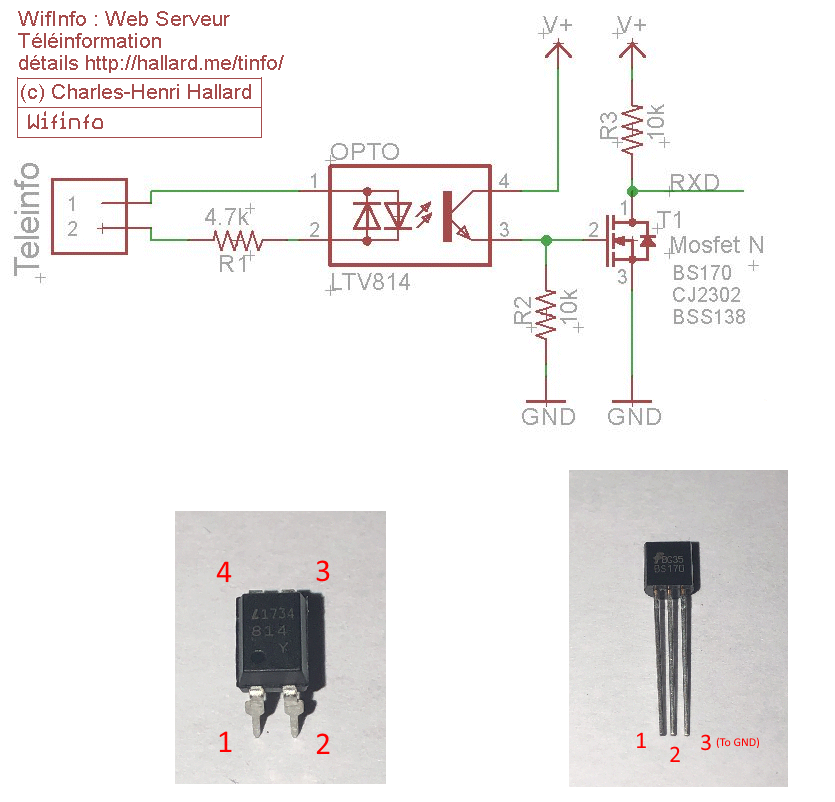
48 |
49 |
50 | - Beaucoup d'informations complémentaires sur le blog de [Charles Hallard](https://hallard.me/wifinfo/) :
51 |
52 | ---
53 |
54 | # diagnostiquer votre montage
55 | - Aide mémoire pour le diagnostique si aucune donnée n'est remontée :
56 |
57 | Si votre montage ne fonctionne pas utilisez un oscilloscope en sortie de TIC, puis derrière l'optocoupleur et enfin derrière le Mosfet. Vous devez systématiquement avoir un signal de ce genre :
58 | 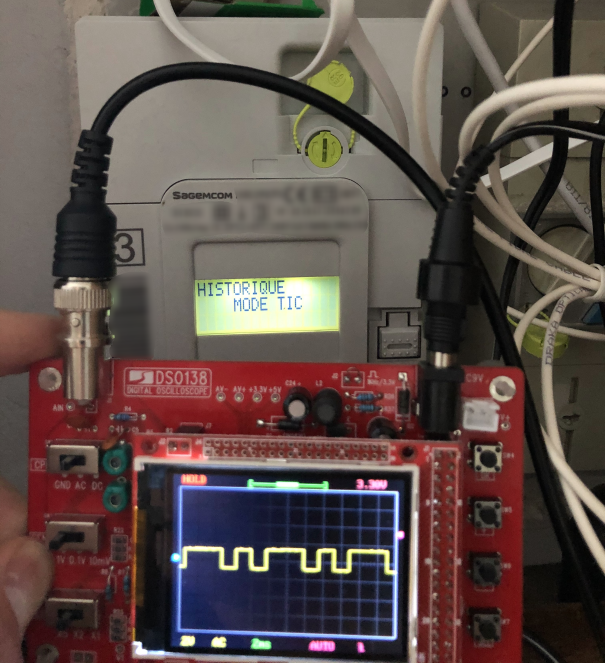
59 |
60 | - Vous pouvez également utiliser un FTDI connecté sur un PC sous Windows en vous inspirant de ce montage :
61 |
62 | 
63 | source du schéma https://www.kzenjoy.net/2015/la-teleinformation-sous-jeedom/
64 |
65 | Ensuite installez [termite](https://www.compuphase.com/software_termite.htm) (1200 Baud)
66 |
67 |
68 |
69 | ---
70 |
71 | ## Help is welcome !
72 | Vous voulez améliorer ce projet ? N'hésitez pas, **Participez !** : éditez et publiez vos modification :)
73 | Vous pouvez également m'acheter un café pour garder ma mtoviation au top !
74 | [![Buy me a coffee][buymeacoffee-shield]][buymeacoffee]
75 |
76 |
77 |
78 |
79 | Merci à Gael Benoit, auteur originel de ce Yaml.
80 | [Post Facebook de Gael Benoit sur le groupe "Home Assistant - France".](https://www.facebook.com/photo.php?fbid=10157966425044020&set=p.10157966425044020&type=3) N'hésitez pas à rejoindre notre communauté !
81 |
82 | [buymeacoffee-shield]: https://www.buymeacoffee.com/assets/img/guidelines/download-assets-sm-2.svg
83 | [buymeacoffee]: https://www.buymeacoffee.com/schmurtz
84 |
--------------------------------------------------------------------------------