├── .gitignore
├── images
├── left.jpg
├── like.png
├── love.png
└── right.jpg
├── tutorials
├── obs-create.png
├── fb-poll-create.png
└── fb-get-video-url.png
├── live-poll.js
├── LICENSE
├── index.html
├── style.css
└── README.md
/.gitignore:
--------------------------------------------------------------------------------
1 | .DS_Store
2 |
--------------------------------------------------------------------------------
/images/left.jpg:
--------------------------------------------------------------------------------
https://raw.githubusercontent.com/sebayaki/facebook-live-poll-js/HEAD/images/left.jpg
--------------------------------------------------------------------------------
/images/like.png:
--------------------------------------------------------------------------------
https://raw.githubusercontent.com/sebayaki/facebook-live-poll-js/HEAD/images/like.png
--------------------------------------------------------------------------------
/images/love.png:
--------------------------------------------------------------------------------
https://raw.githubusercontent.com/sebayaki/facebook-live-poll-js/HEAD/images/love.png
--------------------------------------------------------------------------------
/images/right.jpg:
--------------------------------------------------------------------------------
https://raw.githubusercontent.com/sebayaki/facebook-live-poll-js/HEAD/images/right.jpg
--------------------------------------------------------------------------------
/tutorials/obs-create.png:
--------------------------------------------------------------------------------
https://raw.githubusercontent.com/sebayaki/facebook-live-poll-js/HEAD/tutorials/obs-create.png
--------------------------------------------------------------------------------
/tutorials/fb-poll-create.png:
--------------------------------------------------------------------------------
https://raw.githubusercontent.com/sebayaki/facebook-live-poll-js/HEAD/tutorials/fb-poll-create.png
--------------------------------------------------------------------------------
/tutorials/fb-get-video-url.png:
--------------------------------------------------------------------------------
https://raw.githubusercontent.com/sebayaki/facebook-live-poll-js/HEAD/tutorials/fb-get-video-url.png
--------------------------------------------------------------------------------
/live-poll.js:
--------------------------------------------------------------------------------
1 | window.LivePoll = (function() {
2 |
3 | // Only variables to configure
4 | var ACCESS_TOKEN = '1234567890|WHATEVERblahblah';
5 | var VIDEO_ID = '1234567890';
6 |
7 | getUrl = function(reactionType) {
8 | return 'https://graph.facebook.com/' + VIDEO_ID + '/reactions?type=' + reactionType +'&limit=0&summary=true&access_token=' + ACCESS_TOKEN;
9 | };
10 |
11 | fetch = function() {
12 | $.getJSON(getUrl('LIKE'), function(data) {
13 | $('#likes').text(data.summary.total_count);
14 | });
15 | $.getJSON(getUrl('LOVE'), function(data) {
16 | $('#loves').text(data.summary.total_count);
17 | });
18 | };
19 |
20 | return {
21 | start: function(checkInterval) {
22 | setInterval(function(){ fetch() }, checkInterval);
23 | }
24 | };
25 | })();
26 |
--------------------------------------------------------------------------------
/LICENSE:
--------------------------------------------------------------------------------
1 | MIT License
2 |
3 | Copyright (c) 2016 Sebastian.Kim
4 |
5 | Permission is hereby granted, free of charge, to any person obtaining a copy
6 | of this software and associated documentation files (the "Software"), to deal
7 | in the Software without restriction, including without limitation the rights
8 | to use, copy, modify, merge, publish, distribute, sublicense, and/or sell
9 | copies of the Software, and to permit persons to whom the Software is
10 | furnished to do so, subject to the following conditions:
11 |
12 | The above copyright notice and this permission notice shall be included in all
13 | copies or substantial portions of the Software.
14 |
15 | THE SOFTWARE IS PROVIDED "AS IS", WITHOUT WARRANTY OF ANY KIND, EXPRESS OR
16 | IMPLIED, INCLUDING BUT NOT LIMITED TO THE WARRANTIES OF MERCHANTABILITY,
17 | FITNESS FOR A PARTICULAR PURPOSE AND NONINFRINGEMENT. IN NO EVENT SHALL THE
18 | AUTHORS OR COPYRIGHT HOLDERS BE LIABLE FOR ANY CLAIM, DAMAGES OR OTHER
19 | LIABILITY, WHETHER IN AN ACTION OF CONTRACT, TORT OR OTHERWISE, ARISING FROM,
20 | OUT OF OR IN CONNECTION WITH THE SOFTWARE OR THE USE OR OTHER DEALINGS IN THE
21 | SOFTWARE.
22 |
--------------------------------------------------------------------------------
/index.html:
--------------------------------------------------------------------------------
1 |
2 |
3 |
4 | Live Test
5 |
6 |
7 |
8 |
9 |
10 |
11 |
12 |
13 |
14 |
15 |
16 | 0
17 |
18 |
19 |
VS
20 |
21 |
22 |
23 |
24 |
25 | 0
26 |
27 |
28 |
29 |
30 |
31 |
34 |
35 |
36 |
--------------------------------------------------------------------------------
/style.css:
--------------------------------------------------------------------------------
1 | body {
2 | background-color: #fff;
3 | font-family:arial,sans-serif;
4 | text-align: center;
5 | }
6 |
7 | .container {
8 | margin-top: 100px;
9 | display: inline-block;
10 | }
11 |
12 | .left, .right {
13 | width: 500px;
14 | height: 350px;
15 | background-size: cover;
16 | background-repeat: no-repeat;
17 | background-position: center;
18 | float: left;
19 | }
20 |
21 | .left {
22 | background-image: url('images/left.jpg');
23 | color: #f84e62;
24 | position: relative;
25 | }
26 |
27 | .left .vs {
28 | width: 70px;
29 | height: 70px;
30 | font-size: 30px;
31 | border-radius: 50%;
32 | background-color: #fff;
33 | position: absolute;
34 | right: -35px;
35 | top: 50%;
36 | margin-top: -35px;
37 | box-shadow: 0 4px 8px 0 rgba(0, 0, 0, 0.2), 0 6px 20px 0 rgba(0, 0, 0, 0.19);
38 | }
39 |
40 | .left .vs span {
41 | margin-top: 20px;
42 | display: block;
43 | }
44 |
45 | .right {
46 | background-image: url('images/right.jpg');
47 | color: #528aff;
48 | }
49 |
50 | .count {
51 | background-color: #fff;
52 | display: block;
53 | margin: 380px auto 0 auto;
54 | width: 150px;
55 | padding: 10px;
56 | font-size: 28px;
57 | text-align: center;
58 | border-radius: 5px;
59 | box-shadow: 0 4px 8px 0 rgba(0, 0, 0, 0.2), 0 6px 20px 0 rgba(0, 0, 0, 0.19);
60 | }
61 |
62 | .count img {
63 | vertical-align: top;
64 | margin-right: 5px;
65 | }
66 |
67 | .count span {
68 | line-height: 37px;
69 | }
--------------------------------------------------------------------------------
/README.md:
--------------------------------------------------------------------------------
1 | # The Simplest Scripts for Facebook Live Poll
2 |
3 | - Portable, JS only implementation
4 | - Serverless, you can use your own PC or Mac to stream the live poll
5 | - Easy, you only need to change 2 lines of code
6 | - Free
7 |
8 |
9 | ## Usage
10 |
11 | ### 1. Clone or Download this repo
12 |
13 | `git clone git@github.com:sydneyitguy/facebook-live-poll-js.git`
14 |
15 | ### 2. Get your Facebook Access token
16 |
17 | https://developers.facebook.com/tools/access_token
18 |
19 | ### 3. Download OBS (Open Broadcaster Software)
20 |
21 | https://obsproject.com/download
22 |
23 | ### 4. Create a live stream with a local browser source
24 |
25 | Select `BrowserSource` from OBS, and `index.html` file you donwloaded from `Step 1.`
26 |
27 | 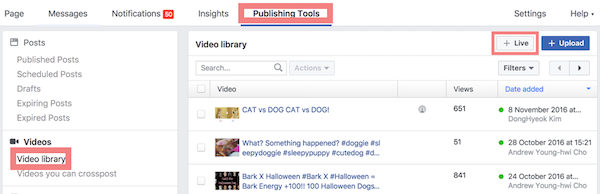
28 |
29 | ### 5. Create Live Poll on Facebook and connect to your OBS stream source
30 |
31 | 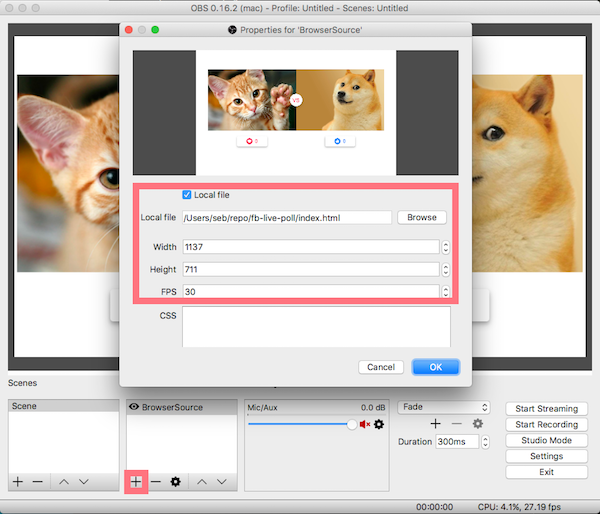
32 |
33 | (You can find a [detailed tutorial here](https://obsproject.com/forum/resources/how-to-stream-to-facebook-live.391))
34 |
35 | ### 6. Get Video ID from the video URL
36 |
37 | 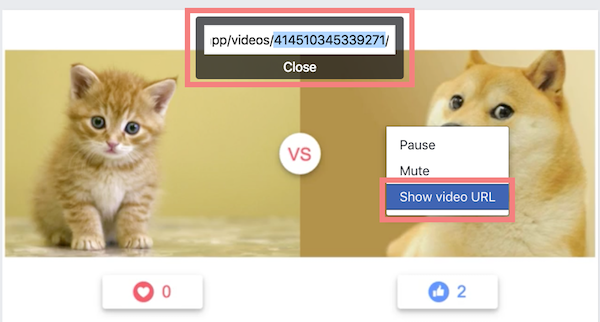
38 |
39 | ### 7. Lastly, edit `live-poll.js` with your configuration
40 |
41 | ```
42 | var ACCESS_TOKEN = '1234567890|WHATEVERblahblah'; // Access token from `Step 2`
43 | var VIDEO_ID = '1234567890'; // Video ID from `Step 7`
44 | ```
45 |
46 | - Don't forget you refresh your BrowserSource on your OBS
47 | - You can change the images whatever you like (just replace `left.jpg` and `right.jpg` in `/images` directory)
48 |
49 |
50 | ## License
51 |
52 | This project is licensed under the terms of the MIT license.
53 |
--------------------------------------------------------------------------------
 16 | 0
17 |
16 | 0
17 |  25 | 0
26 |
25 | 0
26 |