├── resources
├── product-screenshot.png
└── readme-serverless-desktop.png
└── README.md
/resources/product-screenshot.png:
--------------------------------------------------------------------------------
https://raw.githubusercontent.com/serverless/desktop/HEAD/resources/product-screenshot.png
--------------------------------------------------------------------------------
/resources/readme-serverless-desktop.png:
--------------------------------------------------------------------------------
https://raw.githubusercontent.com/serverless/desktop/HEAD/resources/readme-serverless-desktop.png
--------------------------------------------------------------------------------
/README.md:
--------------------------------------------------------------------------------
1 | **📦 Archived - This repository is archived and preserved for reference only. No updates, issues, or pull requests will be accepted. If you have questions, please reach out to our support team.**
2 |
3 | ---
4 |
5 | [](https://github.com/serverless/desktop/releases/latest)
6 |
7 | Serverless Desktop is GUI application that makes it easier to explore and test Serverless Framework applications built on AWS Lambda.
8 |
9 | ### [Download Serverless Desktop](https://github.com/serverless/desktop/releases/latest)
10 |
11 | Serverless Desktop is currently in beta and we are seeking customer feedback. To help us build something you love, [please take 2 minutes to answer these 4 questions](https://xv4b63nuizx.typeform.com/to/RC5jemCU).
12 |
13 |
14 |
15 |
16 | ## Features
17 |
18 | 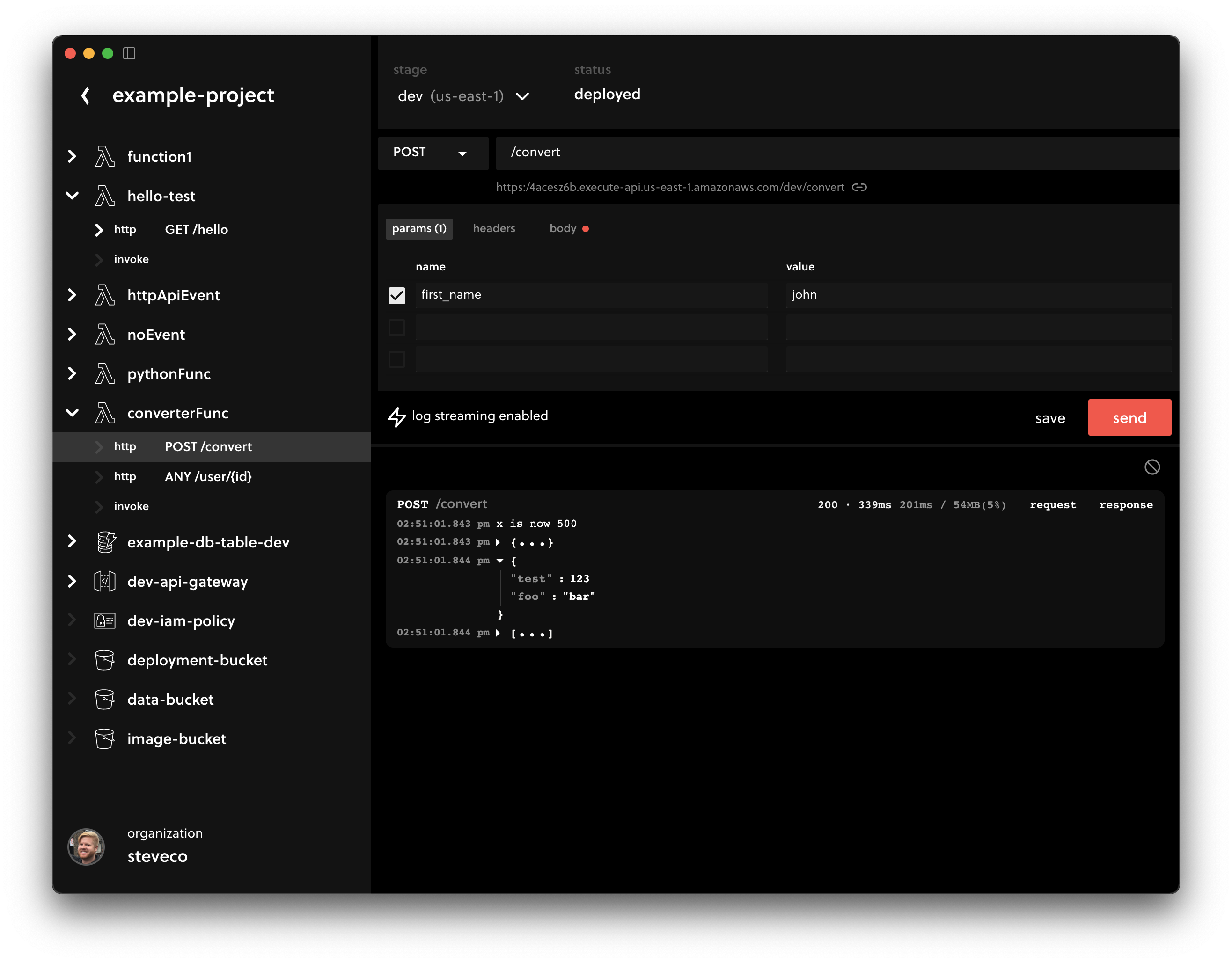
19 |
20 | - Invoke AWS Lambda functions and APIs easily
21 | - Stream errors and logs from AWS Lambda functions in real-time
22 | - Save and share test events and HTTP requests
23 | - Measure performance with duration and memory metrics
24 | - Explore items in AWS DynamoDB tables and AWS S3 buckets
25 | - Review policies for AWS IAM roles
26 |
27 |
28 |
29 | ## How does it work?
30 |
31 | Serverless Desktop will list your AWS Cloudformation stacks that are deployed via the [Serverless Framework](https://github.com/serverless/serverless), and create convenient views to work with the underlying AWS resources. Cloudformation stacks created outside of the Serverless Framework are currently not supported by Desktop.
32 |
33 | Desktop will prompt you to connect your AWS Account. This will create an IAM Role in your account, that will give Desktop periodic, temporary access credentials to perform a `list` operation on your Cloudformation Stacks, and associated AWS resources. These same credentials will be used to invoke your functions, access your DynamoDB tables, S3 buckets, and work with other resources associated with your Serverless project.
34 |
35 | Please note that while in beta, Serverless Desktop requires an AWS IAM Role with permissions for your AWS account, which it assumes to periodically perform server-side operations.
36 | Specifically:
37 |
38 | - S3
39 | - Dynamo
40 | - Lambda
41 | - API Gateway
42 | - CloudFormation
43 | - CloudWatch
44 | - IAM (only ListRolePolicies and GetRolePolicy)
45 |
46 | Desktop does not use long-lasting credentials. Instead, Desktop assumes the IAM Role you provide it, creates temporary credentials via AWS STS, and uses those for each operation. You control the IAM Role and can remove Desktop's access at any time. Within the upcoming weeks, Desktop will request specific permissions, rather than full read/write access. Until then, please be aware of this behavior.
47 |
48 | Log streaming is enabled for NodeJS Lambda functions via the [AWS Lambda Extensions API](https://docs.aws.amazon.com/lambda/latest/dg/runtimes-extensions-api.html). When you navigate to a function event trigger (HTTP, direct invocation, etc.) Desktop will add a [Lambda Layer](https://docs.aws.amazon.com/lambda/latest/dg/configuration-layers.html) to your function to capture log output. Additionally, the following environment variables are added to your Lambda:
49 |
50 | - `AWS_LAMBDA_EXEC_WRAPPER` - The path to the Extension entrypoint
51 | - `SERVERLESS_PLATFORM_CONFIG` - Configuration for your Serverless user and org
52 | - `SERVERLESS_PLATFORM_DEV_MODE` - Toggles on/off log streaming
53 |
54 |
55 |
56 | ## Supported platforms
57 |
58 | - MacOS
59 | - Windows
60 |
61 |
62 |
63 | ## Supported regions
64 | - us-east-1
65 | - us-east-2
66 | - us-west-2
67 | - eu-central-1
68 | - eu-west-1
69 | - eu-west-2
70 | - eu-west-3
71 | - eu-north-1
72 | - ap-northeast-1
73 | - ap-northeast-2
74 | - ap-southeast-1
75 | - ap-southeast-2
76 | - ap-south-1
77 | - ca-central-1
78 | - sa-east-1
79 | - us-west-1
80 |
81 |
82 |
83 | ## Supported resources
84 |
85 | - AWS Lambda
86 | - AWS API Gateway
87 | - AWS DynamoDB
88 | - AWS S3
89 | - AWS IAM
90 |
91 |
92 |
93 | ## Limitations
94 |
95 | - AWS only
96 | - Log streaming is only supported for NodeJS runtimes
97 |
98 |
99 |
100 | ## Feedback
101 |
102 | Feel free to create an [issue](https://github.com/serverless/desktop/issues/new) to report bugs, or request features.
103 |
--------------------------------------------------------------------------------