├── test.js
├── Tweeter Cover.png
├── VerifiedIcon.png
├── Architecture Diagram.png
├── tsconfig.json
├── package.json
├── manifest.json
├── ui.html
├── README.md
└── test.ts
/test.js:
--------------------------------------------------------------------------------
1 | // Compile the typescript file to transpile the TS into JS
2 |
--------------------------------------------------------------------------------
/Tweeter Cover.png:
--------------------------------------------------------------------------------
https://raw.githubusercontent.com/sharan3102/Tweeter/HEAD/Tweeter Cover.png
--------------------------------------------------------------------------------
/VerifiedIcon.png:
--------------------------------------------------------------------------------
https://raw.githubusercontent.com/sharan3102/Tweeter/HEAD/VerifiedIcon.png
--------------------------------------------------------------------------------
/Architecture Diagram.png:
--------------------------------------------------------------------------------
https://raw.githubusercontent.com/sharan3102/Tweeter/HEAD/Architecture Diagram.png
--------------------------------------------------------------------------------
/tsconfig.json:
--------------------------------------------------------------------------------
1 | {
2 | "compilerOptions": {
3 | "target": "es6",
4 | "lib": ["es6"],
5 | "strict": true,
6 | "typeRoots": [
7 | "./node_modules/@types",
8 | "./node_modules/@figma"
9 | ]
10 | }
11 | }
12 |
--------------------------------------------------------------------------------
/package.json:
--------------------------------------------------------------------------------
1 | {
2 | "name": "tweeter",
3 | "version": "1.0.0",
4 | "description": "Your Figma Plugin",
5 | "main": "code.js",
6 | "scripts": {
7 | "build": "tsc -p tsconfig.json",
8 | "watch": "npm run build -- --watch"
9 | },
10 | "author": "",
11 | "license": "",
12 | "devDependencies": {
13 | "@figma/plugin-typings": "^1.65.0",
14 | "typescript": "*"
15 | }
16 | }
17 |
--------------------------------------------------------------------------------
/manifest.json:
--------------------------------------------------------------------------------
1 | {
2 | "name": "tweeter",
3 | "id": "YOUR_FIGMA_PLUGIN_ID",
4 | "api": "1.0.0",
5 | "main": "test.js",
6 | "capabilities": [],
7 | "enableProposedApi": false,
8 | "editorType": [
9 | "figma"
10 | ],
11 | "ui": "ui.html",
12 | "networkAccess": {
13 | "allowedDomains": ["picsum.photos", "raw.githubusercontent.com","https://api.quotable.io"],
14 | "reasoning": "Allow all Domains"
15 | }
16 | }
17 |
--------------------------------------------------------------------------------
/ui.html:
--------------------------------------------------------------------------------
1 |
2 |
3 |
4 |
48 | Tweeter v1.0
49 |
50 |
51 |
52 |
53 |
56 |
69 |
--------------------------------------------------------------------------------
/README.md:
--------------------------------------------------------------------------------
1 |
2 |
3 |
4 | 
5 |
6 | # Tweeter 🐦
7 |
8 | Tweeter is a Figma plugin that allows you to create tweet-like frames with customizable text and images. It simplifies the process of designing social media posts or incorporating tweet-style elements into your Figma projects.
9 |
10 |
11 | ## Features 🚀
12 |
13 | - Create tweet-like frames with customizable content
14 | - Customize frame size, color, and styling options
15 | - Automatically generate timestamp in tweet format
16 | - Efficiently align and arrange elements using auto-layout
17 |
18 | ## Architecture 🤖
19 |
20 | 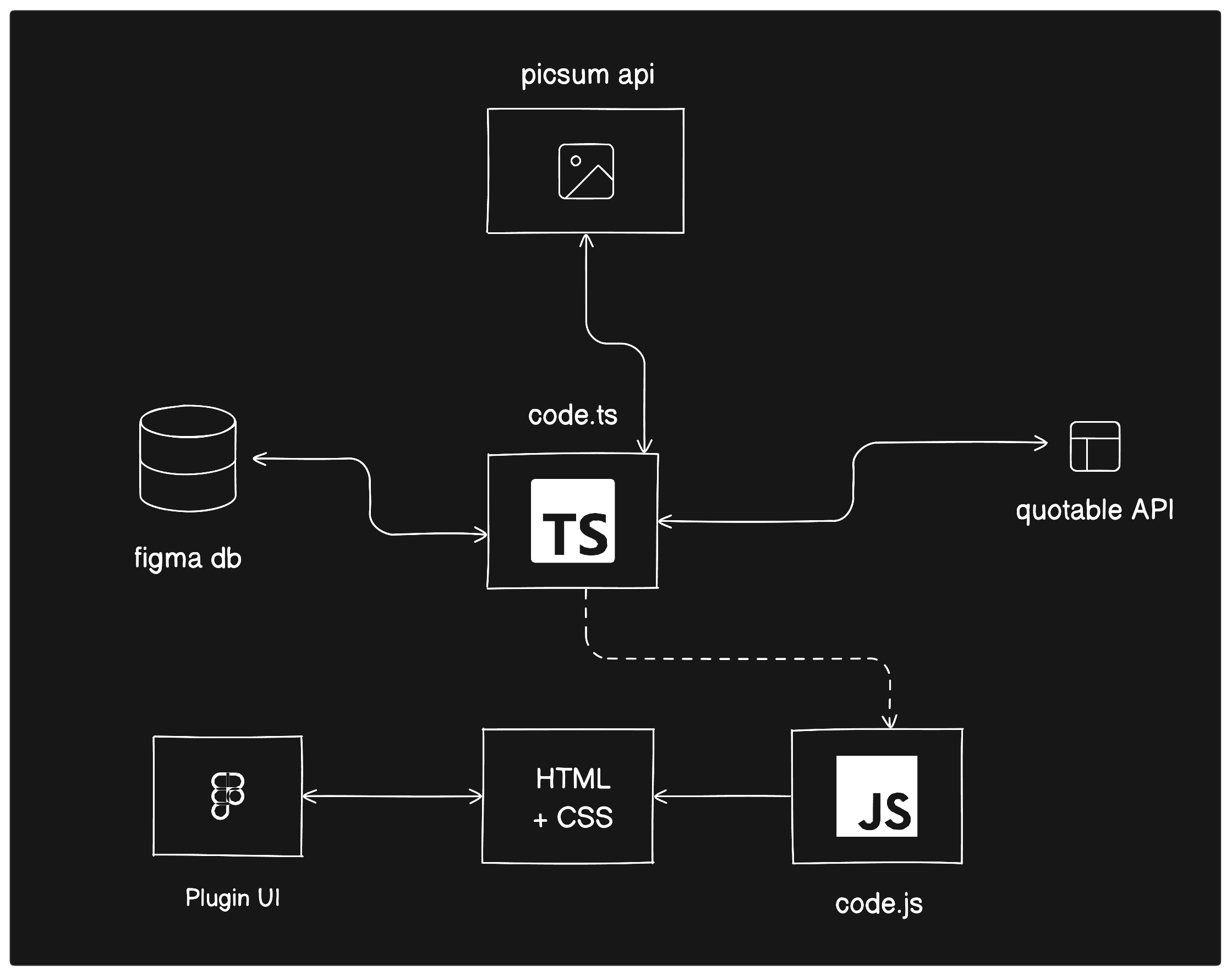
21 |
22 |
23 | The Tweeter plugin is built using a combination of technologies and external services to provide a seamless experience for users. It consists of the following components:
24 |
25 | 1. **User Interface (UI)** : The UI component is responsible for displaying the plugin interface within Figma. It is built using HTML, CSS, and JavaScript. The UI allows users to interact with the plugin's features and options.
26 |
27 | 2. **JavaScript (JS) Conversion**: The plugin's codebase is written in TypeScript (TS) and is converted to JavaScript (JS) for compatibility with the Figma plugin environment. This conversion ensures that the plugin can run within the Figma ecosystem.
28 |
29 | 3. **External APIs** :
30 | - Picsum API: Used to generate random profile pictures for the created frames.
31 | - Quotable API: Used to fetch random names and tweet messages for the created frames.
32 |
33 |
34 | 4. **Figma API Integration** : The plugin leverages the Figma API to interact with the Figma design editor and perform operations such as creating frames, adding images and text nodes, and manipulating the layout of the frames.
35 |
36 |
37 | ## Installation ❤️⚡️
38 |
39 | To use the Tweeter plugin, follow these steps:
40 |
41 | - Go to the Figma Community plugins page or the Figma plugin store.
42 | - Search for "Tweeter" in the search bar.
43 | - Click on the "Install" button next to the Tweeter plugin.
44 | - The plugin will be added to your Figma workspace.
45 |
46 | ## Prerequisites 🤖
47 |
48 | Before you can use this program, make sure you have the following:
49 | - Node.js (version 14 or higher)
50 | - Figma account (to install and use the plugin)
51 | - Internet connection (to access external APIs for profile pictures, names, and tweet messages)
52 |
53 | #### Download Figma 👇🏻
54 | ```
55 | https://www.figma.com/downloads/
56 | ```
57 |
58 |
59 | ## Usage 🧠
60 |
61 | - Select a frame in your Figma project where you want to create a tweet-like element.
62 | - Open the Tweeter plugin from the Figma menu or Plugins panel.
63 | - Customize the tweet-like frame by adding text, images, and adjusting the settings.
64 | - Use the available options and controls to modify the frame appearance.
65 | - Preview and adjust the design as needed.
66 | - Save the created tweet-like frame to your Figma project.
67 | - Use the frame in your designs, presentations, or share it with your team.
68 |
69 |
70 |
71 | ## Contributing ❤️
72 |
73 | Contributions are welcome! If you find any issues or have suggestions for improvements, please open an issue or submit a pull request.
74 |
75 |
76 |
77 | ## Support 🤝🏻
78 |
79 | If you need support or have any questions, you can reach out to me at sharan3102@gmail.com
80 |
81 |
--------------------------------------------------------------------------------
/test.ts:
--------------------------------------------------------------------------------
1 | // Display the HTML page
2 | figma.showUI(__html__, { width: 450, height: 174});
3 | // Set Color Schemes
4 | const colors = {
5 | primaryText: {
6 | r: 0,
7 | g: 0,
8 | b: 0
9 | },
10 | primaryBackground: {
11 | r: 1,
12 | g: 1,
13 | b: 1
14 | },
15 | secondaryText: {
16 | r: 0.5,
17 | g: 0.5,
18 | b: 0.5
19 | },
20 | twitterPlatform: {
21 | r: 0.1,
22 | g: 0.6,
23 | b: 0.9
24 | }
25 | }
26 | figma.ui.onmessage = async (msg) => {
27 | // based on user selection perform frame creation
28 | if (msg.type === 'insert-default') {
29 | const tweetFrame = figma.createFrame()
30 | tweetFrame.resize(395, 206)
31 | tweetFrame.fills = [{ type: 'SOLID', color: colors.primaryBackground }]
32 | tweetFrame.cornerRadius = 5
33 | tweetFrame.effects = [
34 | {
35 | type: 'DROP_SHADOW',
36 | color: { r: 0, g: 0, b: 0, a: 0.2 },
37 | blendMode: 'NORMAL',
38 | offset: { x: 0, y: 20 },
39 | radius: 60,
40 | visible: true,
41 | }
42 | ]
43 | tweetFrame.name = 'Tweet'
44 | try {
45 | await figma.loadFontAsync({ family: 'Inter', style: 'Regular' })
46 | await figma.loadFontAsync({ family: 'Inter', style: 'Medium' })
47 | await figma.loadFontAsync({ family: 'Inter', style: 'Bold' })
48 | const dynamicData = await fetch('https://api.quotable.io/quotes/random?minLength=95&maxLength=110');
49 | const image = await figma.createImageAsync('https://picsum.photos/200')
50 | const iconUrl = 'https://raw.githubusercontent.com/sharan3102/figma-plugin/main/VerifiedIcon.png'
51 | const icon = await figma.createImageAsync(iconUrl)
52 |
53 | const data = await dynamicData.json();
54 | const quote = data[0].content;
55 | const author = data[0].author;
56 | const auth = author.split(" ")
57 |
58 | // Create Profile picture
59 | const profilePicture = figma.createEllipse()
60 | profilePicture.resize(52, 52)
61 | profilePicture.name = 'Profile Picture'
62 | profilePicture.fills = [
63 | {
64 | type: 'IMAGE',
65 | imageHash: image.hash,
66 | scaleMode: 'FILL',
67 | },
68 | ];
69 |
70 | // Create Icon
71 | const verifiedIcon = figma.createEllipse()
72 | verifiedIcon.resize(14,14)
73 | verifiedIcon.name = 'Verified Icon'
74 | verifiedIcon.fills = [{
75 | type: 'IMAGE',
76 | imageHash: icon.hash,
77 | scaleMode: 'FILL'
78 | }]
79 |
80 |
81 | const displayName = figma.createText()
82 | displayName.characters = author || "Mark Spencer"
83 | displayName.fontSize = 14
84 | displayName.fontName = { family: 'Inter', style: 'Bold' }
85 | displayName.fills = [{ type: 'SOLID', color: colors.primaryText }]
86 |
87 | const userName = figma.createText()
88 | userName.characters = `@${auth[0]}`|| "@markwrites"
89 | userName.fontSize = 12
90 | userName.fontName = { family: 'Inter', style: 'Regular' }
91 | userName.fills = [{ type: 'SOLID', color: colors.secondaryText }]
92 |
93 | const tweetMessage = figma.createText()
94 | tweetMessage.characters = quote ||"Why did the computer go to the doctor? Because it had a virus and couldn't stop coughing up SPAM emails! 🤧💌😄"
95 | tweetMessage.fontSize = 16
96 | tweetMessage.fontName = { family: 'Inter', style: 'Regular' }
97 | tweetMessage.fills = [{ type: 'SOLID', color: colors.primaryText }]
98 | tweetMessage.resize(350,tweetMessage.height)
99 | tweetMessage.textAutoResize = 'HEIGHT'
100 |
101 | const symbol = figma.createText()
102 | symbol.characters = '·'
103 | symbol.fontSize = 11.5
104 | symbol.fontName = { family: 'Inter', style: 'Medium' }
105 | symbol.fills = [{ type: 'SOLID', color: colors.secondaryText }]
106 |
107 | const platform = figma.createText()
108 | platform.characters = 'Twitter Web App'
109 | platform.fontSize = 11.5
110 | platform.fontName = { family: 'Inter', style: 'Medium' }
111 | platform.fills = [{ type: 'SOLID', color: colors.twitterPlatform }]
112 |
113 | const timeStamp = figma.createText()
114 | const currentDate = new Date();
115 | const hours = currentDate.getHours();
116 | const minutes = currentDate.getMinutes()
117 | const amOrPm = hours >= 12 ? 'PM' : 'AM'
118 | const formattedHours = hours % 12 || 12
119 | const formattedMinutes = minutes < 10 ? `0${minutes}` : minutes
120 |
121 | const monthNames = [
122 | 'Jan', 'Feb', 'Mar', 'Apr', 'May', 'Jun',
123 | 'Jul', 'Aug', 'Sep', 'Oct', 'Nov', 'Dec'
124 | ]
125 | const month = monthNames[currentDate.getMonth()]
126 | const day = currentDate.getDate()
127 | const year = currentDate.getFullYear()
128 |
129 | const formattedDate = `${formattedHours}:${formattedMinutes} ${amOrPm} · ${month} ${day}, ${year}`
130 | console.log(formattedDate)
131 |
132 | timeStamp.characters = formattedDate
133 | timeStamp.fontSize = 11.5
134 | timeStamp.fontName = { family: 'Inter', style: 'Medium' };
135 | timeStamp.fills = [{ type: 'SOLID', color: colors.secondaryText }]
136 |
137 |
138 |
139 | const displayNameAndIconFrame = figma.createFrame()
140 | displayNameAndIconFrame.layoutMode = 'HORIZONTAL'
141 | displayNameAndIconFrame.counterAxisSizingMode = 'AUTO'
142 | displayNameAndIconFrame.itemSpacing = 6
143 | displayNameAndIconFrame.fills = []
144 | displayNameAndIconFrame.appendChild(displayName)
145 | displayNameAndIconFrame.appendChild(verifiedIcon)
146 | displayNameAndIconFrame.counterAxisAlignItems = 'CENTER'
147 | displayNameAndIconFrame.primaryAxisAlignItems = 'CENTER'
148 | displayNameAndIconFrame.name = 'UserInfo'
149 |
150 | const profileText = figma.createFrame()
151 | profileText.layoutMode = 'VERTICAL'
152 | profileText.counterAxisSizingMode = 'AUTO'
153 | profileText.itemSpacing = 2
154 | profileText.fills = []
155 | profileText.appendChild(displayNameAndIconFrame)
156 | profileText.appendChild(userName)
157 | profileText.counterAxisAlignItems = 'MIN'
158 | profileText.primaryAxisAlignItems = 'MIN'
159 | profileText.name = 'Profile Details'
160 |
161 | const profile = figma.createFrame()
162 | profile.layoutMode = 'HORIZONTAL'
163 | profile.counterAxisSizingMode = 'AUTO'
164 | profile.itemSpacing = 8
165 | profile.fills = []
166 | profile.appendChild(profilePicture)
167 | profile.appendChild(profileText)
168 | profile.counterAxisAlignItems = 'CENTER'
169 | profile.primaryAxisAlignItems = 'CENTER'
170 | profile.name = 'Profile'
171 |
172 | const tweetTop = figma.createFrame()
173 | tweetTop.layoutMode = 'VERTICAL'
174 | tweetTop.counterAxisSizingMode = 'AUTO'
175 | tweetTop.itemSpacing = 14
176 | tweetTop.fills = []
177 | tweetTop.appendChild(profile)
178 | tweetTop.appendChild(tweetMessage)
179 | tweetTop.counterAxisAlignItems = 'MIN'
180 | tweetTop.primaryAxisAlignItems = 'MIN'
181 | tweetTop.name = 'Tweet Content'
182 |
183 | const tweetBottom = figma.createFrame()
184 | tweetBottom.layoutMode = 'HORIZONTAL'
185 | tweetBottom.counterAxisSizingMode = 'AUTO'
186 | tweetBottom.itemSpacing = 4
187 | tweetBottom.fills = []
188 | tweetBottom.appendChild(timeStamp)
189 | tweetBottom.appendChild(symbol)
190 | tweetBottom.appendChild(platform)
191 | tweetBottom.counterAxisAlignItems = 'MIN'
192 | tweetBottom.primaryAxisAlignItems = 'MIN'
193 | tweetBottom.name = 'Tweet Info ℹ️'
194 |
195 | const tweet = figma.createFrame()
196 | tweet.layoutMode = 'VERTICAL'
197 | tweet.counterAxisSizingMode = 'AUTO'
198 | tweet.itemSpacing = 20
199 | tweet.fills = []
200 | tweet.appendChild(tweetTop)
201 | tweet.appendChild(tweetBottom)
202 | tweet.counterAxisAlignItems = 'MIN'
203 | tweet.primaryAxisAlignItems = 'MIN'
204 | tweet.name = 'Tweet'
205 | tweet.x+=20
206 | tweet.y+=20
207 |
208 |
209 | tweetFrame.appendChild(tweet)
210 |
211 | const selected = figma.currentPage.selection;
212 |
213 | if(selected.length >= 1){
214 | console.log(selected[0].width)
215 | tweetFrame.x = selected[0].x + selected[0].width + 50
216 | tweetFrame.y = selected[0].y
217 | }
218 |
219 | figma.currentPage.appendChild(tweetFrame);
220 | } catch (error) {
221 | console.log(error);
222 | }
223 |
224 | }
225 |
226 | // close the plux gin
227 | figma.closePlugin();
228 | };
229 |
--------------------------------------------------------------------------------