├── code
├── babel
│ └── index.js
├── ws
│ ├── example
│ │ ├── client.html
│ │ └── server.js
│ └── index.js
├── style-loader
│ ├── example
│ │ ├── index.js
│ │ ├── style.css
│ │ └── build.js
│ ├── index.js
│ └── package.json
├── bundle
│ ├── example
│ │ ├── hello.js
│ │ ├── math.js
│ │ ├── increment.js
│ │ └── index.js
│ ├── example.js
│ ├── package.json
│ ├── output.js
│ ├── Readme.md
│ └── index.js
├── highlight
│ ├── example
│ │ ├── main.js
│ │ ├── index.html
│ │ └── prism.html
│ ├── index.js
│ └── package.json
├── json-loader
│ ├── example
│ │ ├── index.js
│ │ ├── users.json3
│ │ └── build.js
│ ├── Readme.md
│ ├── package.json
│ └── index.js
├── yaml-loader
│ ├── example
│ │ ├── users.yaml
│ │ └── build.js
│ ├── Readme.md
│ ├── package.json
│ └── index.js
├── html-webpack-plugin
│ ├── example
│ │ ├── add.js
│ │ ├── index.js
│ │ └── build.js
│ ├── package.json
│ ├── Readme.md
│ └── index.js
├── serve
│ ├── example
│ │ ├── about.html
│ │ ├── index.html
│ │ └── users
│ │ │ └── index.html
│ ├── package.json
│ ├── Readme.md
│ └── index.ts
├── ssr
│ ├── client.js
│ ├── src
│ │ └── App.js
│ ├── webpack.config.server.js
│ ├── webpack.config.js
│ ├── package.json
│ ├── server.js
│ └── build
│ │ └── main.js.LICENSE.txt
├── koa
│ ├── package.json
│ ├── example.js
│ ├── debug.md
│ ├── index.js
│ └── Readme.md
├── native-http-server
│ ├── example.js
│ ├── Readme.md
│ └── index.js
├── vdom
│ ├── package.json
│ ├── Readme.md
│ ├── example
│ │ ├── index.html
│ │ └── main.js
│ └── index.js
├── express
│ ├── package.json
│ ├── example.js
│ ├── index.js
│ └── Readme.md
├── http-router
│ ├── package.json
│ ├── example.js
│ ├── index.js
│ └── Readme.md
├── pipeline
│ ├── example.js
│ └── index.js
├── apollo-server
│ ├── package.json
│ ├── example.mjs
│ ├── index.mjs
│ └── package-lock.json
├── react
│ ├── index.js
│ └── Readme.md
└── p
│ └── limit.js
├── .github
└── FUNDING.yml
├── .gitignore
├── package.json
└── Readme.md
/code/babel/index.js:
--------------------------------------------------------------------------------
1 |
--------------------------------------------------------------------------------
/code/ws/example/client.html:
--------------------------------------------------------------------------------
1 |
--------------------------------------------------------------------------------
/code/ws/example/server.js:
--------------------------------------------------------------------------------
1 |
--------------------------------------------------------------------------------
/.github/FUNDING.yml:
--------------------------------------------------------------------------------
1 | github: shfshanyue
--------------------------------------------------------------------------------
/code/style-loader/example/index.js:
--------------------------------------------------------------------------------
1 | import './style.css'
--------------------------------------------------------------------------------
/.gitignore:
--------------------------------------------------------------------------------
1 | node_modules
2 | .vscode
3 | package-lock.gz
4 | dist
--------------------------------------------------------------------------------
/code/bundle/example/hello.js:
--------------------------------------------------------------------------------
1 | module.exports = 'hello, world'
--------------------------------------------------------------------------------
/code/highlight/example/main.js:
--------------------------------------------------------------------------------
1 | import Prisma from '../index.js'
--------------------------------------------------------------------------------
/code/json-loader/example/index.js:
--------------------------------------------------------------------------------
1 | import users from './users.json3'
--------------------------------------------------------------------------------
/code/json-loader/example/users.json3:
--------------------------------------------------------------------------------
1 | [
2 | {
3 | "id": 3
4 | }
5 | ]
--------------------------------------------------------------------------------
/code/style-loader/example/style.css:
--------------------------------------------------------------------------------
1 | body {
2 | background-color: #c8c8c8;
3 | }
--------------------------------------------------------------------------------
/code/bundle/example/math.js:
--------------------------------------------------------------------------------
1 | exports.add = (...args) => args.reduce((x, y) => x + y, 0)
--------------------------------------------------------------------------------
/code/yaml-loader/example/users.yaml:
--------------------------------------------------------------------------------
1 | users:
2 | - id: 10086
3 | name: shanyue
4 |
--------------------------------------------------------------------------------
/code/html-webpack-plugin/example/add.js:
--------------------------------------------------------------------------------
1 | const add = (x, y) => x + y
2 | export default add
3 |
--------------------------------------------------------------------------------
/code/bundle/example.js:
--------------------------------------------------------------------------------
1 | const bundle = require('.')
2 |
3 | console.log(bundle('./example/index.js'))
--------------------------------------------------------------------------------
/code/bundle/example/increment.js:
--------------------------------------------------------------------------------
1 | const add = require('./math.js').add;
2 | exports.increment = x => add(x, 1)
3 |
--------------------------------------------------------------------------------
/code/html-webpack-plugin/example/index.js:
--------------------------------------------------------------------------------
1 | import('./add').then(({ default: add }) => {
2 | console.log(add(3, 4))
3 | })
--------------------------------------------------------------------------------
/code/highlight/index.js:
--------------------------------------------------------------------------------
1 | export function highlight (text, grammer, language) {
2 |
3 | }
4 |
5 | function tokenize (text, grammer) {
6 |
7 | }
--------------------------------------------------------------------------------
/code/serve/example/about.html:
--------------------------------------------------------------------------------
1 |
2 |
3 |
4 |
5 |
6 |
7 | hello, about.
8 |
9 |
--------------------------------------------------------------------------------
/code/serve/example/index.html:
--------------------------------------------------------------------------------
1 |
2 |
3 |
4 |
5 |
6 |
7 | hello, shanyue.
8 |
9 |
--------------------------------------------------------------------------------
/code/bundle/example/index.js:
--------------------------------------------------------------------------------
1 | const inc = require('./increment.js').increment;
2 | const hello = require('./hello.js')
3 | const a = 1;
4 |
5 | console.log(inc(a))
6 | console.log(hello)
--------------------------------------------------------------------------------
/code/ssr/client.js:
--------------------------------------------------------------------------------
1 | import { hydrateRoot } from 'react-dom/client'
2 |
3 | import App from './src/App'
4 |
5 | hydrateRoot(document.getElementById('root'), )
6 |
--------------------------------------------------------------------------------
/code/serve/example/users/index.html:
--------------------------------------------------------------------------------
1 |
2 |
3 |
4 |
5 |
6 |
7 | hello, users index page.
8 |
9 |
--------------------------------------------------------------------------------
/code/ws/index.js:
--------------------------------------------------------------------------------
1 | const EventEmitter = require('events')
2 |
3 | class WebsocketServer extends EventEmitter {
4 | constructor ({
5 | server
6 | }) {
7 | this.server = server
8 | }
9 | }
10 |
--------------------------------------------------------------------------------
/code/koa/package.json:
--------------------------------------------------------------------------------
1 | {
2 | "name": "mini-koa",
3 | "version": "1.0.0",
4 | "description": "",
5 | "main": "index.js",
6 | "scripts": {
7 | "example": "node example.js"
8 | },
9 | "author": "",
10 | "license": "ISC"
11 | }
12 |
--------------------------------------------------------------------------------
/code/native-http-server/example.js:
--------------------------------------------------------------------------------
1 | const { createServer } = require('.')
2 |
3 | const server = createServer((req, res) => {
4 | res.end('hello, world')
5 | })
6 |
7 | server.listen(8000, () => {
8 | console.log('Listing 8000')
9 | })
10 |
--------------------------------------------------------------------------------
/code/vdom/package.json:
--------------------------------------------------------------------------------
1 | {
2 | "name": "vdom",
3 | "version": "1.0.0",
4 | "description": "",
5 | "main": "index.js",
6 | "scripts": {
7 | "example": "serve ."
8 | },
9 | "author": "shfshanyue",
10 | "license": "ISC"
11 | }
12 |
--------------------------------------------------------------------------------
/code/express/package.json:
--------------------------------------------------------------------------------
1 | {
2 | "name": "mini-express",
3 | "version": "1.0.0",
4 | "description": "如何实现一个最小版本的 express",
5 | "main": "index.js",
6 | "scripts": {
7 | "example": "node example.js"
8 | },
9 | "author": "shfshanyue",
10 | "license": "ISC"
11 | }
12 |
--------------------------------------------------------------------------------
/code/style-loader/index.js:
--------------------------------------------------------------------------------
1 | module.exports = function(source) {
2 | return `
3 | function injectCss(css) {
4 | const style = document.createElement('style')
5 | style.appendChild(document.createTextNode(css))
6 | document.head.appendChild(style)
7 | }
8 |
9 | injectCss(\`${source}\`)
10 | `
11 | }
--------------------------------------------------------------------------------
/code/json-loader/Readme.md:
--------------------------------------------------------------------------------
1 | # json loader
2 |
3 | ## 山月的代码实现
4 |
5 | 代码置于 [shfshanyue/mini-code:code/json-loader](https://github.com/shfshanyue/mini-code/blob/master/code/json-loader/index.js)
6 |
7 | 可直接读源码,基本每一行都有注释。
8 |
9 | 使用 `npm run example` 或者 `node example/build.js` 可运行示例代码
10 |
11 | ``` bash
12 | $ npm run example
13 | ```
--------------------------------------------------------------------------------
/code/yaml-loader/Readme.md:
--------------------------------------------------------------------------------
1 | # yaml loader
2 |
3 | ## 山月的代码实现
4 |
5 | 代码置于 [shfshanyue/mini-code:code/yaml-loader](https://github.com/shfshanyue/mini-code/blob/master/code/json-loader/index.js)
6 |
7 | 可直接读源码,基本每一行都有注释。
8 |
9 | 使用 `npm run example` 或者 `node example/build.js` 可运行示例代码
10 |
11 | ``` bash
12 | $ npm run example
13 | ```
--------------------------------------------------------------------------------
/code/json-loader/package.json:
--------------------------------------------------------------------------------
1 | {
2 | "name": "mini-json-loader",
3 | "version": "1.0.0",
4 | "description": "",
5 | "main": "index.js",
6 | "directories": {
7 | "example": "example"
8 | },
9 | "scripts": {
10 | "example": "cd example && node build.js"
11 | },
12 | "author": "shfshanyue",
13 | "license": "ISC"
14 | }
15 |
--------------------------------------------------------------------------------
/code/http-router/package.json:
--------------------------------------------------------------------------------
1 | {
2 | "name": "mini-http-router",
3 | "version": "1.0.0",
4 | "description": "",
5 | "main": "index.js",
6 | "scripts": {
7 | "example": "node example"
8 | },
9 | "keywords": [],
10 | "author": "",
11 | "license": "ISC",
12 | "dependencies": {
13 | "path-to-regexp": "^6.2.0"
14 | }
15 | }
16 |
--------------------------------------------------------------------------------
/code/style-loader/package.json:
--------------------------------------------------------------------------------
1 | {
2 | "name": "mini-style-loader",
3 | "version": "1.0.0",
4 | "description": "",
5 | "main": "index.js",
6 | "directories": {
7 | "example": "example"
8 | },
9 | "scripts": {
10 | "example": "cd example && node build.js"
11 | },
12 | "author": "shfshanyue",
13 | "license": "ISC"
14 | }
15 |
--------------------------------------------------------------------------------
/code/highlight/package.json:
--------------------------------------------------------------------------------
1 | {
2 | "name": "mini-highlight",
3 | "version": "1.0.0",
4 | "description": "",
5 | "main": "index.js",
6 | "directories": {
7 | "example": "example"
8 | },
9 | "scripts": {
10 | "test": "echo \"Error: no test specified\" && exit 1"
11 | },
12 | "author": "shfshanyue",
13 | "license": "ISC"
14 | }
15 |
--------------------------------------------------------------------------------
/code/html-webpack-plugin/package.json:
--------------------------------------------------------------------------------
1 | {
2 | "name": "mini-html-webpack-plugin",
3 | "version": "1.0.0",
4 | "description": "",
5 | "main": "index.js",
6 | "directories": {
7 | "example": "example"
8 | },
9 | "scripts": {
10 | "example": "cd example && node build.js"
11 | },
12 | "author": "shfshanyue",
13 | "license": "ISC"
14 | }
15 |
--------------------------------------------------------------------------------
/code/pipeline/example.js:
--------------------------------------------------------------------------------
1 | const pipeline = require('.');
2 | const fs = require('fs');
3 | const zlib = require('zlib');
4 |
5 | pipeline(
6 | fs.createReadStream('./package-lock.json'),
7 | zlib.createGzip(),
8 | fs.createWriteStream('package-lock.gz', { highWaterMark: 16 }),
9 | ).then(o => {
10 | console.log('SUCCESS')
11 | }).catch(e => {
12 | console.log('ERROR')
13 | })
14 |
--------------------------------------------------------------------------------
/code/ssr/src/App.js:
--------------------------------------------------------------------------------
1 | import { useState } from 'react'
2 |
3 | export default function App({ title }) {
4 | const [value, setValue] = useState('hello')
5 |
6 | return (
7 |
8 |
{title}
9 |
10 | setValue(e.target.value)} />
11 | {value}
12 |
13 |
示例一:可正常渲染元素
12 |
13 |
14 | 示例二:带有 key 的列表
15 |
16 |
17 |
--------------------------------------------------------------------------------
/code/yaml-loader/example/build.js:
--------------------------------------------------------------------------------
1 | const webpack = require('webpack')
2 |
3 | const compiler = webpack({
4 | entry: './users.yaml',
5 | mode: 'none',
6 | output: {
7 | filename: '[name].[contenthash:8].js',
8 | clean: true
9 | },
10 | module: {
11 | rules: [{
12 | // webpack 将会自动 require('..') 作为 loader
13 | use: '..',
14 | test: /\.yaml$/,
15 | type: 'json'
16 | }]
17 | }
18 | })
19 |
20 | compiler.run(() => {
21 | console.log('DONE')
22 | })
--------------------------------------------------------------------------------
/code/html-webpack-plugin/example/build.js:
--------------------------------------------------------------------------------
1 | const webpack = require('webpack')
2 | const HtmlWebpackPlugin = require('..');
3 |
4 | const compiler = webpack({
5 | entry: './index.js',
6 | output: {
7 | filename: '[name].[contenthash:8].js',
8 | clean: true
9 | },
10 | optimization: {
11 | runtimeChunk: true
12 | },
13 | plugins: [
14 | new HtmlWebpackPlugin({
15 | title: '山月的主页'
16 | })
17 | ],
18 | })
19 |
20 | compiler.run(() => {
21 | console.log('DONE')
22 | })
--------------------------------------------------------------------------------
/code/bundle/package.json:
--------------------------------------------------------------------------------
1 | {
2 | "name": "mini-bundle",
3 | "private": true,
4 | "version": "1.0.0",
5 | "description": "",
6 | "main": "index.js",
7 | "scripts": {
8 | "example": "node example.js > output.js"
9 | },
10 | "author": "shfshanyue",
11 | "license": "ISC",
12 | "dependencies": {
13 | "@babel/generator": "^7.15.0",
14 | "@babel/parser": "^7.15.3",
15 | "@babel/traverse": "^7.15.0",
16 | "@babel/types": "^7.15.0",
17 | "lodash": "^4.17.21"
18 | }
19 | }
20 |
--------------------------------------------------------------------------------
/code/koa/example.js:
--------------------------------------------------------------------------------
1 | const Application = require('.')
2 |
3 | const app = new Application()
4 |
5 | app.use(async (ctx, next) => {
6 | console.log('Middleware 1 Start')
7 | await next()
8 | console.log('Middleware 1 End')
9 | })
10 |
11 | app.use(async (ctx, next) => {
12 | console.log('Middleware 2 Start')
13 | await next()
14 | console.log('Middleware 2 End')
15 |
16 | ctx.body = 'hello, world'
17 | })
18 |
19 |
20 | app.listen(7000, () => {
21 | console.log('Listing 7000...')
22 | })
23 |
--------------------------------------------------------------------------------
/code/json-loader/example/build.js:
--------------------------------------------------------------------------------
1 | const webpack = require('webpack')
2 |
3 | const compiler = webpack({
4 | entry: './index.js',
5 | mode: 'none',
6 | output: {
7 | filename: '[name].[contenthash:8].js',
8 | clean: true
9 | },
10 | module: {
11 | rules: [{
12 | // webpack 将会自动 require('..') 做为 loader
13 | use: '..',
14 | // 为了避免与内置的 json-loader 冲突,因此此处命名为 json3
15 | test: /\.json3$/,
16 | }]
17 | }
18 | })
19 |
20 | compiler.run(() => {
21 | console.log('DONE')
22 | })
--------------------------------------------------------------------------------
/code/json-loader/index.js:
--------------------------------------------------------------------------------
1 | // loader 文档见: https://webpack.js.org/api/loaders/
2 | // 官方 json-loader 可见 https://github.com/webpack-contrib/json-loader,尽管目前已内置
3 | //
4 | // 使用 loader 写一个 json-loader,最能理解 webpack 中 loader 的作用
5 |
6 | module.exports = function (source) {
7 | // 为了避免 JSON 有语法错误,所以先 parse/stringify 一遍
8 | return `module.exports = ${JSON.stringify(JSON.parse(source))}`
9 |
10 | // 写成 ESM 格式也可以,但是 webpack 内部还需要将 esm 转化为 cjs,为了降低复杂度,直接使用 cjs
11 | // return `export default ${JSON.stringify(JSON.parse(source))}`
12 | }
--------------------------------------------------------------------------------
/package.json:
--------------------------------------------------------------------------------
1 | {
2 | "name": "mini-code",
3 | "version": "1.0.0",
4 | "description": "",
5 | "main": "index.js",
6 | "scripts": {
7 | "test": "echo \"Error: no test specified\" && exit 1"
8 | },
9 | "workspaces": [
10 | "code/*"
11 | ],
12 | "author": "",
13 | "license": "ISC",
14 | "devDependencies": {
15 | "nodemon": "^2.0.12",
16 | "serve": "^12.0.1"
17 | },
18 | "dependencies": {
19 | "@graphql-tools/schema": "^8.3.2",
20 | "raw-body": "^2.5.0",
21 | "webpack": "^5.58.1"
22 | }
23 | }
24 |
--------------------------------------------------------------------------------
/code/highlight/example/index.html:
--------------------------------------------------------------------------------
1 |
2 |
3 |
4 |
5 |
6 |
7 | Document
8 |
9 |
10 |
11 |
12 | const user = {
13 |   id: 'shfshanyue',
14 |   name: '山月',
15 |   repo: 'shfshanyue/minicode'
16 | }
17 |
18 |
19 |
20 |
21 |
--------------------------------------------------------------------------------
/code/apollo-server/example.mjs:
--------------------------------------------------------------------------------
1 | import GraphQLServer from './index.mjs'
2 |
3 | const typeDefs = `
4 | type Todo {
5 | title: String
6 | author: String
7 | }
8 |
9 | type Query {
10 | todos: [Todo]
11 | }
12 | `
13 |
14 | const books = [
15 | {
16 | title: '三国演义',
17 | author: '施耐庵',
18 | },
19 | {
20 | title: '西游记',
21 | author: '罗贯中',
22 | },
23 | ]
24 |
25 | const resolvers = {
26 | Query: {
27 | books: () => {
28 | return books
29 | }
30 | }
31 | }
32 |
33 | const app = new GraphQLServer({ typeDefs, resolvers })
34 |
35 | app.listen(4000)
36 |
--------------------------------------------------------------------------------
/code/style-loader/example/build.js:
--------------------------------------------------------------------------------
1 | const webpack = require('webpack')
2 | const HtmlWebpackPlugin = require('mini-html-webpack-plugin')
3 |
4 | const compiler = webpack({
5 | entry: './index.js',
6 | mode: 'none',
7 | output: {
8 | filename: 'main.js',
9 | clean: true
10 | },
11 | module: {
12 | rules: [{
13 | // webpack 将会自动 require('..') 最为 loader
14 | use: '..',
15 | // 为了避免与内置的 json-loader 冲突,因此此处命名为 json3
16 | test: /\.css$/,
17 | }]
18 | },
19 | plugins:[
20 | new HtmlWebpackPlugin(),
21 | ]
22 | })
23 |
24 | compiler.run(() => {
25 | console.log('DONE')
26 | })
27 |
--------------------------------------------------------------------------------
/code/ssr/webpack.config.js:
--------------------------------------------------------------------------------
1 | const path = require('path')
2 |
3 | const isProduction = process.env.NODE_ENV === 'production';
4 | module.exports = {
5 | devtool: isProduction ? 'source-map' : 'cheap-module-source-map',
6 | mode: isProduction ? 'production' : 'development',
7 | target: 'web',
8 | entry: [
9 | path.resolve(__dirname, './client.js')
10 | ],
11 | output: {
12 | path: path.resolve(__dirname, './build'),
13 | filename: 'main.js',
14 | },
15 | module: {
16 | rules: [
17 | {
18 | test: /\.js$/,
19 | use: 'babel-loader',
20 | exclude: /node_modules/,
21 | },
22 | ],
23 | },
24 | }
--------------------------------------------------------------------------------
/code/highlight/example/prism.html:
--------------------------------------------------------------------------------
1 |
2 |
3 |
4 |
5 |
6 |
7 | Prism Demo
8 |
9 |
10 |
11 |
12 |
13 | const user = {
14 |   id: 'shfshanyue',
15 |   name: '山月',
16 |   repo: 'shfshanyue/minicode'
17 | }
18 |
19 |
20 |
21 |
22 |
23 |
--------------------------------------------------------------------------------
/code/html-webpack-plugin/Readme.md:
--------------------------------------------------------------------------------
1 | # 如何实现一个最小版 html-webpack-plugin
2 |
3 | > 仓库:[mini-html-webpack-plugin](https://github.com/shfshanyue/mini-code/tree/master/code/html-webpack-plugin)
4 |
5 | 大家好,我是山月。
6 |
7 | `html-webpack-plugin` 是使用 webpack 的前端业务代码中必备的插件,用以将 Javascript/CSS 等资源注入 html 中。
8 |
9 | 这里山月实现一个最简化的 `html-webpack-plugin`。既可以了解 webpack 是如何写一个 plugin,又能够熟悉 webpack 打包的内部流程。
10 |
11 | ## 山月的代码实现
12 |
13 | 代码置于 [shfshanyue/mini-code:code/html-webpack-plugin](https://github.com/shfshanyue/mini-code/blob/master/code/html-webpack-plugin/index.js)
14 |
15 | 可直接读源码,基本每一行都有注释。
16 |
17 | 使用 `npm run example` 或者 `node example` 可运行示例代码
18 |
19 | ``` bash
20 | $ npm run example
21 | ```
22 |
23 | ## 源码实现
24 |
--------------------------------------------------------------------------------
/code/pipeline/index.js:
--------------------------------------------------------------------------------
1 | function _write (stream, data) {
2 | return new Promise((resolve, reject) => {
3 | if (stream.write(data)) {
4 | resolve()
5 | }
6 | stream.on('drain', resolve)
7 | })
8 | }
9 |
10 | async function simeplePipeline (...streams) {
11 | let ret = streams[0]
12 | for (let i = 1; i < streams.length; i++) {
13 | const writeStream = streams[i]
14 | for await (const chunk of ret) {
15 | await _write(writeStream, chunk)
16 | }
17 | ret = writeStream
18 | }
19 | return ret
20 | }
21 |
22 | function eos () {}
23 |
24 | function pump () {}
25 |
26 | async function pipeline (...streams) {
27 |
28 | }
29 |
30 | module.exports = {
31 | pipeline,
32 | simeplePipeline
33 | }
--------------------------------------------------------------------------------
/code/native-http-server/Readme.md:
--------------------------------------------------------------------------------
1 | ## 功能
2 |
3 | 1. 支持粗糙的请求报文解析与相应报文构建并发送
4 | 1. `res.end`: 支持正常发送数据
5 | 1. `res.write`: 支持 `chunksfer encoding`
6 | 1. `keepAlive`
7 |
8 | ## 演示与示例
9 |
10 | ### hello, world
11 |
12 | ``` js
13 | const { createServer } = require('.')
14 |
15 | const server = createServer((req, res) => {
16 | res.end('hello, world')
17 | })
18 |
19 | server.listen(8000, () => {
20 | console.log('Listing 8000')
21 | })
22 | ```
23 |
24 | ### transfer encoding
25 |
26 | ``` js
27 | const { createServer } = require('.')
28 |
29 | const server = createServer((req, res) => {
30 | res.write('hello, world')
31 | res.end()
32 | })
33 |
34 | server.listen(8000, () => {
35 | console.log('Listing 8000')
36 | })
37 | ```
38 |
--------------------------------------------------------------------------------
/code/serve/Readme.md:
--------------------------------------------------------------------------------
1 | # 手动实现一个静态资源服务器
2 |
3 | > 仓库:[mini-serve](https://github.com/shfshanyue/mini-code/tree/master/code/serve/)
4 |
5 | 可参考源码 [serve-handler](https://github.com/vercel/serve-handler)
6 |
7 | 可实现以下功能:
8 |
9 | + 命令行的方式,可传入端口号及目标目录
10 | + 处理 404
11 | + 流式返回资源,处理 Content-Length
12 | + 处理目录,如果请求路径是目录,则自动请求其目录中的 index.html
13 |
14 | 以下功能选做:
15 |
16 | + rewrites
17 | + redirects
18 | + cleanUrls
19 | + trailingSlash
20 | + etag
21 | + symlink
22 |
23 | ## 山月的代码实现
24 |
25 | 代码置于 [shfshanyue/mini-code:code/serve](https://github.com/shfshanyue/mini-code/blob/master/code/serve/index.ts)
26 |
27 | 可直接读源码,基本每一行都有注释。
28 |
29 | 使用 `npm run example` 可运行示例代码
30 |
31 | ``` bash
32 | # npx ts-node index.ts example -p 8000
33 | $ npm run example
34 | ```
35 |
36 | 访问:
37 |
38 | + 能够正确访问目录:
39 | + 能够正确访问文件:
--------------------------------------------------------------------------------
/code/ssr/package.json:
--------------------------------------------------------------------------------
1 | {
2 | "name": "ssr",
3 | "version": "1.0.0",
4 | "description": "",
5 | "main": "server.js",
6 | "scripts": {
7 | "dev": "export NODE_ENV=development && webpack && webpack -c webpack.config.server.js && node build/server.js",
8 | "build": "webpack && webpack -c webpack.config.server.js"
9 | },
10 | "author": "shfshanyue",
11 | "license": "ISC",
12 | "dependencies": {
13 | "@babel/preset-react": "^7.17.12",
14 | "babel-loader": "^8.2.5",
15 | "babel-preset-react-app": "^10.0.1",
16 | "express": "^4.18.1",
17 | "react": "^18.1.0",
18 | "react-dom": "^18.1.0",
19 | "react-error-boundary": "^3.1.4",
20 | "serve-handler": "^6.1.3",
21 | "webpack": "^5.72.1"
22 | },
23 | "devDependencies": {
24 | "webpack-cli": "^4.9.2"
25 | },
26 | "babel": {
27 | "presets": [
28 | [
29 | "react-app",
30 | {
31 | "runtime": "automatic"
32 | }
33 | ]
34 | ]
35 | }
36 | }
37 |
--------------------------------------------------------------------------------
/code/express/example.js:
--------------------------------------------------------------------------------
1 | const express = require('.')
2 |
3 | const app = express()
4 | const sleep = s => new Promise((resolve) => setTimeout(resolve, s))
5 |
6 | app.get('/wait', (req, res) => {
7 | sleep(3000).then(() => res.end('hello, world'))
8 | })
9 |
10 | app.use('/api',
11 | (req, res, next) => {
12 | // 应用中间件 A
13 | console.log('Application Level Middleware: A')
14 | next()
15 | },
16 | (req, res, next) => {
17 | // 应用中间件 B
18 | console.log('Application Level Middleware: B')
19 | next()
20 | }
21 | )
22 |
23 | app.get('/api',
24 | (req, res, next) => {
25 | // 路由中间件 A
26 | console.log('Route Level Middleware: C')
27 | next()
28 | },
29 | (req, res, next) => {
30 | // 路由中间件 A
31 | console.log('Route Level Middleware: D')
32 | res.end('hello, world')
33 | }
34 | )
35 |
36 | app.get('/api/users/:id', (req, res) => {
37 | res.end(JSON.stringify({ userId: req.params.id }))
38 | })
39 |
40 | app.listen(3000, () => console.log('Listening 3000'))
41 |
--------------------------------------------------------------------------------
/code/ssr/server.js:
--------------------------------------------------------------------------------
1 | import http from 'node:http'
2 |
3 | import { renderToString, renderToPipeableStream } from 'react-dom/server'
4 | import handler from 'serve-handler'
5 |
6 | import App from './src/App'
7 |
8 | const server = http.createServer((req, res) => {
9 | if (req.url === '/') {
10 | res.end(
11 | `
12 |
13 |
14 |
15 |
16 |
17 | Document
18 |
19 |
20 |
21 | ${renderToString(
)}
22 |
 73 |
74 | ## 推荐阅读源码清单
75 |
76 | 以下源码按次序,从易到难进行阅读,否则碰到大块头(比如 React),读不下去,容易怀疑自我,从简单的开始读起,有助于培养自信心
77 |
78 | ### 偏客户端
79 |
80 | + [ms](https://github.com/vercel/ms): 时间转换器,Vercel 出品,周下载量 8000 万,几乎是 npm 下载量最高的 package 之一,从它看起,让你知道看源码/发包其实也很简单。
81 | + [github markdown style](https://github.com/sindresorhus/github-markdown-css): 以为很简单,实际上很难。锻炼 CSS 的最好方法,就是给 markdown 写一个主题。
82 | + [lru-cache](https://github.com/isaacs/node-lru-cache): LRU Cache,前端及服务端框架中的常用依赖。
83 | + [tsdx](https://github.com/formium/tsdx): 零配置的 npm 库开发利器,与 CRA 相似,不过它主要面向库开发者而非业务开发者,了解它是如何提供零配置功能,看懂默认配置做了那些优化,并了解它的所有工具链 (prettier、eslint、size、bundleanalyzer、rollup、typescript、storybook)。
84 | + [create-react-app](https://github.com/facebook/create-react-app): React 最广泛的脚手架,读懂三点。一,如何生成脚手架;二,如何实现 eject;三,了解 cra 的所有重要依赖,读懂默认 webpack 配置。
85 | + webpack (runtime code): 读懂两点。一、打包 cjs/esm 后的运行时代码;二、打包有 chunk 后的运行时代码。
86 | + [axios](https://github.com/axios/axios): 请求库,了解它是如何封装源码且如何实现拦截器的。
87 | + [immer](https://github.com/immerjs/immer): 不可变数据,可提升做深拷贝时的性能,可应用在 React 中。
88 | + [use-debounce](https://github.com/xnimorz/use-debounce): React 中的一个 debounce hook。减少 React 的渲染次数,可提升性能。
89 | + [react-virtualized](https://github.com/bvaughn/react-virtualized): React 中的虚拟列表优化,可提升性能。
90 | + [react-query](https://github.com/tannerlinsley/react-query): 用以请求优化的 react hooks,可提升性能。
91 | + [react-router](https://github.com/remix-run/react-router): React 最受欢迎的路由库
92 | + [redux/react-redux](https://github.com/reduxjs/redux): React 最受欢迎的状态库
93 | + [vite](https://github.com/vitejs/vite): 秒级启动及热更行,可大幅提升开发体验。
94 | + [vue3](https://github.com/vuejs/vue-next): 最难的放到最后边,读懂 vue3 的性能优化体验在哪些方面。
95 | + [react](https://github.com/facebook/react): 最难的放到最后边,读懂 Fiber 及其它所提供的性能优化。
96 |
97 | ### 偏服务端
98 |
99 | + [koa](https://github.com/koajs/koa)
100 | + [body-parser](https://github.com/stream-utils/raw-body): express 甚至是大部分服务端框架所依赖的用以解析 body 的库
101 | + [next](https://github.com/vercel/next.js)
102 | + [ws](https://github.com/websockets/ws): 了解 websocket 是如何构造 Frame 并发送数据的 (在此之前可阅读 node/http 源码)
103 | + [serve-handler](https://github.com/vercel/serve-handler): 静态资源服务器
104 | + [apollo-server](https://github.com/apollographql/apollo-server): GraphQL 框架,值得一看
105 | + [node](https://github.com/nodejs/node): 最难的放到最后边
106 |
107 | ### 其它
108 |
109 | + ws
110 | + native http server
111 | + native http client
112 | + lru cache
113 | + trie router
114 | + vdom
115 | + react
116 | + redux
117 | + react-query
118 | + use-debuounce
119 | + axios
120 | + vue
121 | + vite
122 | + dataloader
123 | + mustable
124 | + parser (re/js/css/md)
125 | + stream pipeline (nodejs)
126 | + code highlighter
127 | + babel
128 | + html-webpack-plugin
129 | + react-dnd
130 | + react-dropzone
131 |
132 |
--------------------------------------------------------------------------------
/code/react/Readme.md:
--------------------------------------------------------------------------------
1 | ## React.createElement 时做了什么?
2 |
3 | + React.createElement
4 | + ReactElement
5 |
6 | ## 数据结构
7 |
8 | ### workTag
9 |
10 | > 源码位置: [react-reconciler/src/ReactWorkTag.js](https://github.com/facebook/react/blob/main/packages/react-reconciler/src/ReactWorkTags.js)
11 |
12 | 表示一个 `ReactElement` 的类型,以数字表示,以下列出最常见的几种类型。
13 |
14 | ``` js
15 | // 函数式组件
16 | export const FunctionComponent = 0;
17 | // 类组件
18 | export const ClassComponent = 1;
19 |
20 | // 根元素
21 | export const HostRoot = 3;
22 |
23 | // HTML元素
24 | export const HostComponent = 5;
25 | ```
26 |
27 | ### updateQueue
28 |
29 | ### FiberNode
30 |
31 | > 源码位置: [react-reconciler/src/ReactInternalTypes.js](https://github.com/facebook/react/blob/main/packages/react-reconciler/src/ReactInternalTypes.js#L62)
32 |
33 | ``` js
34 | export type Fiber = {|
35 | // 表示一个 `ReactElement` 的类型,以数字表示,以下列出最常见的几种类型。
36 | tag: WorkTag,
37 |
38 | // 如 div、button 等,也可以是 React 组件的名称,如 App()、HomePage() 等
39 | type: any,
40 |
41 | // The local state associated with this fiber.
42 | stateNode: any,
43 |
44 | // 指向父节点
45 | return: Fiber | null,
46 | // 指向首个子节点
47 | child: Fiber | null,
48 | // 指向相邻兄弟节点
49 | sibling: Fiber | null,
50 |
51 | // 维护虚拟节点的 props
52 | // eg.
73 |
74 | ## 推荐阅读源码清单
75 |
76 | 以下源码按次序,从易到难进行阅读,否则碰到大块头(比如 React),读不下去,容易怀疑自我,从简单的开始读起,有助于培养自信心
77 |
78 | ### 偏客户端
79 |
80 | + [ms](https://github.com/vercel/ms): 时间转换器,Vercel 出品,周下载量 8000 万,几乎是 npm 下载量最高的 package 之一,从它看起,让你知道看源码/发包其实也很简单。
81 | + [github markdown style](https://github.com/sindresorhus/github-markdown-css): 以为很简单,实际上很难。锻炼 CSS 的最好方法,就是给 markdown 写一个主题。
82 | + [lru-cache](https://github.com/isaacs/node-lru-cache): LRU Cache,前端及服务端框架中的常用依赖。
83 | + [tsdx](https://github.com/formium/tsdx): 零配置的 npm 库开发利器,与 CRA 相似,不过它主要面向库开发者而非业务开发者,了解它是如何提供零配置功能,看懂默认配置做了那些优化,并了解它的所有工具链 (prettier、eslint、size、bundleanalyzer、rollup、typescript、storybook)。
84 | + [create-react-app](https://github.com/facebook/create-react-app): React 最广泛的脚手架,读懂三点。一,如何生成脚手架;二,如何实现 eject;三,了解 cra 的所有重要依赖,读懂默认 webpack 配置。
85 | + webpack (runtime code): 读懂两点。一、打包 cjs/esm 后的运行时代码;二、打包有 chunk 后的运行时代码。
86 | + [axios](https://github.com/axios/axios): 请求库,了解它是如何封装源码且如何实现拦截器的。
87 | + [immer](https://github.com/immerjs/immer): 不可变数据,可提升做深拷贝时的性能,可应用在 React 中。
88 | + [use-debounce](https://github.com/xnimorz/use-debounce): React 中的一个 debounce hook。减少 React 的渲染次数,可提升性能。
89 | + [react-virtualized](https://github.com/bvaughn/react-virtualized): React 中的虚拟列表优化,可提升性能。
90 | + [react-query](https://github.com/tannerlinsley/react-query): 用以请求优化的 react hooks,可提升性能。
91 | + [react-router](https://github.com/remix-run/react-router): React 最受欢迎的路由库
92 | + [redux/react-redux](https://github.com/reduxjs/redux): React 最受欢迎的状态库
93 | + [vite](https://github.com/vitejs/vite): 秒级启动及热更行,可大幅提升开发体验。
94 | + [vue3](https://github.com/vuejs/vue-next): 最难的放到最后边,读懂 vue3 的性能优化体验在哪些方面。
95 | + [react](https://github.com/facebook/react): 最难的放到最后边,读懂 Fiber 及其它所提供的性能优化。
96 |
97 | ### 偏服务端
98 |
99 | + [koa](https://github.com/koajs/koa)
100 | + [body-parser](https://github.com/stream-utils/raw-body): express 甚至是大部分服务端框架所依赖的用以解析 body 的库
101 | + [next](https://github.com/vercel/next.js)
102 | + [ws](https://github.com/websockets/ws): 了解 websocket 是如何构造 Frame 并发送数据的 (在此之前可阅读 node/http 源码)
103 | + [serve-handler](https://github.com/vercel/serve-handler): 静态资源服务器
104 | + [apollo-server](https://github.com/apollographql/apollo-server): GraphQL 框架,值得一看
105 | + [node](https://github.com/nodejs/node): 最难的放到最后边
106 |
107 | ### 其它
108 |
109 | + ws
110 | + native http server
111 | + native http client
112 | + lru cache
113 | + trie router
114 | + vdom
115 | + react
116 | + redux
117 | + react-query
118 | + use-debuounce
119 | + axios
120 | + vue
121 | + vite
122 | + dataloader
123 | + mustable
124 | + parser (re/js/css/md)
125 | + stream pipeline (nodejs)
126 | + code highlighter
127 | + babel
128 | + html-webpack-plugin
129 | + react-dnd
130 | + react-dropzone
131 |
132 |
--------------------------------------------------------------------------------
/code/react/Readme.md:
--------------------------------------------------------------------------------
1 | ## React.createElement 时做了什么?
2 |
3 | + React.createElement
4 | + ReactElement
5 |
6 | ## 数据结构
7 |
8 | ### workTag
9 |
10 | > 源码位置: [react-reconciler/src/ReactWorkTag.js](https://github.com/facebook/react/blob/main/packages/react-reconciler/src/ReactWorkTags.js)
11 |
12 | 表示一个 `ReactElement` 的类型,以数字表示,以下列出最常见的几种类型。
13 |
14 | ``` js
15 | // 函数式组件
16 | export const FunctionComponent = 0;
17 | // 类组件
18 | export const ClassComponent = 1;
19 |
20 | // 根元素
21 | export const HostRoot = 3;
22 |
23 | // HTML元素
24 | export const HostComponent = 5;
25 | ```
26 |
27 | ### updateQueue
28 |
29 | ### FiberNode
30 |
31 | > 源码位置: [react-reconciler/src/ReactInternalTypes.js](https://github.com/facebook/react/blob/main/packages/react-reconciler/src/ReactInternalTypes.js#L62)
32 |
33 | ``` js
34 | export type Fiber = {|
35 | // 表示一个 `ReactElement` 的类型,以数字表示,以下列出最常见的几种类型。
36 | tag: WorkTag,
37 |
38 | // 如 div、button 等,也可以是 React 组件的名称,如 App()、HomePage() 等
39 | type: any,
40 |
41 | // The local state associated with this fiber.
42 | stateNode: any,
43 |
44 | // 指向父节点
45 | return: Fiber | null,
46 | // 指向首个子节点
47 | child: Fiber | null,
48 | // 指向相邻兄弟节点
49 | sibling: Fiber | null,
50 |
51 | // 维护虚拟节点的 props
52 | // eg. shanyue
将返回:
53 | // { key: 10086, class: app, children: [shanyue] }
54 | memoizedProps: any,
55 |
56 | // 维护虚拟节点(组件)的 state
57 | memoizedState: any,
58 |
59 | // 即将需要更新的状态队列
60 | updateQueue: mixed,
61 |
62 | // The state used to create the output
63 | memoizedState: any,
64 |
65 | // Dependencies (contexts, events) for this fiber, if it has any
66 | dependencies: Dependencies | null,
67 |
68 | // 副作用
69 | flags: Flags,
70 | subtreeFlags: Flags,
71 | deletions: Array | null,
72 |
73 | // 关于存在副作用的 Fiber 链表,可以快速遍历完所有带有副作用的 FiberNode
74 | nextEffect: Fiber | null,
75 |
76 | // The first and last fiber with side-effect within this subtree. This allows
77 | // us to reuse a slice of the linked list when we reuse the work done within
78 | // this fiber.
79 | firstEffect: Fiber | null,
80 | lastEffect: Fiber | null,
81 |
82 | lanes: Lanes,
83 | childLanes: Lanes,
84 |
85 | // 每一个 FiberNode 都有一个成对的 alternate
86 | alternate: Fiber | null,
87 |
88 | |};
89 | ```
90 |
91 | ## Lane
92 |
93 | > 源码位置: [react-reconciler/src/ReactFiberLane.js](https://github.com/facebook/react/blob/main/packages/react-reconciler/src/ReactInternalTypes.js#L62)
94 |
95 | ``` js
96 | // 0
97 | export const NoLane: Lane = /* */ 0b0000000000000000000000000000000;
98 |
99 | // 1
100 | export const SyncLane: Lane = /* */ 0b0000000000000000000000000000001;
101 | ```
102 |
103 | ## Flag
104 |
105 | > 源码位置: [react-reconciler/src/ReactFiberFlags.js](https://github.com/facebook/react/blob/main/packages/react-reconciler/src/ReactInternalTypes.js#L62)
106 |
107 | ``` js
108 | // 0
109 | export const NoFlags = /* */ 0b00000000000000000000000;
110 |
111 | export const PerformedWork = /* */ 0b00000000000000000000001;
112 | export const Placement = /* */ 0b00000000000000000000010;
113 |
114 | // 4
115 | export const Update = /* */ 0b00000000000000000000100;
116 | ```
117 |
118 | ## EffectList
119 |
120 | ## render 时做了什么?
121 |
122 | ## setState 时做了什么?
123 |
124 | ``` jsx
125 | const [count, setCount] = useState(0)
126 |
127 | const handleClick = () => {
128 | setCount(count + 1)
129 | }
130 | ```
131 |
132 | + setCount(1)
133 | + dispatchAction(fiber, queue, action) -> FiberNode
134 | + requestEventTime()
135 | + requestUpdateLane(fiber) -> Lane
136 | + lastRenderedReducer(currentState, action)
137 | + scheduleUpdateOnFiber(fiber, lane, eventTime)
138 | + markUpdateLaneFromFiberToRoot(fiber, lane, eventTime) -> FiberRootNode
139 | + markRootUpdated(root, updateLane, eventTime)
140 | + ensureRootIsScheduled(root, eventTime)
141 | + schedulePendingInteractions(root, lane)
142 | + scheduleInteractions(root, lane, interactions)
143 |
144 | ``` js
145 | function requestUpdateLane(fiber) {
146 | // Special cases
147 | var mode = fiber.mode;
148 |
149 | if ((mode & BlockingMode) === NoMode) {
150 | return SyncLane;
151 | }
152 | }
153 | ```
154 |
155 | ## lastEffect
156 |
157 | ## performUnitOfWork
158 |
159 | ``` js
160 | function performUnitOfWork(unitOfWork) {
161 | // The current, flushed, state of this fiber is the alternate. Ideally
162 | // nothing should rely on this, but relying on it here means that we don't
163 | // need an additional field on the work in progress.
164 | var current = unitOfWork.alternate;
165 | setCurrentFiber(unitOfWork);
166 | var next;
167 |
168 | if ( (unitOfWork.mode & ProfileMode) !== NoMode) {
169 | startProfilerTimer(unitOfWork);
170 | next = beginWork$1(current, unitOfWork, subtreeRenderLanes);
171 | stopProfilerTimerIfRunningAndRecordDelta(unitOfWork, true);
172 | } else {
173 | next = beginWork$1(current, unitOfWork, subtreeRenderLanes);
174 | }
175 |
176 | resetCurrentFiber();
177 | unitOfWork.memoizedProps = unitOfWork.pendingProps;
178 |
179 | if (next === null) {
180 | // If this doesn't spawn new work, complete the current work.
181 | completeUnitOfWork(unitOfWork);
182 | } else {
183 | workInProgress = next;
184 | }
185 |
186 | ReactCurrentOwner$2.current = null;
187 | }
188 | ```
189 |
190 | ## beginWork
191 |
192 | + valueStack
193 | + fiberStack
194 |
195 | + contextFiberStackCursor
196 |
197 | + beginWork(current, workInProgress, renderLanes)
198 | + checkScheduledUpdateOrContext(current, renderLanes) -> boolean
199 | + bailoutOnAlreadyFinishedWork(current, workInProgress, renderLanes) -> FiberNode
200 | + updateHostComponent -> FiberNode
201 | + pushHostContext(fiber)
202 | + push(cursor, value, fiber)
203 | + markRef(current, workInProgress)
204 | + reconcileChildren(current, workInProgress, nextChildren, renderLanes);
205 |
206 | ## debug 如何调试按源文件而非打包后的 react.development.js
207 |
208 | + mountWorkInProgressHook
209 | + updateWorkInProgressHook
210 |
--------------------------------------------------------------------------------
/code/http-router/Readme.md:
--------------------------------------------------------------------------------
1 | # 如何实现一个最小版 HTTP Server Router
2 |
3 | > 仓库:[mini-http-router](https://github.com/shfshanyue/mini-code/tree/master/code/http-router/)
4 |
5 | 大家好,我是山月。
6 |
7 | 实现一个最简的服务端路由,仅需二十行代码。
8 |
9 | 欲知如何,请往下看。
10 |
11 | ## 山月的代码实现
12 |
13 | 代码置于 [shfshanyue/mini-code:code/http-router](https://github.com/shfshanyue/mini-code/blob/master/code/http-router/index.js)
14 |
15 | 可直接读源码,基本每一行都有注释。
16 |
17 | 使用 `npm run example` 或者 `node example` 可运行示例代码
18 |
19 | ``` bash
20 | # 或者直接 node example.js
21 | $ npm run example
22 | ```
23 |
24 | 1. 当访问 `/api/users/10086` 时,将正常响应数据 `{ userId: 10086 }`
25 | 1. 当访问 `/v2/randomxxxxx` 时,将相应 `hello, v2`
26 | 1. 当访问 `/api/404` 时,将返回 404 状态码
27 |
28 | ## 目标与示例
29 |
30 | 1. 可定义路由函数
31 | 2. 可定义路由参数
32 |
33 | 可在 [shfshanyue/mini-code:code/http-router/example.js](https://github.com/shfshanyue/mini-code/blob/master/code/http-router/example.js) 查看完整示例。
34 |
35 | ``` js
36 | const http = require('http')
37 | const router = require('.')
38 |
39 | router.get('/api/users/:userId', (req, res) => {
40 | res.end(JSON.stringify({
41 | userId: req.params.userId
42 | }))
43 | })
44 |
45 | const server = http.createServer((req, res) => {
46 | router.lookup(req, res)
47 | })
48 |
49 | server.listen(3000)
50 | ```
51 |
52 | ## 如何匹配路由?
53 |
54 | 服务端业务根据路由分发不同的业务逻辑处理函数,如下代码,不同的路由不同的处理逻辑:
55 |
56 | ``` js
57 | const routes = [
58 | {
59 | path: '/api',
60 | method: 'GET',
61 | handleRequest: (req, res) => {},
62 | },
63 | {
64 | path: '/api/user',
65 | method: 'GET',
66 | handleRequest: (req, res) => {}
67 | },
68 | {
69 | path: '/api/book',
70 | method: 'GET',
71 | handleRequest: (req, res) => {}
72 | }
73 | ]
74 | ```
75 |
76 | 如何匹配路由,分发到正常的请求处理函数?
77 |
78 | 以上路径较为简单,可直接匹配字符串
79 |
80 | ``` js
81 | function lookup (req, res) {
82 | return routes.find(route => route.path === req.url && route.method === req.method)
83 | }
84 | ```
85 |
86 | ## 携带参数的路由与前缀路由
87 |
88 | 如果路由表中需要匹配参数呢?
89 |
90 | ``` js
91 | const routes = [
92 | {
93 | path: '/api',
94 | method: 'GET',
95 | handleRequest: (req, res) => {}
96 | },
97 | {
98 | path: '/api/user',
99 | method: 'GET',
100 | handleRequest: (req, res) => {}
101 | },
102 | {
103 | // 此处路由携带有参数 userId
104 | path: '/api/users/:userId',
105 | method: 'GET',
106 | handleRequest: (req, res) => {}
107 | }
108 | ]
109 | ```
110 |
111 | + `/api/users/:userId`: 匹配参数,得到匹配中的 `userId`
112 |
113 | 正则?这个我熟啊。
114 |
115 | 把每次注册路由的路径改成正则,进行正则匹配,伪代码如下:
116 |
117 | ``` js
118 | function lookup (req, res) {
119 | return routes.find(route => route.re.test(req.url) && route.method === req.method)
120 | }
121 | ```
122 |
123 | 问题来了,如何把路径转化为正则表达式?
124 |
125 | 此时祭出神器 [path-to-regexp](https://npm.devtool.tech/path-to-regexp),将路径转化为正则表达式。无论 `Express`、`Koa` 等服务端框架,还是 `React`、`Vue` 等客户端框架的路由部分,都是它的忠实用户。
126 |
127 | ``` js
128 | const { pathToRegexp } = require('path-to-regexp')
129 |
130 | pathToRegexp('/')
131 | //=> /^\/[\/#\?]?$/i
132 |
133 | // 可用以匹配前缀路由
134 | p.pathToRegexp('/', [], { end: false })
135 | //=> /^\/(?:[\/#\?](?=[]|$))?/i
136 |
137 | // 对于参数,通过捕获组来捕获参数
138 | pathToRegexp('/api/users/:id')
139 | //=> /^\/api\/users(?:\/([^\/#\?]+?))[\/#\?]?$/i
140 | ```
141 |
142 | 路由参数与路由前缀问题迎刃而解。
143 |
144 | ## 路由的数据结构
145 |
146 | 使用正则去匹配每次请求的路径,为路由添加一个字段 `re`,根据 `pathToRegexp` 生成正则表达式,此时的数据结构如下所示:
147 |
148 | ``` js
149 | const routes = [
150 | {
151 | path: '/api',
152 | method: 'GET',
153 | re: pathToRegexp('/api'),
154 | handleRequest: (req, res) => {}
155 | },
156 | ]
157 |
158 | function lookup (req, res) {
159 | return routes.find(route => route.re.test(req.url) && route.method === req.method)
160 | }
161 | ```
162 |
163 | 当处理 `/api/users/:userId` 等参数路由时,为路由增加一个方法,用以匹配参数,每次处理请求时,将参数解析并携带到 `req.params` 中。
164 |
165 | 恰好,`path-to-regexp` 可以使用 `match` 直接解析参数,原理是**使用带有捕获组的正则去匹配请求路径**。
166 |
167 | ``` js
168 | const { match } = require('path-to-regexp')
169 |
170 | // 将解析: /api/users/10086 -> { userId: 10086 }
171 | const matchRoute = match('/api/users/:userId', { decode: decodeURIComponent })
172 |
173 | //=> { params: { userId: 10086 } }
174 | matchRoute('/api/users/10086')
175 | ```
176 |
177 | 我们将请求是否能匹配某个路由进行抽象为 `match`,最终路由的数据结构如下所示:
178 |
179 | > 在生产环境中,每个路由都会在注册时生成正则表达式,当请求来临时,将根据该正则表达式进行匹配并针对参数路由生成 params
180 |
181 | ``` js
182 | const routes = [
183 | {
184 | path: '/api',
185 | method: 'GET',
186 | handleRequest: (req, res) => {}
187 | match: (path) => {}
188 | },
189 | {
190 | path: '/api/user',
191 | method: 'GET',
192 | handleRequest: (req, res) => {}
193 | match: (path) => {}
194 | },
195 | {
196 | path: '/api/users/:id',
197 | method: 'GET',
198 | handleRequest: (req, res) => {}
199 | match: (path) => {}
200 | }
201 | ]
202 |
203 | function lookup (req, res) {
204 | return routes.find(route => (req.params = route.match(req.url)?.params) && req.method === route.method)
205 | }
206 | ```
207 |
208 | ## 源码
209 |
210 | ``` js
211 | const { match } = require('path-to-regexp')
212 |
213 | const router = {
214 | routes: [],
215 | // 注册路由,此时路由为前缀路由,将匹配该字符串的所有前缀与 http method
216 | use (path, handleRequest, options) {
217 | // 用以匹配请求路径函数,如果匹配成功则返回匹配成功的参数,否则返回 false
218 | // user/:id -> users/18 (id=18)
219 | const matchRoute = match(path, { decode: decodeURIComponent, end: false, ...options })
220 |
221 | // 注册路由,整理数据结构添加入路由数组
222 | this.routes.push({ match: matchRoute, handleRequest, method: options.method || 'GET' })
223 | },
224 | // 注册路由,请求方法为 GET
225 | get (path, handleRequest) {
226 | return this.use(path, handleRequest, { end: true })
227 | },
228 | // 注册路由,请求方法为 POST
229 | post (path, handleRequest) {
230 | return this.use(path, handleRequest, { end: true, method: 'POST' })
231 | },
232 | // 入口函数
233 | lookup (req, res) {
234 | // 遍历路由,找到匹配路由,并解析路由参数
235 | const route = this.routes.find(route => (req.params = route.match(req.url)?.params) && req.method === route.method)
236 | if (route) {
237 | // 找到路由时,处理该路由的处理逻辑
238 | route.handleRequest(req, res)
239 | } else {
240 | // 如果找不到,返回 404
241 | res.statusCode = 404
242 | res.end('NOT FOUND SHANYUE')
243 | }
244 | }
245 | }
246 |
247 | module.exports = router
248 | ```
249 |
250 | ## 结语
251 |
252 | 完。
253 |
254 | 等一下,记得晚上要好好吃饭。
255 |
--------------------------------------------------------------------------------
/code/vdom/index.js:
--------------------------------------------------------------------------------
1 | const isPrimitive = x => typeof x === 'string' || typeof x === 'number'
2 |
3 | const sameVnode = (oldVnode, newVnode) => oldVnode.key === newVnode.key && oldVnode.tag === newVnode.tag
4 |
5 | function vnode (tag, props, children, text) {
6 | return {
7 | tag,
8 | props,
9 | children,
10 | text
11 | }
12 | }
13 |
14 | function h (tag, props, children) {
15 | let text = null
16 | if (isPrimitive(children)) {
17 | text = children
18 | children = null
19 | } else if (Array.isArray(children)) {
20 | children = children.map(x => isPrimitive(x) ? vnode(null, null, null, x) : x)
21 | }
22 | return vnode(tag, props, children, text)
23 | }
24 |
25 | function createElementByVNode (vnode) {
26 | const { tag, props, children, text } = vnode
27 |
28 | const element = document.createElement(tag)
29 |
30 | if (Array.isArray(children)) {
31 | for (const childVNode of children) {
32 | element.appendChild(
33 | createElementByVNode(childVNode)
34 | )
35 | }
36 | } else if (text) {
37 | element.textContent = text
38 | }
39 | updateProps(element, {}, vnode)
40 | vnode.element = element
41 | return element
42 | }
43 |
44 | //
45 | // 删除掉 element.children 中的第 [startIndex, endIndex) 个子元素
46 | //
47 | function removeVnodes (element, children, startIndex, endIndex) {
48 | for (const vNode of children.slice(startIndex, endIndex)) {
49 | element.removeChild(vNode)
50 | }
51 | }
52 |
53 | //
54 | // 新增 element.children 中的第 [startIndex, endIndex) 个子元素
55 | //
56 | function addVnodes (element, children, startIndex, endIndex) {
57 | for (const vNode of children.slice(startIndex, endIndex)) {
58 | element.appendChild(createElementByVNode(vNode))
59 | }
60 | }
61 |
62 | //
63 | // 更新 className、style、attributes 及更多的属性
64 | //
65 | // 在 snabbdom 中,对于特殊的属性更新使用了 `module` 这个概念,做了更精细的增删改查,如
66 | //
67 | // 1. attribute
68 | // 2. class
69 | // 3. style
70 | // 4. dataset
71 | // 5. eventlistenter
72 | //
73 | // const patch = init([
74 | // classModule,
75 | // propsModule,
76 | // styleModule,
77 | // eventListenersModule,
78 | // ]);
79 | //
80 | // 对于更新而言,ele.props = newVnode.props 可暴力解决,但有时可能效率过低。分一下三种情况进行讨论
81 | //
82 | // 1. 增: 旧节点无,新节点有。 ele.props = newVnode.props
83 | // 2. 删: 新节点无,旧节点有。 ele.props = null
84 | // 3. 改: 旧节点有,新节点有。 ele.props = newVnode.props (暴力解决)
85 | // + 对于需精细控制的 DOM 操作而言,应该仅仅更新补集 (仅更新存在于新节点而在旧节点中不存在的属性)
86 | // + 需要更新的 props 伪代码表示: Add (newVnode and not oldVnode) + Remove (oldVnode and not newVnode)
87 | function updateProps (element, oldVnode, newVnode) {
88 | //
89 | // 更新 DOM 中的 class
90 | //
91 | function updateClass () {
92 | if (oldVnode.props?.class !== newVnode.props?.class) {
93 |
94 | // 对于 class 暴力解决进行更新,如果精细控制可通过 ClassList API
95 | if (newVnode.props?.class) {
96 | element.className = newVnode.props.class
97 | } else {
98 | element.className = ''
99 | }
100 | }
101 | }
102 |
103 | // 示例一:
104 | // { color: 'red', fontSize: '18px' } => { backgroundColor: 'red', fontSize: '18px' }
105 | //
106 | // 示例二:
107 | // { color: 'red', fontSize: '20px' } => { backgroundColor: 'red', fontSize: '18px' }
108 | function updateStyle () {
109 | const newStyle = newVnode.props?.style || {}
110 |
111 | element.style = Object.entries(newStyle).reduce((acc, [key, value]) => {
112 | return `${acc}${key.replace(/[A-Z]/g, x => '-' + x.toLowerCase())}: ${value};`
113 | }, '')
114 | }
115 |
116 | function updateAttributes () {
117 | const newProps = newVnode.props || {}
118 |
119 | Object.entries(newProps).map(([key, value]) => {
120 | if (key !== 'class' && key !== 'style') {
121 | element.setAttribute(key, value)
122 | }
123 | })
124 | }
125 |
126 | updateClass()
127 | updateStyle()
128 | updateAttributes()
129 | }
130 |
131 | function updateChildren (element, oldChildren, newChildren) {
132 |
133 | if (oldChildren) {
134 | // 如果仅仅在旧的虚拟节点存在 children,则需要在 DOM 中删除旧节点的所有子节点
135 | removeVnodes(element, oldChildren, 0, oldChildren.length)
136 | return
137 | } else if (newChildren) {
138 | // 如果仅仅在新的虚拟节点存在 children,则需要新的虚拟节点构建 DOM 并插入到 element 下
139 | addVnodes(element, newChildren, 0, newChildren.length)
140 | return
141 | }
142 |
143 | let oldVnodeIndex = 0, newVnodeIndex = 0
144 | let oldVnodeEndIndex = oldChildren.length, newVnodeEndIndx = newChildren.length
145 | while (oldVnodeIndex < oldVnodeEndIndex && newVnodeIndex < newVnodeEndIndx) {
146 | const oldVnode = oldChildren[oldVnodeIndex]
147 | const newVnode = newChildren[newVnodeEndIndx]
148 | if (oldVnode.props.key) {
149 | // 以下是旧新节点对比:
150 | // oldKey: 1 2 3 4 5
151 | // newKey: 4 3 5 1 2
152 | // 生成 newChild 关于 key 与 index 的对应关系
153 | // { 4: 0, 3: 1, 5: 2, 1: 3, 2: 4 }
154 | const newChildrendKeyMapId = newChildren.reduce((acc, x, idx) => {
155 | acc[x.key] = idx
156 | return acc
157 | }, {})
158 | // 找到与当前旧节点 key 对应的新节点的 id
159 | const id = newChildrendKeyMapId[oldVnode.props.key]
160 | if (id) {
161 | // 如果有相同 key 的新旧节点
162 | patch(oldVnode, newChildren[id]);
163 | [newChildren[id], newChildren[newVnodeIndex]] = [newChildren[newVnodeIndex], newChildren[id]]
164 | oldVnodeIndex++
165 | newVnodeIndex++
166 | } else {
167 | // 如果在新节点中找不到与旧节点对应的 key,则删掉该旧节点
168 | // oldKey: 2 1 3 4
169 | // newKey: 3 1
170 | // 操作: Delete 2
171 | removeVnodes(element, oldChildren, oldVnodeIndex, oldVnodeIndex + 1)
172 | oldVnodeIndex++
173 | }
174 | } else {
175 | patch(oldVnode, newVnode)
176 | }
177 | }
178 | addVnodes(element, newChildren, newVnodeIndex, newVnodeEndIndx)
179 | removeVnodes(element, oldChildren, oldVnodeIndex, oldVnodeEndIndx)
180 | }
181 |
182 | function updateText (oldVnode, newVnode) {
183 | const element = oldVnode.element
184 | element.textContent = newVnode.text
185 | }
186 |
187 | //
188 | // 当两个 vNode 标签及 key 相同时,执行 patchVnode 进行更新
189 | //
190 | // 1. 更新 Props
191 | // 2. 更新 Children (重点)
192 | // 3. 更新 Text
193 | //
194 | function patchVnode (oldVnode, newVnode) {
195 | const element = newVnode.element = oldVnode.element
196 | updateProps(element, oldVnode, newVnode)
197 | updateChildren(oldVnode.element, oldVnode.children, newVnode.children)
198 | updateText(oldVnode, newVnode)
199 | }
200 |
201 | function patch (oldVnode, newVnode) {
202 | if (sameVnode(oldVnode, newVnode)) {
203 | patchVnode (oldVnode, newVnode)
204 | } else if (oldVnode instanceof HTMLElement) {
205 | const element = createElementByVNode(newVnode)
206 | oldVnode.appendChild(element)
207 | } else {
208 | createElementByVNode(newVnode)
209 | }
210 | return newVnode
211 | }
212 |
213 | export { patch, h }
214 |
--------------------------------------------------------------------------------
/code/express/Readme.md:
--------------------------------------------------------------------------------
1 | # 如何实现一个最小版 express
2 |
3 | > 仓库:[mini-express](https://github.com/shfshanyue/mini-code/tree/master/code/express/)
4 |
5 | 大家好,我是山月。
6 |
7 | `express` 是 Node 中下载量最多的服务端框架,虽然大多归源于 `webpack` 的依赖。今天手写一个迷你版的 `express`,对其内部实现一探究竟。
8 |
9 | ## 山月的代码实现
10 |
11 | 代码置于 [shfshanyue/mini-code:code/express](https://github.com/shfshanyue/mini-code/blob/master/code/express/index.js)
12 |
13 | 可直接读源码,基本每一行都有注释。
14 |
15 | 使用 `npm run example` 或者 `node example` 可运行示例代码
16 |
17 | ``` bash
18 | $ npm run example
19 | ```
20 |
21 | ## 关于 express 的个人看法
22 |
23 | 1. 重路由的中间件设计。在 `express` 中所有中间件都会通过 `path-to-regexp` 去匹配路由正则,造成一定的性能下降 (较为有限)。
24 | 1. `querystring` 默认中间件。在 express 中,每次请求都内置中间件解析 qs,造成一定的性能下降 (在 koa 中为按需解析)。
25 | 1. 无 Context 的设计。express 把数据存储在 `req` 中,当然也可自定义 `req.context` 用以存储数据。
26 | 1. `res.send` 直接扔回数据,无 `ctx.body` 灵活。
27 | 1. 源码较难理解,且语法过旧,无 koa 代码清晰。
28 | 1. `express` 默认集成了许多中间件,如 static。
29 |
30 | ## express 的中间件设计
31 |
32 | 在 `express` 中可把中间件分为应用级中间件与路由级中间。
33 |
34 | ``` js
35 | // 应用级中间件 A、B
36 | app.use('/api',
37 | (req, res, next) => {
38 | // 应用中间件 A
39 | console.log('Application Level Middleware: A')
40 | },
41 | (req, res, next) => {
42 | // 应用中间件 B
43 | console.log('Application Level Middleware: B')
44 | }
45 | )
46 |
47 | // 使用 app.get 注册了一个应用级中间件(路由),且该中间件由路由级中间件 C、D 组成
48 | app.get('/api',
49 | (req, res, next) => {
50 | // 路由中间件 C
51 | console.log('Route Level Middleware: C')
52 | },
53 | (req, res, next) => {
54 | // 路由中间件 D
55 | console.log('Route Level Middleware: D')
56 | }
57 | )
58 | ```
59 |
60 | 在 `express` 中,使用数据结构 `Layer` 维护中间件,而使用 `stack` 维护中间件列表。
61 |
62 | 所有的中间件都挂载在 `Router.prototype.stack` 或者 `Route.prototype.stack` 下,数据结构如下。
63 |
64 | + app.router.stack: 所有的应用级中间件(即 `app.use` 注册的中间件)。
65 | + app.router.stack[0].route.stack: 某一应用级中间件的所有路由级中间件 (即 `app.get` 所注册的中间件)。
66 |
67 | 以下是上述代码关于 `express` 中间件的伪代码数据结构:
68 |
69 | ``` js
70 | const app = {
71 | stack: [
72 | Layer({
73 | path: '/api',
74 | handleRequest: 'A 的中间件处理函数'
75 | }),
76 | Layer({
77 | path: '/api',
78 | handleRequest: 'B 的中间件处理函数'
79 | }),
80 | Layer({
81 | path: '/api',
82 | handleRequest: 'dispatch: 用以执行该中间件下的所有路由级中间件',
83 | // 对于 app.get 注册的中间件 (应用级路由中间件),将会带有 route 属性,用以存储该中间件的所有路由级别中间件
84 | route: Route({
85 | path: '/api',
86 | stack: [
87 | Layer({
88 | path: '/',
89 | handleRequest: 'C 的中间件处理函数'
90 | }),
91 | Layer({
92 | path: '/',
93 | handleRequest: 'D 的中间件处理函数'
94 | })
95 | ]
96 | })
97 | })
98 | ]
99 | }
100 | ```
101 |
102 | 根据以上伪代码,梳理一下在 `express` 中匹配中间件的流程:
103 |
104 | 1. 注册应用级中间件,配置 handleRquest 与 path,并根据 `path` 生成 `regexp`,如 `/api/users/:id` 生成 `/^\/api\/users(?:\/([^\/#\?]+?))[\/#\?]?$/i`
105 | 2. 请求来临时,遍历中间件数组,根据中间件的 `regexp` 匹配请求路径,得到第一个中间件
106 | 3. 第一个中间件中,若有 next 则回到第二步,找到下一个中间件
107 | 4. 遍历结束
108 |
109 | ## Application 的实现
110 |
111 | 在 `Application` 层只需要实现一个功能
112 |
113 | + 抽象并封装 HTTP handleRequest
114 |
115 | ``` js
116 | class Application {
117 | constructor () {
118 | this._router = new Router()
119 | }
120 |
121 | // 在 listen 中处理请求并监听端口号,与 koa 一致,或者说基本所有服务端框架都是这么做的
122 | listen (...args) {
123 | // 创建服务,this.handle 为入口函数,在源码中,express app 本身即为入口函数
124 | const server = http.createServer(this.handle.bind(this))
125 | server.listen(...args)
126 | }
127 |
128 | handle (req, res) {
129 | const router = this._router
130 | router.handle(req, res)
131 | }
132 |
133 | // 注册应用级中间件,收集所有的应用级中间至 this._router.stack 中,后将实现洋葱模型
134 | use (path, ...fns) {
135 | }
136 |
137 | // 处理 http 的各种 verb,如 get、post、
138 | // 注册匿名应用级中间件
139 | get (path, ...fns) {
140 | }
141 | }
142 | ```
143 |
144 | ## 中间件的抽象: Layer
145 |
146 | 1. 中间件的抽象
147 | 1. 中间件的匹配
148 |
149 | 中间件要完成几个功能:
150 |
151 | 1. 如何确定匹配
152 | 1. 如何处理请求
153 |
154 | 基于此设计以下数据结构
155 |
156 | ``` js
157 | Layer({
158 | path,
159 | re,
160 | handle,
161 | options
162 | })
163 | ```
164 |
165 | 其中,正则用以匹配请求路径,根据 `path` 生成。那如何获取到路径中定义的参数呢?用捕获组。
166 |
167 | 此时祭出神器 `path-to-regexp`,路径转化为正则。无论 `Express`、`Koa` 等服务端框架,还是 `React`、`Vue` 等客户端框架的路由部分,它对备受青睐。
168 |
169 | ``` js
170 | const { pathToRegexp } = require('path-to-regexp')
171 |
172 | pathToRegexp('/')
173 | //=> /^\/[\/#\?]?$/i
174 |
175 | // 可用以匹配前缀路由
176 | p.pathToRegexp('/', [], { end: false })
177 | //=> /^\/(?:[\/#\?](?=[]|$))?/i
178 |
179 | // 对于参数,通过捕获组来捕获参数
180 | pathToRegexp('/api/users/:id')
181 | //=> /^\/api\/users(?:\/([^\/#\?]+?))[\/#\?]?$/i
182 | ```
183 |
184 | 有了正则,关于匹配中间件的逻辑水到渠成,代码如下
185 |
186 | ``` js
187 |
188 | // 对中间件的一层抽象
189 | class Layer {
190 | //
191 | // 当注册路由 app.use('/users/:id', () => {}) 时,其中以下两个想想为 path 和 handle
192 | // path: /users/:id
193 | // handle: () => {}
194 | constructor (path, handle, options) {
195 | this.path = path
196 | this.handle = handle
197 | this.options = options
198 | this.keys = []
199 | // 根据 path,生政正则表达式
200 | this.re = pathToRegexp(path, this.keys, options)
201 | }
202 |
203 | // 查看请求路径是否匹配该中间件,如果匹配,则返回匹配的 parmas
204 | match (url) {
205 | const matchRoute = regexpToFunction(this.re, this.keys, { decode: decodeURIComponent })
206 | return matchRoute(url)
207 | }
208 | }
209 | ```
210 |
211 | ## 中间件的收集
212 |
213 | `app.use` 及 `app.get` 用以收集中间件,较为简单,代码如下:
214 |
215 | ``` js
216 | class Application {
217 | // 注册应用级中间件,收集所有的应用级中间至 this._router.stack 中,后将实现洋葱模型
218 | use (path, ...fns) {
219 | this._router.use(path, ...fns)
220 | }
221 |
222 | // 处理 http 的各种 verb,如 get、post、
223 | // 注册匿名应用级中间件
224 | get (path, ...fns) {
225 | const route = this._router.route(path)
226 | // 对于该应用级中间件所涉及到的所有路由级中间件,在 Route.prototype.get 中进行处理
227 | route.get(...fns)
228 | }
229 | }
230 |
231 | class Router {
232 | constructor () {
233 | // 收集所有应用级中间件
234 | this.stack = []
235 | }
236 |
237 | // 应用级中间件洋葱模型的实现
238 | handle (req, res) {
239 | }
240 |
241 | //
242 | // app.use('/users/', fn1, fn2, fn3)
243 | // 此处路径在 express 中可省略,则默认为所有路径,为了更好地理解源码,此处不作省略
244 | use (path, ...fns) {
245 | for (const fn of fns) {
246 | const layer = new Layer(path, fn)
247 | this.stack.push(layer)
248 | }
249 | }
250 |
251 | // 注册应用级路由中间件,是一个匿名中间件,维护一系列关于该路径相关的路由级别中间件,
252 | route (path) {
253 | const route = new Route(path)
254 | // 该匿名中间件的 handleRequest 函数为将应用级中间挂载下的所有路由中间件串联处理
255 | // 对于路由级中间件,完全匹配,即 /api 将仅仅匹配 /api
256 | const layer = new Layer(path, route.dispatch.bind(route), { end: true })
257 | layer.route = route
258 | this.stack.push(layer)
259 | return route
260 | }
261 | }
262 | ```
263 |
264 | 其中,关于路由级中间件则由 `Route.prototype.stack` 专门负责收集,多个路由级中间件由 `dispatch` 函数组成一个应用中间件,这中间是一个洋葱模型,接下来讲到。
265 |
266 | ## 中间件与洋葱模型
267 |
268 | 洋葱模型实现起来也较为简单,使用 `next` 连接起所有匹配的中间件,按需执行。
269 |
270 | ``` js
271 | function handle (req, res) {
272 | const stack = this.stack
273 | let index = 0
274 |
275 | // 调用下一个应用级中间件
276 | const next = () => {
277 | let layer
278 | let match
279 |
280 | while (!match && index < this.stack.length) {
281 | layer = stack[index++]
282 | // 查看请求路径是否匹配该中间件,如果匹配,则返回匹配的 parmas
283 | match = layer.match(req.url)
284 | }
285 | // 遍历中间件,如果无一路径匹配,则状态码为 404
286 | if (!match) {
287 | res.status = 404
288 | res.end('NOT FOUND SHANYUE')
289 | return
290 | }
291 | req.params = match.params
292 | // 处理中间件的函数,如果中间件中调用了 next(),则往下走下一个中间件
293 | layer.handle(req, res, next)
294 | }
295 | next()
296 | }
297 | ```
298 |
299 | 相较而言,路由级中间件洋葱模型的实现简单很多
300 |
301 | ``` js
302 | function dispatch (req, res, done) {
303 | let index = 0
304 | const stack = this.stack
305 | const next = () => {
306 | const layer = stack[index++]
307 |
308 | // 如果最后一个
309 | if (!layer) { done() }
310 | layer.handle(req, res, next)
311 | }
312 | next()
313 | }
314 | ```
315 | ## 结语
316 |
317 | 完。
318 |
319 | 等一下,记得吃早饭。
320 |
--------------------------------------------------------------------------------
/code/native-http-server/index.js:
--------------------------------------------------------------------------------
1 | const net = require('net')
2 | const Stream = require('stream');
3 |
4 | // _ 代表私有变量,是 Node 源码中的命名风格,尽管在目前最新的 ES 中可以使用 # 作为私有变量,但是太丑,不予采用
5 |
6 | const CRLF = '\r\n'
7 | const HIGH_WATER_MARK = 65535
8 | const STATUS_CODES = {
9 | 100: 'Continue', // RFC 7231 6.2.1
10 | 101: 'Switching Protocols', // RFC 7231 6.2.2
11 | 102: 'Processing', // RFC 2518 10.1 (obsoleted by RFC 4918)
12 | 103: 'Early Hints', // RFC 8297 2
13 | 200: 'OK', // RFC 7231 6.3.1
14 | 201: 'Created', // RFC 7231 6.3.2
15 | 202: 'Accepted', // RFC 7231 6.3.3
16 | 203: 'Non-Authoritative Information', // RFC 7231 6.3.4
17 | 204: 'No Content', // RFC 7231 6.3.5
18 | 205: 'Reset Content', // RFC 7231 6.3.6
19 | 206: 'Partial Content', // RFC 7233 4.1
20 | 207: 'Multi-Status', // RFC 4918 11.1
21 | 208: 'Already Reported', // RFC 5842 7.1
22 | 226: 'IM Used', // RFC 3229 10.4.1
23 | 300: 'Multiple Choices', // RFC 7231 6.4.1
24 | 301: 'Moved Permanently', // RFC 7231 6.4.2
25 | 302: 'Found', // RFC 7231 6.4.3
26 | 303: 'See Other', // RFC 7231 6.4.4
27 | 304: 'Not Modified', // RFC 7232 4.1
28 | 305: 'Use Proxy', // RFC 7231 6.4.5
29 | 307: 'Temporary Redirect', // RFC 7231 6.4.7
30 | 308: 'Permanent Redirect', // RFC 7238 3
31 | 400: 'Bad Request', // RFC 7231 6.5.1
32 | 401: 'Unauthorized', // RFC 7235 3.1
33 | 402: 'Payment Required', // RFC 7231 6.5.2
34 | 403: 'Forbidden', // RFC 7231 6.5.3
35 | 404: 'Not Found', // RFC 7231 6.5.4
36 | 405: 'Method Not Allowed', // RFC 7231 6.5.5
37 | 406: 'Not Acceptable', // RFC 7231 6.5.6
38 | 407: 'Proxy Authentication Required', // RFC 7235 3.2
39 | 408: 'Request Timeout', // RFC 7231 6.5.7
40 | 409: 'Conflict', // RFC 7231 6.5.8
41 | 410: 'Gone', // RFC 7231 6.5.9
42 | 411: 'Length Required', // RFC 7231 6.5.10
43 | 412: 'Precondition Failed', // RFC 7232 4.2
44 | 413: 'Payload Too Large', // RFC 7231 6.5.11
45 | 414: 'URI Too Long', // RFC 7231 6.5.12
46 | 415: 'Unsupported Media Type', // RFC 7231 6.5.13
47 | 416: 'Range Not Satisfiable', // RFC 7233 4.4
48 | 417: 'Expectation Failed', // RFC 7231 6.5.14
49 | 418: 'I\'m a Teapot', // RFC 7168 2.3.3
50 | 421: 'Misdirected Request', // RFC 7540 9.1.2
51 | 422: 'Unprocessable Entity', // RFC 4918 11.2
52 | 423: 'Locked', // RFC 4918 11.3
53 | 424: 'Failed Dependency', // RFC 4918 11.4
54 | 425: 'Too Early', // RFC 8470 5.2
55 | 426: 'Upgrade Required', // RFC 2817 and RFC 7231 6.5.15
56 | 428: 'Precondition Required', // RFC 6585 3
57 | 429: 'Too Many Requests', // RFC 6585 4
58 | 431: 'Request Header Fields Too Large', // RFC 6585 5
59 | 451: 'Unavailable For Legal Reasons', // RFC 7725 3
60 | 500: 'Internal Server Error', // RFC 7231 6.6.1
61 | 501: 'Not Implemented', // RFC 7231 6.6.2
62 | 502: 'Bad Gateway', // RFC 7231 6.6.3
63 | 503: 'Service Unavailable', // RFC 7231 6.6.4
64 | 504: 'Gateway Timeout', // RFC 7231 6.6.5
65 | 505: 'HTTP Version Not Supported', // RFC 7231 6.6.6
66 | 506: 'Variant Also Negotiates', // RFC 2295 8.1
67 | 507: 'Insufficient Storage', // RFC 4918 11.5
68 | 508: 'Loop Detected', // RFC 5842 7.2
69 | 509: 'Bandwidth Limit Exceeded',
70 | 510: 'Not Extended', // RFC 2774 7
71 | 511: 'Network Authentication Required' // RFC 6585 6
72 | };
73 |
74 | class HTTPParser {
75 | constructor (socket) {
76 | this.socket = socket
77 | this.headerMessage = ''
78 | }
79 |
80 | // 为了服务器的性能,此部分的解析交由 C++ 的 llhttp 来完成
81 | parser () {
82 | this.socket.on('data', (chunk) => {
83 | this.headerMessage += chunk
84 |
85 | // 当接收到 headers 报文时,判断是否以 \r\n\r\n 结尾,表明 header 已经全部接收
86 | if (this.headerMessage.endsWith('\r\n\r\n')) {
87 | this.parserOnData(this.headerMessage)
88 |
89 | // 接受结束本次报文后,再把 header 置空
90 | this.headerMessage = ''
91 | }
92 | })
93 | }
94 |
95 | // 在该方法中用以解析 method、url、version 以及 headers,此处方法较为粗糙,示例:
96 | //
97 | // 'GET /index.html HTTP/1.1',
98 | // 'Hostname: shanyue.tech',
99 | // 'Content-Length: 9',
100 | //
101 | parserOnData (headerMessage) {
102 | const rows = headerMessage.split('\r\n')
103 | const [method, url, version] = rows[0].split(' ')
104 |
105 | // 解析 Request Header,注意 Hostname: localhost:8080 有可能有两个冒号,也有可能没有冒号
106 | const headers = rows.slice(1, -2)
107 | .filter(row => row.includes(':'))
108 | .map(x => {
109 | const [field, ...value] = x.split(/:/)
110 | return [field.trim(), value.join('').trim()]
111 | })
112 | this.parserOnHeadersComplete(version, headers, method, url)
113 | }
114 |
115 | parserOnHeadersComplete(version, headers, method, url) {
116 | const req = new IncomingMessage(this.socket)
117 | req.version = version
118 | req.headers = Object.fromEntries(headers)
119 | req.method = method
120 | req.url = url
121 |
122 | return this.onIncoming(req)
123 | }
124 | }
125 |
126 | class IncomingMessage extends Stream.Readable {
127 | constructor(socket) {
128 | super({
129 | autoDestroy: false,
130 | highWaterMark: socket.readable.highWaterMark
131 | })
132 | this.socket = socket
133 | this.trailers = null
134 | this.complete = false
135 | this.headerMessage = ''
136 | this.headers = []
137 | this.rawHeaders = ''
138 | this.url = null
139 | this.method = null
140 | this._readableState.readingMore = true
141 |
142 | }
143 |
144 | _addHeaderLines(headers) {
145 | this.headers = headers
146 | }
147 | }
148 |
149 | // 在 node.js 源码中,ServerResponse 与 ClientRequest 均继承了 OutgoingMessage
150 | class OutgoingMessage extends Stream {
151 | constructor() {
152 | super()
153 |
154 | // 关于 header 的报文信息,当报文发送时赋值构建,如果有值代表 header 即将发送
155 | this._header = null
156 | this._headerSent = false
157 | this._contentLength = 0
158 | this._hasBody = true
159 | this._onPendingData = () => { }
160 |
161 | // 存储 header 的键值对
162 | this.headers = Object.create(null)
163 | this.socket = null
164 | this.outputSize = 0
165 | this.finished = false
166 | this.outputData = []
167 | this._last = false
168 | }
169 |
170 | _writeRaw(data, encoding, callback) {
171 | if (this.socket.writable) {
172 | return this.socket.write(data, encoding, callback)
173 | }
174 | this.outputData.push({ data, encoding, callback });
175 | this.outputSize += data.length;
176 | this._onPendingData(data.length);
177 | return this.outputSize < HIGH_WATER_MARK
178 | }
179 |
180 | _send(data, encoding, callback) {
181 | if (!this._headerSent) {
182 | data = this._header + data
183 | this._headerSent = true
184 | }
185 | return this._writeRaw(data, encoding, callback)
186 | }
187 |
188 | write(chunk, encoding, callback) {
189 | if (!this._header) {
190 | this._implicitHeader(200)
191 | }
192 | this._send(chunk, encoding, callback)
193 | }
194 |
195 | setHeader(key, value) {
196 | this.headers[key.toLowerCase()] = value
197 | }
198 |
199 | end(chunk, encoding, callback) {
200 | if (!this._header) {
201 | this._contentLength = Buffer.byteLength(chunk)
202 | this._implicitHeader(200)
203 | }
204 |
205 | // // 拿暖壶瓶子接水,接水满了统一处理
206 | // this.socket.cork()
207 |
208 | this._send(chunk, encoding, callback)
209 | this._send('', 'latin1', () => {
210 | this.emit('finish')
211 | })
212 |
213 | // 把暖壶瓶子的水全部倒出来进行处理
214 | // this.socket._writableState.corked = 1
215 | // this.socket.uncork()
216 |
217 | this.finished = true
218 | }
219 | }
220 |
221 | class ServerResponse extends OutgoingMessage {
222 | constructor(req) {
223 | super()
224 | this._removedTE = false
225 | this.statusCode = 200
226 | this.socket = req.socket
227 |
228 | // 该响应报文是否为 chunkedEncoding,即响应头: transfer-encoding: chunked
229 | this.chunkedEncoding = false
230 |
231 | // 当处理完响应报文时触发,onFinish 在 end 中处理完最后一个报文时触发
232 | this.on('finish', () => {
233 | this.socket.end()
234 | })
235 | }
236 |
237 | _implicitHeader(statusCode) {
238 | this.writeHead(statusCode)
239 | }
240 |
241 | // 生成 HTTP 响应头的报文
242 | writeHead(statusCode) {
243 | this.statusCode = statusCode
244 |
245 | let header = `HTTP/1.1 ${statusCode} ${STATUS_CODES[statusCode]}${CRLF}`
246 |
247 | header += 'Date: ' + new Date().toUTCString() + CRLF
248 |
249 | // 相应地,为该 socket 设置 5s 的超时
250 | // header += `Connection: keep-alive${CRLF}`
251 | // header += `Keep-Alive: timeout=5}${CRLF}`
252 |
253 | if (this._contentLength) {
254 | header += 'Content-Length: ' + this._contentLength + CRLF
255 | } else if (this._removedTE) {
256 | header += 'Transfer-Encoding: chunked' + CRLF
257 | this.chunkedEncoding = true;
258 | }
259 |
260 | this._header = header + CRLF
261 | }
262 | }
263 |
264 | class HTTPServer extends net.Server {
265 | constructor(requestListener) {
266 | super({
267 | allowHalfOpen: true
268 | })
269 |
270 | this.on('request', requestListener)
271 | this.on('connection', socket => this.connectionListener(socket));
272 |
273 | this.socket = null
274 | this.timeout = 0
275 | this.keepAliveTimeout = 5000
276 | this.maxHeadersCount = null
277 | this.headersTimeout = 60 * 1000
278 | this.requestTimeout = 0
279 | }
280 |
281 | // 当解析完本次请求的报文时触发此事件,生成 req/res,进入监听请求的回调函数中,即 requestListener
282 | // 该函数,在 http_parser 解析完 header 时,回调触发
283 | onIncoming(req) {
284 | const res = new ServerResponse(req)
285 |
286 | // 触发事件 `request`,当接收到 request 时,进入 requestListener 回调,即 HTTP Server 的入口函数
287 | this.emit('request', req, res)
288 | }
289 |
290 | // 当每次客户端与服务端建立连接时,触发该监听器
291 | connectionListener(socket) {
292 | this.socket = socket
293 |
294 | const parser = new HTTPParser(socket)
295 | parser.onIncoming = this.onIncoming.bind(this)
296 | parser.parser()
297 | }
298 |
299 | }
300 |
301 | function createServer(requestListener) {
302 | return new HTTPServer(requestListener)
303 | }
304 |
305 | module.exports = { createServer }
306 |
--------------------------------------------------------------------------------
/code/koa/Readme.md:
--------------------------------------------------------------------------------
1 | # 如何实现一个最小版 Koa
2 |
3 | > 仓库:[mini-koa](https://github.com/shfshanyue/mini-code/tree/master/code/koa)
4 |
5 | 大家好,我是山月。
6 |
7 | Koa 的源码通俗易懂,仅仅有四个文件,Koa 的下载量奇高,是最受欢迎的服务端框架之一。Koa 也是我最推荐阅读源码源码的库或框架。
8 |
9 | 这里山月使用四十行代码实现一个最简化的 Koa。
10 |
11 | ## 如何阅读及调试源码
12 |
13 | 详见 [koa 源码调试](./koa.md)
14 |
15 | ## 山月的代码实现
16 |
17 | 代码置于 [shfshanyue/mini-code:code/koa](https://github.com/shfshanyue/mini-code/blob/master/code/koa/index.js)
18 |
19 | 可直接读源码,基本每一行都有注释。
20 |
21 | 使用 `npm run example` 或者 `node example` 可运行示例代码
22 |
23 | ``` bash
24 | $ npm run example
25 | ```
26 |
27 | ## 演示与示例
28 |
29 | 以下是一个 koa 核心功能洋葱模型最简化也是最经典的示例:
30 |
31 | ``` js
32 | const Koa = require('koa')
33 | const app = new Koa()
34 |
35 | app.use(async (ctx, next) => {
36 | console.log('Middleware 1 Start')
37 | await next()
38 | console.log('Middleware 1 End')
39 | })
40 |
41 | app.use(async (ctx, next) => {
42 | console.log('Middleware 2 Start')
43 | await next()
44 | console.log('Middleware 2 End')
45 |
46 | ctx.body = 'hello, world'
47 | })
48 |
49 | app.listen(3000)
50 |
51 | // 访问任意路由时,将在终端打印以下内容:
52 | // Middleware 1 Start
53 | // Middleware 2 Start
54 | // Middleware 2 End
55 | // Middleware 1 End
56 | ```
57 |
58 | 在这个最简化的示例中,可以看到有三个清晰的模块,分别如下:
59 |
60 | + Application: 基本服务器框架
61 | + Context: 服务器框架各种基本数据结构的封装,用以 http 请求解析及响应 (由于 Context 包容万物,所以也被称为垃圾桶...)
62 | + Middleware: 中间件,也是洋葱模型的核心机制
63 |
64 | 我们开始逐步实现这三个模块。
65 |
66 | ## 抛开框架,来写一个原生 server
67 |
68 | 我们先基于 node 最基本的 [HTTP API](https://nodejs.org/api/http.html) 来启动一个 http 服务,并通过它来实现最简版的 koa。
69 |
70 |
71 | ``` js
72 | const http = require('http')
73 |
74 | const server = http.createServer((req, res) => { res.end('hello, world') })
75 |
76 | server.listen(3000)
77 | ```
78 |
79 | 其中最重要的函数 `http.createServer` 用以创建一个 http 服务,它将会回调获取到两个最重要的参数: Request/Response 关于请求及响应的一切。
80 |
81 | ``` ts
82 | // 创建一个 http 服务,在回调函数即 requestListener 中获取 req/res
83 | function createServer(requestListener?: RequestListener): Server;
84 |
85 | // req、res 分别是一个可读流与可写流
86 | type RequestListener = (req: IncomingMessage, res: ServerResponse) => void;
87 | ```
88 |
89 | 假设已完成最简版的 `koa` 示例如下,我把最简版的这个 koa 命名为 `mini-koa`
90 |
91 | ``` js
92 | const Koa = require('mini-koa')
93 | const app = new Koa()
94 |
95 | app.use(async (ctx, next) => {
96 | console.log('Middleware 1 Start')
97 | await next()
98 | console.log('Middleware 1 End')
99 | })
100 |
101 | app.use(async (ctx, next) => {
102 | console.log('Middleware 2 Start')
103 | await next()
104 | console.log('Middleware 2 End')
105 |
106 | ctx.body = 'hello, world'
107 | })
108 |
109 | app.listen(3000)
110 | ```
111 |
112 | 从上述代码,可以看出有待实现两个核心 API:
113 |
114 | 1. `new Koa`: 构建 Appliaction
115 | 1. `app.use/ctx`: 构建中间件注册函数与 Context
116 |
117 | 以下将逐步实现:
118 |
119 | ## 构建 Application
120 |
121 | 首先通过 `http.createServer` 构造完成 `Appliacation` 的大体框架:
122 |
123 | 1. `app.listen`: 封装 `http.createServer`,处理请求及响应,并且监听端口
124 | 1. `app.use`: 中间件注册函数,目前阶段仅处理请求并完成响应
125 |
126 | 只有简单的十几行代码,示例如下:
127 |
128 | ``` js
129 | const http = require('http')
130 |
131 | class Application {
132 | constructor () {
133 | this.middleware = null
134 | }
135 |
136 | listen (...args) {
137 | const server = http.createServer(this.middleware)
138 | server.listen(...args)
139 | }
140 |
141 | // 这里依旧调用的是原生 http.createServer 的回调函数
142 | use (middleware) {
143 | this.middleware = middleware
144 | }
145 | }
146 | ```
147 |
148 | 调用 `Application` 启动服务的代码如下:
149 |
150 | ``` js
151 | const app = new Appliacation()
152 |
153 | app.use((req, res) => {
154 | res.end('hello, world')
155 | })
156 |
157 | app.listen(3000)
158 | ```
159 |
160 | 由于 `app.use` 的回调函数依然是原生的 `http.crateServer` 回调函数,而在 `koa` 中回调参数是一个 `Context` 对象。
161 |
162 | 下一步要做的将是使用 `req/res` 构建 `Context` 对象。
163 |
164 | ## 构建 Context
165 |
166 | 在 koa 中,`app.use` 的回调参数为一个 `ctx` 对象,而非原生的 `req/res`。
167 |
168 | 这一步将构建一个 `Context` 对象,并使用 `ctx.body` 响应数据。
169 |
170 | 核心 API 如下:
171 |
172 | + `app.use(ctx => ctx.body = 'hello, world')`: 通过在 `http.createServer` 回调函数中进一步封装 `Context` 实现
173 | + `Context(req, res)`: 以 `request/response` 数据结构为主体构造 Context 对象
174 |
175 | 核心代码如下,注意注释部分:
176 |
177 | ``` js
178 | const http = require('http')
179 |
180 | class Application {
181 | constructor () {}
182 | use () {}
183 |
184 | listen (...args) {
185 | const server = http.createServer((req, res) => {
186 | // 构造 Context 对象
187 | const ctx = new Context(req, res)
188 |
189 | // 此时处理为与 koa 兼容 Context 的 app.use 函数
190 | this.middleware(ctx)
191 |
192 | // ctx.body 为响应内容
193 | ctx.res.end(ctx.body)
194 | })
195 | server.listen(...args)
196 | }
197 | }
198 |
199 | // 构造一个 Context 的类
200 | class Context {
201 | constructor (req, res) {
202 | this.req = req
203 | this.res = res
204 | }
205 | }
206 | ```
207 |
208 | 此时 `koa` 被改造如下,`app.use` 可以正常工作:
209 |
210 | ``` js
211 | const app = new Application()
212 |
213 | app.use(ctx => {
214 | ctx.body = 'hello, world'
215 | })
216 |
217 | app.listen(7000)
218 | ```
219 |
220 | 实现以上的代码都很简单,现在就剩下一个最重要也是最核心的功能:**洋葱模型**
221 |
222 | ## 洋葱模型及中间件改造
223 |
224 | 上述工作只有简单的一个中间件,然而在现实中中间件会有很多个,如错误处理,权限校验,路由,日志,限流等等。
225 |
226 | 因此我们要改造下 `app.middlewares` 使之成为一个数组:
227 |
228 | + `app.middlewares`: 收集中间件回调函数数组,并并使用 `compose` 串联起来
229 |
230 | 对所有中间件函数通过 `compose` 函数来达到抽象效果,它将对 `Context` 对象作为参数,来接收请求及处理响应:
231 |
232 | ``` js
233 | // this.middlewares 代表所有中间件
234 | // 通过 compose 抽象
235 | const fn = compose(this.middlewares)
236 | await fn(ctx)
237 |
238 | // 当然,也可以写成这种形式,只要带上 ctx 参数
239 | await compose(this.middlewares, ctx)
240 | ```
241 |
242 | 先不论 `compose` 的实现,此时先完成中间件函数的收集工作:
243 |
244 | ``` js
245 | const http = require('http')
246 |
247 | class Application {
248 | constructor () {
249 | this.middlewares = []
250 | }
251 |
252 | listen (...args) {
253 | const server = http.createServer(async (req, res) => {
254 | const ctx = new Context(req, res)
255 |
256 | // 对中间件回调函数串联,形成洋葱模型
257 | // 1. 路由解析
258 | // 2. Body解析
259 | // 3. 异常处理
260 | // 4. 统一认证
261 | // 5. 等等...
262 | const fn = compose(this.middlewares)
263 | await fn(ctx)
264 |
265 | ctx.res.end(ctx.body)
266 | })
267 | server.listen(...args)
268 | }
269 |
270 | use (middleware) {
271 | // 中间件回调函数变为了数组
272 | this.middlewares.push(middleware)
273 | }
274 | }
275 | ```
276 |
277 | 接下来,重点完成 `compose` 函数,实现洋葱模型的核心。
278 |
279 | ## 洋葱模型核心: compose 函数封装
280 |
281 | koa 的洋葱模型指每一个中间件都像是洋葱的每一层,当一根针从洋葱中心穿过时,每层都会一进一出穿过两次,且最先穿入的一层最后穿出。
282 |
283 | 此时该祭出洋葱模型的神图了:
284 |
285 | 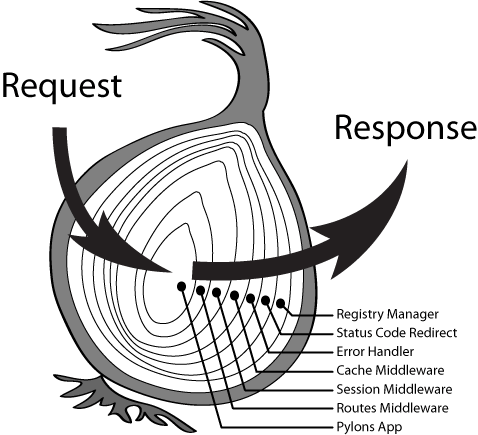
286 |
287 | + `middleware`: 第一个中间件将会执行
288 | + `next`: 每个中间件将会通过 next 来执行下一个中间件
289 |
290 | 我们如何实现所有的中间件的洋葱模型呢?
291 |
292 | 我们看一看每一个 middleware 的 API 如下
293 |
294 | ``` js
295 | middleware(ctx, next)
296 | ```
297 |
298 | 而每个中间件中的 `next` 是指执行下一个中间件,我们来把 `next` 函数提取出来,而 `next` 函数中又有 `next`,这应该怎么处理呢?
299 |
300 | ``` js
301 | const next = () => nextMiddleware(ctx, next)
302 | middleware(ctx, next(0))
303 | ```
304 |
305 | 是了,使用一个递归完成中间件的改造,并把中间件给连接起来,如下所示:
306 |
307 | ``` js
308 | // dispatch(i) 代表执行第 i 个中间件
309 | const dispatch = (i) => {
310 | return middlewares[i](ctx, () => dispatch(i+1))
311 | }
312 | dispatch(0)
313 | ```
314 |
315 | **`dispatch(i)` 代表执行第 i 个中间件,而 `next()` 函数将会执行下一个中间件 `dispatch(i+1)`,于是我们使用递归轻松地完成了洋葱模型。**
316 |
317 | 此时,再把递归的终止条件补充上: 当最后一个中间件函数执行 `next()` 时,直接返回
318 |
319 | ``` js
320 | const dispatch = (i) => {
321 | const middleware = middlewares[i]
322 | if (i === middlewares.length) {
323 | return
324 | }
325 | return middleware(ctx, () => dispatch(i+1))
326 | }
327 | return dispatch(0)
328 | ```
329 |
330 | 最终的 `compose` 函数代码如下:
331 |
332 | ``` js
333 | function compose (middlewares) {
334 | return ctx => {
335 | const dispatch = (i) => {
336 | const middleware = middlewares[i]
337 | if (i === middlewares.length) {
338 | return
339 | }
340 | return middleware(ctx, () => dispatch(i+1))
341 | }
342 | return dispatch(0)
343 | }
344 | }
345 | ```
346 |
347 | 至此,koa 的核心功能洋葱模型已经完成,写个示例来体验一下吧:
348 |
349 | ``` js
350 | const app = new Application()
351 |
352 | app.use(async (ctx, next) => {
353 | ctx.body = 'hello, one'
354 | await next()
355 | })
356 |
357 | app.use(async (ctx, next) => {
358 | ctx.body = 'hello, two'
359 | await next()
360 | })
361 |
362 | app.listen(7000)
363 | ```
364 |
365 | 此时还有一个小小的但不影响全局的不足:异常处理,下一步将会完成异常捕获的代码
366 |
367 | ## 异常处理
368 |
369 | 如果在你的后端服务中因为某一处报错,而把整个服务给挂掉了怎么办?
370 |
371 | 我们只需要对中间件执行函数进行一次异常处理即可:
372 |
373 | ``` js
374 | try {
375 | const fn = compose(this.middlewares)
376 | await fn(ctx)
377 | } catch (e) {
378 | console.error(e)
379 | ctx.res.statusCode = 500
380 | ctx.res.write('Internel Server Error')
381 | }
382 | ```
383 |
384 | 然而在日常项目中使用时,我们**必须**在框架层的异常捕捉之前就需要捕捉到它,来做一些异常结构化及异常上报的任务,此时会使用一个异常处理的中间件:
385 |
386 | ``` js
387 | // 错误处理中间件
388 | app.use(async (ctx, next) => {
389 | try {
390 | await next();
391 | }
392 | catch (err) {
393 | // 1. 异常结构化
394 | // 2. 异常分类
395 | // 3. 异常级别
396 | // 4. 异常上报
397 | }
398 | })
399 | ```
400 |
401 | ## 代码
402 |
403 | 以下是关于实现最小化 `koa` 的所有代码,并添加了注释。
404 |
405 | 也可以在此查看源码 [index.js](https://github.com/shfshanyue/mini-code/blob/master/code/koa/index.js)。
406 |
407 | ``` js
408 | // [http 模块](https://nodejs.org/api/http.html),构建 Node 框架的核心 API
409 | const http = require('http')
410 |
411 | // koa 团队通过额外实现一个库: [koa-compose](https://github.com/koajs/compose),来完成洋葱模型的核心,尽管 koa-compose 的核心代码只有十几行
412 | // 以下是洋葱模型的核心实现,可参考 [简述 koa 的中间件原理,手写 koa-compose 代码](https://github.com/shfshanyue/Daily-Question/issues/643)
413 | function compose (middlewares) {
414 | return ctx => {
415 | const dispatch = (i) => {
416 | const middleware = middlewares[i]
417 | if (i === middlewares.length) {
418 | return
419 | }
420 | //
421 | // app.use((ctx, next) => {})
422 | // 取出当前中间件,并执行
423 | // 当在中间件中调用 next() 时,此时将控制权交给下一个中间件,也是洋葱模型的核心
424 | // 如果中间件未调用 next(),则接下来的中间件将不会执行
425 | return middleware(ctx, () => dispatch(i+1))
426 | }
427 | // 从第一个中间件开始执行
428 | return dispatch(0)
429 | }
430 | }
431 |
432 |
433 | // 在 koa 代码中,使用 Context 对 req/res 进行了封装
434 | // 并把 req/res 中多个属性代理到 Context 中,方便访问
435 | class Context {
436 | constructor (req, res) {
437 | this.req = req
438 | this.res = res
439 | }
440 | }
441 |
442 | class Application {
443 | constructor () {
444 | this.middlewares = []
445 | }
446 |
447 | listen (...args) {
448 | // 在 listen 中处理请求并监听端口号
449 | const server = http.createServer(this.callback())
450 | server.listen(...args)
451 | }
452 |
453 | // 在 koa 中,app.callback() 将返回 Node HTTP API标准的 handleRequest 函数,方便测试
454 | callback () {
455 | return async (req, res) => {
456 | const ctx = new Context(req, res)
457 |
458 | // 使用 compose 合成所有中间件,在中间件中会做一些
459 | // 1. 路由解析
460 | // 2. Body解析
461 | // 3. 异常处理
462 | // 4. 统一认证
463 | // 5. 等等...
464 | const fn = compose(this.middlewares)
465 |
466 | try {
467 | await fn(ctx)
468 | } catch (e) {
469 | // 最基本的异常处理函数,在实际生产环境中,将由一个专业的异常处理中间件来替代,同时也会做
470 | // 1. 确认异常级别
471 | // 2. 异常上报
472 | // 3. 构造与异常对应的状态码,如 429、422 等
473 | console.error(e)
474 | ctx.res.statusCode = 500
475 | ctx.res.end('Internel Server Error')
476 | }
477 | ctx.res.end(ctx.body)
478 | }
479 | }
480 |
481 | // 注册中间件,并收集在中间件数组中
482 | use (middleware) {
483 | this.middlewares.push(middleware)
484 | }
485 | }
486 |
487 | module.exports = Application
488 |
489 | ```
490 |
491 | ## 小结
492 |
493 | `koa` 的核心代码特别简单,如果你是一个 Node 工程师,非常建议在业务之余研究一下 koa 的源码,并且自己也实现一个最简版的 koa。
494 |
--------------------------------------------------------------------------------
/code/apollo-server/package-lock.json:
--------------------------------------------------------------------------------
1 | {
2 | "name": "graphql-server",
3 | "version": "1.0.0",
4 | "lockfileVersion": 2,
5 | "requires": true,
6 | "packages": {
7 | "": {
8 | "name": "graphql-server",
9 | "version": "1.0.0",
10 | "license": "ISC",
11 | "dependencies": {
12 | "@graphql-tools/schema": "^8.3.2",
13 | "graphql": "^16.3.0",
14 | "raw-body": "^2.5.0"
15 | }
16 | },
17 | "node_modules/@graphql-tools/merge": {
18 | "version": "8.2.3",
19 | "resolved": "https://registry.npmjs.org/@graphql-tools/merge/-/merge-8.2.3.tgz",
20 | "integrity": "sha512-XCSmL6/Xg8259OTWNp69B57CPWiVL69kB7pposFrufG/zaAlI9BS68dgzrxmmSqZV5ZHU4r/6Tbf6fwnEJGiSw==",
21 | "dependencies": {
22 | "@graphql-tools/utils": "^8.6.2",
23 | "tslib": "~2.3.0"
24 | },
25 | "peerDependencies": {
26 | "graphql": "^14.0.0 || ^15.0.0 || ^16.0.0"
27 | }
28 | },
29 | "node_modules/@graphql-tools/schema": {
30 | "version": "8.3.2",
31 | "resolved": "https://registry.npmjs.org/@graphql-tools/schema/-/schema-8.3.2.tgz",
32 | "integrity": "sha512-77feSmIuHdoxMXRbRyxE8rEziKesd/AcqKV6fmxe7Zt+PgIQITxNDew2XJJg7qFTMNM43W77Ia6njUSBxNOkwg==",
33 | "dependencies": {
34 | "@graphql-tools/merge": "^8.2.3",
35 | "@graphql-tools/utils": "^8.6.2",
36 | "tslib": "~2.3.0",
37 | "value-or-promise": "1.0.11"
38 | },
39 | "peerDependencies": {
40 | "graphql": "^14.0.0 || ^15.0.0 || ^16.0.0"
41 | }
42 | },
43 | "node_modules/@graphql-tools/utils": {
44 | "version": "8.6.2",
45 | "resolved": "https://registry.npmjs.org/@graphql-tools/utils/-/utils-8.6.2.tgz",
46 | "integrity": "sha512-x1DG0cJgpJtImUlNE780B/dfp8pxvVxOD6UeykFH5rHes26S4kGokbgU8F1IgrJ1vAPm/OVBHtd2kicTsPfwdA==",
47 | "dependencies": {
48 | "tslib": "~2.3.0"
49 | },
50 | "peerDependencies": {
51 | "graphql": "^14.0.0 || ^15.0.0 || ^16.0.0"
52 | }
53 | },
54 | "node_modules/bytes": {
55 | "version": "3.1.2",
56 | "resolved": "https://registry.npmjs.org/bytes/-/bytes-3.1.2.tgz",
57 | "integrity": "sha512-/Nf7TyzTx6S3yRJObOAV7956r8cr2+Oj8AC5dt8wSP3BQAoeX58NoHyCU8P8zGkNXStjTSi6fzO6F0pBdcYbEg==",
58 | "engines": {
59 | "node": ">= 0.8"
60 | }
61 | },
62 | "node_modules/depd": {
63 | "version": "2.0.0",
64 | "resolved": "https://registry.npmjs.org/depd/-/depd-2.0.0.tgz",
65 | "integrity": "sha512-g7nH6P6dyDioJogAAGprGpCtVImJhpPk/roCzdb3fIh61/s/nPsfR6onyMwkCAR/OlC3yBC0lESvUoQEAssIrw==",
66 | "engines": {
67 | "node": ">= 0.8"
68 | }
69 | },
70 | "node_modules/graphql": {
71 | "version": "16.3.0",
72 | "resolved": "https://registry.npmjs.org/graphql/-/graphql-16.3.0.tgz",
73 | "integrity": "sha512-xm+ANmA16BzCT5pLjuXySbQVFwH3oJctUVdy81w1sV0vBU0KgDdBGtxQOUd5zqOBk/JayAFeG8Dlmeq74rjm/A==",
74 | "engines": {
75 | "node": "^12.22.0 || ^14.16.0 || >=16.0.0"
76 | }
77 | },
78 | "node_modules/http-errors": {
79 | "version": "2.0.0",
80 | "resolved": "https://registry.npmjs.org/http-errors/-/http-errors-2.0.0.tgz",
81 | "integrity": "sha512-FtwrG/euBzaEjYeRqOgly7G0qviiXoJWnvEH2Z1plBdXgbyjv34pHTSb9zoeHMyDy33+DWy5Wt9Wo+TURtOYSQ==",
82 | "dependencies": {
83 | "depd": "2.0.0",
84 | "inherits": "2.0.4",
85 | "setprototypeof": "1.2.0",
86 | "statuses": "2.0.1",
87 | "toidentifier": "1.0.1"
88 | },
89 | "engines": {
90 | "node": ">= 0.8"
91 | }
92 | },
93 | "node_modules/iconv-lite": {
94 | "version": "0.4.24",
95 | "resolved": "https://registry.npmjs.org/iconv-lite/-/iconv-lite-0.4.24.tgz",
96 | "integrity": "sha512-v3MXnZAcvnywkTUEZomIActle7RXXeedOR31wwl7VlyoXO4Qi9arvSenNQWne1TcRwhCL1HwLI21bEqdpj8/rA==",
97 | "dependencies": {
98 | "safer-buffer": ">= 2.1.2 < 3"
99 | },
100 | "engines": {
101 | "node": ">=0.10.0"
102 | }
103 | },
104 | "node_modules/inherits": {
105 | "version": "2.0.4",
106 | "resolved": "https://registry.npmjs.org/inherits/-/inherits-2.0.4.tgz",
107 | "integrity": "sha512-k/vGaX4/Yla3WzyMCvTQOXYeIHvqOKtnqBduzTHpzpQZzAskKMhZ2K+EnBiSM9zGSoIFeMpXKxa4dYeZIQqewQ=="
108 | },
109 | "node_modules/raw-body": {
110 | "version": "2.5.0",
111 | "resolved": "https://registry.npmjs.org/raw-body/-/raw-body-2.5.0.tgz",
112 | "integrity": "sha512-XpyZ6O7PVu3ItMQl0LslfsRoKxMOxi3SzDkrOtxMES5AqLFpYjQCryxI4LGygUN2jL+RgFsPkMPPlG7cg/47+A==",
113 | "dependencies": {
114 | "bytes": "3.1.2",
115 | "http-errors": "2.0.0",
116 | "iconv-lite": "0.4.24",
117 | "unpipe": "1.0.0"
118 | },
119 | "engines": {
120 | "node": ">= 0.8"
121 | }
122 | },
123 | "node_modules/safer-buffer": {
124 | "version": "2.1.2",
125 | "resolved": "https://registry.npmjs.org/safer-buffer/-/safer-buffer-2.1.2.tgz",
126 | "integrity": "sha512-YZo3K82SD7Riyi0E1EQPojLz7kpepnSQI9IyPbHHg1XXXevb5dJI7tpyN2ADxGcQbHG7vcyRHk0cbwqcQriUtg=="
127 | },
128 | "node_modules/setprototypeof": {
129 | "version": "1.2.0",
130 | "resolved": "https://registry.npmjs.org/setprototypeof/-/setprototypeof-1.2.0.tgz",
131 | "integrity": "sha512-E5LDX7Wrp85Kil5bhZv46j8jOeboKq5JMmYM3gVGdGH8xFpPWXUMsNrlODCrkoxMEeNi/XZIwuRvY4XNwYMJpw=="
132 | },
133 | "node_modules/statuses": {
134 | "version": "2.0.1",
135 | "resolved": "https://registry.npmjs.org/statuses/-/statuses-2.0.1.tgz",
136 | "integrity": "sha512-RwNA9Z/7PrK06rYLIzFMlaF+l73iwpzsqRIFgbMLbTcLD6cOao82TaWefPXQvB2fOC4AjuYSEndS7N/mTCbkdQ==",
137 | "engines": {
138 | "node": ">= 0.8"
139 | }
140 | },
141 | "node_modules/toidentifier": {
142 | "version": "1.0.1",
143 | "resolved": "https://registry.npmjs.org/toidentifier/-/toidentifier-1.0.1.tgz",
144 | "integrity": "sha512-o5sSPKEkg/DIQNmH43V0/uerLrpzVedkUh8tGNvaeXpfpuwjKenlSox/2O/BTlZUtEe+JG7s5YhEz608PlAHRA==",
145 | "engines": {
146 | "node": ">=0.6"
147 | }
148 | },
149 | "node_modules/tslib": {
150 | "version": "2.3.1",
151 | "resolved": "https://registry.npmjs.org/tslib/-/tslib-2.3.1.tgz",
152 | "integrity": "sha512-77EbyPPpMz+FRFRuAFlWMtmgUWGe9UOG2Z25NqCwiIjRhOf5iKGuzSe5P2w1laq+FkRy4p+PCuVkJSGkzTEKVw=="
153 | },
154 | "node_modules/unpipe": {
155 | "version": "1.0.0",
156 | "resolved": "https://registry.npmjs.org/unpipe/-/unpipe-1.0.0.tgz",
157 | "integrity": "sha1-sr9O6FFKrmFltIF4KdIbLvSZBOw=",
158 | "engines": {
159 | "node": ">= 0.8"
160 | }
161 | },
162 | "node_modules/value-or-promise": {
163 | "version": "1.0.11",
164 | "resolved": "https://registry.npmjs.org/value-or-promise/-/value-or-promise-1.0.11.tgz",
165 | "integrity": "sha512-41BrgH+dIbCFXClcSapVs5M6GkENd3gQOJpEfPDNa71LsUGMXDL0jMWpI/Rh7WhX+Aalfz2TTS3Zt5pUsbnhLg==",
166 | "engines": {
167 | "node": ">=12"
168 | }
169 | }
170 | },
171 | "dependencies": {
172 | "@graphql-tools/merge": {
173 | "version": "8.2.3",
174 | "resolved": "https://registry.npmjs.org/@graphql-tools/merge/-/merge-8.2.3.tgz",
175 | "integrity": "sha512-XCSmL6/Xg8259OTWNp69B57CPWiVL69kB7pposFrufG/zaAlI9BS68dgzrxmmSqZV5ZHU4r/6Tbf6fwnEJGiSw==",
176 | "requires": {
177 | "@graphql-tools/utils": "^8.6.2",
178 | "tslib": "~2.3.0"
179 | }
180 | },
181 | "@graphql-tools/schema": {
182 | "version": "8.3.2",
183 | "resolved": "https://registry.npmjs.org/@graphql-tools/schema/-/schema-8.3.2.tgz",
184 | "integrity": "sha512-77feSmIuHdoxMXRbRyxE8rEziKesd/AcqKV6fmxe7Zt+PgIQITxNDew2XJJg7qFTMNM43W77Ia6njUSBxNOkwg==",
185 | "requires": {
186 | "@graphql-tools/merge": "^8.2.3",
187 | "@graphql-tools/utils": "^8.6.2",
188 | "tslib": "~2.3.0",
189 | "value-or-promise": "1.0.11"
190 | }
191 | },
192 | "@graphql-tools/utils": {
193 | "version": "8.6.2",
194 | "resolved": "https://registry.npmjs.org/@graphql-tools/utils/-/utils-8.6.2.tgz",
195 | "integrity": "sha512-x1DG0cJgpJtImUlNE780B/dfp8pxvVxOD6UeykFH5rHes26S4kGokbgU8F1IgrJ1vAPm/OVBHtd2kicTsPfwdA==",
196 | "requires": {
197 | "tslib": "~2.3.0"
198 | }
199 | },
200 | "bytes": {
201 | "version": "3.1.2",
202 | "resolved": "https://registry.npmjs.org/bytes/-/bytes-3.1.2.tgz",
203 | "integrity": "sha512-/Nf7TyzTx6S3yRJObOAV7956r8cr2+Oj8AC5dt8wSP3BQAoeX58NoHyCU8P8zGkNXStjTSi6fzO6F0pBdcYbEg=="
204 | },
205 | "depd": {
206 | "version": "2.0.0",
207 | "resolved": "https://registry.npmjs.org/depd/-/depd-2.0.0.tgz",
208 | "integrity": "sha512-g7nH6P6dyDioJogAAGprGpCtVImJhpPk/roCzdb3fIh61/s/nPsfR6onyMwkCAR/OlC3yBC0lESvUoQEAssIrw=="
209 | },
210 | "graphql": {
211 | "version": "16.3.0",
212 | "resolved": "https://registry.npmjs.org/graphql/-/graphql-16.3.0.tgz",
213 | "integrity": "sha512-xm+ANmA16BzCT5pLjuXySbQVFwH3oJctUVdy81w1sV0vBU0KgDdBGtxQOUd5zqOBk/JayAFeG8Dlmeq74rjm/A=="
214 | },
215 | "http-errors": {
216 | "version": "2.0.0",
217 | "resolved": "https://registry.npmjs.org/http-errors/-/http-errors-2.0.0.tgz",
218 | "integrity": "sha512-FtwrG/euBzaEjYeRqOgly7G0qviiXoJWnvEH2Z1plBdXgbyjv34pHTSb9zoeHMyDy33+DWy5Wt9Wo+TURtOYSQ==",
219 | "requires": {
220 | "depd": "2.0.0",
221 | "inherits": "2.0.4",
222 | "setprototypeof": "1.2.0",
223 | "statuses": "2.0.1",
224 | "toidentifier": "1.0.1"
225 | }
226 | },
227 | "iconv-lite": {
228 | "version": "0.4.24",
229 | "resolved": "https://registry.npmjs.org/iconv-lite/-/iconv-lite-0.4.24.tgz",
230 | "integrity": "sha512-v3MXnZAcvnywkTUEZomIActle7RXXeedOR31wwl7VlyoXO4Qi9arvSenNQWne1TcRwhCL1HwLI21bEqdpj8/rA==",
231 | "requires": {
232 | "safer-buffer": ">= 2.1.2 < 3"
233 | }
234 | },
235 | "inherits": {
236 | "version": "2.0.4",
237 | "resolved": "https://registry.npmjs.org/inherits/-/inherits-2.0.4.tgz",
238 | "integrity": "sha512-k/vGaX4/Yla3WzyMCvTQOXYeIHvqOKtnqBduzTHpzpQZzAskKMhZ2K+EnBiSM9zGSoIFeMpXKxa4dYeZIQqewQ=="
239 | },
240 | "raw-body": {
241 | "version": "2.5.0",
242 | "resolved": "https://registry.npmjs.org/raw-body/-/raw-body-2.5.0.tgz",
243 | "integrity": "sha512-XpyZ6O7PVu3ItMQl0LslfsRoKxMOxi3SzDkrOtxMES5AqLFpYjQCryxI4LGygUN2jL+RgFsPkMPPlG7cg/47+A==",
244 | "requires": {
245 | "bytes": "3.1.2",
246 | "http-errors": "2.0.0",
247 | "iconv-lite": "0.4.24",
248 | "unpipe": "1.0.0"
249 | }
250 | },
251 | "safer-buffer": {
252 | "version": "2.1.2",
253 | "resolved": "https://registry.npmjs.org/safer-buffer/-/safer-buffer-2.1.2.tgz",
254 | "integrity": "sha512-YZo3K82SD7Riyi0E1EQPojLz7kpepnSQI9IyPbHHg1XXXevb5dJI7tpyN2ADxGcQbHG7vcyRHk0cbwqcQriUtg=="
255 | },
256 | "setprototypeof": {
257 | "version": "1.2.0",
258 | "resolved": "https://registry.npmjs.org/setprototypeof/-/setprototypeof-1.2.0.tgz",
259 | "integrity": "sha512-E5LDX7Wrp85Kil5bhZv46j8jOeboKq5JMmYM3gVGdGH8xFpPWXUMsNrlODCrkoxMEeNi/XZIwuRvY4XNwYMJpw=="
260 | },
261 | "statuses": {
262 | "version": "2.0.1",
263 | "resolved": "https://registry.npmjs.org/statuses/-/statuses-2.0.1.tgz",
264 | "integrity": "sha512-RwNA9Z/7PrK06rYLIzFMlaF+l73iwpzsqRIFgbMLbTcLD6cOao82TaWefPXQvB2fOC4AjuYSEndS7N/mTCbkdQ=="
265 | },
266 | "toidentifier": {
267 | "version": "1.0.1",
268 | "resolved": "https://registry.npmjs.org/toidentifier/-/toidentifier-1.0.1.tgz",
269 | "integrity": "sha512-o5sSPKEkg/DIQNmH43V0/uerLrpzVedkUh8tGNvaeXpfpuwjKenlSox/2O/BTlZUtEe+JG7s5YhEz608PlAHRA=="
270 | },
271 | "tslib": {
272 | "version": "2.3.1",
273 | "resolved": "https://registry.npmjs.org/tslib/-/tslib-2.3.1.tgz",
274 | "integrity": "sha512-77EbyPPpMz+FRFRuAFlWMtmgUWGe9UOG2Z25NqCwiIjRhOf5iKGuzSe5P2w1laq+FkRy4p+PCuVkJSGkzTEKVw=="
275 | },
276 | "unpipe": {
277 | "version": "1.0.0",
278 | "resolved": "https://registry.npmjs.org/unpipe/-/unpipe-1.0.0.tgz",
279 | "integrity": "sha1-sr9O6FFKrmFltIF4KdIbLvSZBOw="
280 | },
281 | "value-or-promise": {
282 | "version": "1.0.11",
283 | "resolved": "https://registry.npmjs.org/value-or-promise/-/value-or-promise-1.0.11.tgz",
284 | "integrity": "sha512-41BrgH+dIbCFXClcSapVs5M6GkENd3gQOJpEfPDNa71LsUGMXDL0jMWpI/Rh7WhX+Aalfz2TTS3Zt5pUsbnhLg=="
285 | }
286 | }
287 | }
288 |
--------------------------------------------------------------------------------