There's a lot to know about Docker! If you're curious about how this project works, or want to dive deeper into Docker, check out the following two (free!) resources.
8 |
9 | ## Docker in Development
10 |
11 | If you're unfamiliar with Docker, try out this [Docker in Development](https://serversforhackers.com/s/docker-in-development) course, which explains important topics in how this is put together.
12 |
13 | ## Dockerized App
14 |
15 | If you want to see how this workflow was developed, check out the [Dockerized App](https://serversforhackers.com/dockerized-app) course, which explains how the workflow used with Vessel was created. This is a free course module from the full [Shipping Docker](https://serversforhackers.com/shipping-docker) course.
--------------------------------------------------------------------------------
/source/_assets/js/main.js:
--------------------------------------------------------------------------------
1 | var hljs = require('highlight.js/lib/highlight.js');
2 | hljs.registerLanguage('php', require('highlight.js/lib/languages/php.js'));
3 | hljs.registerLanguage('bash', require('highlight.js/lib/languages/bash.js'));
4 | hljs.registerLanguage('nginx', require('highlight.js/lib/languages/nginx.js'));
5 | hljs.registerLanguage('yaml', require('highlight.js/lib/languages/yaml.js'));
6 | hljs.registerLanguage('sql', require('highlight.js/lib/languages/sql.js'));
7 | hljs.registerLanguage('json', require('highlight.js/lib/languages/json.js'));
8 | hljs.registerLanguage('apache', require('highlight.js/lib/languages/apache.js'));
9 | hljs.registerLanguage('javascript', require('highlight.js/lib/languages/javascript.js'));
10 |
11 | // On page load
12 | document.addEventListener("DOMContentLoaded", function(event) {
13 | // Highlight.js
14 | hljs.initHighlightingOnLoad();
15 | });
--------------------------------------------------------------------------------
/docker/app/start-container:
--------------------------------------------------------------------------------
1 | #!/usr/bin/env bash
2 |
3 | if [ ! "production" == "$APP_ENV" ] && [ ! "prod" == "$APP_ENV" ]; then
4 | # Enable xdebug
5 |
6 | ## FPM
7 | ln -sf /etc/php/7.1/mods-available/xdebug.ini /etc/php/7.1/fpm/conf.d/20-xdebug.ini
8 |
9 | ## CLI
10 | ln -sf /etc/php/7.1/mods-available/xdebug.ini /etc/php/7.1/cli/conf.d/20-xdebug.ini
11 | else
12 | # Disable xdebug
13 |
14 | ## FPM
15 | if [ -e /etc/php/7.1/fpm/conf.d/20-xdebug.ini ]; then
16 | rm -f /etc/php/7.1/fpm/conf.d/20-xdebug.ini
17 | fi
18 |
19 | ## CLI
20 | if [ -e /etc/php/7.1/cli/conf.d/20-xdebug.ini ]; then
21 | rm -f /etc/php/7.1/cli/conf.d/20-xdebug.ini
22 | fi
23 | fi
24 |
25 | # Config /etc/php/7.1/mods-available/xdebug.ini
26 | sed -i "s/xdebug\.remote_host\=.*/xdebug\.remote_host\=$XDEBUG_HOST/g" /etc/php/7.1/mods-available/xdebug.ini
27 |
28 | # start supervisord
29 | /usr/bin/supervisord
30 |
--------------------------------------------------------------------------------
/source/_partials/header-meta.blade.php:
--------------------------------------------------------------------------------
1 | Vessel - Docker dev environments for Laravel
2 |
3 |
4 |
5 |
6 |
7 |
8 |
9 |
10 |
11 |
12 |
13 |
14 |
15 |
16 |
17 |
18 |
--------------------------------------------------------------------------------
/develop:
--------------------------------------------------------------------------------
1 | #!/usr/bin/env bash
2 |
3 | if [ $# -gt 0 ];then
4 | # If "composer" is used, pass-thru to "composer"
5 | # inside a new container
6 | if [ "$1" == "composer" ]; then
7 | shift 1
8 | docker run -it --rm \
9 | -v $(pwd):/opt \
10 | -w /opt \
11 | vessel/app \
12 | composer "$@"
13 |
14 | # If "npm" is used, run npm
15 | # from our node container
16 |
17 | # TO INSTALL FOR THIS PROJECT, RUN:
18 | # ./develop npm install --unsafe-perm=true
19 |
20 | elif [ "$1" == "npm" ]; then
21 | shift 1
22 | docker run -it --rm \
23 | -v $(pwd):/opt \
24 | -w /opt \
25 | vessel/node \
26 | npm "$@"
27 |
28 | # If "yarn" is used, run yarn
29 | # from our node container
30 | elif [ "$1" == "yarn" ]; then
31 | shift 1
32 | docker run -it --rm \
33 | -v $(pwd):/opt \
34 | -w /opt \
35 | vessel/node \
36 | yarn "$@"
37 |
38 | # If "gulp" is used, run gulp
39 | # from our node container
40 | elif [ "$1" == "gulp" ]; then
41 | shift 1
42 | docker run -it --rm \
43 | -v $(pwd):/opt \
44 | -w /opt \
45 | vessel/node \
46 | ./node_modules/.bin/gulp "$@"
47 | fi
48 | fi
49 |
--------------------------------------------------------------------------------
/source/docs/installing-docker.md:
--------------------------------------------------------------------------------
1 | ---
2 | extends: _layouts.master
3 | section: body
4 | title: Installing Docker
5 | ---
6 |
7 |
Vessel's only requirment is Docker.
8 |
9 |
Vessel currently only works on Macintosh and Linux. It uses a bash script to run Docker commands.
10 |
11 | > Window support may come in the future. It will require [running Hyper-V](https://docs.microsoft.com/en-us/virtualization/hyper-v-on-windows/reference/hyper-v-requirements) which is not supported on Windows 10 **Home** edition.
12 |
13 |
37 |
38 | ## Linux Users
39 |
40 | **First**, the easiest way to install Docker on Linux is the following:
41 |
42 | ```bash
43 | curl -fsSL get.docker.com | sudo sh
44 | ```
45 |
46 | **Second**, be sure to add group `docker` to your user so you don't need `sudo` to run docker commands:
47 |
48 | ```bash
49 | sudo usermod -aG docker your-user
50 | ```
51 |
--------------------------------------------------------------------------------
/source/index.blade.php:
--------------------------------------------------------------------------------
1 | @extends('_layouts.master')
2 |
3 | @section('body')
4 |
Simple Docker development environments for Laravel.
Vessel started as a bash script I put together to make working with Docker easier.
14 |
15 |
It all started because Docker commands are cumbersome to type. You end up in the CLI pretty often when hacking on Laravel projects - a typical workflow in Laravel involves creating controllers or models, creating and running migrations, running queue workers, adding more packages, and more!
16 |
17 |
I developed this workflow from my own daily use, and even created a free video series about it. However, I wanted to make something more official that everyone could easily use.
18 |
19 |
This goal of this project is to be as simple as possible while also giving people a glimpse into how Docker works. I hope you find Docker a really neat way to compartmentalize your projects, and make hacking on projects (on any machine) a breeze.
20 |
21 |
What's Included
22 |
23 |
The aim of this project is simplicity. It (only) includes:
Unlike on Mac or Windows, Docker on Linux has no layer of virtualization. As a result of this (and how containers work in general), operations run within the Docker container on shared files are affected by the owner and permissions of those files. We'll see how here.
8 |
9 | > One way to understand Docker is to think of it as a tool to run *processes* in a contained space on any machine, where as virtual servers are a way to run *entire servers* in a contained space on any machine.
10 |
11 |
12 | ## Docker and Linux Permissions
13 |
14 | Say you have a container running PHP as user `www-data`. That user `www-data` may have a UID (user id) of 33.
15 |
16 | **If you're sharing files** between the host file system and the container (as we do with Vessel), one potentially surprising element is that when PHP writes to a shared file (such as `laravel.log`), it will still write to that file as user ID 33. It does this even if UID 33 does not exist on the host Linux system, or even if the UID belongs to a different user.
17 |
18 | If our code is owned by another user, for example `fideloper` with a UID of 1000, then PHP run within the container likely won't have permission to write to the code files!
19 |
20 | In terms of file permissions, it's just as if Docker is not used at all.
21 |
22 | > Remember this is specific to running Docker on Linux. The layer of virtualization used on MacOS hides this behavior; Mac users don't have to worry about it!
23 |
24 | To get around this issue, Vessel changes the UID used to run processes within the PHP and Node containers. Here's how.
25 |
26 |
27 | ## PHP-FPM
28 |
29 | If PHP is run as user `www-data` with a UID of 33, and your editing your code as user `fideloper` with UID 1000, then PHP in the container likely won't be able to write to your code files.
30 |
31 | To combat this, the following things are done:
32 |
33 | Vessel detects the UID of your current user (e.g. user `fideloper` on your Linux machine) and passes it into the ENTRYPOINT script that runs when the app (PHP) container is started.
34 |
35 | The app container then runs PHP-FPM as that user ID, so that PHP and the user owning your code files match. This allows PHP to write to your files as needed.
36 |
37 |
38 | ## Node
39 |
40 | The Node container also creates files in within `node_modules`, and may edit/create the `packages.json` file, the yarn lock file, and your compiled static assets.
41 |
42 | To prevent these generated files from being created as user `root` (the default user used within any container), we run the NodeJS container as user `node` (as [documented as a best practice](https://github.com/nodejs/docker-node/blob/c37d5e87fa6d46c0e387f73161b056bbf90b83aa/docs/BestPractices.md#non-root-user) by the containers creators).
43 |
44 | However, Vessel changes user node's UID to match your current user (e.g. user `fideloper`). Since the UID of node matches our current user's UID, the files get created on your host machines file system as the correct user name!
45 |
46 | The UID is detected at build-time (when an image is created from the `Dockerfile`) and so are hard-coded after that. If you change users on your workstation and thus have a new UID, you can [rebuild the Node container](/docs/docker-usage#rebuild-images) to get these values updated.
47 |
48 |
--------------------------------------------------------------------------------
/source/_layouts/master.blade.php:
--------------------------------------------------------------------------------
1 |
2 |
3 |
4 | @include('_partials.header-meta')
5 |
6 |
7 |
8 |
9 |
10 |
11 |
12 |
13 |
36 |
Vessel is just a small set of files that sets up a local Docker-based dev environment per project. There is nothing to install globally, except Docker itself!
8 |
9 | > If you don't have PHP 7+ installed on your host machine, see the docs on [I don't have PHP 7 yet (catch-22)](/docs/common-issues#catch22) for a solution.
10 |
11 |
12 | ## Install
13 |
14 | To install Vessel into any given Laravel project, simply require it via Composer:
15 |
16 | ```bash
17 | composer require shipping-docker/vessel
18 | ```
19 |
20 | If using Laravel <=5.4, register Vessel's service provider (Laravel >=5.5 does this automatically):
21 |
22 | ```php
23 | // config/app.php
24 |
25 | 'providers' => [
26 | // ....
27 | Vessel\VesselServiceProvider::class,
28 | // ...
29 | ];
30 | ```
31 |
32 | Finally, publish the `vessel` command and Docker files:
33 |
34 | ```bash
35 | php artisan vendor:publish --provider="Vessel\VesselServiceProvider"
36 | ```
37 |
38 | > Note: You must install Docker to use this project. See [Installing Docker](/docs/installing-docker) for details and supported systems.
39 |
40 |
41 | ## Initialize
42 |
43 | Getting started is easy - just initialize vessel and start using it.
44 |
45 | ```bash
46 | # Run this once to initialize project
47 | # Must run with "bash" until initialized
48 | bash vessel init
49 |
50 | # Start vessel
51 | ./vessel start
52 | ```
53 |
54 | Because Vessel uses Redis for caching, the `init` command will install the `predis/predis` composer package if it is not already present.
55 |
56 | Head to `http://localhost` in your browser and see your Laravel site!
57 |
58 | > **Note 1:** Starting Vessel for the first time will download the base Docker images from [https://hub.docker.com](https://hub.docker.com) and build our application container.
59 | >
60 | > This will only need to be run the first time.
61 |
62 | > **Note 2:** If you receive an error including **EADDRINUSE**, you likely already have something listening on port 80 or 3306. This may be a Vagrant virtual machine, or Laravel Valet, but could be anything! See [Multiple Environments](/docs/everyday-usage#multiple-environments) for a solution.
63 | >
64 | > Note that the EADDRINUSE error is often last in the error output reported from Docker.
65 |
66 |
67 |
68 | ## See it in action
69 |
70 | Here's a quick video on installing and getting started with Vessel, with just a tad more explanation.
71 |
72 |
73 |
74 |
75 |
76 |
77 | ## Starting and Stopping Vessel
78 |
79 | There's only a few commands to know to start or stop your containers. Database and Redis data is saved when you stop and restart Vessel.
80 |
81 | ### Starting Vessel
82 |
83 | This will start your containers and listen on port 80 for web requests.
84 |
85 | ```bash
86 | # Start the environment
87 | ./vessel start
88 |
89 | ## This is equivalent to
90 | ./vessel up -d
91 | ```
92 |
93 | ### Stopping Vessel
94 |
95 | Stopping Vessel will stop the containers and destroy them. They get recreated when you start Vessel back up. Your data (database/cache) is saved between restarts.
96 |
97 | ```bash
98 | # Stop the environment
99 | ./vessel stop
100 |
101 | ## This is equivalent to
102 | ./vessel down
103 | ```
104 |
105 |
106 |
--------------------------------------------------------------------------------
/source/docs/logging.md:
--------------------------------------------------------------------------------
1 | ---
2 | extends: _layouts.master
3 | section: body
4 | title: Logging
5 | ---
6 |
7 |
Docker can take the stdout and stderr output of a process and pipes it out for us to see using its logging mechanism.
8 |
9 |
10 | ## Docker Logs
11 |
12 | Our containers are running PHP, Nginx, MySQL, and Redis. These are all outputting basic logging information to Docker's logging mechanism.
13 |
14 | You can see most log details running some of the following commands:
15 |
16 | ```bash
17 | # Check log output of a container service
18 | ./vessel logs # all container logs
19 | ./vessel logs app # nginx | php logs
20 | ./vessel logs mysql # mysql logs
21 | ./vessel logs redis # redis logs
22 | ```
23 |
24 | You can `tail` the log files as well to see new output as it is generated:
25 |
26 | ```bash
27 | ## Tail the logs to see output as it's generated
28 | ./vessel logs -f # tail all logs
29 | ./vessel logs -f app # tail nginx & php logs
30 | ./vessel logs -f mysql # tail mysql logs
31 | ./vessel logs -f redis # tail redis logs
32 | ```
33 |
34 |
35 | ## Laravel Logs
36 |
37 | The container should be able to write to your application files. The Laravel log file at `storage/logs/laravel.log` will get written to as usual. You can inspect that file as you usually would.
38 |
39 | However, if you'd like, you can also inspect it from within the app container:
40 |
41 | ```bash
42 | # Tail Laravel Logs
43 | ./vessel exec app tail -f /var/www/html/storage/logs/laravel.log
44 | ```
45 |
46 | Note the file path of the application will always be `/var/www/html` within the container.
47 |
48 |
49 | ## MySQL General Log
50 |
51 | By default, MySQL only has it's regular logging enabled (essentially just the error log).
52 |
53 | However, sometimes it's useful to enable MySQL's "general" log, which logs every query it receives. This slows down MySQL a bit (regardless of if it's running within a container or not), but it useful to temporarily debug query issues.
54 |
55 | To enable this, simply uncomment a few lines within the `docker-compose.yml` file and restart the containers:
56 |
57 | Within file `docker-compose.yml`, find the section defining the `mysql` service:
58 |
59 | ```yaml
60 | mysql:
61 | image: mysql:5.7
62 | ports:
63 | - "${MYSQL_PORT}:3306"
64 | environment:
65 | MYSQL_ROOT_PASSWORD: "${DB_PASSWORD}"
66 | MYSQL_DATABASE: "${DB_DATABASE}"
67 | MYSQL_USER: "${DB_USERNAME}"
68 | MYSQL_PASSWORD: "${DB_PASSWORD}"
69 | volumes:
70 | - vesselmysql:/var/lib/mysql
71 | # - ./docker/mysql/conf.d:/etc/mysql/conf.d
72 | # - ./docker/mysql/logs:/var/log/mysql
73 | networks:
74 | - vessel
75 | ```
76 |
77 | Uncomment the `volumes` section which are commented out to include the configuration file that enables the general log, and shares a local directory with the mysql logging location.
78 |
79 | ```yaml
80 | mysql:
81 | image: mysql:5.7
82 | ports:
83 | - "${MYSQL_PORT}:3306"
84 | environment:
85 | MYSQL_ROOT_PASSWORD: "${DB_PASSWORD}"
86 | MYSQL_DATABASE: "${DB_DATABASE}"
87 | MYSQL_USER: "${DB_USERNAME}"
88 | MYSQL_PASSWORD: "${DB_PASSWORD}"
89 | volumes:
90 | - vesselmysql:/var/lib/mysql
91 | - ./docker/mysql/conf.d:/etc/mysql/conf.d
92 | - ./docker/mysql/logs:/var/log/mysql
93 | networks:
94 | - vessel
95 | ```
96 |
97 |
98 | Then restart the containers to see that take affect:
99 |
100 | ```bash
101 | # Restart the containers
102 | ./vessel restart
103 |
104 | # Or stop them and start them completely
105 | # to have it destroy and create new container instances
106 | ./vessel stop
107 | ./vessel start
108 | ```
109 |
110 |
111 |
112 |
--------------------------------------------------------------------------------
/source/docs/updating-resetting.md:
--------------------------------------------------------------------------------
1 | ---
2 | extends: _layouts.master
3 | section: body
4 | title: Updating and Resetting
5 | ---
6 |
7 |
If you want to update Vessel from an older version, or burn it all down and start over, read on here!
8 |
9 |
10 | ## Updating Vessel
11 |
12 | Updating Vessel involves a steps around getting the latest pubslished assets from the Vessel package, and rebuilding your containers if needed.
13 |
14 | **1. Update the Composer Package**
15 |
16 | You can simply update all your packages to the latest:
17 |
18 | ```bash
19 | ./vessel composer update
20 | ```
21 |
22 | If there's a new major version of Vessel, you can remove the old and install the new. For example, to update from Vessel 1.x to 2.0:
23 |
24 | ```bash
25 | ./vessel composer remove shipping-docker/vessel
26 | ./vessel composer require shipping-docker/vessel:~2.0
27 | ```
28 |
29 | **2. Publish Latest Vessel Files**
30 |
31 | Vessel's published assets may be updated as well, so you can get the latest by deleting the old and re-publishing the new ones:
32 |
33 | ```bash
34 | # Delete the "vessel" command
35 | rm vessel
36 | # Delete docker-compose.yml and the docker directory
37 | rm -rf docker*
38 | ```
39 |
40 | Then you can re-publish the new Vessel files:
41 |
42 | ```bash
43 | # Note vessel isn't available to use here at this point
44 | php artisan vendor:publish --provider="Vessel\VesselServiceProvider"
45 | ```
46 |
47 | > **Note**: If you have customized Vessel files, you'll need to save those customizations and re-implement them into the latest Vessel files.
48 |
49 | **3. Re-initialize Vessel**
50 |
51 | ```bash
52 | bash vessel init
53 | ```
54 |
55 | **4. Optional: Rebuild Containers**
56 |
57 | Updates may make changes to the containers themselves. If you want to rebuild your containers, you can do the following without losing any MySQL or Redis data:
58 |
59 | ```bash
60 | # Ensure containers are not running
61 | ./vessel down
62 |
63 | # Delete the Docker images built previously
64 | docker image rm vessel/app
65 | docker image rm vessel/node
66 |
67 | # Rebuild the images
68 | ./vessel build
69 |
70 | # Start Vessel back up
71 | ./vessel start
72 | ```
73 |
74 | Rebuilding the containers may take a few minutes, especially with a slower internet connection.
75 |
76 |
77 |
78 | ## Resetting Vessel
79 |
80 | If you need or want a completely fresh start from Vessel, here's how!
81 |
82 | **1. Ensure all instances of Vessel are stopped**
83 |
84 | You may have multiple projets running with Vessel - ensure each are stopped:
85 |
86 | ```bash
87 | # See what containers are running globally:
88 | docker ps
89 |
90 | # Head to each Vessel instance running and stop them
91 | cd ~/Path/To/Project
92 | ./vessel down
93 | ```
94 |
95 | **2. Delete Vessel Images, Update Official Images**
96 |
97 | Vessel creates 2 images and uses 2 other images from Docker Hub. Here we'll delete the Vessel images and pull down the latest images for the others:
98 |
99 | ```bash
100 | # Delete Vessel-built images
101 | docker image rm vessel/node
102 | docker image rm vessel/app
103 |
104 | # Pull down latest base images
105 | docker pull ubuntu:18.04
106 | docker pull mysql:5.7
107 | docker pull node:latest
108 | ```
109 |
110 | **3. Delete Old Data**
111 |
112 | Assuming you want to delete your old MySQL and Redis data as well, you can here. *If you don't want to delete that data, you can skip this step.*
113 |
114 | To delete your data, we need to find your created Volumes and remove them:
115 |
116 | ```bash
117 | # Find vessel volumes
118 | docker volume ls
119 |
120 | # Remove any you want (ending in *_vesselmysql or *_vesselredis)
121 | docker volume rm foo_vesselmysql
122 | docker volume rm foo_vesselredis
123 |
124 | # Or delete all volumes ever created:
125 | ## 🔴 THIS IS DANGEROUS
126 | ## You're deleting all redis/mysql data for every project!
127 | docker volume rm (docker volume ls -q)
128 | ```
129 |
130 | **4. Rebuild Images**
131 |
132 | You can then head to any project with Vessel in it and rebuild the images used by Vessel.
133 |
134 | ```bash
135 | cd ~/Path/To/Project
136 | ./vessel build
137 | ```
138 |
139 | Building can take a few minutes, depending on internet speed.
140 |
141 | > If you want to update to refresh the Vessel files, you can follow the steps from the [Updating docs](#updating) above.
142 |
143 |
144 |
145 |
--------------------------------------------------------------------------------
/source/_assets/sass/main.scss:
--------------------------------------------------------------------------------
1 | @import url('https://fonts.googleapis.com/css?family=Raleway:300,400,500,600|Roboto+Slab');
2 | @import "node_modules/bootstrap-sass/assets/stylesheets/bootstrap";
3 | @import "node_modules/highlight.js/styles/github";
4 |
5 | $bannerBlue: #0089AF;
6 | $textBlue: #348CB7;
7 | $black: #3b4c52;
8 | $grey: #787878;
9 | $sansSerif: 'Raleway', sans-serif;
10 | $serif: 'Roboto Slab', serif;
11 | $yellow: #EDCA7C;
12 | $yellowText: #5D5432;
13 | $bgBlue: #EFF7FA;
14 | $highlightBlue: #00AAD9;
15 | $darkBlue: #3D4E53;
16 | $borderColor: #e8e8e8;
17 |
18 | * {
19 | font-family: $sansSerif;
20 | }
21 |
22 | body {
23 | background: #f9fafc;
24 | color: $black;
25 | padding-top: 50px;
26 | margin: 0;
27 | padding: 0;
28 | font-size: 16px;
29 | line-height: 26px;
30 | }
31 |
32 |
33 | a {
34 | color: $textBlue;
35 | transition: color .5s;
36 | }
37 |
38 | a:hover {
39 | color: darken($textBlue, 10);
40 | text-decoration: none;
41 | }
42 |
43 | li,p,pre {
44 | margin: 0 0 14px 0;
45 | }
46 |
47 | .toc-nav {
48 | padding-right: 20px;
49 |
50 | h3 {
51 | border-bottom: 1px solid #e5e5e5;
52 | font-weight: 300;
53 | font-size: 16px;
54 | margin-bottom: 10px;
55 | padding: 0 10px 10px 10px;
56 | letter-spacing: 1px;
57 | }
58 | }
59 |
60 | .nav li {
61 | margin: 0;
62 | }
63 |
64 | h1,h2,h3 {
65 | font-weight: 500;
66 | }
67 |
68 | h1 {
69 | font-size: 40px;
70 | margin-top: 10px;
71 | margin-bottom: 40px;
72 | }
73 |
74 | h2 {
75 | font-size: 30px;
76 | margin-top: 60px;
77 | margin-bottom: 20px;
78 | border-bottom: 1px solid $borderColor;
79 | padding-bottom: 16px;
80 | }
81 |
82 | h3 {
83 | margin-top: 30px;
84 | margin-bottom: 15px;
85 | }
86 |
87 | li, p, pre {
88 | margin-bottom: 18px;
89 | }
90 |
91 | .section-label h1 {
92 | color: lighten($black, 30);
93 | font-size: 18px;
94 | font-weight: 300;
95 | margin: 20px 0;
96 | padding: 0 15px;
97 | letter-spacing: 1px;
98 | }
99 |
100 | .github-icon,
101 | .navbar-nav > li > a.github-icon {
102 | line-height: 0;
103 | }
104 |
105 | .navbar-header {
106 | float: left;
107 | }
108 |
109 | .navbar-nav {
110 | float: right;
111 | }
112 |
113 | .navbar,
114 | .navbar-default .navbar-brand,
115 | .navbar-default .navbar-nav > li > a {
116 | color: $black;
117 | // line-height: 0;
118 | }
119 |
120 | .navbar-default {
121 | background-color: #ffffff;
122 | border-color: $borderColor;
123 | }
124 |
125 | .nav-wrap {
126 | padding: 0 15px;
127 | border-bottom:1px solid #e8e8e8;
128 | }
129 |
130 | .b {
131 | display: block;
132 | }
133 |
134 | .tac {
135 | text-align: center;
136 | }
137 |
138 | .undec {
139 | text-decoration: none;
140 | }
141 |
142 | .pad {
143 | padding: 10px;
144 | }
145 |
146 | .mtop {
147 | margin-top: 50px;
148 | }
149 |
150 | .nav-item {
151 | color: #80939a;
152 | font-size: 16px;
153 | font-weight: 500;
154 | border-radius: 3px;
155 |
156 | &:hover,
157 | &.active {
158 | color: $black;
159 | background: #ffffff;
160 | }
161 |
162 | &.active {
163 | padding-left: 20px;
164 |
165 | &.nav-item-sub {
166 | padding-left: 40px;
167 | font-size: 14px;
168 | font-weight: 400;
169 | }
170 | }
171 | }
172 |
173 | .nav-item-sub {
174 | padding-left: 30px;
175 | }
176 |
177 | .sm {
178 | font-size: 12px;
179 | }
180 |
181 | .content {
182 | padding: 10px 15px 10px 15px;
183 | }
184 |
185 | .intro {
186 | font-family: $serif;
187 | font-size: 18px;
188 | line-height: 28px;
189 | margin-bottom: 30px;
190 | padding-bottom: 12px;
191 | border-bottom: 1px solid darken($borderColor, 10);
192 | }
193 |
194 | img {
195 | max-width: 100%;
196 | }
197 |
198 | footer {
199 | margin-top: 60px;
200 | color: #ffffff;
201 | background-color: $darkBlue;
202 | padding: 50px 0 30px 0;
203 |
204 | a {
205 | color: #6fc8f2;
206 | }
207 |
208 | a:hover {
209 | color: darken(#6fc8f2, 10);
210 | }
211 | }
212 |
213 | pre {
214 | background-color: #f8f8f8;
215 | border: 1px solid rgba(51, 69, 109, 0.21);
216 | font-size: 14px;
217 | }
218 |
219 | .embed-container { position: relative; padding-bottom: 56.25%; height: 0; overflow: hidden; max-width: 100%; }
220 | .embed-container iframe, .embed-container object, .embed-container embed { position: absolute; top: 0; left: 0; width: 100%; height: 100%; }
--------------------------------------------------------------------------------
/docker/app/php-fpm.conf:
--------------------------------------------------------------------------------
1 | ;;;;;;;;;;;;;;;;;;;;;
2 | ; FPM Configuration ;
3 | ;;;;;;;;;;;;;;;;;;;;;
4 |
5 | ; All relative paths in this configuration file are relative to PHP's install
6 | ; prefix (/usr). This prefix can be dynamically changed by using the
7 | ; '-p' argument from the command line.
8 |
9 | ;;;;;;;;;;;;;;;;;;
10 | ; Global Options ;
11 | ;;;;;;;;;;;;;;;;;;
12 |
13 | [global]
14 | ; Pid file
15 | ; Note: the default prefix is /var
16 | ; Default Value: none
17 | pid = /run/php/php7.1-fpm.pid
18 |
19 | ; Error log file
20 | ; If it's set to "syslog", log is sent to syslogd instead of being written
21 | ; in a local file.
22 | ; Note: the default prefix is /var
23 | ; Default Value: log/php-fpm.log
24 | error_log = /proc/self/fd/2
25 |
26 | ; syslog_facility is used to specify what type of program is logging the
27 | ; message. This lets syslogd specify that messages from different facilities
28 | ; will be handled differently.
29 | ; See syslog(3) for possible values (ex daemon equiv LOG_DAEMON)
30 | ; Default Value: daemon
31 | ;syslog.facility = daemon
32 |
33 | ; syslog_ident is prepended to every message. If you have multiple FPM
34 | ; instances running on the same server, you can change the default value
35 | ; which must suit common needs.
36 | ; Default Value: php-fpm
37 | ;syslog.ident = php-fpm
38 |
39 | ; Log level
40 | ; Possible Values: alert, error, warning, notice, debug
41 | ; Default Value: notice
42 | ;log_level = notice
43 |
44 | ; If this number of child processes exit with SIGSEGV or SIGBUS within the time
45 | ; interval set by emergency_restart_interval then FPM will restart. A value
46 | ; of '0' means 'Off'.
47 | ; Default Value: 0
48 | ;emergency_restart_threshold = 0
49 |
50 | ; Interval of time used by emergency_restart_interval to determine when
51 | ; a graceful restart will be initiated. This can be useful to work around
52 | ; accidental corruptions in an accelerator's shared memory.
53 | ; Available Units: s(econds), m(inutes), h(ours), or d(ays)
54 | ; Default Unit: seconds
55 | ; Default Value: 0
56 | ;emergency_restart_interval = 0
57 |
58 | ; Time limit for child processes to wait for a reaction on signals from master.
59 | ; Available units: s(econds), m(inutes), h(ours), or d(ays)
60 | ; Default Unit: seconds
61 | ; Default Value: 0
62 | ;process_control_timeout = 0
63 |
64 | ; The maximum number of processes FPM will fork. This has been design to control
65 | ; the global number of processes when using dynamic PM within a lot of pools.
66 | ; Use it with caution.
67 | ; Note: A value of 0 indicates no limit
68 | ; Default Value: 0
69 | ; process.max = 128
70 |
71 | ; Specify the nice(2) priority to apply to the master process (only if set)
72 | ; The value can vary from -19 (highest priority) to 20 (lower priority)
73 | ; Note: - It will only work if the FPM master process is launched as root
74 | ; - The pool process will inherit the master process priority
75 | ; unless it specified otherwise
76 | ; Default Value: no set
77 | ; process.priority = -19
78 |
79 | ; Send FPM to background. Set to 'no' to keep FPM in foreground for debugging.
80 | ; Default Value: yes
81 | daemonize = no
82 |
83 | ; Set open file descriptor rlimit for the master process.
84 | ; Default Value: system defined value
85 | ;rlimit_files = 1024
86 |
87 | ; Set max core size rlimit for the master process.
88 | ; Possible Values: 'unlimited' or an integer greater or equal to 0
89 | ; Default Value: system defined value
90 | ;rlimit_core = 0
91 |
92 | ; Specify the event mechanism FPM will use. The following is available:
93 | ; - select (any POSIX os)
94 | ; - poll (any POSIX os)
95 | ; - epoll (linux >= 2.5.44)
96 | ; - kqueue (FreeBSD >= 4.1, OpenBSD >= 2.9, NetBSD >= 2.0)
97 | ; - /dev/poll (Solaris >= 7)
98 | ; - port (Solaris >= 10)
99 | ; Default Value: not set (auto detection)
100 | ;events.mechanism = epoll
101 |
102 | ; When FPM is build with systemd integration, specify the interval,
103 | ; in second, between health report notification to systemd.
104 | ; Set to 0 to disable.
105 | ; Available Units: s(econds), m(inutes), h(ours)
106 | ; Default Unit: seconds
107 | ; Default value: 10
108 | ;systemd_interval = 10
109 |
110 | ;;;;;;;;;;;;;;;;;;;;
111 | ; Pool Definitions ;
112 | ;;;;;;;;;;;;;;;;;;;;
113 |
114 | ; Multiple pools of child processes may be started with different listening
115 | ; ports and different management options. The name of the pool will be
116 | ; used in logs and stats. There is no limitation on the number of pools which
117 | ; FPM can handle. Your system will tell you anyway :)
118 |
119 | ; Include one or more files. If glob(3) exists, it is used to include a bunch of
120 | ; files from a glob(3) pattern. This directive can be used everywhere in the
121 | ; file.
122 | ; Relative path can also be used. They will be prefixed by:
123 | ; - the global prefix if it's been set (-p argument)
124 | ; - /usr otherwise
125 | include=/etc/php/7.1/fpm/pool.d/*.conf
--------------------------------------------------------------------------------
/source/_partials/nav.blade.php:
--------------------------------------------------------------------------------
1 |
63 |
64 | Vessel
65 |
66 | Vessel Docs
--------------------------------------------------------------------------------
/source/docs/docker-usage.md:
--------------------------------------------------------------------------------
1 | ---
2 | extends: _layouts.master
3 | section: body
4 | title: How Docker is Used
5 | ---
6 |
7 |
You have all the power of Docker at your disposal. This means you can run any Docker command against Vessel.
8 |
9 |
10 | ## Images
11 |
12 | The first time you start up an application with Vessel, it will download the following official Docker images:
13 |
14 | * MySQL (5.7)
15 | * Redis (latest)
16 |
17 | Vessel will also **build** the following Docker images locally on your machine:
18 |
19 | * PHP 7.4 (using Ubuntu 18.04 as a base)
20 | - [Dockerfile used](https://github.com/shipping-docker/vessel/blob/master/docker-files/docker/app/Dockerfile) to build it
21 | * NodeJS (latest), with NPM, Yarn, and Gulp
22 | - [Dockerfile used](https://github.com/shipping-docker/vessel/blob/master/docker-files/docker/node/Dockerfile) to build it
23 |
24 | Images are used to run containers. You can think of an image as a PHP class, and a container as an instance of a class.
25 |
26 | ### Your Local Images
27 |
28 | You can view the images you have downloaded or built on your local machine:
29 |
30 | ```bash
31 | # List images built on your computer
32 | docker image ls
33 | ```
34 |
35 | You'll see something like this:
36 |
37 | ```
38 | REPOSITORY TAG IMAGE ID CREATED SIZE
39 | vessel/app latest ee589c11428a 6 weeks ago 385MB
40 | vessel/node latest e0c607290998 6 weeks ago 696MB
41 | ubuntu 18.04 ccc7a11d65b1 8 weeks ago 120MB
42 | mysql 5.7 c73c7527c03a 2 months ago 412MB
43 | redis alpine 9d8fa9aa0e5b 2 months ago 27.5MB
44 | node 8.6 90223b3d894e 5 months ago 665MB
45 | ```
46 |
47 | This shows the base images used (Node, Redis, MySQL, Ubuntu), and then our two custom images we use for the PHP and Node containers.
48 |
49 |
50 | ### Rebuilding Vessel Images
51 |
52 | If you want to completely rebuild Vessel images (to perhaps pull in the latest version of NodeJS or update the base Ubuntu image), you can delete these images and then have Vessel re-build them.
53 |
54 | **Here's a few examples of rebuilding the Node and PHP containers.**
55 |
56 | To rebuild the Node container:
57 |
58 | ```bash
59 | # Remove the vessel/node image and its base image
60 | # in this order
61 | docker image rm vessel/node
62 | docker image rm node
63 |
64 | # Have vessel rebuild any images it needs to
65 | # which will be "node" in this case
66 | ./vessel build
67 | ```
68 |
69 | We can do the same with our PHP application image:
70 |
71 | ```bash
72 | # Remove the vessel/app image and its base image
73 | # in this order
74 | docker image rm vessel/app
75 | docker image rm ubuntu
76 |
77 | # Have vessel rebuild any images it needs to
78 | # which will be "vessel/app" in this case
79 | ./vessel build
80 | ```
81 |
82 |
83 | ## Docker Compose
84 |
85 | Docker Compose is used to tie together the Docker images created/downloaded. When we start Vessel, Docker Compose tells it to create new containers, set up the networking, persist MySQL/Redis data through volumes, and setup file sharing between your code and the PHP container.
86 |
87 | Vessel will pass-through any command it does not understand to `docker-compose`. If no command is passed, it will run `docker-compose ps`.
88 |
89 | ```bash
90 | # Running this:
91 | ./vessel
92 |
93 | # Is equivalent to
94 | ./vessel ps
95 |
96 | # Which, under the hood, is running:
97 | docker-compose ps
98 | ```
99 |
100 | You can run any `docker-compose` command with `vessel`. Vessel will fill in defaults and environment variables needed/expected by the `docker-compose.yml` file for you, so it's easier and more convenient than using the `docker-compose` command itself.
101 |
102 | For example, we can restart our containers (e.g. run `docker-compose restart`) by letting `vessel` pass the command through to `docker-compose`:
103 |
104 | ```bash
105 | ./vessel restart
106 | ```
107 |
108 | You can see the `docker-compose` help menu like so:
109 |
110 | ```bash
111 | ./vessel help
112 | ```
113 |
114 | ### Services
115 |
116 | Containers within `docker-compose` are defined as "services". Vessel's `docker-compose.yml` file defines the following services:
117 |
118 | * app (the PHP container)
119 | * mysql
120 | * redis
121 | * node
122 |
123 |
124 | ### Network
125 |
126 | The Docker Compose setup creates a network when the containers are spun up. Each container is added to the network automatically, allowing the containers to communicate to eachother.
127 |
128 | The container's hostname is the service's name, so the mysql container can be reached using hostname `mysql`, and the redis container can be reached using hostname `redis`.
129 |
130 | This is why Laravel's `.env` file has the following hostnames defined after running the `bash vessel init` command:
131 |
132 | ```bash
133 | DB_HOST=mysql
134 | REDIS_HOST=redis
135 | ```
136 |
137 | After running `vessel start`, you can see the network created:
138 |
139 | ```bash
140 | # List created networks
141 | docker network ls
142 |
143 | # Inspect the vessel network created.
144 | # It will have a unique name ending in _vessel
145 | docker network inspect
146 | ```
147 |
148 | This network is (re)created and destroyed whenever we start and stop Vessel.
149 |
150 |
151 | ### Volumes
152 |
153 | Both Redis and MySQL images automatically create a Docker volume. This is defined in their `Dockerfile` and is not a special feature of Vessel.
154 |
155 | Each volume is a shared directory *mounted to your host machine*, which lets the containers save data in a place that *persists between stopping and restarting the containers*.
156 |
157 | This means when your containers are destroyed (as they are during normal Docker operation), you won't lose your important data, such as your databases or redis cache data.
158 |
159 | You can see what volumes are created after starting Vessel:
160 |
161 | ```bash
162 | # List created volumes
163 | docker volume ls
164 | ```
165 |
166 | You'll see something like this:
167 |
168 | ```bash
169 | DRIVER VOLUME NAME
170 | local vesselexample_vesselmysql
171 | local vesselexample_vesselredis
172 | ```
173 |
174 | This shows two "local" volumes. Their name is generated by Docker using a normalized directory name of the project, with the name "vesselmysql" or "vesselredis" appended.
175 |
176 | If you want to clean old volumes, or delete your current ones, you can! *Just know this permanently deletes your data, including your databases*:
177 |
178 | ```bash
179 | docker volume rm vesselexample_vesselmysql
180 | docker volume rm vesselexample_vesselredis
181 | ```
182 |
183 |
184 |
185 |
--------------------------------------------------------------------------------
/source/docs/common-issues.md:
--------------------------------------------------------------------------------
1 | ---
2 | extends: _layouts.master
3 | section: body
4 | title: Common Issues
5 | ---
6 |
7 |
There's a few common issues you might hit. Hopefully you'll find a resolution here!
8 |
9 |
10 | ## EADDRINUSE
11 |
12 | You might receive an error when starting up your containers. The error's message is typically not worded well - something like this:
13 |
14 | ```
15 | ERROR: for vesselexample_app_1 Cannot start service app: driver failed programming external connectivity on endpoint vesselexample_app_1 (4c891372c): Error starting userland proxy: Bind for 0.0.0.0:80: unexpected error (Failure EADDRINUSE)
16 | ERROR: Encountered errors while bringing up the project.
17 | ```
18 |
19 | The last part of the error message is the most important part: `Bind for 0.0.0.0:80: unexpected error (Failure EADDRINUSE)`. The error `EADDRINUSE` means **"Error: Address in use"**.
20 |
21 | What's happening is that port 80 is already in use by another process. If it's port 80, it's likely another web server. This might be another instance of Vessel, Laravel Valet, a Vagrant virtual machine, MAMP, WAMP, Apache or anything else you may have running that is listening for web connections.
22 |
23 | Within Vessel, you may also get an error when starting up the MySQL port which binds to port `3306`.
24 |
25 | For either case, you can either turn off the other program also listening on ports 80 and/or 3306, or see the documentation on [Multiple Environments](/docs/everyday-usage#multiple-environments) for a work-around.
26 |
27 |
28 |
29 | ## Symlinks
30 |
31 | If your project files use symlinks to point to other locations outside of the project, Docker will likely not be able to follow those symlinks as the location will not exist within the container.
32 |
33 | It's possible for a Symlink to point to a file that *does* exist within your project but at a file path the container doesn't understand.
34 |
35 | For example, a symlink like the following:
36 |
37 | ```
38 | /Users/fideloper/foo-project/vendor/fideloper -> /Users/fideloper/foo-project/packages/fideloper
39 | ```
40 |
41 | ...will not work within a container, as the container sees project files within `/var/www/html/`. The file path `/Users/fideloper/foo-project` will not exist for code run inside of the container.
42 |
43 | If your symlink points to other files *within* the project, you can create the symlink inside the container so it sees a path it understands:
44 |
45 | ```bash
46 | # Log into the container
47 | ./vessel exec app bash
48 |
49 | # Create the symlink from within the container
50 | > cd /var/www/html
51 | > ln -s /var/www/html/some-dir/real-file.ext /var/www/html/symlinked.ext
52 | ```
53 |
54 | If your symlink points to files outside of what the container has available to it, then the container simply will not be able to see those files.
55 |
56 | You may want to copy those files over to your project (or use `rsync` to sync changes over to your project files).
57 |
58 | Alternatively, you can adjust the `docker-compose.yml` file to share additional directories from your host filesystem:
59 |
60 | ```yaml
61 | # Portion of file `docker-compose.yml`
62 | services:
63 | app:
64 | build:
65 | context: ./docker/app
66 | dockerfile: Dockerfile
67 | image: vessel/app
68 | ports:
69 | - "${APP_PORT}:80"
70 | environment:
71 | CONTAINER_ENV: "${APP_ENV}"
72 | XDEBUG_HOST: "${XDEBUG_HOST}"
73 | WWWUSER: "${WWWUSER}"
74 | volumes:
75 | - .:/var/www/html
76 | - /path/to/additional/directory:/opt
77 | networks:
78 | - vessel
79 | ```
80 |
81 | If you then share additional directories on your host file system to the `/opt` directory of your app container, you can then create symlinks between the two:
82 |
83 | ```bash
84 | # Log into the container
85 | ./vessel exec app bash
86 |
87 | # Create symlink from file in /opt directory to the project files
88 | > ln -s /opt/foo-file.ext /var/www/html/foo-file.ext
89 | ```
90 |
91 |
92 | ## MySQL Access Denied
93 |
94 | When you start Vessel within a project for the first time, MySQL initializes itself. This initialization does the following:
95 |
96 | 1. Sets the `root` user's password to the password defined in the .`env` file's `DB_PASSWORD`
97 | 2. Creates a new database defined by `DB_DATABASE`
98 | 3. Creates a new user and password defined by `DB_USERNAME` and `DB_PASSWORD`
99 | - This means the root user and the created username both have the same password
100 |
101 | If the `DB_PASSWORD` field is empty, then MySQL may not initialize correctly. It will not create a user with an empty password as you might expect.
102 |
103 | **When you perform an action such as a database migration, you might receive an Access Denied error.**
104 |
105 | If you run into this, you can:
106 |
107 | 1. Spin down your containers
108 | 2. Destroy the Volume created for the MySQL container
109 | 3. Set a password within the `.env` file
110 | 4. Start the containers back up - the MySQL container will re-initialize itself
111 |
112 | ```bash
113 | # Spin down the containers
114 | ./vessel stop
115 |
116 | # Destroy the volume created
117 | ## List volumes to find it
118 | docker volume ls
119 | ## Destroy the appropriate one
120 | docker volume rm vesselexample_vesselmysql
121 |
122 | # Set a password within the .env file
123 | DB_PASSWORD=secret
124 |
125 | # Start the containers back up
126 | ./vessel start
127 | ```
128 |
129 |
130 | ## I don't have PHP 7 yet (catch-22)
131 |
132 | Starting a new Laravel project, or just pulling in certain packages, requires PHP7+. If you don't have PHP installed, or don't have PHP 7+, you'll run into an issue where you can't create a new Laravel project, or may not be able to add Vessel into your current project.
133 |
134 | In this case, we have a catch-22; You won't yet have Vessel (which has PHP 7+) but need PHP 7+ to get Laravel and/or Vessel.
135 |
136 | In this case, you can use a [pre-built Docker container](https://hub.docker.com/r/shippingdocker/php-composer/) setup for just this use case. It will allow you to run PHP and `composer` commands using PHP 7.
137 |
138 | Here's how:
139 |
140 | ```bash
141 | # Head to whatever directory you with to create new project in
142 | cd ~/Path/To/Projects
143 |
144 | # Create a new laravel project (or just `cd` into your existing project if you have one)
145 | docker run --rm -it \
146 | -v $(pwd):/opt \
147 | -w /opt shippingdocker/php-composer:latest \
148 | composer create-project laravel/laravel my-app
149 |
150 | # Get into new app directory
151 | cd my-app
152 |
153 | # Get Vessel:
154 | docker run --rm -it \
155 | -v $(pwd):/opt \
156 | -w /opt shippingdocker/php-composer:latest \
157 | composer require shipping-docker/vessel
158 |
159 | # Publish Vessel assets
160 | docker run --rm -it \
161 | -v $(pwd):/opt \
162 | -w /opt shippingdocker/php-composer:latest \
163 | php artisan vendor:publish --provider="Vessel\VesselServiceProvider"
164 |
165 | # If you're a linux user, your files
166 | # may be owned by user root
167 | # Run the following if so:
168 | ls -lah # Check owner of files in current dir
169 | sudo chown -R $USER: . # Change owner:group if needed
170 |
171 | # Then initialize and run Vessel as normal:
172 | bash vessel init
173 | ./vessel start
174 | ./vessel composer require foo/bar
175 | ```
176 |
177 | You can delete the `php-composer` image when you're finished with it:
178 |
179 | ```bash
180 | docker image rm shippingdocker/php-composer:latest
181 | ```
182 |
--------------------------------------------------------------------------------
/source/docs/customizing-vessel.md:
--------------------------------------------------------------------------------
1 | ---
2 | extends: _layouts.master
3 | section: body
4 | title: Customizing Vessel
5 | ---
6 |
7 |
Under the hood, Vessel is just Docker.
8 |
9 | If you're familiar with Docker and Docker Compose, you can basically do anything you want to Vessel.
10 |
11 | To give you an idea of what's possible, here are some example customizations.
12 |
13 |
14 | ## Connecting Two Installs
15 |
16 | Sometimes you may have a Vessel setup for two applications. You can have multiple Vessel's running as described in the [Multiple Environments](https://vessel.shippingdocker.com/docs/everyday-usage/#multiple-environments) section.
17 |
18 | However, what if your two Vessels need to speak to eachother? If you have one running on port 8080 (and use `http://localhost:8080` in the browser to view it), you may try to have your other Vessel reach it using `localhost:8080`. [However, this won't work](https://serversforhackers.com/c/dckr-localhost)! Only your host machine can use `localhost:8080`. That's a special port-forwarding setup between the host machine and your Vessel environment.
19 |
20 | For the Docker containers to speak to eachother directly, they need to be connected over a Docker network. So, to make this work, we need to manually create a new network:
21 |
22 | ```bash
23 | # Name the network whatever you want
24 | # here, I named it "overwatch"
25 | docker network create overwatch
26 | ```
27 |
28 | So we have a new network which is NOT managed by `docker-compose`. Instead, it exists outside of our projects. We can use this network to connect two or more Vessel's being used on our host machine.
29 |
30 | To use that network, we need to add our two (or more) projects' `app` containers into this new network:
31 |
32 | ```yml
33 | # Some things here omitted
34 | # We just need to add our app service
35 | # into the "overwatch" network
36 | services:
37 | app:
38 | networks:
39 | overwatch:
40 | aliases:
41 | - someapp
42 | sdnet:
43 |
44 | # And then, in the networks section
45 | # we define the overwatch network as
46 | # an external network
47 | networks:
48 | overwatch:
49 | external:
50 | name: overwatch
51 | ```
52 |
53 | > Note that I show this example once, but I'm assuming you'll make these changes in BOTH of your Vessel's. Make sure to make a *unique* network alias in both/all of your project's `docker-compose.yml` files.
54 |
55 | We did three things here:
56 |
57 | 1. The `app` service network gets added to `sdnet` as usual
58 | - **Note**: The syntax there of `sdnet:`, with the colon, is intentional/needed to be valid yaml
59 | 2. The `app` service network gets added to our new network `overwatch`, and we give it an alias of `someapp`. The alias `someapp` becomes the network name of that app container within the `overwatch` network.
60 | 3. We defined the `overwatch` network as an external network - docker-compose will NOT try to manage that network.
61 |
62 | So, if you do this in both of your `docker-compose.yml` files for both of your Vessel's, they can then communicate with eachother.
63 |
64 | **If we aliased both Vessel's `app` container to `someapp` and `fooapp`, then `fooapp` can send requests to `http://someapp` and `someapp` can send requests to `http://fooapp` (no ports necessary, Nginx is listening on port 80 in both cases inside of the containers).**
65 |
66 | > If you're confused and want to learn more, definitely consider picking up the [Shipping Docker course](https://serversforhackers.com/shipping-docker), which goes into Docker networking in a bit more detail.
67 |
68 |
69 | ## Using PostgreSQL over MySQL
70 |
71 | If you prefer PostgreSQL instead of MySQL, you can change the database container to use the [official PostreSQL image](https://hub.docker.com/_/postgres/).
72 |
73 | Within your `.env` file, change the database items as needed:
74 |
75 | ```
76 | DB_CONNECTION=pgsql
77 | DB_HOST=pgsql
78 | DB_PORT=5432
79 | ```
80 |
81 | This will prepare Laravel to connect to a PostgreSQL database, listening on port 5432.
82 |
83 | Then we'll edit the `docker-compose.yml` file to swap MySQL out with PostgreSQL.
84 |
85 | Luckily, the PostgreSQL configuration is very similar to the MySQL configuration (same for the Percona and MariaDB containers).
86 |
87 | Replace the `mysql` section with the following:
88 |
89 | ```yaml
90 | services:
91 | pgsql:
92 | image: postgres:10.0
93 | ports:
94 | - "${MYSQL_PORT}:5432"
95 | environment:
96 | POSTGRES_USER: "${DB_USERNAME}"
97 | POSTGRES_PASSWORD: "${DB_PASSWORD}"
98 | POSTGRES_DB: "${DB_DATABASE}"
99 | volumes:
100 | - vesselmysql:/var/lib/postgresql/data
101 | networks:
102 | - vessel
103 | ```
104 |
105 | ### Environment Variables
106 |
107 | **Note** that we still use the `MYSQL_PORT` environment variable. You can re-use this environment variable or edit the `vessel` file to use another environment variable. If we don't change the `vessel` file, you can start up your containers like so:
108 |
109 | ```bash
110 | MYSQL_PORT=5432 ./vessel start
111 | ```
112 |
113 | Otherwise you can add a `PGSQL_PORT` environment variable to the `vessel` script:
114 |
115 | ```bash
116 | export APP_PORT=${APP_PORT:-80}
117 | export MYSQL_PORT=${MYSQL_PORT:-3306}
118 | export PGSQL_PORT=${PGSQL_PORT:-5432}
119 | ```
120 |
121 | You can then use `PGSQL_PORT` in place of `MYSQL_PORT` within the `docker-compose.yml` file.
122 |
123 | ### Volume
124 |
125 | Lastly, we re-use the `vesselmysql` named volume. This is fine as the name is arbitrary, however if you want the naming to be consistent, you can define a volume for PostgreSQL instead.
126 |
127 | ```yaml
128 | services:
129 | pgsql:
130 | image: postgres:10.0
131 | ports:
132 | - "${MYSQL_PORT}:5432"
133 | environment:
134 | POSTGRES_USER: "${DB_USERNAME}"
135 | POSTGRES_PASSWORD: "${DB_PASSWORD}"
136 | POSTGRES_DB: "${DB_DATABASE}"
137 | volumes:
138 | - vesselpgsql:/var/lib/postgresql/data
139 | networks:
140 | - vessel
141 | volumes:
142 | vesselpgsql:
143 | driver: "local"
144 | ```
145 |
146 | I've omitted the Redis volume within the `volumes` section, but that should be there too.
147 |
148 | > **Note**: If you created an environment with MySQL before switching to PgSQL, the volume may have data in it already. If there is data in the volume `vesselmysql` or `vesselpgsql`, then a new database will fail to be initialized.
149 |
150 |
151 | ## Add Beanstalkd for Queues
152 |
153 | Vessel doesn't have any queue technology out of the box (the database driver is great for that use case!).
154 |
155 | If you want to add a queue driver such as Beanstalkd, you can add additional services to the `docker-compose.yml` file.
156 |
157 | Here we'll add an additional [beanstalkd](https://hub.docker.com/r/jonbaldie/beanstalkd/) beanstalkd service, using an image from a popular Docker hub repository.
158 |
159 | This one is pretty simple as there are no environment variables nor volumes needed.
160 |
161 | ```yaml
162 | services:
163 | beanstalkd:
164 | image: jonbaldie/beanstalkd:latest
165 | networks:
166 | - vessel
167 | ```
168 |
169 | Within your `.env` file you can set Laravel to use Beanstalkd:
170 |
171 | ```
172 | QUEUE_DRIVER=beanstalkd
173 | ```
174 |
175 | Finally, within your `config/queues.php` file, you can set the beanstalkd connection settings:
176 |
177 | ```php
178 | env('QUEUE_DRIVER', 'sync'),
183 |
184 | 'connections' => [
185 | 'beanstalkd' => [
186 | 'driver' => 'beanstalkd',
187 | 'host' => 'beanstalkd', // Match hostname to docker service name
188 | 'queue' => 'default',
189 | 'retry_after' => 90,
190 | ],
191 | ],
192 | ]
193 | ```
194 |
195 | Here we just changed the `host` to `beanstalkd`, the hostname used to connect to the Beanstalkd service.
196 |
197 | > Don't forget to run `composer require pda/pheanstalk:~3.0` so you can connect to Beanstalkd from PHP.
198 |
199 | Then you can run a queue worker using Beanstalkd:
200 |
201 | ```bash
202 | ./vessel artisan queue:work
203 | ```
204 |
205 | And within your code, your jobs will default to being pushed to the Beanstalkd queue:
206 |
207 | ```php
208 | dispatch( new App\Jobs\FooJob() );
209 | ```
210 |
--------------------------------------------------------------------------------
/source/docs/everyday-usage.md:
--------------------------------------------------------------------------------
1 | ---
2 | extends: _layouts.master
3 | section: body
4 | title: Everyday Usage
5 | ---
6 |
7 |
Vessel aims to make your everyday development easy, as if you're not using Docker at all. Here's how to run your everyday commands.
8 |
9 |
10 | ## Composer
11 |
12 | Often you can run Composer directly as usual, but you can run them within Vessel as well. You can use vessel's `composer` command or `comp` command for short.
13 |
14 | ```bash
15 | # Use composer
16 | ./vessel composer
17 | ./vessel comp # "comp" is a shortcut to "composer"
18 | ```
19 |
20 | For example, to install the AWS SDK, run:
21 |
22 | ```bash
23 | ./vessel composer require aws/aws-sdk-php
24 | ```
25 |
26 |
27 | ## Artisan
28 |
29 | Artisan commands can be run directly on your host machine as well, except when they interact with the cache or database.
30 |
31 | In those cases, we'll need Vessel to run the artisan commands. We can use `artisan` or `art` for short.
32 |
33 | ```bash
34 | ./vessel artisan
35 | ./vessel art # "art" is a shortcut to "artisan"
36 | ```
37 |
38 | All commands and flags are passed along to Artisan. For example, to run migrations and seed the database, use:
39 |
40 | ```bash
41 | ./vessel artisan migrate --seed
42 | ```
43 |
44 |
45 | ## PHP
46 |
47 | Ad-hoc PHP commands can be run within Vessel.
48 |
49 | Just use the `php` command:
50 |
51 | ```bash
52 | # List php CLI modules:
53 | ./vessel php -m
54 |
55 | # Echo "hello world"
56 | ./vessel php -r "echo 'hello world';"
57 |
58 | # Use artisan, because why not?
59 | ./vessel php artisan list
60 | ```
61 |
62 | All commands and flags are passed along to PHP. Additionally, all commands are run relative to your project root directory (the same directory that your Laravel application resides).
63 |
64 |
65 | ## Queue Workers
66 |
67 | Queue workers are just another `artisan` command. You can run them like any other artisan commands ([Laravel queue worker docs here](https://laravel.com/docs/5.5/queues#running-the-queue-worker)):
68 |
69 | ```bash
70 | # Just like from Laravel docs
71 | ./vessel artisan queue:work
72 |
73 | # Run a single job
74 | ./vessel artisan queue:work --once
75 |
76 | # Give jobs 3 tries before deleting/marking as failed
77 | # Sleep 3 seconds before polling for more jobs
78 | # after no more available jobs are found
79 | ./vessel artisan queue:work --tries=3 --sleep=3
80 | ```
81 |
82 | To stop a queue worker, you can use `ctrl+c` as usual.
83 |
84 | However, if `ctrl+c` doesn't work (which can happen if you start a worker before running `./vessel start`), you can find the ID of the running container and "kill" it:
85 |
86 | ```bash
87 | # Find the running instance of the vessel/app container,
88 | # likely is the top listed container
89 | docker ps
90 |
91 | # Get the container ID and "kill" it
92 | # Here we kill the container with ID 0770015f9257
93 | docker kill 0770015f9257
94 | ```
95 |
96 |
97 | ## Testing
98 |
99 | We can use Vessel to run our tests as well! This is especially useful if you test with your database or SQLite.
100 |
101 | Vessel has the `test` command to help us out here.
102 |
103 | ```bash
104 | # Run phpunit tests
105 | ./vessel test
106 | ```
107 |
108 | You can use any commands or flags you would normally use with phpunit as well.
109 |
110 | ```bash
111 | ./vessel test --filter=some.phpunit.filter
112 | ./vessel test tests/Unit/SpecificTest.php
113 | ```
114 |
115 |
116 | ## NodeJS/NPM/Yarn/Gulp
117 |
118 | Vessel also builds a container with NodeJS, NPM, Yarn, and Gulp. This container isn't actively running but can be used whenever you like.
119 |
120 | ### Node
121 |
122 | Any Node command can be run, such as `node index.js`.
123 |
124 | ```bash
125 | # Run nodejs
126 | ./vessel node
127 | ```
128 |
129 | ### NPM
130 |
131 | Any NPM command can be run, such as `npm install foo`.
132 |
133 | ```bash
134 | # Run npm
135 | ./vessel npm
136 |
137 | ## Example: install deps
138 | ./vessel npm install
139 | ```
140 |
141 | ### Yarn
142 |
143 | You may prefer to install and run tasks with Yarn.
144 |
145 | ```bash
146 | ./vessel yarn
147 |
148 | ## Example: install dependencies
149 | ./vessel yarn install
150 |
151 | ## Watch for file changes
152 | ./vessel yarn watch
153 |
154 | ## Run the dev task
155 | ./vessel yarn run dev
156 | ```
157 |
158 | ### Gulp
159 |
160 | If you are using Gulp, you can continue to use that as well.
161 |
162 | ```bash
163 | ./vessel gulp
164 | ```
165 |
166 |
167 | ## Multiple Environments
168 |
169 | Vessel attempts to bind to port 80 and 3306 on your machine, so you can simply go to `http://localhost` in your browser.
170 |
171 | However, if you run more than one instance of Vessel, you'll get an error when starting it; Each port can only be used once. To get around this, use a different port per project by setting the `APP_PORT` and `MYSQL_PORT` environment variables in one of two ways:
172 |
173 | Within your project's `.env` file:
174 |
175 | ```
176 | APP_PORT=8080
177 | MYSQL_PORT=33060
178 | ```
179 |
180 | Or when starting Vessel:
181 |
182 | ```bash
183 | APP_PORT=8080 MYSQL_PORT=33060 ./vessel start
184 | ```
185 |
186 | Then you can view your project at `http://localhost:8080` and access your database locally from port `33060`.
187 |
188 | > Note that changing `APP_PORT` and `MYSQL_PORT` does not change the fact that Nginx listens on port 80 and MySQL listens on port 3306. Instead, it only changes what port is ***forwarded*** from your host machine into the containers.
189 | >
190 | > Within the containers (which are all within a Docker network), software and containers communicate to eachother over the default ports. For example, your PHP code will connect to MySQL on port `3306` no matter what (there's no reason to change the `DB_PORT` env var).
191 | >
192 | > This port setup is merely convenience to communicate into your containers from the outside world:
193 | >
194 | > 1. `APP_PORT` is set so you can connect to the app container from your browser
195 | > 2. `MYSQL_PORT` is set so you can connect to your MySQL container from a client such as Sequel Pro
196 |
197 |
198 | ## Sequel Pro
199 |
200 | Since we bind the MySQL to port `3306`, Sequel Pro can access the database directly.
201 |
202 | 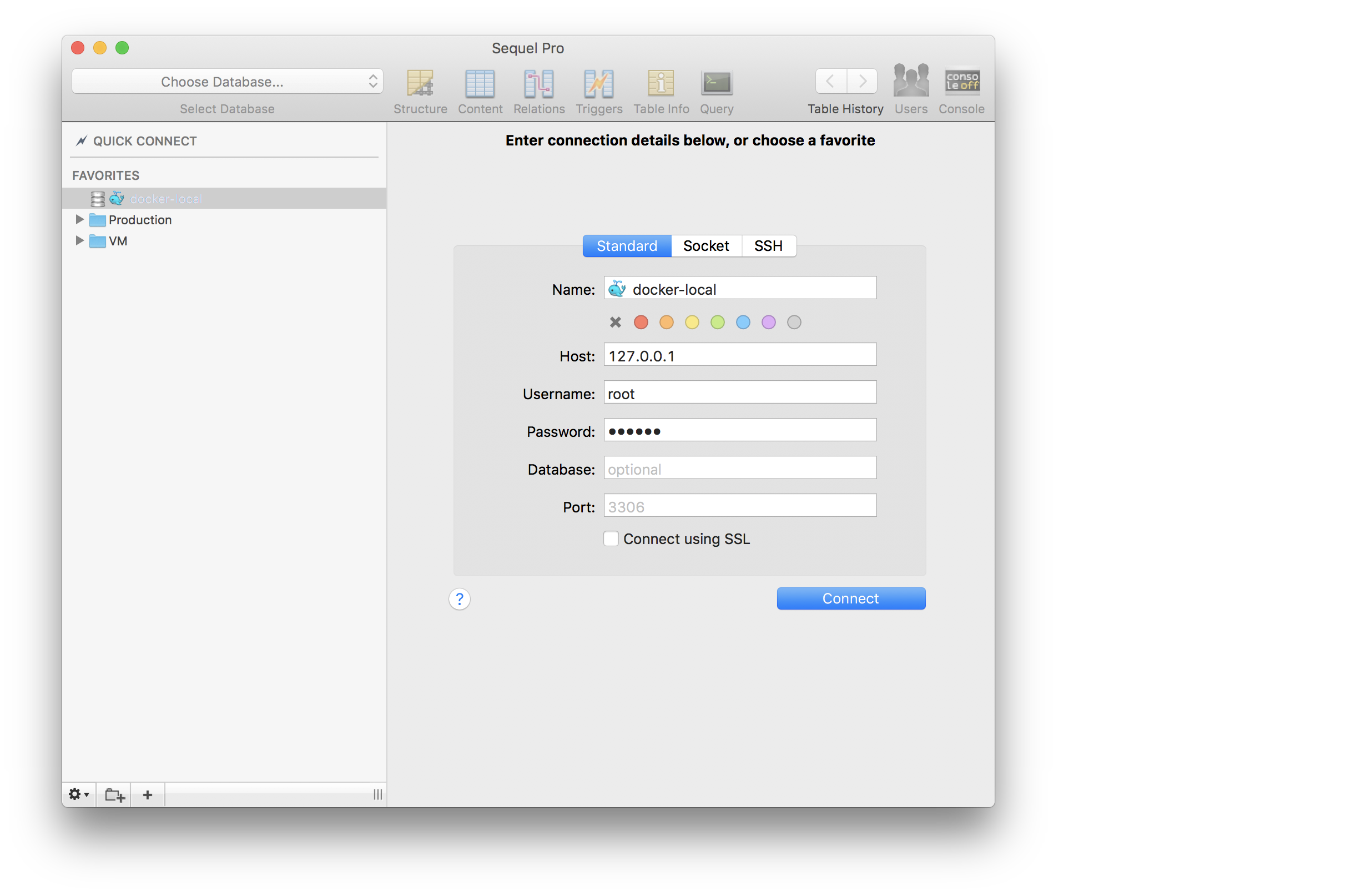
203 |
204 | The password for user `root` is set by environment variable `DB_PASSWORD` from within the `.env` file.
205 |
206 | > The Port setting in Sequel Pro must match the `MYSQL_PORT` environment variable, which defaults to `3306`.
207 |
208 |
209 | ## MySQL
210 |
211 | You'll likely find yourself needing to perform some MySQL operations.
212 |
213 | ### Log into MySQL
214 |
215 | Vessel has a shortcut to allow you to log into MySQL. This will also run `use your_database`, where "your_database" is the database set by your `DB_DATABASE` environment variable.
216 |
217 | > This requires the MySQL container to be running.
218 |
219 | ```bash
220 | # Log into mysql
221 | ./vessel mysql
222 | ```
223 |
224 | ### Exporting the Database
225 |
226 | Vessel has a shortcut to allow you to export the database configured in the `.env` file. This outputs to `stdout`; You'll need to redirect the output to a file on your local file system:
227 |
228 | ```bash
229 | # Export the database and save it to example.sql
230 | ./vessel dump > ~/Sites/example/example.sql
231 |
232 | # Export the database, gzip it, save it to example.sql.gz
233 | ./vessel dump | gzip > ~/Sites/example/example.sql.gz
234 | ```
235 |
236 | ### Importing a Database
237 |
238 | Importing a `.sql` file is a bit more complex due to how Docker interacts with the file system, but it's still very doable.
239 |
240 | > This may more easily be done within Sequel Pro or a similar GUI client, however here's how to do it on the command line.
241 |
242 | Let's say we have a local file `exports/example.sql` we want to import into our database named `example`.
243 |
244 | ```bash
245 | # This will prompt you for the
246 | # mysql root user password
247 | ./vessel run --rm \
248 | -v exports:/opt \
249 | mysql sh -c "mysql -h mysql -u root -p example < /opt/example.sql"
250 | ```
251 |
252 | Here's what this command is doing:
253 |
254 | * `./vessel run --rm` - Run a new container, and delete it when the operation is done
255 | * `-v exports:/opt` - Share the local directory `exports` (which contains `example.sql`) into the container's `/opt` directory
256 | * `sh -c "mysql -h mysql -u root -p example < /opt/example.sql"` - Run this command within the container. Note the `-h mysql` tells it to connect to the hostname `mysql` which will point to the running mysql server
257 | * This command spins up a new server and just runs the mysql client. Technically it's making a remote network connection from this container into the container running mysql server!
258 | * The example `/opt/example.sql` file is available to mysql because of the volume sharing we did between the local `exports` directory and the container's `/opt` directory.
259 |
260 | > We use `sh -c`, which lets us run a command as a string. If we did not, then the part `< /opt/example.sql` would attempt to run against our host computer instead of in the container.
261 |
262 |
263 | ## Container CLI
264 |
265 | You can run other operations against the MySQL container as well. Here are some examples.
266 |
267 | ### MySQL CLI
268 |
269 | > This shows you how to use `exec` to run `mysql` commands against the database container. See the section above `Log into MySQL` to use the `./vessel mysql` command as a shortcut to logging in using the `mysql` client.
270 | >
271 | > This information below will let you do more complex `mysql` commands.
272 |
273 | ```bash
274 | # Execute against the "mysql" container
275 | # the command "mysql -u root -p".
276 | # This will prompt you for the root password to login.
277 | ./vessel exec mysql mysql -u root -p
278 |
279 | # This is similar to the above command, but it spins up a new
280 | # container rather than executes a command within a running
281 | # container. This connects to mysql server at hostname `mysql`.
282 | ./vessel run --rm \
283 | mysql \
284 | mysql -h mysql -u root -p
285 | ```
286 |
287 | ### App Container CLI (Bash)
288 |
289 | If you want to "log into" your application container, you can run `bash` inside of it. This is just like SSHing into the application container, except we're just executing a `bash` process inside the already-running container.
290 |
291 | ```bash
292 | ./vessel exec app bash
293 | ```
294 |
295 | You'll be running as user root, and can poke around the container. Note that any changes you make will **not** persist when you stop and restart Vessel.
296 |
297 | You can do the same for some of the other containers as well:
298 |
299 | ```bash
300 | # Log into the mysql container
301 | ./vessel exec mysql bash
302 | ```
303 |
304 | Finally, you can use the `ssh` command shortcut as of version `3.1.0`:
305 |
306 | ```bash
307 | ./vessel ssh app
308 | ./vessel ssh mysql
309 | ```
310 |
311 | This will use `bash` to "log into" either containers. Accessing the `node` container is not supported.
312 |
313 | ### Redis CLI
314 |
315 | You can poke around the instance of Redis using `redis-cli`:
316 |
317 | ```bash
318 | ./vessel exec redis redis-cli
319 | ```
320 |
321 |
--------------------------------------------------------------------------------
/composer.lock:
--------------------------------------------------------------------------------
1 | {
2 | "_readme": [
3 | "This file locks the dependencies of your project to a known state",
4 | "Read more about it at https://getcomposer.org/doc/01-basic-usage.md#composer-lock-the-lock-file",
5 | "This file is @generated automatically"
6 | ],
7 | "content-hash": "dc6da06d28e4b62b8c9d18e2959a920a",
8 | "packages": [
9 | {
10 | "name": "container-interop/container-interop",
11 | "version": "1.2.0",
12 | "source": {
13 | "type": "git",
14 | "url": "https://github.com/container-interop/container-interop.git",
15 | "reference": "79cbf1341c22ec75643d841642dd5d6acd83bdb8"
16 | },
17 | "dist": {
18 | "type": "zip",
19 | "url": "https://api.github.com/repos/container-interop/container-interop/zipball/79cbf1341c22ec75643d841642dd5d6acd83bdb8",
20 | "reference": "79cbf1341c22ec75643d841642dd5d6acd83bdb8",
21 | "shasum": ""
22 | },
23 | "require": {
24 | "psr/container": "^1.0"
25 | },
26 | "type": "library",
27 | "autoload": {
28 | "psr-4": {
29 | "Interop\\Container\\": "src/Interop/Container/"
30 | }
31 | },
32 | "notification-url": "https://packagist.org/downloads/",
33 | "license": [
34 | "MIT"
35 | ],
36 | "description": "Promoting the interoperability of container objects (DIC, SL, etc.)",
37 | "homepage": "https://github.com/container-interop/container-interop",
38 | "time": "2017-02-14T19:40:03+00:00"
39 | },
40 | {
41 | "name": "doctrine/inflector",
42 | "version": "v1.2.0",
43 | "source": {
44 | "type": "git",
45 | "url": "https://github.com/doctrine/inflector.git",
46 | "reference": "e11d84c6e018beedd929cff5220969a3c6d1d462"
47 | },
48 | "dist": {
49 | "type": "zip",
50 | "url": "https://api.github.com/repos/doctrine/inflector/zipball/e11d84c6e018beedd929cff5220969a3c6d1d462",
51 | "reference": "e11d84c6e018beedd929cff5220969a3c6d1d462",
52 | "shasum": ""
53 | },
54 | "require": {
55 | "php": "^7.0"
56 | },
57 | "require-dev": {
58 | "phpunit/phpunit": "^6.2"
59 | },
60 | "type": "library",
61 | "extra": {
62 | "branch-alias": {
63 | "dev-master": "1.2.x-dev"
64 | }
65 | },
66 | "autoload": {
67 | "psr-4": {
68 | "Doctrine\\Common\\Inflector\\": "lib/Doctrine/Common/Inflector"
69 | }
70 | },
71 | "notification-url": "https://packagist.org/downloads/",
72 | "license": [
73 | "MIT"
74 | ],
75 | "authors": [
76 | {
77 | "name": "Roman Borschel",
78 | "email": "roman@code-factory.org"
79 | },
80 | {
81 | "name": "Benjamin Eberlei",
82 | "email": "kontakt@beberlei.de"
83 | },
84 | {
85 | "name": "Guilherme Blanco",
86 | "email": "guilhermeblanco@gmail.com"
87 | },
88 | {
89 | "name": "Jonathan Wage",
90 | "email": "jonwage@gmail.com"
91 | },
92 | {
93 | "name": "Johannes Schmitt",
94 | "email": "schmittjoh@gmail.com"
95 | }
96 | ],
97 | "description": "Common String Manipulations with regard to casing and singular/plural rules.",
98 | "homepage": "http://www.doctrine-project.org",
99 | "keywords": [
100 | "inflection",
101 | "pluralize",
102 | "singularize",
103 | "string"
104 | ],
105 | "time": "2017-07-22T12:18:28+00:00"
106 | },
107 | {
108 | "name": "erusev/parsedown",
109 | "version": "1.6.3",
110 | "source": {
111 | "type": "git",
112 | "url": "https://github.com/erusev/parsedown.git",
113 | "reference": "728952b90a333b5c6f77f06ea9422b94b585878d"
114 | },
115 | "dist": {
116 | "type": "zip",
117 | "url": "https://api.github.com/repos/erusev/parsedown/zipball/728952b90a333b5c6f77f06ea9422b94b585878d",
118 | "reference": "728952b90a333b5c6f77f06ea9422b94b585878d",
119 | "shasum": ""
120 | },
121 | "require": {
122 | "php": ">=5.3.0"
123 | },
124 | "type": "library",
125 | "autoload": {
126 | "psr-0": {
127 | "Parsedown": ""
128 | }
129 | },
130 | "notification-url": "https://packagist.org/downloads/",
131 | "license": [
132 | "MIT"
133 | ],
134 | "authors": [
135 | {
136 | "name": "Emanuil Rusev",
137 | "email": "hello@erusev.com",
138 | "homepage": "http://erusev.com"
139 | }
140 | ],
141 | "description": "Parser for Markdown.",
142 | "homepage": "http://parsedown.org",
143 | "keywords": [
144 | "markdown",
145 | "parser"
146 | ],
147 | "time": "2017-05-14T14:47:48+00:00"
148 | },
149 | {
150 | "name": "hamcrest/hamcrest-php",
151 | "version": "v1.2.2",
152 | "source": {
153 | "type": "git",
154 | "url": "https://github.com/hamcrest/hamcrest-php.git",
155 | "reference": "b37020aa976fa52d3de9aa904aa2522dc518f79c"
156 | },
157 | "dist": {
158 | "type": "zip",
159 | "url": "https://api.github.com/repos/hamcrest/hamcrest-php/zipball/b37020aa976fa52d3de9aa904aa2522dc518f79c",
160 | "reference": "b37020aa976fa52d3de9aa904aa2522dc518f79c",
161 | "shasum": ""
162 | },
163 | "require": {
164 | "php": ">=5.3.2"
165 | },
166 | "replace": {
167 | "cordoval/hamcrest-php": "*",
168 | "davedevelopment/hamcrest-php": "*",
169 | "kodova/hamcrest-php": "*"
170 | },
171 | "require-dev": {
172 | "phpunit/php-file-iterator": "1.3.3",
173 | "satooshi/php-coveralls": "dev-master"
174 | },
175 | "type": "library",
176 | "autoload": {
177 | "classmap": [
178 | "hamcrest"
179 | ],
180 | "files": [
181 | "hamcrest/Hamcrest.php"
182 | ]
183 | },
184 | "notification-url": "https://packagist.org/downloads/",
185 | "license": [
186 | "BSD"
187 | ],
188 | "description": "This is the PHP port of Hamcrest Matchers",
189 | "keywords": [
190 | "test"
191 | ],
192 | "time": "2015-05-11T14:41:42+00:00"
193 | },
194 | {
195 | "name": "illuminate/container",
196 | "version": "v5.5.2",
197 | "source": {
198 | "type": "git",
199 | "url": "https://github.com/illuminate/container.git",
200 | "reference": "a7095697649494ced03d33cf4e756ccee94f8ab2"
201 | },
202 | "dist": {
203 | "type": "zip",
204 | "url": "https://api.github.com/repos/illuminate/container/zipball/a7095697649494ced03d33cf4e756ccee94f8ab2",
205 | "reference": "a7095697649494ced03d33cf4e756ccee94f8ab2",
206 | "shasum": ""
207 | },
208 | "require": {
209 | "illuminate/contracts": "5.5.*",
210 | "php": ">=7.0",
211 | "psr/container": "~1.0"
212 | },
213 | "type": "library",
214 | "extra": {
215 | "branch-alias": {
216 | "dev-master": "5.5-dev"
217 | }
218 | },
219 | "autoload": {
220 | "psr-4": {
221 | "Illuminate\\Container\\": ""
222 | }
223 | },
224 | "notification-url": "https://packagist.org/downloads/",
225 | "license": [
226 | "MIT"
227 | ],
228 | "authors": [
229 | {
230 | "name": "Taylor Otwell",
231 | "email": "taylor@laravel.com"
232 | }
233 | ],
234 | "description": "The Illuminate Container package.",
235 | "homepage": "https://laravel.com",
236 | "time": "2017-08-14T18:00:01+00:00"
237 | },
238 | {
239 | "name": "illuminate/contracts",
240 | "version": "v5.5.2",
241 | "source": {
242 | "type": "git",
243 | "url": "https://github.com/illuminate/contracts.git",
244 | "reference": "e935ac3bcfa32a9d8b9a082e5085f233fa9cf918"
245 | },
246 | "dist": {
247 | "type": "zip",
248 | "url": "https://api.github.com/repos/illuminate/contracts/zipball/e935ac3bcfa32a9d8b9a082e5085f233fa9cf918",
249 | "reference": "e935ac3bcfa32a9d8b9a082e5085f233fa9cf918",
250 | "shasum": ""
251 | },
252 | "require": {
253 | "php": ">=7.0",
254 | "psr/container": "~1.0",
255 | "psr/simple-cache": "~1.0"
256 | },
257 | "type": "library",
258 | "extra": {
259 | "branch-alias": {
260 | "dev-master": "5.5-dev"
261 | }
262 | },
263 | "autoload": {
264 | "psr-4": {
265 | "Illuminate\\Contracts\\": ""
266 | }
267 | },
268 | "notification-url": "https://packagist.org/downloads/",
269 | "license": [
270 | "MIT"
271 | ],
272 | "authors": [
273 | {
274 | "name": "Taylor Otwell",
275 | "email": "taylor@laravel.com"
276 | }
277 | ],
278 | "description": "The Illuminate Contracts package.",
279 | "homepage": "https://laravel.com",
280 | "time": "2017-08-27T09:20:20+00:00"
281 | },
282 | {
283 | "name": "illuminate/events",
284 | "version": "v5.5.2",
285 | "source": {
286 | "type": "git",
287 | "url": "https://github.com/illuminate/events.git",
288 | "reference": "4879769619e0ea8a720885ba802e315c822eb246"
289 | },
290 | "dist": {
291 | "type": "zip",
292 | "url": "https://api.github.com/repos/illuminate/events/zipball/4879769619e0ea8a720885ba802e315c822eb246",
293 | "reference": "4879769619e0ea8a720885ba802e315c822eb246",
294 | "shasum": ""
295 | },
296 | "require": {
297 | "illuminate/container": "5.5.*",
298 | "illuminate/contracts": "5.5.*",
299 | "illuminate/support": "5.5.*",
300 | "php": ">=7.0"
301 | },
302 | "type": "library",
303 | "extra": {
304 | "branch-alias": {
305 | "dev-master": "5.5-dev"
306 | }
307 | },
308 | "autoload": {
309 | "psr-4": {
310 | "Illuminate\\Events\\": ""
311 | }
312 | },
313 | "notification-url": "https://packagist.org/downloads/",
314 | "license": [
315 | "MIT"
316 | ],
317 | "authors": [
318 | {
319 | "name": "Taylor Otwell",
320 | "email": "taylor@laravel.com"
321 | }
322 | ],
323 | "description": "The Illuminate Events package.",
324 | "homepage": "https://laravel.com",
325 | "time": "2017-08-27T02:05:29+00:00"
326 | },
327 | {
328 | "name": "illuminate/filesystem",
329 | "version": "v5.5.2",
330 | "source": {
331 | "type": "git",
332 | "url": "https://github.com/illuminate/filesystem.git",
333 | "reference": "63ad89e5546fd6c9df02713ec260a6dbaafdf815"
334 | },
335 | "dist": {
336 | "type": "zip",
337 | "url": "https://api.github.com/repos/illuminate/filesystem/zipball/63ad89e5546fd6c9df02713ec260a6dbaafdf815",
338 | "reference": "63ad89e5546fd6c9df02713ec260a6dbaafdf815",
339 | "shasum": ""
340 | },
341 | "require": {
342 | "illuminate/contracts": "5.5.*",
343 | "illuminate/support": "5.5.*",
344 | "php": ">=7.0",
345 | "symfony/finder": "~3.3"
346 | },
347 | "suggest": {
348 | "league/flysystem": "Required to use the Flysystem local and FTP drivers (~1.0).",
349 | "league/flysystem-aws-s3-v3": "Required to use the Flysystem S3 driver (~1.0).",
350 | "league/flysystem-rackspace": "Required to use the Flysystem Rackspace driver (~1.0)."
351 | },
352 | "type": "library",
353 | "extra": {
354 | "branch-alias": {
355 | "dev-master": "5.5-dev"
356 | }
357 | },
358 | "autoload": {
359 | "psr-4": {
360 | "Illuminate\\Filesystem\\": ""
361 | }
362 | },
363 | "notification-url": "https://packagist.org/downloads/",
364 | "license": [
365 | "MIT"
366 | ],
367 | "authors": [
368 | {
369 | "name": "Taylor Otwell",
370 | "email": "taylor@laravel.com"
371 | }
372 | ],
373 | "description": "The Illuminate Filesystem package.",
374 | "homepage": "https://laravel.com",
375 | "time": "2017-08-03T13:03:40+00:00"
376 | },
377 | {
378 | "name": "illuminate/support",
379 | "version": "v5.5.2",
380 | "source": {
381 | "type": "git",
382 | "url": "https://github.com/illuminate/support.git",
383 | "reference": "6a1c08c4e89429a0333ad86c489088ceeadbcced"
384 | },
385 | "dist": {
386 | "type": "zip",
387 | "url": "https://api.github.com/repos/illuminate/support/zipball/6a1c08c4e89429a0333ad86c489088ceeadbcced",
388 | "reference": "6a1c08c4e89429a0333ad86c489088ceeadbcced",
389 | "shasum": ""
390 | },
391 | "require": {
392 | "doctrine/inflector": "~1.1",
393 | "ext-mbstring": "*",
394 | "illuminate/contracts": "5.5.*",
395 | "nesbot/carbon": "^1.20",
396 | "php": ">=7.0"
397 | },
398 | "replace": {
399 | "tightenco/collect": "self.version"
400 | },
401 | "suggest": {
402 | "illuminate/filesystem": "Required to use the composer class (5.2.*).",
403 | "symfony/process": "Required to use the composer class (~3.3).",
404 | "symfony/var-dumper": "Required to use the dd function (~3.3)."
405 | },
406 | "type": "library",
407 | "extra": {
408 | "branch-alias": {
409 | "dev-master": "5.5-dev"
410 | }
411 | },
412 | "autoload": {
413 | "psr-4": {
414 | "Illuminate\\Support\\": ""
415 | },
416 | "files": [
417 | "helpers.php"
418 | ]
419 | },
420 | "notification-url": "https://packagist.org/downloads/",
421 | "license": [
422 | "MIT"
423 | ],
424 | "authors": [
425 | {
426 | "name": "Taylor Otwell",
427 | "email": "taylor@laravel.com"
428 | }
429 | ],
430 | "description": "The Illuminate Support package.",
431 | "homepage": "https://laravel.com",
432 | "time": "2017-09-04T14:00:07+00:00"
433 | },
434 | {
435 | "name": "illuminate/view",
436 | "version": "v5.5.2",
437 | "source": {
438 | "type": "git",
439 | "url": "https://github.com/illuminate/view.git",
440 | "reference": "dc4c42f5ec8b9713b47daf2676095cd1bae31892"
441 | },
442 | "dist": {
443 | "type": "zip",
444 | "url": "https://api.github.com/repos/illuminate/view/zipball/dc4c42f5ec8b9713b47daf2676095cd1bae31892",
445 | "reference": "dc4c42f5ec8b9713b47daf2676095cd1bae31892",
446 | "shasum": ""
447 | },
448 | "require": {
449 | "illuminate/container": "5.5.*",
450 | "illuminate/contracts": "5.5.*",
451 | "illuminate/events": "5.5.*",
452 | "illuminate/filesystem": "5.5.*",
453 | "illuminate/support": "5.5.*",
454 | "php": ">=7.0",
455 | "symfony/debug": "~3.3"
456 | },
457 | "type": "library",
458 | "extra": {
459 | "branch-alias": {
460 | "dev-master": "5.5-dev"
461 | }
462 | },
463 | "autoload": {
464 | "psr-4": {
465 | "Illuminate\\View\\": ""
466 | }
467 | },
468 | "notification-url": "https://packagist.org/downloads/",
469 | "license": [
470 | "MIT"
471 | ],
472 | "authors": [
473 | {
474 | "name": "Taylor Otwell",
475 | "email": "taylor@laravel.com"
476 | }
477 | ],
478 | "description": "The Illuminate View package.",
479 | "homepage": "https://laravel.com",
480 | "time": "2017-08-25T13:20:17+00:00"
481 | },
482 | {
483 | "name": "mnapoli/front-yaml",
484 | "version": "1.5.2",
485 | "source": {
486 | "type": "git",
487 | "url": "https://github.com/mnapoli/FrontYAML.git",
488 | "reference": "f10c1dfee1604d15c2b0ab6826eecc1111d65543"
489 | },
490 | "dist": {
491 | "type": "zip",
492 | "url": "https://api.github.com/repos/mnapoli/FrontYAML/zipball/f10c1dfee1604d15c2b0ab6826eecc1111d65543",
493 | "reference": "f10c1dfee1604d15c2b0ab6826eecc1111d65543",
494 | "shasum": ""
495 | },
496 | "require": {
497 | "erusev/parsedown": "~1.0",
498 | "symfony/yaml": "~2.1|^3.0"
499 | },
500 | "require-dev": {
501 | "league/commonmark": "~0.7",
502 | "phpunit/phpunit": "~4.5"
503 | },
504 | "type": "library",
505 | "autoload": {
506 | "psr-4": {
507 | "Mni\\FrontYAML\\": "src/"
508 | }
509 | },
510 | "notification-url": "https://packagist.org/downloads/",
511 | "license": [
512 | "MIT"
513 | ],
514 | "time": "2016-10-01T11:06:51+00:00"
515 | },
516 | {
517 | "name": "mnapoli/silly",
518 | "version": "1.5.1",
519 | "source": {
520 | "type": "git",
521 | "url": "https://github.com/mnapoli/silly.git",
522 | "reference": "807df4a844972ac74d07518c3a0aa9cb575b470b"
523 | },
524 | "dist": {
525 | "type": "zip",
526 | "url": "https://api.github.com/repos/mnapoli/silly/zipball/807df4a844972ac74d07518c3a0aa9cb575b470b",
527 | "reference": "807df4a844972ac74d07518c3a0aa9cb575b470b",
528 | "shasum": ""
529 | },
530 | "require": {
531 | "container-interop/container-interop": "~1.0",
532 | "php": ">=5.5",
533 | "php-di/invoker": "~1.2",
534 | "symfony/console": "~2.6|~3.0"
535 | },
536 | "require-dev": {
537 | "mnapoli/phpunit-easymock": "~0.1.0",
538 | "phpunit/phpunit": "~4.5"
539 | },
540 | "type": "library",
541 | "autoload": {
542 | "psr-4": {
543 | "Silly\\": "src/"
544 | }
545 | },
546 | "notification-url": "https://packagist.org/downloads/",
547 | "license": [
548 | "MIT"
549 | ],
550 | "description": "Silly CLI micro-framework based on Symfony Console",
551 | "keywords": [
552 | "cli",
553 | "console",
554 | "framework",
555 | "micro-framework",
556 | "silly"
557 | ],
558 | "time": "2016-09-16T11:44:03+00:00"
559 | },
560 | {
561 | "name": "mockery/mockery",
562 | "version": "0.9.9",
563 | "source": {
564 | "type": "git",
565 | "url": "https://github.com/mockery/mockery.git",
566 | "reference": "6fdb61243844dc924071d3404bb23994ea0b6856"
567 | },
568 | "dist": {
569 | "type": "zip",
570 | "url": "https://api.github.com/repos/mockery/mockery/zipball/6fdb61243844dc924071d3404bb23994ea0b6856",
571 | "reference": "6fdb61243844dc924071d3404bb23994ea0b6856",
572 | "shasum": ""
573 | },
574 | "require": {
575 | "hamcrest/hamcrest-php": "~1.1",
576 | "lib-pcre": ">=7.0",
577 | "php": ">=5.3.2"
578 | },
579 | "require-dev": {
580 | "phpunit/phpunit": "~4.0"
581 | },
582 | "type": "library",
583 | "extra": {
584 | "branch-alias": {
585 | "dev-master": "0.9.x-dev"
586 | }
587 | },
588 | "autoload": {
589 | "psr-0": {
590 | "Mockery": "library/"
591 | }
592 | },
593 | "notification-url": "https://packagist.org/downloads/",
594 | "license": [
595 | "BSD-3-Clause"
596 | ],
597 | "authors": [
598 | {
599 | "name": "Pádraic Brady",
600 | "email": "padraic.brady@gmail.com",
601 | "homepage": "http://blog.astrumfutura.com"
602 | },
603 | {
604 | "name": "Dave Marshall",
605 | "email": "dave.marshall@atstsolutions.co.uk",
606 | "homepage": "http://davedevelopment.co.uk"
607 | }
608 | ],
609 | "description": "Mockery is a simple yet flexible PHP mock object framework for use in unit testing with PHPUnit, PHPSpec or any other testing framework. Its core goal is to offer a test double framework with a succinct API capable of clearly defining all possible object operations and interactions using a human readable Domain Specific Language (DSL). Designed as a drop in alternative to PHPUnit's phpunit-mock-objects library, Mockery is easy to integrate with PHPUnit and can operate alongside phpunit-mock-objects without the World ending.",
610 | "homepage": "http://github.com/padraic/mockery",
611 | "keywords": [
612 | "BDD",
613 | "TDD",
614 | "library",
615 | "mock",
616 | "mock objects",
617 | "mockery",
618 | "stub",
619 | "test",
620 | "test double",
621 | "testing"
622 | ],
623 | "time": "2017-02-28T12:52:32+00:00"
624 | },
625 | {
626 | "name": "nesbot/carbon",
627 | "version": "1.22.1",
628 | "source": {
629 | "type": "git",
630 | "url": "https://github.com/briannesbitt/Carbon.git",
631 | "reference": "7cdf42c0b1cc763ab7e4c33c47a24e27c66bfccc"
632 | },
633 | "dist": {
634 | "type": "zip",
635 | "url": "https://api.github.com/repos/briannesbitt/Carbon/zipball/7cdf42c0b1cc763ab7e4c33c47a24e27c66bfccc",
636 | "reference": "7cdf42c0b1cc763ab7e4c33c47a24e27c66bfccc",
637 | "shasum": ""
638 | },
639 | "require": {
640 | "php": ">=5.3.0",
641 | "symfony/translation": "~2.6 || ~3.0"
642 | },
643 | "require-dev": {
644 | "friendsofphp/php-cs-fixer": "~2",
645 | "phpunit/phpunit": "~4.0 || ~5.0"
646 | },
647 | "type": "library",
648 | "extra": {
649 | "branch-alias": {
650 | "dev-master": "1.23-dev"
651 | }
652 | },
653 | "autoload": {
654 | "psr-4": {
655 | "Carbon\\": "src/Carbon/"
656 | }
657 | },
658 | "notification-url": "https://packagist.org/downloads/",
659 | "license": [
660 | "MIT"
661 | ],
662 | "authors": [
663 | {
664 | "name": "Brian Nesbitt",
665 | "email": "brian@nesbot.com",
666 | "homepage": "http://nesbot.com"
667 | }
668 | ],
669 | "description": "A simple API extension for DateTime.",
670 | "homepage": "http://carbon.nesbot.com",
671 | "keywords": [
672 | "date",
673 | "datetime",
674 | "time"
675 | ],
676 | "time": "2017-01-16T07:55:07+00:00"
677 | },
678 | {
679 | "name": "php-di/invoker",
680 | "version": "1.3.3",
681 | "source": {
682 | "type": "git",
683 | "url": "https://github.com/PHP-DI/Invoker.git",
684 | "reference": "1f4ca63b9abc66109e53b255e465d0ddb5c2e3f7"
685 | },
686 | "dist": {
687 | "type": "zip",
688 | "url": "https://api.github.com/repos/PHP-DI/Invoker/zipball/1f4ca63b9abc66109e53b255e465d0ddb5c2e3f7",
689 | "reference": "1f4ca63b9abc66109e53b255e465d0ddb5c2e3f7",
690 | "shasum": ""
691 | },
692 | "require": {
693 | "container-interop/container-interop": "~1.1"
694 | },
695 | "require-dev": {
696 | "athletic/athletic": "~0.1.8",
697 | "phpunit/phpunit": "~4.5"
698 | },
699 | "type": "library",
700 | "autoload": {
701 | "psr-4": {
702 | "Invoker\\": "src/"
703 | }
704 | },
705 | "notification-url": "https://packagist.org/downloads/",
706 | "license": [
707 | "MIT"
708 | ],
709 | "description": "Generic and extensible callable invoker",
710 | "homepage": "https://github.com/PHP-DI/Invoker",
711 | "keywords": [
712 | "callable",
713 | "dependency",
714 | "dependency-injection",
715 | "injection",
716 | "invoke",
717 | "invoker"
718 | ],
719 | "time": "2016-07-14T13:09:58+00:00"
720 | },
721 | {
722 | "name": "psr/container",
723 | "version": "1.0.0",
724 | "source": {
725 | "type": "git",
726 | "url": "https://github.com/php-fig/container.git",
727 | "reference": "b7ce3b176482dbbc1245ebf52b181af44c2cf55f"
728 | },
729 | "dist": {
730 | "type": "zip",
731 | "url": "https://api.github.com/repos/php-fig/container/zipball/b7ce3b176482dbbc1245ebf52b181af44c2cf55f",
732 | "reference": "b7ce3b176482dbbc1245ebf52b181af44c2cf55f",
733 | "shasum": ""
734 | },
735 | "require": {
736 | "php": ">=5.3.0"
737 | },
738 | "type": "library",
739 | "extra": {
740 | "branch-alias": {
741 | "dev-master": "1.0.x-dev"
742 | }
743 | },
744 | "autoload": {
745 | "psr-4": {
746 | "Psr\\Container\\": "src/"
747 | }
748 | },
749 | "notification-url": "https://packagist.org/downloads/",
750 | "license": [
751 | "MIT"
752 | ],
753 | "authors": [
754 | {
755 | "name": "PHP-FIG",
756 | "homepage": "http://www.php-fig.org/"
757 | }
758 | ],
759 | "description": "Common Container Interface (PHP FIG PSR-11)",
760 | "homepage": "https://github.com/php-fig/container",
761 | "keywords": [
762 | "PSR-11",
763 | "container",
764 | "container-interface",
765 | "container-interop",
766 | "psr"
767 | ],
768 | "time": "2017-02-14T16:28:37+00:00"
769 | },
770 | {
771 | "name": "psr/log",
772 | "version": "1.0.2",
773 | "source": {
774 | "type": "git",
775 | "url": "https://github.com/php-fig/log.git",
776 | "reference": "4ebe3a8bf773a19edfe0a84b6585ba3d401b724d"
777 | },
778 | "dist": {
779 | "type": "zip",
780 | "url": "https://api.github.com/repos/php-fig/log/zipball/4ebe3a8bf773a19edfe0a84b6585ba3d401b724d",
781 | "reference": "4ebe3a8bf773a19edfe0a84b6585ba3d401b724d",
782 | "shasum": ""
783 | },
784 | "require": {
785 | "php": ">=5.3.0"
786 | },
787 | "type": "library",
788 | "extra": {
789 | "branch-alias": {
790 | "dev-master": "1.0.x-dev"
791 | }
792 | },
793 | "autoload": {
794 | "psr-4": {
795 | "Psr\\Log\\": "Psr/Log/"
796 | }
797 | },
798 | "notification-url": "https://packagist.org/downloads/",
799 | "license": [
800 | "MIT"
801 | ],
802 | "authors": [
803 | {
804 | "name": "PHP-FIG",
805 | "homepage": "http://www.php-fig.org/"
806 | }
807 | ],
808 | "description": "Common interface for logging libraries",
809 | "homepage": "https://github.com/php-fig/log",
810 | "keywords": [
811 | "log",
812 | "psr",
813 | "psr-3"
814 | ],
815 | "time": "2016-10-10T12:19:37+00:00"
816 | },
817 | {
818 | "name": "psr/simple-cache",
819 | "version": "1.0.0",
820 | "source": {
821 | "type": "git",
822 | "url": "https://github.com/php-fig/simple-cache.git",
823 | "reference": "753fa598e8f3b9966c886fe13f370baa45ef0e24"
824 | },
825 | "dist": {
826 | "type": "zip",
827 | "url": "https://api.github.com/repos/php-fig/simple-cache/zipball/753fa598e8f3b9966c886fe13f370baa45ef0e24",
828 | "reference": "753fa598e8f3b9966c886fe13f370baa45ef0e24",
829 | "shasum": ""
830 | },
831 | "require": {
832 | "php": ">=5.3.0"
833 | },
834 | "type": "library",
835 | "extra": {
836 | "branch-alias": {
837 | "dev-master": "1.0.x-dev"
838 | }
839 | },
840 | "autoload": {
841 | "psr-4": {
842 | "Psr\\SimpleCache\\": "src/"
843 | }
844 | },
845 | "notification-url": "https://packagist.org/downloads/",
846 | "license": [
847 | "MIT"
848 | ],
849 | "authors": [
850 | {
851 | "name": "PHP-FIG",
852 | "homepage": "http://www.php-fig.org/"
853 | }
854 | ],
855 | "description": "Common interfaces for simple caching",
856 | "keywords": [
857 | "cache",
858 | "caching",
859 | "psr",
860 | "psr-16",
861 | "simple-cache"
862 | ],
863 | "time": "2017-01-02T13:31:39+00:00"
864 | },
865 | {
866 | "name": "symfony/console",
867 | "version": "v3.3.9",
868 | "source": {
869 | "type": "git",
870 | "url": "https://github.com/symfony/console.git",
871 | "reference": "a1e1b01293a090cb9ae2ddd221a3251a4a7e4abf"
872 | },
873 | "dist": {
874 | "type": "zip",
875 | "url": "https://api.github.com/repos/symfony/console/zipball/a1e1b01293a090cb9ae2ddd221a3251a4a7e4abf",
876 | "reference": "a1e1b01293a090cb9ae2ddd221a3251a4a7e4abf",
877 | "shasum": ""
878 | },
879 | "require": {
880 | "php": "^5.5.9|>=7.0.8",
881 | "symfony/debug": "~2.8|~3.0",
882 | "symfony/polyfill-mbstring": "~1.0"
883 | },
884 | "conflict": {
885 | "symfony/dependency-injection": "<3.3"
886 | },
887 | "require-dev": {
888 | "psr/log": "~1.0",
889 | "symfony/config": "~3.3",
890 | "symfony/dependency-injection": "~3.3",
891 | "symfony/event-dispatcher": "~2.8|~3.0",
892 | "symfony/filesystem": "~2.8|~3.0",
893 | "symfony/process": "~2.8|~3.0"
894 | },
895 | "suggest": {
896 | "psr/log": "For using the console logger",
897 | "symfony/event-dispatcher": "",
898 | "symfony/filesystem": "",
899 | "symfony/process": ""
900 | },
901 | "type": "library",
902 | "extra": {
903 | "branch-alias": {
904 | "dev-master": "3.3-dev"
905 | }
906 | },
907 | "autoload": {
908 | "psr-4": {
909 | "Symfony\\Component\\Console\\": ""
910 | },
911 | "exclude-from-classmap": [
912 | "/Tests/"
913 | ]
914 | },
915 | "notification-url": "https://packagist.org/downloads/",
916 | "license": [
917 | "MIT"
918 | ],
919 | "authors": [
920 | {
921 | "name": "Fabien Potencier",
922 | "email": "fabien@symfony.com"
923 | },
924 | {
925 | "name": "Symfony Community",
926 | "homepage": "https://symfony.com/contributors"
927 | }
928 | ],
929 | "description": "Symfony Console Component",
930 | "homepage": "https://symfony.com",
931 | "time": "2017-09-06T16:40:18+00:00"
932 | },
933 | {
934 | "name": "symfony/debug",
935 | "version": "v3.3.9",
936 | "source": {
937 | "type": "git",
938 | "url": "https://github.com/symfony/debug.git",
939 | "reference": "8beb24eec70b345c313640962df933499373a944"
940 | },
941 | "dist": {
942 | "type": "zip",
943 | "url": "https://api.github.com/repos/symfony/debug/zipball/8beb24eec70b345c313640962df933499373a944",
944 | "reference": "8beb24eec70b345c313640962df933499373a944",
945 | "shasum": ""
946 | },
947 | "require": {
948 | "php": "^5.5.9|>=7.0.8",
949 | "psr/log": "~1.0"
950 | },
951 | "conflict": {
952 | "symfony/http-kernel": ">=2.3,<2.3.24|~2.4.0|>=2.5,<2.5.9|>=2.6,<2.6.2"
953 | },
954 | "require-dev": {
955 | "symfony/http-kernel": "~2.8|~3.0"
956 | },
957 | "type": "library",
958 | "extra": {
959 | "branch-alias": {
960 | "dev-master": "3.3-dev"
961 | }
962 | },
963 | "autoload": {
964 | "psr-4": {
965 | "Symfony\\Component\\Debug\\": ""
966 | },
967 | "exclude-from-classmap": [
968 | "/Tests/"
969 | ]
970 | },
971 | "notification-url": "https://packagist.org/downloads/",
972 | "license": [
973 | "MIT"
974 | ],
975 | "authors": [
976 | {
977 | "name": "Fabien Potencier",
978 | "email": "fabien@symfony.com"
979 | },
980 | {
981 | "name": "Symfony Community",
982 | "homepage": "https://symfony.com/contributors"
983 | }
984 | ],
985 | "description": "Symfony Debug Component",
986 | "homepage": "https://symfony.com",
987 | "time": "2017-09-01T13:23:39+00:00"
988 | },
989 | {
990 | "name": "symfony/finder",
991 | "version": "v3.3.9",
992 | "source": {
993 | "type": "git",
994 | "url": "https://github.com/symfony/finder.git",
995 | "reference": "b2260dbc80f3c4198f903215f91a1ac7fe9fe09e"
996 | },
997 | "dist": {
998 | "type": "zip",
999 | "url": "https://api.github.com/repos/symfony/finder/zipball/b2260dbc80f3c4198f903215f91a1ac7fe9fe09e",
1000 | "reference": "b2260dbc80f3c4198f903215f91a1ac7fe9fe09e",
1001 | "shasum": ""
1002 | },
1003 | "require": {
1004 | "php": "^5.5.9|>=7.0.8"
1005 | },
1006 | "type": "library",
1007 | "extra": {
1008 | "branch-alias": {
1009 | "dev-master": "3.3-dev"
1010 | }
1011 | },
1012 | "autoload": {
1013 | "psr-4": {
1014 | "Symfony\\Component\\Finder\\": ""
1015 | },
1016 | "exclude-from-classmap": [
1017 | "/Tests/"
1018 | ]
1019 | },
1020 | "notification-url": "https://packagist.org/downloads/",
1021 | "license": [
1022 | "MIT"
1023 | ],
1024 | "authors": [
1025 | {
1026 | "name": "Fabien Potencier",
1027 | "email": "fabien@symfony.com"
1028 | },
1029 | {
1030 | "name": "Symfony Community",
1031 | "homepage": "https://symfony.com/contributors"
1032 | }
1033 | ],
1034 | "description": "Symfony Finder Component",
1035 | "homepage": "https://symfony.com",
1036 | "time": "2017-07-29T21:54:42+00:00"
1037 | },
1038 | {
1039 | "name": "symfony/polyfill-mbstring",
1040 | "version": "v1.5.0",
1041 | "source": {
1042 | "type": "git",
1043 | "url": "https://github.com/symfony/polyfill-mbstring.git",
1044 | "reference": "7c8fae0ac1d216eb54349e6a8baa57d515fe8803"
1045 | },
1046 | "dist": {
1047 | "type": "zip",
1048 | "url": "https://api.github.com/repos/symfony/polyfill-mbstring/zipball/7c8fae0ac1d216eb54349e6a8baa57d515fe8803",
1049 | "reference": "7c8fae0ac1d216eb54349e6a8baa57d515fe8803",
1050 | "shasum": ""
1051 | },
1052 | "require": {
1053 | "php": ">=5.3.3"
1054 | },
1055 | "suggest": {
1056 | "ext-mbstring": "For best performance"
1057 | },
1058 | "type": "library",
1059 | "extra": {
1060 | "branch-alias": {
1061 | "dev-master": "1.5-dev"
1062 | }
1063 | },
1064 | "autoload": {
1065 | "psr-4": {
1066 | "Symfony\\Polyfill\\Mbstring\\": ""
1067 | },
1068 | "files": [
1069 | "bootstrap.php"
1070 | ]
1071 | },
1072 | "notification-url": "https://packagist.org/downloads/",
1073 | "license": [
1074 | "MIT"
1075 | ],
1076 | "authors": [
1077 | {
1078 | "name": "Nicolas Grekas",
1079 | "email": "p@tchwork.com"
1080 | },
1081 | {
1082 | "name": "Symfony Community",
1083 | "homepage": "https://symfony.com/contributors"
1084 | }
1085 | ],
1086 | "description": "Symfony polyfill for the Mbstring extension",
1087 | "homepage": "https://symfony.com",
1088 | "keywords": [
1089 | "compatibility",
1090 | "mbstring",
1091 | "polyfill",
1092 | "portable",
1093 | "shim"
1094 | ],
1095 | "time": "2017-06-14T15:44:48+00:00"
1096 | },
1097 | {
1098 | "name": "symfony/translation",
1099 | "version": "v3.3.9",
1100 | "source": {
1101 | "type": "git",
1102 | "url": "https://github.com/symfony/translation.git",
1103 | "reference": "add53753d978f635492dfe8cd6953f6a7361ef90"
1104 | },
1105 | "dist": {
1106 | "type": "zip",
1107 | "url": "https://api.github.com/repos/symfony/translation/zipball/add53753d978f635492dfe8cd6953f6a7361ef90",
1108 | "reference": "add53753d978f635492dfe8cd6953f6a7361ef90",
1109 | "shasum": ""
1110 | },
1111 | "require": {
1112 | "php": "^5.5.9|>=7.0.8",
1113 | "symfony/polyfill-mbstring": "~1.0"
1114 | },
1115 | "conflict": {
1116 | "symfony/config": "<2.8",
1117 | "symfony/yaml": "<3.3"
1118 | },
1119 | "require-dev": {
1120 | "psr/log": "~1.0",
1121 | "symfony/config": "~2.8|~3.0",
1122 | "symfony/intl": "^2.8.18|^3.2.5",
1123 | "symfony/yaml": "~3.3"
1124 | },
1125 | "suggest": {
1126 | "psr/log": "To use logging capability in translator",
1127 | "symfony/config": "",
1128 | "symfony/yaml": ""
1129 | },
1130 | "type": "library",
1131 | "extra": {
1132 | "branch-alias": {
1133 | "dev-master": "3.3-dev"
1134 | }
1135 | },
1136 | "autoload": {
1137 | "psr-4": {
1138 | "Symfony\\Component\\Translation\\": ""
1139 | },
1140 | "exclude-from-classmap": [
1141 | "/Tests/"
1142 | ]
1143 | },
1144 | "notification-url": "https://packagist.org/downloads/",
1145 | "license": [
1146 | "MIT"
1147 | ],
1148 | "authors": [
1149 | {
1150 | "name": "Fabien Potencier",
1151 | "email": "fabien@symfony.com"
1152 | },
1153 | {
1154 | "name": "Symfony Community",
1155 | "homepage": "https://symfony.com/contributors"
1156 | }
1157 | ],
1158 | "description": "Symfony Translation Component",
1159 | "homepage": "https://symfony.com",
1160 | "time": "2017-07-29T21:54:42+00:00"
1161 | },
1162 | {
1163 | "name": "symfony/yaml",
1164 | "version": "v3.3.9",
1165 | "source": {
1166 | "type": "git",
1167 | "url": "https://github.com/symfony/yaml.git",
1168 | "reference": "1d8c2a99c80862bdc3af94c1781bf70f86bccac0"
1169 | },
1170 | "dist": {
1171 | "type": "zip",
1172 | "url": "https://api.github.com/repos/symfony/yaml/zipball/1d8c2a99c80862bdc3af94c1781bf70f86bccac0",
1173 | "reference": "1d8c2a99c80862bdc3af94c1781bf70f86bccac0",
1174 | "shasum": ""
1175 | },
1176 | "require": {
1177 | "php": "^5.5.9|>=7.0.8"
1178 | },
1179 | "require-dev": {
1180 | "symfony/console": "~2.8|~3.0"
1181 | },
1182 | "suggest": {
1183 | "symfony/console": "For validating YAML files using the lint command"
1184 | },
1185 | "type": "library",
1186 | "extra": {
1187 | "branch-alias": {
1188 | "dev-master": "3.3-dev"
1189 | }
1190 | },
1191 | "autoload": {
1192 | "psr-4": {
1193 | "Symfony\\Component\\Yaml\\": ""
1194 | },
1195 | "exclude-from-classmap": [
1196 | "/Tests/"
1197 | ]
1198 | },
1199 | "notification-url": "https://packagist.org/downloads/",
1200 | "license": [
1201 | "MIT"
1202 | ],
1203 | "authors": [
1204 | {
1205 | "name": "Fabien Potencier",
1206 | "email": "fabien@symfony.com"
1207 | },
1208 | {
1209 | "name": "Symfony Community",
1210 | "homepage": "https://symfony.com/contributors"
1211 | }
1212 | ],
1213 | "description": "Symfony Yaml Component",
1214 | "homepage": "https://symfony.com",
1215 | "time": "2017-07-29T21:54:42+00:00"
1216 | },
1217 | {
1218 | "name": "tightenco/jigsaw",
1219 | "version": "v1.0.8",
1220 | "source": {
1221 | "type": "git",
1222 | "url": "https://github.com/tightenco/jigsaw.git",
1223 | "reference": "1da3dcdad5c68cfd039bb6d9a390fc3218a38dd6"
1224 | },
1225 | "dist": {
1226 | "type": "zip",
1227 | "url": "https://api.github.com/repos/tightenco/jigsaw/zipball/1da3dcdad5c68cfd039bb6d9a390fc3218a38dd6",
1228 | "reference": "1da3dcdad5c68cfd039bb6d9a390fc3218a38dd6",
1229 | "shasum": ""
1230 | },
1231 | "require": {
1232 | "illuminate/container": "^5.5",
1233 | "illuminate/support": "^5.5",
1234 | "illuminate/view": "^5.5",
1235 | "mnapoli/front-yaml": "^1.5",
1236 | "mnapoli/silly": "1.3 - 1.5",
1237 | "mockery/mockery": "^0.9.4",
1238 | "symfony/console": "^2.5|^3.0"
1239 | },
1240 | "require-dev": {
1241 | "phpunit/phpunit": "~5.7"
1242 | },
1243 | "bin": [
1244 | "jigsaw"
1245 | ],
1246 | "type": "library",
1247 | "autoload": {
1248 | "psr-4": {
1249 | "TightenCo\\Jigsaw\\": "src"
1250 | },
1251 | "files": [
1252 | "src/Support/helpers.php"
1253 | ]
1254 | },
1255 | "notification-url": "https://packagist.org/downloads/",
1256 | "license": [
1257 | "MIT"
1258 | ],
1259 | "authors": [
1260 | {
1261 | "name": "Adam Wathan",
1262 | "email": "adam.wathan@gmail.com"
1263 | }
1264 | ],
1265 | "description": "Simple static sites with Laravel's Blade.",
1266 | "keywords": [
1267 | "blade",
1268 | "generator",
1269 | "laravel",
1270 | "site",
1271 | "static"
1272 | ],
1273 | "time": "2017-09-15T03:17:54+00:00"
1274 | }
1275 | ],
1276 | "packages-dev": [],
1277 | "aliases": [],
1278 | "minimum-stability": "stable",
1279 | "stability-flags": [],
1280 | "prefer-stable": false,
1281 | "prefer-lowest": false,
1282 | "platform": [],
1283 | "platform-dev": []
1284 | }
1285 |
--------------------------------------------------------------------------------