├── First React application
├── readme
├── src
│ ├── main.js
│ └── components
│ │ └── home.jsx
├── webpack.config.js
├── package.json
└── index.html
├── Snapshot testing example
├── src
│ ├── src.rar
│ ├── index.js
│ ├── App.test.js
│ ├── App.js
│ ├── components
│ │ ├── style.css
│ │ └── RegisterForm.js
│ ├── __snapshots__
│ │ └── App.test.js.snap
│ └── registerServiceWorker.js
├── build
│ ├── favicon.ico
│ ├── asset-manifest.json
│ ├── manifest.json
│ ├── index.html
│ ├── static
│ │ └── css
│ │ │ ├── main.7ee8872b.css
│ │ │ └── main.7ee8872b.css.map
│ └── service-worker.js
├── public
│ ├── favicon.ico
│ ├── manifest.json
│ └── index.html
├── package.json
└── readme.md
├── Form validation in reactjs
├── public
│ ├── favicon.ico
│ ├── manifest.json
│ └── index.html
├── src
│ ├── registrationForm
│ │ ├── sucess.html
│ │ ├── style.css
│ │ └── RegisterForm.js
│ ├── index.js
│ └── registerServiceWorker.js
├── package.json
└── readme
├── Append Or Prepend HTML Using ReactJS
├── build
│ ├── favicon.ico
│ ├── asset-manifest.json
│ ├── manifest.json
│ ├── static
│ │ ├── css
│ │ │ ├── main.6210e15c.css
│ │ │ └── main.6210e15c.css.map
│ │ └── js
│ │ │ └── main.d235ca8c.js
│ ├── index.html
│ └── service-worker.js
├── public
│ ├── favicon.ico
│ ├── manifest.json
│ └── index.html
├── src
│ ├── index.js
│ ├── textBox
│ │ ├── style.css
│ │ └── Form.js
│ └── registerServiceWorker.js
├── package.json
└── readme
├── Create Simple Popup Example In React Application
├── build
│ ├── favicon.ico
│ ├── asset-manifest.json
│ ├── manifest.json
│ ├── index.html
│ ├── static
│ │ └── css
│ │ │ ├── main.7ee8872b.css
│ │ │ └── main.7ee8872b.css.map
│ └── service-worker.js
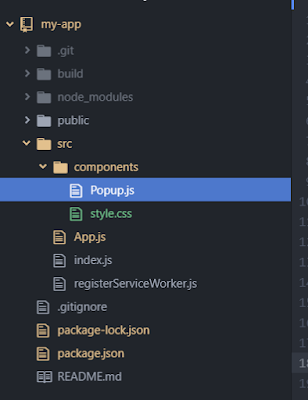
├── src
│ ├── index.js
│ ├── components
│ │ ├── style.css
│ │ └── Popup.js
│ ├── App.js
│ └── registerServiceWorker.js
├── package.json
└── readme.md
└── dropdown menu design in reactjs
├── dropdown menu design in reactjs.rar
└── readme
/First React application/readme:
--------------------------------------------------------------------------------
1 | # react
2 |
--------------------------------------------------------------------------------
/Snapshot testing example/src/src.rar:
--------------------------------------------------------------------------------
https://raw.githubusercontent.com/snowMan128/react/HEAD/Snapshot testing example/src/src.rar
--------------------------------------------------------------------------------
/Snapshot testing example/build/favicon.ico:
--------------------------------------------------------------------------------
https://raw.githubusercontent.com/snowMan128/react/HEAD/Snapshot testing example/build/favicon.ico
--------------------------------------------------------------------------------
/Snapshot testing example/public/favicon.ico:
--------------------------------------------------------------------------------
https://raw.githubusercontent.com/snowMan128/react/HEAD/Snapshot testing example/public/favicon.ico
--------------------------------------------------------------------------------
/Form validation in reactjs/public/favicon.ico:
--------------------------------------------------------------------------------
https://raw.githubusercontent.com/snowMan128/react/HEAD/Form validation in reactjs/public/favicon.ico
--------------------------------------------------------------------------------
/Append Or Prepend HTML Using ReactJS/build/favicon.ico:
--------------------------------------------------------------------------------
https://raw.githubusercontent.com/snowMan128/react/HEAD/Append Or Prepend HTML Using ReactJS/build/favicon.ico
--------------------------------------------------------------------------------
/Append Or Prepend HTML Using ReactJS/public/favicon.ico:
--------------------------------------------------------------------------------
https://raw.githubusercontent.com/snowMan128/react/HEAD/Append Or Prepend HTML Using ReactJS/public/favicon.ico
--------------------------------------------------------------------------------
/Create Simple Popup Example In React Application/build/favicon.ico:
--------------------------------------------------------------------------------
https://raw.githubusercontent.com/snowMan128/react/HEAD/Create Simple Popup Example In React Application/build/favicon.ico
--------------------------------------------------------------------------------
/dropdown menu design in reactjs/dropdown menu design in reactjs.rar:
--------------------------------------------------------------------------------
https://raw.githubusercontent.com/snowMan128/react/HEAD/dropdown menu design in reactjs/dropdown menu design in reactjs.rar
--------------------------------------------------------------------------------
/First React application/src/main.js:
--------------------------------------------------------------------------------
1 | import React from 'react';
2 | import ReactDOM from 'react-dom';
3 | import Home from "./components/home.jsx";
4 |
5 | ReactDOM.render( , document.getElementById('app'));
--------------------------------------------------------------------------------
/Form validation in reactjs/src/registrationForm/sucess.html:
--------------------------------------------------------------------------------
1 |
2 |
3 |
4 | Login Sucessful
5 |
6 |
7 |
8 | Login Sucessful...
9 |
10 |
11 |
--------------------------------------------------------------------------------
/Snapshot testing example/build/asset-manifest.json:
--------------------------------------------------------------------------------
1 | {
2 | "main.css": "static/css/main.7ee8872b.css",
3 | "main.css.map": "static/css/main.7ee8872b.css.map",
4 | "main.js": "static/js/main.4284fec7.js",
5 | "main.js.map": "static/js/main.4284fec7.js.map"
6 | }
--------------------------------------------------------------------------------
/Append Or Prepend HTML Using ReactJS/build/asset-manifest.json:
--------------------------------------------------------------------------------
1 | {
2 | "main.css": "static/css/main.6210e15c.css",
3 | "main.css.map": "static/css/main.6210e15c.css.map",
4 | "main.js": "static/js/main.d235ca8c.js",
5 | "main.js.map": "static/js/main.d235ca8c.js.map"
6 | }
--------------------------------------------------------------------------------
/First React application/src/components/home.jsx:
--------------------------------------------------------------------------------
1 | import React from 'react';
2 |
3 | class Home extends React.Component {
4 | render() {
5 | return (
6 | Welcome react application demo
7 | );
8 | }
9 | }
10 |
11 | export default Home;
12 |
--------------------------------------------------------------------------------
/Create Simple Popup Example In React Application/build/asset-manifest.json:
--------------------------------------------------------------------------------
1 | {
2 | "main.css": "static/css/main.7ee8872b.css",
3 | "main.css.map": "static/css/main.7ee8872b.css.map",
4 | "main.js": "static/js/main.4284fec7.js",
5 | "main.js.map": "static/js/main.4284fec7.js.map"
6 | }
--------------------------------------------------------------------------------
/Snapshot testing example/src/index.js:
--------------------------------------------------------------------------------
1 | import React from 'react';
2 | import ReactDOM from 'react-dom';
3 | import registerServiceWorker from './registerServiceWorker';
4 |
5 | import App from "./App"
6 |
7 |
8 | ReactDOM.render( , document.getElementById('root'));
9 |
10 | registerServiceWorker();
11 |
--------------------------------------------------------------------------------
/Snapshot testing example/src/App.test.js:
--------------------------------------------------------------------------------
1 | import React from 'react';
2 | import App from './App';
3 | import renderer from 'react-test-renderer';
4 |
5 | it('renders correctly', () => {
6 | const tree = renderer
7 | .create( )
8 | .toJSON();
9 | expect(tree).toMatchSnapshot();
10 | });
11 |
--------------------------------------------------------------------------------
/Append Or Prepend HTML Using ReactJS/src/index.js:
--------------------------------------------------------------------------------
1 | import React from 'react';
2 | import ReactDOM from 'react-dom';
3 | import registerServiceWorker from './registerServiceWorker';
4 | import Form from './textBox/Form';
5 |
6 |
7 | ReactDOM.render( , document.getElementById('root'));
8 |
9 | registerServiceWorker();
10 |
--------------------------------------------------------------------------------
/Create Simple Popup Example In React Application/src/index.js:
--------------------------------------------------------------------------------
1 | import React from 'react';
2 | import ReactDOM from 'react-dom';
3 | import registerServiceWorker from './registerServiceWorker';
4 |
5 | import App from "./App"
6 |
7 |
8 | ReactDOM.render( , document.getElementById('root'));
9 |
10 | registerServiceWorker();
11 |
--------------------------------------------------------------------------------
/Snapshot testing example/src/App.js:
--------------------------------------------------------------------------------
1 | import React, { Component } from 'react';
2 | import RegisterForm from './components/RegisterForm';
3 | //import './App.css';
4 |
5 | class App extends Component {
6 |
7 |
8 | render() {
9 | return (
10 |
11 | );
12 | }
13 | }
14 |
15 | export default App;
16 |
--------------------------------------------------------------------------------
/Form validation in reactjs/src/index.js:
--------------------------------------------------------------------------------
1 | import React from 'react';
2 | import ReactDOM from 'react-dom';
3 | import registerServiceWorker from './registerServiceWorker';
4 | import RegisterForm from './registrationForm/RegisterForm';
5 |
6 |
7 | ReactDOM.render( , document.getElementById('root'));
8 |
9 | registerServiceWorker();
10 |
--------------------------------------------------------------------------------
/Snapshot testing example/build/manifest.json:
--------------------------------------------------------------------------------
1 | {
2 | "short_name": "React App",
3 | "name": "Create React App Sample",
4 | "icons": [
5 | {
6 | "src": "favicon.ico",
7 | "sizes": "64x64 32x32 24x24 16x16",
8 | "type": "image/x-icon"
9 | }
10 | ],
11 | "start_url": "./index.html",
12 | "display": "standalone",
13 | "theme_color": "#000000",
14 | "background_color": "#ffffff"
15 | }
16 |
--------------------------------------------------------------------------------
/Snapshot testing example/public/manifest.json:
--------------------------------------------------------------------------------
1 | {
2 | "short_name": "React App",
3 | "name": "Create React App Sample",
4 | "icons": [
5 | {
6 | "src": "favicon.ico",
7 | "sizes": "64x64 32x32 24x24 16x16",
8 | "type": "image/x-icon"
9 | }
10 | ],
11 | "start_url": "./index.html",
12 | "display": "standalone",
13 | "theme_color": "#000000",
14 | "background_color": "#ffffff"
15 | }
16 |
--------------------------------------------------------------------------------
/Form validation in reactjs/public/manifest.json:
--------------------------------------------------------------------------------
1 | {
2 | "short_name": "React App",
3 | "name": "Create React App Sample",
4 | "icons": [
5 | {
6 | "src": "favicon.ico",
7 | "sizes": "64x64 32x32 24x24 16x16",
8 | "type": "image/x-icon"
9 | }
10 | ],
11 | "start_url": "./index.html",
12 | "display": "standalone",
13 | "theme_color": "#000000",
14 | "background_color": "#ffffff"
15 | }
16 |
--------------------------------------------------------------------------------
/Append Or Prepend HTML Using ReactJS/build/manifest.json:
--------------------------------------------------------------------------------
1 | {
2 | "short_name": "React App",
3 | "name": "Create React App Sample",
4 | "icons": [
5 | {
6 | "src": "favicon.ico",
7 | "sizes": "64x64 32x32 24x24 16x16",
8 | "type": "image/x-icon"
9 | }
10 | ],
11 | "start_url": "./index.html",
12 | "display": "standalone",
13 | "theme_color": "#000000",
14 | "background_color": "#ffffff"
15 | }
16 |
--------------------------------------------------------------------------------
/Append Or Prepend HTML Using ReactJS/public/manifest.json:
--------------------------------------------------------------------------------
1 | {
2 | "short_name": "React App",
3 | "name": "Create React App Sample",
4 | "icons": [
5 | {
6 | "src": "favicon.ico",
7 | "sizes": "64x64 32x32 24x24 16x16",
8 | "type": "image/x-icon"
9 | }
10 | ],
11 | "start_url": "./index.html",
12 | "display": "standalone",
13 | "theme_color": "#000000",
14 | "background_color": "#ffffff"
15 | }
16 |
--------------------------------------------------------------------------------
/Form validation in reactjs/package.json:
--------------------------------------------------------------------------------
1 | {
2 | "name": "my-app",
3 | "version": "0.1.0",
4 | "private": true,
5 | "dependencies": {
6 | "react": "^16.3.2",
7 | "react-dom": "^16.3.2",
8 | "react-scripts": "1.1.4"
9 | },
10 | "scripts": {
11 | "start": "react-scripts start",
12 | "build": "react-scripts build",
13 | "test": "react-scripts test --env=jsdom",
14 | "eject": "react-scripts eject"
15 | }
16 | }
--------------------------------------------------------------------------------
/Create Simple Popup Example In React Application/build/manifest.json:
--------------------------------------------------------------------------------
1 | {
2 | "short_name": "React App",
3 | "name": "Create React App Sample",
4 | "icons": [
5 | {
6 | "src": "favicon.ico",
7 | "sizes": "64x64 32x32 24x24 16x16",
8 | "type": "image/x-icon"
9 | }
10 | ],
11 | "start_url": "./index.html",
12 | "display": "standalone",
13 | "theme_color": "#000000",
14 | "background_color": "#ffffff"
15 | }
16 |
--------------------------------------------------------------------------------
/dropdown menu design in reactjs/readme:
--------------------------------------------------------------------------------
1 |
2 | Today, In this tutorial we are are going to discuss how to create simple drop down menu in ReactJS and we have tried our best to make this tutorial as simple as possible. Here we are going to design CSS Dropdown menu with the help of ReactJS and also with the help of onClick Event, we are showing and hiding the drop down menu content.
3 |
4 | Link : https://www.skptricks.com/2018/05/create-dropdown-using-reactjs.html
5 |
--------------------------------------------------------------------------------
/Create Simple Popup Example In React Application/src/components/style.css:
--------------------------------------------------------------------------------
1 | .popup {
2 | position: fixed;
3 | width: 100%;
4 | height: 100%;
5 | top: 0;
6 | left: 0;
7 | right: 0;
8 | bottom: 0;
9 | margin: auto;
10 | background-color: rgba(0,0,0, 0.5);
11 | }
12 | .popup_inner {
13 | position: absolute;
14 | left: 25%;
15 | right: 25%;
16 | top: 25%;
17 | bottom: 25%;
18 | margin: auto;
19 | border-radius: 20px;
20 | background: white;
21 | }
22 |
--------------------------------------------------------------------------------
/Create Simple Popup Example In React Application/src/components/Popup.js:
--------------------------------------------------------------------------------
1 | import React from 'react';
2 | import './style.css';
3 |
4 | class Popup extends React.Component {
5 | render() {
6 | return (
7 |
8 |
9 |
{this.props.text}
10 | close me
11 |
12 |
13 | );
14 | }
15 | }
16 |
17 |
18 | export default Popup;
19 |
--------------------------------------------------------------------------------
/Form validation in reactjs/readme:
--------------------------------------------------------------------------------
1 | This tutorial explains how to validate simple user registration form in reactjs. Form validation is most important part in web development, through which we can restrict invalid entries and validate user details in some extent by using valid sets of checkpoints or validation rules.
2 | Here we are using simple user registration form and performing Client Side Validation using RegisterForm Component. Let see the React user registration form below :
3 | https://www.skptricks.com/2018/06/simple-form-validation-in-reactjs-example.html
4 |
--------------------------------------------------------------------------------
/Append Or Prepend HTML Using ReactJS/build/static/css/main.6210e15c.css:
--------------------------------------------------------------------------------
1 | #mainContainer{width:500px;padding:0 15px 15px;border-radius:5px;font-family:arial;line-height:16px;color:#333;font-size:14px;background:#fff;margin:30px auto}textarea{padding:10px;border:1px solid #bdc7d8}.button{background-color:#00bfff;border-color:#3ac162;font-weight:700;padding:12px 15px;color:#fff;margin-right:50px}.errorMsg{color:#c00;margin-bottom:12px}.sucessMsg{color:#6b8e23;margin-bottom:10px}#display-data{margin-top:12px;background:#e5e5e5;padding:1px}
2 | /*# sourceMappingURL=main.6210e15c.css.map*/
--------------------------------------------------------------------------------
/Append Or Prepend HTML Using ReactJS/package.json:
--------------------------------------------------------------------------------
1 | {
2 | "name": "my-app",
3 | "version": "0.1.0",
4 | "private": true,
5 | "homepage" : "https://skptricks.github.io/react-app/",
6 | "dependencies": {
7 | "react": "^16.3.2",
8 | "react-dom": "^16.3.2",
9 | "react-scripts": "1.1.4"
10 | },
11 | "scripts": {
12 | "predeploy": "npm run build",
13 | "deploy": "gh-pages -d build",
14 | "start": "react-scripts start",
15 | "build": "react-scripts build",
16 | "test": "react-scripts test --env=jsdom",
17 | "eject": "react-scripts eject"
18 | }
19 | }
20 |
--------------------------------------------------------------------------------
/Snapshot testing example/build/index.html:
--------------------------------------------------------------------------------
1 | React App You need to enable JavaScript to run this app.
--------------------------------------------------------------------------------
/Append Or Prepend HTML Using ReactJS/build/index.html:
--------------------------------------------------------------------------------
1 | React App You need to enable JavaScript to run this app.
--------------------------------------------------------------------------------
/Create Simple Popup Example In React Application/build/index.html:
--------------------------------------------------------------------------------
1 | React App You need to enable JavaScript to run this app.
--------------------------------------------------------------------------------
/Snapshot testing example/package.json:
--------------------------------------------------------------------------------
1 | {
2 | "name": "my-app",
3 | "version": "0.1.0",
4 | "private": true,
5 | "homepage": "https://skptricks.github.io/React-Form/",
6 | "dependencies": {
7 | "gh-pages": "^2.0.1",
8 | "react": "^16.3.2",
9 | "react-dom": "^16.3.2",
10 | "react-scripts": "1.1.4",
11 | "react-test-renderer": "^16.7.0"
12 | },
13 | "scripts": {
14 | "predeploy": "npm run build",
15 | "deploy": "gh-pages -d build",
16 | "start": "react-scripts start",
17 | "build": "react-scripts build",
18 | "test": "react-scripts test --env=jsdom",
19 | "eject": "react-scripts eject"
20 | }
21 | }
22 |
--------------------------------------------------------------------------------
/Create Simple Popup Example In React Application/package.json:
--------------------------------------------------------------------------------
1 | {
2 | "name": "my-app",
3 | "version": "0.1.0",
4 | "private": true,
5 | "homepage": "https://skptricks.github.io/React-Form/",
6 | "dependencies": {
7 | "gh-pages": "^2.0.1",
8 | "react": "^16.3.2",
9 | "react-dom": "^16.3.2",
10 | "react-scripts": "1.1.4",
11 | "react-test-renderer": "^16.7.0"
12 | },
13 | "scripts": {
14 | "predeploy": "npm run build",
15 | "deploy": "gh-pages -d build",
16 | "start": "react-scripts start",
17 | "build": "react-scripts build",
18 | "test": "react-scripts test --env=jsdom",
19 | "eject": "react-scripts eject"
20 | },
21 | "devDependencies": {
22 | "jest": "^23.6.0"
23 | }
24 | }
25 |
--------------------------------------------------------------------------------
/First React application/webpack.config.js:
--------------------------------------------------------------------------------
1 | var path = require('path');
2 |
3 | var BUILD_DIR = path.resolve(__dirname, 'src');
4 | var APP_DIR = path.resolve(__dirname, 'static/build');
5 |
6 | var config = {
7 | entry: ['./src/main.js'],
8 | output: {
9 | path: APP_DIR,
10 | filename: 'bundle.js',
11 | },
12 | devServer: {
13 | inline: true,
14 | port: 8080
15 | },
16 | module: {
17 | loaders: [
18 | {
19 | test: /\.jsx?$/,
20 | include : BUILD_DIR,
21 | exclude: /node_modules/,
22 | loader: 'babel-loader',
23 | query: {
24 | presets: ['es2015', 'react']
25 | }
26 | }
27 | ]
28 | }
29 | }
30 | module.exports = config;
--------------------------------------------------------------------------------
/Snapshot testing example/readme.md:
--------------------------------------------------------------------------------
1 |
2 | # Snapshot testing in React Components with Jest
3 |
4 | Snapshot testing in React Components with Jest
5 |
6 | In this tutorial we are going to learn how to perform snapshot testing in react application. Jest is a JavaScript unit testing framework, used by Facebook to test services and React applications.Jest acts as a test runner, assertion library, and mocking library. Snapshot testing is a pretty cool feature offered by Jest. It can memorize how your UI components are rendered, and compare it to the current test, raising an error if there’s a mismatch.
7 |
8 |
9 |
--------------------------------------------------------------------------------
/Append Or Prepend HTML Using ReactJS/src/textBox/style.css:
--------------------------------------------------------------------------------
1 | #mainContainer {
2 | width: 500px;
3 | padding: 0px 15px 15px 15px;
4 | border-radius: 5px;
5 | font-family: arial;
6 | line-height: 16px;
7 | color: #333333;
8 | font-size: 14px;
9 | background: #ffffff;
10 | margin: 30px auto;
11 | }
12 | textarea {
13 | padding: 10px;
14 | border: solid 1px #BDC7D8;
15 | }
16 |
17 | .button {
18 | background-color: #00BFFF;
19 | border-color: #3ac162;
20 | font-weight: bold;
21 | padding: 12px 15px;
22 | color: #ffffff;
23 | margin-right: 50px;
24 | }
25 |
26 | .errorMsg {
27 | color: #cc0000;
28 | margin-bottom: 12px;
29 | }
30 |
31 | .sucessMsg {
32 | color: #6B8E23;
33 | margin-bottom: 10px;
34 | }
35 | #display-data{
36 | margin-top:12px;
37 | background: #e5e5e5;
38 | padding:1px;
39 |
40 | }
41 |
--------------------------------------------------------------------------------
/Form validation in reactjs/src/registrationForm/style.css:
--------------------------------------------------------------------------------
1 | #register, #login {
2 | width: 300px;
3 | border: 1px solid #d6d7da;
4 | padding: 0px 15px 15px 15px;
5 | border-radius: 5px;
6 | font-family: arial;
7 | line-height: 16px;
8 | color: #333333;
9 | font-size: 14px;
10 | background: #ffffff;
11 | margin: 100px auto;
12 | }
13 |
14 | form label, form input {
15 | display: block;
16 | //margin-bottom: 10px;
17 | width: 90%
18 | }
19 |
20 | form input {
21 | padding: 10px;
22 | border: solid 1px #BDC7D8;
23 |
24 | }
25 |
26 | .button {
27 | background-color: #00BFFF;
28 | border-color: #3ac162;
29 | font-weight: bold;
30 | padding: 12px 15px;
31 | color: #ffffff;
32 | }
33 |
34 | .errorMsg {
35 | color: #cc0000;
36 | margin-bottom: 12px;
37 | }
38 |
39 | .sucessMsg {
40 | color: #6B8E23;
41 | margin-bottom: 10px;
42 | }
43 |
--------------------------------------------------------------------------------
/Snapshot testing example/src/components/style.css:
--------------------------------------------------------------------------------
1 | #register, #login {
2 | width: 300px;
3 | border: 1px solid #d6d7da;
4 | padding: 0px 15px 15px 15px;
5 | border-radius: 5px;
6 | font-family: arial;
7 | line-height: 16px;
8 | color: #333333;
9 | font-size: 14px;
10 | background: #ffffff;
11 | margin: 100px auto;
12 | }
13 |
14 | form label, form input {
15 | display: block;
16 | //margin-bottom: 10px;
17 | width: 90%
18 | }
19 |
20 | form input {
21 | padding: 10px;
22 | border: solid 1px #BDC7D8;
23 |
24 | }
25 |
26 | .button {
27 | background-color: #00BFFF;
28 | border-color: #3ac162;
29 | font-weight: bold;
30 | padding: 12px 15px;
31 | color: #ffffff;
32 | }
33 |
34 | .errorMsg {
35 | color: #cc0000;
36 | margin-bottom: 12px;
37 | }
38 |
39 | .sucessMsg {
40 | color: #6B8E23;
41 | margin-bottom: 10px;
42 | }
43 |
--------------------------------------------------------------------------------
/First React application/package.json:
--------------------------------------------------------------------------------
1 | {
2 | "name": "reactapp",
3 | "version": "1.0.0",
4 | "description": "My first react app",
5 | "main": "index.js",
6 | "scripts": {
7 | "start": "webpack-dev-server --hot",
8 | "build": "./node_modules/.bin/webpack --watch"
9 | },
10 | "author": "Sumit",
11 | "license": "ISC",
12 | "dependencies": {
13 | "axios": "^0.18.0",
14 | "babel-core": "^6.26.0",
15 | "babel-loader": "^7.1.2",
16 | "babel-preset-es2015": "^6.24.1",
17 | "babel-preset-react": "^6.24.1",
18 | "cross-fetch": "^2.1.0",
19 | "flux": "^3.1.3",
20 | "history": "^1.17.0",
21 | "react": "^16.2.0",
22 | "react-dom": "^16.2.0",
23 | "react-redux": "^5.0.7",
24 | "react-router": "^4.2.0",
25 | "react-router-dom": "^4.2.2",
26 | "redux": "^3.7.2",
27 | "redux-thunk": "^2.2.0",
28 | "webpack": "^3.10.0",
29 | "webpack-dev-server": "^2.10.0"
30 | }
31 | }
32 |
--------------------------------------------------------------------------------
/Create Simple Popup Example In React Application/src/App.js:
--------------------------------------------------------------------------------
1 | import React, { Component } from 'react';
2 | import Popup from './components/Popup';
3 |
4 |
5 | class App extends Component {
6 |
7 | constructor(props){
8 | super(props);
9 | this.state = { showPopup: false };
10 | }
11 |
12 | togglePopup() {
13 | this.setState({
14 | showPopup: !this.state.showPopup
15 | });
16 | }
17 |
18 | render() {
19 | return (
20 |
21 |
Simple Popup Example In React Application
22 |
Click To Launch Popup
23 |
24 | {this.state.showPopup ?
25 |
29 | : null
30 | }
31 |
32 |
33 | );
34 | }
35 | }
36 |
37 | export default App;
38 |
--------------------------------------------------------------------------------
/Append Or Prepend HTML Using ReactJS/build/static/css/main.6210e15c.css.map:
--------------------------------------------------------------------------------
1 | {"version":3,"sources":["textBox/style.css"],"names":[],"mappings":"AAAA,eACE,YACA,oBACA,kBACA,kBACA,iBACA,WACA,eACA,gBACA,gBAAkB,CAEpB,SACE,aACA,wBAA0B,CAG5B,QACE,yBACA,qBACA,gBACA,kBACA,WACA,iBAAmB,CAGrB,UACE,WACA,kBAAoB,CAGtB,WACE,cACA,kBAAoB,CAEtB,cACA,gBACA,mBACA,WAAY","file":"static/css/main.6210e15c.css","sourcesContent":["#mainContainer {\n width: 500px; \n padding: 0px 15px 15px 15px;\n border-radius: 5px;\n font-family: arial;\n line-height: 16px;\n color: #333333;\n font-size: 14px;\n background: #ffffff;\n margin: 30px auto;\n}\ntextarea {\n padding: 10px;\n border: solid 1px #BDC7D8;\n}\n\n.button {\n background-color: #00BFFF;\n border-color: #3ac162;\n font-weight: bold;\n padding: 12px 15px;\n color: #ffffff;\n margin-right: 50px;\n}\n\n.errorMsg {\n color: #cc0000;\n margin-bottom: 12px;\n}\n\n.sucessMsg {\n color: #6B8E23;\n margin-bottom: 10px;\n}\n#display-data{\nmargin-top:12px;\nbackground: #e5e5e5;\npadding:1px;\n\n}\n\n\n\n// WEBPACK FOOTER //\n// ./src/textBox/style.css"],"sourceRoot":""}
--------------------------------------------------------------------------------
/Create Simple Popup Example In React Application/readme.md:
--------------------------------------------------------------------------------
1 | # Create Simple Popup Example In React Application
2 |
3 | Post Link : Create Simple Popup Example In React Application
4 |
5 | In this tutorial we will see how to create simple popup in react application. Here we will provide you very simple and very easy example, that helps you to understand creation process of simple popup in react JS. We can use this kind of popup message to display email subscription notifications, display advertisements, confirmation message like YES/NO to user etc.
6 | So in this example we have created component named as "Popup" and that helps to display the popup message, whenever user clicks on "Click To Launch Popup" button.
7 |
8 | Create Simple Popup Example In React Application
9 |
10 |
11 |
12 |
--------------------------------------------------------------------------------
/Snapshot testing example/build/static/css/main.7ee8872b.css:
--------------------------------------------------------------------------------
1 | .loader{position:absolute;top:50%;left:50%;-webkit-transform:translateX(-50%) translateY(-50%);-ms-transform:translateX(-50%) translateY(-50%);transform:translateX(-50%) translateY(-50%)}.loader:before{border-radius:500rem;border:.2em solid rgba(0,0,0,.1)}.loader:after,.loader:before{position:absolute;content:"";top:0;left:50%;width:100%;height:100%}.loader:after{-webkit-animation:loader .6s linear;animation:loader .6s linear;-webkit-animation-iteration-count:infinite;animation-iteration-count:infinite;border-radius:500rem;border-color:#767676 transparent transparent;border-style:solid;border-width:.2em;-webkit-box-shadow:0 0 0 1px transparent;box-shadow:0 0 0 1px transparent}@-webkit-keyframes loader{0%{-webkit-transform:rotate(0deg);transform:rotate(0deg)}to{-webkit-transform:rotate(1turn);transform:rotate(1turn)}}@keyframes loader{0%{-webkit-transform:rotate(0deg);transform:rotate(0deg)}to{-webkit-transform:rotate(1turn);transform:rotate(1turn)}}.loader:after,.loader:before{width:2.28571429rem;height:2.28571429rem;margin:0}.contactApp{width:300px}.contactApp>*{width:100%}ul{padding:0}li{list-style:none;margin:5px}.contactData{padding-top:5px;height:40px}li img{border-radius:50%;margin-right:10px;float:left}
2 | /*# sourceMappingURL=main.7ee8872b.css.map*/
--------------------------------------------------------------------------------
/Append Or Prepend HTML Using ReactJS/readme:
--------------------------------------------------------------------------------
1 | Append Or Prepend HTML Using ReactJS :
2 |
3 | Post Link :
4 | https://www.skptricks.com/2018/06/append-or-prepend-html-using-reactjs.html
5 |
6 | Today, In this tutorial we will see how to Append and Prepend element in react like Jquery. In react we are performing append and prepend operation by maintaining simple Array.
7 | push() - append content in array.
8 | unshift() - prepend content in array.
9 | react Append or prepend to an element
10 |
11 | Append element in react by using below function :
12 | Appending content in array by using push function and with the help of state we are render the content in browser.
13 | appendData() {
14 | this.displayData.push();
15 | this.setState({
16 | showdata : this.displayData,
17 | postVal : ""
18 | });
19 | }
20 |
21 | Prepend element in react by using below function :
22 | Prepending content in array by using unshift function and with the help of state we are render the content in browser.
23 | prependData() {
24 | this.displayData.unshift();
25 | this.setState({
26 | showdata : this.displayData,
27 | postVal : ""
28 | });
29 | }
30 |
--------------------------------------------------------------------------------
/Create Simple Popup Example In React Application/build/static/css/main.7ee8872b.css:
--------------------------------------------------------------------------------
1 | .loader{position:absolute;top:50%;left:50%;-webkit-transform:translateX(-50%) translateY(-50%);-ms-transform:translateX(-50%) translateY(-50%);transform:translateX(-50%) translateY(-50%)}.loader:before{border-radius:500rem;border:.2em solid rgba(0,0,0,.1)}.loader:after,.loader:before{position:absolute;content:"";top:0;left:50%;width:100%;height:100%}.loader:after{-webkit-animation:loader .6s linear;animation:loader .6s linear;-webkit-animation-iteration-count:infinite;animation-iteration-count:infinite;border-radius:500rem;border-color:#767676 transparent transparent;border-style:solid;border-width:.2em;-webkit-box-shadow:0 0 0 1px transparent;box-shadow:0 0 0 1px transparent}@-webkit-keyframes loader{0%{-webkit-transform:rotate(0deg);transform:rotate(0deg)}to{-webkit-transform:rotate(1turn);transform:rotate(1turn)}}@keyframes loader{0%{-webkit-transform:rotate(0deg);transform:rotate(0deg)}to{-webkit-transform:rotate(1turn);transform:rotate(1turn)}}.loader:after,.loader:before{width:2.28571429rem;height:2.28571429rem;margin:0}.contactApp{width:300px}.contactApp>*{width:100%}ul{padding:0}li{list-style:none;margin:5px}.contactData{padding-top:5px;height:40px}li img{border-radius:50%;margin-right:10px;float:left}
2 | /*# sourceMappingURL=main.7ee8872b.css.map*/
--------------------------------------------------------------------------------
/Snapshot testing example/src/__snapshots__/App.test.js.snap:
--------------------------------------------------------------------------------
1 | // Jest Snapshot v1, https://goo.gl/fbAQLP
2 |
3 | exports[`renders correctly 1`] = `
4 |
7 |
10 |
11 | Registration page1
12 |
13 |
72 |
73 |
74 | `;
75 |
--------------------------------------------------------------------------------
/Snapshot testing example/public/index.html:
--------------------------------------------------------------------------------
1 |
2 |
3 |
4 |
5 |
6 |
7 |
11 |
12 |
13 |
22 | React App
23 |
24 |
25 |
26 | You need to enable JavaScript to run this app.
27 |
28 |
29 |
39 |
40 |
41 |
--------------------------------------------------------------------------------
/Form validation in reactjs/public/index.html:
--------------------------------------------------------------------------------
1 |
2 |
3 |
4 |
5 |
6 |
7 |
11 |
12 |
13 |
22 | React App
23 |
24 |
25 |
26 | You need to enable JavaScript to run this app.
27 |
28 |
29 |
39 |
40 |
41 |
--------------------------------------------------------------------------------
/Append Or Prepend HTML Using ReactJS/public/index.html:
--------------------------------------------------------------------------------
1 |
2 |
3 |
4 |
5 |
6 |
7 |
11 |
12 |
13 |
22 | React App
23 |
24 |
25 |
26 | You need to enable JavaScript to run this app.
27 |
28 |
29 |
39 |
40 |
41 |
--------------------------------------------------------------------------------
/First React application/index.html:
--------------------------------------------------------------------------------
1 |
2 |
3 |
4 |
5 |
6 |
7 |
8 |
9 |
10 |
11 |
12 | Starter Template for Bootstrap
13 |
14 |
15 |
16 |
17 |
18 |
19 |
20 |
21 |
22 |
23 |
30 |
31 |
32 |
34 |
35 |
36 |
37 |
38 |
39 |
40 |
41 |
42 |
43 |
44 |
45 |
46 |
47 |