├── DataGridOperationButtons.csproj
├── Program.cs
├── .gitignore
├── DataGridOperationButtons.sln
├── Form1.resx
├── README.md
├── Form1.cs
└── Form1.Designer.cs
/DataGridOperationButtons.csproj:
--------------------------------------------------------------------------------
1 |
2 |
3 |
4 | WinExe
5 | net6.0-windows
6 | enable
7 | true
8 | enable
9 |
10 |
11 |
--------------------------------------------------------------------------------
/Program.cs:
--------------------------------------------------------------------------------
1 | namespace DataGridOperationButtons
2 | {
3 | internal static class Program
4 | {
5 | ///
6 | /// The main entry point for the application.
7 | ///
8 | [STAThread]
9 | static void Main()
10 | {
11 | // To customize application configuration such as set high DPI settings or default font,
12 | // see https://aka.ms/applicationconfiguration.
13 | ApplicationConfiguration.Initialize();
14 | Application.Run(new Form1());
15 | }
16 | }
17 | }
--------------------------------------------------------------------------------
/.gitignore:
--------------------------------------------------------------------------------
1 | ## Ignore Visual Studio temporary files, build results, and
2 | ## files generated by popular Visual Studio add-ons.
3 |
4 | # User-specific files
5 | *.suo
6 | *.user
7 | *.userosscache
8 | *.sln.docstates
9 |
10 | # User-specific files (MonoDevelop/Xamarin Studio)
11 | *.userprefs
12 |
13 | # Build results
14 | [Dd]ebug/
15 | [Dd]ebugPublic/
16 | [Rr]elease/
17 | [Rr]eleases/
18 | x64/
19 | x86/
20 | bld/
21 | [Bb]in/
22 | [Oo]bj/
23 | [Ll]og/
24 |
25 | # Visual Studio 2015 cache/options directory
26 | .vs/
27 | # Uncomment if you have tasks that create the
28 |
29 | fastapi.db
30 |
31 | PublishProfiles/
32 |
33 | logs/
--------------------------------------------------------------------------------
/DataGridOperationButtons.sln:
--------------------------------------------------------------------------------
1 |
2 | Microsoft Visual Studio Solution File, Format Version 12.00
3 | # Visual Studio Version 17
4 | VisualStudioVersion = 17.2.32526.322
5 | MinimumVisualStudioVersion = 10.0.40219.1
6 | Project("{FAE04EC0-301F-11D3-BF4B-00C04F79EFBC}") = "DataGridOperationButtons", "DataGridOperationButtons.csproj", "{0E097DCB-F0FE-4C89-AF57-96C03272FF0A}"
7 | EndProject
8 | Global
9 | GlobalSection(SolutionConfigurationPlatforms) = preSolution
10 | Debug|Any CPU = Debug|Any CPU
11 | Release|Any CPU = Release|Any CPU
12 | EndGlobalSection
13 | GlobalSection(ProjectConfigurationPlatforms) = postSolution
14 | {0E097DCB-F0FE-4C89-AF57-96C03272FF0A}.Debug|Any CPU.ActiveCfg = Debug|Any CPU
15 | {0E097DCB-F0FE-4C89-AF57-96C03272FF0A}.Debug|Any CPU.Build.0 = Debug|Any CPU
16 | {0E097DCB-F0FE-4C89-AF57-96C03272FF0A}.Release|Any CPU.ActiveCfg = Release|Any CPU
17 | {0E097DCB-F0FE-4C89-AF57-96C03272FF0A}.Release|Any CPU.Build.0 = Release|Any CPU
18 | EndGlobalSection
19 | GlobalSection(SolutionProperties) = preSolution
20 | HideSolutionNode = FALSE
21 | EndGlobalSection
22 | GlobalSection(ExtensibilityGlobals) = postSolution
23 | SolutionGuid = {1322DEB7-F7CB-4038-98FD-9FF3FD715718}
24 | EndGlobalSection
25 | EndGlobal
26 |
--------------------------------------------------------------------------------
/Form1.resx:
--------------------------------------------------------------------------------
1 |
2 |
3 |
4 |
5 |
6 |
7 |
8 |
9 |
10 |
11 |
12 |
13 |
14 |
15 |
16 |
17 |
18 |
19 |
20 |
21 |
22 |
23 |
24 |
25 |
26 |
27 |
28 |
29 |
30 |
31 |
32 |
33 |
34 |
35 |
36 |
37 |
38 |
39 |
40 |
41 |
42 |
43 |
44 |
45 |
46 |
47 |
48 |
49 | text/microsoft-resx
50 |
51 |
52 | 2.0
53 |
54 |
55 | System.Resources.ResXResourceReader, System.Windows.Forms, Version=4.0.0.0, Culture=neutral, PublicKeyToken=b77a5c561934e089
56 |
57 |
58 | System.Resources.ResXResourceWriter, System.Windows.Forms, Version=4.0.0.0, Culture=neutral, PublicKeyToken=b77a5c561934e089
59 |
60 |
61 | True
62 |
63 |
64 | True
65 |
66 |
67 | True
68 |
69 |
70 | True
71 |
72 |
73 | True
74 |
75 |
76 | True
77 |
78 |
--------------------------------------------------------------------------------
/README.md:
--------------------------------------------------------------------------------
1 | # 实现DataGridView多按钮操作列
2 |
3 | 在很多WinForm过程中,经常会遇到使用DataGridView进行编辑的场景,用户希望在最后放一个操作列,里面放置两个按钮,一个增加行的按钮,一个删除行的按钮;并且第一行只有增加行的按钮,没有删除行的按钮,大概的界面如下:
4 |
5 | 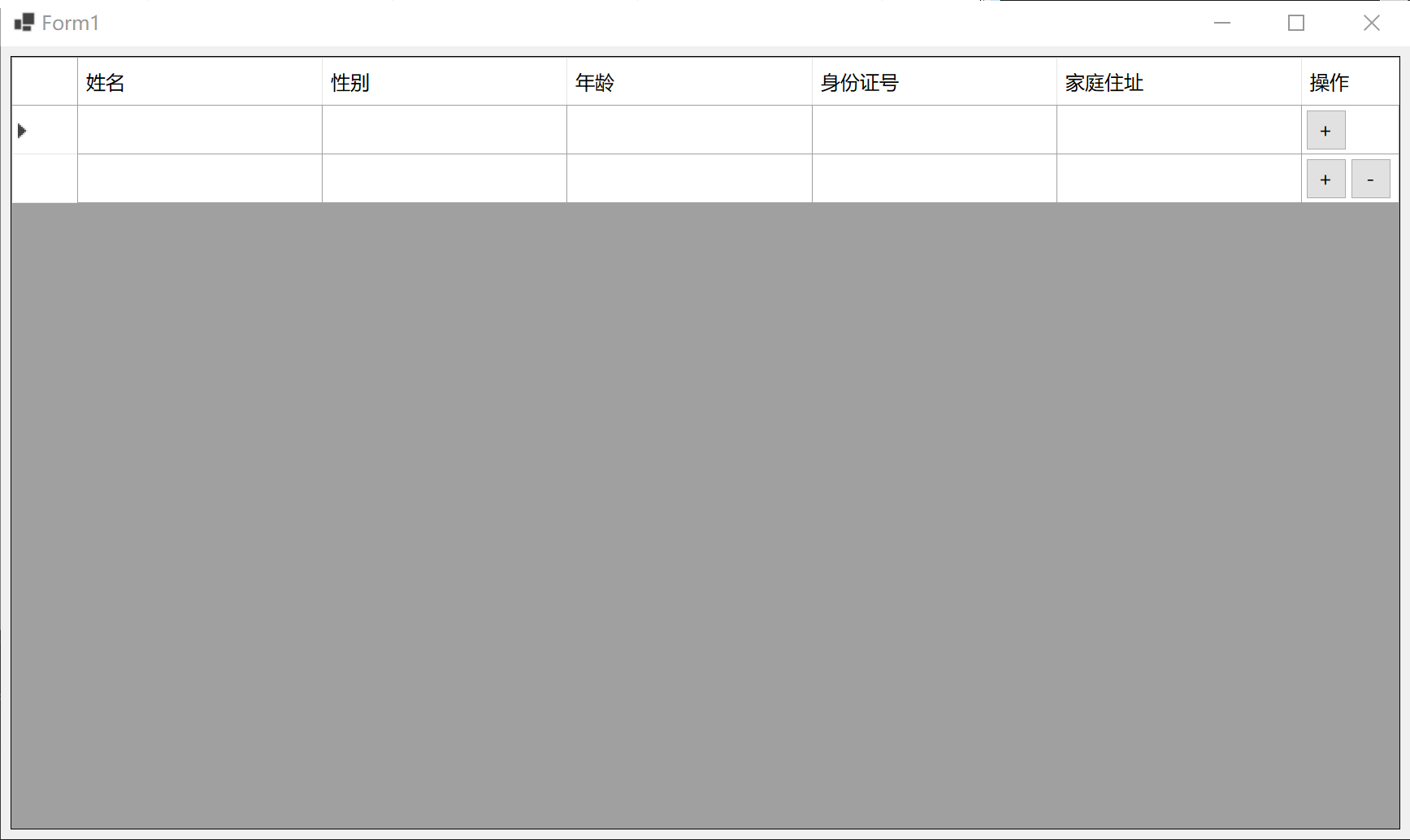
6 |
7 | DataGridView本身提供了DataGridViewButtonColumn列类型,但问题是只会放置一个Button在单元格里,不能满足我们的需求;通过网络搜索,有很多实现方案,最终选用了通过动态生成按钮的方案,并根据所在单元格的显示范围动态设置大小和位置。
8 |
9 | 该方案在实现过程有一些细节需要注意,否则会影响用户的使用体验,先记录如下,希望为后面有需要的朋友提供一些帮助,需要的朋友可到文章末尾获取完整源码,直接复制到自己的项目可用。
10 |
11 | #### 一、监控DataGridView的RowsAdded、RowsRemoved事件进行按钮的动态生成和移除
12 |
13 | 首先是动态生成按钮的时机,一定要在DataGridView的RowsAdded和RowsRemoved事件中去做,否则就需要再所有用户增加行的代码处都增加动态生成按钮的代码,对于后期的代码维护很不友好;而放在RowsAdded事件和RowsRemoved事件中可以一劳永逸的解决这个问题,代码如下:
14 |
15 | ```c#
16 | private void dataGridView1_RowsAdded(object sender, DataGridViewRowsAddedEventArgs e)
17 | {
18 | Button btnAdd = new Button();
19 | btnAdd.Text = "+";
20 | btnAdd.Click += onAddButtonClick;
21 | dataGridView1.Controls.Add(btnAdd);
22 |
23 | Button btnRemove = new Button();
24 | btnRemove.Text = "-";
25 | btnRemove.Click += onRemoveButtonClick;
26 | dataGridView1.Controls.Add(btnRemove);
27 |
28 | ...
29 | }
30 |
31 | private void dataGridView1_RowsRemoved(object sender, DataGridViewRowsRemovedEventArgs e)
32 | {
33 | int rowIndex = e.RowIndex;
34 | if (rowIndex >= 0 && rowIndex < mButtons.Count)
35 | {
36 | ActionButtons ab = mButtons[rowIndex];
37 | ab.AddButton.Visible = false;
38 | ab.AddButton.Dispose();
39 | ab.RemoveButton.Visible = false;
40 | ab.RemoveButton.Dispose();
41 |
42 | ...
43 | }
44 | }
45 | ```
46 |
47 |
48 |
49 | #### 二、使用列表按行顺序保存动态生成的按钮,用以支持按钮移除和按钮位置跟新
50 |
51 | 由于用户对于DataGridView的行操作是不可以允许,可能删除任意一行,也可能在任意一行后面插入,所以我们需要记录每个按钮对应的行索引,以便于后期更新时使用;为了将增加、删除按钮方便的存储并和对应的行进行映射,我们定义了一个ActionButtons类,将每一行对应的按钮都记录在ActionButtons实例中,并按顺序存入List表中,ActionButtons实例在List列表中的的索引号即是对应的DataGridView行号,代码如下:
52 |
53 | ```c#
54 | internal class ActionButtons
55 | {
56 | public ActionButtons(Button addButton, Button removeButton)
57 | {
58 | AddButton = addButton;
59 | RemoveButton = removeButton;
60 | }
61 |
62 | public Button AddButton { get; set; }
63 | public Button RemoveButton { get; set; }
64 | }
65 |
66 | List mButtons = new List();
67 |
68 | private void dataGridView1_RowsAdded(object sender, DataGridViewRowsAddedEventArgs e)
69 | {
70 | Button btnAdd = new Button();
71 | btnAdd.Text = "+";
72 | btnAdd.Click += onAddButtonClick;
73 | dataGridView1.Controls.Add(btnAdd);
74 |
75 | Button btnRemove = new Button();
76 | btnRemove.Text = "-";
77 | btnRemove.Click += onRemoveButtonClick;
78 | dataGridView1.Controls.Add(btnRemove);
79 |
80 | mButtons.Add(new ActionButtons(btnAdd, btnRemove));
81 | }
82 |
83 | private void dataGridView1_RowsRemoved(object sender, DataGridViewRowsRemovedEventArgs e)
84 | {
85 | int rowIndex = e.RowIndex;
86 | if (rowIndex >= 0 && rowIndex < mButtons.Count)
87 | {
88 | ActionButtons ab = mButtons[rowIndex];
89 | ab.AddButton.Visible = false;
90 | ab.AddButton.Dispose();
91 | ab.RemoveButton.Visible = false;
92 | ab.RemoveButton.Dispose();
93 |
94 | mButtons.RemoveAt(rowIndex);
95 | }
96 | }
97 | ```
98 |
99 |
100 |
101 | #### 三、监控DataGridView的Scroll、SizeChanged事件进行按钮的位置更新和显隐控制
102 |
103 | ###### 在用户操作的过程中,有几个场景会需要对按钮的位置进行设置:
104 |
105 | - 新增的时候对按钮位置进行初始化。
106 | - 垂直滚动条由无到有时,按钮的位置需要更新;反之亦然。
107 | - 滚动条发生滚动时,按钮的位置需要更新。
108 | - DataGridView列宽度发生改变时,按钮的位置需要更新。
109 | - DataGridView大小发生变化时,按钮的位置需要更新。
110 |
111 | ###### 同样,有几个场景会需要对按钮进行显隐状态的控制:
112 |
113 | - 当按钮所在行不在DataGridView显示范围内时要对按钮进行隐藏。
114 | - 当按钮所在行被删除时要对按钮进行隐藏。
115 | - DataGridView列宽度发生改变时,按钮的位置需要更新。
116 |
117 | 每次对位置和显隐的更新都需要遍历所有按钮,并且将更新代码放到线程中执行,以避免行增加、删除的同步操作对判断产生影响,具体代码如下:
118 |
119 | ```c#
120 | private void HideAllActionButtons(ActionButtons ab)
121 | {
122 | dataGridView1.BeginInvoke(() =>
123 | {
124 | ab.AddButton.Visible = ab.RemoveButton.Visible = false;
125 | });
126 | }
127 |
128 | private void UpdateActionButtonsPosition(ActionButtons ab, Rectangle rect, int rowIndex)
129 | {
130 | dataGridView1.BeginInvoke(() =>
131 | {
132 | ab.AddButton.Location = new Point(rect.Left + 5, rect.Top + 5);
133 | ab.AddButton.Size = new Size(rect.Width / 2 - 10, rect.Height - 10);
134 | ab.AddButton.Visible = true;
135 |
136 | ab.RemoveButton.Location = new Point(ab.AddButton.Left + ab.AddButton.Width + 5, rect.Top + 5);
137 | ab.RemoveButton.Size = ab.AddButton.Size;
138 | ab.RemoveButton.Visible = rowIndex > 0;
139 | });
140 | }
141 |
142 | private void RepositionActionButtons()
143 | {
144 | Task.Run(() =>
145 | {
146 | Thread.Sleep(100);
147 |
148 | int firstRow = dataGridView1.FirstDisplayedScrollingRowIndex;
149 | int lastRow = firstRow + dataGridView1.DisplayedRowCount(false);
150 |
151 | for (int i = 0; i < mButtons.Count; i++)
152 | {
153 | ActionButtons ab = mButtons[i];
154 | ab.AddButton.Tag = i;
155 | ab.RemoveButton.Tag = i;
156 |
157 | if (i >= firstRow && i <= lastRow)
158 | {
159 | Rectangle rect = dataGridView1.GetCellDisplayRectangle(btnColIndex, i, false);
160 | UpdateActionButtonsPosition(ab, rect, i);
161 | }
162 | else
163 | {
164 | HideAllActionButtons(ab);
165 | }
166 | }
167 | });
168 | }
169 |
170 | private void dataGridView1_Scroll(object sender, ScrollEventArgs e)
171 | {
172 | RepositionActionButtons();
173 | }
174 |
175 | private void dataGridView1_SizeChanged(object sender, EventArgs e)
176 | {
177 | RepositionActionButtons();
178 | }
179 |
180 | private void dataGridView1_ColumnWidthChanged(object sender, DataGridViewColumnEventArgs e)
181 | {
182 | RepositionActionButtons();
183 | this.Refresh();
184 | }
185 |
186 | ```
187 |
188 | ###### 注:在列宽度发生改变时,多调用了一个Refresh方法,用于刷新界面;是因为在拖动列改变宽度时有可能会再按钮表面留下拖动的痕迹,通过刷新可以恢复按钮的样式。
189 |
190 | 最终的效果如下图:
191 | 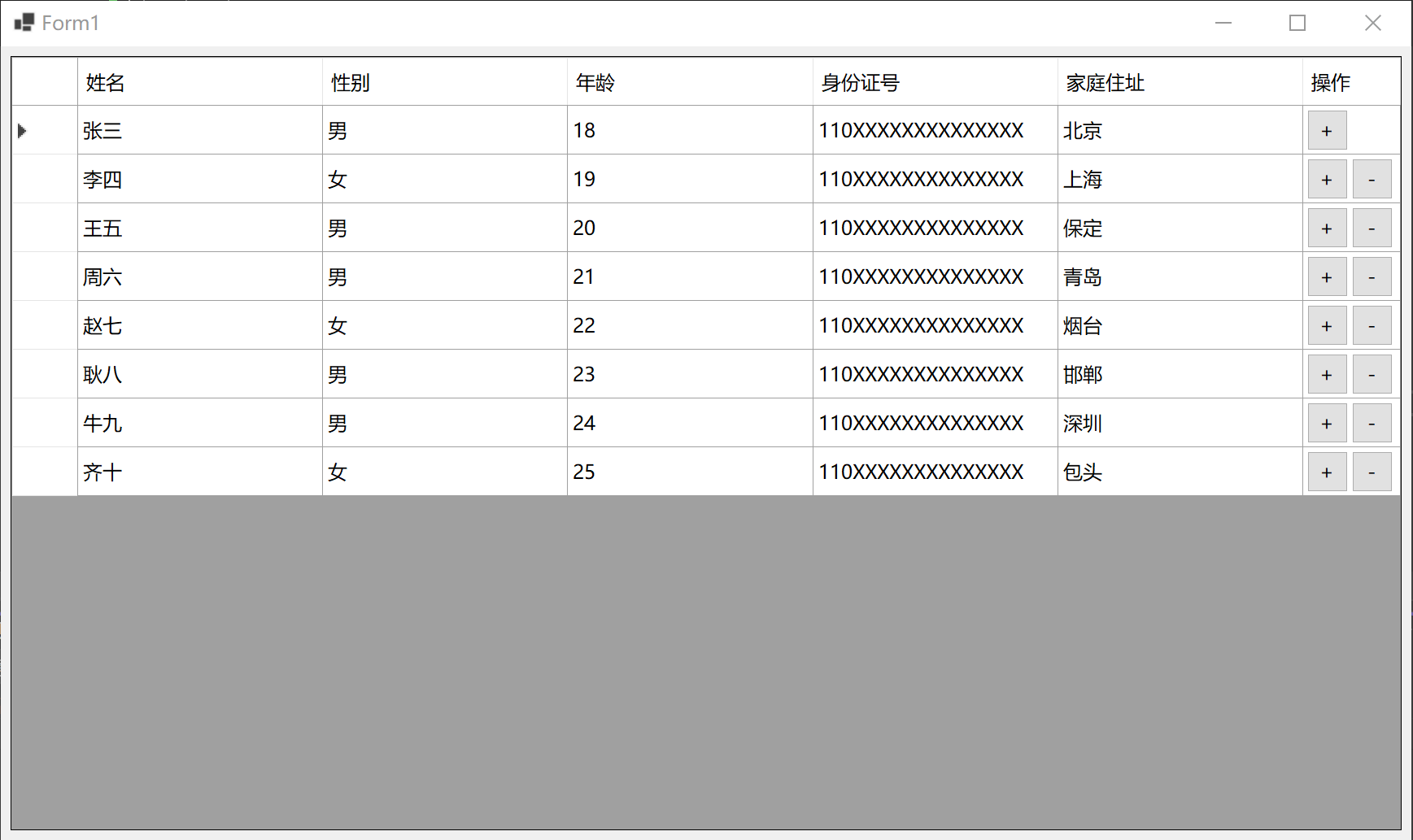
192 |
193 |
194 |
--------------------------------------------------------------------------------
/Form1.cs:
--------------------------------------------------------------------------------
1 | namespace DataGridOperationButtons
2 | {
3 | public partial class Form1 : Form
4 | {
5 | internal class ActionButtons
6 | {
7 | public ActionButtons(Button addButton, Button removeButton)
8 | {
9 | AddButton = addButton;
10 | RemoveButton = removeButton;
11 | }
12 |
13 | public Button AddButton { get; set; }
14 | public Button RemoveButton { get; set; }
15 | }
16 |
17 | List mButtons = new List();
18 | int btnColIndex = 5;
19 |
20 | public Form1()
21 | {
22 | InitializeComponent();
23 | }
24 |
25 | private void AddButtons()
26 | {
27 | Button btnAdd = new Button();
28 | btnAdd.Text = "+";
29 | btnAdd.Click += onAddButtonClick;
30 | dataGridView1.Controls.Add(btnAdd);
31 |
32 | Button btnRemove = new Button();
33 | btnRemove.Text = "-";
34 | btnRemove.Click += onRemoveButtonClick;
35 | dataGridView1.Controls.Add(btnRemove);
36 |
37 | mButtons.Add(new ActionButtons(btnAdd, btnRemove));
38 | }
39 |
40 | private void RemoveButtons(int rowIndex)
41 | {
42 | if (rowIndex >= 0 && rowIndex < mButtons.Count)
43 | {
44 | ActionButtons ab = mButtons[rowIndex];
45 | ab.AddButton.Visible = false;
46 | ab.AddButton.Dispose();
47 | ab.RemoveButton.Visible = false;
48 | ab.RemoveButton.Dispose();
49 |
50 | mButtons.RemoveAt(rowIndex);
51 | }
52 | }
53 |
54 | private void HideAllActionButtons(ActionButtons ab)
55 | {
56 | dataGridView1.BeginInvoke(() =>
57 | {
58 | ab.AddButton.Visible = ab.RemoveButton.Visible = false;
59 | });
60 | }
61 |
62 | private void UpdateActionButtonsPosition(ActionButtons ab, Rectangle rect, int rowIndex)
63 | {
64 | dataGridView1.BeginInvoke(() =>
65 | {
66 | ab.AddButton.Location = new Point(rect.Left + 5, rect.Top + 5);
67 | ab.AddButton.Size = new Size(rect.Width / 2 - 10, rect.Height - 10);
68 | ab.AddButton.Visible = true;
69 |
70 | ab.RemoveButton.Location = new Point(ab.AddButton.Left + ab.AddButton.Width + 5, rect.Top + 5);
71 | ab.RemoveButton.Size = ab.AddButton.Size;
72 | ab.RemoveButton.Visible = rowIndex > 0;
73 | });
74 | }
75 |
76 | private void RepositionActionButtons()
77 | {
78 | Task.Run(() =>
79 | {
80 | Thread.Sleep(100);
81 |
82 | int firstRow = dataGridView1.FirstDisplayedScrollingRowIndex;
83 | int lastRow = firstRow + dataGridView1.DisplayedRowCount(false);
84 | int firstCol = dataGridView1.FirstDisplayedScrollingColumnIndex;
85 | int lastCol = firstCol + dataGridView1.DisplayedColumnCount(true);
86 |
87 | for (int i = 0; i < mButtons.Count; i++)
88 | {
89 | ActionButtons ab = mButtons[i];
90 | ab.AddButton.Tag = i;
91 | ab.RemoveButton.Tag = i;
92 |
93 | if (i >= firstRow && i <= lastRow &&
94 | btnColIndex >= firstCol && btnColIndex <= lastCol)
95 | {
96 | Rectangle rect = this.dataGridView1.GetCellDisplayRectangle(btnColIndex, i, false);
97 | UpdateActionButtonsPosition(ab, rect, i);
98 | }
99 | else
100 | {
101 | HideAllActionButtons(ab);
102 | }
103 | }
104 | });
105 | }
106 |
107 | private void onAddButtonClick(object? sender, EventArgs e)
108 | {
109 | if (sender != null)
110 | {
111 | Button btn = (Button)sender;
112 | int rowIndex = (int)btn.Tag;
113 | if (rowIndex == dataGridView1.Rows.Count - 1)
114 | {
115 | dataGridView1.Rows.Add();
116 | }
117 | else
118 | {
119 | dataGridView1.Rows.Insert(rowIndex + 1, 1);
120 | }
121 | }
122 | }
123 |
124 | private void onRemoveButtonClick(object? sender, EventArgs e)
125 | {
126 | if (sender != null)
127 | {
128 | Button btn = (Button)sender;
129 | int rowIndex = (int)btn.Tag;
130 | dataGridView1.Rows.RemoveAt(rowIndex);
131 | }
132 | }
133 |
134 | private void Form1_Load(object sender, EventArgs e)
135 | {
136 | dataGridView1.Rows.Add();
137 | }
138 |
139 | private void dataGridView1_RowsAdded(object sender, DataGridViewRowsAddedEventArgs e)
140 | {
141 | AddButtons();
142 | RepositionActionButtons();
143 | }
144 |
145 | private void dataGridView1_RowsRemoved(object sender, DataGridViewRowsRemovedEventArgs e)
146 | {
147 | RemoveButtons(e.RowIndex);
148 | RepositionActionButtons();
149 | }
150 |
151 | private void dataGridView1_Scroll(object sender, ScrollEventArgs e)
152 | {
153 | RepositionActionButtons();
154 | }
155 |
156 | private void dataGridView1_SizeChanged(object sender, EventArgs e)
157 | {
158 | RepositionActionButtons();
159 | }
160 |
161 | private void dataGridView1_ColumnWidthChanged(object sender, DataGridViewColumnEventArgs e)
162 | {
163 | RepositionActionButtons();
164 | this.Refresh();
165 | }
166 | }
167 | }
--------------------------------------------------------------------------------
/Form1.Designer.cs:
--------------------------------------------------------------------------------
1 | namespace DataGridOperationButtons
2 | {
3 | partial class Form1
4 | {
5 | ///
6 | /// Required designer variable.
7 | ///
8 | private System.ComponentModel.IContainer components = null;
9 |
10 | ///
11 | /// Clean up any resources being used.
12 | ///
13 | /// true if managed resources should be disposed; otherwise, false.
14 | protected override void Dispose(bool disposing)
15 | {
16 | if (disposing && (components != null))
17 | {
18 | components.Dispose();
19 | }
20 | base.Dispose(disposing);
21 | }
22 |
23 | #region Windows Form Designer generated code
24 |
25 | ///
26 | /// Required method for Designer support - do not modify
27 | /// the contents of this method with the code editor.
28 | ///
29 | private void InitializeComponent()
30 | {
31 | this.dataGridView1 = new System.Windows.Forms.DataGridView();
32 | this.Column1 = new System.Windows.Forms.DataGridViewTextBoxColumn();
33 | this.Column2 = new System.Windows.Forms.DataGridViewTextBoxColumn();
34 | this.Column3 = new System.Windows.Forms.DataGridViewTextBoxColumn();
35 | this.Column5 = new System.Windows.Forms.DataGridViewTextBoxColumn();
36 | this.Column4 = new System.Windows.Forms.DataGridViewTextBoxColumn();
37 | this.Column7 = new System.Windows.Forms.DataGridViewLinkColumn();
38 | ((System.ComponentModel.ISupportInitialize)(this.dataGridView1)).BeginInit();
39 | this.SuspendLayout();
40 | //
41 | // dataGridView1
42 | //
43 | this.dataGridView1.AllowUserToAddRows = false;
44 | this.dataGridView1.AllowUserToDeleteRows = false;
45 | this.dataGridView1.Anchor = ((System.Windows.Forms.AnchorStyles)((((System.Windows.Forms.AnchorStyles.Top | System.Windows.Forms.AnchorStyles.Bottom)
46 | | System.Windows.Forms.AnchorStyles.Left)
47 | | System.Windows.Forms.AnchorStyles.Right)));
48 | this.dataGridView1.ColumnHeadersHeight = 60;
49 | this.dataGridView1.ColumnHeadersHeightSizeMode = System.Windows.Forms.DataGridViewColumnHeadersHeightSizeMode.DisableResizing;
50 | this.dataGridView1.Columns.AddRange(new System.Windows.Forms.DataGridViewColumn[] {
51 | this.Column1,
52 | this.Column2,
53 | this.Column3,
54 | this.Column5,
55 | this.Column4,
56 | this.Column7});
57 | this.dataGridView1.EditMode = System.Windows.Forms.DataGridViewEditMode.EditOnEnter;
58 | this.dataGridView1.Location = new System.Drawing.Point(12, 12);
59 | this.dataGridView1.MultiSelect = false;
60 | this.dataGridView1.Name = "dataGridView1";
61 | this.dataGridView1.RowHeadersWidth = 82;
62 | this.dataGridView1.RowTemplate.DefaultCellStyle.SelectionBackColor = System.Drawing.Color.White;
63 | this.dataGridView1.RowTemplate.Height = 60;
64 | this.dataGridView1.SelectionMode = System.Windows.Forms.DataGridViewSelectionMode.CellSelect;
65 | this.dataGridView1.ShowCellToolTips = false;
66 | this.dataGridView1.Size = new System.Drawing.Size(1710, 952);
67 | this.dataGridView1.TabIndex = 0;
68 | this.dataGridView1.ColumnWidthChanged += new System.Windows.Forms.DataGridViewColumnEventHandler(this.dataGridView1_ColumnWidthChanged);
69 | this.dataGridView1.RowsAdded += new System.Windows.Forms.DataGridViewRowsAddedEventHandler(this.dataGridView1_RowsAdded);
70 | this.dataGridView1.RowsRemoved += new System.Windows.Forms.DataGridViewRowsRemovedEventHandler(this.dataGridView1_RowsRemoved);
71 | this.dataGridView1.Scroll += new System.Windows.Forms.ScrollEventHandler(this.dataGridView1_Scroll);
72 | this.dataGridView1.SizeChanged += new System.EventHandler(this.dataGridView1_SizeChanged);
73 | //
74 | // Column1
75 | //
76 | this.Column1.HeaderText = "姓名";
77 | this.Column1.MinimumWidth = 10;
78 | this.Column1.Name = "Column1";
79 | this.Column1.SortMode = System.Windows.Forms.DataGridViewColumnSortMode.NotSortable;
80 | this.Column1.Width = 301;
81 | //
82 | // Column2
83 | //
84 | this.Column2.HeaderText = "性别";
85 | this.Column2.MinimumWidth = 10;
86 | this.Column2.Name = "Column2";
87 | this.Column2.SortMode = System.Windows.Forms.DataGridViewColumnSortMode.NotSortable;
88 | this.Column2.Width = 301;
89 | //
90 | // Column3
91 | //
92 | this.Column3.HeaderText = "年龄";
93 | this.Column3.MinimumWidth = 10;
94 | this.Column3.Name = "Column3";
95 | this.Column3.SortMode = System.Windows.Forms.DataGridViewColumnSortMode.NotSortable;
96 | this.Column3.Width = 302;
97 | //
98 | // Column5
99 | //
100 | this.Column5.HeaderText = "身份证号";
101 | this.Column5.MinimumWidth = 10;
102 | this.Column5.Name = "Column5";
103 | this.Column5.SortMode = System.Windows.Forms.DataGridViewColumnSortMode.NotSortable;
104 | this.Column5.Width = 301;
105 | //
106 | // Column4
107 | //
108 | this.Column4.HeaderText = "家庭住址";
109 | this.Column4.MinimumWidth = 10;
110 | this.Column4.Name = "Column4";
111 | this.Column4.SortMode = System.Windows.Forms.DataGridViewColumnSortMode.NotSortable;
112 | this.Column4.Width = 500;
113 | //
114 | // Column7
115 | //
116 | this.Column7.AutoSizeMode = System.Windows.Forms.DataGridViewAutoSizeColumnMode.None;
117 | this.Column7.HeaderText = "操作";
118 | this.Column7.MinimumWidth = 10;
119 | this.Column7.Name = "Column7";
120 | this.Column7.Resizable = System.Windows.Forms.DataGridViewTriState.False;
121 | this.Column7.Width = 120;
122 | //
123 | // Form1
124 | //
125 | this.AutoScaleDimensions = new System.Drawing.SizeF(14F, 31F);
126 | this.AutoScaleMode = System.Windows.Forms.AutoScaleMode.Font;
127 | this.ClientSize = new System.Drawing.Size(1734, 976);
128 | this.Controls.Add(this.dataGridView1);
129 | this.Name = "Form1";
130 | this.StartPosition = System.Windows.Forms.FormStartPosition.CenterScreen;
131 | this.Text = "Form1";
132 | this.Load += new System.EventHandler(this.Form1_Load);
133 | ((System.ComponentModel.ISupportInitialize)(this.dataGridView1)).EndInit();
134 | this.ResumeLayout(false);
135 |
136 | }
137 |
138 | #endregion
139 |
140 | private DataGridView dataGridView1;
141 | private DataGridViewTextBoxColumn Column1;
142 | private DataGridViewTextBoxColumn Column2;
143 | private DataGridViewTextBoxColumn Column3;
144 | private DataGridViewTextBoxColumn Column5;
145 | private DataGridViewTextBoxColumn Column4;
146 | private DataGridViewLinkColumn Column7;
147 | }
148 | }
--------------------------------------------------------------------------------