├── screenshots
├── edit.png
├── help.png
└── catfile.png
├── extras
└── ansi_term_codes.txt
├── logo.txt
├── LICENSE
├── help.txt
├── cadubi.1
├── README.md
└── cadubi
/screenshots/edit.png:
--------------------------------------------------------------------------------
https://raw.githubusercontent.com/statico/cadubi/HEAD/screenshots/edit.png
--------------------------------------------------------------------------------
/screenshots/help.png:
--------------------------------------------------------------------------------
https://raw.githubusercontent.com/statico/cadubi/HEAD/screenshots/help.png
--------------------------------------------------------------------------------
/screenshots/catfile.png:
--------------------------------------------------------------------------------
https://raw.githubusercontent.com/statico/cadubi/HEAD/screenshots/catfile.png
--------------------------------------------------------------------------------
/extras/ansi_term_codes.txt:
--------------------------------------------------------------------------------
https://raw.githubusercontent.com/statico/cadubi/HEAD/extras/ansi_term_codes.txt
--------------------------------------------------------------------------------
/logo.txt:
--------------------------------------------------------------------------------
1 | �[0m �[0m�[46;36;1mcccc�[0m �[0m�[41;31;1mrrrr�[0m �[0m�[43;33;1myyy�[0m �[0m�[42;32;1mg�[0m �[0m�[42;32;1mg�[0m �[0m�[44;34;1mbbb�[0m �[0m�[45;35;1mm�[0m�[0m
2 | �[0m �[0m�[46;36;1mc�[0m �[0m�[41;31;1mr�[0m �[0m�[41;31;1mr�[0m �[0m�[43;33;1my�[0m �[0m�[43;33;1my�[0m �[0m�[42;32;1mg�[0m �[0m�[42;32;1mg�[0m �[0m�[44;34;1mb�[0m �[0m�[44;34;1mb�[0m �[0m�[45;35;1mm�[0m�[0m
3 | �[0m �[0m�[46;36;1mc�[0m �[0m�[41;31;1mrrrr�[0m �[0m�[43;33;1my�[0m �[0m�[43;33;1my�[0m �[0m�[42;32;1mg�[0m �[0m�[42;32;1mg�[0m �[0m�[44;34;1mbbb�[0m �[0m�[45;35;1mm�[0m�[0m
4 | �[0m �[0m�[46;36;1mc�[0m �[0m�[41;31;1mr�[0m �[0m�[41;31;1mr�[0m �[0m�[43;33;1my�[0m �[0m�[43;33;1my�[0m �[0m�[42;32;1mg�[0m �[0m�[42;32;1mg�[0m �[0m�[44;34;1mb�[0m �[0m�[44;34;1mb�[0m �[0m�[45;35;1mm�[0m�[0m
5 | �[0m �[0m�[46;36;1mcccc�[0m �[0m�[41;31;1mr�[0m �[0m�[41;31;1mr�[0m �[0m�[43;33;1myyy�[0m �[0m�[42;32;1mgggg�[0m �[0m�[44;34;1mbbb�[0m �[0m�[45;35;1mm�[0m�[0m
6 |
--------------------------------------------------------------------------------
/LICENSE:
--------------------------------------------------------------------------------
1 | The MIT License (MIT)
2 |
3 | Copyright (c) 2015 Ian Langworth
4 |
5 | Permission is hereby granted, free of charge, to any person obtaining a copy
6 | of this software and associated documentation files (the "Software"), to deal
7 | in the Software without restriction, including without limitation the rights
8 | to use, copy, modify, merge, publish, distribute, sublicense, and/or sell
9 | copies of the Software, and to permit persons to whom the Software is
10 | furnished to do so, subject to the following conditions:
11 |
12 | The above copyright notice and this permission notice shall be included in
13 | all copies or substantial portions of the Software.
14 |
15 | THE SOFTWARE IS PROVIDED "AS IS", WITHOUT WARRANTY OF ANY KIND, EXPRESS OR
16 | IMPLIED, INCLUDING BUT NOT LIMITED TO THE WARRANTIES OF MERCHANTABILITY,
17 | FITNESS FOR A PARTICULAR PURPOSE AND NONINFRINGEMENT. IN NO EVENT SHALL THE
18 | AUTHORS OR COPYRIGHT HOLDERS BE LIABLE FOR ANY CLAIM, DAMAGES OR OTHER
19 | LIABILITY, WHETHER IN AN ACTION OF CONTRACT, TORT OR OTHERWISE, ARISING FROM,
20 | OUT OF OR IN CONNECTION WITH THE SOFTWARE OR THE USE OR OTHER DEALINGS IN
21 | THE SOFTWARE.
22 |
--------------------------------------------------------------------------------
/help.txt:
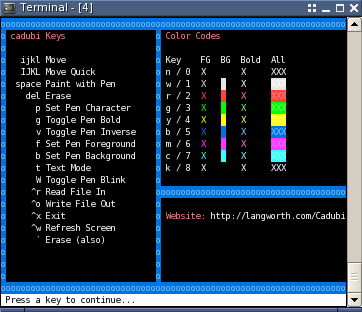
--------------------------------------------------------------------------------
1 | �[0m�[44;34;1moooooooooooooooooooooooooooooooooooooooooooooooooooooooooooooooooooooooooooooooo�[0m
2 | �[0m�[44;34;1mo�[0m �[0m�[31;1mcadubi Keys�[0m �[0m�[44;34;1mo�[0m �[0m�[31;1mColor Codes�[0m �[0m�[44;34;1mo�[0m
3 | �[0m�[44;34;1mo�[0m �[0m�[44;34;1mo�[0m �[0m�[44;34;1mo�[0m
4 | �[0m�[44;34;1mo�[0m �[0m�[1mijkl�[0m Move �[0m�[44;34;1mo�[0m �[0m�[1mKey FG BG Bold All�[0m �[0m�[44;34;1mo�[0m
5 | �[0m�[44;34;1mo�[0m �[0m�[1mIJKL�[0m Move Quick �[0m�[44;34;1mo�[0m n / 0 X �[0m�[1mX�[0m �[0m�[1mXXX�[0m �[0m�[44;34;1mo�[0m
6 | �[0m�[44;34;1mo�[0m �[0m�[1mspace�[0m Paint with Pen �[0m�[44;34;1mo�[0m w / 1 �[0m�[37mX�[0m �[0m�[47;37m �[0m �[0m�[37;1mX�[0m �[0m�[47;37;1mXXX�[0m �[0m�[44;34;1mo�[0m
7 | �[0m�[44;34;1mo�[0m �[0m�[1mdel�[0m Erase �[0m�[44;34;1mo�[0m r / 2 �[0m�[31mX�[0m �[0m�[41;31m �[0m �[0m�[31;1mX�[0m �[0m�[41;31;1mXXX�[0m �[0m�[44;34;1mo�[0m
8 | �[0m�[44;34;1mo�[0m �[0m�[1mp�[0m Set Pen Character �[0m�[44;34;1mo�[0m g / 3 �[0m�[32mX�[0m �[0m�[42;32m �[0m �[0m�[32;1mX�[0m �[0m�[42;32;1mXXX�[0m �[0m�[44;34;1mo�[0m
9 | �[0m�[44;34;1mo�[0m �[0m�[1m g�[0m Toggle Pen Bold �[0m�[44;34;1mo�[0m y / 4 �[0m�[33mX�[0m �[0m�[43m �[0m �[0m�[33;1mX�[0m �[0m�[43;33;1mXXX�[0m �[0m�[44;34;1mo�[0m
10 | �[0m�[44;34;1mo�[0m �[0m�[1m v�[0m Toggle Pen Inverse �[0m�[44;34;1mo�[0m b / 5 �[0m�[34mX�[0m �[0m�[44m �[0m �[0m�[34;1mX�[0m �[0m�[44;34;1mXXX�[0m �[0m�[44;34;1mo�[0m
11 | �[0m�[44;34;1mo�[0m �[0m�[1m f�[0m Set Pen Foreground �[0m�[44;34;1mo�[0m m / 6 �[0m�[35mX�[0m �[0m�[45m �[0m �[0m�[35;1mX�[0m �[0m�[45;35;1mXXX�[0m �[0m�[44;34;1mo�[0m
12 | �[0m�[44;34;1mo�[0m �[0m�[1m b�[0m Set Pen Background �[0m�[44;34;1mo�[0m c / 7 �[0m�[36mX�[0m �[0m�[46m �[0m �[0m�[36;1mX�[0m �[0m�[46;36;1mXXX�[0m �[0m�[44;34;1mo�[0m
13 | �[0m�[44;34;1mo�[0m �[0m�[1m t�[0m Text Mode �[0m�[44;34;1mo�[0m k / 8 �[0m�[30mX�[0m �[0m�[40m �[0m �[0m�[30;1mX�[0m �[0m�[40;30;1mXXX�[0m �[0m�[44;34;1mo�[0m
14 | �[0m�[44;34;1mo�[0m �[0m�[1m W�[0m Toggle Pen Blink �[0m�[44;34;1mo�[0m �[0m�[44;34;1mo�[0m
15 | �[0m�[44;34;1mo�[0m �[0m�[1m^r�[0m Read File In �[0m�[44;34;1mooooooooooooooooooooooooooooooooooooooooooooooooo�[0m
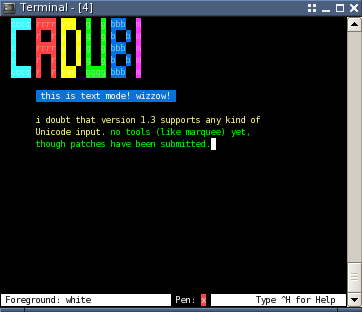
16 | �[0m�[44;34;1mo�[0m �[0m�[1m^o�[0m Write File Out �[0m�[44;34;1mo�[0m �[0m�[44;34;1mo�[0m
17 | �[0m�[44;34;1mo�[0m �[0m�[1m^x�[0m Exit �[0m�[44;34;1mo�[0m �[0m�[31;1mWebsite:�[0m https://github.com/statico/cadubi �[0m�[44;34;1mo�[0m
18 | �[0m�[44;34;1mo�[0m �[0m�[1m^w�[0m Refresh Screen �[0m�[44;34;1mo�[0m �[0m�[44;34;1mo�[0m
19 | �[0m�[44;34;1mo�[0m �[0m�[1m `�[0m Erase (also) �[0m�[44;34;1mo�[0m �[0m�[31;1m �[0m �[0m�[44;34;1mo�[0m
20 | �[0m�[44;34;1mo�[0m �[0m�[44;34;1mo�[0m �[0m�[44;34;1mo�[0m
21 | �[0m�[44;34;1mo�[0m �[0m�[44;34;1mo�[0m �[0m�[44;34;1mo�[0m
22 | �[0m�[44;34;1mo�[0m �[0m�[44;34;1mo�[0m �[0m�[44;34;1mo�[0m
23 | �[0m�[44;34;1moooooooooooooooooooooooooooooooooooooooooooooooooooooooooooooooooooooooooooooooo�[0m
24 |
--------------------------------------------------------------------------------
/cadubi.1:
--------------------------------------------------------------------------------
1 | .\" created by Abel Daniel for the Debian Gnu/Linux version, but may be used by
2 | others.
3 | .TH "cadubi" "1" "1.3.4" "Abel Daniel" "User commands"
4 | .SH "NAME"
5 | cadubi \- Creative ASCII Drawing Utility By Ian
6 | .SH "DESCRIPTION"
7 | cadubi is an application written in Perl that allows you to draw text\-based
8 | images that are viewable on typical UNIX\-based consoles. Usually the
9 | applications
10 | that emulate these consoles support various text modes, such as background and
11 | foreground colors, bold, and inverse. This text art, commonly called
12 | "ASCII art", is used in various places such as online BBSes, email and
13 | login prompts.
14 | .SH "OPTIONS"
15 | .TP
16 | .B \-h \-\-help
17 | display some documentation
18 | .TP
19 | .BI \-m \-\-mute
20 | turn off beeping
21 | .TP
22 | .BI "\-s ["W "] ["H ]
23 | .TP
24 | .BI "\-\-size ["W "] ["H ]
25 | sets the size of the console for use with cadubi, where W is number of columns
26 | and H is number of rows.
27 | .TP
28 | .B \-v \-\-version
29 | show cadubi's version
30 | .SH "CONFIGURING"
31 | Beeping and command line options can be also set in /usr/bin/cadubi.
32 | .SH "KEYBOARD"
33 | .TP
34 | .B i j k l
35 | Move the cursor around. Holding down shift and typing these keys will move the
36 | ursor five spaces instead of one.
37 | .TP
38 | .B space
39 | Paint the current pen on the screen.
40 | .TP
41 | .B return/enter
42 | Move the cursor down one line and all the way to the left of the console.
43 | .TP
44 | .BI "delete " "or " "backspace " "or "`
45 | Delete the character before the cursor.
46 | .TP
47 | .B p
48 | Prompt for a pen character
49 | .TP
50 | .B f
51 | Prompt for foreground color (see section colors).
52 | .TP
53 | .B b
54 | Prompt for background color (see section colors).
55 | .TP
56 | .B g
57 | Toggle bold mode.
58 | .TP
59 | .B v
60 | Toggle inverse mode.
61 | .TP
62 | .B shift-w
63 | Toggle blink (highly annoying).
64 | .TP
65 | .B t
66 | Enter text mode. This allows you to type like as if you were using a normal
67 | text editor, and all the characters drawn onscreen will use the same mode
68 | as the pen
69 | .
70 | Pressing Esc will exit text mode.
71 | .TP
72 | .B control-w
73 | Refresh the entire screen by redrawing each character.
74 | .TP
75 | .B control-r
76 | Open a file.
77 | .TP
78 | .B control-o
79 | Save the file.
80 | .TP
81 | .B control-h
82 | Show the quick help screen.
83 | .TP
84 | .B control-x
85 | Exit cadubi.
86 | .SH "USING"
87 | Cadubi has a 'pen' which describes the current mode. Properties of the pen are
88 | the painting character, foreground color, background color, bold, inverse, and
89 | blink. Whenever you paint or use the text mode, the characters drawn on the
90 | screen will have the properties of the pen. The current mode of the pen is
91 | shown at the bottom of the console and is what will be drawn on screen
92 | when you paint.
93 | .
94 | Typically, foreground text colors are the same as background colors, unless
95 | the text is bold. If the text is bold, foreground colors are usually lighter
96 | than
97 | the background color, making text easier to read when the text has the same
98 | foreground and background color. Refer to the Quick Help (control-'h') to see
99 | what the colors look like on your console.
100 |
101 | Text mode is an extremely useful feature. Once in the text mode you can type
102 | as if you were using a normal text editor, and all the characters drawn
103 | onscreen will use the same mode as the pen. To enter text mode,
104 | press the 't' key. To exit, press escape.
105 |
106 | When cadubi reads a file, it will only read as much that will fit in the
107 | workspace (the area of the console minus the bottom row [status bar]). To gain
108 | more workspace, see the '-s' operator in section "options".
109 |
110 | Cadubi optimizes its output files to display properly and take up as little
111 | space as possible. All cadubi output can be viewed with the 'cat' utility.
112 |
113 | .SH "COLORS"
114 | The color codes are case-insensitive.
115 | The following color codes can be chosen as fore- or background colors:
116 | .IP
117 | 0 or N \- Normal (standard text)
118 | .IP
119 | 1 or W \- White
120 | .IP
121 | 2 or R \- Red
122 | .IP
123 | 3 or G \- Green
124 | .IP
125 | 4 or Y \- Yellow
126 | .IP
127 | 5 or B \- Blue
128 | .IP
129 | 6 or M \- Magenta
130 | .IP
131 | 7 or C \- Cyan
132 | .IP
133 | 8 or K \- Black
134 | .SH "WARNING"
135 | Cadubi uses escape sequences for things like color. These may differ from
136 | system to system. This means that the file generated by cadubi may
137 | trash your console when viewed with for example cat.
138 | It is generally safe to use the files on the
139 | same type of console as they were generated on.
140 | .SH "AUTHORS"
141 | Cadubi was created and is currently being maintained by Ian Langworth. Please
142 | send all questions, comments, hate mail and bug reports to cadubi@logicallemon.
143 | com
144 | .SH "SEE ALSO"
145 | The "Keyboard and Console HOWTO" and the "Text Terminal HOWTO" from the
146 | Linuxdoc project (www.linuxdoc.org). Both are available in a Debian GNU/Linux
147 | system by installing the doc-linux-text package at
148 | .B /usr/share/doc/HOWTO/en-txt/Keyboard-and-Console-HOWTO.gz
149 | and
150 | .B /usr/share/doc/HOWTO/en-txt/Text-Terminal-HOWTO.gz
151 | respectively.
152 |
153 | This man page was copy-pasted from other documentation by Abel Daniel (abli@mai
154 | lbox.hu) for the Debian GNU/Linux distributions, but can be used by
155 | others.
156 |
157 |
--------------------------------------------------------------------------------
/README.md:
--------------------------------------------------------------------------------
1 | # CADUBI - Creative ASCII Drawing Utility By Ian
2 |
3 | This Perl program was written sometime around 1997 -- many years before I knew
4 | anything about Perl or Unix -- and the code hasn't changed much since then. It
5 | has, however, become very widely adopted and is available as a package on most
6 | Linux distributions.
7 |
8 | CADUBI is an application written in Perl that allows you to draw
9 | text-based images that are viewable on typical unix-based consoles.
10 | Usually the applications that emulate these consoles support various
11 | text modes, such as background and foreground colors, bold, and
12 | inverse. This text art, commonly called "ASCII art," is used in
13 | various places such as online BBSes, email and login prompts.
14 |
15 | 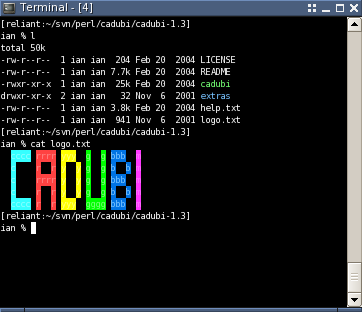
 16 |
17 | ## Installation
18 |
19 | * [Homebrew](http://brew.sh/): `brew install cadubi`
20 | * [Debian](https://packages.debian.org/wheezy/cadubi) and [Ubuntu](http://packages.ubuntu.com/precise/cadubi): `apt-get install cadubi`
21 | * From source:
22 | * Perl 5.002 or later
23 | * `Term::ReadKey` Perl module
24 |
25 | ## Usage
26 |
27 | CADUBI has a 'pen' which describes the current mode. Properties of
28 | the pen are the painting character, foreground color, background
29 | color, bold, inverse, and blink. Whenever you paint or use the text
30 | mode, the characters drawn on the screen will have the properties of
31 | the pen. The current mode of the pen is shown at the bottom of the
32 | console and is what will be drawn on screen when you paint.
33 |
34 | Move around the cursor with the i, j, k and l keys. Holding
35 | down shift and typing these keys will move the cursor five spaces
36 | instead of one. Pressing return/enter will move the cursor down one
37 | line and all the way to the left of the console.
38 |
39 | To paint the current pen on the screen, press the space bar. To
40 | delete a character, press the delete/backspace key. You'll notice
41 | that editing is much like common text editors, such as pico or joe.
42 | You can also delete with the tilde key, which makes moving & painting
43 | (right hand) and erasing (left hand) much easier.
44 |
45 | The pen character is the character that is drawn when you paint using
46 | the space bar. To change the character, press p and then the
47 | character you would like it to be.
48 |
49 | To set the foreground or background colors for the cursor, press f
50 | for foreground or b for background, and then a corresponding color
51 | code. The color codes are case-insensitive and are listed below:
52 |
53 | 0 or N Normal (standard text)
54 | 1 or W White
55 | 2 or R Red
56 | 3 or G Green
57 | 4 or Y Yellow
58 | 5 or B Blue
59 | 6 or M Magenta
60 | 7 or C Cyan
61 | 8 or K Black
62 |
63 | If you can't remember the codes above, you can always hit Ctrl-h
64 | to view the Quick Help which will display a summary of all the keys,
65 | color codes and examples of how they look.
66 |
67 | Typically, foreground text colors are the same as background colors,
68 | unless the text is bold. If the text is bold, foreground colors are
69 | usually lighter than the background color, making text easier to read
70 | when the text has the same foreground and background color. Refer to
71 | the Quick Help (Ctrl-h) to see what the colors look like on your
72 | console.
73 |
74 | Bold and inverse are two widely-supported modes. Bold is toggled with
75 | the g key, and inverse is toggled with the v key. Blink, though
76 | regarded as highly annoying, can be toggled with by pressing
77 | Shift-w.
78 |
79 | Text mode is an extremely useful feature. Once in the text mode you
80 | can type as if you were using a normal text editor, and all the
81 | characters drawn onscreen will use the same mode as the pen. To enter
82 | text mode, press the t key. To exit, press escape.
83 |
84 | To exit the CADUBI application, press Ctrl-x. Quick help can be
85 | accessed by pressing Ctrl-h. In case it is needed, pressing
86 | Ctrl-w will refresh the entire screen by redrawing each
87 | character.
88 |
89 | ### Reading and writing files
90 |
91 | To read a file and use it with CADUBI, type Ctrl-r. To write
92 | a file, type Ctrl-o. You will be prompted for a filename.
93 |
94 | When CADUBI reads a file, it will only read as much that will fit in
95 | the workspace (the area of the console minus the bottom row [status
96 | bar]). To gain more workspace, see the `-s` operator in 'COMMAND LINE
97 | USAGE' below.
98 |
99 | CADUBI optimizes its output files to display properly and take up as
100 | little space as possible. All CADUBI output can be viewed with the
101 | 'cat' utility.
102 |
103 | ## Command line usage
104 |
105 | Usage: cadubi [OPTIONS] [FILE]
106 |
107 | Available options:
108 | -h, --help what you're looking at now
109 | -m, --mute turn off beeping
110 | -s, --size [W] [H] sets the size of the console for use with
111 | CADUBI, where W is number of columns and H
112 | is number of rows.
113 | -v, --version show CADUBI version
114 |
115 | Example:
116 | Will make the cadubi workspace 160 columns wide, 48 rows high,
117 | disable beeping, and open the file 'bacon.txt':
118 |
119 | cadubi --mute --size 160 48 bacon.txt
120 |
121 | Will display the version of CADUBI, copyright and author:
122 |
123 | cadubi -v
124 |
125 | ## Tips
126 |
127 | Whenever you are prompted to type in information, such as the name of
128 | a file to read/write to, you can hit escape to cancel. You can also
129 | hit escape to get out of text mode.
130 |
131 | When using the `-s` or `--size` command line option, make sure your
132 | console actually _is_ that size or the text won't wrap properly and
133 | CADUBI will look funny.
134 |
--------------------------------------------------------------------------------
/cadubi:
--------------------------------------------------------------------------------
1 | #!/usr/bin/perl
2 |
3 | eval 'case $# in 0) exec /usr/bin/perl -S "$0";; *) exec /usr/bin/perl -S "$0" "$@";; esac'
4 | if 0;
5 |
6 | $VERSION = '1.3.4';
7 |
8 | ########################################################################
9 | # MAIN LOOP
10 |
11 | # kludge to make this easier (?) for package maintainers
12 | # (sorry guys, i wrote this years before i had the remotest clue as to
13 | # what the hell i was doing)
14 | use FindBin qw($Bin);
15 | $HELPFILE = "$Bin/help.txt";
16 |
17 | # other stuff
18 | $DEBUG = 0;
19 | $CADUBI_VERSION = $VERSION;
20 | use Term::ReadKey;
21 | use lib "$Bin/../lib";
22 |
23 | # global variables
24 | $ESC = "\x1b"; # our most important var
25 | $AUDIBLE = 1; # beep unless -m, --mute, or configured in 'cadubi'
26 | @pos = (1,1); # position of cursor (x,y)
27 | @totalspan = undef; # width & height of console (x,y)
28 | @workspan = undef; # same as $totalspace, but y-1
29 | $charmap = undef; # a 3D array:
30 | # [col] [row] [(0 => char to paint with
31 | # 1 => bg color
32 | # 2 => fg color
33 | # 3 => bold
34 | # 4 => inverse
35 | # 5 => blink
36 | # 6 => special char command
37 | # )]
38 | @charmode = ('x',0,0,0,0,0,'');
39 | $status_changed = 1; # used with &status so we don't constantly redraw.
40 | $current_filename = undef; # name of file we're working with
41 | $cadubi_done = 0; # main loop var
42 |
43 | # runtime statements
44 | &initKeys(); # setup %controlkeys and %keymap
45 | &initANSI(); # setup %ansi_mode
46 | &setspan(); # setup span of terminal (default 24x80)
47 | &get_args; # read in command line parameters
48 | &clear; # clear screen
49 | &debug_open(); # open debug file
50 | ReadMode raw; # set terminal getchar mode
51 |
52 | if ($current_filename) {
53 | # file has been specified via command line, open it
54 | &user_readfile($current_filename);
55 | } else {
56 | # draw default status bar
57 | &status();
58 | }
59 |
60 | do {
61 | &status if &HandleKeystroke(ReadKey(0)); # handle the key
62 | } until ($cadubi_done);
63 |
64 | &clear; # clear screen
65 | &cleanup; # cleanup code
66 |
67 | sub cleanup {
68 | ReadMode restore; # restore previous terminal getchar mode
69 | &debug_close(); # close debug file
70 | print $ESC.'[0m'; # return to normal ansi mode if anything has messed up
71 | }
72 |
73 | ########################################################################
74 | # ANSI MODES
75 | sub initANSI {
76 | %ansi_mode = ( 'escape' => "\x1b",
77 | 'normal' => 0,
78 | 'bold' => 1,
79 | 'blink' => 5,
80 | 'inverse ' => 7,
81 | 'invisible' => 8,
82 | 'fg_black' => 30,
83 | 'fg_red' => 31,
84 | 'fg_green' => 32,
85 | 'fg_yellow' => 33,
86 | 'fg_blue' => 34,
87 | 'fg_magenta' => 35,
88 | 'fg_cyan' => 36,
89 | 'fg_white' => 37,
90 | 'bg_black' => 40,
91 | 'bg_red' => 41,
92 | 'bg_green' => 42,
93 | 'bg_yellow' => 43,
94 | 'bg_blue' => 44,
95 | 'bg_magenta' => 45,
96 | 'bg_cyan' => 46,
97 | 'bg_white' => 47 );
98 |
99 | # color codes is used strictly for interface purposes
100 | %color_codes = qw( N normal 0 normal
101 | W white 1 white
102 | R red 2 red
103 | G green 3 green
104 | Y yellow 4 yellow
105 | B blue 5 blue
106 | M magenta 6 magenta
107 | C cyan 7 cyan
108 | K black 8 black
109 | );
110 | }
111 |
112 |
113 |
114 | ########################################################################
115 | # CONSOLE ROUTINES
116 |
117 | sub curs_move {
118 | # accepts coordinates ((x,y) or (column, row))
119 | if (($_[0] >= 1) && ($_[0] <= $totalspan[0]) && ($_[1] >= 1) && ($_[1] <= $totalspan[1])) {
120 | print $ESC.'['.$_[1].';'.$_[0].'H';
121 | @pos = ($_[0], $_[1]);
122 | } else {
123 | #&debug('&curs_move out of range: ('.$_[0].','.$_[1].')');
124 | #&debug(' >> @totalspan = ('.$totalspan[0].','.$totalspan[1].')');
125 | #&debug(' >> @workspan = ('.$workspan[0].','.$workspan[1].')');
126 | #&debug(' >> @pos = ('.$pos[0].','.$pos[1].')');
127 | return 0;
128 | }
129 | 1;
130 | }
131 |
132 | sub curs_move_up {
133 | if ($pos[1] > 1) {
134 | print $ESC.'[1A';
135 | $pos[1]--;
136 | } else {
137 | &beep;
138 | return 0;
139 | }
140 | 1;
141 | }
142 | sub curs_move_dn {
143 | if ($pos[1] < $workspan[1]) {
144 | print $ESC.'[1B';
145 | $pos[1]++;
146 | } else {
147 | &beep;
148 | return 0;
149 | }
150 | 1;
151 | }
152 | sub curs_move_rt {
153 | if ($pos[0] < $workspan[0]) {
154 | print $ESC.'[1C';
155 | $pos[0]++;
156 | } else {
157 | &beep;
158 | return 0;
159 | }
160 | 1;
161 | }
162 | sub curs_move_lt {
163 | if ($pos[0] > 1) {
164 | print $ESC.'[1D';
165 | $pos[0]--;
166 | } else {
167 | &beep;
168 | return 0;
169 | }
170 | 1;
171 | }
172 |
173 | sub clear {
174 | print $ESC.'[2J';
175 | &curs_move(1,1);
176 | }
177 |
178 | # set the size of our workspace
179 | sub setspan {
180 | if (@_) {
181 | @totalspan = ($_[0],$_[1]);
182 | @workspan = ($_[0],$_[1]-1);
183 | &debug("\&setspan (specified): $_[0], $_[1]");
184 | } elsif (GetTerminalSize) { #Term::ReadKey
185 | my ($w, $h, @x) = GetTerminalSize; #Term::ReadKey
186 | @totalspan = ($w,$h);
187 | @workspan = ($w,$h-1);
188 | &debug("\&setspan (using Term::ReadKey): $w, $h");
189 | } else { # we must assume, even though it makes an ass of u and me
190 | @totalspan = (80,24);
191 | @workspan = (80,23);
192 | &debug("\&setspan (assumed): 80, 24");
193 | }
194 | }
195 |
196 |
197 | # our status bar
198 | # if no parameters, erases if status has changed
199 | # if string is first argument, fills entire status bar with string
200 | # if string begins with '>', only replace 'CADUBI v1.x' in status bar with string
201 | # if second argument is true, leave the cursor at the end of the status text...
202 | # (good for prompts, see &user_writefile().
203 | sub status {
204 | my $msg = shift;
205 | my $leave_cursor = shift;
206 | my $out = undef;
207 | if ($msg && (substr($msg,0,1) ne '>')) {
208 | $out = ''.$ESC.'[0m'.$ESC.'[7m '.
209 | pack('A'.($totalspan[0]-1), $msg).$ESC.'[0m';
210 | $status_changed = 1;
211 | } else {
212 | if ($status_changed || $msg) {
213 | my $out_vers;
214 | if ($msg) {
215 | $out_vers = pack('A34',' '.substr($msg,1).' ');
216 | $status_changed = 1;
217 | } else {
218 | $out_vers = pack('A34',' cadubi '.$CADUBI_VERSION.' ');
219 | $status_changed = 0;
220 | }
221 | my $out_help = ' Type ^H for Help ';
222 | my $out_char = ' Pen: '.&printchar(@charmode).' ';
223 | $out = $ESC.'[0m'.$ESC.'[7m'.$out_vers.
224 | $ESC.'[0m'.$out_char.$ESC.'[7m'.
225 | (' ' x ($totalspan[0]-
226 | length($out_vers)-
227 | length($out_help)-
228 | 8)
229 | ).
230 | $out_help.$ESC.'[0m';
231 | }
232 | }
233 | my @oldpos = @pos;
234 | &curs_move(1,$totalspan[1]);
235 | print $out;
236 | &curs_move(@oldpos) unless $leave_cursor;
237 | }
238 |
239 | # this promps the user with the first argument given, and waits for a string.
240 | # pass it a maximum string length for second argument. if no second argument,
241 | # user's allowed to fill the width between prompt & right edge with text.
242 | # a third argument is treated as a default answer, already filled in the field
243 | sub get_user_string {
244 | my $msg = shift;
245 | my $max = shift;
246 | my $out = shift;
247 | my @oldpos = @pos;
248 | my $char = undef;
249 | &curs_move(1,$totalspan[1]);
250 | # notice we don't print a normal mode sequence (\x1b[0m) because we
251 | # want to keep writing in inverse. we print a normal mode right before
252 | # we do a return.
253 | print $ESC.'[7m '.pack('A'.($workspan[0]-2),$msg)." ";
254 | $max = $workspan[0]-length($msg)-3 unless $max;
255 | &curs_move(length($msg)+3,$totalspan[1]);
256 | print $out;
257 | while (not $char =~ /[\n\x1b]/) {
258 | $char = ReadKey(0);
259 | # no chars < space
260 | if ($char =~ /[\x00-\x1f]/) {
261 | &beep;
262 | }
263 | # delete, but don't delete past starting x position
264 | elsif (ord($char) == $keymap{'del'}) {
265 | if ($out) {
266 | # print a backspace...the same as move left one char, print
267 | # a space (which moves the cursor right one char), then move
268 | # back one char again
269 | print $ESC.'[1D '.$ESC.'[1D';
270 | $out = substr($out,0,-1);
271 | } else {
272 | &beep;
273 | }
274 | }
275 | else {
276 | if (length($out) >= $max) {
277 | &beep;
278 | } else {
279 | $out .= $char;
280 | print $char;
281 | }
282 | }
283 | }
284 | &curs_move(@oldpos);
285 | print $ESC.'[0m';
286 | # refresh status bar
287 | $status_changed = 1;
288 | &status();
289 | # user hit enter
290 | return $out if ($char eq "\n");
291 | # user hit cancel
292 | return undef;
293 | }
294 |
295 |
296 | ########################################################################
297 | # SUPPORT SUBROUTINES
298 |
299 | sub beep {
300 | print "\x07" if $AUDIBLE;
301 | }
302 |
303 | sub refresh {
304 | my @oldpos = @pos;
305 | &clear();
306 | my ($x, $y);
307 | for ($y=1; $y<=$workspan[1]; $y++) {
308 | for ($x=1; $x<=$workspan[0]; $x++) {
309 | if ($charmap->[$x][$y]) {
310 | print &printchar(@{$charmap->[$x][$y]});
311 | } else {
312 | print ' ';
313 | }
314 | }
315 | &curs_move($x--,$y);
316 | }
317 | &curs_move(@oldpos);
318 | }
319 |
320 | sub printchar { # returns a string with the current ANSI mode and the character
321 | my $out = undef;
322 | my @desc = @_;
323 | my $char = shift(@desc); #key to draw
324 | pop(@desc); #remove special char command
325 | $out.= $ESC.'['; #print properties
326 | foreach (@desc) {
327 | $out.= $_.';' if ($_);
328 | }
329 | $out = substr($out,0,-1).'m';
330 | $out = undef if ($out eq $ESC.'m');
331 | if (defined($char)) { #print char or space if there's no char
332 | $out.= $char;
333 | } else {
334 | $out.= ' ';
335 | }
336 | $out.= $ESC.'[0m';
337 | return $out;
338 | }
339 |
340 | sub paintchar { # prints the char on screen and saves it to $charmap
341 | $charmap->[$pos[0]][$pos[1]] = [@charmode];
342 | print &printchar(@charmode);
343 | &curs_move(@pos); #print moves to the right on us, without asking. the nerve!
344 | }
345 |
346 | sub erasechar { # saves blank char to $charmap, prints
347 | $charmap->[$pos[0]][$pos[1]] = undef;
348 | print &printchar(($charmap->[$pos[0]][$pos[1]]));
349 | &curs_move(@pos); #print moves to the right on us, without asking. the nerve!
350 | }
351 |
352 | sub usage {
353 | if ($_[0]) {
354 | print $_[0]."\n";
355 | }
356 | print <> printed &usage');
386 | &usage();
387 | &cleanup;
388 | exit(1);
389 | }
390 | elsif (($option eq '-v') || ($option eq '--version')) {
391 | &debug('>> printed &version');
392 | &version;
393 | &cleanup;
394 | exit(1);
395 | }
396 | elsif (($option eq '-m') || ($option eq '--mute')) {
397 | &debug('>> disabled audio');
398 | $AUDIBLE = 0;
399 | }
400 | elsif (($option eq '-s') || ($option eq '--size')) {
401 | ($param1, $param2) = (shift(@ARGS), shift(@ARGS));
402 | &debug('>> grabbing setspan variables, raw:');
403 | &debug('>> $param1 = '.$param1);
404 | &debug('>> $param2 = '.$param2);
405 | $param1 = 80 unless $param1;
406 | $param2 = 24 unless $param2;
407 | &debug('>> processed setspan vars:');
408 | &debug('>> $param1 = '.$param1);
409 | &debug('>> $param2 = '.$param2);
410 | &setspan($param1, $param2);
411 | }
412 | elsif ($option =~ /^-/) {
413 | &usage('Unknown option: '.$option);
414 | &cleanup;
415 | exit(1);
416 | }
417 | elsif (not $got_filename) {
418 | $got_filename = 1;
419 | $current_filename = $option;
420 | }
421 | else {
422 | &usage('Unknown argument: '.$option);
423 | &cleanup;
424 | exit(1);
425 | }
426 | }
427 | }
428 |
429 | ########################################################################
430 | # DEBUGGING
431 |
432 | sub debug {
433 | print DEBUGFH $_[0]."\n" if ($DEBUG && DEBUGFH);
434 | }
435 | sub debug_open {
436 | open(DEBUGFH, '>cadubi_debug.txt') if $DEBUG;
437 | &debug('Debug file opened '.(localtime));
438 | }
439 | sub debug_close {
440 | &debug('Debug file closed '.(localtime));
441 | close(DEBUGFH) if DEBUGFH;
442 | }
443 |
444 |
445 | ########################################################################
446 | # KEY HANDLING
447 | sub initKeys {
448 | %controlkeys = GetControlChars; #Term::ReadKey
449 | # DISCARD
450 | # DSUSPEND
451 | # EOF
452 | # EOL
453 | # EOL2
454 | # ERASE
455 | # ERASEWORD
456 | # INTERRUPT
457 | # KILL
458 | # MIN
459 | # QUIT
460 | # QUOTENEXT
461 | # REPRINT
462 | # START
463 | # STATUS
464 | # STOP
465 | # SUSPEND
466 | # SWITCH
467 | # TIME
468 |
469 | %keymap = ( '^a' => 1,
470 | '^b' => 2,
471 | '^d' => 4,
472 | '^e' => 5,
473 | '^f' => 6,
474 | '^g' => 7, #bell
475 | '^h' => 8,
476 | '^i' => 9,
477 | '^k' => 11,
478 | '^o' => 15,
479 | '^p' => 16,
480 | '^r' => 18,
481 | '^t' => 20,
482 | '^u' => 21,
483 | '^v' => 22,
484 | '^w' => 23,
485 | '^x' => 24,
486 | '^y' => 25,
487 | 'esc' => 27,
488 | 'del' => 127,
489 | 'up' => 30,
490 | 'dn' => 31,
491 | 'lt' => 28,
492 | 'rt' => 29,
493 | 'space' => 32,
494 | 'cr' => 13,
495 | 'lf' => 10);
496 | }
497 |
498 |
499 | sub HandleKeystroke {
500 | my $key = shift;
501 |
502 | # ansi escape chars, like arrow keys
503 | if ($key eq $ESC) {
504 | if (ReadKey(0) eq '[') {
505 | my $newkey = ReadKey(0);
506 | if ($newkey eq 'A') {&curs_move_up; return 1;}
507 | elsif ($newkey eq 'B') {&curs_move_dn; return 1;}
508 | elsif ($newkey eq 'C') {&curs_move_rt; return 1;}
509 | elsif ($newkey eq 'D') {&curs_move_lt; return 1;}
510 | else {
511 | &status("Unknown escape sequence: '".$newkey."'");
512 | return 0;
513 | }
514 | } else {
515 | &status("Unknown escape sequence.");
516 | return 0;
517 | }
518 | }
519 |
520 | # moving around keys (ijkl, IJKL, arrow keys)
521 | if ($key eq 'i') {&curs_move_up; return 1;}
522 | if ($key eq 'j') {&curs_move_lt; return 1;}
523 | if ($key eq 'k') {&curs_move_dn; return 1;}
524 | if ($key eq 'l') {&curs_move_rt; return 1;}
525 | if ($key eq 'I') {for (1 .. 5) {&curs_move_up}; return 1;}
526 | if ($key eq 'J') {for (1 .. 5) {&curs_move_lt}; return 1;}
527 | if ($key eq 'K') {for (1 .. 5) {&curs_move_dn}; return 1;}
528 | if ($key eq 'L') {for (1 .. 5) {&curs_move_rt}; return 1;}
529 |
530 | # exit
531 | if (ord($key) == $keymap{'^x'}) {
532 | $cadubi_done = 1;
533 | return 1;
534 | }
535 |
536 | # carrage return
537 | if ($key eq "\n") {
538 | # if we're at the bottom of the workspace, don't return
539 | if ($pos[1] >= $workspan[1]) {
540 | &curs_move(1, $pos[1]);
541 | } else {
542 | &curs_move(1, $pos[1]);
543 | &curs_move_dn;
544 | }
545 | return 1;
546 | }
547 |
548 | # paint
549 | if ($key eq ' ') {
550 | &paintchar;
551 | &curs_move_rt if ($pos[0] < $workspan[0]);
552 | return 1;
553 | }
554 |
555 | # erase
556 | if ((ord($key) == $keymap{'del'}) || ($key eq '`')) {
557 | &curs_move_lt;
558 | &erasechar;
559 | return 1;
560 | }
561 |
562 | # text mode
563 | if ($key eq 't') {
564 | my $char = undef;
565 | my $oldchar = $charmode[0];
566 | my $startingx = $pos[0];
567 | &status('Text mode (escape key exits)');
568 | while ($char ne "\x1b") {
569 | $char = ReadKey(0);
570 | # if user hit return, move down a line to starting point
571 | if ($char eq "\n") {
572 | # if we're at the bottom of the workspace, don't return
573 | if ($pos[1] >= $workspan[1]) {
574 | &beep;
575 | } else {
576 | &curs_move($startingx, $pos[1]);
577 | &curs_move_dn;
578 | }
579 | }
580 | # no chars < space
581 | elsif ($char =~ /[\x00-\x1a\x1c-\x1f]/) {
582 | &beep;
583 | }
584 | # delete, but don't delete past starting x position
585 | elsif (ord($char) == $keymap{'del'}) {
586 | if ($pos[0] > $startingx) {
587 | &curs_move_lt;
588 | } else {
589 | &beep;
590 | }
591 | &erasechar;
592 | }
593 | elsif ($char ne $ESC) {
594 | $charmode[0] = $char;
595 | &paintchar(@charmode);
596 | &curs_move_rt;
597 | }
598 | }
599 | $charmode[0] = $oldchar;
600 | return 1;
601 | }
602 |
603 | # paint modes
604 | if ($key eq 'p') { # pen character
605 | &status('Set pen character:');
606 | my $newkey = ReadKey(0);
607 | if ($newkey =~ /[\x00-\x1f\x7f]/) {
608 | &beep;
609 | &status('Unusable pen selection');
610 | } else {
611 | $charmode[0] = $newkey;
612 | &status(">Pen char now: '".$newkey."'");
613 | }
614 | return 0;
615 | }
616 | if ($key eq 'g') { # bold
617 | $charmode[3] = ($charmode[3]) ? 0 : 1;
618 | &status(">Bold enabled") if $charmode[3];
619 | &status(">Bold disabled") unless $charmode[3];
620 | return 0;
621 | }
622 | if ($key eq 'v') { # inverse
623 | $charmode[4] = ($charmode[4]) ? 0 : 7;
624 | &status(">Inverse enabled") if $charmode[4];
625 | &status(">Inverse disabled") unless $charmode[4];
626 | return 0;
627 | }
628 | if ($key eq 'W') { # blink (that's W for "why?")
629 | $charmode[5] = ($charmode[5]) ? 0 : 5;
630 | &status(">Blink enabled") if $charmode[5];
631 | &status(">Blink disabled") unless $charmode[5];
632 | return 0;
633 | }
634 | if ($key eq 'f') {
635 | &status('Set pen foreground color:');
636 | my $newkey = ReadKey(0);
637 | if ($newkey =~ /[nN0]/) {$charmode[2] = $ansi_mode{'normal'}}
638 | elsif ($newkey =~ /[wW1]/) {$charmode[2] = $ansi_mode{'fg_white'}}
639 | elsif ($newkey =~ /[rR2]/) {$charmode[2] = $ansi_mode{'fg_red'}}
640 | elsif ($newkey =~ /[gG3]/) {$charmode[2] = $ansi_mode{'fg_green'}}
641 | elsif ($newkey =~ /[yY4]/) {$charmode[2] = $ansi_mode{'fg_yellow'}}
642 | elsif ($newkey =~ /[bB5]/) {$charmode[2] = $ansi_mode{'fg_blue'}}
643 | elsif ($newkey =~ /[mM6]/) {$charmode[2] = $ansi_mode{'fg_magenta'}}
644 | elsif ($newkey =~ /[cC7]/) {$charmode[2] = $ansi_mode{'fg_cyan'}}
645 | elsif ($newkey =~ /[kK8]/) {$charmode[2] = $ansi_mode{'fg_black'}}
646 | if ($newkey =~ /[NWRGYBMCK012345678]/i) {
647 | &status(">Foreground: ".$color_codes{uc($newkey)});
648 | } else {
649 | &beep;
650 | &status("Unknown color selection: '".$newkey."'")
651 | }
652 | return 0;
653 | }
654 | if ($key eq 'b') {
655 | &status('Set pen background color:');
656 | my $newkey = ReadKey(0);
657 | if ($newkey =~ /[nN0]/) {$charmode[1] = $ansi_mode{'normal'}}
658 | elsif ($newkey =~ /[wW1]/) {$charmode[1] = $ansi_mode{'bg_white'}}
659 | elsif ($newkey =~ /[rR2]/) {$charmode[1] = $ansi_mode{'bg_red'}}
660 | elsif ($newkey =~ /[gG3]/) {$charmode[1] = $ansi_mode{'bg_green'}}
661 | elsif ($newkey =~ /[yY4]/) {$charmode[1] = $ansi_mode{'bg_yellow'}}
662 | elsif ($newkey =~ /[bB5]/) {$charmode[1] = $ansi_mode{'bg_blue'}}
663 | elsif ($newkey =~ /[mM6]/) {$charmode[1] = $ansi_mode{'bg_magenta'}}
664 | elsif ($newkey =~ /[cC7]/) {$charmode[1] = $ansi_mode{'bg_cyan'}}
665 | elsif ($newkey =~ /[kK8]/) {$charmode[1] = $ansi_mode{'bg_black'}}
666 | if ($newkey =~ /[NWRGYBMCK012345678]/i) {
667 | &status(">Background: ".$color_codes{uc($newkey)});
668 | } else {
669 | &beep;
670 | &status("Unknown color selection: '".$newkey."'")
671 | }
672 | return 0;
673 | }
674 |
675 | # file i/o
676 | if (ord($key) == $keymap{'^r'}) {
677 | return &user_readfile;
678 | }
679 | if (ord($key) == $keymap{'^o'}) {
680 | return &user_writefile;
681 | }
682 |
683 | # refresh
684 | if (ord($key) == $keymap{'^w'}) { #refresh
685 | &refresh();
686 | &status('Workspace refreshed');
687 | return 1;
688 | }
689 |
690 | # help
691 | if (ord($key) == $keymap{'^h'}) { #Help
692 | if (-e $HELPFILE) {
693 | my $oldmap = $charmap;
694 | my @oldpos = @pos;
695 | &readfile($HELPFILE);
696 | &status('Press a key to continue...', 1);
697 | my $temp = ReadKey(0);
698 | $charmap = $oldmap;
699 | $oldmap = undef;
700 | &curs_move(@oldpos);
701 | &refresh;
702 | &status;
703 | } else {
704 | &beep;
705 | &status("$HELPFILE not available");
706 | }
707 | return 0;
708 | }
709 |
710 | # other
711 | if (ord($key) == $keymap{'^t'}) { # TEST
712 | &beep;
713 | return 0;
714 | }
715 |
716 | # no cigar!
717 | &beep;
718 | return 0;
719 | }
720 |
721 |
722 | ########################################################################
723 | # FILE SUBROUTINES
724 |
725 | sub readfile {
726 | # pass it a filename as first argument, reads a file into
727 | # the $charmap array
728 | my $filepath = shift;
729 | my @oldpos = @pos;
730 | my @oldcharmode = @charmode;
731 | my ($char, $buf, $command, @nums);
732 | my $x = 1;
733 | my $y = 1;
734 | open(IN, '<'.$filepath);
735 | unless (IN) {
736 | return 0;
737 | }
738 | $charmap = undef;
739 | &debug('&readfile parsing:');
740 | PARSE: while (not eof(IN)) {
741 | # MAGICAL ANSI ESCAPE SEQUENCE PARSER
742 | # This parses almost all the escape sequences I could get documentation on.
743 | # Even though, other than the mode change sequences, they will hardly ever
744 | # appear in an ascii art file, it's good to be prepared.
745 | #
746 | # I've parsed all EXCEPT this format:
747 | # ESC[#;"string";#p
748 | #
749 | $char = ReadKey(0, IN);
750 | &debug('>> "'.$char.'"');
751 | # exit if we've found more lines than max
752 | if ($y > $workspan[1]) {
753 | &debug('>> '.$y.' is greater than '.$workspan[1]);
754 | last PARSE;
755 | }
756 | # if we've hit a newline in the file
757 | if ($char eq "\n") {
758 | &debug('>> newline');
759 | $y++;
760 | $x = 1;
761 | }
762 | # if we've found more chars on the line than max
763 | elsif ($x > $workspan[0]) {
764 | &debug('>> maximum chars hit');
765 | $y++;
766 | $x = 1;
767 | # read until newline
768 | do {
769 | $char = ReadKey(0, IN);
770 | } until ($char eq "\n");
771 | }
772 | elsif ($char eq $ESC) { # escape sequence
773 | $char = ReadKey(0, IN);
774 | if ($char eq '[') {
775 | $char = ReadKey(0, IN);
776 | # These escape sequence types don't need support
777 | if ($char =~ /[usK]/) {
778 | # example: ESC[u
779 | }
780 | # Double-char unsupported escape sequences
781 | elsif ($char =~ /[2]/) {
782 | # example: ESC[2J
783 | $char = ReadKey(0, IN);
784 | }
785 | # Multi-numbered wierd with digits
786 | elsif ($char =~ /[\=\?]/) {
787 | # example: ESC[=21;29h
788 | do {
789 | $char = ReadKey(0, IN);
790 | } until (not ($char =~ /[\d\;]/));
791 | }
792 | # Eeek! Keyboard reassignment!
793 | elsif ($char eq '"') {
794 | # example: ESC["string"p
795 | $char = ReadKey(0, IN); # get first "
796 | do {
797 | $char = ReadKey(0, IN); # get string"
798 | } until ($char eq '"');
799 | $char = ReadKey(0, IN); # get final p
800 | }
801 | # Oh great. We've hit digits.
802 | elsif ($char =~ /\d/) {
803 | # example: ESC[31;7m
804 | $buf = $char;
805 | # read until we hit a non-digit or non-; char
806 | do {
807 | $char = ReadKey(0, IN);
808 | $buf .= $char;
809 | } until (not ($char =~ /[\d\;]/));
810 | # $command is the letter following the number series
811 | $command = substr($buf,-1,1);
812 | # $buf ends up being a ; delimeted list of numbers
813 | $buf = substr($buf,0,-1);
814 | # @nums is a list the numbers
815 | @nums = split(/\;/, $buf);
816 | &debug(">> Sequence:");
817 | &debug(">> -> \$command = $command");
818 | &debug(">> -> \$buf = $bug");
819 | &debug(">> -> \@nums = ");
820 | foreach (@nums) {&debug(">> -> !- $_")}
821 | # make sure these numbers are a mode change
822 | if ($command eq 'm') {
823 | # did we get a set-to-normal mode? (ESC[0m])
824 | if (grep(/0/, @nums)) {
825 | @charmode = (' ',0,0,0,0,0,'');
826 | # no, we got a regular mode change
827 | } else {
828 | foreach (@nums) {
829 | $charmode[1] = $_ if (($_ >= 40) && ($_ <= 47));
830 | $charmode[2] = $_ if (($_ >= 30) && ($_ <= 37));
831 | $charmode[3] = $_ if ($_ == 1);
832 | $charmode[4] = $_ if ($_ == 7);
833 | $charmode[5] = $_ if ($_ == 5);
834 | }
835 | }
836 | }
837 | }
838 | }
839 | }
840 | else {
841 | $charmode[0] = $char;
842 | $charmap->[$x][$y] = [@charmode];
843 | $x++;
844 | }
845 | }
846 | close(IN);
847 | &refresh;
848 | &curs_move(@oldpos);
849 | @charmode = @oldcharmode;
850 | return 1;
851 | }
852 |
853 | sub writefile {
854 | # pass it a filename, writes the entire $charmap to file, readable by
855 | # cat, more, less, whatever.
856 | my $filepath = shift;
857 | my $out = undef;
858 | my ($thisline, $thischar);
859 | my $inital_space = 1;
860 | my ($x, $y, $i, $d, $max, @newmode, @oldmode, @outlines);
861 | for ($y=1; $y<=$workspan[1]; $y++) {
862 | # fresh new line to work with
863 | @oldmode = qw(99 99 99 99 99 99);
864 | $thisline = undef;
865 | for ($x=1; $x<=$workspan[0]; $x++) {
866 | # set @newmode to the mode of the char we're about to write
867 | @newmode = @{$charmap->[$x][$y]};
868 | # is our new char mode different from our old one?
869 | $d = 0;
870 | $max = ($#oldmode > $#newmode) ? $#oldmode : $#newmode;
871 | for($i=1; $i<=$max; $i++) {
872 | # notice $i starts at one so we skip the character
873 | $d++ if ($oldmode[$i] != $newmode[$i]);
874 | }
875 | # if our new char mode is indeed different, add a normal
876 | # mode sequence and our new mode and char. else, just add
877 | # the char.
878 | if ($d) {
879 | $thisline .= $ESC.'[0m'.substr(&printchar(@{$charmap->[$x][$y]}),0,-4);
880 | } else {
881 | # make sure it's not just a space
882 | if ($charmap->[$x][$y]) {
883 | $thisline .= $newmode[0];
884 | } else {
885 | $thisline .= ' ';
886 | }
887 | }
888 | # now make @newmode our @oldmode
889 | @oldmode = @newmode;
890 | }
891 | # kill trailing whitespace on single lines
892 | $thisline =~ s/(\s+)$//;
893 | # make sure each line ends with a normal mode sequence
894 | push(@outlines, $thisline.$ESC."[0m\n");
895 | }
896 | open(OUT, ">$filepath") or return 0;
897 | # kill trailing lines
898 | $x = 0;
899 | for ($i=$#outlines; $i>=0; $i--) {
900 | unless (($outlines[$i] eq $ESC.'[0m'.$ESC."[0m\n") && (not $x)) {
901 | $out = $outlines[$i].$out;
902 | $x++;
903 | }
904 | }
905 | print OUT $out;
906 | close(OUT);
907 | if ($out) {
908 | return length($out);
909 | } else {
910 | # if no bytes were written, we'll return 'zero'
911 | return 'zero';
912 | }
913 | }
914 |
915 | sub user_writefile {
916 | my ($filename, $reply, $bytes_written);
917 | my $file_exists = 1;
918 | my @oldpos = @pos;
919 | while ($file_exists) {
920 | $filename = &get_user_string('File name to write:', undef, $current_filename);
921 | # user canceled
922 | return 1 unless defined($filename);
923 | # check if file exists
924 | if (-e $filename) {
925 | &status('File already exists. Overwrite? (y/n)',1);
926 | $reply = uc(ReadKey(0));
927 | $file_exists = 0 if ($reply eq 'Y');
928 | return 1 if ($reply eq $ESC);
929 | &status();
930 | } else {
931 | $file_exists = 0;
932 | }
933 | }
934 | $current_filename = $filename;
935 | $bytes_written = &writefile($filename);
936 | if ($bytes_written) {
937 | &status("Wrote '".$filename."' (".$bytes_written.' bytes)');
938 | } else {
939 | &beep;
940 | &status("Couldn't write file '".$filename."': ".$!);
941 | }
942 | &curs_move(@oldpos);
943 | return 0;
944 | }
945 |
946 | sub user_readfile {
947 | my $filename;
948 | if ($_[0]) {
949 | $filename = $_[0];
950 | } else {
951 | $filename = &get_user_string('File name to read:', undef, $current_filename);
952 | }
953 | # user canceled
954 | return 1 unless defined($filename);
955 | if (-e $filename) {
956 | if (&readfile($filename)) {
957 | &status("Read file '".$filename."'");
958 | } else {
959 | &status("Couldn't read file '".$filename."': ".$!);
960 | }
961 | } else {
962 | &status("File '".$filename."' doesn't exist.");
963 | }
964 | return 0;
965 | }
966 |
967 | ########################################################################
968 | # EOF
969 | 1;
970 |
971 |
--------------------------------------------------------------------------------
16 |
17 | ## Installation
18 |
19 | * [Homebrew](http://brew.sh/): `brew install cadubi`
20 | * [Debian](https://packages.debian.org/wheezy/cadubi) and [Ubuntu](http://packages.ubuntu.com/precise/cadubi): `apt-get install cadubi`
21 | * From source:
22 | * Perl 5.002 or later
23 | * `Term::ReadKey` Perl module
24 |
25 | ## Usage
26 |
27 | CADUBI has a 'pen' which describes the current mode. Properties of
28 | the pen are the painting character, foreground color, background
29 | color, bold, inverse, and blink. Whenever you paint or use the text
30 | mode, the characters drawn on the screen will have the properties of
31 | the pen. The current mode of the pen is shown at the bottom of the
32 | console and is what will be drawn on screen when you paint.
33 |
34 | Move around the cursor with the i, j, k and l keys. Holding
35 | down shift and typing these keys will move the cursor five spaces
36 | instead of one. Pressing return/enter will move the cursor down one
37 | line and all the way to the left of the console.
38 |
39 | To paint the current pen on the screen, press the space bar. To
40 | delete a character, press the delete/backspace key. You'll notice
41 | that editing is much like common text editors, such as pico or joe.
42 | You can also delete with the tilde key, which makes moving & painting
43 | (right hand) and erasing (left hand) much easier.
44 |
45 | The pen character is the character that is drawn when you paint using
46 | the space bar. To change the character, press p and then the
47 | character you would like it to be.
48 |
49 | To set the foreground or background colors for the cursor, press f
50 | for foreground or b for background, and then a corresponding color
51 | code. The color codes are case-insensitive and are listed below:
52 |
53 | 0 or N Normal (standard text)
54 | 1 or W White
55 | 2 or R Red
56 | 3 or G Green
57 | 4 or Y Yellow
58 | 5 or B Blue
59 | 6 or M Magenta
60 | 7 or C Cyan
61 | 8 or K Black
62 |
63 | If you can't remember the codes above, you can always hit Ctrl-h
64 | to view the Quick Help which will display a summary of all the keys,
65 | color codes and examples of how they look.
66 |
67 | Typically, foreground text colors are the same as background colors,
68 | unless the text is bold. If the text is bold, foreground colors are
69 | usually lighter than the background color, making text easier to read
70 | when the text has the same foreground and background color. Refer to
71 | the Quick Help (Ctrl-h) to see what the colors look like on your
72 | console.
73 |
74 | Bold and inverse are two widely-supported modes. Bold is toggled with
75 | the g key, and inverse is toggled with the v key. Blink, though
76 | regarded as highly annoying, can be toggled with by pressing
77 | Shift-w.
78 |
79 | Text mode is an extremely useful feature. Once in the text mode you
80 | can type as if you were using a normal text editor, and all the
81 | characters drawn onscreen will use the same mode as the pen. To enter
82 | text mode, press the t key. To exit, press escape.
83 |
84 | To exit the CADUBI application, press Ctrl-x. Quick help can be
85 | accessed by pressing Ctrl-h. In case it is needed, pressing
86 | Ctrl-w will refresh the entire screen by redrawing each
87 | character.
88 |
89 | ### Reading and writing files
90 |
91 | To read a file and use it with CADUBI, type Ctrl-r. To write
92 | a file, type Ctrl-o. You will be prompted for a filename.
93 |
94 | When CADUBI reads a file, it will only read as much that will fit in
95 | the workspace (the area of the console minus the bottom row [status
96 | bar]). To gain more workspace, see the `-s` operator in 'COMMAND LINE
97 | USAGE' below.
98 |
99 | CADUBI optimizes its output files to display properly and take up as
100 | little space as possible. All CADUBI output can be viewed with the
101 | 'cat' utility.
102 |
103 | ## Command line usage
104 |
105 | Usage: cadubi [OPTIONS] [FILE]
106 |
107 | Available options:
108 | -h, --help what you're looking at now
109 | -m, --mute turn off beeping
110 | -s, --size [W] [H] sets the size of the console for use with
111 | CADUBI, where W is number of columns and H
112 | is number of rows.
113 | -v, --version show CADUBI version
114 |
115 | Example:
116 | Will make the cadubi workspace 160 columns wide, 48 rows high,
117 | disable beeping, and open the file 'bacon.txt':
118 |
119 | cadubi --mute --size 160 48 bacon.txt
120 |
121 | Will display the version of CADUBI, copyright and author:
122 |
123 | cadubi -v
124 |
125 | ## Tips
126 |
127 | Whenever you are prompted to type in information, such as the name of
128 | a file to read/write to, you can hit escape to cancel. You can also
129 | hit escape to get out of text mode.
130 |
131 | When using the `-s` or `--size` command line option, make sure your
132 | console actually _is_ that size or the text won't wrap properly and
133 | CADUBI will look funny.
134 |
--------------------------------------------------------------------------------
/cadubi:
--------------------------------------------------------------------------------
1 | #!/usr/bin/perl
2 |
3 | eval 'case $# in 0) exec /usr/bin/perl -S "$0";; *) exec /usr/bin/perl -S "$0" "$@";; esac'
4 | if 0;
5 |
6 | $VERSION = '1.3.4';
7 |
8 | ########################################################################
9 | # MAIN LOOP
10 |
11 | # kludge to make this easier (?) for package maintainers
12 | # (sorry guys, i wrote this years before i had the remotest clue as to
13 | # what the hell i was doing)
14 | use FindBin qw($Bin);
15 | $HELPFILE = "$Bin/help.txt";
16 |
17 | # other stuff
18 | $DEBUG = 0;
19 | $CADUBI_VERSION = $VERSION;
20 | use Term::ReadKey;
21 | use lib "$Bin/../lib";
22 |
23 | # global variables
24 | $ESC = "\x1b"; # our most important var
25 | $AUDIBLE = 1; # beep unless -m, --mute, or configured in 'cadubi'
26 | @pos = (1,1); # position of cursor (x,y)
27 | @totalspan = undef; # width & height of console (x,y)
28 | @workspan = undef; # same as $totalspace, but y-1
29 | $charmap = undef; # a 3D array:
30 | # [col] [row] [(0 => char to paint with
31 | # 1 => bg color
32 | # 2 => fg color
33 | # 3 => bold
34 | # 4 => inverse
35 | # 5 => blink
36 | # 6 => special char command
37 | # )]
38 | @charmode = ('x',0,0,0,0,0,'');
39 | $status_changed = 1; # used with &status so we don't constantly redraw.
40 | $current_filename = undef; # name of file we're working with
41 | $cadubi_done = 0; # main loop var
42 |
43 | # runtime statements
44 | &initKeys(); # setup %controlkeys and %keymap
45 | &initANSI(); # setup %ansi_mode
46 | &setspan(); # setup span of terminal (default 24x80)
47 | &get_args; # read in command line parameters
48 | &clear; # clear screen
49 | &debug_open(); # open debug file
50 | ReadMode raw; # set terminal getchar mode
51 |
52 | if ($current_filename) {
53 | # file has been specified via command line, open it
54 | &user_readfile($current_filename);
55 | } else {
56 | # draw default status bar
57 | &status();
58 | }
59 |
60 | do {
61 | &status if &HandleKeystroke(ReadKey(0)); # handle the key
62 | } until ($cadubi_done);
63 |
64 | &clear; # clear screen
65 | &cleanup; # cleanup code
66 |
67 | sub cleanup {
68 | ReadMode restore; # restore previous terminal getchar mode
69 | &debug_close(); # close debug file
70 | print $ESC.'[0m'; # return to normal ansi mode if anything has messed up
71 | }
72 |
73 | ########################################################################
74 | # ANSI MODES
75 | sub initANSI {
76 | %ansi_mode = ( 'escape' => "\x1b",
77 | 'normal' => 0,
78 | 'bold' => 1,
79 | 'blink' => 5,
80 | 'inverse ' => 7,
81 | 'invisible' => 8,
82 | 'fg_black' => 30,
83 | 'fg_red' => 31,
84 | 'fg_green' => 32,
85 | 'fg_yellow' => 33,
86 | 'fg_blue' => 34,
87 | 'fg_magenta' => 35,
88 | 'fg_cyan' => 36,
89 | 'fg_white' => 37,
90 | 'bg_black' => 40,
91 | 'bg_red' => 41,
92 | 'bg_green' => 42,
93 | 'bg_yellow' => 43,
94 | 'bg_blue' => 44,
95 | 'bg_magenta' => 45,
96 | 'bg_cyan' => 46,
97 | 'bg_white' => 47 );
98 |
99 | # color codes is used strictly for interface purposes
100 | %color_codes = qw( N normal 0 normal
101 | W white 1 white
102 | R red 2 red
103 | G green 3 green
104 | Y yellow 4 yellow
105 | B blue 5 blue
106 | M magenta 6 magenta
107 | C cyan 7 cyan
108 | K black 8 black
109 | );
110 | }
111 |
112 |
113 |
114 | ########################################################################
115 | # CONSOLE ROUTINES
116 |
117 | sub curs_move {
118 | # accepts coordinates ((x,y) or (column, row))
119 | if (($_[0] >= 1) && ($_[0] <= $totalspan[0]) && ($_[1] >= 1) && ($_[1] <= $totalspan[1])) {
120 | print $ESC.'['.$_[1].';'.$_[0].'H';
121 | @pos = ($_[0], $_[1]);
122 | } else {
123 | #&debug('&curs_move out of range: ('.$_[0].','.$_[1].')');
124 | #&debug(' >> @totalspan = ('.$totalspan[0].','.$totalspan[1].')');
125 | #&debug(' >> @workspan = ('.$workspan[0].','.$workspan[1].')');
126 | #&debug(' >> @pos = ('.$pos[0].','.$pos[1].')');
127 | return 0;
128 | }
129 | 1;
130 | }
131 |
132 | sub curs_move_up {
133 | if ($pos[1] > 1) {
134 | print $ESC.'[1A';
135 | $pos[1]--;
136 | } else {
137 | &beep;
138 | return 0;
139 | }
140 | 1;
141 | }
142 | sub curs_move_dn {
143 | if ($pos[1] < $workspan[1]) {
144 | print $ESC.'[1B';
145 | $pos[1]++;
146 | } else {
147 | &beep;
148 | return 0;
149 | }
150 | 1;
151 | }
152 | sub curs_move_rt {
153 | if ($pos[0] < $workspan[0]) {
154 | print $ESC.'[1C';
155 | $pos[0]++;
156 | } else {
157 | &beep;
158 | return 0;
159 | }
160 | 1;
161 | }
162 | sub curs_move_lt {
163 | if ($pos[0] > 1) {
164 | print $ESC.'[1D';
165 | $pos[0]--;
166 | } else {
167 | &beep;
168 | return 0;
169 | }
170 | 1;
171 | }
172 |
173 | sub clear {
174 | print $ESC.'[2J';
175 | &curs_move(1,1);
176 | }
177 |
178 | # set the size of our workspace
179 | sub setspan {
180 | if (@_) {
181 | @totalspan = ($_[0],$_[1]);
182 | @workspan = ($_[0],$_[1]-1);
183 | &debug("\&setspan (specified): $_[0], $_[1]");
184 | } elsif (GetTerminalSize) { #Term::ReadKey
185 | my ($w, $h, @x) = GetTerminalSize; #Term::ReadKey
186 | @totalspan = ($w,$h);
187 | @workspan = ($w,$h-1);
188 | &debug("\&setspan (using Term::ReadKey): $w, $h");
189 | } else { # we must assume, even though it makes an ass of u and me
190 | @totalspan = (80,24);
191 | @workspan = (80,23);
192 | &debug("\&setspan (assumed): 80, 24");
193 | }
194 | }
195 |
196 |
197 | # our status bar
198 | # if no parameters, erases if status has changed
199 | # if string is first argument, fills entire status bar with string
200 | # if string begins with '>', only replace 'CADUBI v1.x' in status bar with string
201 | # if second argument is true, leave the cursor at the end of the status text...
202 | # (good for prompts, see &user_writefile().
203 | sub status {
204 | my $msg = shift;
205 | my $leave_cursor = shift;
206 | my $out = undef;
207 | if ($msg && (substr($msg,0,1) ne '>')) {
208 | $out = ''.$ESC.'[0m'.$ESC.'[7m '.
209 | pack('A'.($totalspan[0]-1), $msg).$ESC.'[0m';
210 | $status_changed = 1;
211 | } else {
212 | if ($status_changed || $msg) {
213 | my $out_vers;
214 | if ($msg) {
215 | $out_vers = pack('A34',' '.substr($msg,1).' ');
216 | $status_changed = 1;
217 | } else {
218 | $out_vers = pack('A34',' cadubi '.$CADUBI_VERSION.' ');
219 | $status_changed = 0;
220 | }
221 | my $out_help = ' Type ^H for Help ';
222 | my $out_char = ' Pen: '.&printchar(@charmode).' ';
223 | $out = $ESC.'[0m'.$ESC.'[7m'.$out_vers.
224 | $ESC.'[0m'.$out_char.$ESC.'[7m'.
225 | (' ' x ($totalspan[0]-
226 | length($out_vers)-
227 | length($out_help)-
228 | 8)
229 | ).
230 | $out_help.$ESC.'[0m';
231 | }
232 | }
233 | my @oldpos = @pos;
234 | &curs_move(1,$totalspan[1]);
235 | print $out;
236 | &curs_move(@oldpos) unless $leave_cursor;
237 | }
238 |
239 | # this promps the user with the first argument given, and waits for a string.
240 | # pass it a maximum string length for second argument. if no second argument,
241 | # user's allowed to fill the width between prompt & right edge with text.
242 | # a third argument is treated as a default answer, already filled in the field
243 | sub get_user_string {
244 | my $msg = shift;
245 | my $max = shift;
246 | my $out = shift;
247 | my @oldpos = @pos;
248 | my $char = undef;
249 | &curs_move(1,$totalspan[1]);
250 | # notice we don't print a normal mode sequence (\x1b[0m) because we
251 | # want to keep writing in inverse. we print a normal mode right before
252 | # we do a return.
253 | print $ESC.'[7m '.pack('A'.($workspan[0]-2),$msg)." ";
254 | $max = $workspan[0]-length($msg)-3 unless $max;
255 | &curs_move(length($msg)+3,$totalspan[1]);
256 | print $out;
257 | while (not $char =~ /[\n\x1b]/) {
258 | $char = ReadKey(0);
259 | # no chars < space
260 | if ($char =~ /[\x00-\x1f]/) {
261 | &beep;
262 | }
263 | # delete, but don't delete past starting x position
264 | elsif (ord($char) == $keymap{'del'}) {
265 | if ($out) {
266 | # print a backspace...the same as move left one char, print
267 | # a space (which moves the cursor right one char), then move
268 | # back one char again
269 | print $ESC.'[1D '.$ESC.'[1D';
270 | $out = substr($out,0,-1);
271 | } else {
272 | &beep;
273 | }
274 | }
275 | else {
276 | if (length($out) >= $max) {
277 | &beep;
278 | } else {
279 | $out .= $char;
280 | print $char;
281 | }
282 | }
283 | }
284 | &curs_move(@oldpos);
285 | print $ESC.'[0m';
286 | # refresh status bar
287 | $status_changed = 1;
288 | &status();
289 | # user hit enter
290 | return $out if ($char eq "\n");
291 | # user hit cancel
292 | return undef;
293 | }
294 |
295 |
296 | ########################################################################
297 | # SUPPORT SUBROUTINES
298 |
299 | sub beep {
300 | print "\x07" if $AUDIBLE;
301 | }
302 |
303 | sub refresh {
304 | my @oldpos = @pos;
305 | &clear();
306 | my ($x, $y);
307 | for ($y=1; $y<=$workspan[1]; $y++) {
308 | for ($x=1; $x<=$workspan[0]; $x++) {
309 | if ($charmap->[$x][$y]) {
310 | print &printchar(@{$charmap->[$x][$y]});
311 | } else {
312 | print ' ';
313 | }
314 | }
315 | &curs_move($x--,$y);
316 | }
317 | &curs_move(@oldpos);
318 | }
319 |
320 | sub printchar { # returns a string with the current ANSI mode and the character
321 | my $out = undef;
322 | my @desc = @_;
323 | my $char = shift(@desc); #key to draw
324 | pop(@desc); #remove special char command
325 | $out.= $ESC.'['; #print properties
326 | foreach (@desc) {
327 | $out.= $_.';' if ($_);
328 | }
329 | $out = substr($out,0,-1).'m';
330 | $out = undef if ($out eq $ESC.'m');
331 | if (defined($char)) { #print char or space if there's no char
332 | $out.= $char;
333 | } else {
334 | $out.= ' ';
335 | }
336 | $out.= $ESC.'[0m';
337 | return $out;
338 | }
339 |
340 | sub paintchar { # prints the char on screen and saves it to $charmap
341 | $charmap->[$pos[0]][$pos[1]] = [@charmode];
342 | print &printchar(@charmode);
343 | &curs_move(@pos); #print moves to the right on us, without asking. the nerve!
344 | }
345 |
346 | sub erasechar { # saves blank char to $charmap, prints
347 | $charmap->[$pos[0]][$pos[1]] = undef;
348 | print &printchar(($charmap->[$pos[0]][$pos[1]]));
349 | &curs_move(@pos); #print moves to the right on us, without asking. the nerve!
350 | }
351 |
352 | sub usage {
353 | if ($_[0]) {
354 | print $_[0]."\n";
355 | }
356 | print <> printed &usage');
386 | &usage();
387 | &cleanup;
388 | exit(1);
389 | }
390 | elsif (($option eq '-v') || ($option eq '--version')) {
391 | &debug('>> printed &version');
392 | &version;
393 | &cleanup;
394 | exit(1);
395 | }
396 | elsif (($option eq '-m') || ($option eq '--mute')) {
397 | &debug('>> disabled audio');
398 | $AUDIBLE = 0;
399 | }
400 | elsif (($option eq '-s') || ($option eq '--size')) {
401 | ($param1, $param2) = (shift(@ARGS), shift(@ARGS));
402 | &debug('>> grabbing setspan variables, raw:');
403 | &debug('>> $param1 = '.$param1);
404 | &debug('>> $param2 = '.$param2);
405 | $param1 = 80 unless $param1;
406 | $param2 = 24 unless $param2;
407 | &debug('>> processed setspan vars:');
408 | &debug('>> $param1 = '.$param1);
409 | &debug('>> $param2 = '.$param2);
410 | &setspan($param1, $param2);
411 | }
412 | elsif ($option =~ /^-/) {
413 | &usage('Unknown option: '.$option);
414 | &cleanup;
415 | exit(1);
416 | }
417 | elsif (not $got_filename) {
418 | $got_filename = 1;
419 | $current_filename = $option;
420 | }
421 | else {
422 | &usage('Unknown argument: '.$option);
423 | &cleanup;
424 | exit(1);
425 | }
426 | }
427 | }
428 |
429 | ########################################################################
430 | # DEBUGGING
431 |
432 | sub debug {
433 | print DEBUGFH $_[0]."\n" if ($DEBUG && DEBUGFH);
434 | }
435 | sub debug_open {
436 | open(DEBUGFH, '>cadubi_debug.txt') if $DEBUG;
437 | &debug('Debug file opened '.(localtime));
438 | }
439 | sub debug_close {
440 | &debug('Debug file closed '.(localtime));
441 | close(DEBUGFH) if DEBUGFH;
442 | }
443 |
444 |
445 | ########################################################################
446 | # KEY HANDLING
447 | sub initKeys {
448 | %controlkeys = GetControlChars; #Term::ReadKey
449 | # DISCARD
450 | # DSUSPEND
451 | # EOF
452 | # EOL
453 | # EOL2
454 | # ERASE
455 | # ERASEWORD
456 | # INTERRUPT
457 | # KILL
458 | # MIN
459 | # QUIT
460 | # QUOTENEXT
461 | # REPRINT
462 | # START
463 | # STATUS
464 | # STOP
465 | # SUSPEND
466 | # SWITCH
467 | # TIME
468 |
469 | %keymap = ( '^a' => 1,
470 | '^b' => 2,
471 | '^d' => 4,
472 | '^e' => 5,
473 | '^f' => 6,
474 | '^g' => 7, #bell
475 | '^h' => 8,
476 | '^i' => 9,
477 | '^k' => 11,
478 | '^o' => 15,
479 | '^p' => 16,
480 | '^r' => 18,
481 | '^t' => 20,
482 | '^u' => 21,
483 | '^v' => 22,
484 | '^w' => 23,
485 | '^x' => 24,
486 | '^y' => 25,
487 | 'esc' => 27,
488 | 'del' => 127,
489 | 'up' => 30,
490 | 'dn' => 31,
491 | 'lt' => 28,
492 | 'rt' => 29,
493 | 'space' => 32,
494 | 'cr' => 13,
495 | 'lf' => 10);
496 | }
497 |
498 |
499 | sub HandleKeystroke {
500 | my $key = shift;
501 |
502 | # ansi escape chars, like arrow keys
503 | if ($key eq $ESC) {
504 | if (ReadKey(0) eq '[') {
505 | my $newkey = ReadKey(0);
506 | if ($newkey eq 'A') {&curs_move_up; return 1;}
507 | elsif ($newkey eq 'B') {&curs_move_dn; return 1;}
508 | elsif ($newkey eq 'C') {&curs_move_rt; return 1;}
509 | elsif ($newkey eq 'D') {&curs_move_lt; return 1;}
510 | else {
511 | &status("Unknown escape sequence: '".$newkey."'");
512 | return 0;
513 | }
514 | } else {
515 | &status("Unknown escape sequence.");
516 | return 0;
517 | }
518 | }
519 |
520 | # moving around keys (ijkl, IJKL, arrow keys)
521 | if ($key eq 'i') {&curs_move_up; return 1;}
522 | if ($key eq 'j') {&curs_move_lt; return 1;}
523 | if ($key eq 'k') {&curs_move_dn; return 1;}
524 | if ($key eq 'l') {&curs_move_rt; return 1;}
525 | if ($key eq 'I') {for (1 .. 5) {&curs_move_up}; return 1;}
526 | if ($key eq 'J') {for (1 .. 5) {&curs_move_lt}; return 1;}
527 | if ($key eq 'K') {for (1 .. 5) {&curs_move_dn}; return 1;}
528 | if ($key eq 'L') {for (1 .. 5) {&curs_move_rt}; return 1;}
529 |
530 | # exit
531 | if (ord($key) == $keymap{'^x'}) {
532 | $cadubi_done = 1;
533 | return 1;
534 | }
535 |
536 | # carrage return
537 | if ($key eq "\n") {
538 | # if we're at the bottom of the workspace, don't return
539 | if ($pos[1] >= $workspan[1]) {
540 | &curs_move(1, $pos[1]);
541 | } else {
542 | &curs_move(1, $pos[1]);
543 | &curs_move_dn;
544 | }
545 | return 1;
546 | }
547 |
548 | # paint
549 | if ($key eq ' ') {
550 | &paintchar;
551 | &curs_move_rt if ($pos[0] < $workspan[0]);
552 | return 1;
553 | }
554 |
555 | # erase
556 | if ((ord($key) == $keymap{'del'}) || ($key eq '`')) {
557 | &curs_move_lt;
558 | &erasechar;
559 | return 1;
560 | }
561 |
562 | # text mode
563 | if ($key eq 't') {
564 | my $char = undef;
565 | my $oldchar = $charmode[0];
566 | my $startingx = $pos[0];
567 | &status('Text mode (escape key exits)');
568 | while ($char ne "\x1b") {
569 | $char = ReadKey(0);
570 | # if user hit return, move down a line to starting point
571 | if ($char eq "\n") {
572 | # if we're at the bottom of the workspace, don't return
573 | if ($pos[1] >= $workspan[1]) {
574 | &beep;
575 | } else {
576 | &curs_move($startingx, $pos[1]);
577 | &curs_move_dn;
578 | }
579 | }
580 | # no chars < space
581 | elsif ($char =~ /[\x00-\x1a\x1c-\x1f]/) {
582 | &beep;
583 | }
584 | # delete, but don't delete past starting x position
585 | elsif (ord($char) == $keymap{'del'}) {
586 | if ($pos[0] > $startingx) {
587 | &curs_move_lt;
588 | } else {
589 | &beep;
590 | }
591 | &erasechar;
592 | }
593 | elsif ($char ne $ESC) {
594 | $charmode[0] = $char;
595 | &paintchar(@charmode);
596 | &curs_move_rt;
597 | }
598 | }
599 | $charmode[0] = $oldchar;
600 | return 1;
601 | }
602 |
603 | # paint modes
604 | if ($key eq 'p') { # pen character
605 | &status('Set pen character:');
606 | my $newkey = ReadKey(0);
607 | if ($newkey =~ /[\x00-\x1f\x7f]/) {
608 | &beep;
609 | &status('Unusable pen selection');
610 | } else {
611 | $charmode[0] = $newkey;
612 | &status(">Pen char now: '".$newkey."'");
613 | }
614 | return 0;
615 | }
616 | if ($key eq 'g') { # bold
617 | $charmode[3] = ($charmode[3]) ? 0 : 1;
618 | &status(">Bold enabled") if $charmode[3];
619 | &status(">Bold disabled") unless $charmode[3];
620 | return 0;
621 | }
622 | if ($key eq 'v') { # inverse
623 | $charmode[4] = ($charmode[4]) ? 0 : 7;
624 | &status(">Inverse enabled") if $charmode[4];
625 | &status(">Inverse disabled") unless $charmode[4];
626 | return 0;
627 | }
628 | if ($key eq 'W') { # blink (that's W for "why?")
629 | $charmode[5] = ($charmode[5]) ? 0 : 5;
630 | &status(">Blink enabled") if $charmode[5];
631 | &status(">Blink disabled") unless $charmode[5];
632 | return 0;
633 | }
634 | if ($key eq 'f') {
635 | &status('Set pen foreground color:');
636 | my $newkey = ReadKey(0);
637 | if ($newkey =~ /[nN0]/) {$charmode[2] = $ansi_mode{'normal'}}
638 | elsif ($newkey =~ /[wW1]/) {$charmode[2] = $ansi_mode{'fg_white'}}
639 | elsif ($newkey =~ /[rR2]/) {$charmode[2] = $ansi_mode{'fg_red'}}
640 | elsif ($newkey =~ /[gG3]/) {$charmode[2] = $ansi_mode{'fg_green'}}
641 | elsif ($newkey =~ /[yY4]/) {$charmode[2] = $ansi_mode{'fg_yellow'}}
642 | elsif ($newkey =~ /[bB5]/) {$charmode[2] = $ansi_mode{'fg_blue'}}
643 | elsif ($newkey =~ /[mM6]/) {$charmode[2] = $ansi_mode{'fg_magenta'}}
644 | elsif ($newkey =~ /[cC7]/) {$charmode[2] = $ansi_mode{'fg_cyan'}}
645 | elsif ($newkey =~ /[kK8]/) {$charmode[2] = $ansi_mode{'fg_black'}}
646 | if ($newkey =~ /[NWRGYBMCK012345678]/i) {
647 | &status(">Foreground: ".$color_codes{uc($newkey)});
648 | } else {
649 | &beep;
650 | &status("Unknown color selection: '".$newkey."'")
651 | }
652 | return 0;
653 | }
654 | if ($key eq 'b') {
655 | &status('Set pen background color:');
656 | my $newkey = ReadKey(0);
657 | if ($newkey =~ /[nN0]/) {$charmode[1] = $ansi_mode{'normal'}}
658 | elsif ($newkey =~ /[wW1]/) {$charmode[1] = $ansi_mode{'bg_white'}}
659 | elsif ($newkey =~ /[rR2]/) {$charmode[1] = $ansi_mode{'bg_red'}}
660 | elsif ($newkey =~ /[gG3]/) {$charmode[1] = $ansi_mode{'bg_green'}}
661 | elsif ($newkey =~ /[yY4]/) {$charmode[1] = $ansi_mode{'bg_yellow'}}
662 | elsif ($newkey =~ /[bB5]/) {$charmode[1] = $ansi_mode{'bg_blue'}}
663 | elsif ($newkey =~ /[mM6]/) {$charmode[1] = $ansi_mode{'bg_magenta'}}
664 | elsif ($newkey =~ /[cC7]/) {$charmode[1] = $ansi_mode{'bg_cyan'}}
665 | elsif ($newkey =~ /[kK8]/) {$charmode[1] = $ansi_mode{'bg_black'}}
666 | if ($newkey =~ /[NWRGYBMCK012345678]/i) {
667 | &status(">Background: ".$color_codes{uc($newkey)});
668 | } else {
669 | &beep;
670 | &status("Unknown color selection: '".$newkey."'")
671 | }
672 | return 0;
673 | }
674 |
675 | # file i/o
676 | if (ord($key) == $keymap{'^r'}) {
677 | return &user_readfile;
678 | }
679 | if (ord($key) == $keymap{'^o'}) {
680 | return &user_writefile;
681 | }
682 |
683 | # refresh
684 | if (ord($key) == $keymap{'^w'}) { #refresh
685 | &refresh();
686 | &status('Workspace refreshed');
687 | return 1;
688 | }
689 |
690 | # help
691 | if (ord($key) == $keymap{'^h'}) { #Help
692 | if (-e $HELPFILE) {
693 | my $oldmap = $charmap;
694 | my @oldpos = @pos;
695 | &readfile($HELPFILE);
696 | &status('Press a key to continue...', 1);
697 | my $temp = ReadKey(0);
698 | $charmap = $oldmap;
699 | $oldmap = undef;
700 | &curs_move(@oldpos);
701 | &refresh;
702 | &status;
703 | } else {
704 | &beep;
705 | &status("$HELPFILE not available");
706 | }
707 | return 0;
708 | }
709 |
710 | # other
711 | if (ord($key) == $keymap{'^t'}) { # TEST
712 | &beep;
713 | return 0;
714 | }
715 |
716 | # no cigar!
717 | &beep;
718 | return 0;
719 | }
720 |
721 |
722 | ########################################################################
723 | # FILE SUBROUTINES
724 |
725 | sub readfile {
726 | # pass it a filename as first argument, reads a file into
727 | # the $charmap array
728 | my $filepath = shift;
729 | my @oldpos = @pos;
730 | my @oldcharmode = @charmode;
731 | my ($char, $buf, $command, @nums);
732 | my $x = 1;
733 | my $y = 1;
734 | open(IN, '<'.$filepath);
735 | unless (IN) {
736 | return 0;
737 | }
738 | $charmap = undef;
739 | &debug('&readfile parsing:');
740 | PARSE: while (not eof(IN)) {
741 | # MAGICAL ANSI ESCAPE SEQUENCE PARSER
742 | # This parses almost all the escape sequences I could get documentation on.
743 | # Even though, other than the mode change sequences, they will hardly ever
744 | # appear in an ascii art file, it's good to be prepared.
745 | #
746 | # I've parsed all EXCEPT this format:
747 | # ESC[#;"string";#p
748 | #
749 | $char = ReadKey(0, IN);
750 | &debug('>> "'.$char.'"');
751 | # exit if we've found more lines than max
752 | if ($y > $workspan[1]) {
753 | &debug('>> '.$y.' is greater than '.$workspan[1]);
754 | last PARSE;
755 | }
756 | # if we've hit a newline in the file
757 | if ($char eq "\n") {
758 | &debug('>> newline');
759 | $y++;
760 | $x = 1;
761 | }
762 | # if we've found more chars on the line than max
763 | elsif ($x > $workspan[0]) {
764 | &debug('>> maximum chars hit');
765 | $y++;
766 | $x = 1;
767 | # read until newline
768 | do {
769 | $char = ReadKey(0, IN);
770 | } until ($char eq "\n");
771 | }
772 | elsif ($char eq $ESC) { # escape sequence
773 | $char = ReadKey(0, IN);
774 | if ($char eq '[') {
775 | $char = ReadKey(0, IN);
776 | # These escape sequence types don't need support
777 | if ($char =~ /[usK]/) {
778 | # example: ESC[u
779 | }
780 | # Double-char unsupported escape sequences
781 | elsif ($char =~ /[2]/) {
782 | # example: ESC[2J
783 | $char = ReadKey(0, IN);
784 | }
785 | # Multi-numbered wierd with digits
786 | elsif ($char =~ /[\=\?]/) {
787 | # example: ESC[=21;29h
788 | do {
789 | $char = ReadKey(0, IN);
790 | } until (not ($char =~ /[\d\;]/));
791 | }
792 | # Eeek! Keyboard reassignment!
793 | elsif ($char eq '"') {
794 | # example: ESC["string"p
795 | $char = ReadKey(0, IN); # get first "
796 | do {
797 | $char = ReadKey(0, IN); # get string"
798 | } until ($char eq '"');
799 | $char = ReadKey(0, IN); # get final p
800 | }
801 | # Oh great. We've hit digits.
802 | elsif ($char =~ /\d/) {
803 | # example: ESC[31;7m
804 | $buf = $char;
805 | # read until we hit a non-digit or non-; char
806 | do {
807 | $char = ReadKey(0, IN);
808 | $buf .= $char;
809 | } until (not ($char =~ /[\d\;]/));
810 | # $command is the letter following the number series
811 | $command = substr($buf,-1,1);
812 | # $buf ends up being a ; delimeted list of numbers
813 | $buf = substr($buf,0,-1);
814 | # @nums is a list the numbers
815 | @nums = split(/\;/, $buf);
816 | &debug(">> Sequence:");
817 | &debug(">> -> \$command = $command");
818 | &debug(">> -> \$buf = $bug");
819 | &debug(">> -> \@nums = ");
820 | foreach (@nums) {&debug(">> -> !- $_")}
821 | # make sure these numbers are a mode change
822 | if ($command eq 'm') {
823 | # did we get a set-to-normal mode? (ESC[0m])
824 | if (grep(/0/, @nums)) {
825 | @charmode = (' ',0,0,0,0,0,'');
826 | # no, we got a regular mode change
827 | } else {
828 | foreach (@nums) {
829 | $charmode[1] = $_ if (($_ >= 40) && ($_ <= 47));
830 | $charmode[2] = $_ if (($_ >= 30) && ($_ <= 37));
831 | $charmode[3] = $_ if ($_ == 1);
832 | $charmode[4] = $_ if ($_ == 7);
833 | $charmode[5] = $_ if ($_ == 5);
834 | }
835 | }
836 | }
837 | }
838 | }
839 | }
840 | else {
841 | $charmode[0] = $char;
842 | $charmap->[$x][$y] = [@charmode];
843 | $x++;
844 | }
845 | }
846 | close(IN);
847 | &refresh;
848 | &curs_move(@oldpos);
849 | @charmode = @oldcharmode;
850 | return 1;
851 | }
852 |
853 | sub writefile {
854 | # pass it a filename, writes the entire $charmap to file, readable by
855 | # cat, more, less, whatever.
856 | my $filepath = shift;
857 | my $out = undef;
858 | my ($thisline, $thischar);
859 | my $inital_space = 1;
860 | my ($x, $y, $i, $d, $max, @newmode, @oldmode, @outlines);
861 | for ($y=1; $y<=$workspan[1]; $y++) {
862 | # fresh new line to work with
863 | @oldmode = qw(99 99 99 99 99 99);
864 | $thisline = undef;
865 | for ($x=1; $x<=$workspan[0]; $x++) {
866 | # set @newmode to the mode of the char we're about to write
867 | @newmode = @{$charmap->[$x][$y]};
868 | # is our new char mode different from our old one?
869 | $d = 0;
870 | $max = ($#oldmode > $#newmode) ? $#oldmode : $#newmode;
871 | for($i=1; $i<=$max; $i++) {
872 | # notice $i starts at one so we skip the character
873 | $d++ if ($oldmode[$i] != $newmode[$i]);
874 | }
875 | # if our new char mode is indeed different, add a normal
876 | # mode sequence and our new mode and char. else, just add
877 | # the char.
878 | if ($d) {
879 | $thisline .= $ESC.'[0m'.substr(&printchar(@{$charmap->[$x][$y]}),0,-4);
880 | } else {
881 | # make sure it's not just a space
882 | if ($charmap->[$x][$y]) {
883 | $thisline .= $newmode[0];
884 | } else {
885 | $thisline .= ' ';
886 | }
887 | }
888 | # now make @newmode our @oldmode
889 | @oldmode = @newmode;
890 | }
891 | # kill trailing whitespace on single lines
892 | $thisline =~ s/(\s+)$//;
893 | # make sure each line ends with a normal mode sequence
894 | push(@outlines, $thisline.$ESC."[0m\n");
895 | }
896 | open(OUT, ">$filepath") or return 0;
897 | # kill trailing lines
898 | $x = 0;
899 | for ($i=$#outlines; $i>=0; $i--) {
900 | unless (($outlines[$i] eq $ESC.'[0m'.$ESC."[0m\n") && (not $x)) {
901 | $out = $outlines[$i].$out;
902 | $x++;
903 | }
904 | }
905 | print OUT $out;
906 | close(OUT);
907 | if ($out) {
908 | return length($out);
909 | } else {
910 | # if no bytes were written, we'll return 'zero'
911 | return 'zero';
912 | }
913 | }
914 |
915 | sub user_writefile {
916 | my ($filename, $reply, $bytes_written);
917 | my $file_exists = 1;
918 | my @oldpos = @pos;
919 | while ($file_exists) {
920 | $filename = &get_user_string('File name to write:', undef, $current_filename);
921 | # user canceled
922 | return 1 unless defined($filename);
923 | # check if file exists
924 | if (-e $filename) {
925 | &status('File already exists. Overwrite? (y/n)',1);
926 | $reply = uc(ReadKey(0));
927 | $file_exists = 0 if ($reply eq 'Y');
928 | return 1 if ($reply eq $ESC);
929 | &status();
930 | } else {
931 | $file_exists = 0;
932 | }
933 | }
934 | $current_filename = $filename;
935 | $bytes_written = &writefile($filename);
936 | if ($bytes_written) {
937 | &status("Wrote '".$filename."' (".$bytes_written.' bytes)');
938 | } else {
939 | &beep;
940 | &status("Couldn't write file '".$filename."': ".$!);
941 | }
942 | &curs_move(@oldpos);
943 | return 0;
944 | }
945 |
946 | sub user_readfile {
947 | my $filename;
948 | if ($_[0]) {
949 | $filename = $_[0];
950 | } else {
951 | $filename = &get_user_string('File name to read:', undef, $current_filename);
952 | }
953 | # user canceled
954 | return 1 unless defined($filename);
955 | if (-e $filename) {
956 | if (&readfile($filename)) {
957 | &status("Read file '".$filename."'");
958 | } else {
959 | &status("Couldn't read file '".$filename."': ".$!);
960 | }
961 | } else {
962 | &status("File '".$filename."' doesn't exist.");
963 | }
964 | return 0;
965 | }
966 |
967 | ########################################################################
968 | # EOF
969 | 1;
970 |
971 |
--------------------------------------------------------------------------------