├── _docimg
├── scripting_console.png
├── open_script_console.png
├── vscode_autocompletion.png
├── project_window_with_overlays.png
├── vscode_open_scripts_folder.png
├── remote_window_real_world_device.png
├── overview_big.svg
└── script_structure.svg
├── behringer
└── bcr2000
│ ├── docs
│ ├── BCR2000_label_v1.6.pdf
│ ├── bcr2000_midiremote.pdf
│ ├── BCR2000 midi remote.pdf
│ └── Behringer_BCR2000.midiremote
│ ├── README.md
│ └── behringer_bcr2000.js
├── LICENSE
├── examplecompany
└── putasmileonyoursurface
│ └── examplecompany_putasmileonyoursurface.js
├── README.md
├── alesis
└── vi49
│ └── alesis_vi49.js
├── presonus
└── faderport8
│ └── presonus_faderport8.js
└── Akai
└── LPD8
└── Akai_LPD8.json
/_docimg/scripting_console.png:
--------------------------------------------------------------------------------
https://raw.githubusercontent.com/steinbergmedia/midiremote-userscripts/HEAD/_docimg/scripting_console.png
--------------------------------------------------------------------------------
/_docimg/open_script_console.png:
--------------------------------------------------------------------------------
https://raw.githubusercontent.com/steinbergmedia/midiremote-userscripts/HEAD/_docimg/open_script_console.png
--------------------------------------------------------------------------------
/_docimg/vscode_autocompletion.png:
--------------------------------------------------------------------------------
https://raw.githubusercontent.com/steinbergmedia/midiremote-userscripts/HEAD/_docimg/vscode_autocompletion.png
--------------------------------------------------------------------------------
/_docimg/project_window_with_overlays.png:
--------------------------------------------------------------------------------
https://raw.githubusercontent.com/steinbergmedia/midiremote-userscripts/HEAD/_docimg/project_window_with_overlays.png
--------------------------------------------------------------------------------
/_docimg/vscode_open_scripts_folder.png:
--------------------------------------------------------------------------------
https://raw.githubusercontent.com/steinbergmedia/midiremote-userscripts/HEAD/_docimg/vscode_open_scripts_folder.png
--------------------------------------------------------------------------------
/_docimg/remote_window_real_world_device.png:
--------------------------------------------------------------------------------
https://raw.githubusercontent.com/steinbergmedia/midiremote-userscripts/HEAD/_docimg/remote_window_real_world_device.png
--------------------------------------------------------------------------------
/behringer/bcr2000/docs/BCR2000_label_v1.6.pdf:
--------------------------------------------------------------------------------
https://raw.githubusercontent.com/steinbergmedia/midiremote-userscripts/HEAD/behringer/bcr2000/docs/BCR2000_label_v1.6.pdf
--------------------------------------------------------------------------------
/behringer/bcr2000/docs/bcr2000_midiremote.pdf:
--------------------------------------------------------------------------------
https://raw.githubusercontent.com/steinbergmedia/midiremote-userscripts/HEAD/behringer/bcr2000/docs/bcr2000_midiremote.pdf
--------------------------------------------------------------------------------
/behringer/bcr2000/docs/BCR2000 midi remote.pdf:
--------------------------------------------------------------------------------
https://raw.githubusercontent.com/steinbergmedia/midiremote-userscripts/HEAD/behringer/bcr2000/docs/BCR2000 midi remote.pdf
--------------------------------------------------------------------------------
/behringer/bcr2000/docs/Behringer_BCR2000.midiremote:
--------------------------------------------------------------------------------
https://raw.githubusercontent.com/steinbergmedia/midiremote-userscripts/HEAD/behringer/bcr2000/docs/Behringer_BCR2000.midiremote
--------------------------------------------------------------------------------
/LICENSE:
--------------------------------------------------------------------------------
1 | MIT License
2 |
3 | Copyright (c) 2022 Steinberg
4 |
5 | Permission is hereby granted, free of charge, to any person obtaining a copy
6 | of this software and associated documentation files (the "Software"), to deal
7 | in the Software without restriction, including without limitation the rights
8 | to use, copy, modify, merge, publish, distribute, sublicense, and/or sell
9 | copies of the Software, and to permit persons to whom the Software is
10 | furnished to do so, subject to the following conditions:
11 |
12 | The above copyright notice and this permission notice shall be included in all
13 | copies or substantial portions of the Software.
14 |
15 | THE SOFTWARE IS PROVIDED "AS IS", WITHOUT WARRANTY OF ANY KIND, EXPRESS OR
16 | IMPLIED, INCLUDING BUT NOT LIMITED TO THE WARRANTIES OF MERCHANTABILITY,
17 | FITNESS FOR A PARTICULAR PURPOSE AND NONINFRINGEMENT. IN NO EVENT SHALL THE
18 | AUTHORS OR COPYRIGHT HOLDERS BE LIABLE FOR ANY CLAIM, DAMAGES OR OTHER
19 | LIABILITY, WHETHER IN AN ACTION OF CONTRACT, TORT OR OTHERWISE, ARISING FROM,
20 | OUT OF OR IN CONNECTION WITH THE SOFTWARE OR THE USE OR OTHER DEALINGS IN THE
21 | SOFTWARE.
22 |
--------------------------------------------------------------------------------
/behringer/bcr2000/README.md:
--------------------------------------------------------------------------------
1 |
MIDI REMOTE for BEHRINGER BCR2000
2 |
3 | INSTALL:
4 | - Create folder structure "Behringer/BCR2000" inside "../MIDI Remote/Driver Scripts/Local" folder.
5 | - Copy .js file inside BCR2000 folder.
6 | - Connect your device.
7 | - Start Cubase/Nuendo.
8 |
9 | IMPORTANT:
10 | factory preset for BCR2000 is absolute mode, and this cause stutter moving on knobs: I used relative mode.
11 | BCR2000 need to be configured manually prior to use this script:
12 | - all knobs need to be in “rel1” mode;
13 | - all buttons “toggle off” mode.
14 |
15 | Or you can load attached .bcr preset (easy done with BC MANAGER https://mountainutilities.eu/bcmanager).
16 |
17 | This is the default CC assignement to match midi remote script:
18 | 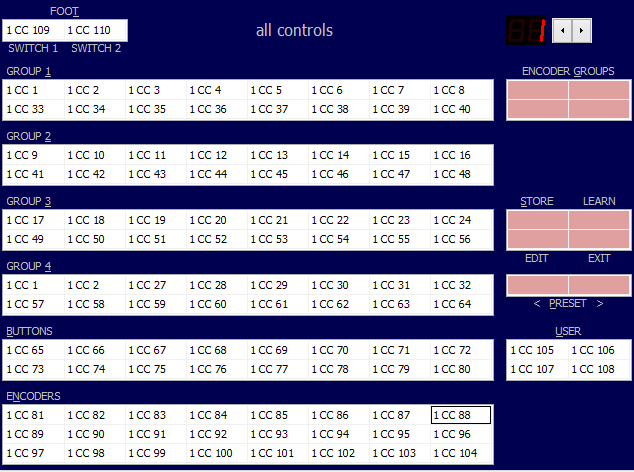
19 |
20 |
FOCUS PAGE
21 |
22 | 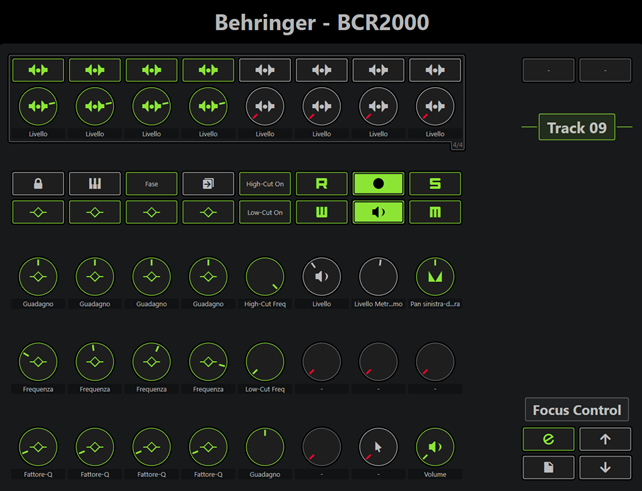
23 |
24 | Use Encoder Groups buttons on BCR2000 to switch between
25 | - Sends
26 | - Focused Quick Controls
27 | - Track Quick Controls
28 | - Cues
29 |
30 | EQ Q/TYPE button, switches between Q and filter type on lower knobs
31 |
32 | Side buttons:
33 | use arrows buttons to move between tracks
34 | use page button to switch page
35 |
36 |
MIXING PAGE
37 |
38 | 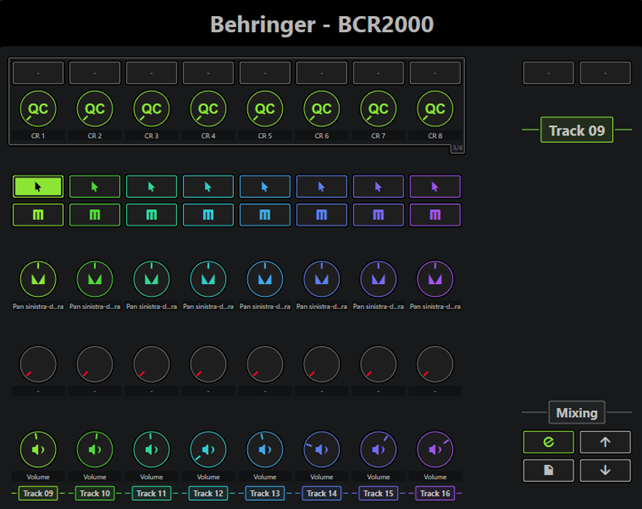
39 |
40 | Side buttons:
41 | use arrows to switch banks
42 |
43 |
44 |
Changelog:
45 |
46 | - v 1.0 07/03/2022
47 | first release.
48 | - v 1.1 08/03/2022
49 | navigate tracks via side button.
50 | - v 1.2 09/03/2022
51 | Focused Quick Control lock added.
52 | - v 1.3 10/03/2022
53 | Pre-filter eq controls added.
54 | Added push button for Focused Quick Control: if focused parameter is a button now you can push the encoder to switch.
55 | - v 1.4.
56 | Added Layers for encoders Group.
57 | - v 1.5 11/03/2022
58 | Cue level control added.
59 | Control Room Main channel level control added.
60 | Monitor enable control added.
61 | Read and write automation control added.
62 | Foot-switches added.
63 | - v 1.6 19/03/2022
64 | Added label for focused track and selected page.
65 | Focus Control page: Phase control added, EQ Q/TYPE button added to switch between Q and filter type on lower knobs. Mixing page added to control banks of 8 channels at once. Mixing page shows track names.
66 |
67 |
68 |
69 | Programmed by Giampaolo Gesuale
70 | contact: giampaologesuale@gmail.com
71 |
--------------------------------------------------------------------------------
/examplecompany/putasmileonyoursurface/examplecompany_putasmileonyoursurface.js:
--------------------------------------------------------------------------------
1 | //-----------------------------------------------------------------------------
2 | // 1. DRIVER SETUP - create driver object, midi ports and detection information
3 | //-----------------------------------------------------------------------------
4 |
5 | // get the api's entry point
6 | var midiremote_api = require('midiremote_api_v1')
7 |
8 | // create the device driver main object
9 | var deviceDriver = midiremote_api.makeDeviceDriver('ExampleCompany', 'PutASmileOnYourSurface', 'Steinberg Media Technologies GmbH')
10 |
11 | // create objects representing the hardware's MIDI ports
12 | var midiInput = deviceDriver.mPorts.makeMidiInput()
13 | var midiOutput = deviceDriver.mPorts.makeMidiOutput()
14 |
15 | // define all possible namings the devices MIDI ports could have
16 | // NOTE: Windows and MacOS handle port naming differently
17 | deviceDriver.makeDetectionUnit().detectPortPair(midiInput, midiOutput)
18 | .expectInputNameEquals('SmileDevice IN')
19 | .expectOutputNameEquals('SmileDevice OUT')
20 |
21 | deviceDriver.makeDetectionUnit().detectPortPair(midiInput, midiOutput)
22 | .expectInputNameEquals('SmileDevice (MIDI IN)')
23 | .expectOutputNameEquals('SmileDevice (MIDI OUT)')
24 |
25 |
26 | //-----------------------------------------------------------------------------
27 | // 2. SURFACE LAYOUT - create control elements and midi bindings
28 | //-----------------------------------------------------------------------------
29 |
30 | // create control element representing your hardware's surface
31 |
32 | deviceDriver.mSurface.makeBlindPanel(0, 0, 6, 6).setShapeCircle()
33 |
34 | var knob1 = deviceDriver.mSurface.makeKnob(0.75, 3.25, 1, 1.5)
35 | var knob2 = deviceDriver.mSurface.makeKnob(1.50, 4.00, 1, 1.5)
36 | var knob3 = deviceDriver.mSurface.makeKnob(2.50, 4.25, 1, 1.5)
37 | var knob4 = deviceDriver.mSurface.makeKnob(3.50, 4.00, 1, 1.5)
38 | var knob5 = deviceDriver.mSurface.makeKnob(4.25, 3.25, 1, 1.5)
39 | var knob6 = deviceDriver.mSurface.makeKnob(1.00, 1.15, 2, 2)
40 | var knob7 = deviceDriver.mSurface.makeKnob(3.00, 1.15, 2, 2)
41 |
42 | // bind midi ports to surface elements
43 | knob1.mSurfaceValue.mMidiBinding
44 | .setInputPort(midiInput)
45 | .setOutputPort(midiOutput)
46 | .bindToControlChange (0, 21) // channel 0, cc 21
47 |
48 | knob2.mSurfaceValue.mMidiBinding
49 | .setInputPort(midiInput)
50 | .setOutputPort(midiOutput)
51 | .bindToControlChange (0, 22) // channel 0, cc 22
52 |
53 | knob3.mSurfaceValue.mMidiBinding
54 | .setInputPort(midiInput)
55 | .setOutputPort(midiOutput)
56 | .bindToControlChange (0, 23) // channel 0, cc 23
57 |
58 | knob4.mSurfaceValue.mMidiBinding
59 | .setInputPort(midiInput)
60 | .setOutputPort(midiOutput)
61 | .bindToControlChange (0, 24) // channel 0, cc 24
62 |
63 | //-----------------------------------------------------------------------------
64 | // 3. HOST MAPPING - create mapping pages and host bindings
65 | //-----------------------------------------------------------------------------
66 |
67 | // create at least one mapping page
68 | var page = deviceDriver.mMapping.makePage('Example Mixer Page')
69 |
70 | // create host accessing objects
71 | var hostSelectedTrackChannel = page.mHostAccess.mTrackSelection.mMixerChannel
72 |
73 |
74 | // bind surface elements to host accessing object values
75 | page.makeValueBinding(knob1.mSurfaceValue, hostSelectedTrackChannel.mValue.mVolume)
76 | page.makeValueBinding(knob2.mSurfaceValue, hostSelectedTrackChannel.mSends.getByIndex(0).mLevel)
77 | page.makeValueBinding(knob3.mSurfaceValue, hostSelectedTrackChannel.mSends.getByIndex(1).mLevel)
78 | page.makeValueBinding(knob4.mSurfaceValue, hostSelectedTrackChannel.mSends.getByIndex(2).mLevel)
79 | page.makeValueBinding(knob5.mSurfaceValue, hostSelectedTrackChannel.mSends.getByIndex(3).mLevel)
80 | page.makeValueBinding(knob6.mSurfaceValue, hostSelectedTrackChannel.mValue.mVolume)
81 | page.makeValueBinding(knob7.mSurfaceValue, hostSelectedTrackChannel.mValue.mPan)
82 |
--------------------------------------------------------------------------------
/README.md:
--------------------------------------------------------------------------------
1 | # MIDI Remote API - User Scripts
2 |
3 | # About
4 |
5 | Welcome to the Steinberg **MIDI Remote API**.
6 |
7 | This document will guide you through the steps of writing a **MIDI Remote API Script** for a specific MIDI Controller Hardware.
8 |
9 | > **NOTE**: Scripts are written in the **[ES5](https://www.w3schools.com/js/js_es5.asp)** version of **JavaScript**
10 |
11 | # How to work with this repository
12 |
13 | 1. Make a fork of steinbergmedia/midiremote-userscripts
14 |
15 | 2. Rename your existing …/Driver Scripts/Local folder to something else (like Local_backup)
16 |
17 | 3. Create a new empty folder Local to replace it
18 |
19 | 4. Clone your forked repository inside the newly created empty Local folder
20 |
21 | 5. Copy your existing scripts from within the Local_backup folder into the Local folder
22 |
23 | 6. Still use the parent folder of Local, the Drive Scripts folder, as the workspace folder in Visual Studio Code
24 |
25 | 7. Make commits/pushes to your forked repo
26 |
27 | 8. Make pull requests to the upstream repo (steinbergmedia/midiremote-userscripts)
28 |
29 | > And don't forget to regulary do “fetch and merge” from the upstream repo (steinbergmedia/midiremote-userscripts) to stay in sync.
30 |
31 |
32 | # Basic Concept
33 |
34 | > The **MIDI Remote API Script** acts as a mediator between a Hardware Controller and Cubase / Nuendo
35 |
36 |
37 |
38 |
39 |
40 |
43 |
44 | > The **MIDI Remote API Script** emulates the hardware surface. This improves usability and recognizability.
45 |
46 |
47 |
48 | # Script Structure
49 |
50 | ### The **MIDI Remote API Script** consists of three building blocks
51 | 1. Driver Setup
52 | - create driver object
53 | - define driver ports to be associated with existing hardware midi ports
54 | - specify all possible port namings for automatic device detection
55 |
56 | 2. Surface Layout
57 | - visualize the hardware's surface elements (e.g. knobs, faders, buttons)
58 | - bind surface elements to midi messages
59 |
60 | 3. Host Mapping
61 | - create mapping pages for each user workflow (e.g. mixing, playing instruments, track navigation)
62 |
63 |
64 |
65 | > The following image illustrates that:
66 |
67 |
68 |
69 |
70 |
71 |
72 | # Getting Started
73 |
74 |
75 |
76 | ### To get started please perform these steps:
77 |
78 | 1. Make sure you have [Visual Studio Code](https://code.visualstudio.com/) installed.
79 |
80 |
81 | We highly recommend using Visual Studio Code for writing MIDI Remote API Scripts. We provide a JSDoc based auto-completion setup. You will not have to look up types and methods in a separate documentation. Visual Studio Code will help you write scripts intuitively.
82 |
83 |
84 |
85 |
86 | 2. Make sure the folder of the [Visual Studio Code](https://code.visualstudio.com/) executable is added to the PATH environment variable.
87 |
88 | 3. Make sure you have the newest Cubase / Nuendo installed.
89 |
90 | 4. Start Cubase / Nuendo.
91 |
92 | 5. Create a project with audio and/or instrument tracks.
93 |
94 | 6. Open the Remote tab in the lower zone.
95 |
96 |
97 |
98 | 1. Open the **MIDI Remote Driver Scripts** folder.
99 |
100 | > Mac: /Users/<Username>/Documents/Steinberg/<Cubase or Nuendo>/MIDI Remote/Driver Scripts
101 |
102 | > Windows: C:\Users\\<Username>\Documents\Steinberg\<Cubase or Nuendo>\MIDI Remote\Driver Scripts
103 |
104 |
105 |
106 | 1. Open a console (win: cmd, mac: terminal) and go to the **MIDI Remote Driver Scripts** folder.
107 |
108 | 2. Open [Visual Studio Code](https://code.visualstudio.com/) from the command line like this:
109 |
110 | > code .
111 |
112 |
113 |
114 | 10. Create a script file.
115 |
116 | The **MIDI Remote API Script** file follows the structure:
117 | <Driver Scripts Folder>/<Local or Public>/<vendor>/<device>/<vendor>_<device>.js
118 |
119 |
120 | WARNING: Always use the folder Local for development, folder Public will be overwritten when starting Cubase / Nuendo.
121 |
 39 |
40 |
43 |
44 | > The **MIDI Remote API Script** emulates the hardware surface. This improves usability and recognizability.
45 |
46 |
39 |
40 |
43 |
44 | > The **MIDI Remote API Script** emulates the hardware surface. This improves usability and recognizability.
45 |
46 |  47 |
48 | # Script Structure
49 |
50 | ### The **MIDI Remote API Script** consists of three building blocks
51 | 1. Driver Setup
52 | - create driver object
53 | - define driver ports to be associated with existing hardware midi ports
54 | - specify all possible port namings for automatic device detection
55 |
56 | 2. Surface Layout
57 | - visualize the hardware's surface elements (e.g. knobs, faders, buttons)
58 | - bind surface elements to midi messages
59 |
60 | 3. Host Mapping
61 | - create mapping pages for each user workflow (e.g. mixing, playing instruments, track navigation)
62 |
63 |
47 |
48 | # Script Structure
49 |
50 | ### The **MIDI Remote API Script** consists of three building blocks
51 | 1. Driver Setup
52 | - create driver object
53 | - define driver ports to be associated with existing hardware midi ports
54 | - specify all possible port namings for automatic device detection
55 |
56 | 2. Surface Layout
57 | - visualize the hardware's surface elements (e.g. knobs, faders, buttons)
58 | - bind surface elements to midi messages
59 |
60 | 3. Host Mapping
61 | - create mapping pages for each user workflow (e.g. mixing, playing instruments, track navigation)
62 |
63 |  70 |
71 |
72 | # Getting Started
73 |
74 |
75 |
76 | ### To get started please perform these steps:
77 |
78 | 1. Make sure you have [Visual Studio Code](https://code.visualstudio.com/) installed.
79 |
80 |
70 |
71 |
72 | # Getting Started
73 |
74 |
75 |
76 | ### To get started please perform these steps:
77 |
78 | 1. Make sure you have [Visual Studio Code](https://code.visualstudio.com/) installed.
79 |
80 |  85 |
86 | 2. Make sure the folder of the [Visual Studio Code](https://code.visualstudio.com/) executable is added to the PATH environment variable.
87 |
88 | 3. Make sure you have the newest Cubase / Nuendo installed.
89 |
90 | 4. Start Cubase / Nuendo.
91 |
92 | 5. Create a project with audio and/or instrument tracks.
93 |
94 | 6. Open the Remote tab in the lower zone.
95 |
96 |
85 |
86 | 2. Make sure the folder of the [Visual Studio Code](https://code.visualstudio.com/) executable is added to the PATH environment variable.
87 |
88 | 3. Make sure you have the newest Cubase / Nuendo installed.
89 |
90 | 4. Start Cubase / Nuendo.
91 |
92 | 5. Create a project with audio and/or instrument tracks.
93 |
94 | 6. Open the Remote tab in the lower zone.
95 |
96 |  97 |
98 | 1. Open the **MIDI Remote Driver Scripts** folder.
99 |
100 | >
97 |
98 | 1. Open the **MIDI Remote Driver Scripts** folder.
99 |
100 | >  113 |
114 | 10. Create a script file.
115 |
116 | The **MIDI Remote API Script** file follows the structure:
117 |
113 |
114 | 10. Create a script file.
115 |
116 | The **MIDI Remote API Script** file follows the structure:
117 |  131 |
132 | > The **Script Console** appears like this:
133 |
134 |
131 |
132 | > The **Script Console** appears like this:
133 |
134 |  135 |
136 | > After modifying the script file press the 'Reload Scripts' button.
137 |
--------------------------------------------------------------------------------
/_docimg/overview_big.svg:
--------------------------------------------------------------------------------
1 |
2 |
3 |
126 |
--------------------------------------------------------------------------------
/alesis/vi49/alesis_vi49.js:
--------------------------------------------------------------------------------
1 | //-----------------------------------------------------------------------------
2 | // 1. DRIVER SETUP - create driver object, midi ports and detection information
3 | //-----------------------------------------------------------------------------
4 |
5 | // get the api's entry point
6 | var midiremote_api = require('midiremote_api_v1')
7 |
8 | // create the device driver main object
9 | var deviceDriver = midiremote_api.makeDeviceDriver('Alesis', 'VI49', 'MH')
10 |
11 | // create objects representing the hardware's MIDI ports
12 | var midiInput = deviceDriver.mPorts.makeMidiInput()
13 | var midiOutput = deviceDriver.mPorts.makeMidiOutput()
14 |
15 | // define all possible namings the devices MIDI ports could have
16 | // NOTE: Windows and MacOS handle port naming differently
17 | deviceDriver.makeDetectionUnit().detectPortPair(midiInput, midiOutput)
18 | .expectInputNameEquals('VI49')
19 | .expectOutputNameEquals('VI49')
20 |
21 | //-----------------------------------------------------------------------------
22 | // 2. SURFACE LAYOUT - create control elements and midi bindings
23 | //-----------------------------------------------------------------------------
24 | var surface = deviceDriver.mSurface
25 |
26 | var keyboard = {}
27 | keyboard.knobs = {}
28 | keyboard.knobs.num = 12
29 | keyboard.knobs.channel = 0
30 | keyboard.buttons = {}
31 | keyboard.buttons.rows = 3
32 | keyboard.buttons.channel = 1
33 | keyboard.buttons.cc = [
34 | 48, 49, 50, 51, 52, 53, 54, 55, 56, 57, 58, 59,
35 | 64, 65, 66, 67, 68, 69, 70, 71, 72, 73, 74, 75,
36 | 80, 81, 82, 83, 84, 85, 86, 87, 88, 89, 90, 91,
37 | ]
38 | keyboard.pads = {}
39 | keyboard.pads.num = 16
40 | keyboard.pads.channel = 1
41 | keyboard.pads.note = [
42 | 48, 49, 50, 51,
43 | 44, 45, 46, 47,
44 | 40, 41, 42, 43,
45 | 36, 37, 38, 39,
46 | ]
47 |
48 |
49 |
50 | function makeKnobs(x, y, w, h, num, channel) {
51 | var knobs = []
52 | for (var i = 0; i < num; i++) {
53 | var knob = surface.makeKnob(i * w + x, y, w, h)
54 | knob.mSurfaceValue.mMidiBinding.setInputPort(midiInput).setOutputPort(midiOutput).bindToControlChange(channel, i + 20)
55 | knobs[i] = knob
56 | }
57 | return knobs
58 | }
59 |
60 | function makeButtons(x, y, w, h, channel) {
61 | var buttons = []
62 | for (var row = 0; row < keyboard.buttons.rows; row++) {
63 | for (var i = 0; i < keyboard.knobs.num; i++) {
64 | var button = surface.makeButton(i * w + x, row * h + y, w, h)
65 | button.mSurfaceValue.mMidiBinding.setInputPort(midiInput).setOutputPort(midiOutput).bindToControlChange(channel, keyboard.buttons.cc[row * 12 + i])
66 | buttons.push(button)
67 | }
68 | }
69 | return buttons
70 | }
71 |
72 | function makePads(x, y, w, h, channel) {
73 | var pads = []
74 | for (var row = 0; row < 4; row++) {
75 | for (var i = 0; i < 4; i++) {
76 | var pad = surface.makeTriggerPad(i * w + x, row * h + y, w, h)
77 | pad.mSurfaceValue.mMidiBinding.setInputPort(midiInput).setOutputPort(midiOutput).bindToNote(channel, keyboard.pads.note[row * 4 + i])
78 | pads.push(pad)
79 | }
80 | }
81 | return pads
82 | }
83 |
84 | function makeTransport(x, y) {
85 | var transport = {}
86 | function mkButton(x, y, w, h, cc) {
87 | var button = {}
88 | button = surface.makeButton(x, y, w, h)
89 | button.mSurfaceValue.mMidiBinding.setInputPort(midiInput).setOutputPort(midiOutput).bindToControlChange(0, cc)
90 | return button
91 | }
92 | transport.rewind = mkButton(x, y, 1, 0.7, 116)
93 | transport.forward = mkButton(x + 1, y, 1, 0.7, 117)
94 | transport.stop = mkButton(x + 2, y, 1, 0.7, 118)
95 | transport.play = mkButton(x + 3, y, 1, 0.7, 119)
96 | transport.cycle = mkButton(x + 4, y, 1, 0.7, 115)
97 | transport.record = mkButton(x + 5, y, 1, 0.7, 114)
98 | return transport
99 | }
100 |
101 | function makeSurfaceElements(){
102 | var surfaceElements = {}
103 | surfaceElements.knobs = makeKnobs(11, 0, 1.2, 2, keyboard.knobs.num, keyboard.knobs.channel)
104 | surfaceElements.buttons = makeButtons(11, 1.5, 1.2, 0.7, keyboard.buttons.channel)
105 | surfaceElements.pads = makePads(0, 4, 1, 1, keyboard.pads.channel)
106 | surfaceElements.transport = makeTransport(4, 2.5)
107 | surfaceElements.pb = surface.makeBlindPanel(0, 0, 0.75, 2)
108 | surfaceElements.mw = surface.makeBlindPanel(1, 0, 0.75, 2)
109 | surfaceElements.piano = surface.makePianoKeys(4, 4, 24, 4, 0, 48)
110 | return surfaceElements
111 | }
112 |
113 | var surfaceElements = makeSurfaceElements()
114 | //-----------------------------------------------------------------------------
115 | // 3. HOST MAPPING - create mapping pages and host bindings
116 | //-----------------------------------------------------------------------------
117 |
118 | var page = deviceDriver.mMapping.makePage('Default')
119 | //Knobs
120 | var knobs = surfaceElements.knobs
121 | for (var i = 0; i < 8; i++) {
122 | var knobSurfaceValue = knobs[i].mSurfaceValue
123 | page.makeValueBinding(knobSurfaceValue, page.mHostAccess.mFocusedQuickControls.getByIndex(i)).setValueTakeOverModePickup()
124 | }
125 | page.makeValueBinding(knobs[8].mSurfaceValue, page.mHostAccess.mTrackSelection.mMixerChannel.mValue.mVolume).setValueTakeOverModePickup()
126 | page.makeValueBinding(knobs[9].mSurfaceValue, page.mHostAccess.mTrackSelection.mMixerChannel.mValue.mPan).setValueTakeOverModePickup()
127 | page.makeValueBinding(knobs[10].mSurfaceValue, page.mHostAccess.mTrackSelection.mMixerChannel.mSends.getByIndex(0).mLevel).setValueTakeOverModePickup()
128 | page.makeValueBinding(knobs[11].mSurfaceValue, page.mHostAccess.mTrackSelection.mMixerChannel.mSends.getByIndex(1).mLevel).setValueTakeOverModePickup()
129 |
130 | //Transport
131 | var transport = surfaceElements.transport
132 | page.makeValueBinding(transport.rewind.mSurfaceValue, page.mHostAccess.mTransport.mValue.mRewind)
133 | page.makeValueBinding(transport.forward.mSurfaceValue, page.mHostAccess.mTransport.mValue.mForward)
134 | page.makeValueBinding(transport.stop.mSurfaceValue, page.mHostAccess.mTransport.mValue.mStop).setTypeToggle()
135 | page.makeValueBinding(transport.play.mSurfaceValue, page.mHostAccess.mTransport.mValue.mStart).setTypeToggle()
136 | page.makeValueBinding(transport.cycle.mSurfaceValue, page.mHostAccess.mTransport.mValue.mCycleActive).setTypeToggle()
137 | page.makeValueBinding(transport.record.mSurfaceValue, page.mHostAccess.mTransport.mValue.mRecord).setTypeToggle()
138 |
139 |
140 | //Pads
141 | var pads = surfaceElements.pads
142 | page.makeCommandBinding(pads[0].mSurfaceValue, 'Mixer', 'Bypass: Inserts')
143 | page.makeCommandBinding(pads[1].mSurfaceValue, 'Mixer', 'Bypass: EQs')
144 | page.makeCommandBinding(pads[2].mSurfaceValue, 'Mixer', 'Bypass: Channel Strip')
145 | page.makeCommandBinding(pads[3].mSurfaceValue, 'Mixer', 'Bypass: Sends')
146 |
147 | page.makeCommandBinding(pads[4].mSurfaceValue, 'Devices', 'Mixer')
148 | page.makeCommandBinding(pads[5].mSurfaceValue, 'Editors', 'Open/Close Editor')
149 | page.makeActionBinding(pads[6].mSurfaceValue, page.mHostAccess.mTrackSelection.mAction.mPrevTrack)
150 | page.makeActionBinding(pads[7].mSurfaceValue, page.mHostAccess.mTrackSelection.mAction.mNextTrack)
151 |
152 | page.makeValueBinding(pads[8].mSurfaceValue, page.mHostAccess.mTrackSelection.mMixerChannel.mValue.mMute).setTypeToggle()
153 | page.makeValueBinding(pads[9].mSurfaceValue, page.mHostAccess.mTrackSelection.mMixerChannel.mValue.mSolo).setTypeToggle()
154 | page.makeValueBinding(pads[10].mSurfaceValue, page.mHostAccess.mTrackSelection.mMixerChannel.mValue.mAutomationRead).setTypeToggle()
155 | page.makeValueBinding(pads[11].mSurfaceValue, page.mHostAccess.mTrackSelection.mMixerChannel.mValue.mAutomationWrite).setTypeToggle()
156 |
157 | page.makeValueBinding(pads[12].mSurfaceValue, page.mHostAccess.mTrackSelection.mMixerChannel.mValue.mRecordEnable).setTypeToggle()
158 | page.makeValueBinding(pads[13].mSurfaceValue, page.mHostAccess.mTrackSelection.mMixerChannel.mValue.mMonitorEnable).setTypeToggle()
159 | page.makeValueBinding(pads[14].mSurfaceValue, page.mHostAccess.mTrackSelection.mMixerChannel.mValue.mEditorOpen).setTypeToggle()
160 | page.makeValueBinding(pads[15].mSurfaceValue, page.mHostAccess.mTrackSelection.mMixerChannel.mValue.mInstrumentOpen).setTypeToggle()
161 |
162 |
163 | //Switches
164 | var buttons = surfaceElements.buttons
165 | page.makeCommandBinding(buttons[0].mSurfaceValue, 'Transport', 'To Marker 1')
166 | page.makeCommandBinding(buttons[1].mSurfaceValue, 'Transport', 'To Marker 2')
167 | page.makeCommandBinding(buttons[2].mSurfaceValue, 'Transport', 'To Marker 3')
168 | page.makeCommandBinding(buttons[3].mSurfaceValue, 'Transport', 'To Marker 4')
169 | page.makeCommandBinding(buttons[4].mSurfaceValue, 'Transport', 'To Marker 5')
170 | page.makeCommandBinding(buttons[5].mSurfaceValue, 'Transport', 'To Marker 6')
171 | page.makeCommandBinding(buttons[6].mSurfaceValue, 'Transport', 'To Marker 7')
172 | page.makeCommandBinding(buttons[7].mSurfaceValue, 'Transport', 'To Marker 8')
173 | page.makeCommandBinding(buttons[8].mSurfaceValue, 'Transport', 'To Marker 9')
174 |
--------------------------------------------------------------------------------
/behringer/bcr2000/behringer_bcr2000.js:
--------------------------------------------------------------------------------
1 | // Behringer BCR2000 v 1.6 by Giampaolo Gesuale
2 |
3 | //-----------------------------------------------------------------------------
4 | // 1. DRIVER SETUP - create driver object, midi ports and detection information
5 | //-----------------------------------------------------------------------------
6 |
7 | var midiremote_api = require('midiremote_api_v1')
8 | var deviceDriver = midiremote_api.makeDeviceDriver('Behringer', 'BCR2000', 'Giampaolo Gesuale')
9 |
10 | var midiInput = deviceDriver.mPorts.makeMidiInput()
11 | var midiOutput = deviceDriver.mPorts.makeMidiOutput()
12 |
13 | deviceDriver.makeDetectionUnit().detectPortPair(midiInput, midiOutput)
14 | .expectInputNameEquals('BCR2000')
15 | .expectOutputNameEquals('BCR2000')
16 |
17 | //user guide
18 | //deviceDriver.setUserGuide ('BCR2000_midi_remote.pdf')
19 |
20 | //submit bcr preset: to be tested
21 | //midiOutput.sendSysexFile(activeDevice, 'preset.bcr', 5)
22 |
23 | //-----------------------------------------------------------------------------
24 | // 2. SURFACE LAYOUT - create control elements and midi bindings
25 | //-----------------------------------------------------------------------------
26 |
27 | var surface= deviceDriver.mSurface
28 | var selTrackName = surface.makeLabelField(18,2,4,1)
29 | var pagename = surface.makeLabelField(18,12,4,0.9)
30 |
31 | var trackNames = []
32 | for (var i = 0; i < 8; ++i){
33 | var trackName = surface.makeLabelField(i*2,15,2,0.6)
34 | trackNames.push(trackName)
35 | }
36 |
37 |
38 | //layer zone
39 | var encoderGroups = surface.makeControlLayerZone('Encoder Groups')
40 | var encoderGroup1 = encoderGroups.makeControlLayer('Group 1')
41 | var encoderGroup2 = encoderGroups.makeControlLayer('Group 2')
42 | var encoderGroup3 = encoderGroups.makeControlLayer('Group 3')
43 | var encoderGroup4 = encoderGroups.makeControlLayer('Group 4')
44 |
45 | var knobs =[]
46 | var buttons = []
47 |
48 | var inarow = 8
49 | var nEncoders = 32
50 | var gruppo = encoderGroup1
51 |
52 | //encoders
53 | for(var r = 0; r < nEncoders/inarow; ++r) {
54 | switch (r){
55 | case 0: gruppo = encoderGroup1
56 | break
57 | case 1: gruppo = encoderGroup2
58 | break
59 | case 2: gruppo = encoderGroup3
60 | break
61 | case 3: gruppo = encoderGroup4
62 | }
63 | for (var c=0; c
135 |
136 | > After modifying the script file press the 'Reload Scripts' button.
137 |
--------------------------------------------------------------------------------
/_docimg/overview_big.svg:
--------------------------------------------------------------------------------
1 |
2 |
3 |
126 |
--------------------------------------------------------------------------------
/alesis/vi49/alesis_vi49.js:
--------------------------------------------------------------------------------
1 | //-----------------------------------------------------------------------------
2 | // 1. DRIVER SETUP - create driver object, midi ports and detection information
3 | //-----------------------------------------------------------------------------
4 |
5 | // get the api's entry point
6 | var midiremote_api = require('midiremote_api_v1')
7 |
8 | // create the device driver main object
9 | var deviceDriver = midiremote_api.makeDeviceDriver('Alesis', 'VI49', 'MH')
10 |
11 | // create objects representing the hardware's MIDI ports
12 | var midiInput = deviceDriver.mPorts.makeMidiInput()
13 | var midiOutput = deviceDriver.mPorts.makeMidiOutput()
14 |
15 | // define all possible namings the devices MIDI ports could have
16 | // NOTE: Windows and MacOS handle port naming differently
17 | deviceDriver.makeDetectionUnit().detectPortPair(midiInput, midiOutput)
18 | .expectInputNameEquals('VI49')
19 | .expectOutputNameEquals('VI49')
20 |
21 | //-----------------------------------------------------------------------------
22 | // 2. SURFACE LAYOUT - create control elements and midi bindings
23 | //-----------------------------------------------------------------------------
24 | var surface = deviceDriver.mSurface
25 |
26 | var keyboard = {}
27 | keyboard.knobs = {}
28 | keyboard.knobs.num = 12
29 | keyboard.knobs.channel = 0
30 | keyboard.buttons = {}
31 | keyboard.buttons.rows = 3
32 | keyboard.buttons.channel = 1
33 | keyboard.buttons.cc = [
34 | 48, 49, 50, 51, 52, 53, 54, 55, 56, 57, 58, 59,
35 | 64, 65, 66, 67, 68, 69, 70, 71, 72, 73, 74, 75,
36 | 80, 81, 82, 83, 84, 85, 86, 87, 88, 89, 90, 91,
37 | ]
38 | keyboard.pads = {}
39 | keyboard.pads.num = 16
40 | keyboard.pads.channel = 1
41 | keyboard.pads.note = [
42 | 48, 49, 50, 51,
43 | 44, 45, 46, 47,
44 | 40, 41, 42, 43,
45 | 36, 37, 38, 39,
46 | ]
47 |
48 |
49 |
50 | function makeKnobs(x, y, w, h, num, channel) {
51 | var knobs = []
52 | for (var i = 0; i < num; i++) {
53 | var knob = surface.makeKnob(i * w + x, y, w, h)
54 | knob.mSurfaceValue.mMidiBinding.setInputPort(midiInput).setOutputPort(midiOutput).bindToControlChange(channel, i + 20)
55 | knobs[i] = knob
56 | }
57 | return knobs
58 | }
59 |
60 | function makeButtons(x, y, w, h, channel) {
61 | var buttons = []
62 | for (var row = 0; row < keyboard.buttons.rows; row++) {
63 | for (var i = 0; i < keyboard.knobs.num; i++) {
64 | var button = surface.makeButton(i * w + x, row * h + y, w, h)
65 | button.mSurfaceValue.mMidiBinding.setInputPort(midiInput).setOutputPort(midiOutput).bindToControlChange(channel, keyboard.buttons.cc[row * 12 + i])
66 | buttons.push(button)
67 | }
68 | }
69 | return buttons
70 | }
71 |
72 | function makePads(x, y, w, h, channel) {
73 | var pads = []
74 | for (var row = 0; row < 4; row++) {
75 | for (var i = 0; i < 4; i++) {
76 | var pad = surface.makeTriggerPad(i * w + x, row * h + y, w, h)
77 | pad.mSurfaceValue.mMidiBinding.setInputPort(midiInput).setOutputPort(midiOutput).bindToNote(channel, keyboard.pads.note[row * 4 + i])
78 | pads.push(pad)
79 | }
80 | }
81 | return pads
82 | }
83 |
84 | function makeTransport(x, y) {
85 | var transport = {}
86 | function mkButton(x, y, w, h, cc) {
87 | var button = {}
88 | button = surface.makeButton(x, y, w, h)
89 | button.mSurfaceValue.mMidiBinding.setInputPort(midiInput).setOutputPort(midiOutput).bindToControlChange(0, cc)
90 | return button
91 | }
92 | transport.rewind = mkButton(x, y, 1, 0.7, 116)
93 | transport.forward = mkButton(x + 1, y, 1, 0.7, 117)
94 | transport.stop = mkButton(x + 2, y, 1, 0.7, 118)
95 | transport.play = mkButton(x + 3, y, 1, 0.7, 119)
96 | transport.cycle = mkButton(x + 4, y, 1, 0.7, 115)
97 | transport.record = mkButton(x + 5, y, 1, 0.7, 114)
98 | return transport
99 | }
100 |
101 | function makeSurfaceElements(){
102 | var surfaceElements = {}
103 | surfaceElements.knobs = makeKnobs(11, 0, 1.2, 2, keyboard.knobs.num, keyboard.knobs.channel)
104 | surfaceElements.buttons = makeButtons(11, 1.5, 1.2, 0.7, keyboard.buttons.channel)
105 | surfaceElements.pads = makePads(0, 4, 1, 1, keyboard.pads.channel)
106 | surfaceElements.transport = makeTransport(4, 2.5)
107 | surfaceElements.pb = surface.makeBlindPanel(0, 0, 0.75, 2)
108 | surfaceElements.mw = surface.makeBlindPanel(1, 0, 0.75, 2)
109 | surfaceElements.piano = surface.makePianoKeys(4, 4, 24, 4, 0, 48)
110 | return surfaceElements
111 | }
112 |
113 | var surfaceElements = makeSurfaceElements()
114 | //-----------------------------------------------------------------------------
115 | // 3. HOST MAPPING - create mapping pages and host bindings
116 | //-----------------------------------------------------------------------------
117 |
118 | var page = deviceDriver.mMapping.makePage('Default')
119 | //Knobs
120 | var knobs = surfaceElements.knobs
121 | for (var i = 0; i < 8; i++) {
122 | var knobSurfaceValue = knobs[i].mSurfaceValue
123 | page.makeValueBinding(knobSurfaceValue, page.mHostAccess.mFocusedQuickControls.getByIndex(i)).setValueTakeOverModePickup()
124 | }
125 | page.makeValueBinding(knobs[8].mSurfaceValue, page.mHostAccess.mTrackSelection.mMixerChannel.mValue.mVolume).setValueTakeOverModePickup()
126 | page.makeValueBinding(knobs[9].mSurfaceValue, page.mHostAccess.mTrackSelection.mMixerChannel.mValue.mPan).setValueTakeOverModePickup()
127 | page.makeValueBinding(knobs[10].mSurfaceValue, page.mHostAccess.mTrackSelection.mMixerChannel.mSends.getByIndex(0).mLevel).setValueTakeOverModePickup()
128 | page.makeValueBinding(knobs[11].mSurfaceValue, page.mHostAccess.mTrackSelection.mMixerChannel.mSends.getByIndex(1).mLevel).setValueTakeOverModePickup()
129 |
130 | //Transport
131 | var transport = surfaceElements.transport
132 | page.makeValueBinding(transport.rewind.mSurfaceValue, page.mHostAccess.mTransport.mValue.mRewind)
133 | page.makeValueBinding(transport.forward.mSurfaceValue, page.mHostAccess.mTransport.mValue.mForward)
134 | page.makeValueBinding(transport.stop.mSurfaceValue, page.mHostAccess.mTransport.mValue.mStop).setTypeToggle()
135 | page.makeValueBinding(transport.play.mSurfaceValue, page.mHostAccess.mTransport.mValue.mStart).setTypeToggle()
136 | page.makeValueBinding(transport.cycle.mSurfaceValue, page.mHostAccess.mTransport.mValue.mCycleActive).setTypeToggle()
137 | page.makeValueBinding(transport.record.mSurfaceValue, page.mHostAccess.mTransport.mValue.mRecord).setTypeToggle()
138 |
139 |
140 | //Pads
141 | var pads = surfaceElements.pads
142 | page.makeCommandBinding(pads[0].mSurfaceValue, 'Mixer', 'Bypass: Inserts')
143 | page.makeCommandBinding(pads[1].mSurfaceValue, 'Mixer', 'Bypass: EQs')
144 | page.makeCommandBinding(pads[2].mSurfaceValue, 'Mixer', 'Bypass: Channel Strip')
145 | page.makeCommandBinding(pads[3].mSurfaceValue, 'Mixer', 'Bypass: Sends')
146 |
147 | page.makeCommandBinding(pads[4].mSurfaceValue, 'Devices', 'Mixer')
148 | page.makeCommandBinding(pads[5].mSurfaceValue, 'Editors', 'Open/Close Editor')
149 | page.makeActionBinding(pads[6].mSurfaceValue, page.mHostAccess.mTrackSelection.mAction.mPrevTrack)
150 | page.makeActionBinding(pads[7].mSurfaceValue, page.mHostAccess.mTrackSelection.mAction.mNextTrack)
151 |
152 | page.makeValueBinding(pads[8].mSurfaceValue, page.mHostAccess.mTrackSelection.mMixerChannel.mValue.mMute).setTypeToggle()
153 | page.makeValueBinding(pads[9].mSurfaceValue, page.mHostAccess.mTrackSelection.mMixerChannel.mValue.mSolo).setTypeToggle()
154 | page.makeValueBinding(pads[10].mSurfaceValue, page.mHostAccess.mTrackSelection.mMixerChannel.mValue.mAutomationRead).setTypeToggle()
155 | page.makeValueBinding(pads[11].mSurfaceValue, page.mHostAccess.mTrackSelection.mMixerChannel.mValue.mAutomationWrite).setTypeToggle()
156 |
157 | page.makeValueBinding(pads[12].mSurfaceValue, page.mHostAccess.mTrackSelection.mMixerChannel.mValue.mRecordEnable).setTypeToggle()
158 | page.makeValueBinding(pads[13].mSurfaceValue, page.mHostAccess.mTrackSelection.mMixerChannel.mValue.mMonitorEnable).setTypeToggle()
159 | page.makeValueBinding(pads[14].mSurfaceValue, page.mHostAccess.mTrackSelection.mMixerChannel.mValue.mEditorOpen).setTypeToggle()
160 | page.makeValueBinding(pads[15].mSurfaceValue, page.mHostAccess.mTrackSelection.mMixerChannel.mValue.mInstrumentOpen).setTypeToggle()
161 |
162 |
163 | //Switches
164 | var buttons = surfaceElements.buttons
165 | page.makeCommandBinding(buttons[0].mSurfaceValue, 'Transport', 'To Marker 1')
166 | page.makeCommandBinding(buttons[1].mSurfaceValue, 'Transport', 'To Marker 2')
167 | page.makeCommandBinding(buttons[2].mSurfaceValue, 'Transport', 'To Marker 3')
168 | page.makeCommandBinding(buttons[3].mSurfaceValue, 'Transport', 'To Marker 4')
169 | page.makeCommandBinding(buttons[4].mSurfaceValue, 'Transport', 'To Marker 5')
170 | page.makeCommandBinding(buttons[5].mSurfaceValue, 'Transport', 'To Marker 6')
171 | page.makeCommandBinding(buttons[6].mSurfaceValue, 'Transport', 'To Marker 7')
172 | page.makeCommandBinding(buttons[7].mSurfaceValue, 'Transport', 'To Marker 8')
173 | page.makeCommandBinding(buttons[8].mSurfaceValue, 'Transport', 'To Marker 9')
174 |
--------------------------------------------------------------------------------
/behringer/bcr2000/behringer_bcr2000.js:
--------------------------------------------------------------------------------
1 | // Behringer BCR2000 v 1.6 by Giampaolo Gesuale
2 |
3 | //-----------------------------------------------------------------------------
4 | // 1. DRIVER SETUP - create driver object, midi ports and detection information
5 | //-----------------------------------------------------------------------------
6 |
7 | var midiremote_api = require('midiremote_api_v1')
8 | var deviceDriver = midiremote_api.makeDeviceDriver('Behringer', 'BCR2000', 'Giampaolo Gesuale')
9 |
10 | var midiInput = deviceDriver.mPorts.makeMidiInput()
11 | var midiOutput = deviceDriver.mPorts.makeMidiOutput()
12 |
13 | deviceDriver.makeDetectionUnit().detectPortPair(midiInput, midiOutput)
14 | .expectInputNameEquals('BCR2000')
15 | .expectOutputNameEquals('BCR2000')
16 |
17 | //user guide
18 | //deviceDriver.setUserGuide ('BCR2000_midi_remote.pdf')
19 |
20 | //submit bcr preset: to be tested
21 | //midiOutput.sendSysexFile(activeDevice, 'preset.bcr', 5)
22 |
23 | //-----------------------------------------------------------------------------
24 | // 2. SURFACE LAYOUT - create control elements and midi bindings
25 | //-----------------------------------------------------------------------------
26 |
27 | var surface= deviceDriver.mSurface
28 | var selTrackName = surface.makeLabelField(18,2,4,1)
29 | var pagename = surface.makeLabelField(18,12,4,0.9)
30 |
31 | var trackNames = []
32 | for (var i = 0; i < 8; ++i){
33 | var trackName = surface.makeLabelField(i*2,15,2,0.6)
34 | trackNames.push(trackName)
35 | }
36 |
37 |
38 | //layer zone
39 | var encoderGroups = surface.makeControlLayerZone('Encoder Groups')
40 | var encoderGroup1 = encoderGroups.makeControlLayer('Group 1')
41 | var encoderGroup2 = encoderGroups.makeControlLayer('Group 2')
42 | var encoderGroup3 = encoderGroups.makeControlLayer('Group 3')
43 | var encoderGroup4 = encoderGroups.makeControlLayer('Group 4')
44 |
45 | var knobs =[]
46 | var buttons = []
47 |
48 | var inarow = 8
49 | var nEncoders = 32
50 | var gruppo = encoderGroup1
51 |
52 | //encoders
53 | for(var r = 0; r < nEncoders/inarow; ++r) {
54 | switch (r){
55 | case 0: gruppo = encoderGroup1
56 | break
57 | case 1: gruppo = encoderGroup2
58 | break
59 | case 2: gruppo = encoderGroup3
60 | break
61 | case 3: gruppo = encoderGroup4
62 | }
63 | for (var c=0; c