├── LICENSE
└── README.md
/LICENSE:
--------------------------------------------------------------------------------
1 | MIT License
2 |
3 | Copyright (c) 2021 Steve Kwon
4 |
5 | Permission is hereby granted, free of charge, to any person obtaining a copy
6 | of this software and associated documentation files (the "Software"), to deal
7 | in the Software without restriction, including without limitation the rights
8 | to use, copy, modify, merge, publish, distribute, sublicense, and/or sell
9 | copies of the Software, and to permit persons to whom the Software is
10 | furnished to do so, subject to the following conditions:
11 |
12 | The above copyright notice and this permission notice shall be included in all
13 | copies or substantial portions of the Software.
14 |
15 | THE SOFTWARE IS PROVIDED "AS IS", WITHOUT WARRANTY OF ANY KIND, EXPRESS OR
16 | IMPLIED, INCLUDING BUT NOT LIMITED TO THE WARRANTIES OF MERCHANTABILITY,
17 | FITNESS FOR A PARTICULAR PURPOSE AND NONINFRINGEMENT. IN NO EVENT SHALL THE
18 | AUTHORS OR COPYRIGHT HOLDERS BE LIABLE FOR ANY CLAIM, DAMAGES OR OTHER
19 | LIABILITY, WHETHER IN AN ACTION OF CONTRACT, TORT OR OTHERWISE, ARISING FROM,
20 | OUT OF OR IN CONNECTION WITH THE SOFTWARE OR THE USE OR OTHER DEALINGS IN THE
21 | SOFTWARE.
22 |
--------------------------------------------------------------------------------
/README.md:
--------------------------------------------------------------------------------
1 | # Hello Kaggle!:wave:
2 |
3 | I summarized the definitions of `Kaggle` and basic usage after reading `Kaggle's Official Document` and `Kaggle Guide`
4 |
5 |
6 | I hope it will help those who are just introduced to `Kaggle` like me.
7 |
8 |
9 | If there is anything that needs to be corrected, please leave it in `Issue`.
10 |
11 |
12 | FYI, the `Hello Kaggle`' document rarely deals with `Python programming` or `machine learning theory`
13 | and focuses on `Kaggle usage`.
14 |
15 |
16 | For those of you who are looking for `programming`, `data science`, and `machine learning materials`, I'll leave you with some links that I've been helped with.
17 |
18 | - [DATA SCIENCE ROADMAP 2020](https://medium.com/@ArtisOne/data-science-roadmap-2020-b256fb948404)
19 | - [data engineer roadmap by datastacktv](https://github.com/datastacktv/data-engineer-roadmap)
20 | - [My Data Science Online Learning Journey on Croursera](https://www.kdnuggets.com/2020/11/data-science-online-learning-journey-coursera.html)
21 |
22 |
23 | ## Table of contents
24 |
25 | 1. [What is Kaggle?](#what-is-kaggle)
26 | - [Kaggler? Kaggling?](#kaggler-kaggling)
27 | - [Kaggle Service and Features](#kaggle-service-and-features)
28 | - [Required Kaggling Knowledge](#required-kaggling-knowledge)
29 | - [Prepare before becoming Kaggler](#prepare-before-becoming-kaggler)
30 |
31 |
32 | 2. [How is Kaggle used?](#how-is-kaggle-used)
33 | - [Infrastructure for data analytics](#infrastructure-for-data-analytics)
34 | - [Notebook](#notebook)
35 | - [Dataset](#dataset)
36 | - [Company Training](#company-training)
37 | - [Discussion](#discussion)
38 |
39 |
40 | 3. [Kaggle Competition?](#kaggle-competition)
41 | - [Featured, the most common Competition](#featured-the-most-common-competition)
42 | - [Research](#research)
43 | - [Getting Started for New Kaggler](#getting-started-for-new-kaggler)
44 | - [Playground for data scientists and engineers](#playground-for-data-scientists-and-engineers)
45 | - [Recruitment for job opportunities](#recruitment-for-job-opportunities)
46 | - [Annual Competition held regularly](#annual-competition-held-regularly)
47 | - [Analytics to effectively explain the results](#analytics-to-effectively-explain-the-results)
48 |
49 |
50 | 4. [Getting Started with Kaggle](#getting-started-with-kaggle)
51 | - [Sign Up](#sign-up)
52 | - [Take a look at Kaggle Courses](#take-a-look-at-kaggle-courses)
53 | - [Kaggle Tiers](#kaggle-tiers)
54 | - [Medal](#medal)
55 | - [Being Contributor](#being-contributor)
56 | - [Kaggle Rankings](#wait)
57 |
58 |
59 | 5. [Getting to know Notebook](#getting-to-know-notebook)
60 | - [Introduction to Notebook](#please-re-read-here-for-a-brief-introduction-to-your-notebook)
61 | - [What can you do with your Notebook?](#what-can-you-do-with-your-notebook)
62 | - [Create and use Notebook](#create-and-use-notebook)
63 | - [Various settings for Notesbook](#various-settings-for-notebook)
64 | - [How to import data from Notebook](#how-to-import-data-from-notebook)
65 | - [Use external packages in Notebook](#use-external-packages-in-notebook)
66 | - [Use Source Code from Dataset in Notebook](#use-source-code-from-dataset--in-notebook)
67 |
68 |
69 | 6. [Competitions and Notebooks](#competitions-and-notebooks)
70 | - [What else can the Notebook be used for besides data analysis Competition?](#what-else-can-the-notebook-be-used-for-besides-data-analysis-competition)
71 | - [How to handle Data Files to use in the Competition Notebook?](#how-to-handle-data-file-to-use-in-competition-notebook)
72 |
73 |
74 | 7. [Competitions Progress Flow](#competitions-progress-flow)
75 | - [Baseline implementing the general purpose algorithm](#baseline-implementing-the-general-purpose-algorithm)
76 | - [Data analysis notebook](#data-analysis-notebook)
77 | - [Fork Notebook](#fork-notebook)
78 | - [Merge, Blending, Stacking, Ensemble Notebook](#merge-blending-stacking-ensemble-notebook)
79 | - [Conclusion of Competitions Progress Flow](#conclusion-of-competitions-progress-flow)
80 |
81 |
82 | 8. [Rule of Competitions](#rule-of-competitions)
83 | - [What rules should I check?](#what-rules-should-i-check)
84 |
85 |
86 | 9. [Flow of Technology in Kaggle](#flow-of-technology-in-kaggle)
87 | - [Exploring in Closed Competition](#exploring-in-closed-competition)
88 | - [Winner Solutions at a Glance](#winner-solutions-at-a-glance)
89 |
90 |
91 | 10. [Kaggle Dataset and API](#kaggle-dataset-and-api)
92 | - [Use Public Dataset](#use-public-dataset)
93 | - [Use it as a Data Repository](#use-it-as-a-data-repository)
94 | - [Kaggle API](#kaggle-api)
95 | - [Install Kaggle API](#install-kaggle-api)
96 | - [Use Kaggle API](#use-kaggle-api)
97 |
98 |
99 | 11. [Finished!](#finished)
100 |
101 |
102 | ***
103 |
104 |
105 |
106 | ## What is Kaggle?
107 |
108 | - __`Kaggle`__ is the platform that hosts the Data Analysis Competition.
109 | - It is common for competitions to be hosted by providing data that needs to be analyzed for the company's `research challenges, key services`.
110 | 
111 |
112 |
113 | - __`Artificial Intelligence, Machine Learning Boom`__ has continued to increase the number of participants and was acquired by Google's parent company __'Alphabet'__ in 2017.
114 | - Since the Alphabet's acquisition, `Kaggle` has become a critical site for data scientists and engineers, not just a platform.
115 |
116 |
117 | ### `Kaggler`? `Kaggling`?
118 |
119 | - Like Google searches __`Googling`__, >
120 | Kaggle's users are __`Kaggler`__ or __`Kaggling`__ to participate in the Competition.
121 |
122 |
123 | ### Kaggle Service and Features
124 |
125 | - __`Jobs`__
126 | - `Jobs Service` was originally provided, but the service ended on December 22, 2020.
127 | Simply put, it's because the number of users is small.
128 | For more information, read it here at https://www.kaggle.com/jobs-board-closed.
129 |
130 |
131 | - __[`Course`](https://www.kaggle.com/learn/overview)__
132 | 
133 | - Provides practical and practical lectures on `Python`, `machine learning` and `visualization`, and so on.
134 | - `Kaggle's course` can be quite useful if you haven't learned it step by step or if you've studied an old course.
135 | - All lectures are also available in `English`, `free` and a `certificate` of completion.
136 |
137 |
138 | __`English`__
139 | - Data scientists from all over the world gather together and use `English` by default.
140 | - `Complementation Notice`, `Dataset`, `Discussion` are also in English.
141 | Below is the photo of `Discussion` and `Site Forum`.
142 | 
143 | - If you look at the profiles of the winners of the Competition, there are a variety of `USA`,`Korea` ,`Russia` ,`China` ,`India`, and so on.
144 |
145 |
146 | - __Programming Language__
147 | - Generally use __`Python`__ and __`R`__ a lot.
148 |
149 |
150 | ### Required Kaggling Knowledge
151 |
152 | - | Purpose | Knowledge Required|
153 | |------|-----|
154 | |Competition participation|Python, R, data analysis|
155 | |Competition organizer|Data analysis, English |
156 | | Discussion with Kaggler|English |
157 | |Learning through Courses|English |
158 |
159 |
160 | ### Prepare before becoming Kaggler
161 |
162 | - Required: `Internet`, `Python` and `R` , `PC`
163 | - Recommended: `Server with GPU` or `Workstation` and high capacity `HDD` or `SSD`
164 |
165 |
166 | ***
167 |
168 |
169 |
170 | ## How is Kaggle used?
171 | ### `Infrastructure` for data analytics
172 |
173 | - Kaggle is `web-based` and provides tools for data analysis. (Notebook)
174 | - Community with a variety of Kagglers to enable competition and cooperation.
175 |
176 |
177 | ### `Notebook`
178 |
179 | - The `programming environment for data analysis` provided by Kaggle.
180 | - A SaaS environment that runs code written on your Notebook on a server.
181 | - It provides a programming environment, so there is no need to build a separate development environment. (No Python installation, Anaconda installation, etc.)
182 | - It is similar to __`Jupyter Notebook`__.
183 | - Provides `4 Core CPU + 16GB RAM` by default. `GPU Server` provides `2Core CPU + GPU + 13GB RAM`.
184 | __`Provided free of charge`__, and `GPU can be used for 30 hours a week`.
185 |
186 |
187 | ### `Dataset`
188 | 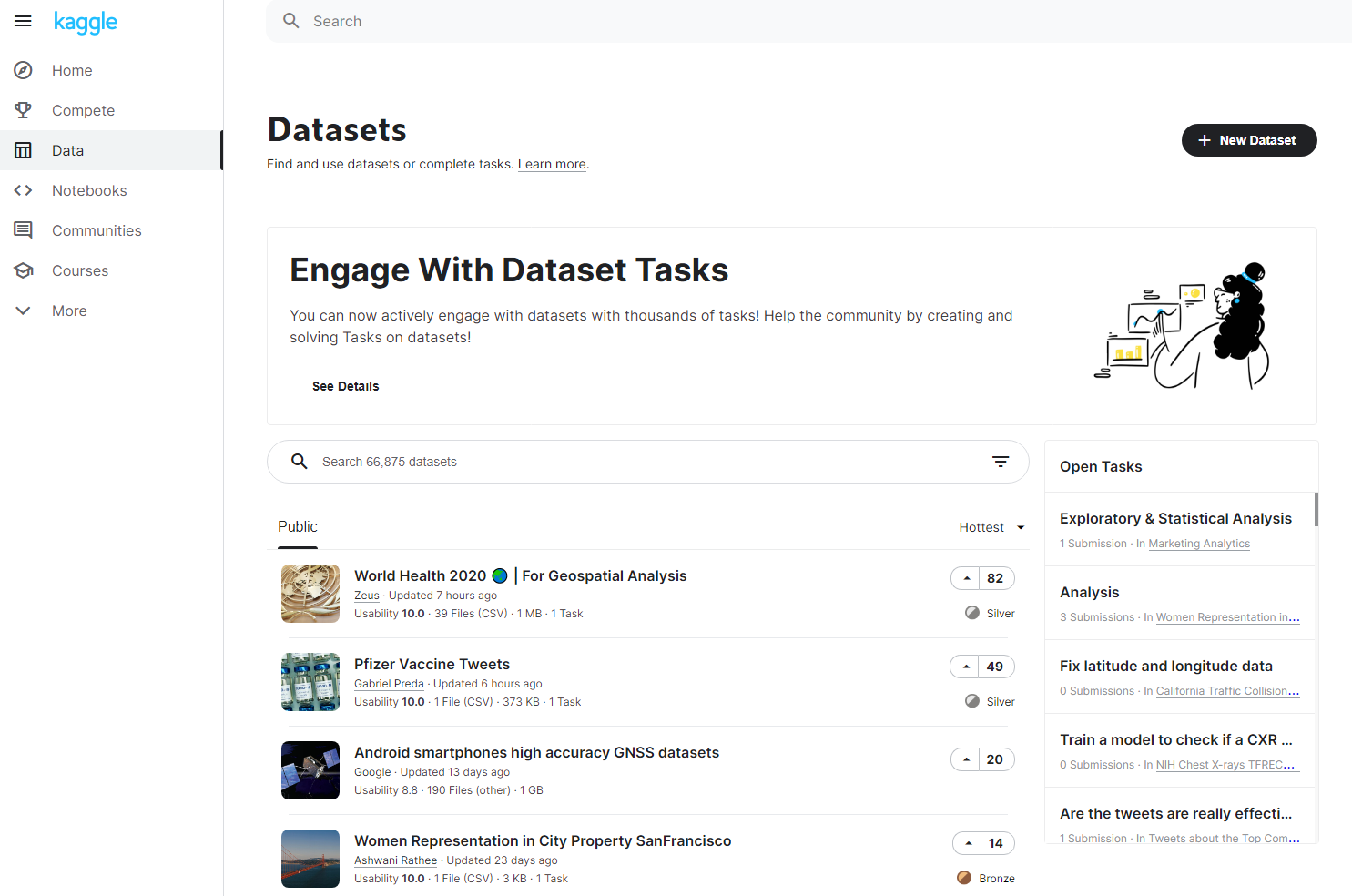
189 |
190 | - The first thing to do when developing a machine learning-based data analysis program is to prepare __`Dataset`__.
191 | - Dataset is open for academic purposes or created and released by Kaggler.
192 | - If you don't want to share your `Dataset`, you can use the __`Private`__ setting to make it private to the outside world.
193 | - Once Dataset or Notebook is set to __`Public`__, `Apache 2.0 License` is applied, so you must make a careful decision.
194 |
195 |
196 | ### `Company Training`
197 |
198 | - Example: staff training for creating neural network-based machine learning programs
199 | - 1. Sign up for Kaggle
200 | - 2. Employees are ready to copy and execute the moderator's Notebook
201 | - 3. Modifying a Neural Network Model in Notebook
202 | - 4. Submit the results of the modified model to Competition and check the score
203 | - What if we didn't use the Kaggle?
204 | - 1. Establishing a development environment on a training computer
205 | - 2. Distributing examples of machine learning programs (neural network models)
206 | - 3. Create a program to evaluate neural network model execution results by converting them into scores
207 | - 4. Check the evaluation score of the executed model
208 | - 5. Modifying a Neural Network Model
209 | - 6. Confirm that the score varies depending on the outcome of the run
210 |
211 |
212 | - Kaggle is much easier and less expensive in `building a development environment`, `checking the score`, and `deployment`.
213 |
214 |
215 | ### `Discussion`
216 |
217 | - If you don't know something, you can ask in __`Site Forums`__, and __`Competition`__ of the __`Communities`__.
218 | - `Communities`
219 | 
220 |
221 |
222 | - `Site Forums`
223 | 
224 |
225 |
226 | ***
227 |
228 |
229 |
230 | ## Kaggle Competition?
231 |
232 | Refer to [Competitions Documentation](https://www.kaggle.com/docs/competitions).
233 |
234 |
235 | ### `Featured`, the most common Competition
236 | 
237 |
238 | - Difficult competitions and generally commercial purposes.
239 | - Most Kagglers participate in the competition, which has been held so far, the prize range is between `$100` and `$1,500,000`.
240 |
241 |
242 | ## `Research`
243 | 
244 | - It mainly deals with research topics and generally does not have prize money or rewards. (All the ongoing Research Competitions have prize money.)
245 | - Instead, you can do research by discussing with less competitive and intellectually curious Kagglers.
246 |
247 |
248 | ### `Getting Started` for New Kaggler
249 | 
250 | - The Competitions shown here are for beginners.
251 | - Especially __`Titanic: Machine Learning from Disaster`__, __`House Prices: Advanced Regression Techniques`__, __`Digit Recognizer`__
252 | These three competitions are the most recommended and helpful competitions for new machine learners.
253 |
254 |
255 | ### `Playground` for data scientists and engineers
256 | 
257 |
258 | - Competition is held mainly with topics that data scientists and engineers might find interesting.
259 | - Playground is not an easy task. It usually covers recent academic/technical issues and public social issues.
260 | - In some cases, the organizers may offer prize money or reward.
261 |
262 |
263 | ### `Recruitment` for job opportunities
264 | 
265 |
266 | - Companies are hosting and a prize is mostly a `Job Interview` opportunity. Participants can upload a Resume at the end of the Competition.
267 |
268 |
269 | ### `Annual Competition` held regularly
270 |
271 | - Kaggle has several regularly held Competitions. You can find the following information at the current Kaggle.
272 | 
273 |
274 |
275 | ### `Analytics` to effectively explain the results
276 |
277 | - This is not explained in Documentation, so I read and wrote the Analytics Competitions that are currently up there.
278 | - Reading the evaluation and submission formats of each Competition, the scoring method of Analytics is shown by submitting a notebook directly and scoring by a person.
279 | The analyzed data should be described by the organizers' requirements. It looks like a company persuading management through a presentation.
280 |
281 |
282 | ***
283 |
284 |
285 |
286 | ## Getting Started with Kaggle
287 |
288 | ### `Sign Up`
289 | - Prior to starting Kaggle, click `Register` button on the upper right to `sign up` first.
290 |
291 |
292 | ### Take a look at Kaggle `Courses`
293 | - For those of you who do not have enough knowledge about machine learning or data analytics, it is also a good idea to study the areas you need at [`Courses`](https://www.kaggle.com/learn/overview), as described above.
294 | - Each course consists of 2 to 8 classes and offers a variety of hands-on examples.
295 |
296 |
297 | Refer to [Kaggle Progression System](https://www.kaggle.com/progression).
298 | Before I explain how to become a `Contributor`, I will explain about `Kaggle Tiers` and `Medal`.
299 |
300 | ### `Kaggle Tiers`
301 |
302 | - There is a `Progression System` in Kaggle, which is simply `Kaggler Tier`.
303 | This rating is a good indicator of your ability as a data scientist.
304 | It also intuitively shows how much you've grown.
305 | - The `Kaggle Tiers` are divided into five levels, and conditions are also given to achieve each.
306 | - `Novice`
307 | 
308 |
309 |
310 | - `Contributor`
311 | 
312 |
313 |
314 | - `Expert`
315 | 
316 |
317 |
318 | - `Master`
319 | 
320 |
321 |
322 | - `Grandmaster`
323 | 
324 |
325 |
326 | - Also, as you can see in the pictures above, `Kaggle Tier` is rated differently for `Competitions`, `Datasets`, `Notebooks`, and `Discussion`.
327 | - Click on the upper right account icon and select `My Profile` to go to the profile page.
328 | Then you can check your profile information and Kaggle activity content and tiers.
329 |
330 |
331 | ### `Medal`
332 |
333 | - `Medal` shows Kaggler's performance in each field.
334 | - Kaggler with excellent results in `Competition`
335 | - Kaggler writes and shares popular `Notebook`
336 | - Kaggler shares useful `Dataset`
337 | - Kaggler writes good `Comment`
338 |
339 |
340 | - `Contributor` just needs to satisfy conditions. However, from `Expert`, the medals required for the applicable conditions in each discipline must be collected.
341 | - `Competitions` have different medal criteria depending on the number of teams participating.
342 | 
343 |
344 |
345 | - `Datasets`, `Notebooks`, `Discussion`are evaluated by `Vote`. It means, the higher number of `Vote`, the more Kaggler recommended it.
346 | 
347 | - Note that there is only one type of medal awarded for each post in each part.
348 | For example, if a post on `Dataset` received 20 Votes, the bronze medal will be gone and the silver medal will be given.
349 |
350 |
351 | ### `Being Contributor`
352 | #### 1. Adding User Profile Information
353 |
354 | - Enter your profile, click `Edit Profile`, and enter the following:
355 | - `Bio (self-introduction)`
356 | - `Occupation`
357 | - `Organization`
358 | - `City`
359 | - In addition, you can set `profile image` and `Social Media` freely.
360 |
361 |
362 | #### 2. SMS Verification
363 | - Click `Phone Verification` on the profile screen.
364 | - Check the `Country Code`, `Phone Number` and `Not a Robot` boxes and click `Send Code`.
365 | - Enter the transmitted code and click `Verify` to complete authentication.
366 |
367 |
368 | #### 3. Run Script
369 | - You can achieve this by learning at `Course` or by creating your own `Notebook` and executing any code.
370 | - `4. Participate in the Competition` will run a notebook, so you can skip it.
371 |
372 |
373 | #### 4. Participate in the Competition
374 | - Select one Competition in the 'Getting Started' category.
375 | - If you go in, you can see the menu below in the middle of the screen.
376 | 
377 | - Click on 'Notes' here and take a look at other people's notebooks.
378 |
379 |
380 | - Pick one notebook and open it in the upper right corner 
381 | You'll see a button like that. Click this button to copy the notebook.
382 |
383 |
384 | - Once the copy is complete, click `Save Version` at the upper right corner.
385 | - `Version Name`: You can enter the name.
386 | - `Version Type`: There are two options, `Quick Save` or `Save & Run All (Commit)`. `Quick Save` is saved, not executed, and `Save & Run All (Commit)` is executed.
387 |
388 |
389 | - Click `Save & Run All` here and press the `Save` button.
390 |
391 |
392 | - Go back to your profile and click `Notebook` to see the notebook you just copied.
393 | When you click on this notebook, there is `Output` at the right menu.
394 | Select Submission.csv, which can be viewed by pressing Output, and click `Submit to Competition` on the right.
395 |
396 |
397 | - The screen will now be moved to the `Leaderboard` menu and the submitted files will be automatically scored.
398 | After scoring, you can check your score and click `Jump to your position on the leaderboard` to see your ranking.
399 |
400 |
401 | #### 5. Comment to other people's posts or comments and cast upvote (Make 1 comment & Cast 1 upload)
402 |
403 | - In `Discussion`, enter the topic you want and click any article you are interested in (recommended to enter `Getting Started` in `Site Forums`).
404 | - Read carefully and write `comments`. If the text is useful or you like it, press `Vote` as well.
405 |
406 |
407 | #### 6. Now you are a `Contributor`!
408 |
409 |
410 |
411 | #### Wait!
412 | - Let me add one more thing, [Kaggle Rankings](https://www.kaggle.com/rankings).
413 | - Rankings are separated by `Competitions`, `Datasets`, `Notebooks`, and `Discussion`.
414 | - The photo below shows the ranking in the `Competitions`. You can also check how many people are in each tier.
415 | 
416 |
417 |
418 | ***
419 |
420 |
421 |
422 | ## Getting to know Notebook
423 | ### [Please re-read here for a brief introduction to your Notebook!](#notebook)
424 |
425 |
426 | ### What can you do with your `Notebook`?
427 |
428 | - Programming for data analysis is the primary purpose, and programs created to run on the Kaggle server.
429 | - Submit to `Competition` or share `Notebook` with `Kaggler`. Some of the `Notebooks` are shared only for training or skills.
430 | - Use `Code Cell` and `Markdown Cell` to write codes, and descriptions of the code, text, image, etc.
431 | [How to use Markdown](https://guides.github.com/features/mastering-markdown/)
432 | [Markdown emoji-cheat-sheet](https://github.com/ikatyang/emoji-cheat-sheet)
433 | The above two links I referred to when I first used Markdown, and I still sometimes look at emoji whenever I need it.
434 |
435 |
436 | ### Create and Use `Notebook`
437 | - Go to the `Notebook` menu and look in the upper right corner  There's a button like this. Click it.
438 |
439 |
440 | - `Kaggle Notebook` has two types: `Script` and `Notebook`.
441 |
442 | - `Script` is a method of writing and executing code in a commonly used code editor.
443 | - `Notebook` is an interactive development environment similar to `Jupyter Notebook`. The characteristic is that you can divide the cells and execute only the code you want.
444 |
445 |
446 | - Press `File` in the upper left corner and hover your cursor over `Edit Type` to select the type. In addition, you can choose between `Python` and `R` in `Language`.
447 | 
448 |
449 |
450 | - You can change the name by clicking on the top left column that looks like the picture below.
451 | 
452 |
453 |
454 | - The first time you create a `Notebook`, you will see the following code:
455 | ```python
456 | # This Python 3 environment comes with many helpful analytics libraries installed
457 | # It is defined by the kaggle/python Docker image: https://github.com/kaggle/docker-python
458 | # For example, here's several helpful packages to load
459 |
460 | import numpy as np # linear algebra
461 | import pandas as pd # data processing, CSV file I/O (e.g. pd.read_csv)
462 |
463 | # Input data files are available in the read-only "../input/" directory
464 | # For example, running this (by clicking run or pressing Shift+Enter) will list all files under the input directory
465 |
466 | import os
467 | for dirname, _, filenames in os.walk('/kaggle/input'):
468 | for filename in filenames:
469 | print(os.path.join(dirname, filename))
470 |
471 | # You can write up to 20GB to the current directory (/kaggle/working/) that gets preserved as output when you create a version using "Save & Run All"
472 | # You can also write temporary files to /kaggle/temp/, but they won't be saved outside of the current session
473 | ```
474 | The above code specifies the directory `/kaggle/input` to import files after loading `Numpy` and `Pandas` libraries from `Python`.
475 |
476 |
477 | - I will print `Hello Kaggle!` on `Notebook`. Place the cursor in any code cell and press the `+ Code` button.
478 | - Then complete the following:
479 | 
480 |
481 |
482 | - At the top left  press this play button or
483 | Enter `Ctrl + Enter` or `Shift + Enter` to execute the code. The output will be like this
484 | 
485 |
486 |
487 | - These are the functions of the buttons that can be seen in the cell.
488 |
489 | - : Raise the cell position one space forward.
490 | -  : Lower the cell position one space down.
491 | -  : Deletes the corresponding cell.
492 | - / : Hides or indicates that cell.
493 | -  : provides the following additional features:
494 | 
495 |
496 |
497 | ### Various settings for `Notebook`
498 | - Set `Public` & `Private`
499 | - `Notebook` can be released for sharing with other `Kaggler`. But if you don't want to share, or when you work as a team, you can make settings such as `Private` or `Shared to a specific user`.
500 | - Press the `Share` button in the upper right corner to open a window for `public` or `private` setting.
501 | - If `Privacy` is set to `Public`, it will be released with `Apache 2.0 License`.
502 | - Use `Collaborators` to add users as collaborators.
503 |
504 |
505 | - `Settings`
506 | - `Language` : You can set the programming language to use `Python` and `R`.
507 | - `Environment` : The `Docker` image can be set. `Original` sets up the development environment when creating `Notebook` and `Latest Available` uses the latest development environment provided by `Kaggle`.
508 | - `Accelerator` : Whether to use `GPU` or `TPU` can be set.
509 | - `GPU/TPU Quota` : Show time and usage of `GPU` and `TPU`
510 | - `Internet` : You can set whether or not to connect to the Internet.
511 | You can install certain packages by setting `Internet to On`. Google accounts also allow you to use `BigQuery`, `Cloud Storage`, and `AutoML` services from `GCP` (Google Cloud Platform).
512 |
513 |
514 | ### How to import `Data` from `Notebook`
515 | - `Kaggle Notebook` is available not only in `Competition Data` but also in a variety of `Dataset` shared.
516 | In this case, a separate file must be set up for use in `Notebook`.
517 |
518 |
519 | - 1. How to create a `new Notebook`
520 | - Go to the `Dataset` you want to use,  and press `New Notebook` to set the file automatically.
521 |
522 |
523 | - 2. How to add to an `existing Notebook`
524 | - To add new data to your `existing Notebook`, first access your `Notebook`.
525 | Then click the  `+ Add Data` button in the upper right corner.
526 | Then a window appears where you search for the desired `Dataset` and press `Add` after you choose `Dataset`.
527 |
528 |
529 | - 3. How to upload yourself
530 | - If you go into the `Data` menu and look in the upper right corner, click on the  `+ New Data` button.
531 | Then enter a name for `Enter Dataset Title` and click `Select Files to Upload` to upload the file. (Compressed file types such as zip or tar.gz are also possible.)
532 | Finally, press `Create` to upload `Dataset`. You can import the uploaded `Dataset` using the `i` or `ii` method.
533 |
534 |
535 | - 4. How to use output data from another `Notebook`
536 | - If you follow `ii` method, a window will appear, where you can click on the `Kernel Output Files` tab to use the output data from another `Notebook`
537 |
538 |
539 | ### Use external packages in `Notebook`
540 | - External packages that `pip` is avaliable can be installed with `pip install package_name` by clicking `Console` at the bottom of `Notebook`.
541 | 
542 |
543 |
544 | - You can also use `pip` directly in the code cell, as shown in two examples
545 | ```python
546 | !pip install package_name
547 | ```
548 | ```python
549 | import os
550 | os.system('pip install package_name')
551 | ```
552 |
553 |
554 | ### Use `Source Code` from Dataset in `Notebook`
555 | - If you add `example dataset` that has package `hello_kaggle` to `Notebook`, you can add the `../input/example-dataset/hello_kaggle` directory.
556 | The codes you add are as follows:
557 |
558 | ```python
559 | import sys
560 | sys.path.append("../input/example-dataset/hello_kaggle")
561 | ```
562 |
563 |
564 | ***
565 |
566 |
567 |
568 | ## Competitions and Notebooks
569 | ### What else can the `Notebook` be used for besides data analysis `Competition`?
570 |
571 | - In general, if the goal is to win a prize, `Notebook` will be shared(Public) after `Competition` is finished.
572 | However, there is also an environment in which we can discuss with Kaggler even when `Competition` is in progress.
573 |
574 |
575 | ### How to handle `Data File` to use in `Competition Notebook`?
576 |
577 | - When performing `Competition`, the `Data` tab is located in the upper right corner of the `Notebook`. There are three types of files you can click on, each of which is described as follows.
578 | - `train.csv` : Learning data with correct answer label.
579 | - `test.csv` : Data for testing without the correct answer label.
580 | - `Sample_submission.csv` : Examples of data for submission
581 |
582 |
583 | - View the `Data` menu in `Competition` to see what data each file contains.
For example, lets look at the `Titanic - Machine Learning from Disaster`.
584 | 
585 | In the picture above, click on the [Data](https://www.kaggle.com/c/titanic/data?select=gender_submission.csv) menu to read `Overview` as follows
586 | 
587 | If you go down further, you can select each file to view the data and download it as follows
588 | 
589 |
590 | - Let's use these files to create and submit a csv file for model creation and submission.
591 | (The same is explained in [4. Participate in the Competition](#4-composition-make-1-composition-or-task-submission).)
592 | - Click `Save Version` in the upper right corner of the `Notebook` screen. (If the code is not executed, click `Save & Run All (Commit)`.
593 | - In `Save & Run All (Commit)`, `Commit` is the same meaning as `Git Commit` in `Github`, which I am currently working on.
594 | Therefore, `Kaggle Notebook` can refer to the version of the source code previously written.
595 |
596 | - Now return to your profile and click `Notebook` to see the notebook you just saved.
597 | When you click on this notebook, there is `Output` in the right menu.
598 | Select `Submission.csv` that you can view by pressing `Output` menu and click `Submit to Competition` on the right.
599 |
600 |
601 | - The screen will now be moved to the `Leaderboard` menu and the submitted files will be automatically scored.
602 | After scoring, you can check your score and click `Jump to your position on the leaderboard` to see your ranking.
603 |
604 |
605 | ***
606 |
607 |
608 |
609 | ## Competitions Progress Flow
610 |
611 | - The type and order that comes out here is the personal opinion of Toshiyuki Sakamoto, author of `Kaggle Guide`.
612 |
613 | ### `Baseline` implementing the general-purpose algorithm
614 |
615 | - First, you start analyzing the data, you get the output data through a general-purpose algorithm.
616 | - Develop machine learning models in earnest and compare output data and results from general-purpose algorithms.
617 | - If the comparison results in a worse result than the general-purpose algorithm, you can assume that the model has a problem.
618 |
619 |
620 | ### `Data Analysis` Notebook
621 |
622 | - This refers to `Notebook` that analyzes `Competition data` and shows `visualization`.
623 | - Focus on identifying `correlations`, `rules`, and `structure` between the analyzed data without creating data to submit. We also look for `independent variables` that fit well with `dependent variable`.
624 | - If you have less `Competition experience`, it would be a good start to build knowledge and insight by looking at data analyzed by other `Kagglers`.
625 |
626 |
627 | ### `Fork Notebook`
628 |
629 | - For those who are new to `machine learning` and `Kaggle`, one way is to fork out a `notebook` that is open without data analysis or model development yourself.
630 | - `Fork` means to copy a version of the source code.
631 | - On the top right of the `Notebook` you'd like to fork  press button to copy.
632 |
633 |
634 | ### `Merge, Blending, Stacking, Ensemble Notebook`
635 | - `Notebook` with words such as `Merge`, `Blending`, `Stacking`, and `Ensemble`.
636 | - As the name suggests, it means `Notebook` combining several `Notebooks`.
637 | - `Example`: 
638 |
639 |
640 | ### Conclusion of Competitions Progress Flow
641 | 
642 | - When `Competition` is carried out in this order, I think it would be better to study a variety of `Notebooks` to understand the process rather than just looking at the `winner's notebook`.
643 | - Also, `Competition` is literally a competition, so the shared(public) `Notebook` means that they are not serious impact on their score.
644 | In fact, if you look at the `Notebook of winners`, you can often see that they used the latest technology or used a different solution than the `shared notebook`.
645 |
646 |
647 | ***
648 |
649 |
650 |
651 | ## Rule of Competitions
652 | - `Competitions in Kaggle` sometimes have specific rules. This is because `Competitions` are usually hosted by a company or organization, and special rules are often created to achieve the results that the company or organization wants.
653 |
654 |
655 | ### What `rules` should I check?
656 | - 1. `Rules` : To win the `Competition`, you must first know the `rules of Competition`. Check the `Rules` menu for each Competition.
657 | - 2. `Evaluation` : On the `Evaluation` page of `Overview`, you should look at the `Evaluation function` and see what evaluation method is applied. Usually, statistical-based functions are used.
658 | - 3. `One-person score check limit` : If you can check the score frequently by submitting a result file as you change the data one by one, the competition won't get any meaningful results, so there is usually a limit to the number of results checked.
659 | - 4. `Notebook Only Competition` : Submit results using `Kaggle Notebook` only.
660 | If only `Kaggle Notebook` is used, `Kaggler` is more likely to share `Notebook`, and all participants can easily find good ideas by viewing `shared Notebook`.
Also, all participants have the same computing resources, which can help address inequality between those who use personal workstations and those who do not.
661 |
662 |
663 | ***
664 |
665 |
666 |
667 | ## Flow of Technology in Kaggle
668 | ### Exploring in `Closed Competition`
669 |
670 | - One characteristic of `Kaggle` is that it leaves `discussion` and `notebook` of `Competition that ended a long time ago`.
671 | So if you look at these, you can see what technologies were applied to where and in what ways.
672 | - Example
673 | |Competition|Used Technology|Description|
674 | |------|-----|-----|
675 | |Mercari Price Suction Cahllenge (2018.2)|TF-IDF Vector + Pre-bonded Neural Network|Learn the frequency of each word with neural networks|
676 | |Toxic Comment Classification Challenge (2018.3)|FastText, Glove + GRU + LightGBM|A combination of word vector dictionaries learned from time series data|
677 | |Avito Demand Prediction Challenge (2018.6)| FastText + LSTM + 2D-CNN|Learn data and images of sentences simultaneously with neural networks|
678 | |Quora Insincere Questions Classification(2019.1)|Glove, para + OOV Token + LSTM + 1D-CNN|Learn vocabularies through OOV token|
679 | |Jigsaw Unintended Bias in Toxicity Classification(2019.6)|BERT + XLNet + GPT2| BERT model appeared to the Kaggle |
680 |
681 |
682 | ### Winner Solutions at a Glance
683 |
684 | - [Data-Science-Competitions](https://github.com/interviewBubble/Data-Science-Competitions) is a Github repository, presents solutions that `won the Competition` topic by topic (I just checked it out that 11 months ago was the last commit).
685 | - The winning solution is technology-based at the time, so we need to see if we have better technology today.
686 | - Most `Competitions` will continue to release their latest technology-enabled solutions on the `Private Leaderboard` page after the end.
687 |
688 |
689 | ***
690 |
691 |
692 |
693 | ## Kaggle Dataset and API
694 | ### Use `public Dataset`
695 |
696 | - When studying common algorithms, it is recommended to test performance with a widely publicized `Dataset`, `UCI Machine Learning Repository` is famous.
697 | It is also used in many academic papers.
698 |
699 |
700 | ### Use it as a `Data Repository`
701 |
702 | - When using `Github`, you can use `Kaggle` as a convenient place to store `Dataset` and `Notebook` (Free!)
703 | - It also has the advantage of being able to connect `Dataset` directly to `Notebook`.
704 | - There is a capacity limit of up to 20GB per `public Dataset` and up to 20GB total for `all private Dataset`.
705 |
706 |
707 | ### `Kaggle API`
708 | - `Kaggle API` is an API that can use various functions of `Kaggle` in various development environments.
709 | - Developed as `Python 3` and the usage is input command into the terminal environment.
710 |
711 |
712 | ### Install `Kaggle API`
713 |
714 | - You must install `Python` and `pip` before starting.
715 | - [Python Installation](https://www.python.org/downloads/)
716 | - [pip Installation](https://pip.pypa.io/en/stable/installing/)
717 |
718 |
719 | - 1. First, install `Kaggle API` using `pip install kaggle`.
720 | - 2.Then enter your profile, click on the  button that looks like this, and press `Accounts`.
721 | - 3.
722 | Click `Create New API Token` here to download the `json` file.
723 | - 4. Save downloaded `json` file to the user's home directory as `.kaggle/kaggle.json`. now you are ready to use `Kaggle API`.
724 |
725 |
726 | ### Use `Kaggle API`
727 |
728 | - You can open a terminal on your PC and run commands.
729 | - Run the `kaggle competitions list` command to see which `Competitions` are currently in progress.
730 | 
731 | - To view and download `Competition files`, check the file with `kaggle competitions files COMPETITION_NAME` and `kaggle competitions download COMPETITION_NAME` to download the files.
732 | - To learn more about the `Kaggle API`, please visit [Kaggle Public API Documentation](https://www.kaggle.com/docs/api).
733 |
734 |
735 | ### Finished!
736 | First of all, thank you for reading __`Hello Kaggle!`__
737 | I studied __`Python`__ for the first time in April 2020 and was unable to concentrate fully on my studies as I've started military service in July of the same year.
738 | That's why I couldn't study data science in depth, and I still need more knowledge to understand it.
739 | Now finally I'm stepping into __`machine learning`__ and __`Kaggle`__.
740 | At this moment to write __`Hello Kaggle!`__, I've improved my understanding of __`Kaggle`__ and I'm going to start with __`Getting Started Competition`__.
Also eager to keep up with the latest technology by looking at other outstanding __`Kaggler's Notebook`__.
Hopefully, everyone who reads __`Hello Kaggle!`__ will get the best time in 2021. Let's Keep Going!
741 |
742 |
--------------------------------------------------------------------------------