├── .gitignore
├── README.md
├── requirements.txt
├── LICENSE
├── zappa_settings.json
├── my_app.py
├── Secure 'Serverless' File Uploads with AWS Lambda, S3, and Zappa.md
├── Secure 'Serverless' File Uploads with AWS Lambda, S3, and Zappa.ipynb
└── .ipynb_checkpoints
└── Secure 'Serverless' File Uploads with AWS Lambda, S3, and Zappa-checkpoint.ipynb
/.gitignore:
--------------------------------------------------------------------------------
1 | *.pyc
2 | *.key
3 | s3-signature-config.json
4 |
5 |
--------------------------------------------------------------------------------
/README.md:
--------------------------------------------------------------------------------
1 | Secure 'Serverless' File Uploads with AWS Lambda, S3, and Zappa.md
--------------------------------------------------------------------------------
/requirements.txt:
--------------------------------------------------------------------------------
1 | Flask>=0.12
2 | flask-cors==3.0.2
3 | zappa>=0.35.1
4 | boto==2.45.0
5 |
--------------------------------------------------------------------------------
/LICENSE:
--------------------------------------------------------------------------------
1 | MIT License
2 |
3 | Copyright (c) 2017 Patrick Rodriguez
4 |
5 | Permission is hereby granted, free of charge, to any person obtaining a copy
6 | of this software and associated documentation files (the "Software"), to deal
7 | in the Software without restriction, including without limitation the rights
8 | to use, copy, modify, merge, publish, distribute, sublicense, and/or sell
9 | copies of the Software, and to permit persons to whom the Software is
10 | furnished to do so, subject to the following conditions:
11 |
12 | The above copyright notice and this permission notice shall be included in all
13 | copies or substantial portions of the Software.
14 |
15 | THE SOFTWARE IS PROVIDED "AS IS", WITHOUT WARRANTY OF ANY KIND, EXPRESS OR
16 | IMPLIED, INCLUDING BUT NOT LIMITED TO THE WARRANTIES OF MERCHANTABILITY,
17 | FITNESS FOR A PARTICULAR PURPOSE AND NONINFRINGEMENT. IN NO EVENT SHALL THE
18 | AUTHORS OR COPYRIGHT HOLDERS BE LIABLE FOR ANY CLAIM, DAMAGES OR OTHER
19 | LIABILITY, WHETHER IN AN ACTION OF CONTRACT, TORT OR OTHERWISE, ARISING FROM,
20 | OUT OF OR IN CONNECTION WITH THE SOFTWARE OR THE USE OR OTHER DEALINGS IN THE
21 | SOFTWARE.
22 |
--------------------------------------------------------------------------------
/zappa_settings.json:
--------------------------------------------------------------------------------
1 | {
2 | "dev": {
3 | "slim_handler": false,
4 | "aws_region": "us-west-1",
5 | "s3_bucket": "zappa.zip.stratospark.us",
6 | "remote_env": "s3://zappa.zip.stratospark.us/s3-signature-config.json",
7 | "cors": {
8 | "allowed_headers": ["Content-Type", "Cache-Control", "X-Requested-With", "X-Amz-Date", "Authorization", "X-Api-Key", "X-Amz-Security-Token"],
9 | "allowed_methods": ["DELETE", "GET", "HEAD", "OPTIONS", "PATCH", "POST", "PUT"],
10 | "allowed_origin": "*"
11 | },
12 | "app_function": "my_app.app",
13 | "keep_warm": true,
14 | "exclude": ["*.gz", "*.dat", "*.zip"],
15 | "memory_size": 128,
16 | "project_name": "s3-signature",
17 | "role_name": "LambdaS3SignatureRoleDev",
18 | "domain": "signature-dev.stratospark.us", // Your target domain
19 | "lets_encrypt_key": "account.key", // Path to account key
20 | "lets_encrypt_expression": "rate(15 days)", // LE Renew schedule
21 | "timeout_seconds": 60
22 | },
23 | "prod": {
24 | "extends": "dev",
25 | "domain": "signature-prod.stratospark.us", // Your target domain
26 | "cors": {
27 | "allowed_headers": ["Content-Type", "Cache-Control", "X-Requested-With", "X-Amz-Date", "Authorization", "X-Api-Key", "X-Amz-Security-Token"],
28 | "allowed_methods": ["DELETE", "GET", "HEAD", "OPTIONS", "PATCH", "POST", "PUT"],
29 | "allowed_origin": "https://stratospark-serverless-uploader.s3.amazonaws.com"
30 | },
31 | }
32 | }
33 |
34 |
--------------------------------------------------------------------------------
/my_app.py:
--------------------------------------------------------------------------------
1 | import logging
2 | import base64, hmac, hashlib, os, json
3 |
4 | logging.basicConfig()
5 | logger = logging.getLogger(__name__)
6 | logger.setLevel(logging.DEBUG)
7 |
8 | from flask import Flask, jsonify, request
9 | from flask_cors import CORS
10 | app = Flask(__name__)
11 | CORS(app)
12 |
13 | ACCESS_KEY = os.environ.get('ACCESS_KEY')
14 | SECRET_KEY = os.environ.get('SECRET_KEY')
15 | if not ACCESS_KEY:
16 | with open('./s3-signature-config.json') as f:
17 | d = json.loads(''.join(f.readlines()))
18 | ACCESS_KEY = d['ACCESS_KEY']
19 | SECRET_KEY = d['SECRET_KEY']
20 |
21 | # Key derivation functions. See:
22 | # http://docs.aws.amazon.com/general/latest/gr/signature-v4-examples.html#signature-v4-examples-python
23 | def sign(key, msg):
24 | return hmac.new(key, msg.encode("utf-8"), hashlib.sha256).digest()
25 |
26 | def getSignatureKey(key, date_stamp, regionName, serviceName):
27 | kDate = sign(('AWS4' + key).encode('utf-8'), date_stamp)
28 | kRegion = sign(kDate, regionName)
29 | kService = sign(kRegion, serviceName)
30 | kSigning = sign(kService, 'aws4_request')
31 | return kSigning
32 |
33 | def sign_policy(policy, credential):
34 | """ Sign and return the policy document for a simple upload.
35 | http://aws.amazon.com/articles/1434/#signyours3postform """
36 | base64_policy = base64.b64encode(policy)
37 | parts = credential.split('/')
38 | date_stamp = parts[1]
39 | region = parts[2]
40 | service = parts[3]
41 |
42 | signedKey = getSignatureKey(SECRET_KEY, date_stamp, region, service)
43 | signature = hmac.new(signedKey, base64_policy, hashlib.sha256).hexdigest()
44 |
45 | return { 'policy': base64_policy, 'signature': signature }
46 |
47 | def sign_headers(headers):
48 | """ Sign and return the headers for a chunked upload. """
49 | headers = str(bytearray(headers, 'utf-8')) # hmac doesn't want unicode
50 | parts = headers.split('\n')
51 | canonical_request = ('\n'.join(parts[3:]))
52 | algorithm = parts[0]
53 | amz_date = parts[1]
54 | credential_scope = parts[2]
55 | string_to_sign = algorithm + '\n' + amz_date + '\n' + credential_scope + '\n' + hashlib.sha256(canonical_request).hexdigest()
56 |
57 | cred_parts = credential_scope.split('/')
58 | date_stamp = cred_parts[0]
59 | region = cred_parts[1]
60 | service = cred_parts[2]
61 | signed_key = getSignatureKey(SECRET_KEY, date_stamp, region, service)
62 | signature = hmac.new(signed_key, (string_to_sign).encode('utf-8'), hashlib.sha256).hexdigest()
63 |
64 | return {'signature': signature}
65 |
66 | @app.route('/', methods=['POST'])
67 | def index():
68 | """ Route for signing the policy document or REST headers. """
69 | request_payload = request.get_json()
70 | if request_payload.get('headers'):
71 | response_data = sign_headers(request_payload['headers'])
72 | else:
73 | credential = [c for c in request_payload['conditions'] if 'x-amz-credential' in c][0].values()[0]
74 | response_data = sign_policy(request.data, credential)
75 | return jsonify(response_data)
76 |
77 | if __name__ == '__main__':
78 | app.run(host='0.0.0.0', debug=True)
79 |
--------------------------------------------------------------------------------
/Secure 'Serverless' File Uploads with AWS Lambda, S3, and Zappa.md:
--------------------------------------------------------------------------------
1 |
2 | # Secure 'Serverless' File Uploads with AWS Lambda, S3, and Zappa
3 |
4 | 
6 |
7 | As I've been experimenting with [AWS Lambda](https://aws.amazon.com/lambda/), I've found the need to accept file uploads from the browser in order to kick off asynchronous Lambda functions. For example, allowing a user to directly upload in an S3 bucket from the browser, which would trigger a Lambda function for image processing.
8 |
9 | I decided to use the [Zappa](https://github.com/Miserlou/Zappa) framework, as it allows me to leverage my existing Python WSGI experience, while also providing a number of **awesome** features such as:
10 |
11 | * Access to powerful, prebuilt Python packages such as Numpy and scikit-learn
12 | * Automatic Let's Encrypt SSL registration and renewal
13 | * Automatic scheduled job to keep the Lambda function warm
14 | * Ability to invoke arbitrary Python functions within the Lambda execution environment (great for debugging)
15 | * Deploy bundles larger than 50 megs through a Slim Handler mechanism
16 |
17 | This walkthrough will cover deploying an SSL-encrypted S3 signature microservice and integrating it with the browser-based [Fine Uploader](http://fineuploader.com/) component. In an upcoming post, I will show how to take the file uploads and process them with an additional Lambda function triggered by new files in an S3 bucket.
18 |
19 | ## Deploy Zappa Lambda Function for Signing S3 Requests
20 |
21 | Here are the steps I took to create a secure file upload system in the cloud:
22 |
23 | * [Sign up for a domain using Namecheap](https://ap.www.namecheap.com/Profile/Tools/Affiliate)
24 | * Follow [these instructions](https://github.com/Miserlou/Zappa/blob/master/docs/domain_with_free_ssl_dns.md) to create a Route 53 Hosted Zone, update your domain DNS, and generate a Let's Encrypt account.key
25 | * Create S3 bucket to hold uploaded files, with the policy below. **Note: do not use periods in the bucket name if you want to be able to use SSL, as [explained here](http://stackoverflow.com/questions/39396634/fine-uploader-upload-to-s3-over-https-error)**
26 |
27 | ```
28 | {
29 | "Version": "2008-10-17",
30 | "Id": "policy",
31 | "Statement": [
32 | {
33 | "Sid": "allow-public-put",
34 | "Effect": "Allow",
35 | "Principal": {
36 | "AWS": "*"
37 | },
38 | "Action": "s3:PutObject",
39 | "Resource": "arn:aws:s3:::BUCKET_NAME_HERE/*"
40 | }
41 | ]
42 | }
43 | ```
44 |
45 | * Activate CORS for the S3 bucket. You may want to update the AllowedOrigin tag to limit the domains you are allowed to upload from.
46 |
47 | ```
48 |
49 |
50 |
51 | *
52 | POST
53 | PUT
54 | DELETE
55 | 3000
56 | ETag
57 | *
58 |
59 |
60 | ```
61 |
62 | * Optionally update the Lifecycle Rules for that bucket to automatically delete files after a certain period of time.
63 | * Create a new IAM user specifically to create a new set of keys with limited permissions for your Lambda function:
64 |
65 | ```
66 | {
67 | "Version": "2012-10-17",
68 | "Statement": [
69 | {
70 | "Sid": "Stmt1486786154000",
71 | "Effect": "Allow",
72 | "Action": [
73 | "s3:PutObject"
74 | ],
75 | "Resource": [
76 | "arn:aws:s3:::BUCKET_NAME_HERE/*"
77 | ]
78 | }
79 | ]
80 | }
81 | ```
82 |
83 | * Clone this Zappa project: `git clone https://github.com/stratospark/zappa-s3-signature`
84 | * Create a virtual environment for this project: `virtualenv myenv`. *Note, conda environments are currently unsupported, so I utilize a Docker container with a standard Python virtualenv*
85 | * Install packages: `pip install -r requirements.txt`.
86 | * Create an `s3-signature-config.json` file with the ACCESS_KEY and SECRET_KEY of the new User you created, for example:
87 |
88 | ```
89 | {
90 | "ACCESS_KEY": "AKIAIHBBHGQSUN34COPA",
91 | "SECRET_KEY": "wJalrXUtnFEMI/K7MDENG+bPxRfiCYEXAMPLEKEY"
92 | }
93 | ```
94 |
95 | * Upload `s3-signature-config.json` to an S3 bucket accessible by the Lambda function, used in **remote_env** config field
96 | * Update the *prod* section of `zappa_settings.json` with your **aws_region**, **s3_bucket**, **cors/allowed_origin**, **remote_env**, **domain**, and **lets_encrypt_key**
97 | * Deploy to AWS Lambda: `zappa deploy prod`
98 | * Enable SSL through Let's Encrypt: `zappa certify prod`
99 |
100 | ## Deploy HTML5/Javascript Fine Uploader Page
101 |
102 | 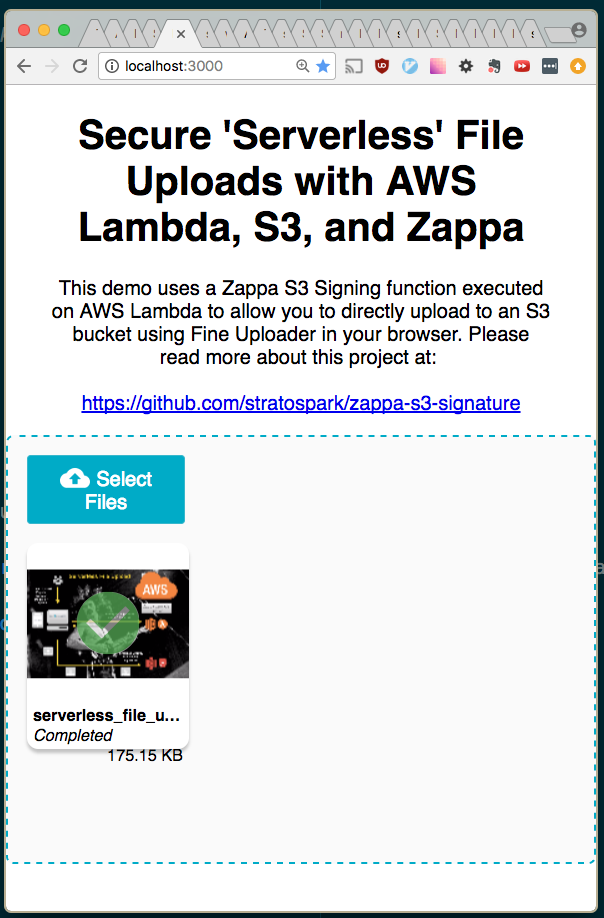
103 |
104 | The following steps will allow you to host a static page that contains the Fine Uploader component. This is a very full-featured open-source component that has excellent S3 support. It also comes with pre-built UI components such as an Image Gallery, to help save time when developing prototypes.
105 |
106 | We have deployed the AWS V4 Signature Lambda function in the previous section in order to take advantage of direct Browser -> S3 uploads.
107 |
108 | You can deploy the HTML and Javascript files onto any server you have access to. However, as we have an opportunity to piggyback on existing AWS infrastructure, including SSL, we can just deploy a static site on S3.
109 |
110 | * Clone the sample React Fine Uploader project: https://github.com/stratospark/react-fineuploader-s3-demo
111 | * Update the **request/endpoint**, **request/accessKey**, and **signature/endpoint** fields in the FineUploaderS3 constructor in App.js. Optionally update **objectProperties/region**.
112 | * For example, request/endpoint should be: `https://BUCKET_NAME.s3.amazonaws.com` ...
113 | **Note: the endpoints must not have trailing slashes or the signatures will not be valid!**
114 | * Run: ``npm build``. **Note: you need to add a `homepage` field to `package.json` if you will serve the pages at a location other than the root.**
115 | * Create S3 bucket and upload the contents of the build folder. **Note: once again, do not use periods in the name if you want to use HTTPS/SSL**
116 | * Make this S3 bucket a publically available static site. Also remember to set a policy like below:
117 |
118 | ```
119 | {
120 | "Version": "2008-10-17",
121 | "Statement": [
122 | {
123 | "Sid": "PublicReadForGetBucketObjects",
124 | "Effect": "Allow",
125 | "Principal": {
126 | "AWS": "*"
127 | },
128 | "Action": "s3:GetObject",
129 | "Resource": "arn:aws:s3:::BUCKET_NAME/*"
130 | }
131 | ]
132 | }
133 | ```
134 |
135 | * Access the Fine Uploader demo page in your browser, for example: https://stratospark-serverless-uploader.s3.amazonaws.com/index.html
136 | * Upload a file
137 | * Check your public uploads bucket
138 |
139 | That's all!
140 |
141 | **Stay tuned for the next installment, where we take these uploaded files and run them through image processing, computer vision, and deep learning Lambda pipelines!**
142 |
--------------------------------------------------------------------------------
/Secure 'Serverless' File Uploads with AWS Lambda, S3, and Zappa.ipynb:
--------------------------------------------------------------------------------
1 | {
2 | "cells": [
3 | {
4 | "cell_type": "markdown",
5 | "metadata": {},
6 | "source": [
7 | "# Secure 'Serverless' File Uploads with AWS Lambda, S3, and Zappa"
8 | ]
9 | },
10 | {
11 | "cell_type": "markdown",
12 | "metadata": {},
13 | "source": [
14 | ""
16 | ]
17 | },
18 | {
19 | "cell_type": "markdown",
20 | "metadata": {},
21 | "source": [
22 | "As I've been experimenting with [AWS Lambda](https://aws.amazon.com/lambda/), I've found the need to accept file uploads from the browser in order to kick off asynchronous Lambda functions. For example, allowing a user to directly upload in an S3 bucket from the browser, which would trigger a Lambda function for image processing.\n",
23 | "\n",
24 | "I decided to use the [Zappa](https://github.com/Miserlou/Zappa) framework, as it allows me to leverage my existing Python WSGI experience, while also providing a number of **awesome** features such as:\n",
25 | "\n",
26 | "* Access to powerful, prebuilt Python packages such as Numpy and scikit-learn\n",
27 | "* Automatic Let's Encrypt SSL registration and renewal\n",
28 | "* Automatic scheduled job to keep the Lambda function warm\n",
29 | "* Ability to invoke arbitrary Python functions within the Lambda execution environment (great for debugging)\n",
30 | "* Deploy bundles larger than 50 megs through a Slim Handler mechanism"
31 | ]
32 | },
33 | {
34 | "cell_type": "markdown",
35 | "metadata": {},
36 | "source": [
37 | "This walkthrough will cover deploying an SSL-encrypted S3 signature microservice and integrating it with the browser-based [Fine Uploader](http://fineuploader.com/) component. In an upcoming post, I will show how to take the file uploads and process them with an additional Lambda function triggered by new files in an S3 bucket."
38 | ]
39 | },
40 | {
41 | "cell_type": "markdown",
42 | "metadata": {},
43 | "source": [
44 | "## Deploy Zappa Lambda Function for Signing S3 Requests"
45 | ]
46 | },
47 | {
48 | "cell_type": "markdown",
49 | "metadata": {},
50 | "source": [
51 | "Here are the steps I took to create a secure file upload system in the cloud:\n",
52 | "\n",
53 | "* [Sign up for a domain using Namecheap](https://ap.www.namecheap.com/Profile/Tools/Affiliate)\n",
54 | "* Follow [these instructions](https://github.com/Miserlou/Zappa/blob/master/docs/domain_with_free_ssl_dns.md) to create a Route 53 Hosted Zone, update your domain DNS, and generate a Let's Encrypt account.key\n",
55 | "* Create S3 bucket to hold uploaded files, with the policy below. **Note: do not use periods in the bucket name if you want to be able to use SSL, as [explained here](http://stackoverflow.com/questions/39396634/fine-uploader-upload-to-s3-over-https-error)**"
56 | ]
57 | },
58 | {
59 | "cell_type": "markdown",
60 | "metadata": {},
61 | "source": [
62 | "```\n",
63 | "{\n",
64 | " \"Version\": \"2008-10-17\",\n",
65 | " \"Id\": \"policy\",\n",
66 | " \"Statement\": [\n",
67 | " {\n",
68 | " \"Sid\": \"allow-public-put\",\n",
69 | " \"Effect\": \"Allow\",\n",
70 | " \"Principal\": {\n",
71 | " \"AWS\": \"*\"\n",
72 | " },\n",
73 | " \"Action\": \"s3:PutObject\",\n",
74 | " \"Resource\": \"arn:aws:s3:::BUCKET_NAME_HERE/*\"\n",
75 | " }\n",
76 | " ]\n",
77 | "}\n",
78 | "```"
79 | ]
80 | },
81 | {
82 | "cell_type": "markdown",
83 | "metadata": {},
84 | "source": [
85 | "* Activate CORS for the S3 bucket. You may want to update the AllowedOrigin tag to limit the domains you are allowed to upload from."
86 | ]
87 | },
88 | {
89 | "cell_type": "markdown",
90 | "metadata": {},
91 | "source": [
92 | "```\n",
93 | "\n",
94 | "\n",
95 | " \n",
96 | " *\n",
97 | " POST\n",
98 | " PUT\n",
99 | " DELETE\n",
100 | " 3000\n",
101 | " ETag\n",
102 | " *\n",
103 | " \n",
104 | "\n",
105 | "```"
106 | ]
107 | },
108 | {
109 | "cell_type": "markdown",
110 | "metadata": {},
111 | "source": [
112 | "* Optionally update the Lifecycle Rules for that bucket to automatically delete files after a certain period of time.\n",
113 | "* Create a new IAM user specifically to create a new set of keys with limited permissions for your Lambda function:"
114 | ]
115 | },
116 | {
117 | "cell_type": "markdown",
118 | "metadata": {},
119 | "source": [
120 | "```\n",
121 | "{\n",
122 | " \"Version\": \"2012-10-17\",\n",
123 | " \"Statement\": [\n",
124 | " {\n",
125 | " \"Sid\": \"Stmt1486786154000\",\n",
126 | " \"Effect\": \"Allow\",\n",
127 | " \"Action\": [\n",
128 | " \"s3:PutObject\"\n",
129 | " ],\n",
130 | " \"Resource\": [\n",
131 | " \"arn:aws:s3:::BUCKET_NAME_HERE/*\"\n",
132 | " ]\n",
133 | " }\n",
134 | " ]\n",
135 | "}\n",
136 | "```"
137 | ]
138 | },
139 | {
140 | "cell_type": "markdown",
141 | "metadata": {},
142 | "source": [
143 | "* Clone this Zappa project: `git clone https://github.com/stratospark/zappa-s3-signature`\n",
144 | "* Create a virtual environment for this project: `virtualenv myenv`. *Note, conda environments are currently unsupported, so I utilize a Docker container with a standard Python virtualenv*\n",
145 | "* Install packages: `pip install -r requirements.txt`. \n",
146 | "* Create an `s3-signature-config.json` file with the ACCESS_KEY and SECRET_KEY of the new User you created, for example:"
147 | ]
148 | },
149 | {
150 | "cell_type": "markdown",
151 | "metadata": {},
152 | "source": [
153 | "```\n",
154 | "{\n",
155 | " \"ACCESS_KEY\": \"AKIAIHBBHGQSUN34COPA\",\n",
156 | " \"SECRET_KEY\": \"wJalrXUtnFEMI/K7MDENG+bPxRfiCYEXAMPLEKEY\"\n",
157 | "}\n",
158 | "```"
159 | ]
160 | },
161 | {
162 | "cell_type": "markdown",
163 | "metadata": {},
164 | "source": [
165 | "* Upload `s3-signature-config.json` to an S3 bucket accessible by the Lambda function, used in **remote_env** config field\n",
166 | "* Update the *prod* section of `zappa_settings.json` with your **aws_region**, **s3_bucket**, **cors/allowed_origin**, **remote_env**, **domain**, and **lets_encrypt_key**\n",
167 | "* Deploy to AWS Lambda: `zappa deploy prod`\n",
168 | "* Enable SSL through Let's Encrypt: `zappa certify prod`"
169 | ]
170 | },
171 | {
172 | "cell_type": "markdown",
173 | "metadata": {},
174 | "source": [
175 | "## Deploy HTML5/Javascript Fine Uploader Page"
176 | ]
177 | },
178 | {
179 | "cell_type": "markdown",
180 | "metadata": {},
181 | "source": [
182 | ""
183 | ]
184 | },
185 | {
186 | "cell_type": "markdown",
187 | "metadata": {},
188 | "source": [
189 | "The following steps will allow you to host a static page that contains the Fine Uploader component. This is a very full-featured open-source component that has excellent S3 support. It also comes with pre-built UI components such as an Image Gallery, to help save time when developing prototypes.\n",
190 | "\n",
191 | "We have deployed the AWS V4 Signature Lambda function in the previous section in order to take advantage of direct Browser -> S3 uploads.\n",
192 | "\n",
193 | "You can deploy the HTML and Javascript files onto any server you have access to. However, as we have an opportunity to piggyback on existing AWS infrastructure, including SSL, we can just deploy a static site on S3."
194 | ]
195 | },
196 | {
197 | "cell_type": "markdown",
198 | "metadata": {},
199 | "source": [
200 | "* Clone the sample React Fine Uploader project: https://github.com/stratospark/react-fineuploader-s3-demo\n",
201 | "* Update the **request/endpoint**, **request/accessKey**, and **signature/endpoint** fields in the FineUploaderS3 constructor in App.js. Optionally update **objectProperties/region**. \n",
202 | " * For example, request/endpoint should be: `https://BUCKET_NAME.s3.amazonaws.com` ...\n",
203 | " **Note: the endpoints must not have trailing slashes or the signatures will not be valid!**\n",
204 | "* Run: ``npm build``. **Note: you need to add a `homepage` field to `package.json` if you will serve the pages at a location other than the root.**\n",
205 | "* Create S3 bucket and upload the contents of the build folder. **Note: once again, do not use periods in the name if you want to use HTTPS/SSL**\n",
206 | "* Make this S3 bucket a publically available static site. Also remember to set a policy like below:"
207 | ]
208 | },
209 | {
210 | "cell_type": "markdown",
211 | "metadata": {},
212 | "source": [
213 | "```\n",
214 | "{\n",
215 | " \"Version\": \"2008-10-17\",\n",
216 | " \"Statement\": [\n",
217 | " {\n",
218 | " \"Sid\": \"PublicReadForGetBucketObjects\",\n",
219 | " \"Effect\": \"Allow\",\n",
220 | " \"Principal\": {\n",
221 | " \"AWS\": \"*\"\n",
222 | " },\n",
223 | " \"Action\": \"s3:GetObject\",\n",
224 | " \"Resource\": \"arn:aws:s3:::BUCKET_NAME/*\"\n",
225 | " }\n",
226 | " ]\n",
227 | "}\n",
228 | "```"
229 | ]
230 | },
231 | {
232 | "cell_type": "markdown",
233 | "metadata": {},
234 | "source": [
235 | "* Access the Fine Uploader demo page in your browser, for example: https://stratospark-serverless-uploader.s3.amazonaws.com/index.html\n",
236 | "* Upload a file\n",
237 | "* Check your public uploads bucket"
238 | ]
239 | },
240 | {
241 | "cell_type": "markdown",
242 | "metadata": {},
243 | "source": [
244 | "That's all!\n",
245 | "\n",
246 | "**Stay tuned for the next installment, where we take these uploaded files and run them through image processing, computer vision, and deep learning Lambda pipelines!**"
247 | ]
248 | }
249 | ],
250 | "metadata": {
251 | "kernelspec": {
252 | "display_name": "Python 2",
253 | "language": "python",
254 | "name": "python2"
255 | },
256 | "language_info": {
257 | "codemirror_mode": {
258 | "name": "ipython",
259 | "version": 2
260 | },
261 | "file_extension": ".py",
262 | "mimetype": "text/x-python",
263 | "name": "python",
264 | "nbconvert_exporter": "python",
265 | "pygments_lexer": "ipython2",
266 | "version": "2.7.13"
267 | }
268 | },
269 | "nbformat": 4,
270 | "nbformat_minor": 2
271 | }
272 |
--------------------------------------------------------------------------------
/.ipynb_checkpoints/Secure 'Serverless' File Uploads with AWS Lambda, S3, and Zappa-checkpoint.ipynb:
--------------------------------------------------------------------------------
1 | {
2 | "cells": [
3 | {
4 | "cell_type": "markdown",
5 | "metadata": {},
6 | "source": [
7 | "# Secure 'Serverless' File Uploads with AWS Lambda, S3, and Zappa"
8 | ]
9 | },
10 | {
11 | "cell_type": "markdown",
12 | "metadata": {},
13 | "source": [
14 | ""
16 | ]
17 | },
18 | {
19 | "cell_type": "markdown",
20 | "metadata": {},
21 | "source": [
22 | "As I've been experimenting with [AWS Lambda](https://aws.amazon.com/lambda/), I've found the need to accept file uploads from the browser in order to kick off asynchronous Lambda functions. For example, allowing a user to directly upload in an S3 bucket from the browser, which would trigger a Lambda function for image processing.\n",
23 | "\n",
24 | "I decided to use the [Zappa](https://github.com/Miserlou/Zappa) framework, as it allows me to leverage my existing Python WSGI experience, while also providing a number of **awesome** features such as:\n",
25 | "\n",
26 | "* Access to powerful, prebuilt Python packages such as Numpy and scikit-learn\n",
27 | "* Automatic Let's Encrypt SSL registration and renewal\n",
28 | "* Automatic scheduled job to keep the Lambda function warm\n",
29 | "* Ability to invoke arbitrary Python functions within the Lambda execution environment (great for debugging)\n",
30 | "* Deploy bundles larger than 50 megs through a Slim Handler mechanism"
31 | ]
32 | },
33 | {
34 | "cell_type": "markdown",
35 | "metadata": {},
36 | "source": [
37 | "This walkthrough will cover deploying an SSL-encrypted S3 signature microservice and integrating it with the browser-based [Fine Uploader](http://fineuploader.com/) component. In an upcoming post, I will show how to take the file uploads and process them with an additional Lambda function triggered by new files in an S3 bucket."
38 | ]
39 | },
40 | {
41 | "cell_type": "markdown",
42 | "metadata": {},
43 | "source": [
44 | "## Deploy Zappa Lambda Function for Signing S3 Requests"
45 | ]
46 | },
47 | {
48 | "cell_type": "markdown",
49 | "metadata": {},
50 | "source": [
51 | "Here are the steps I took to create a secure file upload system in the cloud:\n",
52 | "\n",
53 | "* [Sign up for a domain using Namecheap](https://ap.www.namecheap.com/Profile/Tools/Affiliate)\n",
54 | "* Follow [these instructions](https://github.com/Miserlou/Zappa/blob/master/docs/domain_with_free_ssl_dns.md) to create a Route 53 Hosted Zone, update your domain DNS, and generate a Let's Encrypt account.key\n",
55 | "* Create S3 bucket to hold uploaded files, with the policy below. **Note: do not use periods in the bucket name if you want to be able to use SSL, as [explained here](http://stackoverflow.com/questions/39396634/fine-uploader-upload-to-s3-over-https-error)**"
56 | ]
57 | },
58 | {
59 | "cell_type": "markdown",
60 | "metadata": {},
61 | "source": [
62 | "```\n",
63 | "{\n",
64 | " \"Version\": \"2008-10-17\",\n",
65 | " \"Id\": \"policy\",\n",
66 | " \"Statement\": [\n",
67 | " {\n",
68 | " \"Sid\": \"allow-public-put\",\n",
69 | " \"Effect\": \"Allow\",\n",
70 | " \"Principal\": {\n",
71 | " \"AWS\": \"*\"\n",
72 | " },\n",
73 | " \"Action\": \"s3:PutObject\",\n",
74 | " \"Resource\": \"arn:aws:s3:::BUCKET_NAME_HERE/*\"\n",
75 | " }\n",
76 | " ]\n",
77 | "}\n",
78 | "```"
79 | ]
80 | },
81 | {
82 | "cell_type": "markdown",
83 | "metadata": {},
84 | "source": [
85 | "* Activate CORS for the S3 bucket. You may want to update the AllowedOrigin tag to limit the domains you are allowed to upload from."
86 | ]
87 | },
88 | {
89 | "cell_type": "markdown",
90 | "metadata": {},
91 | "source": [
92 | "```\n",
93 | "\n",
94 | "\n",
95 | " \n",
96 | " *\n",
97 | " POST\n",
98 | " PUT\n",
99 | " DELETE\n",
100 | " 3000\n",
101 | " ETag\n",
102 | " *\n",
103 | " \n",
104 | "\n",
105 | "```"
106 | ]
107 | },
108 | {
109 | "cell_type": "markdown",
110 | "metadata": {},
111 | "source": [
112 | "* Optionally update the Lifecycle Rules for that bucket to automatically delete files after a certain period of time.\n",
113 | "* Create a new IAM user specifically to create a new set of keys with limited permissions for your Lambda function:"
114 | ]
115 | },
116 | {
117 | "cell_type": "markdown",
118 | "metadata": {},
119 | "source": [
120 | "```\n",
121 | "{\n",
122 | " \"Version\": \"2012-10-17\",\n",
123 | " \"Statement\": [\n",
124 | " {\n",
125 | " \"Sid\": \"Stmt1486786154000\",\n",
126 | " \"Effect\": \"Allow\",\n",
127 | " \"Action\": [\n",
128 | " \"s3:PutObject\"\n",
129 | " ],\n",
130 | " \"Resource\": [\n",
131 | " \"arn:aws:s3:::BUCKET_NAME_HERE/*\"\n",
132 | " ]\n",
133 | " }\n",
134 | " ]\n",
135 | "}\n",
136 | "```"
137 | ]
138 | },
139 | {
140 | "cell_type": "markdown",
141 | "metadata": {},
142 | "source": [
143 | "* Clone this Zappa project: `git clone https://github.com/stratospark/zappa-s3-signature`\n",
144 | "* Create a virtual environment for this project: `virtualenv myenv`. *Note, conda environments are currently unsupported, so I utilize a Docker container with a standard Python virtualenv*\n",
145 | "* Install packages: `pip install -r requirements.txt`. \n",
146 | "* Create an `s3-signature-config.json` file with the ACCESS_KEY and SECRET_KEY of the new User you created, for example:"
147 | ]
148 | },
149 | {
150 | "cell_type": "markdown",
151 | "metadata": {},
152 | "source": [
153 | "```\n",
154 | "{\n",
155 | " \"ACCESS_KEY\": \"AKIAIHBBHGQSUN34COPA\",\n",
156 | " \"SECRET_KEY\": \"wJalrXUtnFEMI/K7MDENG+bPxRfiCYEXAMPLEKEY\"\n",
157 | "}\n",
158 | "```"
159 | ]
160 | },
161 | {
162 | "cell_type": "markdown",
163 | "metadata": {},
164 | "source": [
165 | "* Upload `s3-signature-config.json` to an S3 bucket accessible by the Lambda function, used in **remote_env** config field\n",
166 | "* Update the *prod* section of `zappa_settings.json` with your **aws_region**, **s3_bucket**, **cors/allowed_origin**, **remote_env**, **domain**, and **lets_encrypt_key**\n",
167 | "* Deploy to AWS Lambda: `zappa deploy prod`\n",
168 | "* Enable SSL through Let's Encrypt: `zappa certify prod`"
169 | ]
170 | },
171 | {
172 | "cell_type": "markdown",
173 | "metadata": {},
174 | "source": [
175 | "## Deploy HTML5/Javascript Fine Uploader Page"
176 | ]
177 | },
178 | {
179 | "cell_type": "markdown",
180 | "metadata": {},
181 | "source": [
182 | ""
183 | ]
184 | },
185 | {
186 | "cell_type": "markdown",
187 | "metadata": {},
188 | "source": [
189 | "The following steps will allow you to host a static page that contains the Fine Uploader component. This is a very full-featured open-source component that has excellent S3 support. It also comes with pre-built UI components such as an Image Gallery, to help save time when developing prototypes.\n",
190 | "\n",
191 | "We have deployed the AWS V4 Signature Lambda function in the previous section in order to take advantage of direct Browser -> S3 uploads.\n",
192 | "\n",
193 | "You can deploy the HTML and Javascript files onto any server you have access to. However, as we have an opportunity to piggyback on existing AWS infrastructure, including SSL, we can just deploy a static site on S3."
194 | ]
195 | },
196 | {
197 | "cell_type": "markdown",
198 | "metadata": {},
199 | "source": [
200 | "* Clone the sample React Fine Uploader project: https://github.com/stratospark/react-fineuploader-s3-demo\n",
201 | "* Update the **request/endpoint**, **request/accessKey**, and **signature/endpoint** fields in the FineUploaderS3 constructor in App.js. Optionally update **objectProperties/region**. \n",
202 | " * For example, request/endpoint should be: `https://BUCKET_NAME.s3.amazonaws.com` ...\n",
203 | " **Note: the endpoints must not have trailing slashes or the signatures will not be valid!**\n",
204 | "* Run: ``npm build``. **Note: you need to add a `homepage` field to `package.json` if you will serve the pages at a location other than the root.**\n",
205 | "* Create S3 bucket and upload the contents of the build folder. **Note: once again, do not use periods in the name if you want to use HTTPS/SSL**\n",
206 | "* Make this S3 bucket a publically available static site. Also remember to set a policy like below:"
207 | ]
208 | },
209 | {
210 | "cell_type": "markdown",
211 | "metadata": {},
212 | "source": [
213 | "```\n",
214 | "{\n",
215 | " \"Version\": \"2008-10-17\",\n",
216 | " \"Statement\": [\n",
217 | " {\n",
218 | " \"Sid\": \"PublicReadForGetBucketObjects\",\n",
219 | " \"Effect\": \"Allow\",\n",
220 | " \"Principal\": {\n",
221 | " \"AWS\": \"*\"\n",
222 | " },\n",
223 | " \"Action\": \"s3:GetObject\",\n",
224 | " \"Resource\": \"arn:aws:s3:::BUCKET_NAME/*\"\n",
225 | " }\n",
226 | " ]\n",
227 | "}\n",
228 | "```"
229 | ]
230 | },
231 | {
232 | "cell_type": "markdown",
233 | "metadata": {},
234 | "source": [
235 | "* Access the Fine Uploader demo page in your browser, for example: https://stratospark-serverless-uploader.s3.amazonaws.com/index.html\n",
236 | "* Upload a file\n",
237 | "* Check your public uploads bucket"
238 | ]
239 | },
240 | {
241 | "cell_type": "markdown",
242 | "metadata": {},
243 | "source": [
244 | "That's all!\n",
245 | "\n",
246 | "**Stay tuned for the next installment, where we take these uploaded files and run them through image processing, computer vision, and deep learning Lambda pipelines!**"
247 | ]
248 | }
249 | ],
250 | "metadata": {
251 | "kernelspec": {
252 | "display_name": "Python 2",
253 | "language": "python",
254 | "name": "python2"
255 | },
256 | "language_info": {
257 | "codemirror_mode": {
258 | "name": "ipython",
259 | "version": 2
260 | },
261 | "file_extension": ".py",
262 | "mimetype": "text/x-python",
263 | "name": "python",
264 | "nbconvert_exporter": "python",
265 | "pygments_lexer": "ipython2",
266 | "version": "2.7.13"
267 | }
268 | },
269 | "nbformat": 4,
270 | "nbformat_minor": 2
271 | }
272 |
--------------------------------------------------------------------------------