├── .gitignore
├── notes.txt
├── img
├── icon.png
├── icon_406.png
├── icon_602.png
├── settings.png
├── colorflicker.gif
├── darkExample.png
├── lightExample.png
├── liveExample.png
├── resources
│ ├── mockup.png
│ ├── red3_cooked.png
│ ├── red_2_cooked.png
│ ├── blue_2_cooked.png
│ ├── green3_cooked.png
│ ├── green_2_cooked.png
│ ├── red_2_cooked_70.png
│ ├── blue3_cookedmaybe.png
│ ├── blue_2_cooked_70.png
│ ├── green_2_cooked_70.png
│ └── iconColors.html
├── live_dark_screenshot.png
└── live_light_screenshot.png
├── .gitattributes
├── .vscodeignore
├── .vscode
├── extensions.json
├── tasks.json
└── launch.json
├── CHANGELOG.md
├── tslint.json
├── src
├── test
│ ├── extension.test.ts
│ └── index.ts
└── extension.ts
├── tsconfig.json
├── LICENSE
├── README.md
└── package.json
/.gitignore:
--------------------------------------------------------------------------------
1 | out
2 | node_modules
3 | .vscode-test/
4 | *.vsix
5 | asdf.html
6 |
7 |
8 |
--------------------------------------------------------------------------------
/notes.txt:
--------------------------------------------------------------------------------
1 | F5 to load extension debugger
2 | shift-command-F5 to reload extension debugger
--------------------------------------------------------------------------------
/img/icon.png:
--------------------------------------------------------------------------------
https://raw.githubusercontent.com/stuartcrobinson/unique-window-colors/HEAD/img/icon.png
--------------------------------------------------------------------------------
/.gitattributes:
--------------------------------------------------------------------------------
1 | # Set default behavior to automatically normalize line endings.
2 | * text=auto
3 |
4 |
--------------------------------------------------------------------------------
/img/icon_406.png:
--------------------------------------------------------------------------------
https://raw.githubusercontent.com/stuartcrobinson/unique-window-colors/HEAD/img/icon_406.png
--------------------------------------------------------------------------------
/img/icon_602.png:
--------------------------------------------------------------------------------
https://raw.githubusercontent.com/stuartcrobinson/unique-window-colors/HEAD/img/icon_602.png
--------------------------------------------------------------------------------
/img/settings.png:
--------------------------------------------------------------------------------
https://raw.githubusercontent.com/stuartcrobinson/unique-window-colors/HEAD/img/settings.png
--------------------------------------------------------------------------------
/img/colorflicker.gif:
--------------------------------------------------------------------------------
https://raw.githubusercontent.com/stuartcrobinson/unique-window-colors/HEAD/img/colorflicker.gif
--------------------------------------------------------------------------------
/img/darkExample.png:
--------------------------------------------------------------------------------
https://raw.githubusercontent.com/stuartcrobinson/unique-window-colors/HEAD/img/darkExample.png
--------------------------------------------------------------------------------
/img/lightExample.png:
--------------------------------------------------------------------------------
https://raw.githubusercontent.com/stuartcrobinson/unique-window-colors/HEAD/img/lightExample.png
--------------------------------------------------------------------------------
/img/liveExample.png:
--------------------------------------------------------------------------------
https://raw.githubusercontent.com/stuartcrobinson/unique-window-colors/HEAD/img/liveExample.png
--------------------------------------------------------------------------------
/img/resources/mockup.png:
--------------------------------------------------------------------------------
https://raw.githubusercontent.com/stuartcrobinson/unique-window-colors/HEAD/img/resources/mockup.png
--------------------------------------------------------------------------------
/img/live_dark_screenshot.png:
--------------------------------------------------------------------------------
https://raw.githubusercontent.com/stuartcrobinson/unique-window-colors/HEAD/img/live_dark_screenshot.png
--------------------------------------------------------------------------------
/img/live_light_screenshot.png:
--------------------------------------------------------------------------------
https://raw.githubusercontent.com/stuartcrobinson/unique-window-colors/HEAD/img/live_light_screenshot.png
--------------------------------------------------------------------------------
/img/resources/red3_cooked.png:
--------------------------------------------------------------------------------
https://raw.githubusercontent.com/stuartcrobinson/unique-window-colors/HEAD/img/resources/red3_cooked.png
--------------------------------------------------------------------------------
/img/resources/red_2_cooked.png:
--------------------------------------------------------------------------------
https://raw.githubusercontent.com/stuartcrobinson/unique-window-colors/HEAD/img/resources/red_2_cooked.png
--------------------------------------------------------------------------------
/img/resources/blue_2_cooked.png:
--------------------------------------------------------------------------------
https://raw.githubusercontent.com/stuartcrobinson/unique-window-colors/HEAD/img/resources/blue_2_cooked.png
--------------------------------------------------------------------------------
/img/resources/green3_cooked.png:
--------------------------------------------------------------------------------
https://raw.githubusercontent.com/stuartcrobinson/unique-window-colors/HEAD/img/resources/green3_cooked.png
--------------------------------------------------------------------------------
/img/resources/green_2_cooked.png:
--------------------------------------------------------------------------------
https://raw.githubusercontent.com/stuartcrobinson/unique-window-colors/HEAD/img/resources/green_2_cooked.png
--------------------------------------------------------------------------------
/img/resources/red_2_cooked_70.png:
--------------------------------------------------------------------------------
https://raw.githubusercontent.com/stuartcrobinson/unique-window-colors/HEAD/img/resources/red_2_cooked_70.png
--------------------------------------------------------------------------------
/img/resources/blue3_cookedmaybe.png:
--------------------------------------------------------------------------------
https://raw.githubusercontent.com/stuartcrobinson/unique-window-colors/HEAD/img/resources/blue3_cookedmaybe.png
--------------------------------------------------------------------------------
/img/resources/blue_2_cooked_70.png:
--------------------------------------------------------------------------------
https://raw.githubusercontent.com/stuartcrobinson/unique-window-colors/HEAD/img/resources/blue_2_cooked_70.png
--------------------------------------------------------------------------------
/img/resources/green_2_cooked_70.png:
--------------------------------------------------------------------------------
https://raw.githubusercontent.com/stuartcrobinson/unique-window-colors/HEAD/img/resources/green_2_cooked_70.png
--------------------------------------------------------------------------------
/.vscodeignore:
--------------------------------------------------------------------------------
1 | .vscode/**
2 | .vscode-test/**
3 | out/test/**
4 | out/**/*.map
5 | src/**
6 | .gitignore
7 | tsconfig.json
8 | vsc-extension-quickstart.md
9 | tslint.json
--------------------------------------------------------------------------------
/.vscode/extensions.json:
--------------------------------------------------------------------------------
1 | {
2 | // See http://go.microsoft.com/fwlink/?LinkId=827846
3 | // for the documentation about the extensions.json format
4 | "recommendations": [
5 | "eg2.tslint"
6 | ]
7 | }
--------------------------------------------------------------------------------
/CHANGELOG.md:
--------------------------------------------------------------------------------
1 | # Change Log
2 | All notable changes to the "unique-window-colors" extension will be documented in this file.
3 |
4 | Check [Keep a Changelog](http://keepachangelog.com/) for recommendations on how to structure this file.
5 |
6 | ## [Unreleased]
7 | - Initial release
--------------------------------------------------------------------------------
/tslint.json:
--------------------------------------------------------------------------------
1 | {
2 | "rules": {
3 | "no-string-throw": true,
4 | "no-unused-expression": true,
5 | "no-duplicate-variable": true,
6 | "curly": true,
7 | "class-name": true,
8 | "semicolon": [
9 | true,
10 | "always"
11 | ],
12 | "triple-equals": true
13 | },
14 | "defaultSeverity": "warning"
15 | }
--------------------------------------------------------------------------------
/.vscode/tasks.json:
--------------------------------------------------------------------------------
1 | // See https://go.microsoft.com/fwlink/?LinkId=733558
2 | // for the documentation about the tasks.json format
3 | {
4 | "version": "2.0.0",
5 | "tasks": [
6 | {
7 | "type": "npm",
8 | "script": "watch",
9 | "problemMatcher": "$tsc-watch",
10 | "isBackground": true,
11 | "presentation": {
12 | "reveal": "never"
13 | },
14 | "group": {
15 | "kind": "build",
16 | "isDefault": true
17 | }
18 | }
19 | ]
20 | }
--------------------------------------------------------------------------------
/src/test/extension.test.ts:
--------------------------------------------------------------------------------
1 | //
2 | // Note: This example test is leveraging the Mocha test framework.
3 | // Please refer to their documentation on https://mochajs.org/ for help.
4 | //
5 |
6 | // The module 'assert' provides assertion methods from node
7 | import * as assert from 'assert';
8 |
9 | // You can import and use all API from the 'vscode' module
10 | // as well as import your extension to test it
11 | // import * as vscode from 'vscode';
12 | // import * as myExtension from '../extension';
13 |
14 | // Defines a Mocha test suite to group tests of similar kind together
15 | suite("Extension Tests", function () {
16 |
17 | // Defines a Mocha unit test
18 | test("Something 1", function() {
19 | assert.equal(-1, [1, 2, 3].indexOf(5));
20 | assert.equal(-1, [1, 2, 3].indexOf(0));
21 | });
22 | });
--------------------------------------------------------------------------------
/tsconfig.json:
--------------------------------------------------------------------------------
1 | {
2 | "compilerOptions": {
3 | "module": "commonjs",
4 | "target": "es6",
5 | "outDir": "out",
6 | "lib": [
7 | "es6"
8 | ],
9 | "sourceMap": true,
10 | "rootDir": "src",
11 | /* Strict Type-Checking Option */
12 | "strict": true, /* enable all strict type-checking options */
13 | /* Additional Checks */
14 | "noUnusedLocals": true /* Report errors on unused locals. */
15 | // "noImplicitReturns": true, /* Report error when not all code paths in function return a value. */
16 | // "noFallthroughCasesInSwitch": true, /* Report errors for fallthrough cases in switch statement. */
17 | // "noUnusedParameters": true, /* Report errors on unused parameters. */
18 | },
19 | "exclude": [
20 | "node_modules",
21 | ".vscode-test"
22 | ]
23 | }
--------------------------------------------------------------------------------
/src/test/index.ts:
--------------------------------------------------------------------------------
1 | //
2 | // PLEASE DO NOT MODIFY / DELETE UNLESS YOU KNOW WHAT YOU ARE DOING
3 | //
4 | // This file is providing the test runner to use when running extension tests.
5 | // By default the test runner in use is Mocha based.
6 | //
7 | // You can provide your own test runner if you want to override it by exporting
8 | // a function run(testRoot: string, clb: (error:Error) => void) that the extension
9 | // host can call to run the tests. The test runner is expected to use console.log
10 | // to report the results back to the caller. When the tests are finished, return
11 | // a possible error to the callback or null if none.
12 |
13 | import * as testRunner from 'vscode/lib/testrunner';
14 |
15 | // You can directly control Mocha options by uncommenting the following lines
16 | // See https://github.com/mochajs/mocha/wiki/Using-mocha-programmatically#set-options for more info
17 | testRunner.configure({
18 | ui: 'tdd', // the TDD UI is being used in extension.test.ts (suite, test, etc.)
19 | useColors: true // colored output from test results
20 | });
21 |
22 | module.exports = testRunner;
--------------------------------------------------------------------------------
/LICENSE:
--------------------------------------------------------------------------------
1 | MIT License
2 |
3 | Copyright (c) 2024 Stuart Robinson
4 |
5 | Permission is hereby granted, free of charge, to any person obtaining a copy
6 | of this software and associated documentation files (the "Software"), to deal
7 | in the Software without restriction, including without limitation the rights
8 | to use, copy, modify, merge, publish, distribute, sublicense, and/or sell
9 | copies of the Software, and to permit persons to whom the Software is
10 | furnished to do so, subject to the following conditions:
11 |
12 | The above copyright notice and this permission notice shall be included in all
13 | copies or substantial portions of the Software.
14 |
15 | THE SOFTWARE IS PROVIDED "AS IS", WITHOUT WARRANTY OF ANY KIND, EXPRESS OR
16 | IMPLIED, INCLUDING BUT NOT LIMITED TO THE WARRANTIES OF MERCHANTABILITY,
17 | FITNESS FOR A PARTICULAR PURPOSE AND NONINFRINGEMENT. IN NO EVENT SHALL THE
18 | AUTHORS OR COPYRIGHT HOLDERS BE LIABLE FOR ANY CLAIM, DAMAGES OR OTHER
19 | LIABILITY, WHETHER IN AN ACTION OF CONTRACT, TORT OR OTHERWISE, ARISING FROM,
20 | OUT OF OR IN CONNECTION WITH THE SOFTWARE OR THE USE OR OTHER DEALINGS IN THE
21 | SOFTWARE.
22 |
--------------------------------------------------------------------------------
/.vscode/launch.json:
--------------------------------------------------------------------------------
1 | // A launch configuration that compiles the extension and then opens it inside a new window
2 | // Use IntelliSense to learn about possible attributes.
3 | // Hover to view descriptions of existing attributes.
4 | // For more information, visit: https://go.microsoft.com/fwlink/?linkid=830387
5 | {
6 | "version": "0.2.0",
7 | "configurations": [
8 | {
9 | "name": "Extension",
10 | "type": "extensionHost",
11 | "request": "launch",
12 | "runtimeExecutable": "${execPath}",
13 | "args": [
14 | "--extensionDevelopmentPath=${workspaceFolder}"
15 | ],
16 | "outFiles": [
17 | "${workspaceFolder}/out/**/*.js"
18 | ],
19 | "preLaunchTask": "npm: watch"
20 | },
21 | {
22 | "name": "Extension Tests",
23 | "type": "extensionHost",
24 | "request": "launch",
25 | "runtimeExecutable": "${execPath}",
26 | "args": [
27 | "--extensionDevelopmentPath=${workspaceFolder}",
28 | "--extensionTestsPath=${workspaceFolder}/out/test"
29 | ],
30 | "outFiles": [
31 | "${workspaceFolder}/out/test/**/*.js"
32 | ],
33 | "preLaunchTask": "npm: watch"
34 | }
35 | ]
36 | }
37 |
--------------------------------------------------------------------------------
/README.md:
--------------------------------------------------------------------------------
1 | # Window Colors
2 |
3 | Uniquely and automatically colors each VSCode window.
4 |
5 | 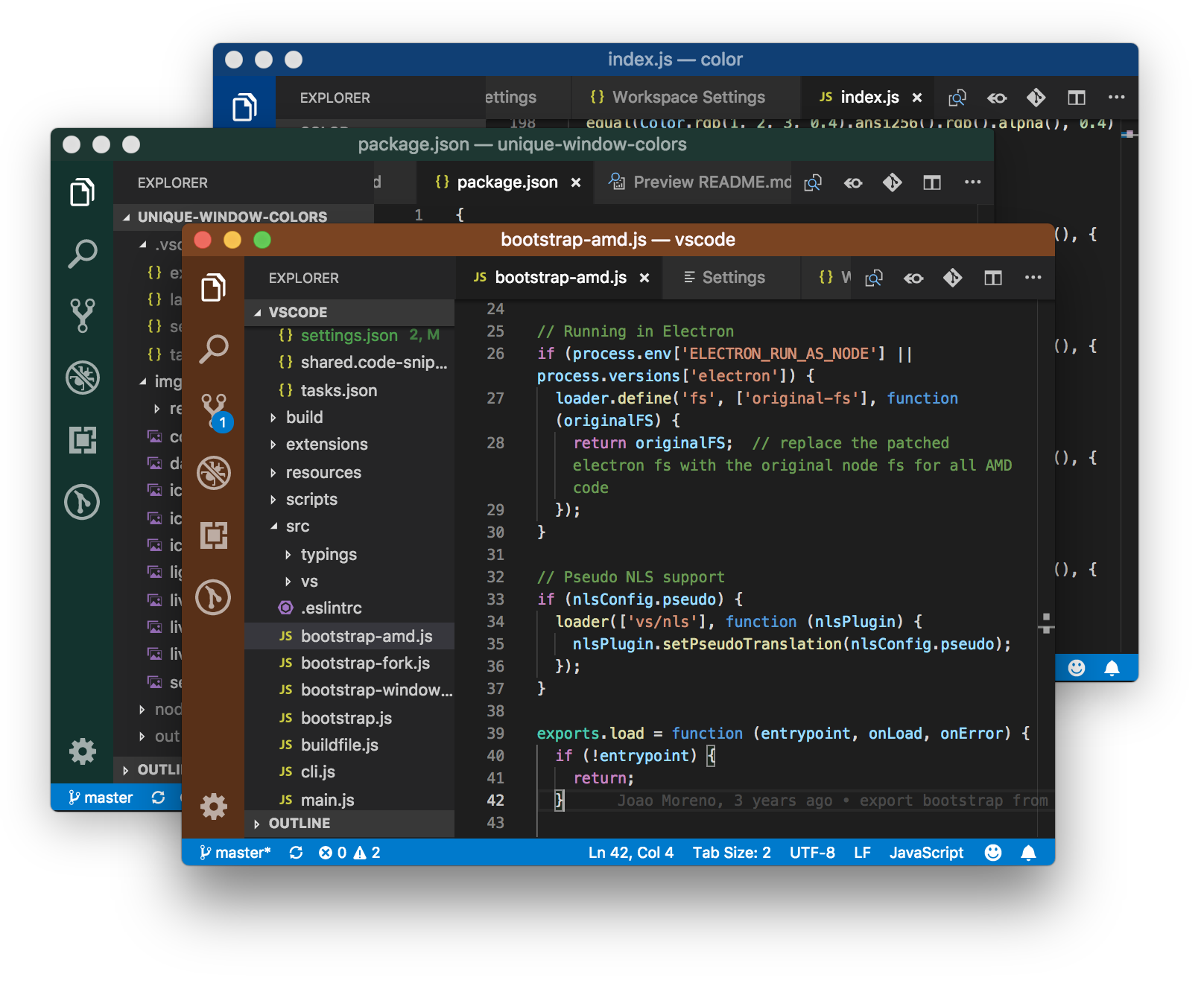 6 |
6 | 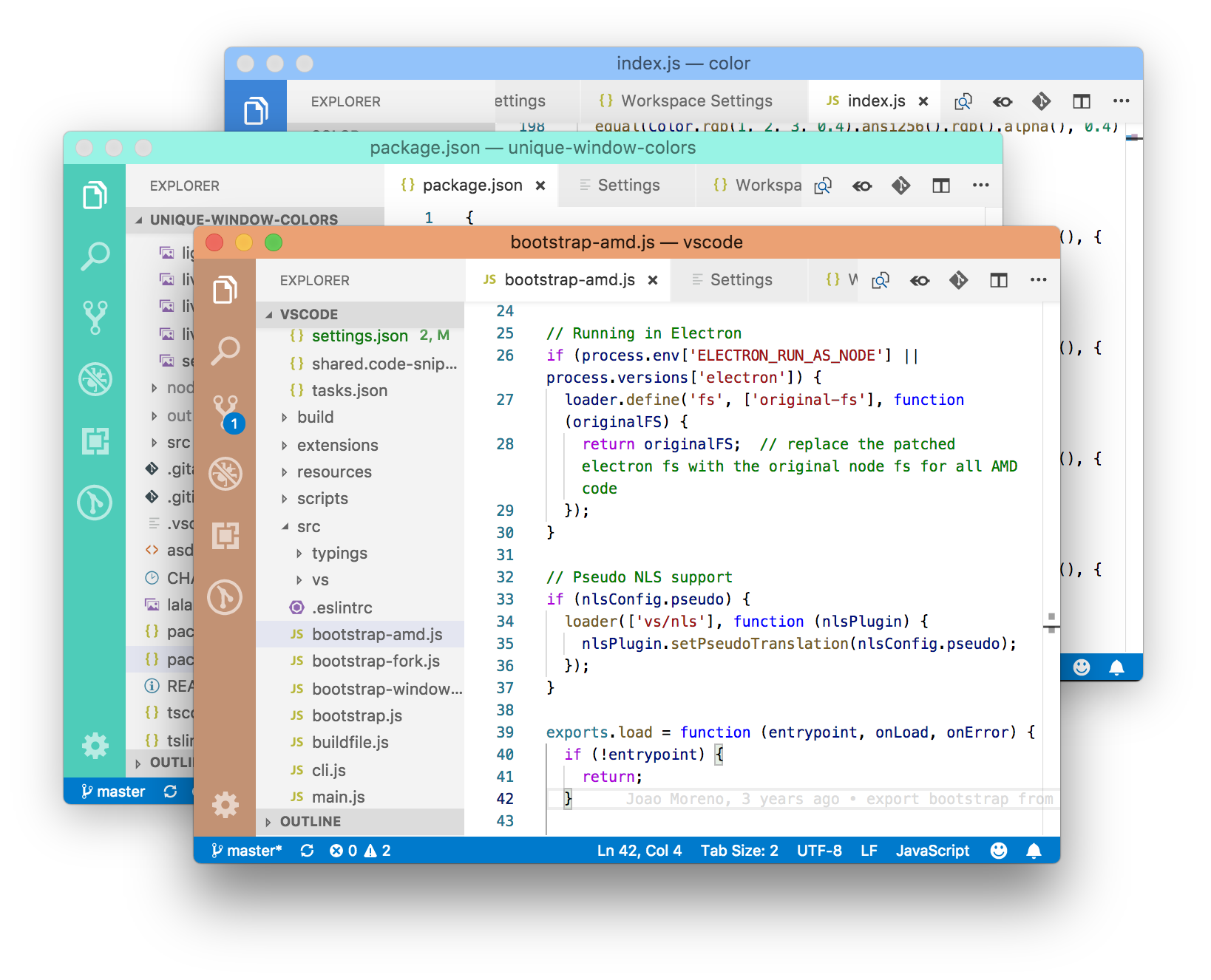 7 |
8 | ## What it does
9 |
10 | This extension gives each new VS Code window a unique color based on a hash of the root directory name when it is opened. It does this by immediately writing three colors to the following settings in `.vscode/settings.json`:
11 |
12 | ```javascript
13 | "workbench.colorCustomizations": {
14 | "activityBar.background": "#13332E",
15 | "titleBar.activeBackground": "#19423B",
16 | "titleBar.activeForeground": "#F6FBFB"
17 | }
18 | ```
19 |
20 | The extension deletes this file and folder each time the VS Code window is closed unless the colors have been modified or unless they contain any other settings.
21 |
22 | You can optionally set a single Base Color (see Window Colors settings) by hex code or css color name.
23 |
24 | ## Usage with Git
25 |
26 | To avoid checking `.vscode/settings.json` in to your remote repository without modifying `.gitignore`, you can either:
27 |
28 | 1. **locally:** add `.vscode/settings.json` to your project's `.git/info/exclude` file
29 |
30 | _or_
31 |
32 | 2. **globally:** create and use a global `.gitignore_global` file like so:
33 |
34 | ```git config --global core.excludesfile ~/.gitignore_global```
35 |
36 | ## Usage
37 |
38 | Colors do not get overwritten. This allows you to set custom colors (or a single Base Color). To switch between light and dark themed colors, you must first delete the current colors from `.vscode/settings.json`. You can do this manually or by or selecting `remove` in the extension's `Window Colors: Theme` settings and reloading the VS Code window.
39 |
40 |
41 |
42 | ## Notes
43 |
44 | Workspaces containing multiple root folders are not currently supported by this extension. The current behavior for multi-folder workspaces is that the workspace color settings will be set by the first window opened, and can be saved in the workspace's `.code-workspace` configuration file.
45 |
46 | When opening new VSCode windows, you might see the relevant theme colors change as they are updated to the new workspace. This is normal:
47 |
48 |
7 |
8 | ## What it does
9 |
10 | This extension gives each new VS Code window a unique color based on a hash of the root directory name when it is opened. It does this by immediately writing three colors to the following settings in `.vscode/settings.json`:
11 |
12 | ```javascript
13 | "workbench.colorCustomizations": {
14 | "activityBar.background": "#13332E",
15 | "titleBar.activeBackground": "#19423B",
16 | "titleBar.activeForeground": "#F6FBFB"
17 | }
18 | ```
19 |
20 | The extension deletes this file and folder each time the VS Code window is closed unless the colors have been modified or unless they contain any other settings.
21 |
22 | You can optionally set a single Base Color (see Window Colors settings) by hex code or css color name.
23 |
24 | ## Usage with Git
25 |
26 | To avoid checking `.vscode/settings.json` in to your remote repository without modifying `.gitignore`, you can either:
27 |
28 | 1. **locally:** add `.vscode/settings.json` to your project's `.git/info/exclude` file
29 |
30 | _or_
31 |
32 | 2. **globally:** create and use a global `.gitignore_global` file like so:
33 |
34 | ```git config --global core.excludesfile ~/.gitignore_global```
35 |
36 | ## Usage
37 |
38 | Colors do not get overwritten. This allows you to set custom colors (or a single Base Color). To switch between light and dark themed colors, you must first delete the current colors from `.vscode/settings.json`. You can do this manually or by or selecting `remove` in the extension's `Window Colors: Theme` settings and reloading the VS Code window.
39 |
40 |
41 |
42 | ## Notes
43 |
44 | Workspaces containing multiple root folders are not currently supported by this extension. The current behavior for multi-folder workspaces is that the workspace color settings will be set by the first window opened, and can be saved in the workspace's `.code-workspace` configuration file.
45 |
46 | When opening new VSCode windows, you might see the relevant theme colors change as they are updated to the new workspace. This is normal:
47 |
48 | 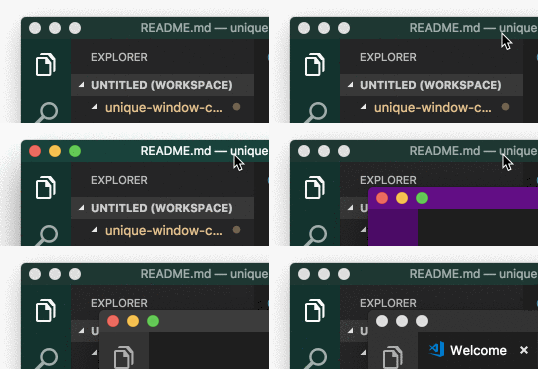 49 |
50 | ## Credits
51 |
52 | Hashing and color generation functions adapted from https://www.designedbyaturtle.co.uk/convert-string-to-hexidecimal-colour-with-javascript-vanilla/ by Edd Turtle.
53 |
54 | Workspace root folder detection function adapted from https://itnext.io/how-to-make-a-visual-studio-code-extension-77085dce7d82 by Van Huynh.
55 |
56 |
57 |
58 |
49 |
50 | ## Credits
51 |
52 | Hashing and color generation functions adapted from https://www.designedbyaturtle.co.uk/convert-string-to-hexidecimal-colour-with-javascript-vanilla/ by Edd Turtle.
53 |
54 | Workspace root folder detection function adapted from https://itnext.io/how-to-make-a-visual-studio-code-extension-77085dce7d82 by Van Huynh.
55 |
56 |
57 |
58 |
59 |  60 |
--------------------------------------------------------------------------------
/package.json:
--------------------------------------------------------------------------------
1 | {
2 | "name": "unique-window-colors",
3 | "displayName": "Window Colors",
4 | "description": "Automatically adds a unique color to each window's activityBar and titleBar.",
5 | "icon": "img/icon_602.png",
6 | "version": "1.0.50",
7 | "publisher": "stuart",
8 | "author": {
9 | "name": "Stuart Robinson"
10 | },
11 | "engines": {
12 | "vscode": "^1.20.0"
13 | },
14 | "repository": {
15 | "type": "git",
16 | "url": "https://github.com/stuartcrobinson/unique-window-colors"
17 | },
18 | "categories": [
19 | "Other",
20 | "Themes"
21 | ],
22 | "keywords": [
23 | "color",
24 | "theme",
25 | "workspace",
26 | "folder",
27 | "customization"
28 | ],
29 | "activationEvents": [
30 | "*"
31 | ],
32 | "main": "./out/extension",
33 | "contributes": {
34 | "commands": [
35 | {
36 | "command": "extension.sayHello",
37 | "title": "Hello World"
38 | }
39 | ],
40 | "configuration": {
41 | "type": "object",
42 | "title": "Window Colors Configuration",
43 | "properties": {
44 | "windowColors.🌈 Theme": {
45 | "type": "string",
46 | "default": "dark",
47 | "enum": [
48 | "dark",
49 | "light",
50 | "remove"
51 | ],
52 | "enumDescriptions": [
53 | "Applies a dark-themed color to the activityBar and titleBar. First 'remove' and reload VSCode for changes to take effect. ",
54 | "Applies a light-themed color to the activityBar and titleBar. First 'remove' and reload VSCode for changes to take effect. ",
55 | "Removes the modified color settings from .vscode/settings.json"
56 | ],
57 | "description": "Controls the color shades to blend with dark or light themes. To switch betwen light and dark, you must first select 'remove' and reload VSCode to remove the settings, because they are not automatically overwritten. This lets you modify the selected colors if you don't like what the extension picks. \n\nReload the window for this to take effect (cmd-⇧-P, 'Reload Window')"
58 | },
59 | "windowColors.🌈 DeleteSettingsFileUponExit": {
60 | "type": "boolean",
61 | "default": false,
62 | "description": "Delete .vscode/settings.json each time you close the workspace/window. This prevents this file from being saved even when you haven't manually edited it. This setting is necessary in situations where VSCode needelessly copies global settings to this workspace settings file. \n\n🚨 This will delete any workspace customizations you might have saved, including a Base Color.\n\nThis should be set in 'User Settings' instead of 'Workspace Settings' or else it will just delete itself."
63 | },
64 | "windowColors.🌈 BaseColor": {
65 | "type": "string",
66 | "description": "Html color name or hex color value (eg 'whitesmoke' or '#ffffff').\n\nhttps://www.w3schools.com/colors/colors_names.asp\n\nReload the window for this to take effect (cmd-shift-p, 'Reload Window')\n\nTo remove a Base Color, you'll have to delete the relevant settings in .vscode/settings.json either manually or by selecting 'Delete Settings File Upon Exit'."
67 | }
68 | }
69 | }
70 | },
71 | "scripts": {
72 | "vscode:prepublish": "npm run compile",
73 | "compile": "tsc -p ./",
74 | "watch": "tsc -watch -p ./",
75 | "postinstall": "node ./node_modules/vscode/bin/install",
76 | "test": "npm run compile && node ./node_modules/vscode/bin/test"
77 | },
78 | "devDependencies": {
79 | "typescript": "^2.6.1",
80 | "vscode": "^1.1.22",
81 | "tslint": "^5.8.0",
82 | "@types/node": "^8.10.25",
83 | "@types/mocha": "^2.2.42"
84 | },
85 | "dependencies": {
86 | "@types/color": "^3.0.0",
87 | "color": "^3.1.0"
88 | }
89 | }
90 |
--------------------------------------------------------------------------------
/img/resources/iconColors.html:
--------------------------------------------------------------------------------
1 |
60 |
--------------------------------------------------------------------------------
/package.json:
--------------------------------------------------------------------------------
1 | {
2 | "name": "unique-window-colors",
3 | "displayName": "Window Colors",
4 | "description": "Automatically adds a unique color to each window's activityBar and titleBar.",
5 | "icon": "img/icon_602.png",
6 | "version": "1.0.50",
7 | "publisher": "stuart",
8 | "author": {
9 | "name": "Stuart Robinson"
10 | },
11 | "engines": {
12 | "vscode": "^1.20.0"
13 | },
14 | "repository": {
15 | "type": "git",
16 | "url": "https://github.com/stuartcrobinson/unique-window-colors"
17 | },
18 | "categories": [
19 | "Other",
20 | "Themes"
21 | ],
22 | "keywords": [
23 | "color",
24 | "theme",
25 | "workspace",
26 | "folder",
27 | "customization"
28 | ],
29 | "activationEvents": [
30 | "*"
31 | ],
32 | "main": "./out/extension",
33 | "contributes": {
34 | "commands": [
35 | {
36 | "command": "extension.sayHello",
37 | "title": "Hello World"
38 | }
39 | ],
40 | "configuration": {
41 | "type": "object",
42 | "title": "Window Colors Configuration",
43 | "properties": {
44 | "windowColors.🌈 Theme": {
45 | "type": "string",
46 | "default": "dark",
47 | "enum": [
48 | "dark",
49 | "light",
50 | "remove"
51 | ],
52 | "enumDescriptions": [
53 | "Applies a dark-themed color to the activityBar and titleBar. First 'remove' and reload VSCode for changes to take effect. ",
54 | "Applies a light-themed color to the activityBar and titleBar. First 'remove' and reload VSCode for changes to take effect. ",
55 | "Removes the modified color settings from .vscode/settings.json"
56 | ],
57 | "description": "Controls the color shades to blend with dark or light themes. To switch betwen light and dark, you must first select 'remove' and reload VSCode to remove the settings, because they are not automatically overwritten. This lets you modify the selected colors if you don't like what the extension picks. \n\nReload the window for this to take effect (cmd-⇧-P, 'Reload Window')"
58 | },
59 | "windowColors.🌈 DeleteSettingsFileUponExit": {
60 | "type": "boolean",
61 | "default": false,
62 | "description": "Delete .vscode/settings.json each time you close the workspace/window. This prevents this file from being saved even when you haven't manually edited it. This setting is necessary in situations where VSCode needelessly copies global settings to this workspace settings file. \n\n🚨 This will delete any workspace customizations you might have saved, including a Base Color.\n\nThis should be set in 'User Settings' instead of 'Workspace Settings' or else it will just delete itself."
63 | },
64 | "windowColors.🌈 BaseColor": {
65 | "type": "string",
66 | "description": "Html color name or hex color value (eg 'whitesmoke' or '#ffffff').\n\nhttps://www.w3schools.com/colors/colors_names.asp\n\nReload the window for this to take effect (cmd-shift-p, 'Reload Window')\n\nTo remove a Base Color, you'll have to delete the relevant settings in .vscode/settings.json either manually or by selecting 'Delete Settings File Upon Exit'."
67 | }
68 | }
69 | }
70 | },
71 | "scripts": {
72 | "vscode:prepublish": "npm run compile",
73 | "compile": "tsc -p ./",
74 | "watch": "tsc -watch -p ./",
75 | "postinstall": "node ./node_modules/vscode/bin/install",
76 | "test": "npm run compile && node ./node_modules/vscode/bin/test"
77 | },
78 | "devDependencies": {
79 | "typescript": "^2.6.1",
80 | "vscode": "^1.1.22",
81 | "tslint": "^5.8.0",
82 | "@types/node": "^8.10.25",
83 | "@types/mocha": "^2.2.42"
84 | },
85 | "dependencies": {
86 | "@types/color": "^3.0.0",
87 | "color": "^3.1.0"
88 | }
89 | }
90 |
--------------------------------------------------------------------------------
/img/resources/iconColors.html:
--------------------------------------------------------------------------------
1 |
2 |
3 |  4 |
4 |
5 |
6 | Window Colors
7 |
8 |