├── scripts
├── .gitignore
└── make_dev_link.js
├── icon.png
├── preview.png
├── img
├── newKmind.gif
├── shortcut.png
├── changeStyle.gif
├── kmindguide.gif
├── siyuanBlock.gif
└── exportToXmind.gif
├── CHANGELOG.md
├── index.html
├── .gitignore
├── plugin.json
├── LICENSE
├── README.md
└── README_en_US.md
/scripts/.gitignore:
--------------------------------------------------------------------------------
1 | .venv
2 | build
3 | dist
4 | *.exe
5 | *.spec
6 |
--------------------------------------------------------------------------------
/icon.png:
--------------------------------------------------------------------------------
https://raw.githubusercontent.com/suka233/siyuan-kmind-plugin/HEAD/icon.png
--------------------------------------------------------------------------------
/preview.png:
--------------------------------------------------------------------------------
https://raw.githubusercontent.com/suka233/siyuan-kmind-plugin/HEAD/preview.png
--------------------------------------------------------------------------------
/img/newKmind.gif:
--------------------------------------------------------------------------------
https://raw.githubusercontent.com/suka233/siyuan-kmind-plugin/HEAD/img/newKmind.gif
--------------------------------------------------------------------------------
/img/shortcut.png:
--------------------------------------------------------------------------------
https://raw.githubusercontent.com/suka233/siyuan-kmind-plugin/HEAD/img/shortcut.png
--------------------------------------------------------------------------------
/img/changeStyle.gif:
--------------------------------------------------------------------------------
https://raw.githubusercontent.com/suka233/siyuan-kmind-plugin/HEAD/img/changeStyle.gif
--------------------------------------------------------------------------------
/img/kmindguide.gif:
--------------------------------------------------------------------------------
https://raw.githubusercontent.com/suka233/siyuan-kmind-plugin/HEAD/img/kmindguide.gif
--------------------------------------------------------------------------------
/img/siyuanBlock.gif:
--------------------------------------------------------------------------------
https://raw.githubusercontent.com/suka233/siyuan-kmind-plugin/HEAD/img/siyuanBlock.gif
--------------------------------------------------------------------------------
/img/exportToXmind.gif:
--------------------------------------------------------------------------------
https://raw.githubusercontent.com/suka233/siyuan-kmind-plugin/HEAD/img/exportToXmind.gif
--------------------------------------------------------------------------------
/CHANGELOG.md:
--------------------------------------------------------------------------------
1 | #### v1.1.3
2 |
3 | 修复:
4 |
5 | - 修复左上角的通知即使点击了下次不再提示,下次依然会提示的bug
6 |
7 | 优化:
8 |
9 | - 当没有安装kmind挂件的时候,新建tab页优化提示信息
10 |
--------------------------------------------------------------------------------
/index.html:
--------------------------------------------------------------------------------
1 |
2 |
3 |
4 |
5 |
6 |
7 | Arco - Calendar
8 |
9 |
10 |
11 |
12 |
13 |
14 |
--------------------------------------------------------------------------------
/.gitignore:
--------------------------------------------------------------------------------
1 | # Logs
2 | logs
3 | *.log
4 | npm-debug.log*
5 | yarn-debug.log*
6 | yarn-error.log*
7 | pnpm-debug.log*
8 | lerna-debug.log*
9 |
10 | node_modules
11 | .DS_Store
12 | /dist
13 | dist-ssr
14 | coverage
15 | *.local
16 |
17 | /cypress/videos/
18 | /cypress/screenshots/
19 |
20 | # Editor directories and files
21 | .vscode/*
22 | !.vscode/extensions.json
23 | .idea
24 | *.suo
25 | *.ntvs*
26 | *.njsproj
27 | *.sln
28 | *.sw?
29 |
30 |
31 | .idea
32 | .vscode
33 | .DS_Store
34 | pnpm-lock.yaml
35 | package.zip
36 | node_modules
37 | dev
38 | dist
39 | build
40 | package.zip
41 |
--------------------------------------------------------------------------------
/plugin.json:
--------------------------------------------------------------------------------
1 | {
2 | "name": "kmind-plugin",
3 | "author": "suka233",
4 | "url": "https://github.com/suka233/siyuan-kmind-plugin",
5 | "version": "2.13.4",
6 | "kmindReleaseMsg": "优化打开同一张导图的时候,保存失败的提示",
7 | "minAppVersion": "2.10.9",
8 | "backends": ["all"],
9 | "frontends": ["all"],
10 | "displayName": {
11 | "zh_CN": "KMind思维导图插件",
12 | "en_US": "KMind plugin"
13 | },
14 | "description": {
15 | "zh_CN": "KMind思维导图插件,多根节点,MOC模式,思源文档一键转导图,导图镜像块,文档树导图,PDF标注跳转等功能,交流QQ群号:130584086",
16 | "en_US": "KMind mind map plugin, one-click convert SiYuan documents to mind maps, mirror blocks, document tree mind maps, PDF annotation jump, etc."
17 | },
18 | "readme": {
19 | "zh_CN": "README.md",
20 | "en_US": "README_en_US.md"
21 | },
22 | "i18n": ["zh_CN", "en_US"],
23 | "funding": {
24 | "custom": ["https://txc.qq.com/products/662653"]
25 | }
26 | }
27 |
--------------------------------------------------------------------------------
/LICENSE:
--------------------------------------------------------------------------------
1 | MIT License
2 |
3 | Copyright (c) 2023 Seven Chord
4 |
5 | Permission is hereby granted, free of charge, to any person obtaining a copy
6 | of this software and associated documentation files (the "Software"), to deal
7 | in the Software without restriction, including without limitation the rights
8 | to use, copy, modify, merge, publish, distribute, sublicense, and/or sell
9 | copies of the Software, and to permit persons to whom the Software is
10 | furnished to do so, subject to the following conditions:
11 |
12 | The above copyright notice and this permission notice shall be included in all
13 | copies or substantial portions of the Software.
14 |
15 | THE SOFTWARE IS PROVIDED "AS IS", WITHOUT WARRANTY OF ANY KIND, EXPRESS OR
16 | IMPLIED, INCLUDING BUT NOT LIMITED TO THE WARRANTIES OF MERCHANTABILITY,
17 | FITNESS FOR A PARTICULAR PURPOSE AND NONINFRINGEMENT. IN NO EVENT SHALL THE
18 | AUTHORS OR COPYRIGHT HOLDERS BE LIABLE FOR ANY CLAIM, DAMAGES OR OTHER
19 | LIABILITY, WHETHER IN AN ACTION OF CONTRACT, TORT OR OTHERWISE, ARISING FROM,
20 | OUT OF OR IN CONNECTION WITH THE SOFTWARE OR THE USE OR OTHER DEALINGS IN THE
21 | SOFTWARE.
22 |
--------------------------------------------------------------------------------
/scripts/make_dev_link.js:
--------------------------------------------------------------------------------
1 | import fs from 'fs'
2 |
3 | //************************************ Write you dir here ************************************
4 |
5 | //Please write the "workspace/data/plugins" directory here
6 | //请在这里填写你的 "workspace/data/plugins" 目录
7 | // const targetDir = 'C:\\D\\Document\\siyuan-test\\data\\plugins'
8 | // suka-gem12
9 | const targetDir = 'C:\\D\\Document\\siyuan\\data\\plugins'
10 | // const targetDir = 'D:\\document\\other\\siyuan-test\\data\\plugins'
11 | //Like this
12 | // const targetDir = `H:\\SiYuanDevSpace\\data\\plugins`;
13 | //********************************************************************************************
14 |
15 | //Check
16 | if (!fs.existsSync(targetDir)) {
17 | console.log(`Failed! plugin directory not exists: "${targetDir}"`)
18 | console.log(`Please set the plugin directory in scripts/make_dev_link.js`)
19 | process.exit(1)
20 | }
21 |
22 | //check if plugin.json exists
23 | if (!fs.existsSync('./plugin.json')) {
24 | console.error('Failed! plugin.json not found')
25 | process.exit(1)
26 | }
27 |
28 | //load plugin.json
29 | const plugin = JSON.parse(fs.readFileSync('./plugin.json', 'utf8'))
30 | const name = plugin?.name
31 | if (!name || name === '') {
32 | console.log('Failed! Please set plugin name in plugin.json')
33 | process.exit(1)
34 | }
35 |
36 | //dev directory
37 | const devDir = `./dev`
38 | //mkdir if not exists
39 | if (!fs.existsSync(devDir)) {
40 | fs.mkdirSync(devDir)
41 | }
42 |
43 | const targetPath = `${targetDir}/${name}`
44 | //如果已经存在,就退出
45 | if (fs.existsSync(targetPath)) {
46 | console.log('Failed! Target directory already exists')
47 | process.exit(1)
48 | }
49 |
50 | //创建软链接
51 | fs.symlinkSync(`${process.cwd()}/dev`, targetPath, 'junction')
52 | console.log(`Done! Created symlink ${targetPath}`)
53 |
--------------------------------------------------------------------------------
/README.md:
--------------------------------------------------------------------------------
1 | # 思源笔记-kmind 插件
2 |
3 | xmind你不要打电话来了,我怕kmind误会
4 |
5 | ## QQ 交流群号:[130584086](https://qm.qq.com/cgi-bin/qm/qr?k=ViZ2ouiFw8LF5Zx1fg1SQUr1Y0bH1FAR&jump_from=webapi&authKey=UR61OGV1muKUgQZFTdBuxgdcXDWm2TLGisL5RZ9X6VYRY7NPM32L4ciyF426+qPF)
6 |
7 |
8 | ## 最近一次更新记录
9 |
10 | # KMind v2.13.4 修复版本
11 |
12 | ## 优化:
13 |
14 | - 优化打开同一张导图的时候,保存失败的提示
15 |
16 | # KMind v2.13.3 史诗级更新,支持直接拖拽思源块到导图中 & 全局快捷键
17 |
18 | ## 说明: 该版可以直接将思源文档和思源块拖拽到导图中啦,并且支持配置全局快捷键,所有KMind资产均可生效;
19 |
20 | ## 新增:
21 |
22 | 1. 新增直接拖拽思源文档到导图中,如果拖拽到空白处,则以拖拽文档名称创建一个新根节点,如果拖拽到节点上,则更新该节点的思源超链接指向
23 |
24 | 
25 | 2. 新增直接拖拽思源块到导图中,如果按住shift,则可以为目标节点创建子节点并渲染为思源块,否则会直接在导图中创建一个思源块区域
26 |
27 | 
28 | 3. 新增KMind Dock栏Icon隐藏配置,快速上手:右上角KMind 全局配置 -> 全局配置 ->是否显示Dock栏Icon
29 |
30 | 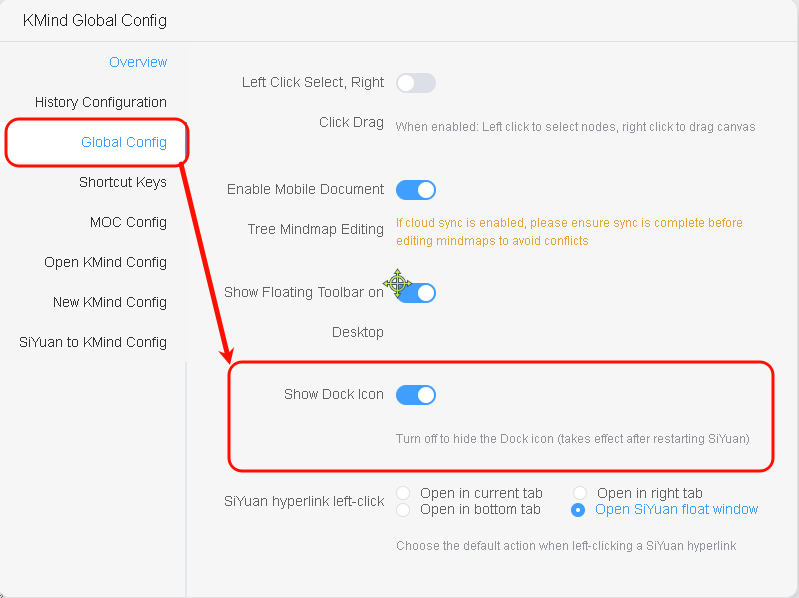
31 | 4. 新增内置一系列的快捷键,开箱即用,禅模式,超链接等等,并且可以随意配置快捷键,保存后立即生效;快速上手:右上角KMind 全局配置 -> 快捷键配置
32 |
33 | 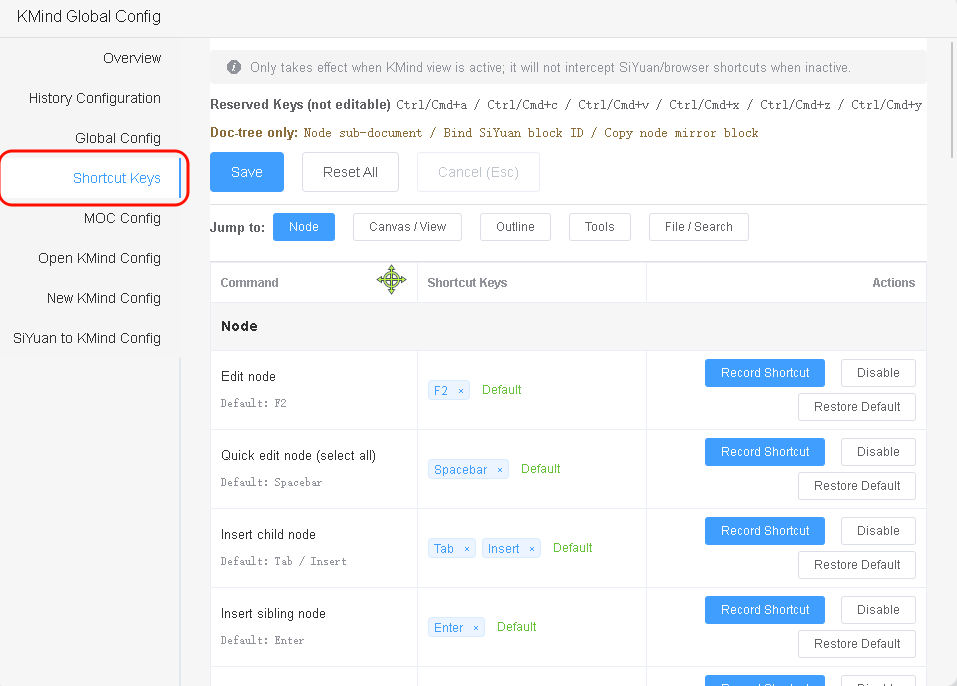
34 |
35 | ## 修复 & 优化:
36 |
37 | 1. 修复多根模式下,大纲展开空白的Bug
38 | 2. 修复多根模式下,导入导出部分文件失效的Bug
39 | 3. 优化切换tab页 & 打开无需历史版本的导图,控制台输出debugger信息的问题
40 | 4. 当修改全局快捷键后,导图中对应的快捷键提示会同步更新
41 |
42 | # KMind v2.13.1 多根支持不同布局 & 主题
43 |
44 | ## 更新摘要
45 |
46 | 该版本进一步优化了多根体验,支持为每个根设置不同的主题与布局,并补足了一系列交互体验。
47 |
48 | 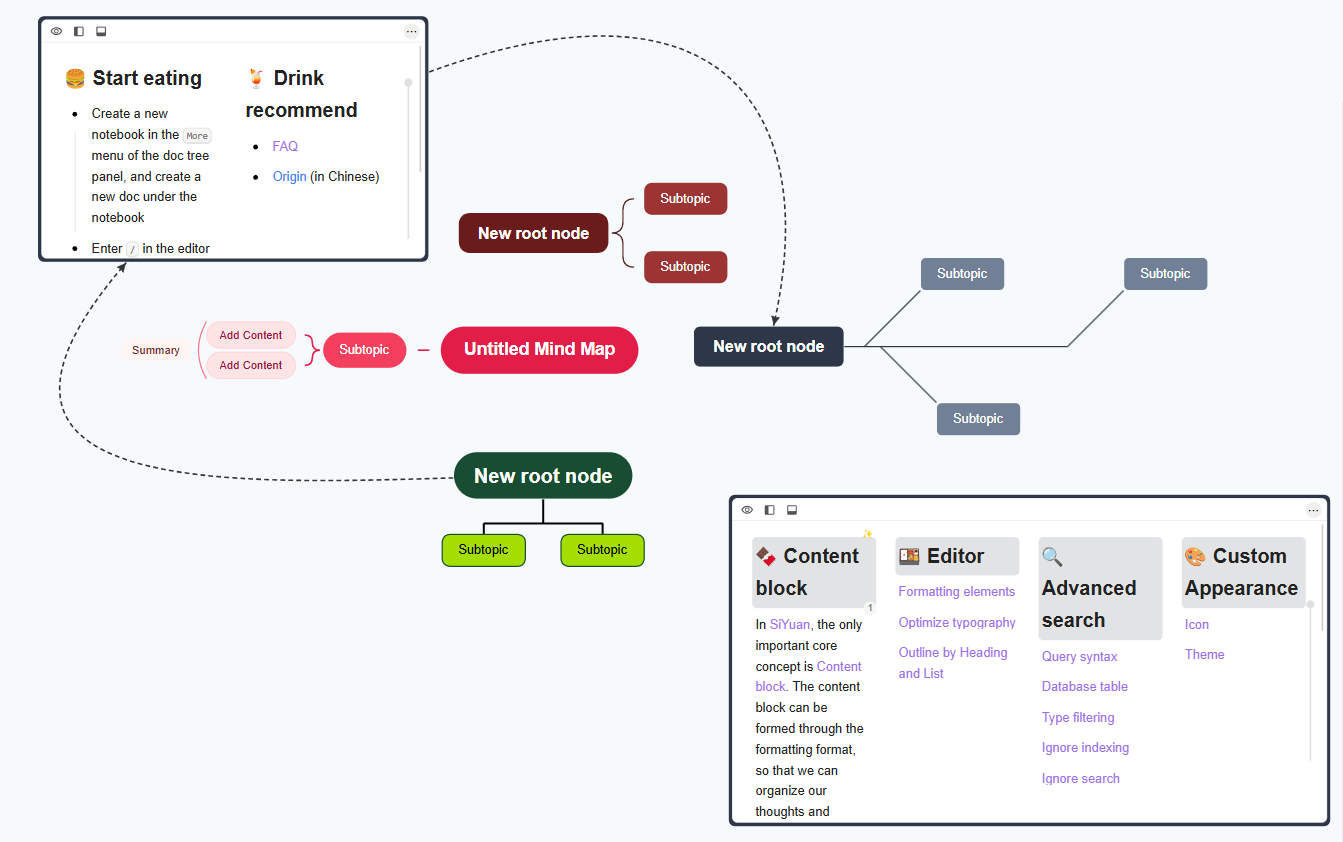
49 |
50 | ## 新增
51 |
52 | 1. 支持为每个根单独设置主题 & 布局
53 |
54 | 
55 | 2. 优化子节点拖拽成为新根节点的交互
56 |
57 | 
58 | 3. 新增根节点收缩功能
59 | 4. 根节点新增删除逻辑,首次Del键可以删除子节点,再次Del即可删除根节点
60 | 5. 新增节点思源超链接icon单击的全局配置
61 |
62 | 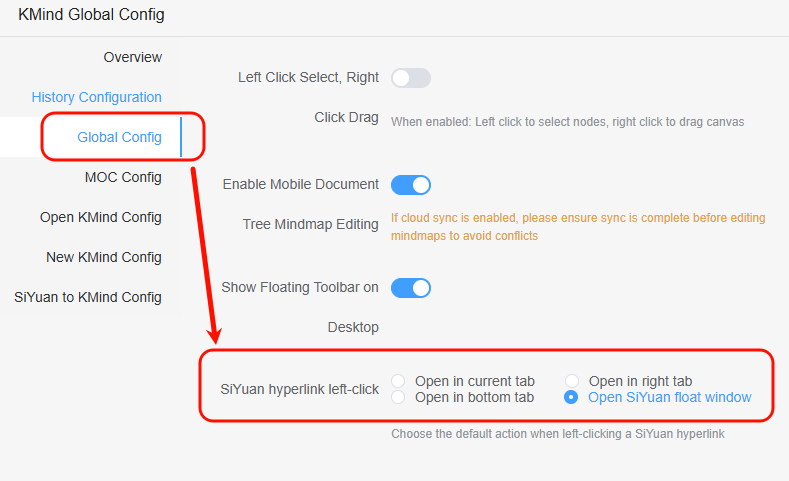
63 |
64 | ## 修复 & 优化
65 |
66 | 1. 修复彩虹线条在多根模式下报错的Bug
67 | 2. 优化添加根节点逻辑,避免二次刷新,优化性能
68 | 3. 优化搜索框样式,避免出现预期外的阴影
69 | 4. 修复搜索框的关闭按钮被截断的问题
70 |
71 | # KMind v2.13.0 支持多根模式
72 |
73 | ## 说明:从今年6月15日写下的第一行多根功能的代码起,到现在已经过了半年,也经历了"古法"编程到AI Coding的变迁;现在我开心的宣布,KMind已经正式支持多根节点!无论是挂件的导图,亦或是Dock栏的导图,还是思源文档树的文档树导图,都支持多根节点功能!并且,现有数据会在主动创建第二个根节点的时候,自动迁移到最新数据结构,**无需任何手动操作!**,大家可以在已存在的导图中,直接双击空白画布,即可创建额外的根节点!
74 |
75 | ## 推荐的最佳实践:
76 |
77 | 强烈建议大家使用Dock栏导图或者文档树导图,然后在KMind全局配置中,设置打开导图时自动进入禅模式;这样进入导图的时候,即可自动隐藏无关的操作按钮,不仅可以获得更大的编辑视野,更内嵌的体验,还能使用更多的功能!
78 |
79 | 接下来将以功能支持最全的`文档树导图`演示本次多根节点的玩法:
80 |
81 | 1. 在思源文档树中创建一张KMind导图,设置喜欢的主题和样式
82 |
83 | 
84 | 2. 双击即可创建额外的根节点
85 |
86 | 
87 | 3. 复制想要嵌入的思源块id,右键节点即可绑定该思源块并渲染。(Dock导图暂时不支持该功能)
88 |
89 | 
90 | 4. 渲染的思源块可以拖拽大小,可以通过快捷操作栏选择在何处打开该块
91 |
92 | 
93 | 5. 渲染的思源块,本质上可以看作思维导图的节点,所以可以任意的创建子节点,创建关联线,拖拽到其它任意位置
94 |
95 | 
96 | 6. 经过上述的双击创建多根节点的操作后,拖拽任意子节点到画布空白处,超过2秒,即可将该子节点作为新的根节点
97 |
98 | 
99 | 7. 使用节点的TODO功能,可以创建轻量的TODO根节点,用完即删
100 |
101 | 
102 | 8. 使用节点子文档功能,可以快速创建思源子文档,实践轻量的,可以自主控制的 MOC(Dock导图暂时不支持该功能)
103 |
104 | 
105 | 9. 使用节点超链接功能,从任意位置直达导图的任意节点
106 |
107 | 
108 |
109 | ## 注意:
110 |
111 | 本版本为多根模式初版,有很多交互尚在完善中,将根据大家的建议慢慢改进;嵌入的思源块数量取决于设备性能,不建议维护大量的思源块在同一张导图上;
112 |
113 | # KMind v2.12.0 节点支持直接渲染思源块,支持((快捷引用思源文档
114 |
115 | ## 说明:此版本的文档树导图的节点,可以直接渲染思源块,还能在编辑的时候使用思源的 `((` 快捷键快速引用思源文档
116 |
117 | ## 新增:
118 |
119 | 1. 文档树导图的节点可以直接渲染思源块啦,具体能渲染多少个,取决于机器配置
120 |
121 | 
122 | 2. 节点直接编辑的时候,可以输入 `((` 或者 `{{` 直接引用思源文档,交互同思源原生基本一致;注意弹出框编辑暂不支持该快捷方式
123 |
124 | 
125 | 3. 思源文档树的右键菜单,支持插入平级的KMind文档树导图啦
126 |
127 | 
128 | 4. 节点新增化学方程式支持,弹出框编辑暂不支持
129 |
130 | 
131 | 5. 思源文档一键转KMind导图,过滤空块,嵌入块显示SQL,映射标签,新增代码块显示支持,优化icon适配,适配思源原生引用,支持公式
132 |
133 | 
134 |
135 | ## 修复:
136 |
137 | 1. 修复思源文档一键转KMind导图的时候无法加载图片的问题
138 | 2. 修复移动端 MOC 导图切换文档的时候,不能正确销毁导图的问题
139 |
140 | ## 其它:
141 |
142 | KMind的[主题分享网站](https://share.kmind.app/themes)新增了 8 个括号线条风格的主题,快去瞅瞅吧
143 |
144 | # KMind v2.11.0 新增括号连线风格与 Markdown 文本导入
145 |
146 | ## 新增
147 |
148 | - 新增括号连线风格(仅在特定布局下可用),搭配彩虹线条效果更佳
149 | 
150 | - 主题编辑器支持括号连线风格与节点外边距配置
151 | 
152 | - 导入弹窗支持直接粘贴 Markdown 文本,整体优化 Markdown 导入效果
153 | 
154 |
155 | # KMind v2.10.2
156 |
157 | ## 修复
158 |
159 | - 修复节点内联编辑无法输入斜杠 `/` 的问题(会误触展开/收起节点快捷键)
160 | - 修复 DOM 模式下使用弹框编辑节点时,`Ctrl+A` 等编辑快捷键无法生效的问题
161 |
162 | # KMind v2.10.1
163 |
164 | ## 修复
165 |
166 | - 修复 moc 模式引发的偶发性快捷键失效 Bug
167 | - 修复 i18n warn, 优化性能
168 |
169 | # KMind v2.10.0,新增MOC模式
170 |
171 | ## Hi~经过一段时间的设计 & 吸取了热心群友的交互建议,又一个重磅大功能来啦:KMind MOC 模式!!
172 |
173 | ## 新增:
174 |
175 | 1. KMind MOC模式,将文档树以导图的形式展示,节点与思源文档呈一一对应关系,功能入口:右键任意思源文档->插件->KMind->切换MOC模式
176 |
177 | 
178 |
179 | - 跟以往的节点关联思源子文档功能有什么区别呢?以往的非MOC导图可以任意添加节点,用户自行控制节点是否关联思源文档;而MOC导图为实时渲染,导图内容与思源文档树为强对应关系,导图自身的功能受限;
180 | - 有一些需要注意,由于创建节点需要同步创建思源文档,请不要在极短时间创建大量节点,某些大量创建节点的功能也会在MOC模式中被禁用,后期可能会视情况酌情优化后开放;
181 | - 多数边界情况已经做了拦截,如果出现问题,可以右键MOC导图刷新即可;
182 | - 默认有两种打开节点对应文档的方式,通过超链接icon or 通过悬浮工具栏;
183 | - 全局配置可以更改MOC导图的配置,例如是否展示超链接,设定MOC导图的默认主题与布局等,设定展示悬浮窗的等待时间等;
184 |
185 | 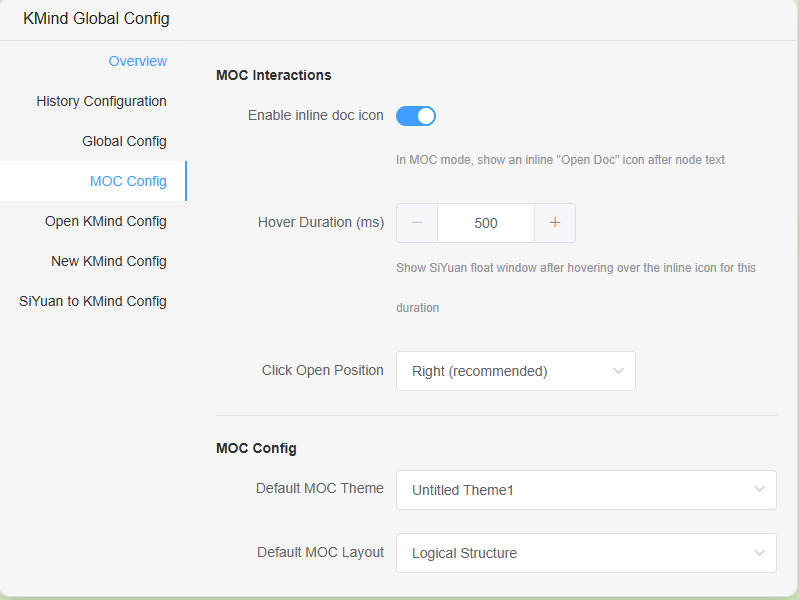
186 | 2. 节点图片直接复制功能;
187 |
188 | 
189 | 3. 全局只读功能,可以在全局配置中,设定全局只读状态,避免误操作
190 |
191 | ## 修复:
192 |
193 | 1. 修复概要索引问题导致的删除概要前的节点,可能导致概要直接被删除的bug
194 | 2. 修复只读模式下,关联线仍然能被修改的bug
195 | 3. 修复只读模式下,底栏避让不会复原位置的bug
196 |
197 | ## 碎碎念:
198 |
199 | 大家快去KMind主题分享网站( https://share.kmind.app )分享做好的主题吧!这次示例图使用的主题就是主题分享网站上的 抹茶绿 主题~
200 |
201 | 主题设计器位置:思源右上角的KMind菜单->主题设计器,设计完成后,点击分享即可~
202 |
203 | # KMind v2.9.2 修复文档树导图的搜索会呼出思源搜索框的Bug,新增搜索框自动聚焦的功能
204 |
205 | # KMind v2.9.1 修复空格快捷键Bug
206 |
207 | # KMind v2.9.0 重构底层,新增节点超链接,主题设计器
208 |
209 | ## 说明:大家好,经过几个月的重构,KMind 2.9.0 版本已经蓄势待发~~非常感谢十多位热心群友的测试。本次重构目的是为了更好的跟思源整合,为之后的思源块与导图直接交互,MOC等高级功能做铺垫。
210 |
211 | ## 新增:
212 |
213 | ### 1. 新增全局节点超链接,您可以将此超链接放到任意外部软件,比如 Anki,或者其它任意外部软件内,点击超链接后,即可打开思源跳转到指定导图的指定节点
214 |
215 | 
216 |
217 | ### 2. 新增主题设计器 & 分享功能,设计完主题并保存后,即可在任意kmind导图和全局配置中使用该主题,并且可以快速分享给其他人,也能快速导入其他人分享的主题~
218 |
219 | 注意:设计完主题并保存后,需要重新打开导图,方可选取最新设计的主题
220 |
221 | 
222 |
223 | ### 3. 上线全新主题分享网站
224 |
225 | 欢迎大家去玩:https://share.kmind.app
226 |
227 | ### 4. 重构全局配置,主题 & 结构 下拉新增预览图
228 |
229 | 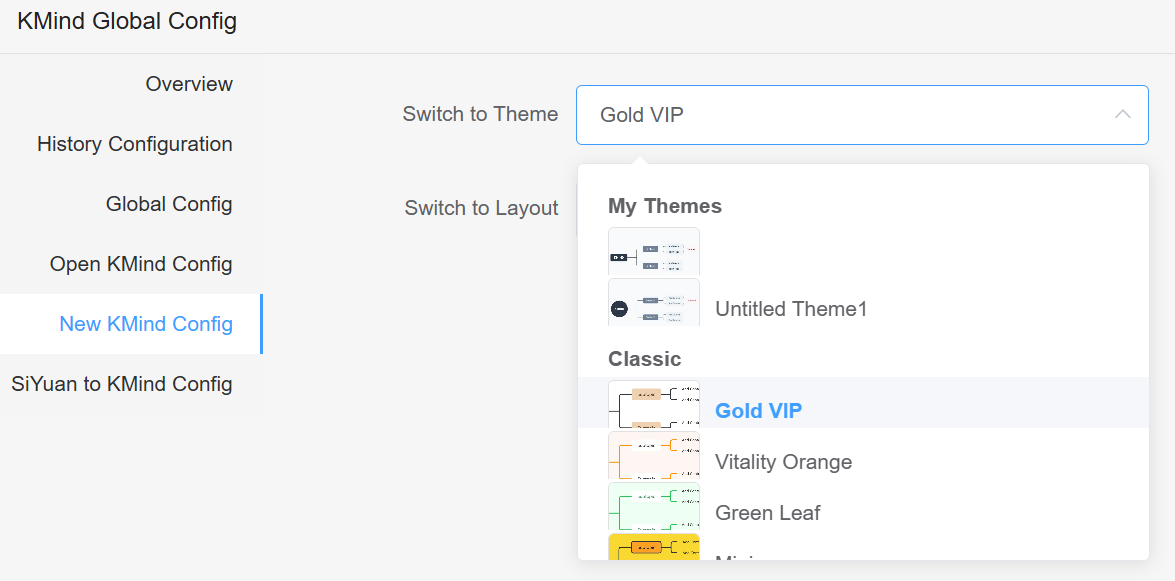
230 |
231 | ### 优化 & 修复:
232 |
233 | ### 1. 优化导图的主题预览图 & 结构预览图,适配自定义主题
234 |
235 | ### 2. 修复节点跳转思源块某些情况下无法准确定位的Bug
236 |
237 | ### 3. 修复新版本思源中,非官方主题KMind的icon显示不出来的Bug
238 |
239 | # KMind v2.8.1 优化悬浮工具栏体验,新增全局配置
240 |
241 | ## 说明:此版优化了悬浮工具栏的体验,新增了全局配置,新增去除思源PDF链接功能
242 |
243 | ## 新增:
244 |
245 | ### 1. 新增全局配置,可以配置桌面端是否显示悬浮工具栏,默认显示
246 |
247 | ### 2. 新增去除思源PDF超链接功能,入口:右键->选择移除思源PDF关联
248 |
249 | ### 优化:
250 |
251 | ### 1. 优化悬浮工具栏体验,在某些情况下会自动隐藏,并且会跟随节点的编辑动态更新位置
252 |
253 | ### 2. 重构全局配置的设置页面
254 |
255 | # KMind v2.8.0 新增直觉按钮,新增直接跳转PDF标注,移动端开放文档树导图编辑
256 |
257 | ## 说明:此版优化了底层数据结构,直观的效果就是kmind的存储空间普遍可以降低30%左右,开放了移动端的文档树导图的编辑,并且新增了移动端方便使用的直觉按钮,新增了PDF的标注直接跳转功能
258 |
259 | ## 新增:
260 |
261 | ### 1. 内部迭代了几个版本,kmind原创的"直觉按钮"上线啦,推荐搭配禅模式使用,隐藏其它工具栏,按住直觉按钮拖拽,可以以当前节点为中心,便携的创建节点~
262 |
263 | 
264 |
265 | ### 2. 文档树导图创建的时候,会自动应用文档标题为根节点的文本
266 |
267 | 
268 |
269 | ### 3. 新增全局配置,移动端可以开启文档树导图的编辑了
270 |
271 | 注意,虽然目前kmind已经做了很多同步相关的优化,但是为了避免多端冲突,请确保编辑导图前已经同步完毕!!
272 |
273 | ### 4. 新增PDF标注直接跳转功能
274 |
275 | 在思源的PDF中标注后,只需要点击复制标注,然后直接在节点上粘贴,kmind会自动解析标注数据,点击后即可直接跳转到指定的PDF标注位置
276 |
277 | 
278 |
279 | ## 优化 & 修复:
280 |
281 | ### 1. 去除unocss库,改用纯原生css,以此修复思源文章复制到微信公众号会样式丢失的奇怪bug;
282 |
283 | ### 2. 移动端dock栏新增不可用提示,如果你想要在移动端使用kmind,可以试试挂件版kmind和kmind的文档树导图;
284 |
285 | ### 3. 隐藏思源tab页展示kmind的时候,意料之外的滚动条;
286 |
287 | ### 4. 修复freemind导出bug;
288 |
289 | ### 5. 文档树导图的节点子文档默认会在右侧打开;
290 |
291 | ### 6. 优化镜像块和子节点镜像块逻辑,自动居中;
292 |
293 | ### 7. 优化初次加载的loading提示;
294 |
295 | ### 8. kmind超链接解析适配思源最新版v3.1.26+
296 |
297 | ## 最后的重要说明!!:
298 |
299 | 本次kmind更新包含了上游库的破坏性的底层数据更新,但是kmind尽力做了兼容,打开导图即可无感更新到最新数据结构,带来的好处是显而易见的,减少了底层数据的大小(通常会降低百分之30左右的存储占用),减少了复制节点的时候的奇奇怪怪的样式bug;缺点是,老kmind导图切换主题的时候,会发现有些样式不能被新主题覆盖,不完美的解决办法是,右键导图,选择`一键去除所有节点自定义样式`,(这样会将你手动定义的样式一并去除)即可顺利应用新样式了。
300 |
301 |
302 |
303 | # KMind v2.7.0 新增子节点镜像块,文档树导图对接思源全局搜索(初版)(2025年2月12日)
304 |
305 | ## 说明:新增文档树导图的镜像块功能,并额外支持添加节点镜像块;文档树导图对接了思源的全局搜索功能(初版,会有一些限制);新增直接复制节点为图片功能;悬浮预览适配最新的思源接口(v3.1.20+),同时兼容旧接口。
306 |
307 |
308 |
309 | ## 新增:
310 |
311 | ### 1.文档树导图也有镜像块啦~快速上手:右键文档树导图->插件->KMind->复制镜像块,然后直接在思源的任意位置ctrl+v粘贴即可!
312 |
313 | 
314 |
315 | ### 2.文档树导图的节点也能有镜像块啦~快速上手:右键任意节点->选择复制节点镜像块,然后直接在思源的任意位置ctrl+v粘贴即可!
316 |
317 | 注意,节点镜像块在某些主题下效果不佳,并非bug,而是主题的背景色和节点文本颜色重合了,看起来像是空白节点。请自行探索一下合适的主题吧~
318 |
319 | 
320 |
321 | ### 3.文档树导图的节点文本内容可以被思源的全局搜索到了!
322 |
323 | 但是还是有点小问题,目前只有新建的文档树导图的内容会被搜索到,如果想要旧的文档树导图可以被搜索到,需要手动去更新一下旧的文档树导图(比如添加一个节点,然后删除这个节点)。等到该功能稳定后,会开放 "一键为旧的文档树导图对接思源搜索" 的功能,届时旧导图无需手动操作即可被全局搜索到
324 |
325 | 
326 |
327 | ### 4.新增一键复制节点为图片的功能,快速上手:右键任意节点->复制节点为图片;你甚至可以直接右键根节点复制为图片,快速将整张导图分享给别人(节点多的话,会根据电脑配置的不同存在不同的延迟)
328 |
329 | 由于浏览器安全策略等原因,此功能只保证客户端可用,其他端如果暂时无效,会根据反馈酌情适配。
330 |
331 | 
332 |
333 | ## 优化和修复:
334 |
335 | ### 1.适配思源(v3.1.20+)的新版api,老版本思源和新版本思源都可以Alt+左键单击节点超链接来悬浮预览了~
336 |
337 | ### 2.修复导入的时候,彩虹线条配置没有导入保存的问题;
338 |
339 | ### 3.修复打开一张导图直接导出,导出数据为空的问题;
340 |
341 | ### 4.修复一些i18n的文案错误;
342 |
343 | ### 5.使用方向键切换子节点的时候,默认只激活节点,不会将该节点居中了;
344 |
345 | ### 6.优化镜像块性能与节点镜像块性能,更新主导图,镜像块不会闪一下了;
346 |
347 | ### 7.适配思源版本v3.1.21更新的文档树行为,此前会导致创建文档树导图的时候提示失败,实际上创建成功。
348 |
349 |
350 |
351 | ## 其它:
352 |
353 | ### 1.由于一些原因,如果你打开了一张kmind导图,然后立即切走这个tab页,会导致导图app找不到要挂载的tab页DOM节点而失败,表现为一直转圈。数据没有任何损坏,只是导图app加载失败了,只需要重新开关一下这张导图就行了,正在寻找优化解决方案ing。。。
354 |
355 | ### 2.有用户反馈复制思源文本到微信公众号,微信公众号无法保留样式,经过我长时间的排查,是本插件使用的unocss库导致的问题(其实我觉得是微信的问题,但是谁叫微信体量大2333),正在迁移到tailwindcss,预计两个版本内迁移完毕,如果出现此问题,只需要临时禁用本插件即可;还有需要注意的是,我开发的knote也使用了unocss框架。
356 |
357 |
358 |
359 | ### KMind v2.6.2 新增一键转导图直接插入文档树,节点checkbox,freemind导入导出 (2024年12月19日)
360 |
361 | #### 说明:一键转KMind新增直接插入到文档树功能,新增freemind导入导出,节点checkbox功能,新增创建导图时候的命名功能,还有一些体验上的优化
362 |
363 |
364 |
365 | #### 新增:
366 |
367 | ##### 1. 一键转导图的时候,可以右键导出为思源文档的子导图了,一键将转换后的导图插入到思源文档树中,快速上手:右键->导出->选中文档子导图->确认
368 |
369 | 
370 |
371 | ##### 2. 新增freemind导入导出功能
372 |
373 | 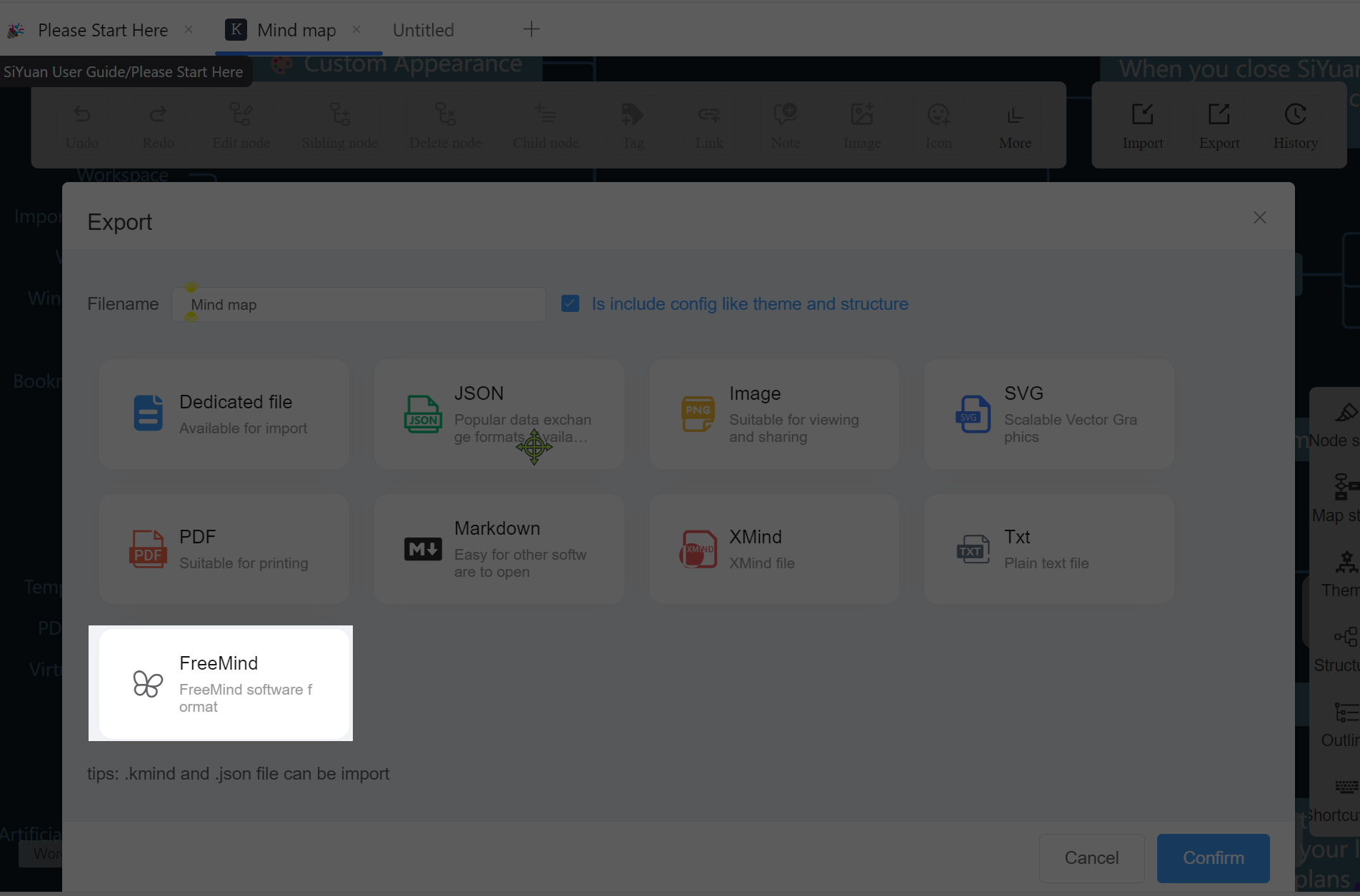
374 |
375 | ##### 3. 新增节点checkbox功能
376 |
377 | 
378 |
379 | ##### 4. 文档树导图创建的时候,可以自定义名称了(当然你也可以直接点确定)
380 |
381 | 
382 |
383 | #### 优化:
384 |
385 | ##### 1. 当在桌面端设置了全局配置中的左键选择,右键拖拽后,移动端会默认忽略这个配置,以免无法拖动导图
386 |
387 |
388 |
389 | ##### 2. 当导图数据无实际变化的时候(注意,折叠节点就算实际变化了),默认不触发视图数据保存,此举的好处是,当你打开一张导图,拖拽查看的时候,不会更新这张导图的源文件,最大限度避免同步冲突
390 |
391 |
392 |
393 | ##### 3. 优化关联线编辑,自定义颜色等
394 |
395 |
396 |
397 | ##### 4. 还有一些体验上的小优化
398 |
399 |
400 |
401 | #### 其它:
402 |
403 | ##### 1. 更新i18n,升级底层库
404 |
405 |
406 |
407 | ##### 2.征集一下svg格式的超链接icon,需求是当节点的超链接为思源的块超链接的时候,需要显示一个跟思源相关的icon,这个icon需要能够与当前所存在的icon区分开来,采纳后赠送一个kmind年付订阅作为答谢 ;p
408 |
409 |
410 | ### [v2.6.1(2024年12月16日)](https://docs.kmind.app/changelog/kimind-v261-global-configuration-of-one-click-transition-map-1hoxvv.html)
411 |
412 | #### 说明:新增思源文档一键转KMind的全局配置,可以配置转换后显示的主题,结构等等,去除了一些日志,优化性能,修复一些bug
413 |
414 | 
415 |
416 |
417 | #### 新增:
418 |
419 | ### 1.思源文档一键转KMind的全局配置,现在可以自定义转换后的主题和结构
420 |
421 |
422 | #### 修复:
423 |
424 | ### 1. 修复全局配置"左键拖拽右键选择"的文案错误
425 |
426 | ### 2. 修复一键转KMind时,导出会弹框两次的bug
427 |
428 | ### 3. 修复彩虹线条配置第二次保存失败的bug
429 |
430 |
431 | #### 其它:
432 |
433 | ### 1. 更新导图保存逻辑,旧导图初次渲染,拦截首次的自动保存操作
434 |
435 | ### 2. 去除一些不必要的日志log,优化性能
436 |
437 | ### [v2.6.0(2024年11月29日)](https://docs.kmind.app/changelog/v260.html)
438 |
439 | #### 说明:新增了全局配置功能,可以使用KMind插件设置全局导图的行为,包括文档树导图,dock栏导图,挂件导图。新增智能粘贴思源超链接为节点超链接
440 |
441 | #### 新增:
442 |
443 | ##### 1.新增快速粘贴思源超链接为节点超链接的功能:
444 |
445 | 以往需要复制siyuan://开头的思源超链接,然后点击节点,点击超链接按钮,点击确认;
446 |
447 | 现在不需要这么麻烦啦!直接复制思源的超链接,然后选中节点,ctrl+v粘贴即可。
448 |
449 | 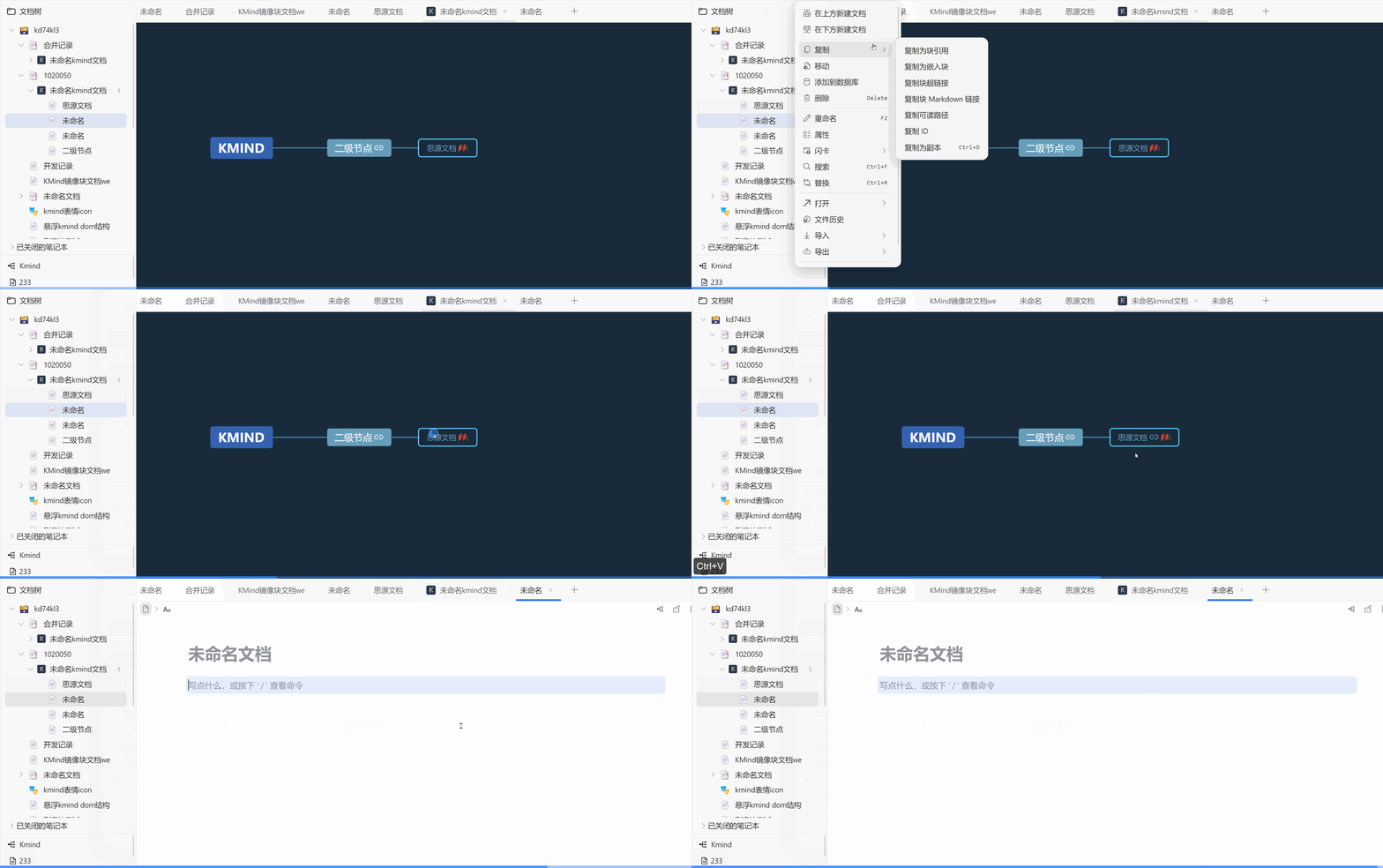
450 |
451 | ##### 2. KMind全局配置,可以一键配置所有导图的默认行为,当前开放了:1.鼠标左键选择右键拖拽配置;2.打开导图的时候自动进入禅模式的配置;3.创建导图(包括文档树导图,dock栏导图,挂件导图)默认选择主题,选择默认结构(pro)
452 |
453 | 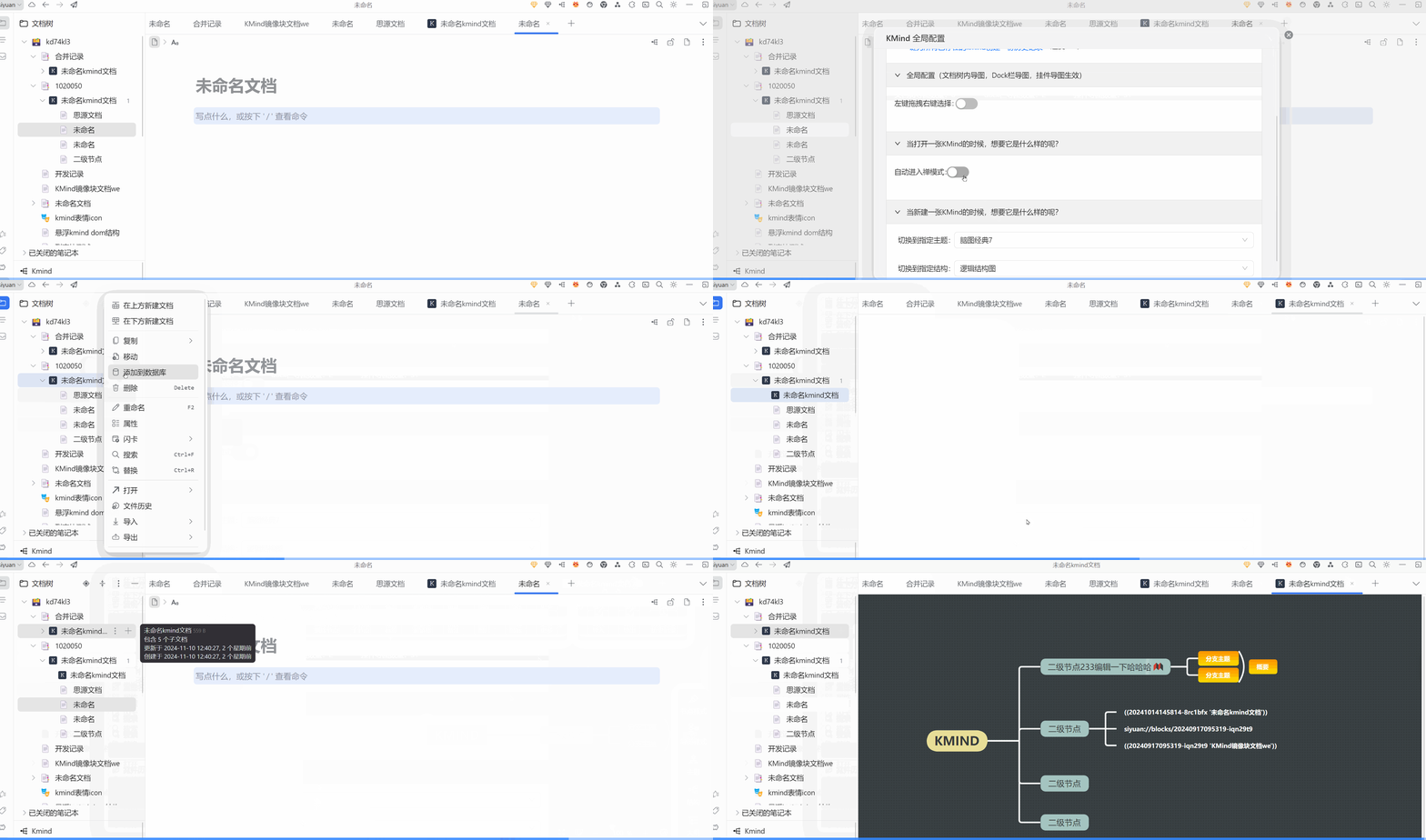
454 |
455 | #### 优化:
456 |
457 | ##### 1. 去除底部工具栏切换语言下拉,自动适配思源i18n
458 |
459 | ##### 2.优化一些性能问题,修复一些不影响功能的报错log,优化批量格式刷性能
460 |
461 | #### 其它:
462 |
463 | 以上标注为pro的功能为本版本限免,无需付费即可使用 :P
464 |
465 |
466 |
467 | ### [2.5.0(2024年11月11日)](https://siyuannote.space/x/20241111153508-dx2yrwp)
468 |
469 | 说明:新增数据兜底保护策略,保存的时候会拦截异常数据的写入;新增历史记录功能;最大化保护数据
470 |
471 | 新增:
472 | - 历史记录功能,文档树导图,dock栏导图和挂件导图均可用。功能说明,会在数据变动的时候,自动每隔6分钟保存一份历史记录,基于存储空间的考量,目前最多保存3份,旧的会被自动删除:
473 | - kmind概览功能:可以在全局配置里查看当前工作空间的导图数量(pro)
474 | - 一键为已存在的导图创建固定历史版本功能(pro)(使用此功能创建的历史版本不会自动清理,可以手动删除)
475 | - 新增保存数据的时候的兜底保护策略,自动拦截异常数据的写入,避免潜在的导图数据丢失风险
476 |
477 | 优化:
478 | - 去除一些非必要的console,优化性能
479 |
480 | 其它:
481 | - 以上标注为pro的功能为本版本限免,无需付费即可使用,将在月底的涨价版本发布后取消限免 :P
482 |
483 | ### 2.4.3(2024 年 10 月 29 日)
484 |
485 | 说明:更新底层库,带来了拖拽调整节点大小,原地编辑等效果,新增节点思源子文档快捷打开位置悬浮按钮
486 |
487 | 新增:
488 |
489 | - 新增拖拽调整节点大小
490 | - 新增节点子文档快捷指定打开位置的悬浮按钮
491 |
492 | 优化:
493 |
494 | - 编辑默认为原地编辑效果
495 |
496 | ### 2.4.2(2024 年 10 月 8 日)
497 |
498 | 修复:
499 |
500 | - 修复了非思源超链接类型的超链接无法正常跳转的 bug
501 | - 修复部分设备激活状态无法保存的 bug
502 |
503 | 新增:
504 |
505 | - 新增根据订单号找回激活码功能
506 |
507 | ### 2.4.1-plugin.1(2024 年 10 月 6 日)
508 |
509 | 说明:
510 |
511 | - 更新插件适配思源版本说明,请更新思源版本到 3.1.8 及以上后使用本插件
512 |
513 | ### [v2.4.0(2024 年 10 月 5 日)](https://siyuannote.site/x/20241005113503-s68860l)
514 |
515 | 说明:
516 |
517 | - 新增了直接在思源文档树中创建 KMind 文档的能力,新增节点右击创建思源节点子文档,以适配 MOC 流程~
518 |
519 | 新增:
520 |
521 | - 现在可以直接在思源文档树中创建 KMind 文档,操作方法:右键文档树 -> 插件 -> KMind -> 创建 KMind 文档(pro)
522 | - 新增节点直接创建关联思源文档功能;操作方法:选中节点 -> 右键节点 -> 点击 '节点子文档'(pro)
523 |
524 | 优化 & 修复:
525 |
526 | - 优化 KMind 中对思源超链接的处理,现在无论是移动端,docker 端,还是 PC 端,都能在思源内部正确的跳转到指定的思源块,不会出现 docker 端点击超链接,会拉起本机 PC 端的情况了
527 | - 修复挂件初次渲染的时候,没有自动进入禅模式的 bug
528 | - 优化 KMind 在移动端的展示效果,目前仅可查看不可编辑,编辑请在 PC 端进行
529 |
530 | 缺陷:
531 |
532 | - 由于 KMind 的源文件保存粒度是整个文档保存,所以请不要在同一时空同时打开同一张 KMind 导图!否则会出现数据相互覆盖的情况,包括的危险操作如下:
533 | - 多端打开同一张导图(是的,同时打开也会导致冲突,因为 KMind 还会存储视图数据到源文件中,一旦你打开了拖拽查看了的话,视图数据就会更新,这个时候,多端的数据就会不一致了)
534 | - 向右 or 向下 分屏操作同一张导图
535 | - 其它同时打开同一张导图的情况...
536 | - 打开文档树中的 KMind 文档的时候,如果第一个 KMind 文档没有加载完毕就切换到第二个 KMind 文档,那么第一个 KMind 文档会一直加载不了,这个时候重新开关一下第一个 KMind 文档就行了(数据是安全的,不会丢失)
537 | - 由于上面提到的原因,移动端目前仅开启查看功能
538 |
539 | ### [v2.3.1(2024 年 9 月 29 日)](https://ld246.com/article/1727602784074)
540 |
541 | 说明:
542 |
543 | - 优化了挂件的使用方式,优化了挂件和镜像块蒙版的展示效果,优化底部工具栏的展示位置
544 |
545 | 新增:
546 |
547 | - 新增了挂件的快捷穿透蒙版功能:按住 ctrl 键+左键单击节点,可以快速聚焦节点,直接进行编辑
548 | - 底部工具栏新增禅模式按钮,现在移动端不必调出右键菜单就能直接进入禅模式了
549 | - 新增了镜像块的一键跳转编辑功能,点击镜像块的右上角,即可跳转到源导图进行编辑(pro)
550 |
551 | 优化:
552 |
553 | - 优化了挂件和镜像块蒙版的展示效果,现在只有鼠标划上去,才会展示蒙版提示
554 | - 优化底部工具栏的位置,现在会随着侧栏的展开而动态更改位置了,避免被覆盖
555 |
556 | ### v2.3.0(2024 年 9 月 21 日)
557 |
558 | 说明:
559 |
560 | - 优化了镜像块的使用手感,镜像块,一键转 kmind,插件导图自适应思源黑暗模式,并同步了上游库的一些功能与更新
561 |
562 | 新增:
563 |
564 | - UI 界面自动适配思源的黑暗模式
565 | - 导出水印自定义
566 | - 思源文档一键转 KMind 功能新增解析图片;(pro)
567 | - 备注:技术限制,图片大小默认强制为 100*100,双击节点即可自动调整
568 | - 思源文档一键转 KMind 功能自适应黑暗模式;(pro)
569 | - 镜像块新增蒙版:防止误操作 & 捕获思源笔记页面滚轮;(pro)
570 |
571 | 其它:
572 |
573 | - 去除一些日志输出,优化性能
574 |
575 | ### v2.2.0-plugin.1(2024 年 9 月 18 日)
576 |
577 | 说明:
578 |
579 | - 优化性能,更新捐赠单号说明
580 |
581 | ### v2.2.0(2024 年 9 月 17 日)
582 |
583 | 说明:
584 |
585 | - 中秋快乐~此为中秋特别版
586 | - 加入了大家期待已久的付费功能 - -!付费指引[点我查看](https://siyuannote.space/x/20240917120223-roa3lpm),以下有 `(pro)`后缀的功能为付费功能
587 | - 建议在 PC 端扫码付费,然后通过思源的云同步,将 KMind 付费状态同步到移动端,移动端同步后,重启一下移动端的思源即可。
588 |
589 | 新增:
590 |
591 | - 新建导图的时候,侧边操作栏默认隐藏;
592 | - 新增思源文档一键转 KMind 功能,功能查看以及说明[点我查看](https://siyuannote.site/x/20240917102811-jx1umib)(pro)
593 | - 新增 KMind 镜像块功能,功能查看以及说明[点我查看](https://siyuannote.site/x/20240917094117-jeem5c6)(pro)
594 |
595 | 优化:
596 |
597 | - 优化镜像块的性能
598 |
599 | ## 使用方式
600 |
601 | 1.在插件市场安装并启用后,在左下角找到 kmind 的 dock,然后点击新建即可
602 | 
603 |
604 | 2.快捷键的说明详见插件菜单(挂件遇到此问题同理)
605 | 
606 |
607 | ## 反馈
608 |
609 | 如果你需要反馈,可以去我的 github 仓库提交[issue](https://github.com/suka233/siyuan-kmind-plugin/issues),如果你没有 github 账号,可以[点我反馈](https://txc.qq.com/products/662653)。如果你要捐赠我,可以[点我](https://wj.qq.com/s2/12591272/adf1/),
610 | 或者去我的 github 仓库给[本插件](https://github.com/suka233/siyuan-kmind-plugin/issues)点一颗 star 吧~
611 |
612 | ## 付费
613 |
614 | kmind 插件的基础编辑功能永久免费使用,不限制导图数量,也不限制节点数量。~~之后与思源或者外部结合的高级功能可能需要付费 (目前此插件收益负 50 元,因为我向上游库的导图库作者捐赠了 50 元 😋 ),等到正式付费,各位的捐赠金额可以双倍抵扣 kmind 费用。~~
615 |
616 | kmind pro 版本已经上线,不会影响免费版使用,只是多了两个跟思源结合的 pro 功能。请在发布日前的捐赠过的用户输入自己的转账单号,即可自动计算抵扣金额,注意,由于微信捐赠码设计原因(付款方转账单号和收款方转账单号不一致),所以请先加 qq 群私聊我你的转账单号。。!
617 | 有任何疑问请 qq 群联系我:QQ 交流群号:[130584086](https://qm.qq.com/cgi-bin/qm/qr?k=ViZ2ouiFw8LF5Zx1fg1SQUr1Y0bH1FAR&jump_from=webapi&authKey=UR61OGV1muKUgQZFTdBuxgdcXDWm2TLGisL5RZ9X6VYRY7NPM32L4ciyF426+qPF)
618 |
619 | 感谢各位的捐赠,时间有限,不能一一列出~。~ 主要是懒
620 |
621 | ## 缘起
622 |
623 | 思源笔记是一款我很喜欢的笔记软件,但是它的导图功能却不是很完善,而我恰好是思维导图重度使用者
624 |
625 | 一直以来都是用的 xmind 做笔记,规划生活等等,但是由于 xmind 比较贵,并且绑定设备,而且必须要使用 xmind 客户端才能打开,
626 | 拥有多台设备的我感觉很痛苦,并且在与其它软件或者生态的联动方面,xmind 一直都迟迟不做改进。
627 |
628 | 所以我基于开源库开发了思源思维导图挂件:[kmind](https://github.com/suka233/siyuan-Kmind)。
629 | 后来,思源的目录插件作者[@TinkMingKing](https://github.com/TinkMingKing)建议我开发一个插件版思维导图,
630 | 我想想,确实,挂件版本的 kmind 由于只能插入到某篇具体的文档中,和单篇文档高度相关,无法覆盖所有的思维导图应用场景,所以这个插件就诞生啦~
631 |
632 | 高强度使用此插件半个多月的我突然发现,我已经好久没有打开过 xmind 了,所以,xmind 你以后不要打电话来了,我怕 kmind 误会 :p
633 |
634 | ## kmind 特点
635 |
636 | 1.随意导入 or 导出 xmind 文件,并且额外支持导出为图片、markdown、svg 文件,以及通用的 json 文件,这也是我从 xmind 转为 kmind 的底气
637 | 
638 |
639 | 2.现代化的设计:采用了蚂蚁的 Ant Design UI 组件库,界面简洁大方
640 |
641 | 3.高度可配置:支持自定义主题、结构、节点的字体、字号、并且可以配置新建导图的默认动作,比如新建一张 kmind 的时候,自动选择某个设定好的主题,自动开启禅模式等等
642 | 
643 |
644 | 4.富文本节点:目前市面上的思维导图的节点为普通的文本格式,富文本节点由于可以加粗指定文字,更改背景或者文字颜色,可以更好的突出重点
645 |
646 | 5.和思源笔记深度结合:如果把节点的超链接设置为思源的块超链接,点击即可跳转到思源笔记的指定块,如果按住 Alt 键点击,还可以直接在 kmind 中悬浮预览思源笔记的指定块
647 | 
648 |
649 | 6.开放性:得益于开源的力量,单个节点能承载的功能可以开发出更多玩法,比如:在节点中渲染出思源笔记指定的编辑区是什么样的体验?
650 | 
651 |
652 | 7.数据安全:kmind 的所有数据全部存储于本地,并且与思源的笔记本数据完全隔离,也没有任何交互。所以不会对思源的数据造成任何影响。此外,kmind 会在你编辑的时候,智能每隔 1s 自动保存数据到本地,意外断电也不怕丢失啦。
653 |
654 | ## 致谢
655 |
656 | 感谢[@wanglin2/mind-map](https://github.com/wanglin2/mind-map)大佬开发的导图库,没有他就没有本项目,如果您对导图的功能满意,请考虑直接[捐赠他](https://wanglin2.github.io/mind-map-docs/sponsor.html)
657 |
658 | 感谢思源目录插件作者:[@TinkMingKing](https://github.com/TinkMingKing/siyuan-index-plugins) 大佬的提议与帮助
659 |
660 | 感谢顶栏日历插件作者:[@svchord](https://github.com/svchord/siyuan-arco-calendar) 大佬的 vue 模板参考
661 |
662 | 感谢开放 API 插件作者:[@Zuoqiu-Yingyi](https://github.com/Zuoqiu-Yingyi) 萌佬的插件参考与答疑,kmind 挂件的悬浮预览脱胎于此
663 |
664 | 感谢插件系统的开拓者:[@zuoez02](https://github.com/zuoez02/siyuan-plugin-excalidraw) Z 佬的[Excalidraw 插件](https://github.com/zuoez02/siyuan-plugin-excalidraw)
665 |
666 | 和[@frostime](https://github.com/frostime)大佬的[文档流插件](https://github.com/frostime/sy-docs-flow)参考,抄了亿点点新建自定义 tab 页的写法,嘿嘿
667 |
668 | ## 以往更新记录
669 |
670 | ### v2.1.0(2024 年 9 月 4 日)
671 |
672 | 说明:
673 |
674 | - 跟 KMind 挂件更新保持一致。
675 |
676 | 新增:
677 |
678 | - 更新图标 ICON 的视觉风格,入口:选择节点->图标->表情图标
679 |
680 | 修复:
681 |
682 | - 加入缺少的 14 号字体
683 |
684 | ### v2.0.0-beta.1(2024 年 7 月 25 日)
685 |
686 | 简介:插件重构,底层更新,与挂件解耦,无需安装挂件即可直接使用,更新了 UI 视觉风格,黑暗模式,大纲编辑等等一系列功能,更新了富文本编辑器,更好用了
687 |
688 | 修复:修复无法切换主题的 bug [#39](https://github.com/suka233/siyuan-kmind-plugin/issues/39)
689 |
690 | 新增:
691 |
692 | 1.新增黑暗模式 & 主题 [#23](https://github.com/suka233/siyuan-kmind-plugin/issues/23)
693 |
694 | 2.导图样式支持调节概要,关联线的样式
695 |
696 | 3.支持导图的节点内边距,节点外边距,图片,图标
697 |
698 | 4.支持更换导图的背景颜色
699 |
700 | 5.添加了更多主题
701 |
702 | 6.添加了一个向左的逻辑结构
703 |
704 | 7.重构了大纲和搜索,支持比较简单的大纲编辑,全屏大纲编辑和大纲拖拽调整节点位置等等
705 |
706 | 8.左下角展示节点和字数
707 |
708 | 9.上方的按钮栏重构,更新视觉 UI,适配黑暗模式和小屏幕模式(小屏幕将会自动折叠按钮)[#29](https://github.com/suka233/siyuan-kmind-plugin/issues/29)
709 |
710 | 10.右键菜单添加了一键去除样式,复制为 md 文档,txt 文档,kmind 数据,插入父节点,仅删除当前节点等等功能 [#25](https://github.com/suka233/siyuan-kmind-plugin/issues/25) [#12](https://github.com/suka233/siyuan-kmind-plugin/issues/12)
711 |
712 | 11.修复了节点内的字号(如标题)无法生效的 bug
713 |
714 | 12.添加了编辑节点的时候的快捷富文本操作栏
715 |
716 | 13.其它的一些小优化,如右键菜单自动调整到可视区,操作栏按钮在分辨率低的屏幕上自动折叠,添加常用按钮到操作区域,方便触屏使用等等 [#18](https://github.com/suka233/siyuan-kmind-plugin/issues/18)
717 |
718 | #### v1.1.7(2024 年 3 月 20 日)
719 |
720 | 修复:
721 |
722 | - 修复 nginx 反代思源笔记的时候,kmind 插件可能无法正常使用的问题
723 |
724 | #### v1.1.6(2024 年 2 月 18 日)
725 |
726 | 修复:
727 |
728 | - 修复思源 v2.12.4 版本更新导致的 dock 图标过大的 bug
729 |
730 | #### v1.1.5(2024 年 2 月 18 日)
731 |
732 | 修复:
733 |
734 | - 修复当有 kmind tab 页打开的时候,无法删除这张 kmind 的 bug
735 |
736 | #### v1.1.4
737 |
738 | 修复:
739 |
740 | - 修复思源版本 v2.10.9 更新插件 api 导致无法打开 tab 页的 bug,该版本可能无法在低于 v2.10.9 的思源版本中使用
741 |
742 | 新增:
743 |
744 | - 复制 kmind 超链接的功能:现在,你可以复制一个 kmind 的超链接,然后在另一个 kmind 的节点上或者思源中或者其它任何地方粘贴,点击即可跳转到该 kmind。
745 |
746 | 优化:
747 |
748 | - 点击左下角 dock 栏的 kmind 文件列表,如果该 kmind 已经打开,则会自动跳转到已经打开的 tab 页
749 |
--------------------------------------------------------------------------------
/README_en_US.md:
--------------------------------------------------------------------------------
1 | # KMind v2.13.4 Bugfix Release
2 |
3 | ## Optimization:
4 |
5 | - Optimized the save failure prompt when opening the same mind map
6 |
7 | # KMind v2.13.3 Epic Update: Support Dragging SiYuan Blocks Directly into the Map & Global Shortcuts
8 |
9 | ## Description: This version supports dragging SiYuan documents and blocks directly into the map, and allows configuring global shortcuts that apply to all KMind assets.
10 |
11 | ## New Features:
12 |
13 | 1. Support dragging SiYuan documents directly into the map. If dropped on a blank area, a new root node is created with the document name. If dropped on a node, the node's SiYuan hyperlink is updated.
14 |
15 | 
16 | 2. Support dragging SiYuan blocks directly into the map. Hold Shift to create a child node and render it as a SiYuan block, otherwise a SiYuan block area is created directly in the map.
17 |
18 | 
19 | 3. Added KMind Dock icon visibility configuration. Quick start: Top-right KMind Global Config -> Global Config -> Show Dock Icon
20 |
21 | 
22 | 4. Added built-in shortcuts, ready to use out of the box, including Zen mode, hyperlinks, etc. Shortcuts can be freely configured and take effect immediately after saving. Quick start: Top-right KMind Global Config -> Shortcut Keys
23 |
24 | 
25 |
26 | ## Fixes & Optimizations:
27 |
28 | 1. Fixed blank outline expansion in multi-root mode
29 | 2. Fixed import/export issues with some files in multi-root mode
30 | 3. Optimized console debugger output when switching tabs & opening maps without history versions
31 | 4. Shortcut hints in the map now sync when global shortcuts are modified
32 |
33 | # KMind v2.13.1 Multiple Roots Support Different Layouts & Themes
34 |
35 | ## Update Summary
36 |
37 | This version further optimizes the multi-root experience, supporting different themes and layouts for each root, and adds a series of interaction improvements.
38 |
39 | 
40 |
41 | ## New Features
42 |
43 | 1. Support setting different theme & layout for each root individually
44 |
45 | 
46 | 2. Optimized the interaction for dragging child nodes to become new root nodes
47 |
48 | 
49 | 3. Added root node collapse functionality
50 | 4. Added new delete logic for root nodes: first Del key deletes child nodes, second Del deletes the root node
51 | 5. Added global configuration for SiYuan hyperlink icon click behavior
52 |
53 | 
54 |
55 | ## Fixes & Optimizations
56 |
57 | 1. Fixed rainbow lines error in multi-root mode
58 | 2. Optimized add root node logic to avoid double refresh, improving performance
59 | 3. Optimized search box style to avoid unexpected shadows
60 | 4. Fixed search box close button being truncated
61 |
62 | # KMind v2.13.0 Supports Multi-Root Mode
63 |
64 | ## Description: From the first line of multi-root code written on June 15th this year until now, half a year has passed, experiencing the transition from traditional programming to AI Coding. Now I'm happy to announce that KMind officially supports multi-root nodes! Whether it's widget maps, Dock bar maps, or document tree maps, all support multi-root node functionality! Moreover, existing data will automatically migrate to the latest data structure when you actively create a second root node, **without any manual operation!** You can double-click on the blank canvas in existing maps to create additional root nodes!
65 |
66 | ## Recommended Best Practices:
67 |
68 | We strongly recommend using Dock bar maps or document tree maps, and setting auto-enter Zen mode when opening maps in KMind global configuration. This way, irrelevant operation buttons will be automatically hidden when entering the map, giving you a larger editing view, more embedded experience, and more features!
69 |
70 | Next, we will demonstrate the multi-root node features using the `Document Tree Map`, which has the most complete feature support:
71 |
72 | 1. Create a KMind map in SiYuan document tree and set your preferred theme and style
73 |
74 | 
75 | 2. Double-click to create additional root nodes
76 |
77 | 
78 | 3. Copy the SiYuan block ID you want to embed, right-click the node to bind and render that SiYuan block (Dock maps don't support this feature yet)
79 |
80 | 
81 | 4. Rendered SiYuan blocks can be resized by dragging, and you can choose where to open the block via the quick action bar
82 |
83 | 
84 | 5. Rendered SiYuan blocks can essentially be treated as mind map nodes, so you can create child nodes, relationship lines, and drag them to any position
85 |
86 | 
87 | 6. After creating multi-root nodes by double-clicking, drag any child node to blank canvas for more than 2 seconds to make it a new root node
88 |
89 | 
90 | 7. Use the node TODO feature to create lightweight TODO root nodes, delete when done
91 |
92 | 
93 | 8. Use the node sub-document feature to quickly create SiYuan sub-documents, practicing lightweight, self-controlled MOC (Dock maps don't support this feature yet)
94 |
95 | 
96 | 9. Use node hyperlink feature to navigate directly to any node in the map from anywhere
97 |
98 | 
99 |
100 | ## Note:
101 |
102 | This version is the initial release of multi-root mode. Many interactions are still being improved and will be gradually enhanced based on user feedback. The number of embedded SiYuan blocks depends on device performance - it's not recommended to maintain a large number of SiYuan blocks in the same map.
103 |
104 | # KMind v2.12.0 Nodes Support Direct Rendering of SiYuan Blocks and (( Quick Reference
105 |
106 | ## Description: In this version, document tree map nodes can directly render SiYuan blocks, and you can use SiYuan's `((` shortcut to quickly reference SiYuan documents while editing
107 |
108 | ## New Features:
109 |
110 | 1. Document tree map nodes can now directly render SiYuan blocks! The number of blocks that can be rendered depends on your machine's configuration
111 |
112 | 
113 | 2. When editing a node directly, you can type `((` or `{{` to reference SiYuan documents with an interaction similar to SiYuan's native behavior; Note: popup editing does not support this shortcut yet
114 |
115 | 
116 | 3. SiYuan document tree right-click menu now supports inserting sibling KMind document tree maps
117 |
118 | 
119 | 4. Added chemical equation support for nodes; popup editing does not support this yet
120 |
121 | 
122 | 5. One-click SiYuan document to KMind map conversion improvements: filter empty blocks, display SQL for embed blocks, map tags, add code block display support, optimize icon adaptation, adapt to SiYuan native references, support formulas
123 |
124 | 
125 |
126 | ## Bug Fixes:
127 |
128 | 1. Fixed an issue where images couldn't be loaded when converting SiYuan documents to KMind maps
129 | 2. Fixed an issue where the map wasn't properly destroyed when switching documents in MOC mode on mobile
130 |
131 | ## Other:
132 |
133 | KMind's [theme sharing website](https://share.kmind.app/themes) now has 8 new bracket line style themes, go check them out!
134 |
135 | # KMind v2.11.0, New Bracket Connection Style and Markdown Import
136 |
137 | ## New
138 |
139 | - Added a new bracket connection line style (available for specific layouts, works best with rainbow lines)
140 | 
141 | - Theme Designer now supports bracket line style and node margin configuration
142 | 
143 | - The import dialog now supports pasting Markdown text directly and improves Markdown import behavior
144 | 
145 |
146 | # KMind v2.10.2
147 |
148 | ## Fixes
149 |
150 | - Fixed an issue where typing `/` in inline node editing would trigger the expand/collapse shortcut instead of being entered as text
151 | - Fixed an issue where `Ctrl+A` and other editing shortcuts did not work in the DOM-mode popup editor
152 |
153 | # KMind v2.10.1
154 |
155 | ## Fixes
156 |
157 | - Fixed occasional shortcut key failures caused by MOC mode
158 | - Fixed i18n warnings and improved performance
159 |
160 | # KMind v2.10.0, New MOC Mode
161 |
162 | ## Hi~ After a period of design work and incorporating interaction suggestions from enthusiastic community members, another major feature is here: KMind MOC Mode!!
163 |
164 | ## New Features:
165 |
166 | 1. KMind MOC Mode: Display the document tree as a mind map with a one-to-one correspondence between nodes and Siyuan documents. Access: Right-click any Siyuan document -> Plugin -> KMind -> Switch to MOC Mode
167 |
168 | 
169 |
170 | - How is this different from the previous node-associated Siyuan sub-document feature? In previous non-MOC maps, you could add nodes freely and control whether nodes were associated with Siyuan documents; MOC maps render in real-time with a strong correspondence to the Siyuan document tree, and the map's functionality is more restricted.
171 | - Important notes: Since creating nodes requires synchronous creation of Siyuan documents, please avoid creating a large number of nodes in a very short time. Some bulk node creation features will be disabled in MOC mode and may be optimized and enabled later.
172 | - Most edge cases have been handled. If issues occur, you can right-click the MOC map to refresh.
173 | - By default, there are two ways to open the document corresponding to a node: through the hyperlink icon or through the floating toolbar.
174 | - Global configuration allows you to change MOC map settings, such as whether to display hyperlinks, set default theme and layout for MOC maps, set the waiting time for displaying floating windows, etc.
175 |
176 | 
177 | 2. Node image direct copy functionality
178 |
179 | 
180 | 3. Global read-only functionality: Set global read-only status in the global configuration to prevent accidental operations
181 |
182 | ## Bug Fixes:
183 |
184 | 1. Fixed a bug where deleting nodes before a summary could cause the summary itself to be deleted due to summary indexing issues
185 | 2. Fixed a bug where relationship lines could still be modified in read-only mode
186 | 3. Fixed a bug where bottom bar avoidance would not restore to its original position in read-only mode
187 |
188 | ## Notes:
189 |
190 | Everyone, please go to the KMind theme sharing website (https://share.kmind.app) to share your themes! The example images in this update use the Matcha Green theme from the theme sharing website~
191 |
192 | Theme Designer location: KMind menu in the top-right corner of Siyuan -> Theme Designer. After designing, click Share!
193 |
194 | # KMind v2.9.2 Fixes Document Tree Map Search Bug and Adds Auto-Focus to Search Box
195 |
196 | # KMind v2.9.1 Fixes Spacebar Shortcut Bug
197 |
198 | # KMind v2.9.0 Reconstructs the Bottom Layer, Adds Node Hyperlinks and Theme Designer
199 |
200 | ## Description: Hello everyone, after several months of refactoring, KMind 2.9.0 is ready to launch~~ We sincerely thank more than a dozen enthusiastic community members for their testing. The purpose of this refactoring is to better integrate with Siyuan, laying the foundation for future advanced features such as direct interaction between Siyuan blocks and mind maps, and MOC functionality.
201 |
202 | ## New Features:
203 |
204 | ### 1. Added global node hyperlinks, which can be placed in any external software, such as Anki or any other external software. Clicking the hyperlink will open Siyuan and jump to the specified node in the specified mind map
205 |
206 | 
207 |
208 | ### 2. Added theme designer & sharing functionality. After designing and saving a theme, you can use it in any KMind mind map and global configuration, and quickly share it with others or import themes shared by others~
209 |
210 | Note: After designing and saving a theme, you need to reopen the mind map to select the newly designed theme
211 |
212 | 
213 |
214 | ### 3. Launched a new theme sharing website
215 |
216 | Feel free to visit: https://share.kmind.app
217 |
218 | ### 4. Refactored global configuration, added preview images for theme & structure dropdowns
219 |
220 | 
221 |
222 | ### Optimizations & Fixes:
223 |
224 | ### 1. Optimized mind map theme preview images & structure preview images, adapted to custom themes
225 |
226 | ### 2. Fixed bug where node jump to Siyuan block could not accurately locate in certain situations
227 |
228 | ### 3. Fixed bug where KMind icon would not display in non-official Siyuan themes in the new version of Siyuan
229 |
230 | # KMind v2.8.1 Optimizes the Floating Toolbar Experience and Adds Global Configuration
231 |
232 | ## Description: This version optimizes the floating toolbar experience, adds global configuration, and adds a feature to remove SiYuan PDF links
233 |
234 | ## New Features:
235 |
236 | ### 1. Added global configuration, allowing users to configure whether to display the floating toolbar on desktop, displayed by default
237 |
238 | ### 2. Added the feature to remove SiYuan PDF hyperlinks, accessible via: right-click -> select "Remove SiYuan PDF association"
239 |
240 | ### Optimizations:
241 |
242 | ### 1. Optimized floating toolbar experience, will automatically hide in certain situations and dynamically update position following node editing
243 |
244 | ### 2. Restructured the global configuration settings page
245 |
246 |
247 | # KMind v2.8.0 adds intuitive buttons, direct PDF annotation jumping, and document tree map editing on mobile
248 |
249 | ## Note: This version optimizes the underlying data structure, reducing KMind's storage space by about 30%. We've enabled document tree map editing on mobile devices and added intuitive buttons for mobile users, as well as a new feature to jump directly to PDF annotations.
250 |
251 | ## New Features:
252 |
253 | ### 1. After several internal iterations, KMind's original "Intuitive Button" is now available! We recommend using it with Zen mode - hide other toolbars, hold and drag the intuitive button to easily create nodes centered around your current node.
254 |
255 | 
256 |
257 | ### 2. When creating document tree maps, the document title is automatically applied as the root node text
258 |
259 | 
260 |
261 | ### 3. New global configuration allowing document tree map editing on mobile devices
262 |
263 | Note: Although KMind has made many synchronization optimizations, to avoid conflicts between devices, please ensure synchronization is complete before editing maps!
264 |
265 | ### 4. New direct PDF annotation jump feature
266 |
267 | After highlighting text in SiYuan's PDF viewer, simply click "Copy annotation" and paste it directly onto a node. KMind will automatically parse the annotation data, and clicking it will take you directly to that specific location in the PDF.
268 |
269 | 
270 |
271 | ## Optimizations & Fixes:
272 |
273 | ### 1. Removed unocss library in favor of native CSS, fixing a strange bug where SiYuan article styles would be lost when copied to WeChat Official Accounts
274 |
275 | ### 2. Added "unavailable" tooltips for the mobile dock bar - if you want to use KMind on mobile, try the widget version or document tree maps
276 |
277 | ### 3. Fixed unexpected scrollbars when displaying KMind in SiYuan tab pages
278 |
279 | ### 4. Fixed FreeMind export bug
280 |
281 | ### 5. Child documents in document tree maps now open on the right side by default
282 |
283 | ### 6. Optimized mirror blocks and child node mirror blocks logic, with automatic centering
284 |
285 | ### 7. Improved initial loading indicators
286 |
287 | ### 8. Updated KMind hyperlink parsing to support the latest SiYuan version (v3.1.26+)
288 |
289 | ## Important Note:
290 |
291 | This KMind update includes breaking changes to the underlying data structure from upstream libraries. However, we've made every effort to ensure compatibility - simply opening your maps will update them to the new data structure without any noticeable changes. The benefits are clear: smaller data size (typically reducing storage usage by about 30%) and fewer style bugs when copying nodes.
292 |
293 | The downside: when switching themes in older KMind maps, you may notice some styles aren't properly overridden by the new theme. A less-than-perfect solution is to right-click on the map and select "Remove all custom node styles" (this will also remove any manually defined styles), allowing the new styles to be applied smoothly.
294 |
295 | # KMind v2.7.0 Adds Node Mirror Blocks and Global Search Integration for Document Tree Maps (Initial Release) (February 12, 2025)
296 |
297 | ## Overview: Added mirror block functionality for document tree maps and node mirror blocks; integrated SiYuan's global search feature (initial version with some limitations); added direct node-to-image copying; updated hover preview to support the latest SiYuan API (v3.1.20+) while maintaining backward compatibility.
298 |
299 |
300 |
301 | ## New Features:
302 |
303 | ### 1. Document Tree Maps Now Support Mirror Blocks! Quick Start: Right-click on a document tree map -> Plugin -> KMind -> Copy Mirror Block, then simply paste (Ctrl+V) anywhere in SiYuan!
304 |
305 | 
306 |
307 | ### 2. Individual Nodes in Document Tree Maps Can Now Have Mirror Blocks! Quick Start: Right-click any node -> Select Copy Node Mirror Block, then paste (Ctrl+V) anywhere in SiYuan!
308 |
309 | Note: Node mirror blocks may not display optimally with certain themes. This isn't a bug - it occurs when the theme's background color matches the node text color, making nodes appear blank. Please explore different themes to find one that works best for you.
310 |
311 | 
312 |
313 | ### 3. Document Tree Map Node Content is Now Searchable via SiYuan's Global Search!
314 |
315 | There are some current limitations: only newly created document tree maps will be searchable. To make existing document tree maps searchable, you'll need to manually update them (e.g., by adding and then deleting a node). Once this feature is stable, we'll release a "one-click update" function to make all existing document tree maps searchable without manual intervention.
316 |
317 | 
318 |
319 | ### 4. New Feature: Copy Node as Image! Quick Start: Right-click any node -> Copy Node as Image. You can even right-click the root node to copy the entire mind map as an image for easy sharing (processing time may vary based on your computer's specifications when dealing with many nodes).
320 |
321 | Due to browser security policies, this feature is guaranteed to work only in the desktop client. Support for other platforms will be considered based on user feedback.
322 |
323 | 
324 |
325 | ## Optimizations and Bug Fixes:
326 |
327 | ### 1. Updated to support SiYuan's new API (v3.1.20+). Both old and new versions now support Alt+Left-click on node hyperlinks for hover preview.
328 |
329 | ### 2. Fixed an issue where rainbow line configurations weren't being saved during imports.
330 |
331 | ### 3. Fixed a bug where exported data was empty when exporting immediately after opening a mind map.
332 |
333 | ### 4. Fixed various i18n text errors.
334 |
335 | ### 5. When using arrow keys to navigate between child nodes, nodes are now only activated without being centered.
336 |
337 | ### 6. Improved mirror block and node mirror block performance - updating the main mind map no longer causes flickering.
338 |
339 | ### 7. Adapted to SiYuan v3.1.21's document tree behavior changes, resolving an issue where creating document tree maps would show an error message despite successful creation.
340 |
341 |
342 |
343 | ## Other Notes:
344 |
345 | ### 1. Known Issue: If you open a KMind map and immediately switch to another tab, the mind map app may fail to find the tab page DOM node to mount to, resulting in an endless loading spinner. No data is damaged - simply reopening the mind map will resolve the issue. We're actively working on a solution.
346 |
347 | ### 2. Some users reported that copying SiYuan text to WeChat Official Accounts loses styling. After investigation, this is caused by the unocss library used by this plugin (though we believe it's more of a WeChat limitation). We're migrating to tailwindcss, expected to complete within two versions. As a temporary workaround, you can disable the plugin when copying text. Note that my KNote plugin also uses unocss framework.
348 |
349 |
350 |
351 | # KMind v2.6.2 Added One-button Mind Map Insertion into Document Tree, Node Checkbox, and FreeMind Import/Export
352 |
353 | ## Description: One-click KMind conversion now supports direct insertion into the document tree, added FreeMind import/export, node checkbox functionality, naming feature when creating mind maps, and various experience improvements
354 |
355 |
356 |
357 | ## New Features:
358 |
359 | ### 1. When converting to mind map, you can now right-click to export as a sub-diagram in SiYuan documents, quickly inserting the converted mind map into the SiYuan document tree. Quick start: Right-click -> Export -> Select Document Sub-diagram -> Confirm
360 |
361 | 
362 |
363 | ### 2. Added FreeMind import and export functionality
364 |
365 | 
366 |
367 | ### 3. Added node checkbox functionality
368 |
369 | 
370 |
371 | ### 4. When creating a mind map in the document tree, you can now customize the name (of course, you can also just click confirm)
372 |
373 | 
374 |
375 | ## Optimizations:
376 |
377 | ### 1. When left-click select and right-click drag are set in desktop global configuration, mobile devices will ignore this configuration by default to ensure mind map dragging functionality
378 |
379 |
380 |
381 | ### 2. When there are no actual changes to the mind map data (note that node folding counts as an actual change), view data saving is not triggered by default. This ensures that when you open a mind map and drag to view it, the source file won't be updated, minimizing synchronization conflicts
382 |
383 |
384 |
385 | ### 3. Optimized relationship line editing, custom colors, etc.
386 |
387 |
388 |
389 | ### 4. Various other minor experience improvements
390 |
391 |
392 |
393 | ## Other Updates:
394 |
395 | ### 1. Updated i18n and upgraded underlying libraries
396 |
397 |
398 |
399 | ### 2. Collecting SVG format link icons - we need an icon that distinguishes SiYuan block links from other links in nodes. The icon should be clearly distinguishable from existing icons. A one-year KMind subscription will be offered as a thank you for accepted submissions ;p
400 |
401 |
402 | # [KMind v2.6.1 Adds Global Configuration for One-Click Mind Map Conversion](https://docs.kmind.app/en/changelog/kimind-v261-global-configuration-of-one-click-transition-map-1hoxvv.html)
403 |
404 | ## Description: Added global configuration for one-click conversion from SiYuan documents to KMind, allowing customization of themes and structures after conversion. Removed some logs, optimized performance, and fixed several bugs.
405 |
406 |
407 |
408 | ## New Features:
409 |
410 | ### 1. Global configuration for one-click conversion from SiYuan documents to KMind, now supporting customization of themes and structures after conversion
411 |
412 | 
413 |
414 |
415 |
416 | ## Bug Fixes:
417 |
418 | ### 1. Fixed incorrect text in global configuration for "Left-click drag, right-click select"
419 |
420 | ### 2. Fixed the bug where export dialog appears twice during one-click KMind conversion
421 |
422 | ### 3. Fixed the bug where rainbow line configuration fails to save on second attempt
423 |
424 |
425 |
426 | ## Other Updates:
427 |
428 | ### 1. Updated mind map saving logic, intercepting first automatic save operation when rendering old mind maps
429 |
430 | ### 2. Removed unnecessary log entries, optimized performance
431 |
432 | # KMind v2.6.0 Update - New Global Configuration, Quick Paste for SiYuan Hyperlinks
433 |
434 | ## Description: Added global configuration functionality, allowing you to set global mind map behavior through the KMind plugin, including document tree maps, dock bar maps, and widget maps. Added smart pasting of SiYuan hyperlinks as node hyperlinks.
435 |
436 | ## New Features:
437 |
438 | ### 1. Quick paste SiYuan hyperlinks as node hyperlinks:
439 |
440 | Previously, you needed to copy the SiYuan hyperlink (starting with siyuan://), click the node, click the hyperlink button, and then confirm;
441 |
442 | Now it's much simpler! Just copy the SiYuan hyperlink, select the node, and press ctrl+v to paste.
443 |
444 | 
445 |
446 | ### 2. KMind global configuration allows you to configure default behavior for all mind maps with one click. Currently available settings include: 1. Mouse left-click select and right-click drag configuration; 2. Auto-enter zen mode when opening mind maps; 3. Default theme selection when creating mind maps (including document tree maps, dock bar maps, and widget maps), and default structure selection (pro)
447 |
448 | 
449 |
450 | ## Optimizations:
451 |
452 | ### 1. Removed the language switch dropdown from the bottom toolbar, automatically adapting to SiYuan i18n
453 |
454 | ### 2. Optimized some performance issues, fixed some non-functional error logs, improved batch format brush performance
455 |
456 | ## Other:
457 |
458 | Features marked as pro in this version are free for a limited time, no payment required :P
459 |
--------------------------------------------------------------------------------