├── .gitignore
├── core
├── prompt
│ ├── planning_prompt.md
│ ├── code_review_prompt.md
│ ├── edit_instruction_prompt.md
│ ├── apply_edits_prompt.md
│ ├── chat_instruction_prompt.md
│ └── create_system_prompt.md
└── Code_Composer.py
├── requirements.txt
├── main.py
├── LICENSE
├── README.md
└── utils
└── utils.py
/.gitignore:
--------------------------------------------------------------------------------
1 | .env
2 | .DS_Store
3 | .idea
4 | .vscode
5 | **/__pycache__
6 | *.pyc
7 | *.log
8 | test/
9 |
--------------------------------------------------------------------------------
/core/prompt/planning_prompt.md:
--------------------------------------------------------------------------------
1 | 你是一位高级项目规划助手。
2 | **注意:**
3 | 1. 你的任务是根据用户的请求创建一个详细的可执行的计划。
4 | 2. 如果请求是创建一个可结构化的项目,你的输出应该包含必要的项目结构,文件和文件夹,以及每个文件需要实现的功能。
5 | 3. 考虑任务的各个方面,将其分解为可执行的步骤,并提供一个全面的实现策略。
6 | 4. 你的计划应当清晰、可行且全面。
--------------------------------------------------------------------------------
/requirements.txt:
--------------------------------------------------------------------------------
1 | openai
2 | termcolor
3 | prompt_toolkit
4 | rich
5 | python-dotenv
--------------------------------------------------------------------------------
/core/prompt/code_review_prompt.md:
--------------------------------------------------------------------------------
1 | 您是一位专业的代码审查员。您的任务是分析提供的代码文件并提供全面的代码审查。对于每个文件,请考虑:
2 |
3 | 1. 代码质量:评估可读性、可维护性以及遵循最佳实践的程度
4 | 2. 潜在问题:识别bug、安全漏洞或性能问题
5 | 3. 建议:提供具体的改进建议
6 |
7 | 请按照以下格式进行审查:
8 | 1. 以所有文件的简要概述开始
9 | 2. 对于每个文件,提供:
10 | - 文件目的的摘要
11 | - 主要发现(包括正面和负面)
12 | - 具体建议
13 | 3. 以对代码库的总体建议结束
14 |
15 | 您的审查应详细但简洁,重点关注代码中最重要的方面。
--------------------------------------------------------------------------------
/core/prompt/edit_instruction_prompt.md:
--------------------------------------------------------------------------------
1 | 你是一位高级工程师,旨在根据用户请求分析文件并提供编辑指令。你的任务是:
2 |
3 | 1. 理解用户请求:仔细解释用户希望通过修改实现的目标。
4 | 2. 分析文件:审查所提供文件的内容。
5 | 3. 生成编辑指示:提供清晰、逐步的指令,说明如何修改文件以满足用户的请求。
6 |
7 | 你的响应必须采用以下格式:
8 |
9 | ```
10 | 文件: [文件路径]
11 | 指令:
12 | 1. [第一条编辑指令]
13 | 2. [第二条编辑指令]
14 | ...
15 |
16 | 文件: [另一个文件路径]
17 | 指令:
18 | 1. [第一条编辑指令]
19 | 2. [第二条编辑指令]
20 | ...
21 | ```
22 | 仅为需要更改的文件提供指令。在指令中具体且清晰。
--------------------------------------------------------------------------------
/core/prompt/apply_edits_prompt.md:
--------------------------------------------------------------------------------
1 | 使用提供的编辑指示来重写或创建整个文件。
2 |
3 | 确保创建或从头到尾重写整个内容,并结合指定的更改。
4 |
5 | # 步骤
6 |
7 | 1. **接收输入:** 获取文件和编辑指示。文件可以是各种格式(例如 .txt, .docx)。
8 | 2. **分析内容:** 理解文件的内容和结构。
9 | 3. **审核指示:** 仔细检查编辑指示以了解所需的更改。
10 | 4. **应用更改:** 从上到下重写整个文件的内容,结合指定的更改。
11 | 5. **验证一致性:** 确保重写的内容保持逻辑上的连贯性和一致性。
12 | 6. **最终审查:** 进行最终检查,确保所有指示都被遵循,且重写的内容符合质量标准。
13 | 7. 不要包含任何解释、额外的文本或代码块标记(如 ```html 或 ```)。
14 |
15 | 将输出提供为 **完全新重写的文件**。
16 | **绝不在文件的开头或结尾添加任何代码块标记**(如 ```html 或 ```)。
--------------------------------------------------------------------------------
/main.py:
--------------------------------------------------------------------------------
1 | import logging
2 | from termcolor import colored
3 | from core.Code_Composer import CodeComposer
4 | from utils.utils import select_root_directory
5 |
6 |
7 | def main():
8 | logging.basicConfig(level=logging.INFO) # 设置日志级别为INFO
9 | print(colored("选择根目录: ", "cyan"))
10 | root_dir = select_root_directory()
11 | ai_engine = CodeComposer(current_dir=root_dir)
12 | ai_engine.start()
13 | logging.info("程序结束。")
14 |
15 | if __name__ == "__main__":
16 | main()
--------------------------------------------------------------------------------
/core/prompt/chat_instruction_prompt.md:
--------------------------------------------------------------------------------
1 | 你是一个编程专家,负责回答用户关于编程的问题。
2 |
3 | 你是一位专业的编程助手,正在与用户进行基于文件的交互。用户将提供一个文件路径和相应的文件内容,并就该文件提出问题。
4 |
5 | 你的职责是:
6 |
7 | 1. 仔细分析用户提供的文件内容。
8 | 2. 准确理解并回答用户关于该文件的问题。
9 | 3. 提供深入、全面的解释和实用的代码示例。
10 |
11 | 你的回答应包含以下几个方面:
12 |
13 | 1. 问题解析:
14 | - 清晰阐述用户的问题要点。
15 | - 提供详细的背景信息和相关概念解释。
16 |
17 | 2. 代码演示:
18 | - 提供针对性的、易于理解的代码示例。
19 | - 解释代码的每个关键部分及其作用。
20 |
21 | 3. 解决方案:
22 | - 提出一个或多个可行的解决方案。
23 | - 分析每个解决方案的优缺点。
24 |
25 | 4. 最佳实践:
26 | - 分享与问题相关的编程最佳实践和设计模式。
27 | - 提供优化建议和性能考虑。
28 |
29 | 5. 总结:
30 | - 简明扼要地总结问题的核心和解决方案。
31 | - 提供进一步学习或改进的建议。
32 |
33 | 请确保你的回答既专业又易于理解,能够帮助用户全面掌握相关知识并解决实际问题。
--------------------------------------------------------------------------------
/LICENSE:
--------------------------------------------------------------------------------
1 | MIT License
2 |
3 | Copyright (c) [year] [fullname]
4 |
5 | Permission is hereby granted, free of charge, to any person obtaining a copy
6 | of this software and associated documentation files (the "Software"), to deal
7 | in the Software without restriction, including without limitation the rights
8 | to use, copy, modify, merge, publish, distribute, sublicense, and/or sell
9 | copies of the Software, and to permit persons to whom the Software is
10 | furnished to do so, subject to the following conditions:
11 |
12 | The above copyright notice and this permission notice shall be included in all
13 | copies or substantial portions of the Software.
14 |
15 | THE SOFTWARE IS PROVIDED "AS IS", WITHOUT WARRANTY OF ANY KIND, EXPRESS OR
16 | IMPLIED, INCLUDING BUT NOT LIMITED TO THE WARRANTIES OF MERCHANTABILITY,
17 | FITNESS FOR A PARTICULAR PURPOSE AND NONINFRINGEMENT. IN NO EVENT SHALL THE
18 | AUTHORS OR COPYRIGHT HOLDERS BE LIABLE FOR ANY CLAIM, DAMAGES OR OTHER
19 | LIABILITY, WHETHER IN AN ACTION OF CONTRACT, TORT OR OTHERWISE, ARISING FROM,
20 | OUT OF OR IN CONNECTION WITH THE SOFTWARE OR THE USE OR OTHER DEALINGS IN THE
21 | SOFTWARE.
--------------------------------------------------------------------------------
/core/prompt/create_system_prompt.md:
--------------------------------------------------------------------------------
1 | 你是一个优秀的项目工程师,负责根据用户指示创建文件和文件夹。你的主要目标是以特定的形式(%%%)生成待创建文件的内容块。每个块应指明是文件还是文件夹,以及其路径。
2 |
3 | 收到用户请求时,请执行以下步骤:
4 |
5 | 1. 理解用户请求:仔细解读用户想要创建的内容。
6 | 2. 生成创建指令:在合适的内容块内提供每个待创建文件的内容。每个块应以一个特殊的注释行开始,该注释行指明是文件还是文件夹,以及其路径。
7 | 3. 你创建完整、功能齐全的代码文件,而不仅仅是代码片段。不要使用近似或占位符。请写入完整可运行的代码。
8 | 4. 由于文件内容是可读的文本,因此创建的文件必须是可读的文本文件类型,如.md; .html; .css; .js; .json等,而不能创建二进制文件,如.png; .jpg; .mp4; .pdf; .docx等。
9 |
10 | 重要提示:你的回复只能包含内容块,内容块前后不应有任何额外的文本。不要在内容块之外使用内容块的格式。请使用以下格式来编写特殊注释行。不要包含任何解释或额外的文本:
11 |
12 | 对于文件夹:
13 | %%%folder
14 | ### 文件夹: path/to/folder
15 | %%%
16 |
17 | 对于文件:
18 | %%%language
19 | ### 文件: path/to/file.extension
20 | 文件内容在这里...
21 | %%%
22 |
23 | 预期格式的示例:
24 |
25 | %%%folder
26 | ### 文件夹: new_app
27 | %%%
28 |
29 | %%%html
30 | ### 文件: new_app/index.html
31 |
32 |
33 |
34 | New App
35 |
36 |
37 | Hello, World!
38 |
39 |
40 | %%%
41 |
42 | %%%css
43 | ### 文件: new_app/styles.css
44 | body {
45 | font-family: Arial, sans-serif;
46 | }
47 | %%%
48 |
49 | %%%javascript
50 | ### 文件: new_app/script.js
51 | console.log('Hello, World!');
52 | %%%
53 |
54 | %%%markdown
55 | ### 文件: new_app/README.md
56 | # New App
57 | This is a new app.
58 | ```
59 | snake-game/
60 | ├── assets/
61 | │ ├── images/
62 | │ └── sounds/
63 | ├── src/
64 | │ ├── css/
65 | │ │ └── styles.css
66 | │ ├── js/
67 | │ │ ├── main.js
68 | │ │ ├── game.js
69 | │ │ ├── snake.js
70 | │ │ ├── food.js
71 | │ │ └── utils.js
72 | │ └── index.html
73 | ├── dist/
74 | ├── .gitignore
75 | ```
76 | %%%
77 |
78 | 确保每个文件和文件夹都被正确指定,以便脚本能够无缝创建。
--------------------------------------------------------------------------------
/README.md:
--------------------------------------------------------------------------------
1 | # 介绍
2 |
3 | Code Composer 是一个智能项目编码助手,旨在通过利用先进的大模型(如o1模型、Claude 3.5 Sonnet)来提升开发者的工作效率。它能够帮助开发者进行代码审查、项目规划、文件创建和编辑等任务,为软件开发过程提供智能化支持。这个工具特别适合那些希望提高编码效率、获得即时编程建议或需要协助进行项目管理的开发者。
4 |
5 | ## 功能
6 | 目前支持以下命令的调用:
7 |
8 | ```
9 | /planning 规划项目结构和任务 (后跟指令)
10 | /create 创建项目需要的文件或文件夹 (后跟指令)
11 | /edit 编辑项目文件或目录 (后跟路径)
12 | /reset 重置聊天上下文并清除添加的文件
13 | /review 审查代码文件 (后跟路径)
14 | /chat 与AI聊天 (后跟路径)
15 | /debug 打印最后AI响应
16 | /quit 退出程序
17 | ```
18 |
19 | ## 安装
20 | ### 环境变量配置
21 | 在项目根目录创建 .env 文件,并设置以下环境变量:
22 | ```
23 | #你的OpenAI API密钥
24 | OPENAI_API_KEY=
25 | OPENAI_API_BASE_URL=
26 | #使用的模型名称,建议使用claude-3.5-sonnet-20240620/o1-mini
27 | MODEL=
28 | #要排除的目录,多个目录用逗号分隔,如:.git,.idea,venv
29 | EXCLUDED_DIRS=
30 | ```
31 | ### 安装依赖
32 | ```
33 | pip install -r requirements.txt
34 | ```
35 | ## 使用
36 | 在配置好环境变量后,在项目根目录运行:
37 | ```
38 | python main.py
39 | ```
40 | 注意:
41 | 启动时会跳出目录选择栏,这是选择根目录,后面所有的项目的创建、编辑都是在该目录下进行的。
42 | 确保在启动应用前已正确配置所有必要的环境变量。
43 |
44 |
45 | ## 使用示例:写一个贪吃蛇项目
46 | 1. 可以通过`/palnning`命令让AI帮忙规划项目结构
47 | ```
48 | /planning 我想创建一个网页贪吃蛇项目
49 | ```
50 | AI会帮你详细规划该项目,效果如下:
51 |
52 | 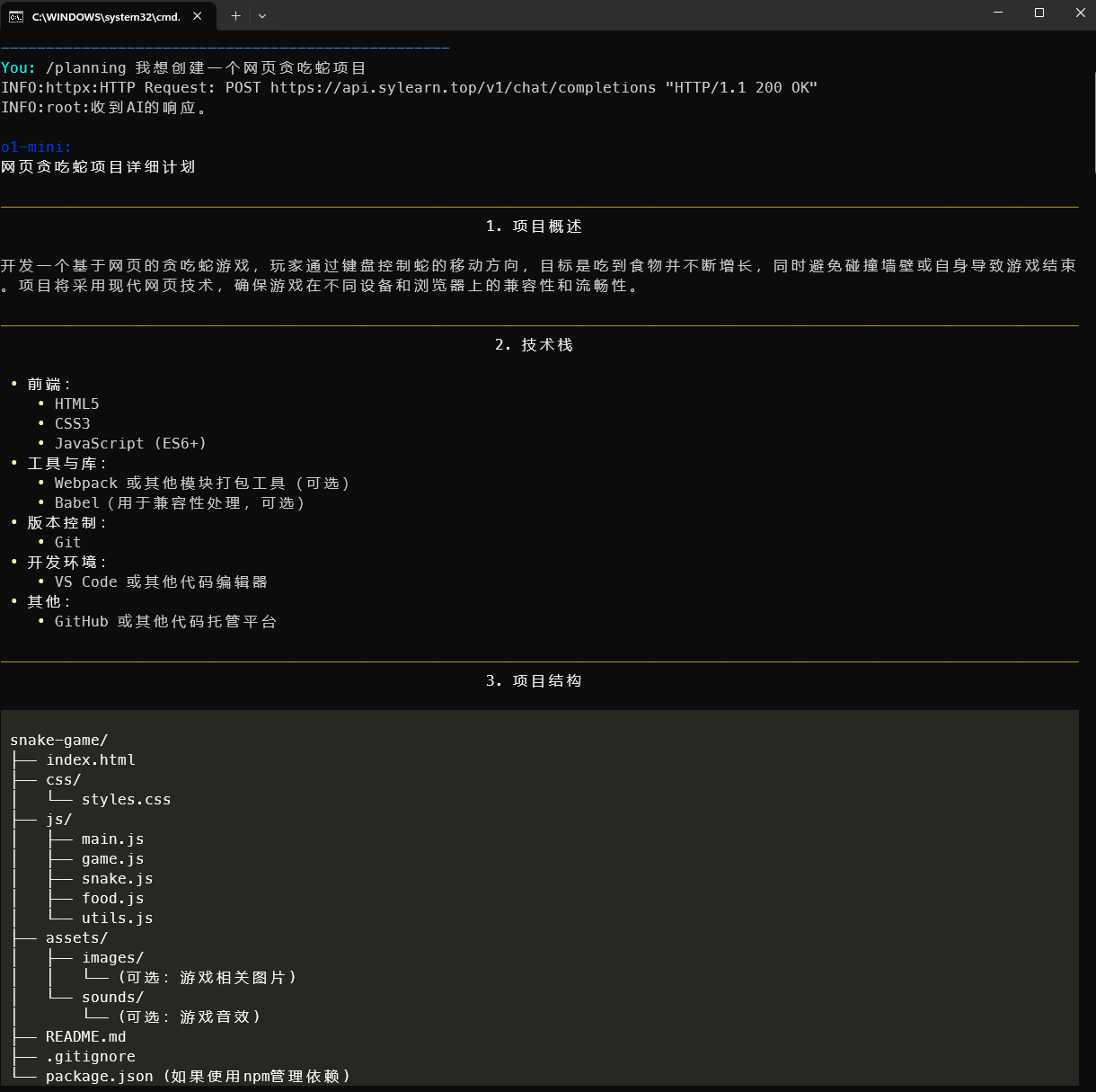
53 |
54 | 2. 接着,我们就可以让AI基于上面的规划,创建项目了:
55 | ```
56 | /create 基于上面的规划,请创建该项目
57 | ```
58 | 于是,AI会将所有需要创建的目录/文件列出,如果统一,键入yes即可创建:
59 |
60 | 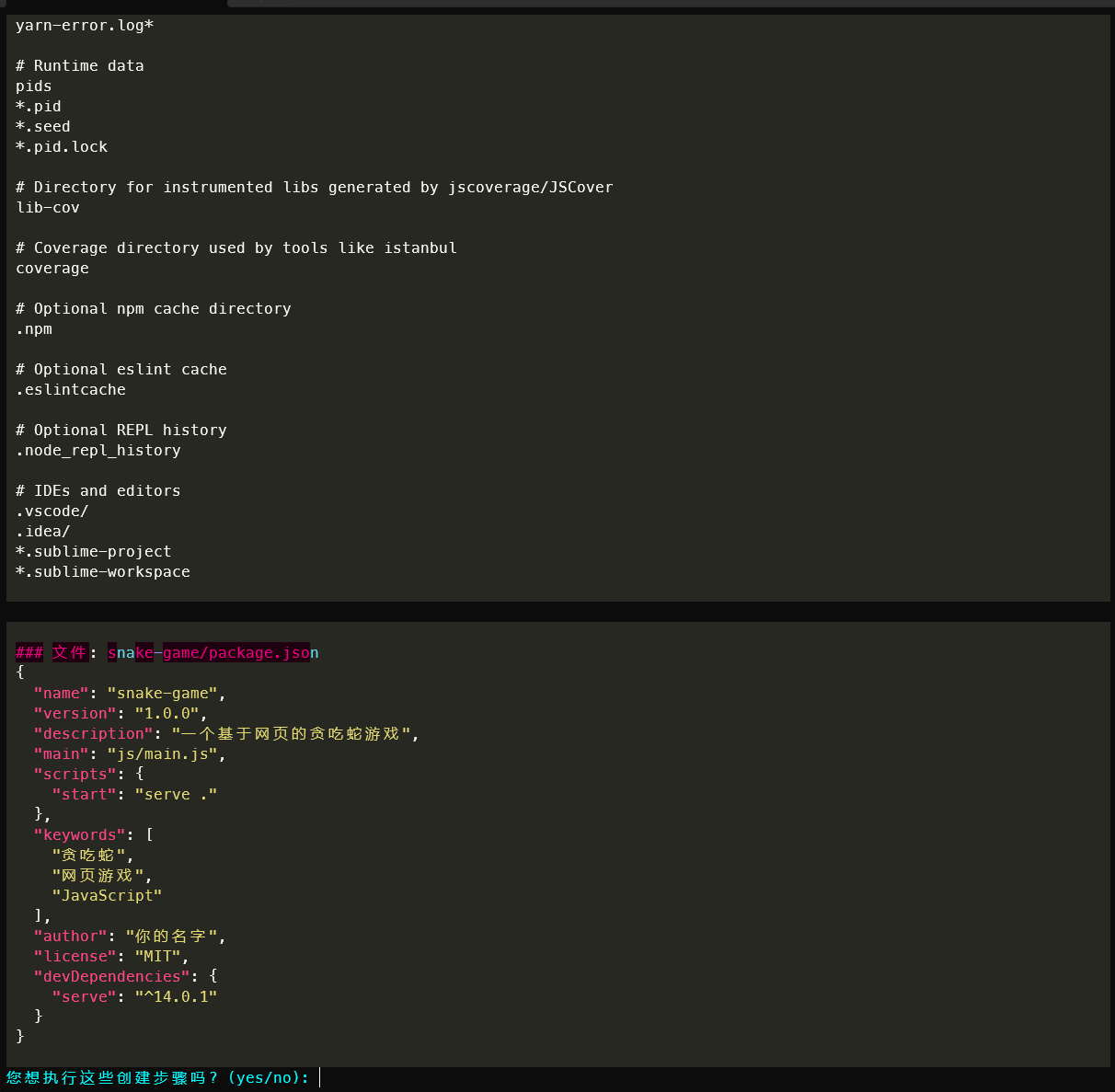
61 |
62 | 键入后:
63 |
64 | 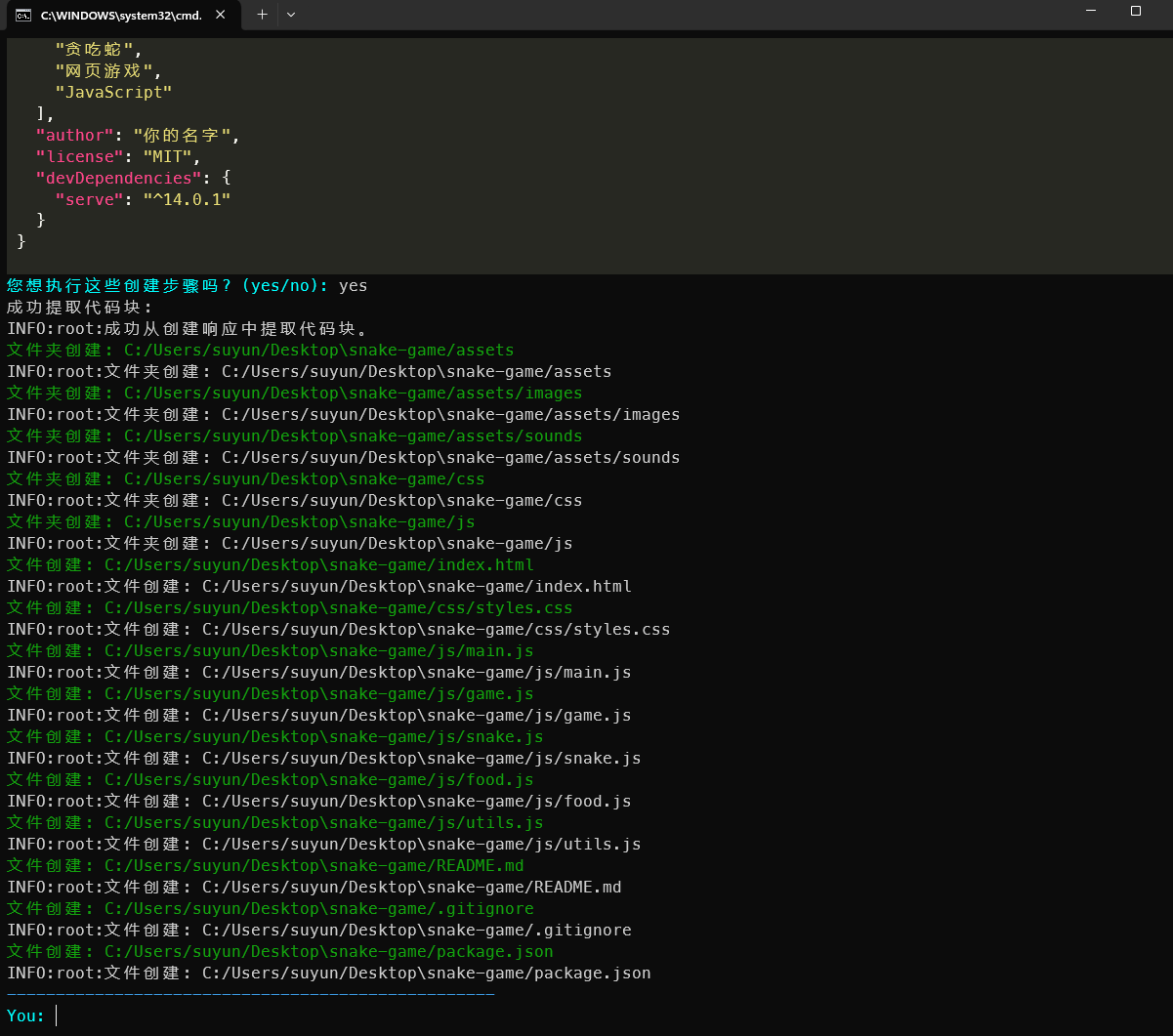
65 |
66 | 我们来看看该目录,可以发现,文件已经全部被创建:
67 |
68 | 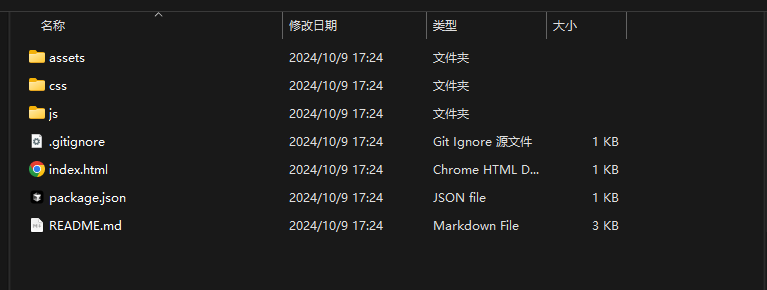
69 |
70 | 最后我们点击`index.html`就可以发现,生成代码可以正常运行:
71 |
72 | 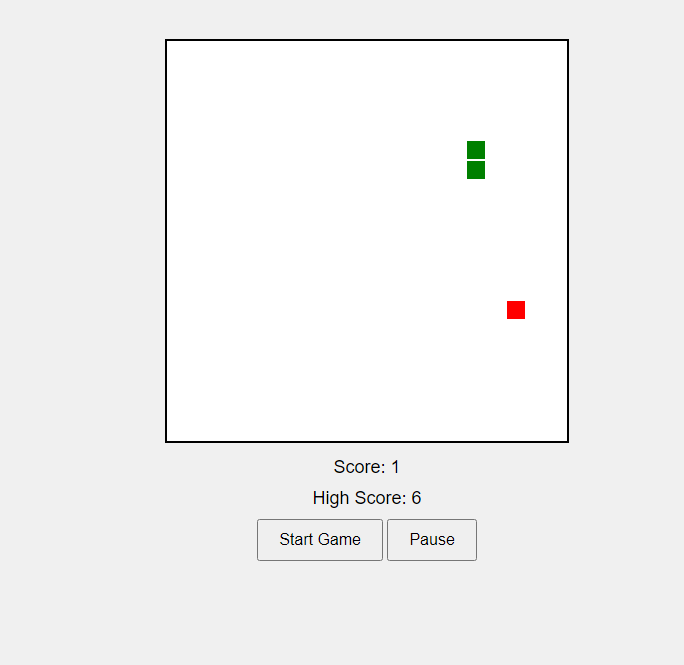
73 |
74 | 当然,还有其他的功能,如代码文件的审查和修改等等,这里就不作过多演示,小伙伴们可以自己尝试。
75 |
76 |
77 | ## 注意事项
78 |
79 | - 使用前请确保已正确配置API密钥和其他必要的环境变量。
80 | - 对于大型项目或文件,处理时间可能会较长,请耐心等待。
81 | - AI生成的代码和建议仍需人工审核,以确保其准确性和适用性。
82 | - 定期备份重要文件,特别是在使用编辑功能时。
83 |
84 | ## 参考
85 |
86 | 本项目参考了以下项目:
87 |
88 | - [o1-engineer](https://github.com/Code-WSY/o1-engineer)
89 |
90 | ## 许可证
91 |
92 | 该项目采用 MIT 许可证。详情请见 [LICENSE](LICENSE) 文件。
--------------------------------------------------------------------------------
/utils/utils.py:
--------------------------------------------------------------------------------
1 | import os
2 | import fnmatch
3 | import logging
4 | from termcolor import colored
5 | from rich.console import Console
6 | from rich.table import Table
7 | import difflib
8 | from prompt_toolkit import prompt
9 | from prompt_toolkit.styles import Style
10 | import re
11 | import time
12 | from dotenv import load_dotenv
13 |
14 | load_dotenv()
15 |
16 | def is_binary_file(file_path):
17 | """通过读取文件的一小部分来检查文件是否为二进制文件。"""
18 | try:
19 | with open(file_path, 'rb') as file:
20 | chunk = file.read(1024) # 读取前1024个字节
21 | if b'\0' in chunk:
22 | return True # 如果包含空字节,则认为是二进制文件
23 | # 使用启发式方法检测二进制内容
24 | text_characters = bytearray({7,8,9,10,12,13,27} | set(range(0x20, 0x100)))
25 | non_text = chunk.translate(None, text_characters)
26 | if len(non_text) / len(chunk) > 0.30:
27 | return True # 如果非文本字符超过30%,则认为是二进制文件
28 | except Exception as e:
29 | logging.error(f"阅读文件时发生错误: {file_path}: {e}")
30 | return True # 如果发生错误,则认为是二进制文件
31 | return False # 文件可能是文本
32 |
33 | def load_gitignore_patterns(directory):
34 | """如果在一个git仓库中,加载.gitignore模式"""
35 | gitignore_path = os.path.join(directory, '.gitignore')
36 | patterns = []
37 | if os.path.exists(gitignore_path):
38 | with open(gitignore_path, 'r', encoding='utf-8') as f:
39 | for line in f:
40 | line = line.strip()
41 | if line and not line.startswith('#'):
42 | patterns.append(line)
43 | return patterns
44 |
45 | def should_ignore(file_path, patterns):
46 | """检查文件是否应被忽略"""
47 | for pattern in patterns:
48 | if fnmatch.fnmatch(file_path, pattern):
49 | return True
50 | return False
51 |
52 | def add_file_to_context(file_path, added_files, action='to context'):
53 | """
54 | 将文件添加到给定的字典中,应用排除规则。
55 | Args:
56 | file_path: 文件路径
57 | added_files: 给定的字典
58 | action: 添加到上下文
59 |
60 | """
61 | # 如果在一个git仓库中,加载.gitignore模式
62 | gitignore_patterns = []
63 | #如果当前目录下有.gitignore文件,则加载.gitignore模式
64 | if os.path.exists('.gitignore'):
65 | gitignore_patterns = load_gitignore_patterns('.') # 加载.gitignore模式
66 | # 如果file_path是一个文件,则添加到上下文
67 | if os.path.isfile(file_path):
68 | # 基于目录排除
69 | if any(ex_dir in file_path for ex_dir in os.getenv("EXCLUDED_DIRS").split(',')):
70 | #如果file_path包含在excluded_dirs中,则跳过
71 | print(colored(f"跳过排除目录文件: {file_path}", "yellow"))
72 | logging.info(f"跳过排除目录文件: {file_path}")
73 | return
74 | # 基于.gitignore模式排除
75 | if gitignore_patterns and should_ignore(file_path, gitignore_patterns):
76 | #如果file_path在.gitignore文件中,则跳过
77 | print(colored(f"跳过匹配.gitignore模式的文件: {file_path}", "yellow"))
78 | logging.info(f"跳过匹配.gitignore模式的文件: {file_path}")
79 | return
80 | if is_binary_file(file_path):
81 | #如果file_path是一个二进制文件,则跳过
82 | print(colored(f"跳过二进制文件: {file_path}", "yellow"))
83 | logging.info(f"跳过二进制文件: {file_path}")
84 | return
85 | try:
86 | with open(file_path, 'r', encoding='utf-8', errors='ignore') as file:
87 | content = file.read()
88 | added_files[file_path] = content
89 | print(colored(f"添加文件: {file_path} {action}.", "green"))
90 | logging.info(f"添加文件: {file_path} {action}.")
91 |
92 | except Exception as e:
93 | print(colored(f"读取文件错误: {file_path}: {e}", "red"))
94 | logging.error(f"读取文件错误: {file_path}: {e}")
95 | else:
96 | print(colored(f"错误: {file_path} 不是文件。", "red"))
97 | logging.error(f"{file_path} 不是文件。")
98 |
99 | def display_diff(old_content, new_content, file_path):
100 | """显示文件的差异"""
101 | diff = list(difflib.unified_diff(
102 | old_content.splitlines(keepends=True),
103 | new_content.splitlines(keepends=True),
104 | fromfile=f"a/{file_path}",
105 | tofile=f"b/{file_path}",
106 | lineterm='',
107 | n=5
108 | ))
109 | if not diff:
110 | print(f"未检测到 {file_path} 的更改")
111 | return
112 | console = Console()
113 | table = Table(title=f"Diff for {file_path}")
114 | table.add_column("状态", style="bold")
115 | table.add_column("行")
116 | table.add_column("内容")
117 | line_number = 1
118 | for line in diff:
119 | status = line[0]
120 | content = line[2:].rstrip()
121 | if status == ' ':
122 | continue # Skip unchanged lines
123 | elif status == '-':
124 | table.add_row("删除", str(line_number), content, style="red")
125 | elif status == '+':
126 | table.add_row("添加", str(line_number), content, style="green")
127 | line_number += 1
128 | console.print(table)
129 | def apply_modifications(new_content, file_path):
130 | """将新内容应用到指定文件"""
131 | if not os.path.exists(file_path):
132 | #创建空文件
133 | with open(file_path, 'w', encoding='utf-8') as file:
134 | file.write('')
135 | print(colored(f"创建文件: {file_path}", "green"))
136 | try:
137 | # 读取文件内容
138 | with open(file_path, 'r', encoding='utf-8') as file:
139 | old_content = file.read()
140 |
141 | if old_content.strip() == new_content.strip():
142 | print(colored(f"未检测到 {file_path} 的更改", "red"))
143 | return True
144 | # 显示差异
145 | display_diff(old_content, new_content, file_path) # 显示差异
146 |
147 | confirm = prompt(f"应用这些更改到 {file_path}? (yes/no): ", style=Style.from_dict({'prompt': 'orange'})).strip().lower() # 确认是否应用更改
148 | # 应用更改
149 | if confirm == 'yes':
150 | # 写入文件
151 | with open(file_path, 'w', encoding='utf-8') as file:
152 | file.write(new_content)
153 | print(colored(f"成功应用更改到 {file_path}.", "green"))
154 | logging.info(f"成功应用更改到 {file_path}.")
155 | return True
156 | else:
157 | print(colored(f"未应用更改到 {file_path}.", "red"))
158 | logging.info(f"用户选择不应用更改到 {file_path}.")
159 | return False
160 |
161 | except Exception as e:
162 | print(colored(f"在应用更改到 {file_path} 时发生错误: {e}", "red"))
163 | logging.error(f"在应用更改到 {file_path} 时发生错误: {e}")
164 | return False
165 |
166 | def extract_code_blocks(text):
167 | """
168 | 提取文本中的顶层代码块内容,忽略嵌套的 Markdown 代码块。
169 |
170 | 参数:
171 | - text (str): 包含多个代码块的文本内容。
172 |
173 | 返回:
174 | - List[str]: 包含所有顶层代码块内容的列表。
175 | """
176 | code_blocks = []
177 | stack = []
178 | current_block = []
179 | code_block_pattern = re.compile(r'^%%%(\w+)?\s*$')
180 |
181 | lines = text.splitlines()
182 | for line in lines:
183 | match = code_block_pattern.match(line)
184 | if match:
185 | if not stack:
186 | # 开始一个新的顶层代码块
187 | stack.append(match.group(1) if match.group(1) else "")
188 | current_block = []
189 | else:
190 | # 结束当前代码块
191 | stack.pop()
192 | if not stack:
193 | code_blocks.append('\n'.join(current_block))
194 | continue
195 | if stack:
196 | current_block.append(line)
197 |
198 | return code_blocks
199 |
200 | return code_blocks
201 | def apply_creation_steps(creation_response, added_files, retry_count=0,chat_with_ai=None,root_dir=os.getcwd()):
202 | """从AI响应中提取代码块,并创建文件或文件夹"""
203 | max_retries = 3 # 最大重试次数
204 | try:
205 | # 提取内容中的所有代码块
206 | code_blocks = extract_code_blocks(creation_response)
207 | #code_blocks类型是list,list的每个元素是str
208 | # 如果没有代码块,则抛出错误
209 | if not code_blocks:
210 | raise ValueError("未在AI响应中找到代码块。")
211 |
212 | print("成功提取代码块:")
213 | logging.info("成功从创建响应中提取代码块。")
214 | # 遍历所有代码块
215 | for code in code_blocks:
216 | # 提取文件/文件夹信息
217 | info_match = re.match(r'### (文件|文件夹): (.+)', code.strip())
218 | # 如果匹配成功,提取文件夹或文件
219 | if info_match:
220 | item_type, path = info_match.groups() # 提取文件夹或文件,item_type是文件夹或文件,path是路径
221 | path = os.path.join(root_dir, path) # 将路径与根目录拼接
222 | # 如果item_type是文件夹,则创建文件夹
223 | if item_type == '文件夹':
224 | # 创建文件夹
225 | os.makedirs(path, exist_ok=True)
226 | print(colored(f"文件夹创建: {path}", "green"))
227 | logging.info(f"文件夹创建: {path}")
228 | # 如果item_type是文件,则创建文件
229 | elif item_type == '文件':
230 | # 提取文件内容:匹配`### 文件: `的后面的内容
231 | file_content = re.sub(r'### 文件: .+\n', '', code, count=1).strip()
232 |
233 | # 检查目录是否存在,如果不存在则创建目录
234 | directory = os.path.dirname(path)
235 | if directory and not os.path.exists(directory):
236 | os.makedirs(directory, exist_ok=True) # 创建目录
237 | print(colored(f"文件夹创建: {directory}", "green"))
238 | logging.info(f"文件夹创建: {directory}")
239 |
240 | # 将内容写入文件
241 | with open(path, 'w', encoding='utf-8') as f:
242 | f.write(file_content) # 写入文件内容
243 | print(colored(f"文件创建: {path}", "green"))
244 | logging.info(f"文件创建: {path}")
245 | else:
246 | print(colored("错误: 无法从代码块中确定文件或文件夹信息。", "red"))
247 | logging.error("无法从代码块中确定文件或文件夹信息。")
248 | continue
249 | return True
250 |
251 | except ValueError as e:
252 | # 如果重试次数小于最大重试次数,则重试
253 | if retry_count < max_retries:
254 | print(colored(f"错误: {str(e)} 重试... (尝试 {retry_count + 1})", "red"))
255 | logging.warning(f"创建解析失败: {str(e)}. 重试... (尝试 {retry_count + 1})")
256 | error_message = f"{str(e)} 请再次提供创建指令,使用指定的格式。"
257 | time.sleep(2 ** retry_count) # Exponential backoff
258 | new_response = chat_with_ai(error_message, is_edit_request=False, added_files=added_files)
259 | if new_response:
260 | return apply_creation_steps(new_response, added_files, retry_count + 1, chat_with_ai)
261 | else:
262 | return False
263 | else:
264 | print(colored(f"创建指令解析失败: {str(e)}", "red"))
265 | logging.error(f"创建指令解析失败: {str(e)}")
266 | print("创建响应失败:")
267 | print(creation_response)
268 | return False
269 | except Exception as e:
270 | print(colored(f"在创建期间发生意外错误: {e}", "red"))
271 | logging.error(f"在创建期间发生意外错误: {e}")
272 | return False
273 |
274 | def parse_edit_instructions(response):
275 | """
276 | 解析编辑指令
277 | 返回格式化:{文件路径: 编辑指令}
278 | """
279 | instructions = {} # 存储编辑指令
280 | current_file = None # 当前文件
281 | current_instructions = [] # 当前文件的编辑指令
282 | # 遍历响应中的每一行
283 | for line in response.split('\n'):
284 | if line.startswith("文件: "):
285 |
286 | # 将上一次的文件的编辑指令添加到instructions中
287 | if current_file:
288 | # 将current_file的编辑指令添加到instructions中
289 | instructions[current_file] = "\n".join(current_instructions)
290 | # 获取文件路径
291 | current_file = line.split("文件: ", 1)[1].strip()
292 | # 初始化current_instructions
293 | current_instructions = []
294 | #读取编辑指令
295 | elif line.strip() and current_file:
296 | current_instructions.append(line.strip())
297 |
298 | # 最后一次的文件的编辑指令添加到instructions中
299 | if current_file:
300 | # 将current_file的编辑指令添加到instructions中
301 | instructions[current_file] = "\n".join(current_instructions)
302 | # 返回编辑指令{文件路径: 编辑指令}
303 | return instructions
304 |
305 |
306 | def select_root_directory():
307 | import tkinter as tk
308 | from tkinter import filedialog
309 | """
310 | 选择根目录
311 |
312 | 该函数会弹出一个选择目录的对话框,用户可以选择需要的目录
313 | 如果用户未选择任何目录,程序将退出
314 |
315 | Returns:
316 | str: 选择的目录
317 | """
318 | root = tk.Tk()
319 | root.withdraw() # 隐藏主窗口
320 | root.attributes("-topmost", True) # 确保对话框在最前面
321 | directory = filedialog.askdirectory(title="请选择根目录")
322 | if not directory:
323 | logging.error("未选择任何目录,程序将退出。")
324 | exit(1)
325 | return directory
--------------------------------------------------------------------------------
/core/Code_Composer.py:
--------------------------------------------------------------------------------
1 | import os
2 | import logging
3 | from openai import OpenAI
4 | from termcolor import colored
5 | from prompt_toolkit import prompt
6 | from prompt_toolkit.styles import Style
7 | from prompt_toolkit.completion import WordCompleter
8 | from rich import print as rprint
9 | from rich.markdown import Markdown
10 | import os
11 | import dotenv
12 | from utils.utils import apply_modifications, add_file_to_context, parse_edit_instructions,apply_creation_steps
13 | # 加载环境变量
14 | dotenv.load_dotenv()
15 | class CodeComposer:
16 | def __init__(self, current_dir):
17 | # 当前目录
18 | self.root_dir = current_dir
19 | #获取项目所在目录
20 | self.project_dir = os.getcwd()
21 | # 初始化全局变量
22 | self.last_ai_response = None
23 | self.conversation_history = []
24 | self.style = Style.from_dict({'prompt': 'cyan'})
25 | # 获取根目录中的文件列表
26 | self.files = [
27 | os.path.relpath(os.path.join(dp, f), self.root_dir) # 获取文件的相对路径
28 | for dp, dn, filenames in os.walk(self.root_dir)
29 | for f in filenames
30 | if os.path.isfile(os.path.join(dp, f))
31 | ]
32 | # 排除目录
33 | self.excluded_dirs = set(os.getenv("EXCLUDED_DIRS").split(','))
34 | # 添加的文件
35 | self.added_files = {}
36 | # 文件内容
37 | self.file_contents = {}
38 | # 模型
39 | self.MODEL = os.getenv("MODEL")
40 | # 初始化OpenAI客户端
41 | self.client = OpenAI(api_key=os.getenv("OPENAI_API_KEY"), base_url=os.getenv("OPENAI_API_BASE_URL"))
42 | # 创建系统提示
43 | self.prompt_files = {
44 | 'CREATE_SYSTEM_PROMPT': 'create_system_prompt.md',
45 | 'CODE_REVIEW_PROMPT': 'code_review_prompt.md',
46 | 'EDIT_INSTRUCTION_PROMPT': 'edit_instruction_prompt.md',
47 | 'APPLY_EDITS_PROMPT': 'apply_edits_prompt.md',
48 | 'PLANNING_PROMPT': 'planning_prompt.md',
49 | 'CHAT_INSTRUCTION_PROMPT': 'chat_instruction_prompt.md'
50 | }
51 | # 加载系统提示
52 | self.core_dir = os.path.join(self.project_dir, "core") #获取core目录
53 | self.prompts_dir = os.path.join(self.core_dir, "prompt") #获取prompt目录
54 | for prompt_var, prompt_file in self.prompt_files.items():
55 | with open(os.path.join(self.prompts_dir, prompt_file), 'r', encoding='utf-8') as file:
56 | setattr(self, prompt_var, file.read())
57 | print(colored("根目录: ", "cyan"), self.root_dir)
58 | #print(colored("运行成功: ", "cyan"), os.getcwd())
59 | #print(colored("文件: ", "cyan"), self.files)
60 | # 应用编辑指令
61 | def apply_edit_instructions(self, edit_instructions, original_files):
62 | """
63 | 应用编辑指令
64 |
65 | 参数:
66 | edit_instructions (dict): 编辑指令 {文件路径: 编辑指令}
67 | original_files (dict): 原始文件 {文件路径: 文件内容}
68 | 返回:
69 | modified_files (dict): 修改后的文件路径和内容
70 | """
71 | modified_files = {}
72 | # 遍历original_files中的每一对文件路径和内容
73 | for file_path, content in original_files.items():
74 | # 如果file_path在edit_instructions中,则应用编辑指令
75 | if file_path in edit_instructions:
76 | # 获取编辑指令
77 | instructions = edit_instructions[file_path] # 编辑指令
78 | # 生成提示
79 | prompt = f"{self.APPLY_EDITS_PROMPT}\n\n\
80 | 原始文件: {file_path}\n\
81 | 内容:\n{content}\n\n\
82 | 编辑指令:\n{instructions}\n\n\
83 | 更新后的文件内容:"
84 | response = self.chat_with_ai(prompt)
85 | # 如果response不为空,则将response添加到modified_files中
86 | if response:
87 | # 将response添加到modified_files中
88 | modified_files[file_path] = response.strip()
89 | else:
90 | # 没有更改: 将content添加到modified_files中
91 | modified_files[file_path] = content
92 | #如果edit_instructions有新建的文件,则将新建的文件添加到modified_files中
93 | for file_path, content in edit_instructions.items():
94 | if file_path not in original_files:
95 | #print(colored(f"创建文件: {file_path}", "green"))
96 | response = self.chat_with_ai(f"{self.APPLY_EDITS_PROMPT}\n\n\
97 | 创建文件: {file_path}\n\
98 | 编辑指令:\n{content}\n\n\
99 | 写入内容:")
100 | modified_files[file_path] = response.strip()
101 | # 返回modified_files
102 | return modified_files
103 |
104 | # 与AI聊天
105 | def chat_with_ai(self, user_message):
106 | """
107 | 与AI进行对话或编辑请求
108 |
109 | 参数:
110 | user_message (str): 用户输入
111 | is_edit_request (bool): 是否为编辑请求
112 | retry_count (int): 重试次数
113 | """
114 |
115 | try:
116 | messages = self.conversation_history + [{"role": "user", "content": user_message}]
117 | # 获取AI响应
118 | response = self.client.chat.completions.create(
119 | model=self.MODEL,
120 | messages=messages,
121 | #max_completion_tokens=60000
122 | )
123 | logging.info("收到AI的响应。")
124 | self.last_ai_response = response.choices[0].message.content
125 | self.conversation_history.append({"role": "assistant", "content": self.last_ai_response})
126 | if len(self.conversation_history) > 20:
127 | self.conversation_history = self.conversation_history[-20:]
128 | return self.last_ai_response
129 | except Exception as e:
130 | error_message = f"与OpenAI通信时发生错误: {e}"
131 | print(colored(error_message, "red"))
132 | logging.error(error_message)
133 | return None
134 |
135 |
136 | # 退出程序
137 | def quit(self):
138 | print(colored("再见!", "green"))
139 | logging.info("用户退出程序。")
140 | exit()
141 |
142 | # 调试
143 | def debug(self):
144 | if self.last_ai_response:
145 | print(colored("最后AI响应:", "blue"))
146 | print(self.last_ai_response)
147 | else:
148 | print(colored("没有AI响应可用。", "red"))
149 | logging.warning("用户在没有AI响应的情况下发出/debug命令。")
150 |
151 | # 重置聊天上下文
152 | def reset(self):
153 | """
154 | 重置聊天上下文和添加的文件
155 | """
156 | self.conversation_history = []
157 | self.added_files.clear()
158 | self.last_ai_response = None
159 | print(colored("聊天上下文和添加的文件已重置。", "green"))
160 | logging.info("用户重置聊天上下文和添加的文件。")
161 |
162 | # 添加文件
163 | def add_files(self, paths):
164 | """
165 | 添加文件或文件夹到上下文
166 |
167 | 参数:
168 | paths (list): 文件或文件夹路径列表
169 | """
170 | if not paths:
171 | print(colored("请提供至少一个文件或文件夹路径。", "red"))
172 | logging.warning("用户没有提供文件或文件夹路径。")
173 | return
174 | #所有路径输入时都是相对self.root_dir的路径,这里需要转换为绝对路径
175 | paths = [os.path.abspath(os.path.join(self.root_dir, path)) for path in paths]
176 | for path in paths:
177 | if os.path.isfile(path):
178 | #print(colored(f"文件: {path}", "green"))
179 | add_file_to_context(path, self.added_files)
180 | elif os.path.isdir(path):
181 | for root, dirs, files_in_dir in os.walk(path):
182 | dirs[:] = [d for d in dirs if d not in self.excluded_dirs]
183 | for file in files_in_dir:
184 | file_path = os.path.join(root, file)
185 | #print(colored(f"文件: {file_path}", "green"))
186 | add_file_to_context(file_path, self.added_files)
187 | else:
188 | print(colored(f"错误: {path} 既不是文件也不是目录。", "red"))
189 | logging.error(f"{path} 既不是文件也不是目录。")
190 | total_size = sum(len(content) for content in self.added_files.values())
191 | if total_size > 1000000:
192 | print(colored("警告: 添加的文件的总大小很大,可能会影响性能。", "red"))
193 | logging.warning("添加的文件的总大小超过了100KB。")
194 |
195 | def edit_files(self, paths):
196 | """
197 | 编辑文件或目录
198 |
199 | 参数:
200 | paths (list): 文件或文件夹路径列表
201 | """
202 | if not paths:
203 | print(colored("请提供至少一个文件或文件夹路径。", "red"))
204 | logging.warning("用户在没有文件或文件夹路径的情况下发出/edit命令。")
205 | return
206 | # 将输入的文件路径添加到added_files中
207 | self.add_files(paths)
208 | # 编辑指令为所有文件
209 | edit_instruction = prompt(f"为所有文件编辑指令: ", style=self.style).strip()
210 | # 编辑请求的提示
211 | edit_prompt=self.EDIT_INSTRUCTION_PROMPT
212 | # 编辑请求
213 | edit_request = f"""{edit_prompt}\n\n用户请求: {edit_instruction}\n
214 | 可能需要修改的文件:
215 | """
216 | for file_path, content in self.added_files.items():
217 | edit_request += f"\n文件: {file_path}\n内容:\n{content}\n\n"
218 |
219 | ai_response = self.chat_with_ai(edit_request)
220 |
221 | if ai_response:
222 | print(f"以下是 {self.MODEL} 建议的编辑指令:")
223 | rprint(Markdown(ai_response))
224 | # 应用编辑指令
225 | confirm = prompt("您想应用这些编辑指令吗? (yes/no): ", style=self.style).strip().lower()
226 | if confirm == 'yes':
227 | # 解析编辑指令
228 | edit_instructions = parse_edit_instructions(ai_response)
229 | # 应用编辑指令
230 | modified_files = self.apply_edit_instructions(edit_instructions, self.added_files)
231 | for file_path, new_content in modified_files.items():
232 | apply_modifications(new_content, file_path)
233 | else:
234 | print(colored("编辑指令未应用。", "red"))
235 | logging.info("用户选择不应用编辑指令。")
236 |
237 | # 创建文件
238 | def create_project(self, creation_instruction):
239 | if not creation_instruction:
240 | print(colored("请在/create之后提供创建指令。", "red"))
241 | logging.warning("用户在没有指令的情况下发出/create命令。")
242 | return
243 | # 生成创建请求
244 | create_request = f"{self.CREATE_SYSTEM_PROMPT}\n\n用户请求: {creation_instruction}"
245 | ai_response = self.chat_with_ai(create_request)
246 | if ai_response:
247 | while True:
248 | print(f"以下是 {self.MODEL} 建议的创建结构:")
249 | markdown_ai_response = ai_response.replace("%%%", "```")
250 | rprint(Markdown(markdown_ai_response))
251 |
252 | confirm = prompt("您想执行这些创建步骤吗? (yes/no): ", style=self.style).strip().lower()
253 | if confirm == 'yes':
254 | success = apply_creation_steps(ai_response, self.added_files, chat_with_ai=self.chat_with_ai,root_dir=self.root_dir)
255 | if success:
256 | break
257 | else:
258 | retry = prompt("创建失败。您想让AI再次尝试吗? (yes/no): ", style=self.style).strip().lower()
259 | if retry != 'yes':
260 | break
261 | ai_response = self.chat_with_ai("之前的创建尝试失败。请尝试不同的方法。")
262 | else:
263 | print(colored("创建步骤未执行。", "red"))
264 | logging.info("用户选择不执行创建步骤。")
265 | break
266 | def code_review(self, paths):
267 | if not paths:
268 | print(colored("请提供至少一个文件或文件夹路径。", "red"))
269 | logging.warning("用户在没有文件或文件夹路径的情况下发出/review命令。")
270 | return
271 | # 将输入的文件路径添加到added_files中
272 | self.add_files(paths)
273 | if not self.added_files:
274 | print(colored("没有有效的文件可以审查。", "red"))
275 | logging.warning("用户在没有文件的情况下发出/review命令。")
276 | return
277 | # 审查请求
278 | review_request = f"{self.CODE_REVIEW_PROMPT}\n\n要审查的文件:\n"
279 | for file_path, content in self.added_files.items():
280 | review_request += f"\n文件: {file_path}\n内容:\n{content}\n\n"
281 | print(colored("分析代码并生成审查...", "magenta"))
282 | ai_response = self.chat_with_ai(review_request)
283 |
284 | if ai_response:
285 | print()
286 | print(colored("代码审查:", "blue"))
287 | rprint(Markdown(ai_response))
288 | logging.info("提供了代码审查。")
289 |
290 | def chat_with_files(self, paths):
291 | """
292 | 基于内容的聊天
293 | 参数:
294 | user_message (str): 用户输入
295 | """
296 | if not paths:
297 | print(colored("请提供至少一个文件或文件夹路径。", "red"))
298 | logging.warning("用户在没有文件或文件夹路径的情况下发出/chat命令。")
299 | return
300 | # 将输入的文件路径添加到added_files中
301 | self.add_files(paths)
302 | # 聊天请求
303 | chat_instruction = prompt(f"User: ", style=self.style).strip()
304 | # 聊天请求的提示
305 | chat_prompt=self.CHAT_INSTRUCTION_PROMPT
306 | # 聊天请求
307 | chat_request = f"""{chat_prompt}\n\n用户请求: {chat_instruction}\n
308 | 相关文件:
309 | """
310 | for file_path, content in self.added_files.items():
311 | chat_request += f"\n文件: {file_path}\n内容:\n{content}\n\n"
312 |
313 |
314 | ai_response = self.chat_with_ai(chat_request)
315 |
316 | if ai_response:
317 | print()
318 | print(colored(f"{self.MODEL}: ", "blue"))
319 | rprint(Markdown(ai_response))
320 |
321 | def planning_project(self, planning_instruction):
322 | """
323 | 根据用户提供的指令规划项目结构和任务
324 |
325 | 参数:
326 | paths (list): 文件或文件夹路径列表
327 | """
328 |
329 | if not planning_instruction:
330 | print(colored("请在/planning之后提供计划请求。", "red"))
331 | logging.warning("用户在没有指令的情况下发出/planning命令。")
332 | return
333 |
334 | planning_request = f"{self.PLANNING_PROMPT}\n\n计划请求: {planning_instruction}"
335 | ai_response = self.chat_with_ai(planning_request)
336 | if ai_response:
337 | print()
338 | print(colored(f"{self.MODEL}: ", "blue"))
339 | rprint(Markdown(ai_response))
340 | logging.info("提供了详细计划。")
341 |
342 | def start(self):
343 | print(colored("命令:", "cyan"))
344 | print(colored("-"*50, "cyan"))
345 | commands = {
346 | "/planning": "规划项目结构和任务 (后跟指令)",
347 | "/create": "创建文件或文件夹 (后跟指令)",
348 | "/edit": "编辑文件或目录 (后跟路径)",
349 | "/reset": "重置聊天上下文并清除添加的文件",
350 | "/review": "审查代码文件 (后跟路径)",
351 | "/chat": "与AI聊天 (后跟路径)",
352 | "/debug": "打印最后AI响应",
353 | "/quit": "退出程序"
354 | }
355 | command_list = list(commands.keys())
356 | for cmd, desc in commands.items():
357 | print(f"{colored(cmd, 'magenta'):<10} {colored(desc, 'dark_grey')}")
358 | # 创建一个WordCompleter,自动补全命令
359 | completer = WordCompleter(
360 | command_list + self.files,
361 | ignore_case=True # 忽略大小写
362 | )
363 | while True:
364 | print(colored("-"*50, "cyan"))
365 | user_input = prompt("You: ", style=self.style, completer=completer).strip()
366 |
367 | if user_input.lower() == '/quit':
368 | self.quit()
369 | # 调试
370 | elif user_input.lower() == '/debug':
371 | self.debug()
372 | # 重置
373 | elif user_input.lower() == '/reset':
374 | self.reset()
375 | # 编辑
376 | elif user_input.startswith('/edit'):
377 | paths = user_input.split()[1:]
378 | self.edit_files(paths)
379 | self.added_files.clear()
380 | # 审查
381 | elif user_input.startswith('/review'):
382 | paths = user_input.split()[1:]
383 | self.code_review(paths)
384 | self.added_files.clear()
385 | # 需要指令
386 | elif user_input.startswith('/create'):
387 | creation_instruction = user_input.split()[1:]
388 | self.create_project(creation_instruction)
389 | self.added_files.clear()
390 | # 计划
391 | elif user_input.startswith('/planning'):
392 | planning_instruction = user_input.split()[1:]
393 | self.planning_project(planning_instruction)
394 | # 聊天
395 | elif user_input.startswith('/chat'):
396 | paths = user_input.split()[1:]
397 | self.chat_with_files(paths)
398 | self.added_files.clear()
399 | else:
400 | ai_response = self.chat_with_ai(user_input)
401 | print(colored("-"*50, "cyan"))
402 | print(colored(f"{self.MODEL}", "cyan"))
403 | if ai_response:
404 | print()
405 | print(colored(f"{self.MODEL}:", "blue"))
406 | rprint(Markdown(ai_response))
--------------------------------------------------------------------------------