 46 |
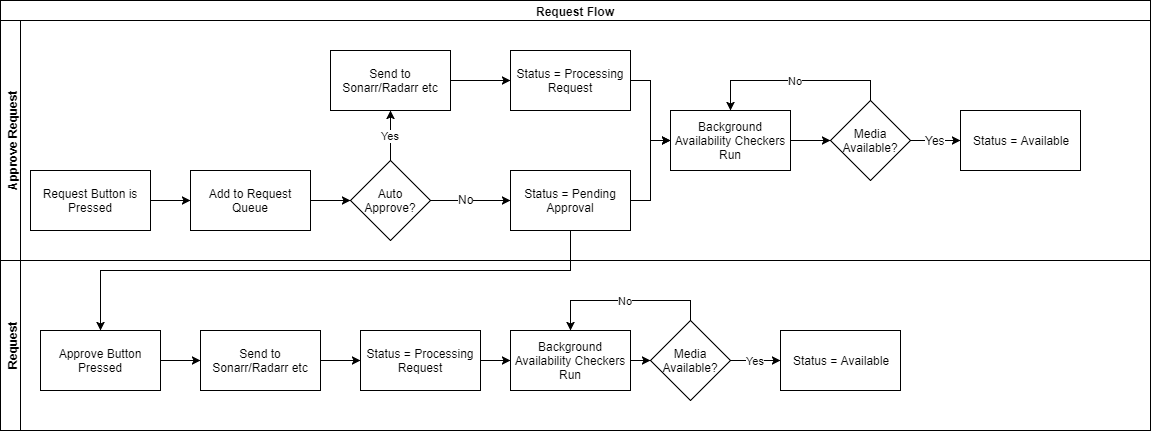
47 | Now imagine you're requesting an entire series of episodes, 10 seasons with 20 episodes each. Each one of those episodes has to be tracked individually in the DB, and we've only got 4KB of memory to work with - looking at the above workflow, you can imagine how many database actions this could add up to... Each time that 4KB fills, we have to commit, each time we have an episode to add to the db we have to commit, and every time we complete, we have to delete the 'log' that said we had a commit to do.
48 |
49 | It's no wonder the database completely locks up once you've got multiple users and thousands of items in your media library!
50 |
51 | ## You don't need a crane, just a dolly
52 |
53 | SQLite's more than capable of handling this as long as we give it the proper resources it needs to do so.
54 |
55 | We'll use the WAL (Write-Ahead Log) logging mechanism instead of TRUNCATE as it's more performant than both `truncate` and `delete` and we don't really care about the additional files being generated additional files generated as we would with WAL, as well as bumping the page size to max to minimize our number of unnecessary writes:
56 |
57 | ```sql
58 | # Do this for each of the three .db files
59 | sqlite3 Ombi.db 'pragma page_size=65536; pragma journal_mode=wal; VACUUM;'
60 | ```
61 |
62 | (this setting doesn't stick and can be ignored for now) - Just like with Sonarr, we change sync to 'most' as we depend on ZFS for db consistency - helps lower the number of blocking ops on the database:
63 | ```shell
64 | sqlite3 Ombi.db 'pragma synchronous = NORMAL;'
65 | ```
66 |
67 | ## Filesystem settings recommendations
68 | See [Arr's on ZFS](https://github.com/teambvd/unraid-zfs-docs/main/containers/sonarrRadarrLidarr.md)
69 |
--------------------------------------------------------------------------------
/containers/sonarrRadarrLidarr.md:
--------------------------------------------------------------------------------
1 | # ***Sonarr / Lidarr / Radarr on ZFS***
2 |
3 | ## Reference information
4 |
5 | (My 'workloads'):
6 |
7 | > * Sonarr - `259MB` - 31,689 Episodes
8 | > * Radarr - `115MB` - 2460 Movies
9 | > * Lidarr - `422MB` - 34,581 Songs
10 |
11 |
12 | ## Filesystem settings recommendations:
13 |
14 | * Recordsize - `64K` - This'll make more sense when we get to tuning the DB
15 | * Compression - `zstd-3` - I'd used `lz4` since opensolaris was released, but z-std has made me a believer - 2.57 compressratio, no noticeable performance differnce (on a modern CPU at least). Standard recommendation for all non-media datasets imo.
16 | * Primarycache - `none` - the DB does it's own caching, so this would be duplicating resources, wasting them; normally you'd set this to `metadata` for a database, but sqlite's so small, there's limited gains (if any) from doing so, especially on NVME; again, more on this later
17 | * atime - `off` - another 'do this for everything' setting... except, actually for everything, media or otherwise
18 | * logbias - `throughput` - again, databases
19 | * xattr - `sa` - recommended for all ZoL datasets
20 |
21 | Note: These settings (in general) should be set at creation time. Modifying a setting doesn't change existing data and only applies to newly created data placed within that dataset. If data already exists, it's best to migrate that data to a newly created dataset with the appropriate settings. **DO NOT** make changes to an existing dataset while the data is being actively accessed (unless you know what you're doing).
22 |
23 | ## Application tuning
24 |
25 | The fileset's been configured this way forever, and things had been humming along swimmingly. As times gone on and my library has grown, I've noticed my Sonarr instance had been getting incrementally slower over time. It used to be that when I first loaded the UI, it'd show up within ~2-3 seconds, it'd now take twice that or more.
26 |
27 | The biggest tell though was when I'd go to the History tab, usually to try to sort out what'd happened with a given series (e.g. an existing series was for some reason updated with a quality I didn't expect, or maybe an incorrect episode was pulled, etc.). It'd take ~10+ seconds to load the first set of 20 most recent activities, then close to that for each subsequent page.
28 |
29 | ### Finding the Cause
30 |
31 | I won't bore you too much with the details, but a trace revealed that the majority of the time spent was in waiting on a query response from the database, sqlite. Looking at the database size:
32 | ```bash
33 | 259M Mar 23 06:59 sonarr.db
34 | ```
35 |
36 | Fairly large for an SQLite DB. Vacuum brought no tangible benefit either. Next I checked the page size:
37 | ```bash
38 | sqlite3 sonarr.db 'pragma page_size;'
39 | 4096
40 | ```
41 |
42 | We're only able to act on 4KB of transaction data at a time? Bingo.
43 |
44 | ### The Solution
45 |
46 | All the 'arr's use an sqlite backend - you'll need to acquire sqlite3 from the the Dev Pack, if not already installed. First, we need to verify the data base is healthy - **MAKE SURE YOUR CONTAINER IS STOPPED BEFORE PROCEEDING FURTHER**:
47 | ```bash
48 | sqlite3 sonarr.db 'pragma integrity_check;'
49 | ```
50 |
51 | This can take awhile, so be patient. If this returns anything other than `OK`, then stop here and either work on restoring from backup or repairing the DB.
52 |
53 | Without boring you to death (hopefully), SQLite essentially treats the page_size as the upper bound for it's DB cache. You can instead set the 'cache_size', but this setting is lost each time you disconnect from the DB (e.g. container reboot), so that's kinda worthless for our needs. We're setting our to the maximum, `64KB`:
54 | ```bash
55 | sqlite3 sonarr.db 'pragma page_size=65536; pragma journal_mode=truncate; VACUUM;'
56 | ```
57 |
58 | This might take a bit, depending on the size of your sonarr.db and transaction log files. Once it's done, we need to re-enable `WAL`:
59 | ```bash
60 | sqlite3 sonarr.db 'pragma journal_mode=WAL;
61 | ```
62 |
63 |
64 |
65 | ***WORK IN PROGRESS / TBD - has to be done on a per connection basis and isn't persistent, which means this requires container modification***
66 |
67 | Most people don't 'notice' slowness related to commits to the DB, but if you've ever seen the UI sort of spaz out whenever you've added some new series with 18 seasons at 20+ episodes per, you've encountered it:
68 |
69 | ```shell
70 | sqlite3 sonarr.db 'pragma synchronous;'
71 | 2
72 | ```
73 |
74 | The default setting uses both [WAL](https://sqlite.org/wal.html) (Write-Ahead Log) as well as full sync, which double-commits transactions; this helps protect the database from inconsistency in the event of an unexpected failure at the OS level and can also slow down reads. Many OS's/filesystems (cough **windows** cough) treat in-memory data as disposable, neglecting the fact that a file may be a database with in-flight writes inside.
75 |
76 | Given ZFS already checksums and syncs data itself (whole other topic), I'm a little less concerned about the database protecting itself and simply rely on the filesystem for this - if the DB becomes corrupted on ZFS, I've got bigger problems to worry about than rebuilding sonarr/radarr/lidarr. We can set this to 'normal' mode, for single commit operation:
77 |
78 | ```shell
79 | sqlite3 sonarr.db 'pragma synchronous = Normal;'
80 | ```
81 |
82 |
83 |
84 | References:
85 | * [SQLite Page Sizes](https://www.sqlite.org/pragma.html#pragma_page_size)
86 | * [WAL vs Journal in SQLite](https://www.sqlite.org/wal.html)
87 | * [Previously, on Sonarr Dev](https://github.com/Sonarr/Sonarr/issues/2080#issuecomment-318859070)
88 |
--------------------------------------------------------------------------------
/general/commonIssues.md:
--------------------------------------------------------------------------------
1 | ## Common Issues
2 |
3 | **Table of Contents**
4 | - [Game stutters when using ZFS on UnRAID](#game-stutters-when-using-zfs-on-unraid)
5 | - [My zpool is busy but I cant tell why](#my-zpool-is-busy-but-i-cant-tell-why)
6 | * [Customizing UnRAIDs CLI/shell, and running commands natively](#customizing-unraids-cli-and-running-commands-natively)
7 | - [Unable to modify filesets status](#unable-to-modify-filesets-status)
8 | * [Sledgehammer approach](#sledgehammer-approach)
9 | * [Dataset is busy](#dataset-is-busy)
10 | * [Dealing with PID Whackamole](#dealing-with-pid-whackamole)
11 |
12 | ### Game stutters when using ZFS on UnRAID
13 |
14 | In addition to all the '[normal](https://www.youtube.com/watch?v=miYUGWq6l24)' things you should [go through](https://www.youtube.com/watch?v=A2dkrFKPOyw) in order to ensure a [low latency gaming](https://www.youtube.com/watch?v=QlTVANDndpM) experience on UnRAID, you need to take some additional steps to attempt to further restrict the opportunities for the kernel to use the CPU's you're attempting to isolate for VM usage. Unfortunately ZFS [doesn't properly respect the isolcpus](https://github.com/openzfs/zfs/issues/8908) value alone, so some further steps are necessary.
15 |
16 | For reference, I've copied my `syslinux.cfg` configuration below, where my intention is to isolate the last 4 cores of a 16 core CPU:
17 |
18 | ```bash
19 | label Unraid OS
20 | menu default
21 | kernel /bzimage
22 | append initrd=/bzroot nomodeset mitigations=off amd_iommu=on isolcpus=12-15,28-31 nohz_full=12-15,28-31 rcu_nocbs=12-15,28-31
23 | ```
24 |
25 | This was all that was needed for my threadripper 3955wx; looking at the CPU topology, I'm restricting all cores of a single CCX:
26 |
27 | 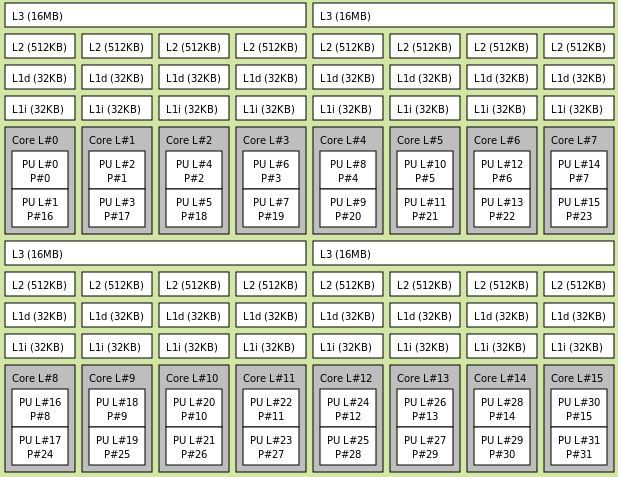
28 |
29 | You can see a really great video on how this topology image is generated in [SpaceInvader's video](https://www.youtube.com/watch?v=14dvDX17GH0), but if you don't have a multi-cpu or multi-chiplet CPU (which you could tell by generating the topology image as in the video), then you may need to take take some [additional steps](https://github.com/openzfs/zfs/issues/8908#issuecomment-1066046587).
30 |
31 | ### My zpool is busy but I cant tell why
32 |
33 | There's a tool for this now, created by the same person who created sanoid/syncoid (Jim Salter), called `ioztat` (think '[iostat for zfs](https://github.com/jimsalterjrs/ioztat)'). It's not available through the nerd/dev packs (it's a relatively recent-sh creation), and may well continue to be updated anyway, so we'll install directly from git.
34 |
35 | You'll likely want to a fileset which we can use to store the tool - for myself, I have all little git tools in one fileset, so did something like this:
36 | ```bash
37 | zfs create wd/utility/git -o compression=zstd-3 -o xattr=sa -o recordsize=32K
38 |
39 | # now we're going to pull down the code into our fileset
40 | cd /mnt/wd/utility/git
41 | git clone https://github.com/jimsalterjrs/ioztat
42 |
43 | # you should see it listed there now
44 | ls -lhaFr
45 | drwx------ 3 root root 8 Mar 14 11:29 ioztat/
46 |
47 | # don't forget to make it executable
48 | chmod +x ioztat/ioztat
49 | ```
50 |
51 | Now, you can just execute the command, but only currently from the directory it's saved in. I've a bunch of random tools installed, and there's no way I'd remember all of these. One of the bigger annoyances I've had with unraid is how complicated it is to customize in a way that survives a reboot (recompile the kernel to install a tool a few KB in size? Ugh). We could just link them to our go file or something, but if you're like me, your go file is messy enough as it is...
52 |
53 | #### Customizing UnRAIDs CLI and running commands natively
54 |
55 | What I've done instead is to create files (placing them all inside of a folder called 'scripts', which I also put in the 'utility' fileset) that contain all my cli/shell 'customizations', then have unraid's User Scripts run through them at first array start. While they don't * Technically * persist across reboots, this method sufficiently works around it (annoying, but solvable):
56 | ```bash
57 | # create the files
58 | nano /mnt/wd/utility/scripts/createSymlinks.sh
59 |
60 | # create your symlinks - here's a small subset of mine -
61 |
62 | # # Shell profiles
63 | ln -sf /mnt/wd/utility/git/.tmux/.tmux.conf /root/.tmux.conf
64 | cp /mnt/wd/utility/git/.tmux/.tmux.conf.local /root/.tmux.conf.local
65 | ln -sf /mnt/wd/utility/bvd-home/.bash_profile /root/.bash_profile
66 | # # Bad ideas
67 | ln -sf /mnt/wd/dock/free-ipa /var/lib/ipa-data
68 | # # CLI tools and Apps
69 | ln -sf /mnt/wd/utility/git/ioztat/ioztat /usr/bin/ioztat
70 | ln -sf /mnt/wd/utility/git/btop/btop /usr/bin/btop
71 | ```
72 |
73 | I actually have multiple files here, each one being 'grouped' - if it's just linking a tool so it's available from the shell, that's one file, another is for linking a few privileged containers I've got running to where they 'should' be where they installed on bare metal, things like that. This way, if I screw something up and dont find out till I reboot some months later, it'll make figuring out **which** thing I screwed up (and where) far easier.
74 |
75 | ### Unable to modify filesets status
76 |
77 | This happens when **something** is using either the dataset itself (at the filesystem level), or some of the contents within it. Common causes include:
78 |
79 | * Application using fileset contents
80 | * Network access (mounted via SMB/NFS/iSCSI)
81 | * If attempting deletion:
82 | * The filesystem is currently `mounted` by your host (unraid)
83 | * Snapshots currently exist for the fileset
84 |
85 | #### Sledgehammer approach
86 |
87 | For unmount issues, you can bypass the userspace restrictions by going directly to ZFS and issuing a rename; it's important to note that this could impact any applications using it, only recommended when you're either certain there's no active access, or if you plan on deleting the fileset anyway after unmounting
88 |
89 | ```bash
90 | zfs rename tank/filesetName tank/newFilesetName
91 | zfs destroy tank/newFilesetName
92 |
93 | # be cognizant of potential impact on nested filesets and their mountpoints, such as tank/datasetName/datsetChileName
94 | ```
95 |
96 | #### Dataset is busy
97 |
98 | * This usually due to a process (PID) using that fileset or some part of it's contents. You can verify whether the below example, where I have my pool `wd` mounted to `mnt` and am trying to figure out what's using my `nginx` container:
99 | ```bash
100 | root@milkyway:~# ps -auxe | grep /mnt/wd/dock/nginx
101 | root 63910 0.0 0.0 3912 2004 pts/0 S+ 12:19 0:00 grep /mnt/wd/dock/nginx
46 |
47 | Now imagine you're requesting an entire series of episodes, 10 seasons with 20 episodes each. Each one of those episodes has to be tracked individually in the DB, and we've only got 4KB of memory to work with - looking at the above workflow, you can imagine how many database actions this could add up to... Each time that 4KB fills, we have to commit, each time we have an episode to add to the db we have to commit, and every time we complete, we have to delete the 'log' that said we had a commit to do.
48 |
49 | It's no wonder the database completely locks up once you've got multiple users and thousands of items in your media library!
50 |
51 | ## You don't need a crane, just a dolly
52 |
53 | SQLite's more than capable of handling this as long as we give it the proper resources it needs to do so.
54 |
55 | We'll use the WAL (Write-Ahead Log) logging mechanism instead of TRUNCATE as it's more performant than both `truncate` and `delete` and we don't really care about the additional files being generated additional files generated as we would with WAL, as well as bumping the page size to max to minimize our number of unnecessary writes:
56 |
57 | ```sql
58 | # Do this for each of the three .db files
59 | sqlite3 Ombi.db 'pragma page_size=65536; pragma journal_mode=wal; VACUUM;'
60 | ```
61 |
62 | (this setting doesn't stick and can be ignored for now) - Just like with Sonarr, we change sync to 'most' as we depend on ZFS for db consistency - helps lower the number of blocking ops on the database:
63 | ```shell
64 | sqlite3 Ombi.db 'pragma synchronous = NORMAL;'
65 | ```
66 |
67 | ## Filesystem settings recommendations
68 | See [Arr's on ZFS](https://github.com/teambvd/unraid-zfs-docs/main/containers/sonarrRadarrLidarr.md)
69 |
--------------------------------------------------------------------------------
/containers/sonarrRadarrLidarr.md:
--------------------------------------------------------------------------------
1 | # ***Sonarr / Lidarr / Radarr on ZFS***
2 |
3 | ## Reference information
4 |
5 | (My 'workloads'):
6 |
7 | > * Sonarr - `259MB` - 31,689 Episodes
8 | > * Radarr - `115MB` - 2460 Movies
9 | > * Lidarr - `422MB` - 34,581 Songs
10 |
11 |
12 | ## Filesystem settings recommendations:
13 |
14 | * Recordsize - `64K` - This'll make more sense when we get to tuning the DB
15 | * Compression - `zstd-3` - I'd used `lz4` since opensolaris was released, but z-std has made me a believer - 2.57 compressratio, no noticeable performance differnce (on a modern CPU at least). Standard recommendation for all non-media datasets imo.
16 | * Primarycache - `none` - the DB does it's own caching, so this would be duplicating resources, wasting them; normally you'd set this to `metadata` for a database, but sqlite's so small, there's limited gains (if any) from doing so, especially on NVME; again, more on this later
17 | * atime - `off` - another 'do this for everything' setting... except, actually for everything, media or otherwise
18 | * logbias - `throughput` - again, databases
19 | * xattr - `sa` - recommended for all ZoL datasets
20 |
21 | Note: These settings (in general) should be set at creation time. Modifying a setting doesn't change existing data and only applies to newly created data placed within that dataset. If data already exists, it's best to migrate that data to a newly created dataset with the appropriate settings. **DO NOT** make changes to an existing dataset while the data is being actively accessed (unless you know what you're doing).
22 |
23 | ## Application tuning
24 |
25 | The fileset's been configured this way forever, and things had been humming along swimmingly. As times gone on and my library has grown, I've noticed my Sonarr instance had been getting incrementally slower over time. It used to be that when I first loaded the UI, it'd show up within ~2-3 seconds, it'd now take twice that or more.
26 |
27 | The biggest tell though was when I'd go to the History tab, usually to try to sort out what'd happened with a given series (e.g. an existing series was for some reason updated with a quality I didn't expect, or maybe an incorrect episode was pulled, etc.). It'd take ~10+ seconds to load the first set of 20 most recent activities, then close to that for each subsequent page.
28 |
29 | ### Finding the Cause
30 |
31 | I won't bore you too much with the details, but a trace revealed that the majority of the time spent was in waiting on a query response from the database, sqlite. Looking at the database size:
32 | ```bash
33 | 259M Mar 23 06:59 sonarr.db
34 | ```
35 |
36 | Fairly large for an SQLite DB. Vacuum brought no tangible benefit either. Next I checked the page size:
37 | ```bash
38 | sqlite3 sonarr.db 'pragma page_size;'
39 | 4096
40 | ```
41 |
42 | We're only able to act on 4KB of transaction data at a time? Bingo.
43 |
44 | ### The Solution
45 |
46 | All the 'arr's use an sqlite backend - you'll need to acquire sqlite3 from the the Dev Pack, if not already installed. First, we need to verify the data base is healthy - **MAKE SURE YOUR CONTAINER IS STOPPED BEFORE PROCEEDING FURTHER**:
47 | ```bash
48 | sqlite3 sonarr.db 'pragma integrity_check;'
49 | ```
50 |
51 | This can take awhile, so be patient. If this returns anything other than `OK`, then stop here and either work on restoring from backup or repairing the DB.
52 |
53 | Without boring you to death (hopefully), SQLite essentially treats the page_size as the upper bound for it's DB cache. You can instead set the 'cache_size', but this setting is lost each time you disconnect from the DB (e.g. container reboot), so that's kinda worthless for our needs. We're setting our to the maximum, `64KB`:
54 | ```bash
55 | sqlite3 sonarr.db 'pragma page_size=65536; pragma journal_mode=truncate; VACUUM;'
56 | ```
57 |
58 | This might take a bit, depending on the size of your sonarr.db and transaction log files. Once it's done, we need to re-enable `WAL`:
59 | ```bash
60 | sqlite3 sonarr.db 'pragma journal_mode=WAL;
61 | ```
62 |
63 |
64 |
65 | ***WORK IN PROGRESS / TBD - has to be done on a per connection basis and isn't persistent, which means this requires container modification***
66 |
67 | Most people don't 'notice' slowness related to commits to the DB, but if you've ever seen the UI sort of spaz out whenever you've added some new series with 18 seasons at 20+ episodes per, you've encountered it:
68 |
69 | ```shell
70 | sqlite3 sonarr.db 'pragma synchronous;'
71 | 2
72 | ```
73 |
74 | The default setting uses both [WAL](https://sqlite.org/wal.html) (Write-Ahead Log) as well as full sync, which double-commits transactions; this helps protect the database from inconsistency in the event of an unexpected failure at the OS level and can also slow down reads. Many OS's/filesystems (cough **windows** cough) treat in-memory data as disposable, neglecting the fact that a file may be a database with in-flight writes inside.
75 |
76 | Given ZFS already checksums and syncs data itself (whole other topic), I'm a little less concerned about the database protecting itself and simply rely on the filesystem for this - if the DB becomes corrupted on ZFS, I've got bigger problems to worry about than rebuilding sonarr/radarr/lidarr. We can set this to 'normal' mode, for single commit operation:
77 |
78 | ```shell
79 | sqlite3 sonarr.db 'pragma synchronous = Normal;'
80 | ```
81 |
82 |
83 |
84 | References:
85 | * [SQLite Page Sizes](https://www.sqlite.org/pragma.html#pragma_page_size)
86 | * [WAL vs Journal in SQLite](https://www.sqlite.org/wal.html)
87 | * [Previously, on Sonarr Dev](https://github.com/Sonarr/Sonarr/issues/2080#issuecomment-318859070)
88 |
--------------------------------------------------------------------------------
/general/commonIssues.md:
--------------------------------------------------------------------------------
1 | ## Common Issues
2 |
3 | **Table of Contents**
4 | - [Game stutters when using ZFS on UnRAID](#game-stutters-when-using-zfs-on-unraid)
5 | - [My zpool is busy but I cant tell why](#my-zpool-is-busy-but-i-cant-tell-why)
6 | * [Customizing UnRAIDs CLI/shell, and running commands natively](#customizing-unraids-cli-and-running-commands-natively)
7 | - [Unable to modify filesets status](#unable-to-modify-filesets-status)
8 | * [Sledgehammer approach](#sledgehammer-approach)
9 | * [Dataset is busy](#dataset-is-busy)
10 | * [Dealing with PID Whackamole](#dealing-with-pid-whackamole)
11 |
12 | ### Game stutters when using ZFS on UnRAID
13 |
14 | In addition to all the '[normal](https://www.youtube.com/watch?v=miYUGWq6l24)' things you should [go through](https://www.youtube.com/watch?v=A2dkrFKPOyw) in order to ensure a [low latency gaming](https://www.youtube.com/watch?v=QlTVANDndpM) experience on UnRAID, you need to take some additional steps to attempt to further restrict the opportunities for the kernel to use the CPU's you're attempting to isolate for VM usage. Unfortunately ZFS [doesn't properly respect the isolcpus](https://github.com/openzfs/zfs/issues/8908) value alone, so some further steps are necessary.
15 |
16 | For reference, I've copied my `syslinux.cfg` configuration below, where my intention is to isolate the last 4 cores of a 16 core CPU:
17 |
18 | ```bash
19 | label Unraid OS
20 | menu default
21 | kernel /bzimage
22 | append initrd=/bzroot nomodeset mitigations=off amd_iommu=on isolcpus=12-15,28-31 nohz_full=12-15,28-31 rcu_nocbs=12-15,28-31
23 | ```
24 |
25 | This was all that was needed for my threadripper 3955wx; looking at the CPU topology, I'm restricting all cores of a single CCX:
26 |
27 | 
28 |
29 | You can see a really great video on how this topology image is generated in [SpaceInvader's video](https://www.youtube.com/watch?v=14dvDX17GH0), but if you don't have a multi-cpu or multi-chiplet CPU (which you could tell by generating the topology image as in the video), then you may need to take take some [additional steps](https://github.com/openzfs/zfs/issues/8908#issuecomment-1066046587).
30 |
31 | ### My zpool is busy but I cant tell why
32 |
33 | There's a tool for this now, created by the same person who created sanoid/syncoid (Jim Salter), called `ioztat` (think '[iostat for zfs](https://github.com/jimsalterjrs/ioztat)'). It's not available through the nerd/dev packs (it's a relatively recent-sh creation), and may well continue to be updated anyway, so we'll install directly from git.
34 |
35 | You'll likely want to a fileset which we can use to store the tool - for myself, I have all little git tools in one fileset, so did something like this:
36 | ```bash
37 | zfs create wd/utility/git -o compression=zstd-3 -o xattr=sa -o recordsize=32K
38 |
39 | # now we're going to pull down the code into our fileset
40 | cd /mnt/wd/utility/git
41 | git clone https://github.com/jimsalterjrs/ioztat
42 |
43 | # you should see it listed there now
44 | ls -lhaFr
45 | drwx------ 3 root root 8 Mar 14 11:29 ioztat/
46 |
47 | # don't forget to make it executable
48 | chmod +x ioztat/ioztat
49 | ```
50 |
51 | Now, you can just execute the command, but only currently from the directory it's saved in. I've a bunch of random tools installed, and there's no way I'd remember all of these. One of the bigger annoyances I've had with unraid is how complicated it is to customize in a way that survives a reboot (recompile the kernel to install a tool a few KB in size? Ugh). We could just link them to our go file or something, but if you're like me, your go file is messy enough as it is...
52 |
53 | #### Customizing UnRAIDs CLI and running commands natively
54 |
55 | What I've done instead is to create files (placing them all inside of a folder called 'scripts', which I also put in the 'utility' fileset) that contain all my cli/shell 'customizations', then have unraid's User Scripts run through them at first array start. While they don't * Technically * persist across reboots, this method sufficiently works around it (annoying, but solvable):
56 | ```bash
57 | # create the files
58 | nano /mnt/wd/utility/scripts/createSymlinks.sh
59 |
60 | # create your symlinks - here's a small subset of mine -
61 |
62 | # # Shell profiles
63 | ln -sf /mnt/wd/utility/git/.tmux/.tmux.conf /root/.tmux.conf
64 | cp /mnt/wd/utility/git/.tmux/.tmux.conf.local /root/.tmux.conf.local
65 | ln -sf /mnt/wd/utility/bvd-home/.bash_profile /root/.bash_profile
66 | # # Bad ideas
67 | ln -sf /mnt/wd/dock/free-ipa /var/lib/ipa-data
68 | # # CLI tools and Apps
69 | ln -sf /mnt/wd/utility/git/ioztat/ioztat /usr/bin/ioztat
70 | ln -sf /mnt/wd/utility/git/btop/btop /usr/bin/btop
71 | ```
72 |
73 | I actually have multiple files here, each one being 'grouped' - if it's just linking a tool so it's available from the shell, that's one file, another is for linking a few privileged containers I've got running to where they 'should' be where they installed on bare metal, things like that. This way, if I screw something up and dont find out till I reboot some months later, it'll make figuring out **which** thing I screwed up (and where) far easier.
74 |
75 | ### Unable to modify filesets status
76 |
77 | This happens when **something** is using either the dataset itself (at the filesystem level), or some of the contents within it. Common causes include:
78 |
79 | * Application using fileset contents
80 | * Network access (mounted via SMB/NFS/iSCSI)
81 | * If attempting deletion:
82 | * The filesystem is currently `mounted` by your host (unraid)
83 | * Snapshots currently exist for the fileset
84 |
85 | #### Sledgehammer approach
86 |
87 | For unmount issues, you can bypass the userspace restrictions by going directly to ZFS and issuing a rename; it's important to note that this could impact any applications using it, only recommended when you're either certain there's no active access, or if you plan on deleting the fileset anyway after unmounting
88 |
89 | ```bash
90 | zfs rename tank/filesetName tank/newFilesetName
91 | zfs destroy tank/newFilesetName
92 |
93 | # be cognizant of potential impact on nested filesets and their mountpoints, such as tank/datasetName/datsetChileName
94 | ```
95 |
96 | #### Dataset is busy
97 |
98 | * This usually due to a process (PID) using that fileset or some part of it's contents. You can verify whether the below example, where I have my pool `wd` mounted to `mnt` and am trying to figure out what's using my `nginx` container:
99 | ```bash
100 | root@milkyway:~# ps -auxe | grep /mnt/wd/dock/nginx
101 | root 63910 0.0 0.0 3912 2004 pts/0 S+ 12:19 0:00 grep /mnt/wd/dock/nginx 78 | NOTE
79 |80 | All of the settings mentioned your ZFS dataset configuration should be set prior to putting any data on them. If data already exists, you'll need to create a new dataset and migrate the data to that dataset in order to fully enjoy their benefits. 81 |
82 |
83 |130 | NOTE
131 |132 | Unlike the ZFS settings, all of the settings mentioned for postgresql.conf can be changed even after the DB has been created and still reap the benefits. If you're not getting the performance you desire, you can test and tweak at will; simply stop whatever applications are using PG, make the change to the config file, then restart the PG container (and start the application container back up as well following). There is unfortunately no 'one size fits all', but the above can be a healthy starting point. Tune, test, evaluate - rinse and repeat! 133 |
134 |
135 |137 | NOTE
138 |139 | Using 's6-setuidgid' is typically preferred as this pretty well 'always works', as it sets the config as the specific (occ) user would from the command line, 'impersonating' them, but transparently doing so. Modifying the config files directly may not always work, depending on the install, as one config file may be overridden by another during init. Just depends on the specific container. 140 |
141 |
142 |