├── exampleimage.png
├── README.md
└── nmap.sublime-syntax
/exampleimage.png:
--------------------------------------------------------------------------------
https://raw.githubusercontent.com/tehstoni/Sublime-Nmap-Syntax/HEAD/exampleimage.png
--------------------------------------------------------------------------------
/README.md:
--------------------------------------------------------------------------------
1 | How to install:
2 |
3 | Open sublime text.
4 |
5 | Click 'preferences'
6 |
7 | Then 'browse packages'
8 |
9 | Go into 'User'
10 |
11 | Download the file above, and put it in there.
12 |
13 | When its put in there, you should be able to open any .nmap file and have syntax highlighting.
14 |
15 | Or if you're like me, open your nmap file and manually select the syntax, either through 'Ctrl + Shift + P > Set Syntax: Nmap' or clicking the thing in the bottom right corner.
16 |
17 | If you click browse packages and nothing happens
18 | Linux / Mac:
19 | The path is:
20 | /home/`whoami`/.config/sublime-text/Packages/User/
21 |
22 | ```bash
23 | #command to open path
24 | xdg-open /home/`whoami`/.config/sublime-text/Packages/User/
25 | ```
26 |
27 | Or root:
28 | /root/.config/sublime-text/Packages/User
29 |
30 | For Mac:
31 | ```bash
32 | open ~/Library/Application\ Support/Sublime\ Text\ 3/Packages/User
33 | ```
34 |
35 |
36 | Windows:
37 | C:\Users\user\AppData\Roaming\Sublime Text\Packages
38 |
39 | ```powershell
40 | # powershell command to open path
41 | $appdata = $env:APPDATA; $fullpath = $appdata + "\Sublime Text\Packages\User"; start $fullpath
42 | ```
43 |
44 | Demo Image
45 | 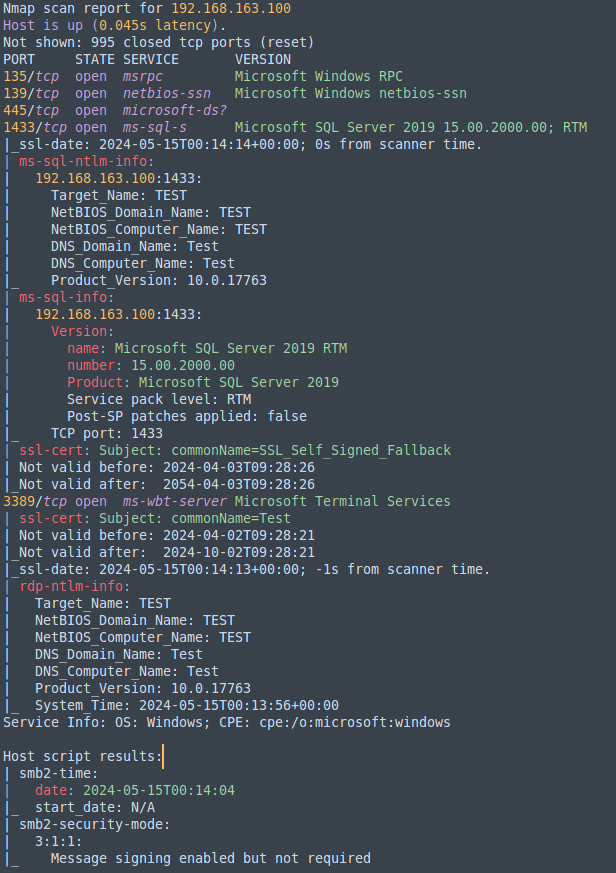 46 |
--------------------------------------------------------------------------------
/nmap.sublime-syntax:
--------------------------------------------------------------------------------
1 | %YAML 1.2
2 | ---
3 | name: Nmap
4 | file_extensions:
5 | - nmap
6 | scope: source.nmap
7 |
8 | contexts:
9 | main:
10 | # Comment lines
11 | - match: ^#.*
12 | scope: comment.line.number-sign.nmap
13 |
14 | # Host information with IP addresses
15 | - match: (Nmap scan report for )([^\s]+)\s\((\d{1,3}\.\d{1,3}\.\d{1,3}\.\d{1,3})\)
16 | captures:
17 | 1: entity.name.section.nmap
18 | 2: constant.other.hostname.nmap
19 | 3: constant.numeric.ip-address.nmap
20 |
21 | # Host status
22 | - match: (Host is up \()(.*?)(\))
23 | captures:
24 | 1: keyword.other.nmap
25 | 2: constant.numeric.time.nmap
26 | 3: punctuation.definition.comment.nmap
27 |
28 | # Port information
29 | - match: ^(\d+)/(tcp|udp)\s+(open|closed|filtered)\s+([^\s]+)\s+(.*)$
30 | captures:
31 | 1: constant.numeric.port.nmap
32 | 2: storage.type.nmap
33 | 3: keyword.other.state.nmap
34 | 4: storage.type.service.nmap
35 | 5: string.unquoted.version.nmap
36 |
37 | # Service information
38 | - match: ^([^\s]+)\s+(open|closed|filtered)\s+(.*)$
39 | captures:
40 | 1: storage.type.service.nmap
41 | 2: keyword.other.state.nmap
42 | 3: string.unquoted.nmap
43 |
44 | # IP addresses
45 | - match: \b(\d{1,3}\.\d{1,3}\.\d{1,3}\.\d{1,3})\b
46 | scope: constant.numeric.ip-address.nmap
47 |
48 | # Finished time
49 | - match: (Nmap done at )(.*)
50 | captures:
51 | 1: keyword.other.nmap
52 | 2: constant.numeric.time.nmap
53 |
54 | # HTTP Responses
55 | - match: (HTTP/\d+\.\d+ \d+ .*)
56 | scope: keyword.control.http.nmap
57 |
58 | # Headers
59 | - match: ^([A-Za-z-]+:)(\s+.*)
60 | captures:
61 | 1: entity.name.tag.http.nmap
62 | 2: string.unquoted.nmap
63 |
64 | # HTML and XML content
65 | - match: (<[^>]+>)
66 | scope: string.unquoted.html.nmap
67 |
68 | # SF lines
69 | - match: ^SF.*.+$
70 | scope: string.unquoted.sf-response.nmap
71 |
72 | # Next Service Fingerprint header
73 | - match: ^={14,}NEXT SERVICE FINGERPRINT \(SUBMIT INDIVIDUALLY\)={14,}$
74 | scope: entity.name.section.next-service.nmap
75 |
76 | # Generic lines with equals at the start and end
77 | - match: ^=.*=$
78 | scope: entity.name.tag.http.nmap
79 |
80 | # HTTP header lines with pipe
81 | - match: ^(\|\s+)([A-Za-z-]+)(:)(.*)$
82 | captures:
83 | 1: punctuation.separator.pipe.nmap
84 | 2: entity.name.tag.header-name.nmap
85 | 3: punctuation.separator.colon.nmap
86 | 4: string.unquoted.header-value.nmap
87 |
--------------------------------------------------------------------------------
46 |
--------------------------------------------------------------------------------
/nmap.sublime-syntax:
--------------------------------------------------------------------------------
1 | %YAML 1.2
2 | ---
3 | name: Nmap
4 | file_extensions:
5 | - nmap
6 | scope: source.nmap
7 |
8 | contexts:
9 | main:
10 | # Comment lines
11 | - match: ^#.*
12 | scope: comment.line.number-sign.nmap
13 |
14 | # Host information with IP addresses
15 | - match: (Nmap scan report for )([^\s]+)\s\((\d{1,3}\.\d{1,3}\.\d{1,3}\.\d{1,3})\)
16 | captures:
17 | 1: entity.name.section.nmap
18 | 2: constant.other.hostname.nmap
19 | 3: constant.numeric.ip-address.nmap
20 |
21 | # Host status
22 | - match: (Host is up \()(.*?)(\))
23 | captures:
24 | 1: keyword.other.nmap
25 | 2: constant.numeric.time.nmap
26 | 3: punctuation.definition.comment.nmap
27 |
28 | # Port information
29 | - match: ^(\d+)/(tcp|udp)\s+(open|closed|filtered)\s+([^\s]+)\s+(.*)$
30 | captures:
31 | 1: constant.numeric.port.nmap
32 | 2: storage.type.nmap
33 | 3: keyword.other.state.nmap
34 | 4: storage.type.service.nmap
35 | 5: string.unquoted.version.nmap
36 |
37 | # Service information
38 | - match: ^([^\s]+)\s+(open|closed|filtered)\s+(.*)$
39 | captures:
40 | 1: storage.type.service.nmap
41 | 2: keyword.other.state.nmap
42 | 3: string.unquoted.nmap
43 |
44 | # IP addresses
45 | - match: \b(\d{1,3}\.\d{1,3}\.\d{1,3}\.\d{1,3})\b
46 | scope: constant.numeric.ip-address.nmap
47 |
48 | # Finished time
49 | - match: (Nmap done at )(.*)
50 | captures:
51 | 1: keyword.other.nmap
52 | 2: constant.numeric.time.nmap
53 |
54 | # HTTP Responses
55 | - match: (HTTP/\d+\.\d+ \d+ .*)
56 | scope: keyword.control.http.nmap
57 |
58 | # Headers
59 | - match: ^([A-Za-z-]+:)(\s+.*)
60 | captures:
61 | 1: entity.name.tag.http.nmap
62 | 2: string.unquoted.nmap
63 |
64 | # HTML and XML content
65 | - match: (<[^>]+>)
66 | scope: string.unquoted.html.nmap
67 |
68 | # SF lines
69 | - match: ^SF.*.+$
70 | scope: string.unquoted.sf-response.nmap
71 |
72 | # Next Service Fingerprint header
73 | - match: ^={14,}NEXT SERVICE FINGERPRINT \(SUBMIT INDIVIDUALLY\)={14,}$
74 | scope: entity.name.section.next-service.nmap
75 |
76 | # Generic lines with equals at the start and end
77 | - match: ^=.*=$
78 | scope: entity.name.tag.http.nmap
79 |
80 | # HTTP header lines with pipe
81 | - match: ^(\|\s+)([A-Za-z-]+)(:)(.*)$
82 | captures:
83 | 1: punctuation.separator.pipe.nmap
84 | 2: entity.name.tag.header-name.nmap
85 | 3: punctuation.separator.colon.nmap
86 | 4: string.unquoted.header-value.nmap
87 |
--------------------------------------------------------------------------------