├── cookies.js ├── modal.js ├── main.js ├── README.md ├── index.html └── style.css /cookies.js: -------------------------------------------------------------------------------- 1 | const cookieNotification = document.querySelector('.cookie-notification'); 2 | const cookieAccept = document.querySelector('#cookie-accept'); 3 | 4 | if (!localStorage.getItem('cookieAccepted')) { 5 | cookieNotification.style.display = 'block'; 6 | } 7 | 8 | cookieAccept.addEventListener('click', () => { 9 | localStorage.setItem('cookieAccepted', true); 10 | cookieNotification.style.display = 'none'; 11 | }); -------------------------------------------------------------------------------- /modal.js: -------------------------------------------------------------------------------- 1 | const modalLinks = document.querySelectorAll('.modal-link'); 2 | const modalCloseButtons = document.querySelectorAll('.modal-close'); 3 | const modals = document.querySelectorAll('.modal'); 4 | 5 | modalLinks.forEach((link) => { 6 | link.addEventListener('click', (event) => { 7 | event.preventDefault(); 8 | const target = link.getAttribute('href'); 9 | const modal = document.querySelector(target); 10 | modal.style.display = 'flex'; 11 | }); 12 | }); 13 | 14 | modalCloseButtons.forEach((button) => { 15 | button.addEventListener('click', (event) => { 16 | event.preventDefault(); 17 | const modal = button.closest('.modal'); 18 | modal.style.display = 'none'; 19 | }); 20 | }); 21 | 22 | modals.forEach((modal) => { 23 | modal.addEventListener('click', (event) => { 24 | if (event.target === modal) { 25 | modal.style.display = 'none'; 26 | } 27 | }); 28 | }); 29 | 30 | document.addEventListener('keyup', (event) => { 31 | if (event.key === 'Escape') { 32 | modals.forEach((modal) => { 33 | modal.style.display = 'none'; 34 | }); 35 | } 36 | }); -------------------------------------------------------------------------------- /main.js: -------------------------------------------------------------------------------- 1 | const modelSelect = document.getElementById('model'); 2 | const resultText = document.getElementById('result'); 3 | 4 | const wordCountButtons = document.querySelectorAll('.word-count-btn'); 5 | wordCountButtons.forEach(button => { 6 | button.addEventListener('click', () => { 7 | const words = button.getAttribute('data-words'); 8 | document.getElementById('word-count').value = words; 9 | calculateTotal(words); 10 | }); 11 | }); 12 | 13 | modelSelect.addEventListener('change', () => { 14 | calculateTotal(); 15 | }); 16 | 17 | document.getElementById('word-count').addEventListener('input', () => { 18 | calculateTotal(); 19 | }); 20 | 21 | function calculateTotal(words) { 22 | const wordCount = words || document.getElementById('word-count').value; 23 | const model = modelSelect.value; 24 | let price = 0; 25 | 26 | switch (model) { 27 | case 'chatgpt-4k': 28 | price = 0.002; 29 | break; 30 | case 'chatgpt-16k': 31 | price = 0.004; 32 | break; 33 | case 'gpt4-8k': 34 | price = 0.06; 35 | break; 36 | case 'gpt4-32k': 37 | price = 0.12; 38 | break; 39 | default: 40 | break; 41 | } 42 | 43 | const total = (wordCount / 500) * price; 44 | resultText.textContent = '$' + total.toFixed(2); 45 | } 46 | 47 | calculateTotal(); -------------------------------------------------------------------------------- /README.md: -------------------------------------------------------------------------------- 1 |
2 | LOGO 3 | 4 |

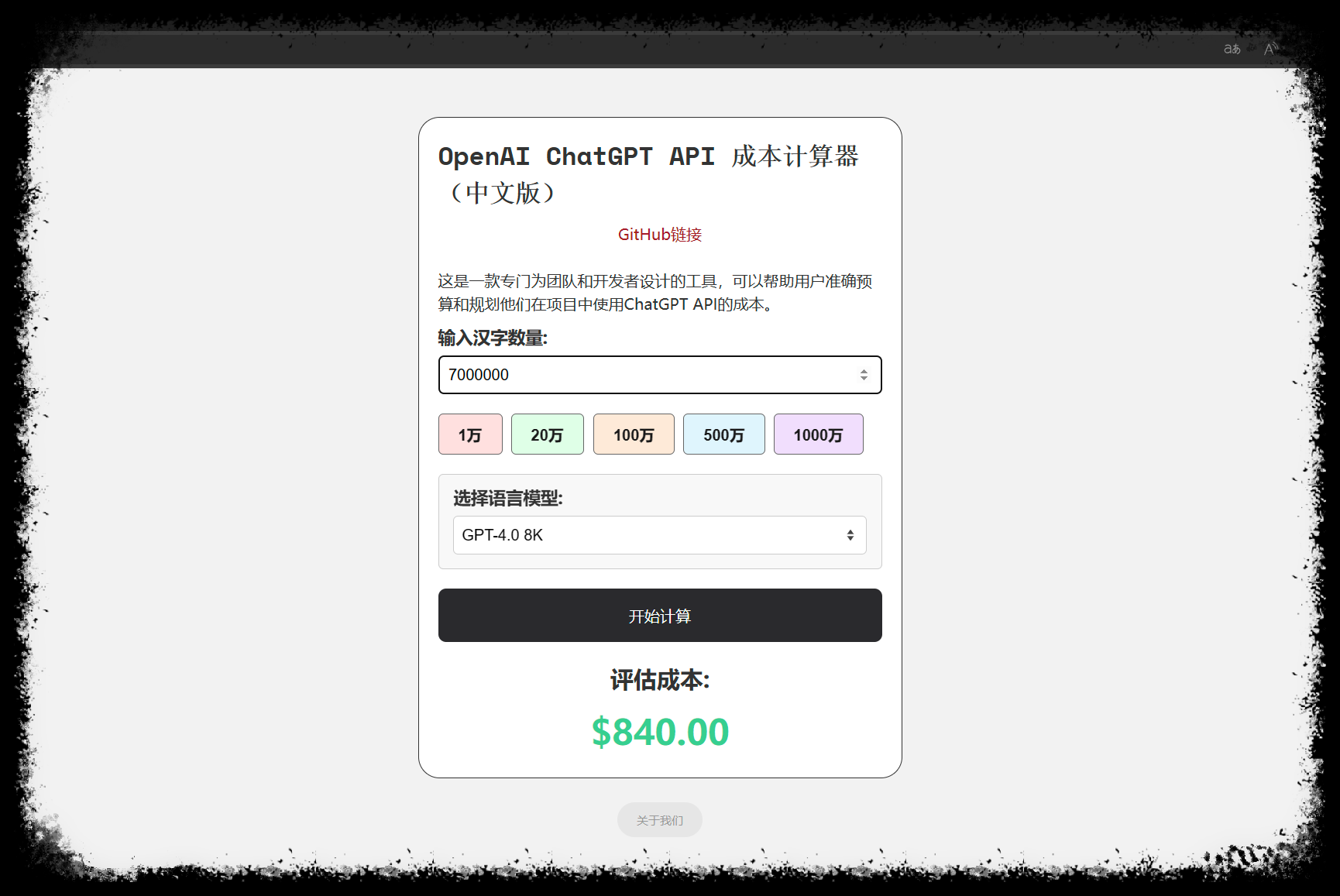
OpenAI ChatGPT API 成本计算器(中文版)

5 | 6 | 这是一款专门为团队和开发者设计的工具,可以帮助用户准确预算和规划他们在项目中使用ChatGPT API的成本。 7 | 8 | [演示 Demo](https://ccc.openkey.cloud/) / [团队介绍](https://openkey.cloud/) 9 | 10 |
11 | 12 | ## 界面预览 13 | 14 | LOGO 15 | 16 | ## 主要特点和功能 17 | 18 | 基于中文汉字的的 API 价格/成本计算器,对中文开发者更加友好; 19 | 20 | 可以帮助用户估算项目成本,规划API使用; 21 | 22 | 精确性高,简单易懂。 23 | 24 | ## 计算细节 25 | 26 | 模型对应的价格: 27 | 28 | >GPT-3.5-Turbo 4K - $0.002 / 1K tokens 29 | > 30 | >GPT-3.5-Turbo 16K - $0.004 / 1K tokens 31 | > 32 | >GPT-4.0 8K - $0.06 / 1K tokens 33 | > 34 | >GPT-4.0 32K - $0.12 / 1K tokens 35 | 36 | 计算公式: 37 | 38 | >成本 = (中文字数 * 2 / 1000) * 模型价格 39 | 40 | ## 部署方式 41 | 42 | 纯静态部署 43 | 44 | ## 开源赞助 45 | 46 | 47 | 河马小镇 48 | 49 | 50 | ## 相关项目 51 | 52 | * [ChatGPT-API-Faucet](https://github.com/terobox/ChatGPT-API-Faucet): AI 圈的水龙头网站,每24小时可领取一个令牌用于开发测试 AI 产品 53 | 54 | ## 开源协议 55 | 56 | [MIT](https://opensource.org/license/mit/) -------------------------------------------------------------------------------- /index.html: -------------------------------------------------------------------------------- 1 | 2 | 3 | 4 | 5 | 6 | 7 | OpenAI ChatGPT API 成本计算器(中文版) 8 | 9 | 10 | 11 | 12 | 13 | 14 | 15 | 16 | 29 | 30 | 31 | 32 | 33 | 34 | 41 | 48 | 49 | 50 |
51 |

OpenAI ChatGPT API 成本计算器(中文版)

52 | GitHub链接 53 |
54 |

55 | 这是一款专门为团队和开发者设计的工具,可以帮助用户准确预算和规划他们在项目中使用ChatGPT API的成本。 56 |

57 |
58 | 59 | 60 |
61 |
62 | 63 | 64 | 65 | 66 | 67 |
68 |
69 |
70 | 71 | 77 |
78 |
79 |
80 | 81 |
82 |
83 |

评估成本:

84 |

$0.00

85 |
86 |
87 |
88 | 92 | 93 | 131 | 132 | 133 | 134 | 135 | 136 | 137 | -------------------------------------------------------------------------------- /style.css: -------------------------------------------------------------------------------- 1 | * { 2 | margin: 0; 3 | padding: 0; 4 | box-sizing: border-box; 5 | } 6 | 7 | body { 8 | font-family: 'Open Sans', sans-serif; 9 | font-size: 16px; 10 | line-height: 1.5; 11 | color: #333; 12 | background-color: #f2f2f2; 13 | } 14 | 15 | a{ 16 | text-decoration: none; 17 | color: #36CF8F; 18 | } 19 | 20 | .container { 21 | max-width: 500px; 22 | margin: 50px auto 25px auto; 23 | padding: 20px; 24 | border-radius: 22px; 25 | background-color: #fff; 26 | border:1px solid #333; 27 | /*box-shadow: 0 2px 8px rgba(0, 0, 0, 0.1);*/ 28 | } 29 | 30 | .title { 31 | font-size: 26px; 32 | font-weight: 700; 33 | margin-bottom: 10px; 34 | font-family: 'Space Mono', monospace; 35 | } 36 | 37 | .description{ 38 | font-size: 16px; 39 | font-weight: 500; 40 | } 41 | 42 | .input-group { 43 | margin-bottom: 20px; 44 | } 45 | 46 | label { 47 | display: block; 48 | margin-bottom: 5px; 49 | font-size: 18px; 50 | font-weight: 600; 51 | } 52 | 53 | input[type="number"], 54 | select { 55 | width: 100%; 56 | padding: 10px; 57 | font-size: 16px; 58 | border: 1px solid #ccc; 59 | border-radius: 5px; 60 | background-color: #fff; 61 | -moz-appearance: none; 62 | -webkit-appearance: none; 63 | appearance: none; 64 | } 65 | select { 66 | border: 1px solid #ccc; 67 | background: #fff; 68 | line-height: 1.2; 69 | height: 40px; 70 | border-radius: 5px; 71 | padding: 0 18px 0 8px; 72 | background: #fff url(data:image/svg+xml;base64,PHN2ZyBpZD0iTGF5ZXJfMSIgZGF0YS1uYW1lPSJMYXllciAxIiB4bWxucz0iaHR0cDovL3d3dy53My5vcmcvMjAwMC9zdmciIHZpZXdCb3g9IjAgMCA0Ljk1IDEwIj48ZGVmcz48c3R5bGU+LmNscy0xe2ZpbGw6I2ZmZjt9LmNscy0ye2ZpbGw6IzQ0NDt9PC9zdHlsZT48L2RlZnM+PHRpdGxlPmFycm93czwvdGl0bGU+PHJlY3QgY2xhc3M9ImNscy0xIiB3aWR0aD0iNC45NSIgaGVpZ2h0PSIxMCIvPjxwb2x5Z29uIGNsYXNzPSJjbHMtMiIgcG9pbnRzPSIxLjQxIDQuNjcgMi40OCAzLjE4IDMuNTQgNC42NyAxLjQxIDQuNjciLz48cG9seWdvbiBjbGFzcz0iY2xzLTIiIHBvaW50cz0iMy41NCA1LjMzIDIuNDggNi44MiAxLjQxIDUuMzMgMy41NCA1LjMzIi8+PC9zdmc+) no-repeat 98% 50%; 73 | background-size: auto; 74 | background-size: 16px 100%; 75 | -moz-appearance: none; 76 | -webkit-appearance: none; 77 | appearance: none; 78 | box-shadow: none; 79 | outline: 0; 80 | cursor: pointer; 81 | } 82 | 83 | .input-group .selstyle { 84 | background: #f8f8f8; 85 | padding: 10px 15px 15px 15px; 86 | border-radius: 5px; 87 | border: 1px solid #ccc; 88 | } 89 | 90 | button { 91 | padding: 10px 20px; 92 | font-size: 16px; 93 | font-weight: 600; 94 | border: none; 95 | border-radius: 5px; 96 | cursor: pointer; 97 | transition: background-color 0.3s ease; 98 | } 99 | 100 | #calculate-btn{ 101 | background: #2a2a2d!important; 102 | color: #fff; 103 | width: 100%; 104 | padding: 17px; 105 | font-weight: 400; 106 | border-radius: 8px; 107 | } 108 | #calculate-btn:hover{ 109 | background: #151515 !important; 110 | } 111 | 112 | .pink, .green, .blue, .orange, .yellow, .violet{margin-bottom:20px;opacity:.9;border:1px solid #555;color: #000;border-radius: 5px;} 113 | .pink:hover, .green:hover, .blue:hover, .orange:hover, .yellow:hover, .violet:hover{opacity: inherit;} 114 | .pink{background-color: #FEDDDC;margin-right:4px;} 115 | .green{background-color: #DBFFE5;margin-right:5px;} 116 | .blue{background-color: #DBF4FD;margin-right:4px;} 117 | .orange{background-color: #ffe8d4;margin-right:4px;} 118 | .yellow{background-color: #FFF9C2;margin-right:4px;} 119 | .violet{background-color: #EFDBFE;} 120 | 121 | .result-container { 122 | margin-top: 20px; 123 | text-align: center; 124 | } 125 | 126 | h2 { 127 | font-size: 24px; 128 | font-weight: 700; 129 | margin-bottom: 10px; 130 | } 131 | 132 | p#result { 133 | font-size: 36px; 134 | font-weight: 700; 135 | color: #36CF90; 136 | } 137 | 138 | .poweredby{ 139 | width: 100%; 140 | } 141 | .poweredby button{ 142 | background-color: #e6e6e6; 143 | font-size: 12px; 144 | font-weight: 400; 145 | color: #999; 146 | border-radius: 32px; 147 | text-align: center; 148 | margin: 0 auto; 149 | left: 0; 150 | right: 0; 151 | display: block; 152 | } 153 | 154 | 155 | .cookie-notification { 156 | background-color: #fff; 157 | color: #333; 158 | padding: 20px; 159 | position: fixed; 160 | bottom: 10px; 161 | left: 10px; 162 | max-width: 380px; 163 | border: 1px solid #000; 164 | border-radius: 14px; 165 | display: none; 166 | } 167 | 168 | 169 | .cookie-notification p { 170 | margin: 0; 171 | margin-bottom: 10px; 172 | font-size: 15px; 173 | } 174 | 175 | .cookie-notification button { 176 | background-color: #efdbfe !important; 177 | color: #000; 178 | border: 1px solid #000; 179 | width: 100%; 180 | font-weight: 400; 181 | border-radius: 8px; 182 | padding: 10px 10px; 183 | cursor: pointer; 184 | float: right; 185 | } 186 | 187 | 188 | 189 | /* Estilo de los enlaces */ 190 | nav{ 191 | display: flex; 192 | justify-content: center; 193 | margin: 15px 0 25px 0; 194 | } 195 | nav ul { 196 | list-style: none; 197 | display: flex; 198 | } 199 | 200 | nav li { 201 | margin-right: 20px; 202 | } 203 | 204 | nav a { 205 | color: #333; 206 | text-decoration: none; 207 | font-size: 14px; 208 | } 209 | 210 | /* Estilo del modal */ 211 | .modal { 212 | position: fixed; 213 | left: 0; 214 | bottom: 0; 215 | width: 100%; 216 | height: 100%; 217 | background-color: rgba(0, 0, 0, 0.375); 218 | display: none; 219 | justify-content: center; 220 | } 221 | 222 | .modal-content { 223 | background-color: #fff; 224 | border: 1.5px solid #000; 225 | border-bottom: none; 226 | max-width: 800px; 227 | width: 100%; 228 | max-height: 100%; 229 | overflow-y: auto; 230 | padding: 50px 50px; 231 | margin-top: 5%; 232 | border-radius: 14px; 233 | border-bottom-left-radius: 0px; 234 | border-bottom-right-radius: 0px; 235 | position: relative; 236 | } 237 | 238 | .modal h2 { 239 | margin-top: 0; 240 | } 241 | 242 | .modal p { 243 | line-height: 32px; 244 | } 245 | 246 | .modal-close { 247 | position: absolute; 248 | top: 10px; 249 | right: 10px; 250 | background-color: #fff; 251 | color: #333; 252 | border: none; 253 | padding: 10px 20px; 254 | border-radius: 3px; 255 | cursor: pointer; 256 | } 257 | 258 | 259 | 260 | 261 | 262 | 263 | 264 | 265 | 266 | @media screen and (max-width: 600px) { 267 | .container {margin: 15px 15px 30px 15px;} 268 | .cookie-notification { 269 | display: flex; 270 | justify-content: center; 271 | align-items: center; 272 | margin:0 auto; 273 | left: 0; 274 | right:0; 275 | width: 100%; 276 | z-index: 999; 277 | } 278 | .pink, .green, .blue, .orange, .yellow, .violet{padding:6px 10px;} 279 | .pink, .green, .blue, .orange, .yellow{margin-right:3px;} 280 | .modal-content { 281 | border: 1px solid #000; 282 | max-height: 100%; 283 | overflow-y: auto; 284 | padding: 30px 20px; 285 | margin-top: 25%; 286 | } 287 | } 288 | 289 | 290 | 291 | 292 | --------------------------------------------------------------------------------