├── env.gif
├── WALLPAPERS
└── wallpaper.jpg
├── CONFIGS
├── config
│ ├── polybar
│ │ └── forest
│ │ │ ├── scripts
│ │ │ ├── rofi
│ │ │ │ ├── colors.rasi
│ │ │ │ ├── confirm.rasi
│ │ │ │ ├── message.rasi
│ │ │ │ ├── launcher.rasi
│ │ │ │ ├── powermenu.rasi
│ │ │ │ ├── styles.rasi
│ │ │ │ └── networkmenu.rasi
│ │ │ ├── style-switch.sh
│ │ │ ├── launcher.sh
│ │ │ ├── updates.sh
│ │ │ ├── styles.sh
│ │ │ ├── powermenu.sh
│ │ │ └── checkupdates
│ │ │ ├── launch.sh
│ │ │ ├── preview.sh
│ │ │ ├── colors.ini
│ │ │ ├── user_modules.ini
│ │ │ ├── config.ini
│ │ │ ├── preview.ini
│ │ │ ├── bars.ini
│ │ │ └── modules.ini
│ ├── bspwm
│ │ ├── scripts
│ │ │ └── bspwm_resize
│ │ └── bspwmrc
│ ├── kitty
│ │ ├── color.ini
│ │ └── kitty.conf
│ ├── sxhkd
│ │ └── sxhkdrc
│ └── picom
│ │ └── picom.conf
├── zshrc
└── tmux.conf.local
├── SCRIPTS
├── target.sh
└── screenshot.sh
├── LICENSE
├── README.md
├── kitty-installer.sh
└── hackerpwm.sh
/env.gif:
--------------------------------------------------------------------------------
https://raw.githubusercontent.com/thegoodhackertv/hackerpwm/HEAD/env.gif
--------------------------------------------------------------------------------
/WALLPAPERS/wallpaper.jpg:
--------------------------------------------------------------------------------
https://raw.githubusercontent.com/thegoodhackertv/hackerpwm/HEAD/WALLPAPERS/wallpaper.jpg
--------------------------------------------------------------------------------
/CONFIGS/config/polybar/forest/scripts/rofi/colors.rasi:
--------------------------------------------------------------------------------
1 | /* colors */
2 |
3 | * {
4 | al: #00000000;
5 | bg: #212B30FF;
6 | bga: #263035FF;
7 | fg: #C4C7C5FF;
8 | ac: #EC407AFF;
9 | se: #4DD0E1FF;
10 | }
11 |
--------------------------------------------------------------------------------
/SCRIPTS/target.sh:
--------------------------------------------------------------------------------
1 | #!/bin/bash
2 |
3 | FILE=/tmp/target
4 | RED='\033[0;31m'
5 |
6 | if [ $# -eq 0 ]; then
7 | if [ -e "$FILE" ]; then
8 | cat $FILE
9 | else
10 | printf "No Target"
11 | fi
12 | elif [ $1 == "reset" ]; then
13 | rm /tmp/target
14 | else
15 | echo $1 > $FILE
16 | fi
17 |
--------------------------------------------------------------------------------
/SCRIPTS/screenshot.sh:
--------------------------------------------------------------------------------
1 | #! /bin/sh
2 |
3 | output=~/screenshots/%Y-%m-%d-%T-sc.png
4 |
5 | case "$1" in
6 | "select") scrot -s -q 100 -l mode=classic "$output" || exit ;;
7 | "window") scrot -q 100 --focused -b "$output" || exit ;;
8 | *) scrot "$output" || exit ;;
9 | esac
10 |
11 | notify-send "Screenshot taken."
12 |
--------------------------------------------------------------------------------
/CONFIGS/config/polybar/forest/launch.sh:
--------------------------------------------------------------------------------
1 | #!/usr/bin/env bash
2 |
3 | # Add this script to your wm startup file.
4 |
5 | DIR="$HOME/.config/polybar/forest"
6 |
7 | # Terminate already running bar instances
8 | killall -q polybar
9 |
10 | # Wait until the processes have been shut down
11 | while pgrep -u $UID -x polybar >/dev/null; do sleep 1; done
12 |
13 | # Launch the bar
14 | polybar -q main -c "$DIR"/config.ini &
15 |
--------------------------------------------------------------------------------
/CONFIGS/config/polybar/forest/preview.sh:
--------------------------------------------------------------------------------
1 | #!/usr/bin/env bash
2 |
3 | DIR="$HOME/.config/polybar/forest"
4 |
5 | # Terminate already running bar instances
6 | killall -q polybar
7 |
8 | # Wait until the processes have been shut down
9 | while pgrep -u $UID -x polybar >/dev/null; do sleep 1; done
10 |
11 | # Launch the preview bar
12 | polybar -q top -c "$DIR"/preview.ini &
13 | polybar -q mid -c "$DIR"/preview.ini &
14 | polybar -q bottom -c "$DIR"/preview.ini &
15 |
--------------------------------------------------------------------------------
/CONFIGS/config/bspwm/scripts/bspwm_resize:
--------------------------------------------------------------------------------
1 | #usr/bin/env dash
2 |
3 | if bspc query -N -n focused.floating > /dev/null; then
4 | step=20
5 | else
6 | step=100
7 | fi
8 |
9 | case "$1" in
10 | west) dir=right; falldir=left; x="-$step"; y=0;;
11 | east) dir=right; falldir=left; x="$step"; y=0;;
12 | north) dir=top; falldir=bottom; x=0; y="-$step";;
13 | south) dir=top; falldir=bottom; x=0; y="$step";;
14 | esac
15 |
16 | bspc node -z "$dir" "$x" "$y" || bspc node -z "$falldir" "$x" "$y"
17 |
--------------------------------------------------------------------------------
/CONFIGS/config/polybar/forest/scripts/rofi/confirm.rasi:
--------------------------------------------------------------------------------
1 | /* Confirm Dialog */
2 |
3 | @import "colors.rasi"
4 |
5 | * {
6 | background-color: @bg;
7 | text-color: @fg;
8 | font: "Iosevka Nerd Font 10";
9 | }
10 |
11 | window {
12 | width: 210px;
13 | padding: 25px;
14 | border: 0px 0px 1px 0px;
15 | border-radius: 0px;
16 | border-color: @se;
17 | location: center;
18 | y-offset: -2em;
19 | }
20 |
21 | entry {
22 | expand: true;
23 | text-color: @ac;
24 | }
25 |
--------------------------------------------------------------------------------
/CONFIGS/config/polybar/forest/scripts/rofi/message.rasi:
--------------------------------------------------------------------------------
1 | /* Confirm Dialog */
2 |
3 | @import "colors.rasi"
4 |
5 | * {
6 | background-color: @bg;
7 | text-color: @fg;
8 | font: "Iosevka Nerd Font 10";
9 | }
10 |
11 | window {
12 | width: 320px;
13 | padding: 25px;
14 | border: 0px 0px 1px 0px;
15 | border-radius: 0px;
16 | border-color: @se;
17 | location: center;
18 | y-offset: -2em;
19 | }
20 |
21 | entry {
22 | expand: true;
23 | text-color: @ac;
24 | }
25 |
--------------------------------------------------------------------------------
/CONFIGS/config/polybar/forest/scripts/style-switch.sh:
--------------------------------------------------------------------------------
1 | #!/usr/bin/env bash
2 |
3 | SDIR="$HOME/.config/polybar/forest/scripts"
4 |
5 | # Launch Rofi
6 | MENU="$(rofi -no-config -no-lazy-grab -sep "|" -dmenu -i -p '' \
7 | -theme $SDIR/rofi/styles.rasi \
8 | <<< " Default| Nord| Gruvbox| Dark| Cherry|")"
9 | case "$MENU" in
10 | *Default) "$SDIR"/styles.sh --default ;;
11 | *Nord) "$SDIR"/styles.sh --nord ;;
12 | *Gruvbox) "$SDIR"/styles.sh --gruvbox ;;
13 | *Dark) "$SDIR"/styles.sh --dark ;;
14 | *Cherry) "$SDIR"/styles.sh --cherry ;;
15 | esac
16 |
--------------------------------------------------------------------------------
/CONFIGS/config/polybar/forest/scripts/launcher.sh:
--------------------------------------------------------------------------------
1 | #!/usr/bin/env bash
2 |
3 | FILE="$HOME/.config/polybar/forest/scripts/rofi/colors.rasi"
4 |
5 | ## random accent color
6 | #COLORS=('#EC7875' '#EC6798' '#BE78D1' '#75A4CD' '#00C7DF' '#00B19F' '#61C766' \
7 | # '#B9C244' '#EBD369' '#EDB83F' '#E57C46' '#AC8476' '#6C77BB' '#6D8895')
8 | #AC="${COLORS[$(( $RANDOM % 14 ))]}"
9 | #SE="${COLORS[$(( $RANDOM % 14 ))]}"
10 | #sed -i -e "s/ac: .*/ac: ${AC}FF;/g" $FILE
11 | #sed -i -e "s/se: .*/se: ${SE}FF;/g" $FILE
12 |
13 | rofi -no-config -no-lazy-grab -show drun -modi drun -theme ~/.config/polybar/forest/scripts/rofi/launcher.rasi
14 |
--------------------------------------------------------------------------------
/CONFIGS/config/kitty/color.ini:
--------------------------------------------------------------------------------
1 | cursor_shape Underline
2 | cursor_underline_thickness 1
3 | window_padding_width 20
4 |
5 | # Special
6 | foreground #a9b1d6
7 | background #1a1b26
8 |
9 | # Black
10 | color0 #414868
11 | color8 #414868
12 |
13 | # Red
14 | color1 #f7768e
15 | color9 #f7768e
16 |
17 | # Green
18 | color2 #73daca
19 | color10 #73daca
20 |
21 | # Yellow
22 | color3 #e0af68
23 | color11 #e0af68
24 |
25 | # Blue
26 | color4 #7aa2f7
27 | color12 #7aa2f7
28 |
29 | # Magenta
30 | color5 #bb9af7
31 | color13 #bb9af7
32 |
33 | # Cyan
34 | color6 #7dcfff
35 | color14 #7dcfff
36 |
37 | # White
38 | color7 #c0caf5
39 | color15 #c0caf5
40 |
41 | # Cursor
42 | cursor #c0caf5
43 | cursor_text_color #1a1b26
44 |
45 | # Selection highlight
46 | selection_foreground #7aa2f7
47 | selection_background #28344a
48 |
--------------------------------------------------------------------------------
/CONFIGS/config/bspwm/bspwmrc:
--------------------------------------------------------------------------------
1 | #! /bin/sh
2 |
3 | wmname LG3D &
4 | vmware-user-suid-wrapper &
5 |
6 | pgrep -x sxhkd > /dev/null || sxhkd &
7 |
8 | bspc monitor -d I II III IV V VI VII VIII IX X
9 |
10 | bspc config border_width 2
11 | bspc config window_gap 12
12 |
13 | bspc config split_ratio 0.52
14 | bspc config borderless_monocle true
15 | bspc config gapless_monocle true
16 |
17 | bspc rule -a Gimp desktop='^8' state=floating follow=on
18 | bspc rule -a Chromium desktop='^2'
19 | bspc rule -a mplayer2 state=floating
20 | bspc rule -a Kupfer.py focus=on
21 | bspc rule -a Screenkey manage=off
22 |
23 | # WALLPAPER
24 | feh --bg-fill ~/Wallpapers/wallpaper.*
25 |
26 | # POLYBAR
27 | ~/.config/polybar/launch.sh --forest
28 |
29 | # CUSTOM
30 | bspc config focus_follows_pointer true
31 |
32 | # PICOM
33 | picom &
34 | bspc config border_width 0
35 |
36 | xsetroot -cursor_name left_ptr &
37 |
--------------------------------------------------------------------------------
/CONFIGS/config/polybar/forest/colors.ini:
--------------------------------------------------------------------------------
1 | ;; ┌────────────────────────────────────────────────────────────┐
2 | ;; │░█▀█░█▀█░█░░░█░█░█▀▄░█▀█░█▀▄░░░░░░░░░█▀▀░█▀█░█░░░█▀█░█▀▄░█▀▀│
3 | ;; │░█▀▀░█░█░█░░░░█░░█▀▄░█▀█░█▀▄░░░░▀░░░░█░░░█░█░█░░░█░█░█▀▄░▀▀█│
4 | ;; │░▀░░░▀▀▀░▀▀▀░░▀░░▀▀░░▀░▀░▀░▀░░░░▀░░░░▀▀▀░▀▀▀░▀▀▀░▀▀▀░▀░▀░▀▀▀│
5 | ;; │░Created░By░Aditya░Shakya░@adi1090x░░░░░░░░░░░░░░░░░░░░░░░░░│
6 | ;; └────────────────────────────────────────────────────────────┘
7 |
8 | ;; _-_-_-_-_-_-_-_-_-_-_-_-_-_-_-_-_-_-_-_-_-_
9 |
10 | [color]
11 |
12 | ;; Use pywal.sh in scripts directory to use colors from an image/wallpaper.
13 |
14 | ;; main colors
15 | background = #212B30
16 | foreground = #C4C7C5
17 | sep = #3F5360
18 |
19 | white = #FFFFFF
20 | black = #000000
21 | red = #EC7875
22 | pink = #EC407A
23 | purple = #BA68C8
24 | blue = #42A5F5
25 | cyan = #4DD0E1
26 | teal = #00B19F
27 | green = #61C766
28 | lime = #B9C244
29 | yellow = #FDD835
30 | amber = #FBC02D
31 | orange = #E57C46
32 | brown = #AC8476
33 | indigo = #6C77BB
34 | gray = #9E9E9E
35 | blue-gray = #6D8895
36 |
37 | ;; _-_-_-_-_-_-_-_-_-_-_-_-_-_-_-_-_-_-_-_-_-_
38 |
--------------------------------------------------------------------------------
/LICENSE:
--------------------------------------------------------------------------------
1 | MIT License
2 |
3 | Copyright (c) 2023 Andres Moreno
4 |
5 | Permission is hereby granted, free of charge, to any person obtaining a copy
6 | of this software and associated documentation files (the "Software"), to deal
7 | in the Software without restriction, including without limitation the rights
8 | to use, copy, modify, merge, publish, distribute, sublicense, and/or sell
9 | copies of the Software, and to permit persons to whom the Software is
10 | furnished to do so, subject to the following conditions:
11 |
12 | The above copyright notice and this permission notice shall be included in all
13 | copies or substantial portions of the Software.
14 |
15 | THE SOFTWARE IS PROVIDED "AS IS", WITHOUT WARRANTY OF ANY KIND, EXPRESS OR
16 | IMPLIED, INCLUDING BUT NOT LIMITED TO THE WARRANTIES OF MERCHANTABILITY,
17 | FITNESS FOR A PARTICULAR PURPOSE AND NONINFRINGEMENT. IN NO EVENT SHALL THE
18 | AUTHORS OR COPYRIGHT HOLDERS BE LIABLE FOR ANY CLAIM, DAMAGES OR OTHER
19 | LIABILITY, WHETHER IN AN ACTION OF CONTRACT, TORT OR OTHERWISE, ARISING FROM,
20 | OUT OF OR IN CONNECTION WITH THE SOFTWARE OR THE USE OR OTHER DEALINGS IN THE
21 | SOFTWARE.
22 |
--------------------------------------------------------------------------------
/CONFIGS/config/kitty/kitty.conf:
--------------------------------------------------------------------------------
1 | window_padding_width 0
2 | enable_audio_bell no
3 |
4 | include color.ini
5 |
6 | font_family HackNerdFont
7 |
8 | font_size 14
9 |
10 | disable_ligatures never
11 |
12 | url_color #61afef
13 |
14 | url_style curly
15 |
16 | # jump to beginning and end of word
17 | map ctrl+left send_text all \x1b\x62
18 | map ctrl+right send_text all \x1b\x66
19 |
20 | # jump to beginning and end of line
21 | map alt+left send_text all \x01
22 | map alt+right send_text all \x05
23 |
24 | #map ctrl+left neighboring_window left
25 | #map ctrl+right neighboring_window right
26 | #map ctrl+up neighboring_window up
27 | #map ctrl+down neighboring_window down
28 |
29 | map F1 copy_to_buffer a
30 | map F2 paste_from_buffer a
31 | map F3 copy_to_buffer b
32 | map F4 paste_from_buffer b
33 |
34 | cursor_shape beam
35 | cursor_beam_thickness 1.8
36 |
37 | mouse_hide_wait 3.0
38 | detect_urls yes
39 |
40 | repaint_delay 10
41 | input_delay 3
42 | sync_to_monitor yes
43 |
44 | map ctrl+shift+z toggle_layout stack
45 | tab_bar_style powerline
46 |
47 | active_tab_background #98c379
48 | inactive_tab_background #e06c75
49 | inactive_tab_foreground #000000
50 | tab_bar_margin_color black
51 |
52 | map ctrl+shift+enter new_window_with_cwd
53 | map ctrl+shift+t new_tab_with_cwd
54 |
55 | background_opacity 0.85
56 |
57 | shell zsh
58 |
--------------------------------------------------------------------------------
/README.md:
--------------------------------------------------------------------------------
1 | # hackerpwm
2 | Deploy the best environment for Kali Linux.
3 |
4 | 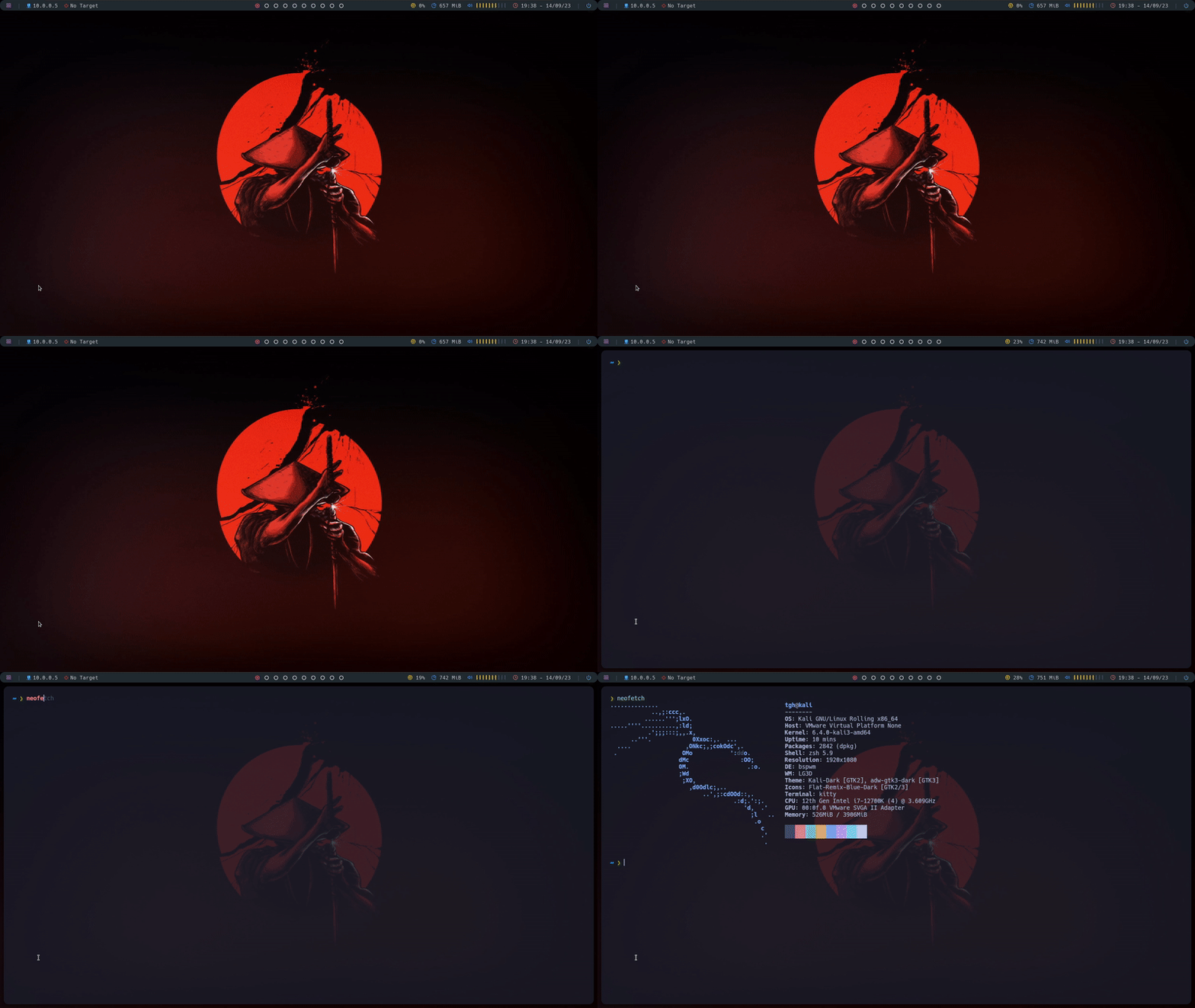
5 |
6 | ## Usage
7 | - You can watch a video tutorial ([CLICK HERE](https://youtu.be/oVgWy5Z9Owc))
8 | - The use of a new/clean Kali Linux 2023 installation is recommended.
9 | - Tested on Kali Linux 2023 with VMware, VirtualBox and bare metal.
10 |
11 | 1. clone repo `git clone https://github.com/thegoodhackertv/hackerpwm.git`
12 | 2. Change directory `cd hackerpwm`
13 | 3. Run script `./hackerpwm.sh`
14 | 4. **Reboot** and switch to bspwm in the login screen.
15 | 5. Enjoy!
16 |
17 | Wallpaper is taken from ~/Wallpapers/wallpaper.*
18 |
19 | ## You will install:
20 | ### Main packages
21 | - Hack Nerd Fonts
22 | - Kitty
23 | - Rmux + oh my tmux
24 | - lsd
25 | - Python + pip + bpython
26 | - Neofetch
27 | - Batcat
28 | - Scrot
29 | - feh
30 | - oh my zsh + plugins
31 | - Powerlevel10k
32 | - Rofi
33 | - Bspwm
34 | - Polybar
35 | - Sxhkd
36 | - Picom
37 | - Neovim
38 |
39 | ## Credits
40 | Big inspiration taken from xJackSx [repo](https://github.com/xJackSx/BSPWMparrot).
41 |
42 | ## Support
43 | [ ](https://www.patreon.com/thegoodhacker)
44 | [
](https://www.patreon.com/thegoodhacker)
44 | [ ](https://www.buymeacoffee.com/thegoodhacker)
45 |
--------------------------------------------------------------------------------
/CONFIGS/config/polybar/forest/scripts/updates.sh:
--------------------------------------------------------------------------------
1 | #!/usr/bin/env bash
2 |
3 | NOTIFY_ICON=/usr/share/icons/Papirus/32x32/apps/system-software-update.svg
4 |
5 | get_total_updates() { UPDATES=$(~/.config/polybar/forest/scripts/checkupdates 2>/dev/null | wc -l); }
6 |
7 | while true; do
8 | get_total_updates
9 |
10 | # notify user of updates
11 | if hash notify-send &>/dev/null; then
12 | if (( UPDATES > 50 )); then
13 | notify-send -u critical -i $NOTIFY_ICON \
14 | "You really need to update!!" "$UPDATES New packages"
15 | elif (( UPDATES > 25 )); then
16 | notify-send -u normal -i $NOTIFY_ICON \
17 | "You should update soon" "$UPDATES New packages"
18 | elif (( UPDATES > 2 )); then
19 | notify-send -u low -i $NOTIFY_ICON \
20 | "$UPDATES New packages"
21 | fi
22 | fi
23 |
24 | # when there are updates available
25 | # every 10 seconds another check for updates is done
26 | while (( UPDATES > 0 )); do
27 | if (( UPDATES == 1 )); then
28 | echo "$UPDATES"
29 | elif (( UPDATES > 1 )); then
30 | echo "$UPDATES"
31 | else
32 | echo "None"
33 | fi
34 | sleep 10
35 | get_total_updates
36 | done
37 |
38 | # when no updates are available, use a longer loop, this saves on CPU
39 | # and network uptime, only checking once every 30 min for new updates
40 | while (( UPDATES == 0 )); do
41 | echo "None"
42 | sleep 1800
43 | get_total_updates
44 | done
45 | done
46 |
--------------------------------------------------------------------------------
/CONFIGS/config/polybar/forest/scripts/styles.sh:
--------------------------------------------------------------------------------
1 | #!/usr/bin/env bash
2 |
3 | # Color files
4 | PFILE="$HOME/.config/polybar/forest/colors.ini"
5 | RFILE="$HOME/.config/polybar/forest/scripts/rofi/colors.rasi"
6 |
7 | # Change colors
8 | change_color() {
9 | # polybar
10 | sed -i -e "s/background = #.*/background = $BG/g" $PFILE
11 | sed -i -e "s/foreground = #.*/foreground = $FG/g" $PFILE
12 | sed -i -e "s/sep = #.*/sep = $SEP/g" $PFILE
13 |
14 | # rofi
15 | cat > $RFILE <<- EOF
16 | /* colors */
17 |
18 | * {
19 | al: #00000000;
20 | bg: ${BG}FF;
21 | bga: ${BGA}FF;
22 | fg: ${FG}FF;
23 | ac: ${AC}FF;
24 | se: ${SE}FF;
25 | }
26 | EOF
27 |
28 | polybar-msg cmd restart
29 | }
30 |
31 | if [[ $1 = "--default" ]]; then
32 | BG="#212B30"
33 | FG="#C4C7C5"
34 | BGA="#263035"
35 | SEP="#3F5360"
36 | AC="#EC407A"
37 | SE="#4DD0E1"
38 | change_color
39 | elif [[ $1 = "--nord" ]]; then
40 | BG="#3B4252"
41 | FG="#E5E9F0"
42 | BGA="#454C5C"
43 | SEP="#5B6579"
44 | AC="#BF616A"
45 | SE="#88C0D0"
46 | change_color
47 | elif [[ $1 = "--gruvbox" ]]; then
48 | BG="#282828"
49 | FG="#EBDBB2"
50 | BGA="#313131"
51 | SEP="#505050"
52 | AC="#FB4934"
53 | SE="#8EC07C"
54 | change_color
55 | elif [[ $1 = "--dark" ]]; then
56 | BG="#141C21"
57 | FG="#93A1A1"
58 | BGA="#1E262B"
59 | SEP="#3C4449"
60 | AC="#D12F2C"
61 | SE="#33C5BA"
62 | change_color
63 | elif [[ $1 = "--cherry" ]]; then
64 | BG="#1F1626"
65 | FG="#FFFFFF"
66 | BGA="#292030"
67 | SEP="#473F4E"
68 | AC="#D94084"
69 | SE="#4F5D95"
70 | change_color
71 | else
72 | cat <<- _EOF_
73 | No option specified, Available options:
74 | --default --nord --gruvbox --dark --cherry
75 | _EOF_
76 | fi
77 |
--------------------------------------------------------------------------------
/CONFIGS/config/polybar/forest/scripts/powermenu.sh:
--------------------------------------------------------------------------------
1 | #!/usr/bin/env bash
2 |
3 | ## Author : Aditya Shakya
4 | ## Mail : adi1090x@gmail.com
5 | ## Github : @adi1090x
6 | ## Twitter : @adi1090x
7 |
8 | dir="~/.config/polybar/forest/scripts/rofi"
9 | uptime=$(uptime -p | sed -e 's/up //g')
10 |
11 | rofi_command="rofi -no-config -theme $dir/powermenu.rasi"
12 |
13 | # Options
14 | shutdown=" Shutdown"
15 | reboot=" Restart"
16 | lock=" Lock"
17 | suspend=" Sleep"
18 | logout=" Logout"
19 |
20 | # Confirmation
21 | confirm_exit() {
22 | rofi -dmenu\
23 | -no-config\
24 | -i\
25 | -no-fixed-num-lines\
26 | -p "Are You Sure? : "\
27 | -theme $dir/confirm.rasi
28 | }
29 |
30 | # Message
31 | msg() {
32 | rofi -no-config -theme "$dir/message.rasi" -e "Available Options - yes / y / no / n"
33 | }
34 |
35 | # Variable passed to rofi
36 | options="$lock\n$suspend\n$logout\n$reboot\n$shutdown"
37 |
38 | chosen="$(echo -e "$options" | $rofi_command -p "Uptime: $uptime" -dmenu -selected-row 0)"
39 | case $chosen in
40 | $shutdown)
41 | ans=$(confirm_exit &)
42 | if [[ $ans == "yes" || $ans == "YES" || $ans == "y" || $ans == "Y" ]]; then
43 | systemctl poweroff
44 | elif [[ $ans == "no" || $ans == "NO" || $ans == "n" || $ans == "N" ]]; then
45 | exit 0
46 | else
47 | msg
48 | fi
49 | ;;
50 | $reboot)
51 | ans=$(confirm_exit &)
52 | if [[ $ans == "yes" || $ans == "YES" || $ans == "y" || $ans == "Y" ]]; then
53 | systemctl reboot
54 | elif [[ $ans == "no" || $ans == "NO" || $ans == "n" || $ans == "N" ]]; then
55 | exit 0
56 | else
57 | msg
58 | fi
59 | ;;
60 | $lock)
61 | if [[ -f /usr/bin/i3lock ]]; then
62 | i3lock
63 | elif [[ -f /usr/bin/betterlockscreen ]]; then
64 | betterlockscreen -l
65 | fi
66 | ;;
67 | $suspend)
68 | ans=$(confirm_exit &)
69 | if [[ $ans == "yes" || $ans == "YES" || $ans == "y" || $ans == "Y" ]]; then
70 | mpc -q pause
71 | amixer set Master mute
72 | systemctl suspend
73 | elif [[ $ans == "no" || $ans == "NO" || $ans == "n" || $ans == "N" ]]; then
74 | exit 0
75 | else
76 | msg
77 | fi
78 | ;;
79 | $logout)
80 | ans=$(confirm_exit &)
81 | if [[ $ans == "yes" || $ans == "YES" || $ans == "y" || $ans == "Y" ]]; then
82 | if [[ "$DESKTOP_SESSION" == "Openbox" ]]; then
83 | openbox --exit
84 | elif [[ "$DESKTOP_SESSION" == "bspwm" ]]; then
85 | bspc quit
86 | elif [[ "$DESKTOP_SESSION" == "i3" ]]; then
87 | i3-msg exit
88 | fi
89 | elif [[ $ans == "no" || $ans == "NO" || $ans == "n" || $ans == "N" ]]; then
90 | exit 0
91 | else
92 | msg
93 | fi
94 | ;;
95 | esac
96 |
--------------------------------------------------------------------------------
/CONFIGS/config/polybar/forest/scripts/checkupdates:
--------------------------------------------------------------------------------
1 | #!/usr/bin/bash
2 | #
3 | # checkupdates: Safely print a list of pending updates.
4 | #
5 | # Copyright (c) 2013 Kyle Keen
6 | #
7 | # This program is free software; you can redistribute it and/or modify
8 | # it under the terms of the GNU General Public License as published by
9 | # the Free Software Foundation; either version 2 of the License, or
10 | # (at your option) any later version.
11 | #
12 | # This program is distributed in the hope that it will be useful,
13 | # but WITHOUT ANY WARRANTY; without even the implied warranty of
14 | # MERCHANTABILITY or FITNESS FOR A PARTICULAR PURPOSE. See the
15 | # GNU General Public License for more details.
16 | #
17 | # You should have received a copy of the GNU General Public License
18 | # along with this program. If not, see .
19 | #
20 |
21 | declare -r myname='checkupdates'
22 | declare -r myver='1.0.0'
23 |
24 | plain() {
25 | (( QUIET )) && return
26 | local mesg=$1; shift
27 | printf "${BOLD} ${mesg}${ALL_OFF}\n" "$@" >&1
28 | }
29 |
30 | msg() {
31 | (( QUIET )) && return
32 | local mesg=$1; shift
33 | printf "${GREEN}==>${ALL_OFF}${BOLD} ${mesg}${ALL_OFF}\n" "$@" >&1
34 | }
35 |
36 | msg2() {
37 | (( QUIET )) && return
38 | local mesg=$1; shift
39 | printf "${BLUE} ->${ALL_OFF}${BOLD} ${mesg}${ALL_OFF}\n" "$@" >&1
40 | }
41 |
42 | ask() {
43 | local mesg=$1; shift
44 | printf "${BLUE}::${ALL_OFF}${BOLD} ${mesg}${ALL_OFF}" "$@" >&1
45 | }
46 |
47 | warning() {
48 | local mesg=$1; shift
49 | printf "${YELLOW}==> $(gettext "WARNING:")${ALL_OFF}${BOLD} ${mesg}${ALL_OFF}\n" "$@" >&2
50 | }
51 |
52 | error() {
53 | local mesg=$1; shift
54 | printf "${RED}==> $(gettext "ERROR:")${ALL_OFF}${BOLD} ${mesg}${ALL_OFF}\n" "$@" >&2
55 | }
56 |
57 | # check if messages are to be printed using color
58 | unset ALL_OFF BOLD BLUE GREEN RED YELLOW
59 | if [[ -t 2 && ! $USE_COLOR = "n" ]]; then
60 | # prefer terminal safe colored and bold text when tput is supported
61 | if tput setaf 0 &>/dev/null; then
62 | ALL_OFF="$(tput sgr0)"
63 | BOLD="$(tput bold)"
64 | BLUE="${BOLD}$(tput setaf 4)"
65 | GREEN="${BOLD}$(tput setaf 2)"
66 | RED="${BOLD}$(tput setaf 1)"
67 | YELLOW="${BOLD}$(tput setaf 3)"
68 | else
69 | ALL_OFF="\e[1;0m"
70 | BOLD="\e[1;1m"
71 | BLUE="${BOLD}\e[1;34m"
72 | GREEN="${BOLD}\e[1;32m"
73 | RED="${BOLD}\e[1;31m"
74 | YELLOW="${BOLD}\e[1;33m"
75 | fi
76 | fi
77 | readonly ALL_OFF BOLD BLUE GREEN RED YELLOW
78 |
79 |
80 | if (( $# > 0 )); then
81 | echo "${myname} v${myver}"
82 | echo
83 | echo "Safely print a list of pending updates"
84 | echo
85 | echo "Usage: ${myname}"
86 | echo
87 | echo 'Note: Export the "CHECKUPDATES_DB" variable to change the path of the temporary database.'
88 | exit 0
89 | fi
90 |
91 | if ! type -P fakeroot >/dev/null; then
92 | error 'Cannot find the fakeroot binary.'
93 | exit 1
94 | fi
95 |
96 | if [[ -z $CHECKUPDATES_DB ]]; then
97 | CHECKUPDATES_DB="${TMPDIR:-/tmp}/checkup-db-${USER}/"
98 | fi
99 |
100 | trap 'rm -f $CHECKUPDATES_DB/db.lck' INT TERM EXIT
101 |
102 | DBPath="$(pacman-conf DBPath)"
103 | if [[ -z "$DBPath" ]] || [[ ! -d "$DBPath" ]]; then
104 | DBPath="/var/lib/pacman/"
105 | fi
106 |
107 | mkdir -p "$CHECKUPDATES_DB"
108 | ln -s "${DBPath}/local" "$CHECKUPDATES_DB" &> /dev/null
109 | if ! fakeroot -- pacman -Sy --dbpath "$CHECKUPDATES_DB" --logfile /dev/null &> /dev/null; then
110 | error 'Cannot fetch updates'
111 | exit 1
112 | fi
113 | pacman -Qu --dbpath "$CHECKUPDATES_DB" 2> /dev/null | grep -v '\[.*\]'
114 |
115 | exit 0
116 |
117 | # vim: set noet:
118 |
--------------------------------------------------------------------------------
/CONFIGS/config/polybar/forest/scripts/rofi/launcher.rasi:
--------------------------------------------------------------------------------
1 | /*
2 | *
3 | * Author : Aditya Shakya
4 | * Mail : adi1090x@gmail.com
5 | * Github : @adi1090x
6 | * Twitter : @adi1090x
7 | *
8 | */
9 |
10 | configuration {
11 | font: "Iosevka Nerd Font 10";
12 | show-icons: true;
13 | icon-theme: "Papirus";
14 | display-drun: "";
15 | drun-display-format: "{name}";
16 | disable-history: false;
17 | fullscreen: false;
18 | hide-scrollbar: true;
19 | sidebar-mode: false;
20 | }
21 |
22 | @import "colors.rasi"
23 |
24 | window {
25 | transparency: "real";
26 | background-color: @bg;
27 | text-color: @fg;
28 | border: 0px 0px 0px 0px;
29 | border-color: @ac;
30 | border-radius: 0px;
31 | width: 500px;
32 | location: center;
33 | x-offset: 0;
34 | y-offset: 0;
35 | }
36 |
37 | prompt {
38 | enabled: true;
39 | padding: 0px;
40 | background-color: @bga;
41 | text-color: @ac;
42 | font: "feather 12";
43 | }
44 |
45 | entry {
46 | background-color: @al;
47 | text-color: @fg;
48 | placeholder-color: @fg;
49 | expand: true;
50 | horizontal-align: 0;
51 | placeholder: "Search...";
52 | padding: 0px 0px 0px 5px;
53 | blink: true;
54 | }
55 |
56 | inputbar {
57 | children: [ prompt, entry ];
58 | background-color: @bga;
59 | text-color: @fg;
60 | expand: false;
61 | border: 0px 0px 1px 0px;
62 | border-radius: 0px;
63 | border-color: @se;
64 | margin: 0px;
65 | padding: 10px;
66 | }
67 |
68 | listview {
69 | background-color: @al;
70 | padding: 0px;
71 | columns: 1;
72 | lines: 6;
73 | spacing: 5px;
74 | cycle: true;
75 | dynamic: true;
76 | layout: vertical;
77 | }
78 |
79 | mainbox {
80 | background-color: @al;
81 | border: 0px;
82 | border-radius: 0px;
83 | border-color: @ac;
84 | children: [ inputbar, listview ];
85 | spacing: 5px;
86 | padding: 5px;
87 | }
88 |
89 | element {
90 | background-color: @al;
91 | text-color: @fg;
92 | orientation: horizontal;
93 | border-radius: 0px;
94 | padding: 8px;
95 | }
96 |
97 | element-icon {
98 | background-color: transparent;
99 | text-color: inherit;
100 | size: 24px;
101 | border: 0px;
102 | }
103 |
104 | element-text {
105 | background-color: transparent;
106 | text-color: inherit;
107 | expand: true;
108 | horizontal-align: 0;
109 | vertical-align: 0.5;
110 | margin: 0px 2.5px 0px 2.5px;
111 | }
112 |
113 | element selected {
114 | background-color: @se;
115 | text-color: @bg;
116 | border: 0px 0px 0px 0px;
117 | border-radius: 0px;
118 | border-color: @ac;
119 | }
120 |
--------------------------------------------------------------------------------
/CONFIGS/config/polybar/forest/scripts/rofi/powermenu.rasi:
--------------------------------------------------------------------------------
1 | /*
2 | *
3 | * Author : Aditya Shakya
4 | * Mail : adi1090x@gmail.com
5 | * Github : @adi1090x
6 | * Twitter : @adi1090x
7 | *
8 | */
9 |
10 | configuration {
11 | font: "Iosevka Nerd Font 10";
12 | show-icons: true;
13 | icon-theme: "Papirus";
14 | display-drun: "";
15 | drun-display-format: "{name}";
16 | disable-history: false;
17 | fullscreen: false;
18 | hide-scrollbar: true;
19 | sidebar-mode: false;
20 | }
21 |
22 | @import "colors.rasi"
23 |
24 | window {
25 | transparency: "real";
26 | background-color: @bg;
27 | text-color: @fg;
28 | border: 0px 0px 0px 0px;
29 | border-color: @ac;
30 | border-radius: 0px;
31 | width: 350px;
32 | location: center;
33 | x-offset: 0;
34 | y-offset: 0;
35 | }
36 |
37 | prompt {
38 | enabled: true;
39 | padding: 0px 0px 0px 10px;
40 | background-color: @bga;
41 | text-color: @fg;
42 | }
43 |
44 | textbox-prompt-colon {
45 | padding: 0px;
46 | background-color: @bga;
47 | text-color: @ac;
48 | expand: false;
49 | str: "";
50 | font: "feather 12";
51 | }
52 |
53 | entry {
54 | background-color: @al;
55 | text-color: @fg;
56 | placeholder-color: @fg;
57 | expand: true;
58 | horizontal-align: 0;
59 | placeholder: "Search...";
60 | padding: 0px 0px 0px 5px;
61 | blink: true;
62 | }
63 |
64 | inputbar {
65 | children: [ textbox-prompt-colon, prompt ];
66 | background-color: @bga;
67 | text-color: @fg;
68 | expand: false;
69 | border: 0px 0px 1px 0px;
70 | border-radius: 0px;
71 | border-color: @se;
72 | margin: 0px;
73 | padding: 10px;
74 | }
75 |
76 | listview {
77 | background-color: @al;
78 | padding: 0px;
79 | columns: 1;
80 | lines: 5;
81 | spacing: 5px;
82 | cycle: true;
83 | dynamic: true;
84 | layout: vertical;
85 | }
86 |
87 | mainbox {
88 | background-color: @al;
89 | border: 0px;
90 | border-radius: 0px;
91 | border-color: @ac;
92 | children: [ inputbar, listview ];
93 | spacing: 5px;
94 | padding: 5px;
95 | }
96 |
97 | element {
98 | background-color: @al;
99 | text-color: @fg;
100 | orientation: horizontal;
101 | border-radius: 0px;
102 | padding: 8px 8px 8px -20px;
103 | }
104 |
105 | element-icon {
106 | background-color: transparent;
107 | text-color: inherit;
108 | size: 24px;
109 | border: 0px;
110 | }
111 |
112 | element-text {
113 | background-color: transparent;
114 | text-color: inherit;
115 | expand: true;
116 | horizontal-align: 0;
117 | vertical-align: 0.5;
118 | margin: 0px 2.5px 0px 2.5px;
119 | }
120 |
121 | element selected {
122 | background-color: @se;
123 | text-color: @bg;
124 | border: 0px 0px 0px 0px;
125 | border-radius: 0px;
126 | border-color: @ac;
127 | }
128 |
--------------------------------------------------------------------------------
/CONFIGS/config/polybar/forest/scripts/rofi/styles.rasi:
--------------------------------------------------------------------------------
1 | /*
2 | *
3 | * Author : Aditya Shakya
4 | * Mail : adi1090x@gmail.com
5 | * Github : @adi1090x
6 | * Twitter : @adi1090x
7 | *
8 | */
9 |
10 | configuration {
11 | font: "Iosevka Nerd Font 10";
12 | show-icons: true;
13 | icon-theme: "Papirus";
14 | display-drun: "";
15 | drun-display-format: "{name}";
16 | disable-history: false;
17 | fullscreen: false;
18 | hide-scrollbar: true;
19 | sidebar-mode: false;
20 | }
21 |
22 | @import "colors.rasi"
23 |
24 | window {
25 | transparency: "real";
26 | background-color: @bg;
27 | text-color: @fg;
28 | border: 0px 0px 0px 0px;
29 | border-color: @ac;
30 | border-radius: 0px;
31 | width: 350px;
32 | location: center;
33 | x-offset: 0;
34 | y-offset: 0;
35 | }
36 |
37 | prompt {
38 | enabled: true;
39 | padding: 0px 0px 0px 5px;
40 | background-color: @bga;
41 | text-color: @fg;
42 | }
43 |
44 | textbox-prompt-colon {
45 | padding: 0px;
46 | background-color: @bga;
47 | text-color: @ac;
48 | expand: false;
49 | str: "";
50 | font: "feather 12";
51 | }
52 |
53 | entry {
54 | background-color: @al;
55 | text-color: @fg;
56 | placeholder-color: @fg;
57 | expand: true;
58 | horizontal-align: 0;
59 | placeholder: "Search...";
60 | padding: 0px 0px 0px 10px;
61 | blink: true;
62 | }
63 |
64 | inputbar {
65 | children: [ textbox-prompt-colon, entry ];
66 | background-color: @bga;
67 | text-color: @fg;
68 | expand: false;
69 | border: 0px 0px 1px 0px;
70 | border-radius: 0px;
71 | border-color: @se;
72 | margin: 0px;
73 | padding: 10px;
74 | }
75 |
76 | listview {
77 | background-color: @al;
78 | padding: 0px;
79 | columns: 1;
80 | lines: 5;
81 | spacing: 5px;
82 | cycle: true;
83 | dynamic: true;
84 | layout: vertical;
85 | }
86 |
87 | mainbox {
88 | background-color: @al;
89 | border: 0px;
90 | border-radius: 0px;
91 | border-color: @ac;
92 | children: [ inputbar, listview ];
93 | spacing: 5px;
94 | padding: 5px;
95 | }
96 |
97 | element {
98 | background-color: @al;
99 | text-color: @fg;
100 | orientation: horizontal;
101 | border-radius: 0px;
102 | padding: 8px 8px 8px -20px;
103 | }
104 |
105 | element-icon {
106 | background-color: transparent;
107 | text-color: inherit;
108 | size: 24px;
109 | border: 0px;
110 | }
111 |
112 | element-text {
113 | background-color: transparent;
114 | text-color: inherit;
115 | expand: true;
116 | horizontal-align: 0;
117 | vertical-align: 0.5;
118 | margin: 0px 2.5px 0px 2.5px;
119 | }
120 |
121 | element selected {
122 | background-color: @se;
123 | text-color: @bg;
124 | border: 0px 0px 0px 0px;
125 | border-radius: 0px;
126 | border-color: @ac;
127 | }
128 |
--------------------------------------------------------------------------------
/CONFIGS/config/polybar/forest/scripts/rofi/networkmenu.rasi:
--------------------------------------------------------------------------------
1 | /*
2 | *
3 | * Author : Aditya Shakya
4 | * Mail : adi1090x@gmail.com
5 | * Github : @adi1090x
6 | * Twitter : @adi1090x
7 | *
8 | */
9 |
10 | configuration {
11 | font: "Iosevka Nerd Font 10";
12 | show-icons: true;
13 | icon-theme: "Papirus";
14 | display-drun: "";
15 | drun-display-format: "{name}";
16 | disable-history: false;
17 | fullscreen: false;
18 | hide-scrollbar: true;
19 | sidebar-mode: false;
20 | }
21 |
22 | @import "colors.rasi"
23 |
24 | window {
25 | transparency: "real";
26 | background-color: @bg;
27 | text-color: @fg;
28 | border: 0px 0px 0px 0px;
29 | border-color: @ac;
30 | border-radius: 0px;
31 | width: 400px;
32 | location: center;
33 | x-offset: 0;
34 | y-offset: 0;
35 | }
36 |
37 | prompt {
38 | enabled: true;
39 | padding: 0px 0px 0px 10px;
40 | background-color: @bga;
41 | text-color: @fg;
42 | }
43 |
44 | textbox-prompt-colon {
45 | padding: 0px;
46 | background-color: @bga;
47 | text-color: @ac;
48 | expand: false;
49 | str: "";
50 | font: "feather 12";
51 | }
52 |
53 | entry {
54 | background-color: @al;
55 | text-color: @fg;
56 | placeholder-color: @fg;
57 | expand: true;
58 | horizontal-align: 0;
59 | placeholder: "Search...";
60 | padding: 0px 0px 0px 5px;
61 | blink: true;
62 | }
63 |
64 | inputbar {
65 | children: [ textbox-prompt-colon, prompt ];
66 | background-color: @bga;
67 | text-color: @fg;
68 | expand: false;
69 | border: 0px 0px 1px 0px;
70 | border-radius: 0px;
71 | border-color: @se;
72 | margin: 0px;
73 | padding: 10px;
74 | }
75 |
76 | listview {
77 | background-color: @al;
78 | padding: 0px;
79 | columns: 1;
80 | lines: 8;
81 | spacing: 5px;
82 | cycle: true;
83 | dynamic: true;
84 | layout: vertical;
85 | }
86 |
87 | mainbox {
88 | background-color: @al;
89 | border: 0px;
90 | border-radius: 0px;
91 | border-color: @ac;
92 | children: [ inputbar, listview ];
93 | spacing: 5px;
94 | padding: 5px;
95 | }
96 |
97 | element {
98 | background-color: @al;
99 | text-color: @fg;
100 | orientation: horizontal;
101 | border-radius: 0px;
102 | padding: 8px 8px 8px -15px;
103 | }
104 |
105 | element-icon {
106 | background-color: transparent;
107 | text-color: inherit;
108 | size: 24px;
109 | border: 0px;
110 | }
111 |
112 | element-text {
113 | background-color: transparent;
114 | text-color: inherit;
115 | expand: true;
116 | horizontal-align: 0;
117 | vertical-align: 0.5;
118 | margin: 0px 2.5px 0px 2.5px;
119 | }
120 |
121 | element selected {
122 | background-color: @se;
123 | text-color: @bg;
124 | border: 0px 0px 0px 0px;
125 | border-radius: 0px;
126 | border-color: @ac;
127 | }
128 |
--------------------------------------------------------------------------------
/CONFIGS/config/sxhkd/sxhkdrc:
--------------------------------------------------------------------------------
1 | ##########################
2 | # wm independent hotkeys #
3 | ##########################
4 |
5 | # terminal emulator
6 | super + Return
7 | ~/.local/kitty.app/bin/kitty
8 |
9 | # program launcher
10 | super + d
11 | ~/.config/polybar/forest/scripts/launcher.sh
12 |
13 | # make sxhkd reload its configuration files:
14 | super + Escape
15 | pkill -USR1 -x sxhkd
16 |
17 | #################
18 | # bspwm hotkeys #
19 | #################
20 |
21 | # quit/restart bspwm
22 | super + alt + {q,r}
23 | bspc {quit,wm -r}
24 |
25 | # close and kill
26 | super + {_,shift + }w
27 | bspc node -{c,k}
28 |
29 | # alternate between the tiled and monocle layout
30 | super + m
31 | bspc desktop -l next
32 |
33 | # send the newest marked node to the newest preselected node
34 | super + y
35 | bspc node newest.marked.local -n newest.!automatic.local
36 |
37 | # swap the current node and the biggest window
38 | super + g
39 | bspc node -s biggest.window
40 |
41 | ###############
42 | # state/flags #
43 | ###############
44 |
45 | # set the window state
46 | super + {t,shift + t,s,f}
47 | bspc node -t {tiled,pseudo_tiled,floating,fullscreen}
48 |
49 | # set the node flags
50 | super + ctrl + {m,x,y,z}
51 | bspc node -g {marked,locked,sticky,private}
52 |
53 | ##############
54 | # focus/swap #
55 | ##############
56 |
57 | # focus the node in the given direction
58 | super + {_,shift + }{Left,Down,Up,Right}
59 | bspc node -{f,s} {west,south,north,east}
60 |
61 | # focus the node for the given path jump
62 | super + {p,b,comma,period}
63 | bspc node -f @{parent,brother,first,second}
64 |
65 | # focus the next/previous window in the current desktop
66 | super + {_,shift + }c
67 | bspc node -f {next,prev}.local.!hidden.window
68 |
69 | # focus the next/previous desktop in the current monitor
70 | super + bracket{left,right}
71 | bspc desktop -f {prev,next}.local
72 |
73 | # focus the last node/desktop
74 | super + {grave,Tab}
75 | bspc {node,desktop} -f last
76 |
77 | # focus the older or newer node in the focus history
78 | super + {o,i}
79 | bspc wm -h off; \
80 | bspc node {older,newer} -f; \
81 | bspc wm -h on
82 |
83 | # focus or send to the given desktop
84 | super + {_,shift + }{1-9,0}
85 | bspc {desktop -f,node -d} '^{1-9,10}'
86 |
87 | #############
88 | # preselect #
89 | #############
90 |
91 | # preselect the direction
92 | super + ctrl + alt + {Left,Down,Up,Right}
93 | bspc node -p {west,south,north,east}
94 |
95 | # preselect the ratio
96 | super + ctrl + {1-9}
97 | bspc node -o 0.{1-9}
98 |
99 | # cancel the preselection for the focused node
100 | super + ctrl + space
101 | bspc node -p cancel
102 |
103 | # cancel the preselection for the focused desktop
104 | super + ctrl + alt + space
105 | bspc query -N -d | xargs -I id -n 1 bspc node id -p cancel
106 |
107 | ###############
108 | # move/resize #
109 | ###############
110 |
111 | # expand a window by moving one of its side outward
112 | #super + alt + {h,j,k,l}
113 | # bspc node -z {left -20 0,bottom 0 20,top 0 -20,right 20 0}
114 |
115 | # contract a window by moving one of its side inward
116 | #super + alt + shift + {h,j,k,l}
117 | # bspc node -z {right -20 0,top 0 20,bottom 0 -20,left 20 0}
118 |
119 | # move a floating window
120 | super + ctrl + {Left,Down,Up,Right}
121 | bspc node -v {-20 0,0 20,0 -20,20 0}
122 |
123 | # Custom move/resize
124 | super + alt + {Left,Down,Up,Right}
125 | ~/.config/bspwm/scripts/bspwm_resize {west,south,north,east}
126 |
127 | ########################
128 | # Custom Launchers App #
129 | ########################
130 |
131 | # Firefox
132 | super + shift + f
133 | firefox
134 |
135 | # BurpSuite
136 | super + shift + b
137 | burpsuite
138 |
139 | ###############
140 | # ScreenShots #
141 | ###############
142 |
143 | @Print
144 | screenshot select
145 |
146 | @Print + ctrl
147 | screenshot
148 |
149 | @Print + alt
150 | screenshot window
151 |
152 | # Volume
153 | #XF86AudioRaiseVolume
154 | # pactl set-sink-volume 0 +5%
155 | #XF86AudioLowerVolume
156 | # pactl set-sink-volume 0 -5%
157 | #XF86AudioMute
158 | # pactl set-sink-mute 0 toggle
159 |
160 | # Screen Brightness
161 | #XF86MonBrightness{Up,Down}
162 | # brightnessctl -c backlight s 10{+,-}
163 |
164 | # Keyboard backlight
165 | #XF86KbdBrightness{Up,Down}
166 | # brightnessctl -d smc::kbd_backlight s 10{+,-}
167 |
--------------------------------------------------------------------------------
/CONFIGS/zshrc:
--------------------------------------------------------------------------------
1 | # Enable Powerlevel10k instant prompt. Should stay close to the top of ~/.zshrc.
2 | # Initialization code that may require console input (password prompts, [y/n]
3 | # confirmations, etc.) must go above this block; everything else may go below.
4 | if [[ -r "${XDG_CACHE_HOME:-$HOME/.cache}/p10k-instant-prompt-${(%):-%n}.zsh" ]]; then
5 | source "${XDG_CACHE_HOME:-$HOME/.cache}/p10k-instant-prompt-${(%):-%n}.zsh"
6 | fi
7 |
8 | # If you come from bash you might have to change your $PATH.
9 | # export PATH=$HOME/bin:/usr/local/bin:$PATH
10 |
11 | # Path to your oh-my-zsh installation.
12 | export ZSH="$HOME/.oh-my-zsh"
13 |
14 | # Set name of the theme to load --- if set to "random", it will
15 | # load a random theme each time oh-my-zsh is loaded, in which case,
16 | # to know which specific one was loaded, run: echo $RANDOM_THEME
17 | # See https://github.com/ohmyzsh/ohmyzsh/wiki/Themes
18 | ZSH_THEME="powerlevel10k/powerlevel10k"
19 |
20 | # Set list of themes to pick from when loading at random
21 | # Setting this variable when ZSH_THEME=random will cause zsh to load
22 | # a theme from this variable instead of looking in $ZSH/themes/
23 | # If set to an empty array, this variable will have no effect.
24 | # ZSH_THEME_RANDOM_CANDIDATES=( "robbyrussell" "agnoster" )
25 |
26 | # Uncomment the following line to use case-sensitive completion.
27 | # CASE_SENSITIVE="true"
28 |
29 | # Uncomment the following line to use hyphen-insensitive completion.
30 | # Case-sensitive completion must be off. _ and - will be interchangeable.
31 | # HYPHEN_INSENSITIVE="true"
32 |
33 | # Uncomment one of the following lines to change the auto-update behavior
34 | # zstyle ':omz:update' mode disabled # disable automatic updates
35 | # zstyle ':omz:update' mode auto # update automatically without asking
36 | # zstyle ':omz:update' mode reminder # just remind me to update when it's time
37 |
38 | # Uncomment the following line to change how often to auto-update (in days).
39 | # zstyle ':omz:update' frequency 13
40 |
41 | # Uncomment the following line if pasting URLs and other text is messed up.
42 | # DISABLE_MAGIC_FUNCTIONS="true"
43 |
44 | # Uncomment the following line to disable colors in ls.
45 | # DISABLE_LS_COLORS="true"
46 |
47 | # Uncomment the following line to disable auto-setting terminal title.
48 | # DISABLE_AUTO_TITLE="true"
49 |
50 | # Uncomment the following line to enable command auto-correction.
51 | # ENABLE_CORRECTION="true"
52 |
53 | # Uncomment the following line to display red dots whilst waiting for completion.
54 | # You can also set it to another string to have that shown instead of the default red dots.
55 | # e.g. COMPLETION_WAITING_DOTS="%F{yellow}waiting...%f"
56 | # Caution: this setting can cause issues with multiline prompts in zsh < 5.7.1 (see #5765)
57 | # COMPLETION_WAITING_DOTS="true"
58 |
59 | # Uncomment the following line if you want to disable marking untracked files
60 | # under VCS as dirty. This makes repository status check for large repositories
61 | # much, much faster.
62 | # DISABLE_UNTRACKED_FILES_DIRTY="true"
63 |
64 | # Uncomment the following line if you want to change the command execution time
65 | # stamp shown in the history command output.
66 | # You can set one of the optional three formats:
67 | # "mm/dd/yyyy"|"dd.mm.yyyy"|"yyyy-mm-dd"
68 | # or set a custom format using the strftime function format specifications,
69 | # see 'man strftime' for details.
70 | # HIST_STAMPS="mm/dd/yyyy"
71 |
72 | # Would you like to use another custom folder than $ZSH/custom?
73 | # ZSH_CUSTOM=/path/to/new-custom-folder
74 |
75 | # Which plugins would you like to load?
76 | # Standard plugins can be found in $ZSH/plugins/
77 | # Custom plugins may be added to $ZSH_CUSTOM/plugins/
78 | # Example format: plugins=(rails git textmate ruby lighthouse)
79 | # Add wisely, as too many plugins slow down shell startup.
80 | plugins=(git zsh-autosuggestions zsh-syntax-highlighting sudo encode64)
81 |
82 | source $ZSH/oh-my-zsh.sh
83 |
84 | # User configuration
85 |
86 | # export MANPATH="/usr/local/man:$MANPATH"
87 |
88 | # You may need to manually set your language environment
89 | # export LANG=en_US.UTF-8
90 |
91 | # Preferred editor for local and remote sessions
92 | # if [[ -n $SSH_CONNECTION ]]; then
93 | # export EDITOR='vim'
94 | # else
95 | # export EDITOR='mvim'
96 | # fi
97 |
98 | # Compilation flags
99 | # export ARCHFLAGS="-arch x86_64"
100 |
101 | # Set personal aliases, overriding those provided by oh-my-zsh libs,
102 | # plugins, and themes. Aliases can be placed here, though oh-my-zsh
103 | # users are encouraged to define aliases within the ZSH_CUSTOM folder.
104 | # For a full list of active aliases, run `alias`.
105 | #
106 | # Example aliases
107 | alias ls='lsd'
108 | alias cat='bat'
109 | alias vi='nvim'
110 | alias vim='nvim'
111 | alias catn='/usr/bin/cat'
112 |
113 | [ -f ~/.fzf.zsh ] && source ~/.fzf.zsh
114 |
115 | # To customize prompt, run `p10k configure` or edit ~/.p10k.zsh.
116 | [[ ! -f ~/.p10k.zsh ]] || source ~/.p10k.zsh
117 |
--------------------------------------------------------------------------------
/kitty-installer.sh:
--------------------------------------------------------------------------------
1 | #!/bin/sh
2 | # Copyright (C) 2018 Kovid Goyal
3 | #
4 | # Distributed under terms of the GPLv3 license.
5 |
6 | { \unalias command; \unset -f command; } >/dev/null 2>&1
7 | tdir=''
8 | cleanup() {
9 | [ -n "$tdir" ] && {
10 | command rm -rf "$tdir"
11 | tdir=''
12 | }
13 | }
14 |
15 | die() {
16 | cleanup
17 | printf "\033[31m%s\033[m\n\r" "$*" > /dev/stderr;
18 | exit 1;
19 | }
20 |
21 | detect_network_tool() {
22 | if command -v curl 2> /dev/null > /dev/null; then
23 | fetch() {
24 | command curl -fL "$1"
25 | }
26 | fetch_quiet() {
27 | command curl -fsSL "$1"
28 | }
29 | elif command -v wget 2> /dev/null > /dev/null; then
30 | fetch() {
31 | command wget -O- "$1"
32 | }
33 | fetch_quiet() {
34 | command wget --quiet -O- "$1"
35 | }
36 | else
37 | die "Neither curl nor wget available, cannot download kitty"
38 | fi
39 | }
40 |
41 |
42 | detect_os() {
43 | arch=""
44 | case "$(command uname)" in
45 | 'Darwin') OS="macos";;
46 | 'Linux')
47 | OS="linux"
48 | case "$(command uname -m)" in
49 | amd64|x86_64) arch="x86_64";;
50 | aarch64*) arch="arm64";;
51 | armv8*) arch="arm64";;
52 | i386) arch="i686";;
53 | i686) arch="i686";;
54 | *) die "Unknown CPU architecture $(command uname -m)";;
55 | esac
56 | ;;
57 | *) die "kitty binaries are not available for $(command uname)"
58 | esac
59 | }
60 |
61 | expand_tilde() {
62 | tilde_less="${1#\~/}"
63 | [ "$1" != "$tilde_less" ] && tilde_less="$HOME/$tilde_less"
64 | printf '%s' "$tilde_less"
65 | }
66 |
67 | parse_args() {
68 | dest='~/.local'
69 | [ "$OS" = "macos" ] && dest="/Applications"
70 | launch='y'
71 | installer=''
72 | while :; do
73 | case "$1" in
74 | dest=*) dest="${1#*=}";;
75 | launch=*) launch="${1#*=}";;
76 | installer=*) installer="${1#*=}";;
77 | "") break;;
78 | *) die "Unrecognized command line option: $1";;
79 | esac
80 | shift
81 | done
82 | dest=$(expand_tilde "${dest}")
83 | [ "$launch" != "y" -a "$launch" != "n" ] && die "Unrecognized command line option: launch=$launch"
84 | dest="$dest/kitty.app"
85 | }
86 |
87 |
88 | get_file_url() {
89 | url="https://github.com/kovidgoyal/kitty/releases/download/$1/kitty-$2"
90 | if [ "$OS" = "macos" ]; then
91 | url="$url.dmg"
92 | else
93 | url="$url-$arch.txz"
94 | fi
95 | }
96 |
97 | get_release_url() {
98 | release_version=$(fetch_quiet "https://sw.kovidgoyal.net/kitty/current-version.txt")
99 | [ $? -ne 0 -o -z "$release_version" ] && die "Could not get kitty latest release version"
100 | get_file_url "v$release_version" "$release_version"
101 | }
102 |
103 |
104 | get_nightly_url() {
105 | get_file_url "nightly" "nightly"
106 | }
107 |
108 | get_download_url() {
109 | installer_is_file="n"
110 | case "$installer" in
111 | "nightly") get_nightly_url ;;
112 | "") get_release_url ;;
113 | *) installer_is_file="y" ;;
114 | esac
115 | }
116 |
117 | download_installer() {
118 | tdir=$(command mktemp -d "/tmp/kitty-install-XXXXXXXXXXXX")
119 | [ "$installer_is_file" != "y" ] && {
120 | printf '%s\n\n' "Downloading from: $url"
121 | if [ "$OS" = "macos" ]; then
122 | installer="$tdir/kitty.dmg"
123 | else
124 | installer="$tdir/kitty.txz"
125 | fi
126 | fetch "$url" > "$installer" || die "Failed to download: $url"
127 | installer_is_file="y"
128 | }
129 | }
130 |
131 | linux_install() {
132 | command mkdir "$tdir/mp"
133 | command tar -C "$tdir/mp" "-xJof" "$installer" || die "Failed to extract kitty tarball"
134 | printf "%s\n" "Installing to $dest"
135 | command rm -rf "$dest" || die "Failed to delete $dest"
136 | command mv "$tdir/mp" "$dest" || die "Failed to move kitty.app to $dest"
137 | }
138 |
139 | macos_install() {
140 | command mkdir "$tdir/mp"
141 | command hdiutil attach "$installer" "-mountpoint" "$tdir/mp" || die "Failed to mount kitty.dmg"
142 | printf "%s\n" "Installing to $dest"
143 | command rm -rf "$dest"
144 | command mkdir -p "$dest" || die "Failed to create the directory: $dest"
145 | command ditto -v "$tdir/mp/kitty.app" "$dest"
146 | rc="$?"
147 | command hdiutil detach "$tdir/mp"
148 | [ "$rc" != "0" ] && die "Failed to copy kitty.app from mounted dmg"
149 | }
150 |
151 | exec_kitty() {
152 | if [ "$OS" = "macos" ]; then
153 | exec "open" "$dest"
154 | else
155 | exec "$dest/bin/kitty" "--detach"
156 | fi
157 | die "Failed to launch kitty"
158 | }
159 |
160 | main() {
161 | detect_os
162 | parse_args "$@"
163 | detect_network_tool
164 | get_download_url
165 | download_installer
166 | if [ "$OS" = "macos" ]; then
167 | macos_install
168 | else
169 | linux_install
170 | fi
171 | cleanup
172 | [ "$launch" = "y" ]
173 | exit 0
174 | }
175 |
176 | main "$@"
177 |
--------------------------------------------------------------------------------
/hackerpwm.sh:
--------------------------------------------------------------------------------
1 | #!/bin/bash
2 |
3 | # Check if current user is root
4 | if [ "$UID" -eq 0 ]; then
5 | echo "Cannot run as root."
6 | exit 1
7 | else
8 | # Checks for sudo
9 | if [ -n "$SUDO_USER" ]; then
10 | echo "Do not use sudo"
11 | exit 1
12 | fi
13 | fi
14 |
15 | echo "
16 | ██╗ ██╗ █████╗ ██████╗██╗ ██╗███████╗██████╗ ██████╗ ██╗ ██╗███╗ ███╗
17 | ██║ ██║██╔══██╗██╔════╝██║ ██╔╝██╔════╝██╔══██╗██╔══██╗██║ ██║████╗ ████║
18 | ███████║███████║██║ █████╔╝ █████╗ ██████╔╝██████╔╝██║ █╗ ██║██╔████╔██║
19 | ██╔══██║██╔══██║██║ ██╔═██╗ ██╔══╝ ██╔══██╗██╔═══╝ ██║███╗██║██║╚██╔╝██║
20 | ██║ ██║██║ ██║╚██████╗██║ ██╗███████╗██║ ██║██║ ╚███╔███╔╝██║ ╚═╝ ██║
21 | ╚═╝ ╚═╝╚═╝ ╚═╝ ╚═════╝╚═╝ ╚═╝╚══════╝╚═╝ ╚═╝╚═╝ ╚══╝╚══╝ ╚═╝ ╚═╝
22 | "
23 | sleep 2
24 | echo -e "\thackerpwm - Hacker environment automation script."
25 | echo -e "\t\tAndrés J. Moreno (Aka. TheGoodHacker)"
26 | sleep 3
27 | echo -e "\nInstallation will begin soon..\n"
28 | sleep 4
29 |
30 | RPATH=`pwd`
31 |
32 | # update and upgrade all
33 | sudo apt update && sudo apt -y full-upgrade
34 |
35 | # install packages
36 | sudo apt install -y git vim feh scrot scrub zsh rofi xclip xsel locate neofetch wmname acpi bspwm sxhkd \
37 | imagemagick ranger kitty tmux python3-pip font-manager lsd bpython open-vm-tools-desktop open-vm-tools # snapd
38 |
39 | # install environment dependencies
40 | sudo apt install -y build-essential libxcb-util0-dev libxcb-ewmh-dev libxcb-randr0-dev \
41 | libxcb-icccm4-dev libxcb-keysyms1-dev libxcb-xinerama0-dev libasound2-dev libxcb-xtest0-dev libxcb-shape0-dev # (xcb removed)
42 |
43 | # install polybar requirements
44 | sudo apt install -y cmake cmake-data pkg-config python3-sphinx libcairo2-dev libxcb1-dev libxcb-util0-dev \
45 | libxcb-randr0-dev libxcb-composite0-dev python3-xcbgen xcb-proto libxcb-image0-dev libxcb-ewmh-dev \
46 | libxcb-icccm4-dev libxcb-xkb-dev libxcb-xrm-dev libxcb-cursor-dev libasound2-dev libpulse-dev libjsoncpp-dev \
47 | libmpdclient-dev libuv1-dev libnl-genl-3-dev
48 |
49 | # Install picom dependencies
50 | sudo apt install -y meson libxext-dev libxcb1-dev libxcb-damage0-dev libxcb-xfixes0-dev libxcb-shape0-dev \
51 | libxcb-render-util0-dev libxcb-render0-dev libxcb-composite0-dev libxcb-image0-dev libxcb-present-dev \
52 | libxcb-xinerama0-dev libpixman-1-dev libdbus-1-dev libconfig-dev libgl1-mesa-dev libpcre2-dev libevdev-dev \
53 | uthash-dev libev-dev libx11-xcb-dev libxcb-glx0-dev libpcre3 libpcre3-dev
54 |
55 | # install fonts
56 | mkdir /tmp/fonts
57 | wget https://github.com/ryanoasis/nerd-fonts/releases/download/v3.0.2/Hack.zip -O /tmp/fonts/Hack.zip
58 | unzip /tmp/fonts/Hack.zip -d /tmp/fonts
59 | font-manager -i /tmp/fonts/*.ttf
60 |
61 | # install ohmyzsh
62 | rm -rf ~/.oh-my-zsh
63 | yes | sh -c "$(curl -fsSL https://raw.githubusercontent.com/ohmyzsh/ohmyzsh/master/tools/install.sh)"
64 |
65 | # install powerlevel10k
66 | git clone --depth=1 https://github.com/romkatv/powerlevel10k.git ${ZSH_CUSTOM:-$HOME/.oh-my-zsh/custom}/themes/powerlevel10k
67 | rm -f ~/.p10k.zsh
68 | cp -v $RPATH/CONFIGS/p10k.zsh ~/.p10k.zsh
69 |
70 | # install zsh plugins
71 | git clone https://github.com/zsh-users/zsh-autosuggestions ${ZSH_CUSTOM:-~/.oh-my-zsh/custom}/plugins/zsh-autosuggestions
72 | git clone https://github.com/zsh-users/zsh-syntax-highlighting.git ${ZSH_CUSTOM:-~/.oh-my-zsh/custom}/plugins/zsh-syntax-highlighting
73 | rm -f ~/.zshrc
74 | # install zsh-autocomplete?
75 | cp -v $RPATH/CONFIGS/zshrc ~/.zshrc
76 |
77 | # install fzf
78 | git clone --depth 1 https://github.com/junegunn/fzf.git ~/.fzf
79 | yes | ~/.fzf/install
80 |
81 | # .tmux
82 | rm -rf ~/.tmux
83 | git clone https://github.com/gpakosz/.tmux.git ~/.tmux
84 | ln -s -f ~/.tmux/.tmux.conf ~/
85 | cp -v $RPATH/CONFIGS/tmux.conf.local ~/.tmux.conf.local
86 |
87 | # nvim
88 | wget https://github.com/neovim/neovim/releases/download/stable/nvim-linux64.tar.gz -O /tmp/nvim-linux64.tar.gz
89 | sudo tar xzvf /tmp/nvim-linux64.tar.gz --directory=/opt
90 | sudo ln -s /opt/nvim-linux64/bin/nvim /usr/bin/nvim
91 | sudo rm -f /opt/nvim-linux64.tar.gz
92 |
93 | #nvchad - needs work. Block cursor and user interaction
94 | # git clone https://github.com/NvChad/NvChad ~/.config/nvim --depth 1 && nvim
95 |
96 | # install kitty terminal
97 | cat $RPATH/kitty-installer.sh | sh /dev/stdin
98 | # ~/.local/kitty.app/bin/kitty
99 |
100 | # batcat
101 | wget https://github.com/sharkdp/bat/releases/download/v0.24.0/bat_0.24.0_amd64.deb -O /tmp/bat.deb
102 | sudo dpkg -i /tmp/bat.deb
103 |
104 | # Clone polybar & picom repos
105 | mkdir ~/github
106 | git clone --recursive https://github.com/polybar/polybar ~/github/polybar
107 | git clone https://github.com/ibhagwan/picom.git ~/github/picom
108 |
109 | # install polybar
110 | cd ~/github/polybar
111 | mkdir build
112 | cd build
113 | cmake ..
114 | make -j$(nproc)
115 | sudo make install
116 |
117 | # install polybar themes
118 | git clone --depth=1 https://github.com/adi1090x/polybar-themes.git ~/github/polybar-themes
119 | chmod +x ~/github/polybar-themes/setup.sh
120 | cd ~/github/polybar-themes
121 | echo 1 | ./setup.sh
122 |
123 | # install picom
124 | cd ~/github/picom
125 | git submodule update --init --recursive
126 | meson --buildtype=release . build
127 | ninja -C build
128 | sudo ninja -C build install
129 |
130 | # Change timezone
131 | # To list timezones run: timedatectl list-timezones
132 | sudo timedatectl set-timezone "Europe/Madrid"
133 |
134 | mkdir ~/screenshots
135 | # copy all config files
136 | cp -rv $RPATH/CONFIGS/config/* ~/.config/
137 |
138 | # copy scripts
139 | cp -rv $RPATH/SCRIPTS/* ~/.config/polybar/forest/scripts/
140 | sudo ln -s ~/.config/polybar/forest/scripts/target.sh /usr/bin/target
141 | sudo ln -s ~/.config/polybar/forest/scripts/screenshot.sh /usr/bin/screenshot
142 |
143 | # copy wallpapers
144 | mkdir ~/Wallpapers/
145 | cp -rv $RPATH/WALLPAPERS/* ~/Wallpapers/
146 |
147 | # Set execution perms
148 | chmod +x ~/.config/bspwm/bspwmrc
149 | chmod +x ~/.config/bspwm/scripts/bspwm_resize
150 | chmod +x ~/.config/polybar/launch.sh
151 | chmod +x ~/.config/polybar/forest/scripts/target.sh
152 | chmod +x ~/.config/polybar/forest/scripts/screenshot.sh
153 |
154 | # Select rofi theme
155 | #rofi-theme-selector
156 |
157 | # Enable tap to click and change mousepad scroll direction (laptops) https://cravencode.com/post/essentials/enable-tap-to-click-in-i3wm/
158 | #sudo mkdir -p /etc/X11/xorg.conf.d && sudo tee <<'EOF' /etc/X11/xorg.conf.d/90-touchpad.conf 1> /dev/null
159 | #Section "InputClass"
160 | # Identifier "touchpad"
161 | # MatchIsTouchpad "on"
162 | # Driver "libinput"
163 | # Option "Tapping" "on"
164 | # Option "NaturalScrolling" "on"
165 | #EndSection
166 | #
167 | #EOF
168 |
169 | # Clean files
170 | rm -rf ~/github
171 | rm -rf $RPATH
172 | sudo apt autoremove -y
173 |
174 | echo -e "\n[+] Done. Have fun!\n"
175 | echo -e "[!] Please reboot..\n"
176 |
--------------------------------------------------------------------------------
/CONFIGS/config/polybar/forest/user_modules.ini:
--------------------------------------------------------------------------------
1 | ;; ┌──────────────────────────────────────────────────────────────────────────────-----┐
2 | ;; │░█▀█░█▀█░█░░░█░█░█▀▄░█▀█░█▀▄░░░░░░░░░█░█░█▀▀░█▀▀░█▀▄░░░█▄█░█▀█░█▀▄░█░█░█░░░█▀▀░█▀▀ │
3 | ;; │░█▀▀░█░█░█░░░░█░░█▀▄░█▀█░█▀▄░░░░▀░░░░█░█░▀▀█░█▀▀░█▀▄░░░█░█░█░█░█░█░█░█░█░░░█▀▀░▀▀█ │
4 | ;; │░▀░░░▀▀▀░▀▀▀░░▀░░▀▀░░▀░▀░▀░▀░░░░▀░░░░▀▀▀░▀▀▀░▀▀▀░▀░▀░░░▀░▀░▀▀▀░▀▀░░▀▀▀░▀▀▀░▀▀▀░▀▀▀ │
5 | ;; │░Created░By░Aditya░Shakya░@adi1090x░░░░░░░░░░░░░░░░░░░░░░░░░░░░░░░░░░░░░░░░░░░░░░░░│
6 | ;; └──────────────────────────────────────────────────────────────────────────────-----┘
7 |
8 | ;; _-_-_-_-_-_-_-_-_-_-_-_-_-_-_-_-_-_-_-_-_-_
9 |
10 | [module/updates]
11 | type = custom/script
12 |
13 | ; Available tokens:
14 | ; %counter%
15 | ; Command to be executed (using "/usr/bin/env sh -c [command]")
16 | exec = ~/.config/polybar/forest/scripts/updates.sh
17 |
18 | ; Conditional command that, if defined, needs to exit successfully
19 | ; before the main exec command is invoked.
20 | ; Default: ""
21 | ;;exec-if = ""
22 |
23 | ; Will the script output continous content?
24 | ; Default: false
25 | tail = true
26 |
27 | ; Seconds to sleep between updates
28 | ; Default: 2 (0 if `tail = true`)
29 | interval = 5
30 |
31 | ; Available tags:
32 | ;
](https://www.buymeacoffee.com/thegoodhacker)
45 |
--------------------------------------------------------------------------------
/CONFIGS/config/polybar/forest/scripts/updates.sh:
--------------------------------------------------------------------------------
1 | #!/usr/bin/env bash
2 |
3 | NOTIFY_ICON=/usr/share/icons/Papirus/32x32/apps/system-software-update.svg
4 |
5 | get_total_updates() { UPDATES=$(~/.config/polybar/forest/scripts/checkupdates 2>/dev/null | wc -l); }
6 |
7 | while true; do
8 | get_total_updates
9 |
10 | # notify user of updates
11 | if hash notify-send &>/dev/null; then
12 | if (( UPDATES > 50 )); then
13 | notify-send -u critical -i $NOTIFY_ICON \
14 | "You really need to update!!" "$UPDATES New packages"
15 | elif (( UPDATES > 25 )); then
16 | notify-send -u normal -i $NOTIFY_ICON \
17 | "You should update soon" "$UPDATES New packages"
18 | elif (( UPDATES > 2 )); then
19 | notify-send -u low -i $NOTIFY_ICON \
20 | "$UPDATES New packages"
21 | fi
22 | fi
23 |
24 | # when there are updates available
25 | # every 10 seconds another check for updates is done
26 | while (( UPDATES > 0 )); do
27 | if (( UPDATES == 1 )); then
28 | echo "$UPDATES"
29 | elif (( UPDATES > 1 )); then
30 | echo "$UPDATES"
31 | else
32 | echo "None"
33 | fi
34 | sleep 10
35 | get_total_updates
36 | done
37 |
38 | # when no updates are available, use a longer loop, this saves on CPU
39 | # and network uptime, only checking once every 30 min for new updates
40 | while (( UPDATES == 0 )); do
41 | echo "None"
42 | sleep 1800
43 | get_total_updates
44 | done
45 | done
46 |
--------------------------------------------------------------------------------
/CONFIGS/config/polybar/forest/scripts/styles.sh:
--------------------------------------------------------------------------------
1 | #!/usr/bin/env bash
2 |
3 | # Color files
4 | PFILE="$HOME/.config/polybar/forest/colors.ini"
5 | RFILE="$HOME/.config/polybar/forest/scripts/rofi/colors.rasi"
6 |
7 | # Change colors
8 | change_color() {
9 | # polybar
10 | sed -i -e "s/background = #.*/background = $BG/g" $PFILE
11 | sed -i -e "s/foreground = #.*/foreground = $FG/g" $PFILE
12 | sed -i -e "s/sep = #.*/sep = $SEP/g" $PFILE
13 |
14 | # rofi
15 | cat > $RFILE <<- EOF
16 | /* colors */
17 |
18 | * {
19 | al: #00000000;
20 | bg: ${BG}FF;
21 | bga: ${BGA}FF;
22 | fg: ${FG}FF;
23 | ac: ${AC}FF;
24 | se: ${SE}FF;
25 | }
26 | EOF
27 |
28 | polybar-msg cmd restart
29 | }
30 |
31 | if [[ $1 = "--default" ]]; then
32 | BG="#212B30"
33 | FG="#C4C7C5"
34 | BGA="#263035"
35 | SEP="#3F5360"
36 | AC="#EC407A"
37 | SE="#4DD0E1"
38 | change_color
39 | elif [[ $1 = "--nord" ]]; then
40 | BG="#3B4252"
41 | FG="#E5E9F0"
42 | BGA="#454C5C"
43 | SEP="#5B6579"
44 | AC="#BF616A"
45 | SE="#88C0D0"
46 | change_color
47 | elif [[ $1 = "--gruvbox" ]]; then
48 | BG="#282828"
49 | FG="#EBDBB2"
50 | BGA="#313131"
51 | SEP="#505050"
52 | AC="#FB4934"
53 | SE="#8EC07C"
54 | change_color
55 | elif [[ $1 = "--dark" ]]; then
56 | BG="#141C21"
57 | FG="#93A1A1"
58 | BGA="#1E262B"
59 | SEP="#3C4449"
60 | AC="#D12F2C"
61 | SE="#33C5BA"
62 | change_color
63 | elif [[ $1 = "--cherry" ]]; then
64 | BG="#1F1626"
65 | FG="#FFFFFF"
66 | BGA="#292030"
67 | SEP="#473F4E"
68 | AC="#D94084"
69 | SE="#4F5D95"
70 | change_color
71 | else
72 | cat <<- _EOF_
73 | No option specified, Available options:
74 | --default --nord --gruvbox --dark --cherry
75 | _EOF_
76 | fi
77 |
--------------------------------------------------------------------------------
/CONFIGS/config/polybar/forest/scripts/powermenu.sh:
--------------------------------------------------------------------------------
1 | #!/usr/bin/env bash
2 |
3 | ## Author : Aditya Shakya
4 | ## Mail : adi1090x@gmail.com
5 | ## Github : @adi1090x
6 | ## Twitter : @adi1090x
7 |
8 | dir="~/.config/polybar/forest/scripts/rofi"
9 | uptime=$(uptime -p | sed -e 's/up //g')
10 |
11 | rofi_command="rofi -no-config -theme $dir/powermenu.rasi"
12 |
13 | # Options
14 | shutdown=" Shutdown"
15 | reboot=" Restart"
16 | lock=" Lock"
17 | suspend=" Sleep"
18 | logout=" Logout"
19 |
20 | # Confirmation
21 | confirm_exit() {
22 | rofi -dmenu\
23 | -no-config\
24 | -i\
25 | -no-fixed-num-lines\
26 | -p "Are You Sure? : "\
27 | -theme $dir/confirm.rasi
28 | }
29 |
30 | # Message
31 | msg() {
32 | rofi -no-config -theme "$dir/message.rasi" -e "Available Options - yes / y / no / n"
33 | }
34 |
35 | # Variable passed to rofi
36 | options="$lock\n$suspend\n$logout\n$reboot\n$shutdown"
37 |
38 | chosen="$(echo -e "$options" | $rofi_command -p "Uptime: $uptime" -dmenu -selected-row 0)"
39 | case $chosen in
40 | $shutdown)
41 | ans=$(confirm_exit &)
42 | if [[ $ans == "yes" || $ans == "YES" || $ans == "y" || $ans == "Y" ]]; then
43 | systemctl poweroff
44 | elif [[ $ans == "no" || $ans == "NO" || $ans == "n" || $ans == "N" ]]; then
45 | exit 0
46 | else
47 | msg
48 | fi
49 | ;;
50 | $reboot)
51 | ans=$(confirm_exit &)
52 | if [[ $ans == "yes" || $ans == "YES" || $ans == "y" || $ans == "Y" ]]; then
53 | systemctl reboot
54 | elif [[ $ans == "no" || $ans == "NO" || $ans == "n" || $ans == "N" ]]; then
55 | exit 0
56 | else
57 | msg
58 | fi
59 | ;;
60 | $lock)
61 | if [[ -f /usr/bin/i3lock ]]; then
62 | i3lock
63 | elif [[ -f /usr/bin/betterlockscreen ]]; then
64 | betterlockscreen -l
65 | fi
66 | ;;
67 | $suspend)
68 | ans=$(confirm_exit &)
69 | if [[ $ans == "yes" || $ans == "YES" || $ans == "y" || $ans == "Y" ]]; then
70 | mpc -q pause
71 | amixer set Master mute
72 | systemctl suspend
73 | elif [[ $ans == "no" || $ans == "NO" || $ans == "n" || $ans == "N" ]]; then
74 | exit 0
75 | else
76 | msg
77 | fi
78 | ;;
79 | $logout)
80 | ans=$(confirm_exit &)
81 | if [[ $ans == "yes" || $ans == "YES" || $ans == "y" || $ans == "Y" ]]; then
82 | if [[ "$DESKTOP_SESSION" == "Openbox" ]]; then
83 | openbox --exit
84 | elif [[ "$DESKTOP_SESSION" == "bspwm" ]]; then
85 | bspc quit
86 | elif [[ "$DESKTOP_SESSION" == "i3" ]]; then
87 | i3-msg exit
88 | fi
89 | elif [[ $ans == "no" || $ans == "NO" || $ans == "n" || $ans == "N" ]]; then
90 | exit 0
91 | else
92 | msg
93 | fi
94 | ;;
95 | esac
96 |
--------------------------------------------------------------------------------
/CONFIGS/config/polybar/forest/scripts/checkupdates:
--------------------------------------------------------------------------------
1 | #!/usr/bin/bash
2 | #
3 | # checkupdates: Safely print a list of pending updates.
4 | #
5 | # Copyright (c) 2013 Kyle Keen
6 | #
7 | # This program is free software; you can redistribute it and/or modify
8 | # it under the terms of the GNU General Public License as published by
9 | # the Free Software Foundation; either version 2 of the License, or
10 | # (at your option) any later version.
11 | #
12 | # This program is distributed in the hope that it will be useful,
13 | # but WITHOUT ANY WARRANTY; without even the implied warranty of
14 | # MERCHANTABILITY or FITNESS FOR A PARTICULAR PURPOSE. See the
15 | # GNU General Public License for more details.
16 | #
17 | # You should have received a copy of the GNU General Public License
18 | # along with this program. If not, see .
19 | #
20 |
21 | declare -r myname='checkupdates'
22 | declare -r myver='1.0.0'
23 |
24 | plain() {
25 | (( QUIET )) && return
26 | local mesg=$1; shift
27 | printf "${BOLD} ${mesg}${ALL_OFF}\n" "$@" >&1
28 | }
29 |
30 | msg() {
31 | (( QUIET )) && return
32 | local mesg=$1; shift
33 | printf "${GREEN}==>${ALL_OFF}${BOLD} ${mesg}${ALL_OFF}\n" "$@" >&1
34 | }
35 |
36 | msg2() {
37 | (( QUIET )) && return
38 | local mesg=$1; shift
39 | printf "${BLUE} ->${ALL_OFF}${BOLD} ${mesg}${ALL_OFF}\n" "$@" >&1
40 | }
41 |
42 | ask() {
43 | local mesg=$1; shift
44 | printf "${BLUE}::${ALL_OFF}${BOLD} ${mesg}${ALL_OFF}" "$@" >&1
45 | }
46 |
47 | warning() {
48 | local mesg=$1; shift
49 | printf "${YELLOW}==> $(gettext "WARNING:")${ALL_OFF}${BOLD} ${mesg}${ALL_OFF}\n" "$@" >&2
50 | }
51 |
52 | error() {
53 | local mesg=$1; shift
54 | printf "${RED}==> $(gettext "ERROR:")${ALL_OFF}${BOLD} ${mesg}${ALL_OFF}\n" "$@" >&2
55 | }
56 |
57 | # check if messages are to be printed using color
58 | unset ALL_OFF BOLD BLUE GREEN RED YELLOW
59 | if [[ -t 2 && ! $USE_COLOR = "n" ]]; then
60 | # prefer terminal safe colored and bold text when tput is supported
61 | if tput setaf 0 &>/dev/null; then
62 | ALL_OFF="$(tput sgr0)"
63 | BOLD="$(tput bold)"
64 | BLUE="${BOLD}$(tput setaf 4)"
65 | GREEN="${BOLD}$(tput setaf 2)"
66 | RED="${BOLD}$(tput setaf 1)"
67 | YELLOW="${BOLD}$(tput setaf 3)"
68 | else
69 | ALL_OFF="\e[1;0m"
70 | BOLD="\e[1;1m"
71 | BLUE="${BOLD}\e[1;34m"
72 | GREEN="${BOLD}\e[1;32m"
73 | RED="${BOLD}\e[1;31m"
74 | YELLOW="${BOLD}\e[1;33m"
75 | fi
76 | fi
77 | readonly ALL_OFF BOLD BLUE GREEN RED YELLOW
78 |
79 |
80 | if (( $# > 0 )); then
81 | echo "${myname} v${myver}"
82 | echo
83 | echo "Safely print a list of pending updates"
84 | echo
85 | echo "Usage: ${myname}"
86 | echo
87 | echo 'Note: Export the "CHECKUPDATES_DB" variable to change the path of the temporary database.'
88 | exit 0
89 | fi
90 |
91 | if ! type -P fakeroot >/dev/null; then
92 | error 'Cannot find the fakeroot binary.'
93 | exit 1
94 | fi
95 |
96 | if [[ -z $CHECKUPDATES_DB ]]; then
97 | CHECKUPDATES_DB="${TMPDIR:-/tmp}/checkup-db-${USER}/"
98 | fi
99 |
100 | trap 'rm -f $CHECKUPDATES_DB/db.lck' INT TERM EXIT
101 |
102 | DBPath="$(pacman-conf DBPath)"
103 | if [[ -z "$DBPath" ]] || [[ ! -d "$DBPath" ]]; then
104 | DBPath="/var/lib/pacman/"
105 | fi
106 |
107 | mkdir -p "$CHECKUPDATES_DB"
108 | ln -s "${DBPath}/local" "$CHECKUPDATES_DB" &> /dev/null
109 | if ! fakeroot -- pacman -Sy --dbpath "$CHECKUPDATES_DB" --logfile /dev/null &> /dev/null; then
110 | error 'Cannot fetch updates'
111 | exit 1
112 | fi
113 | pacman -Qu --dbpath "$CHECKUPDATES_DB" 2> /dev/null | grep -v '\[.*\]'
114 |
115 | exit 0
116 |
117 | # vim: set noet:
118 |
--------------------------------------------------------------------------------
/CONFIGS/config/polybar/forest/scripts/rofi/launcher.rasi:
--------------------------------------------------------------------------------
1 | /*
2 | *
3 | * Author : Aditya Shakya
4 | * Mail : adi1090x@gmail.com
5 | * Github : @adi1090x
6 | * Twitter : @adi1090x
7 | *
8 | */
9 |
10 | configuration {
11 | font: "Iosevka Nerd Font 10";
12 | show-icons: true;
13 | icon-theme: "Papirus";
14 | display-drun: "";
15 | drun-display-format: "{name}";
16 | disable-history: false;
17 | fullscreen: false;
18 | hide-scrollbar: true;
19 | sidebar-mode: false;
20 | }
21 |
22 | @import "colors.rasi"
23 |
24 | window {
25 | transparency: "real";
26 | background-color: @bg;
27 | text-color: @fg;
28 | border: 0px 0px 0px 0px;
29 | border-color: @ac;
30 | border-radius: 0px;
31 | width: 500px;
32 | location: center;
33 | x-offset: 0;
34 | y-offset: 0;
35 | }
36 |
37 | prompt {
38 | enabled: true;
39 | padding: 0px;
40 | background-color: @bga;
41 | text-color: @ac;
42 | font: "feather 12";
43 | }
44 |
45 | entry {
46 | background-color: @al;
47 | text-color: @fg;
48 | placeholder-color: @fg;
49 | expand: true;
50 | horizontal-align: 0;
51 | placeholder: "Search...";
52 | padding: 0px 0px 0px 5px;
53 | blink: true;
54 | }
55 |
56 | inputbar {
57 | children: [ prompt, entry ];
58 | background-color: @bga;
59 | text-color: @fg;
60 | expand: false;
61 | border: 0px 0px 1px 0px;
62 | border-radius: 0px;
63 | border-color: @se;
64 | margin: 0px;
65 | padding: 10px;
66 | }
67 |
68 | listview {
69 | background-color: @al;
70 | padding: 0px;
71 | columns: 1;
72 | lines: 6;
73 | spacing: 5px;
74 | cycle: true;
75 | dynamic: true;
76 | layout: vertical;
77 | }
78 |
79 | mainbox {
80 | background-color: @al;
81 | border: 0px;
82 | border-radius: 0px;
83 | border-color: @ac;
84 | children: [ inputbar, listview ];
85 | spacing: 5px;
86 | padding: 5px;
87 | }
88 |
89 | element {
90 | background-color: @al;
91 | text-color: @fg;
92 | orientation: horizontal;
93 | border-radius: 0px;
94 | padding: 8px;
95 | }
96 |
97 | element-icon {
98 | background-color: transparent;
99 | text-color: inherit;
100 | size: 24px;
101 | border: 0px;
102 | }
103 |
104 | element-text {
105 | background-color: transparent;
106 | text-color: inherit;
107 | expand: true;
108 | horizontal-align: 0;
109 | vertical-align: 0.5;
110 | margin: 0px 2.5px 0px 2.5px;
111 | }
112 |
113 | element selected {
114 | background-color: @se;
115 | text-color: @bg;
116 | border: 0px 0px 0px 0px;
117 | border-radius: 0px;
118 | border-color: @ac;
119 | }
120 |
--------------------------------------------------------------------------------
/CONFIGS/config/polybar/forest/scripts/rofi/powermenu.rasi:
--------------------------------------------------------------------------------
1 | /*
2 | *
3 | * Author : Aditya Shakya
4 | * Mail : adi1090x@gmail.com
5 | * Github : @adi1090x
6 | * Twitter : @adi1090x
7 | *
8 | */
9 |
10 | configuration {
11 | font: "Iosevka Nerd Font 10";
12 | show-icons: true;
13 | icon-theme: "Papirus";
14 | display-drun: "";
15 | drun-display-format: "{name}";
16 | disable-history: false;
17 | fullscreen: false;
18 | hide-scrollbar: true;
19 | sidebar-mode: false;
20 | }
21 |
22 | @import "colors.rasi"
23 |
24 | window {
25 | transparency: "real";
26 | background-color: @bg;
27 | text-color: @fg;
28 | border: 0px 0px 0px 0px;
29 | border-color: @ac;
30 | border-radius: 0px;
31 | width: 350px;
32 | location: center;
33 | x-offset: 0;
34 | y-offset: 0;
35 | }
36 |
37 | prompt {
38 | enabled: true;
39 | padding: 0px 0px 0px 10px;
40 | background-color: @bga;
41 | text-color: @fg;
42 | }
43 |
44 | textbox-prompt-colon {
45 | padding: 0px;
46 | background-color: @bga;
47 | text-color: @ac;
48 | expand: false;
49 | str: "";
50 | font: "feather 12";
51 | }
52 |
53 | entry {
54 | background-color: @al;
55 | text-color: @fg;
56 | placeholder-color: @fg;
57 | expand: true;
58 | horizontal-align: 0;
59 | placeholder: "Search...";
60 | padding: 0px 0px 0px 5px;
61 | blink: true;
62 | }
63 |
64 | inputbar {
65 | children: [ textbox-prompt-colon, prompt ];
66 | background-color: @bga;
67 | text-color: @fg;
68 | expand: false;
69 | border: 0px 0px 1px 0px;
70 | border-radius: 0px;
71 | border-color: @se;
72 | margin: 0px;
73 | padding: 10px;
74 | }
75 |
76 | listview {
77 | background-color: @al;
78 | padding: 0px;
79 | columns: 1;
80 | lines: 5;
81 | spacing: 5px;
82 | cycle: true;
83 | dynamic: true;
84 | layout: vertical;
85 | }
86 |
87 | mainbox {
88 | background-color: @al;
89 | border: 0px;
90 | border-radius: 0px;
91 | border-color: @ac;
92 | children: [ inputbar, listview ];
93 | spacing: 5px;
94 | padding: 5px;
95 | }
96 |
97 | element {
98 | background-color: @al;
99 | text-color: @fg;
100 | orientation: horizontal;
101 | border-radius: 0px;
102 | padding: 8px 8px 8px -20px;
103 | }
104 |
105 | element-icon {
106 | background-color: transparent;
107 | text-color: inherit;
108 | size: 24px;
109 | border: 0px;
110 | }
111 |
112 | element-text {
113 | background-color: transparent;
114 | text-color: inherit;
115 | expand: true;
116 | horizontal-align: 0;
117 | vertical-align: 0.5;
118 | margin: 0px 2.5px 0px 2.5px;
119 | }
120 |
121 | element selected {
122 | background-color: @se;
123 | text-color: @bg;
124 | border: 0px 0px 0px 0px;
125 | border-radius: 0px;
126 | border-color: @ac;
127 | }
128 |
--------------------------------------------------------------------------------
/CONFIGS/config/polybar/forest/scripts/rofi/styles.rasi:
--------------------------------------------------------------------------------
1 | /*
2 | *
3 | * Author : Aditya Shakya
4 | * Mail : adi1090x@gmail.com
5 | * Github : @adi1090x
6 | * Twitter : @adi1090x
7 | *
8 | */
9 |
10 | configuration {
11 | font: "Iosevka Nerd Font 10";
12 | show-icons: true;
13 | icon-theme: "Papirus";
14 | display-drun: "";
15 | drun-display-format: "{name}";
16 | disable-history: false;
17 | fullscreen: false;
18 | hide-scrollbar: true;
19 | sidebar-mode: false;
20 | }
21 |
22 | @import "colors.rasi"
23 |
24 | window {
25 | transparency: "real";
26 | background-color: @bg;
27 | text-color: @fg;
28 | border: 0px 0px 0px 0px;
29 | border-color: @ac;
30 | border-radius: 0px;
31 | width: 350px;
32 | location: center;
33 | x-offset: 0;
34 | y-offset: 0;
35 | }
36 |
37 | prompt {
38 | enabled: true;
39 | padding: 0px 0px 0px 5px;
40 | background-color: @bga;
41 | text-color: @fg;
42 | }
43 |
44 | textbox-prompt-colon {
45 | padding: 0px;
46 | background-color: @bga;
47 | text-color: @ac;
48 | expand: false;
49 | str: "";
50 | font: "feather 12";
51 | }
52 |
53 | entry {
54 | background-color: @al;
55 | text-color: @fg;
56 | placeholder-color: @fg;
57 | expand: true;
58 | horizontal-align: 0;
59 | placeholder: "Search...";
60 | padding: 0px 0px 0px 10px;
61 | blink: true;
62 | }
63 |
64 | inputbar {
65 | children: [ textbox-prompt-colon, entry ];
66 | background-color: @bga;
67 | text-color: @fg;
68 | expand: false;
69 | border: 0px 0px 1px 0px;
70 | border-radius: 0px;
71 | border-color: @se;
72 | margin: 0px;
73 | padding: 10px;
74 | }
75 |
76 | listview {
77 | background-color: @al;
78 | padding: 0px;
79 | columns: 1;
80 | lines: 5;
81 | spacing: 5px;
82 | cycle: true;
83 | dynamic: true;
84 | layout: vertical;
85 | }
86 |
87 | mainbox {
88 | background-color: @al;
89 | border: 0px;
90 | border-radius: 0px;
91 | border-color: @ac;
92 | children: [ inputbar, listview ];
93 | spacing: 5px;
94 | padding: 5px;
95 | }
96 |
97 | element {
98 | background-color: @al;
99 | text-color: @fg;
100 | orientation: horizontal;
101 | border-radius: 0px;
102 | padding: 8px 8px 8px -20px;
103 | }
104 |
105 | element-icon {
106 | background-color: transparent;
107 | text-color: inherit;
108 | size: 24px;
109 | border: 0px;
110 | }
111 |
112 | element-text {
113 | background-color: transparent;
114 | text-color: inherit;
115 | expand: true;
116 | horizontal-align: 0;
117 | vertical-align: 0.5;
118 | margin: 0px 2.5px 0px 2.5px;
119 | }
120 |
121 | element selected {
122 | background-color: @se;
123 | text-color: @bg;
124 | border: 0px 0px 0px 0px;
125 | border-radius: 0px;
126 | border-color: @ac;
127 | }
128 |
--------------------------------------------------------------------------------
/CONFIGS/config/polybar/forest/scripts/rofi/networkmenu.rasi:
--------------------------------------------------------------------------------
1 | /*
2 | *
3 | * Author : Aditya Shakya
4 | * Mail : adi1090x@gmail.com
5 | * Github : @adi1090x
6 | * Twitter : @adi1090x
7 | *
8 | */
9 |
10 | configuration {
11 | font: "Iosevka Nerd Font 10";
12 | show-icons: true;
13 | icon-theme: "Papirus";
14 | display-drun: "";
15 | drun-display-format: "{name}";
16 | disable-history: false;
17 | fullscreen: false;
18 | hide-scrollbar: true;
19 | sidebar-mode: false;
20 | }
21 |
22 | @import "colors.rasi"
23 |
24 | window {
25 | transparency: "real";
26 | background-color: @bg;
27 | text-color: @fg;
28 | border: 0px 0px 0px 0px;
29 | border-color: @ac;
30 | border-radius: 0px;
31 | width: 400px;
32 | location: center;
33 | x-offset: 0;
34 | y-offset: 0;
35 | }
36 |
37 | prompt {
38 | enabled: true;
39 | padding: 0px 0px 0px 10px;
40 | background-color: @bga;
41 | text-color: @fg;
42 | }
43 |
44 | textbox-prompt-colon {
45 | padding: 0px;
46 | background-color: @bga;
47 | text-color: @ac;
48 | expand: false;
49 | str: "";
50 | font: "feather 12";
51 | }
52 |
53 | entry {
54 | background-color: @al;
55 | text-color: @fg;
56 | placeholder-color: @fg;
57 | expand: true;
58 | horizontal-align: 0;
59 | placeholder: "Search...";
60 | padding: 0px 0px 0px 5px;
61 | blink: true;
62 | }
63 |
64 | inputbar {
65 | children: [ textbox-prompt-colon, prompt ];
66 | background-color: @bga;
67 | text-color: @fg;
68 | expand: false;
69 | border: 0px 0px 1px 0px;
70 | border-radius: 0px;
71 | border-color: @se;
72 | margin: 0px;
73 | padding: 10px;
74 | }
75 |
76 | listview {
77 | background-color: @al;
78 | padding: 0px;
79 | columns: 1;
80 | lines: 8;
81 | spacing: 5px;
82 | cycle: true;
83 | dynamic: true;
84 | layout: vertical;
85 | }
86 |
87 | mainbox {
88 | background-color: @al;
89 | border: 0px;
90 | border-radius: 0px;
91 | border-color: @ac;
92 | children: [ inputbar, listview ];
93 | spacing: 5px;
94 | padding: 5px;
95 | }
96 |
97 | element {
98 | background-color: @al;
99 | text-color: @fg;
100 | orientation: horizontal;
101 | border-radius: 0px;
102 | padding: 8px 8px 8px -15px;
103 | }
104 |
105 | element-icon {
106 | background-color: transparent;
107 | text-color: inherit;
108 | size: 24px;
109 | border: 0px;
110 | }
111 |
112 | element-text {
113 | background-color: transparent;
114 | text-color: inherit;
115 | expand: true;
116 | horizontal-align: 0;
117 | vertical-align: 0.5;
118 | margin: 0px 2.5px 0px 2.5px;
119 | }
120 |
121 | element selected {
122 | background-color: @se;
123 | text-color: @bg;
124 | border: 0px 0px 0px 0px;
125 | border-radius: 0px;
126 | border-color: @ac;
127 | }
128 |
--------------------------------------------------------------------------------
/CONFIGS/config/sxhkd/sxhkdrc:
--------------------------------------------------------------------------------
1 | ##########################
2 | # wm independent hotkeys #
3 | ##########################
4 |
5 | # terminal emulator
6 | super + Return
7 | ~/.local/kitty.app/bin/kitty
8 |
9 | # program launcher
10 | super + d
11 | ~/.config/polybar/forest/scripts/launcher.sh
12 |
13 | # make sxhkd reload its configuration files:
14 | super + Escape
15 | pkill -USR1 -x sxhkd
16 |
17 | #################
18 | # bspwm hotkeys #
19 | #################
20 |
21 | # quit/restart bspwm
22 | super + alt + {q,r}
23 | bspc {quit,wm -r}
24 |
25 | # close and kill
26 | super + {_,shift + }w
27 | bspc node -{c,k}
28 |
29 | # alternate between the tiled and monocle layout
30 | super + m
31 | bspc desktop -l next
32 |
33 | # send the newest marked node to the newest preselected node
34 | super + y
35 | bspc node newest.marked.local -n newest.!automatic.local
36 |
37 | # swap the current node and the biggest window
38 | super + g
39 | bspc node -s biggest.window
40 |
41 | ###############
42 | # state/flags #
43 | ###############
44 |
45 | # set the window state
46 | super + {t,shift + t,s,f}
47 | bspc node -t {tiled,pseudo_tiled,floating,fullscreen}
48 |
49 | # set the node flags
50 | super + ctrl + {m,x,y,z}
51 | bspc node -g {marked,locked,sticky,private}
52 |
53 | ##############
54 | # focus/swap #
55 | ##############
56 |
57 | # focus the node in the given direction
58 | super + {_,shift + }{Left,Down,Up,Right}
59 | bspc node -{f,s} {west,south,north,east}
60 |
61 | # focus the node for the given path jump
62 | super + {p,b,comma,period}
63 | bspc node -f @{parent,brother,first,second}
64 |
65 | # focus the next/previous window in the current desktop
66 | super + {_,shift + }c
67 | bspc node -f {next,prev}.local.!hidden.window
68 |
69 | # focus the next/previous desktop in the current monitor
70 | super + bracket{left,right}
71 | bspc desktop -f {prev,next}.local
72 |
73 | # focus the last node/desktop
74 | super + {grave,Tab}
75 | bspc {node,desktop} -f last
76 |
77 | # focus the older or newer node in the focus history
78 | super + {o,i}
79 | bspc wm -h off; \
80 | bspc node {older,newer} -f; \
81 | bspc wm -h on
82 |
83 | # focus or send to the given desktop
84 | super + {_,shift + }{1-9,0}
85 | bspc {desktop -f,node -d} '^{1-9,10}'
86 |
87 | #############
88 | # preselect #
89 | #############
90 |
91 | # preselect the direction
92 | super + ctrl + alt + {Left,Down,Up,Right}
93 | bspc node -p {west,south,north,east}
94 |
95 | # preselect the ratio
96 | super + ctrl + {1-9}
97 | bspc node -o 0.{1-9}
98 |
99 | # cancel the preselection for the focused node
100 | super + ctrl + space
101 | bspc node -p cancel
102 |
103 | # cancel the preselection for the focused desktop
104 | super + ctrl + alt + space
105 | bspc query -N -d | xargs -I id -n 1 bspc node id -p cancel
106 |
107 | ###############
108 | # move/resize #
109 | ###############
110 |
111 | # expand a window by moving one of its side outward
112 | #super + alt + {h,j,k,l}
113 | # bspc node -z {left -20 0,bottom 0 20,top 0 -20,right 20 0}
114 |
115 | # contract a window by moving one of its side inward
116 | #super + alt + shift + {h,j,k,l}
117 | # bspc node -z {right -20 0,top 0 20,bottom 0 -20,left 20 0}
118 |
119 | # move a floating window
120 | super + ctrl + {Left,Down,Up,Right}
121 | bspc node -v {-20 0,0 20,0 -20,20 0}
122 |
123 | # Custom move/resize
124 | super + alt + {Left,Down,Up,Right}
125 | ~/.config/bspwm/scripts/bspwm_resize {west,south,north,east}
126 |
127 | ########################
128 | # Custom Launchers App #
129 | ########################
130 |
131 | # Firefox
132 | super + shift + f
133 | firefox
134 |
135 | # BurpSuite
136 | super + shift + b
137 | burpsuite
138 |
139 | ###############
140 | # ScreenShots #
141 | ###############
142 |
143 | @Print
144 | screenshot select
145 |
146 | @Print + ctrl
147 | screenshot
148 |
149 | @Print + alt
150 | screenshot window
151 |
152 | # Volume
153 | #XF86AudioRaiseVolume
154 | # pactl set-sink-volume 0 +5%
155 | #XF86AudioLowerVolume
156 | # pactl set-sink-volume 0 -5%
157 | #XF86AudioMute
158 | # pactl set-sink-mute 0 toggle
159 |
160 | # Screen Brightness
161 | #XF86MonBrightness{Up,Down}
162 | # brightnessctl -c backlight s 10{+,-}
163 |
164 | # Keyboard backlight
165 | #XF86KbdBrightness{Up,Down}
166 | # brightnessctl -d smc::kbd_backlight s 10{+,-}
167 |
--------------------------------------------------------------------------------
/CONFIGS/zshrc:
--------------------------------------------------------------------------------
1 | # Enable Powerlevel10k instant prompt. Should stay close to the top of ~/.zshrc.
2 | # Initialization code that may require console input (password prompts, [y/n]
3 | # confirmations, etc.) must go above this block; everything else may go below.
4 | if [[ -r "${XDG_CACHE_HOME:-$HOME/.cache}/p10k-instant-prompt-${(%):-%n}.zsh" ]]; then
5 | source "${XDG_CACHE_HOME:-$HOME/.cache}/p10k-instant-prompt-${(%):-%n}.zsh"
6 | fi
7 |
8 | # If you come from bash you might have to change your $PATH.
9 | # export PATH=$HOME/bin:/usr/local/bin:$PATH
10 |
11 | # Path to your oh-my-zsh installation.
12 | export ZSH="$HOME/.oh-my-zsh"
13 |
14 | # Set name of the theme to load --- if set to "random", it will
15 | # load a random theme each time oh-my-zsh is loaded, in which case,
16 | # to know which specific one was loaded, run: echo $RANDOM_THEME
17 | # See https://github.com/ohmyzsh/ohmyzsh/wiki/Themes
18 | ZSH_THEME="powerlevel10k/powerlevel10k"
19 |
20 | # Set list of themes to pick from when loading at random
21 | # Setting this variable when ZSH_THEME=random will cause zsh to load
22 | # a theme from this variable instead of looking in $ZSH/themes/
23 | # If set to an empty array, this variable will have no effect.
24 | # ZSH_THEME_RANDOM_CANDIDATES=( "robbyrussell" "agnoster" )
25 |
26 | # Uncomment the following line to use case-sensitive completion.
27 | # CASE_SENSITIVE="true"
28 |
29 | # Uncomment the following line to use hyphen-insensitive completion.
30 | # Case-sensitive completion must be off. _ and - will be interchangeable.
31 | # HYPHEN_INSENSITIVE="true"
32 |
33 | # Uncomment one of the following lines to change the auto-update behavior
34 | # zstyle ':omz:update' mode disabled # disable automatic updates
35 | # zstyle ':omz:update' mode auto # update automatically without asking
36 | # zstyle ':omz:update' mode reminder # just remind me to update when it's time
37 |
38 | # Uncomment the following line to change how often to auto-update (in days).
39 | # zstyle ':omz:update' frequency 13
40 |
41 | # Uncomment the following line if pasting URLs and other text is messed up.
42 | # DISABLE_MAGIC_FUNCTIONS="true"
43 |
44 | # Uncomment the following line to disable colors in ls.
45 | # DISABLE_LS_COLORS="true"
46 |
47 | # Uncomment the following line to disable auto-setting terminal title.
48 | # DISABLE_AUTO_TITLE="true"
49 |
50 | # Uncomment the following line to enable command auto-correction.
51 | # ENABLE_CORRECTION="true"
52 |
53 | # Uncomment the following line to display red dots whilst waiting for completion.
54 | # You can also set it to another string to have that shown instead of the default red dots.
55 | # e.g. COMPLETION_WAITING_DOTS="%F{yellow}waiting...%f"
56 | # Caution: this setting can cause issues with multiline prompts in zsh < 5.7.1 (see #5765)
57 | # COMPLETION_WAITING_DOTS="true"
58 |
59 | # Uncomment the following line if you want to disable marking untracked files
60 | # under VCS as dirty. This makes repository status check for large repositories
61 | # much, much faster.
62 | # DISABLE_UNTRACKED_FILES_DIRTY="true"
63 |
64 | # Uncomment the following line if you want to change the command execution time
65 | # stamp shown in the history command output.
66 | # You can set one of the optional three formats:
67 | # "mm/dd/yyyy"|"dd.mm.yyyy"|"yyyy-mm-dd"
68 | # or set a custom format using the strftime function format specifications,
69 | # see 'man strftime' for details.
70 | # HIST_STAMPS="mm/dd/yyyy"
71 |
72 | # Would you like to use another custom folder than $ZSH/custom?
73 | # ZSH_CUSTOM=/path/to/new-custom-folder
74 |
75 | # Which plugins would you like to load?
76 | # Standard plugins can be found in $ZSH/plugins/
77 | # Custom plugins may be added to $ZSH_CUSTOM/plugins/
78 | # Example format: plugins=(rails git textmate ruby lighthouse)
79 | # Add wisely, as too many plugins slow down shell startup.
80 | plugins=(git zsh-autosuggestions zsh-syntax-highlighting sudo encode64)
81 |
82 | source $ZSH/oh-my-zsh.sh
83 |
84 | # User configuration
85 |
86 | # export MANPATH="/usr/local/man:$MANPATH"
87 |
88 | # You may need to manually set your language environment
89 | # export LANG=en_US.UTF-8
90 |
91 | # Preferred editor for local and remote sessions
92 | # if [[ -n $SSH_CONNECTION ]]; then
93 | # export EDITOR='vim'
94 | # else
95 | # export EDITOR='mvim'
96 | # fi
97 |
98 | # Compilation flags
99 | # export ARCHFLAGS="-arch x86_64"
100 |
101 | # Set personal aliases, overriding those provided by oh-my-zsh libs,
102 | # plugins, and themes. Aliases can be placed here, though oh-my-zsh
103 | # users are encouraged to define aliases within the ZSH_CUSTOM folder.
104 | # For a full list of active aliases, run `alias`.
105 | #
106 | # Example aliases
107 | alias ls='lsd'
108 | alias cat='bat'
109 | alias vi='nvim'
110 | alias vim='nvim'
111 | alias catn='/usr/bin/cat'
112 |
113 | [ -f ~/.fzf.zsh ] && source ~/.fzf.zsh
114 |
115 | # To customize prompt, run `p10k configure` or edit ~/.p10k.zsh.
116 | [[ ! -f ~/.p10k.zsh ]] || source ~/.p10k.zsh
117 |
--------------------------------------------------------------------------------
/kitty-installer.sh:
--------------------------------------------------------------------------------
1 | #!/bin/sh
2 | # Copyright (C) 2018 Kovid Goyal
3 | #
4 | # Distributed under terms of the GPLv3 license.
5 |
6 | { \unalias command; \unset -f command; } >/dev/null 2>&1
7 | tdir=''
8 | cleanup() {
9 | [ -n "$tdir" ] && {
10 | command rm -rf "$tdir"
11 | tdir=''
12 | }
13 | }
14 |
15 | die() {
16 | cleanup
17 | printf "\033[31m%s\033[m\n\r" "$*" > /dev/stderr;
18 | exit 1;
19 | }
20 |
21 | detect_network_tool() {
22 | if command -v curl 2> /dev/null > /dev/null; then
23 | fetch() {
24 | command curl -fL "$1"
25 | }
26 | fetch_quiet() {
27 | command curl -fsSL "$1"
28 | }
29 | elif command -v wget 2> /dev/null > /dev/null; then
30 | fetch() {
31 | command wget -O- "$1"
32 | }
33 | fetch_quiet() {
34 | command wget --quiet -O- "$1"
35 | }
36 | else
37 | die "Neither curl nor wget available, cannot download kitty"
38 | fi
39 | }
40 |
41 |
42 | detect_os() {
43 | arch=""
44 | case "$(command uname)" in
45 | 'Darwin') OS="macos";;
46 | 'Linux')
47 | OS="linux"
48 | case "$(command uname -m)" in
49 | amd64|x86_64) arch="x86_64";;
50 | aarch64*) arch="arm64";;
51 | armv8*) arch="arm64";;
52 | i386) arch="i686";;
53 | i686) arch="i686";;
54 | *) die "Unknown CPU architecture $(command uname -m)";;
55 | esac
56 | ;;
57 | *) die "kitty binaries are not available for $(command uname)"
58 | esac
59 | }
60 |
61 | expand_tilde() {
62 | tilde_less="${1#\~/}"
63 | [ "$1" != "$tilde_less" ] && tilde_less="$HOME/$tilde_less"
64 | printf '%s' "$tilde_less"
65 | }
66 |
67 | parse_args() {
68 | dest='~/.local'
69 | [ "$OS" = "macos" ] && dest="/Applications"
70 | launch='y'
71 | installer=''
72 | while :; do
73 | case "$1" in
74 | dest=*) dest="${1#*=}";;
75 | launch=*) launch="${1#*=}";;
76 | installer=*) installer="${1#*=}";;
77 | "") break;;
78 | *) die "Unrecognized command line option: $1";;
79 | esac
80 | shift
81 | done
82 | dest=$(expand_tilde "${dest}")
83 | [ "$launch" != "y" -a "$launch" != "n" ] && die "Unrecognized command line option: launch=$launch"
84 | dest="$dest/kitty.app"
85 | }
86 |
87 |
88 | get_file_url() {
89 | url="https://github.com/kovidgoyal/kitty/releases/download/$1/kitty-$2"
90 | if [ "$OS" = "macos" ]; then
91 | url="$url.dmg"
92 | else
93 | url="$url-$arch.txz"
94 | fi
95 | }
96 |
97 | get_release_url() {
98 | release_version=$(fetch_quiet "https://sw.kovidgoyal.net/kitty/current-version.txt")
99 | [ $? -ne 0 -o -z "$release_version" ] && die "Could not get kitty latest release version"
100 | get_file_url "v$release_version" "$release_version"
101 | }
102 |
103 |
104 | get_nightly_url() {
105 | get_file_url "nightly" "nightly"
106 | }
107 |
108 | get_download_url() {
109 | installer_is_file="n"
110 | case "$installer" in
111 | "nightly") get_nightly_url ;;
112 | "") get_release_url ;;
113 | *) installer_is_file="y" ;;
114 | esac
115 | }
116 |
117 | download_installer() {
118 | tdir=$(command mktemp -d "/tmp/kitty-install-XXXXXXXXXXXX")
119 | [ "$installer_is_file" != "y" ] && {
120 | printf '%s\n\n' "Downloading from: $url"
121 | if [ "$OS" = "macos" ]; then
122 | installer="$tdir/kitty.dmg"
123 | else
124 | installer="$tdir/kitty.txz"
125 | fi
126 | fetch "$url" > "$installer" || die "Failed to download: $url"
127 | installer_is_file="y"
128 | }
129 | }
130 |
131 | linux_install() {
132 | command mkdir "$tdir/mp"
133 | command tar -C "$tdir/mp" "-xJof" "$installer" || die "Failed to extract kitty tarball"
134 | printf "%s\n" "Installing to $dest"
135 | command rm -rf "$dest" || die "Failed to delete $dest"
136 | command mv "$tdir/mp" "$dest" || die "Failed to move kitty.app to $dest"
137 | }
138 |
139 | macos_install() {
140 | command mkdir "$tdir/mp"
141 | command hdiutil attach "$installer" "-mountpoint" "$tdir/mp" || die "Failed to mount kitty.dmg"
142 | printf "%s\n" "Installing to $dest"
143 | command rm -rf "$dest"
144 | command mkdir -p "$dest" || die "Failed to create the directory: $dest"
145 | command ditto -v "$tdir/mp/kitty.app" "$dest"
146 | rc="$?"
147 | command hdiutil detach "$tdir/mp"
148 | [ "$rc" != "0" ] && die "Failed to copy kitty.app from mounted dmg"
149 | }
150 |
151 | exec_kitty() {
152 | if [ "$OS" = "macos" ]; then
153 | exec "open" "$dest"
154 | else
155 | exec "$dest/bin/kitty" "--detach"
156 | fi
157 | die "Failed to launch kitty"
158 | }
159 |
160 | main() {
161 | detect_os
162 | parse_args "$@"
163 | detect_network_tool
164 | get_download_url
165 | download_installer
166 | if [ "$OS" = "macos" ]; then
167 | macos_install
168 | else
169 | linux_install
170 | fi
171 | cleanup
172 | [ "$launch" = "y" ]
173 | exit 0
174 | }
175 |
176 | main "$@"
177 |
--------------------------------------------------------------------------------
/hackerpwm.sh:
--------------------------------------------------------------------------------
1 | #!/bin/bash
2 |
3 | # Check if current user is root
4 | if [ "$UID" -eq 0 ]; then
5 | echo "Cannot run as root."
6 | exit 1
7 | else
8 | # Checks for sudo
9 | if [ -n "$SUDO_USER" ]; then
10 | echo "Do not use sudo"
11 | exit 1
12 | fi
13 | fi
14 |
15 | echo "
16 | ██╗ ██╗ █████╗ ██████╗██╗ ██╗███████╗██████╗ ██████╗ ██╗ ██╗███╗ ███╗
17 | ██║ ██║██╔══██╗██╔════╝██║ ██╔╝██╔════╝██╔══██╗██╔══██╗██║ ██║████╗ ████║
18 | ███████║███████║██║ █████╔╝ █████╗ ██████╔╝██████╔╝██║ █╗ ██║██╔████╔██║
19 | ██╔══██║██╔══██║██║ ██╔═██╗ ██╔══╝ ██╔══██╗██╔═══╝ ██║███╗██║██║╚██╔╝██║
20 | ██║ ██║██║ ██║╚██████╗██║ ██╗███████╗██║ ██║██║ ╚███╔███╔╝██║ ╚═╝ ██║
21 | ╚═╝ ╚═╝╚═╝ ╚═╝ ╚═════╝╚═╝ ╚═╝╚══════╝╚═╝ ╚═╝╚═╝ ╚══╝╚══╝ ╚═╝ ╚═╝
22 | "
23 | sleep 2
24 | echo -e "\thackerpwm - Hacker environment automation script."
25 | echo -e "\t\tAndrés J. Moreno (Aka. TheGoodHacker)"
26 | sleep 3
27 | echo -e "\nInstallation will begin soon..\n"
28 | sleep 4
29 |
30 | RPATH=`pwd`
31 |
32 | # update and upgrade all
33 | sudo apt update && sudo apt -y full-upgrade
34 |
35 | # install packages
36 | sudo apt install -y git vim feh scrot scrub zsh rofi xclip xsel locate neofetch wmname acpi bspwm sxhkd \
37 | imagemagick ranger kitty tmux python3-pip font-manager lsd bpython open-vm-tools-desktop open-vm-tools # snapd
38 |
39 | # install environment dependencies
40 | sudo apt install -y build-essential libxcb-util0-dev libxcb-ewmh-dev libxcb-randr0-dev \
41 | libxcb-icccm4-dev libxcb-keysyms1-dev libxcb-xinerama0-dev libasound2-dev libxcb-xtest0-dev libxcb-shape0-dev # (xcb removed)
42 |
43 | # install polybar requirements
44 | sudo apt install -y cmake cmake-data pkg-config python3-sphinx libcairo2-dev libxcb1-dev libxcb-util0-dev \
45 | libxcb-randr0-dev libxcb-composite0-dev python3-xcbgen xcb-proto libxcb-image0-dev libxcb-ewmh-dev \
46 | libxcb-icccm4-dev libxcb-xkb-dev libxcb-xrm-dev libxcb-cursor-dev libasound2-dev libpulse-dev libjsoncpp-dev \
47 | libmpdclient-dev libuv1-dev libnl-genl-3-dev
48 |
49 | # Install picom dependencies
50 | sudo apt install -y meson libxext-dev libxcb1-dev libxcb-damage0-dev libxcb-xfixes0-dev libxcb-shape0-dev \
51 | libxcb-render-util0-dev libxcb-render0-dev libxcb-composite0-dev libxcb-image0-dev libxcb-present-dev \
52 | libxcb-xinerama0-dev libpixman-1-dev libdbus-1-dev libconfig-dev libgl1-mesa-dev libpcre2-dev libevdev-dev \
53 | uthash-dev libev-dev libx11-xcb-dev libxcb-glx0-dev libpcre3 libpcre3-dev
54 |
55 | # install fonts
56 | mkdir /tmp/fonts
57 | wget https://github.com/ryanoasis/nerd-fonts/releases/download/v3.0.2/Hack.zip -O /tmp/fonts/Hack.zip
58 | unzip /tmp/fonts/Hack.zip -d /tmp/fonts
59 | font-manager -i /tmp/fonts/*.ttf
60 |
61 | # install ohmyzsh
62 | rm -rf ~/.oh-my-zsh
63 | yes | sh -c "$(curl -fsSL https://raw.githubusercontent.com/ohmyzsh/ohmyzsh/master/tools/install.sh)"
64 |
65 | # install powerlevel10k
66 | git clone --depth=1 https://github.com/romkatv/powerlevel10k.git ${ZSH_CUSTOM:-$HOME/.oh-my-zsh/custom}/themes/powerlevel10k
67 | rm -f ~/.p10k.zsh
68 | cp -v $RPATH/CONFIGS/p10k.zsh ~/.p10k.zsh
69 |
70 | # install zsh plugins
71 | git clone https://github.com/zsh-users/zsh-autosuggestions ${ZSH_CUSTOM:-~/.oh-my-zsh/custom}/plugins/zsh-autosuggestions
72 | git clone https://github.com/zsh-users/zsh-syntax-highlighting.git ${ZSH_CUSTOM:-~/.oh-my-zsh/custom}/plugins/zsh-syntax-highlighting
73 | rm -f ~/.zshrc
74 | # install zsh-autocomplete?
75 | cp -v $RPATH/CONFIGS/zshrc ~/.zshrc
76 |
77 | # install fzf
78 | git clone --depth 1 https://github.com/junegunn/fzf.git ~/.fzf
79 | yes | ~/.fzf/install
80 |
81 | # .tmux
82 | rm -rf ~/.tmux
83 | git clone https://github.com/gpakosz/.tmux.git ~/.tmux
84 | ln -s -f ~/.tmux/.tmux.conf ~/
85 | cp -v $RPATH/CONFIGS/tmux.conf.local ~/.tmux.conf.local
86 |
87 | # nvim
88 | wget https://github.com/neovim/neovim/releases/download/stable/nvim-linux64.tar.gz -O /tmp/nvim-linux64.tar.gz
89 | sudo tar xzvf /tmp/nvim-linux64.tar.gz --directory=/opt
90 | sudo ln -s /opt/nvim-linux64/bin/nvim /usr/bin/nvim
91 | sudo rm -f /opt/nvim-linux64.tar.gz
92 |
93 | #nvchad - needs work. Block cursor and user interaction
94 | # git clone https://github.com/NvChad/NvChad ~/.config/nvim --depth 1 && nvim
95 |
96 | # install kitty terminal
97 | cat $RPATH/kitty-installer.sh | sh /dev/stdin
98 | # ~/.local/kitty.app/bin/kitty
99 |
100 | # batcat
101 | wget https://github.com/sharkdp/bat/releases/download/v0.24.0/bat_0.24.0_amd64.deb -O /tmp/bat.deb
102 | sudo dpkg -i /tmp/bat.deb
103 |
104 | # Clone polybar & picom repos
105 | mkdir ~/github
106 | git clone --recursive https://github.com/polybar/polybar ~/github/polybar
107 | git clone https://github.com/ibhagwan/picom.git ~/github/picom
108 |
109 | # install polybar
110 | cd ~/github/polybar
111 | mkdir build
112 | cd build
113 | cmake ..
114 | make -j$(nproc)
115 | sudo make install
116 |
117 | # install polybar themes
118 | git clone --depth=1 https://github.com/adi1090x/polybar-themes.git ~/github/polybar-themes
119 | chmod +x ~/github/polybar-themes/setup.sh
120 | cd ~/github/polybar-themes
121 | echo 1 | ./setup.sh
122 |
123 | # install picom
124 | cd ~/github/picom
125 | git submodule update --init --recursive
126 | meson --buildtype=release . build
127 | ninja -C build
128 | sudo ninja -C build install
129 |
130 | # Change timezone
131 | # To list timezones run: timedatectl list-timezones
132 | sudo timedatectl set-timezone "Europe/Madrid"
133 |
134 | mkdir ~/screenshots
135 | # copy all config files
136 | cp -rv $RPATH/CONFIGS/config/* ~/.config/
137 |
138 | # copy scripts
139 | cp -rv $RPATH/SCRIPTS/* ~/.config/polybar/forest/scripts/
140 | sudo ln -s ~/.config/polybar/forest/scripts/target.sh /usr/bin/target
141 | sudo ln -s ~/.config/polybar/forest/scripts/screenshot.sh /usr/bin/screenshot
142 |
143 | # copy wallpapers
144 | mkdir ~/Wallpapers/
145 | cp -rv $RPATH/WALLPAPERS/* ~/Wallpapers/
146 |
147 | # Set execution perms
148 | chmod +x ~/.config/bspwm/bspwmrc
149 | chmod +x ~/.config/bspwm/scripts/bspwm_resize
150 | chmod +x ~/.config/polybar/launch.sh
151 | chmod +x ~/.config/polybar/forest/scripts/target.sh
152 | chmod +x ~/.config/polybar/forest/scripts/screenshot.sh
153 |
154 | # Select rofi theme
155 | #rofi-theme-selector
156 |
157 | # Enable tap to click and change mousepad scroll direction (laptops) https://cravencode.com/post/essentials/enable-tap-to-click-in-i3wm/
158 | #sudo mkdir -p /etc/X11/xorg.conf.d && sudo tee <<'EOF' /etc/X11/xorg.conf.d/90-touchpad.conf 1> /dev/null
159 | #Section "InputClass"
160 | # Identifier "touchpad"
161 | # MatchIsTouchpad "on"
162 | # Driver "libinput"
163 | # Option "Tapping" "on"
164 | # Option "NaturalScrolling" "on"
165 | #EndSection
166 | #
167 | #EOF
168 |
169 | # Clean files
170 | rm -rf ~/github
171 | rm -rf $RPATH
172 | sudo apt autoremove -y
173 |
174 | echo -e "\n[+] Done. Have fun!\n"
175 | echo -e "[!] Please reboot..\n"
176 |
--------------------------------------------------------------------------------
/CONFIGS/config/polybar/forest/user_modules.ini:
--------------------------------------------------------------------------------
1 | ;; ┌──────────────────────────────────────────────────────────────────────────────-----┐
2 | ;; │░█▀█░█▀█░█░░░█░█░█▀▄░█▀█░█▀▄░░░░░░░░░█░█░█▀▀░█▀▀░█▀▄░░░█▄█░█▀█░█▀▄░█░█░█░░░█▀▀░█▀▀ │
3 | ;; │░█▀▀░█░█░█░░░░█░░█▀▄░█▀█░█▀▄░░░░▀░░░░█░█░▀▀█░█▀▀░█▀▄░░░█░█░█░█░█░█░█░█░█░░░█▀▀░▀▀█ │
4 | ;; │░▀░░░▀▀▀░▀▀▀░░▀░░▀▀░░▀░▀░▀░▀░░░░▀░░░░▀▀▀░▀▀▀░▀▀▀░▀░▀░░░▀░▀░▀▀▀░▀▀░░▀▀▀░▀▀▀░▀▀▀░▀▀▀ │
5 | ;; │░Created░By░Aditya░Shakya░@adi1090x░░░░░░░░░░░░░░░░░░░░░░░░░░░░░░░░░░░░░░░░░░░░░░░░│
6 | ;; └──────────────────────────────────────────────────────────────────────────────-----┘
7 |
8 | ;; _-_-_-_-_-_-_-_-_-_-_-_-_-_-_-_-_-_-_-_-_-_
9 |
10 | [module/updates]
11 | type = custom/script
12 |
13 | ; Available tokens:
14 | ; %counter%
15 | ; Command to be executed (using "/usr/bin/env sh -c [command]")
16 | exec = ~/.config/polybar/forest/scripts/updates.sh
17 |
18 | ; Conditional command that, if defined, needs to exit successfully
19 | ; before the main exec command is invoked.
20 | ; Default: ""
21 | ;;exec-if = ""
22 |
23 | ; Will the script output continous content?
24 | ; Default: false
25 | tail = true
26 |
27 | ; Seconds to sleep between updates
28 | ; Default: 2 (0 if `tail = true`)
29 | interval = 5
30 |
31 | ; Available tags:
32 | ;