├── Logo.png
├── ReadMe.md
├── Src
└── Core
│ ├── Logo.png
│ ├── net40
│ └── Apps72.Dev.Data.dll
│ ├── Annotations
│ ├── IgnoreAttribute.cs
│ └── ColumnAttribute.cs
│ ├── ExceptionOccuredEventArgs.cs
│ ├── Generator
│ ├── DatabaseFamily.cs
│ ├── TableAndColumn.cs
│ └── SchemaFields.cs
│ ├── DictionaryExtensions.cs
│ ├── DataExtensions.cs
│ ├── Core.csproj
│ ├── Schema
│ ├── DataTable.cs
│ └── DataRow.cs
│ ├── Convertor
│ ├── DataTableConvertor.cs
│ ├── DataRowConvertor.cs
│ └── TypeExtension.cs
│ ├── DatabaseCommand.Private.cs
│ └── Compatability_2.cs
├── Doc
├── images
│ ├── logo.png
│ └── favicon.ico
├── api
│ ├── dbcmd
│ │ └── .gitignore
│ ├── toc.yml
│ └── index.md
├── .gitignore
├── dbcmd-tools
│ ├── toc.yml
│ ├── merge.md
│ ├── run.md
│ └── generate-entities.md
├── toc.yml
├── dbmocker
│ ├── returns.md
│ ├── toc.yml
│ ├── returns-scalar.md
│ ├── returns-row.md
│ ├── check-sql-syntax.md
│ ├── quickstart.md
│ ├── conditions.md
│ ├── returns-table.md
│ ├── basic-sample.md
│ └── returns-table-import.md
├── index.md
├── dbcmd
│ ├── extensions.md
│ ├── dispose.md
│ ├── execute-scalar.md
│ ├── exception.md
│ ├── db-scott.md
│ ├── log.md
│ ├── tag.md
│ ├── transaction.md
│ ├── action-before-after.md
│ ├── execute-nonquery.md
│ ├── toc.yml
│ ├── execute-dataset.md
│ ├── fluent.md
│ ├── retry.md
│ ├── why-to-use.md
│ ├── execute-row.md
│ ├── quickstart.md
│ ├── commandtext.md
│ ├── execute-table.md
│ ├── parameters.md
│ ├── basic-samples.md
│ └── databaseservice.md
├── templates
│ └── material
│ │ ├── partials
│ │ ├── logo.tmpl.partial
│ │ ├── footer.tmpl.partial
│ │ └── head.tmpl.partial
│ │ └── styles
│ │ └── main.css
├── Web.config
├── readme.txt
└── docfx.json
├── Test
├── Core
│ ├── Data
│ │ ├── scott.db
│ │ ├── Scott.sql
│ │ └── Scott.cs
│ ├── Configuration.cs
│ ├── _StartCodeCoverage.cmd
│ ├── Core.Tests.csproj
│ ├── Helpers
│ │ └── PrivateType.cs
│ ├── DataTableConvertorTests.cs
│ ├── BestPractices.cs
│ ├── Annotations
│ │ └── IgnoreAttributeTests.cs
│ ├── SqlStringTests.cs
│ ├── TransactionTests.cs
│ ├── ExecuteNonQueryTests.cs
│ └── TagsTests.cs
├── Tools.Generator
│ ├── Configuration.cs
│ ├── Tools.Generator.Tests.csproj
│ ├── Generator-OracleTests.cs
│ ├── CommandLineTests.cs
│ ├── DataValidator.cs
│ └── Generator-SqlServerTests.cs
├── Performances
│ ├── ScottFromSqlServer.cs
│ ├── Performances.csproj
│ ├── Program.cs
│ ├── ScottInMemory.cs
│ └── BasicSamples.cs
└── HowToTest.md
├── packages
└── NuGet
│ └── NuGet.exe
├── Tools
└── Generator.Tools
│ ├── Properties
│ └── launchSettings.json
│ ├── GeneratorOptions.cs
│ ├── QuickDoc.md
│ ├── Generator.cs
│ ├── Wildcard.cs
│ ├── Merger.cs
│ ├── Generator.Tools.csproj
│ ├── StringExtensions.cs
│ ├── Program.cs
│ └── CommandLine.cs
├── .github
└── workflows
│ └── main.yml
├── LICENSE
├── .vscode
├── launch.json
└── tasks.json
└── .gitignore
/Logo.png:
--------------------------------------------------------------------------------
https://raw.githubusercontent.com/tossnet/Dev.Data/master/Logo.png
--------------------------------------------------------------------------------
/ReadMe.md:
--------------------------------------------------------------------------------
https://raw.githubusercontent.com/tossnet/Dev.Data/master/ReadMe.md
--------------------------------------------------------------------------------
/Src/Core/Logo.png:
--------------------------------------------------------------------------------
https://raw.githubusercontent.com/tossnet/Dev.Data/master/Src/Core/Logo.png
--------------------------------------------------------------------------------
/Doc/images/logo.png:
--------------------------------------------------------------------------------
https://raw.githubusercontent.com/tossnet/Dev.Data/master/Doc/images/logo.png
--------------------------------------------------------------------------------
/Doc/images/favicon.ico:
--------------------------------------------------------------------------------
https://raw.githubusercontent.com/tossnet/Dev.Data/master/Doc/images/favicon.ico
--------------------------------------------------------------------------------
/Test/Core/Data/scott.db:
--------------------------------------------------------------------------------
https://raw.githubusercontent.com/tossnet/Dev.Data/master/Test/Core/Data/scott.db
--------------------------------------------------------------------------------
/packages/NuGet/NuGet.exe:
--------------------------------------------------------------------------------
https://raw.githubusercontent.com/tossnet/Dev.Data/master/packages/NuGet/NuGet.exe
--------------------------------------------------------------------------------
/Doc/api/dbcmd/.gitignore:
--------------------------------------------------------------------------------
1 | ###############
2 | # temp file #
3 | ###############
4 | *.yml
5 | .manifest
6 |
--------------------------------------------------------------------------------
/Doc/api/toc.yml:
--------------------------------------------------------------------------------
1 | - name: Database Command
2 | href: dbcmd/Apps72.Dev.Data.DatabaseCommand.yml
3 | - name: DbMocker
--------------------------------------------------------------------------------
/Src/Core/net40/Apps72.Dev.Data.dll:
--------------------------------------------------------------------------------
https://raw.githubusercontent.com/tossnet/Dev.Data/master/Src/Core/net40/Apps72.Dev.Data.dll
--------------------------------------------------------------------------------
/Tools/Generator.Tools/Properties/launchSettings.json:
--------------------------------------------------------------------------------
1 | {
2 | "profiles": {
3 | "Generator.Tools": {
4 | "commandName": "Project"
5 | }
6 | }
7 | }
--------------------------------------------------------------------------------
/Doc/.gitignore:
--------------------------------------------------------------------------------
1 | ###############
2 | # folder #
3 | ###############
4 | /**/DROP/
5 | /**/TEMP/
6 | /**/packages/
7 | /**/bin/
8 | /**/obj/
9 | _site
10 |
--------------------------------------------------------------------------------
/Doc/dbcmd-tools/toc.yml:
--------------------------------------------------------------------------------
1 | - name: DbCmd GenerateEntities
2 | href: generate-entities.md
3 | - name: DbCmd Merge
4 | href: merge.md
5 | - name: DbCmd Run
6 | href: run.md
--------------------------------------------------------------------------------
/Doc/toc.yml:
--------------------------------------------------------------------------------
1 | - name: Database Command
2 | href: dbcmd/
3 | homepage: dbcmd/quickstart.md
4 | - name: Tools
5 | href: dbcmd-tools/
6 | homepage: dbcmd-tools/generate-entities.md
7 | - name: DbMocker
8 | href: dbmocker/
9 | homepage: dbmocker/quickstart.md
--------------------------------------------------------------------------------
/Doc/dbmocker/returns.md:
--------------------------------------------------------------------------------
1 | # Return mock data
2 |
3 | There are 3 types of `Returns` methods to generate results:
4 |
5 | - [ReturnsTable](returns-table.md) to return a mocked data table.
6 | - [ReturnsRow](returns-row.md) to return a mocked data row.
7 | - [ReturnsScalar](returns-scalar.md) to return a mocked simple value.
--------------------------------------------------------------------------------
/Doc/index.md:
--------------------------------------------------------------------------------
1 | # Welcome to the **DatabaseCommand** documentation
2 |
3 | 1. [Tutorials and samples are here](dbcmd/quickstart.md)
4 | 2. [DbCmd Global Tools](dbcmd-tools/generate-entities.md)
5 | 3. [How to use DbMocker](dbmocker/quickstart.md)
6 |
7 |
--------------------------------------------------------------------------------
/Test/Core/Configuration.cs:
--------------------------------------------------------------------------------
1 | using System;
2 | using System.Collections.Generic;
3 | using System.Text;
4 |
5 | namespace Data.Core.Tests
6 | {
7 | public class Configuration
8 | {
9 | public static string CONNECTION_STRING = @"Server=(localdb)\MyServer;Database=Scott;Integrated Security=true;";
10 | }
11 | }
12 |
--------------------------------------------------------------------------------
/Src/Core/Annotations/IgnoreAttribute.cs:
--------------------------------------------------------------------------------
1 | using System;
2 |
3 | namespace Apps72.Dev.Data.Annotations
4 | {
5 | ///
6 | /// Specifies that the property shouldn't be part of the database mapping.
7 | ///
8 | [AttributeUsage(AttributeTargets.Property, AllowMultiple = false)]
9 | public class IgnoreAttribute : Attribute
10 | {
11 | }
12 | }
13 |
--------------------------------------------------------------------------------
/Doc/dbcmd/extensions.md:
--------------------------------------------------------------------------------
1 | ## Extension methods
2 |
3 | You can use these extension methods, to improve the readability of your code.
4 |
5 | ### DbParameter.ConvertToDBNull()
6 |
7 | This method convert the parameter value to a DBNull.Value if this value is null.
8 |
9 | ### IDbConnection.GetTransaction()
10 |
11 | Returns the internal _DbTransaction_ associated to the current internal connection.
12 |
13 |
--------------------------------------------------------------------------------
/Doc/templates/material/partials/logo.tmpl.partial:
--------------------------------------------------------------------------------
1 | {{!Copyright (c) Microsoft. All rights reserved. Licensed under the MIT license. See LICENSE file in the project root for full license information.}}
2 |
3 |
4 |  5 |
6 |
--------------------------------------------------------------------------------
/Test/Tools.Generator/Configuration.cs:
--------------------------------------------------------------------------------
1 | using System;
2 | using System.Collections.Generic;
3 | using System.Text;
4 |
5 | namespace Tools.Generator.Tests
6 | {
7 | public class Configuration
8 | {
9 | public static string SQLSERVER_CONNECTION_STRING = @"Server=(localdb)\MyServer;Database=Scott;Integrated Security=true;";
10 |
11 | public static string ORACLE_CONNECTION_STRING = @"";
12 | }
13 | }
14 |
--------------------------------------------------------------------------------
/Src/Core/ExceptionOccuredEventArgs.cs:
--------------------------------------------------------------------------------
1 | using System;
2 |
3 | namespace Apps72.Dev.Data
4 | {
5 | ///
6 | /// Argument of ExceptionOccured event.
7 | ///
8 | public class ExceptionOccuredEventArgs : EventArgs
9 | {
10 | ///
11 | /// Gets or sets the exception occured
12 | ///
13 | public Exception Exception { get; set; }
14 | }
15 | }
16 |
--------------------------------------------------------------------------------
/Src/Core/Generator/DatabaseFamily.cs:
--------------------------------------------------------------------------------
1 | using System;
2 |
3 | namespace Apps72.Dev.Data.Generator
4 | {
5 | ///
6 | /// Type of Database
7 | ///
8 | public enum DatabaseFamily
9 | {
10 | ///
11 | Unknown,
12 | ///
13 | SqlServer,
14 | ///
15 | Oracle,
16 | ///
17 | Sqlite
18 | }
19 | }
20 |
--------------------------------------------------------------------------------
/Test/Performances/ScottFromSqlServer.cs:
--------------------------------------------------------------------------------
1 | using System;
2 | using System.Collections.Generic;
3 | using System.Data.SqlClient;
4 | using System.Text;
5 |
6 | namespace Performances
7 | {
8 | class ScottFromSqlServer
9 | {
10 | public ScottFromSqlServer()
11 | {
12 | Connection = new SqlConnection("Server=(localdb)\\MyServer;Database=Scott;");
13 | Connection.Open();
14 | }
15 |
16 | public SqlConnection Connection { get; set; }
17 | }
18 | }
19 |
--------------------------------------------------------------------------------
/Doc/dbcmd/dispose.md:
--------------------------------------------------------------------------------
1 | ## Resource disposing
2 |
3 | **DatabaseCommand** implement the standard [IDisposable](https://docs.microsoft.com/en-us/dotnet/api/system.idisposable) interface.
4 |
5 | The `Dispose` method call the overridable `Cleanup` method to dispose the internal **DbCOmmand** object.
6 | By default, the flag `DatabaseCommand.AlwaysDispose` is **False** to dispose the DbCommand object only if the garbage collector ask that. You can override the Cleanup method or set this flag to True, to always dispose DbCommand.
--------------------------------------------------------------------------------
/Doc/Web.config:
--------------------------------------------------------------------------------
1 |
2 |
3 |
11 |
12 |
13 |
14 |
15 |
--------------------------------------------------------------------------------
/Doc/dbmocker/toc.yml:
--------------------------------------------------------------------------------
1 | - name: Quickstart
2 | href: quickstart.md
3 | - name: Basic sample
4 | href: basic-sample.md
5 | - name: Conditions
6 | href: conditions.md
7 | - name: Returns
8 | href: returns.md
9 | items:
10 | - name: ReturnsTable
11 | href: returns-table.md
12 | - name: ReturnsTable from string
13 | href: returns-table-import.md
14 | - name: ReturnsRow
15 | href: returns-row.md
16 | - name: ReturnsScalar
17 | href: returns-scalar.md
18 | - name: Check SQL syntax
19 | href: check-sql-syntax.md
20 |
--------------------------------------------------------------------------------
/Doc/readme.txt:
--------------------------------------------------------------------------------
1 | To modify this documentation
2 |
3 | 1. Install DocFX
4 | - Download the ZIP file from https://github.com/dotnet/docfx/releases.
5 | - Copy the ZIP content to a local folder.
6 | - Optional: Add this folder to your PATH environment variable.
7 |
8 | 2. Create MarkDown pages in Tutorials folder
9 | And referenced it via toc.ylm
10 |
11 | 3. Generate a static documentation (folder '_site') using this command:
12 | $> docfx --serve
13 |
14 | PS: You need to build the C# project to have a DLL in "bin/Release/netstandard2.0" folder.
--------------------------------------------------------------------------------
/Doc/api/index.md:
--------------------------------------------------------------------------------
1 | # API Documentation
2 |
3 | ## DatabaseCommand
4 |
5 | Main classes are:
6 |
7 | - [DatabaseCommand](dbcmd/Apps72.Dev.Data.DatabaseCommand.yml)
8 | - [FluentQuery](dbcmd/Apps72.Dev.Data.FluentQuery.yml)
9 | - [ColumnAttribute](dbcmd/Apps72.Dev.Data.Annotations.ColumnAttribute.yml)
10 | - [CommandTextFormatted](dbcmd/Apps72.Dev.Data.CommandTextFormatted.yml)
11 | - [DatabaseRetry](dbcmd/Apps72.Dev.Data.DatabaseRetry.yml)
12 | - [SqlString](dbcmd/Apps72.Dev.Data.SqlString.yml)
13 |
14 | ## DbMocker
15 |
16 | [See you soon]
17 |
18 | In the meantime, go to https://github.com/Apps72/DbMocker
--------------------------------------------------------------------------------
/Doc/dbcmd/execute-scalar.md:
--------------------------------------------------------------------------------
1 | ## ExecuteScalar
2 |
3 | This method executes the query and returns the first column of the first row of results
4 | Other rows and columns are ignored.
5 |
6 | ```CSharp
7 | using (var cmd = new DatabaseCommand(mySqlConnection))
8 | {
9 | cmd.CommandText = "SELECT COUNT(*) FROM EMP";
10 | var nbEmployees = cmd.ExecuteScalar();
11 | }
12 | ```
13 |
14 | > If no data are found, the result will be `null` (for a nullable type) or the default value of this type (0 in the previous example).
15 |
16 | > All execution commands are available in synchronous and asynchronous (Async) mode.
--------------------------------------------------------------------------------
/Doc/templates/material/partials/footer.tmpl.partial:
--------------------------------------------------------------------------------
1 | {{!Copyright (c) Microsoft. All rights reserved. Licensed under the MIT license. See LICENSE file in the project root for full license information.}}
2 |
3 |
15 |
--------------------------------------------------------------------------------
/Doc/dbcmd/exception.md:
--------------------------------------------------------------------------------
1 | ## Exceptions
2 |
3 | By default, when an exception occured with the query execution, the library raise a standard [DbException](https://docs.microsoft.com/en-us/dotnet/api/system.data.common.dbexception).
4 |
5 | ### ThrowException property
6 |
7 | Sets this **ThrowException** property from True (default value) to **False**, to not raise the standard exception if an error occured with the query.
8 |
9 | ### Exception property
10 |
11 | Gets the last raised exception
12 |
13 | ### ExceptionOccured event
14 |
15 | When a SQL exception occured, this event is raised to catch all details about this error.
16 |
--------------------------------------------------------------------------------
/Doc/dbmocker/returns-scalar.md:
--------------------------------------------------------------------------------
1 | # ReturnsScalar
2 |
3 | ## Value
4 |
5 | When a condition occured, a single simple value will be return.
6 |
7 | ```CSharp
8 | conn.Mocks
9 | .WhenTag("MyTag")
10 | .ReturnsScalar(14);
11 | ```
12 |
13 | ## Expression
14 |
15 | Using an expression to customize the return.
16 |
17 | ```CSharp
18 | conn.Mocks
19 | .WhenTag("MyTag")
20 | .ReturnsScalar(cmd => DateTime.Today.Year > 2000 ? 14 : 0);
21 | ```
22 |
23 | > This method is mainly used to return a value from the
24 | > `ExecuteScalar` or `ExecuteNonQuery` methods of the [DbCommand class](https://docs.microsoft.com/dotnet/api/system.data.common.dbcommand).
--------------------------------------------------------------------------------
/Tools/Generator.Tools/GeneratorOptions.cs:
--------------------------------------------------------------------------------
1 | using System;
2 | using System.Data.Common;
3 |
4 | namespace Apps72.Dev.Data.Generator.Tools
5 | {
6 | ///
7 | /// Options to use with the .
8 | ///
9 | public class GeneratorOptions
10 | {
11 | ///
12 | /// Commands to execute before the generation of entities.
13 | ///
14 | public Action PreCommand { get; set; }
15 |
16 | ///
17 | /// Commands to execute after the generation of entities.
18 | ///
19 | public Action PostCommand { get; set; }
20 | }
21 | }
22 |
--------------------------------------------------------------------------------
/Test/Tools.Generator/Tools.Generator.Tests.csproj:
--------------------------------------------------------------------------------
1 |
2 |
3 |
4 | net6.0
5 | false
6 |
7 |
8 |
9 |
10 |
11 |
12 |
13 |
14 |
15 |
16 |
17 |
18 |
19 |
20 |
--------------------------------------------------------------------------------
/Test/Performances/Performances.csproj:
--------------------------------------------------------------------------------
1 |
2 |
3 |
4 | Exe
5 | net6.0
6 |
7 |
8 |
9 |
10 |
11 |
12 |
13 |
14 |
15 |
16 |
17 |
18 |
19 |
20 |
21 |
--------------------------------------------------------------------------------
/Doc/dbcmd/db-scott.md:
--------------------------------------------------------------------------------
1 | ## Scott database
2 |
3 | All examples use an **EMP** employees table.
4 |
5 | |EMPNO |ENAME |JOB |MGR |
6 | |--- |--- |--- |--- |
7 | |7369 |SMITH |CLERK |7566 |
8 | |7499 |ALLEN |SALESMAN |7566 |
9 | |7521 |WARD |SALESMAN |7566 |
10 | |7566 |JONES |MANAGER |NULL |
11 |
12 | The SQL script to execute:
13 |
14 | ```SQL
15 | CREATE TABLE EMP
16 | (
17 | EMPNO INT CONSTRAINT PK_EMP PRIMARY KEY,
18 | ENAME VARCHAR(10) NOT NULL,
19 | JOB VARCHAR(9) NOT NULL,
20 | MGR INT
21 | )
22 |
23 | INSERT INTO EMP VALUES (7369, 'SMITH', 'CLERK', 7902)
24 | INSERT INTO EMP VALUES (7499, 'ALLEN', 'SALESMAN', 7698)
25 | INSERT INTO EMP VALUES (7521, 'WARD', 'SALESMAN', 7698)
26 | INSERT INTO EMP VALUES (7566, 'JONES', 'MANAGER', 7839)
27 | ```
--------------------------------------------------------------------------------
/Doc/dbcmd/log.md:
--------------------------------------------------------------------------------
1 | # Tracing and logging
2 |
3 | You can easily trace all SQL queries that will be sent to the database server,
4 | by defining an action at the `Log` property.
5 |
6 | ```CSharp
7 | using (var cmd = new DatabaseCommand(mySqlConnection))
8 | {
9 | // To trace all queries in the console.
10 | cmd.Log = Console.WriteLine;
11 |
12 | // To trace all queries into the file sql.log
13 | cmd.Log = (query) =>
14 | {
15 | System.IO.File.AppendAllText("sql.log", query);
16 | };
17 | }
18 | ```
19 |
20 | The easy way is to define a method `GetCommand()` in your `DataService` object
21 | to centralize all of these configurations.
22 |
23 | > If you need more details about your DatabaseCommand, you can use `ActionBeforeExecution`
24 | > to trace all commands details before executions.
--------------------------------------------------------------------------------
/Doc/dbmocker/returns-row.md:
--------------------------------------------------------------------------------
1 | # ReturnsRow
2 |
3 | ## Data
4 |
5 | When a condition occured, a single data row will be return.
6 | The specified typed object will generate a MockTable
7 | where property names will be the column names
8 | and property values will be the first row data.
9 |
10 | ```CSharp
11 | conn.Mocks
12 | .WhenTag("MyTag")
13 | .ReturnsRow(new
14 | {
15 | Id = 1,
16 | Name = "Denis"
17 | });
18 | ```
19 |
20 | ## Expression
21 |
22 | Using an expression to customize the return.
23 |
24 | ```CSharp
25 | conn.Mocks
26 | .WhenTag("MyTag")
27 | .ReturnsRow(cmd =>
28 | {
29 | int i = cmd.Parameters.Count();
30 | return new
31 | {
32 | Id = i,
33 | Name = "Denis"
34 | }
35 | });
36 | ```
--------------------------------------------------------------------------------
/Test/HowToTest.md:
--------------------------------------------------------------------------------
1 | # How to test
2 |
3 | ## Create the **Scott** database
4 |
5 | You need to use SQL Server LocalDB to execute the tests. You can download it from [here](https://learn.microsoft.com/en-us/sql/database-engine/configure-windows/sql-server-express-localdb).
6 | If you already have installed Visual Studio 2017 or 2019, you can use the LocalDB instance that comes with it.
7 |
8 | 1. Create a new local server called **MyServer**: `SqlLocalDB c MyServer`
9 | 2. Start this server using: `SqlLocalDB s MyServer`
10 | 3. You can use [SqlCmd](https://learn.microsoft.com/en-us/sql/tools/sqlcmd/sqlcmd-start-utility) to execute the the **Scott.sql** script.
11 | For example, from the **Test\Core** folder: `SqlCmd -S "(localdb)\MyServer" -i Data\Scott.sql`
12 |
13 | > Check the connection string included in the file `Configuration.cs`.
14 |
15 |
--------------------------------------------------------------------------------
/Doc/dbcmd/tag.md:
--------------------------------------------------------------------------------
1 | # Tag
2 |
3 | This feature helps correlate SQL queries in code with queries captured in logs or in unit tests.
4 | You annotate a `CommandText` query using the new `TagWith()` method.
5 |
6 | This feature is similar to the `TagWith` method available in [EF Core 2.2](https://docs.microsoft.com/ef/core/querying/tags).
7 |
8 | ```CSharp
9 | using (var cmd = new DatabaseCommand(_connection))
10 | {
11 | cmd.TagWith("List all employees");
12 | cmd.CommandText = "SELECT * FROM EMP";
13 | }
14 | ```
15 |
16 | This query is translated to the following SQL statement:
17 |
18 | ```SQL
19 | -- List all employees
20 | SELECT * FROM EMP
21 | ```
22 |
23 | It's possible to call `TagWith()` many times on the same query. Query tags are cumulative.
24 |
25 | > **Best practice**: We recommend to tag all your requests, in order
26 | > to find them more easily in the logs or in the unit tests.
--------------------------------------------------------------------------------
/Doc/dbcmd/transaction.md:
--------------------------------------------------------------------------------
1 | ## Transaction
2 |
3 | A [transaction](https://docs.microsoft.com/en-us/sql/t-sql/language-elements/transactions-transact-sql) is a single unit of work. If a transaction is successful, all of the data modifications made during the transaction are committed and become a permanent part of the database.
4 |
5 | ### TransactionBegin
6 |
7 | Start a SQL transaction using `TransactionBegin` method, and keep the Transaction for future command executions.
8 |
9 | ### TransactionCommit
10 |
11 | Use the `TransactionCommit` method to commit the current transaction to the database.
12 |
13 | ### TransactionRollback
14 |
15 | Use the `TransactionRollback` method to rollback the current transaction to the database.
16 |
17 | ### Example
18 |
19 | ```csharp
20 | cmd.TransactionBegin();
21 | int count = await cmd.ExecuteNonQueryAsync();
22 | cmd.TransactionRollback();
23 | ```
--------------------------------------------------------------------------------
/Tools/Generator.Tools/QuickDoc.md:
--------------------------------------------------------------------------------
1 | Installation:
2 | `dotnet tool install -g Apps72.Dev.Data.Generator.Tools`
3 |
4 | Example:
5 |
6 | - This command **gets all tables/columns** and generates an Entities.cs file with all equivalent classes.
7 | `DbCmd GenerateEntities -cs=Server=localhost;Database=Scott; --provider=SqlServer`
8 |
9 | - This command **merges all sql files**, of the current directory, to a new one.
10 | `DbCmd Merge --source=C:\Temp --output=allScripts.sql`
11 |
12 | - This command **executes all sql files**, of the current directory, to this SQL Server.
13 | `DbCmd Run --source=C:\Temp -cs=Server=localhost;Database=Scott;`
14 |
15 | With **Run** command, use `--DbConfigAfter` and `--DbConfigUpdate` to set SQL queries to
16 | select and to update a database field with the name of the last executed script.
17 | Only next scripts will be read and executed.
18 |
19 | **More details**:
20 | Use `DbCmd --Help` to display all commands and options.
21 | Go to [https://apps72.com](https://apps72.com) for the documentation.
22 |
--------------------------------------------------------------------------------
/Test/Core/_StartCodeCoverage.cmd:
--------------------------------------------------------------------------------
1 | echo off
2 |
3 | REM 0. Include the NuGet Package "coverlet.msbuild" in the UnitTests project.
4 | REM 1. Install tools:
5 | REM $:\> dotnet tool install --global coverlet.console --version 3.2.0
6 | REM $:\> dotnet tool install --global dotnet-reportgenerator-globaltool --version 5.1.20
7 | REM
8 | REM Use this command to list existing installed tools:
9 | REM $:\> dotnet tool list --global
10 | REM
11 | REM 2. Start a code coverage in the UnitTests project:
12 | REM $:\> dotnet test /p:CollectCoverage=true /p:CoverletOutputFormat=cobertura
13 | REM
14 | REM 3. Display the Coverage Report:
15 | REM $:\> reportgenerator "-reports:coverage.cobertura.xml" "-targetdir:C:\Temp\Coverage" -reporttypes:HtmlInline_AzurePipelines
16 | REM $:\> explorer C:\Temp\Coverage\index.html
17 |
18 | echo on
19 | cls
20 |
21 | dotnet test /p:CollectCoverage=true /p:CoverletOutputFormat=cobertura
22 | reportgenerator "-reports:coverage.cobertura.xml" "-targetdir:C:\Temp\DbCmd\Coverage" -reporttypes:HtmlInline_AzurePipelines
23 | start "" "C:\Temp\DbCmd\Coverage\index.htm"
--------------------------------------------------------------------------------
/Doc/dbcmd/action-before-after.md:
--------------------------------------------------------------------------------
1 | # Actions _before_ and _after_ query execution
2 |
3 | Before and after the execution of a request, DatabaseCommand checks
4 | for the presence of pre-processing and possible post-processing.
5 | If an ActionBeforeExecution or AfterBeforeExecution action is defined,
6 | it is executed before or after the request.
7 | This allows you to easily intervene on requests. For example, to perform a security
8 | or tracking operation before each SQL query.
9 |
10 | In this sample, we change the parameter `EmpNo` by the value `9999` (always).
11 |
12 | ```CSharp
13 | using (var cmd = new DatabaseCommand(mySqlConnection))
14 | {
15 | cmd.CommandText = @" SELECT COUNT(*)
16 | FROM EMP
17 | WHERE EMPNO = @EmpNo ";
18 | cmd.AddParameter("@EmpNo", 7392);
19 |
20 | cmd.ActionBeforeExecution = (command) =>
21 | {
22 | command.Parameters["@EmpNo"].Value = 9999;
23 | };
24 |
25 | var count = cmd.ExecuteScalar();
26 | }
27 | ```
28 |
29 | You can also, use this method to trace your request (in addition to [Tracing and logs](log.md)).
--------------------------------------------------------------------------------
/.github/workflows/main.yml:
--------------------------------------------------------------------------------
1 | # This is a basic workflow to help you get started with Actions
2 |
3 | name: CI
4 |
5 | on:
6 | push:
7 | branches: [ master ]
8 | pull_request:
9 | branches: [ master ]
10 |
11 | jobs:
12 |
13 | build:
14 |
15 | strategy:
16 | matrix:
17 | configuration: [Release]
18 | frameworks: [net45,net6.0,netcoreapp3.1]
19 |
20 | runs-on: windows-latest
21 |
22 | steps:
23 | - name: Checkout
24 | uses: actions/checkout@v2
25 | with:
26 | fetch-depth: 0
27 |
28 | - name: Install .NET Core
29 | uses: actions/setup-dotnet@v1
30 | with:
31 | dotnet-version: '6.0.418'
32 |
33 | - name: Execute dotnet build
34 | run: dotnet build Src\Core\Core.csproj -c $env:Configuration -f $env:Framework
35 | env:
36 | Configuration: ${{ matrix.configuration }}
37 | Framework: ${{ matrix.frameworks }}
38 |
39 | # Test want to get SQL DB connected
40 | # - name: Execute unit tests
41 | # run: dotnet test -c $env:Configuration
42 | # env:
43 | # Configuration: ${{ matrix.configuration }}
44 |
--------------------------------------------------------------------------------
/Doc/dbcmd/execute-nonquery.md:
--------------------------------------------------------------------------------
1 | ## ExecuteNonQuery
2 |
3 | This method executes the query and returns the count of modified rows
4 |
5 | ```CSharp
6 | using (var cmd = new DatabaseCommand(mySqlConnection))
7 | {
8 | cmd.CommandText = "DELETE FROM EMP";
9 | cmd.ExecuteNonQuery();
10 | }
11 | ```
12 |
13 | You can start a transaction to perform multiple SQL commands as a unit of work.
14 |
15 | ```CSharp
16 | using (var transaction = mySqlConnection.BeginTransaction())
17 | {
18 | using (var cmd = new DatabaseCommand(transaction))
19 | {
20 | cmd.CommandText = "INSERT INTO EMP (EMPNO, ENAME) VALUES (1234, 'ABC')";
21 | cmd.ExecuteNonQuery();
22 | }
23 |
24 | using (var cmd = new DatabaseCommand(transaction))
25 | {
26 | cmd.CommandText = "INSERT INTO EMP (EMPNO, ENAME) VALUES (9876, 'XYZ')");
27 | cmd.ExecuteNonQuery();
28 | }
29 |
30 | transaction.Rollback();
31 |
32 | // With the Rollback, nothing was saved in the database.
33 | // Use transaction.Commit() to persist all changes.
34 | }
35 | ```
36 | > All execution commands are available in synchronous and asynchronous (Async) mode.
--------------------------------------------------------------------------------
/Doc/dbcmd/toc.yml:
--------------------------------------------------------------------------------
1 | - name: Quickstart
2 | href: quickstart.md
3 | - name: Why to use?
4 | href: why-to-use.md
5 | - name: Basic samples
6 | href: basic-samples.md
7 | items:
8 | - name: Scott database
9 | href: db-scott.md
10 | - name: CommandText
11 | href: commandtext.md
12 | - name: ExecuteDataSet
13 | href: execute-dataset.md
14 | - name: ExecuteTable
15 | href: execute-table.md
16 | - name: ExecuteRow
17 | href: execute-row.md
18 | - name: ExecuteScalar
19 | href: execute-scalar.md
20 | - name: ExecuteNonQuery
21 | href: execute-nonquery.md
22 | - name: Parameters
23 | href: parameters.md
24 | - name: Transaction
25 | href: transaction.md
26 | - name: Extension methods
27 | href: extensions.md
28 | - name: Fluent queries
29 | href: fluent.md
30 | - name: Tracing and Logging
31 | href: log.md
32 | - name: Tags
33 | href: tag.md
34 | - name: Actions before and after
35 | href: action-before-after.md
36 | - name: Exceptions
37 | href: exception.md
38 | - name: Retry queries
39 | href: retry.md
40 | - name: Dispose
41 | href: dispose.md
42 | - name: Best practice (DatabaseService.cs)
43 | href: databaseservice.md
44 |
--------------------------------------------------------------------------------
/Test/Core/Core.Tests.csproj:
--------------------------------------------------------------------------------
1 |
2 |
3 |
4 | net6.0
5 | false
6 |
7 |
8 |
9 |
10 |
11 |
12 |
13 |
14 | all
15 | runtime; build; native; contentfiles; analyzers; buildtransitive
16 |
17 |
18 | all
19 | runtime; build; native; contentfiles; analyzers; buildtransitive
20 |
21 |
22 |
23 |
24 |
25 |
26 |
27 |
28 |
--------------------------------------------------------------------------------
/LICENSE:
--------------------------------------------------------------------------------
1 | The MIT License (MIT)
2 |
3 | Copyright (c) dvoituron and Contributors
4 |
5 | All rights reserved.
6 |
7 | Permission is hereby granted, free of charge, to any person obtaining a copy
8 | of this software and associated documentation files (the "Software"), to deal
9 | in the Software without restriction, including without limitation the rights
10 | to use, copy, modify, merge, publish, distribute, sublicense, and/or sell
11 | copies of the Software, and to permit persons to whom the Software is
12 | furnished to do so, subject to the following conditions:
13 |
14 | The above copyright notice and this permission notice shall be included in all
15 | copies or substantial portions of the Software.
16 |
17 | THE SOFTWARE IS PROVIDED "AS IS", WITHOUT WARRANTY OF ANY KIND, EXPRESS OR
18 | IMPLIED, INCLUDING BUT NOT LIMITED TO THE WARRANTIES OF MERCHANTABILITY,
19 | FITNESS FOR A PARTICULAR PURPOSE AND NONINFRINGEMENT. IN NO EVENT SHALL THE
20 | AUTHORS OR COPYRIGHT HOLDERS BE LIABLE FOR ANY CLAIM, DAMAGES OR OTHER
21 | LIABILITY, WHETHER IN AN ACTION OF CONTRACT, TORT OR OTHERWISE, ARISING FROM,
22 | OUT OF OR IN CONNECTION WITH THE SOFTWARE OR THE USE OR OTHER DEALINGS IN THE
23 | SOFTWARE.
24 |
--------------------------------------------------------------------------------
/.vscode/launch.json:
--------------------------------------------------------------------------------
1 | {
2 | // Use IntelliSense to find out which attributes exist for C# debugging
3 | // Use hover for the description of the existing attributes
4 | // For further information visit https://github.com/OmniSharp/omnisharp-vscode/blob/master/debugger-launchjson.md
5 | "version": "0.2.0",
6 | "configurations": [
7 | {
8 | "name": ".NET Core Launch (console)",
9 | "type": "coreclr",
10 | "request": "launch",
11 | "preLaunchTask": "build",
12 | // If you have changed target frameworks, make sure to update the program path.
13 | "program": "${workspaceFolder}/Test/Performances/bin/Debug/netcoreapp2.2/Performances.dll",
14 | "args": [],
15 | "cwd": "${workspaceFolder}/Test/Performances",
16 | // For more information about the 'console' field, see https://aka.ms/VSCode-CS-LaunchJson-Console
17 | "console": "internalConsole",
18 | "stopAtEntry": false
19 | },
20 | {
21 | "name": ".NET Core Attach",
22 | "type": "coreclr",
23 | "request": "attach",
24 | "processId": "${command:pickProcess}"
25 | }
26 | ]
27 | }
--------------------------------------------------------------------------------
/Test/Tools.Generator/Generator-OracleTests.cs:
--------------------------------------------------------------------------------
1 | using Apps72.Dev.Data.Generator.Tools;
2 | using Microsoft.VisualStudio.TestTools.UnitTesting;
3 | using System;
4 |
5 | namespace Tools.Generator.Tests
6 | {
7 | [TestClass]
8 | public class Generator_OracleTests
9 | {
10 | [TestMethod]
11 | [Ignore]
12 | public void Oracle_DefaultParameters_Test()
13 | {
14 | var args = new[]
15 | {
16 | $"GenerateEntities",
17 | $"cs=\"{Configuration.ORACLE_CONNECTION_STRING}\"",
18 | $"ns=\"Actiris.CoreBusiness.Services.Data.Models.Ibis\"",
19 | $"p=Oracle",
20 | $"cf=NameOnly",
21 | $"ca=\"AV1130, AV1507, AV1704, AV1706, AV1710\"",
22 | $"os=IBIS",
23 | $"a=\"System.ComponentModel.DataAnnotations.Schema.Column\"", // Include Column Attribute
24 | };
25 | var generator = new Apps72.Dev.Data.Generator.Tools.Generator(new Arguments(args));
26 | var code = generator.Code;
27 |
28 | Assert.IsTrue(code.Contains("public virtual long ID_JOUR_OUVRE { get; set; }"));
29 | }
30 | }
31 | }
32 |
33 |
34 | namespace Test
35 | {
36 | }
37 |
--------------------------------------------------------------------------------
/Src/Core/DictionaryExtensions.cs:
--------------------------------------------------------------------------------
1 | using System.Collections.Generic;
2 |
3 | namespace Apps72.Dev.Data
4 | {
5 | internal static class DictionaryExtensions
6 | {
7 | ///
8 | /// Tries to get the value associated with the specified key in the dictionary.
9 | /// is returned if the key does not exists.
10 | ///
11 | /// The key type of the dictionary.
12 | /// The value type of the dictionary.
13 | /// The dictionnary to lookup.
14 | /// The search to search for.
15 | /// The default value if no key is found. By default, it is the default value or .
16 | /// The value associated to the specified key. If the key does not exists, is returned.
17 | internal static TValue GetValueOrDefault(this IDictionary dictionary, TKey key, TValue defaultValue = default(TValue))
18 | {
19 | return dictionary.TryGetValue(key, out TValue value) ? value : defaultValue;
20 | }
21 | }
22 | }
23 |
--------------------------------------------------------------------------------
/Doc/dbcmd/execute-dataset.md:
--------------------------------------------------------------------------------
1 | ## ExecuteDataSet
2 |
3 | Execute the query and return a standard [System.Data.DataSet](https://docs.microsoft.com/en-us/dotnet/api/system.data.dataset) object filled with data table results.
4 |
5 | ```CSharp
6 | using (var cmd = new DatabaseCommand(mySqlConnection))
7 | {
8 | cmd.CommandText = @" SELECT EMPNO, ENAME FROM EMP;
9 | SELECT * FROM DEPT; ");
10 | var dataset = cmd.ExecuteDataSetAsync();
11 |
12 | var smith = dataset.Tables[0].Rows[0];
13 | var accounting = dataset.Tables[1].Rows[0];
14 | }
15 | ```
16 |
17 | ## ExecuteDataSet
18 |
19 | This method executes the query and returns a list or array of new instances of typed results filled with data table results.
20 |
21 | ```CSharp
22 | using (var cmd = new DatabaseCommand(mySqlConnection))
23 | {
24 | cmd.CommandText = @" SELECT EMPNO, ENAME FROM EMP;
25 | SELECT * FROM DEPT; ");
26 | var data = cmd.ExecuteDataSet();
27 |
28 | var employees = data.Item1;
29 | var departments = data.Item2;
30 | }
31 | ```
32 |
33 | You can call this method with 2, 3, 4 or 5 result types (not more than 5).
34 |
35 |
36 | > All execution commands are available in synchronous and asynchronous (Async) mode.
--------------------------------------------------------------------------------
/Doc/dbcmd/fluent.md:
--------------------------------------------------------------------------------
1 | # Fluent queries
2 |
3 | Execute methods ([ExecuteNonQuery](basic-samples.md), [ExecuteScalar](basic-samples.md#ExecuteScalar),
4 | [ExecuteRow](basic-samples.md#ExecuteRow), [ExecuteTable](basic-samples.md#ExecuteTable)) are available using the [Fluent](https://en.wikipedia.org/wiki/Fluent_interface) syntax.
5 | To do this, call the `Query()` method.
6 |
7 | Sample 1
8 | ```CSharp
9 | using (var cmd = new DatabaseCommand(mySqlConnection))
10 | {
11 | var count = cmd.Query(@"SELECT COUNT(*)
12 | FROM EMP
13 | WHERE EMPNO > @id")
14 | .AddParameter("id", 10)
15 | .ExecuteScalar();
16 | }
17 | ```
18 |
19 | Sample 2
20 | ```CSharp
21 | using (var cmd = new DatabaseCommand(mySqlConnection))
22 | {
23 | var emps = cmd.Query(@"SELECT ENAME, JOB
24 | FROM EMP
25 | WHERE EMPNO > @id")
26 | .AddParameter(new { id = 10 })
27 | .ExecuteTable(new
28 | {
29 | EName = default(string),
30 | Job = default(string)
31 | });
32 | }
33 | ```
34 |
35 | > All features are not available in Fluent queries. For example, `ExecuteDataset` is not yet implemented.
--------------------------------------------------------------------------------
/Test/Core/Helpers/PrivateType.cs:
--------------------------------------------------------------------------------
1 | using System;
2 | using System.Linq;
3 | using System.Reflection;
4 |
5 | namespace Core.Tests.Helpers
6 | {
7 | ///
8 | /// PrivateType is not (yet) included in .NET Core
9 | ///
10 | public class PrivateType
11 | {
12 | private const BindingFlags BindToEveryThing = BindingFlags.Default | BindingFlags.NonPublic | BindingFlags.Instance | BindingFlags.Public | BindingFlags.Static | BindingFlags.FlattenHierarchy;
13 | private readonly Type _type;
14 |
15 | public PrivateType(string assemblyName, string typeName)
16 | {
17 | var assembly = Assembly.Load(assemblyName);
18 | _type = assembly.GetType(typeName);
19 | }
20 |
21 | public object InvokeStatic(string method, params object[] args)
22 | {
23 | MethodInfo staticMethodInfo;
24 |
25 | if (args == null || args.Length == 0)
26 | staticMethodInfo = _type.GetMethod(method, BindToEveryThing);
27 | else
28 | staticMethodInfo = _type.GetMethod(method, GetAllTypes(args));
29 |
30 | return staticMethodInfo.Invoke(null, args);
31 | }
32 |
33 | private Type[] GetAllTypes(object[] args)
34 | {
35 | return args.Select(i => i.GetType()).ToArray();
36 | }
37 | }
38 | }
39 |
--------------------------------------------------------------------------------
/Doc/dbcmd-tools/merge.md:
--------------------------------------------------------------------------------
1 | # Tools - Merge files
2 |
3 | A simple command line tools allows you to merge multiple SQL files to one full script.
4 |
5 | ## Installation:
6 |
7 | This tool is hosted by [Nuget.org](https://www.nuget.org/packages/Apps72.Dev.Data.Generator.Tools) server.
8 |
9 | This package contains a .NET Core Global Tool you can call from the shell/command line.
10 |
11 | ```Shell
12 | dotnet tool install -g Apps72.Dev.Data.Generator.Tools
13 | ```
14 |
15 | ## First sample
16 |
17 | This command merges all SQL files from the Temp folder to _AllScripts.sql_ file.
18 | By default, scripts are merged using `GO` keyword (see _Separator_ flag).
19 |
20 | ```Shell
21 | DbCmd Merge --source="C:\Temp\*.sql" --output=AllScripts.sql
22 | ```
23 |
24 | ## Options for _Merge_ command
25 |
26 | Use `DbCmd --Help` to display all commands and options (see below).
27 |
28 | ```Shell
29 | Usage: DbCmd GenerateEntities [options]
30 |
31 | Options:
32 | --Source | -s Source directory pattern containing all files to merged.
33 | Default is "*.sql" in current directory.
34 | --Output | -o File name where all files will be merged.
35 | If not set, the merged file will be written to the console.
36 | --Separator | -sp Add this separator between each merged files.
37 | Ex: -sp=GO
38 | ```
--------------------------------------------------------------------------------
/Doc/dbmocker/check-sql-syntax.md:
--------------------------------------------------------------------------------
1 | # Check the SQL Server query syntax
2 |
3 | ## Has a valid command text
4 |
5 | Call the method `Mocks.HasValidSqlServerCommandText()`
6 | to check if your string **CommandText** respect the SQL Server syntax.
7 | **Without connection to SQL Server**
8 | (but using the (Microsoft.SqlServer.SqlParser)[https://www.nuget.org/packages/Microsoft.SqlServer.SqlParser] package).
9 |
10 | ```CSharp
11 | conn.Mocks
12 | .HasValidSqlServerCommandText()
13 | .WhenTag("MyTag")
14 | .ReturnsScalar(14);
15 | ```
16 |
17 | So the `CommandText="SELECT ** FROM EMP"` (double `*`)
18 | will raised a **MockException** with the message
19 | _Incorrect syntax near '*'_.
20 |
21 | ## Default validation
22 |
23 | You can also define a default value using the
24 | `MockDbConnection.HasValidSqlServerCommandText` property.
25 |
26 | ```CSharp
27 | var conn = new MockDbConnection()
28 | {
29 | HasValidSqlServerCommandText = true
30 | };
31 | ```
32 |
33 | > If your database engine is SQL Server, we recommand to use
34 | > this flag, to validate all your queries.
35 |
36 | ## Specific activation or desactivation
37 |
38 | Even if you have disable syntax checking for all queries,
39 | you can enable it for a single query.
40 |
41 | ```CSharp
42 | conn.Mocks
43 | .When(cmd => cmd.CommandText.Contains("FROM EMP") &&
44 | cmd.HasValidSqlServerCommandText() )
45 | .ReturnsScalar(14);
46 | ```
--------------------------------------------------------------------------------
/.vscode/tasks.json:
--------------------------------------------------------------------------------
1 | {
2 | "version": "2.0.0",
3 | "tasks": [
4 | {
5 | "label": "build",
6 | "command": "dotnet",
7 | "type": "process",
8 | "args": [
9 | "build",
10 | "${workspaceFolder}/Test/Performances/Performances.csproj",
11 | "/property:GenerateFullPaths=true",
12 | "/consoleloggerparameters:NoSummary"
13 | ],
14 | "problemMatcher": "$msCompile"
15 | },
16 | {
17 | "label": "publish",
18 | "command": "dotnet",
19 | "type": "process",
20 | "args": [
21 | "publish",
22 | "${workspaceFolder}/Test/Performances/Performances.csproj",
23 | "/property:GenerateFullPaths=true",
24 | "/consoleloggerparameters:NoSummary"
25 | ],
26 | "problemMatcher": "$msCompile"
27 | },
28 | {
29 | "label": "watch",
30 | "command": "dotnet",
31 | "type": "process",
32 | "args": [
33 | "watch",
34 | "run",
35 | "${workspaceFolder}/Test/Performances/Performances.csproj",
36 | "/property:GenerateFullPaths=true",
37 | "/consoleloggerparameters:NoSummary"
38 | ],
39 | "problemMatcher": "$msCompile"
40 | }
41 | ]
42 | }
--------------------------------------------------------------------------------
/Doc/templates/material/partials/head.tmpl.partial:
--------------------------------------------------------------------------------
1 | {{!Copyright (c) Oscar Vasquez. All rights reserved. Licensed under the MIT license. See LICENSE file in the project root for full license information.}}
2 |
3 |
4 |
5 |
6 | {{#title}}{{title}}{{/title}}{{^title}}{{>partials/title}}{{/title}} {{#_appTitle}}| {{_appTitle}} {{/_appTitle}}
7 |
8 |
9 |
10 | {{#_description}}{{/_description}}
11 |
12 |
13 |
14 |
15 |
16 |
17 | {{#_noindex}}{{/_noindex}}
18 | {{#_enableSearch}}{{/_enableSearch}}
19 | {{#_enableNewTab}}{{/_enableNewTab}}
20 |
--------------------------------------------------------------------------------
/Src/Core/Annotations/ColumnAttribute.cs:
--------------------------------------------------------------------------------
1 | using System;
2 | using System.Linq;
3 | using System.Reflection;
4 |
5 | namespace Apps72.Dev.Data.Annotations
6 | {
7 | ///
8 | /// Specifies the database column that a property is mapped to.
9 | ///
10 | [AttributeUsage(AttributeTargets.Property, AllowMultiple = false)]
11 | public sealed class ColumnAttribute : Attribute
12 | {
13 | readonly string _name;
14 |
15 | ///
16 | /// Initializes a new instance of the ColumnAttribute.
17 | ///
18 | /// The name of the column the property is mapped to.
19 | public ColumnAttribute(string name)
20 | {
21 | _name = name;
22 | }
23 |
24 | ///
25 | /// Gets the name of the column the property is mapped to.
26 | ///
27 | public string Name => _name;
28 |
29 | ///
30 | /// Returns the Column.Name attribute for the specified property.
31 | ///
32 | /// Property
33 | /// Column.Name attribute or String.Empty if not found
34 | internal static string GetColumnAttributeName(PropertyInfo property)
35 | {
36 | var customAttributes = property.GetCustomAttributes(typeof(ColumnAttribute), false);
37 | var attribute = customAttributes?.FirstOrDefault(a => a is ColumnAttribute) as ColumnAttribute;
38 | return attribute?.Name;
39 | }
40 | }
41 |
42 | }
--------------------------------------------------------------------------------
/Doc/dbcmd/retry.md:
--------------------------------------------------------------------------------
1 | # Retry queries
2 |
3 | Some projects sometimes trigger DeadLock exceptions that are often very difficult to resolve.
4 | A simple solution is to wait a few milliseconds and restart the request.
5 | The `Retry` property allows you to configure this.
6 |
7 | ## Retry with default values
8 |
9 | In this case, when a Database Exception occured,
10 | the process wait 1 second and try to execute the same query again.
11 |
12 | ```CSharp
13 | using (var cmd = new DatabaseCommand(mySqlConnection))
14 | {
15 | cmd.Retry.SetDefaultCriteriaToRetry(RetryDefaultCriteria.SqlServer_DeadLock);
16 |
17 | cmd.CommandText = "SELECT COUNT(*) FROM EMP";
18 | int count = cmd.ExecuteScalar();
19 | }
20 | ```
21 |
22 | ## Retry with specific values
23 |
24 | You can configure your retry values with the `Activate` method.
25 |
26 | ```CSharp
27 | using (var cmd = new DatabaseCommand(mySqlConnection))
28 | {
29 | cmd.Retry.Activate(options =>
30 | {
31 | options.SetDefaultCriteriaToRetry(RetryDefaultCriteria.SqlServer_DeadLock);
32 | options.MillisecondsBetweenTwoRetries = 1000;
33 | options.NumberOfRetriesBeforeFailed = 3;
34 | });
35 |
36 | cmd.CommandText = "SELECT COUNT(*) FROM EMP";
37 | int count = cmd.ExecuteScalar();
38 | }
39 | ```
40 |
41 | ## How to dectect a Deadlock?
42 |
43 | For **SQL Server**, we check if the exception message contains "deadlock".
44 |
45 | For **Oracle Server**, we check if the exception message contains "ORA-04061" or "ORA-04068".
46 |
47 | You can configure your criteria using the `CriteriaToRetry` method.
--------------------------------------------------------------------------------
/Doc/docfx.json:
--------------------------------------------------------------------------------
1 | {
2 | "build": {
3 | "content": [
4 | {
5 | "files": [
6 | "dbcmd/**.md",
7 | "dbcmd/**/toc.yml",
8 | "toc.yml",
9 | "*.md"
10 | ]
11 | },
12 | {
13 | "files": [
14 | "dbmocker/**.md",
15 | "dbmocker/**/toc.yml",
16 | "toc.yml",
17 | "*.md"
18 | ]
19 | },
20 | {
21 | "files": [
22 | "dbcmd-tools/**.md",
23 | "dbcmd-tools/**/toc.yml",
24 | "toc.yml",
25 | "*.md"
26 | ]
27 | }
28 | ],
29 | "resource": [
30 | {
31 | "files": [
32 | "images/**"
33 | ]
34 | }
35 | ],
36 | "overwrite": [
37 | {
38 | "files": [
39 | "apidoc/**.md"
40 | ],
41 | "exclude": [
42 | "obj/**",
43 | "_site/**"
44 | ]
45 | }
46 | ],
47 | "globalMetadata": {
48 | "_appTitle": "Apps72.Dev.Data",
49 | "_appFooter": "Developed By Denis Voituron",
50 | "_appLogoPath": "images/logo.png",
51 | "_appFaviconPath": "images/favicon.ico",
52 | "_disableBreadcrumb": false,
53 | "_disableAffix": false,
54 | "_disableContribution": false
55 | },
56 | "dest": "_site",
57 | "globalMetadataFiles": [],
58 | "fileMetadataFiles": [],
59 | "template": [
60 | "default",
61 | "templates/material"
62 | ],
63 | "postProcessors": [],
64 | "markdownEngineName": "markdig",
65 | "noLangKeyword": false,
66 | "keepFileLink": false,
67 | "cleanupCacheHistory": false,
68 | "disableGitFeatures": false
69 | }
70 | }
--------------------------------------------------------------------------------
/Doc/dbmocker/quickstart.md:
--------------------------------------------------------------------------------
1 | # Getting Started with DbMocker
2 |
3 | This .NET library simplifies data mocking for UnitTests, to avoid a connection to a relational database.
4 | DbMocker use the standard Microsoft .NET DbConnection object. So, you can mock any toolkit,
5 | including EntityFramework, Dapper or ADO.NET; And for all database servers (SQL Server, Oracle, SQLite).
6 |
7 | **DbMocker** is an Open Source project. Go to https://github.com/Apps72/DbMocker to fork or improve the source code.
8 |
9 | ## Quick start
10 |
11 | 1. Add the **NuGet package** [DbMocker ](https://www.nuget.org/packages/DbMocker).
12 |
13 | 2. Instanciate a `MockDbConnection`.
14 | This object implements all features of `DbConnection`
15 | with only one extra property called `Mocks` to define your conditions (see step 3).
16 |
17 | ```CSharp
18 | [TestMethod]
19 | public void MyUnitTest()
20 | {
21 | var conn = new MockDbConnection();
22 | }
23 | ```
24 |
25 | 3. Intercept you SQL queries executions, using a condition and return a DataTable.
26 | For example, when the SQL query containing `SELECT COUNT` is executed in your app,
27 | it will be intercepted by **DbMocker** which will return a table
28 | containing the value 14.
29 |
30 | ```CSharp
31 | conn.Mocks
32 | .When(cmd => cmd.CommandText.Contains("SELECT COUNT"))
33 | .ReturnsTable(MockTable.WithColumns("Count")
34 | .AddRow(14));
35 | ```
36 |
37 | 4. Don't change your app source code.
38 | Call your methods using this `MockDbConnection` reference,
39 | and validate your results.
40 |
41 | Go to the next page to see a [complete basic sample](basic-sample.md).
--------------------------------------------------------------------------------
/Src/Core/DataExtensions.cs:
--------------------------------------------------------------------------------
1 | using System;
2 | using System.Data;
3 | using System.Data.Common;
4 | using System.Reflection;
5 |
6 | ///
7 | /// Helper Extensions to simplify data management
8 | ///
9 | public static class DataExtensions
10 | {
11 | ///
12 | /// Convert the parameter value to a DBNull.Value if this value is null.
13 | ///
14 | ///
15 | public static DbParameter ConvertToDBNull(this DbParameter parameter)
16 | {
17 | if (parameter.Value == null)
18 | {
19 | parameter.Value = DBNull.Value;
20 | }
21 | return parameter;
22 | }
23 |
24 | ///
25 | /// Returns the internal DbTransaction associated to the .
26 | ///
27 | /// Connection to retrieve internal Transaction.
28 | ///
29 | public static DbTransaction GetTransaction(IDbConnection connection)
30 | {
31 | var info = connection.GetType().GetProperty("InnerConnection", BindingFlags.NonPublic | BindingFlags.Instance);
32 | var internalConn = info?.GetValue(connection, null);
33 | var currentTransactionProperty = internalConn?.GetType().GetProperty("CurrentTransaction", BindingFlags.NonPublic | BindingFlags.Instance);
34 | var currentTransaction = currentTransactionProperty?.GetValue(internalConn, null);
35 | var realTransactionProperty = currentTransaction?.GetType().GetProperty("Parent", BindingFlags.NonPublic | BindingFlags.Instance);
36 | var realTransaction = realTransactionProperty?.GetValue(currentTransaction, null);
37 | return (DbTransaction)realTransaction;
38 | }
39 | }
40 |
--------------------------------------------------------------------------------
/Tools/Generator.Tools/Generator.cs:
--------------------------------------------------------------------------------
1 | using System;
2 | using System.Collections.Generic;
3 | using System.Data.Common;
4 |
5 | namespace Apps72.Dev.Data.Generator.Tools
6 | {
7 | public class Generator
8 | {
9 | public Generator(Arguments args, Action options = null)
10 | {
11 | this.Arguments = args;
12 |
13 | var config = new GeneratorOptions();
14 | options?.Invoke(config);
15 |
16 | using (DbConnection conn = GetConnection())
17 | {
18 | conn.ConnectionString = Arguments.ConnectionString;
19 | conn.Open();
20 |
21 | config.PreCommand?.Invoke(conn);
22 |
23 | this.AllEntities = new EntityGenerator(conn, this.Arguments.OnlySchema);
24 |
25 | var generator = new GeneratorCSharp(this.AllEntities, Arguments);
26 | this.Code = generator.Code;
27 | this.EntitiesGenerated = generator.Entities;
28 |
29 | config.PostCommand?.Invoke(conn);
30 |
31 | conn.Close();
32 | }
33 | }
34 |
35 | public Arguments Arguments { get; private set; }
36 |
37 | public EntityGenerator AllEntities { get; set; }
38 |
39 | public string Code { get; private set; }
40 |
41 | public IEnumerable EntitiesGenerated { get; set; }
42 |
43 | private DbConnection GetConnection()
44 | {
45 | // Oracle
46 | if (Arguments.Provider.IsEqualTo("Oracle"))
47 | return new Oracle.ManagedDataAccess.Client.OracleConnection();
48 |
49 | // SQLite
50 | if (Arguments.Provider.IsEqualTo("SQLite"))
51 | return new Microsoft.Data.Sqlite.SqliteConnection();
52 |
53 | // SQLServer or Default
54 | return new System.Data.SqlClient.SqlConnection();
55 | }
56 | }
57 | }
58 |
--------------------------------------------------------------------------------
/Doc/dbcmd/why-to-use.md:
--------------------------------------------------------------------------------
1 | # Why to use DatabaseCommand?
2 |
3 | I developed a first version of this project several years ago. My personal reasons are mainly.
4 | These criteria are based on years of experience in the development of applications connected to databases and they only commit me.
5 |
6 | ---
7 |
8 | **DatabaseCommand** is a very lightweight command library that is based on SQL queries and never modifies these queries.
9 |
10 | Software development often requires data to be stored in a relational database such as SQL Server or Oracle. It is very important that the performance is optimal. Solutions such as **Entity Framework** generate most of the queries for you, which often leads to slow data retrieval several months after the project is put into production.
11 |
12 | DatabaseCommand is very simple and very powerful, similar to the [**Dapper** project](https://github.com/DapperLib/Dapper).
13 | The big difference with **Dapper**, is that **DatabaseCommand** is not based on extension methods, but on a more configurable object (for logs, traces, properties, ...). A best practice is to add a methode `GetDatabaseCommand()` from a **DataService** object.
14 |
15 | Therefore, **DatabaseCommand** can be built and configured once and globally in the application. This allows for a centralized further development. This simplifies maintenance and the risk of errors.
16 | DatabaseCommand has a more detailed syntax, which helps to understand and maintain the code. " (_Denis Voituron_)
17 |
18 | ---
19 |
20 | ## Samples:
21 |
22 | **Using Dapper**
23 |
24 | ```csharp
25 | var dog = connection.Query("SELECT Age = @Age, Id = @Id", new { Age = (int?)null, Id = guid });
26 | ```
27 |
28 | **Using DatabaseCommand**
29 |
30 | ```CSharp
31 | using (var cmd = new DatabaseCommand(connection))
32 | {
33 | cmd.CommandText = "SELECT Age = @Age, Id = @Id";
34 | cmd.AddParameter("@Age", (int?)null);
35 | cmd.AddParameter("@Id", guid);
36 | var dog = cmd.ExecuteTable();
37 | }
38 | ```
--------------------------------------------------------------------------------
/Tools/Generator.Tools/Wildcard.cs:
--------------------------------------------------------------------------------
1 | using System;
2 | using System.Text.RegularExpressions;
3 |
4 | namespace Apps72.Dev.Data.Generator.Tools
5 | {
6 | ///
7 | /// Represents a wildcard running on the
8 | /// engine.
9 | ///
10 | ///
11 | /// See https://www.codeproject.com/articles/11556/converting-wildcards-to-regexes
12 | ///
13 | public class Wildcard : Regex
14 | {
15 | ///
16 | /// Initializes a wildcard with the given search pattern.
17 | ///
18 | /// The wildcard pattern to match.
19 | public Wildcard(string pattern)
20 | : base(WildcardToRegex(pattern))
21 | {
22 | }
23 |
24 | ///
25 | /// Initializes a wildcard with the given search pattern and options.
26 | ///
27 | /// The wildcard pattern to match.
28 | /// A combination of one or more
29 | /// .
30 | public Wildcard(string pattern, RegexOptions options)
31 | : base(WildcardToRegex(pattern), options)
32 | {
33 | }
34 |
35 | ///
36 | /// Converts a wildcard to a regex.
37 | ///
38 | /// The wildcard pattern to convert.
39 | /// A regex equivalent of the given wildcard.
40 | public static string WildcardToRegex(string pattern)
41 | {
42 | return "^" + Regex.Escape(pattern)
43 | .Replace("\\*", ".*")
44 | .Replace("\\?", ".") + "$";
45 | }
46 |
47 | public static bool HasWildcard(string pattern)
48 | {
49 | return pattern.Contains("*") || pattern.Contains("?");
50 | }
51 | }
52 | }
53 |
--------------------------------------------------------------------------------
/Src/Core/Generator/TableAndColumn.cs:
--------------------------------------------------------------------------------
1 | using System;
2 |
3 | namespace Apps72.Dev.Data.Generator
4 | {
5 | ///
6 | public class TableAndColumn
7 | {
8 | ///
9 | public DatabaseFamily DatabaseFamily { get; internal set; }
10 | ///
11 | public int SequenceNumber { get; internal set; }
12 | ///
13 | public string SchemaName { get; internal set; }
14 | ///
15 | public string TableName { get; internal set; }
16 | ///
17 | public string ColumnName { get; internal set; }
18 | ///
19 | public string ColumnType { get; internal set; }
20 | ///
21 | public int ColumnSize { get; internal set; }
22 | ///
23 | public int? NumericPrecision { get; internal set; }
24 | ///
25 | public int? NumericScale { get; internal set; }
26 | ///
27 | public bool IsColumnNullable { get; internal set; }
28 |
29 | internal Type GetDataType()
30 | {
31 | Type dataType = Convertor.DbTypeMap.FirstType(this.ColumnType);
32 |
33 | if (DatabaseFamily == DatabaseFamily.Oracle)
34 | {
35 | // For NUMERIC, check the Scale and Precision to transform to an Int64
36 | if (this.NumericScale == 0 && this.NumericPrecision > 0 &&
37 | (dataType == typeof(decimal) || dataType == typeof(float) || dataType == typeof(double)))
38 | {
39 | if (this.NumericPrecision <= 4)
40 | dataType = typeof(System.Int16);
41 | else if (this.NumericPrecision <= 9)
42 | dataType = typeof(System.Int32);
43 | else
44 | dataType = typeof(System.Int64);
45 | }
46 | }
47 |
48 | return dataType;
49 | }
50 | }
51 | }
52 |
--------------------------------------------------------------------------------
/Doc/dbmocker/conditions.md:
--------------------------------------------------------------------------------
1 | # Conditions
2 |
3 | ## When
4 |
5 | Use the `When` method to describe the condition to be detected.
6 | This condition is based on a Lambda expression containing
7 | a CommandText or Parameters check.
8 |
9 | ```CSharp
10 | conn.Mocks
11 | .When(cmd => cmd.CommandText.Contains("SELECT COUNT") &&
12 | cmd.Parameters.Count() == 0)
13 | .ReturnsTable(...);
14 | ```
15 |
16 | Based on this condition, when a SQL query will be detected,
17 | the `Returns` values will be sent.
18 |
19 | ## WhenTag
20 |
21 | Use the `WhenTag` method to detect query containing a row starting
22 | with a comment `-- MyTag`. This is compatible with [EFCore 2.2](https://docs.microsoft.com/ef/core/querying/tags),
23 | containing a new extension method `TagWith` to identity a request.
24 |
25 | ```CSharp
26 | conn.Mocks
27 | .WhenTag("MyTag")
28 | .ReturnsTable(...);
29 | ```
30 |
31 | > **Best practice**: use a _Tag_ to easily find your SQL queries.
32 | > Each request in your application must have the equivalent _Tag_
33 | > (via a SQL comment or by using the `TagWith` method)
34 |
35 | See the [TagWith](../dbcmd/tag.md) method included in Database Command toolkit.
36 |
37 | ## WhenAny
38 |
39 | Use the `WhenAny` method to detect all SQL queries.
40 | In this case, all queries to the database will return the data specified
41 | by WhenAny.
42 |
43 | ```CSharp
44 | conn.Mocks
45 | .WhenAny()
46 | .ReturnsTable(...);
47 | ```
48 |
49 | ## LoadTagsFromResources
50 |
51 | To avoid creating dozens of `.WhenTag().ReturnsTable()`, you can use the method `LoadTagsFromResources`.
52 | This method search all text files embedded in your projects and use the name as the Tag Name.
53 |
54 | See [LoadTagsFromResources](returns-table-import.md)
55 |
56 | ## Checking order
57 |
58 | DbMocker uses the condition encoding order to return the correct table.
59 |
60 | We recommend creating a new instance of MockDbConnection for each unit test.
61 | Indeed, the list of Mocks Conditions is global at the SQL connection.
--------------------------------------------------------------------------------
/Test/Core/DataTableConvertorTests.cs:
--------------------------------------------------------------------------------
1 | using Apps72.Dev.Data.Convertor;
2 | using Microsoft.VisualStudio.TestTools.UnitTesting;
3 | using System;
4 | using System.Collections.Generic;
5 | using System.Linq;
6 | using System.Text;
7 |
8 | namespace Data.Core.Tests
9 | {
10 | [TestClass]
11 | public class DataTableConvertorTests
12 | {
13 | [TestMethod]
14 | public void DataTableConvertor_ArrayOfObjects_Test()
15 | {
16 | var data = new[]
17 | {
18 | new Employee { Id = 1, Name = "Denis", Birthdate = new DateTime(2019, 12, 29) },
19 | new Employee { Id = 2, Name = "Anne", Birthdate = new DateTime(2018, 10, 26) },
20 | };
21 |
22 | var table = DataTableConvertor.ToDataTable(data).First();
23 |
24 | Assert.AreEqual("Id", table.Columns[0].ColumnName);
25 | Assert.AreEqual("Name", table.Columns[1].ColumnName);
26 | Assert.AreEqual("string", table.Columns[1].CSharpType);
27 | Assert.AreEqual("Birthdate", table.Columns[2].ColumnName);
28 | Assert.AreEqual("DateTime", table.Columns[2].CSharpType);
29 | Assert.AreEqual(true, table.Columns[2].IsNullable);
30 |
31 | Assert.AreEqual(1, table.Rows[0][0]);
32 | Assert.AreEqual(2, table.Rows[1].Field("Id"));
33 |
34 | }
35 |
36 | [TestMethod]
37 | public void DataTableConvertor_ArrayOfIntegers_Test()
38 | {
39 | var data = new[] { 1, 2 };
40 |
41 | var table = DataTableConvertor.ToDataTable(data).First();
42 |
43 | Assert.AreEqual("Column", table.Columns[0].ColumnName);
44 | Assert.AreEqual(1, table.Rows[0][0]);
45 | Assert.AreEqual(2, table.Rows[1][0]);
46 |
47 | }
48 |
49 | private class Employee
50 | {
51 | public int Id { get; set; }
52 | public string Name { get; set; }
53 | public DateTime? Birthdate { get; set; }
54 | }
55 | }
56 | }
57 |
--------------------------------------------------------------------------------
/Doc/dbcmd/execute-row.md:
--------------------------------------------------------------------------------
1 | ## ExecuteRow
2 |
3 | This method executes the query and fill the specified object with the first row of results.
4 | Other rows are ignored.
5 | Only columns that find a property with the same name are mapped.
6 | The others fields (from the table or class) are ignored.
7 |
8 | ### ExecuteRow with existing entity
9 |
10 | This method executes the query and fill the specified object with the first row of results.
11 |
12 | ```CSharp
13 | using (var cmd = new DatabaseCommand(mySqlConnection))
14 | {
15 | cmd.CommandText = "SELECT * FROM EMP WHERE EMPNO = 7369";
16 | var smith = cmd.ExecuteRow();
17 | // smith is a Employee type.
18 | }
19 | ```
20 |
21 | > Use the `[Column(name)]` attribute to specify different a column name that the property name.
22 |
23 | ### ExecuteRow with anonymous class
24 |
25 | This method executes the query and fill a new instances of anonymous class, with the first row of results.
26 |
27 | ```CSharp
28 | using (var cmd = new DatabaseCommand(mySqlConnection))
29 | {
30 | cmd.CommandText = "SELECT * FROM EMP WHERE EMPNO = 7369";
31 | var smith = cmd.ExecuteRow(new
32 | {
33 | EmpNo = default(int),
34 | EName = default(string),
35 | });
36 | // smith is a anonymous object { EmpNo, EName }.
37 | }
38 | ```
39 |
40 | ### ExecuteRow with a converter function
41 |
42 | This method executes the query and fill the specified object with the first row of results,
43 | converted by a function.
44 |
45 | ```CSharp
46 | using (var cmd = new DatabaseCommand(mySqlConnection))
47 | {
48 | cmd.CommandText = "SELECT * FROM EMP WHERE EMPNO = 7369";
49 | var emps = cmd.ExecuteRow((row) =>
50 | {
51 | return new
52 | {
53 | Id = row.Field("EMPNO"),
54 | Name = row.Field("ENAME"),
55 | HireYear = row.Field("HIREDATE").Year,
56 | };
57 | });
58 | // smith is a anonymous object { Id, Name, HireYear }
59 | }
60 | ```
61 |
62 | > All execution commands are available in synchronous and asynchronous (Async) mode.
--------------------------------------------------------------------------------
/Tools/Generator.Tools/Merger.cs:
--------------------------------------------------------------------------------
1 | using System;
2 | using System.Collections.Generic;
3 | using System.IO;
4 | using System.Linq;
5 | using System.Text;
6 |
7 | namespace Apps72.Dev.Data.Generator.Tools
8 | {
9 | public class Merger
10 | {
11 | public Merger(Arguments args)
12 | {
13 | this.Files = args.GetFilesForSource();
14 | this.Output = String.IsNullOrEmpty(args.Output) ? null : new FileInfo(args.Output);
15 | this.Separator = args.Separator;
16 | }
17 |
18 | public Merger Start()
19 | {
20 | if (Output != null && Output.Exists)
21 | Output.Delete();
22 |
23 | foreach (var file in this.Files.OrderBy(i => i.FullName))
24 | {
25 | if (file.Exists)
26 | {
27 | StringBuilder content = new StringBuilder();
28 |
29 | content.AppendLine($"--------------------------------------------------------------------------------");
30 | content.AppendLine($"-- Script {file.Name}");
31 | content.AppendLine($"--------------------------------------------------------------------------------");
32 | content.AppendLine();
33 | content.AppendLine(File.ReadAllText(file.FullName));
34 | content.AppendLine();
35 | content.AppendLine(Separator);
36 | content.AppendLine();
37 |
38 | if (Output != null)
39 | {
40 | File.WriteAllText(Output.FullName, content.ToString());
41 | }
42 | else
43 | {
44 | Console.WriteLine(content);
45 | }
46 | }
47 | else
48 | {
49 | Console.WriteLine($"Script \"{file.FullName}\" not found.");
50 | }
51 | }
52 |
53 | return this;
54 | }
55 |
56 | public IEnumerable Files { get; private set; }
57 |
58 | public FileInfo Output { get; private set; }
59 |
60 | public string Separator { get; private set; }
61 | }
62 | }
63 |
--------------------------------------------------------------------------------
/Tools/Generator.Tools/Generator.Tools.csproj:
--------------------------------------------------------------------------------
1 |
2 |
3 |
4 | Exe
5 | net6.0
6 | Apps72.Dev.Data.Generator.Tools
7 | Apps72.Dev.Data.Generator.Tools
8 |
9 |
10 | true
11 | DbCmd
12 | bin/nupkgs
13 | 6.0.1.0
14 | Denis Voituron
15 | Denis Voituron
16 | DbCmd is a command line tools to generate entities (class) from existing databases (SQL Server, Oracle or SQLite), to merge script files into a single file or to execute scripts. This tool is also an assembly usable by your .NET project to retrieve tables and columns, and to generate C# or TypeScript code.
17 |
18 | https://github.com/Apps72/Dev.Data
19 | https://github.com/Apps72/Dev.Data
20 | MIT
21 | true
22 | https://raw.githubusercontent.com/Apps72/Dev.Data/master/Logo.png
23 | SQL SqlDatabaseCommand Entity DbCmd Generator
24 | Copyright 2020 Denis Voituron
25 | See https://github.com/Apps72/Dev.Data
26 | 6.0.1.0
27 | QuickDoc.md
28 | true
29 |
30 |
31 |
32 |
33 |
34 |
35 |
36 |
37 |
38 |
39 |
40 |
41 |
42 |
--------------------------------------------------------------------------------
/Src/Core/Core.csproj:
--------------------------------------------------------------------------------
1 |
2 |
3 |
4 | net45;net6.0;netcoreapp3.1
5 | Apps72.Dev.Data
6 | Apps72.Dev.Data
7 | 6.0.1.0
8 | true
9 | Denis Voituron
10 | Denis Voituron
11 | DatabaseCommand
12 | DatabaseCommand to execute SQL Queries
13 | Apps72.Dev.Data
14 | MIT
15 | https://github.com/Apps72/Dev.Data
16 | Logo.png
17 | https://github.com/Apps72/Dev.Data
18 | https://github.com/Apps72/Dev.Data#ReleaseNotes
19 | Data Database SQL DatabaseCommand DotNetCore Oracle SQLite SqlServer Dapper
20 | Copyright 2020 Denis Voituron
21 | This DatabaseCommand is a set of components helping C# developers to execute SQL Queries and to retrieve data from SQL Server, Oracle, SQLite, ... It is a light and pragmatic framework that contains only the essential classes needed to create SQL query strings, define parameters and transaction, and execute it to retrieve all data converted in typed objects.
22 | 6.0.1.0
23 | 6.0.1.0
24 |
25 | ReadMe.md
26 |
27 |
28 |
29 |
30 |
31 |
32 |
33 |
34 |
35 |
36 |
37 |
38 |
39 |
40 |
41 |
42 |
43 |
44 |
45 |
46 |
47 |
48 |
49 |
--------------------------------------------------------------------------------
/Test/Core/Data/Scott.sql:
--------------------------------------------------------------------------------
1 | CREATE DATABASE SCOTT;
2 |
3 | GO
4 |
5 | USE SCOTT;
6 |
7 | GO
8 |
9 | CREATE TABLE DEPT
10 | (DEPTNO INT CONSTRAINT PK_DEPT PRIMARY KEY,
11 | DNAME VARCHAR(14),
12 | LOC VARCHAR(13) );
13 |
14 | GO
15 |
16 | CREATE TABLE EMP
17 | (EMPNO INT CONSTRAINT PK_EMP PRIMARY KEY,
18 | ENAME VARCHAR(10),
19 | JOB VARCHAR(9),
20 | MGR INT,
21 | HIREDATE DATETIME,
22 | SAL NUMERIC,
23 | COMM INT,
24 | DEPTNO INT CONSTRAINT FK_DEPTNO REFERENCES DEPT);
25 |
26 | GO
27 |
28 | INSERT INTO DEPT VALUES (10,'ACCOUNTING','NEW YORK');
29 | INSERT INTO DEPT VALUES (20,'RESEARCH','DALLAS');
30 | INSERT INTO DEPT VALUES (30,'SALES','CHICAGO');
31 | INSERT INTO DEPT VALUES (40,'OPERATIONS','BOSTON');
32 |
33 | INSERT INTO EMP VALUES (7369,'SMITH','CLERK',7902,'12-17-1980',800,NULL,20);
34 | INSERT INTO EMP VALUES (7499,'ALLEN','SALESMAN',7698,'2-20-1981',1600,300,30);
35 | INSERT INTO EMP VALUES (7521,'WARD','SALESMAN',7698,'2-22-1981',1250,500,30);
36 | INSERT INTO EMP VALUES (7566,'JONES','MANAGER',7839,'4-2-1981',2975,NULL,20);
37 | INSERT INTO EMP VALUES (7654,'MARTIN','SALESMAN',7698,'9-28-1981',1250,1400,30);
38 | INSERT INTO EMP VALUES (7698,'BLAKE','MANAGER',7839,'5-1-1981',2850,NULL,30);
39 | INSERT INTO EMP VALUES (7782,'CLARK','MANAGER',7839,'6-9-1981',2450,NULL,10);
40 | INSERT INTO EMP VALUES (7788,'SCOTT','ANALYST',7566,'07-13-87',3000,NULL,20);
41 | INSERT INTO EMP VALUES (7839,'KING','PRESIDENT',NULL,'11-17-1981',5000,NULL,10);
42 | INSERT INTO EMP VALUES (7844,'TURNER','SALESMAN',7698,'9-8-1981',1500,0,30);
43 | INSERT INTO EMP VALUES (7876,'ADAMS','CLERK',7788,'07-13-87',1100,NULL,20);
44 | INSERT INTO EMP VALUES (7900,'JAMES','CLERK',7698,'12-3-1981',950,NULL,30);
45 | INSERT INTO EMP VALUES (7902,'FORD','ANALYST',7566,'12-3-1981',3000,NULL,20);
46 | INSERT INTO EMP VALUES (7934,'MILLER','CLERK',7782,'1-23-1982',1300,NULL,10);
47 |
48 | GO
49 |
50 | CREATE TABLE BONUS
51 | (
52 | ENAME VARCHAR(10),
53 | JOB VARCHAR(9),
54 | SAL INT,
55 | COMM INT
56 | );
57 |
58 | GO
59 |
60 | CREATE TABLE SALGRADE
61 | ( GRADE INT,
62 | LOSAL INT,
63 | HISAL INT
64 | );
65 |
66 | GO
67 |
68 | INSERT INTO SALGRADE VALUES (1,700,1200);
69 | INSERT INTO SALGRADE VALUES (2,1201,1400);
70 | INSERT INTO SALGRADE VALUES (3,1401,2000);
71 | INSERT INTO SALGRADE VALUES (4,2001,3000);
72 | INSERT INTO SALGRADE VALUES (5,3001,9999);
73 |
74 | GO
75 |
76 |
--------------------------------------------------------------------------------
/Test/Tools.Generator/CommandLineTests.cs:
--------------------------------------------------------------------------------
1 | using Apps72.Dev.Data.Generator.Tools;
2 | using Microsoft.VisualStudio.TestTools.UnitTesting;
3 |
4 | namespace Tools.Generator.Tests
5 | {
6 | [TestClass]
7 | public class CommandLineTests
8 | {
9 | [TestMethod]
10 | public void CmdLine_Separators_Test()
11 | {
12 | var cmdLine = new CommandLine(new string[] { "-a=1", "B:2", "--c=3", "/D:4" });
13 |
14 | Assert.IsTrue(cmdLine.ContainsKey("a"));
15 | Assert.AreEqual("1", cmdLine.GetValue("a"));
16 | Assert.IsTrue(cmdLine.ContainsKey("b"));
17 | Assert.AreEqual("2", cmdLine.GetValue("b"));
18 | Assert.IsTrue(cmdLine.ContainsKey("c"));
19 | Assert.AreEqual("3", cmdLine.GetValue("c"));
20 | Assert.IsTrue(cmdLine.ContainsKey("d"));
21 | Assert.AreEqual("4", cmdLine.GetValue("d"));
22 | }
23 |
24 | [TestMethod]
25 | public void CmdLine_Guillemets_Test()
26 | {
27 | var cmdLine = new CommandLine(new string[] { "-a=\"Hello World\"", "/B:Hello World" });
28 |
29 | Assert.AreEqual("Hello World", cmdLine.GetValue("a"));
30 | Assert.AreEqual("Hello World", cmdLine.GetValue("b"));
31 | }
32 |
33 | [TestMethod]
34 | public void CmdLine_ContainsKey_Test()
35 | {
36 | var cmdLine = new CommandLine(new string[] { "-a=1", "B:2" });
37 |
38 | Assert.IsTrue(cmdLine.ContainsKey("a"));
39 | Assert.IsTrue(cmdLine.ContainsKey("A"));
40 | Assert.IsTrue(cmdLine.ContainsKey("a", "b"));
41 | Assert.IsFalse(cmdLine.ContainsKey("c"));
42 | }
43 |
44 | [TestMethod]
45 | public void CmdLine_GetValue_Test()
46 | {
47 | var cmdLine = new CommandLine(new string[] { "-a=1", "B:2" });
48 |
49 | Assert.AreEqual("1", cmdLine.GetValue("a"));
50 | Assert.AreEqual("1", cmdLine.GetValue("A"));
51 | Assert.AreEqual("1", cmdLine.GetValue("a", "B"));
52 | Assert.AreEqual("1", cmdLine.GetValue("B", "a"));
53 | Assert.AreEqual(null, cmdLine.GetValue("c"));
54 | }
55 |
56 | [TestMethod]
57 | public void String_Left_Test()
58 | {
59 | Assert.AreEqual("ABC", "ABCDEF".Left(3));
60 | Assert.AreEqual("ABC", "ABC".Left(3));
61 | Assert.AreEqual("ABC", "ABC".Left(5));
62 | Assert.AreEqual("", "".Left(3));
63 | }
64 | }
65 | }
66 |
--------------------------------------------------------------------------------
/Doc/dbmocker/returns-table.md:
--------------------------------------------------------------------------------
1 | # ReturnsTable
2 |
3 | When a condition [condition](conditions.md) is verified,
4 | a mocked table will be return. There are many ways to define a **MockTable**.
5 |
6 | ## New instance
7 |
8 | Creating an new instance of `MockTable`.
9 |
10 | ```CSharp
11 | conn.Mocks
12 | .WhenTag("MyTag")
13 | .ReturnsTable(new MockTable().AddColumns("ID", "Name")
14 | .AddRow(1, "Scott")
15 | .AddRow(2, "Bill"));
16 | ```
17 |
18 | ## Empty table
19 |
20 | Using a `MockTable.Empty()` table... to complete.
21 | It is particularly interesting to build the table data dynamically,
22 | according to external criteria.
23 |
24 | ```CSharp
25 | conn.Mocks
26 | .WhenTag("MyTag")
27 | .ReturnsTable(MockTable.Empty()
28 | .AddColumns("ID", "Name")
29 | .AddRow(1, "Scott")
30 | .AddRow(2, "Bill"));
31 | ```
32 |
33 | ## Static methods
34 |
35 | Using a `MockTable.WithColumns()` table... to complete.
36 | It is a simplification of the writing of the previous methods.
37 |
38 | ```CSharp
39 | conn.Mocks
40 | .WhenTag("MyTag")
41 | .ReturnsTable(MockTable.WithColumns("ID", "Name")
42 | .AddRow(1, "Scott")
43 | .AddRow(2, "Bill"));
44 | ```
45 |
46 | ## Typed columns
47 |
48 | Using a `MockTable.WithColumns()` typed columns.
49 | In this case, columns are defined using a tuple (ColumnName, ColumnType).
50 |
51 | > Often it is essential to specify the types of data to be returned,
52 | > so that SQL to C# conversion can be done correctly.
53 |
54 | ```CSharp
55 | conn.Mocks
56 | .WhenTag("MyTag")
57 | .ReturnsTable(MockTable.WithColumns(("ID", typeof(int?)),
58 | ("Name", typeof(string)))
59 | .AddRow(null, "Scott")
60 | .AddRow(2, "Bill"));
61 | ```
62 |
63 | ## SingleCell
64 |
65 | You can return a table containing only one column and one row,
66 | using method `MockTable.SingleCell`.
67 |
68 | ```CSharp
69 | conn.Mocks
70 | .WhenTag("MyTag")
71 | .ReturnsTable(MockTable.SingleCell("Count", 14));
72 | ```
73 |
74 | It's possible to customize the value returned,
75 | using a lambda expression.
76 |
77 | ```CSharp
78 | conn.Mocks
79 | .WhenTag("MyTag")
80 | .ReturnsTable(cmd => cmd.Parameters.Count() > 0 ? 14 : 99);
81 | ```
82 |
83 | ## FromCsv
84 |
85 | You can create a MockTable, using a CSV string with all data.
86 | Go to the [next page for more information](returns-table-csv.md).
--------------------------------------------------------------------------------
/Doc/dbmocker/basic-sample.md:
--------------------------------------------------------------------------------
1 | # A complete basic sample
2 |
3 | Create a console applicaion and instanciate a `SqlConnection`
4 | to your SQL Server database.
5 |
6 | All these examples use an **EMP** [employees table](../dbcmd/db-scott.md):
7 |
8 | |EMPNO |ENAME |JOB |MGR |
9 | |--- |--- |--- |--- |
10 | |7369 |SMITH |CLERK |7566 |
11 | |7499 |ALLEN |SALESMAN |7566 |
12 | |7521 |WARD |SALESMAN |7566 |
13 | |7566 |JONES |MANAGER |NULL |
14 |
15 | ```CSharp
16 | public class MyApplication
17 | {
18 | public static DbConnection MyConnection;
19 |
20 | public static void Main(string[] args)
21 | {
22 | MyConnection = new SqlConnection("Server=.;Database=Scott;");
23 | MyConnection.Open();
24 |
25 | var count = GetNumberOfEmployees();
26 |
27 | MyConnection.Close();
28 | }
29 |
30 | // Returns the number of employees
31 | public static int GetNumberOfEmployees()
32 | {
33 | using (var cmd = MyConnection.CreateCommand())
34 | {
35 | cmd.CommandText = "SELECT COUNT(*) FROM Employees";
36 | return Convert.ToInt32(cmd.ExecuteScalar());
37 | }
38 | }
39 | }
40 | }
41 | ```
42 |
43 | Create a Unit Tests project, referencing your application project.
44 | And add the **NuGet package** [DbMocker ](https://www.nuget.org/packages/DbMocker).
45 |
46 | ```CSharp
47 | [TestClass]
48 | public class MyTests
49 | {
50 | [TestMethod]
51 | public void UnitTest1()
52 | {
53 | var conn = new MockDbConnection();
54 |
55 | // Use the DBMocker connection instead of your connection
56 | MyApplication.MyConnection = conn;
57 |
58 | // When a specific SQL command is detected,
59 | // Don't execute the query to your database engine (SQL Server, Oracle, SQLite, ...),
60 | // But returns this Table.
61 | conn.Mocks
62 | .When(cmd => cmd.CommandText.StartsWith("SELECT COUNT"))
63 | .ReturnsTable(MockTable.WithColumns("Count")
64 | .AddRow(14));
65 |
66 | // Call your "classic" methods to tests
67 | int count = MyApplication.GetNumberOfEmployees(conn);
68 |
69 | Assert.AreEqual(14, count);
70 | }
71 | }
72 | ```
73 |
74 | > **Tips**: When you integrate DBMocker into an existing project,
75 | > the easiest way is to replace your **SqlConnection** with **MockDbConnection**.
76 | > And to execute the unit tests in _Debug_ mode.
77 | > You will receive an error for each SQL query that will have to be mocked.
78 | > Step by step, this allows you to create mocks and simulate your data returns.
--------------------------------------------------------------------------------
/Test/Core/BestPractices.cs:
--------------------------------------------------------------------------------
1 | using Apps72.Dev.Data;
2 | using System;
3 | using System.Data;
4 | using System.Data.Common;
5 | using System.Data.SqlClient;
6 | using System.Text;
7 | namespace Core.Tests
8 | {
9 | public class BestPractices : IDisposable
10 | {
11 | private readonly object _dbOpeningLock = new object();
12 | private readonly string _sqlConnectionStrings = "[value read from the configuration file]";
13 | private DbConnection _connection;
14 |
15 | public virtual IDatabaseCommand GetDatabaseCommand()
16 | {
17 | lock (_dbOpeningLock)
18 | {
19 | if (_connection == null)
20 | {
21 | _connection = new SqlConnection(_sqlConnectionStrings);
22 | }
23 |
24 | if (_connection.State == ConnectionState.Broken ||
25 | _connection.State == ConnectionState.Closed)
26 | {
27 | _connection.Open();
28 | }
29 |
30 | return new DatabaseCommand(_connection)
31 | {
32 | Log = (query) => Console.WriteLine($"SQL: {query}")
33 | };
34 | }
35 | }
36 |
37 | public virtual IDatabaseCommand GetDatabaseCommand(DbTransaction transaction)
38 | {
39 | if (transaction == null)
40 | return this.GetDatabaseCommand();
41 |
42 | lock (_dbOpeningLock)
43 | {
44 | return new DatabaseCommand(transaction)
45 | {
46 | Log = (query) => Console.WriteLine($"SQL: {query}")
47 | };
48 | }
49 | }
50 |
51 | private bool _disposed;
52 |
53 | public virtual void Dispose()
54 | {
55 | Cleanup(fromGC: false);
56 | }
57 |
58 | protected virtual void Cleanup(bool fromGC)
59 | {
60 | if (_disposed) return;
61 |
62 | try
63 | {
64 | if (fromGC)
65 | {
66 | // Dispose managed state (managed objects).
67 | if (_connection != null)
68 | {
69 | if (_connection.State != ConnectionState.Closed)
70 | _connection.Close();
71 |
72 | _connection.Dispose();
73 | }
74 | }
75 | }
76 | finally
77 | {
78 | _disposed = true;
79 | if (!fromGC) GC.SuppressFinalize(this);
80 | }
81 | }
82 | }
83 | }
84 |
--------------------------------------------------------------------------------
/Test/Core/Annotations/IgnoreAttributeTests.cs:
--------------------------------------------------------------------------------
1 | using System;
2 | using System.Data.SqlClient;
3 | using Apps72.Dev.Data;
4 | using Data.Core.Tests;
5 | using Microsoft.VisualStudio.TestTools.UnitTesting;
6 |
7 | namespace Core.Tests.Annotations
8 | {
9 | /*
10 | To run most of these tests, you must have the SCOTT database (scott.sql)
11 | and you need to configure your connection string (configuration.cs)
12 | */
13 |
14 | [TestClass]
15 | public class IgnoreAttributeTests
16 | {
17 | #region INITIALIZATION
18 |
19 | private SqlConnection _connection;
20 |
21 | [TestInitialize]
22 | public void Initialization()
23 | {
24 | _connection = new SqlConnection(Configuration.CONNECTION_STRING);
25 | _connection.Open();
26 | }
27 |
28 | [TestCleanup]
29 | public void Finalization()
30 | {
31 | if (_connection != null)
32 | {
33 | _connection.Close();
34 | _connection.Dispose();
35 | }
36 | }
37 |
38 | #endregion{
39 |
40 | [TestMethod]
41 | public void ToParameters_WhenIgnoreAttribute_DontAddParameter()
42 | {
43 | // Arrange
44 | var data = new DEPTWithIgnoredProperty() {
45 | DeptNo = 70,
46 | Loc = "BRUSSELS"
47 | };
48 | var cmd = new DatabaseCommand(_connection);
49 |
50 | // Act
51 | cmd.AddParameter(data);
52 |
53 | // Assert
54 | Assert.AreEqual(2, cmd.Parameters.Count);
55 | Assert.AreEqual("@DeptNo", cmd.Parameters[0].ParameterName);
56 | Assert.AreEqual("@Loc", cmd.Parameters[1].ParameterName);
57 | }
58 |
59 | [TestMethod]
60 | public void DatabaseRead_WhenIgnoreAttribute_IgnoreProperty()
61 | {
62 | using (var cmd = new DatabaseCommand(_connection))
63 | {
64 | cmd.Log = Console.WriteLine;
65 | cmd.CommandText = "SELECT * FROM DEPT WHERE DEPTNO = 10";
66 | var result = cmd.ExecuteRow();
67 |
68 | Assert.AreEqual(10, result.DeptNo);
69 | Assert.AreEqual("IgnoredValue", result.DName);
70 | Assert.AreEqual("NEW YORK", result.Loc);
71 | }
72 | }
73 | }
74 |
75 | internal class DEPTWithIgnoredProperty
76 | {
77 | public virtual int DeptNo { get; set; }
78 |
79 | [Apps72.Dev.Data.Annotations.Ignore]
80 | public virtual string DName { get; set; } = "IgnoredValue";
81 |
82 | public virtual string Loc { get; set; }
83 | }
84 | }
--------------------------------------------------------------------------------
/Test/Performances/Program.cs:
--------------------------------------------------------------------------------
1 | using BenchmarkDotNet.Running;
2 | using System;
3 | using System.Data.Common;
4 | using System.Data.SqlClient;
5 |
6 | namespace Performances
7 | {
8 | public class Program
9 | {
10 | const int RUN_MODE = 0; // 0=Benchmark, 1=Light samples, 2=ManualPerformances
11 |
12 | static void Main(string[] args)
13 | {
14 | switch (RUN_MODE)
15 | {
16 | // *******************************
17 | // Run Benchmark
18 | // *******************************
19 | case 0:
20 |
21 | var summary = BenchmarkRunner.Run();
22 | break;
23 |
24 | // *******************************
25 | // Run light samples
26 | // *******************************
27 | case 1:
28 | new BasicSamples().DbCmd_Samples();
29 | break;
30 |
31 | // *******************************
32 | // Check Performances Manually
33 | // *******************************
34 | case 2:
35 | const int COUNT = 1000;
36 | var sample = new BasicSamples();
37 | var watcher = System.Diagnostics.Stopwatch.StartNew();
38 |
39 | Console.WriteLine($"Average to return a Type Tables (sample of {COUNT} data).");
40 |
41 | watcher.Restart();
42 | for (int i = 0; i < COUNT; i++)
43 | {
44 | sample.DbCmd_ExecuteTable_5Cols_14Rows();
45 | }
46 | double avg_dbcmd = (double)watcher.ElapsedMilliseconds / COUNT;
47 | Console.WriteLine($" DatabaseCommand {avg_dbcmd:0.00} ms");
48 |
49 | watcher.Restart();
50 | for (int i = 0; i < COUNT; i++)
51 | {
52 | sample.Dapper_ExecuteTable_5Cols_14Rows();
53 | }
54 | double avg_Dapper = (double)watcher.ElapsedMilliseconds / COUNT;
55 | Console.WriteLine($" Dapper {avg_Dapper:0.00} ms");
56 |
57 | watcher.Restart();
58 | for (int i = 0; i < COUNT; i++)
59 | {
60 | sample.EF_ExecuteTable_5Cols_14Rows();
61 | }
62 | double avg_efcore = (double)watcher.ElapsedMilliseconds / COUNT;
63 | Console.WriteLine($" EFCore {avg_efcore:0.00} ms");
64 |
65 | //Console.WriteLine($"{(avg_dbcmd / avg_Dapper - 1) * 100}%");
66 | break;
67 | }
68 | }
69 | }
70 | }
71 |
--------------------------------------------------------------------------------
/Src/Core/Schema/DataTable.cs:
--------------------------------------------------------------------------------
1 | using System;
2 | using System.Collections.Generic;
3 | using System.Data.Common;
4 | using System.Linq;
5 | using System.Reflection;
6 |
7 | namespace Apps72.Dev.Data.Schema
8 | {
9 | ///
10 | /// Represents one table of in-memory data.
11 | ///
12 | [System.Diagnostics.DebuggerDisplay("{SchemaAndName}")]
13 | public partial class DataTable
14 | {
15 | #region CONSTRUCTORS
16 |
17 | ///
18 | /// Initialize a new instance of DataTable
19 | ///
20 | public DataTable()
21 | {
22 | this.Columns = null;
23 | this.Rows = null;
24 | }
25 |
26 | ///
27 | /// Initialize a new instance of DataTable,
28 | /// based on a single Row/Col value.
29 | ///
30 | ///
31 | ///
32 | ///
33 | internal DataTable(string tableName, string columnName, object firstColRowValue)
34 | {
35 | this.Name = tableName;
36 | this.Columns = new DataColumn[] { new DataColumn
37 | (
38 | ordinal: 0,
39 | columnName: columnName,
40 | dataType: firstColRowValue != null ? firstColRowValue.GetType() : typeof(object),
41 | sqlType: null,
42 | isNullable: true
43 | )};
44 |
45 | this.Rows = new DataRow[] { new DataRow(this, new object[] { firstColRowValue }) };
46 | }
47 |
48 | #endregion
49 |
50 | #region PROPERTIES
51 |
52 | ///
53 | /// Gets the name of this Table
54 | ///
55 | public string Name { get; internal set; }
56 |
57 | ///
58 | /// Gets the Schema of this table
59 | ///
60 | public string Schema { get; internal set; }
61 |
62 | ///
63 | /// Gets the Schema and the Name of this table, separated by an underscore.
64 | ///
65 | public string SchemaAndName
66 | {
67 | get
68 | {
69 | return $"{Schema}_{Name}";
70 | }
71 | }
72 |
73 | ///
74 | /// Gets True if this 'Table' is a View.
75 | /// Not developed (always False)
76 | ///
77 | public bool IsView { get; internal set; }
78 |
79 | ///
80 | /// Gets the Columns properties
81 | ///
82 | public DataColumn[] Columns { get; internal set; }
83 |
84 | ///
85 | /// Gets all Rows values
86 | ///
87 | public DataRow[] Rows { get; internal set; }
88 |
89 | #endregion
90 | }
91 | }
92 |
--------------------------------------------------------------------------------
/Test/Core/Data/Scott.cs:
--------------------------------------------------------------------------------
1 | using Apps72.Dev.Data;
2 | using System;
3 | using System.Data.Common;
4 | using System.Data.SqlClient;
5 |
6 | namespace Data.Core.Tests
7 | {
8 | public class EMPBase
9 | {
10 | public DateTime HireDate { get; set; }
11 | public string EName { get; set; }
12 | public int EmpNo { get; set; }
13 | public int? Comm { get; set; }
14 | }
15 |
16 | public class EMP : EMPBase
17 | {
18 | public int? SAL { get; set; } // Not used, because there are a Salary property tagged [Column("SAL")]
19 |
20 | [Apps72.Dev.Data.Annotations.Column("sal")]
21 | public decimal? Salary { get; set; }
22 |
23 | [Apps72.Dev.Data.Annotations.Column("MGR")]
24 | public int? Manager { get; set; }
25 |
26 | public int? MGR { get; set; } // Not used, because there are a Manager property tagged [Column("MGR")]
27 |
28 | public string ColumnNotUse { get; set; }
29 |
30 | private string ColumnPrivate { get; set; }
31 |
32 | public string ColumnGetOnly => $"{EmpNo} {EName}";
33 |
34 | public static EMP Smith
35 | {
36 | get
37 | {
38 | return new EMP() { EmpNo = 7369, EName = "SMITH", HireDate = new DateTime(1980, 12, 17), Comm = null, Salary = 800, Manager = 7902 };
39 | }
40 | }
41 |
42 | public static int GetEmployeesCount(DbConnection currentConnection)
43 | {
44 | using (var cmd = new DatabaseCommand(currentConnection))
45 | {
46 | cmd.CommandText.AppendLine(" SELECT COUNT(*) FROM EMP ");
47 | return cmd.ExecuteScalar();
48 | }
49 | }
50 |
51 | [Obsolete]
52 | public static int GetEmployeesCount(DbConnection currentConnection, DbTransaction transaction)
53 | {
54 | using (var cmd = new DatabaseCommand(currentConnection, transaction))
55 | {
56 | cmd.CommandText.AppendLine(" SELECT COUNT(*) FROM EMP ");
57 | return cmd.ExecuteScalar();
58 | }
59 | }
60 |
61 | public static int GetEmployeesCount(DbTransaction currentTransaction)
62 | {
63 | using (var cmd = new DatabaseCommand(currentTransaction))
64 | {
65 | cmd.CommandText.AppendLine(" SELECT COUNT(*) FROM EMP ");
66 | return cmd.ExecuteScalar();
67 | }
68 | }
69 | }
70 |
71 | public partial class DEPT
72 | {
73 | public virtual int DeptNo { get; set; }
74 |
75 | public virtual string DName { get; set; }
76 | public virtual string Loc { get; set; }
77 |
78 | public static DEPT Accounting
79 | {
80 | get
81 | {
82 | return new DEPT() { DeptNo = 10, DName = "ACCOUNTING", Loc = "NEW YORK" };
83 | }
84 | }
85 | }
86 | }
87 |
--------------------------------------------------------------------------------
/Doc/dbcmd/quickstart.md:
--------------------------------------------------------------------------------
1 | # Getting Started with DatabaseCommand
2 |
3 | **DatabaseCommand** is a set of components helping .NET developers to execute SQL Queries and to retrieve data.
4 |
5 | This C# library simplify all SQL Queries to external databases, using the base system class DbConnection.
6 | Your can use your favorites libraries for SQLServer, Oracle, SQLite, ...
7 |
8 | **DatabaseCommand** is an Open Source project. Go to https://github.com/Apps72/Dev.Data to fork or improve the source code.
9 |
10 | ## Quick start
11 |
12 | 1. Add the **NuGet package** [Apps72.Dev.Data](https://www.nuget.org/packages/Apps72.Dev.Data).
13 |
14 | 2. Create a `SqlConnection`, or other **database connection**, in your project, and call the `Open()` method.
15 |
16 | ```CSharp
17 | var mySqlConnection = new SqlConnection("Server=MyServer;Database=Scott;");
18 | mySqlConnection.Open();
19 | ```
20 |
21 | 3. Use the **DatabaseCommand** methods to retrieve data (see other samples below).
22 |
23 | ```CSharp
24 | using (var cmd = new DatabaseCommand(mySqlConnection))
25 | {
26 | cmd.CommandText = "SELECT COUNT(*) FROM EMP";
27 | int count = cmd.ExecuteScalar();
28 | }
29 | ```
30 |
31 | *Requirements: Microsoft .NET Core 2.0 or Microsoft .NET Standard 2.0 or Microsoft Framework 4.5 (Client Profile).*
32 |
33 |
34 | ## Execute methods
35 |
36 | To retrieve data from a database server, you must write a correct SQL command,
37 | possibly inject parameters, and execute this query using one of the following methods:
38 |
39 | - [**ExecuteNonQuery**](basic-samples.md): Execute the query and return the count of modified rows (for `INSERT`, `UPDATE`, `DELETE`).
40 | - [**ExecuteScalar**](basic-samples.md#ExecuteScalar): Execute the query and return the first column of the first row of results (for `SELECT COUNT() FROM EMP`).
41 | - [**ExecuteRow**](basic-samples.md#ExecuteRow): Execute the query and return a new instance of typed results filled with the first row of results
42 | - [**ExecuteTable**](basic-samples.md#ExecuteTable): Execute the query and return an array of new instances of typed results filled with data table result.
43 | - [**ExecuteDataSet**](basic-samples.md): Execute the query and return a list or array of new instances of typed results filled with data table results (multiple tables).
44 |
45 | ## Property mapping
46 |
47 | By default, each data table columns are mapped to C# class properties with same names:
48 | `SELECT ENAME FROM EMP` will be mapped to the same C# property name `public string Ename { get; set; }`.
49 | The mapping is case insensitive.
50 |
51 | You can use the `[Column()]` attribute to define the database column name to use with another C# property.
52 |
53 | ```CSharp
54 | [Column("Ename")]
55 | public string EmployeeName { get; set;}
56 | ```
57 |
58 | ## Live samples
59 |
60 | Watch this video to see a complete sample to retrieve data from SQL Server.
61 |
62 | [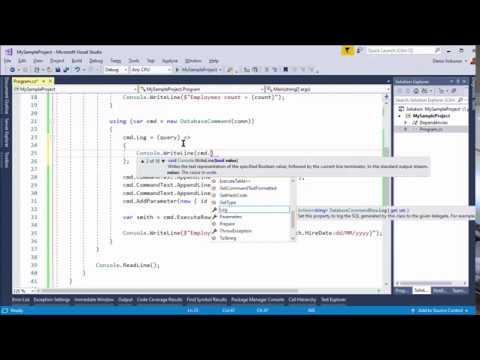](https://www.youtube.com/watch?v=DRfM15Paw8k)
63 |
--------------------------------------------------------------------------------
/Doc/dbcmd-tools/run.md:
--------------------------------------------------------------------------------
1 | # Tools - Run multiple SQL Scripts
2 |
3 | A simple command line tools allows you to execute multiple SQL files to a database server.
4 |
5 | ## Installation:
6 |
7 | This tool is hosted by [Nuget.org](https://www.nuget.org/packages/Apps72.Dev.Data.Generator.Tools) server.
8 |
9 | This package contains a .NET Core Global Tool you can call from the shell/command line.
10 |
11 | ```Shell
12 | dotnet tool install -g Apps72.Dev.Data.Generator.Tools
13 | ```
14 |
15 | ## First sample
16 |
17 | This command runs all SQL files from the Temp folder to your localhost server and database _Scott_.
18 | By default, scripts are merged using `GO` keyword (see _Separator_ flag).
19 |
20 | ```Shell
21 | DbCmd Run --source="C:\Temp\*.sql" -cs="Server=localhost;Database=Scott;"
22 | ```
23 |
24 | If a script contains the keyword `Go` (by default, for SQL Server), the script will be splitted to multiple sub-script, before to execute each sub-scripts.
25 |
26 | ## Second sample
27 |
28 | Use `--DbConfigAfter` and `--DbConfigUpdate` flags to select or update a version number to execute only files with name > this version.
29 |
30 | ```Shell
31 | DbCmd Run --source="C:\Temp\*.sql"
32 | -cs="Server=localhost;Database=Scott;"
33 | -ca="SELECT [Value] FROM [Configuration] WHERE [Key] = 'DbVer'"
34 | -cu="UPDATE [Configuration] SET [Value] = @Filename WHERE [Key] = 'DbVer'"
35 | ```
36 |
37 | For example, if the database contains _Configuration.DbVer = '0002'_, thse scripts will be skipped or executed, depending the filename.
38 |
39 | |File|Used|
40 | |---|---|
41 | |0001.sql|Skipped|
42 | |0002.sql|Skipped|
43 | |0003.sql|Executed|
44 | |0004.sql|Executed|
45 |
46 | Using `--DbConfigUpdate` the _Configuration.DbVer_ will be updated with the last value (0004), to pass all script to _Skipped_ in the next command run.
47 |
48 | `@Filename` will be replace by the last executed filename (without extension): _0004_.
49 |
50 | ## Options for _Merge_ command
51 |
52 | Use `DbCmd --Help` to display all commands and options (see below).
53 |
54 | ```Shell
55 | Usage: DbCmd GenerateEntities [options]
56 |
57 | Options:
58 | --ConnectionString | -cs Required. Connection string to the database server.
59 | See https://www.connectionstrings.com
60 | --Source | -s Source directory pattern containing all files to merged.
61 | Default is "*.sql" in current directory.
62 | --Separator | -sp Split script using this separator, to execute part of script
63 | and not a global script. Set -sp=GO for SQL Server.
64 | --Provider | -p Type of server: SqlServer, Oracle or SqLite.
65 | --DbConfigAfter | -ca Query to get the last file executed (without extension);
66 | And run only files with name greater than this value.
67 | --DbConfigUpdate | -cu Query to update the last file executed.
68 | The variable @Filename will be replace with the SQL file name.
69 | ```
--------------------------------------------------------------------------------
/Tools/Generator.Tools/StringExtensions.cs:
--------------------------------------------------------------------------------
1 | using System;
2 | using System.IO;
3 |
4 | namespace Apps72.Dev.Data.Generator.Tools
5 | {
6 | public static class StringExtensions
7 | {
8 | ///
9 | /// Reports the zero-based index of the first occurrence in this instance of any
10 | /// character in a specified array of Unicode characters.
11 | ///
12 | ///
13 | ///
14 | ///
15 | /// First argument: the zero-based index position of value if that string is found, or -1 if it is not.
16 | /// Second argument: the separator found, or String.Empty if it is not.
17 | ///
18 | public static (int Index, string Separator) IndexOfAny(this string text, string[] separators)
19 | {
20 | int indexFound = -1;
21 | foreach (var separator in separators)
22 | {
23 | indexFound = text.IndexOf(separator);
24 | if (indexFound >= 0) return (indexFound, separator);
25 | }
26 | return (-1, string.Empty);
27 | }
28 |
29 | ///
30 | /// Returns True if the current string is equal to .
31 | /// The comparaison is based on Invariant Culture and Ignore Case.
32 | ///
33 | ///
34 | ///
35 | ///
36 | public static bool IsEqualTo(this string text, string value)
37 | {
38 | return String.Compare(text, value, StringComparison.InvariantCultureIgnoreCase) == 0;
39 | }
40 |
41 | ///
42 | /// Returns True if the current string is NOT equal to .
43 | /// The comparaison is based on Invariant Culture and Ignore Case.
44 | ///
45 | ///
46 | ///
47 | ///
48 | public static bool IsNotEqualTo(this string text, string value)
49 | {
50 | return !IsEqualTo(text, value);
51 | }
52 |
53 | ///
54 | /// Returns the first first characters.
55 | ///
56 | ///
57 | ///
58 | ///
59 | public static string Left(this string text, int length)
60 | {
61 | if (text.Length > length)
62 | return text.Substring(0, length);
63 | else
64 | return text;
65 | }
66 |
67 | ///
68 | /// Returns the file name only, without extension.
69 | ///
70 | ///
71 | ///
72 | public static string NameWithoutExtension(this FileInfo file)
73 | {
74 | return file.Name.Substring(0, file.Name.Length - file.Extension.Length);
75 | }
76 | }
77 | }
--------------------------------------------------------------------------------
/Tools/Generator.Tools/Program.cs:
--------------------------------------------------------------------------------
1 | using System;
2 | using System.Linq;
3 |
4 | namespace Apps72.Dev.Data.Generator.Tools
5 | {
6 | class Program
7 | {
8 | static void Main(string[] args)
9 | {
10 | Console.WriteLine($"SqlDatabase Command Line Tools (v{GetAssemblyVersion().ToString(3)})");
11 | Console.WriteLine($"Project on https://github.com/Apps72/Dev.Data");
12 |
13 | if (args == null || args.Length <= 0 || args[0].IsEqualTo("-h") || args[0].IsEqualTo("--help"))
14 | {
15 | Help.DisplayGeneralHelp();
16 | return;
17 | }
18 |
19 | #if !DEBUG
20 | try
21 | #endif
22 | {
23 | var watch = System.Diagnostics.Stopwatch.StartNew();
24 | var arguments = new Arguments(args);
25 |
26 | switch (arguments.Command)
27 | {
28 | case ArgumentCommand.GenerateEntities:
29 | Console.WriteLine($" Entities generating...");
30 | var generator = new Generator(arguments);
31 | System.IO.File.WriteAllText(generator.Arguments.Output, generator.Code);
32 | Console.WriteLine($" {generator.EntitiesGenerated.Count()} entities generated in {generator.Arguments.Output}. {watch.Elapsed.TotalSeconds:0.00} seconds.");
33 | break;
34 |
35 | case ArgumentCommand.Merge:
36 | Console.WriteLine($" Merge files...");
37 | var merger = new Merger(arguments).Start();
38 | Console.WriteLine($" {merger.Files.Count()} files merged. {watch.Elapsed.TotalSeconds:0.00} seconds.");
39 | break;
40 |
41 |
42 | case ArgumentCommand.Run:
43 | Console.WriteLine($" Execute SQL scripts...");
44 | var runner = new Runner(arguments).Start();
45 | Console.WriteLine($" {runner.Files.Count()} files executed. {watch.Elapsed.TotalSeconds:0.00} seconds.");
46 | break;
47 |
48 | default:
49 | Help.DisplayGeneralHelp();
50 | return;
51 | }
52 | }
53 | #if !DEBUG
54 | catch (Exception ex)
55 | {
56 | Console.ForegroundColor = ConsoleColor.Red;
57 | Console.WriteLine(ex.Message);
58 | if (ex.InnerException != null) Console.WriteLine(ex.InnerException.Message);
59 | Console.WriteLine("Write DbCmd --help for more information.");
60 | Console.ResetColor();
61 | Environment.Exit(-1);
62 | }
63 | #endif
64 | }
65 |
66 | private static Version GetAssemblyVersion()
67 | {
68 | var assembly = System.Reflection.Assembly.GetExecutingAssembly();
69 | var fvi = System.Diagnostics.FileVersionInfo.GetVersionInfo(assembly.Location);
70 | return new Version(fvi.FileVersion);
71 | }
72 | }
73 | }
74 |
--------------------------------------------------------------------------------
/Doc/dbcmd/commandtext.md:
--------------------------------------------------------------------------------
1 | ## CommandText
2 |
3 | The `CommandText` property is of the **SqlString** type.
4 | `SQLString` is convertible with `string` and `StringBuilder` types.
5 |
6 | ```CSharp
7 | using (var cmd = new DatabaseCommand(mySqlConnection))
8 | {
9 | cmd.CommandText = @"SELECT COUNT(*)
10 | FROM EMP
11 | WHERE EMPNO = 7369";
12 | var count = cmd.ExecuteScalar();
13 | }
14 | ```
15 |
16 | ## Append methods
17 |
18 | Like a `StringBuilder` you can dynamcally create your SQL command text using these methods:
19 |
20 | - **Append**: Appends the specified string to end of the current command text.
21 | - **AppendLine**: Appends the specified string followed by the default line terminator to the end of the current command text.
22 | - **AppendFormat**: Appends the string returned by processing a composite format string,
23 | which contains zero or more format items, to this instance. Each format item is replaced by
24 | the string representation of a corresponding argument in a parameter array.
25 |
26 | ```CSharp
27 | using (var cmd = new DatabaseCommand(mySqlConnection))
28 | {
29 | cmd.CommandText.AppendLine("SELECT COUNT(*)");
30 | cmd.CommandText.AppendLine(" FROM EMP");
31 | cmd.CommandText.AppendLine(" WHERE EMPNO = 7369");
32 | var count = cmd.ExecuteScalar();
33 | }
34 | ```
35 |
36 | ## FormattedText
37 |
38 | When debugging or tracing SQL queries, it is easier to view the final query directly,
39 | where the parameters are replaced by their values.
40 | This is what the `Formatted` property provides.
41 |
42 | ```CSharp
43 | using (var cmd = new DatabaseCommand(mySqlConnection))
44 | {
45 | cmd.CommandText = @" SELECT *
46 | FROM EMP
47 | WHERE EMPNO = @EmpNo
48 | AND ENAME LIKE @Ename ";
49 |
50 | cmd.AddParameter("@EmpNo", 7369);
51 | cmd.AddParameter("@Ename", "%SM%");
52 |
53 | string commandAsText = cmd.Formatted.CommandAsText;
54 | string commandAsHtml = cmd.Formatted.CommandAsHtml;
55 | string commandAsVariables = cmd.Formatted.CommandAsVariables;
56 | ```
57 |
58 | ### Formatted.CommandAsText
59 |
60 | This property returns the SQL query where all parameters are replaced by their values.
61 |
62 | ```Text
63 | SELECT *
64 | FROM EMP
65 | WHERE EMPNO = 7369
66 | AND ENAME LIKE '%SM%'
67 | ```
68 |
69 | ### Formatted.CommandAsHtml
70 |
71 | Similar to CommandAsText but the result is colored in SQL format: SQL keywords are syntactically recognized.
72 | This result is sometimes interesting to trace requests in HTML files.
73 |
74 | ```SQL
75 | SELECT *
76 | FROM EMP
77 | WHERE EMPNO = 7369
78 | AND ENAME LIKE '%SM%'
79 | ```
80 |
81 | ### Formatted.CommandAsVariables
82 |
83 | This property returns the SQL query where all parameters are declared at the beginning of the request.
84 | This command can be executed directly in a query analyzer.
85 | This is the mode closest to what will be executed by the database server.
86 |
87 | ```Text
88 | DECLARE @Ename AS VARCHAR(4) = '%SM%'
89 | DECLARE @EmpNo AS INT = 7369
90 |
91 | SELECT *
92 | FROM EMP
93 | WHERE EMPNO = 7369
94 | AND ENAME LIKE '%SM%'
95 | ```
--------------------------------------------------------------------------------
/Doc/dbcmd/execute-table.md:
--------------------------------------------------------------------------------
1 | ## ExecuteTable
2 |
3 | This method executes the SQL query to map all data rows to a `IEnumerable`.
4 | Only columns that find a property with the same name are mapped.
5 | The others fields (from the table or class) are ignored.
6 |
7 | ### ExecuteTable with existing entity
8 |
9 | Execute the query and return an array of new instances of typed results
10 | filled with data table result.
11 |
12 | ```CSharp
13 | using (var cmd = new DatabaseCommand(mySqlConnection))
14 | {
15 | cmd.CommandText = "SELECT * FROM EMP";
16 | var emps = cmd.ExecuteTable();
17 | // emps is a IEnumerable.
18 | }
19 | ```
20 |
21 | > Use the `[Column(name)]` attribute to specify different a column name that the property name.
22 |
23 | ### ExecuteTable with anonymous class
24 |
25 | Execute the query and return an array of new instances of anonymous class
26 | filled with data table result.
27 |
28 | ```CSharp
29 | using (var cmd = new DatabaseCommand(mySqlConnection))
30 | {
31 | cmd.CommandText = "SELECT * FROM EMP";
32 | var emps = cmd.ExecuteTable(new
33 | {
34 | EmpNo = default(int),
35 | EName = default(string),
36 | });
37 | // emps is a IEnumerable of { EmpNo, EName }.
38 | }
39 | ```
40 |
41 | ### ExecuteTable with a converter function
42 |
43 | Execute the query and return an array of new instances of typed results
44 | filled with data table result, converted by a function.
45 |
46 | ```CSharp
47 | using (var cmd = new DatabaseCommand(mySqlConnection))
48 | {
49 | cmd.CommandText = "SELECT * FROM EMP";
50 | var emps = cmd.ExecuteTable((row) =>
51 | {
52 | return new
53 | {
54 | Id = row.Field("EMPNO"),
55 | Name = row.Field("ENAME"),
56 | HireYear = row.Field("HIREDATE").Year,
57 | };
58 | });
59 | // emps is a IEnumerable of a new object { Id, Name, HireYear }
60 | }
61 | ```
62 |
63 | ### MapTo for partial mapping
64 |
65 | Some C# objects contains extra complex properties.
66 | For example, MyEmployee contains a property Department of type MyDepartment.
67 |
68 | ```CSharp
69 | class MyEmployee
70 | {
71 | public int EmpNo { get; set; }
72 | public string EName { get; set; }
73 | public MyDepartment Department { get; set; }
74 | }
75 | class MyDepartment
76 | {
77 | public string DName { get; set; }
78 | }
79 | ```
80 |
81 | You can use the `MapTo` method to automatically map all MyEmployee properties and, next, all MyDepartment properties to a final object.
82 |
83 | ```CSharp
84 | using (var cmd = new DatabaseCommand(mySqlConnection))
85 | {
86 | cmd.CommandText = @"SELECT EMP.EMPNO,
87 | EMP.ENAME,
88 | DEPT.DNAME
89 | FROM EMP
90 | INNER JOIN DEPT ON DEPT.DEPTNO = EMP.DEPTNO
91 | WHERE EMPNO = 7369";
92 |
93 | var emps = cmd.ExecuteTable(row =>
94 | {
95 | MyEmployee emp = row.MapTo();
96 | emp.Department = row.MapTo();
97 | return emp;
98 | });}
99 | ```
100 |
101 | > All execution commands are available in synchronous and asynchronous (Async) mode.
--------------------------------------------------------------------------------
/Doc/dbcmd/parameters.md:
--------------------------------------------------------------------------------
1 | ## Parameters
2 |
3 | To avoid [SQL injections](https://en.wikipedia.org/wiki/SQL_injection), it is recommended to use parameters in queries.
4 | In SQL Server or SQLite, a parameter is set via the `@` symbol; and in Oracle Server, a parameter is set via the `:` symbol.
5 |
6 | Parameters automatically handle data types: a `@MyText` parameter of type string will be replaced by its value, surrounded by the apostrophes necessary for the SQL language `'Value of variable'`.
7 | The same applies to dates, Booleans and other numerical values.
8 |
9 | > If a parameter value is set to `null`, DatabaseCommand will convert it automatically to `DBNull.Value`.
10 |
11 | ### AddParameter with name and value
12 |
13 | You can add a parameter using `AddParameter(string name, object value)`.
14 | The _dbtype_ is deducted from the `value` provided.
15 |
16 | ```CSharp
17 | using (var cmd = new DatabaseCommand(mySqlConnection))
18 | {
19 | cmd.CommandText = @" SELECT *
20 | FROM EMP
21 | WHERE EMPNO = @EmpNo
22 | AND ENAME LIKE @Ename ";
23 |
24 | cmd.AddParameter("@EmpNo", 7369);
25 | cmd.AddParameter("@Ename", "%SM%");
26 | }
27 | ```
28 |
29 | ### AddParameter with name, value and DbType
30 |
31 | You can add a parameter using `AddParameter(string name, object value, DbType type)`.
32 |
33 | ```CSharp
34 | using (var cmd = new DatabaseCommand(mySqlConnection))
35 | {
36 | cmd.CommandText = @" SELECT *
37 | FROM EMP
38 | WHERE COMM = @Comm";
39 |
40 | cmd.AddParameter("@Comm", null, DbType.Currency);
41 | }
42 | ```
43 |
44 | ### AddParameter with name, value, DbType and size
45 |
46 | You can add a parameter using `AddParameter(string name, object value, DbType type, int? size)`.
47 |
48 | ```CSharp
49 | using (var cmd = new DatabaseCommand(mySqlConnection))
50 | {
51 | cmd.CommandText = @" SELECT *
52 | FROM EMP
53 | WHERE ENAME = @Name";
54 |
55 | cmd.AddParameter("@Name", "Smith", DbType.String, 20);
56 | }
57 | ```
58 |
59 | ### AddParameter with a typed object
60 |
61 | You can add multiple parameters using a typed object.
62 | All properties are used to define a parameter.
63 |
64 | ```CSharp
65 | using (var cmd = new DatabaseCommand(mySqlConnection))
66 | {
67 | cmd.CommandText = @" SELECT *
68 | FROM EMP
69 | WHERE EMPNO = @EmpNo
70 | AND HIREDATE = @HireDate";
71 |
72 | cmd.AddParameter(new
73 | {
74 | EmpNo = 7369,
75 | HireDate = new DateTime(1980, 12, 17)
76 | });
77 | }
78 | ```
79 |
80 | ### Parameters collection
81 |
82 | All parameters added are listed in the property `Parameters`.
83 | You can add, remove or change parameters using this property.
84 |
85 | ```CSharp
86 | using (var cmd = new DatabaseCommand(mySqlConnection))
87 | {
88 | cmd.CommandText = @" UPDATE EMP
89 | SET HIREDATE = @HireDate
90 | WHERE EMPNO = @EmpNo";
91 |
92 | cmd.AddParameter(new
93 | {
94 | EmpNo = default(int),
95 | HireDate = default(DateTime)
96 | });
97 |
98 | // Set parameters values
99 | cmd.Parameters["@HireDate"].Value = DateTime.Now;
100 | cmd.Parameters["@EmpNo"].Value = 123;
101 | }
102 | ```
--------------------------------------------------------------------------------
/Test/Tools.Generator/DataValidator.cs:
--------------------------------------------------------------------------------
1 | using System;
2 | using System.Collections.Generic;
3 | using System.ComponentModel.DataAnnotations;
4 | using System.Linq;
5 | using System.Reflection;
6 |
7 | namespace Tools.Generator.Tests
8 | {
9 | ///
10 | /// DataAnnotation extension
11 | ///
12 | public static class DataValidator
13 | {
14 | ///
15 | /// Validate the specified object, using DataAnnotations.
16 | ///
17 | ///
18 | ///
19 | ///
20 | /// Don't call this method from IValidatableObject.Validate to avoid StackOverflow exception.
21 | ///
22 | public static IEnumerable ValidateObject(object value)
23 | {
24 | return ValidateObject(value, extraValidations: null);
25 | }
26 |
27 | ///
28 | /// Validate the specified object, using DataAnnotations.
29 | /// And call an extra method to extra validations.
30 | ///
31 | ///
32 | ///
33 | ///
34 | ///
35 | /// Don't call this method from IValidatableObject.Validate to avoid StackOverflow exception.
36 | ///
37 | public static IEnumerable ValidateObject(object value, Action> extraValidations)
38 | {
39 | var context = new ValidationContext(value, serviceProvider: null, items: null);
40 | var results = new List();
41 | System.ComponentModel.DataAnnotations.Validator.TryValidateObject(value, context, results, validateAllProperties: true);
42 | extraValidations?.Invoke(results);
43 | return results;
44 | }
45 |
46 | ///
47 | /// Truncates all strings of an object.
48 | ///
49 | ///
50 | ///
51 | ///
52 | public static T TruncateObjectProperties(T item)
53 | {
54 | // Strings properties
55 | var properties = typeof(T).GetProperties()
56 | .Where(p => p.GetCustomAttribute(typeof(StringLengthAttribute)) != null &&
57 | p.CanWrite && p.CanRead);
58 | // Set values
59 | foreach (var stringProperty in properties)
60 | {
61 | var stringAttribute = (StringLengthAttribute)stringProperty.GetCustomAttributes(typeof(StringLengthAttribute)).First();
62 | var maximumLength = stringAttribute.MaximumLength;
63 | stringProperty.SetValue(item, stringProperty.Name.Left(maximumLength), null);
64 | }
65 | return item;
66 | }
67 |
68 | //
69 | /// Truncate a string with maximum characters if needed.
70 | ///
71 | ///
72 | ///
73 | ///
74 | private static string Left(this string item, int length)
75 | {
76 | if (item.Length > length)
77 | return item.Substring(0, length);
78 | else
79 | return item;
80 | }
81 | }
82 | }
83 |
--------------------------------------------------------------------------------
/Doc/dbcmd/basic-samples.md:
--------------------------------------------------------------------------------
1 | ## Basic samples
2 |
3 | All these examples use an **EMP** [employees table](db-scott.md):
4 |
5 | |EMPNO |ENAME |JOB |MGR |
6 | |--- |--- |--- |--- |
7 | |7369 |SMITH |CLERK |7566 |
8 | |7499 |ALLEN |SALESMAN |7566 |
9 | |7521 |WARD |SALESMAN |7566 |
10 | |7566 |JONES |MANAGER |NULL |
11 |
12 | And this table is mapped to an **Employee** C# class:
13 |
14 | ```CSharp
15 | class Employee
16 | {
17 | public int EmpNo { get; set; }
18 | public string EName { get; set; }
19 | public string Job { get; set; }
20 | public string Mgr { get; set; }
21 | }
22 | ```
23 |
24 |
25 | ### 1. ExecuteTable - Get **all data**
26 |
27 | Call the [ExecuteTable](execute-table.md) method to map all data rows to a `IEnumerable`.
28 |
29 | ```CSharp
30 | using (var cmd = new DatabaseCommand(mySqlConnection))
31 | {
32 | cmd.CommandText= "SELECT * FROM EMP";
33 | var emps = cmd.ExecuteTable();
34 | // emps is a IEnumerable.
35 | }
36 | ```
37 |
38 |
39 | ### 2. ExecuteRow - Get the **first row**.
40 |
41 | Call the [ExecuteRow](execute-row.md) method to map a row to an object.
42 |
43 | ```CSharp
44 | using (var cmd = new DatabaseCommand(mySqlConnection))
45 | {
46 | cmd.CommandText = "SELECT * FROM EMP WHERE EMPNO = 7369";
47 | var smith = cmd.ExecuteRow();
48 | // smith is a Employee object.
49 | }
50 | ```
51 |
52 |
53 | ### 3. AddParameter - Get a row using a **SQL Parameter**.
54 |
55 | Call the [AddParameter](parameters.md) method to define a SQL parameter.
56 |
57 | ```CSharp
58 | using (var cmd = new DatabaseCommand(mySqlConnection))
59 | {
60 | cmd.CommandText = "SELECT * FROM EMP WHERE EMPNO = @ID";
61 | cmd.AddParameter("@ID", 7369);
62 | var smith = cmd.ExecuteRow();
63 | // smith is a Employee object.
64 | }
65 | ```
66 |
67 |
68 | ### 4. Dynamic - Get the first row **without creating the class**.
69 |
70 | Call the [ExecuteRow](execute-row.md) method, using the `dynamic` keyword, to map the result dynamically (properties are created dynamically, based on name/type of SQL results).
71 |
72 | ```CSharp
73 | using (var cmd = new DatabaseCommand(mySqlConnection))
74 | {
75 | cmd.CommandText = "SELECT * FROM EMP WHERE EMPNO = 7369";
76 | var smith = cmd.ExecuteRow();
77 | // smith is a object with properties EMPNO, ENAME, JOB, MGR.
78 | }
79 | ```
80 |
81 |
82 | ### 5. ExecuteScalar - Get a **single value**.
83 |
84 | Call the [ExecuteScalar](execute-scalar.md) method to map a value (first column, first row) to an simple type.
85 |
86 | ```CSharp
87 | using (var cmd = new DatabaseCommand(mySqlConnection))
88 | {
89 | cmd.CommandText = "SELECT COUNT(*) FROM EMP";
90 | int count = cmd.ExecuteScalar();
91 | // count = 4.
92 | }
93 | ```
94 |
95 |
96 | ### 6. Using a **Fluent** syntax.
97 |
98 | All methods are available using the [Fluent](https://en.wikipedia.org/wiki/Fluent_interface) syntax. To do this, call the `Query()` method.
99 |
100 | ```CSharp
101 | using (var cmd = new DatabaseCommand(mySqlConnection))
102 | {
103 | var smith = cmd.Query(@"SELECT *
104 | FROM EMP
105 | WHERE EMPNO = @ID")
106 | .AddParameter("ID", 7369)
107 | .ExecuteRow();
108 | // smith is a Employee object.
109 | }
--------------------------------------------------------------------------------
/Src/Core/Convertor/DataTableConvertor.cs:
--------------------------------------------------------------------------------
1 | using Apps72.Dev.Data.Schema;
2 | using System;
3 | using System.Collections.Generic;
4 | using System.Linq;
5 | using System.Reflection;
6 |
7 | namespace Apps72.Dev.Data.Convertor
8 | {
9 | public static class DataTableConvertor
10 | {
11 | public static IEnumerable ToDataTable(object value)
12 | {
13 | switch (value)
14 | {
15 | case DataTable table:
16 | return new[] { table };
17 |
18 | case IEnumerable
5 |
6 |
--------------------------------------------------------------------------------
/Test/Tools.Generator/Configuration.cs:
--------------------------------------------------------------------------------
1 | using System;
2 | using System.Collections.Generic;
3 | using System.Text;
4 |
5 | namespace Tools.Generator.Tests
6 | {
7 | public class Configuration
8 | {
9 | public static string SQLSERVER_CONNECTION_STRING = @"Server=(localdb)\MyServer;Database=Scott;Integrated Security=true;";
10 |
11 | public static string ORACLE_CONNECTION_STRING = @"";
12 | }
13 | }
14 |
--------------------------------------------------------------------------------
/Src/Core/ExceptionOccuredEventArgs.cs:
--------------------------------------------------------------------------------
1 | using System;
2 |
3 | namespace Apps72.Dev.Data
4 | {
5 | ///
6 | /// Argument of ExceptionOccured event.
7 | ///
8 | public class ExceptionOccuredEventArgs : EventArgs
9 | {
10 | ///
11 | /// Gets or sets the exception occured
12 | ///
13 | public Exception Exception { get; set; }
14 | }
15 | }
16 |
--------------------------------------------------------------------------------
/Src/Core/Generator/DatabaseFamily.cs:
--------------------------------------------------------------------------------
1 | using System;
2 |
3 | namespace Apps72.Dev.Data.Generator
4 | {
5 | ///
6 | /// Type of Database
7 | ///
8 | public enum DatabaseFamily
9 | {
10 | ///
11 | Unknown,
12 | ///
13 | SqlServer,
14 | ///
15 | Oracle,
16 | ///
17 | Sqlite
18 | }
19 | }
20 |
--------------------------------------------------------------------------------
/Test/Performances/ScottFromSqlServer.cs:
--------------------------------------------------------------------------------
1 | using System;
2 | using System.Collections.Generic;
3 | using System.Data.SqlClient;
4 | using System.Text;
5 |
6 | namespace Performances
7 | {
8 | class ScottFromSqlServer
9 | {
10 | public ScottFromSqlServer()
11 | {
12 | Connection = new SqlConnection("Server=(localdb)\\MyServer;Database=Scott;");
13 | Connection.Open();
14 | }
15 |
16 | public SqlConnection Connection { get; set; }
17 | }
18 | }
19 |
--------------------------------------------------------------------------------
/Doc/dbcmd/dispose.md:
--------------------------------------------------------------------------------
1 | ## Resource disposing
2 |
3 | **DatabaseCommand** implement the standard [IDisposable](https://docs.microsoft.com/en-us/dotnet/api/system.idisposable) interface.
4 |
5 | The `Dispose` method call the overridable `Cleanup` method to dispose the internal **DbCOmmand** object.
6 | By default, the flag `DatabaseCommand.AlwaysDispose` is **False** to dispose the DbCommand object only if the garbage collector ask that. You can override the Cleanup method or set this flag to True, to always dispose DbCommand.
--------------------------------------------------------------------------------
/Doc/Web.config:
--------------------------------------------------------------------------------
1 |
2 |
3 |
11 |
12 |
13 |
14 |
15 |
--------------------------------------------------------------------------------
/Doc/dbmocker/toc.yml:
--------------------------------------------------------------------------------
1 | - name: Quickstart
2 | href: quickstart.md
3 | - name: Basic sample
4 | href: basic-sample.md
5 | - name: Conditions
6 | href: conditions.md
7 | - name: Returns
8 | href: returns.md
9 | items:
10 | - name: ReturnsTable
11 | href: returns-table.md
12 | - name: ReturnsTable from string
13 | href: returns-table-import.md
14 | - name: ReturnsRow
15 | href: returns-row.md
16 | - name: ReturnsScalar
17 | href: returns-scalar.md
18 | - name: Check SQL syntax
19 | href: check-sql-syntax.md
20 |
--------------------------------------------------------------------------------
/Doc/readme.txt:
--------------------------------------------------------------------------------
1 | To modify this documentation
2 |
3 | 1. Install DocFX
4 | - Download the ZIP file from https://github.com/dotnet/docfx/releases.
5 | - Copy the ZIP content to a local folder.
6 | - Optional: Add this folder to your PATH environment variable.
7 |
8 | 2. Create MarkDown pages in Tutorials folder
9 | And referenced it via toc.ylm
10 |
11 | 3. Generate a static documentation (folder '_site') using this command:
12 | $> docfx --serve
13 |
14 | PS: You need to build the C# project to have a DLL in "bin/Release/netstandard2.0" folder.
--------------------------------------------------------------------------------
/Doc/api/index.md:
--------------------------------------------------------------------------------
1 | # API Documentation
2 |
3 | ## DatabaseCommand
4 |
5 | Main classes are:
6 |
7 | - [DatabaseCommand](dbcmd/Apps72.Dev.Data.DatabaseCommand.yml)
8 | - [FluentQuery](dbcmd/Apps72.Dev.Data.FluentQuery.yml)
9 | - [ColumnAttribute](dbcmd/Apps72.Dev.Data.Annotations.ColumnAttribute.yml)
10 | - [CommandTextFormatted](dbcmd/Apps72.Dev.Data.CommandTextFormatted.yml)
11 | - [DatabaseRetry](dbcmd/Apps72.Dev.Data.DatabaseRetry.yml)
12 | - [SqlString](dbcmd/Apps72.Dev.Data.SqlString.yml)
13 |
14 | ## DbMocker
15 |
16 | [See you soon]
17 |
18 | In the meantime, go to https://github.com/Apps72/DbMocker
--------------------------------------------------------------------------------
/Doc/dbcmd/execute-scalar.md:
--------------------------------------------------------------------------------
1 | ## ExecuteScalar
2 |
3 | This method executes the query and returns the first column of the first row of results
4 | Other rows and columns are ignored.
5 |
6 | ```CSharp
7 | using (var cmd = new DatabaseCommand(mySqlConnection))
8 | {
9 | cmd.CommandText = "SELECT COUNT(*) FROM EMP";
10 | var nbEmployees = cmd.ExecuteScalar();
11 | }
12 | ```
13 |
14 | > If no data are found, the result will be `null` (for a nullable type) or the default value of this type (0 in the previous example).
15 |
16 | > All execution commands are available in synchronous and asynchronous (Async) mode.
--------------------------------------------------------------------------------
/Doc/templates/material/partials/footer.tmpl.partial:
--------------------------------------------------------------------------------
1 | {{!Copyright (c) Microsoft. All rights reserved. Licensed under the MIT license. See LICENSE file in the project root for full license information.}}
2 |
3 |
15 |
--------------------------------------------------------------------------------
/Doc/dbcmd/exception.md:
--------------------------------------------------------------------------------
1 | ## Exceptions
2 |
3 | By default, when an exception occured with the query execution, the library raise a standard [DbException](https://docs.microsoft.com/en-us/dotnet/api/system.data.common.dbexception).
4 |
5 | ### ThrowException property
6 |
7 | Sets this **ThrowException** property from True (default value) to **False**, to not raise the standard exception if an error occured with the query.
8 |
9 | ### Exception property
10 |
11 | Gets the last raised exception
12 |
13 | ### ExceptionOccured event
14 |
15 | When a SQL exception occured, this event is raised to catch all details about this error.
16 |
--------------------------------------------------------------------------------
/Doc/dbmocker/returns-scalar.md:
--------------------------------------------------------------------------------
1 | # ReturnsScalar
2 |
3 | ## Value
4 |
5 | When a condition occured, a single simple value will be return.
6 |
7 | ```CSharp
8 | conn.Mocks
9 | .WhenTag("MyTag")
10 | .ReturnsScalar(14);
11 | ```
12 |
13 | ## Expression
14 |
15 | Using an expression to customize the return.
16 |
17 | ```CSharp
18 | conn.Mocks
19 | .WhenTag("MyTag")
20 | .ReturnsScalar(cmd => DateTime.Today.Year > 2000 ? 14 : 0);
21 | ```
22 |
23 | > This method is mainly used to return a value from the
24 | > `ExecuteScalar` or `ExecuteNonQuery` methods of the [DbCommand class](https://docs.microsoft.com/dotnet/api/system.data.common.dbcommand).
--------------------------------------------------------------------------------
/Tools/Generator.Tools/GeneratorOptions.cs:
--------------------------------------------------------------------------------
1 | using System;
2 | using System.Data.Common;
3 |
4 | namespace Apps72.Dev.Data.Generator.Tools
5 | {
6 | ///
7 | /// Options to use with the .
8 | ///
9 | public class GeneratorOptions
10 | {
11 | ///
12 | /// Commands to execute before the generation of entities.
13 | ///
14 | public Action PreCommand { get; set; }
15 |
16 | ///
17 | /// Commands to execute after the generation of entities.
18 | ///
19 | public Action PostCommand { get; set; }
20 | }
21 | }
22 |
--------------------------------------------------------------------------------
/Test/Tools.Generator/Tools.Generator.Tests.csproj:
--------------------------------------------------------------------------------
1 |
2 |
3 |
4 | net6.0
5 | false
6 |
7 |
8 |
9 |
10 |
11 |
12 |
13 |
14 |
15 |
16 |
17 |
18 |
19 |
20 |
--------------------------------------------------------------------------------
/Test/Performances/Performances.csproj:
--------------------------------------------------------------------------------
1 |
2 |
3 |
4 | Exe
5 | net6.0
6 |
7 |
8 |
9 |
10 |
11 |
12 |
13 |
14 |
15 |
16 |
17 |
18 |
19 |
20 |
21 |
--------------------------------------------------------------------------------
/Doc/dbcmd/db-scott.md:
--------------------------------------------------------------------------------
1 | ## Scott database
2 |
3 | All examples use an **EMP** employees table.
4 |
5 | |EMPNO |ENAME |JOB |MGR |
6 | |--- |--- |--- |--- |
7 | |7369 |SMITH |CLERK |7566 |
8 | |7499 |ALLEN |SALESMAN |7566 |
9 | |7521 |WARD |SALESMAN |7566 |
10 | |7566 |JONES |MANAGER |NULL |
11 |
12 | The SQL script to execute:
13 |
14 | ```SQL
15 | CREATE TABLE EMP
16 | (
17 | EMPNO INT CONSTRAINT PK_EMP PRIMARY KEY,
18 | ENAME VARCHAR(10) NOT NULL,
19 | JOB VARCHAR(9) NOT NULL,
20 | MGR INT
21 | )
22 |
23 | INSERT INTO EMP VALUES (7369, 'SMITH', 'CLERK', 7902)
24 | INSERT INTO EMP VALUES (7499, 'ALLEN', 'SALESMAN', 7698)
25 | INSERT INTO EMP VALUES (7521, 'WARD', 'SALESMAN', 7698)
26 | INSERT INTO EMP VALUES (7566, 'JONES', 'MANAGER', 7839)
27 | ```
--------------------------------------------------------------------------------
/Doc/dbcmd/log.md:
--------------------------------------------------------------------------------
1 | # Tracing and logging
2 |
3 | You can easily trace all SQL queries that will be sent to the database server,
4 | by defining an action at the `Log` property.
5 |
6 | ```CSharp
7 | using (var cmd = new DatabaseCommand(mySqlConnection))
8 | {
9 | // To trace all queries in the console.
10 | cmd.Log = Console.WriteLine;
11 |
12 | // To trace all queries into the file sql.log
13 | cmd.Log = (query) =>
14 | {
15 | System.IO.File.AppendAllText("sql.log", query);
16 | };
17 | }
18 | ```
19 |
20 | The easy way is to define a method `GetCommand()` in your `DataService` object
21 | to centralize all of these configurations.
22 |
23 | > If you need more details about your DatabaseCommand, you can use `ActionBeforeExecution`
24 | > to trace all commands details before executions.
--------------------------------------------------------------------------------
/Doc/dbmocker/returns-row.md:
--------------------------------------------------------------------------------
1 | # ReturnsRow
2 |
3 | ## Data
4 |
5 | When a condition occured, a single data row will be return.
6 | The specified typed object will generate a MockTable
7 | where property names will be the column names
8 | and property values will be the first row data.
9 |
10 | ```CSharp
11 | conn.Mocks
12 | .WhenTag("MyTag")
13 | .ReturnsRow(new
14 | {
15 | Id = 1,
16 | Name = "Denis"
17 | });
18 | ```
19 |
20 | ## Expression
21 |
22 | Using an expression to customize the return.
23 |
24 | ```CSharp
25 | conn.Mocks
26 | .WhenTag("MyTag")
27 | .ReturnsRow(cmd =>
28 | {
29 | int i = cmd.Parameters.Count();
30 | return new
31 | {
32 | Id = i,
33 | Name = "Denis"
34 | }
35 | });
36 | ```
--------------------------------------------------------------------------------
/Test/HowToTest.md:
--------------------------------------------------------------------------------
1 | # How to test
2 |
3 | ## Create the **Scott** database
4 |
5 | You need to use SQL Server LocalDB to execute the tests. You can download it from [here](https://learn.microsoft.com/en-us/sql/database-engine/configure-windows/sql-server-express-localdb).
6 | If you already have installed Visual Studio 2017 or 2019, you can use the LocalDB instance that comes with it.
7 |
8 | 1. Create a new local server called **MyServer**: `SqlLocalDB c MyServer`
9 | 2. Start this server using: `SqlLocalDB s MyServer`
10 | 3. You can use [SqlCmd](https://learn.microsoft.com/en-us/sql/tools/sqlcmd/sqlcmd-start-utility) to execute the the **Scott.sql** script.
11 | For example, from the **Test\Core** folder: `SqlCmd -S "(localdb)\MyServer" -i Data\Scott.sql`
12 |
13 | > Check the connection string included in the file `Configuration.cs`.
14 |
15 |
--------------------------------------------------------------------------------
/Doc/dbcmd/tag.md:
--------------------------------------------------------------------------------
1 | # Tag
2 |
3 | This feature helps correlate SQL queries in code with queries captured in logs or in unit tests.
4 | You annotate a `CommandText` query using the new `TagWith()` method.
5 |
6 | This feature is similar to the `TagWith` method available in [EF Core 2.2](https://docs.microsoft.com/ef/core/querying/tags).
7 |
8 | ```CSharp
9 | using (var cmd = new DatabaseCommand(_connection))
10 | {
11 | cmd.TagWith("List all employees");
12 | cmd.CommandText = "SELECT * FROM EMP";
13 | }
14 | ```
15 |
16 | This query is translated to the following SQL statement:
17 |
18 | ```SQL
19 | -- List all employees
20 | SELECT * FROM EMP
21 | ```
22 |
23 | It's possible to call `TagWith()` many times on the same query. Query tags are cumulative.
24 |
25 | > **Best practice**: We recommend to tag all your requests, in order
26 | > to find them more easily in the logs or in the unit tests.
--------------------------------------------------------------------------------
/Doc/dbcmd/transaction.md:
--------------------------------------------------------------------------------
1 | ## Transaction
2 |
3 | A [transaction](https://docs.microsoft.com/en-us/sql/t-sql/language-elements/transactions-transact-sql) is a single unit of work. If a transaction is successful, all of the data modifications made during the transaction are committed and become a permanent part of the database.
4 |
5 | ### TransactionBegin
6 |
7 | Start a SQL transaction using `TransactionBegin` method, and keep the Transaction for future command executions.
8 |
9 | ### TransactionCommit
10 |
11 | Use the `TransactionCommit` method to commit the current transaction to the database.
12 |
13 | ### TransactionRollback
14 |
15 | Use the `TransactionRollback` method to rollback the current transaction to the database.
16 |
17 | ### Example
18 |
19 | ```csharp
20 | cmd.TransactionBegin();
21 | int count = await cmd.ExecuteNonQueryAsync();
22 | cmd.TransactionRollback();
23 | ```
--------------------------------------------------------------------------------
/Tools/Generator.Tools/QuickDoc.md:
--------------------------------------------------------------------------------
1 | Installation:
2 | `dotnet tool install -g Apps72.Dev.Data.Generator.Tools`
3 |
4 | Example:
5 |
6 | - This command **gets all tables/columns** and generates an Entities.cs file with all equivalent classes.
7 | `DbCmd GenerateEntities -cs=Server=localhost;Database=Scott; --provider=SqlServer`
8 |
9 | - This command **merges all sql files**, of the current directory, to a new one.
10 | `DbCmd Merge --source=C:\Temp --output=allScripts.sql`
11 |
12 | - This command **executes all sql files**, of the current directory, to this SQL Server.
13 | `DbCmd Run --source=C:\Temp -cs=Server=localhost;Database=Scott;`
14 |
15 | With **Run** command, use `--DbConfigAfter` and `--DbConfigUpdate` to set SQL queries to
16 | select and to update a database field with the name of the last executed script.
17 | Only next scripts will be read and executed.
18 |
19 | **More details**:
20 | Use `DbCmd --Help` to display all commands and options.
21 | Go to [https://apps72.com](https://apps72.com) for the documentation.
22 |
--------------------------------------------------------------------------------
/Test/Core/_StartCodeCoverage.cmd:
--------------------------------------------------------------------------------
1 | echo off
2 |
3 | REM 0. Include the NuGet Package "coverlet.msbuild" in the UnitTests project.
4 | REM 1. Install tools:
5 | REM $:\> dotnet tool install --global coverlet.console --version 3.2.0
6 | REM $:\> dotnet tool install --global dotnet-reportgenerator-globaltool --version 5.1.20
7 | REM
8 | REM Use this command to list existing installed tools:
9 | REM $:\> dotnet tool list --global
10 | REM
11 | REM 2. Start a code coverage in the UnitTests project:
12 | REM $:\> dotnet test /p:CollectCoverage=true /p:CoverletOutputFormat=cobertura
13 | REM
14 | REM 3. Display the Coverage Report:
15 | REM $:\> reportgenerator "-reports:coverage.cobertura.xml" "-targetdir:C:\Temp\Coverage" -reporttypes:HtmlInline_AzurePipelines
16 | REM $:\> explorer C:\Temp\Coverage\index.html
17 |
18 | echo on
19 | cls
20 |
21 | dotnet test /p:CollectCoverage=true /p:CoverletOutputFormat=cobertura
22 | reportgenerator "-reports:coverage.cobertura.xml" "-targetdir:C:\Temp\DbCmd\Coverage" -reporttypes:HtmlInline_AzurePipelines
23 | start "" "C:\Temp\DbCmd\Coverage\index.htm"
--------------------------------------------------------------------------------
/Doc/dbcmd/action-before-after.md:
--------------------------------------------------------------------------------
1 | # Actions _before_ and _after_ query execution
2 |
3 | Before and after the execution of a request, DatabaseCommand checks
4 | for the presence of pre-processing and possible post-processing.
5 | If an ActionBeforeExecution or AfterBeforeExecution action is defined,
6 | it is executed before or after the request.
7 | This allows you to easily intervene on requests. For example, to perform a security
8 | or tracking operation before each SQL query.
9 |
10 | In this sample, we change the parameter `EmpNo` by the value `9999` (always).
11 |
12 | ```CSharp
13 | using (var cmd = new DatabaseCommand(mySqlConnection))
14 | {
15 | cmd.CommandText = @" SELECT COUNT(*)
16 | FROM EMP
17 | WHERE EMPNO = @EmpNo ";
18 | cmd.AddParameter("@EmpNo", 7392);
19 |
20 | cmd.ActionBeforeExecution = (command) =>
21 | {
22 | command.Parameters["@EmpNo"].Value = 9999;
23 | };
24 |
25 | var count = cmd.ExecuteScalar();
26 | }
27 | ```
28 |
29 | You can also, use this method to trace your request (in addition to [Tracing and logs](log.md)).
--------------------------------------------------------------------------------
/.github/workflows/main.yml:
--------------------------------------------------------------------------------
1 | # This is a basic workflow to help you get started with Actions
2 |
3 | name: CI
4 |
5 | on:
6 | push:
7 | branches: [ master ]
8 | pull_request:
9 | branches: [ master ]
10 |
11 | jobs:
12 |
13 | build:
14 |
15 | strategy:
16 | matrix:
17 | configuration: [Release]
18 | frameworks: [net45,net6.0,netcoreapp3.1]
19 |
20 | runs-on: windows-latest
21 |
22 | steps:
23 | - name: Checkout
24 | uses: actions/checkout@v2
25 | with:
26 | fetch-depth: 0
27 |
28 | - name: Install .NET Core
29 | uses: actions/setup-dotnet@v1
30 | with:
31 | dotnet-version: '6.0.418'
32 |
33 | - name: Execute dotnet build
34 | run: dotnet build Src\Core\Core.csproj -c $env:Configuration -f $env:Framework
35 | env:
36 | Configuration: ${{ matrix.configuration }}
37 | Framework: ${{ matrix.frameworks }}
38 |
39 | # Test want to get SQL DB connected
40 | # - name: Execute unit tests
41 | # run: dotnet test -c $env:Configuration
42 | # env:
43 | # Configuration: ${{ matrix.configuration }}
44 |
--------------------------------------------------------------------------------
/Doc/dbcmd/execute-nonquery.md:
--------------------------------------------------------------------------------
1 | ## ExecuteNonQuery
2 |
3 | This method executes the query and returns the count of modified rows
4 |
5 | ```CSharp
6 | using (var cmd = new DatabaseCommand(mySqlConnection))
7 | {
8 | cmd.CommandText = "DELETE FROM EMP";
9 | cmd.ExecuteNonQuery();
10 | }
11 | ```
12 |
13 | You can start a transaction to perform multiple SQL commands as a unit of work.
14 |
15 | ```CSharp
16 | using (var transaction = mySqlConnection.BeginTransaction())
17 | {
18 | using (var cmd = new DatabaseCommand(transaction))
19 | {
20 | cmd.CommandText = "INSERT INTO EMP (EMPNO, ENAME) VALUES (1234, 'ABC')";
21 | cmd.ExecuteNonQuery();
22 | }
23 |
24 | using (var cmd = new DatabaseCommand(transaction))
25 | {
26 | cmd.CommandText = "INSERT INTO EMP (EMPNO, ENAME) VALUES (9876, 'XYZ')");
27 | cmd.ExecuteNonQuery();
28 | }
29 |
30 | transaction.Rollback();
31 |
32 | // With the Rollback, nothing was saved in the database.
33 | // Use transaction.Commit() to persist all changes.
34 | }
35 | ```
36 | > All execution commands are available in synchronous and asynchronous (Async) mode.
--------------------------------------------------------------------------------
/Doc/dbcmd/toc.yml:
--------------------------------------------------------------------------------
1 | - name: Quickstart
2 | href: quickstart.md
3 | - name: Why to use?
4 | href: why-to-use.md
5 | - name: Basic samples
6 | href: basic-samples.md
7 | items:
8 | - name: Scott database
9 | href: db-scott.md
10 | - name: CommandText
11 | href: commandtext.md
12 | - name: ExecuteDataSet
13 | href: execute-dataset.md
14 | - name: ExecuteTable
15 | href: execute-table.md
16 | - name: ExecuteRow
17 | href: execute-row.md
18 | - name: ExecuteScalar
19 | href: execute-scalar.md
20 | - name: ExecuteNonQuery
21 | href: execute-nonquery.md
22 | - name: Parameters
23 | href: parameters.md
24 | - name: Transaction
25 | href: transaction.md
26 | - name: Extension methods
27 | href: extensions.md
28 | - name: Fluent queries
29 | href: fluent.md
30 | - name: Tracing and Logging
31 | href: log.md
32 | - name: Tags
33 | href: tag.md
34 | - name: Actions before and after
35 | href: action-before-after.md
36 | - name: Exceptions
37 | href: exception.md
38 | - name: Retry queries
39 | href: retry.md
40 | - name: Dispose
41 | href: dispose.md
42 | - name: Best practice (DatabaseService.cs)
43 | href: databaseservice.md
44 |
--------------------------------------------------------------------------------
/Test/Core/Core.Tests.csproj:
--------------------------------------------------------------------------------
1 |
2 |
3 |
4 | net6.0
5 | false
6 |
7 |
8 |
9 |
10 |
11 |
12 |
13 |
14 | all
15 | runtime; build; native; contentfiles; analyzers; buildtransitive
16 |
17 |
18 | all
19 | runtime; build; native; contentfiles; analyzers; buildtransitive
20 |
21 |
22 |
23 |
24 |
25 |
26 |
27 |
28 |
--------------------------------------------------------------------------------
/LICENSE:
--------------------------------------------------------------------------------
1 | The MIT License (MIT)
2 |
3 | Copyright (c) dvoituron and Contributors
4 |
5 | All rights reserved.
6 |
7 | Permission is hereby granted, free of charge, to any person obtaining a copy
8 | of this software and associated documentation files (the "Software"), to deal
9 | in the Software without restriction, including without limitation the rights
10 | to use, copy, modify, merge, publish, distribute, sublicense, and/or sell
11 | copies of the Software, and to permit persons to whom the Software is
12 | furnished to do so, subject to the following conditions:
13 |
14 | The above copyright notice and this permission notice shall be included in all
15 | copies or substantial portions of the Software.
16 |
17 | THE SOFTWARE IS PROVIDED "AS IS", WITHOUT WARRANTY OF ANY KIND, EXPRESS OR
18 | IMPLIED, INCLUDING BUT NOT LIMITED TO THE WARRANTIES OF MERCHANTABILITY,
19 | FITNESS FOR A PARTICULAR PURPOSE AND NONINFRINGEMENT. IN NO EVENT SHALL THE
20 | AUTHORS OR COPYRIGHT HOLDERS BE LIABLE FOR ANY CLAIM, DAMAGES OR OTHER
21 | LIABILITY, WHETHER IN AN ACTION OF CONTRACT, TORT OR OTHERWISE, ARISING FROM,
22 | OUT OF OR IN CONNECTION WITH THE SOFTWARE OR THE USE OR OTHER DEALINGS IN THE
23 | SOFTWARE.
24 |
--------------------------------------------------------------------------------
/.vscode/launch.json:
--------------------------------------------------------------------------------
1 | {
2 | // Use IntelliSense to find out which attributes exist for C# debugging
3 | // Use hover for the description of the existing attributes
4 | // For further information visit https://github.com/OmniSharp/omnisharp-vscode/blob/master/debugger-launchjson.md
5 | "version": "0.2.0",
6 | "configurations": [
7 | {
8 | "name": ".NET Core Launch (console)",
9 | "type": "coreclr",
10 | "request": "launch",
11 | "preLaunchTask": "build",
12 | // If you have changed target frameworks, make sure to update the program path.
13 | "program": "${workspaceFolder}/Test/Performances/bin/Debug/netcoreapp2.2/Performances.dll",
14 | "args": [],
15 | "cwd": "${workspaceFolder}/Test/Performances",
16 | // For more information about the 'console' field, see https://aka.ms/VSCode-CS-LaunchJson-Console
17 | "console": "internalConsole",
18 | "stopAtEntry": false
19 | },
20 | {
21 | "name": ".NET Core Attach",
22 | "type": "coreclr",
23 | "request": "attach",
24 | "processId": "${command:pickProcess}"
25 | }
26 | ]
27 | }
--------------------------------------------------------------------------------
/Test/Tools.Generator/Generator-OracleTests.cs:
--------------------------------------------------------------------------------
1 | using Apps72.Dev.Data.Generator.Tools;
2 | using Microsoft.VisualStudio.TestTools.UnitTesting;
3 | using System;
4 |
5 | namespace Tools.Generator.Tests
6 | {
7 | [TestClass]
8 | public class Generator_OracleTests
9 | {
10 | [TestMethod]
11 | [Ignore]
12 | public void Oracle_DefaultParameters_Test()
13 | {
14 | var args = new[]
15 | {
16 | $"GenerateEntities",
17 | $"cs=\"{Configuration.ORACLE_CONNECTION_STRING}\"",
18 | $"ns=\"Actiris.CoreBusiness.Services.Data.Models.Ibis\"",
19 | $"p=Oracle",
20 | $"cf=NameOnly",
21 | $"ca=\"AV1130, AV1507, AV1704, AV1706, AV1710\"",
22 | $"os=IBIS",
23 | $"a=\"System.ComponentModel.DataAnnotations.Schema.Column\"", // Include Column Attribute
24 | };
25 | var generator = new Apps72.Dev.Data.Generator.Tools.Generator(new Arguments(args));
26 | var code = generator.Code;
27 |
28 | Assert.IsTrue(code.Contains("public virtual long ID_JOUR_OUVRE { get; set; }"));
29 | }
30 | }
31 | }
32 |
33 |
34 | namespace Test
35 | {
36 | }
37 |
--------------------------------------------------------------------------------
/Src/Core/DictionaryExtensions.cs:
--------------------------------------------------------------------------------
1 | using System.Collections.Generic;
2 |
3 | namespace Apps72.Dev.Data
4 | {
5 | internal static class DictionaryExtensions
6 | {
7 | ///
8 | /// Tries to get the value associated with the specified key in the dictionary.
9 | /// is returned if the key does not exists.
10 | ///
11 | /// The key type of the dictionary.
12 | /// The value type of the dictionary.
13 | /// The dictionnary to lookup.
14 | /// The search to search for.
15 | /// The default value if no key is found. By default, it is the default value or .
16 | /// The value associated to the specified key. If the key does not exists, is returned.
17 | internal static TValue GetValueOrDefault(this IDictionary dictionary, TKey key, TValue defaultValue = default(TValue))
18 | {
19 | return dictionary.TryGetValue(key, out TValue value) ? value : defaultValue;
20 | }
21 | }
22 | }
23 |
--------------------------------------------------------------------------------
/Doc/dbcmd/execute-dataset.md:
--------------------------------------------------------------------------------
1 | ## ExecuteDataSet
2 |
3 | Execute the query and return a standard [System.Data.DataSet](https://docs.microsoft.com/en-us/dotnet/api/system.data.dataset) object filled with data table results.
4 |
5 | ```CSharp
6 | using (var cmd = new DatabaseCommand(mySqlConnection))
7 | {
8 | cmd.CommandText = @" SELECT EMPNO, ENAME FROM EMP;
9 | SELECT * FROM DEPT; ");
10 | var dataset = cmd.ExecuteDataSetAsync();
11 |
12 | var smith = dataset.Tables[0].Rows[0];
13 | var accounting = dataset.Tables[1].Rows[0];
14 | }
15 | ```
16 |
17 | ## ExecuteDataSet
18 |
19 | This method executes the query and returns a list or array of new instances of typed results filled with data table results.
20 |
21 | ```CSharp
22 | using (var cmd = new DatabaseCommand(mySqlConnection))
23 | {
24 | cmd.CommandText = @" SELECT EMPNO, ENAME FROM EMP;
25 | SELECT * FROM DEPT; ");
26 | var data = cmd.ExecuteDataSet();
27 |
28 | var employees = data.Item1;
29 | var departments = data.Item2;
30 | }
31 | ```
32 |
33 | You can call this method with 2, 3, 4 or 5 result types (not more than 5).
34 |
35 |
36 | > All execution commands are available in synchronous and asynchronous (Async) mode.
--------------------------------------------------------------------------------
/Doc/dbcmd/fluent.md:
--------------------------------------------------------------------------------
1 | # Fluent queries
2 |
3 | Execute methods ([ExecuteNonQuery](basic-samples.md), [ExecuteScalar](basic-samples.md#ExecuteScalar),
4 | [ExecuteRow](basic-samples.md#ExecuteRow), [ExecuteTable](basic-samples.md#ExecuteTable)) are available using the [Fluent](https://en.wikipedia.org/wiki/Fluent_interface) syntax.
5 | To do this, call the `Query()` method.
6 |
7 | Sample 1
8 | ```CSharp
9 | using (var cmd = new DatabaseCommand(mySqlConnection))
10 | {
11 | var count = cmd.Query(@"SELECT COUNT(*)
12 | FROM EMP
13 | WHERE EMPNO > @id")
14 | .AddParameter("id", 10)
15 | .ExecuteScalar();
16 | }
17 | ```
18 |
19 | Sample 2
20 | ```CSharp
21 | using (var cmd = new DatabaseCommand(mySqlConnection))
22 | {
23 | var emps = cmd.Query(@"SELECT ENAME, JOB
24 | FROM EMP
25 | WHERE EMPNO > @id")
26 | .AddParameter(new { id = 10 })
27 | .ExecuteTable(new
28 | {
29 | EName = default(string),
30 | Job = default(string)
31 | });
32 | }
33 | ```
34 |
35 | > All features are not available in Fluent queries. For example, `ExecuteDataset` is not yet implemented.
--------------------------------------------------------------------------------
/Test/Core/Helpers/PrivateType.cs:
--------------------------------------------------------------------------------
1 | using System;
2 | using System.Linq;
3 | using System.Reflection;
4 |
5 | namespace Core.Tests.Helpers
6 | {
7 | ///
8 | /// PrivateType is not (yet) included in .NET Core
9 | ///
10 | public class PrivateType
11 | {
12 | private const BindingFlags BindToEveryThing = BindingFlags.Default | BindingFlags.NonPublic | BindingFlags.Instance | BindingFlags.Public | BindingFlags.Static | BindingFlags.FlattenHierarchy;
13 | private readonly Type _type;
14 |
15 | public PrivateType(string assemblyName, string typeName)
16 | {
17 | var assembly = Assembly.Load(assemblyName);
18 | _type = assembly.GetType(typeName);
19 | }
20 |
21 | public object InvokeStatic(string method, params object[] args)
22 | {
23 | MethodInfo staticMethodInfo;
24 |
25 | if (args == null || args.Length == 0)
26 | staticMethodInfo = _type.GetMethod(method, BindToEveryThing);
27 | else
28 | staticMethodInfo = _type.GetMethod(method, GetAllTypes(args));
29 |
30 | return staticMethodInfo.Invoke(null, args);
31 | }
32 |
33 | private Type[] GetAllTypes(object[] args)
34 | {
35 | return args.Select(i => i.GetType()).ToArray();
36 | }
37 | }
38 | }
39 |
--------------------------------------------------------------------------------
/Doc/dbcmd-tools/merge.md:
--------------------------------------------------------------------------------
1 | # Tools - Merge files
2 |
3 | A simple command line tools allows you to merge multiple SQL files to one full script.
4 |
5 | ## Installation:
6 |
7 | This tool is hosted by [Nuget.org](https://www.nuget.org/packages/Apps72.Dev.Data.Generator.Tools) server.
8 |
9 | This package contains a .NET Core Global Tool you can call from the shell/command line.
10 |
11 | ```Shell
12 | dotnet tool install -g Apps72.Dev.Data.Generator.Tools
13 | ```
14 |
15 | ## First sample
16 |
17 | This command merges all SQL files from the Temp folder to _AllScripts.sql_ file.
18 | By default, scripts are merged using `GO` keyword (see _Separator_ flag).
19 |
20 | ```Shell
21 | DbCmd Merge --source="C:\Temp\*.sql" --output=AllScripts.sql
22 | ```
23 |
24 | ## Options for _Merge_ command
25 |
26 | Use `DbCmd --Help` to display all commands and options (see below).
27 |
28 | ```Shell
29 | Usage: DbCmd GenerateEntities [options]
30 |
31 | Options:
32 | --Source | -s Source directory pattern containing all files to merged.
33 | Default is "*.sql" in current directory.
34 | --Output | -o File name where all files will be merged.
35 | If not set, the merged file will be written to the console.
36 | --Separator | -sp Add this separator between each merged files.
37 | Ex: -sp=GO
38 | ```
--------------------------------------------------------------------------------
/Doc/dbmocker/check-sql-syntax.md:
--------------------------------------------------------------------------------
1 | # Check the SQL Server query syntax
2 |
3 | ## Has a valid command text
4 |
5 | Call the method `Mocks.HasValidSqlServerCommandText()`
6 | to check if your string **CommandText** respect the SQL Server syntax.
7 | **Without connection to SQL Server**
8 | (but using the (Microsoft.SqlServer.SqlParser)[https://www.nuget.org/packages/Microsoft.SqlServer.SqlParser] package).
9 |
10 | ```CSharp
11 | conn.Mocks
12 | .HasValidSqlServerCommandText()
13 | .WhenTag("MyTag")
14 | .ReturnsScalar(14);
15 | ```
16 |
17 | So the `CommandText="SELECT ** FROM EMP"` (double `*`)
18 | will raised a **MockException** with the message
19 | _Incorrect syntax near '*'_.
20 |
21 | ## Default validation
22 |
23 | You can also define a default value using the
24 | `MockDbConnection.HasValidSqlServerCommandText` property.
25 |
26 | ```CSharp
27 | var conn = new MockDbConnection()
28 | {
29 | HasValidSqlServerCommandText = true
30 | };
31 | ```
32 |
33 | > If your database engine is SQL Server, we recommand to use
34 | > this flag, to validate all your queries.
35 |
36 | ## Specific activation or desactivation
37 |
38 | Even if you have disable syntax checking for all queries,
39 | you can enable it for a single query.
40 |
41 | ```CSharp
42 | conn.Mocks
43 | .When(cmd => cmd.CommandText.Contains("FROM EMP") &&
44 | cmd.HasValidSqlServerCommandText() )
45 | .ReturnsScalar(14);
46 | ```
--------------------------------------------------------------------------------
/.vscode/tasks.json:
--------------------------------------------------------------------------------
1 | {
2 | "version": "2.0.0",
3 | "tasks": [
4 | {
5 | "label": "build",
6 | "command": "dotnet",
7 | "type": "process",
8 | "args": [
9 | "build",
10 | "${workspaceFolder}/Test/Performances/Performances.csproj",
11 | "/property:GenerateFullPaths=true",
12 | "/consoleloggerparameters:NoSummary"
13 | ],
14 | "problemMatcher": "$msCompile"
15 | },
16 | {
17 | "label": "publish",
18 | "command": "dotnet",
19 | "type": "process",
20 | "args": [
21 | "publish",
22 | "${workspaceFolder}/Test/Performances/Performances.csproj",
23 | "/property:GenerateFullPaths=true",
24 | "/consoleloggerparameters:NoSummary"
25 | ],
26 | "problemMatcher": "$msCompile"
27 | },
28 | {
29 | "label": "watch",
30 | "command": "dotnet",
31 | "type": "process",
32 | "args": [
33 | "watch",
34 | "run",
35 | "${workspaceFolder}/Test/Performances/Performances.csproj",
36 | "/property:GenerateFullPaths=true",
37 | "/consoleloggerparameters:NoSummary"
38 | ],
39 | "problemMatcher": "$msCompile"
40 | }
41 | ]
42 | }
--------------------------------------------------------------------------------
/Doc/templates/material/partials/head.tmpl.partial:
--------------------------------------------------------------------------------
1 | {{!Copyright (c) Oscar Vasquez. All rights reserved. Licensed under the MIT license. See LICENSE file in the project root for full license information.}}
2 |
3 |
4 |
5 |
6 | {{#title}}{{title}}{{/title}}{{^title}}{{>partials/title}}{{/title}} {{#_appTitle}}| {{_appTitle}} {{/_appTitle}}
7 |
8 |
9 |
10 | {{#_description}}{{/_description}}
11 |
12 |
13 |
14 |
15 |
16 |
17 | {{#_noindex}}{{/_noindex}}
18 | {{#_enableSearch}}{{/_enableSearch}}
19 | {{#_enableNewTab}}{{/_enableNewTab}}
20 |
--------------------------------------------------------------------------------
/Src/Core/Annotations/ColumnAttribute.cs:
--------------------------------------------------------------------------------
1 | using System;
2 | using System.Linq;
3 | using System.Reflection;
4 |
5 | namespace Apps72.Dev.Data.Annotations
6 | {
7 | ///
8 | /// Specifies the database column that a property is mapped to.
9 | ///
10 | [AttributeUsage(AttributeTargets.Property, AllowMultiple = false)]
11 | public sealed class ColumnAttribute : Attribute
12 | {
13 | readonly string _name;
14 |
15 | ///
16 | /// Initializes a new instance of the ColumnAttribute.
17 | ///
18 | /// The name of the column the property is mapped to.
19 | public ColumnAttribute(string name)
20 | {
21 | _name = name;
22 | }
23 |
24 | ///
25 | /// Gets the name of the column the property is mapped to.
26 | ///
27 | public string Name => _name;
28 |
29 | ///
30 | /// Returns the Column.Name attribute for the specified property.
31 | ///
32 | /// Property
33 | /// Column.Name attribute or String.Empty if not found
34 | internal static string GetColumnAttributeName(PropertyInfo property)
35 | {
36 | var customAttributes = property.GetCustomAttributes(typeof(ColumnAttribute), false);
37 | var attribute = customAttributes?.FirstOrDefault(a => a is ColumnAttribute) as ColumnAttribute;
38 | return attribute?.Name;
39 | }
40 | }
41 |
42 | }
--------------------------------------------------------------------------------
/Doc/dbcmd/retry.md:
--------------------------------------------------------------------------------
1 | # Retry queries
2 |
3 | Some projects sometimes trigger DeadLock exceptions that are often very difficult to resolve.
4 | A simple solution is to wait a few milliseconds and restart the request.
5 | The `Retry` property allows you to configure this.
6 |
7 | ## Retry with default values
8 |
9 | In this case, when a Database Exception occured,
10 | the process wait 1 second and try to execute the same query again.
11 |
12 | ```CSharp
13 | using (var cmd = new DatabaseCommand(mySqlConnection))
14 | {
15 | cmd.Retry.SetDefaultCriteriaToRetry(RetryDefaultCriteria.SqlServer_DeadLock);
16 |
17 | cmd.CommandText = "SELECT COUNT(*) FROM EMP";
18 | int count = cmd.ExecuteScalar();
19 | }
20 | ```
21 |
22 | ## Retry with specific values
23 |
24 | You can configure your retry values with the `Activate` method.
25 |
26 | ```CSharp
27 | using (var cmd = new DatabaseCommand(mySqlConnection))
28 | {
29 | cmd.Retry.Activate(options =>
30 | {
31 | options.SetDefaultCriteriaToRetry(RetryDefaultCriteria.SqlServer_DeadLock);
32 | options.MillisecondsBetweenTwoRetries = 1000;
33 | options.NumberOfRetriesBeforeFailed = 3;
34 | });
35 |
36 | cmd.CommandText = "SELECT COUNT(*) FROM EMP";
37 | int count = cmd.ExecuteScalar();
38 | }
39 | ```
40 |
41 | ## How to dectect a Deadlock?
42 |
43 | For **SQL Server**, we check if the exception message contains "deadlock".
44 |
45 | For **Oracle Server**, we check if the exception message contains "ORA-04061" or "ORA-04068".
46 |
47 | You can configure your criteria using the `CriteriaToRetry` method.
--------------------------------------------------------------------------------
/Doc/docfx.json:
--------------------------------------------------------------------------------
1 | {
2 | "build": {
3 | "content": [
4 | {
5 | "files": [
6 | "dbcmd/**.md",
7 | "dbcmd/**/toc.yml",
8 | "toc.yml",
9 | "*.md"
10 | ]
11 | },
12 | {
13 | "files": [
14 | "dbmocker/**.md",
15 | "dbmocker/**/toc.yml",
16 | "toc.yml",
17 | "*.md"
18 | ]
19 | },
20 | {
21 | "files": [
22 | "dbcmd-tools/**.md",
23 | "dbcmd-tools/**/toc.yml",
24 | "toc.yml",
25 | "*.md"
26 | ]
27 | }
28 | ],
29 | "resource": [
30 | {
31 | "files": [
32 | "images/**"
33 | ]
34 | }
35 | ],
36 | "overwrite": [
37 | {
38 | "files": [
39 | "apidoc/**.md"
40 | ],
41 | "exclude": [
42 | "obj/**",
43 | "_site/**"
44 | ]
45 | }
46 | ],
47 | "globalMetadata": {
48 | "_appTitle": "Apps72.Dev.Data",
49 | "_appFooter": "Developed By Denis Voituron",
50 | "_appLogoPath": "images/logo.png",
51 | "_appFaviconPath": "images/favicon.ico",
52 | "_disableBreadcrumb": false,
53 | "_disableAffix": false,
54 | "_disableContribution": false
55 | },
56 | "dest": "_site",
57 | "globalMetadataFiles": [],
58 | "fileMetadataFiles": [],
59 | "template": [
60 | "default",
61 | "templates/material"
62 | ],
63 | "postProcessors": [],
64 | "markdownEngineName": "markdig",
65 | "noLangKeyword": false,
66 | "keepFileLink": false,
67 | "cleanupCacheHistory": false,
68 | "disableGitFeatures": false
69 | }
70 | }
--------------------------------------------------------------------------------
/Doc/dbmocker/quickstart.md:
--------------------------------------------------------------------------------
1 | # Getting Started with DbMocker
2 |
3 | This .NET library simplifies data mocking for UnitTests, to avoid a connection to a relational database.
4 | DbMocker use the standard Microsoft .NET DbConnection object. So, you can mock any toolkit,
5 | including EntityFramework, Dapper or ADO.NET; And for all database servers (SQL Server, Oracle, SQLite).
6 |
7 | **DbMocker** is an Open Source project. Go to https://github.com/Apps72/DbMocker to fork or improve the source code.
8 |
9 | ## Quick start
10 |
11 | 1. Add the **NuGet package** [DbMocker ](https://www.nuget.org/packages/DbMocker).
12 |
13 | 2. Instanciate a `MockDbConnection`.
14 | This object implements all features of `DbConnection`
15 | with only one extra property called `Mocks` to define your conditions (see step 3).
16 |
17 | ```CSharp
18 | [TestMethod]
19 | public void MyUnitTest()
20 | {
21 | var conn = new MockDbConnection();
22 | }
23 | ```
24 |
25 | 3. Intercept you SQL queries executions, using a condition and return a DataTable.
26 | For example, when the SQL query containing `SELECT COUNT` is executed in your app,
27 | it will be intercepted by **DbMocker** which will return a table
28 | containing the value 14.
29 |
30 | ```CSharp
31 | conn.Mocks
32 | .When(cmd => cmd.CommandText.Contains("SELECT COUNT"))
33 | .ReturnsTable(MockTable.WithColumns("Count")
34 | .AddRow(14));
35 | ```
36 |
37 | 4. Don't change your app source code.
38 | Call your methods using this `MockDbConnection` reference,
39 | and validate your results.
40 |
41 | Go to the next page to see a [complete basic sample](basic-sample.md).
--------------------------------------------------------------------------------
/Src/Core/DataExtensions.cs:
--------------------------------------------------------------------------------
1 | using System;
2 | using System.Data;
3 | using System.Data.Common;
4 | using System.Reflection;
5 |
6 | ///
7 | /// Helper Extensions to simplify data management
8 | ///
9 | public static class DataExtensions
10 | {
11 | ///
12 | /// Convert the parameter value to a DBNull.Value if this value is null.
13 | ///
14 | ///
15 | public static DbParameter ConvertToDBNull(this DbParameter parameter)
16 | {
17 | if (parameter.Value == null)
18 | {
19 | parameter.Value = DBNull.Value;
20 | }
21 | return parameter;
22 | }
23 |
24 | ///
25 | /// Returns the internal DbTransaction associated to the .
26 | ///
27 | /// Connection to retrieve internal Transaction.
28 | ///
29 | public static DbTransaction GetTransaction(IDbConnection connection)
30 | {
31 | var info = connection.GetType().GetProperty("InnerConnection", BindingFlags.NonPublic | BindingFlags.Instance);
32 | var internalConn = info?.GetValue(connection, null);
33 | var currentTransactionProperty = internalConn?.GetType().GetProperty("CurrentTransaction", BindingFlags.NonPublic | BindingFlags.Instance);
34 | var currentTransaction = currentTransactionProperty?.GetValue(internalConn, null);
35 | var realTransactionProperty = currentTransaction?.GetType().GetProperty("Parent", BindingFlags.NonPublic | BindingFlags.Instance);
36 | var realTransaction = realTransactionProperty?.GetValue(currentTransaction, null);
37 | return (DbTransaction)realTransaction;
38 | }
39 | }
40 |
--------------------------------------------------------------------------------
/Tools/Generator.Tools/Generator.cs:
--------------------------------------------------------------------------------
1 | using System;
2 | using System.Collections.Generic;
3 | using System.Data.Common;
4 |
5 | namespace Apps72.Dev.Data.Generator.Tools
6 | {
7 | public class Generator
8 | {
9 | public Generator(Arguments args, Action options = null)
10 | {
11 | this.Arguments = args;
12 |
13 | var config = new GeneratorOptions();
14 | options?.Invoke(config);
15 |
16 | using (DbConnection conn = GetConnection())
17 | {
18 | conn.ConnectionString = Arguments.ConnectionString;
19 | conn.Open();
20 |
21 | config.PreCommand?.Invoke(conn);
22 |
23 | this.AllEntities = new EntityGenerator(conn, this.Arguments.OnlySchema);
24 |
25 | var generator = new GeneratorCSharp(this.AllEntities, Arguments);
26 | this.Code = generator.Code;
27 | this.EntitiesGenerated = generator.Entities;
28 |
29 | config.PostCommand?.Invoke(conn);
30 |
31 | conn.Close();
32 | }
33 | }
34 |
35 | public Arguments Arguments { get; private set; }
36 |
37 | public EntityGenerator AllEntities { get; set; }
38 |
39 | public string Code { get; private set; }
40 |
41 | public IEnumerable EntitiesGenerated { get; set; }
42 |
43 | private DbConnection GetConnection()
44 | {
45 | // Oracle
46 | if (Arguments.Provider.IsEqualTo("Oracle"))
47 | return new Oracle.ManagedDataAccess.Client.OracleConnection();
48 |
49 | // SQLite
50 | if (Arguments.Provider.IsEqualTo("SQLite"))
51 | return new Microsoft.Data.Sqlite.SqliteConnection();
52 |
53 | // SQLServer or Default
54 | return new System.Data.SqlClient.SqlConnection();
55 | }
56 | }
57 | }
58 |
--------------------------------------------------------------------------------
/Doc/dbcmd/why-to-use.md:
--------------------------------------------------------------------------------
1 | # Why to use DatabaseCommand?
2 |
3 | I developed a first version of this project several years ago. My personal reasons are mainly.
4 | These criteria are based on years of experience in the development of applications connected to databases and they only commit me.
5 |
6 | ---
7 |
8 | **DatabaseCommand** is a very lightweight command library that is based on SQL queries and never modifies these queries.
9 |
10 | Software development often requires data to be stored in a relational database such as SQL Server or Oracle. It is very important that the performance is optimal. Solutions such as **Entity Framework** generate most of the queries for you, which often leads to slow data retrieval several months after the project is put into production.
11 |
12 | DatabaseCommand is very simple and very powerful, similar to the [**Dapper** project](https://github.com/DapperLib/Dapper).
13 | The big difference with **Dapper**, is that **DatabaseCommand** is not based on extension methods, but on a more configurable object (for logs, traces, properties, ...). A best practice is to add a methode `GetDatabaseCommand()` from a **DataService** object.
14 |
15 | Therefore, **DatabaseCommand** can be built and configured once and globally in the application. This allows for a centralized further development. This simplifies maintenance and the risk of errors.
16 | DatabaseCommand has a more detailed syntax, which helps to understand and maintain the code. " (_Denis Voituron_)
17 |
18 | ---
19 |
20 | ## Samples:
21 |
22 | **Using Dapper**
23 |
24 | ```csharp
25 | var dog = connection.Query("SELECT Age = @Age, Id = @Id", new { Age = (int?)null, Id = guid });
26 | ```
27 |
28 | **Using DatabaseCommand**
29 |
30 | ```CSharp
31 | using (var cmd = new DatabaseCommand(connection))
32 | {
33 | cmd.CommandText = "SELECT Age = @Age, Id = @Id";
34 | cmd.AddParameter("@Age", (int?)null);
35 | cmd.AddParameter("@Id", guid);
36 | var dog = cmd.ExecuteTable();
37 | }
38 | ```
--------------------------------------------------------------------------------
/Tools/Generator.Tools/Wildcard.cs:
--------------------------------------------------------------------------------
1 | using System;
2 | using System.Text.RegularExpressions;
3 |
4 | namespace Apps72.Dev.Data.Generator.Tools
5 | {
6 | ///
7 | /// Represents a wildcard running on the
8 | /// engine.
9 | ///
10 | ///
11 | /// See https://www.codeproject.com/articles/11556/converting-wildcards-to-regexes
12 | ///
13 | public class Wildcard : Regex
14 | {
15 | ///
16 | /// Initializes a wildcard with the given search pattern.
17 | ///
18 | /// The wildcard pattern to match.
19 | public Wildcard(string pattern)
20 | : base(WildcardToRegex(pattern))
21 | {
22 | }
23 |
24 | ///
25 | /// Initializes a wildcard with the given search pattern and options.
26 | ///
27 | /// The wildcard pattern to match.
28 | /// A combination of one or more
29 | /// .
30 | public Wildcard(string pattern, RegexOptions options)
31 | : base(WildcardToRegex(pattern), options)
32 | {
33 | }
34 |
35 | ///
36 | /// Converts a wildcard to a regex.
37 | ///
38 | /// The wildcard pattern to convert.
39 | /// A regex equivalent of the given wildcard.
40 | public static string WildcardToRegex(string pattern)
41 | {
42 | return "^" + Regex.Escape(pattern)
43 | .Replace("\\*", ".*")
44 | .Replace("\\?", ".") + "$";
45 | }
46 |
47 | public static bool HasWildcard(string pattern)
48 | {
49 | return pattern.Contains("*") || pattern.Contains("?");
50 | }
51 | }
52 | }
53 |
--------------------------------------------------------------------------------
/Src/Core/Generator/TableAndColumn.cs:
--------------------------------------------------------------------------------
1 | using System;
2 |
3 | namespace Apps72.Dev.Data.Generator
4 | {
5 | ///
6 | public class TableAndColumn
7 | {
8 | ///
9 | public DatabaseFamily DatabaseFamily { get; internal set; }
10 | ///
11 | public int SequenceNumber { get; internal set; }
12 | ///
13 | public string SchemaName { get; internal set; }
14 | ///
15 | public string TableName { get; internal set; }
16 | ///
17 | public string ColumnName { get; internal set; }
18 | ///
19 | public string ColumnType { get; internal set; }
20 | ///
21 | public int ColumnSize { get; internal set; }
22 | ///
23 | public int? NumericPrecision { get; internal set; }
24 | ///
25 | public int? NumericScale { get; internal set; }
26 | ///
27 | public bool IsColumnNullable { get; internal set; }
28 |
29 | internal Type GetDataType()
30 | {
31 | Type dataType = Convertor.DbTypeMap.FirstType(this.ColumnType);
32 |
33 | if (DatabaseFamily == DatabaseFamily.Oracle)
34 | {
35 | // For NUMERIC, check the Scale and Precision to transform to an Int64
36 | if (this.NumericScale == 0 && this.NumericPrecision > 0 &&
37 | (dataType == typeof(decimal) || dataType == typeof(float) || dataType == typeof(double)))
38 | {
39 | if (this.NumericPrecision <= 4)
40 | dataType = typeof(System.Int16);
41 | else if (this.NumericPrecision <= 9)
42 | dataType = typeof(System.Int32);
43 | else
44 | dataType = typeof(System.Int64);
45 | }
46 | }
47 |
48 | return dataType;
49 | }
50 | }
51 | }
52 |
--------------------------------------------------------------------------------
/Doc/dbmocker/conditions.md:
--------------------------------------------------------------------------------
1 | # Conditions
2 |
3 | ## When
4 |
5 | Use the `When` method to describe the condition to be detected.
6 | This condition is based on a Lambda expression containing
7 | a CommandText or Parameters check.
8 |
9 | ```CSharp
10 | conn.Mocks
11 | .When(cmd => cmd.CommandText.Contains("SELECT COUNT") &&
12 | cmd.Parameters.Count() == 0)
13 | .ReturnsTable(...);
14 | ```
15 |
16 | Based on this condition, when a SQL query will be detected,
17 | the `Returns` values will be sent.
18 |
19 | ## WhenTag
20 |
21 | Use the `WhenTag` method to detect query containing a row starting
22 | with a comment `-- MyTag`. This is compatible with [EFCore 2.2](https://docs.microsoft.com/ef/core/querying/tags),
23 | containing a new extension method `TagWith` to identity a request.
24 |
25 | ```CSharp
26 | conn.Mocks
27 | .WhenTag("MyTag")
28 | .ReturnsTable(...);
29 | ```
30 |
31 | > **Best practice**: use a _Tag_ to easily find your SQL queries.
32 | > Each request in your application must have the equivalent _Tag_
33 | > (via a SQL comment or by using the `TagWith` method)
34 |
35 | See the [TagWith](../dbcmd/tag.md) method included in Database Command toolkit.
36 |
37 | ## WhenAny
38 |
39 | Use the `WhenAny` method to detect all SQL queries.
40 | In this case, all queries to the database will return the data specified
41 | by WhenAny.
42 |
43 | ```CSharp
44 | conn.Mocks
45 | .WhenAny()
46 | .ReturnsTable(...);
47 | ```
48 |
49 | ## LoadTagsFromResources
50 |
51 | To avoid creating dozens of `.WhenTag().ReturnsTable()`, you can use the method `LoadTagsFromResources`.
52 | This method search all text files embedded in your projects and use the name as the Tag Name.
53 |
54 | See [LoadTagsFromResources](returns-table-import.md)
55 |
56 | ## Checking order
57 |
58 | DbMocker uses the condition encoding order to return the correct table.
59 |
60 | We recommend creating a new instance of MockDbConnection for each unit test.
61 | Indeed, the list of Mocks Conditions is global at the SQL connection.
--------------------------------------------------------------------------------
/Test/Core/DataTableConvertorTests.cs:
--------------------------------------------------------------------------------
1 | using Apps72.Dev.Data.Convertor;
2 | using Microsoft.VisualStudio.TestTools.UnitTesting;
3 | using System;
4 | using System.Collections.Generic;
5 | using System.Linq;
6 | using System.Text;
7 |
8 | namespace Data.Core.Tests
9 | {
10 | [TestClass]
11 | public class DataTableConvertorTests
12 | {
13 | [TestMethod]
14 | public void DataTableConvertor_ArrayOfObjects_Test()
15 | {
16 | var data = new[]
17 | {
18 | new Employee { Id = 1, Name = "Denis", Birthdate = new DateTime(2019, 12, 29) },
19 | new Employee { Id = 2, Name = "Anne", Birthdate = new DateTime(2018, 10, 26) },
20 | };
21 |
22 | var table = DataTableConvertor.ToDataTable(data).First();
23 |
24 | Assert.AreEqual("Id", table.Columns[0].ColumnName);
25 | Assert.AreEqual("Name", table.Columns[1].ColumnName);
26 | Assert.AreEqual("string", table.Columns[1].CSharpType);
27 | Assert.AreEqual("Birthdate", table.Columns[2].ColumnName);
28 | Assert.AreEqual("DateTime", table.Columns[2].CSharpType);
29 | Assert.AreEqual(true, table.Columns[2].IsNullable);
30 |
31 | Assert.AreEqual(1, table.Rows[0][0]);
32 | Assert.AreEqual(2, table.Rows[1].Field("Id"));
33 |
34 | }
35 |
36 | [TestMethod]
37 | public void DataTableConvertor_ArrayOfIntegers_Test()
38 | {
39 | var data = new[] { 1, 2 };
40 |
41 | var table = DataTableConvertor.ToDataTable(data).First();
42 |
43 | Assert.AreEqual("Column", table.Columns[0].ColumnName);
44 | Assert.AreEqual(1, table.Rows[0][0]);
45 | Assert.AreEqual(2, table.Rows[1][0]);
46 |
47 | }
48 |
49 | private class Employee
50 | {
51 | public int Id { get; set; }
52 | public string Name { get; set; }
53 | public DateTime? Birthdate { get; set; }
54 | }
55 | }
56 | }
57 |
--------------------------------------------------------------------------------
/Doc/dbcmd/execute-row.md:
--------------------------------------------------------------------------------
1 | ## ExecuteRow
2 |
3 | This method executes the query and fill the specified object with the first row of results.
4 | Other rows are ignored.
5 | Only columns that find a property with the same name are mapped.
6 | The others fields (from the table or class) are ignored.
7 |
8 | ### ExecuteRow with existing entity
9 |
10 | This method executes the query and fill the specified object with the first row of results.
11 |
12 | ```CSharp
13 | using (var cmd = new DatabaseCommand(mySqlConnection))
14 | {
15 | cmd.CommandText = "SELECT * FROM EMP WHERE EMPNO = 7369";
16 | var smith = cmd.ExecuteRow();
17 | // smith is a Employee type.
18 | }
19 | ```
20 |
21 | > Use the `[Column(name)]` attribute to specify different a column name that the property name.
22 |
23 | ### ExecuteRow with anonymous class
24 |
25 | This method executes the query and fill a new instances of anonymous class, with the first row of results.
26 |
27 | ```CSharp
28 | using (var cmd = new DatabaseCommand(mySqlConnection))
29 | {
30 | cmd.CommandText = "SELECT * FROM EMP WHERE EMPNO = 7369";
31 | var smith = cmd.ExecuteRow(new
32 | {
33 | EmpNo = default(int),
34 | EName = default(string),
35 | });
36 | // smith is a anonymous object { EmpNo, EName }.
37 | }
38 | ```
39 |
40 | ### ExecuteRow with a converter function
41 |
42 | This method executes the query and fill the specified object with the first row of results,
43 | converted by a function.
44 |
45 | ```CSharp
46 | using (var cmd = new DatabaseCommand(mySqlConnection))
47 | {
48 | cmd.CommandText = "SELECT * FROM EMP WHERE EMPNO = 7369";
49 | var emps = cmd.ExecuteRow((row) =>
50 | {
51 | return new
52 | {
53 | Id = row.Field("EMPNO"),
54 | Name = row.Field("ENAME"),
55 | HireYear = row.Field("HIREDATE").Year,
56 | };
57 | });
58 | // smith is a anonymous object { Id, Name, HireYear }
59 | }
60 | ```
61 |
62 | > All execution commands are available in synchronous and asynchronous (Async) mode.
--------------------------------------------------------------------------------
/Tools/Generator.Tools/Merger.cs:
--------------------------------------------------------------------------------
1 | using System;
2 | using System.Collections.Generic;
3 | using System.IO;
4 | using System.Linq;
5 | using System.Text;
6 |
7 | namespace Apps72.Dev.Data.Generator.Tools
8 | {
9 | public class Merger
10 | {
11 | public Merger(Arguments args)
12 | {
13 | this.Files = args.GetFilesForSource();
14 | this.Output = String.IsNullOrEmpty(args.Output) ? null : new FileInfo(args.Output);
15 | this.Separator = args.Separator;
16 | }
17 |
18 | public Merger Start()
19 | {
20 | if (Output != null && Output.Exists)
21 | Output.Delete();
22 |
23 | foreach (var file in this.Files.OrderBy(i => i.FullName))
24 | {
25 | if (file.Exists)
26 | {
27 | StringBuilder content = new StringBuilder();
28 |
29 | content.AppendLine($"--------------------------------------------------------------------------------");
30 | content.AppendLine($"-- Script {file.Name}");
31 | content.AppendLine($"--------------------------------------------------------------------------------");
32 | content.AppendLine();
33 | content.AppendLine(File.ReadAllText(file.FullName));
34 | content.AppendLine();
35 | content.AppendLine(Separator);
36 | content.AppendLine();
37 |
38 | if (Output != null)
39 | {
40 | File.WriteAllText(Output.FullName, content.ToString());
41 | }
42 | else
43 | {
44 | Console.WriteLine(content);
45 | }
46 | }
47 | else
48 | {
49 | Console.WriteLine($"Script \"{file.FullName}\" not found.");
50 | }
51 | }
52 |
53 | return this;
54 | }
55 |
56 | public IEnumerable Files { get; private set; }
57 |
58 | public FileInfo Output { get; private set; }
59 |
60 | public string Separator { get; private set; }
61 | }
62 | }
63 |
--------------------------------------------------------------------------------
/Tools/Generator.Tools/Generator.Tools.csproj:
--------------------------------------------------------------------------------
1 |
2 |
3 |
4 | Exe
5 | net6.0
6 | Apps72.Dev.Data.Generator.Tools
7 | Apps72.Dev.Data.Generator.Tools
8 |
9 |
10 | true
11 | DbCmd
12 | bin/nupkgs
13 | 6.0.1.0
14 | Denis Voituron
15 | Denis Voituron
16 | DbCmd is a command line tools to generate entities (class) from existing databases (SQL Server, Oracle or SQLite), to merge script files into a single file or to execute scripts. This tool is also an assembly usable by your .NET project to retrieve tables and columns, and to generate C# or TypeScript code.
17 |
18 | https://github.com/Apps72/Dev.Data
19 | https://github.com/Apps72/Dev.Data
20 | MIT
21 | true
22 | https://raw.githubusercontent.com/Apps72/Dev.Data/master/Logo.png
23 | SQL SqlDatabaseCommand Entity DbCmd Generator
24 | Copyright 2020 Denis Voituron
25 | See https://github.com/Apps72/Dev.Data
26 | 6.0.1.0
27 | QuickDoc.md
28 | true
29 |
30 |
31 |
32 |
33 |
34 |
35 |
36 |
37 |
38 |
39 |
40 |
41 |
42 |
--------------------------------------------------------------------------------
/Src/Core/Core.csproj:
--------------------------------------------------------------------------------
1 |
2 |
3 |
4 | net45;net6.0;netcoreapp3.1
5 | Apps72.Dev.Data
6 | Apps72.Dev.Data
7 | 6.0.1.0
8 | true
9 | Denis Voituron
10 | Denis Voituron
11 | DatabaseCommand
12 | DatabaseCommand to execute SQL Queries
13 | Apps72.Dev.Data
14 | MIT
15 | https://github.com/Apps72/Dev.Data
16 | Logo.png
17 | https://github.com/Apps72/Dev.Data
18 | https://github.com/Apps72/Dev.Data#ReleaseNotes
19 | Data Database SQL DatabaseCommand DotNetCore Oracle SQLite SqlServer Dapper
20 | Copyright 2020 Denis Voituron
21 | This DatabaseCommand is a set of components helping C# developers to execute SQL Queries and to retrieve data from SQL Server, Oracle, SQLite, ... It is a light and pragmatic framework that contains only the essential classes needed to create SQL query strings, define parameters and transaction, and execute it to retrieve all data converted in typed objects.
22 | 6.0.1.0
23 | 6.0.1.0
24 |
25 | ReadMe.md
26 |
27 |
28 |
29 |
30 |
31 |
32 |
33 |
34 |
35 |
36 |
37 |
38 |
39 |
40 |
41 |
42 |
43 |
44 |
45 |
46 |
47 |
48 |
49 |
--------------------------------------------------------------------------------
/Test/Core/Data/Scott.sql:
--------------------------------------------------------------------------------
1 | CREATE DATABASE SCOTT;
2 |
3 | GO
4 |
5 | USE SCOTT;
6 |
7 | GO
8 |
9 | CREATE TABLE DEPT
10 | (DEPTNO INT CONSTRAINT PK_DEPT PRIMARY KEY,
11 | DNAME VARCHAR(14),
12 | LOC VARCHAR(13) );
13 |
14 | GO
15 |
16 | CREATE TABLE EMP
17 | (EMPNO INT CONSTRAINT PK_EMP PRIMARY KEY,
18 | ENAME VARCHAR(10),
19 | JOB VARCHAR(9),
20 | MGR INT,
21 | HIREDATE DATETIME,
22 | SAL NUMERIC,
23 | COMM INT,
24 | DEPTNO INT CONSTRAINT FK_DEPTNO REFERENCES DEPT);
25 |
26 | GO
27 |
28 | INSERT INTO DEPT VALUES (10,'ACCOUNTING','NEW YORK');
29 | INSERT INTO DEPT VALUES (20,'RESEARCH','DALLAS');
30 | INSERT INTO DEPT VALUES (30,'SALES','CHICAGO');
31 | INSERT INTO DEPT VALUES (40,'OPERATIONS','BOSTON');
32 |
33 | INSERT INTO EMP VALUES (7369,'SMITH','CLERK',7902,'12-17-1980',800,NULL,20);
34 | INSERT INTO EMP VALUES (7499,'ALLEN','SALESMAN',7698,'2-20-1981',1600,300,30);
35 | INSERT INTO EMP VALUES (7521,'WARD','SALESMAN',7698,'2-22-1981',1250,500,30);
36 | INSERT INTO EMP VALUES (7566,'JONES','MANAGER',7839,'4-2-1981',2975,NULL,20);
37 | INSERT INTO EMP VALUES (7654,'MARTIN','SALESMAN',7698,'9-28-1981',1250,1400,30);
38 | INSERT INTO EMP VALUES (7698,'BLAKE','MANAGER',7839,'5-1-1981',2850,NULL,30);
39 | INSERT INTO EMP VALUES (7782,'CLARK','MANAGER',7839,'6-9-1981',2450,NULL,10);
40 | INSERT INTO EMP VALUES (7788,'SCOTT','ANALYST',7566,'07-13-87',3000,NULL,20);
41 | INSERT INTO EMP VALUES (7839,'KING','PRESIDENT',NULL,'11-17-1981',5000,NULL,10);
42 | INSERT INTO EMP VALUES (7844,'TURNER','SALESMAN',7698,'9-8-1981',1500,0,30);
43 | INSERT INTO EMP VALUES (7876,'ADAMS','CLERK',7788,'07-13-87',1100,NULL,20);
44 | INSERT INTO EMP VALUES (7900,'JAMES','CLERK',7698,'12-3-1981',950,NULL,30);
45 | INSERT INTO EMP VALUES (7902,'FORD','ANALYST',7566,'12-3-1981',3000,NULL,20);
46 | INSERT INTO EMP VALUES (7934,'MILLER','CLERK',7782,'1-23-1982',1300,NULL,10);
47 |
48 | GO
49 |
50 | CREATE TABLE BONUS
51 | (
52 | ENAME VARCHAR(10),
53 | JOB VARCHAR(9),
54 | SAL INT,
55 | COMM INT
56 | );
57 |
58 | GO
59 |
60 | CREATE TABLE SALGRADE
61 | ( GRADE INT,
62 | LOSAL INT,
63 | HISAL INT
64 | );
65 |
66 | GO
67 |
68 | INSERT INTO SALGRADE VALUES (1,700,1200);
69 | INSERT INTO SALGRADE VALUES (2,1201,1400);
70 | INSERT INTO SALGRADE VALUES (3,1401,2000);
71 | INSERT INTO SALGRADE VALUES (4,2001,3000);
72 | INSERT INTO SALGRADE VALUES (5,3001,9999);
73 |
74 | GO
75 |
76 |
--------------------------------------------------------------------------------
/Test/Tools.Generator/CommandLineTests.cs:
--------------------------------------------------------------------------------
1 | using Apps72.Dev.Data.Generator.Tools;
2 | using Microsoft.VisualStudio.TestTools.UnitTesting;
3 |
4 | namespace Tools.Generator.Tests
5 | {
6 | [TestClass]
7 | public class CommandLineTests
8 | {
9 | [TestMethod]
10 | public void CmdLine_Separators_Test()
11 | {
12 | var cmdLine = new CommandLine(new string[] { "-a=1", "B:2", "--c=3", "/D:4" });
13 |
14 | Assert.IsTrue(cmdLine.ContainsKey("a"));
15 | Assert.AreEqual("1", cmdLine.GetValue("a"));
16 | Assert.IsTrue(cmdLine.ContainsKey("b"));
17 | Assert.AreEqual("2", cmdLine.GetValue("b"));
18 | Assert.IsTrue(cmdLine.ContainsKey("c"));
19 | Assert.AreEqual("3", cmdLine.GetValue("c"));
20 | Assert.IsTrue(cmdLine.ContainsKey("d"));
21 | Assert.AreEqual("4", cmdLine.GetValue("d"));
22 | }
23 |
24 | [TestMethod]
25 | public void CmdLine_Guillemets_Test()
26 | {
27 | var cmdLine = new CommandLine(new string[] { "-a=\"Hello World\"", "/B:Hello World" });
28 |
29 | Assert.AreEqual("Hello World", cmdLine.GetValue("a"));
30 | Assert.AreEqual("Hello World", cmdLine.GetValue("b"));
31 | }
32 |
33 | [TestMethod]
34 | public void CmdLine_ContainsKey_Test()
35 | {
36 | var cmdLine = new CommandLine(new string[] { "-a=1", "B:2" });
37 |
38 | Assert.IsTrue(cmdLine.ContainsKey("a"));
39 | Assert.IsTrue(cmdLine.ContainsKey("A"));
40 | Assert.IsTrue(cmdLine.ContainsKey("a", "b"));
41 | Assert.IsFalse(cmdLine.ContainsKey("c"));
42 | }
43 |
44 | [TestMethod]
45 | public void CmdLine_GetValue_Test()
46 | {
47 | var cmdLine = new CommandLine(new string[] { "-a=1", "B:2" });
48 |
49 | Assert.AreEqual("1", cmdLine.GetValue("a"));
50 | Assert.AreEqual("1", cmdLine.GetValue("A"));
51 | Assert.AreEqual("1", cmdLine.GetValue("a", "B"));
52 | Assert.AreEqual("1", cmdLine.GetValue("B", "a"));
53 | Assert.AreEqual(null, cmdLine.GetValue("c"));
54 | }
55 |
56 | [TestMethod]
57 | public void String_Left_Test()
58 | {
59 | Assert.AreEqual("ABC", "ABCDEF".Left(3));
60 | Assert.AreEqual("ABC", "ABC".Left(3));
61 | Assert.AreEqual("ABC", "ABC".Left(5));
62 | Assert.AreEqual("", "".Left(3));
63 | }
64 | }
65 | }
66 |
--------------------------------------------------------------------------------
/Doc/dbmocker/returns-table.md:
--------------------------------------------------------------------------------
1 | # ReturnsTable
2 |
3 | When a condition [condition](conditions.md) is verified,
4 | a mocked table will be return. There are many ways to define a **MockTable**.
5 |
6 | ## New instance
7 |
8 | Creating an new instance of `MockTable`.
9 |
10 | ```CSharp
11 | conn.Mocks
12 | .WhenTag("MyTag")
13 | .ReturnsTable(new MockTable().AddColumns("ID", "Name")
14 | .AddRow(1, "Scott")
15 | .AddRow(2, "Bill"));
16 | ```
17 |
18 | ## Empty table
19 |
20 | Using a `MockTable.Empty()` table... to complete.
21 | It is particularly interesting to build the table data dynamically,
22 | according to external criteria.
23 |
24 | ```CSharp
25 | conn.Mocks
26 | .WhenTag("MyTag")
27 | .ReturnsTable(MockTable.Empty()
28 | .AddColumns("ID", "Name")
29 | .AddRow(1, "Scott")
30 | .AddRow(2, "Bill"));
31 | ```
32 |
33 | ## Static methods
34 |
35 | Using a `MockTable.WithColumns()` table... to complete.
36 | It is a simplification of the writing of the previous methods.
37 |
38 | ```CSharp
39 | conn.Mocks
40 | .WhenTag("MyTag")
41 | .ReturnsTable(MockTable.WithColumns("ID", "Name")
42 | .AddRow(1, "Scott")
43 | .AddRow(2, "Bill"));
44 | ```
45 |
46 | ## Typed columns
47 |
48 | Using a `MockTable.WithColumns()` typed columns.
49 | In this case, columns are defined using a tuple (ColumnName, ColumnType).
50 |
51 | > Often it is essential to specify the types of data to be returned,
52 | > so that SQL to C# conversion can be done correctly.
53 |
54 | ```CSharp
55 | conn.Mocks
56 | .WhenTag("MyTag")
57 | .ReturnsTable(MockTable.WithColumns(("ID", typeof(int?)),
58 | ("Name", typeof(string)))
59 | .AddRow(null, "Scott")
60 | .AddRow(2, "Bill"));
61 | ```
62 |
63 | ## SingleCell
64 |
65 | You can return a table containing only one column and one row,
66 | using method `MockTable.SingleCell`.
67 |
68 | ```CSharp
69 | conn.Mocks
70 | .WhenTag("MyTag")
71 | .ReturnsTable(MockTable.SingleCell("Count", 14));
72 | ```
73 |
74 | It's possible to customize the value returned,
75 | using a lambda expression.
76 |
77 | ```CSharp
78 | conn.Mocks
79 | .WhenTag("MyTag")
80 | .ReturnsTable(cmd => cmd.Parameters.Count() > 0 ? 14 : 99);
81 | ```
82 |
83 | ## FromCsv
84 |
85 | You can create a MockTable, using a CSV string with all data.
86 | Go to the [next page for more information](returns-table-csv.md).
--------------------------------------------------------------------------------
/Doc/dbmocker/basic-sample.md:
--------------------------------------------------------------------------------
1 | # A complete basic sample
2 |
3 | Create a console applicaion and instanciate a `SqlConnection`
4 | to your SQL Server database.
5 |
6 | All these examples use an **EMP** [employees table](../dbcmd/db-scott.md):
7 |
8 | |EMPNO |ENAME |JOB |MGR |
9 | |--- |--- |--- |--- |
10 | |7369 |SMITH |CLERK |7566 |
11 | |7499 |ALLEN |SALESMAN |7566 |
12 | |7521 |WARD |SALESMAN |7566 |
13 | |7566 |JONES |MANAGER |NULL |
14 |
15 | ```CSharp
16 | public class MyApplication
17 | {
18 | public static DbConnection MyConnection;
19 |
20 | public static void Main(string[] args)
21 | {
22 | MyConnection = new SqlConnection("Server=.;Database=Scott;");
23 | MyConnection.Open();
24 |
25 | var count = GetNumberOfEmployees();
26 |
27 | MyConnection.Close();
28 | }
29 |
30 | // Returns the number of employees
31 | public static int GetNumberOfEmployees()
32 | {
33 | using (var cmd = MyConnection.CreateCommand())
34 | {
35 | cmd.CommandText = "SELECT COUNT(*) FROM Employees";
36 | return Convert.ToInt32(cmd.ExecuteScalar());
37 | }
38 | }
39 | }
40 | }
41 | ```
42 |
43 | Create a Unit Tests project, referencing your application project.
44 | And add the **NuGet package** [DbMocker ](https://www.nuget.org/packages/DbMocker).
45 |
46 | ```CSharp
47 | [TestClass]
48 | public class MyTests
49 | {
50 | [TestMethod]
51 | public void UnitTest1()
52 | {
53 | var conn = new MockDbConnection();
54 |
55 | // Use the DBMocker connection instead of your connection
56 | MyApplication.MyConnection = conn;
57 |
58 | // When a specific SQL command is detected,
59 | // Don't execute the query to your database engine (SQL Server, Oracle, SQLite, ...),
60 | // But returns this Table.
61 | conn.Mocks
62 | .When(cmd => cmd.CommandText.StartsWith("SELECT COUNT"))
63 | .ReturnsTable(MockTable.WithColumns("Count")
64 | .AddRow(14));
65 |
66 | // Call your "classic" methods to tests
67 | int count = MyApplication.GetNumberOfEmployees(conn);
68 |
69 | Assert.AreEqual(14, count);
70 | }
71 | }
72 | ```
73 |
74 | > **Tips**: When you integrate DBMocker into an existing project,
75 | > the easiest way is to replace your **SqlConnection** with **MockDbConnection**.
76 | > And to execute the unit tests in _Debug_ mode.
77 | > You will receive an error for each SQL query that will have to be mocked.
78 | > Step by step, this allows you to create mocks and simulate your data returns.
--------------------------------------------------------------------------------
/Test/Core/BestPractices.cs:
--------------------------------------------------------------------------------
1 | using Apps72.Dev.Data;
2 | using System;
3 | using System.Data;
4 | using System.Data.Common;
5 | using System.Data.SqlClient;
6 | using System.Text;
7 | namespace Core.Tests
8 | {
9 | public class BestPractices : IDisposable
10 | {
11 | private readonly object _dbOpeningLock = new object();
12 | private readonly string _sqlConnectionStrings = "[value read from the configuration file]";
13 | private DbConnection _connection;
14 |
15 | public virtual IDatabaseCommand GetDatabaseCommand()
16 | {
17 | lock (_dbOpeningLock)
18 | {
19 | if (_connection == null)
20 | {
21 | _connection = new SqlConnection(_sqlConnectionStrings);
22 | }
23 |
24 | if (_connection.State == ConnectionState.Broken ||
25 | _connection.State == ConnectionState.Closed)
26 | {
27 | _connection.Open();
28 | }
29 |
30 | return new DatabaseCommand(_connection)
31 | {
32 | Log = (query) => Console.WriteLine($"SQL: {query}")
33 | };
34 | }
35 | }
36 |
37 | public virtual IDatabaseCommand GetDatabaseCommand(DbTransaction transaction)
38 | {
39 | if (transaction == null)
40 | return this.GetDatabaseCommand();
41 |
42 | lock (_dbOpeningLock)
43 | {
44 | return new DatabaseCommand(transaction)
45 | {
46 | Log = (query) => Console.WriteLine($"SQL: {query}")
47 | };
48 | }
49 | }
50 |
51 | private bool _disposed;
52 |
53 | public virtual void Dispose()
54 | {
55 | Cleanup(fromGC: false);
56 | }
57 |
58 | protected virtual void Cleanup(bool fromGC)
59 | {
60 | if (_disposed) return;
61 |
62 | try
63 | {
64 | if (fromGC)
65 | {
66 | // Dispose managed state (managed objects).
67 | if (_connection != null)
68 | {
69 | if (_connection.State != ConnectionState.Closed)
70 | _connection.Close();
71 |
72 | _connection.Dispose();
73 | }
74 | }
75 | }
76 | finally
77 | {
78 | _disposed = true;
79 | if (!fromGC) GC.SuppressFinalize(this);
80 | }
81 | }
82 | }
83 | }
84 |
--------------------------------------------------------------------------------
/Test/Core/Annotations/IgnoreAttributeTests.cs:
--------------------------------------------------------------------------------
1 | using System;
2 | using System.Data.SqlClient;
3 | using Apps72.Dev.Data;
4 | using Data.Core.Tests;
5 | using Microsoft.VisualStudio.TestTools.UnitTesting;
6 |
7 | namespace Core.Tests.Annotations
8 | {
9 | /*
10 | To run most of these tests, you must have the SCOTT database (scott.sql)
11 | and you need to configure your connection string (configuration.cs)
12 | */
13 |
14 | [TestClass]
15 | public class IgnoreAttributeTests
16 | {
17 | #region INITIALIZATION
18 |
19 | private SqlConnection _connection;
20 |
21 | [TestInitialize]
22 | public void Initialization()
23 | {
24 | _connection = new SqlConnection(Configuration.CONNECTION_STRING);
25 | _connection.Open();
26 | }
27 |
28 | [TestCleanup]
29 | public void Finalization()
30 | {
31 | if (_connection != null)
32 | {
33 | _connection.Close();
34 | _connection.Dispose();
35 | }
36 | }
37 |
38 | #endregion{
39 |
40 | [TestMethod]
41 | public void ToParameters_WhenIgnoreAttribute_DontAddParameter()
42 | {
43 | // Arrange
44 | var data = new DEPTWithIgnoredProperty() {
45 | DeptNo = 70,
46 | Loc = "BRUSSELS"
47 | };
48 | var cmd = new DatabaseCommand(_connection);
49 |
50 | // Act
51 | cmd.AddParameter(data);
52 |
53 | // Assert
54 | Assert.AreEqual(2, cmd.Parameters.Count);
55 | Assert.AreEqual("@DeptNo", cmd.Parameters[0].ParameterName);
56 | Assert.AreEqual("@Loc", cmd.Parameters[1].ParameterName);
57 | }
58 |
59 | [TestMethod]
60 | public void DatabaseRead_WhenIgnoreAttribute_IgnoreProperty()
61 | {
62 | using (var cmd = new DatabaseCommand(_connection))
63 | {
64 | cmd.Log = Console.WriteLine;
65 | cmd.CommandText = "SELECT * FROM DEPT WHERE DEPTNO = 10";
66 | var result = cmd.ExecuteRow();
67 |
68 | Assert.AreEqual(10, result.DeptNo);
69 | Assert.AreEqual("IgnoredValue", result.DName);
70 | Assert.AreEqual("NEW YORK", result.Loc);
71 | }
72 | }
73 | }
74 |
75 | internal class DEPTWithIgnoredProperty
76 | {
77 | public virtual int DeptNo { get; set; }
78 |
79 | [Apps72.Dev.Data.Annotations.Ignore]
80 | public virtual string DName { get; set; } = "IgnoredValue";
81 |
82 | public virtual string Loc { get; set; }
83 | }
84 | }
--------------------------------------------------------------------------------
/Test/Performances/Program.cs:
--------------------------------------------------------------------------------
1 | using BenchmarkDotNet.Running;
2 | using System;
3 | using System.Data.Common;
4 | using System.Data.SqlClient;
5 |
6 | namespace Performances
7 | {
8 | public class Program
9 | {
10 | const int RUN_MODE = 0; // 0=Benchmark, 1=Light samples, 2=ManualPerformances
11 |
12 | static void Main(string[] args)
13 | {
14 | switch (RUN_MODE)
15 | {
16 | // *******************************
17 | // Run Benchmark
18 | // *******************************
19 | case 0:
20 |
21 | var summary = BenchmarkRunner.Run();
22 | break;
23 |
24 | // *******************************
25 | // Run light samples
26 | // *******************************
27 | case 1:
28 | new BasicSamples().DbCmd_Samples();
29 | break;
30 |
31 | // *******************************
32 | // Check Performances Manually
33 | // *******************************
34 | case 2:
35 | const int COUNT = 1000;
36 | var sample = new BasicSamples();
37 | var watcher = System.Diagnostics.Stopwatch.StartNew();
38 |
39 | Console.WriteLine($"Average to return a Type Tables (sample of {COUNT} data).");
40 |
41 | watcher.Restart();
42 | for (int i = 0; i < COUNT; i++)
43 | {
44 | sample.DbCmd_ExecuteTable_5Cols_14Rows();
45 | }
46 | double avg_dbcmd = (double)watcher.ElapsedMilliseconds / COUNT;
47 | Console.WriteLine($" DatabaseCommand {avg_dbcmd:0.00} ms");
48 |
49 | watcher.Restart();
50 | for (int i = 0; i < COUNT; i++)
51 | {
52 | sample.Dapper_ExecuteTable_5Cols_14Rows();
53 | }
54 | double avg_Dapper = (double)watcher.ElapsedMilliseconds / COUNT;
55 | Console.WriteLine($" Dapper {avg_Dapper:0.00} ms");
56 |
57 | watcher.Restart();
58 | for (int i = 0; i < COUNT; i++)
59 | {
60 | sample.EF_ExecuteTable_5Cols_14Rows();
61 | }
62 | double avg_efcore = (double)watcher.ElapsedMilliseconds / COUNT;
63 | Console.WriteLine($" EFCore {avg_efcore:0.00} ms");
64 |
65 | //Console.WriteLine($"{(avg_dbcmd / avg_Dapper - 1) * 100}%");
66 | break;
67 | }
68 | }
69 | }
70 | }
71 |
--------------------------------------------------------------------------------
/Src/Core/Schema/DataTable.cs:
--------------------------------------------------------------------------------
1 | using System;
2 | using System.Collections.Generic;
3 | using System.Data.Common;
4 | using System.Linq;
5 | using System.Reflection;
6 |
7 | namespace Apps72.Dev.Data.Schema
8 | {
9 | ///
10 | /// Represents one table of in-memory data.
11 | ///
12 | [System.Diagnostics.DebuggerDisplay("{SchemaAndName}")]
13 | public partial class DataTable
14 | {
15 | #region CONSTRUCTORS
16 |
17 | ///
18 | /// Initialize a new instance of DataTable
19 | ///
20 | public DataTable()
21 | {
22 | this.Columns = null;
23 | this.Rows = null;
24 | }
25 |
26 | ///
27 | /// Initialize a new instance of DataTable,
28 | /// based on a single Row/Col value.
29 | ///
30 | ///
31 | ///
32 | ///
33 | internal DataTable(string tableName, string columnName, object firstColRowValue)
34 | {
35 | this.Name = tableName;
36 | this.Columns = new DataColumn[] { new DataColumn
37 | (
38 | ordinal: 0,
39 | columnName: columnName,
40 | dataType: firstColRowValue != null ? firstColRowValue.GetType() : typeof(object),
41 | sqlType: null,
42 | isNullable: true
43 | )};
44 |
45 | this.Rows = new DataRow[] { new DataRow(this, new object[] { firstColRowValue }) };
46 | }
47 |
48 | #endregion
49 |
50 | #region PROPERTIES
51 |
52 | ///
53 | /// Gets the name of this Table
54 | ///
55 | public string Name { get; internal set; }
56 |
57 | ///
58 | /// Gets the Schema of this table
59 | ///
60 | public string Schema { get; internal set; }
61 |
62 | ///
63 | /// Gets the Schema and the Name of this table, separated by an underscore.
64 | ///
65 | public string SchemaAndName
66 | {
67 | get
68 | {
69 | return $"{Schema}_{Name}";
70 | }
71 | }
72 |
73 | ///
74 | /// Gets True if this 'Table' is a View.
75 | /// Not developed (always False)
76 | ///
77 | public bool IsView { get; internal set; }
78 |
79 | ///
80 | /// Gets the Columns properties
81 | ///
82 | public DataColumn[] Columns { get; internal set; }
83 |
84 | ///
85 | /// Gets all Rows values
86 | ///
87 | public DataRow[] Rows { get; internal set; }
88 |
89 | #endregion
90 | }
91 | }
92 |
--------------------------------------------------------------------------------
/Test/Core/Data/Scott.cs:
--------------------------------------------------------------------------------
1 | using Apps72.Dev.Data;
2 | using System;
3 | using System.Data.Common;
4 | using System.Data.SqlClient;
5 |
6 | namespace Data.Core.Tests
7 | {
8 | public class EMPBase
9 | {
10 | public DateTime HireDate { get; set; }
11 | public string EName { get; set; }
12 | public int EmpNo { get; set; }
13 | public int? Comm { get; set; }
14 | }
15 |
16 | public class EMP : EMPBase
17 | {
18 | public int? SAL { get; set; } // Not used, because there are a Salary property tagged [Column("SAL")]
19 |
20 | [Apps72.Dev.Data.Annotations.Column("sal")]
21 | public decimal? Salary { get; set; }
22 |
23 | [Apps72.Dev.Data.Annotations.Column("MGR")]
24 | public int? Manager { get; set; }
25 |
26 | public int? MGR { get; set; } // Not used, because there are a Manager property tagged [Column("MGR")]
27 |
28 | public string ColumnNotUse { get; set; }
29 |
30 | private string ColumnPrivate { get; set; }
31 |
32 | public string ColumnGetOnly => $"{EmpNo} {EName}";
33 |
34 | public static EMP Smith
35 | {
36 | get
37 | {
38 | return new EMP() { EmpNo = 7369, EName = "SMITH", HireDate = new DateTime(1980, 12, 17), Comm = null, Salary = 800, Manager = 7902 };
39 | }
40 | }
41 |
42 | public static int GetEmployeesCount(DbConnection currentConnection)
43 | {
44 | using (var cmd = new DatabaseCommand(currentConnection))
45 | {
46 | cmd.CommandText.AppendLine(" SELECT COUNT(*) FROM EMP ");
47 | return cmd.ExecuteScalar();
48 | }
49 | }
50 |
51 | [Obsolete]
52 | public static int GetEmployeesCount(DbConnection currentConnection, DbTransaction transaction)
53 | {
54 | using (var cmd = new DatabaseCommand(currentConnection, transaction))
55 | {
56 | cmd.CommandText.AppendLine(" SELECT COUNT(*) FROM EMP ");
57 | return cmd.ExecuteScalar();
58 | }
59 | }
60 |
61 | public static int GetEmployeesCount(DbTransaction currentTransaction)
62 | {
63 | using (var cmd = new DatabaseCommand(currentTransaction))
64 | {
65 | cmd.CommandText.AppendLine(" SELECT COUNT(*) FROM EMP ");
66 | return cmd.ExecuteScalar();
67 | }
68 | }
69 | }
70 |
71 | public partial class DEPT
72 | {
73 | public virtual int DeptNo { get; set; }
74 |
75 | public virtual string DName { get; set; }
76 | public virtual string Loc { get; set; }
77 |
78 | public static DEPT Accounting
79 | {
80 | get
81 | {
82 | return new DEPT() { DeptNo = 10, DName = "ACCOUNTING", Loc = "NEW YORK" };
83 | }
84 | }
85 | }
86 | }
87 |
--------------------------------------------------------------------------------
/Doc/dbcmd/quickstart.md:
--------------------------------------------------------------------------------
1 | # Getting Started with DatabaseCommand
2 |
3 | **DatabaseCommand** is a set of components helping .NET developers to execute SQL Queries and to retrieve data.
4 |
5 | This C# library simplify all SQL Queries to external databases, using the base system class DbConnection.
6 | Your can use your favorites libraries for SQLServer, Oracle, SQLite, ...
7 |
8 | **DatabaseCommand** is an Open Source project. Go to https://github.com/Apps72/Dev.Data to fork or improve the source code.
9 |
10 | ## Quick start
11 |
12 | 1. Add the **NuGet package** [Apps72.Dev.Data](https://www.nuget.org/packages/Apps72.Dev.Data).
13 |
14 | 2. Create a `SqlConnection`, or other **database connection**, in your project, and call the `Open()` method.
15 |
16 | ```CSharp
17 | var mySqlConnection = new SqlConnection("Server=MyServer;Database=Scott;");
18 | mySqlConnection.Open();
19 | ```
20 |
21 | 3. Use the **DatabaseCommand** methods to retrieve data (see other samples below).
22 |
23 | ```CSharp
24 | using (var cmd = new DatabaseCommand(mySqlConnection))
25 | {
26 | cmd.CommandText = "SELECT COUNT(*) FROM EMP";
27 | int count = cmd.ExecuteScalar();
28 | }
29 | ```
30 |
31 | *Requirements: Microsoft .NET Core 2.0 or Microsoft .NET Standard 2.0 or Microsoft Framework 4.5 (Client Profile).*
32 |
33 |
34 | ## Execute methods
35 |
36 | To retrieve data from a database server, you must write a correct SQL command,
37 | possibly inject parameters, and execute this query using one of the following methods:
38 |
39 | - [**ExecuteNonQuery**](basic-samples.md): Execute the query and return the count of modified rows (for `INSERT`, `UPDATE`, `DELETE`).
40 | - [**ExecuteScalar**](basic-samples.md#ExecuteScalar): Execute the query and return the first column of the first row of results (for `SELECT COUNT() FROM EMP`).
41 | - [**ExecuteRow**](basic-samples.md#ExecuteRow): Execute the query and return a new instance of typed results filled with the first row of results
42 | - [**ExecuteTable**](basic-samples.md#ExecuteTable): Execute the query and return an array of new instances of typed results filled with data table result.
43 | - [**ExecuteDataSet**](basic-samples.md): Execute the query and return a list or array of new instances of typed results filled with data table results (multiple tables).
44 |
45 | ## Property mapping
46 |
47 | By default, each data table columns are mapped to C# class properties with same names:
48 | `SELECT ENAME FROM EMP` will be mapped to the same C# property name `public string Ename { get; set; }`.
49 | The mapping is case insensitive.
50 |
51 | You can use the `[Column()]` attribute to define the database column name to use with another C# property.
52 |
53 | ```CSharp
54 | [Column("Ename")]
55 | public string EmployeeName { get; set;}
56 | ```
57 |
58 | ## Live samples
59 |
60 | Watch this video to see a complete sample to retrieve data from SQL Server.
61 |
62 | [](https://www.youtube.com/watch?v=DRfM15Paw8k)
63 |
--------------------------------------------------------------------------------
/Doc/dbcmd-tools/run.md:
--------------------------------------------------------------------------------
1 | # Tools - Run multiple SQL Scripts
2 |
3 | A simple command line tools allows you to execute multiple SQL files to a database server.
4 |
5 | ## Installation:
6 |
7 | This tool is hosted by [Nuget.org](https://www.nuget.org/packages/Apps72.Dev.Data.Generator.Tools) server.
8 |
9 | This package contains a .NET Core Global Tool you can call from the shell/command line.
10 |
11 | ```Shell
12 | dotnet tool install -g Apps72.Dev.Data.Generator.Tools
13 | ```
14 |
15 | ## First sample
16 |
17 | This command runs all SQL files from the Temp folder to your localhost server and database _Scott_.
18 | By default, scripts are merged using `GO` keyword (see _Separator_ flag).
19 |
20 | ```Shell
21 | DbCmd Run --source="C:\Temp\*.sql" -cs="Server=localhost;Database=Scott;"
22 | ```
23 |
24 | If a script contains the keyword `Go` (by default, for SQL Server), the script will be splitted to multiple sub-script, before to execute each sub-scripts.
25 |
26 | ## Second sample
27 |
28 | Use `--DbConfigAfter` and `--DbConfigUpdate` flags to select or update a version number to execute only files with name > this version.
29 |
30 | ```Shell
31 | DbCmd Run --source="C:\Temp\*.sql"
32 | -cs="Server=localhost;Database=Scott;"
33 | -ca="SELECT [Value] FROM [Configuration] WHERE [Key] = 'DbVer'"
34 | -cu="UPDATE [Configuration] SET [Value] = @Filename WHERE [Key] = 'DbVer'"
35 | ```
36 |
37 | For example, if the database contains _Configuration.DbVer = '0002'_, thse scripts will be skipped or executed, depending the filename.
38 |
39 | |File|Used|
40 | |---|---|
41 | |0001.sql|Skipped|
42 | |0002.sql|Skipped|
43 | |0003.sql|Executed|
44 | |0004.sql|Executed|
45 |
46 | Using `--DbConfigUpdate` the _Configuration.DbVer_ will be updated with the last value (0004), to pass all script to _Skipped_ in the next command run.
47 |
48 | `@Filename` will be replace by the last executed filename (without extension): _0004_.
49 |
50 | ## Options for _Merge_ command
51 |
52 | Use `DbCmd --Help` to display all commands and options (see below).
53 |
54 | ```Shell
55 | Usage: DbCmd GenerateEntities [options]
56 |
57 | Options:
58 | --ConnectionString | -cs Required. Connection string to the database server.
59 | See https://www.connectionstrings.com
60 | --Source | -s Source directory pattern containing all files to merged.
61 | Default is "*.sql" in current directory.
62 | --Separator | -sp Split script using this separator, to execute part of script
63 | and not a global script. Set -sp=GO for SQL Server.
64 | --Provider | -p Type of server: SqlServer, Oracle or SqLite.
65 | --DbConfigAfter | -ca Query to get the last file executed (without extension);
66 | And run only files with name greater than this value.
67 | --DbConfigUpdate | -cu Query to update the last file executed.
68 | The variable @Filename will be replace with the SQL file name.
69 | ```
--------------------------------------------------------------------------------
/Tools/Generator.Tools/StringExtensions.cs:
--------------------------------------------------------------------------------
1 | using System;
2 | using System.IO;
3 |
4 | namespace Apps72.Dev.Data.Generator.Tools
5 | {
6 | public static class StringExtensions
7 | {
8 | ///
9 | /// Reports the zero-based index of the first occurrence in this instance of any
10 | /// character in a specified array of Unicode characters.
11 | ///
12 | ///
13 | ///
14 | ///
15 | /// First argument: the zero-based index position of value if that string is found, or -1 if it is not.
16 | /// Second argument: the separator found, or String.Empty if it is not.
17 | ///
18 | public static (int Index, string Separator) IndexOfAny(this string text, string[] separators)
19 | {
20 | int indexFound = -1;
21 | foreach (var separator in separators)
22 | {
23 | indexFound = text.IndexOf(separator);
24 | if (indexFound >= 0) return (indexFound, separator);
25 | }
26 | return (-1, string.Empty);
27 | }
28 |
29 | ///
30 | /// Returns True if the current string is equal to .
31 | /// The comparaison is based on Invariant Culture and Ignore Case.
32 | ///
33 | ///
34 | ///
35 | ///
36 | public static bool IsEqualTo(this string text, string value)
37 | {
38 | return String.Compare(text, value, StringComparison.InvariantCultureIgnoreCase) == 0;
39 | }
40 |
41 | ///
42 | /// Returns True if the current string is NOT equal to .
43 | /// The comparaison is based on Invariant Culture and Ignore Case.
44 | ///
45 | ///
46 | ///
47 | ///
48 | public static bool IsNotEqualTo(this string text, string value)
49 | {
50 | return !IsEqualTo(text, value);
51 | }
52 |
53 | ///
54 | /// Returns the first first characters.
55 | ///
56 | ///
57 | ///
58 | ///
59 | public static string Left(this string text, int length)
60 | {
61 | if (text.Length > length)
62 | return text.Substring(0, length);
63 | else
64 | return text;
65 | }
66 |
67 | ///
68 | /// Returns the file name only, without extension.
69 | ///
70 | ///
71 | ///
72 | public static string NameWithoutExtension(this FileInfo file)
73 | {
74 | return file.Name.Substring(0, file.Name.Length - file.Extension.Length);
75 | }
76 | }
77 | }
--------------------------------------------------------------------------------
/Tools/Generator.Tools/Program.cs:
--------------------------------------------------------------------------------
1 | using System;
2 | using System.Linq;
3 |
4 | namespace Apps72.Dev.Data.Generator.Tools
5 | {
6 | class Program
7 | {
8 | static void Main(string[] args)
9 | {
10 | Console.WriteLine($"SqlDatabase Command Line Tools (v{GetAssemblyVersion().ToString(3)})");
11 | Console.WriteLine($"Project on https://github.com/Apps72/Dev.Data");
12 |
13 | if (args == null || args.Length <= 0 || args[0].IsEqualTo("-h") || args[0].IsEqualTo("--help"))
14 | {
15 | Help.DisplayGeneralHelp();
16 | return;
17 | }
18 |
19 | #if !DEBUG
20 | try
21 | #endif
22 | {
23 | var watch = System.Diagnostics.Stopwatch.StartNew();
24 | var arguments = new Arguments(args);
25 |
26 | switch (arguments.Command)
27 | {
28 | case ArgumentCommand.GenerateEntities:
29 | Console.WriteLine($" Entities generating...");
30 | var generator = new Generator(arguments);
31 | System.IO.File.WriteAllText(generator.Arguments.Output, generator.Code);
32 | Console.WriteLine($" {generator.EntitiesGenerated.Count()} entities generated in {generator.Arguments.Output}. {watch.Elapsed.TotalSeconds:0.00} seconds.");
33 | break;
34 |
35 | case ArgumentCommand.Merge:
36 | Console.WriteLine($" Merge files...");
37 | var merger = new Merger(arguments).Start();
38 | Console.WriteLine($" {merger.Files.Count()} files merged. {watch.Elapsed.TotalSeconds:0.00} seconds.");
39 | break;
40 |
41 |
42 | case ArgumentCommand.Run:
43 | Console.WriteLine($" Execute SQL scripts...");
44 | var runner = new Runner(arguments).Start();
45 | Console.WriteLine($" {runner.Files.Count()} files executed. {watch.Elapsed.TotalSeconds:0.00} seconds.");
46 | break;
47 |
48 | default:
49 | Help.DisplayGeneralHelp();
50 | return;
51 | }
52 | }
53 | #if !DEBUG
54 | catch (Exception ex)
55 | {
56 | Console.ForegroundColor = ConsoleColor.Red;
57 | Console.WriteLine(ex.Message);
58 | if (ex.InnerException != null) Console.WriteLine(ex.InnerException.Message);
59 | Console.WriteLine("Write DbCmd --help for more information.");
60 | Console.ResetColor();
61 | Environment.Exit(-1);
62 | }
63 | #endif
64 | }
65 |
66 | private static Version GetAssemblyVersion()
67 | {
68 | var assembly = System.Reflection.Assembly.GetExecutingAssembly();
69 | var fvi = System.Diagnostics.FileVersionInfo.GetVersionInfo(assembly.Location);
70 | return new Version(fvi.FileVersion);
71 | }
72 | }
73 | }
74 |
--------------------------------------------------------------------------------
/Doc/dbcmd/commandtext.md:
--------------------------------------------------------------------------------
1 | ## CommandText
2 |
3 | The `CommandText` property is of the **SqlString** type.
4 | `SQLString` is convertible with `string` and `StringBuilder` types.
5 |
6 | ```CSharp
7 | using (var cmd = new DatabaseCommand(mySqlConnection))
8 | {
9 | cmd.CommandText = @"SELECT COUNT(*)
10 | FROM EMP
11 | WHERE EMPNO = 7369";
12 | var count = cmd.ExecuteScalar();
13 | }
14 | ```
15 |
16 | ## Append methods
17 |
18 | Like a `StringBuilder` you can dynamcally create your SQL command text using these methods:
19 |
20 | - **Append**: Appends the specified string to end of the current command text.
21 | - **AppendLine**: Appends the specified string followed by the default line terminator to the end of the current command text.
22 | - **AppendFormat**: Appends the string returned by processing a composite format string,
23 | which contains zero or more format items, to this instance. Each format item is replaced by
24 | the string representation of a corresponding argument in a parameter array.
25 |
26 | ```CSharp
27 | using (var cmd = new DatabaseCommand(mySqlConnection))
28 | {
29 | cmd.CommandText.AppendLine("SELECT COUNT(*)");
30 | cmd.CommandText.AppendLine(" FROM EMP");
31 | cmd.CommandText.AppendLine(" WHERE EMPNO = 7369");
32 | var count = cmd.ExecuteScalar();
33 | }
34 | ```
35 |
36 | ## FormattedText
37 |
38 | When debugging or tracing SQL queries, it is easier to view the final query directly,
39 | where the parameters are replaced by their values.
40 | This is what the `Formatted` property provides.
41 |
42 | ```CSharp
43 | using (var cmd = new DatabaseCommand(mySqlConnection))
44 | {
45 | cmd.CommandText = @" SELECT *
46 | FROM EMP
47 | WHERE EMPNO = @EmpNo
48 | AND ENAME LIKE @Ename ";
49 |
50 | cmd.AddParameter("@EmpNo", 7369);
51 | cmd.AddParameter("@Ename", "%SM%");
52 |
53 | string commandAsText = cmd.Formatted.CommandAsText;
54 | string commandAsHtml = cmd.Formatted.CommandAsHtml;
55 | string commandAsVariables = cmd.Formatted.CommandAsVariables;
56 | ```
57 |
58 | ### Formatted.CommandAsText
59 |
60 | This property returns the SQL query where all parameters are replaced by their values.
61 |
62 | ```Text
63 | SELECT *
64 | FROM EMP
65 | WHERE EMPNO = 7369
66 | AND ENAME LIKE '%SM%'
67 | ```
68 |
69 | ### Formatted.CommandAsHtml
70 |
71 | Similar to CommandAsText but the result is colored in SQL format: SQL keywords are syntactically recognized.
72 | This result is sometimes interesting to trace requests in HTML files.
73 |
74 | ```SQL
75 | SELECT *
76 | FROM EMP
77 | WHERE EMPNO = 7369
78 | AND ENAME LIKE '%SM%'
79 | ```
80 |
81 | ### Formatted.CommandAsVariables
82 |
83 | This property returns the SQL query where all parameters are declared at the beginning of the request.
84 | This command can be executed directly in a query analyzer.
85 | This is the mode closest to what will be executed by the database server.
86 |
87 | ```Text
88 | DECLARE @Ename AS VARCHAR(4) = '%SM%'
89 | DECLARE @EmpNo AS INT = 7369
90 |
91 | SELECT *
92 | FROM EMP
93 | WHERE EMPNO = 7369
94 | AND ENAME LIKE '%SM%'
95 | ```
--------------------------------------------------------------------------------
/Doc/dbcmd/execute-table.md:
--------------------------------------------------------------------------------
1 | ## ExecuteTable
2 |
3 | This method executes the SQL query to map all data rows to a `IEnumerable`.
4 | Only columns that find a property with the same name are mapped.
5 | The others fields (from the table or class) are ignored.
6 |
7 | ### ExecuteTable with existing entity
8 |
9 | Execute the query and return an array of new instances of typed results
10 | filled with data table result.
11 |
12 | ```CSharp
13 | using (var cmd = new DatabaseCommand(mySqlConnection))
14 | {
15 | cmd.CommandText = "SELECT * FROM EMP";
16 | var emps = cmd.ExecuteTable();
17 | // emps is a IEnumerable.
18 | }
19 | ```
20 |
21 | > Use the `[Column(name)]` attribute to specify different a column name that the property name.
22 |
23 | ### ExecuteTable with anonymous class
24 |
25 | Execute the query and return an array of new instances of anonymous class
26 | filled with data table result.
27 |
28 | ```CSharp
29 | using (var cmd = new DatabaseCommand(mySqlConnection))
30 | {
31 | cmd.CommandText = "SELECT * FROM EMP";
32 | var emps = cmd.ExecuteTable(new
33 | {
34 | EmpNo = default(int),
35 | EName = default(string),
36 | });
37 | // emps is a IEnumerable of { EmpNo, EName }.
38 | }
39 | ```
40 |
41 | ### ExecuteTable with a converter function
42 |
43 | Execute the query and return an array of new instances of typed results
44 | filled with data table result, converted by a function.
45 |
46 | ```CSharp
47 | using (var cmd = new DatabaseCommand(mySqlConnection))
48 | {
49 | cmd.CommandText = "SELECT * FROM EMP";
50 | var emps = cmd.ExecuteTable((row) =>
51 | {
52 | return new
53 | {
54 | Id = row.Field("EMPNO"),
55 | Name = row.Field("ENAME"),
56 | HireYear = row.Field("HIREDATE").Year,
57 | };
58 | });
59 | // emps is a IEnumerable of a new object { Id, Name, HireYear }
60 | }
61 | ```
62 |
63 | ### MapTo for partial mapping
64 |
65 | Some C# objects contains extra complex properties.
66 | For example, MyEmployee contains a property Department of type MyDepartment.
67 |
68 | ```CSharp
69 | class MyEmployee
70 | {
71 | public int EmpNo { get; set; }
72 | public string EName { get; set; }
73 | public MyDepartment Department { get; set; }
74 | }
75 | class MyDepartment
76 | {
77 | public string DName { get; set; }
78 | }
79 | ```
80 |
81 | You can use the `MapTo` method to automatically map all MyEmployee properties and, next, all MyDepartment properties to a final object.
82 |
83 | ```CSharp
84 | using (var cmd = new DatabaseCommand(mySqlConnection))
85 | {
86 | cmd.CommandText = @"SELECT EMP.EMPNO,
87 | EMP.ENAME,
88 | DEPT.DNAME
89 | FROM EMP
90 | INNER JOIN DEPT ON DEPT.DEPTNO = EMP.DEPTNO
91 | WHERE EMPNO = 7369";
92 |
93 | var emps = cmd.ExecuteTable(row =>
94 | {
95 | MyEmployee emp = row.MapTo();
96 | emp.Department = row.MapTo();
97 | return emp;
98 | });}
99 | ```
100 |
101 | > All execution commands are available in synchronous and asynchronous (Async) mode.
--------------------------------------------------------------------------------
/Doc/dbcmd/parameters.md:
--------------------------------------------------------------------------------
1 | ## Parameters
2 |
3 | To avoid [SQL injections](https://en.wikipedia.org/wiki/SQL_injection), it is recommended to use parameters in queries.
4 | In SQL Server or SQLite, a parameter is set via the `@` symbol; and in Oracle Server, a parameter is set via the `:` symbol.
5 |
6 | Parameters automatically handle data types: a `@MyText` parameter of type string will be replaced by its value, surrounded by the apostrophes necessary for the SQL language `'Value of variable'`.
7 | The same applies to dates, Booleans and other numerical values.
8 |
9 | > If a parameter value is set to `null`, DatabaseCommand will convert it automatically to `DBNull.Value`.
10 |
11 | ### AddParameter with name and value
12 |
13 | You can add a parameter using `AddParameter(string name, object value)`.
14 | The _dbtype_ is deducted from the `value` provided.
15 |
16 | ```CSharp
17 | using (var cmd = new DatabaseCommand(mySqlConnection))
18 | {
19 | cmd.CommandText = @" SELECT *
20 | FROM EMP
21 | WHERE EMPNO = @EmpNo
22 | AND ENAME LIKE @Ename ";
23 |
24 | cmd.AddParameter("@EmpNo", 7369);
25 | cmd.AddParameter("@Ename", "%SM%");
26 | }
27 | ```
28 |
29 | ### AddParameter with name, value and DbType
30 |
31 | You can add a parameter using `AddParameter(string name, object value, DbType type)`.
32 |
33 | ```CSharp
34 | using (var cmd = new DatabaseCommand(mySqlConnection))
35 | {
36 | cmd.CommandText = @" SELECT *
37 | FROM EMP
38 | WHERE COMM = @Comm";
39 |
40 | cmd.AddParameter("@Comm", null, DbType.Currency);
41 | }
42 | ```
43 |
44 | ### AddParameter with name, value, DbType and size
45 |
46 | You can add a parameter using `AddParameter(string name, object value, DbType type, int? size)`.
47 |
48 | ```CSharp
49 | using (var cmd = new DatabaseCommand(mySqlConnection))
50 | {
51 | cmd.CommandText = @" SELECT *
52 | FROM EMP
53 | WHERE ENAME = @Name";
54 |
55 | cmd.AddParameter("@Name", "Smith", DbType.String, 20);
56 | }
57 | ```
58 |
59 | ### AddParameter with a typed object
60 |
61 | You can add multiple parameters using a typed object.
62 | All properties are used to define a parameter.
63 |
64 | ```CSharp
65 | using (var cmd = new DatabaseCommand(mySqlConnection))
66 | {
67 | cmd.CommandText = @" SELECT *
68 | FROM EMP
69 | WHERE EMPNO = @EmpNo
70 | AND HIREDATE = @HireDate";
71 |
72 | cmd.AddParameter(new
73 | {
74 | EmpNo = 7369,
75 | HireDate = new DateTime(1980, 12, 17)
76 | });
77 | }
78 | ```
79 |
80 | ### Parameters collection
81 |
82 | All parameters added are listed in the property `Parameters`.
83 | You can add, remove or change parameters using this property.
84 |
85 | ```CSharp
86 | using (var cmd = new DatabaseCommand(mySqlConnection))
87 | {
88 | cmd.CommandText = @" UPDATE EMP
89 | SET HIREDATE = @HireDate
90 | WHERE EMPNO = @EmpNo";
91 |
92 | cmd.AddParameter(new
93 | {
94 | EmpNo = default(int),
95 | HireDate = default(DateTime)
96 | });
97 |
98 | // Set parameters values
99 | cmd.Parameters["@HireDate"].Value = DateTime.Now;
100 | cmd.Parameters["@EmpNo"].Value = 123;
101 | }
102 | ```
--------------------------------------------------------------------------------
/Test/Tools.Generator/DataValidator.cs:
--------------------------------------------------------------------------------
1 | using System;
2 | using System.Collections.Generic;
3 | using System.ComponentModel.DataAnnotations;
4 | using System.Linq;
5 | using System.Reflection;
6 |
7 | namespace Tools.Generator.Tests
8 | {
9 | ///
10 | /// DataAnnotation extension
11 | ///
12 | public static class DataValidator
13 | {
14 | ///
15 | /// Validate the specified object, using DataAnnotations.
16 | ///
17 | ///
18 | ///
19 | ///
20 | /// Don't call this method from IValidatableObject.Validate to avoid StackOverflow exception.
21 | ///
22 | public static IEnumerable ValidateObject(object value)
23 | {
24 | return ValidateObject(value, extraValidations: null);
25 | }
26 |
27 | ///
28 | /// Validate the specified object, using DataAnnotations.
29 | /// And call an extra method to extra validations.
30 | ///
31 | ///
32 | ///
33 | ///
34 | ///
35 | /// Don't call this method from IValidatableObject.Validate to avoid StackOverflow exception.
36 | ///
37 | public static IEnumerable ValidateObject(object value, Action> extraValidations)
38 | {
39 | var context = new ValidationContext(value, serviceProvider: null, items: null);
40 | var results = new List();
41 | System.ComponentModel.DataAnnotations.Validator.TryValidateObject(value, context, results, validateAllProperties: true);
42 | extraValidations?.Invoke(results);
43 | return results;
44 | }
45 |
46 | ///
47 | /// Truncates all strings of an object.
48 | ///
49 | ///
50 | ///
51 | ///
52 | public static T TruncateObjectProperties(T item)
53 | {
54 | // Strings properties
55 | var properties = typeof(T).GetProperties()
56 | .Where(p => p.GetCustomAttribute(typeof(StringLengthAttribute)) != null &&
57 | p.CanWrite && p.CanRead);
58 | // Set values
59 | foreach (var stringProperty in properties)
60 | {
61 | var stringAttribute = (StringLengthAttribute)stringProperty.GetCustomAttributes(typeof(StringLengthAttribute)).First();
62 | var maximumLength = stringAttribute.MaximumLength;
63 | stringProperty.SetValue(item, stringProperty.Name.Left(maximumLength), null);
64 | }
65 | return item;
66 | }
67 |
68 | //
69 | /// Truncate a string with maximum characters if needed.
70 | ///
71 | ///
72 | ///
73 | ///
74 | private static string Left(this string item, int length)
75 | {
76 | if (item.Length > length)
77 | return item.Substring(0, length);
78 | else
79 | return item;
80 | }
81 | }
82 | }
83 |
--------------------------------------------------------------------------------
/Doc/dbcmd/basic-samples.md:
--------------------------------------------------------------------------------
1 | ## Basic samples
2 |
3 | All these examples use an **EMP** [employees table](db-scott.md):
4 |
5 | |EMPNO |ENAME |JOB |MGR |
6 | |--- |--- |--- |--- |
7 | |7369 |SMITH |CLERK |7566 |
8 | |7499 |ALLEN |SALESMAN |7566 |
9 | |7521 |WARD |SALESMAN |7566 |
10 | |7566 |JONES |MANAGER |NULL |
11 |
12 | And this table is mapped to an **Employee** C# class:
13 |
14 | ```CSharp
15 | class Employee
16 | {
17 | public int EmpNo { get; set; }
18 | public string EName { get; set; }
19 | public string Job { get; set; }
20 | public string Mgr { get; set; }
21 | }
22 | ```
23 |
24 |
25 | ### 1. ExecuteTable - Get **all data**
26 |
27 | Call the [ExecuteTable](execute-table.md) method to map all data rows to a `IEnumerable`.
28 |
29 | ```CSharp
30 | using (var cmd = new DatabaseCommand(mySqlConnection))
31 | {
32 | cmd.CommandText= "SELECT * FROM EMP";
33 | var emps = cmd.ExecuteTable();
34 | // emps is a IEnumerable.
35 | }
36 | ```
37 |
38 |
39 | ### 2. ExecuteRow - Get the **first row**.
40 |
41 | Call the [ExecuteRow](execute-row.md) method to map a row to an object.
42 |
43 | ```CSharp
44 | using (var cmd = new DatabaseCommand(mySqlConnection))
45 | {
46 | cmd.CommandText = "SELECT * FROM EMP WHERE EMPNO = 7369";
47 | var smith = cmd.ExecuteRow();
48 | // smith is a Employee object.
49 | }
50 | ```
51 |
52 |
53 | ### 3. AddParameter - Get a row using a **SQL Parameter**.
54 |
55 | Call the [AddParameter](parameters.md) method to define a SQL parameter.
56 |
57 | ```CSharp
58 | using (var cmd = new DatabaseCommand(mySqlConnection))
59 | {
60 | cmd.CommandText = "SELECT * FROM EMP WHERE EMPNO = @ID";
61 | cmd.AddParameter("@ID", 7369);
62 | var smith = cmd.ExecuteRow();
63 | // smith is a Employee object.
64 | }
65 | ```
66 |
67 |
68 | ### 4. Dynamic - Get the first row **without creating the class**.
69 |
70 | Call the [ExecuteRow](execute-row.md) method, using the `dynamic` keyword, to map the result dynamically (properties are created dynamically, based on name/type of SQL results).
71 |
72 | ```CSharp
73 | using (var cmd = new DatabaseCommand(mySqlConnection))
74 | {
75 | cmd.CommandText = "SELECT * FROM EMP WHERE EMPNO = 7369";
76 | var smith = cmd.ExecuteRow();
77 | // smith is a object with properties EMPNO, ENAME, JOB, MGR.
78 | }
79 | ```
80 |
81 |
82 | ### 5. ExecuteScalar - Get a **single value**.
83 |
84 | Call the [ExecuteScalar](execute-scalar.md) method to map a value (first column, first row) to an simple type.
85 |
86 | ```CSharp
87 | using (var cmd = new DatabaseCommand(mySqlConnection))
88 | {
89 | cmd.CommandText = "SELECT COUNT(*) FROM EMP";
90 | int count = cmd.ExecuteScalar();
91 | // count = 4.
92 | }
93 | ```
94 |
95 |
96 | ### 6. Using a **Fluent** syntax.
97 |
98 | All methods are available using the [Fluent](https://en.wikipedia.org/wiki/Fluent_interface) syntax. To do this, call the `Query()` method.
99 |
100 | ```CSharp
101 | using (var cmd = new DatabaseCommand(mySqlConnection))
102 | {
103 | var smith = cmd.Query(@"SELECT *
104 | FROM EMP
105 | WHERE EMPNO = @ID")
106 | .AddParameter("ID", 7369)
107 | .ExecuteRow();
108 | // smith is a Employee object.
109 | }
--------------------------------------------------------------------------------
/Src/Core/Convertor/DataTableConvertor.cs:
--------------------------------------------------------------------------------
1 | using Apps72.Dev.Data.Schema;
2 | using System;
3 | using System.Collections.Generic;
4 | using System.Linq;
5 | using System.Reflection;
6 |
7 | namespace Apps72.Dev.Data.Convertor
8 | {
9 | public static class DataTableConvertor
10 | {
11 | public static IEnumerable ToDataTable(object value)
12 | {
13 | switch (value)
14 | {
15 | case DataTable table:
16 | return new[] { table };
17 |
18 | case IEnumerable