├── images
├── init.txt
├── battery.jpg
├── chest_freezer_test.jpg
├── chest_freezer_temp_sensor.jpg
├── chest_freezer-cooldown_warmup.jpg
└── energy_consumption_monitoring.jpg
├── README.md
└── govee_ble_mqtt_pi.py
/images/init.txt:
--------------------------------------------------------------------------------
1 |
2 |
--------------------------------------------------------------------------------
/images/battery.jpg:
--------------------------------------------------------------------------------
https://raw.githubusercontent.com/tsaitsai/govee_bluetooth_gateway/HEAD/images/battery.jpg
--------------------------------------------------------------------------------
/images/chest_freezer_test.jpg:
--------------------------------------------------------------------------------
https://raw.githubusercontent.com/tsaitsai/govee_bluetooth_gateway/HEAD/images/chest_freezer_test.jpg
--------------------------------------------------------------------------------
/images/chest_freezer_temp_sensor.jpg:
--------------------------------------------------------------------------------
https://raw.githubusercontent.com/tsaitsai/govee_bluetooth_gateway/HEAD/images/chest_freezer_temp_sensor.jpg
--------------------------------------------------------------------------------
/images/chest_freezer-cooldown_warmup.jpg:
--------------------------------------------------------------------------------
https://raw.githubusercontent.com/tsaitsai/govee_bluetooth_gateway/HEAD/images/chest_freezer-cooldown_warmup.jpg
--------------------------------------------------------------------------------
/images/energy_consumption_monitoring.jpg:
--------------------------------------------------------------------------------
https://raw.githubusercontent.com/tsaitsai/govee_bluetooth_gateway/HEAD/images/energy_consumption_monitoring.jpg
--------------------------------------------------------------------------------
/README.md:
--------------------------------------------------------------------------------
1 | # govee_bluetooth_gateway
2 | **Bluetooth to MQTT gateway for Govee brand bluetooth sensors.**
3 |
4 | 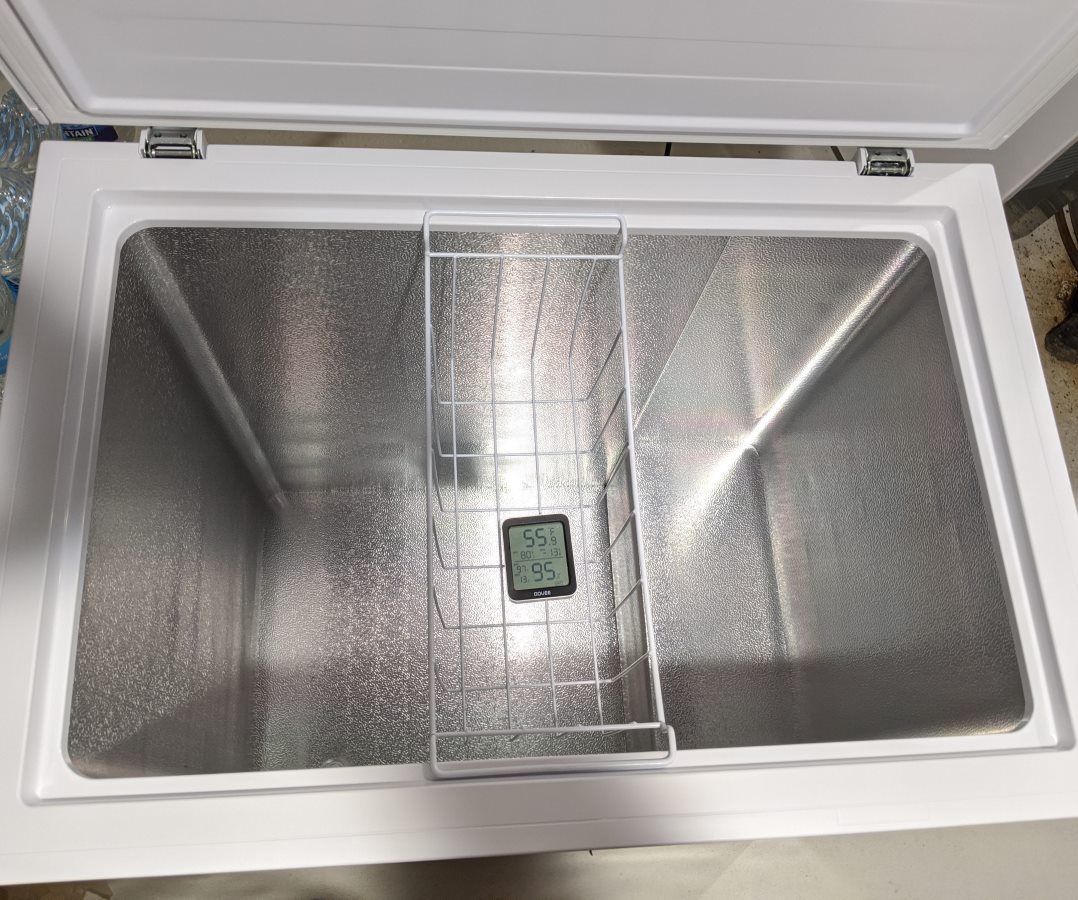 5 |
6 | I got a chest freezer recently, and planned to put it in the basement. Since it's not used frequently, I wanted to keep track of the temperature and send myself a notification in case the freezer breaks down and I need to save the food.
7 |
8 | I have zigbee temperature sensors that are small and use CR2032 coin cells. They'll work for a little while, but freezing temperatures may not be best for coin cell battery performance and might necessitate frequent battery changes. I came across these [Govee brand](https://www.amazon.com/Govee-Temperature-Notification-Hygrometer-Thermometer/dp/B0872X4H4J) Bluetooth temperature sensors that use a pair of AAA batteries.
9 |
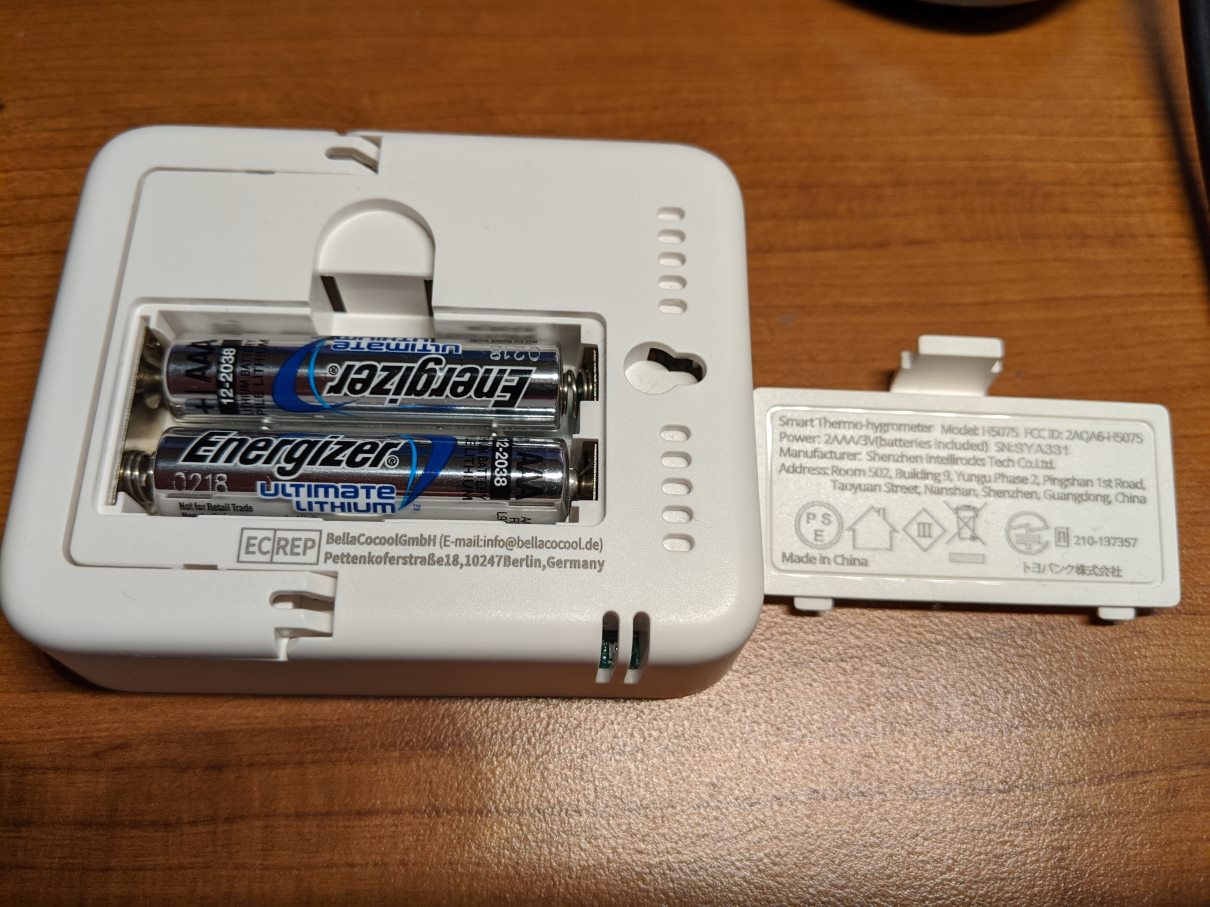
10 | If I swap the alkaline AAA batteries out with Energizer Lithium AAA batteries, the sensor should work better in a chest freezer. The lithium-iron disulfide chemistry in these Energizer AAA batteries perform better in freezing conditions than the Lithium Manganese dioxide chemistry used in typical CR2032 coin cells. The added capacity should also reduce battery changes.
11 |
12 |
5 |
6 | I got a chest freezer recently, and planned to put it in the basement. Since it's not used frequently, I wanted to keep track of the temperature and send myself a notification in case the freezer breaks down and I need to save the food.
7 |
8 | I have zigbee temperature sensors that are small and use CR2032 coin cells. They'll work for a little while, but freezing temperatures may not be best for coin cell battery performance and might necessitate frequent battery changes. I came across these [Govee brand](https://www.amazon.com/Govee-Temperature-Notification-Hygrometer-Thermometer/dp/B0872X4H4J) Bluetooth temperature sensors that use a pair of AAA batteries.
9 |
10 | If I swap the alkaline AAA batteries out with Energizer Lithium AAA batteries, the sensor should work better in a chest freezer. The lithium-iron disulfide chemistry in these Energizer AAA batteries perform better in freezing conditions than the Lithium Manganese dioxide chemistry used in typical CR2032 coin cells. The added capacity should also reduce battery changes.
11 |
12 | 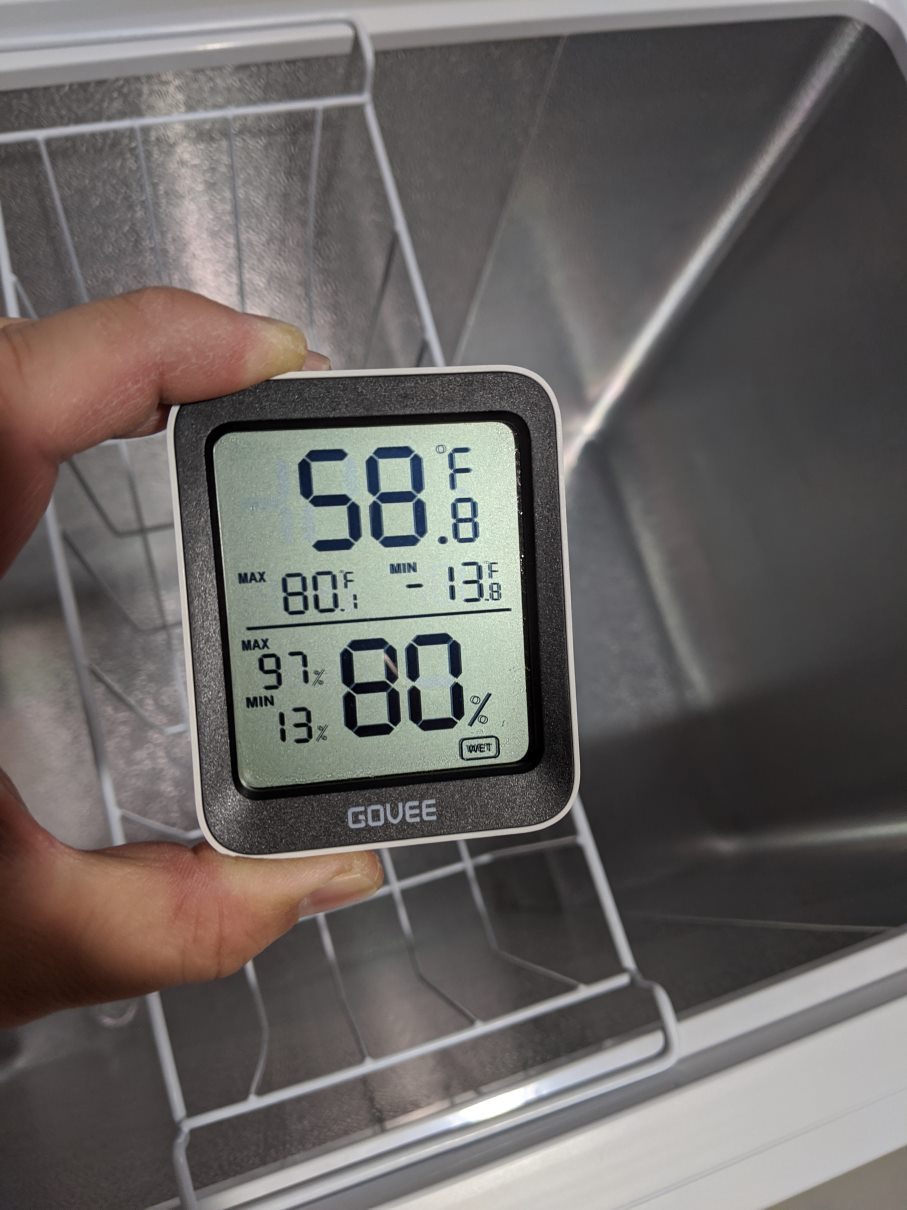
 13 |
14 |
15 | Like a lot of these gateway projects, I wanted to use a Raspberry Pi to read the bluetooth sensor data and act as a dedicated gateway. I came across this [GoveeWatcher project](https://github.com/Thrilleratplay/GoveeWatcher/issues/2) that explains the how the Govee bluetooth advertisement formats the temperature, humidity, and battery level. The sensor data is encoded in the advertisement, so no GATT connections needed. The manufacturer provides mobile apps for typical usage, but it has creepy permissions and it's not useful for my purpose. Instead, I used the Bluepy library to read the BLE advertisement and parse it out per the description from GoveeWatcher project. As I'm already using MQTT, Influx, Grafana, and telegraph, it was convenient to publish the sensor data as MQTT messages and visualize it in Grafana. Then send email notifications using Node-Red.
16 |
17 |
13 |
14 |
15 | Like a lot of these gateway projects, I wanted to use a Raspberry Pi to read the bluetooth sensor data and act as a dedicated gateway. I came across this [GoveeWatcher project](https://github.com/Thrilleratplay/GoveeWatcher/issues/2) that explains the how the Govee bluetooth advertisement formats the temperature, humidity, and battery level. The sensor data is encoded in the advertisement, so no GATT connections needed. The manufacturer provides mobile apps for typical usage, but it has creepy permissions and it's not useful for my purpose. Instead, I used the Bluepy library to read the BLE advertisement and parse it out per the description from GoveeWatcher project. As I'm already using MQTT, Influx, Grafana, and telegraph, it was convenient to publish the sensor data as MQTT messages and visualize it in Grafana. Then send email notifications using Node-Red.
16 |
17 | 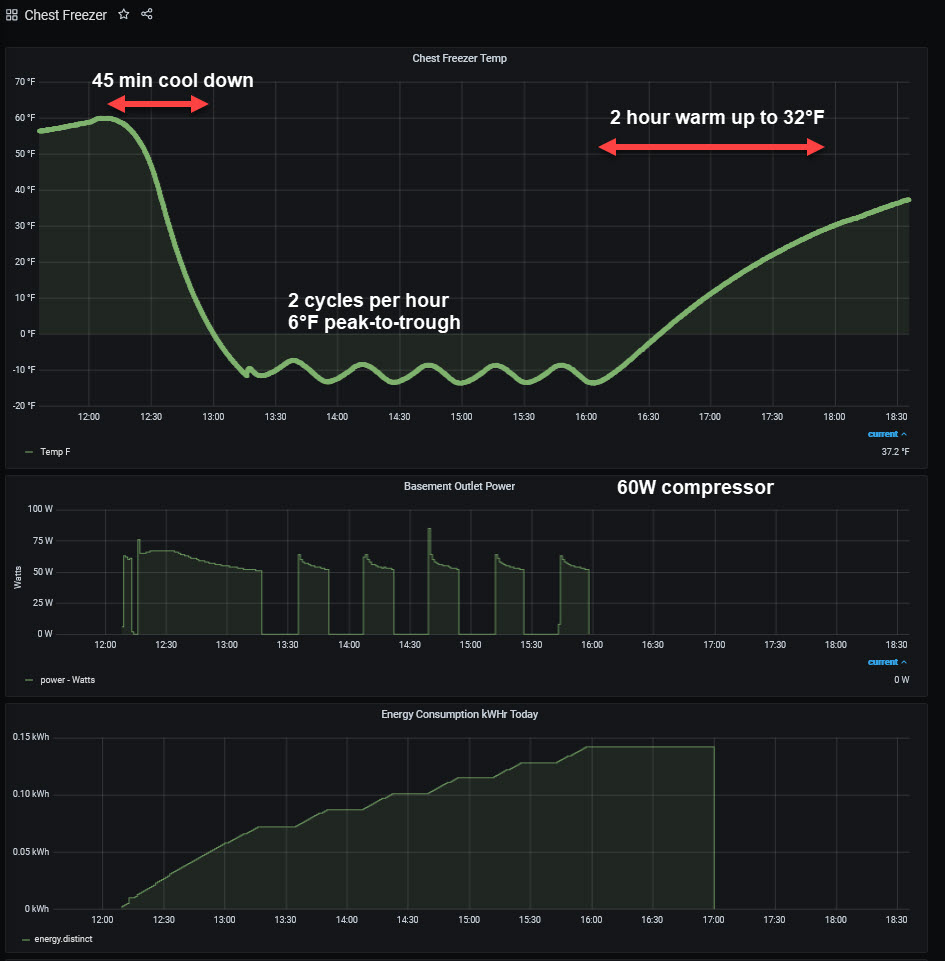 18 |
19 | I'm also interested in how the freezer behaves. How the temperature fluctuates, how many watts it consumes, etc. It's interesting how long it takes for it to go from -13F back put up to 32F when the power is shut off. To monitor energy consumption, I used a [wifi outlet](https://www.amazon.com/BN-LINK-Monitoring-Function-Compatible-Assistant/dp/B07VDGM6QR) with built-in current sensor and flashed it with Tasmota via [Tuya Convert](https://github.com/ct-Open-Source/tuya-convert). This 7 cu-ft Hisense chest freezer uses about 0.7 kWh per day when the unit is totally empty and door kept closed.
20 |
21 |
18 |
19 | I'm also interested in how the freezer behaves. How the temperature fluctuates, how many watts it consumes, etc. It's interesting how long it takes for it to go from -13F back put up to 32F when the power is shut off. To monitor energy consumption, I used a [wifi outlet](https://www.amazon.com/BN-LINK-Monitoring-Function-Compatible-Assistant/dp/B07VDGM6QR) with built-in current sensor and flashed it with Tasmota via [Tuya Convert](https://github.com/ct-Open-Source/tuya-convert). This 7 cu-ft Hisense chest freezer uses about 0.7 kWh per day when the unit is totally empty and door kept closed.
20 |
21 | 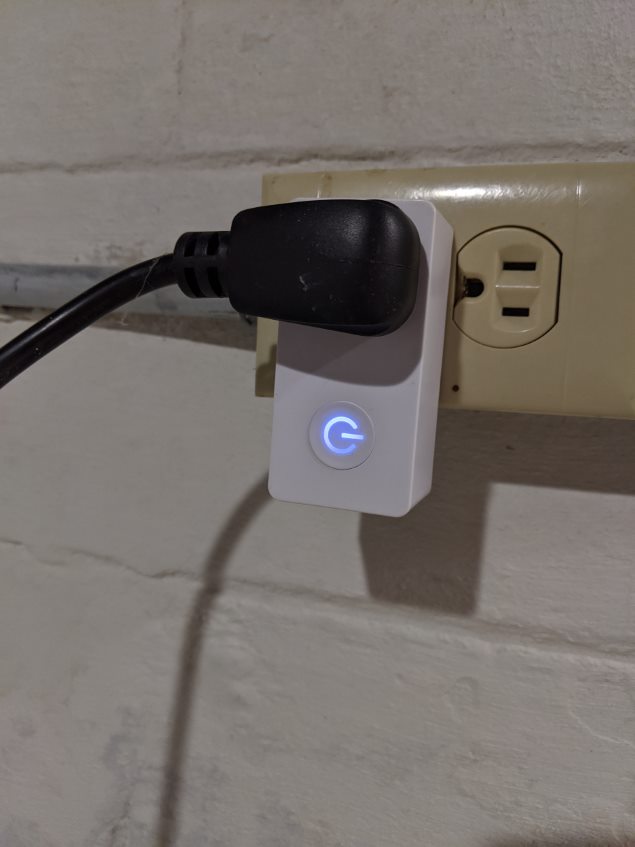 22 |
23 | I'll update the energy usage once the freezer is more full of food. I'll also update when I get battery life data. The Govee bluetooth sensor unfortunately sends out updates way more often than necessary (every couple of seconds). So the added battery capacity from the AAA batteries may be somewhat negated by the excess data transmissions.
24 |
25 | The chest freezer isn't blocking the signal too much. The Pi gateway is one level up and one room over from the chest freezer location, and I'm able to receive 3 out of 5 advertisements on average.
26 |
--------------------------------------------------------------------------------
/govee_ble_mqtt_pi.py:
--------------------------------------------------------------------------------
1 | #!/usr/bin/python
2 | '''
3 | This is a python Bluetooth advertisement scanner for the Govee brand Bluetooth
4 | temperature sensor. Tested on model H5075 using Raspberry Pi 3.
5 | Temperature, humidity, and battery level is published as MQTT messages.
6 |
7 | Credit: I used information for Govee advertisement format from
8 | github.com/Thrilleratplay/GoveeWatcher
9 |
10 | Install dependencies:
11 | sudo apt-get install python3-pip libglib2.0-dev
12 | sudo pip3 install bluepy
13 | sudo apt install -y mosquitto mosquitto-clients
14 | sudo pip3 install paho-mqtt
15 |
16 | Needs sudo to run on Raspbian
17 | sudo python3 govee_ble_mqtt_pi.py
18 |
19 | Run in background
20 | sudo nohup python3 govee_ble_mqtt_pi.py &
21 |
22 | '''
23 |
24 | from __future__ import print_function
25 |
26 | from time import gmtime, strftime, sleep
27 | from bluepy.btle import Scanner, DefaultDelegate, BTLEException
28 | import sys
29 | import paho.mqtt.client as mqtt
30 |
31 | def on_connect(client, userdata, flags, rc):
32 | print("Connected with result code "+str(rc))
33 |
34 | def on_message(client, userdata, msg):
35 | print("on message")
36 |
37 | client = mqtt.Client()
38 | mqtt_prefix = "/sensor/govee"
39 | mqtt_gateway_name = "/upstairs/"
40 |
41 | class ScanDelegate(DefaultDelegate):
42 |
43 | global client
44 | # mqtt message topic/payload: /prefix/gateway_name/mac/
45 | global mqtt_prefix
46 | global mqtt_gateway_name
47 |
48 | def handleDiscovery(self, dev, isNewDev, isNewData):
49 | #if (dev.addr == "a4:c1:38:xx:xx:xx") or (dev.addr == "a4:c1:38:xx:xx:xx"):
50 | if dev.addr[:8]=="a4:c1:38":
51 |
52 | #returns a list, of which the [2] item of the [3] tupple is manufacturing data
53 | adv_list = dev.getScanData()
54 |
55 | adv_manuf_data = adv_list[2][2]
56 |
57 | #print("manuf data = ", adv_manuf_data)
58 |
59 | #this is the location of the encoded temp/humidity and battery data
60 | temp_hum_data = adv_manuf_data[6:12]
61 | battery = adv_manuf_data[12:14]
62 |
63 | #convert to integer
64 | val = (int(temp_hum_data, 16))
65 |
66 | #decode tip from eharris: https://github.com/Thrilleratplay/GoveeWatcher/issues/2
67 | is_negative = False
68 | temp_C = 500
69 | humidity = 500
70 | if (val & 0x800000):
71 | is_negative = True
72 | val = val ^ 0x800000
73 | try:
74 | humidity = (val % 1000) / 10
75 | temp_C = int(val / 1000) / 10
76 | if (is_negative):
77 | temp_C = 0 - temp_C
78 | except:
79 | print("issues with integer conversion")
80 |
81 | try:
82 | battery_percent = int(adv_manuf_data[12:14]) / 64 * 100
83 | except:
84 | battery_percent = 200
85 | battery_percent = round(battery_percent)
86 |
87 | temp_F = round(temp_C*9/5+32, 1)
88 |
89 | try:
90 | hum_percent = ((int(temp_hum_data, 16)) % 1000) / 10
91 | except:
92 | hum_percent = 200
93 | hum_percent = round(hum_percent)
94 | mac=dev.addr
95 | signal = dev.rssi
96 |
97 | #print("mac=", mac, " percent humidity ", hum_percent, " temp_F = ", temp_F, " battery percent=", battery_percent, " rssi=", signal)
98 | mqtt_topic = mqtt_prefix + mqtt_gateway_name + mac + "/"
99 |
100 | client.publish(mqtt_topic+"rssi", signal, qos=0)
101 | client.publish(mqtt_topic+"temp_F", temp_F, qos=0)
102 | client.publish(mqtt_topic+"hum", hum_percent, qos=0)
103 | client.publish(mqtt_topic+"battery_pct", battery_percent, qos=0)
104 |
105 | sys.stdout.flush()
106 |
107 | scanner = Scanner().withDelegate(ScanDelegate())
108 |
109 | #replace localhost with your MQTT broker
110 | client.connect("localhost",1883,60)
111 |
112 | client.on_connect = on_connect
113 | client.on_message = on_message
114 |
115 | while True:
116 | scanner.scan(60.0, passive=True)
117 |
118 |
--------------------------------------------------------------------------------
22 |
23 | I'll update the energy usage once the freezer is more full of food. I'll also update when I get battery life data. The Govee bluetooth sensor unfortunately sends out updates way more often than necessary (every couple of seconds). So the added battery capacity from the AAA batteries may be somewhat negated by the excess data transmissions.
24 |
25 | The chest freezer isn't blocking the signal too much. The Pi gateway is one level up and one room over from the chest freezer location, and I'm able to receive 3 out of 5 advertisements on average.
26 |
--------------------------------------------------------------------------------
/govee_ble_mqtt_pi.py:
--------------------------------------------------------------------------------
1 | #!/usr/bin/python
2 | '''
3 | This is a python Bluetooth advertisement scanner for the Govee brand Bluetooth
4 | temperature sensor. Tested on model H5075 using Raspberry Pi 3.
5 | Temperature, humidity, and battery level is published as MQTT messages.
6 |
7 | Credit: I used information for Govee advertisement format from
8 | github.com/Thrilleratplay/GoveeWatcher
9 |
10 | Install dependencies:
11 | sudo apt-get install python3-pip libglib2.0-dev
12 | sudo pip3 install bluepy
13 | sudo apt install -y mosquitto mosquitto-clients
14 | sudo pip3 install paho-mqtt
15 |
16 | Needs sudo to run on Raspbian
17 | sudo python3 govee_ble_mqtt_pi.py
18 |
19 | Run in background
20 | sudo nohup python3 govee_ble_mqtt_pi.py &
21 |
22 | '''
23 |
24 | from __future__ import print_function
25 |
26 | from time import gmtime, strftime, sleep
27 | from bluepy.btle import Scanner, DefaultDelegate, BTLEException
28 | import sys
29 | import paho.mqtt.client as mqtt
30 |
31 | def on_connect(client, userdata, flags, rc):
32 | print("Connected with result code "+str(rc))
33 |
34 | def on_message(client, userdata, msg):
35 | print("on message")
36 |
37 | client = mqtt.Client()
38 | mqtt_prefix = "/sensor/govee"
39 | mqtt_gateway_name = "/upstairs/"
40 |
41 | class ScanDelegate(DefaultDelegate):
42 |
43 | global client
44 | # mqtt message topic/payload: /prefix/gateway_name/mac/
45 | global mqtt_prefix
46 | global mqtt_gateway_name
47 |
48 | def handleDiscovery(self, dev, isNewDev, isNewData):
49 | #if (dev.addr == "a4:c1:38:xx:xx:xx") or (dev.addr == "a4:c1:38:xx:xx:xx"):
50 | if dev.addr[:8]=="a4:c1:38":
51 |
52 | #returns a list, of which the [2] item of the [3] tupple is manufacturing data
53 | adv_list = dev.getScanData()
54 |
55 | adv_manuf_data = adv_list[2][2]
56 |
57 | #print("manuf data = ", adv_manuf_data)
58 |
59 | #this is the location of the encoded temp/humidity and battery data
60 | temp_hum_data = adv_manuf_data[6:12]
61 | battery = adv_manuf_data[12:14]
62 |
63 | #convert to integer
64 | val = (int(temp_hum_data, 16))
65 |
66 | #decode tip from eharris: https://github.com/Thrilleratplay/GoveeWatcher/issues/2
67 | is_negative = False
68 | temp_C = 500
69 | humidity = 500
70 | if (val & 0x800000):
71 | is_negative = True
72 | val = val ^ 0x800000
73 | try:
74 | humidity = (val % 1000) / 10
75 | temp_C = int(val / 1000) / 10
76 | if (is_negative):
77 | temp_C = 0 - temp_C
78 | except:
79 | print("issues with integer conversion")
80 |
81 | try:
82 | battery_percent = int(adv_manuf_data[12:14]) / 64 * 100
83 | except:
84 | battery_percent = 200
85 | battery_percent = round(battery_percent)
86 |
87 | temp_F = round(temp_C*9/5+32, 1)
88 |
89 | try:
90 | hum_percent = ((int(temp_hum_data, 16)) % 1000) / 10
91 | except:
92 | hum_percent = 200
93 | hum_percent = round(hum_percent)
94 | mac=dev.addr
95 | signal = dev.rssi
96 |
97 | #print("mac=", mac, " percent humidity ", hum_percent, " temp_F = ", temp_F, " battery percent=", battery_percent, " rssi=", signal)
98 | mqtt_topic = mqtt_prefix + mqtt_gateway_name + mac + "/"
99 |
100 | client.publish(mqtt_topic+"rssi", signal, qos=0)
101 | client.publish(mqtt_topic+"temp_F", temp_F, qos=0)
102 | client.publish(mqtt_topic+"hum", hum_percent, qos=0)
103 | client.publish(mqtt_topic+"battery_pct", battery_percent, qos=0)
104 |
105 | sys.stdout.flush()
106 |
107 | scanner = Scanner().withDelegate(ScanDelegate())
108 |
109 | #replace localhost with your MQTT broker
110 | client.connect("localhost",1883,60)
111 |
112 | client.on_connect = on_connect
113 | client.on_message = on_message
114 |
115 | while True:
116 | scanner.scan(60.0, passive=True)
117 |
118 |
--------------------------------------------------------------------------------