├── app
├── .gitignore
├── src
│ ├── main
│ │ ├── res
│ │ │ ├── values
│ │ │ │ ├── strings.xml
│ │ │ │ ├── colors.xml
│ │ │ │ ├── dimens.xml
│ │ │ │ └── styles.xml
│ │ │ ├── mipmap-hdpi
│ │ │ │ └── ic_launcher.png
│ │ │ ├── mipmap-mdpi
│ │ │ │ └── ic_launcher.png
│ │ │ ├── mipmap-xhdpi
│ │ │ │ └── ic_launcher.png
│ │ │ ├── mipmap-xxhdpi
│ │ │ │ └── ic_launcher.png
│ │ │ ├── mipmap-xxxhdpi
│ │ │ │ └── ic_launcher.png
│ │ │ ├── values-w820dp
│ │ │ │ └── dimens.xml
│ │ │ └── layout
│ │ │ │ └── activity_main.xml
│ │ ├── java
│ │ │ └── com
│ │ │ │ └── example
│ │ │ │ └── android
│ │ │ │ └── android_me
│ │ │ │ └── MainActivity.java
│ │ └── AndroidManifest.xml
│ └── androidTest
│ │ └── java
│ │ └── com
│ │ └── example
│ │ └── android
│ │ └── android_me
│ │ └── ExampleInstrumentedTest.java
├── proguard-rules.pro
└── build.gradle
├── settings.gradle
├── gradle
└── wrapper
│ ├── gradle-wrapper.jar
│ └── gradle-wrapper.properties
├── .gitignore
├── gradle.properties
├── gradlew.bat
├── gradlew
└── README.md
/app/.gitignore:
--------------------------------------------------------------------------------
1 | /build
2 |
--------------------------------------------------------------------------------
/settings.gradle:
--------------------------------------------------------------------------------
1 | include ':app'
2 |
--------------------------------------------------------------------------------
/app/src/main/res/values/strings.xml:
--------------------------------------------------------------------------------
1 |
2 | Android_Me
3 |
4 |
--------------------------------------------------------------------------------
/gradle/wrapper/gradle-wrapper.jar:
--------------------------------------------------------------------------------
https://raw.githubusercontent.com/udacity/Android_Me/HEAD/gradle/wrapper/gradle-wrapper.jar
--------------------------------------------------------------------------------
/app/src/main/res/mipmap-hdpi/ic_launcher.png:
--------------------------------------------------------------------------------
https://raw.githubusercontent.com/udacity/Android_Me/HEAD/app/src/main/res/mipmap-hdpi/ic_launcher.png
--------------------------------------------------------------------------------
/app/src/main/res/mipmap-mdpi/ic_launcher.png:
--------------------------------------------------------------------------------
https://raw.githubusercontent.com/udacity/Android_Me/HEAD/app/src/main/res/mipmap-mdpi/ic_launcher.png
--------------------------------------------------------------------------------
/app/src/main/res/mipmap-xhdpi/ic_launcher.png:
--------------------------------------------------------------------------------
https://raw.githubusercontent.com/udacity/Android_Me/HEAD/app/src/main/res/mipmap-xhdpi/ic_launcher.png
--------------------------------------------------------------------------------
/app/src/main/res/mipmap-xxhdpi/ic_launcher.png:
--------------------------------------------------------------------------------
https://raw.githubusercontent.com/udacity/Android_Me/HEAD/app/src/main/res/mipmap-xxhdpi/ic_launcher.png
--------------------------------------------------------------------------------
/app/src/main/res/mipmap-xxxhdpi/ic_launcher.png:
--------------------------------------------------------------------------------
https://raw.githubusercontent.com/udacity/Android_Me/HEAD/app/src/main/res/mipmap-xxxhdpi/ic_launcher.png
--------------------------------------------------------------------------------
/.gitignore:
--------------------------------------------------------------------------------
1 | *.iml
2 | .gradle
3 | /local.properties
4 | /.idea/workspace.xml
5 | /.idea/libraries
6 | .DS_Store
7 | /build
8 | /captures
9 | .externalNativeBuild
10 |
--------------------------------------------------------------------------------
/app/src/main/res/values/colors.xml:
--------------------------------------------------------------------------------
1 |
2 |
3 | #3F51B5
4 | #303F9F
5 | #FF4081
6 |
7 |
--------------------------------------------------------------------------------
/app/src/main/res/values/dimens.xml:
--------------------------------------------------------------------------------
1 |
2 |
3 | 16dp
4 | 16dp
5 |
6 |
--------------------------------------------------------------------------------
/gradle/wrapper/gradle-wrapper.properties:
--------------------------------------------------------------------------------
1 | #Mon Dec 28 10:00:20 PST 2015
2 | distributionBase=GRADLE_USER_HOME
3 | distributionPath=wrapper/dists
4 | zipStoreBase=GRADLE_USER_HOME
5 | zipStorePath=wrapper/dists
6 | distributionUrl=https\://services.gradle.org/distributions/gradle-2.14.1-all.zip
7 |
--------------------------------------------------------------------------------
/app/src/main/res/values-w820dp/dimens.xml:
--------------------------------------------------------------------------------
1 |
2 |
5 | 64dp
6 |
7 |
--------------------------------------------------------------------------------
/app/src/main/res/values/styles.xml:
--------------------------------------------------------------------------------
1 |
2 |
3 |
4 |
10 |
11 |
12 |
--------------------------------------------------------------------------------
/app/src/main/java/com/example/android/android_me/MainActivity.java:
--------------------------------------------------------------------------------
1 | package com.example.android.android_me;
2 |
3 | import android.support.v7.app.AppCompatActivity;
4 | import android.os.Bundle;
5 |
6 | public class MainActivity extends AppCompatActivity {
7 |
8 | @Override
9 | protected void onCreate(Bundle savedInstanceState) {
10 | super.onCreate(savedInstanceState);
11 | setContentView(R.layout.activity_main);
12 | }
13 | }
14 |
--------------------------------------------------------------------------------
/app/proguard-rules.pro:
--------------------------------------------------------------------------------
1 | # Add project specific ProGuard rules here.
2 | # By default, the flags in this file are appended to flags specified
3 | # in /Users/cezannec/Library/Android/sdk/tools/proguard/proguard-android.txt
4 | # You can edit the include path and order by changing the proguardFiles
5 | # directive in build.gradle.
6 | #
7 | # For more details, see
8 | # http://developer.android.com/guide/developing/tools/proguard.html
9 |
10 | # Add any project specific keep options here:
11 |
12 | # If your project uses WebView with JS, uncomment the following
13 | # and specify the fully qualified class name to the JavaScript interface
14 | # class:
15 | #-keepclassmembers class fqcn.of.javascript.interface.for.webview {
16 | # public *;
17 | #}
18 |
--------------------------------------------------------------------------------
/app/src/main/AndroidManifest.xml:
--------------------------------------------------------------------------------
1 |
2 |
4 |
5 |
11 |
12 |
13 |
14 |
15 |
16 |
17 |
18 |
19 |
20 |
--------------------------------------------------------------------------------
/gradle.properties:
--------------------------------------------------------------------------------
1 | # Project-wide Gradle settings.
2 |
3 | # IDE (e.g. Android Studio) users:
4 | # Gradle settings configured through the IDE *will override*
5 | # any settings specified in this file.
6 |
7 | # For more details on how to configure your build environment visit
8 | # http://www.gradle.org/docs/current/userguide/build_environment.html
9 |
10 | # Specifies the JVM arguments used for the daemon process.
11 | # The setting is particularly useful for tweaking memory settings.
12 | org.gradle.jvmargs=-Xmx1536m
13 |
14 | # When configured, Gradle will run in incubating parallel mode.
15 | # This option should only be used with decoupled projects. More details, visit
16 | # http://www.gradle.org/docs/current/userguide/multi_project_builds.html#sec:decoupled_projects
17 | # org.gradle.parallel=true
18 |
--------------------------------------------------------------------------------
/app/src/main/res/layout/activity_main.xml:
--------------------------------------------------------------------------------
1 |
2 |
12 |
13 |
17 |
18 |
--------------------------------------------------------------------------------
/app/src/androidTest/java/com/example/android/android_me/ExampleInstrumentedTest.java:
--------------------------------------------------------------------------------
1 | package com.example.android.android_me;
2 |
3 | import android.content.Context;
4 | import android.support.test.InstrumentationRegistry;
5 | import android.support.test.runner.AndroidJUnit4;
6 |
7 | import org.junit.Test;
8 | import org.junit.runner.RunWith;
9 |
10 | import static org.junit.Assert.*;
11 |
12 | /**
13 | * Instrumentation test, which will execute on an Android device.
14 | *
15 | * @see Testing documentation
16 | */
17 | @RunWith(AndroidJUnit4.class)
18 | public class ExampleInstrumentedTest {
19 | @Test
20 | public void useAppContext() throws Exception {
21 | // Context of the app under test.
22 | Context appContext = InstrumentationRegistry.getTargetContext();
23 |
24 | assertEquals("com.example.android.android_me", appContext.getPackageName());
25 | }
26 | }
27 |
--------------------------------------------------------------------------------
/app/build.gradle:
--------------------------------------------------------------------------------
1 | apply plugin: 'com.android.application'
2 |
3 | android {
4 | compileSdkVersion 25
5 | buildToolsVersion "25.0.2"
6 | defaultConfig {
7 | applicationId "com.example.android.android_me"
8 | minSdkVersion 16
9 | targetSdkVersion 25
10 | versionCode 1
11 | versionName "1.0"
12 | testInstrumentationRunner "android.support.test.runner.AndroidJUnitRunner"
13 | }
14 | buildTypes {
15 | release {
16 | minifyEnabled false
17 | proguardFiles getDefaultProguardFile('proguard-android.txt'), 'proguard-rules.pro'
18 | }
19 | }
20 | }
21 |
22 | dependencies {
23 | compile fileTree(dir: 'libs', include: ['*.jar'])
24 | androidTestCompile('com.android.support.test.espresso:espresso-core:2.2.2', {
25 | exclude group: 'com.android.support', module: 'support-annotations'
26 | })
27 | compile 'com.android.support:appcompat-v7:25.1.0'
28 | testCompile 'junit:junit:4.12'
29 | }
30 |
--------------------------------------------------------------------------------
/gradlew.bat:
--------------------------------------------------------------------------------
1 | @if "%DEBUG%" == "" @echo off
2 | @rem ##########################################################################
3 | @rem
4 | @rem Gradle startup script for Windows
5 | @rem
6 | @rem ##########################################################################
7 |
8 | @rem Set local scope for the variables with windows NT shell
9 | if "%OS%"=="Windows_NT" setlocal
10 |
11 | @rem Add default JVM options here. You can also use JAVA_OPTS and GRADLE_OPTS to pass JVM options to this script.
12 | set DEFAULT_JVM_OPTS=
13 |
14 | set DIRNAME=%~dp0
15 | if "%DIRNAME%" == "" set DIRNAME=.
16 | set APP_BASE_NAME=%~n0
17 | set APP_HOME=%DIRNAME%
18 |
19 | @rem Find java.exe
20 | if defined JAVA_HOME goto findJavaFromJavaHome
21 |
22 | set JAVA_EXE=java.exe
23 | %JAVA_EXE% -version >NUL 2>&1
24 | if "%ERRORLEVEL%" == "0" goto init
25 |
26 | echo.
27 | echo ERROR: JAVA_HOME is not set and no 'java' command could be found in your PATH.
28 | echo.
29 | echo Please set the JAVA_HOME variable in your environment to match the
30 | echo location of your Java installation.
31 |
32 | goto fail
33 |
34 | :findJavaFromJavaHome
35 | set JAVA_HOME=%JAVA_HOME:"=%
36 | set JAVA_EXE=%JAVA_HOME%/bin/java.exe
37 |
38 | if exist "%JAVA_EXE%" goto init
39 |
40 | echo.
41 | echo ERROR: JAVA_HOME is set to an invalid directory: %JAVA_HOME%
42 | echo.
43 | echo Please set the JAVA_HOME variable in your environment to match the
44 | echo location of your Java installation.
45 |
46 | goto fail
47 |
48 | :init
49 | @rem Get command-line arguments, handling Windowz variants
50 |
51 | if not "%OS%" == "Windows_NT" goto win9xME_args
52 | if "%@eval[2+2]" == "4" goto 4NT_args
53 |
54 | :win9xME_args
55 | @rem Slurp the command line arguments.
56 | set CMD_LINE_ARGS=
57 | set _SKIP=2
58 |
59 | :win9xME_args_slurp
60 | if "x%~1" == "x" goto execute
61 |
62 | set CMD_LINE_ARGS=%*
63 | goto execute
64 |
65 | :4NT_args
66 | @rem Get arguments from the 4NT Shell from JP Software
67 | set CMD_LINE_ARGS=%$
68 |
69 | :execute
70 | @rem Setup the command line
71 |
72 | set CLASSPATH=%APP_HOME%\gradle\wrapper\gradle-wrapper.jar
73 |
74 | @rem Execute Gradle
75 | "%JAVA_EXE%" %DEFAULT_JVM_OPTS% %JAVA_OPTS% %GRADLE_OPTS% "-Dorg.gradle.appname=%APP_BASE_NAME%" -classpath "%CLASSPATH%" org.gradle.wrapper.GradleWrapperMain %CMD_LINE_ARGS%
76 |
77 | :end
78 | @rem End local scope for the variables with windows NT shell
79 | if "%ERRORLEVEL%"=="0" goto mainEnd
80 |
81 | :fail
82 | rem Set variable GRADLE_EXIT_CONSOLE if you need the _script_ return code instead of
83 | rem the _cmd.exe /c_ return code!
84 | if not "" == "%GRADLE_EXIT_CONSOLE%" exit 1
85 | exit /b 1
86 |
87 | :mainEnd
88 | if "%OS%"=="Windows_NT" endlocal
89 |
90 | :omega
91 |
--------------------------------------------------------------------------------
/gradlew:
--------------------------------------------------------------------------------
1 | #!/usr/bin/env bash
2 |
3 | ##############################################################################
4 | ##
5 | ## Gradle start up script for UN*X
6 | ##
7 | ##############################################################################
8 |
9 | # Add default JVM options here. You can also use JAVA_OPTS and GRADLE_OPTS to pass JVM options to this script.
10 | DEFAULT_JVM_OPTS=""
11 |
12 | APP_NAME="Gradle"
13 | APP_BASE_NAME=`basename "$0"`
14 |
15 | # Use the maximum available, or set MAX_FD != -1 to use that value.
16 | MAX_FD="maximum"
17 |
18 | warn ( ) {
19 | echo "$*"
20 | }
21 |
22 | die ( ) {
23 | echo
24 | echo "$*"
25 | echo
26 | exit 1
27 | }
28 |
29 | # OS specific support (must be 'true' or 'false').
30 | cygwin=false
31 | msys=false
32 | darwin=false
33 | case "`uname`" in
34 | CYGWIN* )
35 | cygwin=true
36 | ;;
37 | Darwin* )
38 | darwin=true
39 | ;;
40 | MINGW* )
41 | msys=true
42 | ;;
43 | esac
44 |
45 | # Attempt to set APP_HOME
46 | # Resolve links: $0 may be a link
47 | PRG="$0"
48 | # Need this for relative symlinks.
49 | while [ -h "$PRG" ] ; do
50 | ls=`ls -ld "$PRG"`
51 | link=`expr "$ls" : '.*-> \(.*\)$'`
52 | if expr "$link" : '/.*' > /dev/null; then
53 | PRG="$link"
54 | else
55 | PRG=`dirname "$PRG"`"/$link"
56 | fi
57 | done
58 | SAVED="`pwd`"
59 | cd "`dirname \"$PRG\"`/" >/dev/null
60 | APP_HOME="`pwd -P`"
61 | cd "$SAVED" >/dev/null
62 |
63 | CLASSPATH=$APP_HOME/gradle/wrapper/gradle-wrapper.jar
64 |
65 | # Determine the Java command to use to start the JVM.
66 | if [ -n "$JAVA_HOME" ] ; then
67 | if [ -x "$JAVA_HOME/jre/sh/java" ] ; then
68 | # IBM's JDK on AIX uses strange locations for the executables
69 | JAVACMD="$JAVA_HOME/jre/sh/java"
70 | else
71 | JAVACMD="$JAVA_HOME/bin/java"
72 | fi
73 | if [ ! -x "$JAVACMD" ] ; then
74 | die "ERROR: JAVA_HOME is set to an invalid directory: $JAVA_HOME
75 |
76 | Please set the JAVA_HOME variable in your environment to match the
77 | location of your Java installation."
78 | fi
79 | else
80 | JAVACMD="java"
81 | which java >/dev/null 2>&1 || die "ERROR: JAVA_HOME is not set and no 'java' command could be found in your PATH.
82 |
83 | Please set the JAVA_HOME variable in your environment to match the
84 | location of your Java installation."
85 | fi
86 |
87 | # Increase the maximum file descriptors if we can.
88 | if [ "$cygwin" = "false" -a "$darwin" = "false" ] ; then
89 | MAX_FD_LIMIT=`ulimit -H -n`
90 | if [ $? -eq 0 ] ; then
91 | if [ "$MAX_FD" = "maximum" -o "$MAX_FD" = "max" ] ; then
92 | MAX_FD="$MAX_FD_LIMIT"
93 | fi
94 | ulimit -n $MAX_FD
95 | if [ $? -ne 0 ] ; then
96 | warn "Could not set maximum file descriptor limit: $MAX_FD"
97 | fi
98 | else
99 | warn "Could not query maximum file descriptor limit: $MAX_FD_LIMIT"
100 | fi
101 | fi
102 |
103 | # For Darwin, add options to specify how the application appears in the dock
104 | if $darwin; then
105 | GRADLE_OPTS="$GRADLE_OPTS \"-Xdock:name=$APP_NAME\" \"-Xdock:icon=$APP_HOME/media/gradle.icns\""
106 | fi
107 |
108 | # For Cygwin, switch paths to Windows format before running java
109 | if $cygwin ; then
110 | APP_HOME=`cygpath --path --mixed "$APP_HOME"`
111 | CLASSPATH=`cygpath --path --mixed "$CLASSPATH"`
112 | JAVACMD=`cygpath --unix "$JAVACMD"`
113 |
114 | # We build the pattern for arguments to be converted via cygpath
115 | ROOTDIRSRAW=`find -L / -maxdepth 1 -mindepth 1 -type d 2>/dev/null`
116 | SEP=""
117 | for dir in $ROOTDIRSRAW ; do
118 | ROOTDIRS="$ROOTDIRS$SEP$dir"
119 | SEP="|"
120 | done
121 | OURCYGPATTERN="(^($ROOTDIRS))"
122 | # Add a user-defined pattern to the cygpath arguments
123 | if [ "$GRADLE_CYGPATTERN" != "" ] ; then
124 | OURCYGPATTERN="$OURCYGPATTERN|($GRADLE_CYGPATTERN)"
125 | fi
126 | # Now convert the arguments - kludge to limit ourselves to /bin/sh
127 | i=0
128 | for arg in "$@" ; do
129 | CHECK=`echo "$arg"|egrep -c "$OURCYGPATTERN" -`
130 | CHECK2=`echo "$arg"|egrep -c "^-"` ### Determine if an option
131 |
132 | if [ $CHECK -ne 0 ] && [ $CHECK2 -eq 0 ] ; then ### Added a condition
133 | eval `echo args$i`=`cygpath --path --ignore --mixed "$arg"`
134 | else
135 | eval `echo args$i`="\"$arg\""
136 | fi
137 | i=$((i+1))
138 | done
139 | case $i in
140 | (0) set -- ;;
141 | (1) set -- "$args0" ;;
142 | (2) set -- "$args0" "$args1" ;;
143 | (3) set -- "$args0" "$args1" "$args2" ;;
144 | (4) set -- "$args0" "$args1" "$args2" "$args3" ;;
145 | (5) set -- "$args0" "$args1" "$args2" "$args3" "$args4" ;;
146 | (6) set -- "$args0" "$args1" "$args2" "$args3" "$args4" "$args5" ;;
147 | (7) set -- "$args0" "$args1" "$args2" "$args3" "$args4" "$args5" "$args6" ;;
148 | (8) set -- "$args0" "$args1" "$args2" "$args3" "$args4" "$args5" "$args6" "$args7" ;;
149 | (9) set -- "$args0" "$args1" "$args2" "$args3" "$args4" "$args5" "$args6" "$args7" "$args8" ;;
150 | esac
151 | fi
152 |
153 | # Split up the JVM_OPTS And GRADLE_OPTS values into an array, following the shell quoting and substitution rules
154 | function splitJvmOpts() {
155 | JVM_OPTS=("$@")
156 | }
157 | eval splitJvmOpts $DEFAULT_JVM_OPTS $JAVA_OPTS $GRADLE_OPTS
158 | JVM_OPTS[${#JVM_OPTS[*]}]="-Dorg.gradle.appname=$APP_BASE_NAME"
159 |
160 | exec "$JAVACMD" "${JVM_OPTS[@]}" -classpath "$CLASSPATH" org.gradle.wrapper.GradleWrapperMain "$@"
161 |
--------------------------------------------------------------------------------
/README.md:
--------------------------------------------------------------------------------
1 | # Android_Me
2 | App that lets you style your own Android! This uses Fragments to create a flexible and responsive UI.
3 |
4 | This is a exercise repository for the AndroidMe example app which is part of the [Advanced Android App Development course on Udacity](https://www.udacity.com/course/advanced-android-app-development--ud855).
5 |
6 | ## How to use this repo while taking the course
7 |
8 | Each code repository in this class has a chain of commits that looks like this:
9 |
10 | 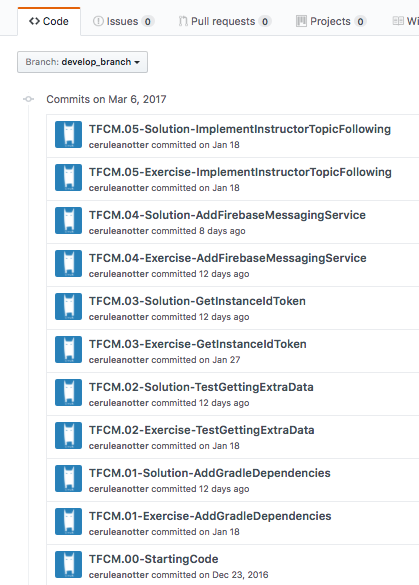
11 |
12 | These commits show every step you'll take to create the app. They include **Exercise** commits and **Solution** commits.
13 |
14 | Exercise commits contain instructions for completing the exercise, while solution commits show the completed exercise. You can tell what a commit is by looking at its commit message.
15 |
16 | For example, **TFCM.01-Exercise-AddGradleDependencies** is the first code step in the Firebase Cloud Messaging (FCM) lesson. This is the exercise commit, and the exercise is called Add Gradle Dependencies.
17 |
18 | Each commit also has a **branch** associated with it of the same name as the commit message, seen below:
19 |
20 | 
22 | Access all branches from this tab
23 |
24 | 
26 |
27 |
28 | 
30 |
31 |
32 | The branches are also accessible from the drop-down in the "Code" tab
33 |
34 |
35 | ## Working with the Course Code
36 |
37 | Here are the basic steps for working with and completing exercises in the repo. This information is linked whenever you start a new exercise project, so don't feel you need to memorize all of this! In fact, skim it now, make sure that you know generally how to do the different tasks, and then come back when you start your first exercise.
38 |
39 | The basic steps are:
40 |
41 | 1. Clone the repo
42 | 2. Checkout the exercise branch
43 | 3. Find and complete the TODOs
44 | 4. Optionally commit your code changes
45 | 5. Compare with the solution
46 |
47 |
48 | **Step 1: Clone the repo**
49 |
50 | As you go through the course, you'll be instructed to clone the different exercise repositories, so you don't need to set these up now. You can clone a repository from github in a folder of your choice with the command:
51 |
52 | ```bash
53 | git clone https://github.com/udacity/REPOSITORY_NAME.git
54 | ```
55 |
56 | **Step 2: Checkout the exercise branch**
57 |
58 | As you do different exercises in the code, you'll be told which exercise you're on, as seen below:
59 | 
61 |
62 | To complete an exercise, you'll want to check out the branch associated with that exercise. For the exercise above, the command to check out that branch would be:
63 |
64 | ```bash
65 | git checkout TFCM.01-Exercise-AddGradleDependencies
66 | ```
67 |
68 | **Step 3: Find and complete the TODOs**
69 |
70 | This branch should always have **Exercise** in the title. Once you've checked out the branch, you'll have the code in the exact state you need. You'll even have TODOs, which are special comments that tell you all the steps you need to complete the exercise. You can easily navigate to all the TODOs using Android Studio's TODO tool. To open the TODO tool, click the button at the bottom of the screen that says TODO. This will display a list of all comments with TODO in the project.
71 |
72 | We've numbered the TODO steps so you can do them in order:
73 | 
75 |
76 | **Step 4: Optionally commit your code changes**
77 |
78 | After You've completed the TODOs, you can optionally commit your changes. This will allow you to see the code you wrote whenever you return to the branch. The following git code will add and save **all** your changes.
79 |
80 | ```bash
81 | git add .
82 | git commit -m "Your commit message"
83 | ```
84 |
85 | **Step 5: Compare with the solution**
86 |
87 | Most exercises will have a list of steps for you to check off in the classroom. Once you've checked these off, you'll see a pop up window with a link to the solution code. Note the **Diff** link:
88 |
89 | 
91 |
92 | The **Diff** link will take you to a Github diff as seen below:
93 | 
95 |
96 | All of the code that was added in the solution is in green, and the removed code (which will usually be the TODO comments) is in red.
97 | ## Report Issues
98 | Notice any issues with a repository? Please file a github issue in the repository.
99 |
100 | # Archival Note
101 | This repository is deprecated; therefore, we are going to archive it. However, learners will be able to fork it to their personal Github account but cannot submit PRs to this repository. If you have any issues or suggestions to make, feel free to:
102 | - Utilize the https://knowledge.udacity.com/ forum to seek help on content-specific issues.
103 | - Submit a support ticket along with the link to your forked repository if (learners are) blocked for other reasons. Here are the links for the [retail consumers](https://udacity.zendesk.com/hc/en-us/requests/new) and [enterprise learners](https://udacityenterprise.zendesk.com/hc/en-us/requests/new?ticket_form_id=360000279131).
--------------------------------------------------------------------------------