├── blog-view.py
└── README.md
/blog-view.py:
--------------------------------------------------------------------------------
1 | import requests
2 | import time
3 | import sys
4 | from torrequest import TorRequest
5 |
6 | headers = {
7 | "User-Agent":"Mozilla/5.0 (Windows NT 10.0; WOW64) AppleWebKit/537.36 (KHTML, like Gecko) Chrome/53.0.2785.143 Safari/537.36"
8 | }
9 |
10 | print """\033[1m\033[37m
11 | _____ ___ ____ ____ _ __ ___ ____ _
12 | | ___/ _ \/ ___| | __ )| | ___ __ _ \ \ / (_) _____ _____ | __ ) ___ | |_
13 | | |_ | | | \___ \ _____ | _ \| |/ _ \ / _` | \ \ / /| |/ _ \ \ /\ / / __| | _ \ / _ \| __|
14 | | _|| |_| |___) | |_____| | |_) | | (_) | (_| | \ V / | | __/\ V V /\__ \ | |_) | (_) | |_
15 | |_| \___/|____/ |____/|_|\___/ \__, | \_/ |_|\___| \_/\_/ |___/ |____/ \___/ \__|
16 | |___/
17 |
18 | \033[41m FOS- Fools of Security :)
19 | \033[0m
20 | """
21 | #Default Tor port configuration
22 | proxyPort=9050
23 | ctrlPort=9051
24 | site = raw_input("Enter your Blog Address : ")
25 | blog = input("Enter The number of Viewers : ")
26 |
27 |
28 | def run():
29 | response = tr.get(site, headers=headers,verify=False)
30 | # time.sleep(10)
31 | # print(response.text)
32 | print "["+str(i)+"]" + " Blog View Added With IP:" + tr.get('http://ipecho.net/plain').content
33 | tr.reset_identity()
34 |
35 |
36 |
37 | if __name__ == '__main__':
38 | if len(sys.argv) > 3:
39 | if sys.argv[1] and sys.argv[2]:
40 | proxyPort=sys.argv[1]
41 | ctrlPort=sys.argv[2]
42 | with TorRequest(proxy_port=proxyPort, ctrl_port=ctrlPort, password=None) as tr:
43 | for i in range(blog):
44 | run()
45 |
46 |
47 |
48 |
49 |
50 |
--------------------------------------------------------------------------------
/README.md:
--------------------------------------------------------------------------------
1 |
2 | # Blog Views Bot
3 | 
4 | #### We create this python script for fun to increase blog user view traffic on website through Tor Network i.e blog user view with different country IP address for every request :)
5 |
6 | ## Getting Started
7 | git clone https://github.com/umarfarook882/Blog-Views-Bot.git or download Zip and extract it.
8 | cd Blog-Views-Bot
9 | chmod +x blog-view.py
10 | python blog-view.py
11 |
12 | ## :heavy_exclamation_mark:Requirements
13 | 1.Linux operating system with python (Kali linux (or) other Linux OS) or windows with python installed.
14 | 2.Python2.x or above must installed in linux or windows for this tool to work.
15 | Recommended:Python 2.x
16 | 3.Install TorRequest Package for sending request via Tor.
17 | pip install TorRequest
18 |
19 | ## Download:
20 | Python :[Python 2.x or above](https://www.python.org/downloads/)
21 | Tor Browser:[Tor Browser](https://www.torproject.org/projects/torbrowser.html.en)
22 | TorRequest:[TorRequest package](https://pypi.python.org/pypi/torrequest/0.1.0)
23 |
24 | ## How it works
25 | 1.Install the tor using apt-get install tor
26 | 2.Run the tor from terminal
27 | 3.By Defualt it use 9050 as Proxy port and 9051 as control port.
28 | 4.To change port configuration, Change it in /etc/tor/torrc file
29 | 3.Run:Python blog-view.py
30 | 4.Enter your Blog Address i.e with Protocol(http/https).
31 | 5.Enter The number of Viewers.
32 | 6.Wait for few seconds, it will automatically make request to blog address with different tor ip address.
33 |
34 | ## Demo
35 | [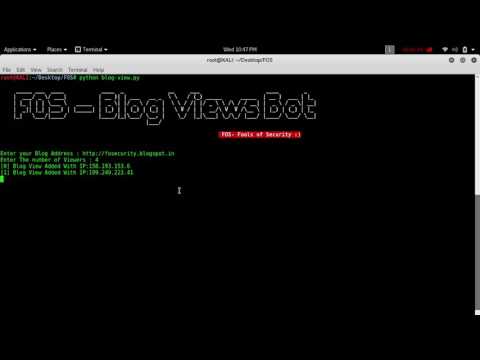](https://www.youtube.com/watch?v=1pjY3fgN2og)
36 |
37 | ## :octocat:Credits:
38 | * Umar Farook: [Security Engineer | Researcher](https://www.linkedin.com/in/umar-farook-a45603101)
39 | * FOS Team : [Fools of Security](https://www.youtube.com/channel/UCEBHO0kD1WFvIhf9wBCU-VQ)
40 |
41 | ## Support !
42 | Email address: umarfarookmech712@gmail.com for more details.
43 | Youtube:[FOS](https://www.youtube.com/channel/UCEBHO0kD1WFvIhf9wBCU-VQ)
44 | Blog:[FOS](https://fosecurity.blogspot.com)
45 |
46 |
47 | ## Disclaimer:
48 | For Educational purpose only, We DO NOT take responsibility of any harm caused by this method to any one or any organization.
49 |
50 |
51 |
--------------------------------------------------------------------------------