├── implemented
└── .gitkeep
├── README.md
├── accepted
├── 0000-modern-mode.md
├── 0000-umi-block-v2.md
├── 0000-unify-error-handling.md
└── 0000-umi-plugin-single-spa.md
└── 0000-template.md
/implemented/.gitkeep:
--------------------------------------------------------------------------------
1 |
--------------------------------------------------------------------------------
/README.md:
--------------------------------------------------------------------------------
1 | # Umi RFCs
2 |
3 |
--------------------------------------------------------------------------------
/accepted/0000-modern-mode.md:
--------------------------------------------------------------------------------
1 | - Start Date: 2019-05-16
2 | - RFC PR: (leave this empty)
3 | - Umi Issue: (leave this empty)
4 |
5 | # Summary
6 |
7 | Umi Offers a "Modern Mode" to help someone to bundle a modern bundle targeting modern browsers that support ES modules.
8 |
9 | # Motivation
10 |
11 | With Babel we are able to leverage all the newest language features in ES2015+, but that also means we have to ship transpiled and polyfilled bundles in order to support older browsers. These transpiled bundles are often more verbose than the original native ES2015+ code, and also parse and run slower. Given that today a good majority of the modern browsers have decent support for native ES2015, it is a waste that we have to ship heavier and less efficient code to those browsers just because we have to support older ones.
12 |
13 | # Detailed design
14 |
15 | Umi will produce two versions of your app: one modern bundle targeting modern browsers that support ES modules, and one legacy bundle targeting older browsers that do not.
16 |
17 | # How We Teach This
18 |
19 | Introduce a new configuration: modern
20 |
21 | # Drawbacks
22 |
23 | none
24 |
25 | # Alternatives
26 |
27 | none
28 |
29 | # Unresolved questions
30 |
31 | Later version safari still load nomodule scirpts.
32 | Ref:
33 | https://gist.github.com/samthor/64b114e4a4f539915a95b91ffd340acc
34 | https://github.com/shaodahong/dahong/issues/18
--------------------------------------------------------------------------------
/0000-template.md:
--------------------------------------------------------------------------------
1 | - Start Date: (fill me in with today's date, YYYY-MM-DD)
2 | - RFC PR: (leave this empty)
3 | - Umi Issue: (leave this empty)
4 |
5 | # Summary
6 |
7 | One paragraph explanation of the feature.
8 |
9 | # Motivation
10 |
11 | Why are we doing this? What use cases does it support? What is the expected
12 | outcome?
13 |
14 | Please focus on explaining the motivation so that if this RFC is not accepted,
15 | the motivation could be used to develop alternative solutions. In other words,
16 | enumerate the constraints you are trying to solve without coupling them too
17 | closely to the solution you have in mind.
18 |
19 | # Detailed design
20 |
21 | This is the bulk of the RFC. Explain the design in enough detail for somebody
22 | familiar with Umi to understand, and for somebody familiar with the
23 | implementation to implement. This should get into specifics and corner-cases,
24 | and include examples of how the feature is used. Any new terminology should be
25 | defined here.
26 |
27 | # How We Teach This
28 |
29 | What names and terminology work best for these concepts and why? How is this
30 | idea best presented? As a continuation of existing npm patterns, existing Umi
31 | patterns, or as a wholly new one?
32 |
33 | Would the acceptance of this proposal mean the Umi documentation must be
34 | re-organized or altered? Does it change how Umi is taught to new users
35 | at any level?
36 |
37 | How should this feature be introduced and taught to existing Umi users?
38 |
39 | # Drawbacks
40 |
41 | Why should we *not* do this? Please consider the impact on teaching people to
42 | use Umi, on the integration of this feature with other existing and planned
43 | features, on the impact of churn on existing users.
44 |
45 | There are tradeoffs to choosing any path, please attempt to identify them here.
46 |
47 | # Alternatives
48 |
49 | What other designs have been considered? What is the impact of not doing this?
50 |
51 | # Unresolved questions
52 |
53 | Optional, but suggested for first drafts. What parts of the design are still
54 | TBD?
55 |
--------------------------------------------------------------------------------
/accepted/0000-umi-block-v2.md:
--------------------------------------------------------------------------------
1 | - Start Date: (2019-05-11)
2 | - RFC PR: (leave this empty)
3 | - Umi Issue: (leave this empty)
4 |
5 | # Summary
6 |
7 | 区块 2.0 版本,支持重复添加区块和区块合集(典型页面模板)。
8 |
9 | # Motivation
10 |
11 | 当前 umi 的区块(block)就是一个页面的代码片段,不支持我们把更细粒度 UI 片段提取为区块,使得可以基于 umi 研发更细粒度的区块,这样就能够通过添加多个区块来更灵活的来初始化页面了。
12 |
13 | 除了可以重复添加区块,还要提供能够把多个区块做为一个合集来快速添加,这样又能够把分散的区块整合到一起使得能够通过它们快速的初始化一个页面。
14 |
15 | # Detailed design
16 |
17 | ### 重复添加区块
18 |
19 | 区块的代码结构不变,和现有的区块保持一致(@ 目录不再推荐使用了,局部区块的方案也不再支持它):
20 |
21 | ```
22 | - src // 通常我们推荐一个区块只包含 index.js 和 style.less 不再有 model 相关内容
23 | - index.js
24 | - style.less
25 | - package.json
26 | ```
27 |
28 | 添加区块的命令行也保持不变,比如 `tnpx bigfish block add [blockpath]`(未来会支持通过 umi ui 来快速添加)。
29 |
30 | 但是具体将代码添加到项目的时候策略会修改,具体步骤如下:
31 |
32 | #### 检测目标路径是否已经有组件存在
33 |
34 | 比如说 --path=/NewPage 时检测 `page/NewPage/index.(jsx?|tsx)` 是否存在。
35 |
36 | #### 如果不存在则添加一个新的容器组件
37 |
38 | 如果不存在则添加 `page/NewPage/index.(js|tsx)`,通过判断是否有 tsconfig.json 来决定创建 tsx 还是 js。
39 |
40 | 该组件作为新的页面组件,并在路由中添加新的路由,逻辑和当前的区块添加逻辑保持一致。组件的内容如下:
41 |
42 | ```jsx
43 | import React, { Component } from '@alipay/bigfish/react';
44 |
45 | class NewPage extends Component {
46 | render() {
47 | return (
48 |
49 |
50 | )
51 | }
52 | }
53 | ```
54 |
55 | #### 下载区块到目标目录的子目录下
56 |
57 | ```
58 | - page
59 | - NewPage
60 | - index.js
61 | - BlockName // 把区块代码下载到该目录,如果有已经有重名的则提示用户输入新的名称
62 | - index.js
63 | - style.less
64 | ```
65 |
66 | #### 往容器组件中添加区块
67 |
68 |
69 | ```diff
70 | import React, { Component } from '@alipay/bigfish/react';
71 | + import BlockName from './BlockName';
72 |
73 | class NewPage extends Component {
74 | render() {
75 | return (
76 |
77 | +
78 |
79 | )
80 | }
81 | }
82 | ```
83 |
84 | ### 区块合集
85 |
86 | 区块合集和一个区块一样也是一个包含 package.json 的地址,只不过它没有代码内容,只有配置。
87 |
88 | ```json
89 | // package.json
90 | {
91 | "blockConfig": {
92 | "blockGroup": {
93 | "layout": {
94 | "type": "antd-grid", // 默认是内置的顺序添加的 layout
95 | "config": [
96 | [{
97 | "span": 24,
98 | "block": "BlockA",
99 | }],
100 | [{
101 | "span": 12,
102 | "block": "BlockB",
103 | },{
104 | "span": 12,
105 | "block": "BlockB",
106 | }]
107 | ],
108 | },
109 | "blocks": {
110 | "BlockA": "http://a.block.url",
111 | "BlockB": "http://b.block.url",
112 | },
113 | }
114 | }
115 | }
116 | ```
117 |
118 | 其中的 layout type 对应 `umi-block-layout-antd-grid` 的一个 npm 包,这个包需要暴露一个方法接收配置,返回对应的页面的 JS。比如 umi 可以内置一个 layout:
119 |
120 | ```js
121 | export default (config) => {
122 | return `${config.map(blockName => `<${blockName} />`)}`;
123 | }
124 | ```
125 |
126 | ### 兼容性
127 |
128 | 对于已有的区块,可以添加如下配置来保留之前整个区块直接添加到目标文件夹的方式:
129 |
130 | ```
131 | "blockConfig": {
132 | "specVersion": "0.1"
133 | }
134 | ```
135 |
136 | 也支持通过参数 `--direct=true` 来实现。
137 |
138 | # How We Teach This
139 |
140 | 暂无
141 |
142 | # Drawbacks
143 |
144 | 暂无
145 |
146 | # Alternatives
147 |
148 | 暂无
149 |
150 | # Unresolved questions
151 |
152 | 暂无
153 |
--------------------------------------------------------------------------------
/accepted/0000-unify-error-handling.md:
--------------------------------------------------------------------------------
1 | - Start Date: 2019-04-25
2 | - RFC PR: (leave this empty)
3 | - Umi Issue: (leave this empty)
4 |
5 | # Summary
6 |
7 | 统一做出错处理,覆盖编译时的 webpack、插件、配置、路由等场景,功能上包含整理 errorCode、处理多语言、出错时给适当的建议等等。
8 |
9 | # Motivation
10 |
11 | 没有统一的出错处理,导致的问题有:
12 |
13 | - 可能的遗漏
14 | - 错误风格不一致
15 | - 多语言实现复杂
16 | - 出错时不能给出很好的建议(尤其时由于三方依赖出错,目前用户端不能及时收到我们给出的修复建议,进而导致大量的咨询)
17 | - 等
18 |
19 | 为解决这些问题,所以要做出错的统一处理。
20 |
21 | 此外,统一整理 errorCode 还有利于做出错统计和多平台的信息共享。
22 |
23 | # Detailed design
24 |
25 | ## 如何抛错
26 |
27 | 通过 umi-utils 提供 UmiError 类,扩展 Error,允许传入 `code`、`data`、`message` 和 `tips` 配置项。
28 |
29 | 抛错的方式如下:
30 |
31 | ```js
32 | // 只给 code,message 和 tips 如果没有,会从 ERROR_MAP 里找
33 | throw new UmiError({
34 | code: 10001,
35 | });
36 |
37 | // message 如果是 template,可接收变量传入
38 | throw new UmiError({
39 | code: 10001,
40 | context: {
41 | configKey: 'chainWebpack',
42 | },
43 | });
44 |
45 | // 可自带 message
46 | throw new UmiError({
47 | code: 10001,
48 | message: 'Failed to minify the bundle.',
49 | });
50 |
51 | // 可自带 tips,格式为数组
52 | throw new UmiError({
53 | code: 10001,
54 | tips: ['Steps:', '1. Install deps', '2. Umi dev'],
55 | });
56 |
57 | // tips 也可以是字符串
58 | throw new UmiError({
59 | code: 10001,
60 | tips: 'UglifyJS 问题请参考文章解决 https://github.com/sorrycc/blog/issues/83',
61 | });
62 |
63 | // 传入额外的 tips
64 | throw new UmiError({
65 | code: 10001,
66 | extraTips: ['还可以尝试删除 node_modules 重装,说不定就好了。'],
67 | });
68 |
69 | // 只传 message,会通过从 ERROR_MAP 里过滤有 test() 检测函数的进行检测,猜出 errorCode
70 | throw new UmiError({
71 | message: 'Failed to minify the bundle.',
72 | });
73 |
74 | // 既没 code,又没 message 的直接抛 UmiError 错误
75 | throw new UmiError({
76 | tips: [],
77 | });
78 | ```
79 |
80 | umi 里可以直接引 `import { UmiError } from umi-utils` 使用,插件里通过 `api.UmiError` 露出。
81 |
82 | ## ERROR_MAP 表
83 |
84 | 通过单独的仓库 `umijs/umi-error-map` 维护,umi 里通过 `^` 前缀声明依赖,便于快速更新。
85 |
86 | 格式如下:
87 |
88 | ```js
89 | {
90 | (errorCode: string): {
91 | message?: string,
92 | test?: function,
93 | tips?: string[] | string,
94 | // Default context
95 | context?: object,
96 | }
97 | }
98 | ```
99 |
100 | 示例:
101 |
102 | ```json
103 | {
104 | 10001: {
105 | message: 'Config failed',
106 | },
107 | 10002: {
108 | message: 'Config item <%= item %> invalid',
109 | tips: [],
110 | },
111 | 10003: {
112 | test(error) {
113 | return e.message.includes('UglifyJS'),
114 | },
115 | tips: `UglifyJS 问题请参考文章解决 https://github.com/sorrycc/blog/issues/83`,
116 | },
117 | }
118 | ```
119 |
120 | ### 分类
121 |
122 | errorCode 为 5 位数,然后通过第一位数字分类,
123 |
124 | * `1` ,umi-core 错误
125 | * `2`,webpack 错误
126 | * `3-8`,预留
127 | * `9`,上层框架错误,比如 Bigfish 的抛错
128 |
129 | ### 扩展
130 |
131 | 允许上层框架扩展 ERROR_MAP,比如 Bigfish;不允许插件层扩展 ERROR_MAP,因为没有必要,插件里直接自己抛 tips、message 等就好了。
132 |
133 | 通过环境变量进行扩展,比如:
134 |
135 | ```bash
136 | process.env.EXTRA_ERROR_MAP = require.resolve('bigfish-error-map');
137 | ```
138 |
139 | ## 统一的错误输出形式
140 |
141 | 在 `umi-utils` 里提供 `printUmiError` 方法,统一处理错误输出,用 `console.error`,打在 stderr 上。
142 |
143 | ```js
144 | Error: Failed to minify the bundle. Error: 0.0f3f4c41.async.js from UglifyJs
145 | Error Code: 10001
146 | Tips:
147 | UglifyJS 问题请参考文章解决 https://github.com/sorrycc/blog/issues/83
148 | Stack:
149 | at foo (/private/tmp/sorrycc-SIqNNX/a.js:19:9)
150 | at Object. (/private/tmp/sorrycc-SIqNNX/a.js:35:3)
151 | at Module._compile (internal/modules/cjs/loader.js:688:30)
152 | at Object.Module._extensions..js (internal/modules/cjs/loader.js:699:10)
153 | at Module.load (internal/modules/cjs/loader.js:598:32)
154 | at tryModuleLoad (internal/modules/cjs/loader.js:537:12)
155 | at Function.Module._load (internal/modules/cjs/loader.js:529:3)
156 | at Function.Module.runMain (internal/modules/cjs/loader.js:741:12)
157 | at startup (internal/bootstrap/node.js:285:19)
158 | at bootstrapNodeJSCore (internal/bootstrap/node.js:739:3)
159 | ```
160 |
161 | 上色版,
162 |
163 | 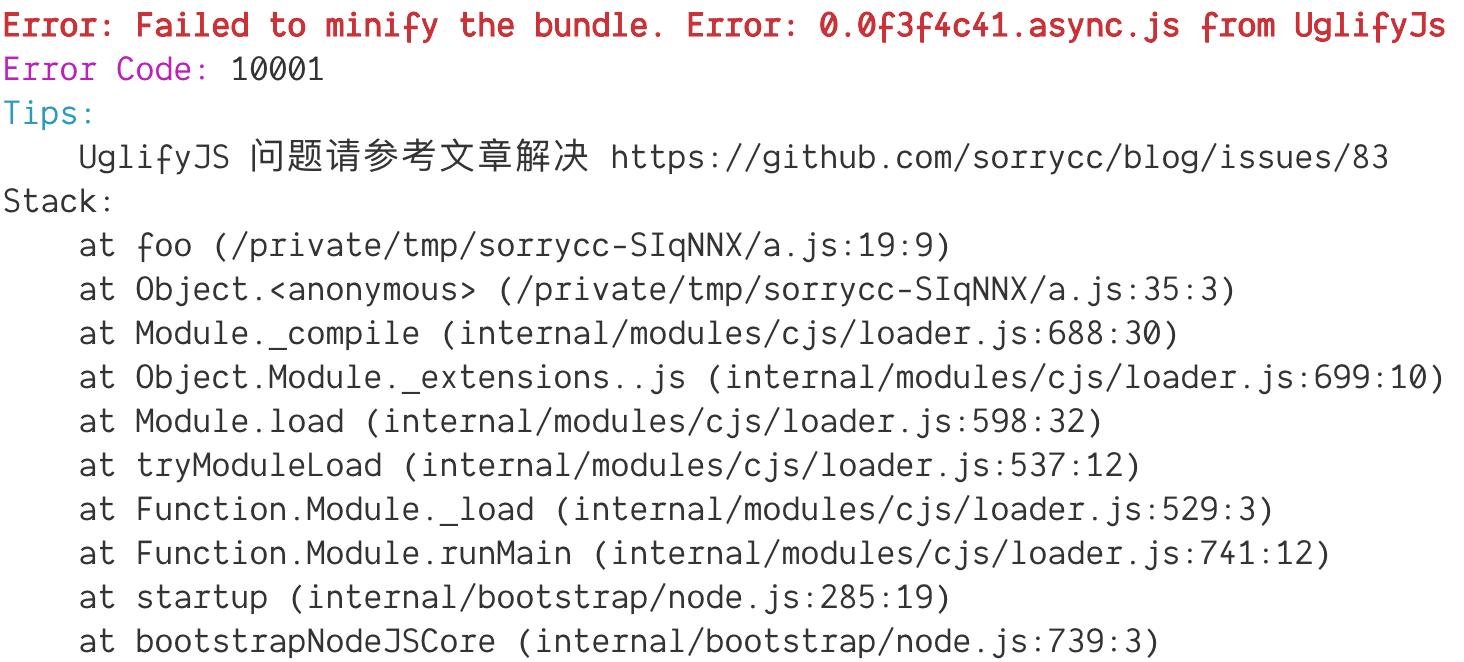
164 |
165 | 示例代码:
166 |
167 | ```js
168 | const chalk = require('chalk');
169 |
170 | const ERROR_MAP = {
171 | '10001': {
172 | tip: 'UglifyJS 问题请参考文章解决 https://github.com/sorrycc/blog/issues/83',
173 | },
174 | }
175 |
176 | class UmiError extends Error {
177 | constructor(opts, ...params) {
178 | const { message, tip, code } = opts;
179 | super(message, ...params);
180 | this.code = code;
181 | this.tip = tip;
182 | }
183 | }
184 |
185 | function foo() {
186 | throw new UmiError({
187 | code: 10001,
188 | message: 'Failed to minify the bundle. Error: 0.0f3f4c41.async.js from UglifyJs',
189 | });
190 | }
191 |
192 | function printError(e) {
193 | const { tip } = ERROR_MAP[e.code];
194 | console.error(chalk.red.bold(`Error: ${e.message}`));
195 | console.error(`${chalk.magenta('Error Code: ')}${e.code}`);
196 | console.error(`${chalk.cyan('Tips: ')}\n ${tip}`);
197 | console.error(`Stack:`);
198 | console.error(e.stack.split('\n').slice(1).join('\n'));
199 | }
200 |
201 | try {
202 | foo();
203 | } catch(e) {
204 | printError(e);
205 | }
206 | ```
207 |
208 |
209 |
210 | # How We Teach This
211 |
212 | 不需要。
213 |
214 | # Drawbacks
215 |
216 | 没有。
217 |
218 | # Alternatives
219 |
220 | 无。
221 |
222 | # Unresolved questions
223 |
224 | * 多语言
225 |
226 | # Ref
227 |
228 | * https://github.com/umijs/umi/issues/1813
229 |
--------------------------------------------------------------------------------
/accepted/0000-umi-plugin-single-spa.md:
--------------------------------------------------------------------------------
1 | - Start Date: 2019-05-10
2 | - RFC PR: (leave this empty)
3 | - Umi Issue: (leave this empty)
4 |
5 | # Summary
6 |
7 | 基于 umi 的微前端方案。
8 |
9 | # Motivation
10 |
11 | 微前端是有适用场景的。
12 |
13 | 一种场景是比如这篇 [DDD: Strategic Design: Core, Supporting, and Generic Subdomains](https://blog.jonathanoliver.com/ddd-strategic-design-core-supporting-and-generic-subdomains/) 的划分方式,把业务域划分成 Core、Supporting 和 Generic,出于人力和成本的考虑,除了 Core 的业务域都可能交给外包或者通过购买的方式实现,技术栈难免不一致,而这些业务域在挂载进来之后又不能影响到 Core 业务域。
14 |
15 | 一种场景是跨团队维护,比如一个系统分多个子系统,每个子系统由不同的团队维护,可能跨部门团队、外包,甚至 ISV,技术栈上可以要求一致,但发布节奏会不同,并且跨团队的沟通成本高,所以技术自治是比较好的方式,每个子应用保留自己的测试、CI、构建、部署等流程。
16 |
17 | 一种场景是比如一个系统在构建时只管开发子功能,但不清楚要多少功能,需要多少只有在最终运行时才知道,或者用户可能选择一部分功能形成一个新系统,但是加载时又不能把用户不需要的功能文件加载进去。每个子功能是一个文件,格式可以是 umd 或 amd,然后按需加载子功能的文件实现。这一类,可以归为运行时的插件系统。
18 |
19 | 那么,为啥 SPA 不行?
20 |
21 | SPA 的特点是一个代码仓库,一次构建,一次下载(可以按需),对于上述需要外包、隔离、跨团队沟通协作、跨技术栈的场景,SPA 会让事情变得复杂,并且提升成本。
22 |
23 | 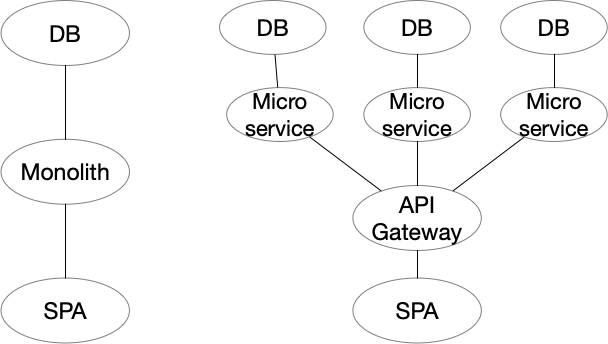
24 |
25 | 另外,像上图一样,当后端根据业务域扩张时,SPA 无法灵活地扩张,仍然是一个仓库、一次构建,。。。。
26 |
27 | # Detailed design
28 |
29 | 首先是基于 umi,分主应用和子应用,主应用也基于 umi,分别挂载不同的 umi 插件实现打包。
30 |
31 | [GitHub - umijs/umi-plugin-single-spa: Umi plugin for single-spa.](https://github.com/umijs/umi-plugin-single-spa)
32 |
33 | ## 使用
34 |
35 | 主应用配 `umi-plugin-single-spa/master` 插件,
36 |
37 | ```js
38 | export default {
39 | plugins: [
40 | ['umi-plugin-single-spa/master', {
41 | // 注册子应用信息
42 | apps: [
43 | {
44 | name: 'app1',
45 | // 支持 config entry
46 | entry: {
47 | scripts: [],
48 | styles: [],
49 | },
50 | },
51 | {
52 | name: 'app2',
53 | // 支持 html entry
54 | entry: {
55 | html: '/path/to/app/index.html',
56 | },
57 | },
58 | ],
59 | }],
60 | ],
61 | }
62 | ```
63 |
64 | 子应用配 `umi-plugin-single-spa/slave` 插件,
65 |
66 | ```js
67 | export default {
68 | plugins: [
69 | ['umi-plugin-single-spa/slave', {
70 | }],
71 | ],
72 | }
73 | ```
74 |
75 | ## 关键技术点
76 |
77 | 然后,还有一些关键的技术点,我画了张图,
78 |
79 | 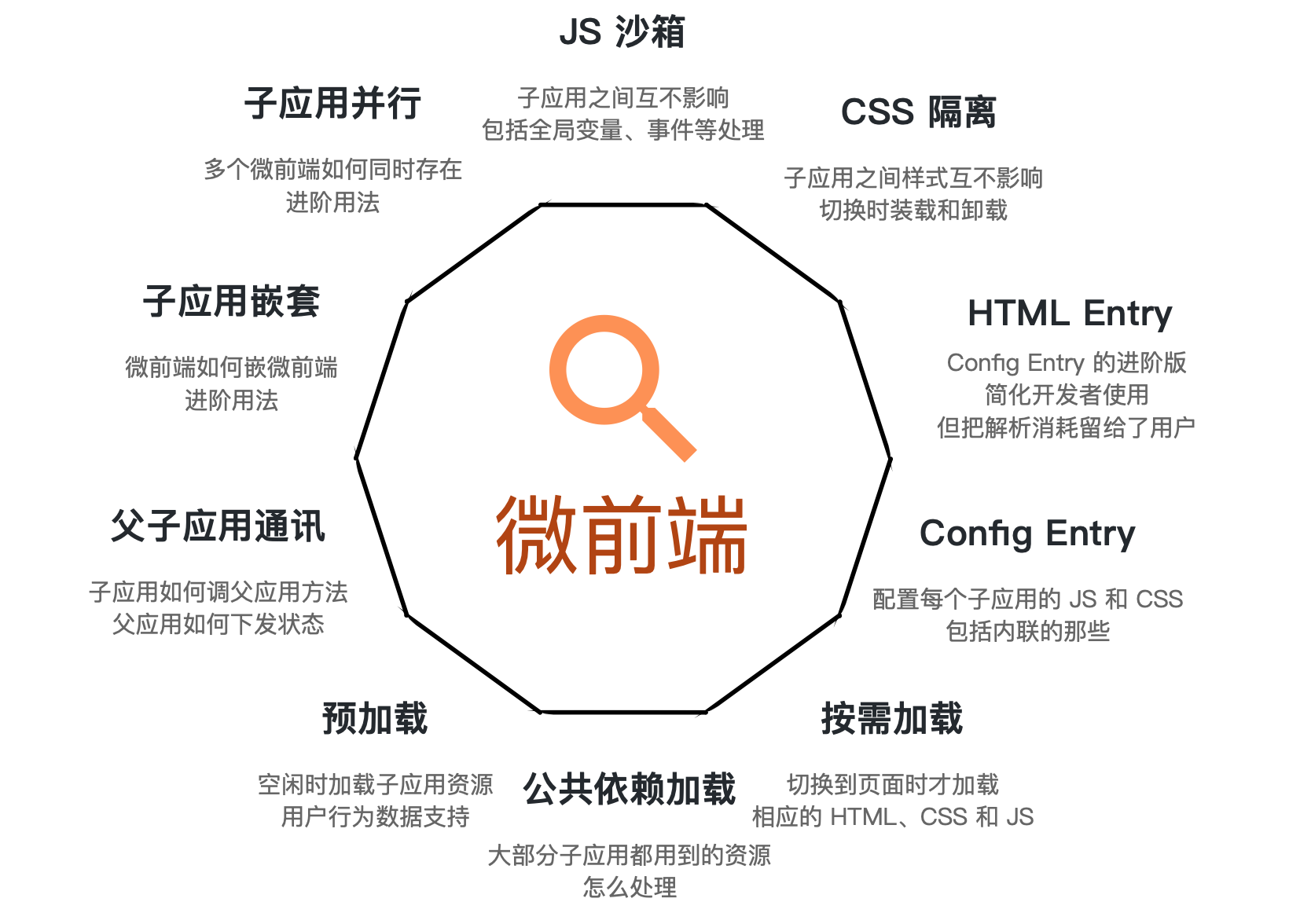 80 |
81 | 实现掉前三个,基于 single-spa 就可以跑起来了,其他是增量可选功能。
82 |
83 | ### Config Entry
84 |
85 | 以配置的方式注册子应用信息,通过 `apps` 配置项露出,包括 name、routerPrefix、scripts 和 styles,scripts 和 styles 同时支持外链和内联。
86 |
87 | Config Entry 是相对于 HTML Entry 而言的,HTML Entry 的方式是在运行时解析 HTML 拿到 Config 信息,而 Config Entry 则是在编译时拿到,少了运行时解析的一步,但会损失一些开发者的便利性。
88 |
89 | 比如:
90 |
91 | ```js
92 | {
93 | apps: [
94 | {
95 | name: 'app1',
96 | routerPrefix: '/app1',
97 | entry: {
98 | scripts: [
99 | // 外链
100 | {
101 | src: '/path/to/a.js',
102 | isEntry: true,
103 | },
104 | // 外链的简写
105 | '/path/to/a.js',
106 | // 内联
107 | {
108 | content: 'alert(\'app1\');',
109 | },
110 | ],
111 | styles: [
112 | // 外链
113 | {
114 | href: '/path/to/a.css',
115 | },
116 | // 外链的简写
117 | '/path/to/a.css',
118 | // 内联
119 | {
120 | content: 'body { color: red; }',
121 | },
122 | ],
123 | },
124 | },
125 | ]
126 | }
127 | ```
128 |
129 | 以下是子 app 配置项,
130 |
131 | #### name
132 |
133 | 唯一 key,不允许重复。
134 |
135 | #### routerPrefix
136 |
137 | 路由匹配时激活该子应用。
138 |
139 | #### entry
140 |
141 | #### entry.scripts
142 |
143 | script 的属性有:
144 |
145 | - src
146 | - content
147 | - isEntry,是否为入口
148 |
149 | 没有显式的 isEntry 标记,则最后一个 script 为 entry。
150 |
151 | #### entry.styles
152 |
153 | ### 按需加载
154 |
155 | 根据 Config Entry 的配置,在激活页面时加载相应的 JS 和 CSS。(如果支持 HTML Entry,需先加载 HTML 解析拿到 Config Entry)
156 |
157 | 实现上先基于 [import-html-entry](https://github.com/kuitos/import-html-entry) 的方案来做,fetch 拿到内容,`eval` 执行。(后续看看还有没有更好的方案,比如 systemjs + amd 的方式)
158 |
159 | 基本流程:
160 |
161 | 1. 获取外链的 JS 和 CSS 内容,把 `{ src }` 或 `{ href }` 转化为 `{ content }`
162 | 2. 执行 JS 和挂载 CSS
163 |
164 | 获取外链内容需要做缓存,可能多个子应用外链了同一个 url 的文件。(进而还可以做本地持久化,因为 cdn 上的文件是不可覆盖的,不存在更新问题)
165 |
166 | 由于 JS 执行需要拿到 entry 文件 export 的生命周期方法,所以需要特殊处理。事先记录 window 对象属性,事后比对 window 对象属性,最后新增的 window 对象属性即 entry 文件 export 的内容。
167 |
168 | 挂载 CSS 比较简单,在 `` 标签里新增 `
80 |
81 | 实现掉前三个,基于 single-spa 就可以跑起来了,其他是增量可选功能。
82 |
83 | ### Config Entry
84 |
85 | 以配置的方式注册子应用信息,通过 `apps` 配置项露出,包括 name、routerPrefix、scripts 和 styles,scripts 和 styles 同时支持外链和内联。
86 |
87 | Config Entry 是相对于 HTML Entry 而言的,HTML Entry 的方式是在运行时解析 HTML 拿到 Config 信息,而 Config Entry 则是在编译时拿到,少了运行时解析的一步,但会损失一些开发者的便利性。
88 |
89 | 比如:
90 |
91 | ```js
92 | {
93 | apps: [
94 | {
95 | name: 'app1',
96 | routerPrefix: '/app1',
97 | entry: {
98 | scripts: [
99 | // 外链
100 | {
101 | src: '/path/to/a.js',
102 | isEntry: true,
103 | },
104 | // 外链的简写
105 | '/path/to/a.js',
106 | // 内联
107 | {
108 | content: 'alert(\'app1\');',
109 | },
110 | ],
111 | styles: [
112 | // 外链
113 | {
114 | href: '/path/to/a.css',
115 | },
116 | // 外链的简写
117 | '/path/to/a.css',
118 | // 内联
119 | {
120 | content: 'body { color: red; }',
121 | },
122 | ],
123 | },
124 | },
125 | ]
126 | }
127 | ```
128 |
129 | 以下是子 app 配置项,
130 |
131 | #### name
132 |
133 | 唯一 key,不允许重复。
134 |
135 | #### routerPrefix
136 |
137 | 路由匹配时激活该子应用。
138 |
139 | #### entry
140 |
141 | #### entry.scripts
142 |
143 | script 的属性有:
144 |
145 | - src
146 | - content
147 | - isEntry,是否为入口
148 |
149 | 没有显式的 isEntry 标记,则最后一个 script 为 entry。
150 |
151 | #### entry.styles
152 |
153 | ### 按需加载
154 |
155 | 根据 Config Entry 的配置,在激活页面时加载相应的 JS 和 CSS。(如果支持 HTML Entry,需先加载 HTML 解析拿到 Config Entry)
156 |
157 | 实现上先基于 [import-html-entry](https://github.com/kuitos/import-html-entry) 的方案来做,fetch 拿到内容,`eval` 执行。(后续看看还有没有更好的方案,比如 systemjs + amd 的方式)
158 |
159 | 基本流程:
160 |
161 | 1. 获取外链的 JS 和 CSS 内容,把 `{ src }` 或 `{ href }` 转化为 `{ content }`
162 | 2. 执行 JS 和挂载 CSS
163 |
164 | 获取外链内容需要做缓存,可能多个子应用外链了同一个 url 的文件。(进而还可以做本地持久化,因为 cdn 上的文件是不可覆盖的,不存在更新问题)
165 |
166 | 由于 JS 执行需要拿到 entry 文件 export 的生命周期方法,所以需要特殊处理。事先记录 window 对象属性,事后比对 window 对象属性,最后新增的 window 对象属性即 entry 文件 export 的内容。
167 |
168 | 挂载 CSS 比较简单,在 `` 标签里新增 `