├── .gitignore
├── resources
├── select.png
└── codelf_logo.png
├── .vscode
├── settings.json
├── extensions.json
└── launch.json
├── .vscodeignore
├── jsconfig.json
├── CHANGELOG.md
├── .eslintrc.json
├── test
├── extension.test.js
└── index.js
├── package.json
├── extension.js
├── vsc-extension-quickstart.md
└── README.md
/.gitignore:
--------------------------------------------------------------------------------
1 | node_modules
2 | .idea
3 | npm-debug.log.*
--------------------------------------------------------------------------------
/resources/select.png:
--------------------------------------------------------------------------------
https://raw.githubusercontent.com/unbug/vscode-codelf/HEAD/resources/select.png
--------------------------------------------------------------------------------
/.vscode/settings.json:
--------------------------------------------------------------------------------
1 | // Place your settings in this file to overwrite default and user settings.
2 | {
3 | }
--------------------------------------------------------------------------------
/resources/codelf_logo.png:
--------------------------------------------------------------------------------
https://raw.githubusercontent.com/unbug/vscode-codelf/HEAD/resources/codelf_logo.png
--------------------------------------------------------------------------------
/.vscodeignore:
--------------------------------------------------------------------------------
1 | .vscode/**
2 | .vscode-test/**
3 | test/**
4 | .gitignore
5 | jsconfig.json
6 | vsc-extension-quickstart.md
7 | .eslintrc.json
8 |
--------------------------------------------------------------------------------
/.vscode/extensions.json:
--------------------------------------------------------------------------------
1 | {
2 | // See https://go.microsoft.com/fwlink/?LinkId=733558
3 | // for the documentation about the extensions.json format
4 | "recommendations": [
5 | "dbaeumer.vscode-eslint"
6 | ]
7 | }
--------------------------------------------------------------------------------
/jsconfig.json:
--------------------------------------------------------------------------------
1 | {
2 | "compilerOptions": {
3 | "module": "commonjs",
4 | "target": "es6",
5 | "lib": [
6 | "es6"
7 | ]
8 | },
9 | "exclude": [
10 | "node_modules"
11 | ]
12 | }
--------------------------------------------------------------------------------
/CHANGELOG.md:
--------------------------------------------------------------------------------
1 | # Change Log
2 | All notable changes to the "vscode-codelf" extension will be documented in this file.
3 |
4 | Check [Keep a Changelog](http://keepachangelog.com/) for recommendations on how to structure this file.
5 |
6 | ## [Unreleased]
7 | - Initial release
--------------------------------------------------------------------------------
/.eslintrc.json:
--------------------------------------------------------------------------------
1 | {
2 | "env": {
3 | "browser": false,
4 | "commonjs": true,
5 | "es6": true,
6 | "node": true
7 | },
8 | "parserOptions": {
9 | "ecmaFeatures": {
10 | "jsx": true
11 | },
12 | "sourceType": "module"
13 | },
14 | "rules": {
15 | "no-const-assign": "warn",
16 | "no-this-before-super": "warn",
17 | "no-undef": "warn",
18 | "no-unreachable": "warn",
19 | "no-unused-vars": "warn",
20 | "constructor-super": "warn",
21 | "valid-typeof": "warn"
22 | }
23 | }
--------------------------------------------------------------------------------
/.vscode/launch.json:
--------------------------------------------------------------------------------
1 | // A launch configuration that launches the extension inside a new window
2 | {
3 | "version": "0.1.0",
4 | "configurations": [
5 | {
6 | "name": "Launch Extension",
7 | "type": "extensionHost",
8 | "request": "launch",
9 | "runtimeExecutable": "${execPath}",
10 | "args": ["--extensionDevelopmentPath=${workspaceRoot}" ],
11 | "stopOnEntry": false
12 | },
13 | {
14 | "name": "Launch Tests",
15 | "type": "extensionHost",
16 | "request": "launch",
17 | "runtimeExecutable": "${execPath}",
18 | "args": ["--extensionDevelopmentPath=${workspaceRoot}", "--extensionTestsPath=${workspaceRoot}/test" ],
19 | "stopOnEntry": false
20 | }
21 | ]
22 | }
--------------------------------------------------------------------------------
/test/extension.test.js:
--------------------------------------------------------------------------------
1 | /* global suite, test */
2 |
3 | //
4 | // Note: This example test is leveraging the Mocha test framework.
5 | // Please refer to their documentation on https://mochajs.org/ for help.
6 | //
7 |
8 | // The module 'assert' provides assertion methods from node
9 | var assert = require('assert');
10 |
11 | // You can import and use all API from the 'vscode' module
12 | // as well as import your extension to test it
13 | var vscode = require('vscode');
14 | var myExtension = require('../extension');
15 |
16 | // Defines a Mocha test suite to group tests of similar kind together
17 | suite("Extension Tests", function() {
18 |
19 | // Defines a Mocha unit test
20 | test("Something 1", function() {
21 | assert.equal(-1, [1, 2, 3].indexOf(5));
22 | assert.equal(-1, [1, 2, 3].indexOf(0));
23 | });
24 | });
--------------------------------------------------------------------------------
/test/index.js:
--------------------------------------------------------------------------------
1 | //
2 | // PLEASE DO NOT MODIFY / DELETE UNLESS YOU KNOW WHAT YOU ARE DOING
3 | //
4 | // This file is providing the test runner to use when running extension tests.
5 | // By default the test runner in use is Mocha based.
6 | //
7 | // You can provide your own test runner if you want to override it by exporting
8 | // a function run(testRoot: string, clb: (error:Error) => void) that the extension
9 | // host can call to run the tests. The test runner is expected to use console.log
10 | // to report the results back to the caller. When the tests are finished, return
11 | // a possible error to the callback or null if none.
12 |
13 | var testRunner = require('vscode/lib/testrunner');
14 |
15 | // You can directly control Mocha options by uncommenting the following lines
16 | // See https://github.com/mochajs/mocha/wiki/Using-mocha-programmatically#set-options for more info
17 | testRunner.configure({
18 | ui: 'tdd', // the TDD UI is being used in extension.test.js (suite, test, etc.)
19 | useColors: true // colored output from test results
20 | });
21 |
22 | module.exports = testRunner;
--------------------------------------------------------------------------------
/package.json:
--------------------------------------------------------------------------------
1 | {
2 | "name": "codelf",
3 | "displayName": "Codelf",
4 | "description": "Best GitHub stars, repositories tagger and organizer. Search Github, GitLab to find real-world usage variable names.",
5 | "version": "10.2.0",
6 | "publisher": "unbug",
7 | "engines": {
8 | "vscode": "^1.12.0"
9 | },
10 | "categories": [
11 | "Other"
12 | ],
13 | "activationEvents": [
14 | "onCommand:extension.codelf"
15 | ],
16 | "main": "./extension",
17 | "author": {
18 | "name": "unbug",
19 | "url": "https://github.com/unbug"
20 | },
21 | "icon": "resources/codelf_logo.png",
22 | "homepage": "http://unbug.github.io/codelf/",
23 | "repository": {
24 | "type": "git",
25 | "url": "https://github.com/unbug/vscode-codelf.git"
26 | },
27 | "bugs": {
28 | "url": "https://github.com/unbug/vscode-codelf/issues"
29 | },
30 | "contributes": {
31 | "menus": {
32 | "editor/context": [
33 | {
34 | "when": "editorHasSelection",
35 | "command": "extension.codelf",
36 | "group": "navigation"
37 | }
38 | ]
39 | },
40 | "commands": [
41 | {
42 | "command": "extension.codelf",
43 | "title": "Codelf"
44 | }
45 | ]
46 | },
47 | "scripts": {
48 | "postinstall": "node ./node_modules/vscode/bin/install",
49 | "test": "node ./node_modules/vscode/bin/test"
50 | },
51 | "devDependencies": {
52 | "typescript": "^2.0.3",
53 | "vscode": "^1.0.0",
54 | "mocha": "^2.3.3",
55 | "eslint": "^3.6.0",
56 | "@types/node": "^6.0.40",
57 | "@types/mocha": "^2.2.32"
58 | }
59 | }
60 |
--------------------------------------------------------------------------------
/extension.js:
--------------------------------------------------------------------------------
1 | // The module 'vscode' contains the VS Code extensibility API
2 | // Import the module and reference it with the alias vscode in your code below
3 | var vscode = require('vscode');
4 |
5 | // Launches the search URL in default browser
6 | function openBrowser() {
7 | var selectedText = getSelectedText();
8 | if (!selectedText)
9 | return;
10 | vscode.commands.executeCommand('vscode.open',
11 | vscode.Uri.parse(`https://unbug.github.io/codelf/#${encodeURI(selectedText)}`));
12 | }
13 |
14 | function getSelectedText() {
15 | const documentText = vscode.window.activeTextEditor.document.getText();
16 | if (!documentText)
17 | return '';
18 |
19 | var activeSelection = vscode.window.activeTextEditor.selection;
20 | if (activeSelection.isEmpty)
21 | return '';
22 |
23 | const selStartOffset = vscode.window.activeTextEditor.document.offsetAt(activeSelection.start);
24 | const selEndOffset = vscode.window.activeTextEditor.document.offsetAt(activeSelection.end);
25 |
26 | var selectedText = documentText.slice(selStartOffset, selEndOffset).trim();
27 | selectedText = selectedText.replace(/\s\s+/g, ' ');
28 | return selectedText;
29 | }
30 |
31 | // this method is called when your extension is activated
32 | // your extension is activated the very first time the command is executed
33 | function activate(context) {
34 | // The command has been defined in the package.json file
35 | // Now provide the implementation of the command with registerCommand
36 | // The commandId parameter must match the command field in package.json
37 | var disposable = vscode.commands.registerCommand('extension.codelf', openBrowser);
38 |
39 | context.subscriptions.push(disposable);
40 | }
41 | exports.activate = activate;
42 |
43 | // this method is called when your extension is deactivated
44 | function deactivate() {
45 | }
46 | exports.deactivate = deactivate;
--------------------------------------------------------------------------------
/vsc-extension-quickstart.md:
--------------------------------------------------------------------------------
1 | # Welcome to your first VS Code Extension
2 |
3 | ## What's in the folder
4 | * This folder contains all of the files necessary for your extension
5 | * `package.json` - this is the manifest file in which you declare your extension and command.
6 | The sample plugin registers a command and defines its title and command name. With this information
7 | VS Code can show the command in the command palette. It doesn’t yet need to load the plugin.
8 | * `extension.js` - this is the main file where you will provide the implementation of your command.
9 | The file exports one function, `activate`, which is called the very first time your extension is
10 | activated (in this case by executing the command). Inside the `activate` function we call `registerCommand`.
11 | We pass the function containing the implementation of the command as the second parameter to
12 | `registerCommand`.
13 |
14 | ## Get up and running straight away
15 | * press `F5` to open a new window with your extension loaded
16 | * run your command from the command palette by pressing (`Ctrl+Shift+P` or `Cmd+Shift+P` on Mac) and typing `Hello World`
17 | * set breakpoints in your code inside extension.ts to debug your extension
18 | * find output from your extension in the debug console
19 |
20 | ## Make changes
21 | * you can relaunch the extension from the debug toolbar after changing code in `extension.js`
22 | * you can also reload (`Ctrl+R` or `Cmd+R` on Mac) the VS Code window with your extension to load your changes
23 |
24 | ## Explore the API
25 | * you can open the full set of our API when you open the file `node_modules/vscode/vscode.d.ts`
26 |
27 | ## Run tests
28 | * open the debug viewlet (`Ctrl+Shift+D` or `Cmd+Shift+D` on Mac) and from the launch configuration dropdown pick `Launch Tests`
29 | * press `F5` to run the tests in a new window with your extension loaded
30 | * see the output of the test result in the debug console
31 | * make changes to `test/extension.test.js` or create new test files inside the `test` folder
32 | * by convention, the test runner will only consider files matching the name pattern `**.test.js`
33 | * you can create folders inside the `test` folder to structure your tests any way you want
--------------------------------------------------------------------------------
/README.md:
--------------------------------------------------------------------------------
1 |  2 |
3 | Codelf(变量命名神器)
4 | =================
5 | Search over projects from Github, Bitbucket, Google Code, Codeplex, Sourceforge, Fedora Project, GitLab to find real-world usage variable names.
6 |
7 | Also a daily Algorithm Copybook.
8 |
9 | Also a GitHub stars, repositories tagger and organizer tool.
10 |
11 | >There are only two hard things in Computer Science: cache invalidation and naming things.-- Phil Karlton
12 | >
13 | >
14 |
15 | 
16 |
17 | Usage
18 | ===============
19 | 1. Select text, right-click and select "Codelf".
20 |
21 |
2 |
3 | Codelf(变量命名神器)
4 | =================
5 | Search over projects from Github, Bitbucket, Google Code, Codeplex, Sourceforge, Fedora Project, GitLab to find real-world usage variable names.
6 |
7 | Also a daily Algorithm Copybook.
8 |
9 | Also a GitHub stars, repositories tagger and organizer tool.
10 |
11 | >There are only two hard things in Computer Science: cache invalidation and naming things.-- Phil Karlton
12 | >
13 | >
14 |
15 | 
16 |
17 | Usage
18 | ===============
19 | 1. Select text, right-click and select "Codelf".
20 |
21 |  22 |
23 | Apps && Plugins
24 | =================
25 | * [Codelf for Atom](https://atom.io/packages/codelf)
26 | * [Codelf Chrome App](https://chrome.google.com/webstore/detail/codelf-best-github-stars/jnmjaglhmmcplekpfnblniiammmdpaan)
27 | * [Codelf for Sublime Text](https://github.com/unbug/codelf)
28 |
29 |
30 | Find me
31 | =================
32 | * Twitter [@unbug](https://twitter.com/unbug)
33 | * 微博 [@听奏](http://weibo.com/unbug)
34 |
35 | Videos
36 | ===============
37 | [](https://youtu.be/Uqg8HWaa-2c)
38 |
39 | Screenshots
40 | ================
41 |
42 | Screenshots
43 | ================
44 |
45 | ### Search variable
46 | 
47 |
48 | 
49 |
50 | ### Daily Algorithm Copybook
51 |
52 | 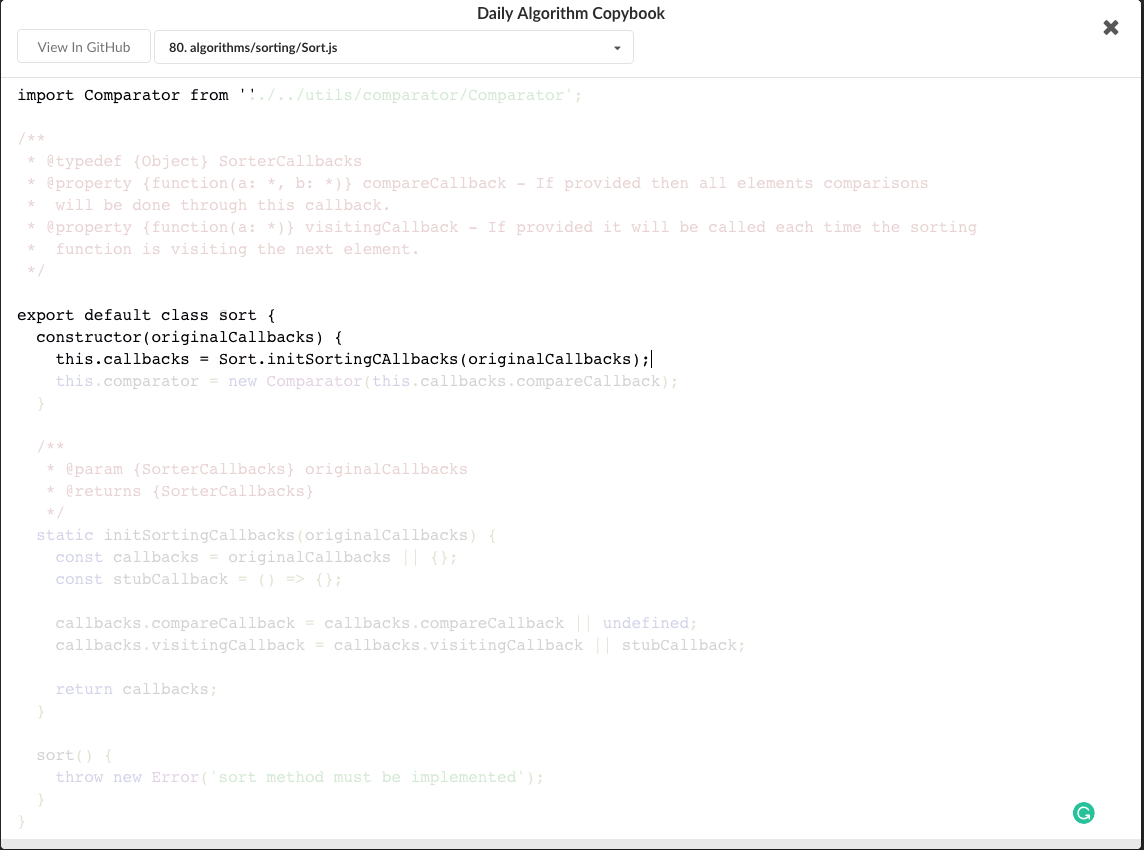
53 |
54 | ### GitHub stars, repositories tagger and organizer tool
55 |
56 | 
57 |
58 | 
59 |
60 |
--------------------------------------------------------------------------------
22 |
23 | Apps && Plugins
24 | =================
25 | * [Codelf for Atom](https://atom.io/packages/codelf)
26 | * [Codelf Chrome App](https://chrome.google.com/webstore/detail/codelf-best-github-stars/jnmjaglhmmcplekpfnblniiammmdpaan)
27 | * [Codelf for Sublime Text](https://github.com/unbug/codelf)
28 |
29 |
30 | Find me
31 | =================
32 | * Twitter [@unbug](https://twitter.com/unbug)
33 | * 微博 [@听奏](http://weibo.com/unbug)
34 |
35 | Videos
36 | ===============
37 | [](https://youtu.be/Uqg8HWaa-2c)
38 |
39 | Screenshots
40 | ================
41 |
42 | Screenshots
43 | ================
44 |
45 | ### Search variable
46 | 
47 |
48 | 
49 |
50 | ### Daily Algorithm Copybook
51 |
52 | 
53 |
54 | ### GitHub stars, repositories tagger and organizer tool
55 |
56 | 
57 |
58 | 
59 |
60 |
--------------------------------------------------------------------------------