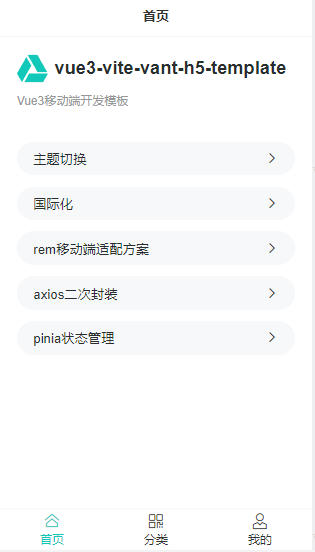
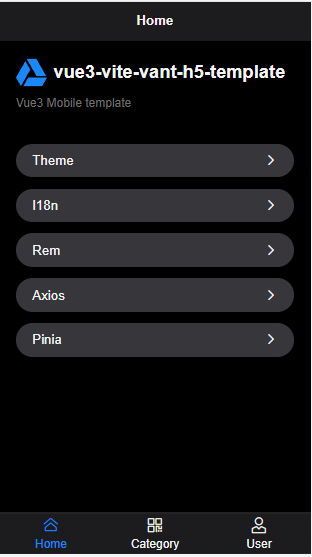
├── .husky ├── .gitignore └── pre-commit ├── .vscode └── extensions.json ├── images ├── qr.png ├── home.png ├── i18n.png ├── login.png └── theme.png ├── public └── favicon.ico ├── src ├── assets │ ├── logo.png │ ├── css │ │ ├── theme.css │ │ └── index.css │ └── svg │ │ ├── logo.svg │ │ └── password.svg ├── api │ └── index.ts ├── layout │ ├── NavBar.vue │ ├── Tabbar.vue │ └── Index.vue ├── store │ ├── index.ts │ └── modules │ │ └── app.ts ├── views │ ├── tabbar │ │ ├── Category.vue │ │ ├── User.vue │ │ └── Home.vue │ └── Login.vue ├── env.d.ts ├── plugins │ ├── vant.ts │ └── i18n.ts ├── utils │ ├── auth.ts │ └── request.ts ├── config │ ├── locales │ │ ├── zh-CN.ts │ │ └── en-US.ts │ └── index.ts ├── main.ts ├── App.vue ├── components │ └── SvgIcon.vue └── router │ └── index.ts ├── tsconfig.node.json ├── postcss.config.js ├── .gitignore ├── index.html ├── .editorconfig ├── tsconfig.json ├── .github └── workflows │ ├── ci.yml │ └── sync-gitee.yml ├── .prettierrc.js ├── vite.config.ts ├── docs ├── github-action.md └── 项目搭建.md ├── package.json ├── .eslintrc.js └── README.md /.husky/.gitignore: -------------------------------------------------------------------------------- 1 | _ 2 | -------------------------------------------------------------------------------- /.husky/pre-commit: -------------------------------------------------------------------------------- 1 | #!/bin/sh 2 | . "$(dirname "$0")/_/husky.sh" 3 | 4 | npm run lint 5 | -------------------------------------------------------------------------------- /.vscode/extensions.json: -------------------------------------------------------------------------------- 1 | { 2 | "recommendations": ["johnsoncodehk.volar"] 3 | } 4 | -------------------------------------------------------------------------------- /images/qr.png: -------------------------------------------------------------------------------- https://raw.githubusercontent.com/vangleer/vue3-vite-vant-h5-template/HEAD/images/qr.png -------------------------------------------------------------------------------- /images/home.png: -------------------------------------------------------------------------------- https://raw.githubusercontent.com/vangleer/vue3-vite-vant-h5-template/HEAD/images/home.png -------------------------------------------------------------------------------- /images/i18n.png: -------------------------------------------------------------------------------- https://raw.githubusercontent.com/vangleer/vue3-vite-vant-h5-template/HEAD/images/i18n.png -------------------------------------------------------------------------------- /images/login.png: -------------------------------------------------------------------------------- https://raw.githubusercontent.com/vangleer/vue3-vite-vant-h5-template/HEAD/images/login.png -------------------------------------------------------------------------------- /images/theme.png: -------------------------------------------------------------------------------- https://raw.githubusercontent.com/vangleer/vue3-vite-vant-h5-template/HEAD/images/theme.png -------------------------------------------------------------------------------- /public/favicon.ico: -------------------------------------------------------------------------------- https://raw.githubusercontent.com/vangleer/vue3-vite-vant-h5-template/HEAD/public/favicon.ico -------------------------------------------------------------------------------- /src/assets/logo.png: -------------------------------------------------------------------------------- https://raw.githubusercontent.com/vangleer/vue3-vite-vant-h5-template/HEAD/src/assets/logo.png -------------------------------------------------------------------------------- /src/api/index.ts: -------------------------------------------------------------------------------- 1 | import request from '../utils/request' 2 | 3 | export const login = (data: any) => request.post('/login', data) 4 | -------------------------------------------------------------------------------- /src/layout/NavBar.vue: -------------------------------------------------------------------------------- 1 | 4 | 5 | 6 | 7 | 8 | -------------------------------------------------------------------------------- /tsconfig.node.json: -------------------------------------------------------------------------------- 1 | { 2 | "compilerOptions": { 3 | "composite": true, 4 | "module": "esnext", 5 | "moduleResolution": "node" 6 | }, 7 | "include": ["vite.config.ts"] 8 | } 9 | -------------------------------------------------------------------------------- /src/store/index.ts: -------------------------------------------------------------------------------- 1 | import { App } from 'vue' 2 | import { createPinia } from 'pinia' 3 | 4 | export const setupStore = (app: App) => { 5 | app.use(createPinia()) 6 | } 7 | 8 | export * from './modules/app' 9 | -------------------------------------------------------------------------------- /src/views/tabbar/Category.vue: -------------------------------------------------------------------------------- 1 | 4 | 5 | 8 | 9 | 10 | -------------------------------------------------------------------------------- /postcss.config.js: -------------------------------------------------------------------------------- 1 | module.exports = { 2 | plugins: { 3 | 'postcss-pxtorem': { 4 | rootValue: 37.5, 5 | propList: ['*'] 6 | }, 7 | 'postcss-import': require('postcss-import'), 8 | autoprefixer: require('autoprefixer') 9 | } 10 | } 11 | -------------------------------------------------------------------------------- /src/env.d.ts: -------------------------------------------------------------------------------- 1 | /// 2 | 3 | declare module '*.vue' { 4 | import type { DefineComponent } from 'vue' 5 | // eslint-disable-next-line @typescript-eslint/no-explicit-any, @typescript-eslint/ban-types 6 | const component: DefineComponent<{}, {}, any> 7 | export default component 8 | } 9 | -------------------------------------------------------------------------------- /src/assets/css/theme.css: -------------------------------------------------------------------------------- 1 | /* 白色主题 */ 2 | .van-theme-light { 3 | --default-color: #272e2d; 4 | --van-blue: #12C8B9; 5 | --common-background-color: var(--van-background); 6 | } 7 | 8 | /* 黑色主题 */ 9 | .van-theme-dark { 10 | background-color: #000; 11 | color: var(--van-text-color); 12 | --common-background-color: var(--van-background-3); 13 | } -------------------------------------------------------------------------------- /.gitignore: -------------------------------------------------------------------------------- 1 | # Logs 2 | logs 3 | *.log 4 | npm-debug.log* 5 | yarn-debug.log* 6 | yarn-error.log* 7 | pnpm-debug.log* 8 | lerna-debug.log* 9 | 10 | node_modules 11 | dist 12 | dist-ssr 13 | *.local 14 | 15 | # Editor directories and files 16 | .vscode/* 17 | !.vscode/extensions.json 18 | .idea 19 | .DS_Store 20 | *.suo 21 | *.ntvs* 22 | *.njsproj 23 | *.sln 24 | *.sw? 25 | -------------------------------------------------------------------------------- /src/plugins/vant.ts: -------------------------------------------------------------------------------- 1 | import { App } from 'vue' 2 | import { Button, Icon, NavBar, Tabbar, TabbarItem, ConfigProvider, Cell } from 'vant' 3 | 4 | const components = [Button, NavBar, Tabbar, TabbarItem, Icon, ConfigProvider, Cell] 5 | 6 | export const setupVant = (app: App) => { 7 | components.forEach((component) => { 8 | app.component(component.name, component) 9 | }) 10 | } 11 | -------------------------------------------------------------------------------- /index.html: -------------------------------------------------------------------------------- 1 | 2 | 3 | 4 | 5 | 6 | 7 | 8 | Vite App 9 | 10 | 11 | 12 |
13 | 14 | 15 | 16 | -------------------------------------------------------------------------------- /src/utils/auth.ts: -------------------------------------------------------------------------------- 1 | import Cookies from 'js-cookie' 2 | import { useAppStore } from '/@/store' 3 | export const TOKEN_KEY = 'token' 4 | 5 | export function getToken() { 6 | return Cookies.get(TOKEN_KEY) 7 | } 8 | 9 | export function setToken(token: string) { 10 | Cookies.set(TOKEN_KEY, token) 11 | useAppStore().setState({ token }) 12 | } 13 | 14 | // 删除token 15 | export function removeToken() { 16 | Cookies.remove(TOKEN_KEY) 17 | } 18 | -------------------------------------------------------------------------------- /.editorconfig: -------------------------------------------------------------------------------- 1 | # http://editorconfig.org 2 | 3 | root = true 4 | 5 | [*] # 表示所有文件适用 6 | charset = utf-8 # 设置文件字符集为 utf-8 7 | indent_style = space # 缩进风格(tab | space) 8 | indent_size = 2 # 缩进大小 9 | end_of_line = lf # 控制换行类型(lf | cr | crlf) 10 | trim_trailing_whitespace = true # 去除行首的任意空白字符 11 | insert_final_newline = true # 始终在文件末尾插入一个新行 12 | 13 | [*.md] # 表示仅 md 文件适用以下规则 14 | max_line_length = off 15 | trim_trailing_whitespace = false -------------------------------------------------------------------------------- /src/layout/Tabbar.vue: -------------------------------------------------------------------------------- 1 | 10 | 11 | 15 | 16 | 17 | -------------------------------------------------------------------------------- /src/views/tabbar/User.vue: -------------------------------------------------------------------------------- 1 | 5 | 6 | 17 | 18 | 19 | -------------------------------------------------------------------------------- /src/config/locales/zh-CN.ts: -------------------------------------------------------------------------------- 1 | export default { 2 | username: '用户名', 3 | password: '密码', 4 | forgotPassword: '忘记密码/解绑', 5 | login: '登录', 6 | register: '注册', 7 | success: '成功', 8 | pleaseInput: '请输入', 9 | home: { 10 | title: '首页', 11 | tip: 'Vue3移动端开发模板', 12 | title1: '主题切换', 13 | title2: '国际化', 14 | title3: 'rem移动端适配方案', 15 | title4: 'axios二次封装', 16 | title5: 'pinia状态管理', 17 | reminder: '提示' 18 | }, 19 | category: { 20 | title: '分类' 21 | }, 22 | user: { 23 | title: '我的', 24 | logout: '退出登录' 25 | } 26 | } 27 | -------------------------------------------------------------------------------- /src/main.ts: -------------------------------------------------------------------------------- 1 | import { createApp } from 'vue' 2 | import 'amfe-flexible' 3 | import './assets/css/index.css' 4 | import './assets/css/theme.css' 5 | import 'virtual:svg-icons-register' 6 | import { useI18n } from './plugins/i18n' 7 | import { setupStore } from './store' 8 | import { setupVant } from './plugins/vant' 9 | import router from './router' 10 | import App from './App.vue' 11 | 12 | const app = createApp(App) 13 | 14 | useI18n(app) 15 | setupVant(app) 16 | setupStore(app) 17 | app.use(router) 18 | 19 | router.isReady().then(() => { 20 | app.mount('#app') 21 | }) 22 | -------------------------------------------------------------------------------- /src/config/index.ts: -------------------------------------------------------------------------------- 1 | export const CONFIG_KEY = 'app-config' 2 | // 默认配置 3 | const defaultConfig = { 4 | theme: 'light', 5 | locale: 'zh' 6 | } 7 | 8 | export function getConfig() { 9 | return JSON.parse(localStorage.getItem(CONFIG_KEY) || JSON.stringify(defaultConfig)) 10 | } 11 | export function setConfig(conf: any) { 12 | const config = JSON.parse(localStorage.getItem(CONFIG_KEY) || JSON.stringify(defaultConfig)) 13 | 14 | Object.keys(conf).forEach((key) => { 15 | config[key] = conf[key] 16 | }) 17 | 18 | localStorage.setItem(CONFIG_KEY, JSON.stringify(config)) 19 | } 20 | -------------------------------------------------------------------------------- /src/config/locales/en-US.ts: -------------------------------------------------------------------------------- 1 | export default { 2 | username: 'Username', 3 | password: 'Password', 4 | forgotPassword: 'forget the password', 5 | login: 'Login', 6 | register: 'Register', 7 | success: 'Success', 8 | pleaseInput: 'Please Enter', 9 | home: { 10 | title: 'Home', 11 | tip: 'Vue3 Mobile template', 12 | title1: 'Theme', 13 | title2: 'I18n', 14 | title3: 'Rem', 15 | title4: 'Axios', 16 | title5: 'Pinia', 17 | reminder: 'Reminder' 18 | }, 19 | category: { 20 | title: 'Category' 21 | }, 22 | user: { 23 | title: 'User', 24 | logout: 'Logout' 25 | } 26 | } 27 | -------------------------------------------------------------------------------- /src/App.vue: -------------------------------------------------------------------------------- 1 | 12 | 13 | 23 | 24 | 25 | -------------------------------------------------------------------------------- /src/layout/Index.vue: -------------------------------------------------------------------------------- 1 | 14 | 15 | 23 | 24 | 25 | -------------------------------------------------------------------------------- /tsconfig.json: -------------------------------------------------------------------------------- 1 | { 2 | "compilerOptions": { 3 | "target": "esnext", 4 | "useDefineForClassFields": true, 5 | "module": "esnext", 6 | "moduleResolution": "node", 7 | "strict": true, 8 | "jsx": "preserve", 9 | "sourceMap": true, 10 | "resolveJsonModule": true, 11 | "isolatedModules": true, 12 | "esModuleInterop": true, 13 | "baseUrl": ".", 14 | "lib": [ 15 | "esnext", 16 | "dom" 17 | ], 18 | "skipLibCheck": true, 19 | "paths": { 20 | "/@/*": [ 21 | "src/*" 22 | ] 23 | } 24 | }, 25 | "include": [ 26 | "src/**/*.ts", 27 | "src/**/*.d.ts", 28 | "src/**/*.tsx", 29 | "src/**/*.vue" 30 | ], 31 | "references": [ 32 | { 33 | "path": "./tsconfig.node.json" 34 | } 35 | ] 36 | } -------------------------------------------------------------------------------- /.github/workflows/ci.yml: -------------------------------------------------------------------------------- 1 | name: Vue3 Vite Vant H5 Template 2 | on: 3 | push: 4 | branches: 5 | - main 6 | jobs: 7 | build-and-deploy: 8 | concurrency: ci-${{ github.ref }} # Recommended if you intend to make multiple deployments in quick succession. 9 | runs-on: ubuntu-latest 10 | steps: 11 | - name: Checkout 🛎️ 12 | uses: actions/checkout@v3 13 | 14 | - name: Install and Build 🔧 # 安装依赖、打包,如果提前已打包好无需这一步 15 | run: | 16 | npm install 17 | npm run build 18 | cp images/ -r dist/assets 19 | 20 | - name: Deploy 🚀 21 | uses: JamesIves/github-pages-deploy-action@v4.3.3 22 | with: 23 | branch: gh-pages # The branch the action should deploy to. 24 | folder: dist # The folder the action should deploy. -------------------------------------------------------------------------------- /.prettierrc.js: -------------------------------------------------------------------------------- 1 | module.exports = { 2 | printWidth: 100, // 单行输出(不折行)的(最大)长度 3 | tabWidth: 2, // 每个缩进级别的空格数 4 | tabs: false, // 使用制表符 (tab) 缩进行而不是空格 (space)。 5 | semi: false, // 是否在语句末尾打印分号 6 | singleQuote: true, // 是否使用单引号 7 | quoteProps: "as-needed", // 仅在需要时在对象属性周围添加引号 8 | jsxSingleQuote: false, // jsx 不使用单引号,而使用双引号 9 | trailingComma: "none", // 去除对象最末尾元素跟随的逗号 10 | bracketSpacing: true, // 是否在对象属性添加空格 11 | jsxBracketSameLine: true, // 将 > 多行 JSX 元素放在最后一行的末尾,而不是单独放在下一行(不适用于自闭元素),默认false,这里选择>不另起一行 12 | arrowParens: "always", // 箭头函数,只有一个参数的时候,也需要括号 13 | proseWrap: "always", // 当超出print width(上面有这个参数)时就折行 14 | htmlWhitespaceSensitivity: "ignore", // 指定 HTML 文件的全局空白区域敏感度, "ignore" - 空格被认为是不敏感的 15 | vueIndentScriptAndStyle: false, // 在VUE文件中不要缩进脚本和样式标记 16 | stylelintIntegration: true, 17 | endOfLine: "auto" 18 | } -------------------------------------------------------------------------------- /src/components/SvgIcon.vue: -------------------------------------------------------------------------------- 1 | 6 | 7 | 26 | 27 | 35 | -------------------------------------------------------------------------------- /src/utils/request.ts: -------------------------------------------------------------------------------- 1 | import axios, { AxiosRequestConfig, AxiosInstance } from 'axios' 2 | import qs from 'qs' 3 | 4 | const defaultConfig: AxiosRequestConfig = { 5 | baseURL: '/api/v1', 6 | timeout: 10000, 7 | // 数组格式参数序列化 8 | paramsSerializer: (params) => qs.stringify(params, { indices: false }) 9 | } 10 | 11 | const instance: AxiosInstance = axios.create({ 12 | ...defaultConfig 13 | }) 14 | 15 | // 请求拦截器 16 | instance.interceptors.request.use( 17 | (config) => { 18 | const token = localStorage.getItem('token') 19 | if (token) { 20 | config.headers['Authorization'] = `Bearer ${token}` 21 | } 22 | 23 | return config 24 | }, 25 | (error) => Promise.reject(error) 26 | ) 27 | 28 | // 响应拦截器 29 | instance.interceptors.response.use( 30 | (response) => { 31 | return response.data 32 | }, 33 | (error) => Promise.reject(error) 34 | ) 35 | 36 | export default instance 37 | -------------------------------------------------------------------------------- /src/assets/svg/logo.svg: -------------------------------------------------------------------------------- 1 | -------------------------------------------------------------------------------- /.github/workflows/sync-gitee.yml: -------------------------------------------------------------------------------- 1 | name: Sync to Gitee 2 | 3 | on: 4 | push: 5 | branches: [main] 6 | 7 | jobs: 8 | build: 9 | runs-on: ubuntu-latest 10 | steps: 11 | - name: Sync to Gitee 12 | uses: wearerequired/git-mirror-action@master 13 | env: 14 | # 在 Settings->Secrets 15 | SSH_PRIVATE_KEY: ${{ secrets.GITEE_PRIVATE_KEY }} 16 | with: 17 | # GitHub 源仓库地址 18 | source-repo: git@github.com:vangleer/vue3-vite-vant-h5-template.git 19 | # Gitee 目标仓库地址 20 | destination-repo: git@gitee.com:huangwantong/vue3-vite-vant-h5-template.git 21 | 22 | # - name: Build Gitee Pages # 部署 gitee pages 23 | # uses: yanglbme/gitee-pages-action@master 24 | # with: 25 | # # 注意替换为你的 Gitee 用户名 26 | # gitee-username: huangwantong 27 | # # 注意在 Settings->Secrets 配置 GITEE_PASSWORD 28 | # gitee-password: ${{ secrets.GITEE_PASSWORD }} 29 | # # 注意替换为你的 Gitee 仓库 30 | # gitee-repo: vue3-vite-vant-h5-template 31 | # branch: gh-pages 32 | -------------------------------------------------------------------------------- /src/plugins/i18n.ts: -------------------------------------------------------------------------------- 1 | import { App } from 'vue' 2 | import { createI18n } from 'vue-i18n' 3 | import { Locale } from 'vant' 4 | import { getConfig } from '/@/config' 5 | import enLocale from 'vant/es/locale/lang/en-US' 6 | import zhLocale from 'vant/es/locale/lang/zh-CN' 7 | import zhCN from '../config/locales/zh-CN' 8 | import enUS from '../config/locales/en-US' 9 | 10 | export const i18nKey = 'responsive-locale' 11 | 12 | const messages = { 13 | zh: zhCN, 14 | en: enUS 15 | } 16 | 17 | export const i18n = createI18n({ 18 | legacy: false, 19 | locale: getConfig().locale, 20 | fallbackLocale: 'en', 21 | messages 22 | }) 23 | export function useI18n(app: App) { 24 | app.use(i18n) 25 | } 26 | 27 | export const t = (key: string) => i18n.global.t(key) 28 | 29 | /** 30 | * 设置语言 31 | * @param key string | undefined 32 | */ 33 | export function changeLocale(key?: 'zh' | 'en') { 34 | if (!key) { 35 | key = i18n.global.locale.value === 'zh' ? 'en' : 'zh' 36 | } 37 | i18n.global.locale.value = key 38 | key === 'zh' ? Locale.use('zh-CN', zhLocale) : Locale.use('en-US', enLocale) 39 | return key 40 | } 41 | -------------------------------------------------------------------------------- /src/store/modules/app.ts: -------------------------------------------------------------------------------- 1 | import { defineStore } from 'pinia' 2 | import { changeLocale } from '/@/plugins/i18n' 3 | import { getConfig, setConfig } from '/@/config' 4 | const config = getConfig() 5 | type AppStateType = { 6 | token?: string 7 | title?: string 8 | theme?: string 9 | locale?: string 10 | } 11 | export const useAppStore = defineStore({ 12 | id: 't-app', 13 | state: (): AppStateType => ({ 14 | title: '', 15 | token: '', 16 | theme: config.theme as string, 17 | locale: config.locale as string 18 | }), 19 | actions: { 20 | setState(state: AppStateType) { 21 | const keys: any = Object.keys(state) 22 | keys.forEach((key: keyof AppStateType) => { 23 | this[key] = state[key] 24 | }) 25 | }, 26 | changeTheme(theme?: string) { 27 | if (theme) { 28 | this.theme = theme 29 | } else { 30 | this.theme = this.theme === 'light' ? 'dark' : 'light' 31 | } 32 | setConfig({ theme: this.theme }) 33 | }, 34 | changeLocale(locale?: 'zh' | 'en') { 35 | const key = changeLocale(locale) 36 | this.locale = key 37 | setConfig({ locale: key }) 38 | } 39 | } 40 | }) 41 | -------------------------------------------------------------------------------- /src/assets/css/index.css: -------------------------------------------------------------------------------- 1 | body { 2 | width: 100%; 3 | height: 100%; 4 | margin: 0; 5 | padding: 0; 6 | -moz-osx-font-smoothing: grayscale; 7 | -webkit-font-smoothing: antialiased; 8 | text-rendering: optimizelegibility; 9 | font-family: 'Helvetica Neue', Helvetica, 'PingFang SC', 'Hiragino Sans GB', 'Microsoft YaHei', '微软雅黑', Arial, 10 | sans-serif; 11 | } 12 | 13 | html { 14 | width: 100%; 15 | height: 100%; 16 | box-sizing: border-box; 17 | } 18 | 19 | #app { 20 | width: 100%; 21 | height: 100%; 22 | font-size: 16px; 23 | color: var(--default-color); 24 | } 25 | 26 | label { 27 | font-weight: 700; 28 | } 29 | 30 | *, 31 | *::before, 32 | *::after { 33 | box-sizing: inherit; 34 | margin: 0; 35 | padding: 0; 36 | } 37 | 38 | a:focus, 39 | a:active { 40 | outline: none; 41 | } 42 | 43 | a, 44 | a:focus, 45 | a:hover { 46 | cursor: pointer; 47 | color: inherit; 48 | text-decoration: none; 49 | } 50 | 51 | div:focus { 52 | outline: none; 53 | } 54 | 55 | ul { 56 | margin: 0; 57 | padding: 0; 58 | list-style: none; 59 | } 60 | 61 | .clearfix::after { 62 | visibility: hidden; 63 | display: block; 64 | font-size: 0; 65 | content: ' '; 66 | clear: both; 67 | height: 0; 68 | } -------------------------------------------------------------------------------- /vite.config.ts: -------------------------------------------------------------------------------- 1 | import { defineConfig } from 'vite' 2 | import vue from '@vitejs/plugin-vue' 3 | import svgLoader from 'vite-svg-loader' 4 | import { createSvgIconsPlugin } from 'vite-plugin-svg-icons' 5 | import styleImport, { VantResolve } from 'vite-plugin-style-import' 6 | import { resolve } from 'path' 7 | // 路径查找 8 | const pathResolve = (dir: string): string => { 9 | return resolve(__dirname, '.', dir) 10 | } 11 | 12 | // 设置别名 13 | const alias: Record = { 14 | '/@': pathResolve('src'), 15 | '@': pathResolve('src'), 16 | '@build': pathResolve('build') 17 | } 18 | // https://vitejs.dev/config/ 19 | export default ({ mode }) => defineConfig({ 20 | resolve: { alias }, 21 | base: mode === 'production' ? '/vue3-vite-vant-h5-template/' : '/', 22 | plugins: [ 23 | vue(), 24 | styleImport({ 25 | resolves: [VantResolve()] 26 | }), 27 | svgLoader(), 28 | createSvgIconsPlugin({ 29 | // 指定需要缓存的图标文件夹 30 | iconDirs: [pathResolve('src/assets/svg')], 31 | // 指定symbolId格式 32 | symbolId: 'icon-[dir]-[name]' 33 | }) 34 | ], 35 | server: { 36 | // 是否开启 https 37 | https: false, 38 | // 端口号 39 | port: 3002, 40 | host: '0.0.0.0', 41 | // 本地跨域代理 42 | proxy: { 43 | '/api/v1': { 44 | target: 'http://192.168.1.25:8081', 45 | changeOrigin: true, 46 | } 47 | } 48 | } 49 | }) 50 | 51 | -------------------------------------------------------------------------------- /docs/github-action.md: -------------------------------------------------------------------------------- 1 | # Github Actions 配置 2 | 3 | ### [参考文档](https://www.ruanyifeng.com/blog/2019/09/getting-started-with-github-actions.html) 4 | 5 | ### 修改部署配置 6 | 1. 在package.json中添加一个homepage字段 7 | ```json 8 | "homepage": "https://[username].github.io/github-actions-demo" 9 | ``` 10 | - 将[username]替换成你的 GitHub 用户名 11 | 12 | 2. 在vite.config.ts中修改base 13 | ```js 14 | export default ({ mode }) => defineConfig({ 15 | base: mode === 'production' ? '/vue3-vite-vant-h5-template/' : '/', 16 | }) 17 | ``` 18 | - 这需要注意一下,由于github pages默认的地址是包含子目录的,所以我这这需要指定一下 base 的路径为我们的项目名。 19 | 20 | 21 | ### 配置文件 22 | 23 | - 在这个仓库的.github/workflows目录,生成一个 workflow 文件,名字可以随便取,这个示例是ci.yml 24 | ```yml 25 | # ci.yml 26 | name: Vue3 Vite Vant H5 Template 27 | on: 28 | push: 29 | branches: 30 | - main 31 | jobs: 32 | build-and-deploy: 33 | concurrency: ci-${{ github.ref }} # Recommended if you intend to make multiple deployments in quick succession. 34 | runs-on: ubuntu-latest 35 | steps: 36 | - name: Checkout 🛎️ 37 | uses: actions/checkout@v3 38 | 39 | - name: Install and Build 🔧 # 安装依赖、打包,如果提前已打包好无需这一步 40 | run: | 41 | npm install 42 | npm run build 43 | 44 | - name: Deploy 🚀 45 | uses: JamesIves/github-pages-deploy-action@v4.3.3 46 | with: 47 | branch: gh-pages # The branch the action should deploy to. 48 | folder: dist # The folder the action should deploy. 49 | 50 | ``` 51 | - 如果不是自己提交的话需要 -------------------------------------------------------------------------------- /package.json: -------------------------------------------------------------------------------- 1 | { 2 | "name": "vue3-vite-vant-h5-template", 3 | "private": true, 4 | "version": "0.1.0", 5 | "homepage": "https://vangleer.github.io/vue3-vite-vant-h5-template", 6 | "scripts": { 7 | "dev": "vite", 8 | "build": "vite build", 9 | "preview": "vite preview", 10 | "lint": "eslint ./src/**/*{.js,.jsx,.ts,.tsx,.vue} --fix", 11 | "prettier": "prettier --write \"src/**/*.{js,jsx,json,ts,tsx,css,less,scss,vue,html,md}\"", 12 | "prepare": "husky install" 13 | }, 14 | "dependencies": { 15 | "amfe-flexible": "^2.2.1", 16 | "axios": "^0.27.2", 17 | "js-cookie": "^3.0.1", 18 | "pinia": "^2.0.13", 19 | "qs": "^6.10.3", 20 | "vant": "4.0.0-alpha.0", 21 | "vite-svg-loader": "^3.3.0", 22 | "vue": "^3.2.25", 23 | "vue-i18n": "9.2.0-beta.33", 24 | "vue-router": "4" 25 | }, 26 | "devDependencies": { 27 | "@types/js-cookie": "^3.0.2", 28 | "@types/node": "^17.0.29", 29 | "@types/qs": "^6.9.7", 30 | "@typescript-eslint/eslint-plugin": "^5.21.0", 31 | "@typescript-eslint/parser": "^5.21.0", 32 | "@vitejs/plugin-vue": "^2.3.1", 33 | "autoprefixer": "^10.4.7", 34 | "eslint": "^8.14.0", 35 | "eslint-config-prettier": "^8.5.0", 36 | "eslint-plugin-prettier": "^4.0.0", 37 | "eslint-plugin-vue": "^8.7.1", 38 | "husky": "^7.0.4", 39 | "lint-staged": "^12.4.1", 40 | "postcss": "^8.4.13", 41 | "postcss-import": "^14.1.0", 42 | "postcss-pxtorem": "^6.0.0", 43 | "prettier": "^2.6.2", 44 | "sass": "^1.51.0", 45 | "ts-node": "^10.7.0", 46 | "typescript": "^4.5.4", 47 | "vite": "^2.9.5", 48 | "vite-plugin-style-import": "1.4.1", 49 | "vite-plugin-svg-icons": "^2.0.1", 50 | "vue-global-api": "^0.4.1", 51 | "vue-tsc": "^0.34.7" 52 | }, 53 | "lint-staged": { 54 | "*.{js,jsx,vue,ts,tsx}": "npm run lint" 55 | } 56 | } 57 | -------------------------------------------------------------------------------- /src/router/index.ts: -------------------------------------------------------------------------------- 1 | import { createRouter, createWebHashHistory, RouteRecordRaw } from 'vue-router' 2 | import Login from '/@/views/Login.vue' 3 | import Layout from '/@/layout/Index.vue' 4 | import Home from '/@/views/tabbar/Home.vue' 5 | import Category from '/@/views/tabbar/Category.vue' 6 | import User from '/@/views/tabbar/User.vue' 7 | import { useAppStore } from '/@/store' 8 | import { getToken } from '/@/utils/auth' 9 | import { t } from '/@/plugins/i18n' 10 | export const tabbar: Array = [ 11 | { 12 | path: '/home', 13 | component: Home, 14 | meta: { 15 | title: 'home.title', 16 | icon: 'home-o' 17 | } 18 | }, 19 | { 20 | path: '/category', 21 | component: Category, 22 | meta: { 23 | title: 'category.title', 24 | icon: 'qr' 25 | } 26 | }, 27 | { 28 | path: '/user', 29 | component: User, 30 | meta: { 31 | title: 'user.title', 32 | icon: 'user-o' 33 | } 34 | } 35 | ] 36 | const routes: Array = [ 37 | { 38 | path: '/', 39 | component: Layout, 40 | redirect: '/home', 41 | children: tabbar 42 | }, 43 | { 44 | path: '/login', 45 | component: Login 46 | } 47 | ] 48 | 49 | const router = createRouter({ 50 | history: createWebHashHistory(), 51 | routes 52 | }) 53 | 54 | // 路由白名单 55 | const whiteList = ['/login'] 56 | 57 | router.beforeEach((to, from, next) => { 58 | const title = (to.meta.title as string) || 'Vite App' 59 | document.title = t(title) 60 | const token = getToken() 61 | if (to.path === '/login' || whiteList.includes(to.path)) { 62 | if (token) { 63 | next('/') 64 | } else { 65 | next() 66 | } 67 | } else { 68 | const store = useAppStore() 69 | if (!token) { 70 | store.setState({ title }) 71 | return next('/login') 72 | } 73 | 74 | store.setState({ title, token }) 75 | next() 76 | } 77 | }) 78 | 79 | export default router 80 | -------------------------------------------------------------------------------- /src/views/tabbar/Home.vue: -------------------------------------------------------------------------------- 1 | 22 | 23 | 56 | 57 | 92 | -------------------------------------------------------------------------------- /.eslintrc.js: -------------------------------------------------------------------------------- 1 | module.exports = { 2 | root: true, 3 | env: { 4 | browser: true, 5 | node: true 6 | }, 7 | globals: { 8 | Message: true, 9 | env: true, 10 | useRoute: true, 11 | useRouter: true, 12 | useStore: true 13 | }, 14 | /* 指定如何解析语法。可以为空,但若不为空,只能配该值,原因见下文。*/ 15 | parser: 'vue-eslint-parser', 16 | /* 优先级低于parse的语法解析配置 */ 17 | parserOptions: { 18 | parser: '@typescript-eslint/parser', // Specifies the ESLint parser 19 | ecmaVersion: 2020, // Allows for the parsing of modern ECMAScript features 20 | sourceType: 'module', // Allows for the use of imports 21 | ecmaFeatures: { 22 | jsx: true 23 | } 24 | }, 25 | extends: [ 26 | 'vue-global-api', 27 | 'eslint:recommended', 28 | 'plugin:vue/vue3-recommended', 29 | 'plugin:@typescript-eslint/recommended', 30 | 'prettier', 31 | 'plugin:prettier/recommended' 32 | ], 33 | plugins: ['vue'], 34 | rules: { 35 | 'no-console': process.env.NODE_ENV === 'production' ? 1 : 0, 36 | 'no-debugger': process.env.NODE_ENV === 'production' ? 1 : 0, 37 | 'no-useless-concat': 1, // 禁止不必要的字符串字面量或模板字面量的连接 38 | 'no-useless-escape': 0, // 禁止不必要的转义字符 39 | 'consistent-return': 0, // 要求 return 语句要么总是指定返回的值,要么不指定 40 | 'camelcase': 0, // 强制使用骆驼拼写法命名约定 41 | 'no-redeclare': 1, // 禁止多次声明同一变量 42 | 'array-callback-return': 1, // 强制数组方法的回调函数中有 return 语句,Array有几种过滤,映射和折叠的方法。如果我们忘记return在这些回调中写入语句,那可能是一个错误。 43 | 'default-case': 1, // 要求 switch 语句中有 default 分支 44 | 'no-fallthrough': 1, // 禁止 case 语句落空 45 | 'no-lonely-if': 1, // 禁止 if 作为唯一的语句出现在 else 语句中.如果一个if陈述是该else块中唯一的陈述,那么使用一个else if表格通常会更清晰。 46 | 'no-irregular-whitespace': 1, // 禁止在字符串和注释之外不规则的空白 47 | 'prefer-const': 0, // 要求使用 const 声明那些声明后不再被修改的变量.如果一个变量从不重新分配,使用const声明更好。const 声明告诉读者,“这个变量永远不会被重新分配,”减少认知负荷并提高可维护性。 48 | 'no-use-before-define': 1, // 禁止在变量定义之前使用它们 49 | 'vue/attributes-order': 2, // vue api使用顺序 50 | 'vue/no-multiple-template-root': 0, 51 | '@typescript-eslint/explicit-module-boundary-types': 0, 52 | '@typescript-eslint/no-var-requires': 0, 53 | '@typescript-eslint/no-unused-vars': 0, 54 | '@typescript-eslint/ban-ts-comment': 0, 55 | '@typescript-eslint/no-explicit-any': 0, 56 | '@typescript-eslint/no-empty-function': 0, 57 | 'vue/multi-word-component-names': 0 58 | }, 59 | overrides: [ 60 | { 61 | files: ['**/__tests__/*.{j,t}s?(x)'], 62 | env: { 63 | mocha: true 64 | } 65 | } 66 | ] 67 | } -------------------------------------------------------------------------------- /src/views/Login.vue: -------------------------------------------------------------------------------- 1 | 33 | 34 | 66 | 67 | 131 | -------------------------------------------------------------------------------- /src/assets/svg/password.svg: -------------------------------------------------------------------------------- 1 | -------------------------------------------------------------------------------- /docs/项目搭建.md: -------------------------------------------------------------------------------- 1 | # vue3-vite-vant-h5-template 最新版vue移动端开发模板 2 | 3 | - 使用技术 Vue 3 + TypeScript + Vite + Vant + pinia + vue-router + axios + vuei18n 4 | - 项目使用 pnpm 包管理工具,用法和 npm 没有什么区别,官方地址:https://www.pnpm.cn/ 5 | 6 | ## 项目搭建 7 | - 参考vite官网:https://vitejs.cn 8 | ``` 9 | pnpm create vite 10 | ``` 11 | ## 代码规范 12 | 13 | ### 集成 editorconfig 配置 14 | 15 | - EditorConfig 有助于为不同 IDE 编辑器上处理同一项目的多个开发人员维护一致的编码风格。 16 | 17 | ```yaml 18 | # http://editorconfig.org 19 | 20 | root = true 21 | 22 | [*] # 表示所有文件适用 23 | charset = utf-8 # 设置文件字符集为 utf-8 24 | indent_style = space # 缩进风格(tab | space) 25 | indent_size = 2 # 缩进大小 26 | end_of_line = lf # 控制换行类型(lf | cr | crlf) 27 | trim_trailing_whitespace = true # 去除行首的任意空白字符 28 | insert_final_newline = true # 始终在文件末尾插入一个新行 29 | 30 | [*.md] # 表示仅 md 文件适用以下规则 31 | max_line_length = off 32 | trim_trailing_whitespace = false 33 | ``` 34 | 35 | - VSCode 需要安装一个插件:EditorConfig for VS Code 36 | 37 | ![image-20210722215138665](https://tva1.sinaimg.cn/large/008i3skNgy1gsq2gh989yj30pj05ggmb.jpg) 38 | 39 | ### 配置 eslint、prettier 40 | ``` 41 | pnpm i eslint prettier eslint-config-prettier eslint-plugin-prettier eslint-plugin-vue @typescript-eslint/parser @typescript-eslint/eslint-plugin vue-global-api -D 42 | ``` 43 | 44 | - 在根目录下建立 eslint 配置文件: .eslintrc.js 45 | ```js 46 | module.exports = { 47 | root: true, 48 | env: { 49 | browser: true, 50 | node: true 51 | }, 52 | globals: { 53 | Message: true, 54 | env: true, 55 | useRoute: true, 56 | useRouter: true, 57 | useStore: true 58 | }, 59 | /* 指定如何解析语法。可以为空,但若不为空,只能配该值,原因见下文。*/ 60 | parser: 'vue-eslint-parser', 61 | /* 优先级低于parse的语法解析配置 */ 62 | parserOptions: { 63 | parser: '@typescript-eslint/parser', // Specifies the ESLint parser 64 | ecmaVersion: 2020, // Allows for the parsing of modern ECMAScript features 65 | sourceType: 'module', // Allows for the use of imports 66 | ecmaFeatures: { 67 | jsx: true 68 | } 69 | }, 70 | extends: [ 71 | 'vue-global-api', 72 | 'eslint:recommended', 73 | 'plugin:vue/vue3-recommended', 74 | 'plugin:@typescript-eslint/recommended', 75 | 'prettier', 76 | 'plugin:prettier/recommended' 77 | ], 78 | plugins: ['vue'], 79 | rules: { 80 | 'no-console': process.env.NODE_ENV === 'production' ? 1 : 0, 81 | 'no-debugger': process.env.NODE_ENV === 'production' ? 1 : 0, 82 | 'no-useless-concat': 1, // 禁止不必要的字符串字面量或模板字面量的连接 83 | 'no-useless-escape': 0, // 禁止不必要的转义字符 84 | 'consistent-return': 0, // 要求 return 语句要么总是指定返回的值,要么不指定 85 | 'camelcase': 0, // 强制使用骆驼拼写法命名约定 86 | 'no-redeclare': 1, // 禁止多次声明同一变量 87 | 'array-callback-return': 1, // 强制数组方法的回调函数中有 return 语句,Array有几种过滤,映射和折叠的方法。如果我们忘记return在这些回调中写入语句,那可能是一个错误。 88 | 'default-case': 1, // 要求 switch 语句中有 default 分支 89 | 'no-fallthrough': 1, // 禁止 case 语句落空 90 | 'no-lonely-if': 1, // 禁止 if 作为唯一的语句出现在 else 语句中.如果一个if陈述是该else块中唯一的陈述,那么使用一个else if表格通常会更清晰。 91 | 'no-irregular-whitespace': 1, // 禁止在字符串和注释之外不规则的空白 92 | 'prefer-const': 0, // 要求使用 const 声明那些声明后不再被修改的变量.如果一个变量从不重新分配,使用const声明更好。const 声明告诉读者,“这个变量永远不会被重新分配,”减少认知负荷并提高可维护性。 93 | 'no-use-before-define': 1, // 禁止在变量定义之前使用它们 94 | 'vue/attributes-order': 2, // vue api使用顺序 95 | 'vue/no-multiple-template-root': 0, 96 | '@typescript-eslint/explicit-module-boundary-types': 0, 97 | '@typescript-eslint/no-var-requires': 0, 98 | '@typescript-eslint/no-unused-vars': 0, 99 | '@typescript-eslint/ban-ts-comment': 0, 100 | '@typescript-eslint/no-explicit-any': 0, 101 | '@typescript-eslint/no-empty-function': 0, 102 | 'vue/multi-word-component-names': 0 103 | }, 104 | overrides: [ 105 | { 106 | files: ['**/__tests__/*.{j,t}s?(x)'], 107 | env: { 108 | mocha: true 109 | } 110 | } 111 | ] 112 | } 113 | ``` 114 | - 在根目录下建立 prettier 配置文件: .prettierrc.js 115 | ```js 116 | module.exports = { 117 | printWidth: 100, // 单行输出(不折行)的(最大)长度 118 | tabWidth: 2, // 每个缩进级别的空格数 119 | tabs: false, // 使用制表符 (tab) 缩进行而不是空格 (space)。 120 | semi: false, // 是否在语句末尾打印分号 121 | singleQuote: true, // 是否使用单引号 122 | quoteProps: "as-needed", // 仅在需要时在对象属性周围添加引号 123 | jsxSingleQuote: false, // jsx 不使用单引号,而使用双引号 124 | trailingComma: "none", // 去除对象最末尾元素跟随的逗号 125 | bracketSpacing: true, // 是否在对象属性添加空格 126 | jsxBracketSameLine: true, // 将 > 多行 JSX 元素放在最后一行的末尾,而不是单独放在下一行(不适用于自闭元素),默认false,这里选择>不另起一行 127 | arrowParens: "always", // 箭头函数,只有一个参数的时候,也需要括号 128 | proseWrap: "always", // 当超出print width(上面有这个参数)时就折行 129 | htmlWhitespaceSensitivity: "ignore", // 指定 HTML 文件的全局空白区域敏感度, "ignore" - 空格被认为是不敏感的 130 | vueIndentScriptAndStyle: false, // 在VUE文件中不要缩进脚本和样式标记 131 | stylelintIntegration: true, 132 | endOfLine: "auto" 133 | } 134 | 135 | ``` 136 | 137 | ### Husky 和 Lint-staged 配置 Pre-commit 检查 138 | ``` 139 | npx mrm@2 lint-staged 140 | ``` 141 | - 运行上面这条命令后会在package.json中添加一条脚本和lint-staged配置 142 | ```json 143 | { 144 | "scripts": { 145 | "lint": "eslint ./src/**/*{.js,.jsx,.ts,.tsx,.vue} --fix", // 这条除外 146 | "prepare": "husky install" 147 | }, 148 | "devDependencies": { 149 | "husky": "^7.0.4", 150 | "lint-staged": "^12.4.1", 151 | }, 152 | "lint-staged": { 153 | "*.{js,jsx,vue,ts,tsx}": "npm run lint" 154 | } 155 | } 156 | ``` 157 | - 安装 lint-staged 和 husky 相关的依赖 158 | - 然后会在更目录创建一个.husky目录,这一步在windows上可能会出错,执行 npx husky install 创建,该目录下有一个pre-commit文件在每次提交代码的时候会执行,可以修改里面的运行脚本,自定义提交需要做的工作 159 | ```shell 160 | #!/bin/sh 161 | . "$(dirname "$0")/_/husky.sh" 162 | 163 | # npx lint-staged 164 | npm run lint 165 | ``` 166 | 167 | 注意:由于我们使用的是pnpm,在执行npx mrm@2 lint-staged的时候,使用的是npm去安装依赖,而且在package.json中没有相关的版本记录,我的解决方法是再使用pnpm i husky lint-staged -D安装一次 168 | 169 | ## 第三方库集成 170 | 171 | ### 路由 vue-router 172 | 173 | 安装依赖 174 | 175 | ``` 176 | pnpm install vue-router@4 177 | ``` 178 | 179 | src 目录创建 router/index.ts 180 | 181 | ```ts 182 | import { createRouter, createWebHashHistory, RouteRecordRaw } from 'vue-router' 183 | import Login from '/@/views/login.vue' 184 | const routes: Array = [ 185 | { 186 | path: '/login', 187 | component: Login 188 | } 189 | ] 190 | 191 | const router = createRouter({ 192 | history: createWebHashHistory(), 193 | routes 194 | }) 195 | 196 | export default router 197 | ``` 198 | 199 | 在 main.ts 中注册路由 200 | 201 | ```ts 202 | import { createApp } from 'vue' 203 | import router from './router' 204 | import App from './App.vue' 205 | 206 | const app = createApp(App) 207 | app.use(router).mount('#app') 208 | ``` 209 | 210 | App.vue 中使用路由占位符 211 | 212 | ```html 213 | 214 | 215 | 216 | 217 | 218 | ``` 219 | 220 | ### 状态管理 pinia 221 | 222 | ```shell 223 | pnpm install pinia 224 | ``` 225 | 226 | src 目录创建 store/index.ts 227 | 228 | ```ts 229 | import { App } from 'vue' 230 | import { createPinia } from 'pinia' 231 | 232 | export const setupStore = (app: App) => { 233 | app.use(createPinia()) 234 | } 235 | ``` 236 | 237 | 在 main.ts 中注册 238 | 239 | ```ts 240 | import { setupStore } from './store' 241 | setupStore(app) 242 | ``` 243 | 244 | ### 引入Vant 推荐[官方文档](https://vant-contrib.gitee.io/vant/#/zh-CN/quickstart) 245 | ``` 246 | pnpm add vant 247 | ``` 248 | 1. 在 vite 项目中按需引入组件(推荐) 249 | ``` 250 | pnpm add vite-plugin-style-import@1.4.1 -D 251 | ``` 252 | 2. 配置插件 安装完成后,在 vite.config.ts 文件中配置插件: 253 | ```ts 254 | import { defineConfig } from 'vite' 255 | import vue from '@vitejs/plugin-vue' 256 | import styleImport, { VantResolve } from 'vite-plugin-style-import' 257 | import { resolve } from 'path' 258 | // 路径查找 259 | const pathResolve = (dir: string): string => { 260 | return resolve(__dirname, '.', dir) 261 | } 262 | 263 | // 设置别名 264 | const alias: Record = { 265 | '/@': pathResolve('src'), 266 | '@': pathResolve('src'), 267 | '@build': pathResolve('build') 268 | } 269 | // https://vitejs.dev/config/ 270 | export default defineConfig({ 271 | resolve: { alias }, 272 | plugins: [ 273 | vue(), 274 | styleImport({ 275 | resolves: [VantResolve()] 276 | }) 277 | ] 278 | }) 279 | 280 | ``` 281 | 282 | 3. 引入组件 完成以上两步,就可以直接使用 Vant 组件了: 283 | ```ts 284 | import { createApp } from 'vue' 285 | import { Button } from 'vant' 286 | 287 | const app = createApp() 288 | app.use(Button) 289 | ``` 290 | 291 | ### rem适配 292 | ``` 293 | pnpm add postcss postcss-import postcss-pxtorem autoprefixer -D 294 | pnpm add amfe-flexible -S 295 | ``` 296 | 新建 postcss.config.js 297 | ```js 298 | module.exports = { 299 | plugins: { 300 | 'postcss-pxtorem': { 301 | rootValue: 37.5, 302 | propList: ['*'] 303 | }, 304 | 'postcss-import': require('postcss-import'), 305 | autoprefixer: require('autoprefixer') 306 | } 307 | } 308 | ``` 309 | 在main.ts中引入 amfe-flexible 310 | ```ts 311 | // main.ts 312 | import 'amfe-flexible' 313 | ``` 314 | -------------------------------------------------------------------------------- /README.md: -------------------------------------------------------------------------------- 1 | # vue3-vite-vant-h5-template 最新版vue移动端开发模板 2 | 3 | 开箱即用的 Vue3 + Vant4 移动端模板 4 | 5 | - 使用技术 Vue 3 + TypeScript + Vite + Vant + pinia + vue-router + axios + vuei18n 6 | - 支持rem移动端适配方案 7 | - axios二次封装 8 | - 主题切换 9 | - 支持国际化 10 | - 项目使用 pnpm 包管理工具,用法和 npm 没有什么区别,官方地址:https://www.pnpm.cn/ 11 | 12 | ## 预览 13 | 14 | [在线预览](https://vangleer.github.io/vue3-vite-vant-h5-template/#/home) 15 | 16 |

17 | Login 18 | Home 19 | Theme 20 | I18n 21 |

22 | 23 | ## 项目搭建 24 | - 参考vite官网:https://vitejs.cn 25 | 26 | ## 代码规范 27 | 28 | ### 集成 editorconfig 配置 29 | 30 | - EditorConfig 有助于为不同 IDE 编辑器上处理同一项目的多个开发人员维护一致的编码风格。 31 | 32 | ```yaml 33 | # http://editorconfig.org 34 | 35 | root = true 36 | 37 | [*] # 表示所有文件适用 38 | charset = utf-8 # 设置文件字符集为 utf-8 39 | indent_style = space # 缩进风格(tab | space) 40 | indent_size = 2 # 缩进大小 41 | end_of_line = lf # 控制换行类型(lf | cr | crlf) 42 | trim_trailing_whitespace = true # 去除行首的任意空白字符 43 | insert_final_newline = true # 始终在文件末尾插入一个新行 44 | 45 | [*.md] # 表示仅 md 文件适用以下规则 46 | max_line_length = off 47 | trim_trailing_whitespace = false 48 | ``` 49 | 50 | - VSCode 需要安装一个插件:EditorConfig for VS Code 51 | 52 | ![image-20210722215138665](https://tva1.sinaimg.cn/large/008i3skNgy1gsq2gh989yj30pj05ggmb.jpg) 53 | 54 | ### 配置 eslint、prettier 55 | ``` 56 | pnpm i eslint prettier eslint-config-prettier eslint-plugin-prettier eslint-plugin-vue @typescript-eslint/parser @typescript-eslint/eslint-plugin vue-global-api -D 57 | ``` 58 | 59 | - 在根目录下建立 eslint 配置文件: .eslintrc.js 60 | ```js 61 | module.exports = { 62 | root: true, 63 | env: { 64 | browser: true, 65 | node: true 66 | }, 67 | globals: { 68 | Message: true, 69 | env: true, 70 | useRoute: true, 71 | useRouter: true, 72 | useStore: true 73 | }, 74 | /* 指定如何解析语法。可以为空,但若不为空,只能配该值,原因见下文。*/ 75 | parser: 'vue-eslint-parser', 76 | /* 优先级低于parse的语法解析配置 */ 77 | parserOptions: { 78 | parser: '@typescript-eslint/parser', // Specifies the ESLint parser 79 | ecmaVersion: 2020, // Allows for the parsing of modern ECMAScript features 80 | sourceType: 'module', // Allows for the use of imports 81 | ecmaFeatures: { 82 | jsx: true 83 | } 84 | }, 85 | extends: [ 86 | 'vue-global-api', 87 | 'eslint:recommended', 88 | 'plugin:vue/vue3-recommended', 89 | 'plugin:@typescript-eslint/recommended', 90 | 'prettier', 91 | 'plugin:prettier/recommended' 92 | ], 93 | plugins: ['vue'], 94 | rules: { 95 | 'no-console': process.env.NODE_ENV === 'production' ? 1 : 0, 96 | 'no-debugger': process.env.NODE_ENV === 'production' ? 1 : 0, 97 | 'no-useless-concat': 1, // 禁止不必要的字符串字面量或模板字面量的连接 98 | 'no-useless-escape': 0, // 禁止不必要的转义字符 99 | 'consistent-return': 0, // 要求 return 语句要么总是指定返回的值,要么不指定 100 | 'camelcase': 0, // 强制使用骆驼拼写法命名约定 101 | 'no-redeclare': 1, // 禁止多次声明同一变量 102 | 'array-callback-return': 1, // 强制数组方法的回调函数中有 return 语句,Array有几种过滤,映射和折叠的方法。如果我们忘记return在这些回调中写入语句,那可能是一个错误。 103 | 'default-case': 1, // 要求 switch 语句中有 default 分支 104 | 'no-fallthrough': 1, // 禁止 case 语句落空 105 | 'no-lonely-if': 1, // 禁止 if 作为唯一的语句出现在 else 语句中.如果一个if陈述是该else块中唯一的陈述,那么使用一个else if表格通常会更清晰。 106 | 'no-irregular-whitespace': 1, // 禁止在字符串和注释之外不规则的空白 107 | 'prefer-const': 0, // 要求使用 const 声明那些声明后不再被修改的变量.如果一个变量从不重新分配,使用const声明更好。const 声明告诉读者,“这个变量永远不会被重新分配,”减少认知负荷并提高可维护性。 108 | 'no-use-before-define': 1, // 禁止在变量定义之前使用它们 109 | 'vue/attributes-order': 2, // vue api使用顺序 110 | 'vue/no-multiple-template-root': 0, 111 | '@typescript-eslint/explicit-module-boundary-types': 0, 112 | '@typescript-eslint/no-var-requires': 0, 113 | '@typescript-eslint/no-unused-vars': 0, 114 | '@typescript-eslint/ban-ts-comment': 0, 115 | '@typescript-eslint/no-explicit-any': 0, 116 | '@typescript-eslint/no-empty-function': 0, 117 | 'vue/multi-word-component-names': 0 118 | }, 119 | overrides: [ 120 | { 121 | files: ['**/__tests__/*.{j,t}s?(x)'], 122 | env: { 123 | mocha: true 124 | } 125 | } 126 | ] 127 | } 128 | ``` 129 | - 在根目录下建立 prettier 配置文件: .prettierrc.js 130 | ```js 131 | module.exports = { 132 | printWidth: 100, // 单行输出(不折行)的(最大)长度 133 | tabWidth: 2, // 每个缩进级别的空格数 134 | tabs: false, // 使用制表符 (tab) 缩进行而不是空格 (space)。 135 | semi: false, // 是否在语句末尾打印分号 136 | singleQuote: true, // 是否使用单引号 137 | quoteProps: "as-needed", // 仅在需要时在对象属性周围添加引号 138 | jsxSingleQuote: false, // jsx 不使用单引号,而使用双引号 139 | trailingComma: "none", // 去除对象最末尾元素跟随的逗号 140 | bracketSpacing: true, // 是否在对象属性添加空格 141 | jsxBracketSameLine: true, // 将 > 多行 JSX 元素放在最后一行的末尾,而不是单独放在下一行(不适用于自闭元素),默认false,这里选择>不另起一行 142 | arrowParens: "always", // 箭头函数,只有一个参数的时候,也需要括号 143 | proseWrap: "always", // 当超出print width(上面有这个参数)时就折行 144 | htmlWhitespaceSensitivity: "ignore", // 指定 HTML 文件的全局空白区域敏感度, "ignore" - 空格被认为是不敏感的 145 | vueIndentScriptAndStyle: false, // 在VUE文件中不要缩进脚本和样式标记 146 | stylelintIntegration: true, 147 | endOfLine: "auto" 148 | } 149 | 150 | ``` 151 | 152 | ### Husky 和 Lint-staged 配置 Pre-commit 检查 153 | ``` 154 | npx mrm@2 lint-staged 155 | ``` 156 | - 运行上面这条命令后会在package.json中添加一条脚本和lint-staged配置 157 | ```json 158 | { 159 | "scripts": { 160 | "lint": "eslint ./src/**/*{.js,.jsx,.ts,.tsx,.vue} --fix", // 这条除外 161 | "prepare": "husky install" 162 | }, 163 | "devDependencies": { 164 | "husky": "^7.0.4", 165 | "lint-staged": "^12.4.1", 166 | }, 167 | "lint-staged": { 168 | "*.{js,jsx,vue,ts,tsx}": "npm run lint" 169 | } 170 | } 171 | ``` 172 | - 安装 lint-staged 和 husky 相关的依赖 173 | - 然后会在更目录创建一个.husky目录,这一步在windows上可能会出错,执行 npx husky install 创建,该目录下有一个pre-commit文件在每次提交代码的时候会执行,可以修改里面的运行脚本,自定义提交需要做的工作 174 | ```shell 175 | #!/bin/sh 176 | . "$(dirname "$0")/_/husky.sh" 177 | 178 | # npx lint-staged 179 | npm run lint 180 | ``` 181 | 182 | 注意:由于我们使用的是pnpm,在执行npx mrm@2 lint-staged的时候,使用的是npm去安装依赖,而且在package.json中没有相关的版本记录,我的解决方法是再使用pnpm i husky lint-staged -D安装一次 183 | 184 | ## 第三方库集成 185 | 186 | ### 路由 vue-router 187 | 188 | 安装依赖 189 | 190 | ``` 191 | pnpm install vue-router@4 192 | ``` 193 | 194 | src 目录创建 router/index.ts 195 | 196 | ```ts 197 | import { createRouter, createWebHashHistory, RouteRecordRaw } from 'vue-router' 198 | import Login from '/@/views/login.vue' 199 | const routes: Array = [ 200 | { 201 | path: '/login', 202 | component: Login 203 | } 204 | ] 205 | 206 | const router = createRouter({ 207 | history: createWebHashHistory(), 208 | routes 209 | }) 210 | 211 | export default router 212 | ``` 213 | 214 | 在 main.ts 中注册路由 215 | 216 | ```ts 217 | import { createApp } from 'vue' 218 | import router from './router' 219 | import App from './App.vue' 220 | 221 | const app = createApp(App) 222 | app.use(router).mount('#app') 223 | ``` 224 | 225 | App.vue 中使用路由占位符 226 | 227 | ```html 228 | 229 | 230 | 231 | 232 | 233 | ``` 234 | 235 | ### 状态管理 pinia 236 | 237 | ```shell 238 | pnpm install pinia 239 | ``` 240 | 241 | src 目录创建 store/index.ts 242 | 243 | ```ts 244 | import { App } from 'vue' 245 | import { createPinia } from 'pinia' 246 | 247 | export const setupStore = (app: App) => { 248 | app.use(createPinia()) 249 | } 250 | ``` 251 | 252 | 在 main.ts 中注册 253 | 254 | ```ts 255 | import { setupStore } from './store' 256 | setupStore(app) 257 | ``` 258 | 259 | ### 引入Vant 推荐[官方文档](https://vant-contrib.gitee.io/vant/#/zh-CN/quickstart) 260 | ``` 261 | pnpm add vant 262 | ``` 263 | 1. 在 vite 项目中按需引入组件(推荐) 264 | ``` 265 | pnpm add vite-plugin-style-import@1.4.1 -D 266 | ``` 267 | 2. 配置插件 安装完成后,在 vite.config.ts 文件中配置插件: 268 | ```ts 269 | import { defineConfig } from 'vite' 270 | import vue from '@vitejs/plugin-vue' 271 | import styleImport, { VantResolve } from 'vite-plugin-style-import' 272 | import { resolve } from 'path' 273 | // 路径查找 274 | const pathResolve = (dir: string): string => { 275 | return resolve(__dirname, '.', dir) 276 | } 277 | 278 | // 设置别名 279 | const alias: Record = { 280 | '/@': pathResolve('src'), 281 | '@': pathResolve('src'), 282 | '@build': pathResolve('build') 283 | } 284 | // https://vitejs.dev/config/ 285 | export default defineConfig({ 286 | resolve: { alias }, 287 | plugins: [ 288 | vue(), 289 | styleImport({ 290 | resolves: [VantResolve()] 291 | }) 292 | ] 293 | }) 294 | 295 | ``` 296 | 297 | 3. 引入组件 完成以上两步,就可以直接使用 Vant 组件了: 298 | ```ts 299 | import { createApp } from 'vue' 300 | import { Button } from 'vant' 301 | 302 | const app = createApp() 303 | app.use(Button) 304 | ``` 305 | 306 | ### rem适配 307 | ``` 308 | pnpm add postcss postcss-import postcss-pxtorem autoprefixer -D 309 | pnpm add amfe-flexible -S 310 | ``` 311 | 新建 postcss.config.js 312 | ```js 313 | module.exports = { 314 | plugins: { 315 | 'postcss-pxtorem': { 316 | rootValue: 37.5, 317 | propList: ['*'] 318 | }, 319 | 'postcss-import': require('postcss-import'), 320 | autoprefixer: require('autoprefixer') 321 | } 322 | } 323 | ``` 324 | 在main.ts中引入 amfe-flexible 325 | ```ts 326 | // main.ts 327 | import 'amfe-flexible' 328 | ``` 329 | --------------------------------------------------------------------------------