;
804 |
805 | map["prop1"] = 1;
806 | map.prop2 = 2;
807 |
808 | ```
809 |
810 | 这一项只会被应用到具备*显式*字符串索引签名的类型. 使用 `.` 符号来访问一个类型的未知属性依然会报错.
811 |
812 | ### 支持在对 JSX 子元素使用展开运算符
813 |
814 | TypeScript 2.2 添加了对 JSX 子元素使用展开运算符的支持. 请参考 [facebook/jsx#57](https://github.com/facebook/jsx/issues/57) 了解详情.
815 |
816 | #### 例子
817 |
818 | ```ts
819 | function Todo(prop: { key: number, todo: string }) {
820 | return {prop.key.toString() + prop.todo}
;
821 | }
822 |
823 | function TodoList({ todos }: TodoListProps) {
824 | return
825 | {...todos.map(todo => )}
826 |
;
827 | }
828 |
829 | let x: TodoListProps;
830 |
831 |
832 | ```
833 |
834 | ### 新的 `jsx: react-native`
835 |
836 | React-native 的构建过程需要所有文件的扩展名都为 `.js`, 即使这个文件包含了 JSX 语法. 新的 `--jsx` 选项值 `react-native` 将会在生成的文件中保留 JSX 语法, 但使用 `.js` 扩展名.
837 |
838 | ## TypeScript 2.1
839 |
840 | ### `keyof` 与查找类型
841 |
842 | 在 JavaScript 生态里常常会有 API 接受属性名称作为参数的情况, 但到目前为止还无法表达这类 API 的类型关系.
843 |
844 | 入口索引类型查询或者说 `keyof`;
845 | 索引类型查询 `keyof T` 会得出 `T` 可能的属性名称的类型.
846 | `keyof T` 类型被认为是 `string` 的子类型.
847 |
848 | ##### 例子
849 |
850 | ```ts
851 | interface Person {
852 | name: string;
853 | age: number;
854 | location: string;
855 | }
856 |
857 | type K1 = keyof Person; // "name" | "age" | "location"
858 | type K2 = keyof Person[]; // "length" | "push" | "pop" | "concat" | ...
859 | type K3 = keyof { [x: string]: Person }; // string
860 | ```
861 |
862 | 与之对应的是*索引访问类型*, 也叫作*查找类型 (lookup types)*.
863 | 语法上, 它们看起来和元素访问完全相似, 但是是以类型的形式使用的:
864 |
865 | ##### 例子
866 |
867 | ```ts
868 | type P1 = Person["name"]; // string
869 | type P2 = Person["name" | "age"]; // string | number
870 | type P3 = string["charAt"]; // (pos: number) => string
871 | type P4 = string[]["push"]; // (...items: string[]) => number
872 | type P5 = string[][0]; // string
873 | ```
874 |
875 | 你可以将这种形式与类型系统中的其他功能组合, 来获得类型安全的查找.
876 |
877 | ```ts
878 | function getProperty(obj: T, key: K) {
879 | return obj[key]; // 推断的类型为 T[K]
880 | }
881 |
882 | function setProperty(obj: T, key: K, value: T[K]) {
883 | obj[key] = value;
884 | }
885 |
886 | let x = { foo: 10, bar: "hello!" };
887 |
888 | let foo = getProperty(x, "foo"); // number
889 | let bar = getProperty(x, "bar"); // string
890 |
891 | let oops = getProperty(x, "wargarbl"); // 错误! "wargarbl" 不满足类型 "foo" | "bar"
892 |
893 | setProperty(x, "foo", "string"); // 错误! string 应该是 number
894 | ```
895 |
896 | ### 映射类型
897 |
898 | 一个常见的需求是取一个现有的类型, 并将他的所有属性转换为可选值.
899 | 假设我们有 `Person` 类型:
900 |
901 | ```ts
902 | interface Person {
903 | name: string;
904 | age: number;
905 | location: string;
906 | }
907 | ```
908 |
909 | 它的部分类型 (partial) 的版本会是这样:
910 |
911 | ```ts
912 | interface PartialPerson {
913 | name?: string;
914 | age?: number;
915 | location?: string;
916 | }
917 | ```
918 |
919 | 有了映射类型, `PartialPerson` 就可以被写作对于 `Person` 类型的一般化转换:
920 |
921 | ```ts
922 | type Partial = {
923 | [P in keyof T]?: T[P];
924 | };
925 |
926 | type PartialPerson = Partial;
927 | ```
928 |
929 | 映射类型是获取字面量类型的并集, 再通过计算新对象的属性集合产生的.
930 | 它们和 [Python 中的列表解析](https://docs.python.org/2/tutorial/datastructures.html#nested-list-comprehensions) 相似, 但不是在列表中创建新的元素, 而是在类型中创建新的属性.
931 |
932 | 除了 `Partial` 之外, 映射类型可以表达很多有用的类型转换:
933 |
934 | ```ts
935 | // 保持类型一致, 但使每一个属性变为只读
936 | type Readonly = {
937 | readonly [P in keyof T]: T[P];
938 | };
939 |
940 | // 相同的属性名称, 但使值为 Promise 而不是具体的值
941 | type Deferred = {
942 | [P in keyof T]: Promise;
943 | };
944 |
945 | // 为 T 的属性添加代理
946 | type Proxify = {
947 | [P in keyof T]: { get(): T[P]; set(v: T[P]): void }
948 | };
949 | ```
950 |
951 | ### `Partial`, `Readonly`, `Record` 以及 `Pick`
952 |
953 | `Partial` 与 `Readonly`, 就像之前提到的, 是非常有用的结构.
954 | 你可以使用它们来描述一些常见的 JS 实践, 比如:
955 |
956 | ```ts
957 | function assign(obj: T, props: Partial): void;
958 | function freeze(obj: T): Readonly;
959 | ```
960 |
961 | 正因为如此, 它们现在默认被包含在了标准库中.
962 |
963 | 我们还引入了另外两种工具类型: `Record` 和 `Pick`.
964 |
965 | ```ts
966 | // 从 T 挑选一些属性 K
967 | declare function pick(obj: T, ...keys: K[]): Pick;
968 |
969 | const nameAndAgeOnly = pick(person, "name", "age"); // { name: string, age: number }
970 | ```
971 |
972 | ```ts
973 | // 对所有 T 类型的属性 K, 将它转换为 U
974 | function mapObject(obj: Record, f: (x: T) => U): Record;
975 |
976 | const names = { foo: "hello", bar: "world", baz: "bye" };
977 | const lengths = mapObject(names, s => s.length); // { foo: number, bar: number, baz: number }
978 | ```
979 |
980 | ### 对象的展开与剩余运算符
981 |
982 | TypeScript 2.1 带来了对 [ES2017 展开与剩余运算符](https://github.com/sebmarkbage/ecmascript-rest-spread)的支持.
983 |
984 | 和数组的展开类似, 展开一个对象可以很方便地获得它的浅拷贝:
985 |
986 | ```ts
987 | let copy = { ...original };
988 | ```
989 |
990 | 相似的, 你可以合并多个不同的对象.
991 | 在下面的例子中, `merged` 会有来自 `foo`, `bar` 和 `baz` 的属性.
992 |
993 | ```ts
994 | let merged = { ...foo, ...bar, ...baz };
995 | ```
996 |
997 | 你也可以覆盖已有的属性和添加新的属性:
998 |
999 | ```ts
1000 | let obj = { x: 1, y: "string" };
1001 | var newObj = {...obj, z: 3, y: 4}; // { x: number, y: number, z: number }
1002 | ```
1003 |
1004 | 指定展开操作的顺序决定了那些属性的值会留在创建的对象里;
1005 | 在靠后的展开中出现的属性会 "战胜" 之前创建的属性.
1006 |
1007 | 对象的剩余操作和对象的展开是对应的, 这样一来我们可以导出解构一个元素时被漏掉的其他属性.
1008 |
1009 | ```ts
1010 | let obj = { x: 1, y: 1, z: 1 };
1011 | let { z, ...obj1 } = obj;
1012 | obj1; // {x: number, y: number};
1013 | ```
1014 |
1015 | ### 异步函数的向下编译
1016 |
1017 | 这一特性在 TypeScript 2.1 前就已经被支持, 但仅仅是当编译到 ES6/ES2015 的时候.
1018 | TypeScript 2.1 带来了编译到 ES3 和 ES5 运行时的能力, 意味着你可以自由地运用这项优势到任何你在使用的环境.
1019 |
1020 | > 注意: 首先, 我们需要确保我们的运行时有和 ECMAScript 兼容的全局 `Promise`.
1021 | > 这可能需要使用一个 `Promise` 的[实现](https://github.com/stefanpenner/es6-promise), 或者依赖目标运行时中的实现.
1022 | > 我们还需要通过设置 `lib` 选项为像 `"dom", "es2015"` 或者 `"dom", "es2015.promise", "es5"` 这样的值来确保 TypeScript 知道 `Promise` 存在.
1023 |
1024 | ##### 例子
1025 |
1026 | ##### tsconfig.json
1027 |
1028 | ```json
1029 | {
1030 | "compilerOptions": {
1031 | "lib": ["dom", "es2015.promise", "es5"]
1032 | }
1033 | }
1034 | ```
1035 |
1036 | ##### dramaticWelcome.ts
1037 |
1038 | ```ts
1039 | function delay(milliseconds: number) {
1040 | return new Promise(resolve => {
1041 | setTimeout(resolve, milliseconds);
1042 | });
1043 | }
1044 |
1045 | async function dramaticWelcome() {
1046 | console.log("你好");
1047 |
1048 | for (let i = 0; i < 3; i++) {
1049 | await delay(500);
1050 | console.log(".");
1051 | }
1052 |
1053 | console.log("世界!");
1054 | }
1055 |
1056 | dramaticWelcome();
1057 | ```
1058 |
1059 | 编译和运行, 在 ES3/ES5 引擎中应该也会有正确的行为.
1060 |
1061 | ### 支持外部工具库 (`tslib`)
1062 |
1063 | TypeScript 会注入一些工具函数, 比如用于继承的 `__extends`, 用于对象字面量与 JSX 元素中展开运算符的 `__assign`, 以及用于异步函数的 `__awaiter`.
1064 |
1065 | 过去我们有两个选择:
1066 |
1067 | 1. 在*所有*需要的文件中注入这些工具函数, 或者
1068 | 2. 使用 `--noEmitHelpers` 完全不输出工具函数.
1069 |
1070 | 这两个选项很难满足已有的需求;
1071 | 在每一个文件中加入这些工具函数对于关心包大小的客户来说是一个痛点.
1072 | 而不包含工具函数又意味着客户需要维护自己的工具库.
1073 |
1074 | TypeScript 2.1 允许在你的项目中将这些文件作为单独的模块引用, 而编译器则会在需要的时候导入它们.
1075 |
1076 | 首先, 安装 [`tslib`](https://github.com/Microsoft/tslib) 工具库:
1077 |
1078 | ```sh
1079 | npm install tslib
1080 | ```
1081 |
1082 | 接下来, 使用 `--importHelpers` 选项编译你的文件:
1083 |
1084 | ```sh
1085 | tsc --module commonjs --importHelpers a.ts
1086 | ```
1087 |
1088 | 所以使用以下作为输入, 输出的 `.js` 文件就会包含对 `tslib` 的引入, 并且使用其中的 `___assign` 工具函数而不是将它输出在文件中.
1089 |
1090 | ```ts
1091 | export const o = { a: 1, name: "o" };
1092 | export const copy = { ...o };
1093 | ```
1094 |
1095 | ```js
1096 | "use strict";
1097 | var tslib_1 = require("tslib");
1098 | exports.o = { a: 1, name: "o" };
1099 | exports.copy = tslib_1.__assign({}, exports.o);
1100 | ```
1101 |
1102 | ### 未添加类型的导入
1103 |
1104 | TypeScript 过去对于如何导入模块有一些过于严格.
1105 | 这样的本意是避免拼写错误, 并且帮助用户正确地使用模块.
1106 |
1107 | 然而, 很多时候, 你可能仅仅是想导入一个没有它自己的 `.d.ts` 文件的现有模块.
1108 | 之前这是会导致错误.
1109 | 从 TypeScript 2.1 开始, 则会容易很多.
1110 |
1111 | 使用 TypeScript 2.1, 你可以导入一个 JavaScript 模块而无需类型声明.
1112 | 类型声明 (比如 `declare module "foo" { ... }` 或者 `node_modules/@types/foo`) 如果存在的话仍具有更高的优先级.
1113 |
1114 | 对没有声明文件的模块的导入, 在 `--noImplicitAny` 时仍会被标记为错误.
1115 |
1116 | ##### 例子
1117 |
1118 | ```ts
1119 | // 如果 `node_modules/asdf/index.js` 存在, 或 `node_modules/asdf/package.json` 定义了合法的 "main" 入口即可
1120 | import { x } from "asdf";
1121 | ```
1122 |
1123 | ### 对 `--target ES2016`, `--target ES2017` 及 `--target ESNext` 的支持
1124 |
1125 | TypeScript 2.1 支持了三个新的目标版本值 `--target ES2016`, `--target ES2017` 及 `--target ESNext`.
1126 |
1127 | 使用目标版本 `--target ES2016` 会告诉编译器不要对 ES2016 的特性进行转换, 比如 `**` 运算符.
1128 |
1129 | 相似的, `--target ES2017` 会告诉编译器不要转换 ES2017 的特性, 比如 `async`/`await`.
1130 |
1131 | `--target ESNext` 则对应最新的 [ES 提案特性](https://github.com/tc39/proposals)的支持.
1132 |
1133 | ### 改进的 `any` 推断
1134 |
1135 | 之前, 如果 TypeScript 不能弄明白一个变量的类型, 它会选择 `any` 类型.
1136 |
1137 | ```ts
1138 | let x; // 隐式的 'any'
1139 | let y = []; // 隐式的 'any[]'
1140 |
1141 | let z: any; // 显式的 'any'.
1142 | ```
1143 |
1144 | 在 TypeScript 2.1 中, 不同于简单地选择 `any`, TypeScript 会根据之后的赋值推断类型.
1145 |
1146 | 这仅会在 `--noImplicitAny` 时开启.
1147 |
1148 | ##### 例子
1149 |
1150 | ```ts
1151 | let x;
1152 |
1153 | // 你仍可以将任何值赋给 'x'.
1154 | x = () => 42;
1155 |
1156 | // 在上一次赋值后, TypeScript 2.1 知道 'x' 的类型为 '() => number'.
1157 | let y = x();
1158 |
1159 | // 得益于此, 它现在会告诉你你不能将一个数字和函数相加!
1160 | console.log(x + y);
1161 | // ~~~~~
1162 | // 错误! 运算符 '+' 不能被使用在类型 '() => number' 和 'number' 上.
1163 |
1164 | // TypeScript 仍允许你将任何值赋给 'x'
1165 | x = "Hello world!";
1166 |
1167 | // 但现在它也会知道 'x' 是 'string'!
1168 | x.toLowerCase();
1169 | ```
1170 |
1171 | 同样的追踪现在对于空数组也会生效.
1172 |
1173 | 一个没有类型标注, 初始值为 `[]` 的变量声明被认为是一个隐式的 `any[]` 变量.
1174 | 不过, 接下来的 `x.push(value)`, `x.unshift(value)` 或者 `x[n] = value` 操作将依据添加的元素去*演进*变量的类型.
1175 |
1176 | ``` ts
1177 | function f1() {
1178 | let x = [];
1179 | x.push(5);
1180 | x[1] = "hello";
1181 | x.unshift(true);
1182 | return x; // (string | number | boolean)[]
1183 | }
1184 |
1185 | function f2() {
1186 | let x = null;
1187 | if (cond()) {
1188 | x = [];
1189 | while (cond()) {
1190 | x.push("hello");
1191 | }
1192 | }
1193 | return x; // string[] | null
1194 | }
1195 | ```
1196 |
1197 | ### 隐式 any 错误
1198 |
1199 | 这个特性的一大好处就是, 使用 `--noImplicitAny` 时你会看到的隐式 `any` 错误会比之前少*非常多*.
1200 | 隐式 `any` 错误仅仅会在编译器不通过类型声明就无法知道变量类型时被报告.
1201 |
1202 | ##### 例子
1203 |
1204 | ``` ts
1205 | function f3() {
1206 | let x = []; // 错误: 变量 'x' 隐式地有类型 'any[]' 在一些位置的类型无法被确定.
1207 | x.push(5);
1208 | function g() {
1209 | x; // 错误: 变量 'x' 隐式地有类型 'any[]'.
1210 | }
1211 | }
1212 | ```
1213 |
1214 | ### 对字面量类型更好的推断
1215 |
1216 | 字符串, 数字和布尔值字面量类型 (例如 `"abc"`, `1`, 和 `true`) 在之前仅会在有显式的类型标注时被使用.
1217 | 从 TypeScript 2.1 开始, 对于 `const` 变量和 `readonly` 属性, 字面量类型会始终作为推断的结果.
1218 |
1219 | 对于没有类型标注的 `const` 变量和 `readonly` 属性, 推断的类型为字面量初始值的类型.
1220 | 对于有初始值, 没有类型标注的 `let` 变量, `var` 变量, 参数, 或者非 `readonly` 的属性, 推断的类型为拓宽的字面量初始值的类型.
1221 | 这里拓宽的类型对于字符串字面量来说是 `string`, 对于数字字面量是 `number`, 对于 `true` 或 `false` 来说是 `boolean`, 对于枚举字面量类型则是对应的枚举类型.
1222 |
1223 | ##### 例子
1224 |
1225 | ```ts
1226 | const c1 = 1; // 类型 1
1227 | const c2 = c1; // 类型 1
1228 | const c3 = "abc"; // 类型 "abc"
1229 | const c4 = true; // 类型 true
1230 | const c5 = cond ? 1 : "abc"; // 类型 1 | "abc"
1231 |
1232 | let v1 = 1; // 类型 number
1233 | let v2 = c2; // 类型 number
1234 | let v3 = c3; // 类型 string
1235 | let v4 = c4; // 类型 boolean
1236 | let v5 = c5; // 类型 number | string
1237 | ```
1238 |
1239 | 字面量类型的拓宽可以通过显式的类型标注来控制.
1240 | 具体来说, 当一个有字面量类型的表达式是通过常量位置而不是类型标注被推断时, 这个 `const` 变量被推断的是待拓宽的字面量类型.
1241 | 但在 `const` 位置有显式的类型标注时, `const` 变量获得的是非待拓宽的字面量类型.
1242 |
1243 | ##### 例子
1244 |
1245 | ```ts
1246 | const c1 = "hello"; // 待拓宽类型 "hello"
1247 | let v1 = c1; // 类型 string
1248 |
1249 | const c2: "hello" = "hello"; // 类型 "hello"
1250 | let v2 = c2; // 类型 "hello"
1251 | ```
1252 |
1253 | ### 使用 super 的返回值作为 'this'
1254 |
1255 | 在 ES2015 中, 返回对象的构造函数会隐式地替换所有 `super()` 调用者的 `this` 的值.
1256 | 这样一来, 捕获 `super()` 任何潜在的返回值并使用 `this` 替代则是必要的.
1257 | 这一项改变使得我们可以配合[自定义元素](https://w3c.github.io/webcomponents/spec/custom/#htmlelement-constructor), 而它正是利用了这一特性来初始化浏览器分配, 却是由用户编写了构造函数的元素.
1258 |
1259 | ##### Example
1260 |
1261 | ```ts
1262 | class Base {
1263 | x: number;
1264 | constructor() {
1265 | // 返回一个不同于 `this` 的新对象
1266 | return {
1267 | x: 1,
1268 | };
1269 | }
1270 | }
1271 |
1272 | class Derived extends Base {
1273 | constructor() {
1274 | super();
1275 | this.x = 2;
1276 | }
1277 | }
1278 | ```
1279 |
1280 | 生成:
1281 |
1282 | ```js
1283 | var Derived = (function (_super) {
1284 | __extends(Derived, _super);
1285 | function Derived() {
1286 | var _this = _super.call(this) || this;
1287 | _this.x = 2;
1288 | return _this;
1289 | }
1290 | return Derived;
1291 | }(Base));
1292 | ```
1293 |
1294 | > 这一改变会引起对像 `Error`, `Array`, `Map` 等等的内建类的扩展行为带来不兼容的变化. 请参照[扩展内建类型不兼容变化文档](https://github.com/Microsoft/TypeScript-wiki/blob/master/Breaking-Changes.d#extending-built-ins-like-error-array-and-map-may-no-longer-work)了解详情.
1295 |
1296 | ### 配置继承
1297 |
1298 | 一个项目通常会有多个输出目标, 比如 `ES5` 和 `ES2015`, 编译和生产或 `CommonJS` 和 `System`;
1299 | 在这些成对的目标中, 只有少数配置选项会改变, 而维护多个 `tsconfig.json` 文件可以会比较麻烦.
1300 |
1301 | TypeScript 2.1 支持通过 `extends` 来继承配置, 在这儿:
1302 |
1303 | - `extends` 是 `tsconfig.json` 中一个新的顶级属性 (同级的还有 `compilerOptions`, `files`, `include` 和 `exclude`).
1304 | - `extends` 的值必须为一个包含了到另一个被继承的配置文件的路径的字符串.
1305 | - 基文件的配置会先被加载, 然后被继承它的文件内的配置覆盖.
1306 | - 配置文件不允许出现循环.
1307 | - 继承文件中的 `files`, `include` 和 `exclude` 会*覆盖*被继承的配置文件中对应的值.
1308 | - 所有配置文件中出现的相对路径会相对这些路径所配置文件的路径来解析.
1309 |
1310 | ##### 例子
1311 |
1312 | `configs/base.json`:
1313 |
1314 | ```json
1315 | {
1316 | "compilerOptions": {
1317 | "noImplicitAny": true,
1318 | "strictNullChecks": true
1319 | }
1320 | }
1321 | ```
1322 |
1323 | `tsconfig.json`:
1324 |
1325 | ```json
1326 | {
1327 | "extends": "./configs/base",
1328 | "files": [
1329 | "main.ts",
1330 | "supplemental.ts"
1331 | ]
1332 | }
1333 | ```
1334 |
1335 | `tsconfig.nostrictnull.json`:
1336 |
1337 | ```json
1338 | {
1339 | "extends": "./tsconfig",
1340 | "compilerOptions": {
1341 | "strictNullChecks": false
1342 | }
1343 | }
1344 | ```
1345 |
1346 | ### 新 `--alwaysStrict` 选项
1347 |
1348 | 使用 `--alwaysStrict` 来启动编译器会使:
1349 |
1350 | 1. 所有代码以严格模式进行解析.
1351 | 2. 在所有生成文件的顶部输出 `"use strict";` 指令.
1352 |
1353 | 模块会自动以严格模式进行解析.
1354 | 对于非模块代码推荐使用该新选项.
1355 |
1356 | ## TypeScript 2.0
1357 |
1358 | ### 编译器理解 null 和 undefined 类型[2]
1359 |
1360 | TypeScript 有两个特殊的类型, Null 和 Undefined, 他们分别对应了值 `null` 和 `undefined`. 过去这些类型没有明确的名称, 但 `null` 和 `undefined` 现在可以在任意类型检查模式下作为类型名称使用.
1361 |
1362 | 类型检查系统过去认为 `null` 和 `undefined` 可以赋值给任何东西. 或者说, `null` 和 `undefined` 是任何类型的合法值, 并且之前无法将他们排除 (由此也无法检测相关的错误使用).
1363 |
1364 | #### `--strictNullChecks`
1365 |
1366 | `--strictNullChecks` 选项会启用新的严格空值检查模式.
1367 |
1368 | 在严格空值检查模式下, 值 `null` 和 `undefined` 不再属与所有类型并且只能赋值给它们自己对应的类型和 `any` (一个例外是 `undefined` 也可以被复制给 `void`). 所以, 虽然在普通类型检查模式 `T` 和 `T | undefined` 意义相同 (因为 `undefined` 被认为是任何 `T` 的子类型), 在严格类型检查模式下它们是不同的, 并且只有 `T | undefined` 允许 `undefined` 作为值. `T` 和 `T | null` 的关系也是如此.
1369 |
1370 | ##### 例子
1371 |
1372 | ```ts
1373 | // 使用 --strictNullChecks 选项编译
1374 | let x: number;
1375 | let y: number | undefined;
1376 | let z: number | null | undefined;
1377 | x = 1; // 正确
1378 | y = 1; // 正确
1379 | z = 1; // 正确
1380 | x = undefined; // 错误
1381 | y = undefined; // 正确
1382 | z = undefined; // 正确
1383 | x = null; // 错误
1384 | y = null; // 错误
1385 | z = null; // 正确
1386 | x = y; // 错误
1387 | x = z; // 错误
1388 | y = x; // 正确
1389 | y = z; // 错误
1390 | z = x; // 正确
1391 | z = y; // 正确
1392 | ```
1393 |
1394 | #### 使用前赋值检查
1395 |
1396 | 在严格空值检查模式下, 编译器要求每个类型中不包含 `undefined` 的本地变量的引用在它之前的代码路径里被赋值.
1397 |
1398 | ##### 例子
1399 |
1400 | ```ts
1401 | // 使用 --strictNullChecks 选项编译
1402 | let x: number;
1403 | let y: number | null;
1404 | let z: number | undefined;
1405 | x; // 错误, 引用使用前没有被赋值
1406 | y; // 错误, 引用使用前没有被赋值
1407 | z; // 正确
1408 | x = 1;
1409 | y = null;
1410 | x; // 正确
1411 | y; // 正确
1412 | ```
1413 |
1414 | #### 可选参数和属性
1415 |
1416 | 可选参数和属性类型会自动包含 `undefined`, 即便它们的类型标注没有明确包含 `undefined`. 举个例子, 下面的两个类型是等价的:
1417 |
1418 | ```ts
1419 | // 使用 --strictNullChecks 选项编译
1420 | type T1 = (x?: number) => string; // x 的类型为 number | undefined
1421 | type T2 = (x?: number | undefined) => string; // x 的类型为 number | undefined
1422 | ```
1423 |
1424 | #### 非 null 和非 undefined 类型收窄
1425 |
1426 | 如果一个对象的类型包含了 `null` 或者 `undefined`, 访问它的属性或者调用它的方法会产生编译时错误. 然而, 类型收窄已经支持了非 null 和非 undefined 检查.
1427 |
1428 | ##### 例子
1429 |
1430 | ```ts
1431 | // 使用 --strictNullChecks 选项编译
1432 | declare function f(x: number): string;
1433 | let x: number | null | undefined;
1434 | if (x) {
1435 | f(x); // 正确, x 的类型在这里是 number
1436 | }
1437 | else {
1438 | f(x); // 错误, x 的类型在这里是 number?
1439 | }
1440 | let a = x != null ? f(x) : ""; // a 的类型为 string
1441 | let b = x && f(x); // b 的类型为 string | 0 | null | undefined
1442 | ```
1443 |
1444 | 非 null 和非 undefined 类型收窄可以使用 `==`, `!=`, `===` 或者 `!==` 运算符与 `null` 或者 `undefined` 进行比较, 比如 `x != null` 或者 `x === undefined`. 对目标变量类型的效果能准确反映 JavaScript 的语义 (比如双等号运算符两个值都会检查, 而三等号只会检查指定的值).
1445 |
1446 | #### 类型收窄中带点的名称
1447 |
1448 | 类型收窄过去只支持对本地变量和参数的检查. 现在类型收窄支持检查包含了带一级或多级属性访问的变量或参数的 "带点的名称".
1449 |
1450 | ##### 例子
1451 |
1452 | ```ts
1453 | interface Options {
1454 | location?: {
1455 | x?: number;
1456 | y?: number;
1457 | };
1458 | }
1459 |
1460 | function foo(options?: Options) {
1461 | if (options && options.location && options.location.x) {
1462 | const x = options.location.x; // x 的类型为 number
1463 | }
1464 | }
1465 | ```
1466 |
1467 | 对于带点名称的类型收窄也可以和用户自定义的类型收窄函数及 `typeof` 和 `instanceof` 运算符一起使用, 并且不依赖 `--strictNullChecks` 编译器选项.
1468 |
1469 | 带点名称的类型收窄如果跟着对其任意部分的赋值, 会使收窄无效. 比如说, 对于 `x.y.z` 的类型收窄如果后面跟着对 `x`, `x.y` 或者 `x.y.z` 的赋值都会使其无效.
1470 |
1471 | #### 表达式运算符
1472 |
1473 | 表达式运算符允许操作数的类型包含 `null` 和/或 `undefined`, 但会总是产生类型为非 null 和非 undefined 的值.
1474 |
1475 | ```ts
1476 | // 使用 --strictNullChecks 选项编译
1477 | function sum(a: number | null, b: number | null) {
1478 | return a + b; // 产生类型为 number 的值
1479 | }
1480 | ```
1481 |
1482 | `&&` 运算符会根据左边操作数的类型将 `null` 和/或 `undefined` 添加到右边被操作数的类型上, 而 `||` 运算符会在结果的联合类型中同时移除左边被操作数类型中的 `null` 和 `undefined`.
1483 |
1484 | ```ts
1485 | // 使用 --strictNullChecks 选项编译
1486 | interface Entity {
1487 | name: string;
1488 | }
1489 | let x: Entity | null;
1490 | let s = x && x.name; // s 的类型为 string | null
1491 | let y = x || { name: "test" }; // y 的类型为 Entity
1492 | ```
1493 |
1494 | #### 类型拓宽
1495 |
1496 | `null` 和 `undefined` 类型在严格空值检查模式中不会被拓宽为 `any`.
1497 |
1498 | ```ts
1499 | let z = null; // z 的类型为 null
1500 | ```
1501 |
1502 | 在普通的类型检查模式中, 会因为拓宽将 `z` 的类型推断为 `any`, 但在严格空值检查模式中, `z` 推断得出的类型是 `null` (也正因为如此, 在没有类型标注的情况下, `null` 是 `z` 唯一可能的值).
1503 |
1504 | #### 非空断言运算符
1505 |
1506 | 在类型检查器无法得出与实际相符的结论的上下文中, 可以使用新的 `!` 后缀表达式运算符来声明它的操作数是非 null 和非 undefined 的. 特别的, 运算 `x!` 会得出 `x` 排除 `null` 和 `undefined` 后的类型的值. 与 `x` 和 `x as T` 这种形式的类型断言相似, `!` 非空断言运算符在输出的 JavaScript 代码中会被直接移除.
1507 |
1508 | ```ts
1509 | // 使用 --strictNullChecks 选项编译
1510 | function validateEntity(e?: Entity) {
1511 | // 当 e 是 null 或非法 entity 时抛出异常
1512 | }
1513 |
1514 | function processEntity(e?: Entity) {
1515 | validateEntity(e);
1516 | let s = e!.name; // 声明 e 非 null 并且访问 name
1517 | }
1518 | ```
1519 |
1520 | #### 兼容性
1521 |
1522 | 这些新的特性在设计的时候考虑了严格空值检查模式和常规类型检查模式下的使用. 比如 `null` 和 `undefined` 类型在常规类型检查模式下会从联合类型中自动清除 (因为它们是其他任何类型的子类型), 而 `!` 非空断言运算符虽然允许在常规类型检查模式中使用, 但不会有效果. 于是, 更新后支持可为 null 或者 undefined 类型的声明文件为了向后兼容依然可以在常规类型检查模式下使用.
1523 |
1524 | 实际使用时, 严格的空值检查模式需要所有被编译的文件包含是否可为 null 或 undefined 的信息.
1525 |
1526 | ### 基于控制流的类型分析
1527 |
1528 | TypeScript 2.0 实现了对于本地变量和参数基于控制流的类型分析. 过去对类型收窄进行的分析仅限于 `if` 语句和 `?:` 条件表达式, 并没有包含赋值和控制流结构带来的影响, 比如 `return` 和 `break` 语句. 在 TypeScript 2.0 中, 类型检查器会分析语句和表达式中所有可能的控制流, 以尽可能得出包含联合类型的本地变量及参数在指定位置最准确的类型 (收窄的类型).
1529 |
1530 | ##### 例子
1531 |
1532 | ```ts
1533 | function foo(x: string | number | boolean) {
1534 | if (typeof x === "string") {
1535 | x; // x 的类型在这里是 string
1536 | x = 1;
1537 | x; // x 的类型在这里是 number
1538 | }
1539 | x; // x 的类型在这里是 number | boolean
1540 | }
1541 |
1542 | function bar(x: string | number) {
1543 | if (typeof x === "number") {
1544 | return;
1545 | }
1546 | x; // x 的类型在这里是 string
1547 | }
1548 | ```
1549 |
1550 | 基于控制流的类型分析在 `--strictNullChecks` 模式下非常重要, 因为可空的类型是使用联合类型表示的:
1551 |
1552 | ```ts
1553 | function test(x: string | null) {
1554 | if (x === null) {
1555 | return;
1556 | }
1557 | x; // x 在这之后的类型为 string
1558 | }
1559 | ```
1560 |
1561 | 此外, 在 `--strictNullChecks` 模式, 基于控制流的类型分析包含了对类型不允许值 `undefined` 的本地变量的*明确赋值分析*.
1562 |
1563 | ```ts
1564 | function mumble(check: boolean) {
1565 | let x: number; // 类型不允许 undefined
1566 | x; // 错误, x 是 undefined
1567 | if (check) {
1568 | x = 1;
1569 | x; // 正确
1570 | }
1571 | x; // 错误, x 可能是 undefined
1572 | x = 2;
1573 | x; // 正确
1574 | }
1575 | ```
1576 |
1577 | ### 带标记的联合类型
1578 |
1579 | TypeScript 2.0 实现了对带标记的 (或被区别的) 联合类型. 特别的, TS 编译器现在支持通过对可识别的属性进行判断来收窄联合类型, 并且支持 `switch` 语句.
1580 |
1581 | ##### 例子
1582 |
1583 | ```ts
1584 | interface Square {
1585 | kind: "square";
1586 | size: number;
1587 | }
1588 |
1589 | interface Rectangle {
1590 | kind: "rectangle";
1591 | width: number;
1592 | height: number;
1593 | }
1594 |
1595 | interface Circle {
1596 | kind: "circle";
1597 | radius: number;
1598 | }
1599 |
1600 | type Shape = Square | Rectangle | Circle;
1601 |
1602 | function area(s: Shape) {
1603 | // 在下面的语句中, s 的类型在每一个分支中都被收窄了
1604 | // 根据可识别属性的值, 允许变量的其他属性在没有类型断言的情况下被访问
1605 | switch (s.kind) {
1606 | case "square": return s.size * s.size;
1607 | case "rectangle": return s.width * s.height;
1608 | case "circle": return Math.PI * s.radius * s.radius;
1609 | }
1610 | }
1611 |
1612 | function test1(s: Shape) {
1613 | if (s.kind === "square") {
1614 | s; // Square
1615 | }
1616 | else {
1617 | s; // Rectangle | Circle
1618 | }
1619 | }
1620 |
1621 | function test2(s: Shape) {
1622 | if (s.kind === "square" || s.kind === "rectangle") {
1623 | return;
1624 | }
1625 | s; // Circle
1626 | }
1627 | ```
1628 |
1629 | *可识别属性的类型收窄*可以是如下的表达式 `x.p == v`, `x.p === v`, `x.p != v`, 或 `x.p !== v`, 其中 `p` 和 `v` 分别是一个属性和一个为字符串字面量类型或字符串字面量类型的联合类型的表达式.
1630 | 可识别属性的类型收窄会将 `x` 的类型收窄到包含的可识别属性 `p` 为 `v` 一个可能的值的 `x` 的部分类型.
1631 |
1632 | 注意我们现在仅支持字符串字面量类型的可识别属性.
1633 | 我们打算在以后增加布尔值和数字的字面类型.
1634 |
1635 | ### `never` 类型
1636 |
1637 | TypeScript 2.0 引入了新的原始类型 `never`.
1638 | `never` 类型代表从来不会出现的值的类型.
1639 | 特别的, `never` 可以是永远不返回的函数的返回值类型, 也可以是变量在类型收窄中不可能为真的类型.
1640 |
1641 | `never` 类型有以下特征:
1642 |
1643 | * `never` 是任何类型的子类型, 并且可以赋值给任何类型.
1644 | * 没有类型是 `never` 的子类型或者可以复制给 `never` (除了 `never` 本身).
1645 | * 在一个没有返回值标注的函数表达式或箭头函数中, 如果函数没有 `return` 语句, 或者仅有表达式类型为 `never` 的 `return` 语句, 并且函数的终止点无法被执行到 (按照控制流分析), 则推导出的函数返回值类型是 `never`.
1646 | * 在一个明确指定了 `never` 返回值类型的函数中, 所有 `return` 语句 (如果有) 表达式的值必须为 `never` 类型, 且函数不应能执行到终止点.
1647 |
1648 | 由于 `never` 是所有类型的子类型, 在联合类型中它始终被省略, 并且只要函数有其他返回的类型, 推导出的函数返回值类型中就会忽略它.
1649 |
1650 | 一些返回 `never` 的函数的例子:
1651 |
1652 | ```ts
1653 | // 返回 never 的函数必须有无法被执行到的终止点
1654 | function error(message: string): never {
1655 | throw new Error(message);
1656 | }
1657 |
1658 | // 推断的返回值是 never
1659 | function fail() {
1660 | return error("一些东西失败了");
1661 | }
1662 |
1663 | // 返回 never 的函数必须有无法被执行到的终止点
1664 | function infiniteLoop(): never {
1665 | while (true) {
1666 | }
1667 | }
1668 | ```
1669 |
1670 | 一些使用返回 `never` 的函数的例子:
1671 |
1672 | ```ts
1673 | // 推断的返回值类型为 number
1674 | function move1(direction: "up" | "down") {
1675 | switch (direction) {
1676 | case "up":
1677 | return 1;
1678 | case "down":
1679 | return -1;
1680 | }
1681 | return error("永远不应该到这里");
1682 | }
1683 |
1684 | // 推断的返回值类型为 number
1685 | function move2(direction: "up" | "down") {
1686 | return direction === "up" ? 1 :
1687 | direction === "down" ? -1 :
1688 | error("永远不应该到这里");
1689 | }
1690 |
1691 | // 推断的返回值类型为 T
1692 | function check(x: T | undefined) {
1693 | return x || error("未定义的值");
1694 | }
1695 | ```
1696 |
1697 | 因为 `never` 可以赋值给任何类型, 返回 `never` 的函数可以在回调需要返回一个具体类型的时候被使用:
1698 |
1699 | ```ts
1700 | function test(cb: () => string) {
1701 | let s = cb();
1702 | return s;
1703 | }
1704 |
1705 | test(() => "hello");
1706 | test(() => fail());
1707 | test(() => { throw new Error(); })
1708 | ```
1709 |
1710 | ### 只读属性和索引签名
1711 |
1712 | 现在结合 `readonly` 修饰符声明的属性或者索引签名会被认为是只读的.
1713 |
1714 | 只读属性可以有初始化语句, 并且可以在当前类声明的构造函数中被赋值, 但对于只读属性其他形式的赋值是不被允许的.
1715 |
1716 | 另外, 在一些情况下, 实体是*隐式*只读的:
1717 |
1718 | * 一个只有 `get` 访问符没有 `set` 访问符声明的属性被认为是只读的.
1719 | * 在枚举对象的类型中, 枚举成员被认为是只读属性.
1720 | * 在模块对象的类型中, 导出的 `const` 变量被认为是只读属性.
1721 | * 在 `import` 语句中声明的实体被认为是只读的.
1722 | * 通过 ES2015 命名空间导入来访问的实体被认为是只读的 (比如当 `foo` 为 `import * as foo from "foo"` 声明时, `foo.x` 是只读的).
1723 |
1724 | ##### 例子
1725 |
1726 | ```ts
1727 | interface Point {
1728 | readonly x: number;
1729 | readonly y: number;
1730 | }
1731 |
1732 | var p1: Point = { x: 10, y: 20 };
1733 | p1.x = 5; // 错误, p1.x 是只读的
1734 |
1735 | var p2 = { x: 1, y: 1 };
1736 | var p3: Point = p2; // 正确, p2 的只读别名
1737 | p3.x = 5; // 错误, p3.x 是只读的
1738 | p2.x = 5; // 正确, 但由于是别名也会改变 p3.x
1739 | ```
1740 |
1741 | ```ts
1742 | class Foo {
1743 | readonly a = 1;
1744 | readonly b: string;
1745 | constructor() {
1746 | this.b = "hello"; // 在构造函数中允许赋值
1747 | }
1748 | }
1749 | ```
1750 |
1751 | ```ts
1752 | let a: Array = [0, 1, 2, 3, 4];
1753 | let b: ReadonlyArray = a;
1754 | b[5] = 5; // 错误, 元素是只读的
1755 | b.push(5); // 错误, 没有 push 方法 (因为它会改变数组)
1756 | b.length = 3; // 错误, length 是只读的
1757 | a = b; // 错误, 缺少会改变数组值的方法
1758 | ```
1759 |
1760 | ### 指定函数的 `this` 类型
1761 |
1762 | 在指定类和接口中 `this` 的类型之后, 函数和方法现在可以声明它们期望的 `this` 类型了.
1763 |
1764 | 函数中 `this` 的类型默认为 `any`.
1765 | 从 TypeScript 2.0 开始, 你可以添加一个明确地 `this` 参数.
1766 | `this` 参数是位于函数参数列表开头的假参数.
1767 |
1768 | ```ts
1769 | function f(this: void) {
1770 | // 确保 `this` 在这个单独的函数中不可用
1771 | }
1772 | ```
1773 |
1774 | #### 回调函数中的 `this` 参数
1775 |
1776 | 库也可以使用 `this` 参数来声明回调会如何被调用.
1777 |
1778 | ##### 例子
1779 |
1780 | ```ts
1781 | interface UIElement {
1782 | addClickListener(onclick: (this: void, e: Event) => void): void;
1783 | }
1784 | ```
1785 |
1786 | `this: void` 说明 `addClickListener` 期望 `onclick` 是一个不要求 `this` 类型的函数.
1787 |
1788 | 现在如果你标注 `this` 的调用代码:
1789 |
1790 | ```ts
1791 | class Handler {
1792 | info: string;
1793 | onClickBad(this: Handler, e: Event) {
1794 | // 啊哦, 这里使用了 this. 把它用作回调函数可能会在运行时崩掉
1795 | this.info = e.message;
1796 | };
1797 | }
1798 | let h = new Handler();
1799 | uiElement.addClickListener(h.onClickBad); // 错误!
1800 | ```
1801 |
1802 | #### `--noImplicitThis`
1803 |
1804 | 在 TypeScript 2.0 中也加入了一个新的选项来检查函数中没有明确标注类型的 `this` 的使用.
1805 |
1806 | ### `tsconfig.json` 对 glob 的支持
1807 |
1808 | 支持 glob 啦!! 对 glob 的支持一直是[呼声最高的特性之一](https://github.com/Microsoft/TypeScript/issues/1927).
1809 |
1810 | 类似 glob 的文件匹配模板现在被 `"include"` 和 `"exclude"` 两个属性支持.
1811 |
1812 | ##### 例子
1813 |
1814 | ```json
1815 | {
1816 | "compilerOptions": {
1817 | "module": "commonjs",
1818 | "noImplicitAny": true,
1819 | "removeComments": true,
1820 | "preserveConstEnums": true,
1821 | "outFile": "../../built/local/tsc.js",
1822 | "sourceMap": true
1823 | },
1824 | "include": [
1825 | "src/**/*"
1826 | ],
1827 | "exclude": [
1828 | "node_modules",
1829 | "**/*.spec.ts"
1830 | ]
1831 | }
1832 | ```
1833 |
1834 | 支持的 glob 通配符有:
1835 |
1836 | * `*` 匹配零个或多个字符 (不包括目录分隔符)
1837 | * `?` 匹配任意一个字符 (不包括目录分隔符)
1838 | * `**/` 递归匹配子目录
1839 |
1840 | 如果 glob 模板的一个片段只包含 `*` 或 `.*`, 那么只有扩展名被支持的文件会被包含 (比如默认有 `.ts`, `.tsx` 和 `.d.ts`, 如果 `allowJs` 被启用的话还有 `.js` 和 `.jsx`).
1841 |
1842 | 如果 `"files"` 和 `"include"` 都没有指定, 编译器会默认包含当前目录及其子目录中除开由 `"exclude"` 属性排除的以外所有 TypeScript (`.ts`, `.d.ts` 和 `.tsx`) 文件. 如果 `allowJs` 被开启, JS 文件 (`.js` 和 `.jsx`) 也会被包含.
1843 |
1844 | 如果指定了 `"files"` 或 `"include"` 属性, 编译器便会包含两个属性指定文件的并集.
1845 | 除非明确地通过 `"files"` 属性指定 (即便指定了 `"exclude"` 属性), 在使用 `"outDir"` 编译器选项指定目录中的文件总是会被排除.
1846 |
1847 | 使用 `"include"` 包含的文件可以使用 `"exclude"` 属性排除.
1848 | 然而, 由 `"files"` 属性明确包含的文件总是会被包含, 不受 `"exclude"` 影响.
1849 | 如果没有指定, `"exclude"` 属性默认会排除 `node_modules`, `bower_components` 以及 `jspm_packages` 目录.
1850 |
1851 | ### 模块解析增强: 基准 URL, 路径映射, 多个根目录及追踪
1852 |
1853 | TypeScript 2.0 提供了一系列模块解析配置来*告知*编译器从哪里找到给定模块的声明.
1854 |
1855 | 见[模块解析](http://www.typescriptlang.org/docs/handbook/module-resolution.html)文档了解更多内容.
1856 |
1857 | #### 基准 URL
1858 |
1859 | 对于使用 AMD 模块加载器将模块在运行时 "部署" 到单个文件夹的应用来说, 使用 `baseUrl` 是一个通用的做法.
1860 | 所有没有相对名称的模块引用都被假设为相对 `baseUrl`.
1861 |
1862 | ##### 例子
1863 |
1864 | ```json
1865 | {
1866 | "compilerOptions": {
1867 | "baseUrl": "./modules"
1868 | }
1869 | }
1870 | ```
1871 |
1872 | 现在对 `"moduleA"` 的导入会查找 `./modules/moduleA`
1873 |
1874 | ```ts
1875 | import A from "moduleA";
1876 | ```
1877 |
1878 | #### 路径映射
1879 |
1880 | 有时模块没有直接在 *baseUrl* 中.
1881 | 加载器使用映射配置将模块名称与文件在运行时对应起来, 见 [RequireJS 文档](http://requirejs.org/docs/api.html#config-paths)和 [SystemJS 文档](https://github.com/systemjs/systemjs/blob/master/docs/overview.md#map-config).
1882 |
1883 | TypeScript 编译器支持在 `tsconfig.json` 里使用 `"path"` 属性来声明这样的映射.
1884 |
1885 | ##### 例子
1886 |
1887 | 举例来说, 导入模块 `"jquery"` 会编译为运行时的 `"node_modules/jquery/dist/jquery.slim.min.js"`.
1888 |
1889 | ```json
1890 | {
1891 | "compilerOptions": {
1892 | "paths": {
1893 | "jquery": ["jquery/dist/jquery.slim.min"]
1894 | }
1895 | }
1896 | }
1897 | ```
1898 |
1899 | 通过 `"path"` 还可以实现更多包括多级回落路径在内的高级映射.
1900 | 考虑一个部分模块在一个位置, 其他的在另一个位置的项目配置.
1901 |
1902 | #### 使用 `rootDirs` 配置虚拟路径
1903 |
1904 | 你可以使用 `rootDirs` 告知编译器组成这个 "虚拟" 路径的多个*根路径*;
1905 | 这样一来, 编译器会将这些 "虚拟" 目录中的相对模块引入*当做*它们是被合并到同一个目录下的来解析.
1906 |
1907 | ##### 例子
1908 |
1909 | 假定项目结构如下:
1910 |
1911 | ```tree
1912 | src
1913 | └── views
1914 | └── view1.ts (imports './template1')
1915 | └── view2.ts
1916 |
1917 | generated
1918 | └── templates
1919 | └── views
1920 | └── template1.ts (imports './view2')
1921 | ```
1922 |
1923 | 构建步骤会将 `/src/views` 和 `/generated/templates/views` 中的文件在输出中复制到同一目录.
1924 | 在运行时, 一个视图会期望它的模板在它旁边, 这样就应该使用相对的名称 `"./template"` 来导入它.
1925 |
1926 | `"rootDirs"` 指定了将在运行时合并的*多个根目录*的列表.
1927 | 所以对于我们的例子, `tsconfig.json` 文件应该像这样:
1928 |
1929 | ```json
1930 | {
1931 | "compilerOptions": {
1932 | "rootDirs": [
1933 | "src/views",
1934 | "generated/templates/views"
1935 | ]
1936 | }
1937 | }
1938 | ```
1939 |
1940 | #### 追踪模块解析
1941 |
1942 | `--traceResolution` 提供了一个方便的途径帮助理解模块是如何被编译器解析的.
1943 |
1944 | ```shell
1945 | tsc --traceResolution
1946 | ```
1947 |
1948 | ### 简易外围模块声明
1949 |
1950 | 现在如果你不想在使用一个新的模块前花时间写声明信息, 你可以直接使用一个简易声明迅速开始.
1951 |
1952 | ##### declarations.d.ts
1953 |
1954 | ```ts
1955 | declare module "hot-new-module";
1956 | ```
1957 |
1958 | 所有从简易模块中导入的项都为 `any` 类型.
1959 |
1960 | ```ts
1961 | import x, {y} from "hot-new-module";
1962 | x(y);
1963 | ```
1964 |
1965 | ### 模块名中的通配符
1966 |
1967 | 从模块加载器扩展 (比如 [AMD](https://github.com/amdjs/amdjs-api/blob/master/LoaderPlugins.md) 或者 [SystemJS](https://github.com/systemjs/systemjs/blob/master/docs/creating-plugins.md)) 中导入非代码资源过去并不容易;
1968 | 在这之前每一个资源都必须定义对应的外围模块声明.
1969 |
1970 | TypeScript 2.0 支持使用通配符 (`*`) 来声明一组模块名称;
1971 | 这样, 声明一次就可以对应一组扩展, 而不是单个资源.
1972 |
1973 | ##### 例子
1974 |
1975 | ```ts
1976 | declare module "*!text" {
1977 | const content: string;
1978 | export default content;
1979 | }
1980 |
1981 | // 有的使用另一种方式
1982 | declare module "json!*" {
1983 | const value: any;
1984 | export default value;
1985 | }
1986 | ```
1987 |
1988 | 现在你就可以导入匹配 `"*!text"` 或者 `"json!*"` 的东西了.
1989 |
1990 | ```ts
1991 | import fileContent from "./xyz.txt!text";
1992 | import data from "json!http://example.com/data.json";
1993 | console.log(data, fileContent);
1994 | ```
1995 |
1996 | 通配符模块名在从无类型的代码迁移的过程中会更加有用.
1997 | 结合简易模块声明, 一组模块可以轻松地被声明为 `any`.
1998 |
1999 | ##### 例子
2000 |
2001 | ```ts
2002 | declare module "myLibrary/*";
2003 | ```
2004 |
2005 | 所有对 `myLibrary` 下的模块的导入会被编译器认为是 `any` 类型;
2006 | 这样, 对于这些模块的外形或类型的检查都会被关闭.
2007 |
2008 | ```ts
2009 | import { readFile } from "myLibrary/fileSystem/readFile";
2010 |
2011 | readFile(); // readFile 的类型是 any
2012 | ```
2013 |
2014 | ### 支持 UMD 模块定义
2015 |
2016 | 一些库按设计可以在多个模块加载器中使用, 或者不使用模块加载 (全局变量).
2017 | 这种方式被叫做 [UMD](https://github.com/umdjs/umd) 或者[同构](http://isomorphic.net)模块.
2018 | 这些库既可以使用模块导入, 也可以通过全局变量访问.
2019 |
2020 | 比如:
2021 |
2022 | ##### math-lib.d.ts
2023 |
2024 | ```ts
2025 | export const isPrime(x: number): boolean;
2026 | export as namespace mathLib;
2027 | ```
2028 |
2029 | 这个库现在就可以在模块中作为导入项被使用:
2030 |
2031 | ```ts
2032 | import { isPrime } from "math-lib";
2033 | isPrime(2);
2034 | mathLib.isPrime(2); // 错误: 在模块中不能使用全局定义
2035 | ```
2036 |
2037 | 它也可以被用作全局变量, 但是仅限于脚本中.
2038 | (脚本是指不包含导入项或者导出项的文件.)
2039 |
2040 | ```ts
2041 | mathLib.isPrime(2);
2042 | ```
2043 |
2044 | ### 可选的类属性
2045 |
2046 | 可选的类属性和方法现在可以在类中被声明了, 与之前已经在接口中允许的相似.
2047 |
2048 | ##### 例子
2049 |
2050 | ```ts
2051 | class Bar {
2052 | a: number;
2053 | b?: number;
2054 | f() {
2055 | return 1;
2056 | }
2057 | g?(): number; // 可选方法的函数体可以被省略
2058 | h?() {
2059 | return 2;
2060 | }
2061 | }
2062 | ```
2063 |
2064 | 当在 `--strictNullChecks` 模式下编译时, 可选属性和方法会自动在其类型中包含 `undefined`. 如此, 上面的 `b` 属性类型为 `number | undefined`, `g` 方法类型为 `(() => number) | undefined`.
2065 | 类型收窄可以被用来排除这些类型中的 `undefined` 部分:
2066 |
2067 | ```ts
2068 | function test(x: Bar) {
2069 | x.a; // number
2070 | x.b; // number | undefined
2071 | x.f; // () => number
2072 | x.g; // (() => number) | undefined
2073 | let f1 = x.f(); // number
2074 | let g1 = x.g && x.g(); // number | undefined
2075 | let g2 = x.g ? x.g() : 0; // number
2076 | }
2077 | ```
2078 |
2079 | ### 私有和受保护的构造函数
2080 |
2081 | 类的构造函数可以被标记为 `private` 或 `protected`.
2082 | 一个有私有构造函数的类不能在类定义以外被实例化, 并且不能被扩展.
2083 | 一个有受保护构造函数的类不能在类定义以外被实例化, 但是可以被扩展.
2084 |
2085 | ##### 例子
2086 |
2087 | ```ts
2088 | class Singleton {
2089 | private static instance: Singleton;
2090 |
2091 | private constructor() { }
2092 |
2093 | static getInstance() {
2094 | if (!Singleton.instance) {
2095 | Singleton.instance = new Singleton();
2096 | }
2097 | return Singleton.instance;
2098 | }
2099 | }
2100 |
2101 | let e = new Singleton(); // 错误: 'Singleton' 的构造函数是私有的.
2102 | let v = Singleton.getInstance();
2103 | ```
2104 |
2105 | ### 抽象属性和访问器
2106 |
2107 | 一个抽象类可以声明抽象的属性和/或访问器.
2108 | 一个子类需要声明这些抽象的属性或者被标记为抽象的.
2109 | 抽象的属性不能有初始值.
2110 | 抽象的访问器不能有定义.
2111 |
2112 | ##### 例子
2113 |
2114 | ```ts
2115 | abstract class Base {
2116 | abstract name: string;
2117 | abstract get value();
2118 | abstract set value(v: number);
2119 | }
2120 |
2121 | class Derived extends Base {
2122 | name = "derived";
2123 | value = 1;
2124 | }
2125 | ```
2126 |
2127 | ### 隐式索引签名
2128 |
2129 | 现在如果一个对象字面量中所有已知的属性可以赋值给一个索引签名, 那么这个对象字面量类型就可以赋值给有该索引签签名的类型. 这使得将使用对象字面量初始化的变量可以作为参数传递给接受映射或字典的函数:
2130 |
2131 | ```ts
2132 | function httpService(path: string, headers: { [x: string]: string }) { }
2133 |
2134 | const headers = {
2135 | "Content-Type": "application/x-www-form-urlencoded"
2136 | };
2137 |
2138 | httpService("", { "Content-Type": "application/x-www-form-urlencoded" }); // 正确
2139 | httpService("", headers); // 现在可以, 过去不行
2140 | ```
2141 |
2142 | ### 使用 `--lib` 加入内建类型声明
2143 |
2144 | 过去使用 ES6/2015 的内建 API 声明仅限于 `target: ES6`.
2145 | 输入 `--lib`; 通过 `--lib` 你可以指定你希望在项目中包含的内建 API 声明组.
2146 | 举例来说, 如果你期望运行时支持 `Map`, `Set` 和 `Promise` (比如目前较新的浏览器), 只需要加入 `--lib es2015.collection,es2015.promise`.
2147 | 相似的, 你可以从你的项目中排除你不希望加入的声明, 比如在使用 `--lib es5,es6` 选项的 node 项目中排除 DOM.
2148 |
2149 | 这里列出了可选的 API 组:
2150 |
2151 | * dom
2152 | * webworker
2153 | * es5
2154 | * es6 / es2015
2155 | * es2015.core
2156 | * es2015.collection
2157 | * es2015.iterable
2158 | * es2015.promise
2159 | * es2015.proxy
2160 | * es2015.reflect
2161 | * es2015.generator
2162 | * es2015.symbol
2163 | * es2015.symbol.wellknown
2164 | * es2016
2165 | * es2016.array.include
2166 | * es2017
2167 | * es2017.object
2168 | * es2017.sharedmemory
2169 | * scripthost
2170 |
2171 | ##### 例子
2172 |
2173 | ```bash
2174 | tsc --target es5 --lib es5,es6.promise
2175 | ```
2176 |
2177 | ```json
2178 | "compilerOptions": {
2179 | "lib": ["es5", "es2015.promise"]
2180 | }
2181 | ```
2182 |
2183 | ### 使用 `--noUnusedParameters` 和 `--noUnusedLocals` 标记未使用的声明
2184 |
2185 | TypeScript 2.0 提供了两个新的选项来帮助你保持代码整洁.
2186 | `--noUnusedParameters` 可以标记所有未使用的函数或方法参数为错误.
2187 | `--noUnusedLocals` 可以标记所有未使用的本地 (未导出的) 声明, 比如变量, 函数, 类, 导入项等等.
2188 | 另外, 类中未使用的私有成员也会被 `--noUnusedLocals` 标记为错误.
2189 |
2190 | ##### 例子
2191 | ```ts
2192 | import B, { readFile } from "./b";
2193 | // ^ 错误: `B` 被声明但从未使用
2194 | readFile();
2195 |
2196 |
2197 | export function write(message: string, args: string[]) {
2198 | // ^^^^ 错误: `arg` 被声明但从未使用
2199 | console.log(message);
2200 | }
2201 | ```
2202 |
2203 | 名称由 `_` 开头的参数声明不会被检查是否未使用.
2204 | 比如:
2205 |
2206 | ```ts
2207 | function returnNull(_a) { // 正确
2208 | return null;
2209 | }
2210 | ```
2211 |
2212 | ### 模块名称允许 `.js` 扩展名
2213 |
2214 | 在 TypeScript 2.0 之前, 模块名称一直被假设是没有扩展名的;
2215 | 举例来说, 对于模块导入 `import d from "./moduleA.js"`, 编译器会到 `./moduleA.js.ts` 或 `./moduleA.js.d.ts` 中查找 `"moduleA.js"` 的声明.
2216 | 这让使用像 [SystemJS](https://github.com/systemjs/systemjs) 这样期望模块名是 URI 的打包/加载工具变得不方便.
2217 |
2218 | 对于 TypeScript 2.0, 编译器会到 `./moduleA.ts` 或 `./moduleA.d.ts` 中查找 `"moduleA.js"` 的声明.
2219 |
2220 | ### 支持同时使用 `target: es5` 和 `module: es6`
2221 |
2222 | 之前这被认为是不合法的选项组合, 现在 `target: es5` 和 `module: es6` 可以一并使用了.
2223 | 这可以方便使用基于 ES2015 的冗余代码清理工具, 比如 [rollup](https://github.com/rollup/rollup).
2224 |
2225 | ### 函数形参和实参列表结尾处的逗号
2226 |
2227 | 现在允许了函数形参和实参列表结尾处的逗号.
2228 | 这是一个[第三阶段的 ECMAScript 提议](https://jeffmo.github.io/es-trailing-function-commas/)对应的实现, 并且会编译为可用的 ES3/ES5/ES6.
2229 |
2230 | ##### 例子
2231 | ```ts
2232 | function foo(
2233 | bar: Bar,
2234 | baz: Baz, // 形参列表可以以逗号结尾
2235 | ) {
2236 | // 实现...
2237 | }
2238 |
2239 | foo(
2240 | bar,
2241 | baz, // 实参列表也可以
2242 | );
2243 | ```
2244 |
2245 | ### 新的 `--skipLibCheck`
2246 |
2247 | TypeScript 2.0 添加了一个新的 `--skipLibCheck` 编译器选项来跳过对声明文件 (扩展名为 `.d.ts` 的文件) 的类型检查.
2248 | 当程序包含了大的声明文件时, 编译器会花掉很多时间对这些已知没有错误的声明进行类型检查, 跳过这些声明文件的类型检查能够显著缩短编译时间.
2249 |
2250 | 由于一个文件中的声明可能影响其他文件中的类型检查, 指定 `--skipLibCheck` 可能导致一些错误无法被检测到.
2251 | 比如说, 如果一个非声明文件中的类型被声明文件用到, 可能仅在声明文件被检查时能发现错误.
2252 | 不过这种情况在实际使用中并不常见.
2253 |
2254 | ### 支持多个声明中出现重复的标示符
2255 |
2256 | 这是造成重复定义错误的常见原因之一.
2257 | 多个声明文件在接口中定义了同样的成员.
2258 |
2259 | TypeScript 2.0 放宽了相关约束并允许不同代码块中出现重复的标示符, 只要它们的类型*等价*.
2260 |
2261 | 在同一个代码块中的重复定义依然是不被允许的.
2262 |
2263 | ##### 例子
2264 |
2265 | ```ts
2266 | interface Error {
2267 | stack?: string;
2268 | }
2269 |
2270 | interface Error {
2271 | code?: string;
2272 | path?: string;
2273 | stack?: string; // 正确
2274 | }
2275 | ```
2276 |
2277 | ### 新的 `--declarationDir`
2278 |
2279 | `--declarationDir` 允许将声明文件生成到和 JavaScript 文件不同的位置.
2280 |
2281 |
2282 | ## TypeScript 1.8
2283 |
2284 | ### 类型参数约束
2285 |
2286 | 在 TypeScript 1.8 中, 类型参数的限制可以引用自同一个类型参数列表中的类型参数. 在此之前这种做法会报错. 这种特性通常被叫做 [F-Bounded Polymorphism](https://en.wikipedia.org/wiki/Bounded_quantification#F-bounded_quantification).
2287 |
2288 | #### 例子
2289 |
2290 | ```ts
2291 | function assign(target: T, source: U): T {
2292 | for (let id in source) {
2293 | target[id] = source[id];
2294 | }
2295 | return target;
2296 | }
2297 |
2298 | let x = { a: 1, b: 2, c: 3, d: 4 };
2299 | assign(x, { b: 10, d: 20 });
2300 | assign(x, { e: 0 }); // 错误
2301 | ```
2302 |
2303 | ### 控制流错误分析
2304 |
2305 | TypeScript 1.8 中引入了控制流分析来捕获开发者通常会遇到的一些错误.
2306 |
2307 | 详情见接下来的内容, 可以上手尝试:
2308 |
2309 | 
2310 |
2311 | #### 不可及的代码
2312 |
2313 | 一定无法在运行时被执行的语句现在会被标记上代码不可及错误. 举个例子, 在无条件限制的 `return`, `throw`, `break` 或者 `continue` 后的语句被认为是不可及的. 使用 `--allowUnreachableCode` 来禁用不可及代码的检测和报错.
2314 |
2315 | ##### 例子
2316 |
2317 | 这里是一个简单的不可及错误的例子:
2318 |
2319 | ```ts
2320 | function f(x) {
2321 | if (x) {
2322 | return true;
2323 | }
2324 | else {
2325 | return false;
2326 | }
2327 |
2328 | x = 0; // 错误: 检测到不可及的代码.
2329 | }
2330 | ```
2331 |
2332 | 这个特性能捕获的一个更常见的错误是在 `return` 语句后添加换行:
2333 |
2334 | ```ts
2335 | function f() {
2336 | return // 换行导致自动插入的分号
2337 | {
2338 | x: "string" // 错误: 检测到不可及的代码.
2339 | }
2340 | }
2341 | ```
2342 |
2343 | 因为 JavaScript 会自动在行末结束 `return` 语句, 下面的对象字面量变成了一个代码块.
2344 |
2345 | #### 未使用的标签
2346 |
2347 | 未使用的标签也会被标记. 和不可及代码检查一样, 被使用的标签检查也是默认开启的. 使用 `--allowUnusedLabels` 来禁用未使用标签的报错.
2348 |
2349 | ##### 例子
2350 |
2351 | ```ts
2352 | loop: while (x > 0) { // 错误: 未使用的标签.
2353 | x++;
2354 | }
2355 | ```
2356 |
2357 | #### 隐式返回
2358 |
2359 | JS 中没有返回值的代码分支会隐式地返回 `undefined`. 现在编译器可以将这种方式标记为隐式返回. 对于隐式返回的检查默认是被禁用的, 可以使用 `--noImplicitReturns` 来启用.
2360 |
2361 | ##### 例子
2362 |
2363 | ```ts
2364 | function f(x) { // 错误: 不是所有分支都返回了值.
2365 | if (x) {
2366 | return false;
2367 | }
2368 |
2369 | // 隐式返回了 `undefined`
2370 | }
2371 | ```
2372 |
2373 | #### Case 语句贯穿
2374 |
2375 | TypeScript 现在可以在 switch 语句中出现贯穿的几个非空 case 时报错.
2376 | 这个检测默认是关闭的, 可以使用 `--noFallthroughCasesInSwitch` 启用.
2377 |
2378 | ##### 例子
2379 |
2380 | ```ts
2381 | switch (x % 2) {
2382 | case 0: // 错误: switch 中出现了贯穿的 case.
2383 | console.log("even");
2384 |
2385 | case 1:
2386 | console.log("odd");
2387 | break;
2388 | }
2389 | ```
2390 |
2391 | 然而, 在下面的例子中, 由于贯穿的 case 是空的, 并不会报错:
2392 |
2393 | ```ts
2394 | switch (x % 3) {
2395 | case 0:
2396 | case 1:
2397 | console.log("Acceptable");
2398 | break;
2399 |
2400 | case 2:
2401 | console.log("This is *two much*!");
2402 | break;
2403 | }
2404 | ```
2405 |
2406 | ### React 无状态的函数组件
2407 |
2408 | TypeScript 现在支持[无状态的函数组件](https://facebook.github.io/react/docs/reusable-components.html#stateless-functions).
2409 | 它是可以组合其他组件的轻量级组件.
2410 |
2411 | ```ts
2412 | // 使用参数解构和默认值轻松地定义 'props' 的类型
2413 | const Greeter = ({name = 'world'}) => Hello, {name}!
;
2414 |
2415 | // 参数可以被检验
2416 | let example = ;
2417 | ```
2418 |
2419 | 如果需要使用这一特性及简化的 props, 请确认使用的是[最新的 react.d.ts](https://github.com/DefinitelyTyped/DefinitelyTyped/tree/master/react).
2420 |
2421 | ### 简化的 React `props` 类型管理
2422 |
2423 | 在 TypeScript 1.8 配合最新的 react.d.ts (见上方) 大幅简化了 `props` 的类型声明.
2424 |
2425 | 具体的:
2426 |
2427 | - 你不再需要显式的声明 `ref` 和 `key` 或者 `extend React.Props`
2428 | - `ref` 和 `key` 属性会在所有组件上拥有正确的类型.
2429 | - `ref` 属性在无状态函数组件上会被正确地禁用.
2430 |
2431 | ### 在模块中扩充全局或者模块作用域
2432 |
2433 | 用户现在可以为任何模块进行他们想要, 或者其他人已经对其作出的扩充.
2434 | 模块扩充的形式和过去的包模块一致 (例如 `declare module "foo" { }` 这样的语法), 并且可以直接嵌在你自己的模块内, 或者在另外的顶级外部包模块中.
2435 |
2436 | 除此之外, TypeScript 还以 `declare global { }` 的形式提供了对于_全局_声明的扩充.
2437 | 这能使模块对像 `Array` 这样的全局类型在必要的时候进行扩充.
2438 |
2439 | 模块扩充的名称解析规则与 `import` 和 `export` 声明中的一致.
2440 | 扩充的模块声明合并方式与在同一个文件中声明是相同的.
2441 |
2442 | 不论是模块扩充还是全局声明扩充都不能向顶级作用域添加新的项目 - 它们只能为已经存在的声明添加 "补丁".
2443 |
2444 | #### 例子
2445 |
2446 | 这里的 `map.ts` 可以声明它会在内部修改在 `observable.ts` 中声明的 `Observable` 类型, 添加 `map` 方法.
2447 |
2448 | ```ts
2449 | // observable.ts
2450 | export class Observable {
2451 | // ...
2452 | }
2453 | ```
2454 |
2455 | ```ts
2456 | // map.ts
2457 | import { Observable } from "./observable";
2458 |
2459 | // 扩充 "./observable"
2460 | declare module "./observable" {
2461 |
2462 | // 使用接口合并扩充 'Observable' 类的定义
2463 | interface Observable {
2464 | map(proj: (el: T) => U): Observable;
2465 | }
2466 |
2467 | }
2468 |
2469 | Observable.prototype.map = /*...*/;
2470 | ```
2471 |
2472 | ```ts
2473 | // consumer.ts
2474 | import { Observable } from "./observable";
2475 | import "./map";
2476 |
2477 | let o: Observable;
2478 | o.map(x => x.toFixed());
2479 | ```
2480 |
2481 | 相似的, 在模块中全局作用域可以使用 `declare global` 声明被增强:
2482 |
2483 | #### 例子
2484 |
2485 | ```ts
2486 | // 确保当前文件被当做一个模块.
2487 | export {};
2488 |
2489 | declare global {
2490 | interface Array {
2491 | mapToNumbers(): number[];
2492 | }
2493 | }
2494 |
2495 | Array.prototype.mapToNumbers = function () { /* ... */ }
2496 | ```
2497 |
2498 | ### 字符串字面量类型
2499 |
2500 | 接受一个特定字符串集合作为某个值的 API 并不少见.
2501 | 举例来说, 考虑一个可以通过控制[动画的渐变](https://en.wikipedia.org/wiki/Inbetweening)让元素在屏幕中滑动的 UI 库:
2502 |
2503 | ```ts
2504 | declare class UIElement {
2505 | animate(options: AnimationOptions): void;
2506 | }
2507 |
2508 | interface AnimationOptions {
2509 | deltaX: number;
2510 | deltaY: number;
2511 | easing: string; // 可以是 "ease-in", "ease-out", "ease-in-out"
2512 | }
2513 | ```
2514 |
2515 | 然而, 这容易产生错误 - 当用户错误不小心错误拼写了一个合法的值时, 并没有任何提示:
2516 |
2517 | ```ts
2518 | // 没有报错
2519 | new UIElement().animate({ deltaX: 100, deltaY: 100, easing: "ease-inout" });
2520 | ```
2521 |
2522 | 在 TypeScript 1.8 中, 我们新增了字符串字面量类型. 这些类型和字符串字面量的写法一致, 只是写在类型的位置.
2523 |
2524 | 用户现在可以确保类型系统会捕获这样的错误.
2525 | 这里是我们使用了字符串字面量类型的新的 `AnimationOptions`:
2526 |
2527 | ```ts
2528 | interface AnimationOptions {
2529 | deltaX: number;
2530 | deltaY: number;
2531 | easing: "ease-in" | "ease-out" | "ease-in-out";
2532 | }
2533 |
2534 | // 错误: 类型 '"ease-inout"' 不能复制给类型 '"ease-in" | "ease-out" | "ease-in-out"'
2535 | new UIElement().animate({ deltaX: 100, deltaY: 100, easing: "ease-inout" });
2536 | ```
2537 |
2538 | ### 更好的联合/交叉类型接口
2539 |
2540 | TypeScript 1.8 优化了源类型和目标类型都是联合或者交叉类型的情况下的类型推导.
2541 | 举例来说, 当从 `string | string[]` 推导到 `string | T` 时, 我们将类型拆解为 `string[]` 和 `T`, 这样就可以将 `string[]` 推导为 `T`.
2542 |
2543 | #### 例子
2544 |
2545 | ```ts
2546 | type Maybe = T | void;
2547 |
2548 | function isDefined(x: Maybe): x is T {
2549 | return x !== undefined && x !== null;
2550 | }
2551 |
2552 | function isUndefined(x: Maybe): x is void {
2553 | return x === undefined || x === null;
2554 | }
2555 |
2556 | function getOrElse(x: Maybe, defaultValue: T): T {
2557 | return isDefined(x) ? x : defaultValue;
2558 | }
2559 |
2560 | function test1(x: Maybe) {
2561 | let x1 = getOrElse(x, "Undefined"); // string
2562 | let x2 = isDefined(x) ? x : "Undefined"; // string
2563 | let x3 = isUndefined(x) ? "Undefined" : x; // string
2564 | }
2565 |
2566 | function test2(x: Maybe) {
2567 | let x1 = getOrElse(x, -1); // number
2568 | let x2 = isDefined(x) ? x : -1; // number
2569 | let x3 = isUndefined(x) ? -1 : x; // number
2570 | }
2571 | ```
2572 |
2573 | ### 使用 `--outFile` 合并 `AMD` 和 `System` 模块
2574 |
2575 | 在使用 `--module amd` 或者 `--module system` 的同时制定 `--outFile` 将会把所有参与编译的模块合并为单个包括了多个模块闭包的输出文件.
2576 |
2577 | 每一个模块都会根据其相对于 `rootDir` 的位置被计算出自己的模块名称.
2578 |
2579 | #### 例子
2580 |
2581 | ```ts
2582 | // 文件 src/a.ts
2583 | import * as B from "./lib/b";
2584 | export function createA() {
2585 | return B.createB();
2586 | }
2587 | ```
2588 |
2589 | ```ts
2590 | // 文件 src/lib/b.ts
2591 | export function createB() {
2592 | return { };
2593 | }
2594 | ```
2595 |
2596 | 结果为:
2597 |
2598 | ```js
2599 | define("lib/b", ["require", "exports"], function (require, exports) {
2600 | "use strict";
2601 | function createB() {
2602 | return {};
2603 | }
2604 | exports.createB = createB;
2605 | });
2606 | define("a", ["require", "exports", "lib/b"], function (require, exports, B) {
2607 | "use strict";
2608 | function createA() {
2609 | return B.createB();
2610 | }
2611 | exports.createA = createA;
2612 | });
2613 | ```
2614 |
2615 | ### 支持 SystemJS 使用 `default` 导入
2616 |
2617 | 像 SystemJS 这样的模块加载器将 CommonJS 模块做了包装并暴露为 `default` ES6 导入项. 这使得在 SystemJS 和 CommonJS 的实现由于不同加载器不同的模块导出方式不能共享定义.
2618 |
2619 | 设置新的编译选项 `--allowSyntheticDefaultImports` 指明模块加载器会进行导入的 `.ts` 或 `.d.ts` 中未指定的某种类型的默认导入项构建. 编译器会由此推断存在一个 `default` 导出项和整个模块自己一致.
2620 |
2621 | 此选项在 System 模块默认开启.
2622 |
2623 | ### 允许循环中被引用的 `let`/`const`
2624 |
2625 | 之前这样会报错, 现在由 TypeScript 1.8 支持.
2626 | 循环中被函数引用的 `let`/`const` 声明现在会被输出为与 `let`/`const` 更新语义相符的代码.
2627 |
2628 | #### 例子
2629 |
2630 | ```ts
2631 | let list = [];
2632 | for (let i = 0; i < 5; i++) {
2633 | list.push(() => i);
2634 | }
2635 |
2636 | list.forEach(f => console.log(f()));
2637 | ```
2638 |
2639 | 被编译为:
2640 |
2641 | ```js
2642 | var list = [];
2643 | var _loop_1 = function(i) {
2644 | list.push(function () { return i; });
2645 | };
2646 | for (var i = 0; i < 5; i++) {
2647 | _loop_1(i);
2648 | }
2649 | list.forEach(function (f) { return console.log(f()); });
2650 | ```
2651 |
2652 | 然后结果是:
2653 |
2654 | ```cmd
2655 | 0
2656 | 1
2657 | 2
2658 | 3
2659 | 4
2660 | ```
2661 |
2662 | ### 改进的 `for..in` 语句检查
2663 |
2664 | 过去 `for..in` 变量的类型被推断为 `any`, 这使得编译器忽略了 `for..in` 语句内的一些不合法的使用.
2665 |
2666 | 从 TypeScript 1.8 开始:
2667 |
2668 | - 在 `for..in` 语句中的变量隐含类型为 `string`.
2669 | - 当一个有数字索引签名对应类型 `T` (比如一个数组) 的对象被一个 `for..in` 索引*有*数字索引签名并且*没有*字符串索引签名 (比如还是数组) 的对象的变量索引, 产生的值的类型为 `T`.
2670 |
2671 | #### 例子
2672 |
2673 | ```ts
2674 | var a: MyObject[];
2675 | for (var x in a) { // x 的隐含类型为 string
2676 | var obj = a[x]; // obj 的类型为 MyObject
2677 | }
2678 | ```
2679 |
2680 | ### 模块现在输出时会加上 `"use strict;"`
2681 |
2682 | 对于 ES6 来说模块始终以严格模式被解析, 但这一点过去对于非 ES6 目标在生成的代码中并没有遵循. 从 TypeScript 1.8 开始, 输出的模块总会为严格模式. 由于多数严格模式下的错误也是 TS 编译时的错误, 多数代码并不会有可见的改动, 但是这也意味着有一些东西可能在运行时没有征兆地失败, 比如赋值给 `NaN` 现在会有运行时错误. 你可以参考这篇 [MDN 上的文章](https://developer.mozilla.org/en-US/docs/Web/JavaScript/Reference/Strict_mod) 查看详细的严格模式与非严格模式的区别列表.
2683 |
2684 | ### 使用 `--allowJs` 加入 `.js` 文件
2685 |
2686 | 经常在项目中会有外部的非 TypeScript 编写的源文件.
2687 | 一种方式是将 JS 代码转换为 TS 代码, 但这时又希望将所有 JS 代码和新的 TS 代码的输出一起打包为一个文件.
2688 |
2689 | `.js` 文件现在允许作为 `tsc` 的输入文件. TypeScript 编译器会检查 `.js` 输入文件的语法错误, 并根据 `--target` 和 `--module` 选项输出对应的代码.
2690 | 输出也会和其他 `.ts` 文件一起. `.js` 文件的 source maps 也会像 `.ts` 文件一样被生成.
2691 |
2692 | ### 使用 `--reactNamespace` 自定义 JSX 工厂
2693 |
2694 | 在使用 `--jsx react` 的同时使用 `--reactNamespace ` 可以允许使用一个不同的 JSX 工厂代替默认的 `React`.
2695 |
2696 | 新的工厂名称会被用来调用 `createElement` 和 `__spread` 方法.
2697 |
2698 | #### 例子
2699 |
2700 | ```ts
2701 | import {jsxFactory} from "jsxFactory";
2702 |
2703 | var div = Hello JSX!
2704 | ```
2705 |
2706 | 编译参数:
2707 |
2708 | ```shell
2709 | tsc --jsx react --reactNamespace jsxFactory --m commonJS
2710 | ```
2711 |
2712 | 结果:
2713 |
2714 | ```js
2715 | "use strict";
2716 | var jsxFactory_1 = require("jsxFactory");
2717 | var div = jsxFactory_1.jsxFactory.createElement("div", null, "Hello JSX!");
2718 | ```
2719 |
2720 | ### 基于 `this` 的类型收窄
2721 |
2722 | TypeScript 1.8 为类和接口方法扩展了[用户定义的类型收窄函数](#用户定义的类型收窄函数).
2723 |
2724 | `this is T` 现在是类或接口方法的合法的返回值类型标注.
2725 | 当在类型收窄的位置使用时 (比如 `if` 语句), 函数调用表达式的目标对象的类型会被收窄为 `T`.
2726 |
2727 | #### 例子
2728 |
2729 | ```ts
2730 | class FileSystemObject {
2731 | isFile(): this is File { return this instanceof File; }
2732 | isDirectory(): this is Directory { return this instanceof Directory;}
2733 | isNetworked(): this is (Networked & this) { return this.networked; }
2734 | constructor(public path: string, private networked: boolean) {}
2735 | }
2736 |
2737 | class File extends FileSystemObject {
2738 | constructor(path: string, public content: string) { super(path, false); }
2739 | }
2740 | class Directory extends FileSystemObject {
2741 | children: FileSystemObject[];
2742 | }
2743 | interface Networked {
2744 | host: string;
2745 | }
2746 |
2747 | let fso: FileSystemObject = new File("foo/bar.txt", "foo");
2748 | if (fso.isFile()) {
2749 | fso.content; // fso 是 File
2750 | }
2751 | else if (fso.isDirectory()) {
2752 | fso.children; // fso 是 Directory
2753 | }
2754 | else if (fso.isNetworked()) {
2755 | fso.host; // fso 是 networked
2756 | }
2757 | ```
2758 |
2759 | ### 官方的 TypeScript NuGet 包
2760 |
2761 | 从 TypeScript 1.8 开始, 将为 TypeScript 编译器 (`tsc.exe`) 和 MSBuild 整合 (`Microsoft.TypeScript.targets` 和 `Microsoft.TypeScript.Tasks.dll`) 提供官方的 NuGet 包.
2762 |
2763 | 稳定版本可以在这里下载:
2764 |
2765 | - [Microsoft.TypeScript.Compiler](https://www.nuget.org/packages/Microsoft.TypeScript.Compiler/)
2766 | - [Microsoft.TypeScript.MSBuild](https://www.nuget.org/packages/Microsoft.TypeScript.MSBuild/)
2767 |
2768 | 与此同时, 和[每日 npm 包](http://blogs.msdn.com/b/typescript/archive/2015/07/27/introducing-typescript-nightlies.aspx)对应的每日 NuGet 包可以在 https://myget.org 下载:
2769 |
2770 | - [TypeScript-Preview](https://www.myget.org/gallery/typescript-preview)
2771 |
2772 | ### `tsc` 错误信息更美观
2773 |
2774 | 我们理解大量单色的输出并不直观. 颜色可以帮助识别信息的始末, 这些视觉上的线索在处理复杂的错误信息时非常重要.
2775 |
2776 | 通过传递 `--pretty` 命令行选项, TypeScript 会给出更丰富的输出, 包含错误发生的上下文.
2777 |
2778 | 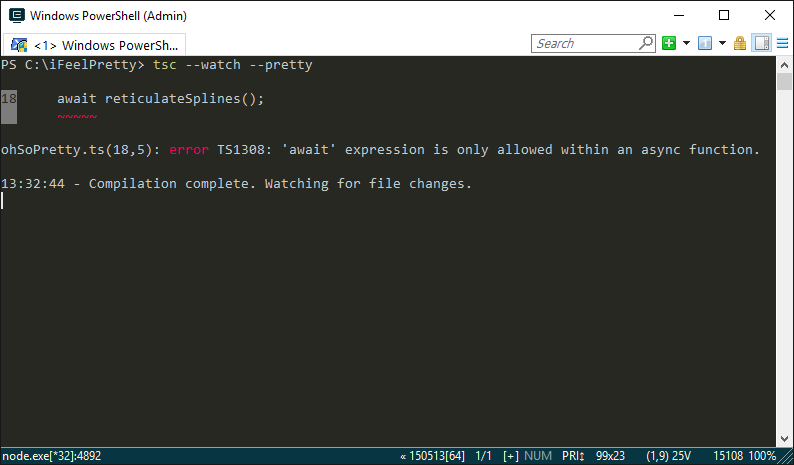
2779 |
2780 | ### 高亮 VS 2015 中的 JSX 代码
2781 |
2782 | 在 TypeScript 1.8 中, JSX 标签现在可以在 Visual Studio 2015 中被分别和高亮.
2783 |
2784 | 
2785 |
2786 | 通过 `工具`->`选项`->`环境`->`字体与颜色` 页面在 `VB XML` 颜色和字体设置中还可以进一步改变字体和颜色来自定义.
2787 |
2788 | ### `--project` (`-p`) 选项现在接受任意文件路径
2789 |
2790 | `--project` 命令行选项过去只接受包含了 `tsconfig.json` 文件的文件夹.
2791 | 考虑到不同的构建场景, 应该允许 `--project` 指向任何兼容的 JSON 文件.
2792 | 比如说, 一个用户可能会希望为 Node 5 编译 CommonJS 的 ES 2015, 为浏览器编译 AMD 的 ES5.
2793 | 现在少了这项限制, 用户可以更容易地直接使用 `tsc` 管理不同的构建目标, 无需再通过一些奇怪的方式, 比如将多个 `tsconfig.json` 文件放在不同的目录中.
2794 |
2795 | 如果参数是一个路径, 行为保持不变 - 编译器会尝试在该目录下寻找名为 `tsconfig.json` 的文件.
2796 |
2797 | ### 允许 tsconfig.json 中的注释
2798 |
2799 | 为配置添加文档是很棒的! `tsconfig.json` 现在支持单行和多行注释.
2800 |
2801 | ```json
2802 | {
2803 | "compilerOptions": {
2804 | "target": "ES2015", // 跑在 node v5 上, 呀!
2805 | "sourceMap": true // 让调试轻松一些
2806 | },
2807 | /*
2808 | * 排除的文件
2809 | */
2810 | "exclude": [
2811 | "file.d.ts"
2812 | ]
2813 | }
2814 | ```
2815 |
2816 | ### 支持输出到 IPC 驱动的文件
2817 |
2818 | TypeScript 1.8 允许用户将 `--outFile` 参数和一些特殊的文件系统对象一起使用, 比如命名的管道 (pipe), 设备 (devices) 等.
2819 |
2820 | 举个例子, 在很多与 Unix 相似的系统上, 标准输出流可以通过文件 `/dev/stdout` 访问.
2821 |
2822 | ```sh
2823 | tsc foo.ts --outFile /dev/stdout
2824 | ```
2825 |
2826 | 这一特性也允许输出给其他命令.
2827 |
2828 | 比如说, 我们可以输出生成的 JavaScript 给一个像 [pretty-js](https://www.npmjs.com/package/pretty-js) 这样的格式美化工具:
2829 |
2830 | ```sh
2831 | tsc foo.ts --outFile /dev/stdout | pretty-js
2832 | ```
2833 |
2834 | ### 改进了 Visual Studio 2015 中对 `tsconfig.json` 的支持
2835 |
2836 | TypeScript 1.8 允许在任何种类的项目中使用 `tsconfig.json` 文件.
2837 | 包括 ASP.NET v4 项目, *控制台应用*, 以及 *用 TypeScript 开发的 HTML 应用*.
2838 | 与此同时, 你可以添加不止一个 `tsconfig.json` 文件, 其中每一个都会作为项目的一部分被构建.
2839 | 这使得你可以在不使用多个不同项目的情况下为应用的不同部分使用不同的配置.
2840 |
2841 | 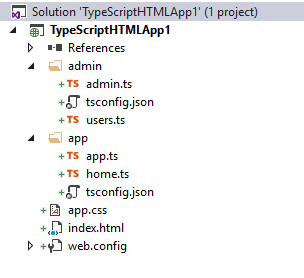
2842 |
2843 | 当项目中添加了 `tsconfig.json` 文件时, 我们还禁用了项目属性页面.
2844 | 也就是说所有配置的改变必须在 `tsconfig.json` 文件中进行.
2845 |
2846 | #### 一些限制
2847 |
2848 | - 如果你添加了一个 `tsconfig.json` 文件, 不在其上下文中的 TypeScript 文件不会被编译.
2849 | - Apache Cordova 应用依然有单个 `tsconfig.json` 文件的限制, 而这个文件必须在根目录或者 `scripts` 文件夹.
2850 | - 多数项目类型中都没有 `tsconfig.json` 的模板.
2851 |
2852 | ## TypeScript 1.7
2853 |
2854 | ### 支持 `async`/`await` 编译到 ES6 (Node v4+)
2855 |
2856 | TypeScript 目前在已经原生支持 ES6 generator 的引擎 (比如 Node v4 及以上版本) 上支持异步函数. 异步函数前置 `async` 关键字; `await` 会暂停执行, 直到一个异步函数执行后返回的 promise 被 fulfill 后获得它的值.
2857 |
2858 | #### 例子
2859 |
2860 | 在下面的例子中, 输入的内容将会延时 200 毫秒逐个打印:
2861 |
2862 | ```ts
2863 | "use strict";
2864 |
2865 | // printDelayed 返回值是一个 'Promise'
2866 | async function printDelayed(elements: string[]) {
2867 | for (const element of elements) {
2868 | await delay(200);
2869 | console.log(element);
2870 | }
2871 | }
2872 |
2873 | async function delay(milliseconds: number) {
2874 | return new Promise(resolve => {
2875 | setTimeout(resolve, milliseconds);
2876 | });
2877 | }
2878 |
2879 | printDelayed(["Hello", "beautiful", "asynchronous", "world"]).then(() => {
2880 | console.log();
2881 | console.log("打印每一个内容!");
2882 | });
2883 | ```
2884 |
2885 | 查看 [Async Functions](http://blogs.msdn.com/b/typescript/archive/2015/11/03/what-about-async-await.aspx) 一文了解更多.
2886 |
2887 | ### 支持同时使用 `--target ES6` 和 `--module`
2888 |
2889 | TypeScript 1.7 将 `ES6` 添加到了 `--module` 选项支持的选项的列表, 当编译到 `ES6` 时允许指定模块类型. 这让使用具体运行时中你需要的特性更加灵活.
2890 |
2891 | #### 例子
2892 |
2893 | ```json
2894 | {
2895 | "compilerOptions": {
2896 | "module": "amd",
2897 | "target": "es6"
2898 | }
2899 | }
2900 | ```
2901 |
2902 | ### `this` 类型
2903 |
2904 | 在方法中返回当前对象 (也就是 `this`) 是一种创建链式 API 的常见方式. 比如, 考虑下面的 `BasicCalculator` 模块:
2905 |
2906 | ```ts
2907 | export default class BasicCalculator {
2908 | public constructor(protected value: number = 0) { }
2909 |
2910 | public currentValue(): number {
2911 | return this.value;
2912 | }
2913 |
2914 | public add(operand: number) {
2915 | this.value += operand;
2916 | return this;
2917 | }
2918 |
2919 | public subtract(operand: number) {
2920 | this.value -= operand;
2921 | return this;
2922 | }
2923 |
2924 | public multiply(operand: number) {
2925 | this.value *= operand;
2926 | return this;
2927 | }
2928 |
2929 | public divide(operand: number) {
2930 | this.value /= operand;
2931 | return this;
2932 | }
2933 | }
2934 | ```
2935 |
2936 | 使用者可以这样表述 `2 * 5 + 1`:
2937 |
2938 | ```ts
2939 | import calc from "./BasicCalculator";
2940 |
2941 | let v = new calc(2)
2942 | .multiply(5)
2943 | .add(1)
2944 | .currentValue();
2945 | ```
2946 |
2947 | 这使得这么一种优雅的编码方式成为可能; 然而, 对于想要去继承 `BasicCalculator` 的类来说有一个问题. 想象使用者可能需要编写一个 `ScientificCalculator`:
2948 |
2949 | ```ts
2950 | import BasicCalculator from "./BasicCalculator";
2951 |
2952 | export default class ScientificCalculator extends BasicCalculator {
2953 | public constructor(value = 0) {
2954 | super(value);
2955 | }
2956 |
2957 | public square() {
2958 | this.value = this.value ** 2;
2959 | return this;
2960 | }
2961 |
2962 | public sin() {
2963 | this.value = Math.sin(this.value);
2964 | return this;
2965 | }
2966 | }
2967 | ```
2968 |
2969 | 因为 `BasicCalculator` 的方法返回了 `this`, TypeScript 过去推断的类型是 `BasicCalculator`, 如果在 `ScientificCalculator` 的实例上调用属于 `BasicCalculator` 的方法, 类型系统不能很好地处理.
2970 |
2971 | 举例来说:
2972 |
2973 | ```ts
2974 | import calc from "./ScientificCalculator";
2975 |
2976 | let v = new calc(0.5)
2977 | .square()
2978 | .divide(2)
2979 | .sin() // Error: 'BasicCalculator' 没有 'sin' 方法.
2980 | .currentValue();
2981 | ```
2982 |
2983 | 这已经不再是问题 - TypeScript 现在在类的实例方法中, 会将 `this` 推断为一个特殊的叫做 `this` 的类型. `this` 类型也就写作 `this`, 可以大致理解为 "方法调用时点左边的类型".
2984 |
2985 | `this` 类型在描述一些使用了 mixin 风格继承的库 (比如 Ember.js) 的交叉类型:
2986 |
2987 | ```ts
2988 | interface MyType {
2989 | extend(other: T): this & T;
2990 | }
2991 | ```
2992 |
2993 | ### ES7 幂运算符
2994 |
2995 | TypeScript 1.7 支持将在 ES7/ES2016 中增加的[幂运算符](https://github.com/rwaldron/exponentiation-operator): `**` 和 `**=`. 这些运算符会被转换为 ES3/ES5 中的 `Math.pow`.
2996 |
2997 | #### 举例
2998 |
2999 | ```ts
3000 | var x = 2 ** 3;
3001 | var y = 10;
3002 | y **= 2;
3003 | var z = -(4 ** 3);
3004 | ```
3005 |
3006 | 会生成下面的 JavaScript:
3007 |
3008 | ```ts
3009 | var x = Math.pow(2, 3);
3010 | var y = 10;
3011 | y = Math.pow(y, 2);
3012 | var z = -(Math.pow(4, 3));
3013 | ```
3014 |
3015 | ### 改进对象字面量解构的检查
3016 |
3017 | TypeScript 1.7 使对象和数组字面量解构初始值的检查更加直观和自然.
3018 |
3019 | 当一个对象字面量通过与之对应的对象解构绑定推断类型时:
3020 |
3021 | - 对象解构绑定中有默认值的属性对于对象字面量来说可选.
3022 | - 对象解构绑定中的属性如果在对象字面量中没有匹配的值, 则该属性必须有默认值, 并且会被添加到对象字面量的类型中.
3023 | - 对象字面量中的属性必须在对象解构绑定中存在.
3024 |
3025 | 当一个数组字面量通过与之对应的数组解构绑定推断类型时:
3026 |
3027 | - 数组解构绑定中的元素如果在数组字面量中没有匹配的值, 则该元素必须有默认值, 并且会被添加到数组字面量的类型中.
3028 |
3029 | #### 举例
3030 |
3031 | ```ts
3032 | // f1 的类型为 (arg?: { x?: number, y?: number }) => void
3033 | function f1({ x = 0, y = 0 } = {}) { }
3034 |
3035 | // And can be called as:
3036 | f1();
3037 | f1({});
3038 | f1({ x: 1 });
3039 | f1({ y: 1 });
3040 | f1({ x: 1, y: 1 });
3041 |
3042 | // f2 的类型为 (arg?: (x: number, y?: number) => void
3043 | function f2({ x, y = 0 } = { x: 0 }) { }
3044 |
3045 | f2();
3046 | f2({}); // 错误, x 非可选
3047 | f2({ x: 1 });
3048 | f2({ y: 1 }); // 错误, x 非可选
3049 | f2({ x: 1, y: 1 });
3050 | ```
3051 |
3052 | ### 装饰器 (decorators) 支持的编译目标版本增加 ES3
3053 |
3054 | 装饰器现在可以编译到 ES3. TypeScript 1.7 在 `__decorate` 函数中移除了 ES5 中增加的 `reduceRight`. 相关改动也内联了对 `Object.getOwnPropertyDescriptor` 和 `Object.defineProperty` 的调用, 并向后兼容, 使 ES5 的输出可以消除前面提到的 `Object` 方法的重复[3].
3055 |
3056 | ## TypeScript 1.6
3057 |
3058 | ### JSX 支持
3059 |
3060 | JSX 是一种可嵌入的类似 XML 的语法. 它将最终被转换为合法的 JavaScript, 但转换的语义和具体实现有关. JSX 随着 React 流行起来, 也出现在其他应用中. TypeScript 1.6 支持 JavaScript 文件中 JSX 的嵌入, 类型检查, 以及直接编译为 JavaScript 的选项.
3061 |
3062 | #### 新的 `.tsx` 文件扩展名和 `as` 运算符
3063 |
3064 | TypeScript 1.6 引入了新的 `.tsx` 文件扩展名. 这一扩展名一方面允许 TypeScript 文件中的 JSX 语法, 一方面将 `as` 运算符作为默认的类型转换方式 (避免 JSX 表达式和 TypeScript 前置类型转换运算符之间的歧义). 比如:
3065 |
3066 | ```ts
3067 | var x = foo;
3068 | // 与如下等价:
3069 | var x = foo as any;
3070 | ```
3071 |
3072 | #### 使用 React
3073 |
3074 | 使用 React 及 JSX 支持, 你需要使用 [React 类型声明](https://github.com/borisyankov/DefinitelyTyped/tree/master/react). 这些类型定义了 `JSX` 命名空间, 以便 TypeScript 能正确地检查 React 的 JSX 表达式. 比如:
3075 |
3076 | ```ts
3077 | ///
3078 |
3079 | interface Props {
3080 | name: string;
3081 | }
3082 |
3083 | class MyComponent extends React.Component {
3084 | render() {
3085 | return {this.props.foo}
3086 | }
3087 | }
3088 |
3089 | ; // 没问题
3090 | ; // 错误, `name` 不是一个数字
3091 | ```
3092 |
3093 | #### 使用其他 JSX 框架
3094 |
3095 | JSX 元素的名称和属性是根据 `JSX` 命名空间来检验的. 请查看 [JSX](https://github.com/Microsoft/TypeScript/wiki/JSX) 页面了解如何为自己的框架定义 `JSX` 命名空间.
3096 |
3097 | #### 编译输出
3098 |
3099 | TypeScript 支持两种 `JSX` 模式: `preserve` (保留) 和 `react`.
3100 |
3101 | - `preserve` 模式将会在输出中保留 JSX 表达式, 使之后的转换步骤可以处理. *并且输出的文件扩展名为 `.jsx`.*
3102 | - `react` 模式将会生成 `React.createElement`, 不再需要再通过 JSX 转换即可运行, 输出的文件扩展名为 `.js`.
3103 |
3104 | 查看 [JSX](https://github.com/Microsoft/TypeScript/wiki/JSX) 页面了解更多 JSX 在 TypeScript 中的使用.
3105 |
3106 | ### 交叉类型 (intersection types)
3107 |
3108 | TypeScript 1.6 引入了交叉类型作为联合类型 (union types) 逻辑上的补充. 联合类型 `A | B` 表示一个类型为 `A` 或 `B` 的实体, 而交叉类型 `A & B` 表示一个类型同时为 `A` 或 `B` 的实体.
3109 |
3110 | #### 例子
3111 |
3112 | ```ts
3113 | function extend(first: T, second: U): T & U {
3114 | let result = {};
3115 | for (let id in first) {
3116 | result[id] = first[id];
3117 | }
3118 | for (let id in second) {
3119 | if (!result.hasOwnProperty(id)) {
3120 | result[id] = second[id];
3121 | }
3122 | }
3123 | return result;
3124 | }
3125 |
3126 | var x = extend({ a: "hello" }, { b: 42 });
3127 | var s = x.a;
3128 | var n = x.b;
3129 | ```
3130 |
3131 | ```ts
3132 | type LinkedList = T & { next: LinkedList };
3133 |
3134 | interface Person {
3135 | name: string;
3136 | }
3137 |
3138 | var people: LinkedList;
3139 | var s = people.name;
3140 | var s = people.next.name;
3141 | var s = people.next.next.name;
3142 | var s = people.next.next.next.name;
3143 | interface A { a: string }
3144 | interface B { b: string }
3145 | interface C { c: string }
3146 |
3147 | var abc: A & B & C;
3148 | abc.a = "hello";
3149 | abc.b = "hello";
3150 | abc.c = "hello";
3151 | ```
3152 |
3153 | 查看 [issue #1256](https://github.com/Microsoft/TypeScript/issues/1256) 了解更多.
3154 |
3155 | ### 本地类型声明
3156 |
3157 | 本地的类, 接口, 枚举和类型别名现在可以在函数声明中出现. 本地类型为块级作用域, 与 `let` 和 `const` 声明的变量类似. 比如说:
3158 |
3159 | ```ts
3160 | function f() {
3161 | if (true) {
3162 | interface T { x: number }
3163 | let v: T;
3164 | v.x = 5;
3165 | }
3166 | else {
3167 | interface T { x: string }
3168 | let v: T;
3169 | v.x = "hello";
3170 | }
3171 | }
3172 | ```
3173 |
3174 | 推导出的函数返回值类型可能在函数内部声明的. 调用函数的地方无法引用到这样的本地类型, 但是它当然能从类型结构上匹配. 比如:
3175 |
3176 | ```ts
3177 | interface Point {
3178 | x: number;
3179 | y: number;
3180 | }
3181 |
3182 | function getPointFactory(x: number, y: number) {
3183 | class P {
3184 | x = x;
3185 | y = y;
3186 | }
3187 | return P;
3188 | }
3189 |
3190 | var PointZero = getPointFactory(0, 0);
3191 | var PointOne = getPointFactory(1, 1);
3192 | var p1 = new PointZero();
3193 | var p2 = new PointZero();
3194 | var p3 = new PointOne();
3195 | ```
3196 |
3197 | 本地的类型可以引用类型参数, 本地的类和接口本身即可能是泛型. 比如:
3198 |
3199 | ```ts
3200 | function f3() {
3201 | function f(x: X, y: Y) {
3202 | class C {
3203 | public x = x;
3204 | public y = y;
3205 | }
3206 | return C;
3207 | }
3208 | let C = f(10, "hello");
3209 | let v = new C();
3210 | let x = v.x; // number
3211 | let y = v.y; // string
3212 | }
3213 | ```
3214 |
3215 | ### 类表达式
3216 |
3217 | TypeScript 1.6 增加了对 ES6 类表达式的支持. 在一个类表达式中, 类的名称是可选的, 如果指明, 作用域仅限于类表达式本身. 这和函数表达式可选的名称类似. 在类表达式外无法引用其实例类型, 但是自然也能够从类型结构上匹配. 比如:
3218 |
3219 | ```ts
3220 | let Point = class {
3221 | constructor(public x: number, public y: number) { }
3222 | public length() {
3223 | return Math.sqrt(this.x * this.x + this.y * this.y);
3224 | }
3225 | };
3226 | var p = new Point(3, 4); // p has anonymous class type
3227 | console.log(p.length());
3228 | ```
3229 |
3230 | ### 继承表达式
3231 |
3232 | TypeScript 1.6 增加了对类继承任意值为一个构造函数的表达式的支持. 这样一来内建的类型也可以在类的声明中被继承.
3233 |
3234 | `extends` 语句过去需要指定一个类型引用, 现在接受一个可选类型参数的表达式. 表达式的类型必须为有至少一个构造函数签名的构造函数, 并且需要和 `extends` 语句中类型参数数量一致. 匹配的构造函数签名的返回值类型是类实例类型继承的基类型. 如此一来, 这使得普通的类和与类相似的表达式可以在 `extends` 语句中使用.
3235 |
3236 | 一些例子:
3237 |
3238 | ```ts
3239 | // 继承内建类
3240 |
3241 | class MyArray extends Array { }
3242 | class MyError extends Error { }
3243 |
3244 | // 继承表达式类
3245 |
3246 | class ThingA {
3247 | getGreeting() { return "Hello from A"; }
3248 | }
3249 |
3250 | class ThingB {
3251 | getGreeting() { return "Hello from B"; }
3252 | }
3253 |
3254 | interface Greeter {
3255 | getGreeting(): string;
3256 | }
3257 |
3258 | interface GreeterConstructor {
3259 | new (): Greeter;
3260 | }
3261 |
3262 | function getGreeterBase(): GreeterConstructor {
3263 | return Math.random() >= 0.5 ? ThingA : ThingB;
3264 | }
3265 |
3266 | class Test extends getGreeterBase() {
3267 | sayHello() {
3268 | console.log(this.getGreeting());
3269 | }
3270 | }
3271 | ```
3272 |
3273 | ### `abstract` (抽象的) 类和方法
3274 |
3275 | TypeScript 1.6 为类和它们的方法增加了 `abstract` 关键字. 一个抽象类允许没有被实现的方法, 并且不能被构造.
3276 |
3277 | #### 例子
3278 |
3279 | ```ts
3280 | abstract class Base {
3281 | abstract getThing(): string;
3282 | getOtherThing() { return 'hello'; }
3283 | }
3284 |
3285 | let x = new Base(); // 错误, 'Base' 是抽象的
3286 |
3287 | // 错误, 必须也为抽象类, 或者实现 'getThing' 方法
3288 | class Derived1 extends Base { }
3289 |
3290 | class Derived2 extends Base {
3291 | getThing() { return 'hello'; }
3292 | foo() {
3293 | super.getThing();// 错误: 不能调用 'super' 的抽象方法
3294 | }
3295 | }
3296 |
3297 | var x = new Derived2(); // 正确
3298 | var y: Base = new Derived2(); // 同样正确
3299 | y.getThing(); // 正确
3300 | y.getOtherThing(); // 正确
3301 | ```
3302 |
3303 | ### 泛型别名
3304 |
3305 | TypeScript 1.6 中, 类型别名支持泛型. 比如:
3306 |
3307 | ```ts
3308 | type Lazy = T | (() => T);
3309 |
3310 | var s: Lazy;
3311 | s = "eager";
3312 | s = () => "lazy";
3313 |
3314 | interface Tuple {
3315 | a: A;
3316 | b: B;
3317 | }
3318 |
3319 | type Pair = Tuple;
3320 | ```
3321 |
3322 | ### 更严格的对象字面量赋值检查
3323 |
3324 | 为了能发现多余或者错误拼写的属性, TypeScript 1.6 使用了更严格的对象字面量检查. 确切地说, 在将一个新的对象字面量赋值给一个变量, 或者传递给类型非空的参数时, 如果对象字面量的属性在目标类型中不存在, 则会视为错误.
3325 |
3326 | #### 例子
3327 |
3328 | ```ts
3329 | var x: { foo: number };
3330 | x = { foo: 1, baz: 2 }; // 错误, 多余的属性 `baz`
3331 |
3332 | var y: { foo: number, bar?: number };
3333 | y = { foo: 1, baz: 2 }; // 错误, 多余或者拼错的属性 `baz`
3334 | ```
3335 |
3336 | 一个类型可以通过包含一个索引签名来现实指明未出现在类型中的属性是被允许的.
3337 |
3338 | ```ts
3339 | var x: { foo: number, [x: string]: any };
3340 | x = { foo: 1, baz: 2 }; // 现在 `baz` 匹配了索引签名
3341 | ```
3342 |
3343 | ### ES6 生成器 (generators)
3344 |
3345 | TypeScript 1.6 添加了对于 ES6 输出的生成器支持.
3346 |
3347 | 一个生成器函数可以有返回值类型标注, 就像普通的函数. 标注表示生成器函数返回的生成器的类型. 这里有个例子:
3348 |
3349 | ```ts
3350 | function *g(): Iterable {
3351 | for (var i = 0; i < 100; i++) {
3352 | yield ""; // string 可以赋值给 string
3353 | }
3354 | yield * otherStringGenerator(); // otherStringGenerator 必须可遍历, 并且元素类型需要可赋值给 string
3355 | }
3356 | ```
3357 |
3358 | 没有标注类型的生成器函数会有自动推演的类型. 在下面的例子中, 类型会由 yield 语句推演出来:
3359 |
3360 | ```ts
3361 | function *g() {
3362 | for (var i = 0; i < 100; i++) {
3363 | yield ""; // 推导出 string
3364 | }
3365 | yield * otherStringGenerator(); // 推导出 otherStringGenerator 的元素类型
3366 | }
3367 | ```
3368 |
3369 | ### 对 `async` (异步) 函数的试验性支持
3370 |
3371 | TypeScript 1.6 增加了编译到 ES6 时对 `async` 函数试验性的支持. 异步函数会执行一个异步的操作, 在等待的同时不会阻塞程序的正常运行. 这是通过与 ES6 兼容的 `Promise` 实现完成的, 并且会将函数体转换为支持在等待的异步操作完成时继续的形式.
3372 |
3373 | 由 `async` 标记的函数或方法被称作_异步函数_. 这个标记告诉了编译器该函数体需要被转换, 关键字 _await_ 则应该被当做一个一元运算符, 而不是标示符. 一个_异步函数_必须返回类型与 `Promise` 兼容的值. 返回值类型的推断只能在有一个全局的, 与 ES6 兼容的 `Promise` 类型时使用.
3374 |
3375 | #### 例子
3376 |
3377 | ```ts
3378 | var p: Promise = /* ... */;
3379 | async function fn(): Promise {
3380 | var i = await p; // 暂停执行知道 'p' 得到结果. 'i' 的类型为 "number"
3381 | return 1 + i;
3382 | }
3383 |
3384 | var a = async (): Promise => 1 + await p; // 暂停执行.
3385 | var a = async () => 1 + await p; // 暂停执行. 使用 --target ES6 选项编译时返回值类型被推断为 "Promise"
3386 | var fe = async function(): Promise {
3387 | var i = await p; // 暂停执行知道 'p' 得到结果. 'i' 的类型为 "number"
3388 | return 1 + i;
3389 | }
3390 |
3391 | class C {
3392 | async m(): Promise {
3393 | var i = await p; // 暂停执行知道 'p' 得到结果. 'i' 的类型为 "number"
3394 | return 1 + i;
3395 | }
3396 |
3397 | async get p(): Promise {
3398 | var i = await p; // 暂停执行知道 'p' 得到结果. 'i' 的类型为 "number"
3399 | return 1 + i;
3400 | }
3401 | }
3402 | ```
3403 |
3404 | ### 每天发布新版本
3405 |
3406 | 由于并不算严格意义上的语言变化[4], 每天的新版本可以使用如下命令安装获得:
3407 |
3408 | ```sh
3409 | npm install -g typescript@next
3410 | ```
3411 |
3412 | ### 对模块解析逻辑的调整
3413 |
3414 | 从 1.6 开始, TypeScript 编译器对于 "commonjs" 的模块解析会使用一套不同的规则. 这些[规则](https://github.com/Microsoft/TypeScript/issues/2338) 尝试模仿 Node 查找模块的过程. 这就意味着 node 模块可以包含它的类型信息, 并且 TypeScript 编译器可以找到这些信息. 不过用户可以通过使用 `--moduleResolution` 命令行选项覆盖模块解析规则. 支持的值有:
3415 |
3416 | - 'classic' - TypeScript 1.6 以前的编译器使用的模块解析规则
3417 | - 'node' - 与 node 相似的模块解析
3418 |
3419 | ### 合并外围类和接口的声明
3420 |
3421 | 外围类的实例类型可以通过接口声明来扩展. 类构造函数对象不会被修改. 比如说:
3422 |
3423 | ```ts
3424 | declare class Foo {
3425 | public x : number;
3426 | }
3427 |
3428 | interface Foo {
3429 | y : string;
3430 | }
3431 |
3432 | function bar(foo : Foo) {
3433 | foo.x = 1; // 没问题, 在类 Foo 中有声明
3434 | foo.y = "1"; // 没问题, 在接口 Foo 中有声明
3435 | }
3436 | ```
3437 |
3438 | ### 用户定义的类型收窄函数
3439 |
3440 | TypeScript 1.6 增加了一个新的在 `if` 语句中收窄变量类型的方式, 作为对 `typeof` 和 `instanceof` 的补充. 用户定义的类型收窄函数的返回值类型标注形式为 `x is T`, 这里 `x` 是函数声明中的形参, `T` 是任何类型. 当一个用户定义的类型收窄函数在 `if` 语句中被传入某个变量执行时, 该变量的类型会被收窄到 `T`.
3441 |
3442 | #### 例子
3443 |
3444 | ```ts
3445 | function isCat(a: any): a is Cat {
3446 | return a.name === 'kitty';
3447 | }
3448 |
3449 | var x: Cat | Dog;
3450 | if(isCat(x)) {
3451 | x.meow(); // 那么, x 在这个代码块内是 Cat 类型
3452 | }
3453 | ```
3454 |
3455 | ### `tsconfig.json` 对 `exclude` 属性的支持
3456 |
3457 | 一个没有写明 `files` 属性的 `tsconfig.json` 文件 (默认会引用所有子目录下的 *.ts 文件) 现在可以包含一个 `exclude` 属性, 指定需要在编译中排除的文件或者目录列表. `exclude` 属性必须是一个字符串数组, 其中每一个元素指定对应的一个文件或者文件夹名称对于 `tsconfig.json` 文件所在位置的相对路径. 举例来说:
3458 |
3459 | ```json
3460 | {
3461 | "compilerOptions": {
3462 | "out": "test.js"
3463 | },
3464 | "exclude": [
3465 | "node_modules",
3466 | "test.ts",
3467 | "utils/t2.ts"
3468 | ]
3469 | }
3470 | ```
3471 |
3472 | `exclude` 列表不支持通配符. 仅仅可以是文件或者目录的列表.
3473 |
3474 | ### `--init` 命令行选项
3475 |
3476 | 在一个目录中执行 `tsc --init` 可以在该目录中创建一个包含了默认值的 `tsconfig.json`. 可以通过一并传递其他选项来生成初始的 `tsconfig.json`.
3477 |
3478 | ## TypeScript 1.5
3479 |
3480 | ### ES6 模块
3481 |
3482 | TypeScript 1.5 支持 ECMAScript 6 (ES6) 模块. ES6 模块可以看做之前 TypeScript 的外部模块换上了新的语法: ES6 模块是分开加载的源文件, 这些文件还可能引入其他模块, 并且导出部分供外部可访问. ES6 模块新增了几种导入和导出声明. 我们建议使用 TypeScript 开发的库和应用能够更新到新的语法, 但不做强制要求. 新的 ES6 模块语法和 TypeScript 原来的内部和外部模块结构同时被支持, 如果需要也可以混合使用.
3483 |
3484 | #### 导出声明
3485 |
3486 | 作为 TypeScript 已有的 `export` 前缀支持, 模块成员也可以使用单独导出的声明导出, 如果需要, `as` 语句可以指定不同的导出名称.
3487 |
3488 | ```ts
3489 | interface Stream { ... }
3490 | function writeToStream(stream: Stream, data: string) { ... }
3491 | export { Stream, writeToStream as write }; // writeToStream 导出为 write
3492 | ```
3493 |
3494 | 引入声明也可以使用 `as` 语句来指定一个不同的导入名称. 比如:
3495 |
3496 | ```ts
3497 | import { read, write, standardOutput as stdout } from "./inout";
3498 | var s = read(stdout);
3499 | write(stdout, s);
3500 | ```
3501 |
3502 | 作为单独导入的候选项, 命名空间导入可以导入整个模块:
3503 |
3504 | ```ts
3505 | import * as io from "./inout";
3506 | var s = io.read(io.standardOutput);
3507 | io.write(io.standardOutput, s);
3508 | ```
3509 |
3510 | ### 重新导出
3511 |
3512 | 使用 `from` 语句一个模块可以复制指定模块的导出项到当前模块, 而无需创建本地名称.
3513 |
3514 | ```ts
3515 | export { read, write, standardOutput as stdout } from "./inout";
3516 | ```
3517 |
3518 | `export *` 可以用来重新导出另一个模块的所有导出项. 在创建一个聚合了其他几个模块导出项的模块时很方便.
3519 |
3520 | ```ts
3521 | export function transform(s: string): string { ... }
3522 | export * from "./mod1";
3523 | export * from "./mod2";
3524 | ```
3525 |
3526 | #### 默认导出项
3527 |
3528 | 一个 export default 声明表示一个表达式是这个模块的默认导出项.
3529 |
3530 | ```ts
3531 | export default class Greeter {
3532 | sayHello() {
3533 | console.log("Greetings!");
3534 | }
3535 | }
3536 | ```
3537 |
3538 | 对应的可以使用默认导入:
3539 |
3540 | ```ts
3541 | import Greeter from "./greeter";
3542 | var g = new Greeter();
3543 | g.sayHello();
3544 | ```
3545 |
3546 | #### 无导入加载
3547 |
3548 | "无导入加载" 可以被用来加载某些只需要其副作用的模块.
3549 |
3550 | ```ts
3551 | import "./polyfills";
3552 | ```
3553 |
3554 | 了解更多关于模块的信息, 请参见 [ES6 模块支持规范](https://github.com/Microsoft/TypeScript/issues/2242).
3555 |
3556 | ### 声明与赋值的解构
3557 |
3558 | TypeScript 1.5 添加了对 ES6 解构声明与赋值的支持.
3559 |
3560 | #### 解构
3561 |
3562 | 解构声明会引入一个或多个命名变量, 并且初始化它们的值为对象的属性或者数组的元素对应的值.
3563 |
3564 | 比如说, 下面的例子声明了变量 `x`, `y` 和 `z`, 并且分别将它们的值初始化为 `getSomeObject().x`, `getSomeObject().x` 和 `getSomeObject().x`:
3565 |
3566 | ```ts
3567 | var { x, y, z } = getSomeObject();
3568 | ```
3569 |
3570 | 解构声明也可以用于从数组中得到值.
3571 |
3572 | ```ts
3573 | var [x, y, z = 10] = getSomeArray();
3574 | ```
3575 |
3576 | 相似的, 解构可以用在函数的参数声明中:
3577 |
3578 | ```ts
3579 | function drawText({ text = "", location: [x, y] = [0, 0], bold = false }) {
3580 | // 画出文本
3581 | }
3582 |
3583 | // 以一个对象字面量为参数调用 drawText
3584 | var item = { text: "someText", location: [1,2,3], style: "italics" };
3585 | drawText(item);
3586 | ```
3587 |
3588 | #### 赋值
3589 |
3590 | 解构也可以被用于普通的赋值表达式. 举例来讲, 交换两个变量的值可以被写作一个解构赋值:
3591 |
3592 | ```ts
3593 | var x = 1;
3594 | var y = 2;
3595 | [x, y] = [y, x];
3596 | ```
3597 |
3598 | ### `namespace` (命名空间) 关键字
3599 |
3600 | 过去 TypeScript 中 `module` 关键字既可以定义 "内部模块", 也可以定义 "外部模块"; 这让刚刚接触 TypeScript 的开发者有些困惑. "内部模块" 的概念更接近于大部分人眼中的命名空间; 而 "外部模块" 对于 JS 来讲, 现在也就是模块了.
3601 |
3602 | > 注意: 之前定义内部模块的语法依然被支持.
3603 |
3604 | **之前**:
3605 |
3606 | ```ts
3607 | module Math {
3608 | export function add(x, y) { ... }
3609 | }
3610 | ```
3611 |
3612 | **之后**:
3613 |
3614 | ```ts
3615 | namespace Math {
3616 | export function add(x, y) { ... }
3617 | }
3618 | ```
3619 |
3620 | ### `let` 和 `const` 的支持
3621 |
3622 | ES6 的 `let` 和 `const` 声明现在支持编译到 ES3 和 ES5.
3623 |
3624 | #### Const
3625 |
3626 | ```ts
3627 | const MAX = 100;
3628 |
3629 | ++MAX; // 错误: 自增/减运算符不能用于一个常量
3630 | ```
3631 |
3632 | #### 块级作用域
3633 |
3634 | ```ts
3635 | if (true) {
3636 | let a = 4;
3637 | // 使用变量 a
3638 | }
3639 | else {
3640 | let a = "string";
3641 | // 使用变量 a
3642 | }
3643 |
3644 | alert(a); // 错误: 变量 a 在当前作用域未定义
3645 | ```
3646 |
3647 | ### `for...of` 的支持
3648 |
3649 | TypeScript 1.5 增加了 ES6 `for...of` 循环编译到 ES3/ES5 时对数组的支持, 以及编译到 ES6 时对满足 `Iterator` 接口的全面支持.
3650 |
3651 | #### 例子:
3652 |
3653 | TypeScript 编译器会转译 `for...of` 数组到具有语义的 ES3/ES5 JavaScript (如果被设置为编译到这些版本).
3654 |
3655 | ```ts
3656 | for (var v of expr) { }
3657 | ```
3658 |
3659 | 会输出为:
3660 |
3661 | ```js
3662 | for (var _i = 0, _a = expr; _i < _a.length; _i++) {
3663 | var v = _a[_i];
3664 | }
3665 | ```
3666 |
3667 | ### 装饰器
3668 |
3669 | > TypeScript 装饰器是局域 [ES7 装饰器](https://github.com/wycats/javascript-decorators) 提案的.
3670 |
3671 | 一个装饰器是:
3672 |
3673 | - 一个表达式
3674 | - 并且值为一个函数
3675 | - 接受 `target`, `name`, 以及属性描述对象作为参数
3676 | - 可选返回一个会被应用到目标对象的属性描述对象
3677 |
3678 | > 了解更多, 请参见 [装饰器](https://github.com/Microsoft/TypeScript/issues/2249) 提案.
3679 |
3680 | #### 例子:
3681 |
3682 | 装饰器 `readonly` 和 `enumerable(false)` 会在属性 `method` 添加到类 `C` 上之前被应用. 这使得装饰器可以修改其实现, 具体到这个例子, 设置了 `descriptor` 为 `writable: false` 以及 `enumerable: false`.
3683 |
3684 | ```ts
3685 | class C {
3686 | @readonly
3687 | @enumerable(false)
3688 | method() { }
3689 | }
3690 |
3691 | function readonly(target, key, descriptor) {
3692 | descriptor.writable = false;
3693 | }
3694 |
3695 | function enumerable(value) {
3696 | return function (target, key, descriptor) {
3697 | descriptor.enumerable = value;
3698 | }
3699 | }
3700 | ```
3701 |
3702 | ### 计算属性
3703 |
3704 | 使用动态的属性初始化一个对象可能会很麻烦. 参考下面的例子:
3705 |
3706 | ```ts
3707 | type NeighborMap = { [name: string]: Node };
3708 | type Node = { name: string; neighbors: NeighborMap;}
3709 |
3710 | function makeNode(name: string, initialNeighbor: Node): Node {
3711 | var neighbors: NeighborMap = {};
3712 | neighbors[initialNeighbor.name] = initialNeighbor;
3713 | return { name: name, neighbors: neighbors };
3714 | }
3715 | ```
3716 |
3717 | 这里我们需要创建一个包含了 neighbor-map 的变量, 便于我们初始化它. 使用 TypeScript 1.5, 我们可以让编译器来干重活:
3718 |
3719 | ```ts
3720 | function makeNode(name: string, initialNeighbor: Node): Node {
3721 | return {
3722 | name: name,
3723 | neighbors: {
3724 | [initialNeighbor.name]: initialNeighbor
3725 | }
3726 | }
3727 | }
3728 | ```
3729 |
3730 | ### 指出 `UMD` 和 `System` 模块输出
3731 |
3732 | 作为 `AMD` 和 `CommonJS` 模块加载器的补充, TypeScript 现在支持输出为 `UMD` ([Universal Module Definition](https://github.com/umdjs/umd)) 和 [`System`](https://github.com/systemjs/systemjs) 模块的格式.
3733 |
3734 | **用法**:
3735 |
3736 | > tsc --module umd
3737 |
3738 | 以及
3739 |
3740 | > tsc --module system
3741 |
3742 |
3743 | ### Unicode 字符串码位转义
3744 |
3745 | ES6 中允许用户使用单个转义表示一个 Unicode 码位.
3746 |
3747 | 举个例子, 考虑我们需要转义一个包含了字符 '𠮷' 的字符串. 在 UTF-16/USC2 中, '𠮷' 被表示为一个代理对, 意思就是它被编码为一对 16 位值的代码单元, 具体来说是 `0xD842` 和 `0xDFB7`. 之前这意味着你必须将该码位转义为 `"\uD842\uDFB7"`. 这样做有一个重要的问题, 就事很难讲两个独立的字符同一个代理对区分开来.
3748 |
3749 | 通过 ES6 的码位转义, 你可以在字符串或模板字符串中清晰地通过一个转义表示一个确切的字符: `"\u{20bb7}"`. TypeScript 在编译到 ES3/ES5 时会将该字符串输出为 `"\uD842\uDFB7"`.
3750 |
3751 | ### 标签模板字符串编译到 ES3/ES5
3752 |
3753 | TypeScript 1.4 中, 我们添加了模板字符串编译到所有 ES 版本的支持, 并且支持标签模板字符串编译到 ES6. 得益于 [@ivogabe](https://github.com/ivogabe) 的大量付出, 我们填补了标签模板字符串对编译到 ES3/ES5 的支持.
3754 |
3755 | 当编译到 ES3/ES5 时, 下面的代码:
3756 |
3757 | ```ts
3758 | function oddRawStrings(strs: TemplateStringsArray, n1, n2) {
3759 | return strs.raw.filter((raw, index) => index % 2 === 1);
3760 | }
3761 |
3762 | oddRawStrings `Hello \n${123} \t ${456}\n world`
3763 | ```
3764 |
3765 | 会被输出为:
3766 |
3767 | ```ts
3768 | function oddRawStrings(strs, n1, n2) {
3769 | return strs.raw.filter(function (raw, index) {
3770 | return index % 2 === 1;
3771 | });
3772 | }
3773 | (_a = ["Hello \n", " \t ", "\n world"], _a.raw = ["Hello \\n", " \\t ", "\\n world"], oddRawStrings(_a, 123, 456));
3774 | var _a;
3775 | ```
3776 |
3777 | ### AMD 可选依赖名称
3778 |
3779 | `/// ` 会告诉编译器需要被注入到模块 `require` 方法中的非 TS 模块依赖; 然而在 TS 代码中无法使用这个模块.
3780 |
3781 | 新的 `amd-dependency name` 属性允许为 AMD 依赖传递一个可选的名称.
3782 |
3783 | ```ts
3784 | ///
3785 | declare var moduleA:MyType
3786 | moduleA.callStuff()
3787 | ```
3788 |
3789 | 生成的 JS 代码:
3790 |
3791 | ```ts
3792 | define(["require", "exports", "legacy/moduleA"], function (require, exports, moduleA) {
3793 | moduleA.callStuff()
3794 | });
3795 | ```
3796 |
3797 | ### 通过 `tsconfig.json` 指示一个项目
3798 |
3799 | 通过添加 `tsconfig.json` 到一个目录指明这是一个 TypeScript 项目的根目录. `tsconfig.json` 文件指定了根文件以及编译项目需要的编译器选项. 一个项目可以由以下方式编译:
3800 |
3801 | - 调用 tsc 并不指定输入文件, 此时编译器会从当前目录开始往上级目录寻找 `tsconfig.json` 文件.
3802 | - 调用 tsc 并不指定输入文件, 使用 `-project` (或者 `-p`) 命令行选项指定包含了 `tsconfig.json` 文件的目录.
3803 |
3804 | #### 例子:
3805 | ```json
3806 | {
3807 | "compilerOptions": {
3808 | "module": "commonjs",
3809 | "noImplicitAny": true,
3810 | "sourceMap": true,
3811 | }
3812 | }
3813 | ```
3814 |
3815 | 参见 [tsconfig.json wiki 页面](https://github.com/Microsoft/TypeScript/wiki/tsconfig.json) 查看更多信息.
3816 |
3817 | ### `--rootDir` 命令行选项
3818 |
3819 | 选项 `--outDir` 在输出中会保留输入的层级关系. 编译器将所有输入文件共有的最长路径作为根路径; 并且在输出中应用对应的子层级关系.
3820 |
3821 | 有的时候这并不是期望的结果, 比如输入 `FolderA/FolderB/1.ts` 和 `FolderA/FolderB/2.ts`, 输出结构会是 `FolderA/FolderB/` 对应的结构. 如果输入中新增 `FolderA/3.ts` 文件, 输出的结构将突然变为 `FolderA/` 对应的结构.
3822 |
3823 | `--rootDir` 指定了会输出对应结构的输入目录, 不再通过计算获得.
3824 |
3825 | ### `--noEmitHelpers` 命令行选项
3826 |
3827 | TypeScript 编译器在需要的时候会输出一些像 `__extends` 这样的工具函数. 这些函数会在使用它们的所有文件中输出. 如果你想要聚合所有的工具函数到同一个位置, 或者覆盖默认的行为, 使用 `--noEmitHelpers` 来告知编译器不要输出它们.
3828 |
3829 | ### `--newLine` 命令行选项
3830 |
3831 | 默认输出的换行符在 Windows 上是 `\r\n`, 在 *nix 上是 `\n`. `--newLine` 命令行标记可以覆盖这个行为, 并指定输出文件中使用的换行符.
3832 |
3833 | ### `--inlineSourceMap` and `inlineSources` 命令行选项
3834 |
3835 | `--inlineSourceMap` 将内嵌源文件映射到 `.js` 文件, 而不是在单独的 `.js.map` 文件中. `--inlineSources` 允许进一步将 `.ts` 文件内容包含到输出文件中.
3836 |
3837 | ## TypeScript 1.4
3838 |
3839 | ### 联合类型
3840 |
3841 | #### 概览
3842 |
3843 | 联合类型是描述一个可能是几个类型之一的值的有效方式. 举例来说, 你可能会有一个 API 用于执行一个 `commandline` 为 `string`, `string[]` 或者是返回值为 `string` 的函数的程序. 现在可以这样写:
3844 |
3845 | ```ts
3846 | interface RunOptions {
3847 | program: string;
3848 | commandline: string[]|string|(() => string);
3849 | }
3850 | ```
3851 |
3852 | 对联合类型的赋值非常直观 -- 任何可以赋值给联合类型中任意一个类型的值都可以赋值给这个联合类型:
3853 |
3854 | ```ts
3855 | var opts: RunOptions = /* ... */;
3856 | opts.commandline = '-hello world'; // 没问题
3857 | opts.commandline = ['-hello', 'world']; // 没问题
3858 | opts.commandline = [42]; // 错误, number 不是 string 或 string[]
3859 | ```
3860 |
3861 | 当从联合类型中读取时, 你可以看到联合类型中各类型共有的属性:
3862 |
3863 | ```ts
3864 | if (opts.length === 0) { // 没问题, string 和 string[] 都有 'length' 属性
3865 | console.log("it's empty");
3866 | }
3867 | ```
3868 |
3869 | 使用类型收窄, 你可以方便的使用具有联合类型的变量:
3870 |
3871 | ```ts
3872 | function formatCommandline(c: string|string[]) {
3873 | if (typeof c === 'string') {
3874 | return c.trim();
3875 | } else {
3876 | return c.join(' ');
3877 | }
3878 | }
3879 | ```
3880 |
3881 | #### 更严格的泛型
3882 |
3883 | 结合联合类型可以表示很多种类型场景, 我们决定让某些泛型调用更加严格. 之前, 以下的代码能出人意料地无错通过编译:
3884 |
3885 | ```ts
3886 | function equal(lhs: T, rhs: T): boolean {
3887 | return lhs === rhs;
3888 | }
3889 |
3890 | // 过去: 无错误
3891 | // 现在: 错误, 'string' 和 'number' 间没有最佳共有类型
3892 | var e = equal(42, 'hello');
3893 | ```
3894 |
3895 | 而通过联合类型, 你现在可以在函数声明或者调用的时候指明想要的行为:
3896 |
3897 | ```ts
3898 | // 'choose' 函数的参数类型必须相同
3899 | function choose1(a: T, b: T): T { return Math.random() > 0.5 ? a : b }
3900 | var a = choose1('hello', 42); // 错误
3901 | var b = choose1('hello', 42); // 正确
3902 |
3903 | // 'choose' 函数的参数类型不需要相同
3904 | function choose2(a: T, b: U): T|U { return Math.random() > 0.5 ? a : b }
3905 | var c = choose2('bar', 'foo'); // 正确, c: string
3906 | var d = choose2('hello', 42); // 正确, d: string|number
3907 | ```
3908 |
3909 | #### 更好的类型接口
3910 |
3911 | 联合类型也允许了数组或者其他地方有更好的类型接口, 以便一个集合中可能有多重类型.
3912 |
3913 | ```ts
3914 | var x = [1, 'hello']; // x: Array
3915 | x[0] = 'world'; // 正确
3916 | x[0] = false; // 错误, boolean 不是 string 或 number
3917 | ```
3918 |
3919 | ### `let` 声明
3920 |
3921 | 在 JavaScript 中, `var` 声明会被 "提升" 到它们所在的作用域. 这可能会导致一些令人疑惑的问题:
3922 |
3923 | ```ts
3924 | console.log(x); // 本意是在这里写 'y'
3925 | /* 当前代码块靠后的位置 */
3926 | var x = 'hello';
3927 | ```
3928 |
3929 | ES6 的关键字 `let` 现在在 TypeScript 中得到支持, 声明变量获得了更直观的块级语义. 一个 `let` 变量只能在它声明之后被引用, 其作用域被限定于它被声明的句法块:
3930 |
3931 | ```ts
3932 | if (foo) {
3933 | console.log(x); // 错误, 在声明前不能引用 x
3934 | let x = 'hello';
3935 | } else {
3936 | console.log(x); // 错误, x 在当前块中没有声明
3937 | }
3938 | ```
3939 |
3940 | `let` 仅在编译到 ECMAScript 6 时被支持 (`--target ES6`).
3941 |
3942 | ### `const` 声明
3943 |
3944 | 另外一种在 TypeScript 中被支持的新的 ES6 声明类型是 `const`. 一个 `const` 变量不能被赋值, 并且在声明的时候必须被初始化. 这可以用在你声明和初始化后不希望值被改变时:
3945 |
3946 | ```ts
3947 | const halfPi = Math.PI / 2;
3948 | halfPi = 2; // 错误, 不能赋值给一个 `const`
3949 | ```
3950 |
3951 | `const` 仅在编译到 ECMAScript 6 时被支持 (`--target ES6`).
3952 |
3953 | ## 模板字符串
3954 |
3955 | TypeScript 现在支持 ES6 模板字符串. 现在可以方便地在字符串中嵌入任何表达式:
3956 |
3957 | ```ts
3958 | var name = "TypeScript";
3959 | var greeting = `Hello, ${name}! Your name has ${name.length} characters`;
3960 | ```
3961 |
3962 | 当编译到 ES6 以前的版本时, 字符串会被分解为:
3963 |
3964 | ```ts
3965 | var name = "TypeScript!";
3966 | var greeting = "Hello, " + name + "! Your name has " + name.length + " characters";
3967 | ```
3968 |
3969 | ### 类型收窄
3970 |
3971 | 在 JavaScript 中常常用 `typeof` 或者 `instanceof` 在运行时检查一个表达式的类型. TypeScript 现在理解这些条件, 并且在 `if` 语句中会据此改变类型接口.
3972 |
3973 | 使用 `typeof` 来检查一个变量:
3974 |
3975 | ```ts
3976 | var x: any = /* ... */;
3977 | if(typeof x === 'string') {
3978 | console.log(x.subtr(1)); // 错误, 'subtr' 在 'string' 上不存在
3979 | }
3980 | // 这里 x 的类型依然是 any
3981 | x.unknown(); // 正确
3982 | ```
3983 |
3984 | 与联合类型和 `else` 一起使用 `typeof`:
3985 |
3986 | ```ts
3987 | var x: string | HTMLElement = /* ... */;
3988 | if (typeof x === 'string') {
3989 | // x 如上所述是一个 string
3990 | } else {
3991 | // x 在这里是 HTMLElement
3992 | console.log(x.innerHTML);
3993 | }
3994 | ```
3995 |
3996 | 与类和联合类型一起使用 `instanceof`:
3997 |
3998 | ```ts
3999 | class Dog { woof() { } }
4000 | class Cat { meow() { } }
4001 | var pet: Dog | Cat = /* ... */;
4002 | if (pet instanceof Dog) {
4003 | pet.woof(); // 正确
4004 | } else {
4005 | pet.woof(); // 错误
4006 | }
4007 | ```
4008 |
4009 | ### 类型别名
4010 |
4011 | 现在你可以使用 `type` 关键字为类型定义一个_别名_:
4012 |
4013 | ```ts
4014 | type PrimitiveArray = Array;
4015 | type MyNumber = number;
4016 | type NgScope = ng.IScope;
4017 | type Callback = () => void;
4018 | ```
4019 |
4020 | 类型别名和它们原来的类型完全相同; 它们仅仅是另一种表述的名称.
4021 |
4022 | ### `const enum` (完全内联的枚举)
4023 |
4024 | 枚举非常有用, 但有的程序可能并不需要生成的代码, 而简单地将枚举成员的数字值内联能够给这些程序带来一定好处. 新的 `const enum` 声明在类型安全上和 `enum` 一致, 但是编译后会被完全抹去.
4025 |
4026 | ```ts
4027 | const enum Suit { Clubs, Diamonds, Hearts, Spades }
4028 | var d = Suit.Diamonds;
4029 | ```
4030 |
4031 | 编译为:
4032 |
4033 | ```js
4034 | var d = 1;
4035 | ```
4036 |
4037 | 如果可能 TypeScript 现在会计算枚举的值:
4038 |
4039 | ```ts
4040 | enum MyFlags {
4041 | None = 0,
4042 | Neat = 1,
4043 | Cool = 2,
4044 | Awesome = 4,
4045 | Best = Neat | Cool | Awesome
4046 | }
4047 | var b = MyFlags.Best; // 输出 var b = 7;
4048 | ```
4049 |
4050 | ### `--noEmitOnError` 命令行选项
4051 |
4052 | TypeScript 编译器的默认行为会在出现类型错误 (比如, 尝试赋值一个 `string` 给 `number`) 时依然输出 .js 文件. 在构建服务器或者其他只希望有 "干净" 版本的场景可能并不是期望的结果. 新的 `noEmitOnError` 标记会使编译器在有任何错误时不输出 .js 代码.
4053 |
4054 | 对于 MSBuild 的项目这是目前的默认设定; 这使 MSBuild 的增量编译变得可行, 输出仅在代码没有问题时产生.
4055 |
4056 | ### AMD 模块名称
4057 |
4058 | AMD 模块默认生成是匿名的. 对于一些像打包工具这样的处理输出模块的工具会带来一些问题 (比如 r.js).
4059 |
4060 | 新的 `amd-module name` 标签允许传入一个可选的模块名称给编译器:
4061 |
4062 | ```ts
4063 | //// [amdModule.ts]
4064 | ///
4065 | export class C {
4066 | }
4067 | ```
4068 |
4069 | 这会在调用 AMD 的 `define` 方法时传入名称 `NamedModule`:
4070 |
4071 | ```ts
4072 | //// [amdModule.js]
4073 | define("NamedModule", ["require", "exports"], function (require, exports) {
4074 | var C = (function () {
4075 | function C() {
4076 | }
4077 | return C;
4078 | })();
4079 | exports.C = C;
4080 | });
4081 | ```
4082 |
4083 | ## TypeScript 1.3
4084 |
4085 | ### 受保护成员
4086 |
4087 | 在类中新的 `protected` 标示符就像它在其他一些像 C++, C# 与 Java 这样的常见语言中的功能一致. 一个 `protected` (受保护的) 的成员仅在子类或者声明它的类中可见:
4088 |
4089 | ```ts
4090 | class Thing {
4091 | protected doSomething() { /* ... */ }
4092 | }
4093 |
4094 | class MyThing extends Thing {
4095 | public myMethod() {
4096 | // 正确, 可以在子类中访问受保护成员
4097 | this.doSomething();
4098 | }
4099 | }
4100 | var t = new MyThing();
4101 | t.doSomething(); // 错误, 不能在类外调用受保护成员
4102 | ```
4103 |
4104 | ### 元组类型
4105 |
4106 | 元组类型可以表示一个数组中部分元素的类型是已知, 但不一定相同的情况. 举例来说, 你可能希望描述一个数组, 在下标 0 处为 `string`, 在 1 处为 `number`:
4107 |
4108 | ```ts
4109 | // 声明一个元组类型
4110 | var x: [string, number];
4111 | // 初始化
4112 | x = ['hello', 10]; // 正确
4113 | // 错误的初始化
4114 | x = [10, 'hello']; // 错误
4115 | ```
4116 |
4117 | 当使用已知的下标访问某个元素时, 能够获得正确的类型:
4118 |
4119 | ```ts
4120 | console.log(x[0].substr(1)); // 正确
4121 | console.log(x[1].substr(1)); // 错误, 'number' 类型没有 'substr' 属性
4122 | ```
4123 |
4124 | 注意在 TypeScript 1.4 中, 当访问某个下标不在已知范围内的元素时, 获得的是联合类型:
4125 |
4126 | ```ts
4127 | x[3] = 'world'; // 正确
4128 | console.log(x[5].toString()); // 正确, 'string' 和 'number' 都有 toString 方法
4129 | x[6] = true; // 错误, boolean 不是 number 或 string
4130 | ```
4131 |
4132 | ## TypeScript 1.1
4133 |
4134 | ### 性能优化
4135 |
4136 | 1.1 版编译器大体比之前任何版本快 4 倍. 查看 [这篇文章里令人印象深刻的对比](http://blogs.msdn.com/b/typescript/archive/2014/10/06/announcing-typescript-1-1-ctp.aspx).
4137 |
4138 | ### 更好的模块可见规则
4139 |
4140 | TypeScript 现在仅在开启了 `--declaration` 标记时严格要求模块类型的可见性. 对于 Angular 的场景来说非常有用, 比如:
4141 |
4142 | ```ts
4143 | module MyControllers {
4144 | interface ZooScope extends ng.IScope {
4145 | animals: Animal[];
4146 | }
4147 | export class ZooController {
4148 | // 过去是错误的 (无法暴露 ZooScope), 而现在仅在需要生成 .d.ts 文件时报错
4149 | constructor(public $scope: ZooScope) { }
4150 | /* 更多代码 */
4151 | }
4152 | }
4153 | ```
4154 |
4155 | ---
4156 |
4157 | **[1]** 原文为 "A **mixin class** is a class declaration or expression that `extends` an expression of a type parameter type."
4158 |
4159 | **[2]** 原文为 "Null- and undefined-aware types"
4160 |
4161 | **[3]** 原文为 "The changes also inline calls `Object.getOwnPropertyDescriptor` and `Object.defineProperty` in a backwards-compatible fashion that allows for a to clean up the emit for ES5 and later by removing various repetitive calls to the aforementioned `Object` methods."
4162 |
4163 | **[4]** 原文为 "While not strictly a language change..."
4164 |
--------------------------------------------------------------------------------