75 | );
76 | }
77 |
78 | export default App;
79 |
--------------------------------------------------------------------------------
/frontend/README.md:
--------------------------------------------------------------------------------
1 | This project was bootstrapped with [Create React App](https://github.com/facebook/create-react-app).
2 |
3 | ## Available Scripts
4 |
5 | In the project directory, you can run:
6 |
7 | ### `yarn start`
8 |
9 | Runs the app in the development mode.
10 | Open [http://localhost:3000](http://localhost:3000) to view it in the browser.
11 |
12 | The page will reload if you make edits.
13 | You will also see any lint errors in the console.
14 |
15 | ### `yarn test`
16 |
17 | Launches the test runner in the interactive watch mode.
18 | See the section about [running tests](https://facebook.github.io/create-react-app/docs/running-tests) for more information.
19 |
20 | ### `yarn build`
21 |
22 | Builds the app for production to the `build` folder.
23 | It correctly bundles React in production mode and optimizes the build for the best performance.
24 |
25 | The build is minified and the filenames include the hashes.
26 | Your app is ready to be deployed!
27 |
28 | See the section about [deployment](https://facebook.github.io/create-react-app/docs/deployment) for more information.
29 |
30 | ### `yarn eject`
31 |
32 | **Note: this is a one-way operation. Once you `eject`, you can’t go back!**
33 |
34 | If you aren’t satisfied with the build tool and configuration choices, you can `eject` at any time. This command will remove the single build dependency from your project.
35 |
36 | Instead, it will copy all the configuration files and the transitive dependencies (webpack, Babel, ESLint, etc) right into your project so you have full control over them. All of the commands except `eject` will still work, but they will point to the copied scripts so you can tweak them. At this point you’re on your own.
37 |
38 | You don’t have to ever use `eject`. The curated feature set is suitable for small and middle deployments, and you shouldn’t feel obligated to use this feature. However we understand that this tool wouldn’t be useful if you couldn’t customize it when you are ready for it.
39 |
40 | ## Learn More
41 |
42 | You can learn more in the [Create React App documentation](https://facebook.github.io/create-react-app/docs/getting-started).
43 |
44 | To learn React, check out the [React documentation](https://reactjs.org/).
45 |
46 | ### Code Splitting
47 |
48 | This section has moved here: https://facebook.github.io/create-react-app/docs/code-splitting
49 |
50 | ### Analyzing the Bundle Size
51 |
52 | This section has moved here: https://facebook.github.io/create-react-app/docs/analyzing-the-bundle-size
53 |
54 | ### Making a Progressive Web App
55 |
56 | This section has moved here: https://facebook.github.io/create-react-app/docs/making-a-progressive-web-app
57 |
58 | ### Advanced Configuration
59 |
60 | This section has moved here: https://facebook.github.io/create-react-app/docs/advanced-configuration
61 |
62 | ### Deployment
63 |
64 | This section has moved here: https://facebook.github.io/create-react-app/docs/deployment
65 |
66 | ### `yarn build` fails to minify
67 |
68 | This section has moved here: https://facebook.github.io/create-react-app/docs/troubleshooting#npm-run-build-fails-to-minify
69 |
--------------------------------------------------------------------------------
/frontend/src/usePushNotifications.js:
--------------------------------------------------------------------------------
1 | import { useState, useEffect } from 'react';
2 | import axios from 'axios';
3 | import * as serviceWorker from './serviceWorker';
4 |
5 | const pushNotificationSupported = serviceWorker.isPushNotificationSupported();
6 | // check push notifications are supported by the browser
7 |
8 | export default function usePushNotifications() {
9 | const [userConsent, setSuserConsent] = useState(Notification.permission);
10 | //to manage the user consent: Notification.permission is a JavaScript native function that return the current state of the permission
11 | //We initialize the userConsent with that value
12 | const [userSubscription, setUserSubscription] = useState(null);
13 | //to manage the use push notification subscription
14 | const [pushServerSubscriptionId, setPushServerSubscriptionId] = useState();
15 | //to manage the push server subscription
16 | const [error, setError] = useState(null);
17 | //to manage errors
18 | const [loading, setLoading] = useState(true);
19 | //to manage async actions
20 |
21 | useEffect(() => {
22 | if (pushNotificationSupported) {
23 | setLoading(true);
24 | setError(false);
25 | serviceWorker.register();
26 | }
27 | }, []);
28 | //if the push notifications are supported, registers the service worker
29 | //this effect runs only the first render
30 |
31 | useEffect(() => {
32 | setLoading(true);
33 | setError(false);
34 | const getExixtingSubscription = async () => {
35 | const existingSubscription = await serviceWorker.getUserSubscription();
36 | setUserSubscription(existingSubscription);
37 | setLoading(false);
38 | };
39 | getExixtingSubscription();
40 | }, []);
41 | //Retrieve if there is any push notification subscription for the registered service worker
42 | // this use effect runs only in the first render
43 |
44 | /**
45 | * define a click handler that asks the user permission,
46 | * it uses the setSuserConsent state, to set the consent of the user
47 | * If the user denies the consent, an error is created with the setError hook
48 | */
49 | const onClickAskUserPermission = () => {
50 | setLoading(true);
51 | setError(false);
52 | serviceWorker.askUserPermission().then((consent) => {
53 | setSuserConsent(consent);
54 | if (consent !== 'granted') {
55 | setError({
56 | name: 'Consent denied',
57 | message: 'You denied the consent to receive notifications',
58 | code: 0
59 | });
60 | }
61 | setLoading(false);
62 | });
63 | };
64 | //
65 |
66 | /**
67 | * define a click handler that creates a push notification subscription.
68 | * Once the subscription is created, it uses the setUserSubscription hook
69 | */
70 | const onClickSusbribeToPushNotification = () => {
71 | setLoading(true);
72 | setError(false);
73 | serviceWorker
74 | .createNotificationSubscription()
75 | .then(function(subscrition) {
76 | setUserSubscription(subscrition);
77 | setLoading(false);
78 | })
79 | .catch((err) => {
80 | console.error(
81 | "Couldn't create the notification subscription",
82 | err,
83 | 'name:',
84 | err.name,
85 | 'message:',
86 | err.message,
87 | 'code:',
88 | err.code
89 | );
90 | setError(err);
91 | setLoading(false);
92 | });
93 | };
94 |
95 | /**
96 | * define a click handler that sends the push susbcribtion to the push server.
97 | * Once the subscription ics created on the server, it saves the id using the hook setPushServerSubscriptionId
98 | */
99 | const onClickSendSubscriptionToPushServer = () => {
100 | setLoading(true);
101 | setError(false);
102 | axios
103 | .post('http://localhost:4000/subscription', { data: userSubscription })
104 | .then(function(response) {
105 | setPushServerSubscriptionId(response.data.id);
106 | setLoading(false);
107 | })
108 | .catch((err) => {
109 | setLoading(false);
110 | setError(err);
111 | });
112 | };
113 |
114 | /**
115 | * define a click handler that requests the push server to send a notification, passing the id of the saved subscription
116 | */
117 | const onClickSendNotification = async () => {
118 | setLoading(true);
119 | setError(false);
120 | axios.get(`http://localhost:4000/subscription/${pushServerSubscriptionId}`).catch((error) => {
121 | setLoading(false);
122 | setError(error);
123 | });
124 | setLoading(false);
125 | };
126 |
127 | return {
128 | onClickAskUserPermission,
129 | onClickSusbribeToPushNotification,
130 | onClickSendSubscriptionToPushServer,
131 | pushServerSubscriptionId,
132 | onClickSendNotification,
133 | userConsent,
134 | pushNotificationSupported,
135 | userSubscription,
136 | error,
137 | loading
138 | };
139 | }
140 |
--------------------------------------------------------------------------------
/frontend/src/serviceWorker.js:
--------------------------------------------------------------------------------
1 | // This optional code is used to register a service worker.
2 | // register() is not called by default.
3 |
4 | // This lets the app load faster on subsequent visits in production, and gives
5 | // it offline capabilities. However, it also means that developers (and users)
6 | // will only see deployed updates on subsequent visits to a page, after all the
7 | // existing tabs open on the page have been closed, since previously cached
8 | // resources are updated in the background.
9 |
10 | // To learn more about the benefits of this model and instructions on how to
11 | // opt-in, read https://bit.ly/CRA-PWA
12 |
13 | const isLocalhost = Boolean(
14 | window.location.hostname === 'localhost' ||
15 | // [::1] is the IPv6 localhost address.
16 | window.location.hostname === '[::1]' ||
17 | // 127.0.0.0/8 are considered localhost for IPv4.
18 | window.location.hostname.match(/^127(?:\.(?:25[0-5]|2[0-4][0-9]|[01]?[0-9][0-9]?)){3}$/)
19 | );
20 |
21 | const pushServerPublicKey =
22 | 'BIN2Jc5Vmkmy-S3AUrcMlpKxJpLeVRAfu9WBqUbJ70SJOCWGCGXKY-Xzyh7HDr6KbRDGYHjqZ06OcS3BjD7uAm8';
23 |
24 | export function register(config) {
25 | if (process.env.NODE_ENV === 'production' && 'serviceWorker' in navigator) {
26 | // The URL constructor is available in all browsers that support SW.
27 | const publicUrl = new URL(process.env.PUBLIC_URL, window.location.href);
28 | if (publicUrl.origin !== window.location.origin) {
29 | // Our service worker won't work if PUBLIC_URL is on a different origin
30 | // from what our page is served on. This might happen if a CDN is used to
31 | // serve assets; see https://github.com/facebook/create-react-app/issues/2374
32 | return;
33 | }
34 |
35 | window.addEventListener('load', () => {
36 | const swUrl = `${process.env.PUBLIC_URL}/service-worker.js`;
37 |
38 | if (isLocalhost) {
39 | // This is running on localhost. Let's check if a service worker still exists or not.
40 | checkValidServiceWorker(swUrl, config);
41 |
42 | // Add some additional logging to localhost, pointing developers to the
43 | // service worker/PWA documentation.
44 | navigator.serviceWorker.ready.then(() => {
45 | console.log(
46 | 'This web app is being served cache-first by a service ' +
47 | 'worker. To learn more, visit https://bit.ly/CRA-PWA'
48 | );
49 | });
50 | } else {
51 | // Is not localhost. Just register service worker
52 | registerValidSW(swUrl, config);
53 | console.log('aaa');
54 | }
55 | });
56 | }
57 | }
58 |
59 | function registerValidSW(swUrl, config) {
60 | navigator.serviceWorker
61 | .register(swUrl)
62 | .then((registration) => {
63 | registration.onupdatefound = () => {
64 | const installingWorker = registration.installing;
65 | if (installingWorker == null) {
66 | return;
67 | }
68 | installingWorker.onstatechange = () => {
69 | if (installingWorker.state === 'installed') {
70 | if (navigator.serviceWorker.controller) {
71 | // At this point, the updated precached content has been fetched,
72 | // but the previous service worker will still serve the older
73 | // content until all client tabs are closed.
74 | console.log(
75 | 'New content is available and will be used when all ' +
76 | 'tabs for this page are closed. See https://bit.ly/CRA-PWA.'
77 | );
78 |
79 | // Execute callback
80 | if (config && config.onUpdate) {
81 | config.onUpdate(registration);
82 | }
83 | } else {
84 | // At this point, everything has been precached.
85 | // It's the perfect time to display a
86 | // "Content is cached for offline use." message.
87 | console.log('Content is cached for offline use.');
88 |
89 | // Execute callback
90 | if (config && config.onSuccess) {
91 | config.onSuccess(registration);
92 | }
93 | }
94 | }
95 | };
96 | };
97 | })
98 | .catch((error) => {
99 | console.error('Error during service worker registration:', error);
100 | });
101 | }
102 |
103 | function checkValidServiceWorker(swUrl, config) {
104 | // Check if the service worker can be found. If it can't reload the page.
105 | fetch(swUrl, {
106 | headers: { 'Service-Worker': 'script' }
107 | })
108 | .then((response) => {
109 | // Ensure service worker exists, and that we really are getting a JS file.
110 | const contentType = response.headers.get('content-type');
111 | if (
112 | response.status === 404 ||
113 | (contentType != null && contentType.indexOf('javascript') === -1)
114 | ) {
115 | // No service worker found. Probably a different app. Reload the page.
116 | navigator.serviceWorker.ready.then((registration) => {
117 | registration.unregister().then(() => {
118 | window.location.reload();
119 | });
120 | });
121 | } else {
122 | // Service worker found. Proceed as normal.
123 | registerValidSW(swUrl, config);
124 | }
125 | })
126 | .catch(() => {
127 | console.log('No internet connection found. App is running in offline mode.');
128 | });
129 | }
130 |
131 | export function unregister() {
132 | if ('serviceWorker' in navigator) {
133 | navigator.serviceWorker.ready
134 | .then((registration) => {
135 | registration.unregister();
136 | })
137 | .catch((error) => {
138 | console.error(error.message);
139 | });
140 | }
141 | }
142 |
143 | export async function askUserPermission() {
144 | return await Notification.requestPermission();
145 | }
146 |
147 | export async function createNotificationSubscription() {
148 | //wait for service worker installation to be ready
149 |
150 | const serviceWorker = await navigator.serviceWorker.ready;
151 |
152 | // subscribe and return the subscription
153 | return await serviceWorker.pushManager.subscribe({
154 | userVisibleOnly: true,
155 | applicationServerKey: pushServerPublicKey
156 | });
157 | }
158 |
159 | export function getUserSubscription() {
160 | //wait for service worker installation to be ready, and then
161 | return navigator.serviceWorker.ready
162 | .then(function(serviceWorker) {
163 | return serviceWorker.pushManager.getSubscription();
164 | })
165 | .then(function(pushSubscription) {
166 | return pushSubscription;
167 | });
168 | }
169 |
170 | export function isPushNotificationSupported() {
171 | return 'serviceWorker' in navigator && 'PushManager' in window;
172 | }
173 |
--------------------------------------------------------------------------------
/README.md:
--------------------------------------------------------------------------------
1 | # Push_Notification_Nodejs_Reactjs
2 |
3 | Gần đây mình có nghe một người bạn kể về một task trong công việc đó là làm sao để bắn thông báo cho ng dùng thông qua browser . Lúc đấy vs mình thì khái niệm này khá mơ hồ và mình cho rằng nếu đã tắt tab ứng dụng rồi thì làm sao bắn đc Notification chứ. Rồi mình thử tìm hiểu xem có thực sự làm đc chuyện đấy không . Bài viết này mình sẽ chia sẻ các thức hoạt động cũng như một ví dụ minh họa nhỏ mà mình tìm hiểu và làm được về Push notification .
4 | 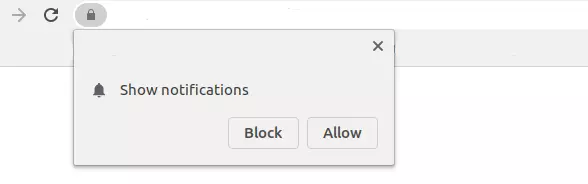
5 |
6 | À hóa ra là nó đây thứ mà bấy lâu nay mình nghĩ nó là quảng cáo và nhấn vào Block mà chẳng mảy may suy nghĩ nó thực sự là gì. Không dài dòng thêm nữa chúng ta cùng bắt đầu tìm hiểu về nó nào
7 |
8 | ## Service Worker
9 | Ủa ủa đang tìm hiểu về Push notification lên browser cơ mà. Vâng mình ko nhầm bài viết đâu ạ. Đầu tiên phải tìm hiểu Service Worker trước đã, Service Worker là một **script** hoạt động ngầm trên browser ( browser underground ) mà không có sự tương tác của người dùng . Ngoài ra, nó giống như một proxy hoạt động ở phía người dùng.
10 |
11 | ### Chúng ta có thể làm gì với Service Worker?
12 |
13 | * Kiểm soát Network Traffic!
14 | * Cache lại dữ liệu req/res từ đó có thể chạy web offline
15 | * Thực hiện một số tính năng chạy background như: **Push notification** và background synchronization.
16 | * Service Worker chỉ có thể làm việc trên giao thức HTTPS. Bạn cũng có thể làm việc trên localhost trong quá trình phát triển.
17 | * ...
18 |
19 | Trong bài này thì mình chỉ tập trung vào phần Push notification thôi nhé . Đầu tiên chúng ta cần nắm rõ hoạt động Push này có 2 phần:
20 | * **Push** : việc gửi thông báo từ máy chủ đến ứng dụng. vì thế bạn sẽ cần một server
21 | * **Notification** : thông báo được hiển thị trên thanh trạng thái của điện thoại hoặc trên browser.
22 |
23 | ## Web push notifications flow
24 | Chúng ta sẽ có 4 tác nhân chính trong quá trình này :
25 | * **User** : Ng dùng muốn nhận thông báo
26 | * **Application** : Ứng dụng chạy ở phía ng dùng
27 | * **Service worker** : Chạy trên browser
28 | * **Push Server** : Server bắn tin nhắn đến service workers
29 | 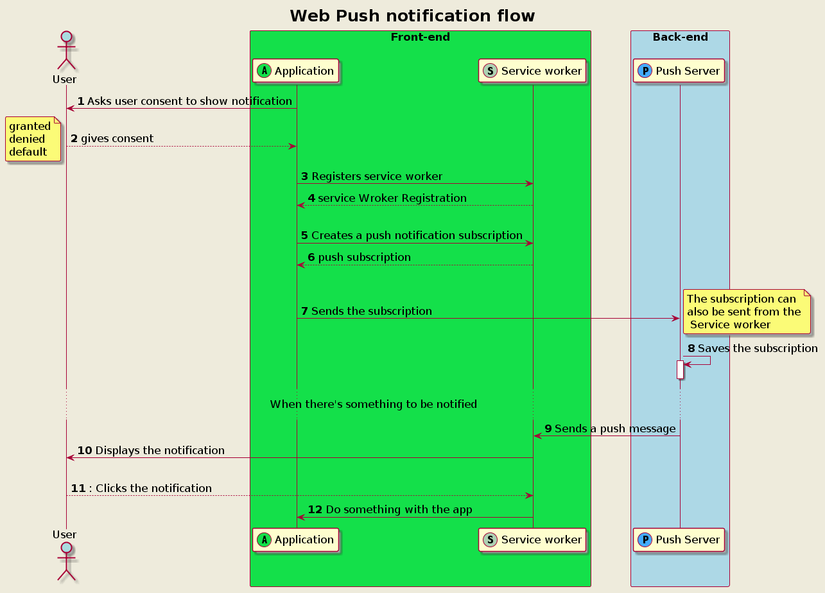
30 |
31 | Giải thích flow :
32 |
33 | **1,** Luồng bắt đầu khi ứng dụng **yêu cầu người dùng đồng ý** hiển thị notifications ( giống như ảnh ban đầu ý ). User sẽ có một vài kịch bản có thể xảy ra :
34 |
35 | * Do nothing : `default` và như vậy thì notification sẽ ko hiện ra
36 | * Grant : `granded` notification sẽ có thể hiển thị
37 | * Deny : `denied` notification sẽ ko hiện ra
38 |
39 | **2, 3,** Sau khi người dùng đồng ý nhận notifications ứng dụng sẽ register một service worker
40 |
41 | **4, 5, 6,** Sau khi đăng kí thành công sẽ tiến hành tạo push notification **subscription**
42 |
43 | **7,** Sau đó ứng dụng sẽ gửi đến server . Tất nhiên là server cần phải có 1 endpoint subscription để gửi noti
44 |
45 | **8,** Sau đó server sẽ lưu subcription đó
46 |
47 | **9,** Sau đó Serer có thể gửi notification đến service worker .
48 |
49 | **10, 11, 12,** Service sẽ hiển thị cho ng dùng . Sau đó nếu ng dùng nhấn vào notification đấy server worker sẽ nhận được hành động đó thông quá **notification click event**. Sau đó nó có thể kích hoạt một số kịch bản như hiển thị trang web , gọi API , v..v....
50 |
51 | ## Code tí vận động ngón tay nào
52 | Ví dụ này mình sẽ làm bằng **Nodejs** và **Reactjs** vì thế mặc định là mọi người có một số kiến thức cũng như môi trường cài đặt nhé .
53 | ### Tạo server
54 | Vẫn những câu lệnh quen thuộc tạo một server nodejs + express và lần này có thêm một thư viện `web-push`
55 | ```
56 | npm init -y
57 | yarn add body-parser cors crypto express morgan web-push
58 | ```
59 |
60 | tạo file `index.js`
61 | ```js
62 | const express = require('express');
63 | const bodyParser = require('body-parser');
64 | const logger = require('morgan');
65 | const cors = require('cors');
66 | const subscriptionHandler = require('./subscriptionHandler');
67 |
68 | var port = process.env.PORT || 4000;
69 |
70 | const app = express();
71 |
72 | app.use(
73 | cors({
74 | origin: '*', // allow to server to accept request from different origin
75 | methods: 'GET,HEAD,PUT,PATCH,POST,DELETE',
76 | credentials: true // allow session cookie from browser to pass through
77 | })
78 | );
79 |
80 | app.use(logger('dev'));
81 | app.use(bodyParser.urlencoded({ extended: true }));
82 | app.use(bodyParser.json());
83 |
84 | app.post('/subscription', subscriptionHandler.handlePushNotificationSubscription);
85 | app.get('/subscription/:id', subscriptionHandler.sendPushNotification);
86 |
87 | app.listen(port);
88 | console.log('The magic happens on port ' + port);
89 | ```
90 |
91 | tạo file `subscriptionHandler.js` để handle việc **push notification** phía server
92 | ```js
93 | const subscriptions = {};
94 | var crypto = require('crypto');
95 | const webpush = require('web-push');
96 |
97 | const vapidKeys = {
98 | privateKey: 'bdSiNzUhUP6piAxLH-tW88zfBlWWveIx0dAsDO66aVU',
99 | publicKey:
100 | 'BIN2Jc5Vmkmy-S3AUrcMlpKxJpLeVRAfu9WBqUbJ70SJOCWGCGXKY-Xzyh7HDr6KbRDGYHjqZ06OcS3BjD7uAm8'
101 | };
102 |
103 | webpush.setVapidDetails('mailto:example@yourdomain.org', vapidKeys.publicKey, vapidKeys.privateKey);
104 |
105 | function createHash(input) {
106 | const md5sum = crypto.createHash('md5');
107 | md5sum.update(Buffer.from(input));
108 | return md5sum.digest('hex');
109 | }
110 |
111 | function handlePushNotificationSubscription(req, res) {
112 | const subscriptionRequest = req.body.data;
113 | const susbscriptionId = createHash(JSON.stringify(subscriptionRequest));
114 | subscriptions[susbscriptionId] = subscriptionRequest;
115 | res.status(201).json({ id: susbscriptionId });
116 | }
117 |
118 | function sendPushNotification(req, res) {
119 | const subscriptionId = req.params.id;
120 | const pushSubscription = subscriptions[subscriptionId];
121 | webpush
122 | .sendNotification(
123 | pushSubscription,
124 | JSON.stringify({
125 | title: 'New Product Available ',
126 | text: 'HEY! Take a look at this brand new t-shirt!',
127 | image: '/images/jason-leung-HM6TMmevbZQ-unsplash.jpg',
128 | tag: 'new-product',
129 | url: '/new-product-jason-leung-HM6TMmevbZQ-unsplash.html'
130 | })
131 | )
132 | .catch((err) => {
133 | console.log(err);
134 | });
135 |
136 | res.status(202).json({});
137 | }
138 |
139 | module.exports = { handlePushNotificationSubscription, sendPushNotification };
140 | ```
141 |
142 | #### Kịch bản
143 | Server này chúng ta tạo 2 api **POST** `/subscription` và **GET** `/subscription/:id` để đăng kí và kích hoạt push notification từ phía server tất nhiên là phần **GET** có thể đc kích hoạt bằng những xử lý logic trong project thực sự như khi có thêm sản phẩm mới ở web bán hàng chứ ko phải client gọi api để bắn notification về mình.
144 |
145 | Hơn nữa mình cũng ko dùng database nào nên dữ liệu sẽ đc fix cứng trong function `sendPushNotification` . Danh sách các client đăng kí cũng đc lưu trong obj `subscriptions` và phân biệt vs nhau bằng id đc generate từ function `createHash`
146 |
147 | Như vậy là đã xong phần server rồi .
148 |
149 | ### Tạo React app
150 | Cách nhanh nhất để tạo khởi tạo React là chạy lệnh `create-react-app`:
151 |
152 | ```
153 | npx create-react-app frontend
154 | cd frontend
155 | yarn add axios serve
156 | ```
157 |
158 | Mình install luôn thư viện **axios** để tiện request đến server thay vì fetch
159 | **serve** để chạy web trên file build
160 | ### Chú ý
161 | Mặc dù có thể chạy service worker ở local nhưng react yêu cầu phải chạy từ file build. Vì thế chạy service worker trên React thì phải chạy build rồi start bằng lệnh . Hơn nữa vì service worker có cache lại nên để test chuẩn nhất thì nên thỉnh thoảng xóa cache của browser .
162 | ```
163 | yarn serve -s build
164 | ```
165 |
166 | Tạo file `usePushNotifications.js` ( một custom Hook )
167 | ```js
168 | import { useState, useEffect } from 'react';
169 | import axios from 'axios';
170 | import * as serviceWorker from './serviceWorker';
171 |
172 | const pushNotificationSupported = serviceWorker.isPushNotificationSupported();
173 | // check push notifications are supported by the browser
174 |
175 | export default function usePushNotifications() {
176 | const [userConsent, setSuserConsent] = useState(Notification.permission);
177 | //to manage the user consent: Notification.permission is a JavaScript native function that return the current state of the permission
178 | //We initialize the userConsent with that value
179 | const [userSubscription, setUserSubscription] = useState(null);
180 | //to manage the use push notification subscription
181 | const [pushServerSubscriptionId, setPushServerSubscriptionId] = useState();
182 | //to manage the push server subscription
183 | const [error, setError] = useState(null);
184 | //to manage errors
185 | const [loading, setLoading] = useState(true);
186 | //to manage async actions
187 |
188 | useEffect(() => {
189 | if (pushNotificationSupported) {
190 | setLoading(true);
191 | setError(false);
192 | serviceWorker.register();
193 | }
194 | }, []);
195 | //if the push notifications are supported, registers the service worker
196 | //this effect runs only the first render
197 |
198 | useEffect(() => {
199 | setLoading(true);
200 | setError(false);
201 | const getExixtingSubscription = async () => {
202 | const existingSubscription = await serviceWorker.getUserSubscription();
203 | setUserSubscription(existingSubscription);
204 | setLoading(false);
205 | };
206 | getExixtingSubscription();
207 | }, []);
208 | //Retrieve if there is any push notification subscription for the registered service worker
209 | // this use effect runs only in the first render
210 |
211 | /**
212 | * define a click handler that asks the user permission,
213 | * it uses the setSuserConsent state, to set the consent of the user
214 | * If the user denies the consent, an error is created with the setError hook
215 | */
216 | const onClickAskUserPermission = () => {
217 | setLoading(true);
218 | setError(false);
219 | serviceWorker.askUserPermission().then((consent) => {
220 | setSuserConsent(consent);
221 | if (consent !== 'granted') {
222 | setError({
223 | name: 'Consent denied',
224 | message: 'You denied the consent to receive notifications',
225 | code: 0
226 | });
227 | }
228 | setLoading(false);
229 | });
230 | };
231 | //
232 |
233 | /**
234 | * define a click handler that creates a push notification subscription.
235 | * Once the subscription is created, it uses the setUserSubscription hook
236 | */
237 | const onClickSusbribeToPushNotification = () => {
238 | setLoading(true);
239 | setError(false);
240 | serviceWorker
241 | .createNotificationSubscription()
242 | .then(function(subscrition) {
243 | setUserSubscription(subscrition);
244 | setLoading(false);
245 | })
246 | .catch((err) => {
247 | console.error(
248 | "Couldn't create the notification subscription",
249 | err,
250 | 'name:',
251 | err.name,
252 | 'message:',
253 | err.message,
254 | 'code:',
255 | err.code
256 | );
257 | setError(err);
258 | setLoading(false);
259 | });
260 | };
261 |
262 | /**
263 | * define a click handler that sends the push susbcribtion to the push server.
264 | * Once the subscription ics created on the server, it saves the id using the hook setPushServerSubscriptionId
265 | */
266 | const onClickSendSubscriptionToPushServer = () => {
267 | setLoading(true);
268 | setError(false);
269 | axios
270 | .post('http://localhost:4000/subscription', { data: userSubscription })
271 | .then(function(response) {
272 | setPushServerSubscriptionId(response.data.id);
273 | setLoading(false);
274 | })
275 | .catch((err) => {
276 | setLoading(false);
277 | setError(err);
278 | });
279 | };
280 |
281 | /**
282 | * define a click handler that requests the push server to send a notification, passing the id of the saved subscription
283 | */
284 | const onClickSendNotification = async () => {
285 | setLoading(true);
286 | setError(false);
287 | axios.get(`http://localhost:4000/subscription/${pushServerSubscriptionId}`).catch((error) => {
288 | setLoading(false);
289 | setError(error);
290 | });
291 | setLoading(false);
292 | };
293 |
294 | return {
295 | onClickAskUserPermission,
296 | onClickSusbribeToPushNotification,
297 | onClickSendSubscriptionToPushServer,
298 | pushServerSubscriptionId,
299 | onClickSendNotification,
300 | userConsent,
301 | pushNotificationSupported,
302 | userSubscription,
303 | error,
304 | loading
305 | };
306 | }
307 | ```
308 |
309 | Nhiều code thế @@
310 | * Đầu tiên là check browser có support push notification không
311 | * Nếu push notifications đã được support tiến hành registers service worker
312 | * Handler click bằng `onClickAskUserPermission` để yêu cầu ng dùng cung cấp quyền
313 | * Handler click bằng `onClickSubscribeToPushNotification` để tạo push notification subscription
314 | * Handler click bằng `onClickSendSubscriptionToPushServer` để gửi `push subscription` đến server
315 | * Handler click bằng `onclickSendNotification` để mô phỏng việc server gửi notification cho mình
316 |
317 | Tiếp theo thêm một vài function vào `serviceWorker.js` file này đã đc tạo sẵn rồi
318 | ```js
319 | const pushServerPublicKey =
320 | 'BIN2Jc5Vmkmy-S3AUrcMlpKxJpLeVRAfu9WBqUbJ70SJOCWGCGXKY-Xzyh7HDr6KbRDGYHjqZ06OcS3BjD7uAm8';
321 |
322 | export async function askUserPermission() {
323 | return await Notification.requestPermission();
324 | }
325 |
326 | export async function createNotificationSubscription() {
327 | //wait for service worker installation to be ready
328 |
329 | const serviceWorker = await navigator.serviceWorker.ready;
330 |
331 | // subscribe and return the subscription
332 | return await serviceWorker.pushManager.subscribe({
333 | userVisibleOnly: true,
334 | applicationServerKey: pushServerPublicKey
335 | });
336 | }
337 |
338 | export function getUserSubscription() {
339 | //wait for service worker installation to be ready, and then
340 | return navigator.serviceWorker.ready
341 | .then(function(serviceWorker) {
342 | return serviceWorker.pushManager.getSubscription();
343 | })
344 | .then(function(pushSubscription) {
345 | return pushSubscription;
346 | });
347 | }
348 |
349 | export function isPushNotificationSupported() {
350 | return 'serviceWorker' in navigator && 'PushManager' in window;
351 | }
352 | ```
353 |
354 | **Chú thích** : chúng ta thêm các hàm
355 | * **askUserPermission** để xin quyền của user
356 | * **isPushNotificationSupported** để check browser có hỗ trợ ko ( cái này sẽ check đc ví dụ mở ẩn danh sẽ ko hỗ trợ )
357 | * **pushServerPublicKey** của server
358 | * **createNotificationSubscription** để tạo Notification Subscription mà chúng ta đã tạo sự kiện `onClickSusbribeToPushNotification` ở `usePushNotifications.js` bên trên
359 |
360 | ### Mấu chốt để bắn noti về browser
361 | ```js
362 | return await serviceWorker.pushManager.subscribe({
363 | userVisibleOnly: true,
364 | applicationServerKey: pushServerPublicKey
365 | });
366 | ```
367 | Để tạo chúng ta cần 2 tham số
368 | - **userVisibleOnly** : giá trị kiểu **Boolean** chỉ ra push subscription được server lại sẽ chỉ được sử dụng để hiển thị cho người dùng .
369 | - **applicationServerKey** : là một Base64-encoded **DOMString** hoặc **ArrayBuffer** chứa ECDSA P-256 public key mà server push notification sau sẽ dùng để xác thực .
370 |
371 | ```js
372 | endpoint: '.....',
373 | keys: {
374 | auth: '.....',
375 | p256dh: '.....'
376 | }
377 | ```
378 |
379 | Đây chính là những gì mà hàm **createNotificationSubscription** tạo ra và chúng ta dùng để register trên server.
380 | - **endpoint** : là endpoint mang tính chất duy nhất và được sử dụng để định tuyến tin nhắn mà server gửi đến đúng thiết bị .
381 | - **keys**: dùng để xác thực và giải mã tin nhắn
382 |
383 | Vậy còn khi server push thì phía browser sẽ nghe ở đâu ? . Đó chính là chúng ta phải ghi đè vào file **service-worker.js** . Thực ra file `serviceWorker.js` mà create-react-app tạo sẵn ko phải là service-worker.js mà browser chạy ngầm mà sau khi build xong file đấy mới thực sự xuất hiện .
384 |
385 |
386 |
387 |
388 | 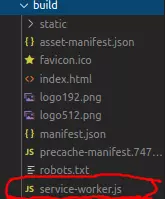
389 |
390 | Vì thế chúng ta phải code thêm file `sw.js` cùng cấp vs file `serviceWorker.js`
391 | ```js
392 | function receivePushNotification(event) {
393 | console.log('[Service Worker] Push Received.');
394 |
395 | const { image, tag, url, title, text } = event.data.json();
396 |
397 | const options = {
398 | data: url,
399 | body: text,
400 | icon: image,
401 | vibrate: [200, 100, 200],
402 | tag: tag,
403 | image: image,
404 | badge: 'https://spyna.it/icons/favicon.ico',
405 | actions: [{ action: 'Detail', title: 'View', icon: 'https://via.placeholder.com/128/ff0000' }]
406 | };
407 | event.waitUntil(self.registration.showNotification(title, options));
408 | }
409 |
410 | function openPushNotification(event) {
411 | console.log('[Service Worker] Notification click Received.', event.notification.data);
412 |
413 | event.notification.close();
414 | event.waitUntil(clients.openWindow(event.notification.data));
415 | }
416 |
417 | self.addEventListener('push', receivePushNotification);
418 | self.addEventListener('notificationclick', openPushNotification);
419 | ```
420 |
421 | Mục đích là để lắng nghe **event** và handle việc ng dùng **click vào notification** đấy. Sau đó sửa lại một chút phần file `package.js` phần build và thêm lệnh sw ở dưới để nối file sw vào file `service-worker.js` .
422 | ```json
423 | "build": "rm -rf build/ && react-scripts build && npm run-script sw",
424 | "sw": "cat src/sw.js >> build/service-worker.js",
425 | ```
426 |
427 | Cuối cùng là phần giao diện .Mình sẽ tận dụng luôn file `App.js` làm demo
428 | ```js
429 | import React from 'react';
430 | import logo from './logo.svg';
431 | import usePushNotifications from './usePushNotifications';
432 | import './App.css';
433 |
434 | function App() {
435 | const {
436 | userConsent,
437 | pushNotificationSupported,
438 | userSubscription,
439 | onClickAskUserPermission,
440 | onClickSusbribeToPushNotification,
441 | onClickSendSubscriptionToPushServer,
442 | pushServerSubscriptionId,
443 | onClickSendNotification,
444 | error,
445 | loading
446 | } = usePushNotifications();
447 |
448 | const Loading = ({ loading }) =>
449 | loading ?