800 |
801 |
802 |
822 | ```
823 |
824 | ## 响应式系统工具集
825 |
826 | ### `unref`
827 |
828 | 如果参数是一个 ref 则返回它的 `value`,否则返回参数本身。它是 `val = isRef(val) ? val.value : val` 的语法糖。
829 |
830 | ```js
831 | function useFoo(x: number | Ref) {
832 | const unwrapped = unref(x) // unwrapped 一定是 number 类型
833 | }
834 | ```
835 |
836 | ### `toRef`
837 |
838 | `toRef` 可以用来为一个 reactive 对象的属性创建一个 ref。这个 ref 可以被传递并且能够保持响应性。
839 |
840 | ```js
841 | const state = reactive({
842 | foo: 1,
843 | bar: 2,
844 | })
845 |
846 | const fooRef = toRef(state, 'foo')
847 |
848 | fooRef.value++
849 | console.log(state.foo) // 2
850 |
851 | state.foo++
852 | console.log(fooRef.value) // 3
853 | ```
854 |
855 | 当您要将一个 prop 中的属性作为 ref 传给组合逻辑函数时,`toRef` 就派上了用场:
856 |
857 | ```js
858 | export default {
859 | setup(props) {
860 | useSomeFeature(toRef(props, 'foo'))
861 | },
862 | }
863 | ```
864 |
865 | ### `toRefs`
866 |
867 | 把一个响应式对象转换成普通对象,该普通对象的每个 property 都是一个 ref ,和响应式对象 property 一一对应。
868 |
869 | ```js
870 | const state = reactive({
871 | foo: 1,
872 | bar: 2,
873 | })
874 |
875 | const stateAsRefs = toRefs(state)
876 | /*
877 | stateAsRefs 的类型如下:
878 |
879 | {
880 | foo: Ref,
881 | bar: Ref
882 | }
883 | */
884 |
885 | // ref 对象 与 原属性的引用是 "链接" 上的
886 | state.foo++
887 | console.log(stateAsRefs.foo.value) // 2
888 |
889 | stateAsRefs.foo.value++
890 | console.log(state.foo) // 3
891 | ```
892 |
893 | 当想要从一个组合逻辑函数中返回响应式对象时,用 `toRefs` 是很有效的,该 API 让消费组件可以 解构 / 扩展(使用 `...` 操作符)返回的对象,并不会丢失响应性:
894 |
895 | ```js
896 | function useFeatureX() {
897 | const state = reactive({
898 | foo: 1,
899 | bar: 2,
900 | })
901 |
902 | // 对 state 的逻辑操作
903 |
904 | // 返回时将属性都转为 ref
905 | return toRefs(state)
906 | }
907 |
908 | export default {
909 | setup() {
910 | // 可以解构,不会丢失响应性
911 | const { foo, bar } = useFeatureX()
912 |
913 | return {
914 | foo,
915 | bar,
916 | }
917 | },
918 | }
919 | ```
920 |
921 | ### `isRef`
922 |
923 | 检查一个值是否为一个 ref 对象。
924 |
925 | ### `isProxy`
926 |
927 | 检查一个对象是否是由 `reactive` 或者 `readonly` 方法创建的代理。
928 |
929 | ### `isReactive`
930 |
931 | 检查一个对象是否是由 `reactive` 创建的响应式代理。
932 |
933 | 如果这个代理是由 `readonly` 创建的,但是又被 `reactive` 创建的另一个代理包裹了一层,那么同样也会返回 `true`。
934 |
935 | ### `isReadonly`
936 |
937 | 检查一个对象是否是由 `readonly` 创建的只读代理。
938 |
939 | ## 高级响应式系统 API
940 |
941 | ### `customRef`
942 |
943 | `customRef` 用于自定义一个 `ref`,可以显式地控制依赖追踪和触发响应,接受一个工厂函数,两个参数分别是用于追踪的 `track` 与用于触发响应的 `trigger`,并返回一个带有 `get` 和 `set` 属性的对象。
944 |
945 | - 使用自定义 ref 实现带防抖功能的 `v-model` :
946 |
947 | ```html
948 |
949 | ```
950 |
951 | ```js
952 | function useDebouncedRef(value, delay = 200) {
953 | let timeout
954 | return customRef((track, trigger) => {
955 | return {
956 | get() {
957 | track()
958 | return value
959 | },
960 | set(newValue) {
961 | clearTimeout(timeout)
962 | timeout = setTimeout(() => {
963 | value = newValue
964 | trigger()
965 | }, delay)
966 | },
967 | }
968 | })
969 | }
970 |
971 | export default {
972 | setup() {
973 | return {
974 | text: useDebouncedRef('hello'),
975 | }
976 | },
977 | }
978 | ```
979 |
980 | - **类型定义**
981 |
982 | ```ts
983 | function customRef(factory: CustomRefFactory): Ref
984 |
985 | type CustomRefFactory = (
986 | track: () => void,
987 | trigger: () => void
988 | ) => {
989 | get: () => T
990 | set: (value: T) => void
991 | }
992 | ```
993 |
994 | ### `markRaw`
995 |
996 | 显式标记一个对象为“永远不会转为响应式代理”,函数返回这个对象本身。
997 |
998 | ```js
999 | const foo = markRaw({})
1000 | console.log(isReactive(reactive(foo))) // false
1001 |
1002 | // 如果被 markRaw 标记了,即使在响应式对象中作属性,也依然不是响应式的
1003 | const bar = reactive({ foo })
1004 | console.log(isReactive(bar.foo)) // false
1005 | ```
1006 |
1007 | ::: warning
1008 | `markRaw` 和下面的 shallowXXX 一族的 API 允许你可选择性的覆盖 reactive readonly 默认 "深层的" 特性,或者使用无代理的普通对象。设计这种「浅层读取」有很多原因,比如:
1009 |
1010 | - 一些值的实际上的用法非常简单,并没有必要转为响应式,比如某个复杂的第三方类库的实例,或者 Vue 组件对象
1011 |
1012 | - 当渲染一个元素数量庞大,但是数据是不可变的,跳过 Proxy 的转换可以带来性能提升。
1013 |
1014 | 这些 API 被认为是高级的,是因为这种特性仅停留在根级别,所以如果你将一个嵌套的,没有 `markRaw` 的对象设置为 reactive 对象的属性,在重新访问时,你又会得到一个 Proxy 的版本,在使用中最终会导致**标识混淆**的严重问题:执行某个操作同时依赖于某个对象的原始版本和代理版本。
1015 |
1016 | ```js
1017 | const foo = markRaw({
1018 | nested: {},
1019 | })
1020 |
1021 | const bar = reactive({
1022 | // 尽管 `foo` 己经被标记为 raw 了, 但 foo.nested 并没有
1023 | nested: foo.nested,
1024 | })
1025 |
1026 | console.log(foo.nested === bar.nested) // false
1027 | ```
1028 |
1029 | 标识混淆在一般使用当中应该是非常罕见的,但是要想完全避免这样的问题,必须要对整个响应式系统的工作原理有一个相当清晰的认知。
1030 | :::
1031 |
1032 | ### `shallowReactive`
1033 |
1034 | 只为某个对象的私有(第一层)属性创建浅层的响应式代理,不会对“属性的属性”做深层次、递归地响应式代理,而只是保留原样。
1035 |
1036 | ```js
1037 | const state = shallowReactive({
1038 | foo: 1,
1039 | nested: {
1040 | bar: 2,
1041 | },
1042 | })
1043 |
1044 | // 变更 state 的自有属性是响应式的
1045 | state.foo++
1046 | // ...但不会深层代理
1047 | isReactive(state.nested) // false
1048 | state.nested.bar++ // 非响应式
1049 | ```
1050 |
1051 | ### `shallowReadonly`
1052 |
1053 | 只为某个对象的自有(第一层)属性创建浅层的**只读**响应式代理,同样也不会做深层次、递归地代理,深层次的属性并不是只读的。
1054 |
1055 | ```js
1056 | const state = shallowReadonly({
1057 | foo: 1,
1058 | nested: {
1059 | bar: 2,
1060 | },
1061 | })
1062 |
1063 | // 变更 state 的自有属性会失败
1064 | state.foo++
1065 | // ...但是嵌套的对象是可以变更的
1066 | isReadonly(state.nested) // false
1067 | state.nested.bar++ // 嵌套属性依然可修改
1068 | ```
1069 |
1070 | ### `shallowRef`
1071 |
1072 | 创建一个 ref ,将会追踪它的 `.value` 更改操作,但是并不会对变更后的 `.value` 做响应式代理转换(即变更不会调用 `reactive`)
1073 |
1074 | ```js
1075 | const foo = shallowRef({})
1076 | // 更改对操作会触发响应
1077 | foo.value = {}
1078 | // 但上面新赋的这个对象并不会变为响应式对象
1079 | isReactive(foo.value) // false
1080 | ```
1081 |
1082 | ### `toRaw`
1083 |
1084 | 返回由 `reactive` 或 `readonly` 方法转换成响应式代理的普通对象。这是一个还原方法,可用于临时读取,访问不会被代理/跟踪,写入时也不会触发更改。不建议一直持有原始对象的引用。请谨慎使用。
1085 |
1086 | ```js
1087 | const foo = {}
1088 | const reactiveFoo = reactive(foo)
1089 |
1090 | console.log(toRaw(reactiveFoo) === foo) // true
1091 | ```
1092 |
--------------------------------------------------------------------------------
/zh/index.md:
--------------------------------------------------------------------------------
1 | ---
2 | sidebar: auto
3 | ---
4 |
5 | # 组合式 API 征求意见稿
6 |
7 | - 开始日期: 2019-07-10
8 | - 目标主版本: 2.x / 3.x
9 | - 相关 Issues 链接: [#42](https://github.com/vuejs/rfcs/pull/42)
10 | - 相关实现的 Pull Request: (leave this empty)
11 |
12 | ## 概述
13 |
14 | 在此我们将为您介绍 **组合式 API**: 一组低侵入式的、函数式的 API,使得我们能够更灵活地「**组合**」组件的逻辑。
15 |
16 |
17 |
18 | 观看 Vue Mastery 上的 [Vue 3 基础课程](https://www.vuemastery.com/courses/vue-3-essentials/why-the-composition-api/). 点击此链接下载 [Vue 3 手册](https://www.vuemastery.com/vue-3-cheat-sheet/).
19 |
20 | ## 基本范例
21 |
22 | ```html
23 |
24 |
27 |
28 |
29 |
50 | ```
51 |
52 | ## 动机与目的
53 |
54 | ### 更好的逻辑复用与代码组织
55 |
56 | 我们都因 Vue 简单易学而爱不释手,它让构建中小型应用程序变得轻而易举。但是随着 Vue 的影响力日益扩大,许多用户也开始使用 Vue 构建更大型的项目。这些项目通常是由多个开发人员组成团队,在很长一段时间内不断迭代和维护的。多年来,我们目睹了其中一些项目遇到了 Vue 当前 API 所带来的编程模型的限制。这些问题可归纳为两类:
57 |
58 | 1. 随着功能的增长,复杂组件的代码变得越来越难以阅读和理解。这种情况在开发人员阅读他人编写的代码时尤为常见。根本原因是 Vue 现有的 API 迫使我们通过选项组织代码,但是有的时候通过逻辑关系组织代码更有意义。
59 |
60 | 2. 目前缺少一种简洁且低成本的机制来提取和重用多个组件之间的逻辑。 (详见 [逻辑抽象、提取与复用](#逻辑抽象、提取与复用))
61 |
62 | RFC 中提出的 API 为组件代码的组织提供了更大的灵活性。现在我们不需要总是通过选项来组织代码,而是可以将代码组织为处理特定功能的函数。这些 API 还使得在组件之间甚至组件之外逻辑的提取和重用变得更加简单。我们会在[设计细节](#设计细节)这一节展示达成的效果。
63 |
64 | ### 更好的类型推导
65 |
66 | 另一个来自大型项目开发者的常见需求是更好的 TypeScript 支持。Vue 当前的 API 在集成 TypeScript 时遇到了不小的麻烦,其主要原因是 Vue 依靠一个简单的 `this` 上下文来暴露 property,我们现在使用 `this` 的方式是比较微妙的。(比如 `methods` 选项下的函数的 `this` 是指向组件实例的,而不是这个 `methods` 对象)。
67 |
68 | 换句话说,Vue 现有的 API 在设计之初没有照顾到类型推导,这使适配 TypeScript 变得复杂。
69 |
70 | 当前,大部分使用 TypeScript 的 Vue 开发者都在通过 `vue-class-component` 这个库将组件撰写为 TypeScript class (借助 decorator)。我们在设计 3.0 时曾有[一个已废弃的 RFC](https://github.com/vuejs/rfcs/pull/17),希望提供一个内建的 Class API 来更好的解决类型问题。然而当讨论并迭代其具体设计时,我们注意到,想通过 Class API 来解决类型问题,就必须依赖 decorator——一个在实现细节上存在许多未知数的非常不稳定的 stage 2 提案。基于它是有极大风险的。([关于 Class API 的类型相关问题请移步这里](#class-api-的类型问题))
71 |
72 | 相比较过后,本 RFC 中提出的方案更多地利用了天然对类型友好的普通变量与函数。用该提案中的 API 撰写的代码会完美享用类型推导,并且也不用做太多额外的类型标注。
73 |
74 | 这也同样意味着你写出的 JavaScript 代码几乎就是 TypeScript 的代码。即使是非 TypeScript 开发者也会因此得到更好的 IDE 类型支持而获益。
75 |
76 | ## 设计细节
77 |
78 | ### API 介绍
79 |
80 | 为了不引入全新的概念,该提案中的 API 更像是暴露 Vue 的核心功能——比如用独立的函数来创建和监听响应式的状态等。
81 |
82 | 在这里我们会介绍一些最基本的 API,及其如何取代 2.x 的选项表述组件内逻辑。
83 |
84 | 请注意,本节主要会介绍这些 API 的基本思路,所以不会展开至其完整的细节。完整的 API 规范请移步 [API 参考](./api)章节。
85 |
86 | #### 响应式状态与副作用
87 |
88 | 让我们从一个简单的任务开始:创建一个响应式的状态
89 |
90 | ```js
91 | import { reactive } from 'vue'
92 |
93 | // state 现在是一个响应式的状态
94 | const state = reactive({
95 | count: 0,
96 | })
97 | ```
98 |
99 | `reactive` 几乎等价于 2.x 中现有的 `Vue.observable()` API,且为了避免与 RxJS 中的 observable 混淆而做了重命名。这里返回的 `state` 是一个所有 Vue 用户都应该熟悉的响应式对象。
100 |
101 | 在 Vue 中,响应式状态的基本用例就是在渲染时使用它。因为有了依赖追踪,视图会在响应式状态发生改变时自动更新。在 DOM 当中渲染内容会被视为一种“副作用”:程序会在外部修改其本身 (也就是这个 DOM) 的状态。我们可以使用 `watchEffect` API 应用基于响应式状态的副作用,并*自动*进行重应用。
102 |
103 | ```js
104 | import { reactive, watchEffect } from 'vue'
105 |
106 | const state = reactive({
107 | count: 0,
108 | })
109 |
110 | watchEffect(() => {
111 | document.body.innerHTML = `count is ${state.count}`
112 | })
113 | ```
114 |
115 | `watchEffect` 应该接收一个应用预期副作用 (这里即设置 `innerHTML`) 的函数。它会立即执行该函数,并将该执行过程中用到的所有响应式状态的 property 作为依赖进行追踪。
116 |
117 | 这里的 `state.count` 会在首次执行后作为依赖被追踪。当 `state.count` 未来发生变更时,里面这个函数又会被重新执行。
118 |
119 | 这正是 Vue 响应式系统的精髓所在了!当你在组件中从 `data()` 返回一个对象,内部实质上通过调用 `reactive()` 使其变为响应式。而模板会被编译为渲染函数 (可被视为一种更高效的 `innerHTML`),因而可以使用这些响应式的 property。
120 |
121 | > `watchEffect` 和 2.x 中的 `watch` 选项类似,但是它不需要把被依赖的数据源和副作用回调分开。组合式 API 同样提供了一个 `watch` 函数,其行为和 2.x 的选项完全一致。
122 |
123 | 继续我们上面的例子,下面我们将展示如何处理用户输入:
124 |
125 | ```js
126 | function increment() {
127 | state.count++
128 | }
129 |
130 | document.body.addEventListener('click', increment)
131 | ```
132 |
133 | 但是在 Vue 的模板系统当中,我们不需要纠结用 `innerHTML` 还是手动挂载事件监听器。让我们将例子简化为一个假设的 `renderTemplate` 方法,以专注在响应性这方面:
134 |
135 | ```js
136 | import { reactive, watchEffect } from 'vue'
137 |
138 | const state = reactive({
139 | count: 0,
140 | })
141 |
142 | function increment() {
143 | state.count++
144 | }
145 |
146 | const renderContext = {
147 | state,
148 | increment,
149 | }
150 |
151 | watchEffect(() => {
152 | // 假设的方法,并不是真实的 API
153 | renderTemplate(
154 | ``,
155 | renderContext
156 | )
157 | })
158 | ```
159 |
160 | #### 计算状态 与 Ref
161 |
162 | 有时候,我们会需要一个依赖于其他状态的状态,在 Vue 中这是通过*计算属性*来处理的。我们可以使用 `computed` API 直接创建一个计算值:
163 |
164 | ```js
165 | import { reactive, computed } from 'vue'
166 |
167 | const state = reactive({
168 | count: 0,
169 | })
170 |
171 | const double = computed(() => state.count * 2)
172 | ```
173 |
174 | 这个 `computed` 返回了什么? 如果猜一下 `computed` 内部是如何实现的,我们可能会想出下面这样的方案:
175 |
176 | ```js
177 | // 简化的伪代码
178 | function computed(getter) {
179 | let value
180 | watchEffect(() => {
181 | value = getter()
182 | })
183 | return value
184 | }
185 | ```
186 |
187 | 但我们知道它不会正常工作:如果 `value` 是一个例如 `number` 的基础类型,那么当被返回时,它与这个 `computed` 内部逻辑之间的关系就丢失了!这是由于 JavaScript 中基础类型是值传递而非引用传递。
188 |
189 | 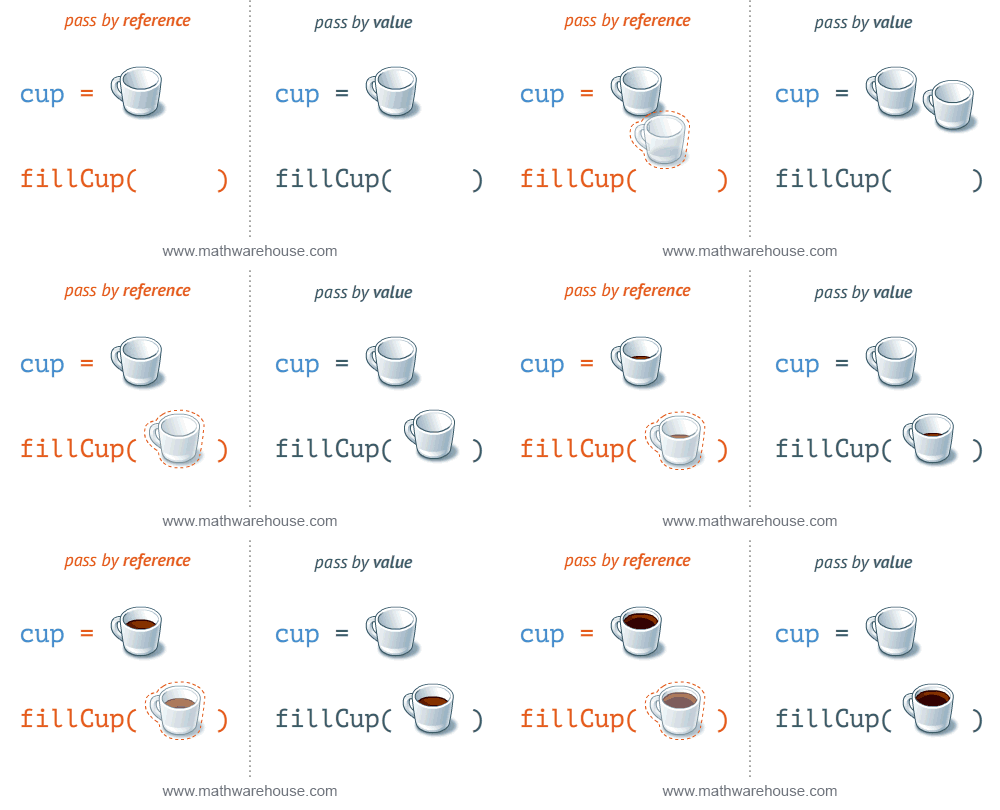
190 |
191 | 在把值作为 property 赋值给某个对象时也会出现同样的问题。一个响应式的值一旦作为 property 被赋值或从一个函数返回,而失去了响应性之后,也就失去了用途。为了确保始终可以读取到最新的计算结果,我们需要将这个值上包裹到一个对象中再返回。
192 |
193 | ```js
194 | // 简化的伪代码
195 | function computed(getter) {
196 | const ref = {
197 | value: null,
198 | }
199 | watchEffect(() => {
200 | ref.value = getter()
201 | })
202 | return ref
203 | }
204 | ```
205 |
206 | 另外我们同样需要劫持对这个对象 `.value` property 的读/写操作,来实现依赖收集与更新通知 (为了简化我们忽略这里的代码实现)。
207 |
208 | 现在我们可以通过引用来传递计算值,也不需要担心其响应式特性会丢失了。当然代价就是:为了获取最新的值,我们每次都需要写 `.value`。
209 |
210 | ```js
211 | const double = computed(() => state.count * 2)
212 |
213 | watchEffect(() => {
214 | console.log(double.value)
215 | }) // -> 0
216 |
217 | state.count++ // -> 2
218 | ```
219 |
220 | **在这里 `double` 是一个对象,我们管它叫“ref”, 用来作为一个响应性引用保留内部的值。**
221 |
222 | > 你可能会担心 Vue 本身已经有 "ref" 的概念了。
223 | >
224 | > 但只是为了在模板中获取 DOM 元素或组件实例 (“模板引用”)。可以到[这里](./api.html#template-refs)查看新的 ref 系统如何同时用于逻辑状态和模板引用。
225 |
226 | 除了计算值的 ref,我们还可以使用 `ref` API 直接创建一个可变更的普通的 ref:
227 |
228 | ```js
229 | const count = ref(0)
230 | console.log(count.value) // 0
231 |
232 | count.value++
233 | console.log(count.value) // 1
234 | ```
235 |
236 | #### 解开 Ref
237 |
238 | ::: v-pre
239 | 我们可以将一个 ref 值暴露给渲染上下文,在渲染过程中,Vue 会直接使用其内部的值,也就是说在模板中你可以把 `{{ count.value }}` 直接写为 `{{ count }}` 。
240 | :::
241 |
242 | 这是计数器示例的另一个版本, 使用的是 `ref` 而不是 `reactive`:
243 |
244 | ```js
245 | import { ref, watchEffect } from 'vue'
246 |
247 | const count = ref(0)
248 |
249 | function increment() {
250 | count.value++
251 | }
252 |
253 | const renderContext = {
254 | count,
255 | increment,
256 | }
257 |
258 | watchEffect(() => {
259 | renderTemplate(
260 | ``,
261 | renderContext
262 | )
263 | })
264 | ```
265 |
266 | 除此之外,当一个 ref 值嵌套于响应式对象之中时,访问时会自动解开:
267 |
268 | ```js
269 | const state = reactive({
270 | count: 0,
271 | double: computed(() => state.count * 2),
272 | })
273 |
274 | // 无需再使用 `state.double.value`
275 | console.log(state.double)
276 | ```
277 |
278 | #### 组件中的使用方式
279 |
280 | 到目前为止,我们的代码已经提供了一个可以根据用户输入进行更新的 UI ,但是代码只运行了一次,无法重用。如果我们想重用其逻辑,那么不如重构成一个函数:
281 |
282 | ```js
283 | import { reactive, computed, watchEffect } from 'vue'
284 |
285 | function setup() {
286 | const state = reactive({
287 | count: 0,
288 | double: computed(() => state.count * 2),
289 | })
290 |
291 | function increment() {
292 | state.count++
293 | }
294 |
295 | return {
296 | state,
297 | increment,
298 | }
299 | }
300 |
301 | const renderContext = setup()
302 |
303 | watchEffect(() => {
304 | renderTemplate(
305 | ``,
308 | renderContext
309 | )
310 | })
311 | ```
312 |
313 | > 请注意,上面的代码并不依赖于组件实例而存在。实际上,到目前为止介绍的所有 API 都可以在组件上下文之外使用,这使我们能够在更广泛的场景中利用 Vue 的响应性系统。
314 |
315 | 现在如果我们把调用 `setup()`、创建侦听器和渲染模板的逻辑组合在一起交给框架,我们就可以仅通过 `setup()` 函数和模板定义一个组件:
316 |
317 | ```html
318 |
319 |
322 |
323 |
324 |
345 | ```
346 |
347 | 这就是我们熟悉的单文件组件格式,只是逻辑的部分 (`
877 | ```
878 |
879 | #### Svelte
880 |
881 | ```html
882 |
895 | ```
896 |
897 | Svelte 的代码看起来更简洁,因为它在编译时做了以下工作:
898 |
899 | - 隐式地将整个 `
45 | ```
46 |
47 | Note that refs returned from `setup` are automatically unwrapped when accessed in the template so there's no need for `.value` in templates.
48 |
49 | - **Usage with Render Functions / JSX**
50 |
51 | `setup` can also return a render function, which can directly make use of reactive state declared in the same scope:
52 |
53 | ```js
54 | import { h, ref, reactive } from 'vue'
55 |
56 | export default {
57 | setup() {
58 | const count = ref(0)
59 | const object = reactive({ foo: 'bar' })
60 |
61 | return () => h('div', [count.value, object.foo])
62 | }
63 | }
64 | ```
65 |
66 | - **Arguments**
67 |
68 | The function receives the resolved props as its first argument:
69 |
70 | ```js
71 | export default {
72 | props: {
73 | name: String
74 | },
75 | setup(props) {
76 | console.log(props.name)
77 | }
78 | }
79 | ```
80 |
81 | Note this `props` object is reactive - i.e. it is updated when new props are passed in, and can be observed and reacted upon using `watchEffect` or `watch`:
82 |
83 | ```js
84 | export default {
85 | props: {
86 | name: String
87 | },
88 | setup(props) {
89 | watchEffect(() => {
90 | console.log(`name is: ` + props.name)
91 | })
92 | }
93 | }
94 | ```
95 |
96 | However, do NOT destructure the `props` object, as it will lose reactivity:
97 |
98 | ```js
99 | export default {
100 | props: {
101 | name: String
102 | },
103 | setup({ name }) {
104 | watchEffect(() => {
105 | console.log(`name is: ` + name) // Will not be reactive!
106 | })
107 | }
108 | }
109 | ```
110 |
111 | The `props` object is immutable for userland code during development (will emit warning if user code attempts to mutate it).
112 |
113 | The second argument provides a context object which exposes a selective list of properties that were previously exposed on `this` in 2.x APIs:
114 |
115 | ```js
116 | const MyComponent = {
117 | setup(props, context) {
118 | context.attrs
119 | context.slots
120 | context.emit
121 | }
122 | }
123 | ```
124 |
125 | `attrs` and `slots` are proxies to the corresponding values on the internal component instance. This ensures they always expose the latest values even after updates so that we can destructure them without worrying about accessing a stale reference:
126 |
127 | ```js
128 | const MyComponent = {
129 | setup(props, { attrs }) {
130 | // a function that may get called at a later stage
131 | function onClick() {
132 | console.log(attrs.foo) // guaranteed to be the latest reference
133 | }
134 | }
135 | }
136 | ```
137 |
138 | There are a number of reasons for placing `props` as a separate first argument instead of including it in the context:
139 |
140 | - It's much more common for a component to use `props` than the other properties, and very often a component uses only `props`.
141 |
142 | - Having `props` as a separate argument makes it easier to type it individually (see [TypeScript-only Props Typing](#typescript-only-props-typing) below) without messing up the types of other properties on the context. It also makes it possible to keep a consistent signature across `setup`, `render` and plain functional components with TSX support.
143 |
144 | - **Usage of `this`**
145 |
146 | **`this` is not available inside `setup()`.** Since `setup()` is called before 2.x options are resolved, `this` inside `setup()` (if made available) will behave quite differently from `this` in other 2.x options. Making it available will likely cause confusion when using `setup()` along other 2.x options. Another reason for avoiding `this` in `setup()` is a very common pitfall for beginners:
147 |
148 | ```js
149 | setup() {
150 | function onClick() {
151 | this // not the `this` you'd expect!
152 | }
153 | }
154 | ```
155 |
156 | - **Typing**
157 |
158 | ```ts
159 | interface Data {
160 | [key: string]: unknown
161 | }
162 |
163 | interface SetupContext {
164 | attrs: Data
165 | slots: Slots
166 | emit: (event: string, ...args: unknown[]) => void
167 | }
168 |
169 | function setup(props: Data, context: SetupContext): Data
170 | ```
171 |
172 | ::: tip
173 | To get type inference for the arguments passed to `setup()`, the use of [`defineComponent`](#defineComponent) is needed.
174 | :::
175 |
176 | ## Reactivity APIs
177 |
178 | ### `reactive`
179 |
180 | Takes an object and returns a reactive proxy of the original. This is equivalent to 2.x's `Vue.observable()`.
181 |
182 | ```js
183 | const obj = reactive({ count: 0 })
184 | ```
185 |
186 | The reactive conversion is "deep": it affects all nested properties. In the ES2015 Proxy based implementation, the returned proxy is **not** equal to the original object. It is recommended to work exclusively with the reactive proxy and avoid relying on the original object.
187 |
188 | - **Typing**
189 |
190 | ```ts
191 | function reactive(raw: T): T
192 | ```
193 |
194 | ### `ref`
195 |
196 | Takes an inner value and returns a reactive and mutable ref object. The ref object has a single property `.value` that points to the inner value.
197 |
198 | ```js
199 | const count = ref(0)
200 | console.log(count.value) // 0
201 |
202 | count.value++
203 | console.log(count.value) // 1
204 | ```
205 |
206 | If an object is assigned as a ref's value, the object is made deeply reactive by the `reactive` method.
207 |
208 | - **Access in Templates**
209 |
210 | When a ref is returned as a property on the render context (the object returned from `setup()`) and accessed in the template, it automatically unwraps to the inner value. There is no need to append `.value` in the template:
211 |
212 | ```html
213 |
214 |
{{ count }}
215 |
216 |
217 |
226 | ```
227 |
228 | - **Access in Reactive Objects**
229 |
230 | When a ref is accessed or mutated as a property of a reactive object, it automatically unwraps to the inner value so it behaves like a normal property:
231 |
232 | ```js
233 | const count = ref(0)
234 | const state = reactive({
235 | count
236 | })
237 |
238 | console.log(state.count) // 0
239 |
240 | state.count = 1
241 | console.log(count.value) // 1
242 | ```
243 |
244 | Note that if a new ref is assigned to a property linked to an existing ref, it will replace the old ref:
245 |
246 | ```js
247 | const otherCount = ref(2)
248 |
249 | state.count = otherCount
250 | console.log(state.count) // 2
251 | console.log(count.value) // 1
252 | ```
253 |
254 | Note that ref unwrapping only happens when nested inside a reactive `Object`. There is no unwrapping performed when the ref is accessed from an `Array` or a native collection type like `Map`:
255 |
256 | ```js
257 | const arr = reactive([ref(0)])
258 | // need .value here
259 | console.log(arr[0].value)
260 |
261 | const map = reactive(new Map([['foo', ref(0)]]))
262 | // need .value here
263 | console.log(map.get('foo').value)
264 | ```
265 |
266 | - **Typing**
267 |
268 | ```ts
269 | interface Ref {
270 | value: T
271 | }
272 |
273 | function ref(value: T): Ref
274 | ```
275 |
276 | Sometimes we may need to specify complex types for a ref's inner value. We can do that succinctly by passing a generics argument when calling `ref` to override the default inference:
277 |
278 | ```ts
279 | const foo = ref('foo') // foo's type: Ref
280 |
281 | foo.value = 123 // ok!
282 | ```
283 |
284 | ### `computed`
285 |
286 | Takes a getter function and returns an immutable reactive ref object for the returned value from the getter.
287 |
288 | ```js
289 | const count = ref(1)
290 | const plusOne = computed(() => count.value + 1)
291 |
292 | console.log(plusOne.value) // 2
293 |
294 | plusOne.value++ // error
295 | ```
296 |
297 | Alternatively, it can take an object with `get` and `set` functions to create a writable ref object.
298 |
299 | ```js
300 | const count = ref(1)
301 | const plusOne = computed({
302 | get: () => count.value + 1,
303 | set: val => {
304 | count.value = val - 1
305 | }
306 | })
307 |
308 | plusOne.value = 1
309 | console.log(count.value) // 0
310 | ```
311 |
312 | - **Typing**
313 |
314 | ```ts
315 | // read-only
316 | function computed(getter: () => T): Readonly>>
317 |
318 | // writable
319 | function computed(options: {
320 | get: () => T
321 | set: (value: T) => void
322 | }): Ref
323 | ```
324 |
325 | ### `readonly`
326 |
327 | Takes an object (reactive or plain) or a ref and returns a readonly proxy to the original. A readonly proxy is deep: any nested property accessed will be readonly as well.
328 |
329 | ```js
330 | const original = reactive({ count: 0 })
331 |
332 | const copy = readonly(original)
333 |
334 | watchEffect(() => {
335 | // works for reactivity tracking
336 | console.log(copy.count)
337 | })
338 |
339 | // mutating original will trigger watchers relying on the copy
340 | original.count++
341 |
342 | // mutating the copy will fail and result in a warning
343 | copy.count++ // warning!
344 | ```
345 |
346 | ### `watchEffect`
347 |
348 | Run a function immediately while reactively tracking its dependencies, and re-run it whenever the dependencies have changed.
349 |
350 | ```js
351 | const count = ref(0)
352 |
353 | watchEffect(() => console.log(count.value))
354 | // -> logs 0
355 |
356 | setTimeout(() => {
357 | count.value++
358 | // -> logs 1
359 | }, 100)
360 | ```
361 |
362 | #### Stopping the Watcher
363 |
364 | When `watchEffect` is called during a component's `setup()` function or lifecycle hooks, the watcher is linked to the component's lifecycle, and will be stopped automatically when the component is unmounted.
365 |
366 | In other cases, it returns a stop handle which can be called to explicitly stop the watcher:
367 |
368 | ```js
369 | const stop = watchEffect(() => {
370 | /* ... */
371 | })
372 |
373 | // later
374 | stop()
375 | ```
376 |
377 | #### Side Effect Invalidation
378 |
379 | Sometimes the watched effect function will perform async side effects that need to be cleaned up when it is invalidated (i.e state changed before the effects can be completed). The effect function receives an `onInvalidate` function that can be used to register a invalidation callback. The invalidation callback is called when:
380 |
381 | - the effect is about to re-run
382 | - the watcher is stopped (i.e. when the component is unmounted if `watchEffect` is used inside `setup()` or lifecycle hooks)
383 |
384 | ```js
385 | watchEffect(onInvalidate => {
386 | const token = performAsyncOperation(id.value)
387 | onInvalidate(() => {
388 | // id has changed or watcher is stopped.
389 | // invalidate previously pending async operation
390 | token.cancel()
391 | })
392 | })
393 | ```
394 |
395 | We are registering the invalidation callback via a passed-in function instead of returning it from the callback (like React `useEffect`) because the return value is important for async error handling.
396 |
397 | It is very common for the effect function to be an async function when performing data fetching:
398 |
399 | ```js
400 | const data = ref(null)
401 | watchEffect(async () => {
402 | data.value = await fetchData(props.id)
403 | })
404 | ```
405 |
406 | An async function implicitly returns a Promise, but the cleanup function needs to be registered immediately before the Promise resolves. In addition, Vue relies on the returned Promise to automatically handle potential errors in the Promise chain.
407 |
408 | #### Effect Flush Timing
409 |
410 | Vue's "reactivity system buffers" invalidate effects and flush them asynchronously to avoid an unnecessary duplicate invocation when there are many state mutations happening in the same "tick". Internally, a component's update function is also a watched effect. When a user effect is queued, it is always invoked after all component update effects:
411 |
412 | ```html
413 |
414 |
{{ count }}
415 |
416 |
417 |
432 | ```
433 |
434 | In this example:
435 |
436 | - The count will be logged synchronously on initial run.
437 | - When `count` is mutated, the callback will be called **after** the component has updated.
438 |
439 | Note the first run is executed before the component is mounted. So if you wish to access the DOM (or template refs) in a watched effect, do it in the mounted hook:
440 |
441 | ```js
442 | onMounted(() => {
443 | watchEffect(() => {
444 | // access the DOM or template refs
445 | })
446 | })
447 | ```
448 |
449 | In cases where a watcher effect needs to be re-run synchronously or before component updates, we can pass an additional options object with the `flush` option (default is `'post'`):
450 |
451 | ```js
452 | // fire synchronously
453 | watchEffect(
454 | () => {
455 | /* ... */
456 | },
457 | {
458 | flush: 'sync'
459 | }
460 | )
461 |
462 | // fire before component updates
463 | watchEffect(
464 | () => {
465 | /* ... */
466 | },
467 | {
468 | flush: 'pre'
469 | }
470 | )
471 | ```
472 |
473 | #### Watcher Debugging
474 |
475 | The `onTrack` and `onTrigger` options can be used to debug a watcher's behavior.
476 |
477 | - `onTrack` will be called when a reactive property or ref is tracked as a dependency
478 | - `onTrigger` will be called when the watcher callback is triggered by the mutation of a dependency
479 |
480 | Both callbacks will receive a debugger event which contains information on the dependency in question. It is recommended to place a `debugger` statement in these callbacks to interactively inspect the dependency:
481 |
482 | ```js
483 | watchEffect(
484 | () => {
485 | /* side effect */
486 | },
487 | {
488 | onTrigger(e) {
489 | debugger
490 | }
491 | }
492 | )
493 | ```
494 |
495 | `onTrack` and `onTrigger` only works in development mode.
496 |
497 | - **Typing**
498 |
499 | ```ts
500 | function watchEffect(
501 | effect: (onInvalidate: InvalidateCbRegistrator) => void,
502 | options?: WatchEffectOptions
503 | ): StopHandle
504 |
505 | interface WatchEffectOptions {
506 | flush?: 'pre' | 'post' | 'sync'
507 | onTrack?: (event: DebuggerEvent) => void
508 | onTrigger?: (event: DebuggerEvent) => void
509 | }
510 |
511 | interface DebuggerEvent {
512 | effect: ReactiveEffect
513 | target: any
514 | type: OperationTypes
515 | key: string | symbol | undefined
516 | }
517 |
518 | type InvalidateCbRegistrator = (invalidate: () => void) => void
519 |
520 | type StopHandle = () => void
521 | ```
522 |
523 | ### `watch`
524 |
525 | The `watch` API is the exact equivalent of the 2.x `this.$watch` (and the corresponding `watch` option). `watch` requires watching a specific data source, and applies side effects in a separate callback function. It also is lazy by default - i.e. the callback is only called when the watched source has changed.
526 |
527 | - Compared to `watchEffect`, `watch` allows us to:
528 |
529 | - Perform the side effect lazily;
530 | - Be more specific about what state should trigger the watcher to re-run;
531 | - Access both the previous and current value of the watched state.
532 |
533 | - **Watching a Single Source**
534 |
535 | A watcher data source can either be a getter function that returns a value, or a direct ref:
536 |
537 | ```js
538 | // watching a getter
539 | const state = reactive({ count: 0 })
540 | watch(
541 | () => state.count,
542 | (count, prevCount) => {
543 | /* ... */
544 | }
545 | )
546 |
547 | // directly watching a ref
548 | const count = ref(0)
549 | watch(count, (count, prevCount) => {
550 | /* ... */
551 | })
552 | ```
553 |
554 | - **Watching Multiple Sources**
555 |
556 | A watcher can also watch multiple sources at the same time using an Array:
557 |
558 | ```js
559 | watch([fooRef, barRef], ([foo, bar], [prevFoo, prevBar]) => {
560 | /* ... */
561 | })
562 | ```
563 |
564 | * **Shared Behavior with `watchEffect`**
565 |
566 | `watch` shares behavior with `watchEffect` in terms of [manual stoppage](#stopping-the-watcher), [side effect invalidation](#side-effect-invalidation) (with `onInvalidate` passed to the callback as the 3rd argument instead), [flush timing](#effect-flush-timing) and [debugging](#watcher-debugging).
567 |
568 | * **Typing**
569 |
570 | ```ts
571 | // wacthing single source
572 | function watch(
573 | source: WatcherSource,
574 | callback: (
575 | value: T,
576 | oldValue: T,
577 | onInvalidate: InvalidateCbRegistrator
578 | ) => void,
579 | options?: WatchOptions
580 | ): StopHandle
581 |
582 | // watching multiple sources
583 | function watch[]>(
584 | sources: T
585 | callback: (
586 | values: MapSources,
587 | oldValues: MapSources,
588 | onInvalidate: InvalidateCbRegistrator
589 | ) => void,
590 | options? : WatchOptions
591 | ): StopHandle
592 |
593 | type WatcherSource = Ref | (() => T)
594 |
595 | type MapSources = {
596 | [K in keyof T]: T[K] extends WatcherSource ? V : never
597 | }
598 |
599 | // see `watchEffect` typing for shared options
600 | interface WatchOptions extends WatchEffectOptions {
601 | immediate?: boolean // default: false
602 | deep?: boolean
603 | }
604 | ```
605 |
606 | ## Lifecycle Hooks
607 |
608 | Lifecycle hooks can be registered explicitly with imported `onXXX` functions:
609 |
610 | ```js
611 | import { onMounted, onUpdated, onUnmounted } from 'vue'
612 |
613 | const MyComponent = {
614 | setup() {
615 | onMounted(() => {
616 | console.log('mounted!')
617 | })
618 | onUpdated(() => {
619 | console.log('updated!')
620 | })
621 | onUnmounted(() => {
622 | console.log('unmounted!')
623 | })
624 | }
625 | }
626 | ```
627 |
628 | These lifecycle hook registration functions can only be used synchronously during `setup()`, since they rely on internal global state to locate the current active instance (the component instance whose `setup()` is being called right now). Calling them without a current active instance will result in an error.
629 |
630 | The component instance context is also set during the synchronous execution of lifecycle hooks, so watchers and computed properties created synchronously inside lifecycle hooks are also automatically torn down when the component unmounts.
631 |
632 | - **Mapping between 2.x Lifecycle Options and Composition API**
633 |
634 | - ~~`beforeCreate`~~ -> use `setup()`
635 | - ~~`created`~~ -> use `setup()`
636 | - `beforeMount` -> `onBeforeMount`
637 | - `mounted` -> `onMounted`
638 | - `beforeUpdate` -> `onBeforeUpdate`
639 | - `updated` -> `onUpdated`
640 | - `beforeDestroy` -> `onBeforeUnmount`
641 | - `destroyed` -> `onUnmounted`
642 | - `activated` -> `onActivated`
643 | - `deactivated` -> `onDeactivated`
644 | - `errorCaptured` -> `onErrorCaptured`
645 |
646 | - **New hooks**
647 |
648 | In addition to 2.x lifecycle equivalents, the Composition API also provides the following debug hooks:
649 |
650 | - `onRenderTracked`
651 | - `onRenderTriggered`
652 |
653 | Both hooks receive a `DebuggerEvent` similar to the `onTrack` and `onTrigger` options for watchers:
654 |
655 | ```js
656 | export default {
657 | onRenderTriggered(e) {
658 | debugger
659 | // inspect which dependency is causing the component to re-render
660 | }
661 | }
662 | ```
663 |
664 | ## Dependency Injection
665 |
666 | `provide` and `inject` enables dependency injection similar to the 2.x `provide/inject` options. Both can only be called during `setup()` with a current active instance.
667 |
668 | ```js
669 | import { provide, inject } from 'vue'
670 |
671 | const ThemeSymbol = Symbol()
672 |
673 | const Ancestor = {
674 | setup() {
675 | provide(ThemeSymbol, 'dark')
676 | }
677 | }
678 |
679 | const Descendent = {
680 | setup() {
681 | const theme = inject(ThemeSymbol, 'light' /* optional default value */)
682 | return {
683 | theme
684 | }
685 | }
686 | }
687 | ```
688 |
689 | `inject` accepts an optional default value as the 2nd argument. If a default value is not provided and the property is not found on the provide context, `inject` returns `undefined`.
690 |
691 | - **Injection Reactivity**
692 |
693 | To retain reactivity between provided and injected values, a ref can be used:
694 |
695 | ```js
696 | // in provider
697 | const themeRef = ref('dark')
698 | provide(ThemeSymbol, themeRef)
699 |
700 | // in consumer
701 | const theme = inject(ThemeSymbol, ref('light'))
702 | watchEffect(() => {
703 | console.log(`theme set to: ${theme.value}`)
704 | })
705 | ```
706 |
707 | If a reactive object is injected, it can also be reactively observed.
708 |
709 | - **Typing**
710 |
711 | ```ts
712 | interface InjectionKey extends Symbol {}
713 |
714 | function provide(key: InjectionKey | string, value: T): void
715 |
716 | // without default value
717 | function inject(key: InjectionKey | string): T | undefined
718 | // with default value
719 | function inject(key: InjectionKey | string, defaultValue: T): T
720 | ```
721 |
722 | Vue provides the `InjectionKey` interface which is a generic type that extends `Symbol`. It can be used to sync the type of the injected value between the provider and the consumer:
723 |
724 | ```ts
725 | import { InjectionKey, provide, inject } from 'vue'
726 |
727 | const key: InjectionKey = Symbol()
728 |
729 | provide(key, 'foo') // providing non-string value will result in error
730 |
731 | const foo = inject(key) // type of foo: string | undefined
732 | ```
733 |
734 | If using string keys or non-typed symbols, the type of the injected value will need to be explicitly declared:
735 |
736 | ```ts
737 | const foo = inject('foo') // string | undefined
738 | ```
739 |
740 | ## Template Refs
741 |
742 | When using the Composition API, the concept of _reactive refs_ and _template refs_ are unified. In order to obtain a reference to an in-template element or component instance, we can declare a ref as usual and return it from `setup()`:
743 |
744 | ```html
745 |
746 |
747 |
748 |
749 |
767 | ```
768 |
769 | Here we are exposing `root` on the render context and binding it to the div as its ref via `ref="root"`. In the Virtual DOM patching algorithm, if a VNode's `ref` key corresponds to a ref on the render context, then the VNode's corresponding element or component instance will be assigned to the value of that ref. This is performed during the Virtual DOM mount / patch process, so template refs will only get assigned values after the initial render.
770 |
771 | Refs used as template refs behave just like any other refs: they are reactive and can be passed into (or returned from) composition functions.
772 |
773 | - **Usage with Render Function / JSX**
774 |
775 | ```js
776 | export default {
777 | setup() {
778 | const root = ref(null)
779 |
780 | return () =>
781 | h('div', {
782 | ref: root
783 | })
784 |
785 | // with JSX
786 | return () =>
787 | }
788 | }
789 | ```
790 |
791 | - **Usage inside `v-for`**
792 |
793 | Composition API template refs do not have special handling when used inside `v-for`. Instead, use function refs (new feature in 3.0) to perform custom handling:
794 |
795 | ```html
796 |
797 |
798 | {{ item }}
799 |
800 |
801 |
802 |
822 | ```
823 |
824 | ## Reactivity Utilities
825 |
826 | ### `unref`
827 |
828 | Returns the inner value if the argument is a ref, otherwise return the argument itself. This is a sugar function for `val = isRef(val) ? val.value : val`.
829 |
830 | ```js
831 | function useFoo(x: number | Ref) {
832 | const unwrapped = unref(x) // unwrapped is guaranteed to be number now
833 | }
834 | ```
835 |
836 | ### `toRef`
837 |
838 | `toRef` can be used to create a ref for a property on a reactive source object. The ref can then be passed around and retains the reactive connection to its source property.
839 |
840 | ```js
841 | const state = reactive({
842 | foo: 1,
843 | bar: 2
844 | })
845 |
846 | const fooRef = toRef(state, 'foo')
847 |
848 | fooRef.value++
849 | console.log(state.foo) // 2
850 |
851 | state.foo++
852 | console.log(fooRef.value) // 3
853 | ```
854 |
855 | `toRef` is useful when you want to pass the ref of a prop to a composition function:
856 |
857 | ```js
858 | export default {
859 | setup(props) {
860 | useSomeFeature(toRef(props, 'foo'))
861 | }
862 | }
863 | ```
864 |
865 | ### `toRefs`
866 |
867 | Convert a reactive object to a plain object, where each property on the resulting object is a ref pointing to the corresponding property in the original object.
868 |
869 | ```js
870 | const state = reactive({
871 | foo: 1,
872 | bar: 2
873 | })
874 |
875 | const stateAsRefs = toRefs(state)
876 | /*
877 | Type of stateAsRefs:
878 |
879 | {
880 | foo: Ref,
881 | bar: Ref
882 | }
883 | */
884 |
885 | // The ref and the original property is "linked"
886 | state.foo++
887 | console.log(stateAsRefs.foo.value) // 2
888 |
889 | stateAsRefs.foo.value++
890 | console.log(state.foo) // 3
891 | ```
892 |
893 | `toRefs` is useful when returning a reactive object from a composition function so that the consuming component can destructure / spread the returned object without losing reactivity:
894 |
895 | ```js
896 | function useFeatureX() {
897 | const state = reactive({
898 | foo: 1,
899 | bar: 2
900 | })
901 |
902 | // logic operating on state
903 |
904 | // convert to refs when returning
905 | return toRefs(state)
906 | }
907 |
908 | export default {
909 | setup() {
910 | // can destructure without losing reactivity
911 | const { foo, bar } = useFeatureX()
912 |
913 | return {
914 | foo,
915 | bar
916 | }
917 | }
918 | }
919 | ```
920 |
921 | ### `isRef`
922 |
923 | Check if a value is a ref object.
924 |
925 | ### `isProxy`
926 |
927 | Check if an object is a proxy created by `reactive` or `readonly`.
928 |
929 | ### `isReactive`
930 |
931 | Check if an object is a reactive proxy created by `reactive`.
932 |
933 | It also returns `true` if the proxy is created by `readonly`, but is wrapping another proxy created by `reactive`.
934 |
935 | ### `isReadonly`
936 |
937 | Check if an object is a readonly proxy created by `readonly`.
938 |
939 | ## Advanced Reactivity APIs
940 |
941 | ### `customRef`
942 |
943 | Create a customized ref with explicit control over its dependency tracking and update triggering. It expects a factory function. The factory function receives `track` and `trigger` functions as arguments and should return an object with `get` and `set`.
944 |
945 | - Example using a custom ref to implement debounce with `v-model`:
946 |
947 | ```html
948 |
949 | ```
950 | ```js
951 | function useDebouncedRef(value, delay = 200) {
952 | let timeout
953 | return customRef((track, trigger) => {
954 | return {
955 | get() {
956 | track()
957 | return value
958 | },
959 | set(newValue) {
960 | clearTimeout(timeout)
961 | timeout = setTimeout(() => {
962 | value = newValue
963 | trigger()
964 | }, delay)
965 | }
966 | }
967 | })
968 | }
969 |
970 | export default {
971 | setup() {
972 | return {
973 | text: useDebouncedRef('hello')
974 | }
975 | }
976 | }
977 | ```
978 |
979 | - **Typing**
980 |
981 | ```ts
982 | function customRef(factory: CustomRefFactory): Ref
983 |
984 | type CustomRefFactory = (
985 | track: () => void,
986 | trigger: () => void
987 | ) => {
988 | get: () => T
989 | set: (value: T) => void
990 | }
991 | ```
992 |
993 | ### `markRaw`
994 |
995 | Mark an object so that it will never be converted to a proxy. Returns the object itself.
996 |
997 | ```js
998 | const foo = markRaw({})
999 | console.log(isReactive(reactive(foo))) // false
1000 |
1001 | // also works when nested inside other reactive objects
1002 | const bar = reactive({ foo })
1003 | console.log(isReactive(bar.foo)) // false
1004 | ```
1005 |
1006 | ::: warning
1007 | `markRaw` and the shallowXXX APIs below allow you to selectively opt-out of the default deep reactive / readonly conversion and embed raw, non-proxied objects in your state graph. They can be used for various reasons:
1008 |
1009 | - Some values simply should not be made reactive, for example a complex 3rd party class instance, or a Vue component object.
1010 |
1011 | - Skipping proxy conversion can provide performance improvements when rendering large lists with immutable data sources.
1012 |
1013 | They are considered advanced because the raw opt-out is only at the root level, so if you set a nested, non-marked raw object into a reactive object and then access it again, you get the proxied version back. This can lead to **identity hazards** - i.e. performing an operation that relies on object identity but using both the raw and the proxied version of the same object:
1014 |
1015 | ```js
1016 | const foo = markRaw({
1017 | nested: {}
1018 | })
1019 |
1020 | const bar = reactive({
1021 | // although `foo` is marked as raw, foo.nested is not.
1022 | nested: foo.nested
1023 | })
1024 |
1025 | console.log(foo.nested === bar.nested) // false
1026 | ```
1027 |
1028 | Identity hazards are in general rare. But to properly utilize these APIs while safely avoiding identity hazards requires a solid understanding of how the reactivity system works.
1029 | :::
1030 |
1031 | ### `shallowReactive`
1032 |
1033 | Create a reactive proxy that tracks reactivity of its own properties, but does not perform deep reactive conversion of nested objects (exposes raw values).
1034 |
1035 | ```js
1036 | const state = shallowReactive({
1037 | foo: 1,
1038 | nested: {
1039 | bar: 2
1040 | }
1041 | })
1042 |
1043 | // mutating state's own properties is reactive
1044 | state.foo++
1045 | // ...but does not convert nested objects
1046 | isReactive(state.nested) // false
1047 | state.nested.bar++ // non-reactive
1048 | ```
1049 |
1050 | ### `shallowReadonly`
1051 |
1052 | Create a proxy that makes its own properties readonly, but does not perform deep readonly conversion of nested objects (exposes raw values).
1053 |
1054 | ```js
1055 | const state = shallowReadonly({
1056 | foo: 1,
1057 | nested: {
1058 | bar: 2
1059 | }
1060 | })
1061 |
1062 | // mutating state's own properties will fail
1063 | state.foo++
1064 | // ...but works on nested objects
1065 | isReadonly(state.nested) // false
1066 | state.nested.bar++ // works
1067 | ```
1068 |
1069 | ### `shallowRef`
1070 |
1071 | Create a ref that tracks its own `.value` mutation but doesn't make its value reactive.
1072 |
1073 | ```js
1074 | const foo = shallowRef({})
1075 | // mutating the ref's value is reactive
1076 | foo.value = {}
1077 | // but the value will not be converted.
1078 | isReactive(foo.value) // false
1079 | ```
1080 |
1081 | ### `toRaw`
1082 |
1083 | Return the raw, original object of a `reactive` or `readonly` proxy. This is an escape hatch that can be used to temporarily read without incurring proxy access / tracking overhead or write without triggering changes. It is **not** recommended to hold a persistent reference to the original object. Use with caution.
1084 |
1085 | ```js
1086 | const foo = {}
1087 | const reactiveFoo = reactive(foo)
1088 |
1089 | console.log(toRaw(reactiveFoo) === foo) // true
1090 | ```
1091 |
--------------------------------------------------------------------------------
/index.md:
--------------------------------------------------------------------------------
1 | ---
2 | sidebar: auto
3 | ---
4 |
5 | # Composition API RFC
6 |
7 | - Start Date: 2019-07-10
8 | - Target Major Version: 2.x / 3.x
9 | - Reference Issues: [#42](https://github.com/vuejs/rfcs/pull/42)
10 | - Implementation PR: (leave this empty)
11 |
12 | ## Summary
13 |
14 | Introducing the **Composition API**: a set of additive, function-based APIs that allow flexible composition of component logic.
15 |
16 |
17 |
18 | Watch Vue Mastery's [Vue 3 Essentials Course](https://www.vuemastery.com/courses/vue-3-essentials/why-the-composition-api/). Download the [Vue 3 Cheat Sheet](https://www.vuemastery.com/vue-3-cheat-sheet/).
19 |
20 | ## Basic example
21 |
22 | ```html
23 |
24 |
27 |
28 |
29 |
50 | ```
51 |
52 | ## Motivation
53 |
54 | ### Logic Reuse & Code Organization
55 |
56 | We all love how Vue is very easy to pick up and makes building small to medium scale applications a breeze. But today as Vue's adoption grows, many users are also using Vue to build large scale projects - ones that are iterated on and maintained over a long timeframe, by a team of multiple developers. Over the years we have witnessed some of these projects run into the limits of the programming model entailed by Vue's current API. The problems can be summarized into two categories:
57 |
58 | 1. The code of complex components become harder to reason about as features grow over time. This happens particularly when developers are reading code they did not write themselves. The root cause is that Vue's existing API forces code organization by options, but in some cases it makes more sense to organize code by logical concerns.
59 |
60 | 2. Lack of a clean and cost-free mechanism for extracting and reusing logic between multiple components. (More details in [Logic Extraction and Reuse](#logic-extraction-and-reuse))
61 |
62 | The APIs proposed in this RFC provide the users with more flexibility when organizing component code. Instead of being forced to always organize code by options, code can now be organized as functions each dealing with a specific feature. The APIs also make it more straightforward to extract and reuse logic between components, or even outside components. We will show how these goals are achieved in the [Detailed Design](#detailed-design) section.
63 |
64 | ### Better Type Inference
65 |
66 | Another common feature request from developers working on large projects is better TypeScript support. Vue's current API has posed some challenges when it comes to integration with TypeScript, mostly due to the fact that Vue relies on a single `this` context for exposing properties, and that the use of `this` in a Vue component is a bit more magical than plain JavaScript (e.g. `this` inside functions nested under `methods` points to the component instance rather than the `methods` object). In other words, Vue's existing API simply wasn't designed with type inference in mind, and that creates a lot of complexity when trying to make it work nicely with TypeScript.
67 |
68 | Most users who use Vue with TypeScript today are using `vue-class-component`, a library that allows components to be authored as TypeScript classes (with the help of decorators). While designing 3.0, we have attempted to provide a built-in Class API to better tackle the typing issues in a [previous (dropped) RFC](https://github.com/vuejs/rfcs/pull/17). However, as we discussed and iterated on the design, we noticed that in order for the Class API to resolve the typing issues, it must rely on decorators - which is a very unstable stage 2 proposal with a lot of uncertainty regarding its implementation details. This makes it a rather risky foundation to build upon. (More details on Class API type issues [here](#type-issues-with-class-api))
69 |
70 | In comparison, the APIs proposed in this RFC utilize mostly plain variables and functions, which are naturally type friendly. Code written with the proposed APIs can enjoy full type inference with little need for manual type hints. This also means that code written with the proposed APIs will look almost identical in TypeScript and plain JavaScript, so even non-TypeScript users will potentially be able to benefit from the typings for better IDE support.
71 |
72 | ## Detailed Design
73 |
74 | ### API Introduction
75 |
76 | Instead of bringing in new concepts, the APIs being proposed here are more about exposing Vue's core capabilities - such as creating and observing reactive state - as standalone functions. Here we will introduce a number of the most fundamental APIs and how they can be used in place of 2.x options to express in-component logic. Note this section focuses on introducing the basic ideas so it does not go into full details for each API. Full API specs can be found in the [API Reference](./api) section.
77 |
78 | #### Reactive State and Side Effects
79 |
80 | Let's start with a simple task: declaring some reactive state.
81 |
82 | ``` js
83 | import { reactive } from 'vue'
84 |
85 | // reactive state
86 | const state = reactive({
87 | count: 0
88 | })
89 | ```
90 |
91 | `reactive` is the equivalent of the current `Vue.observable()` API in 2.x, renamed to avoid confusion with RxJS observables. Here, the returned `state` is a reactive object that all Vue users should be familiar with.
92 |
93 | The essential use case for reactive state in Vue is that we can use it during render. Thanks to dependency tracking, the view automatically updates when reactive state changes. Rendering something in the DOM is considered a "side effect": our program is modifying state external to the program itself (the DOM). To apply and *automatically re-apply* a side effect based on reactive state, we can use the `watchEffect` API:
94 |
95 | ``` js
96 | import { reactive, watchEffect } from 'vue'
97 |
98 | const state = reactive({
99 | count: 0
100 | })
101 |
102 | watchEffect(() => {
103 | document.body.innerHTML = `count is ${state.count}`
104 | })
105 | ```
106 |
107 | `watchEffect` expects a function that applies the desired side effect (in this case, setting `innerHTML`). It executes the function immediately, and tracks all the reactive state properties it used during the execution as dependencies. Here, `state.count` would be tracked as a dependency for this watcher after the initial execution. When `state.count` is mutated at a future time, the inner function will be executed again.
108 |
109 | This is the very essence of Vue's reactivity system. When you return an object from `data()` in a component, it is internally made reactive by `reactive()`. The template is compiled into a render function (think of it as a more efficient `innerHTML`) that makes use of these reactive properties.
110 |
111 | > `watchEffect` is similar to the 2.x `watch` option, but it doesn't require separating the watched data source and the side effect callback. Composition API also provides a `watch` function that behaves exactly the same as the 2.x option.
112 |
113 | Continuing the above example, this is how we would handle user input:
114 |
115 | ``` js
116 | function increment() {
117 | state.count++
118 | }
119 |
120 | document.body.addEventListener('click', increment)
121 | ```
122 |
123 | But with Vue's templating system we don't need to wrangle with `innerHTML` or manually attaching event listeners. Let's simplify the example with a hypothetical `renderTemplate` method so we can focus on the reactivity side:
124 |
125 | ``` js
126 | import { reactive, watchEffect } from 'vue'
127 |
128 | const state = reactive({
129 | count: 0
130 | })
131 |
132 | function increment() {
133 | state.count++
134 | }
135 |
136 | const renderContext = {
137 | state,
138 | increment
139 | }
140 |
141 | watchEffect(() => {
142 | // hypothetical internal code, NOT actual API
143 | renderTemplate(
144 | ``,
145 | renderContext
146 | )
147 | })
148 | ```
149 |
150 | #### Computed State and Refs
151 |
152 | Sometimes we need state that depends on other state - in Vue this is handled with *computed properties*. To directly create a computed value, we can use the `computed` API:
153 |
154 | ``` js
155 | import { reactive, computed } from 'vue'
156 |
157 | const state = reactive({
158 | count: 0
159 | })
160 |
161 | const double = computed(() => state.count * 2)
162 | ```
163 |
164 | What is `computed` returning here? If we take a guess at how `computed` is implemented internally, we might come up with something like this:
165 |
166 | ``` js
167 | // simplified pseudo code
168 | function computed(getter) {
169 | let value
170 | watchEffect(() => {
171 | value = getter()
172 | })
173 | return value
174 | }
175 | ```
176 |
177 | But we know this won't work: if `value` is a primitive type like `number`, its connection to the update logic inside `computed` will be lost once it's returned. This is because JavaScript primitive types are passed by value, not by reference:
178 |
179 | 
180 |
181 | The same problem would occur when a value is assigned to an object as a property. A reactive value wouldn't be very useful if it cannot retain its reactivity when assigned as a property or returned from functions. In order to make sure we can always read the latest value of a computation, we need to wrap the actual value in an object and return that object instead:
182 |
183 | ``` js
184 | // simplified pseudo code
185 | function computed(getter) {
186 | const ref = {
187 | value: null
188 | }
189 | watchEffect(() => {
190 | ref.value = getter()
191 | })
192 | return ref
193 | }
194 | ```
195 |
196 | In addition, we also need to intercept read / write operations to the object's `.value` property to perform dependency tracking and change notification (code omitted here for simplicity). Now we can pass the computed value around by reference, without worrying about losing reactivity. The trade-off is that in order to retrieve the latest value, we now need to access it via `.value`:
197 |
198 | ``` js
199 | const double = computed(() => state.count * 2)
200 |
201 | watchEffect(() => {
202 | console.log(double.value)
203 | }) // -> 0
204 |
205 | state.count++ // -> 2
206 | ```
207 |
208 | **Here `double` is an object that we call a "ref", as it serves as a reactive reference to the internal value it is holding.**
209 |
210 | > You might be aware that Vue already has the concept of "refs", but only for referencing DOM elements or component instances in templates ("template refs"). Check out [this](./api.html#template-refs) to see how the new refs system can be used for both logical state and template refs.
211 |
212 | In addition to computed refs, we can also directly create plain mutable refs using the `ref` API:
213 |
214 | ``` js
215 | const count = ref(0)
216 | console.log(count.value) // 0
217 |
218 | count.value++
219 | console.log(count.value) // 1
220 | ```
221 |
222 | #### Ref Unwrapping
223 |
224 | ::: v-pre
225 | We can expose a ref as a property on the render context. Internally, Vue will perform special treatment for refs so that when a ref is encountered on the render context, the context directly exposes its inner value. This means in the template, we can directly write `{{ count }}` instead of `{{ count.value }}`.
226 | :::
227 |
228 | Here's a version of the same counter example, using `ref` instead of `reactive`:
229 |
230 | ``` js
231 | import { ref, watchEffect } from 'vue'
232 |
233 | const count = ref(0)
234 |
235 | function increment() {
236 | count.value++
237 | }
238 |
239 | const renderContext = {
240 | count,
241 | increment
242 | }
243 |
244 | watchEffect(() => {
245 | renderTemplate(
246 | ``,
247 | renderContext
248 | )
249 | })
250 | ```
251 |
252 | In addition, when a ref is nested as a property under a reactive object, it is also automatically unwrapped on access:
253 |
254 | ``` js
255 | const state = reactive({
256 | count: 0,
257 | double: computed(() => state.count * 2)
258 | })
259 |
260 | // no need to use `state.double.value`
261 | console.log(state.double)
262 | ```
263 |
264 | #### Usage in Components
265 |
266 | Our code so far already provides a working UI that can update based on user input - but the code runs only once and is not reusable. If we want to reuse the logic, a reasonable next step seems to be refactoring it into a function:
267 |
268 | ``` js
269 | import { reactive, computed, watchEffect } from 'vue'
270 |
271 | function setup() {
272 | const state = reactive({
273 | count: 0,
274 | double: computed(() => state.count * 2)
275 | })
276 |
277 | function increment() {
278 | state.count++
279 | }
280 |
281 | return {
282 | state,
283 | increment
284 | }
285 | }
286 |
287 | const renderContext = setup()
288 |
289 | watchEffect(() => {
290 | renderTemplate(
291 | ``,
294 | renderContext
295 | )
296 | })
297 | ```
298 |
299 | > Note how the above code doesn't rely on the presence of a component instance. Indeed, the APIs introduced so far can all be used outside the context of components, allowing us to leverage Vue's reactivity system in a wider range of scenarios.
300 |
301 |
302 | Now if we leave the tasks of calling `setup()`, creating the watcher, and rendering the template to the framework, we can define a component with just the `setup()` function and the template:
303 |
304 | ``` html
305 |
306 |
309 |
310 |
311 |
332 | ```
333 |
334 | This is the single-file component format we are familiar with, with only the logical part (`
848 | ```
849 |
850 | #### Svelte
851 |
852 | ``` html
853 |
866 | ```
867 |
868 | Svelte code looks more concise because it does the following at compile time:
869 |
870 | - Implicitly wraps the entire `