Good Luck
41 | 42 | --- 43 | -------------------------------------------------------------------------------- /Apps/Chromiumfix.md: -------------------------------------------------------------------------------- 1 | ### Fixed Chromium on Parrot 2 |  3 | 4 | --- 5 | * Install Chromium 6 | > sudo apt install chromium -y 7 | 8 | * Uninstall Chromium 9 | > sudo apt autoremove chromium -y 10 | 11 | --- 12 | #### Fixed chromium can't be opened 13 | 14 | * Command in Parrot 15 | ``` 16 | sed -i 's/chromium %U/chromium --no-sandbox --test-type %U/g' /usr/share/applications/chromium.desktop 17 | ``` 18 | 19 | * You can open chromium now. 20 | 21 | 22 | --- 23 | #### How to change search engine 24 | 25 | * Click the three dots on the right 26 | * Select settings 27 | * Click search engine on the left 28 | * Select manage search engines & site 29 | * Click Add (search engine) 30 | 31 | Add search engine 32 | > Search engine 33 | ``` 34 | Google 35 | ``` 36 | 37 | > Shortcut 38 | ``` 39 | Google.com 40 | ``` 41 | 42 | > URL with %s in place of query 43 | ``` 44 | https://google.com/search?q=%s 45 | ``` 46 | 47 | * Search saved search engines 48 | * Click the three dots 49 | * Slect Make default 50 | * Close Chromium and open again 51 | 52 | 53 | --- 54 |Good Luck
55 | 56 | --- 57 | -------------------------------------------------------------------------------- /Desktop/de-lxqt.sh: -------------------------------------------------------------------------------- 1 | #!/bin/bash 2 | #Get the necessary components 3 | apt-get update 4 | apt-get install udisks2 -y 5 | echo " " > /var/lib/dpkg/info/udisks2.postinst 6 | apt-mark hold udisks2 7 | dpkg-reconfigure tzdata 8 | apt-get install lxqt qterminal -y 9 | apt-get install tigervnc-standalone-server dbus-x11 -y 10 | apt-get --fix-broken install 11 | apt-get clean 12 | 13 | #Setup the necessary files 14 | mkdir -p ~/.vnc 15 | echo "#!/bin/bash 16 | export PULSE_SERVER=127.0.0.1 17 | xrdb $HOME/.Xresources 18 | startlxqt" > ~/.vnc/xstartup 19 | 20 | echo "#!/bin/sh 21 | export DISPLAY=:1 22 | export PULSE_SERVER=127.0.0.1 23 | rm -rf /run/dbus/dbus.pid 24 | dbus-launch startlxqt" > /usr/local/bin/vncstart 25 | echo "vncserver -geometry 1600x900 -name remote-desktop :1" > /usr/local/bin/vnc-start 26 | echo "vncserver -kill :*" > /usr/local/bin/vnc-stop 27 | chmod +x ~/.vnc/xstartup 28 | chmod +x /usr/local/bin/* 29 | clear 30 | echo "" 31 | echo "Installing Browser,.." 32 | echo "" 33 | #Browser Fix 34 | wget https://raw.githubusercontent.com/wahasa/Ubuntu/main/Patch/passwd -P .vnc/ 35 | apt install firefox-esr -y 36 | vnc-start 37 | sleep 5 38 | DISPLAY=:1 firefox & 39 | sleep 10 40 | pkill -f firefox 41 | vnc-stop 42 | sleep 2 43 | 44 | wget -O $(find ~/.mozilla/firefox -name *.default-esr)/user.js https://raw.githubusercontent.com/wahasa/Ubuntu/main/Patch/user.js 45 | 46 | rm .vnc/passwd 47 | clear 48 | echo "" 49 | echo "Vnc Server address will run at 127.0.0.1:5901" 50 | echo "" 51 | echo "Start Vnc Server, run vnc-start" 52 | echo "Stop Vnc Server, run vnc-stop" 53 | echo "" 54 | rm de-lxqt.sh 55 | -------------------------------------------------------------------------------- /Desktop/de-kde.sh: -------------------------------------------------------------------------------- 1 | #!/bin/bash 2 | #Get the necessary components 3 | apt-get update 4 | apt-get install udisks2 -y 5 | echo " " > /var/lib/dpkg/info/udisks2.postinst 6 | apt-mark hold udisks2 7 | dpkg-reconfigure tzdata 8 | apt-get install kde-plasma-desktop konsole -y 9 | apt-get install tigervnc-standalone-server dbus-x11 -y 10 | apt-get --fix-broken install 11 | apt-get clean 12 | 13 | #Setup the necessary files 14 | mkdir -p ~/.vnc 15 | echo "#!/bin/bash 16 | export PULSE_SERVER=127.0.0.1 17 | xrdb $HOME/.Xresources 18 | startplasma-x11" > ~/.vnc/xstartup 19 | 20 | echo "#!/bin/sh 21 | export DISPLAY=:1 22 | export PULSE_SERVER=127.0.0.1 23 | rm -rf /run/dbus/dbus.pid 24 | dbus-launch startplasma-x11" > /usr/local/bin/vncstart 25 | echo "vncserver -geometry 1600x900 -name remote-desktop :1" > /usr/local/bin/vnc-start 26 | echo "vncserver -kill :*" > /usr/local/bin/vnc-stop 27 | chmod +x ~/.vnc/xstartup 28 | chmod +x /usr/local/bin/* 29 | clear 30 | echo "" 31 | echo "Installing Browser,.." 32 | echo "" 33 | #Browser Fix 34 | wget https://raw.githubusercontent.com/wahasa/Ubuntu/main/Patch/passwd -P .vnc/ 35 | apt install firefox-esr -y 36 | vnc-start 37 | sleep 5 38 | DISPLAY=:1 firefox & 39 | sleep 10 40 | pkill -f firefox 41 | vnc-stop 42 | sleep 2 43 | 44 | wget -O $(find ~/.mozilla/firefox -name *.default-esr)/user.js https://raw.githubusercontent.com/wahasa/Ubuntu/main/Patch/user.js 45 | 46 | rm .vnc/passwd 47 | clear 48 | echo "" 49 | echo "Vnc Server address will run at 127.0.0.1:5901" 50 | echo "" 51 | echo "Start Vnc Server, run vnc-start" 52 | echo "Stop Vnc Server, run vnc-stop" 53 | echo "" 54 | rm de-kde.sh 55 | -------------------------------------------------------------------------------- /Desktop/de-xfce.sh: -------------------------------------------------------------------------------- 1 | #!/bin/bash 2 | #Get the necessary components 3 | apt-get update 4 | apt-get install udisks2 -y 5 | echo " " > /var/lib/dpkg/info/udisks2.postinst 6 | apt-mark hold udisks2 7 | dpkg-reconfigure tzdata 8 | apt-get install xfce4 xfce4-goodies xfce4-terminal parole -y 9 | apt-get install tigervnc-standalone-server dbus-x11 -y 10 | apt-get --fix-broken install 11 | apt-get clean 12 | 13 | #Setup the necessary files 14 | mkdir -p ~/.vnc 15 | echo "#!/bin/bash 16 | export PULSE_SERVER=127.0.0.1 17 | xrdb $HOME/.Xresources 18 | startxfce4" > ~/.vnc/xstartup 19 | 20 | echo "#!/bin/sh 21 | export DISPLAY=:1 22 | export PULSE_SERVER=127.0.0.1 23 | rm -rf /run/dbus/dbus.pid 24 | dbus-launch startxfce4" > /usr/local/bin/vncstart 25 | echo "vncserver -geometry 1600x900 -name remote-desktop :1" > /usr/local/bin/vnc-start 26 | echo "vncserver -kill :*" > /usr/local/bin/vnc-stop 27 | chmod +x ~/.vnc/xstartup 28 | chmod +x /usr/local/bin/* 29 | clear 30 | echo "" 31 | echo "Installing Browser,.." 32 | echo "" 33 | #Browser Fix 34 | wget https://raw.githubusercontent.com/wahasa/Ubuntu/main/Patch/passwd -P .vnc/ 35 | apt install firefox-esr -y 36 | vnc-start 37 | sleep 5 38 | DISPLAY=:1 firefox & 39 | sleep 10 40 | pkill -f firefox 41 | vnc-stop 42 | sleep 2 43 | 44 | wget -O $(find ~/.mozilla/firefox -name *.default-esr)/user.js https://raw.githubusercontent.com/wahasa/Ubuntu/main/Patch/user.js 45 | 46 | rm .vnc/passwd 47 | clear 48 | echo "" 49 | echo "Vnc Server address will run at 127.0.0.1:5901" 50 | echo "" 51 | echo "Start Vnc Server, run vnc-start" 52 | echo "Stop Vnc Server, run vnc-stop" 53 | echo "" 54 | rm de-xfce.sh 55 | -------------------------------------------------------------------------------- /Desktop/de-lxde.sh: -------------------------------------------------------------------------------- 1 | #!/bin/bash 2 | #Get the necessary components 3 | apt-get update 4 | apt-get install udisks2 -y 5 | echo " " > /var/lib/dpkg/info/udisks2.postinst 6 | apt-mark hold udisks2 7 | dpkg-reconfigure tzdata 8 | apt-get install lxde lxterminal -y 9 | apt-get install tigervnc-standalone-server dbus-x11 -y 10 | mv /usr/bin/lxpolkit /usr/bin/lxpolkit.bak 11 | apt-get --fix-broken install 12 | apt-get clean 13 | 14 | #Setup the necessary files 15 | mkdir -p ~/.vnc 16 | echo "#!/bin/bash 17 | export PULSE_SERVER=127.0.0.1 18 | xrdb $HOME/.Xresources 19 | startlxde" > ~/.vnc/xstartup 20 | 21 | echo "#!/bin/sh 22 | export DISPLAY=:1 23 | export PULSE_SERVER=127.0.0.1 24 | rm -rf /run/dbus/dbus.pid 25 | dbus-launch startlxde" > /usr/local/bin/vncstart 26 | echo "vncserver -geometry 1600x900 -name remote-desktop :1" > /usr/local/bin/vnc-start 27 | echo "vncserver -kill :*" > /usr/local/bin/vnc-stop 28 | chmod +x ~/.vnc/xstartup 29 | chmod +x /usr/local/bin/* 30 | clear 31 | echo "" 32 | echo "Installing Browser,.." 33 | echo "" 34 | #Browser Fix 35 | wget https://raw.githubusercontent.com/wahasa/Ubuntu/main/Patch/passwd -P .vnc/ 36 | apt install firefox-esr -y 37 | vnc-start 38 | sleep 5 39 | DISPLAY=:1 firefox & 40 | sleep 10 41 | pkill -f firefox 42 | vnc-stop 43 | sleep 2 44 | 45 | wget -O $(find ~/.mozilla/firefox -name *.default-esr)/user.js https://raw.githubusercontent.com/wahasa/Ubuntu/main/Patch/user.js 46 | 47 | rm .vnc/passwd 48 | clear 49 | echo "" 50 | echo "Vnc Server address will run at 127.0.0.1:5901" 51 | echo "" 52 | echo "Start Vnc Server, run vnc-start" 53 | echo "Stop Vnc Server, run vnc-stop" 54 | echo "" 55 | rm de-lxde.sh 56 | -------------------------------------------------------------------------------- /Patch/BvncViewer.md: -------------------------------------------------------------------------------- 1 |My Channel 2 | | Discord | YouTube |
3 | 4 | --- 5 | ### BVNC Viewer on Parrot 6 |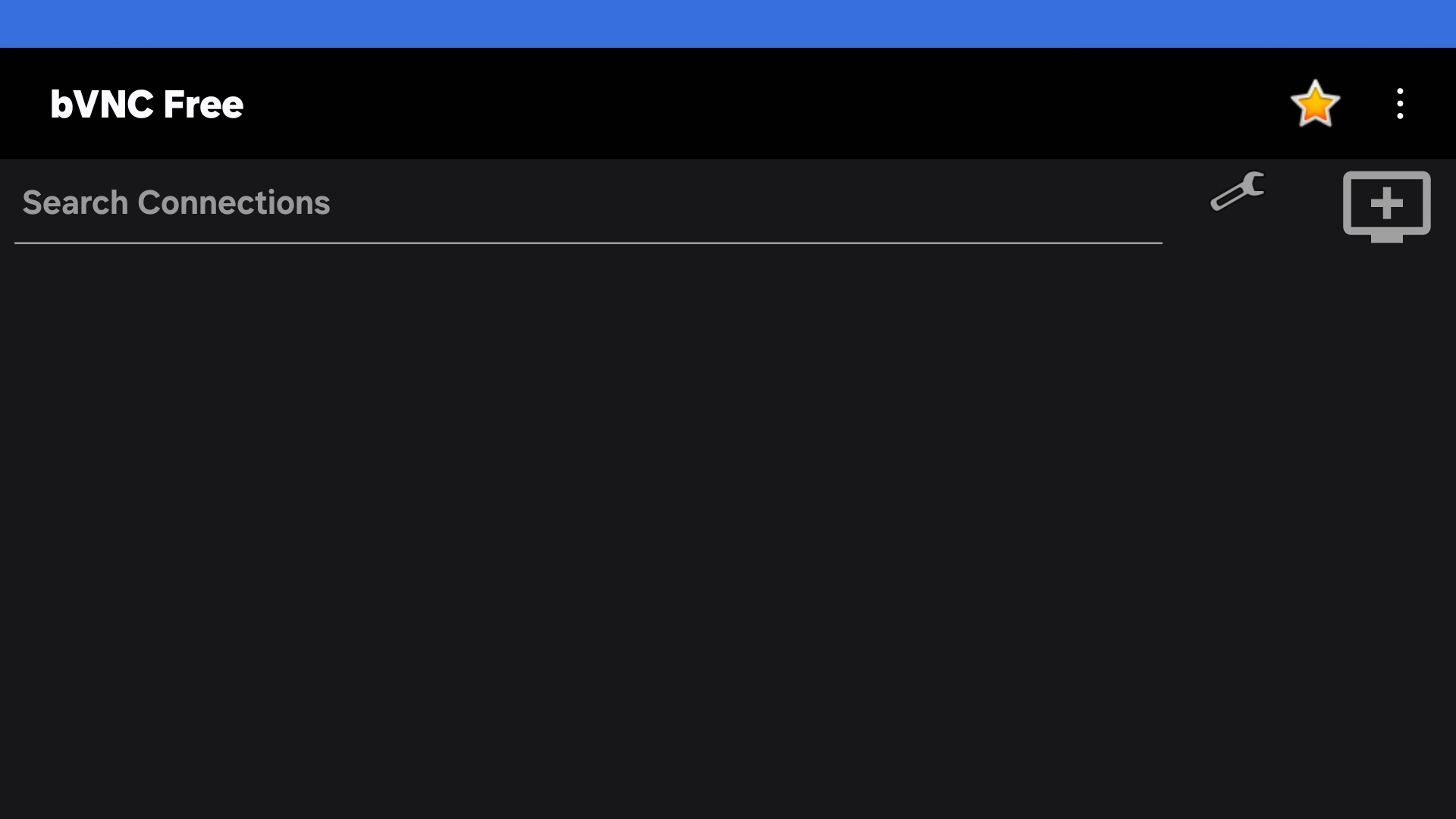 7 |
8 | - App BVNC Viewer
9 |
10 | - [x] [Link Download](https://play.google.com/store/apps/details?id=com.iiordanov.freebVNC)
11 |
12 | ---
13 | Commands in Termux
14 |
15 | - Install Package
16 | ```
17 | apt install tigervnc xorg-xhost -y
18 | ```
19 |
20 | - Add script
21 | ```
22 | echo "vncserver -geometry 1600x900 -listen tcp :1 && DISPLAY=:1 xhost +" > $PREFIX/bin/vncstart
23 | ```
24 | ```
25 | echo "vncserver -kill :1" > $PREFIX/bin/vncstop
26 | ```
27 |
28 | - Activate script
29 | ```
30 | chmod +x $PREFIX/bin/vncstart
31 | ```
32 | ```
33 | chmod +x $PREFIX/bin/vncstop
34 | ```
35 | #### Run BVNC Viewer
36 | - Start VNC Server
37 |
38 | In session 1(termux), run this command
39 | ```
40 | vncstart
41 | ```
42 | ---
43 | Add new session :
44 | Swipe the screen from left to right in termux, click 'New Session'.
45 |
46 | ---
47 | In session 2 (linux), run this commands
48 | ```
49 | export DISPLAY=:1
50 | ```
51 | ```
52 | export PULSE_SERVER=127.0.0.1
53 | ```
54 |
55 | ---
56 | XFCE Desktop
57 | ```
58 | startxfce4
59 | ```
60 | LXDE Desktop
61 | ```
62 | startlxde
63 | ```
64 | LXQT Desktop
65 | ```
66 | startlxqt
67 | ```
68 | KDE- Desktop
69 |
70 | > startplasma-x11
71 |
72 |
73 | ---
74 | - Open BVNC Viewer
75 |
76 | Add (+) VNC Client to connect, fill with :
77 |
78 | VNC Connection Settings
79 |
80 | Vnc Server
81 | > 127.0.0.1
82 |
83 | Port
84 | > 5901
85 |
86 | Vnc Password
87 | > (Your vnc password)
88 |
89 | ---
90 | - Stop VNC Server
91 |
92 | Close BVNC Viewer
93 |
94 | In session 2 (linux), run this command
95 | > Click Ctrl+c, enter (2X)
96 |
97 | In session 1(termux), run this command
98 | > vncstop
99 |
100 |
101 | ---
102 |
7 |
8 | - App BVNC Viewer
9 |
10 | - [x] [Link Download](https://play.google.com/store/apps/details?id=com.iiordanov.freebVNC)
11 |
12 | ---
13 | Commands in Termux
14 |
15 | - Install Package
16 | ```
17 | apt install tigervnc xorg-xhost -y
18 | ```
19 |
20 | - Add script
21 | ```
22 | echo "vncserver -geometry 1600x900 -listen tcp :1 && DISPLAY=:1 xhost +" > $PREFIX/bin/vncstart
23 | ```
24 | ```
25 | echo "vncserver -kill :1" > $PREFIX/bin/vncstop
26 | ```
27 |
28 | - Activate script
29 | ```
30 | chmod +x $PREFIX/bin/vncstart
31 | ```
32 | ```
33 | chmod +x $PREFIX/bin/vncstop
34 | ```
35 | #### Run BVNC Viewer
36 | - Start VNC Server
37 |
38 | In session 1(termux), run this command
39 | ```
40 | vncstart
41 | ```
42 | ---
43 | Add new session :
44 | Swipe the screen from left to right in termux, click 'New Session'.
45 |
46 | ---
47 | In session 2 (linux), run this commands
48 | ```
49 | export DISPLAY=:1
50 | ```
51 | ```
52 | export PULSE_SERVER=127.0.0.1
53 | ```
54 |
55 | ---
56 | XFCE Desktop
57 | ```
58 | startxfce4
59 | ```
60 | LXDE Desktop
61 | ```
62 | startlxde
63 | ```
64 | LXQT Desktop
65 | ```
66 | startlxqt
67 | ```
68 | KDE- Desktop
69 |
70 | > startplasma-x11
71 |
72 |
73 | ---
74 | - Open BVNC Viewer
75 |
76 | Add (+) VNC Client to connect, fill with :
77 |
78 | VNC Connection Settings
79 |
80 | Vnc Server
81 | > 127.0.0.1
82 |
83 | Port
84 | > 5901
85 |
86 | Vnc Password
87 | > (Your vnc password)
88 |
89 | ---
90 | - Stop VNC Server
91 |
92 | Close BVNC Viewer
93 |
94 | In session 2 (linux), run this command
95 | > Click Ctrl+c, enter (2X)
96 |
97 | In session 1(termux), run this command
98 | > vncstop
99 |
100 |
101 | ---
102 | Good Luck
103 | 104 | --- 105 | -------------------------------------------------------------------------------- /Patch/Termux-X11.md: -------------------------------------------------------------------------------- 1 |My Channel 2 | | Discord | YouTube |
3 | 4 | --- 5 | ### Termux-x11 on Parrot 6 | 7 |
8 | - App Termux-x11
9 |
10 | - [x] [Link Download](https://github.com/termux/termux-x11/releases)
11 |
12 | ---
13 | Commands in Termux (session 1)
14 |
15 | - Install Package
16 | ```
17 | apt install termux-x11-nightly -y
18 | ```
19 |
20 | - Add script
21 | ```
22 | echo "termux-x11 :1" > $PREFIX/bin/start-x11
23 | ```
24 | ```
25 | echo "pkill -f com.termux.x11" > $PREFIX/bin/stop-x11
26 | ```
27 |
28 | - Activate script
29 | ```
30 | chmod +x $PREFIX/bin/start-x11
31 | ```
32 | ```
33 | chmod +x $PREFIX/bin/stop-x11
34 | ```
35 |
36 | - Edit Properties
37 | ```
38 | nano ~/.termux/termux.properties
39 | ```
40 |
41 | Example :
42 | > #allow-external-apps = true
43 |
44 | To
45 |
46 | > allow-external-apps = true
47 |
48 | Save : ctrl + x, click Y enter.
49 |
50 | ---
51 | Add new session :
52 | Swipe the screen from left to right in termux, click 'New Session'.
53 |
54 | ---
55 | Commands in Linux (session 2)
56 | > apt install nano
57 |
58 | - Edit script
59 | ```
60 | nano /usr/local/bin/start-x11
61 | ```
62 |
63 | - Add script
64 | ```
65 | #!/bin/sh
66 | export DISPLAY=:1
67 | export PULSE_SERVER=127.0.0.1
68 |
69 | # --XFCE-- #
70 | #startxfce4
71 |
72 | # --LXDE-- #
73 | #startlxde
74 |
75 | # --LXQT-- #
76 | #startlxqt
77 |
78 | # --KDE-- #
79 | #startplasma-x11
80 |
81 | # --END-- #
82 | ```
83 |
84 | Save : ctrl + x, click Y enter.
85 |
86 | Note :
87 | Remove the sign (#) on the desktop you are installing now.
88 |
89 | - Activate script
90 | ```
91 | chmod +x /usr/local/bin/start-x11
92 | ```
93 |
94 | ---
95 | #### Run Termux-x11
96 | - Start Termux-x11
97 |
98 | In session 1(termux), run this command
99 | ```
100 | start-x11
101 | ```
102 |
103 | In session 2 (linux), run this command
104 | ```
105 | start-x11
106 | ```
107 |
108 | Open Termux-x11
109 |
110 |
111 | ---
112 | - Stop Termux-x11
113 |
114 | Close Termux-x11
115 |
116 | In session 2 (linux), run this command
117 | > Click Ctrl+c, enter (2X)
118 |
119 | In session 1(termux), run this command
120 | > stop-x11
121 |
122 |
123 | ---
124 |
7 |
8 | - App Termux-x11
9 |
10 | - [x] [Link Download](https://github.com/termux/termux-x11/releases)
11 |
12 | ---
13 | Commands in Termux (session 1)
14 |
15 | - Install Package
16 | ```
17 | apt install termux-x11-nightly -y
18 | ```
19 |
20 | - Add script
21 | ```
22 | echo "termux-x11 :1" > $PREFIX/bin/start-x11
23 | ```
24 | ```
25 | echo "pkill -f com.termux.x11" > $PREFIX/bin/stop-x11
26 | ```
27 |
28 | - Activate script
29 | ```
30 | chmod +x $PREFIX/bin/start-x11
31 | ```
32 | ```
33 | chmod +x $PREFIX/bin/stop-x11
34 | ```
35 |
36 | - Edit Properties
37 | ```
38 | nano ~/.termux/termux.properties
39 | ```
40 |
41 | Example :
42 | > #allow-external-apps = true
43 |
44 | To
45 |
46 | > allow-external-apps = true
47 |
48 | Save : ctrl + x, click Y enter.
49 |
50 | ---
51 | Add new session :
52 | Swipe the screen from left to right in termux, click 'New Session'.
53 |
54 | ---
55 | Commands in Linux (session 2)
56 | > apt install nano
57 |
58 | - Edit script
59 | ```
60 | nano /usr/local/bin/start-x11
61 | ```
62 |
63 | - Add script
64 | ```
65 | #!/bin/sh
66 | export DISPLAY=:1
67 | export PULSE_SERVER=127.0.0.1
68 |
69 | # --XFCE-- #
70 | #startxfce4
71 |
72 | # --LXDE-- #
73 | #startlxde
74 |
75 | # --LXQT-- #
76 | #startlxqt
77 |
78 | # --KDE-- #
79 | #startplasma-x11
80 |
81 | # --END-- #
82 | ```
83 |
84 | Save : ctrl + x, click Y enter.
85 |
86 | Note :
87 | Remove the sign (#) on the desktop you are installing now.
88 |
89 | - Activate script
90 | ```
91 | chmod +x /usr/local/bin/start-x11
92 | ```
93 |
94 | ---
95 | #### Run Termux-x11
96 | - Start Termux-x11
97 |
98 | In session 1(termux), run this command
99 | ```
100 | start-x11
101 | ```
102 |
103 | In session 2 (linux), run this command
104 | ```
105 | start-x11
106 | ```
107 |
108 | Open Termux-x11
109 |
110 |
111 | ---
112 | - Stop Termux-x11
113 |
114 | Close Termux-x11
115 |
116 | In session 2 (linux), run this command
117 | > Click Ctrl+c, enter (2X)
118 |
119 | In session 1(termux), run this command
120 | > stop-x11
121 |
122 |
123 | ---
124 | Good Luck
125 | 126 | --- 127 | -------------------------------------------------------------------------------- /Patch/RvncViewer.md: -------------------------------------------------------------------------------- 1 |My Channel 2 | | Discord | YouTube |
3 | 4 | --- 5 | ### RVNC Viewer on Parrot 6 |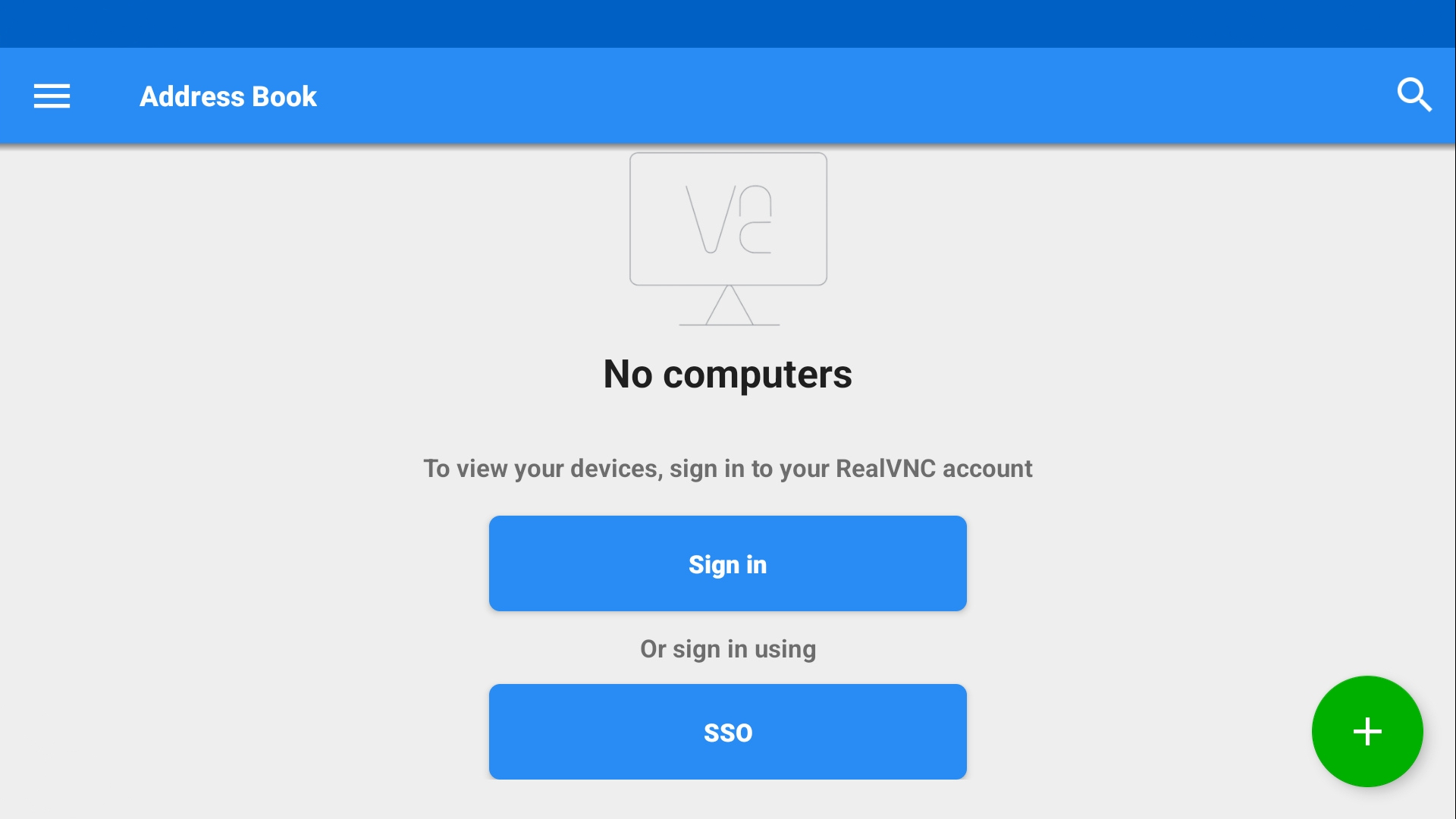 7 |
8 | - App RVNC Viewer
9 |
10 | - [x] [Link Download](https://play.google.com/store/apps/details?id=com.realvnc.viewer.android)
11 |
12 | ---
13 | Commands in Termux (session 1)
14 |
15 | - Install Package
16 | ```
17 | apt install tigervnc xorg-xhost -y
18 | ```
19 |
20 | - Add script
21 | ```
22 | echo "vncserver -geometry 1600x900 -listen tcp :1 && DISPLAY=:1 xhost +" > $PREFIX/bin/vncstart
23 | ```
24 | ```
25 | echo "vncserver -kill :1" > $PREFIX/bin/vncstop
26 | ```
27 |
28 | - Activate script
29 | ```
30 | chmod +x $PREFIX/bin/vncstart
31 | ```
32 | ```
33 | chmod +x $PREFIX/bin/vncstop
34 | ```
35 |
36 | ---
37 | Add new session :
38 | Swipe the screen from left to right in termux, click 'New Session'.
39 |
40 | ---
41 | Commands in Linux (session 2)
42 | > apt install nano
43 |
44 | - Edit script
45 | ```
46 | nano /usr/local/bin/vncstart
47 | ```
48 |
49 | - Add script
50 | ```
51 | #!/bin/sh
52 | export DISPLAY=:1
53 | export PULSE_SERVER=127.0.0.1
54 |
55 | # --XFCE-- #
56 | #startxfce4
57 |
58 | # --LXDE-- #
59 | #startlxde
60 |
61 | # --LXQT-- #
62 | #startlxqt
63 |
64 | # --KDE-- #
65 | #startplasma-x11
66 |
67 | # --END-- #
68 | ```
69 |
70 | Save : ctrl + x, click Y enter.
71 |
72 | Note :
73 | Remove the sign (#) on the desktop you are installing now.
74 |
75 | - Activate script
76 | ```
77 | chmod +x /usr/local/bin/vncstart
78 | ```
79 |
80 | #### Run RVNC Viewer
81 | - Start VNC Server
82 |
83 | In session 1(termux), run this command
84 | ```
85 | vncstart
86 | ```
87 |
88 | In session 2 (linux), run this command
89 | ```
90 | vncstart
91 | ```
92 |
93 | ---
94 | - Open RVNC Viewer
95 |
96 | Add (+) VNC Client to connect, fill with :
97 |
98 | Address
99 | > localhost:1
100 |
101 | Name
102 | > Desktop
103 |
104 | To disconnect VNC Client, click (X) on the right.
105 |
106 |
107 | ---
108 | - Stop VNC Server
109 |
110 | Close RVNC Viewer
111 |
112 | In session 2 (linux), run this command
113 | > Click Ctrl+c, enter (2X)
114 |
115 | In session 1(termux), run this command
116 | > vncstop
117 |
118 |
119 | ---
120 |
7 |
8 | - App RVNC Viewer
9 |
10 | - [x] [Link Download](https://play.google.com/store/apps/details?id=com.realvnc.viewer.android)
11 |
12 | ---
13 | Commands in Termux (session 1)
14 |
15 | - Install Package
16 | ```
17 | apt install tigervnc xorg-xhost -y
18 | ```
19 |
20 | - Add script
21 | ```
22 | echo "vncserver -geometry 1600x900 -listen tcp :1 && DISPLAY=:1 xhost +" > $PREFIX/bin/vncstart
23 | ```
24 | ```
25 | echo "vncserver -kill :1" > $PREFIX/bin/vncstop
26 | ```
27 |
28 | - Activate script
29 | ```
30 | chmod +x $PREFIX/bin/vncstart
31 | ```
32 | ```
33 | chmod +x $PREFIX/bin/vncstop
34 | ```
35 |
36 | ---
37 | Add new session :
38 | Swipe the screen from left to right in termux, click 'New Session'.
39 |
40 | ---
41 | Commands in Linux (session 2)
42 | > apt install nano
43 |
44 | - Edit script
45 | ```
46 | nano /usr/local/bin/vncstart
47 | ```
48 |
49 | - Add script
50 | ```
51 | #!/bin/sh
52 | export DISPLAY=:1
53 | export PULSE_SERVER=127.0.0.1
54 |
55 | # --XFCE-- #
56 | #startxfce4
57 |
58 | # --LXDE-- #
59 | #startlxde
60 |
61 | # --LXQT-- #
62 | #startlxqt
63 |
64 | # --KDE-- #
65 | #startplasma-x11
66 |
67 | # --END-- #
68 | ```
69 |
70 | Save : ctrl + x, click Y enter.
71 |
72 | Note :
73 | Remove the sign (#) on the desktop you are installing now.
74 |
75 | - Activate script
76 | ```
77 | chmod +x /usr/local/bin/vncstart
78 | ```
79 |
80 | #### Run RVNC Viewer
81 | - Start VNC Server
82 |
83 | In session 1(termux), run this command
84 | ```
85 | vncstart
86 | ```
87 |
88 | In session 2 (linux), run this command
89 | ```
90 | vncstart
91 | ```
92 |
93 | ---
94 | - Open RVNC Viewer
95 |
96 | Add (+) VNC Client to connect, fill with :
97 |
98 | Address
99 | > localhost:1
100 |
101 | Name
102 | > Desktop
103 |
104 | To disconnect VNC Client, click (X) on the right.
105 |
106 |
107 | ---
108 | - Stop VNC Server
109 |
110 | Close RVNC Viewer
111 |
112 | In session 2 (linux), run this command
113 | > Click Ctrl+c, enter (2X)
114 |
115 | In session 1(termux), run this command
116 | > vncstop
117 |
118 |
119 | ---
120 | Good Luck
121 | 122 | --- 123 | -------------------------------------------------------------------------------- /README.md: -------------------------------------------------------------------------------- 1 |My Channel 2 | | Discord | YouTube |
3 | 4 | --- 5 | ## Parrot on Termux Android 6 |Install ParrotXfce DesktopLxde DesktopLxqt DesktopKde- DesktopGood Luck
118 | 119 | --- 120 | -------------------------------------------------------------------------------- /Apps/README.md: -------------------------------------------------------------------------------- 1 | ### List Applications 2 | 3 |BlenderChromiumFirefoxGame ClassicGdebiGeditGIMPInkscapeKdenliveKritaLibre OfficeLollypopOBS StudioThunderbirdVimVS CodeGood Luck
133 | 134 | --- 135 | -------------------------------------------------------------------------------- /Install/kali.sh: -------------------------------------------------------------------------------- 1 | #!/data/data/com.termux/files/usr/bin/bash 2 | pkg install root-repo x11-repo 3 | pkg install proot xz-utils neofetch pulseaudio -y 4 | #termux-setup-storage 5 | echo "" 6 | kali=2024 7 | build=rolling 8 | neofetch --ascii_distro Kali -L 9 | case `dpkg --print-architecture` in 10 | aarch64) 11 | device="arm64" ;; 12 | arm*) 13 | device="armhf" ;; 14 | i386) 15 | device="i386" ;; 16 | x86_64) 17 | device="amd64" ;; 18 | *) 19 | echo "Unknown Architecture."; exit 1 ;; 20 | esac 21 | folder=kali-$device 22 | if [ -d "$folder" ]; then 23 | first=1 24 | echo "Skipping Downloading." 25 | fi 26 | tarball="kali-rootfs.tar.xz" 27 | if [ "$first" != 1 ];then 28 | if [ ! -f $tarball ]; then 29 | echo "Download Rootfs, this may take a while base on your internet speed." 30 | case `dpkg --print-architecture` in 31 | aarch64) 32 | archurl="arm64" ;; 33 | arm*) 34 | archurl="armhf" ;; 35 | i386) 36 | archurl="i386" ;; 37 | x86_64) 38 | archurl="amd64" ;; 39 | *) 40 | echo "Unknown Architecture."; exit 1 ;; 41 | esac 42 | #wget -q --show-progress "https://github.com/EXALAB/Anlinux-Resources/raw/refs/heads/master/Rootfs/Kali/${archurl}/kali-rootfs-${archurl}.tar.xz" -O $tarball 43 | wget -q --show-progress "https://kali.download/nethunter-images/current/rootfs/kali-nethunter-rootfs-nano-${archurl}.tar.xz" -O $tarball 44 | fi 45 | #mkdir -p $folder 46 | echo "Decompressing Rootfs, please be patient." 47 | #proot --link2symlink tar -xpf ~/${tarball} -C ~/$folder/ --exclude='dev' ||: 48 | proot --link2symlink tar -xpf ~/${tarball} 2> /dev/null ||: 49 | fi 50 | mkdir -p $folder/binds 51 | echo "localhost" > $folder/etc/hostname 52 | echo "127.0.0.1 localhost" > $folder/etc/hosts 53 | echo "nameserver 8.8.8.8" > $folder/etc/resolv.conf 54 | bin=.kali 55 | linux=kali 56 | echo "" 57 | echo "Writing launch script" 58 | cat > $bin <<- EOM 59 | #!/data/data/com.termux/files/usr/bin/bash 60 | cd \$(dirname \$0) 61 | ## Start pulseaudio 62 | pulseaudio --start --load="module-native-protocol-tcp auth-ip-acl=127.0.0.1 auth-anonymous=1" --exit-idle-time=-1 63 | ## Unset LD_PRELOAD in case termux-exec is installed 64 | unset LD_PRELOAD 65 | command="proot" 66 | command+=" --kill-on-exit" 67 | command+=" --link2symlink" 68 | command+=" -0" 69 | command+=" -r $folder" 70 | if [ -n "\$(ls -A $folder/binds)" ]; then 71 | for f in $folder/binds/* ;do 72 | . \$f 73 | done 74 | fi 75 | command+=" -b /dev" 76 | command+=" -b /dev/null:/proc/sys/kernel/cap_last_cap" 77 | command+=" -b /dev/null:/proc/stat" 78 | command+=" -b /dev/urandom:/dev/random" 79 | command+=" -b /proc" 80 | command+=" -b /proc/self/fd:/dev/fd" 81 | command+=" -b /proc/self/fd/0:/dev/stdin" 82 | command+=" -b /proc/self/fd/1:/dev/stdout" 83 | command+=" -b /proc/self/fd/2:/dev/stderr" 84 | command+=" -b /sys" 85 | command+=" -b /data/data/com.termux/files/usr/tmp:/tmp" 86 | command+=" -b $folder/root:/dev/shm" 87 | ## Uncomment the following line to have access to the home directory of termux 88 | #command+=" -b /data/data/com.termux/files/home:/root" 89 | ## Uncomment the following line to mount /sdcard directly to / 90 | command+=" -b /sdcard" 91 | command+=" -b /mnt" 92 | command+=" -w /root" 93 | command+=" /usr/bin/env -i" 94 | command+=" HOME=/root" 95 | command+=" PATH=/usr/local/sbin:/usr/local/bin:/bin:/usr/bin:/sbin:/usr/sbin:/usr/games:/usr/local/games" 96 | command+=" TERM=\$TERM" 97 | command+=" LC_ALL=C" 98 | command+=" LANG=en_US.UTF-8" 99 | command+=" LANGUAGE=en_US" 100 | command+=" /bin/bash --login" 101 | com="\$@" 102 | if [ -z "\$1" ];then 103 | exec \$command 104 | else 105 | \$command -c "\$com" 106 | fi 107 | EOM 108 | echo "" 109 | echo "Fixing shebang of $linux" 110 | termux-fix-shebang $bin 111 | echo "Making $linux executable" 112 | chmod +x $bin 113 | echo "Fixing permissions for $linux" 114 | #chmod -R 755 $folder 115 | echo "Removing image for some space" 116 | #rm $tarball 117 | echo "" 118 | echo "#Kali Repositories 119 | deb http://http.kali.org/kali kali-rolling main contrib non-free non-free-firmware" > $folder/etc/apt/sources.list 120 | echo "" > $folder/root/.hushlogin 121 | echo "TZ='Asia/Jakarta'; export TZ" >> $folder/root/.profile 122 | echo "export PULSE_SERVER=127.0.0.1" >> $folder/etc/skel/.bashrc 123 | echo 'bash .kali' > $PREFIX/bin/$linux 124 | chmod +x $PREFIX/bin/$linux 125 | clear 126 | echo "" 127 | echo "Updating Package,.." 128 | echo "" 129 | echo "#!/bin/bash 130 | apt update ; apt upgrade -y 131 | apt install apt-utils dialog nano sudo tzdata -y 132 | cp .bashrc .bashrc.bak ; cp /etc/skel/.bashrc . 133 | echo 'kali ALL=(ALL:ALL) ALL' >> /etc/sudoers 134 | #sed -i 's/32/31/g' .bashrc ; apt full-upgrade -y 135 | apt autoremove -y 136 | rm -rf ~/.bash_profile 137 | exit" > $folder/root/.bash_profile 138 | bash $bin 139 | clear 140 | echo "" 141 | echo "You can login to Linux with 'kali' script next time" 142 | echo "" 143 | #rm kali.sh 144 | # 145 | ## Script edited by 'WaHaSa', Script revision-5. 146 | # 147 | -------------------------------------------------------------------------------- /Install/parrot.sh: -------------------------------------------------------------------------------- 1 | #!/data/data/com.termux/files/usr/bin/bash 2 | pkg install root-repo x11-repo 3 | pkg install proot xz-utils neofetch pulseaudio -y 4 | #termux-setup-storage 5 | echo "" 6 | parrot=2024 7 | build=rolling 8 | neofetch --ascii_distro Parrot -L 9 | case `dpkg --print-architecture` in 10 | aarch64) 11 | device="arm64" ;; 12 | arm*) 13 | device="armhf" ;; 14 | i386) 15 | device="i386" ;; 16 | x86_64) 17 | device="amd64" ;; 18 | *) 19 | echo "Unknown Architecture."; exit 1 ;; 20 | esac 21 | folder=parrot-$device 22 | if [ -d "$folder" ]; then 23 | first=1 24 | echo "Skipping Downloading." 25 | fi 26 | tarball="parrot-rootfs.tar.xz" 27 | if [ "$first" != 1 ];then 28 | if [ ! -f $tarball ]; then 29 | echo "Download Rootfs, this may take a while base on your internet speed." 30 | case `dpkg --print-architecture` in 31 | aarch64) 32 | archurl="arm64" ;; 33 | arm*) 34 | archurl="armhf" ;; 35 | i386) 36 | archurl="i386" ;; 37 | x86_64) 38 | archurl="amd64" ;; 39 | *) 40 | echo "Unknown Architecture."; exit 1 ;; 41 | esac 42 | wget -q --show-progress "https://github.com/EXALAB/Anlinux-Resources/raw/refs/heads/master/Rootfs/Parrot/${archurl}/parrot-rootfs-${archurl}.tar.xz" -O $tarball 43 | #wget -q --show-progress "https://deb.parrot.sh/direct/parrot/iso/${parrot}/Parrot-rootfs-6.1_${archurl}.tar.xz" -O $tarball 44 | fi 45 | mkdir -p $folder 46 | echo "Decompressing Rootfs, please be patient." 47 | proot --link2symlink tar -xpf ~/${tarball} -C ~/$folder/ --exclude='dev' ||: 48 | #proot --link2symlink tar -xpf ~/${tarball} --exclude='dev' ||: 49 | #cp -rf lory-$device $folder 50 | #rm -rf lory-$device 51 | fi 52 | mkdir -p $folder/binds 53 | echo "localhost" > $folder/etc/hostname 54 | echo "127.0.0.1 localhost" > $folder/etc/hosts 55 | echo "nameserver 8.8.8.8" > $folder/etc/resolv.conf 56 | bin=.parrot 57 | linux=parrot 58 | echo "" 59 | echo "Writing launch script" 60 | cat > $bin <<- EOM 61 | #!/data/data/com.termux/files/usr/bin/bash 62 | cd \$(dirname \$0) 63 | ## Start pulseaudio 64 | pulseaudio --start --load="module-native-protocol-tcp auth-ip-acl=127.0.0.1 auth-anonymous=1" --exit-idle-time=-1 65 | ## Unset LD_PRELOAD in case termux-exec is installed 66 | unset LD_PRELOAD 67 | command="proot" 68 | command+=" --kill-on-exit" 69 | command+=" --link2symlink" 70 | command+=" -0" 71 | command+=" -r $folder" 72 | if [ -n "\$(ls -A $folder/binds)" ]; then 73 | for f in $folder/binds/* ;do 74 | . \$f 75 | done 76 | fi 77 | command+=" -b /dev" 78 | command+=" -b /dev/null:/proc/sys/kernel/cap_last_cap" 79 | command+=" -b /dev/null:/proc/stat" 80 | command+=" -b /dev/urandom:/dev/random" 81 | command+=" -b /proc" 82 | command+=" -b /proc/self/fd:/dev/fd" 83 | command+=" -b /proc/self/fd/0:/dev/stdin" 84 | command+=" -b /proc/self/fd/1:/dev/stdout" 85 | command+=" -b /proc/self/fd/2:/dev/stderr" 86 | command+=" -b /sys" 87 | command+=" -b /data/data/com.termux/files/usr/tmp:/tmp" 88 | command+=" -b $folder/root:/dev/shm" 89 | ## Uncomment the following line to have access to the home directory of termux 90 | #command+=" -b /data/data/com.termux/files/home:/root" 91 | ## Uncomment the following line to mount /sdcard directly to / 92 | command+=" -b /sdcard" 93 | command+=" -b /mnt" 94 | command+=" -w /root" 95 | command+=" /usr/bin/env -i" 96 | command+=" HOME=/root" 97 | command+=" PATH=/usr/local/sbin:/usr/local/bin:/bin:/usr/bin:/sbin:/usr/sbin:/usr/games:/usr/local/games" 98 | command+=" TERM=\$TERM" 99 | command+=" LC_ALL=C" 100 | command+=" LANG=en_US.UTF-8" 101 | command+=" LANGUAGE=en_US" 102 | command+=" /bin/bash --login" 103 | com="\$@" 104 | if [ -z "\$1" ];then 105 | exec \$command 106 | else 107 | \$command -c "\$com" 108 | fi 109 | EOM 110 | echo "" 111 | echo "Fixing shebang of $linux" 112 | termux-fix-shebang $bin 113 | echo "Making $linux executable" 114 | chmod +x $bin 115 | echo "Fixing permissions for $linux" 116 | #chmod -R 755 $folder 117 | echo "Removing image for some space" 118 | #rm $tarball 119 | echo "" 120 | echo "#Parrot Repositories 121 | deb https://deb.parrot.sh/direct/parrot lory main contrib non-free non-free-firmware 122 | deb https://deb.parrot.sh/direct/parrot lory-updates main contrib non-free non-free-firmware 123 | deb https://deb.parrot.sh/direct/parrot lory-security main contrib non-free non-free-firmware 124 | deb https://deb.parrot.sh/direct/parrot lory-backports main contrib non-free non-free-firmware" > $folder/etc/apt/sources.list.d/parrot.list 125 | rm -rf $folder/etc/apt/sources.list ; touch $folder/etc/apt/sources.list 126 | echo "" > $folder/root/.hushlogin 127 | echo "TZ='Asia/Jakarta'; export TZ" >> $folder/root/.profile 128 | echo "export PULSE_SERVER=127.0.0.1" >> $folder/etc/skel/.bashrc 129 | echo 'bash .parrot' > $PREFIX/bin/$linux 130 | chmod +x $PREFIX/bin/$linux 131 | clear 132 | echo "" 133 | echo "Updating Package,.." 134 | echo "" 135 | echo "#!/bin/bash 136 | apt update && apt upgrade -y 137 | apt install apt-utils dialog nano sudo tzdata -y 138 | cp .bashrc .bashrc.bak ; cp /etc/skel/.bashrc . 139 | apt upgrade passwd -y 140 | rm -rf ~/.bash_profile 141 | exit" > $folder/root/.bash_profile 142 | bash $bin 143 | clear 144 | echo "" 145 | echo "You can login to Linux with 'parrot' script next time" 146 | echo "" 147 | #rm parrot.sh 148 | # 149 | ## Script edited by 'WaHaSa', Script revision-5. 150 | # 151 | --------------------------------------------------------------------------------