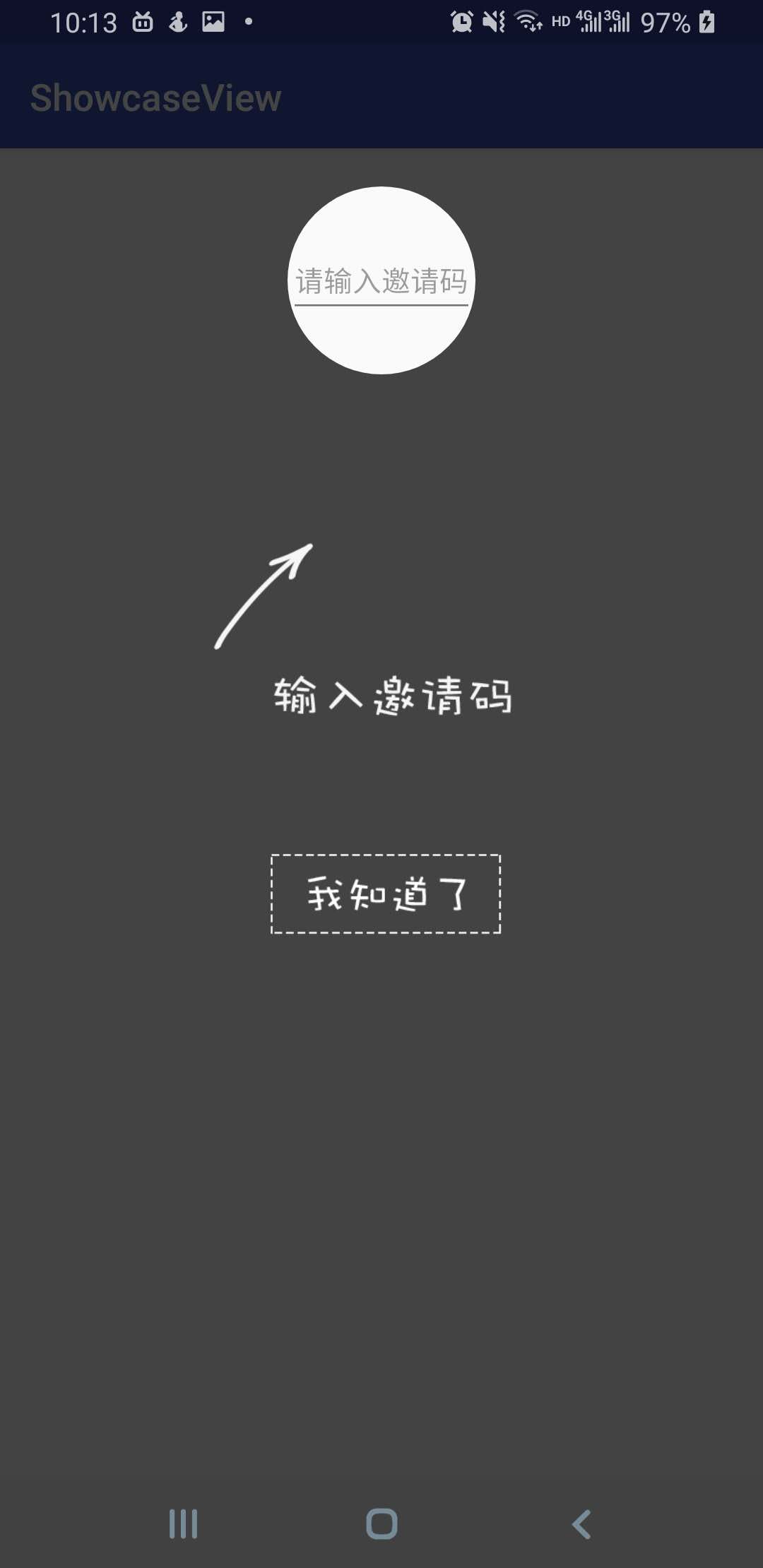
 6 |
6 | 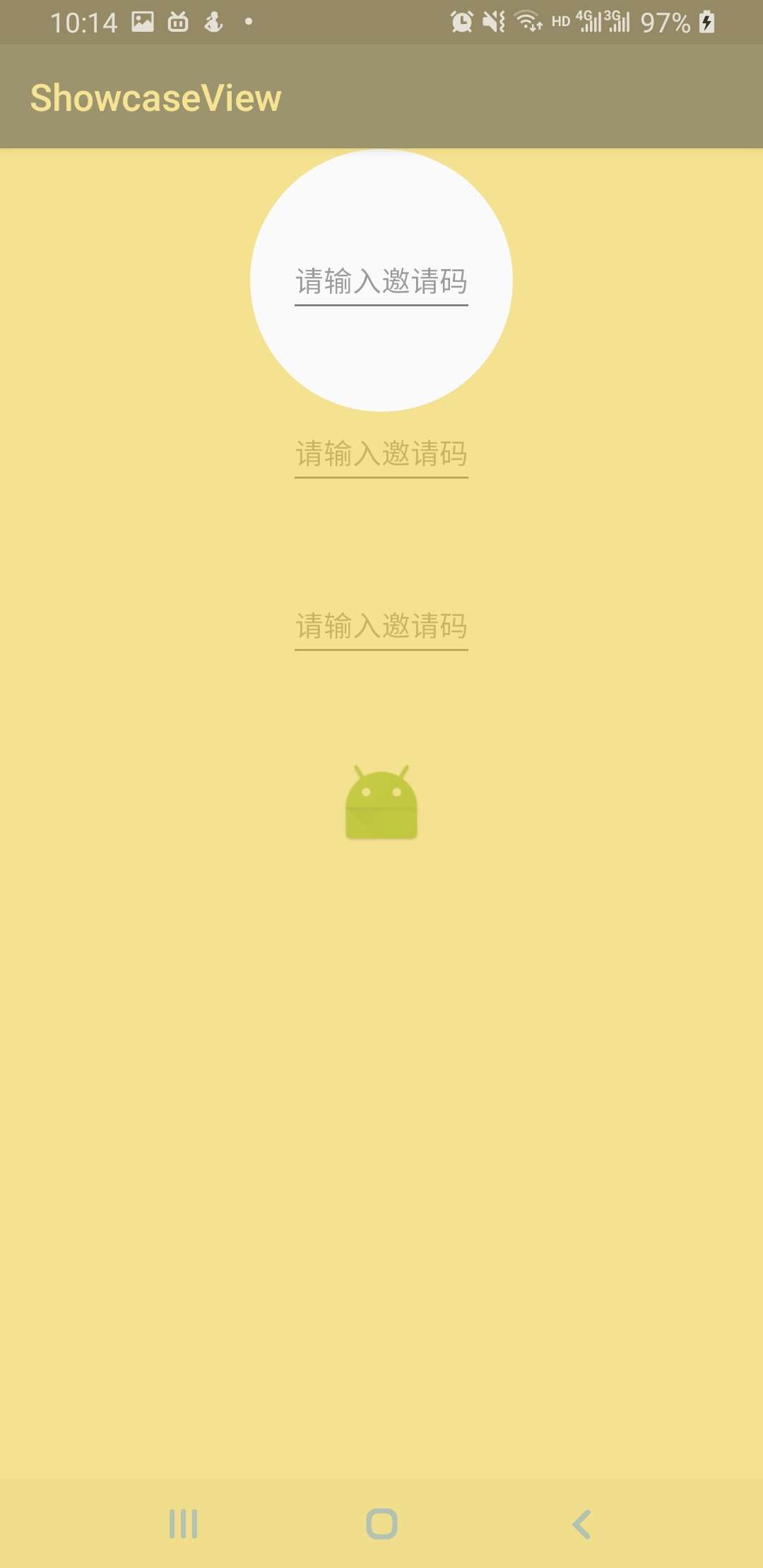 7 |
7 | 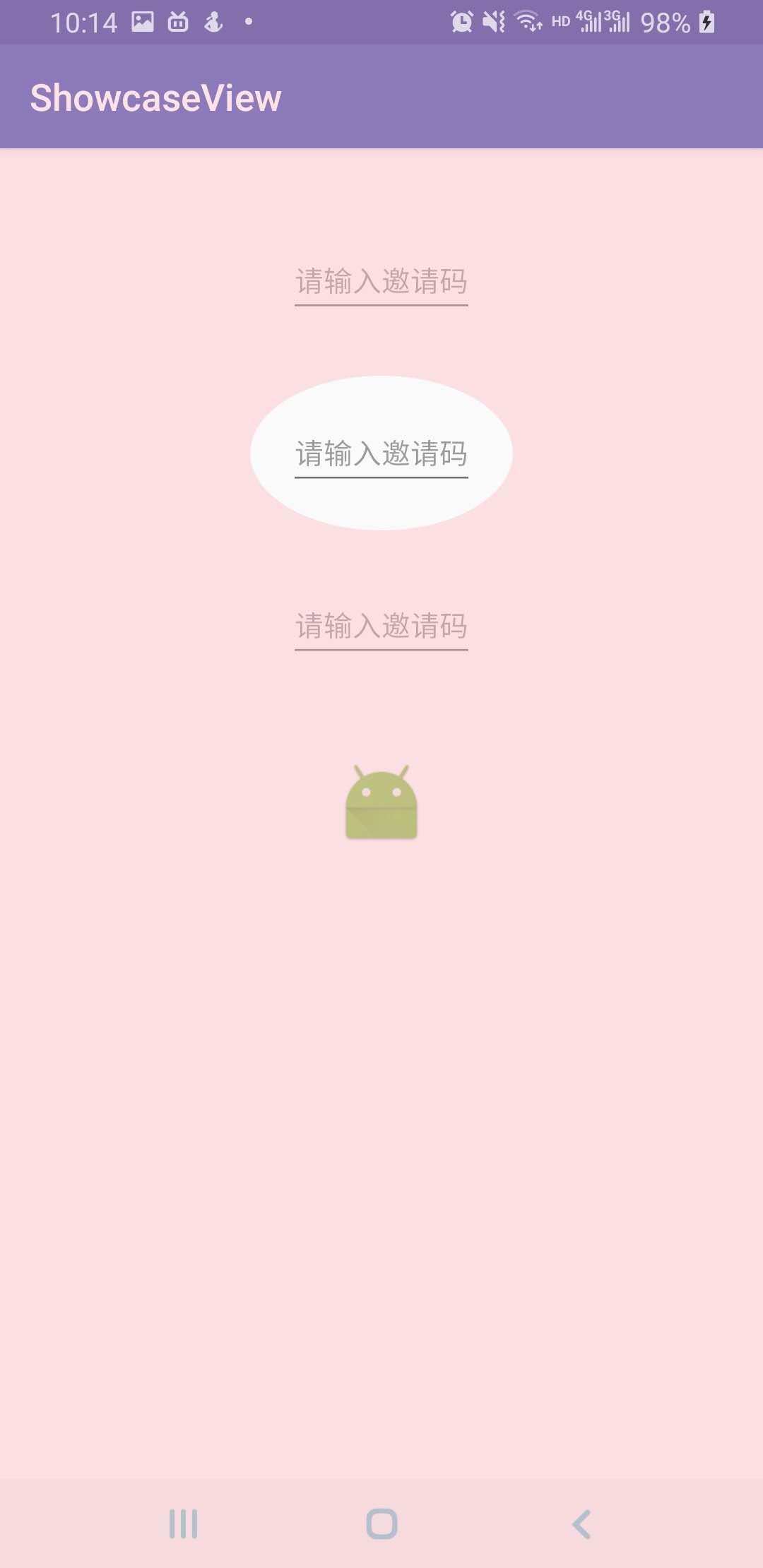 8 |
8 | 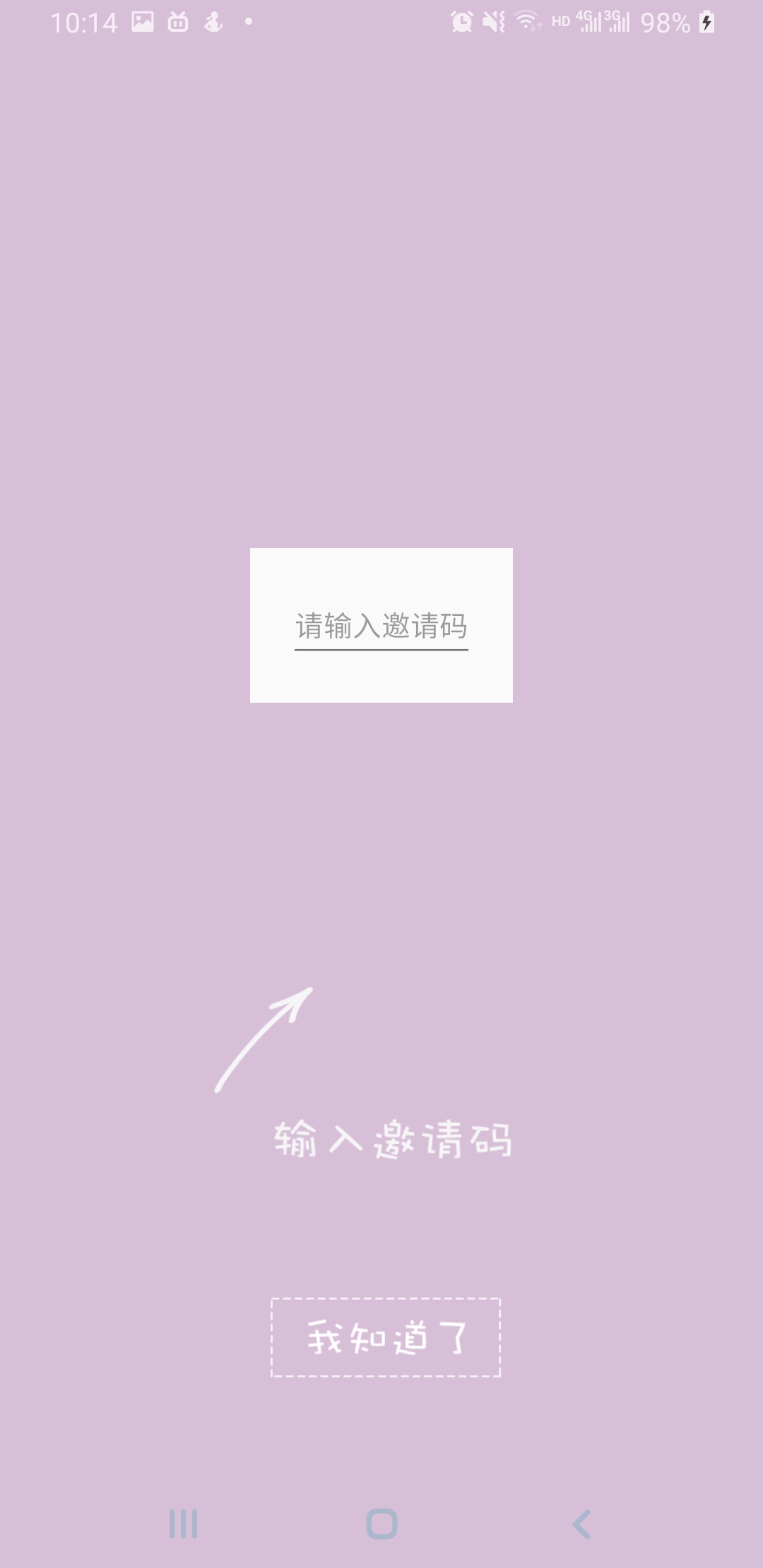 9 |
9 |  10 |
11 | ### **添加依赖**
12 | root build.gradle
13 | ```
14 | allprojects {
15 | repositories {
16 | ...
17 | maven { url 'https://jitpack.io' }
18 | }
19 | }
20 | ```
21 | app build.gradle
22 | ```
23 | dependencies {
24 | compile 'com.github.wdzawdh:ShowcaseView:v1.1'
25 | }
26 | ```
27 |
28 | ### **使用方法**
29 | ### **栗子一**
30 | > 最简单的使用方式 `(图1)`
31 |
32 | >方法解释:(set系列的方法都会有默认值)
33 | 1.setOnlyOneTag 用来标识只显示一次
34 | 2.setMaskColor 遮罩的颜色
35 | 3.setDismissOnTouch 是否触摸任意地方消失
36 | 4.setDuration 显示和消失的事件
37 | 5.setTargetPadding 能控制透明块的大小
38 | 6.addTarget 透明块要在哪个view上展示
39 | 7.addImage 添加图片,五个参数分别是图片资源、x轴的位置(0-10.0f)、y轴的位置(0-10.0f)、图片的缩放比例(当为1.0f时图片宽为屏幕的一半,高度会等比例缩放)、点击图片蒙版是否消失。
40 | 8.addShowcaseListener 监听显示和关闭的事件
41 | ```
42 | new ShowcaseView.Builder(this)
43 | .setOnlyOneTag(MainActivity.class.getSimpleName())
44 | .setMaskColor("#88EECC33")
45 | .setDismissOnTouch(true)
46 | .setDuration(1000L, 1000L)
47 | .setTargetPadding(20)
48 | .addTarget(mTextView)
49 | .addImage(R.mipmap.img_showcase, 5.0f, 5.0f, 1.5f, true)
50 | .addShowcaseListener(new ShowcaseView.ShowcaseListener() {
51 | @Override
52 | public void onDisplay(ShowcaseView showcaseView) {
53 | }
54 |
55 | @Override
56 | public void onDismiss(ShowcaseView showcaseView) {
57 | Intent intent = new Intent(
58 | MainActivity.this, SecondActivity.class);
59 | startActivity(intent);
60 | }
61 | })
62 | .build().show();
63 | ```
64 | ### **栗子二**
65 | > `图2 图3 图4` 是添加到队列再显示的方式(showQueue),也就是说当第一个蒙版消失后会接着显示第二个...直到把队列中的蒙版都显示完。addShowcaseQueue方法用来添加到队列,最后通过showQueue方法来依次显示。
66 |
67 | > 特别注意:set系列的属性会在第一个addShowcaseQueue调用后保留下来,直到调用build为止,比如遮罩颜色等。
68 | ```
69 | new ShowcaseView.Builder(this)
70 | .setOnlyOneTag(MainActivity.class.getSimpleName())
71 | .setMaskColor("#88EECC33")
72 | .setDismissOnTouch(true)
73 | .setDuration(1000L, 1000L)
74 | .setTargetPadding(20)
75 | .addTarget(mTextView, ShowcaseView.CIRCLE_SHAPE)
76 | .addShowcaseQueue()
77 | .setMaskColor("#66FFB6C1")
78 | .addTarget(mTextView2, ShowcaseView.OVAL_SHAPE)
79 | .addShowcaseQueue()
80 | .setMaskColor("#D8BFD8")
81 | .setDismissOnTouch(false)
82 | .addTarget(mTextView3, ShowcaseView.RECTANGLE_SHAPE)
83 | .addImage(R.mipmap.img_showcase, 5.0f, 8.0f, 1.0f, true)
84 | .addShowcaseListener(new ShowcaseView.ShowcaseListener() {
85 | @Override
86 | public void onDisplay(ShowcaseView showcaseView) {
87 | Toast.makeText(getApplication(),
88 | "最后一个展示啦",Toast.LENGTH_SHORT).show();
89 | }
90 |
91 | @Override
92 | public void onDismiss(ShowcaseView showcaseView) {
93 | Toast.makeText(getApplication(),
94 | "最后一个消失啦",Toast.LENGTH_SHORT).show();
95 | }
96 | })
97 | .addShowcaseQueue()
98 | .build().showQueue();
99 | ```
100 |
101 | ### **PS: 关于屏幕适配**
102 | > 为了在不同分辨率的屏幕上显示图片的效果相似,在addImage的时候会默认缩放将图片宽缩放为为屏幕的一半,高度跟随宽等比例缩放,使用时通过第四个参数调整大小,通过第二三个参数调整位置。图片x轴和y轴的位置是按权重调整的,范围是0-10.0f,已图片中心为坐标,(0,0)在最左上方,(10,10)在最右下方。建议先调整大小再调整位置。
103 |
--------------------------------------------------------------------------------
/gradlew:
--------------------------------------------------------------------------------
1 | #!/usr/bin/env bash
2 |
3 | ##############################################################################
4 | ##
5 | ## Gradle start up script for UN*X
6 | ##
7 | ##############################################################################
8 |
9 | # Add default JVM options here. You can also use JAVA_OPTS and GRADLE_OPTS to pass JVM options to this script.
10 | DEFAULT_JVM_OPTS=""
11 |
12 | APP_NAME="Gradle"
13 | APP_BASE_NAME=`basename "$0"`
14 |
15 | # Use the maximum available, or set MAX_FD != -1 to use that value.
16 | MAX_FD="maximum"
17 |
18 | warn ( ) {
19 | echo "$*"
20 | }
21 |
22 | die ( ) {
23 | echo
24 | echo "$*"
25 | echo
26 | exit 1
27 | }
28 |
29 | # OS specific support (must be 'true' or 'false').
30 | cygwin=false
31 | msys=false
32 | darwin=false
33 | case "`uname`" in
34 | CYGWIN* )
35 | cygwin=true
36 | ;;
37 | Darwin* )
38 | darwin=true
39 | ;;
40 | MINGW* )
41 | msys=true
42 | ;;
43 | esac
44 |
45 | # Attempt to set APP_HOME
46 | # Resolve links: $0 may be a link
47 | PRG="$0"
48 | # Need this for relative symlinks.
49 | while [ -h "$PRG" ] ; do
50 | ls=`ls -ld "$PRG"`
51 | link=`expr "$ls" : '.*-> \(.*\)$'`
52 | if expr "$link" : '/.*' > /dev/null; then
53 | PRG="$link"
54 | else
55 | PRG=`dirname "$PRG"`"/$link"
56 | fi
57 | done
58 | SAVED="`pwd`"
59 | cd "`dirname \"$PRG\"`/" >/dev/null
60 | APP_HOME="`pwd -P`"
61 | cd "$SAVED" >/dev/null
62 |
63 | CLASSPATH=$APP_HOME/gradle/wrapper/gradle-wrapper.jar
64 |
65 | # Determine the Java command to use to start the JVM.
66 | if [ -n "$JAVA_HOME" ] ; then
67 | if [ -x "$JAVA_HOME/jre/sh/java" ] ; then
68 | # IBM's JDK on AIX uses strange locations for the executables
69 | JAVACMD="$JAVA_HOME/jre/sh/java"
70 | else
71 | JAVACMD="$JAVA_HOME/bin/java"
72 | fi
73 | if [ ! -x "$JAVACMD" ] ; then
74 | die "ERROR: JAVA_HOME is set to an invalid directory: $JAVA_HOME
75 |
76 | Please set the JAVA_HOME variable in your environment to match the
77 | location of your Java installation."
78 | fi
79 | else
80 | JAVACMD="java"
81 | which java >/dev/null 2>&1 || die "ERROR: JAVA_HOME is not set and no 'java' command could be found in your PATH.
82 |
83 | Please set the JAVA_HOME variable in your environment to match the
84 | location of your Java installation."
85 | fi
86 |
87 | # Increase the maximum file descriptors if we can.
88 | if [ "$cygwin" = "false" -a "$darwin" = "false" ] ; then
89 | MAX_FD_LIMIT=`ulimit -H -n`
90 | if [ $? -eq 0 ] ; then
91 | if [ "$MAX_FD" = "maximum" -o "$MAX_FD" = "max" ] ; then
92 | MAX_FD="$MAX_FD_LIMIT"
93 | fi
94 | ulimit -n $MAX_FD
95 | if [ $? -ne 0 ] ; then
96 | warn "Could not set maximum file descriptor limit: $MAX_FD"
97 | fi
98 | else
99 | warn "Could not query maximum file descriptor limit: $MAX_FD_LIMIT"
100 | fi
101 | fi
102 |
103 | # For Darwin, add options to specify how the application appears in the dock
104 | if $darwin; then
105 | GRADLE_OPTS="$GRADLE_OPTS \"-Xdock:name=$APP_NAME\" \"-Xdock:icon=$APP_HOME/media/gradle.icns\""
106 | fi
107 |
108 | # For Cygwin, switch paths to Windows format before running java
109 | if $cygwin ; then
110 | APP_HOME=`cygpath --path --mixed "$APP_HOME"`
111 | CLASSPATH=`cygpath --path --mixed "$CLASSPATH"`
112 | JAVACMD=`cygpath --unix "$JAVACMD"`
113 |
114 | # We build the pattern for arguments to be converted via cygpath
115 | ROOTDIRSRAW=`find -L / -maxdepth 1 -mindepth 1 -type d 2>/dev/null`
116 | SEP=""
117 | for dir in $ROOTDIRSRAW ; do
118 | ROOTDIRS="$ROOTDIRS$SEP$dir"
119 | SEP="|"
120 | done
121 | OURCYGPATTERN="(^($ROOTDIRS))"
122 | # Add a user-defined pattern to the cygpath arguments
123 | if [ "$GRADLE_CYGPATTERN" != "" ] ; then
124 | OURCYGPATTERN="$OURCYGPATTERN|($GRADLE_CYGPATTERN)"
125 | fi
126 | # Now convert the arguments - kludge to limit ourselves to /bin/sh
127 | i=0
128 | for arg in "$@" ; do
129 | CHECK=`echo "$arg"|egrep -c "$OURCYGPATTERN" -`
130 | CHECK2=`echo "$arg"|egrep -c "^-"` ### Determine if an option
131 |
132 | if [ $CHECK -ne 0 ] && [ $CHECK2 -eq 0 ] ; then ### Added a condition
133 | eval `echo args$i`=`cygpath --path --ignore --mixed "$arg"`
134 | else
135 | eval `echo args$i`="\"$arg\""
136 | fi
137 | i=$((i+1))
138 | done
139 | case $i in
140 | (0) set -- ;;
141 | (1) set -- "$args0" ;;
142 | (2) set -- "$args0" "$args1" ;;
143 | (3) set -- "$args0" "$args1" "$args2" ;;
144 | (4) set -- "$args0" "$args1" "$args2" "$args3" ;;
145 | (5) set -- "$args0" "$args1" "$args2" "$args3" "$args4" ;;
146 | (6) set -- "$args0" "$args1" "$args2" "$args3" "$args4" "$args5" ;;
147 | (7) set -- "$args0" "$args1" "$args2" "$args3" "$args4" "$args5" "$args6" ;;
148 | (8) set -- "$args0" "$args1" "$args2" "$args3" "$args4" "$args5" "$args6" "$args7" ;;
149 | (9) set -- "$args0" "$args1" "$args2" "$args3" "$args4" "$args5" "$args6" "$args7" "$args8" ;;
150 | esac
151 | fi
152 |
153 | # Split up the JVM_OPTS And GRADLE_OPTS values into an array, following the shell quoting and substitution rules
154 | function splitJvmOpts() {
155 | JVM_OPTS=("$@")
156 | }
157 | eval splitJvmOpts $DEFAULT_JVM_OPTS $JAVA_OPTS $GRADLE_OPTS
158 | JVM_OPTS[${#JVM_OPTS[*]}]="-Dorg.gradle.appname=$APP_BASE_NAME"
159 |
160 | exec "$JAVACMD" "${JVM_OPTS[@]}" -classpath "$CLASSPATH" org.gradle.wrapper.GradleWrapperMain "$@"
161 |
--------------------------------------------------------------------------------
/showcase/src/main/java/com/cw/showcase/showcaseview/ShowcaseView.java:
--------------------------------------------------------------------------------
1 | package com.cw.showcase.showcaseview;
2 |
3 | import android.app.Activity;
4 | import android.content.Context;
5 | import android.content.SharedPreferences;
6 | import android.graphics.Bitmap;
7 | import android.graphics.BitmapFactory;
8 | import android.graphics.Canvas;
9 | import android.graphics.Color;
10 | import android.graphics.Paint;
11 | import android.graphics.Point;
12 | import android.graphics.PorterDuff;
13 | import android.graphics.PorterDuffXfermode;
14 | import android.graphics.Rect;
15 | import android.util.AttributeSet;
16 | import android.view.MotionEvent;
17 | import android.view.View;
18 | import android.view.ViewGroup;
19 | import android.view.WindowManager;
20 | import android.view.animation.Animation;
21 | import android.widget.AbsoluteLayout;
22 | import android.widget.FrameLayout;
23 | import android.widget.ImageView;
24 |
25 | import com.cw.showcase.showcaseview.animation.AlphaAnimationFactory;
26 | import com.cw.showcase.showcaseview.animation.IAnimationFactory;
27 | import com.cw.showcase.showcaseview.queue.ShowcaseQueue;
28 | import com.cw.showcase.showcaseview.shape.CircleShape;
29 | import com.cw.showcase.showcaseview.shape.IShape;
30 | import com.cw.showcase.showcaseview.shape.OvalShape;
31 | import com.cw.showcase.showcaseview.shape.RectangleShape;
32 | import com.cw.showcase.showcaseview.target.ViewTarget;
33 |
34 | import java.util.HashMap;
35 | import java.util.Map;
36 |
37 | import androidx.annotation.AttrRes;
38 | import androidx.annotation.NonNull;
39 | import androidx.annotation.Nullable;
40 |
41 |
42 | /**
43 | * @author Cw
44 | * @date 2017/7/24
45 | */
46 | public class ShowcaseView extends FrameLayout implements View.OnClickListener {
47 |
48 | public static final String PREFERENCE_NAME = ShowcaseView.class.getSimpleName();
49 |
50 | public static final int CIRCLE_SHAPE = 0;
51 | public static final int RECTANGLE_SHAPE = 1;
52 | public static final int OVAL_SHAPE = 2;
53 |
54 | public static int sShowIndex = 0;//展示的个数
55 |
56 | private String mMaskColor = "#BB000000";//蒙版的背景颜色
57 | private boolean mDismissOnTouch;//是否触摸任意地方消失
58 | private int mTargetPadding;//透明块的内边距
59 | private long mShowDuration = -1;//show的渐显时间
60 | private long mMissDuration = -1;//miss的渐隐时间
61 | private long mDismissDuration;//设置自动消失时间
62 | private String mOnlyOneTag;//只展示一次的标示
63 |
64 | private Activity mActivity;
65 | private Bitmap mBitmap;
66 | private Paint mPaint;
67 | private Canvas mCanvas;
68 | private ViewGroup mDecorView;
69 | private AbsoluteLayout mContentView;
70 | private Map
10 |
11 | ### **添加依赖**
12 | root build.gradle
13 | ```
14 | allprojects {
15 | repositories {
16 | ...
17 | maven { url 'https://jitpack.io' }
18 | }
19 | }
20 | ```
21 | app build.gradle
22 | ```
23 | dependencies {
24 | compile 'com.github.wdzawdh:ShowcaseView:v1.1'
25 | }
26 | ```
27 |
28 | ### **使用方法**
29 | ### **栗子一**
30 | > 最简单的使用方式 `(图1)`
31 |
32 | >方法解释:(set系列的方法都会有默认值)
33 | 1.setOnlyOneTag 用来标识只显示一次
34 | 2.setMaskColor 遮罩的颜色
35 | 3.setDismissOnTouch 是否触摸任意地方消失
36 | 4.setDuration 显示和消失的事件
37 | 5.setTargetPadding 能控制透明块的大小
38 | 6.addTarget 透明块要在哪个view上展示
39 | 7.addImage 添加图片,五个参数分别是图片资源、x轴的位置(0-10.0f)、y轴的位置(0-10.0f)、图片的缩放比例(当为1.0f时图片宽为屏幕的一半,高度会等比例缩放)、点击图片蒙版是否消失。
40 | 8.addShowcaseListener 监听显示和关闭的事件
41 | ```
42 | new ShowcaseView.Builder(this)
43 | .setOnlyOneTag(MainActivity.class.getSimpleName())
44 | .setMaskColor("#88EECC33")
45 | .setDismissOnTouch(true)
46 | .setDuration(1000L, 1000L)
47 | .setTargetPadding(20)
48 | .addTarget(mTextView)
49 | .addImage(R.mipmap.img_showcase, 5.0f, 5.0f, 1.5f, true)
50 | .addShowcaseListener(new ShowcaseView.ShowcaseListener() {
51 | @Override
52 | public void onDisplay(ShowcaseView showcaseView) {
53 | }
54 |
55 | @Override
56 | public void onDismiss(ShowcaseView showcaseView) {
57 | Intent intent = new Intent(
58 | MainActivity.this, SecondActivity.class);
59 | startActivity(intent);
60 | }
61 | })
62 | .build().show();
63 | ```
64 | ### **栗子二**
65 | > `图2 图3 图4` 是添加到队列再显示的方式(showQueue),也就是说当第一个蒙版消失后会接着显示第二个...直到把队列中的蒙版都显示完。addShowcaseQueue方法用来添加到队列,最后通过showQueue方法来依次显示。
66 |
67 | > 特别注意:set系列的属性会在第一个addShowcaseQueue调用后保留下来,直到调用build为止,比如遮罩颜色等。
68 | ```
69 | new ShowcaseView.Builder(this)
70 | .setOnlyOneTag(MainActivity.class.getSimpleName())
71 | .setMaskColor("#88EECC33")
72 | .setDismissOnTouch(true)
73 | .setDuration(1000L, 1000L)
74 | .setTargetPadding(20)
75 | .addTarget(mTextView, ShowcaseView.CIRCLE_SHAPE)
76 | .addShowcaseQueue()
77 | .setMaskColor("#66FFB6C1")
78 | .addTarget(mTextView2, ShowcaseView.OVAL_SHAPE)
79 | .addShowcaseQueue()
80 | .setMaskColor("#D8BFD8")
81 | .setDismissOnTouch(false)
82 | .addTarget(mTextView3, ShowcaseView.RECTANGLE_SHAPE)
83 | .addImage(R.mipmap.img_showcase, 5.0f, 8.0f, 1.0f, true)
84 | .addShowcaseListener(new ShowcaseView.ShowcaseListener() {
85 | @Override
86 | public void onDisplay(ShowcaseView showcaseView) {
87 | Toast.makeText(getApplication(),
88 | "最后一个展示啦",Toast.LENGTH_SHORT).show();
89 | }
90 |
91 | @Override
92 | public void onDismiss(ShowcaseView showcaseView) {
93 | Toast.makeText(getApplication(),
94 | "最后一个消失啦",Toast.LENGTH_SHORT).show();
95 | }
96 | })
97 | .addShowcaseQueue()
98 | .build().showQueue();
99 | ```
100 |
101 | ### **PS: 关于屏幕适配**
102 | > 为了在不同分辨率的屏幕上显示图片的效果相似,在addImage的时候会默认缩放将图片宽缩放为为屏幕的一半,高度跟随宽等比例缩放,使用时通过第四个参数调整大小,通过第二三个参数调整位置。图片x轴和y轴的位置是按权重调整的,范围是0-10.0f,已图片中心为坐标,(0,0)在最左上方,(10,10)在最右下方。建议先调整大小再调整位置。
103 |
--------------------------------------------------------------------------------
/gradlew:
--------------------------------------------------------------------------------
1 | #!/usr/bin/env bash
2 |
3 | ##############################################################################
4 | ##
5 | ## Gradle start up script for UN*X
6 | ##
7 | ##############################################################################
8 |
9 | # Add default JVM options here. You can also use JAVA_OPTS and GRADLE_OPTS to pass JVM options to this script.
10 | DEFAULT_JVM_OPTS=""
11 |
12 | APP_NAME="Gradle"
13 | APP_BASE_NAME=`basename "$0"`
14 |
15 | # Use the maximum available, or set MAX_FD != -1 to use that value.
16 | MAX_FD="maximum"
17 |
18 | warn ( ) {
19 | echo "$*"
20 | }
21 |
22 | die ( ) {
23 | echo
24 | echo "$*"
25 | echo
26 | exit 1
27 | }
28 |
29 | # OS specific support (must be 'true' or 'false').
30 | cygwin=false
31 | msys=false
32 | darwin=false
33 | case "`uname`" in
34 | CYGWIN* )
35 | cygwin=true
36 | ;;
37 | Darwin* )
38 | darwin=true
39 | ;;
40 | MINGW* )
41 | msys=true
42 | ;;
43 | esac
44 |
45 | # Attempt to set APP_HOME
46 | # Resolve links: $0 may be a link
47 | PRG="$0"
48 | # Need this for relative symlinks.
49 | while [ -h "$PRG" ] ; do
50 | ls=`ls -ld "$PRG"`
51 | link=`expr "$ls" : '.*-> \(.*\)$'`
52 | if expr "$link" : '/.*' > /dev/null; then
53 | PRG="$link"
54 | else
55 | PRG=`dirname "$PRG"`"/$link"
56 | fi
57 | done
58 | SAVED="`pwd`"
59 | cd "`dirname \"$PRG\"`/" >/dev/null
60 | APP_HOME="`pwd -P`"
61 | cd "$SAVED" >/dev/null
62 |
63 | CLASSPATH=$APP_HOME/gradle/wrapper/gradle-wrapper.jar
64 |
65 | # Determine the Java command to use to start the JVM.
66 | if [ -n "$JAVA_HOME" ] ; then
67 | if [ -x "$JAVA_HOME/jre/sh/java" ] ; then
68 | # IBM's JDK on AIX uses strange locations for the executables
69 | JAVACMD="$JAVA_HOME/jre/sh/java"
70 | else
71 | JAVACMD="$JAVA_HOME/bin/java"
72 | fi
73 | if [ ! -x "$JAVACMD" ] ; then
74 | die "ERROR: JAVA_HOME is set to an invalid directory: $JAVA_HOME
75 |
76 | Please set the JAVA_HOME variable in your environment to match the
77 | location of your Java installation."
78 | fi
79 | else
80 | JAVACMD="java"
81 | which java >/dev/null 2>&1 || die "ERROR: JAVA_HOME is not set and no 'java' command could be found in your PATH.
82 |
83 | Please set the JAVA_HOME variable in your environment to match the
84 | location of your Java installation."
85 | fi
86 |
87 | # Increase the maximum file descriptors if we can.
88 | if [ "$cygwin" = "false" -a "$darwin" = "false" ] ; then
89 | MAX_FD_LIMIT=`ulimit -H -n`
90 | if [ $? -eq 0 ] ; then
91 | if [ "$MAX_FD" = "maximum" -o "$MAX_FD" = "max" ] ; then
92 | MAX_FD="$MAX_FD_LIMIT"
93 | fi
94 | ulimit -n $MAX_FD
95 | if [ $? -ne 0 ] ; then
96 | warn "Could not set maximum file descriptor limit: $MAX_FD"
97 | fi
98 | else
99 | warn "Could not query maximum file descriptor limit: $MAX_FD_LIMIT"
100 | fi
101 | fi
102 |
103 | # For Darwin, add options to specify how the application appears in the dock
104 | if $darwin; then
105 | GRADLE_OPTS="$GRADLE_OPTS \"-Xdock:name=$APP_NAME\" \"-Xdock:icon=$APP_HOME/media/gradle.icns\""
106 | fi
107 |
108 | # For Cygwin, switch paths to Windows format before running java
109 | if $cygwin ; then
110 | APP_HOME=`cygpath --path --mixed "$APP_HOME"`
111 | CLASSPATH=`cygpath --path --mixed "$CLASSPATH"`
112 | JAVACMD=`cygpath --unix "$JAVACMD"`
113 |
114 | # We build the pattern for arguments to be converted via cygpath
115 | ROOTDIRSRAW=`find -L / -maxdepth 1 -mindepth 1 -type d 2>/dev/null`
116 | SEP=""
117 | for dir in $ROOTDIRSRAW ; do
118 | ROOTDIRS="$ROOTDIRS$SEP$dir"
119 | SEP="|"
120 | done
121 | OURCYGPATTERN="(^($ROOTDIRS))"
122 | # Add a user-defined pattern to the cygpath arguments
123 | if [ "$GRADLE_CYGPATTERN" != "" ] ; then
124 | OURCYGPATTERN="$OURCYGPATTERN|($GRADLE_CYGPATTERN)"
125 | fi
126 | # Now convert the arguments - kludge to limit ourselves to /bin/sh
127 | i=0
128 | for arg in "$@" ; do
129 | CHECK=`echo "$arg"|egrep -c "$OURCYGPATTERN" -`
130 | CHECK2=`echo "$arg"|egrep -c "^-"` ### Determine if an option
131 |
132 | if [ $CHECK -ne 0 ] && [ $CHECK2 -eq 0 ] ; then ### Added a condition
133 | eval `echo args$i`=`cygpath --path --ignore --mixed "$arg"`
134 | else
135 | eval `echo args$i`="\"$arg\""
136 | fi
137 | i=$((i+1))
138 | done
139 | case $i in
140 | (0) set -- ;;
141 | (1) set -- "$args0" ;;
142 | (2) set -- "$args0" "$args1" ;;
143 | (3) set -- "$args0" "$args1" "$args2" ;;
144 | (4) set -- "$args0" "$args1" "$args2" "$args3" ;;
145 | (5) set -- "$args0" "$args1" "$args2" "$args3" "$args4" ;;
146 | (6) set -- "$args0" "$args1" "$args2" "$args3" "$args4" "$args5" ;;
147 | (7) set -- "$args0" "$args1" "$args2" "$args3" "$args4" "$args5" "$args6" ;;
148 | (8) set -- "$args0" "$args1" "$args2" "$args3" "$args4" "$args5" "$args6" "$args7" ;;
149 | (9) set -- "$args0" "$args1" "$args2" "$args3" "$args4" "$args5" "$args6" "$args7" "$args8" ;;
150 | esac
151 | fi
152 |
153 | # Split up the JVM_OPTS And GRADLE_OPTS values into an array, following the shell quoting and substitution rules
154 | function splitJvmOpts() {
155 | JVM_OPTS=("$@")
156 | }
157 | eval splitJvmOpts $DEFAULT_JVM_OPTS $JAVA_OPTS $GRADLE_OPTS
158 | JVM_OPTS[${#JVM_OPTS[*]}]="-Dorg.gradle.appname=$APP_BASE_NAME"
159 |
160 | exec "$JAVACMD" "${JVM_OPTS[@]}" -classpath "$CLASSPATH" org.gradle.wrapper.GradleWrapperMain "$@"
161 |
--------------------------------------------------------------------------------
/showcase/src/main/java/com/cw/showcase/showcaseview/ShowcaseView.java:
--------------------------------------------------------------------------------
1 | package com.cw.showcase.showcaseview;
2 |
3 | import android.app.Activity;
4 | import android.content.Context;
5 | import android.content.SharedPreferences;
6 | import android.graphics.Bitmap;
7 | import android.graphics.BitmapFactory;
8 | import android.graphics.Canvas;
9 | import android.graphics.Color;
10 | import android.graphics.Paint;
11 | import android.graphics.Point;
12 | import android.graphics.PorterDuff;
13 | import android.graphics.PorterDuffXfermode;
14 | import android.graphics.Rect;
15 | import android.util.AttributeSet;
16 | import android.view.MotionEvent;
17 | import android.view.View;
18 | import android.view.ViewGroup;
19 | import android.view.WindowManager;
20 | import android.view.animation.Animation;
21 | import android.widget.AbsoluteLayout;
22 | import android.widget.FrameLayout;
23 | import android.widget.ImageView;
24 |
25 | import com.cw.showcase.showcaseview.animation.AlphaAnimationFactory;
26 | import com.cw.showcase.showcaseview.animation.IAnimationFactory;
27 | import com.cw.showcase.showcaseview.queue.ShowcaseQueue;
28 | import com.cw.showcase.showcaseview.shape.CircleShape;
29 | import com.cw.showcase.showcaseview.shape.IShape;
30 | import com.cw.showcase.showcaseview.shape.OvalShape;
31 | import com.cw.showcase.showcaseview.shape.RectangleShape;
32 | import com.cw.showcase.showcaseview.target.ViewTarget;
33 |
34 | import java.util.HashMap;
35 | import java.util.Map;
36 |
37 | import androidx.annotation.AttrRes;
38 | import androidx.annotation.NonNull;
39 | import androidx.annotation.Nullable;
40 |
41 |
42 | /**
43 | * @author Cw
44 | * @date 2017/7/24
45 | */
46 | public class ShowcaseView extends FrameLayout implements View.OnClickListener {
47 |
48 | public static final String PREFERENCE_NAME = ShowcaseView.class.getSimpleName();
49 |
50 | public static final int CIRCLE_SHAPE = 0;
51 | public static final int RECTANGLE_SHAPE = 1;
52 | public static final int OVAL_SHAPE = 2;
53 |
54 | public static int sShowIndex = 0;//展示的个数
55 |
56 | private String mMaskColor = "#BB000000";//蒙版的背景颜色
57 | private boolean mDismissOnTouch;//是否触摸任意地方消失
58 | private int mTargetPadding;//透明块的内边距
59 | private long mShowDuration = -1;//show的渐显时间
60 | private long mMissDuration = -1;//miss的渐隐时间
61 | private long mDismissDuration;//设置自动消失时间
62 | private String mOnlyOneTag;//只展示一次的标示
63 |
64 | private Activity mActivity;
65 | private Bitmap mBitmap;
66 | private Paint mPaint;
67 | private Canvas mCanvas;
68 | private ViewGroup mDecorView;
69 | private AbsoluteLayout mContentView;
70 | private Map
216 | * 默认 CIRCLE_SHAPE 圆形
217 | */
218 | public Builder addTarget(View view) {
219 | showcaseView.addTarget(view);
220 | return this;
221 | }
222 |
223 | /**
224 | * 设置透明块的样式
225 | *
226 | * @param view view
227 | * @param shapeMode CIRCLE_SHAPE 圆形 RECTANGLE_SHAPE 矩形 OVAL_SHAPE 椭圆
228 | */
229 | public Builder addTarget(View view, int shapeMode) {
230 | showcaseView.addTarget(view, shapeMode);
231 | return this;
232 | }
233 |
234 | /**
235 | * 增加展示的图片
236 | *
237 | * @param resId resId
238 | * @param xWeight x坐标-权重(总共10.0f,例如5.0f就在屏幕中间)
239 | * @param yWeight y坐标-权重(总共10.0f)
240 | * @param scale 缩放比例
241 | * @param miss 是否点击蒙版消失
242 | */
243 | public Builder addImage(int resId, float xWeight, float yWeight, float scale, boolean miss) {
244 | showcaseView.addImage(resId, xWeight, yWeight, scale, miss);
245 | return this;
246 | }
247 |
248 | /**
249 | * 增加展示的图片
250 | *
251 | * @param resId resId
252 | * @param xWeight x坐标-权重(总共10.0f,例如5.0f就在屏幕中间)
253 | * @param yWeight y坐标-权重(总共10.0f)
254 | * @param scale 缩放比例
255 | * @param miss 是否点击蒙版消失
256 | * @param animation 动画
257 | */
258 | public Builder addImage(int resId, float xWeight, float yWeight, float scale, boolean miss, Animation animation) {
259 | showcaseView.addImage(resId, xWeight, yWeight, scale, miss, animation);
260 | return this;
261 | }
262 |
263 | /**
264 | * 增加展示的View
265 | *
266 | * @param view view
267 | * @param width view width
268 | * @param height view height
269 | * @param xWeight x坐标-权重(总共10.0f)
270 | * @param yWeight y坐标-权重(总共10.0f)
271 | */
272 | public Builder addShowView(View view, int width, int height, float xWeight, float yWeight) {
273 | showcaseView.addShowView(view, width, height, xWeight, yWeight);
274 | return this;
275 | }
276 |
277 | /**
278 | * 将下层View浮动到蒙层上来
279 | *
280 | * @param view view
281 | */
282 | public Builder addFloatView(View view) {
283 | showcaseView.addFloatView(view);
284 | return this;
285 | }
286 |
287 | /**
288 | * 监听show和dismiss的事件
289 | */
290 | public Builder addShowcaseListener(ShowcaseListener listener) {
291 | showcaseView.addShowcaseListener(listener);
292 | return this;
293 | }
294 |
295 | /**
296 | * 添加到展示队列
297 | */
298 | public Builder addShowcaseQueue() {
299 | if (!showcaseView.hasTag()) {
300 | showcaseView.addShowQueue();
301 | }
302 | String maskColor = showcaseView.mMaskColor;
303 | boolean dismissOnTouch = showcaseView.mDismissOnTouch;
304 | int targetPadding = showcaseView.mTargetPadding;
305 | long showDuration = showcaseView.mShowDuration;
306 | long missDuration = showcaseView.mMissDuration;
307 | long dismissDuration = showcaseView.mDismissDuration;
308 | String onlyOneTag = showcaseView.mOnlyOneTag;
309 | //重建ShowcaseView,保留set系列的属性
310 | showcaseView = new ShowcaseView(showcaseView.mActivity);
311 | showcaseView.mMaskColor = maskColor;
312 | showcaseView.mDismissOnTouch = dismissOnTouch;
313 | showcaseView.mTargetPadding = targetPadding;
314 | showcaseView.mShowDuration = showDuration;
315 | showcaseView.mMissDuration = missDuration;
316 | showcaseView.mDismissDuration = dismissDuration;
317 | showcaseView.mOnlyOneTag = onlyOneTag;
318 | return this;
319 | }
320 |
321 | public ShowcaseView build() {
322 | return showcaseView;
323 | }
324 | }
325 |
326 |
327 | //---------------------------------------Method-------------------------------------------------
328 |
329 |
330 | public static boolean hasShow() {
331 | return sShowIndex != 0;
332 | }
333 |
334 | public static boolean hasTag(Context context, String tag) {
335 | SharedPreferences settings = context.getSharedPreferences(PREFERENCE_NAME, Context.MODE_PRIVATE);
336 | return settings.getBoolean(tag, false);
337 | }
338 |
339 | /**
340 | * 显示ShowcaseView
341 | */
342 | public void show() {
343 | if (hasTag()) {
344 | return;
345 | }
346 | mAnimationFactory.fadeInView(this, mShowDuration, new IAnimationFactory.AnimationStartListener() {
347 | @Override
348 | public void onAnimationStart() {
349 | mDecorView.post(new Runnable() {
350 | @Override
351 | public void run() {
352 | sShowIndex++;
353 | //浮动View
354 | for (Map.Entry
517 | * 默认 CIRCLE_SHAPE 圆形
518 | */
519 | public void addTarget(View view) {
520 | addTarget(view, CIRCLE_SHAPE);
521 | }
522 |
523 | /**
524 | * 设置透明块的样式
525 | *
526 | * @param view view
527 | * @param shapeMode CIRCLE_SHAPE 圆形 RECTANGLE_SHAPE 矩形 OVAL_SHAPE 椭圆
528 | */
529 | public void addTarget(View view, int shapeMode) {
530 | if (view == null || hasTag()) {
531 | return;
532 | }
533 | switch (shapeMode) {
534 | case CIRCLE_SHAPE:
535 | mTargets.put(new ViewTarget(view), new CircleShape());
536 | break;
537 | case RECTANGLE_SHAPE:
538 | mTargets.put(new ViewTarget(view), new RectangleShape());
539 | break;
540 | case OVAL_SHAPE:
541 | mTargets.put(new ViewTarget(view), new OvalShape());
542 | break;
543 | default:
544 | mTargets.put(new ViewTarget(view), new CircleShape());
545 | break;
546 | }
547 | }
548 |
549 | /**
550 | * 增加展示的图片
551 | *
552 | * @param resId resId
553 | * @param xWeight x坐标-权重(总共10.0f,例如5.0f就在屏幕中间)
554 | * @param yWeight y坐标-权重(总共10.0f)
555 | * @param scale 缩放比例 (1.0f时图片宽为屏幕的一半,高度等比例缩放)
556 | * @param miss 是否点击蒙版消失
557 | */
558 | public void addImage(int resId, float xWeight, float yWeight, float scale, boolean miss) {
559 | addImage(resId, xWeight, yWeight, scale, miss, null);
560 | }
561 |
562 | /**
563 | * 增加展示的图片
564 | *
565 | * @param resId resId
566 | * @param xWeight x坐标-权重(总共10.0f,例如5.0f就在屏幕中间)
567 | * @param yWeight y坐标-权重(总共10.0f)
568 | * @param scale 缩放比例 (1.0f时图片宽为屏幕的一半,高度等比例缩放)
569 | * @param miss 是否点击蒙版消失
570 | * @param animation 动画
571 | */
572 | public void addImage(int resId, float xWeight, float yWeight, float scale, boolean miss, Animation animation) {
573 | ImageView imageView = new ImageView(mActivity.getApplicationContext());
574 | imageView.setImageResource(resId);
575 | if (miss) setDismissView(imageView);
576 | BitmapFactory.Options options = new BitmapFactory.Options();
577 | options.inJustDecodeBounds = true;
578 | BitmapFactory.decodeResource(getResources(), resId, options);
579 | options.inJustDecodeBounds = false;
580 | float proportion = (float) options.outHeight / options.outWidth;
581 | WindowManager wm = mActivity.getWindowManager();
582 | int windowWidth = wm.getDefaultDisplay().getWidth();
583 | float width = windowWidth / 2 * scale;
584 | float height = width * proportion * scale;
585 | addShowView(imageView, (int) width, (int) height, xWeight, yWeight);
586 | if (animation != null) imageView.startAnimation(animation);
587 | }
588 |
589 | /**
590 | * 增加展示的View
591 | *
592 | * @param view view
593 | * @param width view width
594 | * @param height view height
595 | * @param xWeight x坐标-权重(总共10.0f)
596 | * @param yWeight y坐标-权重(总共10.0f)
597 | */
598 | public void addShowView(View view, int width, int height, float xWeight, float yWeight) {
599 | WindowManager wm = mActivity.getWindowManager();
600 | int windowWidth = wm.getDefaultDisplay().getWidth();
601 | int windowHeight = wm.getDefaultDisplay().getHeight();
602 | float x = (float) windowWidth / 10 * xWeight;
603 | float y = (float) windowHeight / 10 * yWeight;
604 | addShowView(view, width, height, (int) x, (int) y);
605 | }
606 |
607 | /**
608 | * 将下层View浮动上来
609 | *
610 | * @param view view
611 | */
612 | public void addFloatView(final View view) {
613 | if (view == null || view.getParent() == null || hasTag()) {
614 | return;
615 | }
616 | ViewGroup parent = (ViewGroup) view.getParent();
617 | int indexOfChild = parent.indexOfChild(view);
618 | ViewTarget viewTarget = new ViewTarget(view, indexOfChild);
619 | mOriginals.put(parent, viewTarget);
620 | }
621 |
622 | /**
623 | * 增加展示的View(不建议使用,px不利于屏幕适配)
624 | *
625 | * @param view view
626 | * @param width view width
627 | * @param height view height
628 | * @param x 展示位置的x坐标(px)
629 | * @param y 展示位置的y坐标(px)
630 | */
631 | @Deprecated
632 | public void addShowView(View view, int width, int height, int x, int y) {
633 | if (view == null || hasTag()) {
634 | return;
635 | }
636 | AbsoluteLayout.LayoutParams layoutParams = new AbsoluteLayout.LayoutParams(
637 | width, height, x - width / 2, y - height / 2);
638 | mContentView.addView(view, layoutParams);
639 | }
640 |
641 | private boolean hasTag() {
642 | if (mOnlyOneTag == null) {
643 | return false;
644 | }
645 | SharedPreferences settings = getContext().getSharedPreferences(PREFERENCE_NAME, Context.MODE_PRIVATE);
646 | return settings.getBoolean(mOnlyOneTag, false);
647 | }
648 |
649 | private boolean putTag() {
650 | if (mOnlyOneTag == null) {
651 | return false;
652 | }
653 | SharedPreferences settings = getContext().getSharedPreferences(PREFERENCE_NAME, Context.MODE_PRIVATE);
654 | SharedPreferences.Editor editor = settings.edit();
655 | editor.putBoolean(mOnlyOneTag, true);
656 | return editor.commit();
657 | }
658 |
659 |
660 | //---------------------------------------Listener-----------------------------------------------
661 |
662 |
663 | /**
664 | * 监听show和dismiss的事件
665 | */
666 | public void addShowcaseListener(ShowcaseListener listener) {
667 | mListener = listener;
668 | }
669 |
670 | private ShowcaseListener mListener;
671 |
672 | public interface ShowcaseListener {
673 | void onDisplay(ShowcaseView showcaseView);
674 |
675 | void onDismiss(ShowcaseView showcaseView);
676 | }
677 |
678 | /**
679 | * 不建议外部使用,只用于给ShowcaseQueue内部监听onDismiss。
680 | */
681 | @Deprecated
682 | public void addQueueListener(QueueListener queueListener) {
683 | mQueueListener = queueListener;
684 | }
685 |
686 | private QueueListener mQueueListener;
687 |
688 | public interface QueueListener {
689 | void onDismiss();
690 | }
691 |
692 | }
693 |
--------------------------------------------------------------------------------