├── .gitignore
├── typos.toml
├── src
├── building
│ ├── suggested.md
│ ├── intro.md
│ └── prerequisites.md
├── appendix
│ ├── learning-resources.md
│ └── fun.md
├── about-this-guide.md
├── architecture
│ ├── rspack
│ │ ├── intro.md
│ │ ├── plugin.md
│ │ └── loader.md
│ └── webpack
│ │ ├── intro.md
│ │ ├── dependency.md
│ │ └── loader.md
├── contributing
│ ├── managing-labels.md
│ ├── team.md
│ ├── repro.md
│ └── intro.md
├── workflows
│ ├── meetings.md
│ ├── misc.md
│ └── releases.md
├── SUMMARY.md
├── releasing
│ └── intro.md
├── getting-started.md
├── testing
│ ├── e2e.md
│ └── intro.md
├── debugging
│ ├── mix-debug.md
│ └── intro.md
└── profiling
│ └── intro.md
├── .vscode
└── settings.json
├── book.toml
├── LICENSE
├── .github
└── workflows
│ └── ci.yml
└── README.md
/.gitignore:
--------------------------------------------------------------------------------
1 | book
2 |
--------------------------------------------------------------------------------
/typos.toml:
--------------------------------------------------------------------------------
1 | [default.extend-words]
2 |
--------------------------------------------------------------------------------
/src/building/suggested.md:
--------------------------------------------------------------------------------
1 | # Suggested Workflows
2 |
--------------------------------------------------------------------------------
/.vscode/settings.json:
--------------------------------------------------------------------------------
1 | {
2 | "cSpell.words": [
3 | "Rspack"
4 | ]
5 | }
--------------------------------------------------------------------------------
/src/appendix/learning-resources.md:
--------------------------------------------------------------------------------
1 | # Appendix A: Learning resources
2 |
3 | ## Rust
4 |
5 | ## Webpack
6 |
--------------------------------------------------------------------------------
/src/about-this-guide.md:
--------------------------------------------------------------------------------
1 | # About this guide
2 |
3 | This guide is meant to help document how Rspack works, as well as to help new contributors get involved in Rspack development.
4 |
--------------------------------------------------------------------------------
/src/architecture/rspack/intro.md:
--------------------------------------------------------------------------------
1 | # rspack
2 | This is the architecture of current rspack implementation
3 |
4 | # Table of Contents
5 |
6 | - [loader](./loader.md)
7 | - [plugin](./plugin.md)
8 |
--------------------------------------------------------------------------------
/src/architecture/webpack/intro.md:
--------------------------------------------------------------------------------
1 | # webpack
2 |
3 | This is the architecture of webpack implementation
4 |
5 | # Table of Contents
6 |
7 | - [loader](./loader.md)
8 | - [dependency](./dependency.md)
9 |
--------------------------------------------------------------------------------
/src/contributing/managing-labels.md:
--------------------------------------------------------------------------------
1 | # Managing labels
2 |
3 | This page explains the meanings of Rspack repository's labels.
4 |
5 |
6 |
7 | ## C
8 |
9 | ### Contribution welcome
10 |
11 |
12 | ## G
13 |
14 | ### Good first issue
15 |
--------------------------------------------------------------------------------
/src/contributing/team.md:
--------------------------------------------------------------------------------
1 | # About the team
2 |
3 | If you need guidance or assistance with a specific area of the project, check out the [CODEOWNERS][CODEOWNERS] file on GitHub.
4 | This file lists the preferred person to contact for each area.
5 |
6 | [CODEOWNERS]: https://github.com/web-infra-dev/rspack/blob/main/.github/CODEOWNERS
7 |
--------------------------------------------------------------------------------
/src/workflows/meetings.md:
--------------------------------------------------------------------------------
1 | # Meetings
2 |
3 | ## Tuesday meeting
4 |
5 | 1. Go through the [iteration plan](https://github.com/web-infra-dev/rspack/milestones)
6 |
7 | ## Thursday meeting
8 |
9 | 1. Go through any topics that need [to be discussed](https://github.com/web-infra-dev/rspack/issues?q=is%3Aopen+label%3A%22to+be+discussed%22+sort%3Aupdated-desc)
10 |
--------------------------------------------------------------------------------
/src/workflows/misc.md:
--------------------------------------------------------------------------------
1 | # Misc
2 |
3 | ## "need documentation" label
4 |
5 | This is used for reminding ourselves to update the Rspack website for a new feature.
6 |
7 | When a PR is merged with the "need documentation" label,
8 | [rspack-bot](https://github.com/rspack-bot) will create a corresponding PR
9 | in the [rspack-website](https://github.com/web-infra-dev/rspack-website) repo.
10 |
--------------------------------------------------------------------------------
/src/appendix/fun.md:
--------------------------------------------------------------------------------
1 | # Appendix Z: Fun stuff
2 |
3 | ## Motto
4 |
5 | **Question webpack, understand webpack, become webpack**
6 |
7 | ## Team building game
8 |
9 | Despite being located across different cities, the rspack team has found an enjoyable way to bond when we meet in person.
10 | We play a team building game where we ask each other webpack questions.
11 | @hardfist hasn't lost a single game yet.
12 |
--------------------------------------------------------------------------------
/book.toml:
--------------------------------------------------------------------------------
1 | [book]
2 | title = "Rspack Development Guide"
3 | authors = ["https://github.com/web-infra-dev/rspack-dev-guide/graphs/contributors"]
4 | language = "en"
5 | multilingual = false
6 | src = "src"
7 |
8 | [preprocessor.toc]
9 | command = "mdbook-toc"
10 | renderer = ["html"]
11 |
12 | [output.html]
13 |
14 | [output.html.search]
15 | use-boolean-and = true
16 |
17 | [output.html.fold]
18 | enable = true
19 | level = 0
20 |
21 | [output.linkcheck]
22 |
--------------------------------------------------------------------------------
/src/workflows/releases.md:
--------------------------------------------------------------------------------
1 | # Releases
2 |
3 |
4 | - `0.1.0` -> `0.1.1` is a patch release.
5 |
6 | - `0.1.0` -> `0.2.0` is a minor release.
7 |
8 | - `0.1.0` -> `1.0.0` is a major release.
9 |
10 | See details at [semver.org](https://semver.org/)
11 |
12 | ## Release Cycle
13 |
14 | - Patch releases are released Tuesday per week.
15 |
16 | - Minor releases are released as needed.
17 |
18 | - Major releases are released as needed.
19 |
20 | See [milestones](https://github.com/web-infra-dev/rspack/milestones?direction=asc&sort=title&state=open) to follow our release plan.
--------------------------------------------------------------------------------
/src/building/intro.md:
--------------------------------------------------------------------------------
1 | # How to build and run the compiler
2 |
3 | Please see [prerequisites](prerequisites.md) for setting up Rust and Node.js.
4 |
5 | ## Install Node.js dependencies
6 |
7 | Install Node.js dependencies via [pnpm](https://pnpm.io/).
8 |
9 | ```bash
10 | # enable pnpm with corepack, only available on node >= `v14.19.0`
11 | corepack enable
12 |
13 | # or install pnpm directly
14 | npm install -g pnpm@8
15 |
16 | # Install dependencies
17 | pnpm install
18 | ```
19 |
20 | ## Building Rspack
21 |
22 | - Run `cargo build` to compile Rust code.
23 | - Run `pnpm run build:cli:debug` to compile both Node.js and Rust code.
24 |
25 | The built binary is located at `packages/rspack-cli/bin/rspack`.
26 |
--------------------------------------------------------------------------------
/src/contributing/repro.md:
--------------------------------------------------------------------------------
1 | # Minimal reproducible example
2 |
3 | The [rspack repro template](https://github.com/web-infra-dev/rspack-repro) can be used to create a minimal reproducible example.
4 |
5 | A minimal reproducible example (MRE) is a code that is:
6 |
7 | - Short
8 | - Self-contained
9 | - Demonstrates the problem being encountered
10 |
11 | An MRE is essential because it allows us to quickly understand and reproduce your issue.
12 | This, in turn, increases the likelihood of getting a helpful and accurate response in a shorter amount of time.
13 | It is important to note that an MRE should not include extraneous code related to unrelated functionality,
14 | and should instead focus solely on the problem at hand.
15 |
16 | Please see also [How to create a Minimal, Reproducible Example](https://stackoverflow.com/help/minimal-reproducible-example) from Stackoverflow.
17 |
--------------------------------------------------------------------------------
/src/building/prerequisites.md:
--------------------------------------------------------------------------------
1 | # Prerequisites
2 |
3 | ## Setup Rust
4 |
5 | - Install Rust using [rustup](https://rustup.rs/).
6 | - If you are using VSCode, we recommend installing the [rust-analyzer](https://marketplace.visualstudio.com/items?itemName=rust-lang.rust-analyzer) extension.
7 |
8 | ## Setup Node.js
9 |
10 | ### Install Node.js
11 |
12 | We recommend using the LTS version of Node.js 16. You can check your currently used Node.js version with the following command:
13 |
14 | ```bash
15 | node -v
16 | #v16.18.0
17 | ```
18 |
19 | If you do not have Node.js installed in your current environment, you can use [nvm](https://github.com/nvm-sh/nvm) or [fnm](https://github.com/Schniz/fnm) to install it.
20 |
21 | Here is an example of how to install the Node.js 16 LTS version via nvm:
22 |
23 | ```bash
24 | # Install the LTS version of Node.js 16
25 | nvm install 16 --lts
26 |
27 | # Make the newly installed Node.js 16 as the default version
28 | nvm alias default 16
29 |
30 | # Switch to the newly installed Node.js 16
31 | nvm use 16
32 | ```
33 |
--------------------------------------------------------------------------------
/LICENSE:
--------------------------------------------------------------------------------
1 | MIT License
2 |
3 | Copyright (c) 2022-present Bytedance, Inc. and its affiliates.
4 |
5 |
6 | Permission is hereby granted, free of charge, to any person obtaining a copy
7 | of this software and associated documentation files (the "Software"), to deal
8 | in the Software without restriction, including without limitation the rights
9 | to use, copy, modify, merge, publish, distribute, sublicense, and/or sell
10 | copies of the Software, and to permit persons to whom the Software is
11 | furnished to do so, subject to the following conditions:
12 |
13 | The above copyright notice and this permission notice shall be included in all
14 | copies or substantial portions of the Software.
15 |
16 | THE SOFTWARE IS PROVIDED "AS IS", WITHOUT WARRANTY OF ANY KIND, EXPRESS OR
17 | IMPLIED, INCLUDING BUT NOT LIMITED TO THE WARRANTIES OF MERCHANTABILITY,
18 | FITNESS FOR A PARTICULAR PURPOSE AND NONINFRINGEMENT. IN NO EVENT SHALL THE
19 | AUTHORS OR COPYRIGHT HOLDERS BE LIABLE FOR ANY CLAIM, DAMAGES OR OTHER
20 | LIABILITY, WHETHER IN AN ACTION OF CONTRACT, TORT OR OTHERWISE, ARISING FROM,
21 | OUT OF OR IN CONNECTION WITH THE SOFTWARE OR THE USE OR OTHER DEALINGS IN THE
22 | SOFTWARE.
23 |
--------------------------------------------------------------------------------
/.github/workflows/ci.yml:
--------------------------------------------------------------------------------
1 | name: CI
2 |
3 | on:
4 | workflow_dispatch:
5 | pull_request:
6 | branches:
7 | - main
8 | paths-ignore:
9 | - 'README.md'
10 | push:
11 | branches:
12 | - main
13 | paths-ignore:
14 | - 'README.md'
15 |
16 | jobs:
17 | spell:
18 | name: Spell Check
19 | runs-on: ubuntu-latest
20 | steps:
21 | - uses: actions/checkout@v3
22 |
23 | - uses: crate-ci/typos@master
24 | with:
25 | files: .
26 |
27 | ci:
28 | name: Deploy mdbook
29 | runs-on: ubuntu-latest
30 | steps:
31 | - name: Checkout
32 | uses: actions/checkout@v3
33 |
34 | - name: Install Toolchain
35 | run: rustup show
36 |
37 | - name: Install mdbook
38 | uses: taiki-e/install-action@v2
39 | with:
40 | tool: mdbook,mdbook-linkcheck,mdbook-toc
41 |
42 | - name: Build mdbook
43 | run: mdbook build
44 |
45 | - name: Deploy to gh-pages
46 | if: github.ref == 'refs/heads/main'
47 | uses: peaceiris/actions-gh-pages@v3
48 | with:
49 | github_token: ${{ secrets.GITHUB_TOKEN }}
50 | publish_dir: ./book/html
51 |
--------------------------------------------------------------------------------
/src/SUMMARY.md:
--------------------------------------------------------------------------------
1 | # Summary
2 |
3 | [Getting started](./getting-started.md)
4 | [About this guide](./about-this-guide.md)
5 |
6 | ---
7 |
8 | # Development
9 |
10 | - [Building and running](./building/intro.md)
11 | - [Prerequisites](./building/prerequisites.md)
12 | - [Suggested Workflows](./building/suggested.md)
13 | - [Testing](./testing/intro.md)
14 | - [intro](./testing/intro.md)
15 | - [E2E](./testing/e2e.md)
16 | - [Debugging](./debugging/intro.md)
17 | - [Mixed debug](./debugging/mix-debug.md)
18 | - [Profiling](./profiling/intro.md)
19 | - [Releasing](./releasing/intro.md)
20 |
21 | # Contribution
22 |
23 | - [Contribution procedures](./contributing/intro.md)
24 | - [Minimal reproducible example](./contributing/repro.md)
25 | - [About the team](./contributing/team.md)
26 |
27 | - [Managing labels](./contributing/managing-labels.md)
28 |
29 | # Architecture
30 | - [rspack](./architecture/rspack/intro.md)
31 | - [loader](./architecture/rspack/loader.md)
32 | - [plugin](./architecture/rspack/plugin.md)
33 | - [webpack](./architecture/webpack/intro.md)
34 | - [loader](./architecture/webpack/loader.md)
35 | - [dependency](./architecture/webpack/dependency.md)
36 |
37 |
38 |
39 |
40 |
41 |
42 | ---
43 |
44 | # Workflows
45 |
46 | - [Meetings](./workflows/meetings.md)
47 | - [Releases](./workflows/releases.md)
48 | - [Misc](./workflows/misc.md)
49 |
50 | ---
51 |
52 | [Appendix A: Learning resources](./appendix/learning-resources.md)
53 | [Appendix Z: Fun stuff](./appendix/fun.md)
54 |
--------------------------------------------------------------------------------
/src/releasing/intro.md:
--------------------------------------------------------------------------------
1 | # Releasing
2 |
3 | All releases are automated through GitHub actions.
4 |
5 | All published releases of `@rspack/cli` can be found on the [npm versions page](https://www.npmjs.com/package/@rspack/cli?activeTab=versions). They are tagged as
6 |
7 | * `latest` with semver version `x.y.z`
8 | * `nightly`
9 | * `canary`
10 |
11 | ## Latest Full Release
12 |
13 | The [full release workflow](https://github.com/web-infra-dev/rspack/actions/workflows/release.yml?query=is%3Asuccess)
14 | is currently triggered manually every Tuesday with full release notes.
15 |
16 | The following 9 targets are built
17 |
18 | - x86_64-unknown-linux-gnu
19 | - aarch64-unknown-linux-gnu
20 | - x86_64-unknown-linux-musl
21 | - aarch64-unknown-linux-musl
22 | - i686-pc-windows-msvc
23 | - x86_64-pc-windows-msvc
24 | - aarch64-pc-windows-msvc
25 | - x86_64-apple-darwin
26 | - aarch64-apple-darwin
27 |
28 | ## Nightly
29 |
30 | The [nightly release workflow](https://github.com/web-infra-dev/rspack/actions/workflows/release-nightly.yml?query=is%3Asuccess)
31 | is triggered every day at UTC 16:00:07, which is 00:07 AM Beijing Time (offset with an odd minute to avoid cron jobs firing off at the same time).
32 |
33 | The nightly build fully replicates the full release build for catching errors early.
34 |
35 | ## Canary
36 |
37 | Commenting on a PR with the text `!canary` triggers the [canary release workflow](https://github.com/web-infra-dev/rspack/actions/workflows/release-canary.yml?query=is%3Asuccess).
38 | Only contributors have the permission to publish canary releases.
39 |
40 | The canary release only builds three targets for quicker feedback
41 |
42 | * aarch64-apple-darwin
43 | * x86_64-apple-darwin
44 | * x86_64-unknown-linux-gnu
45 |
--------------------------------------------------------------------------------
/README.md:
--------------------------------------------------------------------------------
1 | # Rspack Development Guide
2 |
3 | > [!NOTE]
4 | > The Rspack dev guide has been merged into the Rspack main website, this repo is no longer maintained. See: .
5 |
6 | [![Build Status][ci-badge]][ci-url]
7 |
8 | [ci-badge]: https://github.com/web-infra-dev/rspack-dev-guide/actions/workflows/ci.yml/badge.svg?event=push&branch=main
9 | [ci-url]: https://github.com/web-infra-dev/rspack-dev-guide/actions/workflows/ci.yml?query=event%3Apush+branch%3Amain
10 |
11 | The development guide is a set of guidelines and instructions that help contributors understand how to work on Rspack. It covers everything from setting up the development environment to coding style and testing guidelines.
12 |
13 | [You can read the latest version of the guide here.][book-url]
14 |
15 | [book-url]: https://web-infra-dev.github.io/rspack-dev-guide/
16 |
17 | The Rspack team believe that creating a development guide for Rspack is a great way to build a good relationship with the open source community. By providing clarity and consistency, lowering barriers to entry, building trust, and encouraging collaboration, we can create a strong and thriving open source project that people will want to contribute to.
18 |
19 | ## Installation
20 |
21 | ```bash
22 | cargo install mdbook mdbook-linkcheck mdbook-toc
23 | ```
24 |
25 | ## Preview
26 |
27 | ```bash
28 | mdbook serve --open
29 | ```
30 |
31 | # Credits
32 |
33 | rspack-dev-guide is deeply inspired by [rustc-dev-guide](https://github.com/rust-lang/rustc-dev-guide), a great example of how to encourage collaboration with the open source community.
34 |
35 | # Third Party Licenses
36 |
37 | This project partially copies texts from the following projects:
38 |
39 | - [rustc-dev-guide(MIT)](https://github.com/rust-lang/rustc-dev-guide)
40 |
41 |
--------------------------------------------------------------------------------
/src/contributing/intro.md:
--------------------------------------------------------------------------------
1 | # Intro
2 |
3 | Thank you for your interest in contributing to Rspack! There are many ways to contribute, and we appreciate all of them.
4 |
5 | ## Sending a Pull Request
6 |
7 | 1. [Fork](https://help.github.com/articles/fork-a-repo/) the Rspack repository into your own GitHub account.
8 | 2. [Clone](https://help.github.com/articles/cloning-a-repository/) the repository to your local.
9 | 3. Checkout a new branch from `main`.
10 | 4. Set up the development environment, you can read the "Setup Development Environment" section below to learn about it.
11 | 5. If you've fixed a bug or added code that should be tested, then add some tests.
12 | 6. Make sure all the tests pass, you can read the "Testing" section below to learn about it.
13 | 7. Run `pnpm run lint:js` and `pnpm run lint:rs` to check the code style.
14 | 8. If you've changed some Node.js packages, you should add a new [changeset](https://github.com/changesets/changesets). Run `pnpm run changeset`, select the changed packages and add the changeset info.
15 | 9. If you've changed some Rust packages, you should add a new [changeset](https://github.com/changesets/changesets) for `@rspack/binding` package.
16 | 10. Submit the Pull Request, make sure all CI runs pass.
17 | 11. The maintainers will review your Pull Request soon.
18 |
19 | When submitting a Pull Request, please note the following:
20 |
21 | - Keep your PRs small enough, so that each PR only addresses a single issue or adds a single feature.
22 | - Please include an appropriate description in the PR, and link related issues.
23 |
24 | ### Format of PR titles
25 |
26 | The format of PR titles follow Conventional Commits.
27 |
28 | A example
29 |
30 | ```
31 | feat(ui): Add `Button` component
32 | ^ ^ ^
33 | | | |__ Subject
34 | | |_______ Scope
35 | |____________ Type
36 | ```
37 |
38 | Your PR
39 |
40 | - must have a `Type`
41 | - Optionally have a `Scope`
42 | - `Scope` should be lower case
43 | - must have a `Subject`
44 |
--------------------------------------------------------------------------------
/src/getting-started.md:
--------------------------------------------------------------------------------
1 | # Getting Started
2 |
3 | We are grateful for your interest in contributing to Rspack!
4 | Every single contribution counts and helps us take Rspack to the next level.
5 |
6 |
7 |
8 | ## Asking Questions
9 |
10 | If you have any questions,
11 | please do not hesitate to ask in either the [Discord](https://discord.gg/79ZZ66GH9E) support channel or on the [Github discussion board](https://github.com/web-infra-dev/rspack/discussions).
12 |
13 | ## What should I work on?
14 |
15 | ### Good First Issue
16 |
17 | If you are looking to dive into the codebase and get started,
18 | we recommend checking out our issue list labeled with [good first issue](https://github.com/web-infra-dev/rspack/issues?q=is%3Aissue+is%3Aopen+sort%3Aupdated-desc+label%3A%22good+first+issue%22).
19 | This will help you get acquainted with the project and start contributing.
20 |
21 | ### Tracking Issue
22 |
23 | If you are interested in understanding our project's direction and want to work on issues that are aligned with our priorities,
24 | our [tracking issues list](https://github.com/web-infra-dev/rspack/issues?q=is%3Aopen+label%3A%22tracking+issue%22+sort%3Aupdated-desc)
25 | provides an overview of our progress and current goals.
26 |
27 | ## Other ways to contribute
28 |
29 | We are always looking for contributors, and that goes beyond just our main repository.
30 | Check out these other ways to get involved and start making a difference today.
31 |
32 | - The [documentation website](https://github.com/web-infra-dev/rspack-website) is at [web-infra-dev/rspack-website](https://github.com/web-infra-dev/rspack-website)
33 | - This dev guide is at [web-infra-dev/rspack-dev-guide](https://github.com/web-infra-dev/rspack-dev-guide)
34 | - Community packages is at [https://github.com/rspack-contrib](https://github.com/rspack-contrib)
35 |
36 | ---
37 |
38 | As a reminder, all contributors are expected to follow our [Code of Conduct](https://github.com/web-infra-dev/rspack/blob/main/CODE_OF_CONDUCT.md).
39 |
--------------------------------------------------------------------------------
/src/architecture/rspack/plugin.md:
--------------------------------------------------------------------------------
1 | # How to write a builtin plugin
2 |
3 | Builtin plugin uses [rspack_macros](https://github.com/web-infra-dev/rspack/tree/7cc39cc4bb6f73791a5bcb175137ffd84b105da5/crates/rspack_macros) to help you avoid writing boilerplate code, you can use [cargo-expand](https://github.com/dtolnay/cargo-expand) or [rust-analyzer expand macro](https://rust-analyzer.github.io/manual.html#expand-macro-recursively) to checkout the expanded code, and for developing/testing these macro, you can starts with [rspack_macros_test](https://github.com/web-infra-dev/rspack/tree/7cc39cc4bb6f73791a5bcb175137ffd84b105da5/crates/rspack_macros_test).
4 |
5 | A simple example:
6 |
7 | ```rust
8 | use rspack_hook::{plugin, plugin_hook};
9 | use rspack_core::{Plugin, PluginContext, ApplyContext, CompilerOptions};
10 | use rspack_core::CompilerCompilation;
11 | use rspack_error::Result;
12 |
13 | // define the plugin
14 | #[plugin]
15 | pub struct MyPlugin {
16 | options: MyPluginOptions
17 | }
18 |
19 | // define the plugin hook
20 | #[plugin_hook(CompilerCompilation for MuPlugin)]
21 | async fn compilation(&self, compilation: &mut Compilation) -> Result<()> {
22 | // do something...
23 | }
24 |
25 | // implement apply method for the plugin
26 | impl Plugin for MyPlugin {
27 | fn apply(&self, ctx: PluginContext<&mut ApplyContext>, _options: &mut CompilerOptions) -> Result<()> {
28 | ctx.context.compiler_hooks.tap(compilation::new(self))
29 | Ok(())
30 | }
31 | }
32 | ```
33 |
34 | And here is [an example](https://github.com/web-infra-dev/rspack/blob/7cc39cc4bb6f73791a5bcb175137ffd84b105da5/crates/rspack_plugin_ignore/src/lib.rs).
35 |
36 | If the hook you need is not defined yet, you can define it by `rspack_hook::define_hook`, `compiler.hooks.assetEmitted` for example:
37 |
38 | ```rust
39 | // this will allow you define hook's arguments without limit
40 | define_hook!(CompilerShouldEmit: AsyncSeriesBail(compilation: &mut Compilation) -> bool);
41 | // ------------------ --------------- ----------------------------- -------
42 | // hook name exec kind hook arguments return value (Result>)
43 |
44 | #[derive(Debug, Default)]
45 | pub struct CompilerHooks {
46 | // ...
47 | // and add it here
48 | pub asset_emitted: CompilerAssetEmittedHook,
49 | }
50 | ```
51 |
52 | There are 5 kinds of exec kind:
53 |
54 | - AsyncSeries, return value is `Result<()>`
55 | - AsyncSeriesBail, return value is `Result>`
56 | - AsyncParallel, return value is `Result<()>`
57 | - SyncSeries, return value is `Result<()>`
58 | - SyncSeriesBail, return value is `Result>`
59 |
--------------------------------------------------------------------------------
/src/testing/e2e.md:
--------------------------------------------------------------------------------
1 | # E2E
2 |
3 | The `packages/playground` provides e2e testing feature. We use [playwright](https://github.com/Microsoft/playwright) as the e2e testing framework.
4 |
5 | ## Cases
6 |
7 | The entry point of a test case is a file ending with `.test.ts`, and the parent directory of this file is the project directory.
8 |
9 | Here are some rules about test cases:
10 |
11 | * The project directory must contain `rspack.config.js` to start the dev server.
12 | * The project directory can contain multi `*.test.ts`.
13 | * All test cases share dependencies, so just add dependencies in `packages/playground/package.json`.
14 | * The cases folder should contain the category folders and then is the project folders. In principle, there should be no third-level directory.
15 |
16 | ## Fixtures
17 |
18 | The `fixtures` is a feature of playwright, in short it provides a variable that is generated in before{Each|All} and destroyed in after{Each|All}. More information see [test-fixtures](https://playwright.dev/docs/test-fixtures)
19 |
20 | Here are some rules when defining a new fixture:
21 |
22 | * Private fixtures should start with `_` and are used only in the current file.
23 | * A file only provides fixtures with the same name.
24 | * A file can only provide one option and starts with `default`
25 | * Register fixtures in `fixtures/index.ts` and export only necessary variables and types.
26 |
27 | Here are some existing fixtures:
28 |
29 | #### pathInfo
30 |
31 | This fixture will generate test environment, and calculate the PathInfo.
32 | ``` ts
33 | type PathInfo = {
34 | // test file path
35 | testFile: string;
36 | // project dir
37 | testProjectDir: string
38 | // temporary project directory to be copied into
39 | tempProjectDir: string
40 | }
41 | ```
42 |
43 | #### rspack
44 |
45 | This fixture will start the rspack dev server and provide some useful methods.
46 | ``` ts
47 | type Rspack = {
48 | // rspack running project directory
49 | projectDir: string
50 | // rspack compiler
51 | compiler: Compiler
52 | // rspack dev server
53 | devServer: DevServer
54 | // waiting for rspack build finish
55 | waitingForBuild: () => Promise
56 | // waiting for hmr finish, the poll function is used to check
57 | waitingForHmr: (poll: () => Promise) => Promise
58 | }
59 | ```
60 |
61 | #### fileAction
62 |
63 | This fixture will provide file change operations.
64 | ``` ts
65 | type fileAction = {
66 | updateFile(relativePath: string, fn: (content: string) => string): void
67 | deleteFile(relativePath: string): void
68 | }
69 | ```
70 |
71 | ## How it works
72 |
73 | * playwright scan all test case and allocates a worker to run each case.
74 | * `pathInfo` copy the project directory corresponding to the current case to `temp/${worker_index}`.
75 | * `rspack` rewrite dev server port to `8000 + worker_index` and start compiler and dev server in `temp/${worker_index}`.
76 | * run current tests.
77 | * `rspack` close dev server and compiler.
78 | * `pathInfo` clear `temp/${worker_index}`
79 |
80 |
--------------------------------------------------------------------------------
/src/debugging/mix-debug.md:
--------------------------------------------------------------------------------
1 | # Mixed Debugging Between JavaScript and Rust
2 |
3 | This discussion aims to illustrate the method for mixed debugging between JavaScript and Rust.
4 |
5 | ## Prerequisites
6 |
7 | To illustrate this process, I'll use an example. Let's start by introduce the environment and example I have used.
8 |
9 | - System: macos
10 | - IDE: vscode
11 | - Debugging target: `rspack build ${projectRoot}/basic`
12 |
13 | Firstly, you need to build rspack in debug mode. To do this, execute the following commands in the project's root directory:
14 |
15 | ```bash
16 | npm run build:binding:debug
17 | npm run build:js
18 | ```
19 |
20 | ## Configure `launch.json` in vscode
21 |
22 | It's necessary to configure two debug configurations within in `.vscode/launch.json.`
23 |
24 | - attach for node:
25 |
26 | ```jsonc
27 | {
28 | "name": "attach:node”,
29 | "request": "attach", // refer: https://code.visualstudio.com/docs/editor/debugging#_launch-versus-attach-configurations
30 | "type": "node",
31 | // `9229` is the default port of message
32 | "port": 9229
33 | }
34 | ```
35 |
36 | - and launch for lldb
37 |
38 | ```jsonc
39 | {
40 | "name": "launch:rust-from-node",
41 | "request": "launch”,
42 | "type": "lldb", // it means we use `lldb` to launch the binary file of `node`
43 | "program": "node”,
44 | "args": [
45 | "--inspect",
46 | "--enable-source-maps",
47 | "${workspaceFolder}/packages/rspack-cli/bin/rspack",
48 | "build",
49 | "-c",
50 | "${workspaceFolder}/examples/basic/rspack.config.js",
51 | ],
52 | // `cwd` is just for repack find the correctly entry.
53 | "cwd": "${workspaceFolder}/examples/basic/"
54 | }
55 | ```
56 |
57 | Next, we can utilize [compounds](https://code.visualstudio.com/docs/editor/debugging#_compound-launch-configurations) to amalgamate the two commands:
58 |
59 | ```json
60 | {
61 | "name": "mix-debug",
62 | "configurations": [
63 | "attach:node",
64 | "launch:rust-from-node"
65 | ]
66 | }
67 | ```
68 |
69 | Finally, your `launch.json` should appear as follows:
70 |
71 | ```json
72 | {
73 | "configurations": [
74 | {
75 | "name": "attach:node",
76 | "request": "attach",
77 | "type": "node",
78 | "port": 9229
79 | },
80 | {
81 | "name": "launch:rust-from-node",
82 | "request": "launch",
83 | "type": "lldb",
84 | "program": "node",
85 | "args": [
86 | "--inspect",
87 | "--enable-source-maps",
88 | "${workspaceFolder}/packages/rspack-cli/bin/rspack",
89 | "build",
90 | "-c",
91 | "${workspaceFolder}/examples/basic/rspack.config.js",
92 | ],
93 | "cwd": "${workspaceFolder}/examples/basic/"
94 | }
95 | ],
96 | "compounds": [
97 | {
98 | "name": "mix-debug",
99 | "configurations": [
100 | "attach:node",
101 | "launch:rust-from-node"
102 | ]
103 | }
104 | ]
105 | }
106 | ```
107 |
108 | ## Debugging Attempt
109 |
110 | Next, we can introduce some breakpoints and commence debugging.
111 |
112 | The result appears as follows:
113 |
114 |
118 |
--------------------------------------------------------------------------------
/src/testing/intro.md:
--------------------------------------------------------------------------------
1 | # Testing
2 |
3 | We currently have two sets of test suites, one for Rust and one for Node.js.
4 |
5 | ## Rust Testing
6 |
7 | - `cargo test` will run all the rust side tests, which includes standalone tests for core functionality and plugins.
8 | - `UPDATE=1 cargo test` will automatically update the failed snapshot
9 |
10 | ## Node Testing
11 | We are maintaining two test suites for Node Testing in Rspack, Rspack Testing and Webpack Testing
12 | ### Webpack Testing
13 |
14 | We copy the whole webpack test suites into [webpack-test](https://github.com/web-infra-dev/rspack/tree/main/webpack-test#progressively-migrate-webpack-test) folder to check the compatibility with webpack. If you add features or fix bugs we recommend you check whether this feature or bug is covered in webpack test suites first. If it's covered and testable in Webpack Testing, you can enable specific test case by setting return value to true in [`test.filter.js`](https://github.com/web-infra-dev/rspack/blob/80e97477483fcb912473ae339c37d5a5e247f7b1/webpack-test/cases/compile/error-hide-stack/test.filter.js#L2C33-L2C84) in this case folder to enable this case. See more details in https://github.com/web-infra-dev/rspack/blob/main/webpack-test/README.md, Please note that don't modify original test code in Webpack Testing, if you find difficulties in running test suites without modifying original code, you can copy this test code in the following \[Rspack Testing\](#Rspack Testing).
15 | #### Run Tests
16 |
17 | ```sh
18 | # In root path
19 | ./x build -a # build binding and js part
20 | ./x test webpack # run webpack test suites
21 | ```
22 |
23 | ### Rspack Testing
24 | We maintain test suites in Rspack Testing which is not coverable or need to be modified in Webpack Testing. The test suites lies in [rspack-test](https://github.com/web-infra-dev/rspack/tree/main/packages/rspack/tests). This folder structure is similar with Webpack Testing.
25 | #### Run Tests
26 | ```sh
27 | # In root path
28 | ./x build -a
29 | ./x test js
30 | ```
31 |
32 | Or only test the package that you made the changes:
33 |
34 | ```sh
35 | # In the Node.js package path
36 | pnpm run build && pnpm run test
37 | ```
38 |
39 | To update snapshots:
40 |
41 | ```sh
42 | pnpm --filter '@rspack/*' test -- -u
43 | ```
44 |
45 | ### Node Testing Suite Overview
46 |
47 | We use jest for Node.js tests, The most important test cases are the case in the `packages/rspack`. most of these cases comes from webpack https://github.com/webpack/webpack/tree/main/test because we want to make sure that Rspack can work as same as webpack.
48 |
49 | There are three kinds of integration cases in `@rspack/core`.
50 |
51 | #### case.test.ts
52 |
53 | Cases are used to test normal build behavior, we use these cases to test against bundler core functionality, like `entry`, `output`, `module` `resolve`, etc. it will first build your test file to test whether the input could be compiled successfully, then it will use the bundled test file to run test cases in the test file to test bundler's all kinds of behavior.
54 |
55 | #### configCase.test.ts
56 |
57 | Cases are used to test custom build behavior, you could use custom `webpack.config.js` to override default build behavior, you can use these cases to test against behavior related to specific config.
58 |
59 | ##### statsTestCase.test.ts
60 |
61 | Cases are used to test your stats, By Default we will use jest's snapshot to snapshot your stats, and we **highly** recommend to **avoid** snapshot except statsCase. you can use statsCase to test behaviors like code splitting | bundle splitting, which is hard to test by just running code.
62 |
--------------------------------------------------------------------------------
/src/debugging/intro.md:
--------------------------------------------------------------------------------
1 | # Debugging
2 |
3 | ## Debugging with VSCode
4 |
5 | 1. Install `go install github.com/go-delve/delve/cmd/dlv@latest`
6 | 2. Install VSCode extension [rust-analyzer](https://marketplace.visualstudio.com/items?itemName=rust-lang.rust-analyzer) and [CodeLLDB](https://marketplace.visualstudio.com/items?itemName=vadimcn.vscode-lldb)
7 | 3. build `@rspack/cli` and napi binding by run `pnpm install && pnpm -w build:cli:debug`
8 | 4. In VSCode's `Run and Debug` tab, select `debug-rspack` to start debugging the initial launch of `@rspack/cli`. This task can be configured in `.vscode/launch.json`, which launches the Node and Rust debugger together.
9 |
10 | ## Tracing
11 |
12 | [`tracing`](https://crates.io/crates/tracing) is used to instrumenting Rspack.
13 |
14 | The supported tracing levels for
15 |
16 | * release builds are `INFO`, `WARN` and `ERROR`
17 | * debug builds are `TRACE`, `DEBUG`, `INFO`, `WARN` and `ERROR`
18 |
19 | Use the `RSPACK_PROFILE` environment variable for displaying trace information
20 |
21 | ```bash
22 | RSPACK_PROFILE=TRACE=layer=logger rspack build
23 | # filter for an event
24 | RSPACK_PROFILE='TRACE=layer=logger&filter=rspack_core::compiler::compilation' rspack build
25 | # with logger level
26 | RSPACK_PROFILE='TRACE=layer=logger&filter=rspack_core::compiler::compilation=info' rspack build
27 | # filter logs across multiple modules
28 | RSPACK_PROFILE='TRACE=layer=logger&filter=rspack_core::compiler::compilation,rspack_core::build_chunk_graph::code_splitter' rspack build
29 | # [fn_name] will show:
30 | # - all functions calls to `fn_name`
31 | # - the arguments(except for these in the `skip` list)
32 | # - everything until this function returns
33 | RSPACK_PROFILE='TRACE=layer=logger&filter=[build_chunk_graph]' rspack build
34 | # compilation::chunk_asset is a custom instrument name
35 | RSPACK_PROFILE='TRACE=layer=logger&filter=[compilation:chunk_asset]' rspack build
36 | # log a specific function by their arguments
37 | RSPACK_PROFILE='TRACE=layer=logger&filter=[compilation:chunk_asset{filename="main\.js"}]' rspack build
38 | # It support regexp expression
39 | RSPACK_PROFILE='TRACE=layer=logger&filter=[compilation:chunk_asset{filename=".*\.js"}]' rspack build
40 | # disable ansi color escape codes
41 | NO_COLOR=1 RSPACK_PROFILE=TRACE=layer=logger rspack build
42 | ```
43 |
44 | ### `oxc_resolver`
45 |
46 | `oxc_resolver` emits some tracing information for debugging purposes.
47 |
48 | ```bash
49 | RSPACK_PROFILE='TRACE=filter=oxc_resolver=trace&layer=logger' rspack build
50 | ```
51 |
52 | ## rust-lldb
53 |
54 | `rust-lldb` can be used to get panic information from debug builds
55 |
56 | ```bash
57 | rust-lldb -- node /path/to/rspack build
58 | ```
59 |
60 | Once it launches, press `r` for running the program.
61 |
62 | For example, `examples/arco-pro` crashes without any information before [this fix](https://github.com/web-infra-dev/rspack/pull/3195/files):
63 |
64 | ```
65 | rspack/examples/arco-pro ❯ node ../../packages/rspack-cli/bin/rspack build
66 | Rspack ██████████████████████░░░░░░░░░░░░░░░░░░ 56% building ./pages/welcome
67 | zsh: bus error node ../../packages/rspack-cli/bin/rspack build
68 | ```
69 |
70 | Using `rust-lldb`
71 |
72 | ```bash
73 | rspack/examples/arco-pro ❯ rust-lldb -- node ../../packages/rspack-cli/bin/rspack build
74 | ```
75 |
76 | Press `r` and it prints:
77 |
78 | ```
79 | Process 23110 stopped
80 | * thread #10, name = 'tokio-runtime-worker', stop reason = EXC_BAD_ACCESS (code=2, address=0x70000cc66560)
81 | frame #0: 0x0000000140d0db4b rspack.darwin-x64.node`swc_ecma_parser::parser::expr::ops::_$LT$impl$u20$swc_ecma_parser..parser..Parser$LT$I$GT$$GT$::parse_unary_expr::h29f49330a806839c(self=0x0000000000000000) at ops.rs:244
82 | 241 /// Parse unary expression and update expression.
83 | 242 ///
84 | 243 /// spec: 'UnaryExpression'
85 | -> 244 pub(in crate::parser) fn parse_unary_expr(&mut self) -> PResult> {
86 | 245 trace_cur!(self, parse_unary_expr);
87 | 246 let start = cur_pos!(self);
88 | 247
89 | Target 0: (node) stopped.
90 | ```
91 |
--------------------------------------------------------------------------------
/src/architecture/rspack/loader.md:
--------------------------------------------------------------------------------
1 | # Related PRs
2 |
3 | - [rspack#2780](https://github.com/web-infra-dev/rspack/pull/2789)
4 | - [rspack#2808](https://github.com/web-infra-dev/rspack/pull/2808)
5 |
6 | # Summary
7 |
8 | The old architecture is a quite simple version, which only supports loaders for normal stage.
9 | Pitching loader does not put into consideration. The basic concept of the old version is to
10 | convert the normal loader to a native function which can be called from the Rust side.
11 | Furthermore, for performance reason, Rspack also composes loaders from the JS side to
12 | mitigate the performance issue of Node/Rust communications.
13 |
14 | In this new architecture, loaders will not be converted directly into native functions.
15 | Instead, it is almost the same with how webpack's loader-runner resolves its loaders, by
16 | leveraging the identifier. Every time Rspack wants to invoke a JS loader, the identifiers will
17 | be passed to the handler passed by Node side to process. The implementation also keeps
18 | the feature of composing JS loaders for performance reason.
19 |
20 |
21 | # Guide-level explanation
22 |
23 | The refactor does not introduce any other breaking changes. So it's backwards compatible.
24 | The change of the architecture also help us to implement pitching loader with composability.
25 |
26 | ## Pitching loader
27 |
28 | Pitching loader is a technique to change the loader pipeline flow. It is usually used with
29 | inline loader syntax for creating another loader pipeline. style-loader, etc and other loaders
30 | which might consume the evaluated result of the following loaders may use this technique.
31 | There are other technique to achieve the same ability, but it's out of this article's topic.
32 |
33 | See [Pitching loader](https://webpack.js.org/api/loaders/#pitching-loader) for more detail.
34 |
35 |
36 | # Reference-level explanation
37 |
38 | ## Actor of loader execution
39 |
40 | In the original implementation of loader, Rspack will convert the normal loaders in the first place,
41 | then pass it to the Rust side. In the procedure of building modules, these loaders will be called directly:
42 |
43 | 
44 |
45 | The loader runner is only on the Rust side and execute the loaders directly from the Rust side.
46 | This mechanism has a strong limit for us to use webpack's loader-runner for composed loaders.
47 |
48 | In the new architecture, we will delegate the loader request from the Rust core to a dispatcher
49 | located on the JS side. The dispatcher will normalize the loader and execute these using a modified
50 | version of webpack's loader-runner:
51 |
52 | 
53 |
54 | Loader functions for pitch or normal will not be passed to the Rust side. Instead, each JS loader has
55 | its identifier to uniquely represent each one. If a module requests a loader for processing the module,
56 | Rspack will pass identifier with options to the JS side to instruct the Webpack like loader-runner to
57 | process the transform. This also reduces the complexity of writing our own loader composer.
58 |
59 | ## Passing options
60 |
61 | Options will normally be converted to query, but some of the options contain fields that cannot be
62 | serialized, Rspack will reuse the _**loader ident**_ created by webpack to uniquely identify the option
63 | and restore it in later loading process.
64 |
65 | ## Optimization for pitching
66 |
67 | As we had known before, each loader has two steps, pitch and normal. For a performance friendly
68 | interoperability, we must reduce the communication between Rust and JS as minimum as possible.
69 | Normally, the execution steps of loaders will look like this:
70 |
71 | 
72 |
73 | The execution order of the loaders above will looks like this:
74 |
75 | ```
76 | loader-A(pitch)
77 | loader-B(pitch)
78 | loader-C(pitch)
79 | loader-B(normal)
80 | loader-A(normal)
81 | ```
82 |
83 | The example above does not contain any JS loaders, but if, say, we mark these loaders registered on the
84 | JS side:
85 |
86 | 
87 |
88 | The execution order will not change, but Rspack will compose the step 2/3/4 together for only a single
89 | round communication.
90 |
91 |
92 |
--------------------------------------------------------------------------------
/src/profiling/intro.md:
--------------------------------------------------------------------------------
1 | # Profiling
2 |
3 | In this section, we'll explore how to profile Rspack for identifying bottlenecks.
4 | By examining where Rspack spends its time, we can gain insights into how to improve performance.
5 | Since different profilers have different strengths. It is good to use more than one.
6 |
7 |
8 |
9 | ## Tracing
10 |
11 | [`tracing`](https://crates.io/crates/tracing) is used to instrumenting Rspack.
12 |
13 | The supported tracing levels for
14 |
15 | - release builds are `INFO`, `WARN` and `ERROR`
16 | - debug builds are `TRACE`, `DEBUG`, `INFO`, `WARN` and `ERROR`
17 |
18 | Two ways to enable tracing:
19 |
20 | - if you are using `@rspack/cli`, you can enable it by `RSPACK_PROFILE` environment variable.
21 | - if you are using `@rspack/core` without `@rspack/cli`, you can enable it by `experimental_registerGlobalTrace` and `experimental_cleanupGlobalTrace`, checkout [how we implement `RSPACK_PROFILE` in `@rspack/cli` with these two function](https://github.com/web-infra-dev/rspack/blob/25df2981ce1f0232ab05109c0995a249f57e2a09/packages/rspack-cli/src/utils/profile.ts#L186-L187) for more details.
22 |
23 | ### Chrome
24 |
25 | [`tracing-chrome`](https://crates.io/crates/tracing-chrome) is supported for viewing tracing information graphically.
26 |
27 | 
28 |
29 | Setting the environment variable `RSPACK_PROFILE=TRACE=layer=chrome` before running Rspack, for example
30 |
31 | ```bash
32 | RSPACK_PROFILE=TRACE=layer=chrome rspack build
33 | ```
34 |
35 | produces a trace file (`.rspack-profile-${timestamp}/trace.json`) in the current working directory.
36 |
37 | The JSON trace file can be viewed in either `chrome://tracing` or [ui.perfetto.dev](https://ui.perfetto.dev).
38 |
39 | ### Terminal
40 |
41 | Granular tracing event values can be viewed inside the terminal via `RSPACK_PROFILE=TRACE=layer=logger`, for example
42 |
43 | ```bash
44 | RSPACK_PROFILE=TRACE=layer=logger rspack build
45 | ```
46 |
47 | will print the options passed to Rspack as well as each individual tracing event.
48 |
49 | ### Nodejs Profiling
50 |
51 | If we find that the performance bottleneck is on the JS side (e.g. js loader), then we need to further analyse the js side, and we can use Nodejs Profiling to analyse. for example
52 |
53 | ```bash
54 | node --cpu-prof {rspack_bin_path} -c rspack.config.js
55 | ```
56 |
57 | or
58 |
59 | ```bash
60 | RSPACK_PROFILE=JSCPU rspack build
61 | ```
62 |
63 | this will generates a cpu profile like `CPU.20230522.154658.14577.0.001.cpuprofile`, and we can use speedscope to visualize the profile, for example
64 |
65 | ```bash
66 | npm install -g speedscope
67 | speedscope CPU.20230522.154658.14577.0.001.cpuprofile
68 | ```
69 |
70 | ## Mac Xcode Instruments
71 |
72 | Xcode instruments can be used to produce a CPU profile if you are on a Mac.
73 |
74 | 
75 |
76 | To install Xcode Instruments, simply install the Command Line Tools:
77 |
78 | ```bash
79 | xcode-select --install
80 | ```
81 |
82 | For normal Rust builds, [`cargo instruments`](https://github.com/cmyr/cargo-instruments) can be used as the glue
83 | for profiling and creating the trace file.
84 |
85 | Since Rspack takes quite a while to build, you can use the following procedure without invoking `cargo instruments`.
86 | It has the same effect.
87 |
88 | In workspace root's `Cargo.toml`, turn on debug symbols and disable symbol stripping in the `[profile.release]` section
89 |
90 | ```toml
91 | [profile.release]
92 | debug = 1 # debug info with line tables only
93 | strip = false # do not strip symbols
94 | ```
95 |
96 | Then build the project
97 |
98 | ```bash
99 | pnpm run build:cli:release
100 | ```
101 |
102 | The final binary is located at `packages/rspack-cli/bin/rspack` once the project is built.
103 |
104 | Under the hood, `cargo instruments` invokes the `xcrun` command,
105 | which means we can run the following in our own project that uses Rspack.
106 |
107 | ```bash
108 | xcrun xctrace record --template 'Time Profile' --output . --launch -- /path/to/rspack/packages/rspack-cli/bin/rspack build
109 | ```
110 |
111 | It produces the following output
112 |
113 | ```
114 | Starting recording with the Time Profiler template. Launching process: rspack.
115 | Ctrl-C to stop the recording
116 | Target app exited, ending recording...
117 | Recording completed. Saving output file...
118 | Output file saved as: Launch_rspack_2023-04-24_11.32.06_9CFE3A63.trace
119 | ```
120 |
121 | We can open the trace file by
122 |
123 | ```bash
124 | open Launch_rspack_2023-04-24_11.32.06_9CFE3A63.trace
125 | ```
126 |
--------------------------------------------------------------------------------
/src/architecture/webpack/dependency.md:
--------------------------------------------------------------------------------
1 | > Based on *Webpack version: 5.73.0*.
2 | > Some source code is omitted for cleaner demonstration in the example.
3 |
4 |
5 | # Summary
6 |
7 | Explain how webpack dependency affects the compilation and what kind of problem that webpack was facing at the moment and the solution to the problem.
8 |
9 |
10 | # Glossary
11 |
12 | > What's the meaning of a word used to describe a feature?
13 | >
14 | > Why does the Webpack introduce this and what's the background of introducing this? What kind of problem Webpack was facing at the time?
15 |
16 | ## High-level presentations of *Dependencies*
17 |
18 | - [Dependency(fileDependency)](https://webpack.js.org/api/loaders/#thisadddependency): An existing dependency that is marked as watchable. This is the widely-used type of dependency. CSS Preprocessors like `postcss` strongly depend on this in order to mark its dependency watchable.
19 | - [ContextDependency](https://webpack.js.org/api/loaders/#thisaddcontextdependency): Most useful for requests in which Glob and Regexp were used. For real-world usage, see [[this](https://webpack.js.org/guides/dependency-management/#require-with-expression)](https://webpack.js.org/guides/dependency-management/#require-with-expression).
20 | - [MissingDependency](https://webpack.js.org/api/loaders/#thisaddmissingdependency): A missing dependency to mark it watchable (handles the creation of files during compilation before watchers are attached correctly.)
21 | - [BuildDependency](https://webpack.js.org/configuration/cache/#cachebuilddependencies): Related to persistent cache.
22 | - PresentationalDependency: Dependencies that only affect presentation are mostly used with their associated template.
23 |
24 | ## Others
25 |
26 | - [LoaderContext](https://webpack.js.org/api/loaders/#the-loader-context): Context provided by Webpack *loader-runner*, which can be accessed through `this` in each loader function.
27 | - ModuleGraph: A graph to describe the relationship between modules.
28 |
29 | # Guide-level explanation
30 |
31 | ## `Dependency`
32 |
33 | `dependency`(`fileDependency`) stands for the file *dependency* among `missingDependency` and `contextDependency`, etc. The created dependency will be marked as watchable, which is useful in *Hot Module Replacement* in developer mode.
34 |
35 | The implicit behavior for webpack internally in the case below is to create two dependencies internally.
36 |
37 | ```js
38 | import foo from "./foo";
39 | import "./style.css";
40 | ```
41 |
42 | ## `ContextDependency`
43 |
44 | `contextDependency` is mostly used in scenarios where we want to dynamic load some module in runtime. In this case, webpack cannot assure which module it will be included in the final bundle at compile time. In order to make the code runnable in runtime, webpack has to firstly create multiple bundle modules corresponding to the matching filename such as `./components/a.js` and `./components/b.js`, etc.
45 |
46 | ```js
47 | // index.js
48 | import("./components" + componentName).then(...)
49 | ```
50 |
51 | ```js
52 | // components/a.js
53 | ...
54 | export default ComponentA;
55 | ```
56 |
57 | ```js
58 | // components/b.js
59 | ...
60 | export default ComponentB;
61 | ```
62 |
63 | For loaders, you can access to `this.addContextDependency` in each loader function.
64 | For plugins, you can access via `module.buildInfo.contextDependencies`.
65 |
66 |
67 |
68 | # Reference-level explanation
69 |
70 |
71 | > The abstraction of *Dependency* of Webpack was introduced in Webpack version 0.9 with a big refactor. [Redirect to the commit](https://github.com/webpack/webpack/commit/ee01837d66a44f1dd52fd1e174a6669e0d18dd55)
72 |
73 |
74 | ## Stakeholders of *Dependency*
75 |
76 | ### High-level
77 |
78 | 
79 |
80 |
81 |
82 | ### Low-level
83 |
84 | 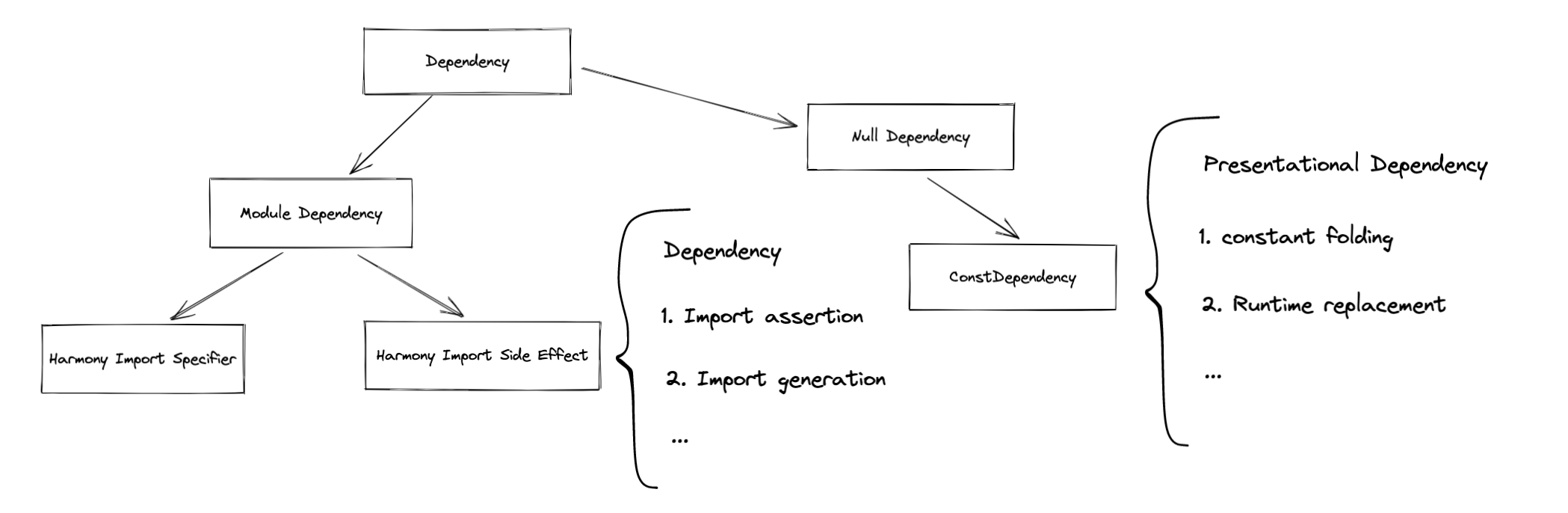
85 |
86 |
87 |
88 |
89 | ## How *dependencies* affect the creation of *module graph*?
90 |
91 |
92 | ### Duplicated module detection
93 |
94 | Each module will have its own `identifier`, for `NormalModule`, you can find this in `NormalModule#identifier`. If the identifier will be duplicated if inserted in `this._module`, then webpack will directly skip the remaining build process. [\[source\]](https://github.com/webpack/webpack/blob/9fcaa243573005d6fdece9a3f8d89a0e8b399613/lib/Compilation.js#L1270-L1274)
95 |
96 | Basically, an `NormalModule` identifier contains these parts:
97 | 1. `type` \[`string`\]: The module type of a module. If the type of the module is `javascript/auto`, this field can be omitted
98 | 2. `request` \[`string`\]: Request to the module. All loaders whether it's inline or matched by a config will be stringified. If _inline match resource_ exists, inline loaders will be executed before any normal-loaders after pre-loaders. A module with a different loader passed through will be treated as a different module regardless of its path.
99 | 3. `layer`: applied if provided
100 |
101 |
102 |
103 | ### Module resolution
104 |
105 | `getResolve` is a loader API on the `LoaderContext`. Loader developers can pass `dependencyType` to its `option` which indicates the category of the module dependency that will be created. Values like `esm` can be passed, then webpack will use type `esm` to resolve the dependency.
106 |
107 | The resolved dependencies are automatically added to the current module. This is driven by the internal plugin system of `enhanced-resolve`. Internally, `enhanced-resolve` uses plugins to handle the dependency registration like `FileExistsPlugin` [\[source\]](https://github.com/webpack/enhanced-resolve/blob/e5ff68aef5ab43b8197e864181eda3912957c526/lib/FileExistsPlugin.js#L34-L54) to detect whether a file is located on the file system or will add this file to a list of `missingDependency` and report in respect of the running mode of webpack. The collecting end of Webpack is generated by the `getResolveContext` in `NormalModule` [\[source\]](https://github.com/webpack/webpack/blob/9fcaa243573005d6fdece9a3f8d89a0e8b399613/lib/NormalModule.js#L513-L524)
108 |
109 |
110 |
111 |
112 | ### *Module dependency* in *ModuleGraph*
113 |
114 | Here's a module graph with `esm` import between modules:
115 |
116 | 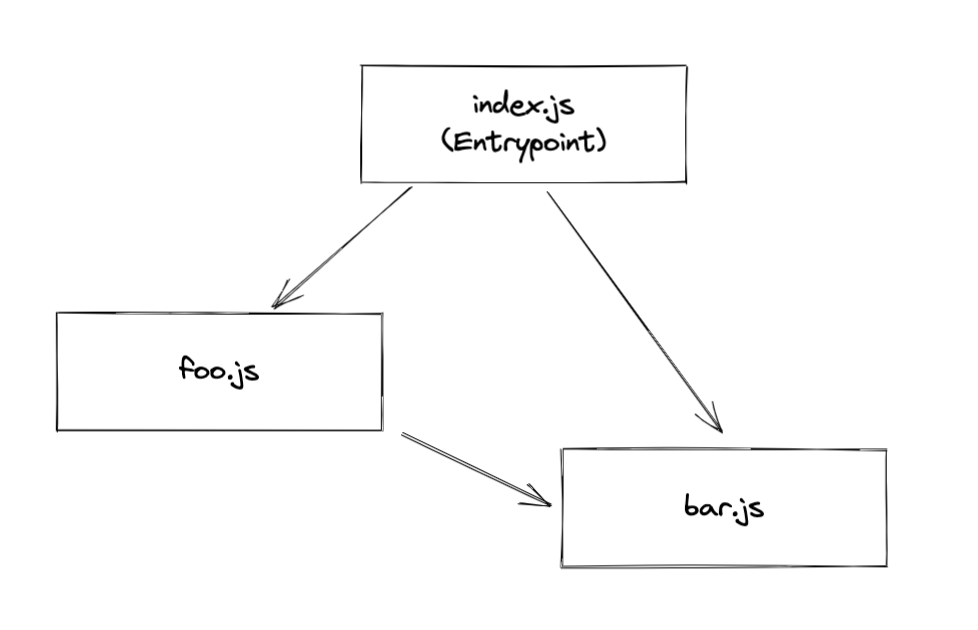
117 |
118 | The dependency type introduced by `import` or `require` is a derived dependency: *ModuleDependency*.
119 |
120 | A *ModuleDependency* contains three important fields.
121 |
122 | 1. `category`: used to describe the category of dependency. e.g. "esm" | "commonjs"
123 | 2. `request`: see the explanation above.
124 | 3. `userRequest`: Resource and its inline loader syntax will be stringified and applied, but loaders in `module.rules` will be omitted.
125 |
126 | It's also good to note a field we will talk about later:
127 | 1. `assertions`: assertions in `import xx from "foo.json" assert { type: "json" }`
128 |
129 | More fields can be found in abstract class of *Dependency* and *ModuleDependency*. [source: Dependency](https://github.com/webpack/webpack/blob/9fcaa243573005d6fdece9a3f8d89a0e8b399613/lib/Dependency.js#L88) [source: ModuleDependency](https://github.com/webpack/webpack/blob/9fcaa243573005d6fdece9a3f8d89a0e8b399613/lib/dependencies/ModuleDependency.js#L17)
130 |
131 |
132 | ```js
133 | // null -> index.js
134 |
135 | EntryDependency {
136 | category: "esm",
137 | request: "./index.js",
138 | type: "entry",
139 | _parentModule: undefined
140 | }
141 | ```
142 |
143 | ```js
144 | // index.js -> foo.js
145 |
146 | HarmonyImportSideEffectDependency {
147 | category: "esm",
148 | request: "./foo",
149 | type: "harmony side effect evaluation",
150 | _parentModule: NormalModule { identifier: "index.js" }
151 | }
152 | ```
153 |
154 | ```js
155 | // index.js -> bar.js
156 |
157 | HarmonyImportSideEffectDependency {
158 | category: "esm",
159 | request: "./bar",
160 | type: "harmony side effect evaluation",
161 | _parentModule: NormalModule { identifier: "index.js" }
162 | }
163 | ```
164 |
165 | ```js
166 | // bar.js -> foo.js
167 | HarmonyImportSideEffectDependency {
168 | category: "esm",
169 | request: "./foo",
170 | type: "harmony side effect evaluation",
171 | _parentModule: NormalModule { identifier: "bar.js" }
172 | }
173 | ```
174 |
175 | ### Resolving a module
176 |
177 | *ModuleDependencies* with different dependency category such as `esm` or `commonjs` will affect the resolving part. For ECMAScript modules, they may prefer `"module"` to `"main"`, and for *CommonJS* modules, they may use `"main"` in `package.json`. On top of that, conditional exports are also necessary to be taken into account. [doc](https://nodejs.org/api/packages.html#conditional-exports)
178 |
179 |
180 | ### Different types of *module dependencies*
181 |
182 | #### ESM-related derived types
183 |
184 | There are a few of *ModuleDependencies* introduced in ESM imports. A full list of each derived type can be reached at [\[source\]](https://github.com/webpack/webpack/blob/86a8bd9618c4677e94612ff7cbdf69affeba1268/lib/dependencies/HarmonyImportDependencyParserPlugin.js)
185 |
186 |
187 | ##### Import
188 |
189 | **`HarmonyImportDependency`**
190 |
191 | The basic type of harmony-related *module dependencies* are below. [\[source\]](https://github.com/webpack/webpack/blob/86a8bd9618c4677e94612ff7cbdf69affeba1268/lib/dependencies/HarmonyImportDependency.js#L51)
192 |
193 | **`HarmonyImportSideEffectDependency`**
194 |
195 | ```js
196 | import { foo, bar } from "./module"
197 | import * as module from "./module"
198 | import foo from "./module"
199 | import "./module"
200 | ```
201 |
202 | Every import statement will come with a `HarmonyImportSideEffectDependency`, no matter how the specifiers look like. The speicifier will be handled by `HarmonyImportSpecifierDendency` below.
203 |
204 | The field `assertions` will be stored if any import assertions exist for later consumption.
205 | The field `category` will be used as `dependencyType` to resolve modules.
206 |
207 | **`HarmonyImportSpecifierDependency`**
208 |
209 | ```js
210 | import { foo, bar } from "./module"
211 | import * as module from "./module"
212 | import foo from "./module"
213 | ```
214 |
215 | Example:
216 |
217 | ```js
218 | import { foo, bar } from "./module"
219 |
220 | console.log(foo, bar)
221 | ```
222 |
223 | Specifier will be mapped into a specifier dependency if and only if it is used. JavaScript parser will first tag each variable [\[source\]](https://github.com/webpack/webpack/blob/86a8bd9618c4677e94612ff7cbdf69affeba1268/lib/dependencies/HarmonyImportDependencyParserPlugin.js#L137), and then create corresponding dependencies on each reading of dependency. [\[source\]](https://github.com/webpack/webpack/blob/86a8bd9618c4677e94612ff7cbdf69affeba1268/lib/dependencies/HarmonyImportDependencyParserPlugin.js#L189) and finally be replaced to the generated `importVar`.
224 |
225 |
226 | ##### Export(They are not module dependencies to be actual, but I placed here for convenience)
227 |
228 | **`HarmonyExportHeaderDependency`**
229 |
230 | > PresentationalDependency
231 |
232 | ```js
233 | export const foo = "foo";
234 | export default "foo";
235 | ```
236 |
237 | This is a *presentational dependency*. We will take more time on this later.
238 |
239 | **`HarmonyExportSpecifierDependency`**
240 |
241 | ```js
242 | export const foo = "foo"; // `foo` is a specifier
243 |
244 | HarmonyExportSpecifierDependency {
245 | id: string;
246 | name: string;
247 | }
248 | ```
249 |
250 | **`HarmonyExportExpressionDependency`**
251 |
252 | ```js
253 | export default "foo"; // "foo" is an expression
254 |
255 | HarmonyExportExpressionDependency {
256 | range: [number, number] // range of the expression
257 | rangeStatement: [number, number] // range of the whole statement
258 | }
259 | ```
260 |
261 |
262 |
263 |
264 |
265 | ## How *dependencies* affect code generation
266 |
267 |
268 | ### *Presentational dependency*
269 |
270 | > A type of dependency that only affects code presentation.
271 |
272 | **`ConstDependency`**
273 |
274 | ```
275 | ConstDependency {
276 | expression: string
277 | range: [number, number]
278 | runtimeRequirements: Set | null
279 | }
280 | ```
281 |
282 | You can think of the passed `expression` as a `replacement` for the corresponding `range`. For the real world example, you can directly refer to *Constant Folding*.
283 |
284 |
285 | ### _Template_
286 |
287 | Remember the fact that Webpack is an architecture wrapped around source code modifications. _Template_ is the solution that helps Webpack to do the real patch on the source code. Each dependency has its associated _template_ which affects a part of the code generation scoped per dependency. In other words, the effect of each _template_ is strictly scoped to its associated dependency.
288 |
289 | 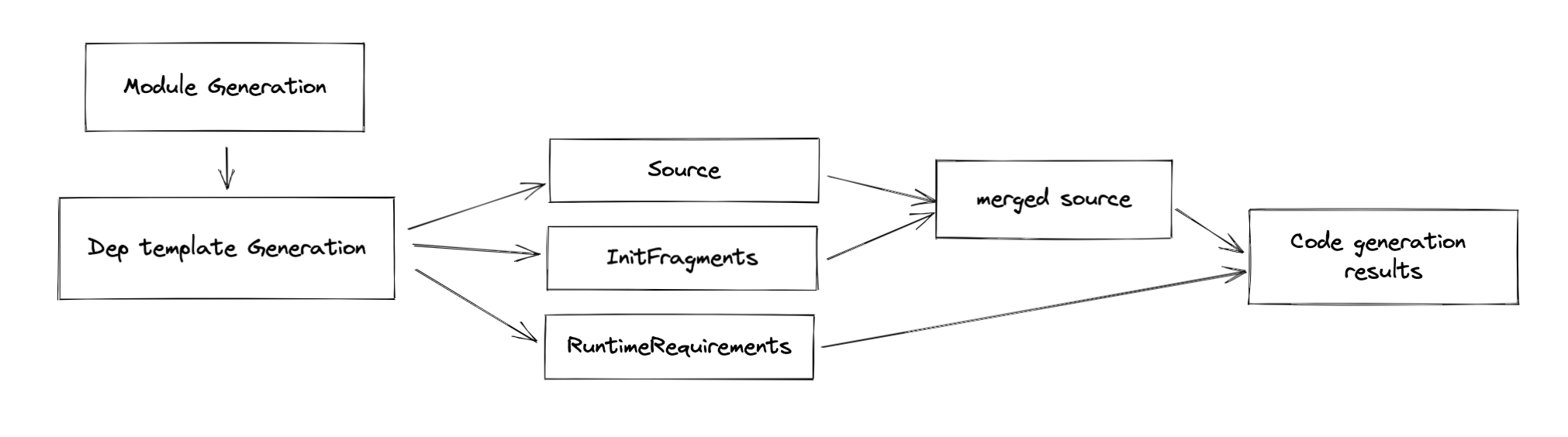
290 |
291 | There are three types of modification:
292 | - `source`
293 | - `fragments`
294 | - `runtimeRequirements`
295 |
296 | A boilerplate of the dependency template looks like this:
297 | ```js
298 | class SomeDependency {}
299 |
300 | SomeDependency.Template = class SomeDependencyTemplate {
301 | /**
302 | * @param {Dependency} dependency the dependency for which the template should be applied
303 | * @param {ReplaceSource} source the current replace source which can be modified
304 | * @param {DependencyTemplateContext} templateContext the context object
305 | * @returns {void}
306 | */
307 | apply(dependency, source, templateContext) {
308 | // do code mod here
309 | }
310 | }
311 | ```
312 |
313 | There are three parameters in the function signature:
314 | - dependency: The associated dependency of this template
315 | - source: The source code represent in `ReplaceSource`, which can be used to replace a snippet of code with a new one, given the start and end position
316 | - templateContext: A context of template, which stores the corresponding `module`, `InitFragments`, `moduleGraph`, `runtimeRequirements`, etc. (not important in this section)
317 |
318 |
319 |
320 |
321 | #### `Source`
322 |
323 | Again, given an example of [`ConstDependency`](https://github.com/webpack/webpack/blob/9fcaa243573005d6fdece9a3f8d89a0e8b399613/lib/dependencies/ConstDependency.js#L20), even if you don't have an idea what it is, it doesn't matter. We will cover this in the later sections.
324 |
325 | The associated template modifies the code with `Source`(`ReplaceSource` to be more specific):
326 | ```js
327 | ConstDependency.Template = class ConstDependencyTemplate extends (
328 | NullDependency.Template
329 | ) {
330 | apply(dependency, source, templateContext) {
331 | const dep = /** @type {ConstDependency} */ (dependency);
332 |
333 | // not necessary code is removed for clearer demonstration
334 |
335 | if (dep.runtimeRequirements) {
336 | for (const req of dep.runtimeRequirements) {
337 | templateContext.runtimeRequirements.add(req);
338 | }
339 | }
340 |
341 | source.replace(dep.range[0], dep.range[1] - 1, dep.expression);
342 | }
343 | };
344 | ```
345 |
346 |
347 | #### `runtimeRequirements`
348 |
349 | As you can see from the `Source` section above, there is another modification we talked about: `runtimeRequirements`, It adds
350 | runtime requirements for the current `compilation`. We will explain more in the later sections.
351 |
352 |
353 | #### `Fragments`
354 |
355 | Essentially, a [_fragment_](https://github.com/webpack/webpack/blob/9fcaa243573005d6fdece9a3f8d89a0e8b399613/lib/InitFragment.js) is a pair of code snippet that to be wrapped around each _module_ source. Note the wording "wrap", it could contain two parts `content` and `endContent` [\[source\]](https://github.com/webpack/webpack/blob/9fcaa243573005d6fdece9a3f8d89a0e8b399613/lib/InitFragment.js#L69). To make it more illustrative, see this:
356 |
357 |
358 |
359 | The order of the fragment comes from two parts:
360 | 1. The stage of a fragment: if the stage of two fragments is different, then it will be replaced corresponding to the order define by the stage
361 | 2. If two fragments share the same order, then it will be replaced in [position](https://github.com/webpack/webpack/blob/9fcaa243573005d6fdece9a3f8d89a0e8b399613/lib/InitFragment.js#L41) order.
362 | [\[source\]](https://github.com/webpack/webpack/blob/9fcaa243573005d6fdece9a3f8d89a0e8b399613/lib/InitFragment.js#L153-L159)
363 |
364 | **A real-world example**
365 |
366 | ```js
367 | import { foo } from "./foo"
368 |
369 | foo()
370 | ```
371 |
372 | Given the example above, here's the code to generate a dependency that replaces `import` statement with `__webpack_require__`.
373 |
374 | ```js
375 | // some code is omitted for cleaner demonstration
376 | parser.hooks.import.tap(
377 | "HarmonyImportDependencyParserPlugin",
378 | (statement, source) => {
379 | const clearDep = new ConstDependency(
380 | "",
381 | statement.range
382 | );
383 | clearDep.loc = statement.loc;
384 | parser.state.module.addPresentationalDependency(clearDep);
385 |
386 | const sideEffectDep = new HarmonyImportSideEffectDependency(
387 | source
388 | );
389 | sideEffectDep.loc = statement.loc;
390 | parser.state.module.addDependency(sideEffectDep);
391 |
392 | return true;
393 | }
394 | );
395 | ```
396 | Webpack will create two dependencies `ConstDependency` and `HarmonyImportSideEffectDependency` while parsing [\[source\]](https://github.com/webpack/webpack/blob/9fcaa243573005d6fdece9a3f8d89a0e8b399613/lib/dependencies/HarmonyImportDependencyParserPlugin.js#L110-L132).
397 |
398 | Let me focus on `HarmonyImportSideEffectDependency` more, since it uses `Fragment` to do some patch.
399 |
400 | ```js
401 | // some code is omitted for cleaner demonstration
402 | HarmonyImportSideEffectDependency.Template = class HarmonyImportSideEffectDependencyTemplate extends (
403 | HarmonyImportDependency.Template
404 | ) {
405 | apply(dependency, source, templateContext) {
406 | super.apply(dependency, source, templateContext);
407 | }
408 | };
409 | ```
410 | As you can see in its associated _template_ [\[source\]](https://github.com/webpack/webpack/blob/9fcaa243573005d6fdece9a3f8d89a0e8b399613/lib/dependencies/HarmonyImportSideEffectDependency.js#L59), the modification to the code is made via its superclass `HarmonyImportDependency.Template` [\[source\]](https://github.com/webpack/webpack/blob/9fcaa243573005d6fdece9a3f8d89a0e8b399613/lib/dependencies/HarmonyImportDependency.js#L244).
411 |
412 | ```js
413 | // some code is omitted for cleaner demonstration
414 | HarmonyImportDependency.Template = class HarmonyImportDependencyTemplate extends (
415 | ModuleDependency.Template
416 | ) {
417 | apply(dependency, source, templateContext) {
418 | const dep = /** @type {HarmonyImportDependency} */ (dependency);
419 | const { module, chunkGraph, moduleGraph, runtime } = templateContext;
420 |
421 | const referencedModule = connection && connection.module;
422 |
423 | const moduleKey = referencedModule
424 | ? referencedModule.identifier()
425 | : dep.request;
426 | const key = `harmony import ${moduleKey}`;
427 |
428 | // 1
429 | const importStatement = dep.getImportStatement(false, templateContext);
430 | // 2
431 | templateContext.initFragments.push(
432 | new ConditionalInitFragment(
433 | importStatement[0] + importStatement[1],
434 | InitFragment.STAGE_HARMONY_IMPORTS,
435 | dep.sourceOrder,
436 | key,
437 | // omitted for cleaner code
438 | )
439 | );
440 | }
441 | }
442 | ```
443 |
444 | As you can see from the simplified source code above, the actual patch made to the generated code is via `templateContext.initFragments`(2). The import statement generated from dependency looks like this.
445 |
446 | ```js
447 | /* harmony import */ var _foo__WEBPACK_IMPORTED_MODULE_0__ = __webpack_require__(/*! ./foo */ "./src/foo.js"); //(1)
448 | ```
449 |
450 | Note, the real require statement is generated via _initFragments_, `ConditionalInitFragment` to be specific. Don't be afraid of the naming, for more information you can see the [background](https://github.com/webpack/webpack/pull/11802) of this _fragment_, which let's webpack to change it from `InitFragment` to `ConditionalInitFragment`.
451 |
452 | **How does webpack solve the compatibility issue?**
453 |
454 | For ESM modules, webpack will additionally call a helper to define `_esModule` on exports as an hint:
455 |
456 | ```js
457 | __webpack_require__.r(__webpack_exports__);
458 | ```
459 | The call of a helper is always placed ahead of any `require` statements. Probably you have already get this as the stage of `STAGE_HARMONY_EXPORTS` has high priority than `STAGE_HARMONY_IMPORTS`. Again, this is achieved via `initFragments`. The logic of the compatibility helper is defined in [this](https://github.com/webpack/webpack/blob/9fcaa243573005d6fdece9a3f8d89a0e8b399613/lib/dependencies/HarmonyCompatibilityDependency.js) file, you can check it out.
460 |
461 |
462 | ### Runtime
463 |
464 | Runtime generation is based on the previously collected `runtimeRequirements` in different dependency templates and is done after the code generation of each module. Note: it's not after the `renderManifest`, but it's after the code generation of each module.
465 |
466 | 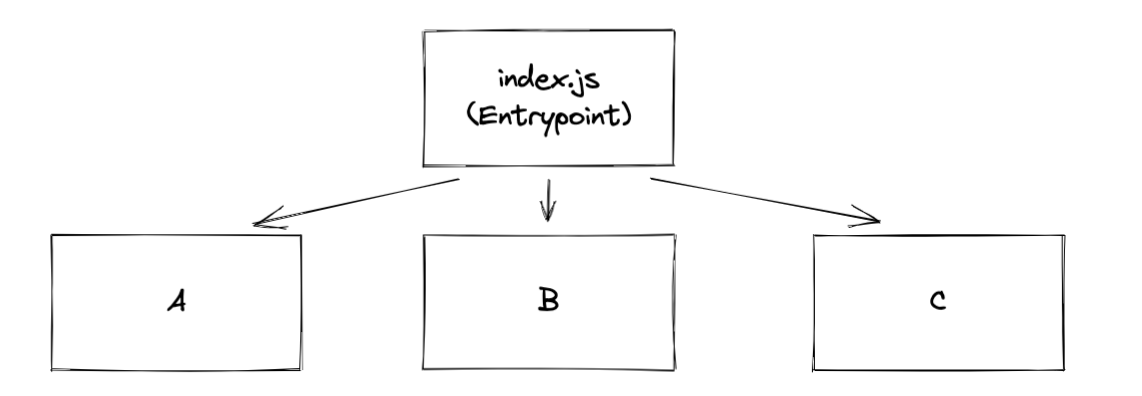In the first iteration of collection, Sets of `runtimeRequirements` are collected from the module's code generation results and added to each `ChunkGraphModule`.
467 |
468 | In the second iteration of collection, the collected `runtimeRequirements` are already stored in `ChunkGraphModule`, so Webpack again collects them from there and stores the runtimes required by each chunk of `ChunkGraphChunk`. It's kind of the hoisting procedure of the required runtimes.
469 |
470 | Finally, also known as the third iteration of collection, Webpack hoists `runtimeRequirements` from those chunks that are referenced by the entry chunk and get it hoisted on the `ChunkGraphChunk` using a different field named `runtimeRequirementsInTree` which indicates not only does it contains the runtime requirements by the chunk but also it's children runtime requirements.
471 |
472 | 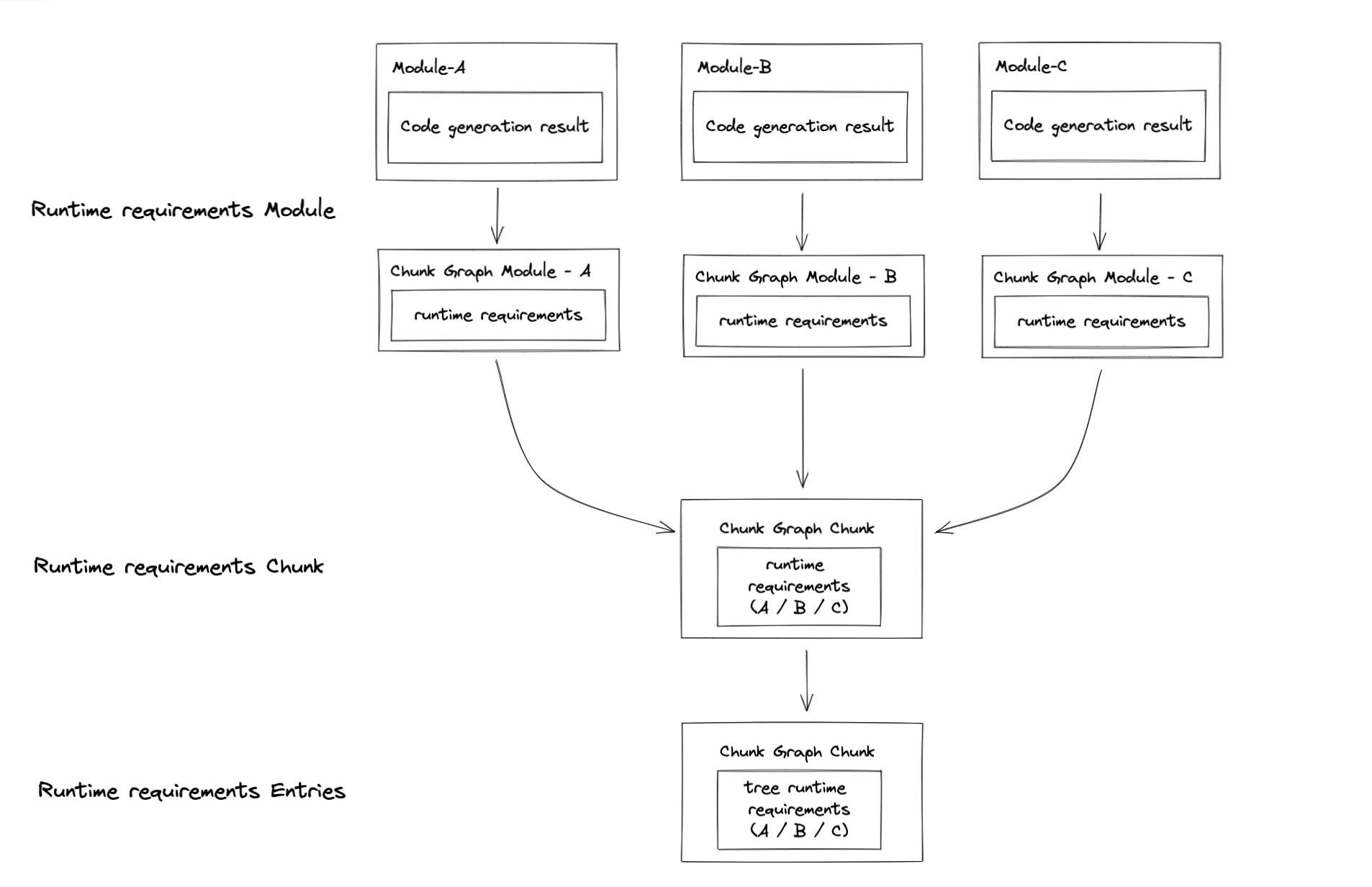
473 |
474 | The referenced source code you can be found it [here](https://github.com/webpack/webpack/blob/9fcaa243573005d6fdece9a3f8d89a0e8b399613/lib/Compilation.js#L3379) and these steps are basically done in `processRuntimeRequirements`. This let me recall the linking procedure of a rollup-like bundler. Anyway, after this procedure, we can finally generate _runtime modules_. Actually, I lied here, huge thanks to the hook system of Webpack, the creation of _runtime modules_ is done in this method via calls to `runtimeRequirementInTree`[\[source\]](https://github.com/webpack/webpack/blob/9fcaa243573005d6fdece9a3f8d89a0e8b399613/lib/Compilation.js#L3498). No doubt, this is all done in the `seal` step. After that, webpack will process each chunk and create a few code generation jobs, and finally, emit assets.
475 |
476 |
477 |
478 | ### *Hot module replacement*
479 |
480 | Changes made via *hot module replacement* is mostly come from `HotModuleReplacementPlugin`.
481 |
482 |
483 |
484 | Given the code below:
485 |
486 | ```js
487 | if (module.hot) {
488 | module.hot.accept(...)
489 | }
490 | ```
491 |
492 | Webpack will replace expressions like `module.hot` and `module.hot.accept`, etc with `ConstDependency` as the *presentationalDependency* as I previously talked about. [\[source\]](https://github.com/webpack/webpack/blob/9fcaa243573005d6fdece9a3f8d89a0e8b399613/lib/HotModuleReplacementPlugin.js#L97-L101)
493 |
494 | With the help of a simple expression replacement is not enough, the plugin also introduce additional runtime modules for each entries. [\[source\]](https://github.com/webpack/webpack/blob/9fcaa243573005d6fdece9a3f8d89a0e8b399613/lib/HotModuleReplacementPlugin.js#L736-L748)
495 |
496 | The plugin is quite complicated, and you should definitely checkout what it actually does, but for things related to dependency, it's enough.
497 |
498 |
499 |
500 |
501 | ## How *dependencies* affect production optimizations
502 |
503 |
504 | ### Constant folding
505 |
506 | > The logic is defined in ConstPlugin : [\[source\]](https://github.com/webpack/webpack/blob/9fcaa243573005d6fdece9a3f8d89a0e8b399613/lib/ConstPlugin.js#L135)
507 |
508 |
509 | _Constant folding_ is a technique that used as an optimization for optimization. For example:
510 |
511 | **Source**
512 |
513 | ```js
514 | if (process.env.NODE_ENV === "development") {
515 | ...
516 | } else {
517 | ...
518 | }
519 | ```
520 |
521 | **Generated**
522 |
523 | ```js
524 | if (true) {
525 | ...
526 | }
527 | ```
528 |
529 | With mode set to `"development"`, webpack will "fold" the expression `process.env.NODE_ENV === "development"` into an expression of `"true"` as you can see for the code generation result.
530 |
531 | In the `make` procedure of webpack, Webpack internally uses an `JavaScriptParser` for JavaScript parsing. If an `ifStatement` is encountered, Webpack creates a corresponding `ConstDependency`. Essentially, for the `ifStatement`, the `ConstDependency` looks like this :
532 |
533 | ```js
534 | ConstDependency {
535 | expression: "true",
536 | range: [start, end] // range to replace
537 | }
538 | ```
539 |
540 | It's almost the same with `else` branch, if there is no _side effects_(refer to source code for more detail), Webpack will create another `ConstDependency` with `expression` set to `""`, which in the end removes the `else` branch.
541 |
542 | In the `seal` procedure of Webpack, the record of the dependency will be applied to the original source code and generate the final result as you may have already seen above.
543 |
544 |
545 |
546 | ### Tree shaking & DCE
547 |
548 | Tree-shaking is a technique of a bundle-wise DCE(dead code elimination). In the following content, I will use tree-shaking as a wording for bundle-wise and DCE for module-wise code elimination. (I know it's not quite appropriate, but you get the point)
549 |
550 |
551 |
552 | Here's an example:
553 |
554 | ```js
555 | // webpack configuration
556 | module.exports = {
557 | optimization: {
558 | usedExports: true
559 | }
560 | }
561 | ```
562 |
563 | 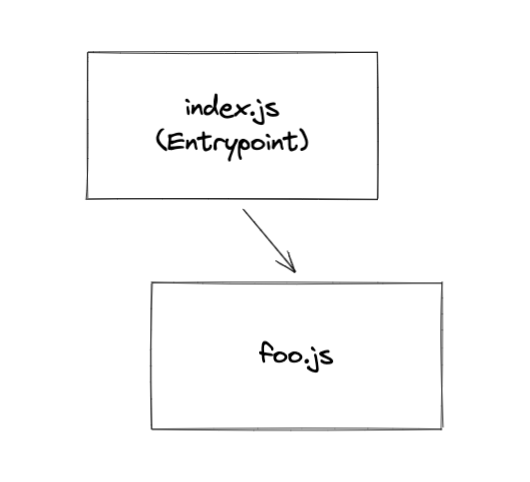
564 |
565 | 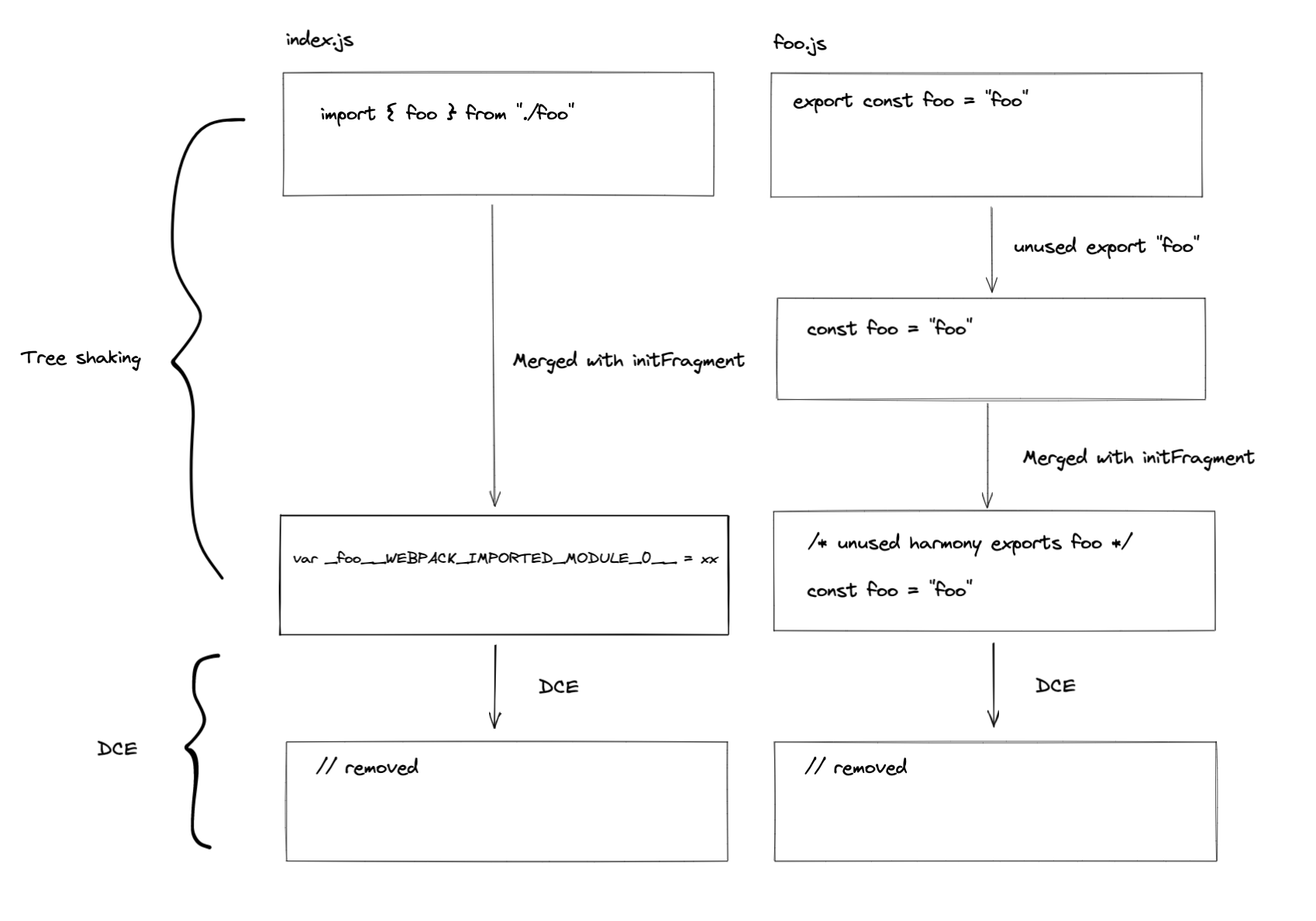
566 |
567 | 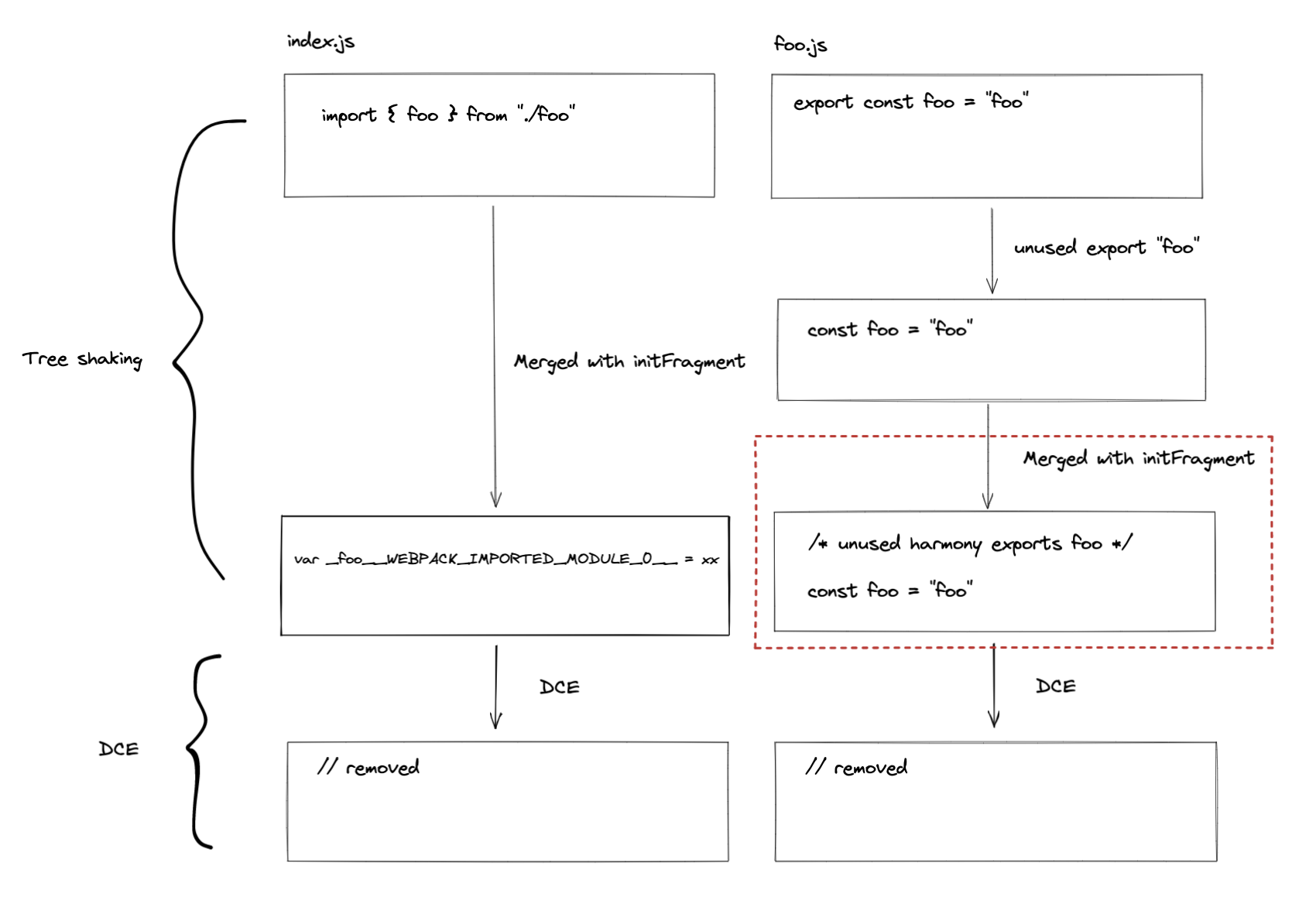
568 |
569 | As you can see from the red square, the `initFragment` is generated based on the usage of the exported symbol in the `HarmonyExportSpecifierDependency` [\[source\]](https://github.com/webpack/webpack/blob/9fcaa243573005d6fdece9a3f8d89a0e8b399613/lib/dependencies/HarmonyExportSpecifierDependency.js#L91-L107)
570 |
571 | If `foo` is used in the graph, then the generated result will be this:
572 |
573 | ```js
574 | /* harmony export */ __webpack_require__.d(__webpack_exports__, {
575 | /* harmony export */ "foo": function() { return /* binding */ foo; }
576 | /* harmony export */ });
577 | const foo = "foo";
578 | ```
579 |
580 | In the example above, the `foo` is not used, so it will be excluded in the code generation of the template of `HarmonyExportSpecifierDependency` and it will be dead-code-eliminated in later steps. For terser plugin, it eliminates all unreachable code in `processAssets` [\[source\]](https://github.com/webpack-contrib/terser-webpack-plugin/blob/580f59c5d223a31c4a9c658a6f9bb1e59b3defa6/src/index.js#L836).
581 |
582 |
583 |
584 | ## Things related to Persistent cache
585 |
586 | *TODO*
587 |
588 |
589 |
590 |
591 | ## Wrap it up!
592 |
593 | Let's wrap everything up in a simple example! Isn't it exciting?
594 |
595 | 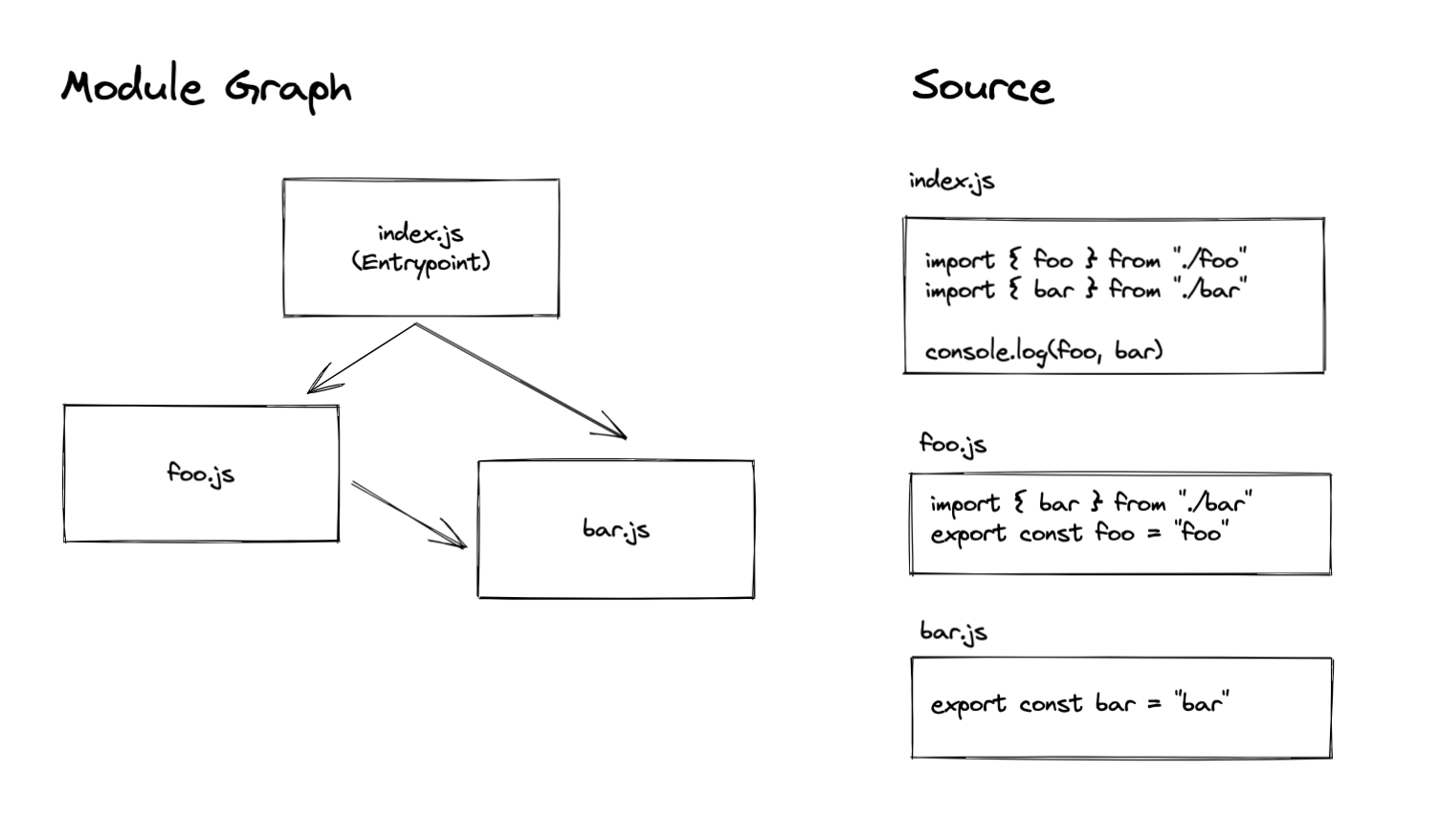
596 |
597 | Given a module graph that contains three modules, the entry point of this bundle is `index.js`. To not make this example too complicated, we use normal import statements to reference each module (i.e: only one chunk that bundles everything will be created).
598 |
599 | ### `Make`
600 |
601 | 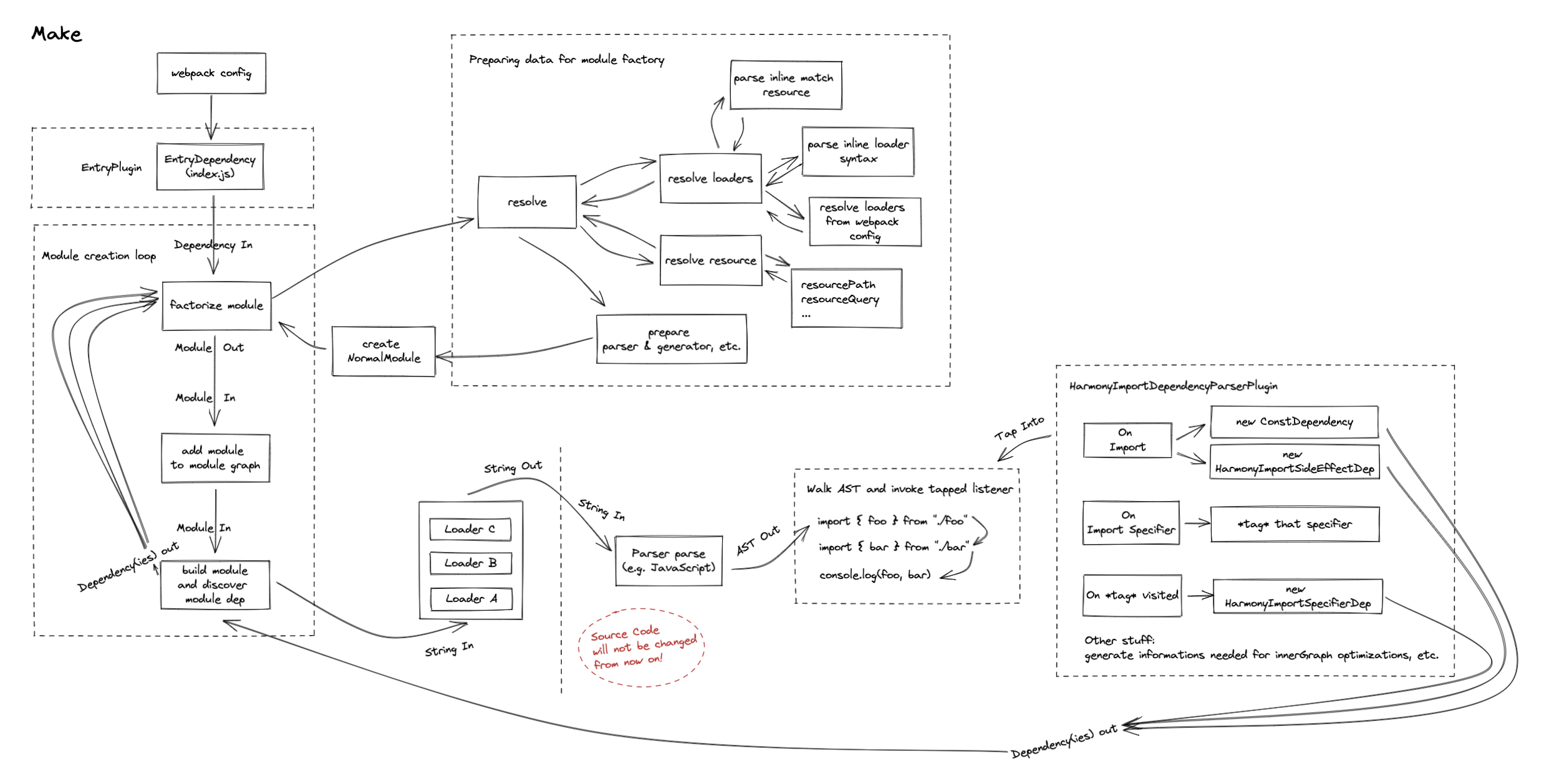
602 |
603 |
604 |
605 | ### Dependencies after `make`
606 |
607 | 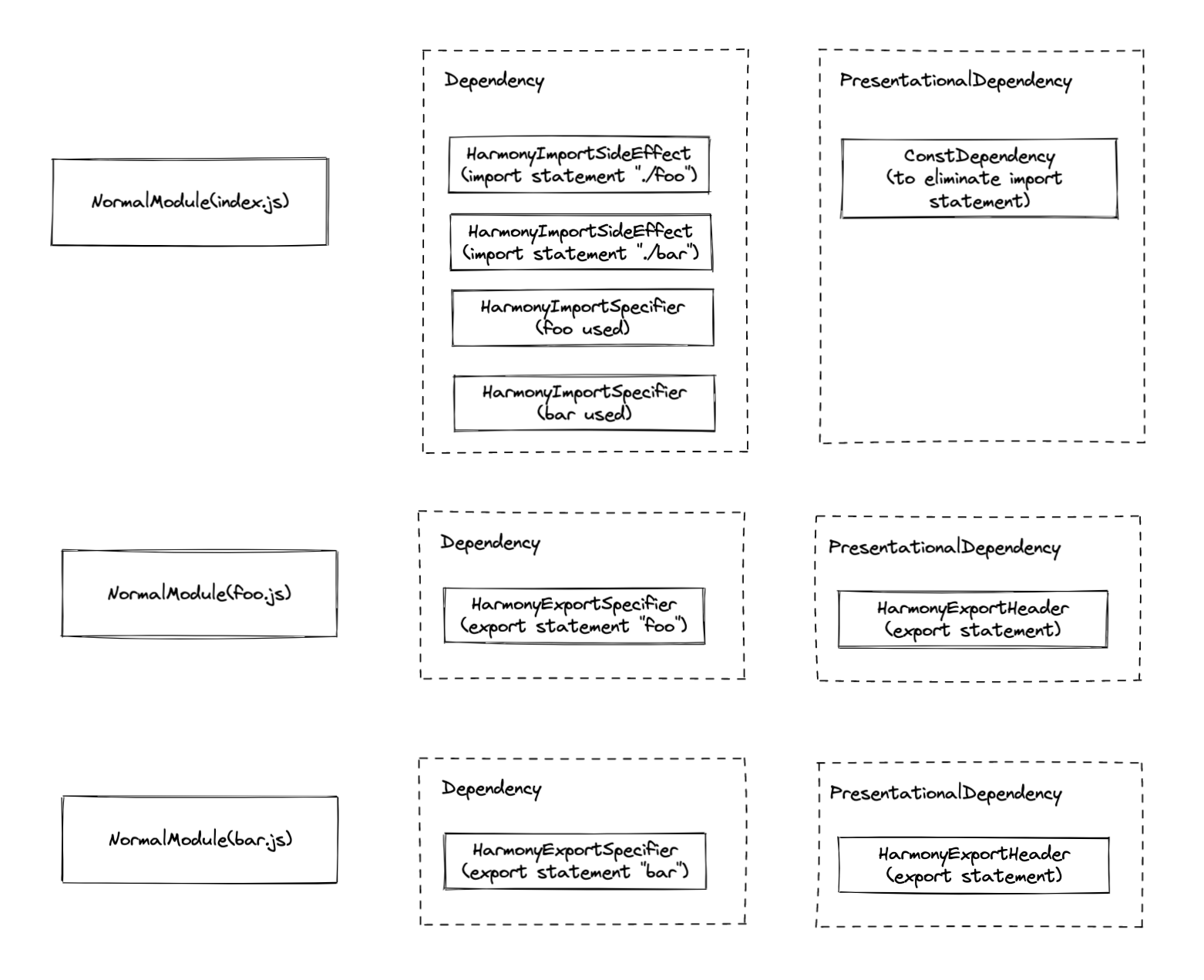
608 |
609 | ### `seal`
610 |
611 | 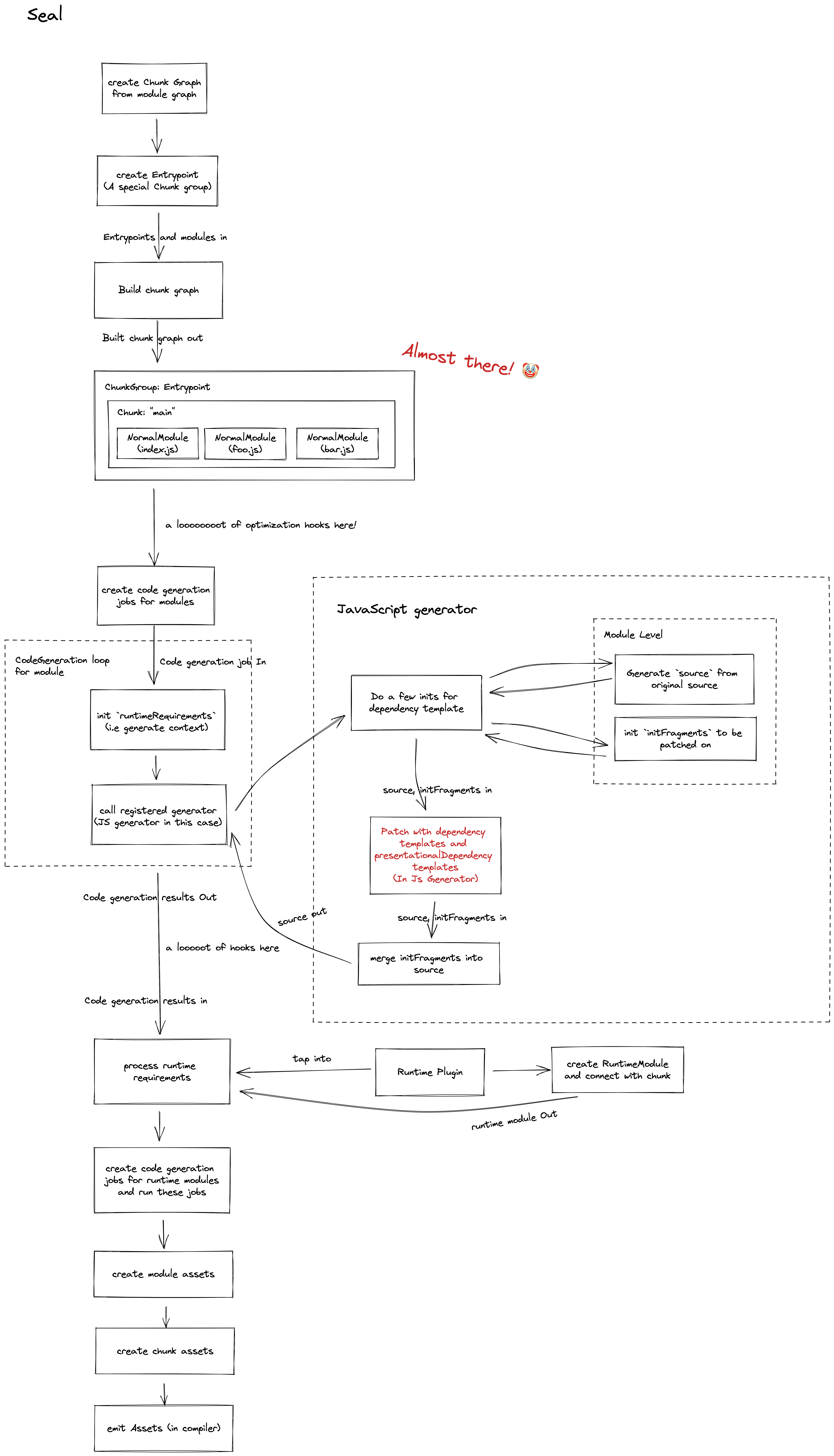
612 |
613 |
614 |
615 | # References
616 | *TODO*
617 |
618 |
619 |
--------------------------------------------------------------------------------
/src/architecture/webpack/loader.md:
--------------------------------------------------------------------------------
1 | > Based on *Webpack version: 5.73.0*.
2 |
3 |
4 | # Summary
5 |
6 | Explain how webpack loader works. Even though it's a little bit long and tedious, It's still a teeny-tiny peek at the loader system of Webpack.
7 |
8 |
9 |
10 | # Glossary
11 |
12 | > What's the meaning of a word used to describe a feature?
13 | >
14 | > Why does the Webpack introduce this and what's the background of introducing this? What kind of problem Webpack was facing at the time?
15 |
16 |
17 |
18 | ## Request Related
19 |
20 | ```javascript
21 | import Styles from '!style-loader!css-loader?modules!./styles.css';
22 | ```
23 |
24 | - [Inline loader syntax](https://webpack.js.org/concepts/loaders/#inline): The syntax that chains the loader together within the specifier, followed by the file requested. e.g. `!style-loader!css-loader?modules!./style.css`
25 | - `request`: The request with *inline loader syntax* retained. Webpack will convert relative URLs and module requests to absolute URLs for loaders and files requested. e.g. `!full-path-to-the-loader-separated-with-exclamation-mark!full-path-to-styles.css`
26 |
27 |
28 |
29 | ## Resource Related
30 |
31 | ```javascript
32 | import xxx from "./index.js?vue=true&style#some-fragment"
33 | ```
34 |
35 | - [`resource`](https://webpack.js.org/api/loaders/#thisresource): The absolute path to the requested file with `query` and `fragment` retained but inline loader syntax removed. e.g. `absolute-path-to-index-js.js?vue=true&style#some-fragment`
36 | - [`resourcePath`](https://webpack.js.org/api/loaders/#thisresourcepath): The absolute path to the requested file only. e.g. `absolute-path-to-index-js.js`
37 | - [`resourceQuery`](https://webpack.js.org/api/loaders/#thisresourcequery): Query with question mark `?` included. e.g. `?vue=true&style`
38 | - [`resourceFragment`](https://webpack.js.org/api/loaders/#thisresourcefragment): e.g. `#some-fragment`
39 | - inline match resource:
40 | - Used to redirect the `module.rules` to another, which is able to adjust the loader chain. We will cover this later.
41 | - Ref: [related PR](https://github.com/webpack/webpack/pull/7462) [Webpack Doc1](https://webpack.js.org/api/loaders/#thisimportmodule) [Webpack Doc2](https://webpack.js.org/api/loaders/#inline-matchresource)
42 |
43 | - `virtualResource`:
44 | - The proposed solution to support asset type changing(A sugar to inline matchResource, which can also affect the asset filename generation)
45 | - See more: [the background of this property](https://github.com/webpack/webpack/issues/14851)
46 |
47 |
48 |
49 |
50 | ## Others but also important to note
51 |
52 | - Virtual Module: A kind of module that does not locate in the real file system. But you can still import it. To create a virtual module, you need to follow the [spec](https://www.ietf.org/rfc/rfc2397.txt) and it's also worth noting that Node.js and Webpack both support it under the scheme of `data:`. Also known as, `data:` import. [Doc to Node.js](https://nodejs.org/api/esm.html#data-imports)
53 | - [Module types](https://webpack.js.org/concepts/modules/#supported-module-types) with native support: Webpack supports the following module types native: `'javascript/auto'` |` 'javascript/dynamic'` | `'javascript/esm'` | `'json'` | `'webassembly/sync'` | `'webassembly/async'` | `'asset'` | `'asset/source'` | `'asset/resource'` | `'asset/inline'`, for those types you can use it **without a loader**. From webpack version 4.0+, webpack can understand more than `javascript` alone.
54 |
55 |
56 |
57 | # Guide-level explanation
58 |
59 | ## Loader configuration
60 |
61 | The way that webpack controls what kind of module that each loader would apply is based on `module.rules`
62 |
63 |
64 |
65 | ```javascript
66 | const MiniExtractCssPlugin = require("mini-extract-css-plugin")
67 |
68 | module.exports = {
69 | module: {
70 | rules: [
71 | {
72 | test: /\.vue$/,
73 | use: ["vue-loader"]
74 | },
75 | {
76 | test: /\.css$/,
77 | use: [MiniExtractCssPlugin.loader, "css-loader"]
78 | }
79 | ]
80 | },
81 | plugins: [new MiniExtractCssPlugin()]
82 | }
83 | ```
84 |
85 | Here is a simple option for the configuration of `vue-loader`. `module.rules[number].test` is a part rule to test **whether a rule should be applied**. For `vue-loader` alone, It's kind of confusing how webpack pass the result to the rule of `css`, we will cover this later. But for now, It's good to notice **there is not only a `test` option alone to test if a rule should be applied**. You can find it [here](https://webpack.js.org/configuration/module/#rule) for full conditions supported. Here're some examples of other conditions you can use.
86 |
87 | ```javascript
88 | module.exports = {
89 | module: {
90 | rules: [
91 | {
92 | test: /\.vue$/, // of course, test if the file extension match `vue`.
93 | scheme: "data", // if the specifier of a request starts with `data:`
94 | resourceQuery: "?raw", // if the `resourceQuery` matches then the rule will be applied. For this example, it's a great idea to apply a `raw-loader` here.
95 | type: "css" // use webpack's native resource handling for css
96 | }
97 | ]
98 | }
99 | }
100 | ```
101 |
102 |
103 |
104 | ## Examples
105 |
106 | ### Vue(1 to n)
107 |
108 | In a single file component(SFC) of Vue, there are commonly three blocks or more blocks([custom blocks](https://vue-loader.vuejs.org/guide/custom-blocks.html#example)) contained. The basic idea of implementing this loader is to convert it into JavaScript / CSS and let webpack handle the chunk generation(e.g. Style should be generated into a separate `.css` file)
109 |
110 | ```vue
111 |
112 |
113 |
114 |
115 |
116 | ```
117 |
118 |
119 |
120 | ⬇️⬇️⬇️⬇️⬇️⬇️
121 |
122 | `Vue-loader` will firstly turn into the `*.vue` file into something like that.
123 |
124 | ```javascript
125 | import "script-path-to-vue-sfc";
126 | import "template-path-to-vue-sfc";
127 | import "style-path-to-vue-sfc";
128 | ```
129 |
130 |
131 |
132 | You may find it weird how webpack handles these imports and build the transformed code. But if I change the code a little bit, you will find the idea.
133 |
134 | ```javascript
135 | import "script:path-to-vue-sfc";
136 | import "template:path-to-vue-sfc";
137 | import "style:path-to-vue-sfc";
138 | ```
139 |
140 | and if we tweak the configuration a little bit to this, webpack will know exactly how to work with these import statements.
141 |
142 | ```javascript
143 | module.exports = {
144 | module: {
145 | rules: [
146 | {
147 | test: /\.vue$/,
148 | use: ["vue-loader"]
149 | },
150 | {
151 | scheme: "script",
152 | use: ["apply-your-javascript-loader", "vue-script-extract-loader"]
153 | },
154 | {
155 | scheme: "template",
156 | use: ["apply-your-javascript-loader", "vue-template-extract-loader"]
157 | },
158 | {
159 | scheme: "style",
160 | use: ["apply-your-style-loader", "vue-style-extract-loader"]
161 | }
162 | ]
163 | }
164 | }
165 | ```
166 |
167 | We added a few loaders to handle the splitting. I know it's still kind of weird here, but please stick with me and we will find a better way out.
168 |
169 | - vue-script-extract-loader: extract the `script` block from a SFC file.
170 | - vue-style-extract-loader: extract the `style` block from a SFC file.
171 | - vue-template-extract-loader: extract the `template` block from a SFC file and convert it into JavaScript.
172 |
173 |
174 |
175 | You will find it's really noisy only to transform a `*.vue` file, four loaders were introduced and I believe none of you would like to separate a simple loader into four. It's a real bummer! It will be great to use a single loader `vue-loader` alone. The current vue loader implementation uses resourceQuery to handle this. But how?
176 |
177 |
178 |
179 | #### Loader optimizations I
180 |
181 | We know that webpack uses a few conditions to handle whether a rule should be applied. Even with `rule.test` alone, the `this.reousrceQuery` is still available to `loaderContext` which developer could access it with `this` in any loader function(Don't worry if you still don't catch this. You will understand this after). Based on that, we change the `rule` to this:
182 |
183 | ```javascript
184 | module.exports = {
185 | module: {
186 | rules: [
187 | {
188 | test: /.vue$/,
189 | use: ["vue-loader"]
190 | }
191 | ]
192 | }
193 | }
194 | ```
195 |
196 | This indicates "If an import specifier is encountered, please pass me to vue-loader"! If you remember the import transformation above, we could adjust the transformation a little bit to this:
197 |
198 |
199 |
200 | **Before**
201 |
202 | ```javascript
203 | import "script-path-to-vue-sfc";
204 | import "template-path-to-vue-sfc";
205 | import "style-path-to-vue-sfc";
206 | ```
207 |
208 |
209 |
210 | **After**
211 |
212 | ```javascript
213 | import "path-to-vue-sfc.vue?script=true";
214 | import "path-to-vue-sfc.vue?template=true";
215 | import "path-to-vue-sfc.vue?style=true";
216 | ```
217 |
218 | These requests will match the `test: /.vue$/` above flawlessly and in the loader we can handle like this:
219 |
220 | ```javascript
221 | // pseudo code only for proofing of the concept
222 | const compiler = require("some-vue-template-compiler")
223 |
224 | const loader = function(source) {
225 | const {
226 | resourceQuery /* ?script=true or something else */,
227 | resourcePath /* path-to-vue-sfc.vue */
228 | } = this
229 |
230 | if (resourceQuery === "?script=true") {
231 | return compiler.giveMeCodeofScriptBlock(this.resourcePath) // javascript code
232 | } else if (resourceQuery === "?template=true") {
233 | return compiler.giveMeCodeofTemplateBlock(this.resourcePath) // javascript code
234 | } else if (resourceQuery === "?style=true") {
235 | return compiler.giveMeCodeofStyleBlock(this.resourcePath) // style code
236 | } else {
237 | return `
238 | import `${this.resourcePath}?script=true`;
239 | import `${this.resourcePath}?template=true`;
240 | import `${this.resourcePath}?style=true`;
241 | `
242 | }
243 | }
244 |
245 | module.exports = loader
246 | ```
247 |
248 | You can see the loader for the example above will be used for four times.
249 |
250 | 1. Encounter a `*.vue` file, transform the code to a few import statements
251 | 2. For each import statement introduced in the first transformation, the loader will be used again as they share the same extension `vue`.
252 |
253 |
254 |
255 | Is this the end? No! Even if you wrote the code like this, it will still fail to load.
256 |
257 | 1. For CSS: You haven't tell webpack a way to handle the CSS, remember the CSS part is required to go through the `css-loader` and then `mini-css-extract`(if you want to generate CSS for chunk) or `style-loader`(if you want to append it directly to the DOM). After all, you have to make the result of style to pass these loaders.
258 | 2. For JS: You haven't transformed the code to any transpilers, It will be failed if your runtime doesn't support the syntax(maybe in TypeScript for example) and webpack internal acorn compiler does not have the ability to help you with that.
259 |
260 |
261 |
262 | **Pass the code to the corresponding loaders**
263 |
264 | We tweak the configuration a little bit again.
265 |
266 | ```javascript
267 | module.exports = {
268 | module: {
269 | rules: [
270 | {
271 | test: /.vue$/,
272 | use: ["vue-loader"]
273 | },
274 | {
275 | test: /.css$/,
276 | use: [MiniCssExtractPlugin.loader, "css-loader"]
277 | },
278 | {
279 | test: /.js$/,
280 | use: ["babel-loader"]
281 | }
282 | ]
283 | }
284 | }
285 | ```
286 |
287 | It looks a bit more like the "normal" Webpack configuration. Note that the `rule.test` is based on the file extension, so `vue-loader` did a little bit of hack here.
288 |
289 | ```javascript
290 | // pseudo code only for proofing of the concept
291 | const compiler = require("some-vue-template-compiler")
292 |
293 | const loader = function(source) {
294 | const {
295 | resourceQuery /* ?script=true or something else */,
296 | resourcePath /* path-to-vue-sfc.vue */
297 | } = this
298 |
299 | if (resourceQuery === "?script=true") {
300 | const code = compiler.giveMeCodeofScriptBlock(this.resourcePath) // javascript code
301 | this.resourcePath += ".js"
302 | return code
303 | } else if (resourceQuery === "?template=true") {
304 | const code = compiler.giveMeCodeofTemplateBlock(this.resourcePath) // javascript code
305 | this.resourcePath += ".js"
306 | return code
307 | } else if (resourceQuery === "?style=true") {
308 | const code = compiler.giveMeCodeofStyleBlock(this.resourcePath) // style code
309 | this.resourcePath += ".css" // based on the `lang` in each script, the extension will be set accordingly.
310 | return code
311 | } else {
312 | return `
313 | import `${this.resourcePath}?script=true`;
314 | import `${this.resourcePath}?template=true`;
315 | import `${this.resourcePath}?style=true`;
316 | `
317 | }
318 | }
319 |
320 | module.exports = loader
321 | ```
322 |
323 | Webpack uses `resourcePath` to match a `module.rules`. So this hack will let webpack treat blocks accordingly as if they are real files with extensions of `js` | `css` |`...` .
324 |
325 |
326 |
327 | Finally! But this is only a proof of concept, for the real implementation. You should definitely check out the [`vue-loader`](https://github.com/vuejs/vue-loader) yourself.
328 |
329 |
330 |
331 | #### Loader Optimization II
332 |
333 | Well done! We implemented a simple and rudimentary version of `vue-loader`. However, the real pain-in-the-ass part of this implementation is hacking the extension to match the configuration. But since almost every user would have other `js` | `css` files included in the project, so vue team decide to use this kind of strategy to reuse the user configuration.
334 |
335 | Except for hacking the extension, webpack then provided a more legit way to handle this kind of **rule matching problem** which is known as ***inline match resource*** (We covered it in the glossary part).
336 |
337 |
338 |
339 | **inline match resource**
340 |
341 | Webpack can do almost anything with an import specifier like the loader chaining we covered in the glossary part. *Inline source match* is another case. By taking the advantage of it, you can force an import statement to go through a `module.rules` by introducing the `!=!` syntax. For example, if we want to force a `css` file to go through a `less` loader, it will be look like this:
342 |
343 | ```javascript
344 | module.exports = {
345 | module: {
346 | rules: [
347 | {
348 | test: /.less$/,
349 | use: ["style-loader", "css-loader", "less-loader"]
350 | }
351 | ]
352 | }
353 | }
354 | ```
355 |
356 | ```javascript
357 | // This import should be converted with a loader
358 |
359 | // treat the file as `less`
360 | import "./index.css.less!=!./index.css"
361 | ```
362 |
363 | The slice before the `!=!` is a way to modify the extension of a single file and force it to match the `module.rules` and this transformation is often done in a loader, or you will make your application code specialized for Webpack only.
364 |
365 |
366 |
367 | After going through the basic example, let's see how we're going to optimize out the hack used in `vue-loader`.
368 |
369 | ```javascript
370 | // pseudo code only for proofing of the concept
371 | const compiler = require("some-vue-template-compiler")
372 |
373 | const loader = function(source) {
374 | const {
375 | resourceQuery /* ?script=true or something else */,
376 | resourcePath /* path-to-vue-sfc.vue */
377 | } = this
378 |
379 | if (resourceQuery === "?vue=true&script=true") {
380 | return compiler.giveMeCodeofScriptBlock(this.resourcePath) // javascript code
381 | } else if (resourceQuery === "?vue=true&template=true") {
382 | return compiler.giveMeCodeofTemplateBlock(this.resourcePath) // javascript code
383 | } else if (resourceQuery === "?vue=true&style=true") {
384 | return compiler.giveMeCodeofStyleBlock(this.resourcePath) // style code
385 | } else {
386 | return `
387 | import `${this.resourcePath}.js!=!${this.resourcePath}?vue=true&script=true`;
388 | import `${this.resourcePath}.js!=!${this.resourcePath}?vue=true&template=true`;
389 | import `${this.resourcePath}.css!=!${this.resourcePath}?vue=true&style=true`;
390 | `
391 | }
392 | }
393 |
394 | module.exports = loader
395 | ```
396 |
397 | Webpack will internally use the match resource part(before `!=!`) as the data to match loaders. In order to let `vue-loader` match the resource. We have two options:
398 |
399 | 1. Loose test
400 | 2. *Inline loader syntax*
401 |
402 |
403 |
404 | **1. Loose test**
405 |
406 | ```javascript
407 | module.exports = {
408 | module: {
409 | rules: [
410 | {
411 | test: /\.vue/, // original: `/\.vue$/`, we removed the `$` to allow resources with `.vue` included to match this rule.
412 | use: ["vue-loader"]
413 | }
414 | ]
415 | }
416 | }
417 | ```
418 |
419 | We removed the `$` to allow resources with `.vue` included matching this rule. Personally speaking, this is not a good idea, because a loose match might cause mismatches.
420 |
421 |
422 |
423 | **2. Inline loader syntax**
424 |
425 | ```javascript
426 | // vue-loader/index.js
427 |
428 | module.exports = function() {
429 | // ... code omitted
430 | return `
431 | import `${this.resourcePath}.js!=!${__filename}!${this.resourcePath}?vue=true&script=true`;
432 | import `${this.resourcePath}.js!=!${__filename}!${this.resourcePath}?vue=true&template=true`;
433 | import `${this.resourcePath}.css!=!${__filename}!${this.resourcePath}?vue=true&style=true`;
434 | `
435 | }
436 | ```
437 |
438 | This technique is to take advantage of the ***inline loader syntax*** to force the loader to go through the vue loader. This tackles down the tangible mismatching ideally and we can still retain the test regex `/\.vue$/` as-is.
439 |
440 |
441 |
442 |
443 |
444 | #### Final art and conclusion
445 |
446 | **Configuration**
447 |
448 | ```javascript
449 | module.exports = {
450 | module: {
451 | rules: [
452 | {
453 | test: /\.vue$/,
454 | use: ["vue-loader"]
455 | },
456 | // ... other rules for js, or css, etc.
457 | ]
458 | }
459 | }
460 | ```
461 |
462 |
463 |
464 | **Loader**
465 |
466 | ```javascript
467 | // pseudo code only for proofing of the concept
468 | const compiler = require("some-vue-template-compiler")
469 |
470 | const loader = function(source) {
471 | const {
472 | resourceQuery /* ?script=true or something else */,
473 | resourcePath /* path-to-vue-sfc.vue */
474 | } = this
475 |
476 | if (resourceQuery === "?vue=true&script=true") {
477 | return compiler.giveMeCodeofScriptBlock(resourcePath) // javascript code
478 | } else if (resourceQuery === "?vue=true&template=true") {
479 | return compiler.giveMeCodeofTemplateBlock(resourcePath) // javascript code
480 | } else if (resourceQuery === "?vue=true&style=true") {
481 | return compiler.giveMeCodeofStyleBlock(resourcePath) // style code
482 | } else {
483 | return `
484 | import `${this.resourcePath}.js!=!${__filename}!${resourcePath}?vue=true&script=true`;
485 | import `${this.resourcePath}.js!=!${__filename}!${resourcePath}?vue=true&template=true`;
486 | import `${this.resourcePath}.css!=!${__filename}!${resourcePath}?vue=true&style=true`;
487 | `
488 | }
489 | }
490 |
491 | module.exports = loader
492 | ```
493 |
494 |
495 |
496 | **Conclusion**
497 |
498 | Vue-loader is quite complex. The basic needs of the loader are:
499 |
500 | 1. Separate a `*.vue` file request into a number of parts. For each block, explicitly change the resource matching mechanism (using ***inline match resource***). The killer *inline match resource* not only gives us great composability with user-defined loaders, but also the ability to interact with webpack supported native types, and we will cover this part late.
501 | 2. When requesting the `vue-loader` again for a block, the code of each block is returned and let webpack handle the changed matched resource(e.g. `./App.vue.css`) with user-defined loaders (Webpack did this internally).
502 |
503 |
504 |
505 | ### Use natively supported module types
506 |
507 | We know that webpack only supports `JavaScript` in the old time, from the version of `4.0.0`+([changelog](https://github.com/webpack/webpack/releases/tag/v4.0.0))
508 |
509 |
510 |
511 | #### Simplified pre-processor's configuration
512 |
513 | > With the experimental support of CSS. A.K.A webpack knows how to handle CSS files natively.
514 |
515 |
516 |
517 | **Before**
518 |
519 | ```javascript
520 | module.exports = {
521 | module: {
522 | rules: [
523 | {
524 | test: /\.less$/,
525 | use: ["style-loader", "css-loader", "less-loader"],
526 | type: "javascript/auto" // this field is a implicit one, if not defined, it will be set to `"javascript/auto"`
527 | }
528 | ]
529 | }
530 | }
531 | ```
532 |
533 |
534 |
535 | **After**
536 |
537 | ```javascript
538 | module.exports = {
539 | module: {
540 | rules: [
541 | {
542 | test: /\.less$/,
543 | use: ["less-loader"],
544 | type: "css"
545 | }
546 | ]
547 | },
548 | experiments: {
549 | css: true
550 | }
551 | }
552 | ```
553 |
554 | With `experiments.css` on, webpack can experimentally understand the parsing and generating of `css` files which gets rid of `css-loader` and `style-loader`. For the full list of natively supported `Rule.type`, you can find it [here](https://webpack.js.org/configuration/module/#ruletype).
555 |
556 |
557 |
558 |
559 |
560 | #### Asset modules
561 |
562 | > From *webpack 4.0.0+*, assets are supported natively
563 |
564 | ```javascript
565 | module.exports = {
566 | module: {
567 | rules: [
568 | {
569 | test: /\.(png|jpg)/,
570 | type: "asset"
571 | }
572 | ]
573 | }
574 | }
575 | ```
576 |
577 | `Rule.type === "asset"` indicates the asset will be automatically tested whether it's going to be inlined or emitted as a file on the real file system. The possible options are: `'asset'` | `'asset/source'` | `'asset/resource'` | `'asset/inline'`
578 |
579 |
580 |
581 |
582 |
583 | ### Svgr
584 |
585 | Webpack loader will read the source to a UTF-8 string by default. For SVG files, this would fit the webpack load defaults.
586 |
587 |
588 |
589 | ```javascript
590 | // Proof of concept of svgr-loader
591 | module.exports = function(source) {
592 | if (this.resourceQuery === "?svgr=true") { // the real transform part
593 | let { code } = svgrTransformer.transform(source);
594 | return code
595 | }
596 | return `require("${this.resourcePath}.jsx!=!${__filename}!${this.resourcePath}?svgr=true")` // the request part
597 | }
598 | ```
599 |
600 | Again here we use double-pass to firstly convert each request to the request part with *inline match resource*, and do the real request with query `?svgr=true`, and let *inline match resource* handle the `jsx` conversion. Before that, we have to call a third-party `jsx` transformer, could be *ESBuild* for example, for which we cannot reuse other `module.rules` set by the user-side. *Inline match resource* saved our ass again!
601 |
602 |
603 |
604 | ### Scheme imports
605 |
606 | > Supported in *Webpack version 5.38.0*, doc: [Rule.scheme](https://webpack.js.org/configuration/module/#rulescheme)
607 |
608 | ```javascript
609 | // JavaScript
610 | import x from "data:text/javascript,export default 42"
611 | console.log('x:',x);
612 | ```
613 |
614 | ```css
615 | /* CSS */
616 | @import ("data:text/css, body { background: #fff; }");
617 | ```
618 |
619 | Webpack handles `data:` imports for JavaScript internally.
620 |
621 |
622 |
623 | ### Asset transform and rename
624 |
625 | > [**Asset**](https://webpack.js.org/guides/asset-management/): This is a general term for the images, fonts, media, and any other kind of files that are typically used in websites and other applications. These typically end up as individual files within the [output](https://webpack.js.org/glossary/#o) but can also be inlined via things like the [style-loader](https://webpack.js.org/loaders/style-loader) or [url-loader](https://webpack.js.org/loaders/url-loader).
626 | >
627 | > *Originally posted at Webpack [Glossary](https://webpack.js.org/glossary/#a)*
628 |
629 |
630 |
631 | #### Default resource reading override
632 |
633 | Asset could be formatted in both text(`*.svg`) or binary (`*.png` / `*.jpg`). For loaders, webpack provides you an option [`raw`](https://webpack.js.org/api/loaders/#raw-loader) to override the default and built-in resource reading strategy from UTF-8 `string` to `Buffer`:
634 |
635 | ```javascript
636 | module.exports = function(source /* Buffer */ ) {
637 | // loader implementation
638 | }
639 |
640 | module.exports.raw = true
641 | ```
642 |
643 |
644 |
645 | #### Transform and rename
646 |
647 | Image there is a need to transform an asset formatted with `png` to `jpg`. There is two abilities that webpack needs to support:
648 |
649 | 1. Handle the asset with `raw` content, or a `Buffer`. We can simply override the default resource reading behavior by exporting `raw`(covered before).
650 | 2. Change the filename, and reuse the loader for both `png` and `jpg`
651 |
652 |
653 |
654 | ##### Configuration
655 |
656 | ```javascript
657 | module.exports = {
658 | module: {
659 | rules: [
660 | {
661 | test: /\.png/,
662 | use: ["png-to-jpg-loader"] // some png to jpg loader, we will implement this
663 | },
664 | {
665 | test: /\.jpg/,
666 | use: ["jpg-optimizer"] // some jpg optimizer, we will not covert this,
667 | type: "asset/resource"
668 | }
669 | ]
670 | }
671 | }
672 | ```
673 |
674 | 1. Rule1: For files with extension `png`, we want to use a `png` to `jpg` loader, which will be covered in this article.
675 | 2. Rule2:
676 | 1. For files with extension `jpg`, we want to use a third-party `jpg-optimizer`, which will not be covered in this article.
677 | 2. `type: "asset/resource"`: As soon as all the loaders have gone through, we want webpack to emit the file as an external resource on the file system regardless of the file size(`type: "asset"` will automatically detect the size of an asset to determine whether an asset will be inline-included for dynamically imported from file system).
678 | 3. For those `jpg` files converted from `png`, we want them to apply with the `jpg-optimizer` too(i.e. reuse the loaders defined in `module.rules`)
679 |
680 |
681 |
682 | ##### Loader
683 |
684 | ```javascript
685 | module.exports = function(source) {
686 | if (this.resourceQuery === "?pngToJPG=true") {
687 | return pngToJpg.transform(source)
688 | }
689 |
690 | return `require("${this.resourcePath}.jpg!=!${__filename}${this.resourcePath}?pngToJPG=true")`
691 | }
692 |
693 | module.exports.raw = true
694 | ```
695 |
696 | We use double-pass again, firstly we convert the extension to `.jpg` which will apply the matched rules(in this case `test: /\.jpg/`), after the transformation of `png-to-jpg-loader`. Generated asset module filename will be based on the *inline match resource*, which is `xxxx.jpg` in this case.
697 |
698 |
699 |
700 | ### AST reuse
701 |
702 | Webpack provides a way to pass metadata(the forth parameter) among the chaining loaders [doc](https://webpack.js.org/api/loaders/#thiscallback). The most commonly used value is `webpackAST` which accepts an `ESTree` compatible(webpack internally uses `acorn`) AST, which hugely improves the performance since webpack instead of parsing the returned code to AST again, **will directly use the AST(`webpackAST`) returned from a loader**(But **the work of a complete walking of an AST can not be omitted** as it's necessary for webpack for do some analysis for its dependencies and will be only done once, so it is not a big overhead.)
703 |
704 | ```javascript
705 | module.exports = function(source) {
706 | let ast = AcornParser.parse(source, {
707 | // options
708 | })
709 |
710 | this.callback(null, '', null, {
711 | webpackAST: ast
712 | })
713 | }
714 | ```
715 |
716 | Good to note that only `ESTree` is compatible, so you cannot pass a CSS AST, or webpack will complain with `"webpackAst is unexpected for the CssParser"`. It will be ok if you don't get this, let's move to the reference-level explanation for analysis in-depth.
717 |
718 |
719 |
720 |
721 | ## Reference-level explanation
722 |
723 | This is the reference-level explanation part of webpack's internal loader implementation.
724 |
725 |
726 |
727 | ### Loader composability
728 |
729 | > If you don't quite get this concept, you may refer to the Glossary and *Example* part of the Guide-level explanation first and pick up this as soon as you finished.
730 |
731 | The high-level idea of previously talked *inline match resource* is to let **loader developers** to customize the behavior of matching to match the pre-defined `module.rules`. It's an API to write composable loaders. But what does composition mean? For those users who are familiar with React hooks and Vue composable APIs, you may get this faster. Actually, webpack provides a lot of ways to help loader developers and users do the composition.
732 |
733 |
734 |
735 | #### User-defined loader flows
736 |
737 | ```javascript
738 | module.exports = {
739 | module: {
740 | rules: [
741 | {
742 | test: /\.js$/,
743 | use: ["babel-loader"],
744 | type: "javascript/auto"
745 | },
746 | {
747 | test: /\.svg$/,
748 | use: ["svgr-loader", "svgo-loader"],
749 | }
750 | ]
751 | }
752 | }
753 | ```
754 |
755 | Webpack users can take the advantage of `module.rules[number].use` with a loader list for each request that matches the corresponding conditions. Note that I use the wording of `request,` not the `file` , which can include a request to `data:text/javascript` not the files on the real file system only. (In Parcel bundler, it's called [*pipelines*](https://parceljs.org/features/plugins/#pipelines), but this will not be covered in this article.)
756 |
757 |
758 |
759 | Apparently, user-declared loader flow is not able to cover up every case that a loader wants. You can see from the previous examples, `vue-loader` wants to split a file into many blocks, and remain the reference to it. `svgr-loader` wants to do the transformation first and let other loaders deal with the `jsx`. `svg-loader` wants to use the internal ability of `Asset Module` to let Webpack decide whether an asset is inlined or emitted to the real file system. and there are more to come... Based on the complexity of the loader, Webpack also provides a syntax to allow loader implementors to do the composition by themselves.
760 |
761 |
762 |
763 | #### The syntax for loader composition
764 |
765 |
766 |
767 | ##### Inline loader syntax (Chaining loaders)
768 |
769 | > Supported from *webpack v1* [chaining-loaders](https://webpack.js.org/migrate/3/#chaining-loaders)
770 | >
771 | > It's possible to specify loaders in an `import` statement, or any [equivalent "importing" method](https://webpack.js.org/api/module-methods). Separate loaders from the resource with `!`. Each part is resolved relative to the current directory. [doc](https://webpack.js.org/concepts/loaders/#inline)
772 |
773 | ```javascript
774 | import Styles from '!style-loader!css-loader?modules!./styles.css';
775 | ```
776 |
777 | The *inline loader syntax* executes each loader for each request from right to left. Webpack handles the interaction with user-defined loaders carefully. So by default, the user-defined normal loader will be executed prior to the inline loaders, you can disable this behavior by prefixing `!` , (full reference could be found here [doc](https://webpack.js.org/concepts/loaders/#inline)).
778 |
779 | The custom specifier is parsed before the `module.rules` as the *inline loader syntax* interferes the user-defined loaders(See the [source code](https://github.com/webpack/webpack/blob/9fcaa243573005d6fdece9a3f8d89a0e8b399613/lib/NormalModuleFactory.js#L390-L403)). Then, webpack will get the `module.rules` combined with the required conditions to calculate the matching rule set (See the [source code](https://github.com/webpack/webpack/blob/9fcaa243573005d6fdece9a3f8d89a0e8b399613/lib/NormalModuleFactory.js#L493-L510)).
780 |
781 | At the moment, you cannot change the matching behavior with the syntax, loaders are always matched with the provided *resourcePath*, etc, which leads to a bunch of hack code in the implementations of loaders (see this [code snippet](https://github.com/vuejs/vue-loader/blob/e9314347d75a1b0e54f971272d23a669fc3e6965/src/select.ts#L31) in `vue-loader`). The possibilities for changing the matching behavior leaves to the later-coming *inline match resource*.
782 |
783 | Nevertheless, the architecture of Loader at this moment is sound and solid. Another good example is the implementation-nonrelative filter(i.e. the filtering logic of *Loader* is not declared in the loader itself), which is the fundamental root of loader composition, or the implementor will do a lot of hacks. (It's way too dirty to talk about here, but you can take the rollup [svgr](https://github.com/gregberge/svgr/blob/1dbc3e2c2027253b3b81b92fd4eb09a4aa8ae25e/packages/rollup/src/index.ts#L52) plugin as a reference)
784 |
785 | In conclusion, *inline loader syntax* gives us a chance to control the loader flow with user-defined rules.
786 |
787 |
788 |
789 | ##### Inline match resource
790 |
791 | To extend the matching ability, *inline match resource* enables loader implementors to reuse some of the user-defined configurations with more flexibilities.
792 |
793 | On top of the previous example, webpack also provides a way to make use of the natively-supported *module types*.
794 |
795 | ```javascript
796 | // For module type `css` to work, you need to enable `experiments.css`
797 | import "./style.less.webpack[css]!=path-to-less-loader!./style.less"
798 | ```
799 |
800 | ```javascript
801 | // webpack.config.js
802 | module.exports = {
803 | experiments: {
804 | css: true
805 | }
806 | }
807 | ```
808 |
809 | Given the configuration above, the overview of the complete flow will be like this:
810 |
811 | 1. Webpack: Parse the specifier of the import and create the loader for the current request
812 | 2. Webpack: Merge the result from the second step with a user-defined `module.rules` in `webpack.config`, in this case is `[]`
813 | 3. Webpack: load `style.less` as UTF-8 string
814 | 4. Less-loader: Accept the UTF-8 string as the first parameter of the loader function and transform it to the content of `css`.
815 | 5. Webpack: Call the registered native `CSS` parser, and later at the code generation step the registered native `CSS` generator generates the result.
816 |
817 |
818 |
819 | For *asset modules*, you can also use this:
820 |
821 | ```javascript
822 | import "./logo.png.jpg.webpack[asset/resource]!=path-to-loaders!./logo.png"
823 | ```
824 |
825 | The first part, also known as `matchResource` will be used as a part of the `filename` of the final code generation. (See the [source code](https://github.com/webpack/webpack/blob/9fcaa243573005d6fdece9a3f8d89a0e8b399613/lib/asset/AssetGenerator.js#L293-L348))
826 |
827 |
828 |
829 | ### Performance optimizations
830 |
831 | Before moving on to the detailed implementations, here's some glossary to support your understanding the architecture as a whole.
832 |
833 |
834 |
835 | #### Glossary
836 |
837 | - `NormalModuleFactory`: A factory used to create a `NormalModule`, which basically exposes a `create` method.
838 | - `NormalModule`: A module in Webpack most of the time is a `NormalModule`, but with different implementations of `parser`/ `generator` / `Module Type`, the module could be almost any kind, and also exposes a `build` method. For example, a `NormalModule` with JavaScript parser, JavaScript generator, and `type ===javascript/auto` will be regarded as a module with JavaScript-related functionalities. Also, good to note that a module may not exist on the real file system, taking `data:` for example.
839 |
840 |
841 |
842 | #### The module creation workflow
843 |
844 | > This will only introduce a slice of webpack's internal implementation from **the Loader's perspective**, for more you should directly refer to the source code.
845 |
846 | When an import statement is detected, webpack will initialize a module creation. Based on the type of *Dependency* (an abstraction of webpack, it's not important here), webpack can find the linked *ModuleFactory*(The abstraction class), in most cases, the derived factory is `NormalModuleFactory`, which exposes a `create` method.
847 |
848 |
849 |
850 | ##### Prepare data needed for module creation
851 |
852 | The `NormalModuleFactory#create` is used to provide enough information to create a real `NormalModule`, and create the `NormalModule`. In the `create` method, webpack basically does these things(some non-loader related stuff will be omitted):
853 |
854 | - Resolve loaders from request: resolve the request, parse inline loader syntax: This contains *inline match resource*, *inline loader syntax*.
855 | - Do the analysis on the parsed loader syntax, to decide whether a user-defined `normal/post/pre` loader is going to be included. [doc](https://webpack.js.org/concepts/loaders/#inline)
856 | - Resolve Resource: resolve resource to the absolute path, fragments, queries, etc(These stuff are also provided in `LoaderContext`). For the full source code you may refer to [this](https://github.com/webpack/webpack/blob/main/lib/NormalModuleFactory.js#L653-L678)
857 | - Use the resolved resource data to match `module.rules` defined in the configuration, and get the matched rules. This is also a part of the module creation data.
858 | - Do some special logic with *inline match resource*, since match resource ends like `.webpack[css]` would change `Rule.type`. Also store the match resource data, since it might affect the filename generation for *asset modules*.
859 |
860 |
861 |
862 | ##### Create a module based on the prepared data
863 |
864 | After the data needed for module creation is prepared, `NormalModuleFactory` will `new NormalModule` with the data provided. It contains basically every that a `NormalModule` needs (see the [source code](https://github.com/webpack/webpack/blob/9fcaa243573005d6fdece9a3f8d89a0e8b399613/lib/NormalModule.js#L271-L287)). Most importantly, the `loaders`. It contains every loader parsed and ordered from the `create` step.
865 |
866 |
867 |
868 | #### The module build step
869 |
870 | The module build step is kind of clear. Webpack will invoke the `build` method for each `NormalModule` instance, which invokes `loader-runner`(see the [source code](https://github.com/webpack/webpack/blob/9fcaa243573005d6fdece9a3f8d89a0e8b399613/lib/NormalModule.js#L819)) to go through every loader that was analyzed from the create step. It's clear to **know that the composition of loaders is happening on the same module**.
871 |
872 |
873 |
874 | #### A peek of the support of *Module Types*
875 |
876 | As far as this article goes, It might be getting a little bit tedious. But have you ever wondered how webpack supports these *module types* natively? I think It's still worth telling you about it to get a more complete understanding of the AST optimizations. For the support of JavaScript, webpack's JavaScript plugin will register different types of parser and generators for each *module types*, which will be used as the `parser` / `generator` to a `NormalModule` (see the [source code](https://github.com/webpack/webpack/blob/9fcaa243573005d6fdece9a3f8d89a0e8b399613/lib/javascript/JavascriptModulesPlugin.js#L202-L231)).
877 |
878 |
879 |
880 | #### Reusing AST in Webpack
881 |
882 | Based on the parser and generator we introduced before, webpack did a little hack around the fourth parameter of `this.callback` (from *loaderContext*), with `webpackAST`, after each loader call, the `webpackAST` will be stored in the context of loader, and passed again to the next loader. Finally, the AST will be passed to the `parser`(It could be any type, based on the *module type*, but webpack makes it a JavaScript only for AST) (see the [source code](https://github.com/webpack/webpack/blob/9fcaa243573005d6fdece9a3f8d89a0e8b399613/lib/NormalModule.js#L1087)).
883 |
884 | Here's an issue about trying to use SWC's AST to get rid of the time sensitive code parsing from Acorn Parser, but they are facing some AST compatibility issues and performance issues about the overhead of interop with native code(Rust).
885 |
886 |
887 |
888 |
889 |
890 | ## References
891 |
892 | - loader plugin api design (Analysis) [#315](https://github.com/speedy-js/rspack/discussions/315)
893 |
894 | - RFC-011 Supports `data:text/javascript` protocol [#457](https://github.com/speedy-js/rspack/discussions/457)
895 |
896 | - Webpack: `matchResource` with natively-supported module types [doc](https://webpack.js.org/api/loaders/#thisimportmodule)
897 |
898 | - Webpack: Loader context [doc](https://webpack.js.org/api/loaders/#the-loader-context)
899 |
900 | - Webpack: Module rules [doc](https://webpack.js.org/configuration/module/#rule)
901 |
902 | - SWC-loader for performance optimizations [issue](https://github.com/webpack/webpack/issues/13425#issuecomment-1013560170)
903 |
904 |
--------------------------------------------------------------------------------
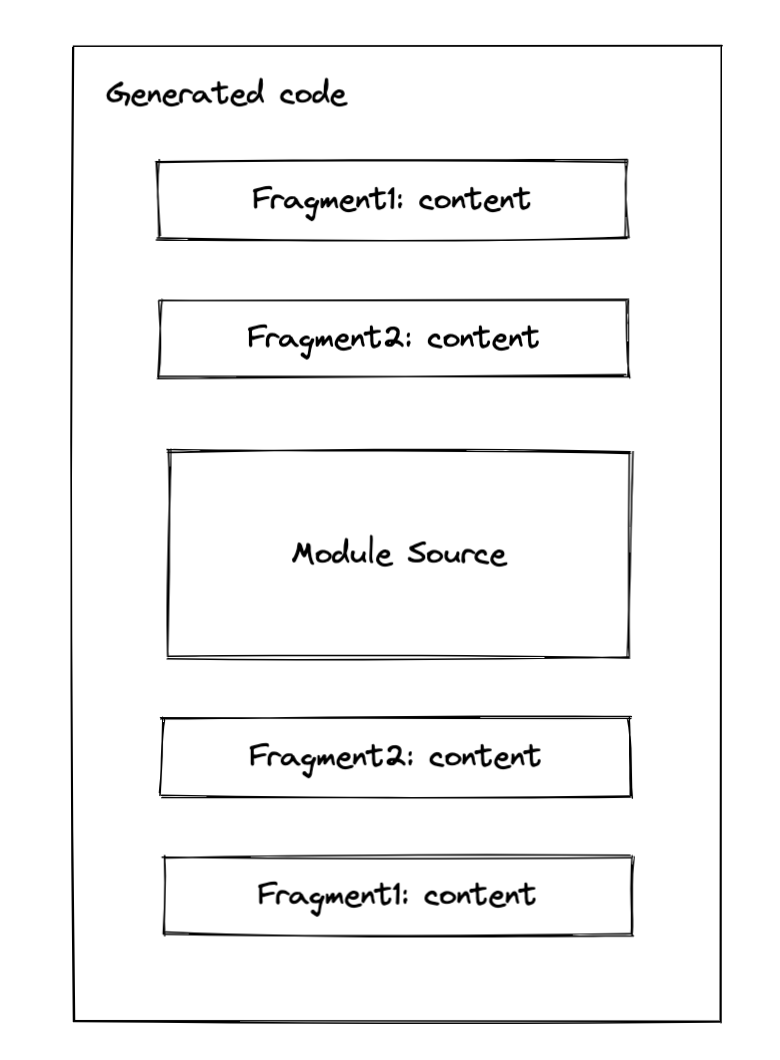 358 |
359 | The order of the fragment comes from two parts:
360 | 1. The stage of a fragment: if the stage of two fragments is different, then it will be replaced corresponding to the order define by the stage
361 | 2. If two fragments share the same order, then it will be replaced in [position](https://github.com/webpack/webpack/blob/9fcaa243573005d6fdece9a3f8d89a0e8b399613/lib/InitFragment.js#L41) order.
362 | [\[source\]](https://github.com/webpack/webpack/blob/9fcaa243573005d6fdece9a3f8d89a0e8b399613/lib/InitFragment.js#L153-L159)
363 |
364 | **A real-world example**
365 |
366 | ```js
367 | import { foo } from "./foo"
368 |
369 | foo()
370 | ```
371 |
372 | Given the example above, here's the code to generate a dependency that replaces `import` statement with `__webpack_require__`.
373 |
374 | ```js
375 | // some code is omitted for cleaner demonstration
376 | parser.hooks.import.tap(
377 | "HarmonyImportDependencyParserPlugin",
378 | (statement, source) => {
379 | const clearDep = new ConstDependency(
380 | "",
381 | statement.range
382 | );
383 | clearDep.loc = statement.loc;
384 | parser.state.module.addPresentationalDependency(clearDep);
385 |
386 | const sideEffectDep = new HarmonyImportSideEffectDependency(
387 | source
388 | );
389 | sideEffectDep.loc = statement.loc;
390 | parser.state.module.addDependency(sideEffectDep);
391 |
392 | return true;
393 | }
394 | );
395 | ```
396 | Webpack will create two dependencies `ConstDependency` and `HarmonyImportSideEffectDependency` while parsing [\[source\]](https://github.com/webpack/webpack/blob/9fcaa243573005d6fdece9a3f8d89a0e8b399613/lib/dependencies/HarmonyImportDependencyParserPlugin.js#L110-L132).
397 |
398 | Let me focus on `HarmonyImportSideEffectDependency` more, since it uses `Fragment` to do some patch.
399 |
400 | ```js
401 | // some code is omitted for cleaner demonstration
402 | HarmonyImportSideEffectDependency.Template = class HarmonyImportSideEffectDependencyTemplate extends (
403 | HarmonyImportDependency.Template
404 | ) {
405 | apply(dependency, source, templateContext) {
406 | super.apply(dependency, source, templateContext);
407 | }
408 | };
409 | ```
410 | As you can see in its associated _template_ [\[source\]](https://github.com/webpack/webpack/blob/9fcaa243573005d6fdece9a3f8d89a0e8b399613/lib/dependencies/HarmonyImportSideEffectDependency.js#L59), the modification to the code is made via its superclass `HarmonyImportDependency.Template` [\[source\]](https://github.com/webpack/webpack/blob/9fcaa243573005d6fdece9a3f8d89a0e8b399613/lib/dependencies/HarmonyImportDependency.js#L244).
411 |
412 | ```js
413 | // some code is omitted for cleaner demonstration
414 | HarmonyImportDependency.Template = class HarmonyImportDependencyTemplate extends (
415 | ModuleDependency.Template
416 | ) {
417 | apply(dependency, source, templateContext) {
418 | const dep = /** @type {HarmonyImportDependency} */ (dependency);
419 | const { module, chunkGraph, moduleGraph, runtime } = templateContext;
420 |
421 | const referencedModule = connection && connection.module;
422 |
423 | const moduleKey = referencedModule
424 | ? referencedModule.identifier()
425 | : dep.request;
426 | const key = `harmony import ${moduleKey}`;
427 |
428 | // 1
429 | const importStatement = dep.getImportStatement(false, templateContext);
430 | // 2
431 | templateContext.initFragments.push(
432 | new ConditionalInitFragment(
433 | importStatement[0] + importStatement[1],
434 | InitFragment.STAGE_HARMONY_IMPORTS,
435 | dep.sourceOrder,
436 | key,
437 | // omitted for cleaner code
438 | )
439 | );
440 | }
441 | }
442 | ```
443 |
444 | As you can see from the simplified source code above, the actual patch made to the generated code is via `templateContext.initFragments`(2). The import statement generated from dependency looks like this.
445 |
446 | ```js
447 | /* harmony import */ var _foo__WEBPACK_IMPORTED_MODULE_0__ = __webpack_require__(/*! ./foo */ "./src/foo.js"); //(1)
448 | ```
449 |
450 | Note, the real require statement is generated via _initFragments_, `ConditionalInitFragment` to be specific. Don't be afraid of the naming, for more information you can see the [background](https://github.com/webpack/webpack/pull/11802) of this _fragment_, which let's webpack to change it from `InitFragment` to `ConditionalInitFragment`.
451 |
452 | **How does webpack solve the compatibility issue?**
453 |
454 | For ESM modules, webpack will additionally call a helper to define `_esModule` on exports as an hint:
455 |
456 | ```js
457 | __webpack_require__.r(__webpack_exports__);
458 | ```
459 | The call of a helper is always placed ahead of any `require` statements. Probably you have already get this as the stage of `STAGE_HARMONY_EXPORTS` has high priority than `STAGE_HARMONY_IMPORTS`. Again, this is achieved via `initFragments`. The logic of the compatibility helper is defined in [this](https://github.com/webpack/webpack/blob/9fcaa243573005d6fdece9a3f8d89a0e8b399613/lib/dependencies/HarmonyCompatibilityDependency.js) file, you can check it out.
460 |
461 |
462 | ### Runtime
463 |
464 | Runtime generation is based on the previously collected `runtimeRequirements` in different dependency templates and is done after the code generation of each module. Note: it's not after the `renderManifest`, but it's after the code generation of each module.
465 |
466 | In the first iteration of collection, Sets of `runtimeRequirements` are collected from the module's code generation results and added to each `ChunkGraphModule`.
467 |
468 | In the second iteration of collection, the collected `runtimeRequirements` are already stored in `ChunkGraphModule`, so Webpack again collects them from there and stores the runtimes required by each chunk of `ChunkGraphChunk`. It's kind of the hoisting procedure of the required runtimes.
469 |
470 | Finally, also known as the third iteration of collection, Webpack hoists `runtimeRequirements` from those chunks that are referenced by the entry chunk and get it hoisted on the `ChunkGraphChunk` using a different field named `runtimeRequirementsInTree` which indicates not only does it contains the runtime requirements by the chunk but also it's children runtime requirements.
471 |
472 | 
473 |
474 | The referenced source code you can be found it [here](https://github.com/webpack/webpack/blob/9fcaa243573005d6fdece9a3f8d89a0e8b399613/lib/Compilation.js#L3379) and these steps are basically done in `processRuntimeRequirements`. This let me recall the linking procedure of a rollup-like bundler. Anyway, after this procedure, we can finally generate _runtime modules_. Actually, I lied here, huge thanks to the hook system of Webpack, the creation of _runtime modules_ is done in this method via calls to `runtimeRequirementInTree`[\[source\]](https://github.com/webpack/webpack/blob/9fcaa243573005d6fdece9a3f8d89a0e8b399613/lib/Compilation.js#L3498). No doubt, this is all done in the `seal` step. After that, webpack will process each chunk and create a few code generation jobs, and finally, emit assets.
475 |
476 |
477 |
478 | ### *Hot module replacement*
479 |
480 | Changes made via *hot module replacement* is mostly come from `HotModuleReplacementPlugin`.
481 |
482 |
483 |
484 | Given the code below:
485 |
486 | ```js
487 | if (module.hot) {
488 | module.hot.accept(...)
489 | }
490 | ```
491 |
492 | Webpack will replace expressions like `module.hot` and `module.hot.accept`, etc with `ConstDependency` as the *presentationalDependency* as I previously talked about. [\[source\]](https://github.com/webpack/webpack/blob/9fcaa243573005d6fdece9a3f8d89a0e8b399613/lib/HotModuleReplacementPlugin.js#L97-L101)
493 |
494 | With the help of a simple expression replacement is not enough, the plugin also introduce additional runtime modules for each entries. [\[source\]](https://github.com/webpack/webpack/blob/9fcaa243573005d6fdece9a3f8d89a0e8b399613/lib/HotModuleReplacementPlugin.js#L736-L748)
495 |
496 | The plugin is quite complicated, and you should definitely checkout what it actually does, but for things related to dependency, it's enough.
497 |
498 |
499 |
500 |
501 | ## How *dependencies* affect production optimizations
502 |
503 |
504 | ### Constant folding
505 |
506 | > The logic is defined in ConstPlugin : [\[source\]](https://github.com/webpack/webpack/blob/9fcaa243573005d6fdece9a3f8d89a0e8b399613/lib/ConstPlugin.js#L135)
507 |
508 |
509 | _Constant folding_ is a technique that used as an optimization for optimization. For example:
510 |
511 | **Source**
512 |
513 | ```js
514 | if (process.env.NODE_ENV === "development") {
515 | ...
516 | } else {
517 | ...
518 | }
519 | ```
520 |
521 | **Generated**
522 |
523 | ```js
524 | if (true) {
525 | ...
526 | }
527 | ```
528 |
529 | With mode set to `"development"`, webpack will "fold" the expression `process.env.NODE_ENV === "development"` into an expression of `"true"` as you can see for the code generation result.
530 |
531 | In the `make` procedure of webpack, Webpack internally uses an `JavaScriptParser` for JavaScript parsing. If an `ifStatement` is encountered, Webpack creates a corresponding `ConstDependency`. Essentially, for the `ifStatement`, the `ConstDependency` looks like this :
532 |
533 | ```js
534 | ConstDependency {
535 | expression: "true",
536 | range: [start, end] // range to replace
537 | }
538 | ```
539 |
540 | It's almost the same with `else` branch, if there is no _side effects_(refer to source code for more detail), Webpack will create another `ConstDependency` with `expression` set to `""`, which in the end removes the `else` branch.
541 |
542 | In the `seal` procedure of Webpack, the record of the dependency will be applied to the original source code and generate the final result as you may have already seen above.
543 |
544 |
545 |
546 | ### Tree shaking & DCE
547 |
548 | Tree-shaking is a technique of a bundle-wise DCE(dead code elimination). In the following content, I will use tree-shaking as a wording for bundle-wise and DCE for module-wise code elimination. (I know it's not quite appropriate, but you get the point)
549 |
550 |
551 |
552 | Here's an example:
553 |
554 | ```js
555 | // webpack configuration
556 | module.exports = {
557 | optimization: {
558 | usedExports: true
559 | }
560 | }
561 | ```
562 |
563 | 
564 |
565 | 
566 |
567 | 
568 |
569 | As you can see from the red square, the `initFragment` is generated based on the usage of the exported symbol in the `HarmonyExportSpecifierDependency` [\[source\]](https://github.com/webpack/webpack/blob/9fcaa243573005d6fdece9a3f8d89a0e8b399613/lib/dependencies/HarmonyExportSpecifierDependency.js#L91-L107)
570 |
571 | If `foo` is used in the graph, then the generated result will be this:
572 |
573 | ```js
574 | /* harmony export */ __webpack_require__.d(__webpack_exports__, {
575 | /* harmony export */ "foo": function() { return /* binding */ foo; }
576 | /* harmony export */ });
577 | const foo = "foo";
578 | ```
579 |
580 | In the example above, the `foo` is not used, so it will be excluded in the code generation of the template of `HarmonyExportSpecifierDependency` and it will be dead-code-eliminated in later steps. For terser plugin, it eliminates all unreachable code in `processAssets` [\[source\]](https://github.com/webpack-contrib/terser-webpack-plugin/blob/580f59c5d223a31c4a9c658a6f9bb1e59b3defa6/src/index.js#L836).
581 |
582 |
583 |
584 | ## Things related to Persistent cache
585 |
586 | *TODO*
587 |
588 |
589 |
590 |
591 | ## Wrap it up!
592 |
593 | Let's wrap everything up in a simple example! Isn't it exciting?
594 |
595 | 
596 |
597 | Given a module graph that contains three modules, the entry point of this bundle is `index.js`. To not make this example too complicated, we use normal import statements to reference each module (i.e: only one chunk that bundles everything will be created).
598 |
599 | ### `Make`
600 |
601 | 
602 |
603 |
604 |
605 | ### Dependencies after `make`
606 |
607 | 
608 |
609 | ### `seal`
610 |
611 | 
612 |
613 |
614 |
615 | # References
616 | *TODO*
617 |
618 |
619 |
--------------------------------------------------------------------------------
/src/architecture/webpack/loader.md:
--------------------------------------------------------------------------------
1 | > Based on *Webpack version: 5.73.0*.
2 |
3 |
4 | # Summary
5 |
6 | Explain how webpack loader works. Even though it's a little bit long and tedious, It's still a teeny-tiny peek at the loader system of Webpack.
7 |
8 |
9 |
10 | # Glossary
11 |
12 | > What's the meaning of a word used to describe a feature?
13 | >
14 | > Why does the Webpack introduce this and what's the background of introducing this? What kind of problem Webpack was facing at the time?
15 |
16 |
17 |
18 | ## Request Related
19 |
20 | ```javascript
21 | import Styles from '!style-loader!css-loader?modules!./styles.css';
22 | ```
23 |
24 | - [Inline loader syntax](https://webpack.js.org/concepts/loaders/#inline): The syntax that chains the loader together within the specifier, followed by the file requested. e.g. `!style-loader!css-loader?modules!./style.css`
25 | - `request`: The request with *inline loader syntax* retained. Webpack will convert relative URLs and module requests to absolute URLs for loaders and files requested. e.g. `!full-path-to-the-loader-separated-with-exclamation-mark!full-path-to-styles.css`
26 |
27 |
28 |
29 | ## Resource Related
30 |
31 | ```javascript
32 | import xxx from "./index.js?vue=true&style#some-fragment"
33 | ```
34 |
35 | - [`resource`](https://webpack.js.org/api/loaders/#thisresource): The absolute path to the requested file with `query` and `fragment` retained but inline loader syntax removed. e.g. `absolute-path-to-index-js.js?vue=true&style#some-fragment`
36 | - [`resourcePath`](https://webpack.js.org/api/loaders/#thisresourcepath): The absolute path to the requested file only. e.g. `absolute-path-to-index-js.js`
37 | - [`resourceQuery`](https://webpack.js.org/api/loaders/#thisresourcequery): Query with question mark `?` included. e.g. `?vue=true&style`
38 | - [`resourceFragment`](https://webpack.js.org/api/loaders/#thisresourcefragment): e.g. `#some-fragment`
39 | - inline match resource:
40 | - Used to redirect the `module.rules` to another, which is able to adjust the loader chain. We will cover this later.
41 | - Ref: [related PR](https://github.com/webpack/webpack/pull/7462) [Webpack Doc1](https://webpack.js.org/api/loaders/#thisimportmodule) [Webpack Doc2](https://webpack.js.org/api/loaders/#inline-matchresource)
42 |
43 | - `virtualResource`:
44 | - The proposed solution to support asset type changing(A sugar to inline matchResource, which can also affect the asset filename generation)
45 | - See more: [the background of this property](https://github.com/webpack/webpack/issues/14851)
46 |
47 |
48 |
49 |
50 | ## Others but also important to note
51 |
52 | - Virtual Module: A kind of module that does not locate in the real file system. But you can still import it. To create a virtual module, you need to follow the [spec](https://www.ietf.org/rfc/rfc2397.txt) and it's also worth noting that Node.js and Webpack both support it under the scheme of `data:`. Also known as, `data:` import. [Doc to Node.js](https://nodejs.org/api/esm.html#data-imports)
53 | - [Module types](https://webpack.js.org/concepts/modules/#supported-module-types) with native support: Webpack supports the following module types native: `'javascript/auto'` |` 'javascript/dynamic'` | `'javascript/esm'` | `'json'` | `'webassembly/sync'` | `'webassembly/async'` | `'asset'` | `'asset/source'` | `'asset/resource'` | `'asset/inline'`, for those types you can use it **without a loader**. From webpack version 4.0+, webpack can understand more than `javascript` alone.
54 |
55 |
56 |
57 | # Guide-level explanation
58 |
59 | ## Loader configuration
60 |
61 | The way that webpack controls what kind of module that each loader would apply is based on `module.rules`
62 |
63 |
64 |
65 | ```javascript
66 | const MiniExtractCssPlugin = require("mini-extract-css-plugin")
67 |
68 | module.exports = {
69 | module: {
70 | rules: [
71 | {
72 | test: /\.vue$/,
73 | use: ["vue-loader"]
74 | },
75 | {
76 | test: /\.css$/,
77 | use: [MiniExtractCssPlugin.loader, "css-loader"]
78 | }
79 | ]
80 | },
81 | plugins: [new MiniExtractCssPlugin()]
82 | }
83 | ```
84 |
85 | Here is a simple option for the configuration of `vue-loader`. `module.rules[number].test` is a part rule to test **whether a rule should be applied**. For `vue-loader` alone, It's kind of confusing how webpack pass the result to the rule of `css`, we will cover this later. But for now, It's good to notice **there is not only a `test` option alone to test if a rule should be applied**. You can find it [here](https://webpack.js.org/configuration/module/#rule) for full conditions supported. Here're some examples of other conditions you can use.
86 |
87 | ```javascript
88 | module.exports = {
89 | module: {
90 | rules: [
91 | {
92 | test: /\.vue$/, // of course, test if the file extension match `vue`.
93 | scheme: "data", // if the specifier of a request starts with `data:`
94 | resourceQuery: "?raw", // if the `resourceQuery` matches then the rule will be applied. For this example, it's a great idea to apply a `raw-loader` here.
95 | type: "css" // use webpack's native resource handling for css
96 | }
97 | ]
98 | }
99 | }
100 | ```
101 |
102 |
103 |
104 | ## Examples
105 |
106 | ### Vue(1 to n)
107 |
108 | In a single file component(SFC) of Vue, there are commonly three blocks or more blocks([custom blocks](https://vue-loader.vuejs.org/guide/custom-blocks.html#example)) contained. The basic idea of implementing this loader is to convert it into JavaScript / CSS and let webpack handle the chunk generation(e.g. Style should be generated into a separate `.css` file)
109 |
110 | ```vue
111 |
112 |
113 |
114 |
115 |
116 | ```
117 |
118 |
119 |
120 | ⬇️⬇️⬇️⬇️⬇️⬇️
121 |
122 | `Vue-loader` will firstly turn into the `*.vue` file into something like that.
123 |
124 | ```javascript
125 | import "script-path-to-vue-sfc";
126 | import "template-path-to-vue-sfc";
127 | import "style-path-to-vue-sfc";
128 | ```
129 |
130 |
131 |
132 | You may find it weird how webpack handles these imports and build the transformed code. But if I change the code a little bit, you will find the idea.
133 |
134 | ```javascript
135 | import "script:path-to-vue-sfc";
136 | import "template:path-to-vue-sfc";
137 | import "style:path-to-vue-sfc";
138 | ```
139 |
140 | and if we tweak the configuration a little bit to this, webpack will know exactly how to work with these import statements.
141 |
142 | ```javascript
143 | module.exports = {
144 | module: {
145 | rules: [
146 | {
147 | test: /\.vue$/,
148 | use: ["vue-loader"]
149 | },
150 | {
151 | scheme: "script",
152 | use: ["apply-your-javascript-loader", "vue-script-extract-loader"]
153 | },
154 | {
155 | scheme: "template",
156 | use: ["apply-your-javascript-loader", "vue-template-extract-loader"]
157 | },
158 | {
159 | scheme: "style",
160 | use: ["apply-your-style-loader", "vue-style-extract-loader"]
161 | }
162 | ]
163 | }
164 | }
165 | ```
166 |
167 | We added a few loaders to handle the splitting. I know it's still kind of weird here, but please stick with me and we will find a better way out.
168 |
169 | - vue-script-extract-loader: extract the `script` block from a SFC file.
170 | - vue-style-extract-loader: extract the `style` block from a SFC file.
171 | - vue-template-extract-loader: extract the `template` block from a SFC file and convert it into JavaScript.
172 |
173 |
174 |
175 | You will find it's really noisy only to transform a `*.vue` file, four loaders were introduced and I believe none of you would like to separate a simple loader into four. It's a real bummer! It will be great to use a single loader `vue-loader` alone. The current vue loader implementation uses resourceQuery to handle this. But how?
176 |
177 |
178 |
179 | #### Loader optimizations I
180 |
181 | We know that webpack uses a few conditions to handle whether a rule should be applied. Even with `rule.test` alone, the `this.reousrceQuery` is still available to `loaderContext` which developer could access it with `this` in any loader function(Don't worry if you still don't catch this. You will understand this after). Based on that, we change the `rule` to this:
182 |
183 | ```javascript
184 | module.exports = {
185 | module: {
186 | rules: [
187 | {
188 | test: /.vue$/,
189 | use: ["vue-loader"]
190 | }
191 | ]
192 | }
193 | }
194 | ```
195 |
196 | This indicates "If an import specifier is encountered, please pass me to vue-loader"! If you remember the import transformation above, we could adjust the transformation a little bit to this:
197 |
198 |
199 |
200 | **Before**
201 |
202 | ```javascript
203 | import "script-path-to-vue-sfc";
204 | import "template-path-to-vue-sfc";
205 | import "style-path-to-vue-sfc";
206 | ```
207 |
208 |
209 |
210 | **After**
211 |
212 | ```javascript
213 | import "path-to-vue-sfc.vue?script=true";
214 | import "path-to-vue-sfc.vue?template=true";
215 | import "path-to-vue-sfc.vue?style=true";
216 | ```
217 |
218 | These requests will match the `test: /.vue$/` above flawlessly and in the loader we can handle like this:
219 |
220 | ```javascript
221 | // pseudo code only for proofing of the concept
222 | const compiler = require("some-vue-template-compiler")
223 |
224 | const loader = function(source) {
225 | const {
226 | resourceQuery /* ?script=true or something else */,
227 | resourcePath /* path-to-vue-sfc.vue */
228 | } = this
229 |
230 | if (resourceQuery === "?script=true") {
231 | return compiler.giveMeCodeofScriptBlock(this.resourcePath) // javascript code
232 | } else if (resourceQuery === "?template=true") {
233 | return compiler.giveMeCodeofTemplateBlock(this.resourcePath) // javascript code
234 | } else if (resourceQuery === "?style=true") {
235 | return compiler.giveMeCodeofStyleBlock(this.resourcePath) // style code
236 | } else {
237 | return `
238 | import `${this.resourcePath}?script=true`;
239 | import `${this.resourcePath}?template=true`;
240 | import `${this.resourcePath}?style=true`;
241 | `
242 | }
243 | }
244 |
245 | module.exports = loader
246 | ```
247 |
248 | You can see the loader for the example above will be used for four times.
249 |
250 | 1. Encounter a `*.vue` file, transform the code to a few import statements
251 | 2. For each import statement introduced in the first transformation, the loader will be used again as they share the same extension `vue`.
252 |
253 |
254 |
255 | Is this the end? No! Even if you wrote the code like this, it will still fail to load.
256 |
257 | 1. For CSS: You haven't tell webpack a way to handle the CSS, remember the CSS part is required to go through the `css-loader` and then `mini-css-extract`(if you want to generate CSS for chunk) or `style-loader`(if you want to append it directly to the DOM). After all, you have to make the result of style to pass these loaders.
258 | 2. For JS: You haven't transformed the code to any transpilers, It will be failed if your runtime doesn't support the syntax(maybe in TypeScript for example) and webpack internal acorn compiler does not have the ability to help you with that.
259 |
260 |
261 |
262 | **Pass the code to the corresponding loaders**
263 |
264 | We tweak the configuration a little bit again.
265 |
266 | ```javascript
267 | module.exports = {
268 | module: {
269 | rules: [
270 | {
271 | test: /.vue$/,
272 | use: ["vue-loader"]
273 | },
274 | {
275 | test: /.css$/,
276 | use: [MiniCssExtractPlugin.loader, "css-loader"]
277 | },
278 | {
279 | test: /.js$/,
280 | use: ["babel-loader"]
281 | }
282 | ]
283 | }
284 | }
285 | ```
286 |
287 | It looks a bit more like the "normal" Webpack configuration. Note that the `rule.test` is based on the file extension, so `vue-loader` did a little bit of hack here.
288 |
289 | ```javascript
290 | // pseudo code only for proofing of the concept
291 | const compiler = require("some-vue-template-compiler")
292 |
293 | const loader = function(source) {
294 | const {
295 | resourceQuery /* ?script=true or something else */,
296 | resourcePath /* path-to-vue-sfc.vue */
297 | } = this
298 |
299 | if (resourceQuery === "?script=true") {
300 | const code = compiler.giveMeCodeofScriptBlock(this.resourcePath) // javascript code
301 | this.resourcePath += ".js"
302 | return code
303 | } else if (resourceQuery === "?template=true") {
304 | const code = compiler.giveMeCodeofTemplateBlock(this.resourcePath) // javascript code
305 | this.resourcePath += ".js"
306 | return code
307 | } else if (resourceQuery === "?style=true") {
308 | const code = compiler.giveMeCodeofStyleBlock(this.resourcePath) // style code
309 | this.resourcePath += ".css" // based on the `lang` in each script, the extension will be set accordingly.
310 | return code
311 | } else {
312 | return `
313 | import `${this.resourcePath}?script=true`;
314 | import `${this.resourcePath}?template=true`;
315 | import `${this.resourcePath}?style=true`;
316 | `
317 | }
318 | }
319 |
320 | module.exports = loader
321 | ```
322 |
323 | Webpack uses `resourcePath` to match a `module.rules`. So this hack will let webpack treat blocks accordingly as if they are real files with extensions of `js` | `css` |`...` .
324 |
325 |
326 |
327 | Finally! But this is only a proof of concept, for the real implementation. You should definitely check out the [`vue-loader`](https://github.com/vuejs/vue-loader) yourself.
328 |
329 |
330 |
331 | #### Loader Optimization II
332 |
333 | Well done! We implemented a simple and rudimentary version of `vue-loader`. However, the real pain-in-the-ass part of this implementation is hacking the extension to match the configuration. But since almost every user would have other `js` | `css` files included in the project, so vue team decide to use this kind of strategy to reuse the user configuration.
334 |
335 | Except for hacking the extension, webpack then provided a more legit way to handle this kind of **rule matching problem** which is known as ***inline match resource*** (We covered it in the glossary part).
336 |
337 |
338 |
339 | **inline match resource**
340 |
341 | Webpack can do almost anything with an import specifier like the loader chaining we covered in the glossary part. *Inline source match* is another case. By taking the advantage of it, you can force an import statement to go through a `module.rules` by introducing the `!=!` syntax. For example, if we want to force a `css` file to go through a `less` loader, it will be look like this:
342 |
343 | ```javascript
344 | module.exports = {
345 | module: {
346 | rules: [
347 | {
348 | test: /.less$/,
349 | use: ["style-loader", "css-loader", "less-loader"]
350 | }
351 | ]
352 | }
353 | }
354 | ```
355 |
356 | ```javascript
357 | // This import should be converted with a loader
358 |
359 | // treat the file as `less`
360 | import "./index.css.less!=!./index.css"
361 | ```
362 |
363 | The slice before the `!=!` is a way to modify the extension of a single file and force it to match the `module.rules` and this transformation is often done in a loader, or you will make your application code specialized for Webpack only.
364 |
365 |
366 |
367 | After going through the basic example, let's see how we're going to optimize out the hack used in `vue-loader`.
368 |
369 | ```javascript
370 | // pseudo code only for proofing of the concept
371 | const compiler = require("some-vue-template-compiler")
372 |
373 | const loader = function(source) {
374 | const {
375 | resourceQuery /* ?script=true or something else */,
376 | resourcePath /* path-to-vue-sfc.vue */
377 | } = this
378 |
379 | if (resourceQuery === "?vue=true&script=true") {
380 | return compiler.giveMeCodeofScriptBlock(this.resourcePath) // javascript code
381 | } else if (resourceQuery === "?vue=true&template=true") {
382 | return compiler.giveMeCodeofTemplateBlock(this.resourcePath) // javascript code
383 | } else if (resourceQuery === "?vue=true&style=true") {
384 | return compiler.giveMeCodeofStyleBlock(this.resourcePath) // style code
385 | } else {
386 | return `
387 | import `${this.resourcePath}.js!=!${this.resourcePath}?vue=true&script=true`;
388 | import `${this.resourcePath}.js!=!${this.resourcePath}?vue=true&template=true`;
389 | import `${this.resourcePath}.css!=!${this.resourcePath}?vue=true&style=true`;
390 | `
391 | }
392 | }
393 |
394 | module.exports = loader
395 | ```
396 |
397 | Webpack will internally use the match resource part(before `!=!`) as the data to match loaders. In order to let `vue-loader` match the resource. We have two options:
398 |
399 | 1. Loose test
400 | 2. *Inline loader syntax*
401 |
402 |
403 |
404 | **1. Loose test**
405 |
406 | ```javascript
407 | module.exports = {
408 | module: {
409 | rules: [
410 | {
411 | test: /\.vue/, // original: `/\.vue$/`, we removed the `$` to allow resources with `.vue` included to match this rule.
412 | use: ["vue-loader"]
413 | }
414 | ]
415 | }
416 | }
417 | ```
418 |
419 | We removed the `$` to allow resources with `.vue` included matching this rule. Personally speaking, this is not a good idea, because a loose match might cause mismatches.
420 |
421 |
422 |
423 | **2. Inline loader syntax**
424 |
425 | ```javascript
426 | // vue-loader/index.js
427 |
428 | module.exports = function() {
429 | // ... code omitted
430 | return `
431 | import `${this.resourcePath}.js!=!${__filename}!${this.resourcePath}?vue=true&script=true`;
432 | import `${this.resourcePath}.js!=!${__filename}!${this.resourcePath}?vue=true&template=true`;
433 | import `${this.resourcePath}.css!=!${__filename}!${this.resourcePath}?vue=true&style=true`;
434 | `
435 | }
436 | ```
437 |
438 | This technique is to take advantage of the ***inline loader syntax*** to force the loader to go through the vue loader. This tackles down the tangible mismatching ideally and we can still retain the test regex `/\.vue$/` as-is.
439 |
440 |
441 |
442 |
443 |
444 | #### Final art and conclusion
445 |
446 | **Configuration**
447 |
448 | ```javascript
449 | module.exports = {
450 | module: {
451 | rules: [
452 | {
453 | test: /\.vue$/,
454 | use: ["vue-loader"]
455 | },
456 | // ... other rules for js, or css, etc.
457 | ]
458 | }
459 | }
460 | ```
461 |
462 |
463 |
464 | **Loader**
465 |
466 | ```javascript
467 | // pseudo code only for proofing of the concept
468 | const compiler = require("some-vue-template-compiler")
469 |
470 | const loader = function(source) {
471 | const {
472 | resourceQuery /* ?script=true or something else */,
473 | resourcePath /* path-to-vue-sfc.vue */
474 | } = this
475 |
476 | if (resourceQuery === "?vue=true&script=true") {
477 | return compiler.giveMeCodeofScriptBlock(resourcePath) // javascript code
478 | } else if (resourceQuery === "?vue=true&template=true") {
479 | return compiler.giveMeCodeofTemplateBlock(resourcePath) // javascript code
480 | } else if (resourceQuery === "?vue=true&style=true") {
481 | return compiler.giveMeCodeofStyleBlock(resourcePath) // style code
482 | } else {
483 | return `
484 | import `${this.resourcePath}.js!=!${__filename}!${resourcePath}?vue=true&script=true`;
485 | import `${this.resourcePath}.js!=!${__filename}!${resourcePath}?vue=true&template=true`;
486 | import `${this.resourcePath}.css!=!${__filename}!${resourcePath}?vue=true&style=true`;
487 | `
488 | }
489 | }
490 |
491 | module.exports = loader
492 | ```
493 |
494 |
495 |
496 | **Conclusion**
497 |
498 | Vue-loader is quite complex. The basic needs of the loader are:
499 |
500 | 1. Separate a `*.vue` file request into a number of parts. For each block, explicitly change the resource matching mechanism (using ***inline match resource***). The killer *inline match resource* not only gives us great composability with user-defined loaders, but also the ability to interact with webpack supported native types, and we will cover this part late.
501 | 2. When requesting the `vue-loader` again for a block, the code of each block is returned and let webpack handle the changed matched resource(e.g. `./App.vue.css`) with user-defined loaders (Webpack did this internally).
502 |
503 |
504 |
505 | ### Use natively supported module types
506 |
507 | We know that webpack only supports `JavaScript` in the old time, from the version of `4.0.0`+([changelog](https://github.com/webpack/webpack/releases/tag/v4.0.0))
508 |
509 |
510 |
511 | #### Simplified pre-processor's configuration
512 |
513 | > With the experimental support of CSS. A.K.A webpack knows how to handle CSS files natively.
514 |
515 |
516 |
517 | **Before**
518 |
519 | ```javascript
520 | module.exports = {
521 | module: {
522 | rules: [
523 | {
524 | test: /\.less$/,
525 | use: ["style-loader", "css-loader", "less-loader"],
526 | type: "javascript/auto" // this field is a implicit one, if not defined, it will be set to `"javascript/auto"`
527 | }
528 | ]
529 | }
530 | }
531 | ```
532 |
533 |
534 |
535 | **After**
536 |
537 | ```javascript
538 | module.exports = {
539 | module: {
540 | rules: [
541 | {
542 | test: /\.less$/,
543 | use: ["less-loader"],
544 | type: "css"
545 | }
546 | ]
547 | },
548 | experiments: {
549 | css: true
550 | }
551 | }
552 | ```
553 |
554 | With `experiments.css` on, webpack can experimentally understand the parsing and generating of `css` files which gets rid of `css-loader` and `style-loader`. For the full list of natively supported `Rule.type`, you can find it [here](https://webpack.js.org/configuration/module/#ruletype).
555 |
556 |
557 |
558 |
559 |
560 | #### Asset modules
561 |
562 | > From *webpack 4.0.0+*, assets are supported natively
563 |
564 | ```javascript
565 | module.exports = {
566 | module: {
567 | rules: [
568 | {
569 | test: /\.(png|jpg)/,
570 | type: "asset"
571 | }
572 | ]
573 | }
574 | }
575 | ```
576 |
577 | `Rule.type === "asset"` indicates the asset will be automatically tested whether it's going to be inlined or emitted as a file on the real file system. The possible options are: `'asset'` | `'asset/source'` | `'asset/resource'` | `'asset/inline'`
578 |
579 |
580 |
581 |
582 |
583 | ### Svgr
584 |
585 | Webpack loader will read the source to a UTF-8 string by default. For SVG files, this would fit the webpack load defaults.
586 |
587 |
588 |
589 | ```javascript
590 | // Proof of concept of svgr-loader
591 | module.exports = function(source) {
592 | if (this.resourceQuery === "?svgr=true") { // the real transform part
593 | let { code } = svgrTransformer.transform(source);
594 | return code
595 | }
596 | return `require("${this.resourcePath}.jsx!=!${__filename}!${this.resourcePath}?svgr=true")` // the request part
597 | }
598 | ```
599 |
600 | Again here we use double-pass to firstly convert each request to the request part with *inline match resource*, and do the real request with query `?svgr=true`, and let *inline match resource* handle the `jsx` conversion. Before that, we have to call a third-party `jsx` transformer, could be *ESBuild* for example, for which we cannot reuse other `module.rules` set by the user-side. *Inline match resource* saved our ass again!
601 |
602 |
603 |
604 | ### Scheme imports
605 |
606 | > Supported in *Webpack version 5.38.0*, doc: [Rule.scheme](https://webpack.js.org/configuration/module/#rulescheme)
607 |
608 | ```javascript
609 | // JavaScript
610 | import x from "data:text/javascript,export default 42"
611 | console.log('x:',x);
612 | ```
613 |
614 | ```css
615 | /* CSS */
616 | @import ("data:text/css, body { background: #fff; }");
617 | ```
618 |
619 | Webpack handles `data:` imports for JavaScript internally.
620 |
621 |
622 |
623 | ### Asset transform and rename
624 |
625 | > [**Asset**](https://webpack.js.org/guides/asset-management/): This is a general term for the images, fonts, media, and any other kind of files that are typically used in websites and other applications. These typically end up as individual files within the [output](https://webpack.js.org/glossary/#o) but can also be inlined via things like the [style-loader](https://webpack.js.org/loaders/style-loader) or [url-loader](https://webpack.js.org/loaders/url-loader).
626 | >
627 | > *Originally posted at Webpack [Glossary](https://webpack.js.org/glossary/#a)*
628 |
629 |
630 |
631 | #### Default resource reading override
632 |
633 | Asset could be formatted in both text(`*.svg`) or binary (`*.png` / `*.jpg`). For loaders, webpack provides you an option [`raw`](https://webpack.js.org/api/loaders/#raw-loader) to override the default and built-in resource reading strategy from UTF-8 `string` to `Buffer`:
634 |
635 | ```javascript
636 | module.exports = function(source /* Buffer */ ) {
637 | // loader implementation
638 | }
639 |
640 | module.exports.raw = true
641 | ```
642 |
643 |
644 |
645 | #### Transform and rename
646 |
647 | Image there is a need to transform an asset formatted with `png` to `jpg`. There is two abilities that webpack needs to support:
648 |
649 | 1. Handle the asset with `raw` content, or a `Buffer`. We can simply override the default resource reading behavior by exporting `raw`(covered before).
650 | 2. Change the filename, and reuse the loader for both `png` and `jpg`
651 |
652 |
653 |
654 | ##### Configuration
655 |
656 | ```javascript
657 | module.exports = {
658 | module: {
659 | rules: [
660 | {
661 | test: /\.png/,
662 | use: ["png-to-jpg-loader"] // some png to jpg loader, we will implement this
663 | },
664 | {
665 | test: /\.jpg/,
666 | use: ["jpg-optimizer"] // some jpg optimizer, we will not covert this,
667 | type: "asset/resource"
668 | }
669 | ]
670 | }
671 | }
672 | ```
673 |
674 | 1. Rule1: For files with extension `png`, we want to use a `png` to `jpg` loader, which will be covered in this article.
675 | 2. Rule2:
676 | 1. For files with extension `jpg`, we want to use a third-party `jpg-optimizer`, which will not be covered in this article.
677 | 2. `type: "asset/resource"`: As soon as all the loaders have gone through, we want webpack to emit the file as an external resource on the file system regardless of the file size(`type: "asset"` will automatically detect the size of an asset to determine whether an asset will be inline-included for dynamically imported from file system).
678 | 3. For those `jpg` files converted from `png`, we want them to apply with the `jpg-optimizer` too(i.e. reuse the loaders defined in `module.rules`)
679 |
680 |
681 |
682 | ##### Loader
683 |
684 | ```javascript
685 | module.exports = function(source) {
686 | if (this.resourceQuery === "?pngToJPG=true") {
687 | return pngToJpg.transform(source)
688 | }
689 |
690 | return `require("${this.resourcePath}.jpg!=!${__filename}${this.resourcePath}?pngToJPG=true")`
691 | }
692 |
693 | module.exports.raw = true
694 | ```
695 |
696 | We use double-pass again, firstly we convert the extension to `.jpg` which will apply the matched rules(in this case `test: /\.jpg/`), after the transformation of `png-to-jpg-loader`. Generated asset module filename will be based on the *inline match resource*, which is `xxxx.jpg` in this case.
697 |
698 |
699 |
700 | ### AST reuse
701 |
702 | Webpack provides a way to pass metadata(the forth parameter) among the chaining loaders [doc](https://webpack.js.org/api/loaders/#thiscallback). The most commonly used value is `webpackAST` which accepts an `ESTree` compatible(webpack internally uses `acorn`) AST, which hugely improves the performance since webpack instead of parsing the returned code to AST again, **will directly use the AST(`webpackAST`) returned from a loader**(But **the work of a complete walking of an AST can not be omitted** as it's necessary for webpack for do some analysis for its dependencies and will be only done once, so it is not a big overhead.)
703 |
704 | ```javascript
705 | module.exports = function(source) {
706 | let ast = AcornParser.parse(source, {
707 | // options
708 | })
709 |
710 | this.callback(null, '', null, {
711 | webpackAST: ast
712 | })
713 | }
714 | ```
715 |
716 | Good to note that only `ESTree` is compatible, so you cannot pass a CSS AST, or webpack will complain with `"webpackAst is unexpected for the CssParser"`. It will be ok if you don't get this, let's move to the reference-level explanation for analysis in-depth.
717 |
718 |
719 |
720 |
721 | ## Reference-level explanation
722 |
723 | This is the reference-level explanation part of webpack's internal loader implementation.
724 |
725 |
726 |
727 | ### Loader composability
728 |
729 | > If you don't quite get this concept, you may refer to the Glossary and *Example* part of the Guide-level explanation first and pick up this as soon as you finished.
730 |
731 | The high-level idea of previously talked *inline match resource* is to let **loader developers** to customize the behavior of matching to match the pre-defined `module.rules`. It's an API to write composable loaders. But what does composition mean? For those users who are familiar with React hooks and Vue composable APIs, you may get this faster. Actually, webpack provides a lot of ways to help loader developers and users do the composition.
732 |
733 |
734 |
735 | #### User-defined loader flows
736 |
737 | ```javascript
738 | module.exports = {
739 | module: {
740 | rules: [
741 | {
742 | test: /\.js$/,
743 | use: ["babel-loader"],
744 | type: "javascript/auto"
745 | },
746 | {
747 | test: /\.svg$/,
748 | use: ["svgr-loader", "svgo-loader"],
749 | }
750 | ]
751 | }
752 | }
753 | ```
754 |
755 | Webpack users can take the advantage of `module.rules[number].use` with a loader list for each request that matches the corresponding conditions. Note that I use the wording of `request,` not the `file` , which can include a request to `data:text/javascript` not the files on the real file system only. (In Parcel bundler, it's called [*pipelines*](https://parceljs.org/features/plugins/#pipelines), but this will not be covered in this article.)
756 |
757 |
758 |
759 | Apparently, user-declared loader flow is not able to cover up every case that a loader wants. You can see from the previous examples, `vue-loader` wants to split a file into many blocks, and remain the reference to it. `svgr-loader` wants to do the transformation first and let other loaders deal with the `jsx`. `svg-loader` wants to use the internal ability of `Asset Module` to let Webpack decide whether an asset is inlined or emitted to the real file system. and there are more to come... Based on the complexity of the loader, Webpack also provides a syntax to allow loader implementors to do the composition by themselves.
760 |
761 |
762 |
763 | #### The syntax for loader composition
764 |
765 |
766 |
767 | ##### Inline loader syntax (Chaining loaders)
768 |
769 | > Supported from *webpack v1* [chaining-loaders](https://webpack.js.org/migrate/3/#chaining-loaders)
770 | >
771 | > It's possible to specify loaders in an `import` statement, or any [equivalent "importing" method](https://webpack.js.org/api/module-methods). Separate loaders from the resource with `!`. Each part is resolved relative to the current directory. [doc](https://webpack.js.org/concepts/loaders/#inline)
772 |
773 | ```javascript
774 | import Styles from '!style-loader!css-loader?modules!./styles.css';
775 | ```
776 |
777 | The *inline loader syntax* executes each loader for each request from right to left. Webpack handles the interaction with user-defined loaders carefully. So by default, the user-defined normal loader will be executed prior to the inline loaders, you can disable this behavior by prefixing `!` , (full reference could be found here [doc](https://webpack.js.org/concepts/loaders/#inline)).
778 |
779 | The custom specifier is parsed before the `module.rules` as the *inline loader syntax* interferes the user-defined loaders(See the [source code](https://github.com/webpack/webpack/blob/9fcaa243573005d6fdece9a3f8d89a0e8b399613/lib/NormalModuleFactory.js#L390-L403)). Then, webpack will get the `module.rules` combined with the required conditions to calculate the matching rule set (See the [source code](https://github.com/webpack/webpack/blob/9fcaa243573005d6fdece9a3f8d89a0e8b399613/lib/NormalModuleFactory.js#L493-L510)).
780 |
781 | At the moment, you cannot change the matching behavior with the syntax, loaders are always matched with the provided *resourcePath*, etc, which leads to a bunch of hack code in the implementations of loaders (see this [code snippet](https://github.com/vuejs/vue-loader/blob/e9314347d75a1b0e54f971272d23a669fc3e6965/src/select.ts#L31) in `vue-loader`). The possibilities for changing the matching behavior leaves to the later-coming *inline match resource*.
782 |
783 | Nevertheless, the architecture of Loader at this moment is sound and solid. Another good example is the implementation-nonrelative filter(i.e. the filtering logic of *Loader* is not declared in the loader itself), which is the fundamental root of loader composition, or the implementor will do a lot of hacks. (It's way too dirty to talk about here, but you can take the rollup [svgr](https://github.com/gregberge/svgr/blob/1dbc3e2c2027253b3b81b92fd4eb09a4aa8ae25e/packages/rollup/src/index.ts#L52) plugin as a reference)
784 |
785 | In conclusion, *inline loader syntax* gives us a chance to control the loader flow with user-defined rules.
786 |
787 |
788 |
789 | ##### Inline match resource
790 |
791 | To extend the matching ability, *inline match resource* enables loader implementors to reuse some of the user-defined configurations with more flexibilities.
792 |
793 | On top of the previous example, webpack also provides a way to make use of the natively-supported *module types*.
794 |
795 | ```javascript
796 | // For module type `css` to work, you need to enable `experiments.css`
797 | import "./style.less.webpack[css]!=path-to-less-loader!./style.less"
798 | ```
799 |
800 | ```javascript
801 | // webpack.config.js
802 | module.exports = {
803 | experiments: {
804 | css: true
805 | }
806 | }
807 | ```
808 |
809 | Given the configuration above, the overview of the complete flow will be like this:
810 |
811 | 1. Webpack: Parse the specifier of the import and create the loader for the current request
812 | 2. Webpack: Merge the result from the second step with a user-defined `module.rules` in `webpack.config`, in this case is `[]`
813 | 3. Webpack: load `style.less` as UTF-8 string
814 | 4. Less-loader: Accept the UTF-8 string as the first parameter of the loader function and transform it to the content of `css`.
815 | 5. Webpack: Call the registered native `CSS` parser, and later at the code generation step the registered native `CSS` generator generates the result.
816 |
817 |
818 |
819 | For *asset modules*, you can also use this:
820 |
821 | ```javascript
822 | import "./logo.png.jpg.webpack[asset/resource]!=path-to-loaders!./logo.png"
823 | ```
824 |
825 | The first part, also known as `matchResource` will be used as a part of the `filename` of the final code generation. (See the [source code](https://github.com/webpack/webpack/blob/9fcaa243573005d6fdece9a3f8d89a0e8b399613/lib/asset/AssetGenerator.js#L293-L348))
826 |
827 |
828 |
829 | ### Performance optimizations
830 |
831 | Before moving on to the detailed implementations, here's some glossary to support your understanding the architecture as a whole.
832 |
833 |
834 |
835 | #### Glossary
836 |
837 | - `NormalModuleFactory`: A factory used to create a `NormalModule`, which basically exposes a `create` method.
838 | - `NormalModule`: A module in Webpack most of the time is a `NormalModule`, but with different implementations of `parser`/ `generator` / `Module Type`, the module could be almost any kind, and also exposes a `build` method. For example, a `NormalModule` with JavaScript parser, JavaScript generator, and `type ===javascript/auto` will be regarded as a module with JavaScript-related functionalities. Also, good to note that a module may not exist on the real file system, taking `data:` for example.
839 |
840 |
841 |
842 | #### The module creation workflow
843 |
844 | > This will only introduce a slice of webpack's internal implementation from **the Loader's perspective**, for more you should directly refer to the source code.
845 |
846 | When an import statement is detected, webpack will initialize a module creation. Based on the type of *Dependency* (an abstraction of webpack, it's not important here), webpack can find the linked *ModuleFactory*(The abstraction class), in most cases, the derived factory is `NormalModuleFactory`, which exposes a `create` method.
847 |
848 |
849 |
850 | ##### Prepare data needed for module creation
851 |
852 | The `NormalModuleFactory#create` is used to provide enough information to create a real `NormalModule`, and create the `NormalModule`. In the `create` method, webpack basically does these things(some non-loader related stuff will be omitted):
853 |
854 | - Resolve loaders from request: resolve the request, parse inline loader syntax: This contains *inline match resource*, *inline loader syntax*.
855 | - Do the analysis on the parsed loader syntax, to decide whether a user-defined `normal/post/pre` loader is going to be included. [doc](https://webpack.js.org/concepts/loaders/#inline)
856 | - Resolve Resource: resolve resource to the absolute path, fragments, queries, etc(These stuff are also provided in `LoaderContext`). For the full source code you may refer to [this](https://github.com/webpack/webpack/blob/main/lib/NormalModuleFactory.js#L653-L678)
857 | - Use the resolved resource data to match `module.rules` defined in the configuration, and get the matched rules. This is also a part of the module creation data.
858 | - Do some special logic with *inline match resource*, since match resource ends like `.webpack[css]` would change `Rule.type`. Also store the match resource data, since it might affect the filename generation for *asset modules*.
859 |
860 |
861 |
862 | ##### Create a module based on the prepared data
863 |
864 | After the data needed for module creation is prepared, `NormalModuleFactory` will `new NormalModule` with the data provided. It contains basically every that a `NormalModule` needs (see the [source code](https://github.com/webpack/webpack/blob/9fcaa243573005d6fdece9a3f8d89a0e8b399613/lib/NormalModule.js#L271-L287)). Most importantly, the `loaders`. It contains every loader parsed and ordered from the `create` step.
865 |
866 |
867 |
868 | #### The module build step
869 |
870 | The module build step is kind of clear. Webpack will invoke the `build` method for each `NormalModule` instance, which invokes `loader-runner`(see the [source code](https://github.com/webpack/webpack/blob/9fcaa243573005d6fdece9a3f8d89a0e8b399613/lib/NormalModule.js#L819)) to go through every loader that was analyzed from the create step. It's clear to **know that the composition of loaders is happening on the same module**.
871 |
872 |
873 |
874 | #### A peek of the support of *Module Types*
875 |
876 | As far as this article goes, It might be getting a little bit tedious. But have you ever wondered how webpack supports these *module types* natively? I think It's still worth telling you about it to get a more complete understanding of the AST optimizations. For the support of JavaScript, webpack's JavaScript plugin will register different types of parser and generators for each *module types*, which will be used as the `parser` / `generator` to a `NormalModule` (see the [source code](https://github.com/webpack/webpack/blob/9fcaa243573005d6fdece9a3f8d89a0e8b399613/lib/javascript/JavascriptModulesPlugin.js#L202-L231)).
877 |
878 |
879 |
880 | #### Reusing AST in Webpack
881 |
882 | Based on the parser and generator we introduced before, webpack did a little hack around the fourth parameter of `this.callback` (from *loaderContext*), with `webpackAST`, after each loader call, the `webpackAST` will be stored in the context of loader, and passed again to the next loader. Finally, the AST will be passed to the `parser`(It could be any type, based on the *module type*, but webpack makes it a JavaScript only for AST) (see the [source code](https://github.com/webpack/webpack/blob/9fcaa243573005d6fdece9a3f8d89a0e8b399613/lib/NormalModule.js#L1087)).
883 |
884 | Here's an issue about trying to use SWC's AST to get rid of the time sensitive code parsing from Acorn Parser, but they are facing some AST compatibility issues and performance issues about the overhead of interop with native code(Rust).
885 |
886 |
887 |
888 |
889 |
890 | ## References
891 |
892 | - loader plugin api design (Analysis) [#315](https://github.com/speedy-js/rspack/discussions/315)
893 |
894 | - RFC-011 Supports `data:text/javascript` protocol [#457](https://github.com/speedy-js/rspack/discussions/457)
895 |
896 | - Webpack: `matchResource` with natively-supported module types [doc](https://webpack.js.org/api/loaders/#thisimportmodule)
897 |
898 | - Webpack: Loader context [doc](https://webpack.js.org/api/loaders/#the-loader-context)
899 |
900 | - Webpack: Module rules [doc](https://webpack.js.org/configuration/module/#rule)
901 |
902 | - SWC-loader for performance optimizations [issue](https://github.com/webpack/webpack/issues/13425#issuecomment-1013560170)
903 |
904 |
--------------------------------------------------------------------------------
358 |
359 | The order of the fragment comes from two parts:
360 | 1. The stage of a fragment: if the stage of two fragments is different, then it will be replaced corresponding to the order define by the stage
361 | 2. If two fragments share the same order, then it will be replaced in [position](https://github.com/webpack/webpack/blob/9fcaa243573005d6fdece9a3f8d89a0e8b399613/lib/InitFragment.js#L41) order.
362 | [\[source\]](https://github.com/webpack/webpack/blob/9fcaa243573005d6fdece9a3f8d89a0e8b399613/lib/InitFragment.js#L153-L159)
363 |
364 | **A real-world example**
365 |
366 | ```js
367 | import { foo } from "./foo"
368 |
369 | foo()
370 | ```
371 |
372 | Given the example above, here's the code to generate a dependency that replaces `import` statement with `__webpack_require__`.
373 |
374 | ```js
375 | // some code is omitted for cleaner demonstration
376 | parser.hooks.import.tap(
377 | "HarmonyImportDependencyParserPlugin",
378 | (statement, source) => {
379 | const clearDep = new ConstDependency(
380 | "",
381 | statement.range
382 | );
383 | clearDep.loc = statement.loc;
384 | parser.state.module.addPresentationalDependency(clearDep);
385 |
386 | const sideEffectDep = new HarmonyImportSideEffectDependency(
387 | source
388 | );
389 | sideEffectDep.loc = statement.loc;
390 | parser.state.module.addDependency(sideEffectDep);
391 |
392 | return true;
393 | }
394 | );
395 | ```
396 | Webpack will create two dependencies `ConstDependency` and `HarmonyImportSideEffectDependency` while parsing [\[source\]](https://github.com/webpack/webpack/blob/9fcaa243573005d6fdece9a3f8d89a0e8b399613/lib/dependencies/HarmonyImportDependencyParserPlugin.js#L110-L132).
397 |
398 | Let me focus on `HarmonyImportSideEffectDependency` more, since it uses `Fragment` to do some patch.
399 |
400 | ```js
401 | // some code is omitted for cleaner demonstration
402 | HarmonyImportSideEffectDependency.Template = class HarmonyImportSideEffectDependencyTemplate extends (
403 | HarmonyImportDependency.Template
404 | ) {
405 | apply(dependency, source, templateContext) {
406 | super.apply(dependency, source, templateContext);
407 | }
408 | };
409 | ```
410 | As you can see in its associated _template_ [\[source\]](https://github.com/webpack/webpack/blob/9fcaa243573005d6fdece9a3f8d89a0e8b399613/lib/dependencies/HarmonyImportSideEffectDependency.js#L59), the modification to the code is made via its superclass `HarmonyImportDependency.Template` [\[source\]](https://github.com/webpack/webpack/blob/9fcaa243573005d6fdece9a3f8d89a0e8b399613/lib/dependencies/HarmonyImportDependency.js#L244).
411 |
412 | ```js
413 | // some code is omitted for cleaner demonstration
414 | HarmonyImportDependency.Template = class HarmonyImportDependencyTemplate extends (
415 | ModuleDependency.Template
416 | ) {
417 | apply(dependency, source, templateContext) {
418 | const dep = /** @type {HarmonyImportDependency} */ (dependency);
419 | const { module, chunkGraph, moduleGraph, runtime } = templateContext;
420 |
421 | const referencedModule = connection && connection.module;
422 |
423 | const moduleKey = referencedModule
424 | ? referencedModule.identifier()
425 | : dep.request;
426 | const key = `harmony import ${moduleKey}`;
427 |
428 | // 1
429 | const importStatement = dep.getImportStatement(false, templateContext);
430 | // 2
431 | templateContext.initFragments.push(
432 | new ConditionalInitFragment(
433 | importStatement[0] + importStatement[1],
434 | InitFragment.STAGE_HARMONY_IMPORTS,
435 | dep.sourceOrder,
436 | key,
437 | // omitted for cleaner code
438 | )
439 | );
440 | }
441 | }
442 | ```
443 |
444 | As you can see from the simplified source code above, the actual patch made to the generated code is via `templateContext.initFragments`(2). The import statement generated from dependency looks like this.
445 |
446 | ```js
447 | /* harmony import */ var _foo__WEBPACK_IMPORTED_MODULE_0__ = __webpack_require__(/*! ./foo */ "./src/foo.js"); //(1)
448 | ```
449 |
450 | Note, the real require statement is generated via _initFragments_, `ConditionalInitFragment` to be specific. Don't be afraid of the naming, for more information you can see the [background](https://github.com/webpack/webpack/pull/11802) of this _fragment_, which let's webpack to change it from `InitFragment` to `ConditionalInitFragment`.
451 |
452 | **How does webpack solve the compatibility issue?**
453 |
454 | For ESM modules, webpack will additionally call a helper to define `_esModule` on exports as an hint:
455 |
456 | ```js
457 | __webpack_require__.r(__webpack_exports__);
458 | ```
459 | The call of a helper is always placed ahead of any `require` statements. Probably you have already get this as the stage of `STAGE_HARMONY_EXPORTS` has high priority than `STAGE_HARMONY_IMPORTS`. Again, this is achieved via `initFragments`. The logic of the compatibility helper is defined in [this](https://github.com/webpack/webpack/blob/9fcaa243573005d6fdece9a3f8d89a0e8b399613/lib/dependencies/HarmonyCompatibilityDependency.js) file, you can check it out.
460 |
461 |
462 | ### Runtime
463 |
464 | Runtime generation is based on the previously collected `runtimeRequirements` in different dependency templates and is done after the code generation of each module. Note: it's not after the `renderManifest`, but it's after the code generation of each module.
465 |
466 | In the first iteration of collection, Sets of `runtimeRequirements` are collected from the module's code generation results and added to each `ChunkGraphModule`.
467 |
468 | In the second iteration of collection, the collected `runtimeRequirements` are already stored in `ChunkGraphModule`, so Webpack again collects them from there and stores the runtimes required by each chunk of `ChunkGraphChunk`. It's kind of the hoisting procedure of the required runtimes.
469 |
470 | Finally, also known as the third iteration of collection, Webpack hoists `runtimeRequirements` from those chunks that are referenced by the entry chunk and get it hoisted on the `ChunkGraphChunk` using a different field named `runtimeRequirementsInTree` which indicates not only does it contains the runtime requirements by the chunk but also it's children runtime requirements.
471 |
472 | 
473 |
474 | The referenced source code you can be found it [here](https://github.com/webpack/webpack/blob/9fcaa243573005d6fdece9a3f8d89a0e8b399613/lib/Compilation.js#L3379) and these steps are basically done in `processRuntimeRequirements`. This let me recall the linking procedure of a rollup-like bundler. Anyway, after this procedure, we can finally generate _runtime modules_. Actually, I lied here, huge thanks to the hook system of Webpack, the creation of _runtime modules_ is done in this method via calls to `runtimeRequirementInTree`[\[source\]](https://github.com/webpack/webpack/blob/9fcaa243573005d6fdece9a3f8d89a0e8b399613/lib/Compilation.js#L3498). No doubt, this is all done in the `seal` step. After that, webpack will process each chunk and create a few code generation jobs, and finally, emit assets.
475 |
476 |
477 |
478 | ### *Hot module replacement*
479 |
480 | Changes made via *hot module replacement* is mostly come from `HotModuleReplacementPlugin`.
481 |
482 |
483 |
484 | Given the code below:
485 |
486 | ```js
487 | if (module.hot) {
488 | module.hot.accept(...)
489 | }
490 | ```
491 |
492 | Webpack will replace expressions like `module.hot` and `module.hot.accept`, etc with `ConstDependency` as the *presentationalDependency* as I previously talked about. [\[source\]](https://github.com/webpack/webpack/blob/9fcaa243573005d6fdece9a3f8d89a0e8b399613/lib/HotModuleReplacementPlugin.js#L97-L101)
493 |
494 | With the help of a simple expression replacement is not enough, the plugin also introduce additional runtime modules for each entries. [\[source\]](https://github.com/webpack/webpack/blob/9fcaa243573005d6fdece9a3f8d89a0e8b399613/lib/HotModuleReplacementPlugin.js#L736-L748)
495 |
496 | The plugin is quite complicated, and you should definitely checkout what it actually does, but for things related to dependency, it's enough.
497 |
498 |
499 |
500 |
501 | ## How *dependencies* affect production optimizations
502 |
503 |
504 | ### Constant folding
505 |
506 | > The logic is defined in ConstPlugin : [\[source\]](https://github.com/webpack/webpack/blob/9fcaa243573005d6fdece9a3f8d89a0e8b399613/lib/ConstPlugin.js#L135)
507 |
508 |
509 | _Constant folding_ is a technique that used as an optimization for optimization. For example:
510 |
511 | **Source**
512 |
513 | ```js
514 | if (process.env.NODE_ENV === "development") {
515 | ...
516 | } else {
517 | ...
518 | }
519 | ```
520 |
521 | **Generated**
522 |
523 | ```js
524 | if (true) {
525 | ...
526 | }
527 | ```
528 |
529 | With mode set to `"development"`, webpack will "fold" the expression `process.env.NODE_ENV === "development"` into an expression of `"true"` as you can see for the code generation result.
530 |
531 | In the `make` procedure of webpack, Webpack internally uses an `JavaScriptParser` for JavaScript parsing. If an `ifStatement` is encountered, Webpack creates a corresponding `ConstDependency`. Essentially, for the `ifStatement`, the `ConstDependency` looks like this :
532 |
533 | ```js
534 | ConstDependency {
535 | expression: "true",
536 | range: [start, end] // range to replace
537 | }
538 | ```
539 |
540 | It's almost the same with `else` branch, if there is no _side effects_(refer to source code for more detail), Webpack will create another `ConstDependency` with `expression` set to `""`, which in the end removes the `else` branch.
541 |
542 | In the `seal` procedure of Webpack, the record of the dependency will be applied to the original source code and generate the final result as you may have already seen above.
543 |
544 |
545 |
546 | ### Tree shaking & DCE
547 |
548 | Tree-shaking is a technique of a bundle-wise DCE(dead code elimination). In the following content, I will use tree-shaking as a wording for bundle-wise and DCE for module-wise code elimination. (I know it's not quite appropriate, but you get the point)
549 |
550 |
551 |
552 | Here's an example:
553 |
554 | ```js
555 | // webpack configuration
556 | module.exports = {
557 | optimization: {
558 | usedExports: true
559 | }
560 | }
561 | ```
562 |
563 | 
564 |
565 | 
566 |
567 | 
568 |
569 | As you can see from the red square, the `initFragment` is generated based on the usage of the exported symbol in the `HarmonyExportSpecifierDependency` [\[source\]](https://github.com/webpack/webpack/blob/9fcaa243573005d6fdece9a3f8d89a0e8b399613/lib/dependencies/HarmonyExportSpecifierDependency.js#L91-L107)
570 |
571 | If `foo` is used in the graph, then the generated result will be this:
572 |
573 | ```js
574 | /* harmony export */ __webpack_require__.d(__webpack_exports__, {
575 | /* harmony export */ "foo": function() { return /* binding */ foo; }
576 | /* harmony export */ });
577 | const foo = "foo";
578 | ```
579 |
580 | In the example above, the `foo` is not used, so it will be excluded in the code generation of the template of `HarmonyExportSpecifierDependency` and it will be dead-code-eliminated in later steps. For terser plugin, it eliminates all unreachable code in `processAssets` [\[source\]](https://github.com/webpack-contrib/terser-webpack-plugin/blob/580f59c5d223a31c4a9c658a6f9bb1e59b3defa6/src/index.js#L836).
581 |
582 |
583 |
584 | ## Things related to Persistent cache
585 |
586 | *TODO*
587 |
588 |
589 |
590 |
591 | ## Wrap it up!
592 |
593 | Let's wrap everything up in a simple example! Isn't it exciting?
594 |
595 | 
596 |
597 | Given a module graph that contains three modules, the entry point of this bundle is `index.js`. To not make this example too complicated, we use normal import statements to reference each module (i.e: only one chunk that bundles everything will be created).
598 |
599 | ### `Make`
600 |
601 | 
602 |
603 |
604 |
605 | ### Dependencies after `make`
606 |
607 | 
608 |
609 | ### `seal`
610 |
611 | 
612 |
613 |
614 |
615 | # References
616 | *TODO*
617 |
618 |
619 |
--------------------------------------------------------------------------------
/src/architecture/webpack/loader.md:
--------------------------------------------------------------------------------
1 | > Based on *Webpack version: 5.73.0*.
2 |
3 |
4 | # Summary
5 |
6 | Explain how webpack loader works. Even though it's a little bit long and tedious, It's still a teeny-tiny peek at the loader system of Webpack.
7 |
8 |
9 |
10 | # Glossary
11 |
12 | > What's the meaning of a word used to describe a feature?
13 | >
14 | > Why does the Webpack introduce this and what's the background of introducing this? What kind of problem Webpack was facing at the time?
15 |
16 |
17 |
18 | ## Request Related
19 |
20 | ```javascript
21 | import Styles from '!style-loader!css-loader?modules!./styles.css';
22 | ```
23 |
24 | - [Inline loader syntax](https://webpack.js.org/concepts/loaders/#inline): The syntax that chains the loader together within the specifier, followed by the file requested. e.g. `!style-loader!css-loader?modules!./style.css`
25 | - `request`: The request with *inline loader syntax* retained. Webpack will convert relative URLs and module requests to absolute URLs for loaders and files requested. e.g. `!full-path-to-the-loader-separated-with-exclamation-mark!full-path-to-styles.css`
26 |
27 |
28 |
29 | ## Resource Related
30 |
31 | ```javascript
32 | import xxx from "./index.js?vue=true&style#some-fragment"
33 | ```
34 |
35 | - [`resource`](https://webpack.js.org/api/loaders/#thisresource): The absolute path to the requested file with `query` and `fragment` retained but inline loader syntax removed. e.g. `absolute-path-to-index-js.js?vue=true&style#some-fragment`
36 | - [`resourcePath`](https://webpack.js.org/api/loaders/#thisresourcepath): The absolute path to the requested file only. e.g. `absolute-path-to-index-js.js`
37 | - [`resourceQuery`](https://webpack.js.org/api/loaders/#thisresourcequery): Query with question mark `?` included. e.g. `?vue=true&style`
38 | - [`resourceFragment`](https://webpack.js.org/api/loaders/#thisresourcefragment): e.g. `#some-fragment`
39 | - inline match resource:
40 | - Used to redirect the `module.rules` to another, which is able to adjust the loader chain. We will cover this later.
41 | - Ref: [related PR](https://github.com/webpack/webpack/pull/7462) [Webpack Doc1](https://webpack.js.org/api/loaders/#thisimportmodule) [Webpack Doc2](https://webpack.js.org/api/loaders/#inline-matchresource)
42 |
43 | - `virtualResource`:
44 | - The proposed solution to support asset type changing(A sugar to inline matchResource, which can also affect the asset filename generation)
45 | - See more: [the background of this property](https://github.com/webpack/webpack/issues/14851)
46 |
47 |
48 |
49 |
50 | ## Others but also important to note
51 |
52 | - Virtual Module: A kind of module that does not locate in the real file system. But you can still import it. To create a virtual module, you need to follow the [spec](https://www.ietf.org/rfc/rfc2397.txt) and it's also worth noting that Node.js and Webpack both support it under the scheme of `data:`. Also known as, `data:` import. [Doc to Node.js](https://nodejs.org/api/esm.html#data-imports)
53 | - [Module types](https://webpack.js.org/concepts/modules/#supported-module-types) with native support: Webpack supports the following module types native: `'javascript/auto'` |` 'javascript/dynamic'` | `'javascript/esm'` | `'json'` | `'webassembly/sync'` | `'webassembly/async'` | `'asset'` | `'asset/source'` | `'asset/resource'` | `'asset/inline'`, for those types you can use it **without a loader**. From webpack version 4.0+, webpack can understand more than `javascript` alone.
54 |
55 |
56 |
57 | # Guide-level explanation
58 |
59 | ## Loader configuration
60 |
61 | The way that webpack controls what kind of module that each loader would apply is based on `module.rules`
62 |
63 |
64 |
65 | ```javascript
66 | const MiniExtractCssPlugin = require("mini-extract-css-plugin")
67 |
68 | module.exports = {
69 | module: {
70 | rules: [
71 | {
72 | test: /\.vue$/,
73 | use: ["vue-loader"]
74 | },
75 | {
76 | test: /\.css$/,
77 | use: [MiniExtractCssPlugin.loader, "css-loader"]
78 | }
79 | ]
80 | },
81 | plugins: [new MiniExtractCssPlugin()]
82 | }
83 | ```
84 |
85 | Here is a simple option for the configuration of `vue-loader`. `module.rules[number].test` is a part rule to test **whether a rule should be applied**. For `vue-loader` alone, It's kind of confusing how webpack pass the result to the rule of `css`, we will cover this later. But for now, It's good to notice **there is not only a `test` option alone to test if a rule should be applied**. You can find it [here](https://webpack.js.org/configuration/module/#rule) for full conditions supported. Here're some examples of other conditions you can use.
86 |
87 | ```javascript
88 | module.exports = {
89 | module: {
90 | rules: [
91 | {
92 | test: /\.vue$/, // of course, test if the file extension match `vue`.
93 | scheme: "data", // if the specifier of a request starts with `data:`
94 | resourceQuery: "?raw", // if the `resourceQuery` matches then the rule will be applied. For this example, it's a great idea to apply a `raw-loader` here.
95 | type: "css" // use webpack's native resource handling for css
96 | }
97 | ]
98 | }
99 | }
100 | ```
101 |
102 |
103 |
104 | ## Examples
105 |
106 | ### Vue(1 to n)
107 |
108 | In a single file component(SFC) of Vue, there are commonly three blocks or more blocks([custom blocks](https://vue-loader.vuejs.org/guide/custom-blocks.html#example)) contained. The basic idea of implementing this loader is to convert it into JavaScript / CSS and let webpack handle the chunk generation(e.g. Style should be generated into a separate `.css` file)
109 |
110 | ```vue
111 |
112 |
113 |
114 |
115 |
116 | ```
117 |
118 |
119 |
120 | ⬇️⬇️⬇️⬇️⬇️⬇️
121 |
122 | `Vue-loader` will firstly turn into the `*.vue` file into something like that.
123 |
124 | ```javascript
125 | import "script-path-to-vue-sfc";
126 | import "template-path-to-vue-sfc";
127 | import "style-path-to-vue-sfc";
128 | ```
129 |
130 |
131 |
132 | You may find it weird how webpack handles these imports and build the transformed code. But if I change the code a little bit, you will find the idea.
133 |
134 | ```javascript
135 | import "script:path-to-vue-sfc";
136 | import "template:path-to-vue-sfc";
137 | import "style:path-to-vue-sfc";
138 | ```
139 |
140 | and if we tweak the configuration a little bit to this, webpack will know exactly how to work with these import statements.
141 |
142 | ```javascript
143 | module.exports = {
144 | module: {
145 | rules: [
146 | {
147 | test: /\.vue$/,
148 | use: ["vue-loader"]
149 | },
150 | {
151 | scheme: "script",
152 | use: ["apply-your-javascript-loader", "vue-script-extract-loader"]
153 | },
154 | {
155 | scheme: "template",
156 | use: ["apply-your-javascript-loader", "vue-template-extract-loader"]
157 | },
158 | {
159 | scheme: "style",
160 | use: ["apply-your-style-loader", "vue-style-extract-loader"]
161 | }
162 | ]
163 | }
164 | }
165 | ```
166 |
167 | We added a few loaders to handle the splitting. I know it's still kind of weird here, but please stick with me and we will find a better way out.
168 |
169 | - vue-script-extract-loader: extract the `script` block from a SFC file.
170 | - vue-style-extract-loader: extract the `style` block from a SFC file.
171 | - vue-template-extract-loader: extract the `template` block from a SFC file and convert it into JavaScript.
172 |
173 |
174 |
175 | You will find it's really noisy only to transform a `*.vue` file, four loaders were introduced and I believe none of you would like to separate a simple loader into four. It's a real bummer! It will be great to use a single loader `vue-loader` alone. The current vue loader implementation uses resourceQuery to handle this. But how?
176 |
177 |
178 |
179 | #### Loader optimizations I
180 |
181 | We know that webpack uses a few conditions to handle whether a rule should be applied. Even with `rule.test` alone, the `this.reousrceQuery` is still available to `loaderContext` which developer could access it with `this` in any loader function(Don't worry if you still don't catch this. You will understand this after). Based on that, we change the `rule` to this:
182 |
183 | ```javascript
184 | module.exports = {
185 | module: {
186 | rules: [
187 | {
188 | test: /.vue$/,
189 | use: ["vue-loader"]
190 | }
191 | ]
192 | }
193 | }
194 | ```
195 |
196 | This indicates "If an import specifier is encountered, please pass me to vue-loader"! If you remember the import transformation above, we could adjust the transformation a little bit to this:
197 |
198 |
199 |
200 | **Before**
201 |
202 | ```javascript
203 | import "script-path-to-vue-sfc";
204 | import "template-path-to-vue-sfc";
205 | import "style-path-to-vue-sfc";
206 | ```
207 |
208 |
209 |
210 | **After**
211 |
212 | ```javascript
213 | import "path-to-vue-sfc.vue?script=true";
214 | import "path-to-vue-sfc.vue?template=true";
215 | import "path-to-vue-sfc.vue?style=true";
216 | ```
217 |
218 | These requests will match the `test: /.vue$/` above flawlessly and in the loader we can handle like this:
219 |
220 | ```javascript
221 | // pseudo code only for proofing of the concept
222 | const compiler = require("some-vue-template-compiler")
223 |
224 | const loader = function(source) {
225 | const {
226 | resourceQuery /* ?script=true or something else */,
227 | resourcePath /* path-to-vue-sfc.vue */
228 | } = this
229 |
230 | if (resourceQuery === "?script=true") {
231 | return compiler.giveMeCodeofScriptBlock(this.resourcePath) // javascript code
232 | } else if (resourceQuery === "?template=true") {
233 | return compiler.giveMeCodeofTemplateBlock(this.resourcePath) // javascript code
234 | } else if (resourceQuery === "?style=true") {
235 | return compiler.giveMeCodeofStyleBlock(this.resourcePath) // style code
236 | } else {
237 | return `
238 | import `${this.resourcePath}?script=true`;
239 | import `${this.resourcePath}?template=true`;
240 | import `${this.resourcePath}?style=true`;
241 | `
242 | }
243 | }
244 |
245 | module.exports = loader
246 | ```
247 |
248 | You can see the loader for the example above will be used for four times.
249 |
250 | 1. Encounter a `*.vue` file, transform the code to a few import statements
251 | 2. For each import statement introduced in the first transformation, the loader will be used again as they share the same extension `vue`.
252 |
253 |
254 |
255 | Is this the end? No! Even if you wrote the code like this, it will still fail to load.
256 |
257 | 1. For CSS: You haven't tell webpack a way to handle the CSS, remember the CSS part is required to go through the `css-loader` and then `mini-css-extract`(if you want to generate CSS for chunk) or `style-loader`(if you want to append it directly to the DOM). After all, you have to make the result of style to pass these loaders.
258 | 2. For JS: You haven't transformed the code to any transpilers, It will be failed if your runtime doesn't support the syntax(maybe in TypeScript for example) and webpack internal acorn compiler does not have the ability to help you with that.
259 |
260 |
261 |
262 | **Pass the code to the corresponding loaders**
263 |
264 | We tweak the configuration a little bit again.
265 |
266 | ```javascript
267 | module.exports = {
268 | module: {
269 | rules: [
270 | {
271 | test: /.vue$/,
272 | use: ["vue-loader"]
273 | },
274 | {
275 | test: /.css$/,
276 | use: [MiniCssExtractPlugin.loader, "css-loader"]
277 | },
278 | {
279 | test: /.js$/,
280 | use: ["babel-loader"]
281 | }
282 | ]
283 | }
284 | }
285 | ```
286 |
287 | It looks a bit more like the "normal" Webpack configuration. Note that the `rule.test` is based on the file extension, so `vue-loader` did a little bit of hack here.
288 |
289 | ```javascript
290 | // pseudo code only for proofing of the concept
291 | const compiler = require("some-vue-template-compiler")
292 |
293 | const loader = function(source) {
294 | const {
295 | resourceQuery /* ?script=true or something else */,
296 | resourcePath /* path-to-vue-sfc.vue */
297 | } = this
298 |
299 | if (resourceQuery === "?script=true") {
300 | const code = compiler.giveMeCodeofScriptBlock(this.resourcePath) // javascript code
301 | this.resourcePath += ".js"
302 | return code
303 | } else if (resourceQuery === "?template=true") {
304 | const code = compiler.giveMeCodeofTemplateBlock(this.resourcePath) // javascript code
305 | this.resourcePath += ".js"
306 | return code
307 | } else if (resourceQuery === "?style=true") {
308 | const code = compiler.giveMeCodeofStyleBlock(this.resourcePath) // style code
309 | this.resourcePath += ".css" // based on the `lang` in each script, the extension will be set accordingly.
310 | return code
311 | } else {
312 | return `
313 | import `${this.resourcePath}?script=true`;
314 | import `${this.resourcePath}?template=true`;
315 | import `${this.resourcePath}?style=true`;
316 | `
317 | }
318 | }
319 |
320 | module.exports = loader
321 | ```
322 |
323 | Webpack uses `resourcePath` to match a `module.rules`. So this hack will let webpack treat blocks accordingly as if they are real files with extensions of `js` | `css` |`...` .
324 |
325 |
326 |
327 | Finally! But this is only a proof of concept, for the real implementation. You should definitely check out the [`vue-loader`](https://github.com/vuejs/vue-loader) yourself.
328 |
329 |
330 |
331 | #### Loader Optimization II
332 |
333 | Well done! We implemented a simple and rudimentary version of `vue-loader`. However, the real pain-in-the-ass part of this implementation is hacking the extension to match the configuration. But since almost every user would have other `js` | `css` files included in the project, so vue team decide to use this kind of strategy to reuse the user configuration.
334 |
335 | Except for hacking the extension, webpack then provided a more legit way to handle this kind of **rule matching problem** which is known as ***inline match resource*** (We covered it in the glossary part).
336 |
337 |
338 |
339 | **inline match resource**
340 |
341 | Webpack can do almost anything with an import specifier like the loader chaining we covered in the glossary part. *Inline source match* is another case. By taking the advantage of it, you can force an import statement to go through a `module.rules` by introducing the `!=!` syntax. For example, if we want to force a `css` file to go through a `less` loader, it will be look like this:
342 |
343 | ```javascript
344 | module.exports = {
345 | module: {
346 | rules: [
347 | {
348 | test: /.less$/,
349 | use: ["style-loader", "css-loader", "less-loader"]
350 | }
351 | ]
352 | }
353 | }
354 | ```
355 |
356 | ```javascript
357 | // This import should be converted with a loader
358 |
359 | // treat the file as `less`
360 | import "./index.css.less!=!./index.css"
361 | ```
362 |
363 | The slice before the `!=!` is a way to modify the extension of a single file and force it to match the `module.rules` and this transformation is often done in a loader, or you will make your application code specialized for Webpack only.
364 |
365 |
366 |
367 | After going through the basic example, let's see how we're going to optimize out the hack used in `vue-loader`.
368 |
369 | ```javascript
370 | // pseudo code only for proofing of the concept
371 | const compiler = require("some-vue-template-compiler")
372 |
373 | const loader = function(source) {
374 | const {
375 | resourceQuery /* ?script=true or something else */,
376 | resourcePath /* path-to-vue-sfc.vue */
377 | } = this
378 |
379 | if (resourceQuery === "?vue=true&script=true") {
380 | return compiler.giveMeCodeofScriptBlock(this.resourcePath) // javascript code
381 | } else if (resourceQuery === "?vue=true&template=true") {
382 | return compiler.giveMeCodeofTemplateBlock(this.resourcePath) // javascript code
383 | } else if (resourceQuery === "?vue=true&style=true") {
384 | return compiler.giveMeCodeofStyleBlock(this.resourcePath) // style code
385 | } else {
386 | return `
387 | import `${this.resourcePath}.js!=!${this.resourcePath}?vue=true&script=true`;
388 | import `${this.resourcePath}.js!=!${this.resourcePath}?vue=true&template=true`;
389 | import `${this.resourcePath}.css!=!${this.resourcePath}?vue=true&style=true`;
390 | `
391 | }
392 | }
393 |
394 | module.exports = loader
395 | ```
396 |
397 | Webpack will internally use the match resource part(before `!=!`) as the data to match loaders. In order to let `vue-loader` match the resource. We have two options:
398 |
399 | 1. Loose test
400 | 2. *Inline loader syntax*
401 |
402 |
403 |
404 | **1. Loose test**
405 |
406 | ```javascript
407 | module.exports = {
408 | module: {
409 | rules: [
410 | {
411 | test: /\.vue/, // original: `/\.vue$/`, we removed the `$` to allow resources with `.vue` included to match this rule.
412 | use: ["vue-loader"]
413 | }
414 | ]
415 | }
416 | }
417 | ```
418 |
419 | We removed the `$` to allow resources with `.vue` included matching this rule. Personally speaking, this is not a good idea, because a loose match might cause mismatches.
420 |
421 |
422 |
423 | **2. Inline loader syntax**
424 |
425 | ```javascript
426 | // vue-loader/index.js
427 |
428 | module.exports = function() {
429 | // ... code omitted
430 | return `
431 | import `${this.resourcePath}.js!=!${__filename}!${this.resourcePath}?vue=true&script=true`;
432 | import `${this.resourcePath}.js!=!${__filename}!${this.resourcePath}?vue=true&template=true`;
433 | import `${this.resourcePath}.css!=!${__filename}!${this.resourcePath}?vue=true&style=true`;
434 | `
435 | }
436 | ```
437 |
438 | This technique is to take advantage of the ***inline loader syntax*** to force the loader to go through the vue loader. This tackles down the tangible mismatching ideally and we can still retain the test regex `/\.vue$/` as-is.
439 |
440 |
441 |
442 |
443 |
444 | #### Final art and conclusion
445 |
446 | **Configuration**
447 |
448 | ```javascript
449 | module.exports = {
450 | module: {
451 | rules: [
452 | {
453 | test: /\.vue$/,
454 | use: ["vue-loader"]
455 | },
456 | // ... other rules for js, or css, etc.
457 | ]
458 | }
459 | }
460 | ```
461 |
462 |
463 |
464 | **Loader**
465 |
466 | ```javascript
467 | // pseudo code only for proofing of the concept
468 | const compiler = require("some-vue-template-compiler")
469 |
470 | const loader = function(source) {
471 | const {
472 | resourceQuery /* ?script=true or something else */,
473 | resourcePath /* path-to-vue-sfc.vue */
474 | } = this
475 |
476 | if (resourceQuery === "?vue=true&script=true") {
477 | return compiler.giveMeCodeofScriptBlock(resourcePath) // javascript code
478 | } else if (resourceQuery === "?vue=true&template=true") {
479 | return compiler.giveMeCodeofTemplateBlock(resourcePath) // javascript code
480 | } else if (resourceQuery === "?vue=true&style=true") {
481 | return compiler.giveMeCodeofStyleBlock(resourcePath) // style code
482 | } else {
483 | return `
484 | import `${this.resourcePath}.js!=!${__filename}!${resourcePath}?vue=true&script=true`;
485 | import `${this.resourcePath}.js!=!${__filename}!${resourcePath}?vue=true&template=true`;
486 | import `${this.resourcePath}.css!=!${__filename}!${resourcePath}?vue=true&style=true`;
487 | `
488 | }
489 | }
490 |
491 | module.exports = loader
492 | ```
493 |
494 |
495 |
496 | **Conclusion**
497 |
498 | Vue-loader is quite complex. The basic needs of the loader are:
499 |
500 | 1. Separate a `*.vue` file request into a number of parts. For each block, explicitly change the resource matching mechanism (using ***inline match resource***). The killer *inline match resource* not only gives us great composability with user-defined loaders, but also the ability to interact with webpack supported native types, and we will cover this part late.
501 | 2. When requesting the `vue-loader` again for a block, the code of each block is returned and let webpack handle the changed matched resource(e.g. `./App.vue.css`) with user-defined loaders (Webpack did this internally).
502 |
503 |
504 |
505 | ### Use natively supported module types
506 |
507 | We know that webpack only supports `JavaScript` in the old time, from the version of `4.0.0`+([changelog](https://github.com/webpack/webpack/releases/tag/v4.0.0))
508 |
509 |
510 |
511 | #### Simplified pre-processor's configuration
512 |
513 | > With the experimental support of CSS. A.K.A webpack knows how to handle CSS files natively.
514 |
515 |
516 |
517 | **Before**
518 |
519 | ```javascript
520 | module.exports = {
521 | module: {
522 | rules: [
523 | {
524 | test: /\.less$/,
525 | use: ["style-loader", "css-loader", "less-loader"],
526 | type: "javascript/auto" // this field is a implicit one, if not defined, it will be set to `"javascript/auto"`
527 | }
528 | ]
529 | }
530 | }
531 | ```
532 |
533 |
534 |
535 | **After**
536 |
537 | ```javascript
538 | module.exports = {
539 | module: {
540 | rules: [
541 | {
542 | test: /\.less$/,
543 | use: ["less-loader"],
544 | type: "css"
545 | }
546 | ]
547 | },
548 | experiments: {
549 | css: true
550 | }
551 | }
552 | ```
553 |
554 | With `experiments.css` on, webpack can experimentally understand the parsing and generating of `css` files which gets rid of `css-loader` and `style-loader`. For the full list of natively supported `Rule.type`, you can find it [here](https://webpack.js.org/configuration/module/#ruletype).
555 |
556 |
557 |
558 |
559 |
560 | #### Asset modules
561 |
562 | > From *webpack 4.0.0+*, assets are supported natively
563 |
564 | ```javascript
565 | module.exports = {
566 | module: {
567 | rules: [
568 | {
569 | test: /\.(png|jpg)/,
570 | type: "asset"
571 | }
572 | ]
573 | }
574 | }
575 | ```
576 |
577 | `Rule.type === "asset"` indicates the asset will be automatically tested whether it's going to be inlined or emitted as a file on the real file system. The possible options are: `'asset'` | `'asset/source'` | `'asset/resource'` | `'asset/inline'`
578 |
579 |
580 |
581 |
582 |
583 | ### Svgr
584 |
585 | Webpack loader will read the source to a UTF-8 string by default. For SVG files, this would fit the webpack load defaults.
586 |
587 |
588 |
589 | ```javascript
590 | // Proof of concept of svgr-loader
591 | module.exports = function(source) {
592 | if (this.resourceQuery === "?svgr=true") { // the real transform part
593 | let { code } = svgrTransformer.transform(source);
594 | return code
595 | }
596 | return `require("${this.resourcePath}.jsx!=!${__filename}!${this.resourcePath}?svgr=true")` // the request part
597 | }
598 | ```
599 |
600 | Again here we use double-pass to firstly convert each request to the request part with *inline match resource*, and do the real request with query `?svgr=true`, and let *inline match resource* handle the `jsx` conversion. Before that, we have to call a third-party `jsx` transformer, could be *ESBuild* for example, for which we cannot reuse other `module.rules` set by the user-side. *Inline match resource* saved our ass again!
601 |
602 |
603 |
604 | ### Scheme imports
605 |
606 | > Supported in *Webpack version 5.38.0*, doc: [Rule.scheme](https://webpack.js.org/configuration/module/#rulescheme)
607 |
608 | ```javascript
609 | // JavaScript
610 | import x from "data:text/javascript,export default 42"
611 | console.log('x:',x);
612 | ```
613 |
614 | ```css
615 | /* CSS */
616 | @import ("data:text/css, body { background: #fff; }");
617 | ```
618 |
619 | Webpack handles `data:` imports for JavaScript internally.
620 |
621 |
622 |
623 | ### Asset transform and rename
624 |
625 | > [**Asset**](https://webpack.js.org/guides/asset-management/): This is a general term for the images, fonts, media, and any other kind of files that are typically used in websites and other applications. These typically end up as individual files within the [output](https://webpack.js.org/glossary/#o) but can also be inlined via things like the [style-loader](https://webpack.js.org/loaders/style-loader) or [url-loader](https://webpack.js.org/loaders/url-loader).
626 | >
627 | > *Originally posted at Webpack [Glossary](https://webpack.js.org/glossary/#a)*
628 |
629 |
630 |
631 | #### Default resource reading override
632 |
633 | Asset could be formatted in both text(`*.svg`) or binary (`*.png` / `*.jpg`). For loaders, webpack provides you an option [`raw`](https://webpack.js.org/api/loaders/#raw-loader) to override the default and built-in resource reading strategy from UTF-8 `string` to `Buffer`:
634 |
635 | ```javascript
636 | module.exports = function(source /* Buffer */ ) {
637 | // loader implementation
638 | }
639 |
640 | module.exports.raw = true
641 | ```
642 |
643 |
644 |
645 | #### Transform and rename
646 |
647 | Image there is a need to transform an asset formatted with `png` to `jpg`. There is two abilities that webpack needs to support:
648 |
649 | 1. Handle the asset with `raw` content, or a `Buffer`. We can simply override the default resource reading behavior by exporting `raw`(covered before).
650 | 2. Change the filename, and reuse the loader for both `png` and `jpg`
651 |
652 |
653 |
654 | ##### Configuration
655 |
656 | ```javascript
657 | module.exports = {
658 | module: {
659 | rules: [
660 | {
661 | test: /\.png/,
662 | use: ["png-to-jpg-loader"] // some png to jpg loader, we will implement this
663 | },
664 | {
665 | test: /\.jpg/,
666 | use: ["jpg-optimizer"] // some jpg optimizer, we will not covert this,
667 | type: "asset/resource"
668 | }
669 | ]
670 | }
671 | }
672 | ```
673 |
674 | 1. Rule1: For files with extension `png`, we want to use a `png` to `jpg` loader, which will be covered in this article.
675 | 2. Rule2:
676 | 1. For files with extension `jpg`, we want to use a third-party `jpg-optimizer`, which will not be covered in this article.
677 | 2. `type: "asset/resource"`: As soon as all the loaders have gone through, we want webpack to emit the file as an external resource on the file system regardless of the file size(`type: "asset"` will automatically detect the size of an asset to determine whether an asset will be inline-included for dynamically imported from file system).
678 | 3. For those `jpg` files converted from `png`, we want them to apply with the `jpg-optimizer` too(i.e. reuse the loaders defined in `module.rules`)
679 |
680 |
681 |
682 | ##### Loader
683 |
684 | ```javascript
685 | module.exports = function(source) {
686 | if (this.resourceQuery === "?pngToJPG=true") {
687 | return pngToJpg.transform(source)
688 | }
689 |
690 | return `require("${this.resourcePath}.jpg!=!${__filename}${this.resourcePath}?pngToJPG=true")`
691 | }
692 |
693 | module.exports.raw = true
694 | ```
695 |
696 | We use double-pass again, firstly we convert the extension to `.jpg` which will apply the matched rules(in this case `test: /\.jpg/`), after the transformation of `png-to-jpg-loader`. Generated asset module filename will be based on the *inline match resource*, which is `xxxx.jpg` in this case.
697 |
698 |
699 |
700 | ### AST reuse
701 |
702 | Webpack provides a way to pass metadata(the forth parameter) among the chaining loaders [doc](https://webpack.js.org/api/loaders/#thiscallback). The most commonly used value is `webpackAST` which accepts an `ESTree` compatible(webpack internally uses `acorn`) AST, which hugely improves the performance since webpack instead of parsing the returned code to AST again, **will directly use the AST(`webpackAST`) returned from a loader**(But **the work of a complete walking of an AST can not be omitted** as it's necessary for webpack for do some analysis for its dependencies and will be only done once, so it is not a big overhead.)
703 |
704 | ```javascript
705 | module.exports = function(source) {
706 | let ast = AcornParser.parse(source, {
707 | // options
708 | })
709 |
710 | this.callback(null, '', null, {
711 | webpackAST: ast
712 | })
713 | }
714 | ```
715 |
716 | Good to note that only `ESTree` is compatible, so you cannot pass a CSS AST, or webpack will complain with `"webpackAst is unexpected for the CssParser"`. It will be ok if you don't get this, let's move to the reference-level explanation for analysis in-depth.
717 |
718 |
719 |
720 |
721 | ## Reference-level explanation
722 |
723 | This is the reference-level explanation part of webpack's internal loader implementation.
724 |
725 |
726 |
727 | ### Loader composability
728 |
729 | > If you don't quite get this concept, you may refer to the Glossary and *Example* part of the Guide-level explanation first and pick up this as soon as you finished.
730 |
731 | The high-level idea of previously talked *inline match resource* is to let **loader developers** to customize the behavior of matching to match the pre-defined `module.rules`. It's an API to write composable loaders. But what does composition mean? For those users who are familiar with React hooks and Vue composable APIs, you may get this faster. Actually, webpack provides a lot of ways to help loader developers and users do the composition.
732 |
733 |
734 |
735 | #### User-defined loader flows
736 |
737 | ```javascript
738 | module.exports = {
739 | module: {
740 | rules: [
741 | {
742 | test: /\.js$/,
743 | use: ["babel-loader"],
744 | type: "javascript/auto"
745 | },
746 | {
747 | test: /\.svg$/,
748 | use: ["svgr-loader", "svgo-loader"],
749 | }
750 | ]
751 | }
752 | }
753 | ```
754 |
755 | Webpack users can take the advantage of `module.rules[number].use` with a loader list for each request that matches the corresponding conditions. Note that I use the wording of `request,` not the `file` , which can include a request to `data:text/javascript` not the files on the real file system only. (In Parcel bundler, it's called [*pipelines*](https://parceljs.org/features/plugins/#pipelines), but this will not be covered in this article.)
756 |
757 |
758 |
759 | Apparently, user-declared loader flow is not able to cover up every case that a loader wants. You can see from the previous examples, `vue-loader` wants to split a file into many blocks, and remain the reference to it. `svgr-loader` wants to do the transformation first and let other loaders deal with the `jsx`. `svg-loader` wants to use the internal ability of `Asset Module` to let Webpack decide whether an asset is inlined or emitted to the real file system. and there are more to come... Based on the complexity of the loader, Webpack also provides a syntax to allow loader implementors to do the composition by themselves.
760 |
761 |
762 |
763 | #### The syntax for loader composition
764 |
765 |
766 |
767 | ##### Inline loader syntax (Chaining loaders)
768 |
769 | > Supported from *webpack v1* [chaining-loaders](https://webpack.js.org/migrate/3/#chaining-loaders)
770 | >
771 | > It's possible to specify loaders in an `import` statement, or any [equivalent "importing" method](https://webpack.js.org/api/module-methods). Separate loaders from the resource with `!`. Each part is resolved relative to the current directory. [doc](https://webpack.js.org/concepts/loaders/#inline)
772 |
773 | ```javascript
774 | import Styles from '!style-loader!css-loader?modules!./styles.css';
775 | ```
776 |
777 | The *inline loader syntax* executes each loader for each request from right to left. Webpack handles the interaction with user-defined loaders carefully. So by default, the user-defined normal loader will be executed prior to the inline loaders, you can disable this behavior by prefixing `!` , (full reference could be found here [doc](https://webpack.js.org/concepts/loaders/#inline)).
778 |
779 | The custom specifier is parsed before the `module.rules` as the *inline loader syntax* interferes the user-defined loaders(See the [source code](https://github.com/webpack/webpack/blob/9fcaa243573005d6fdece9a3f8d89a0e8b399613/lib/NormalModuleFactory.js#L390-L403)). Then, webpack will get the `module.rules` combined with the required conditions to calculate the matching rule set (See the [source code](https://github.com/webpack/webpack/blob/9fcaa243573005d6fdece9a3f8d89a0e8b399613/lib/NormalModuleFactory.js#L493-L510)).
780 |
781 | At the moment, you cannot change the matching behavior with the syntax, loaders are always matched with the provided *resourcePath*, etc, which leads to a bunch of hack code in the implementations of loaders (see this [code snippet](https://github.com/vuejs/vue-loader/blob/e9314347d75a1b0e54f971272d23a669fc3e6965/src/select.ts#L31) in `vue-loader`). The possibilities for changing the matching behavior leaves to the later-coming *inline match resource*.
782 |
783 | Nevertheless, the architecture of Loader at this moment is sound and solid. Another good example is the implementation-nonrelative filter(i.e. the filtering logic of *Loader* is not declared in the loader itself), which is the fundamental root of loader composition, or the implementor will do a lot of hacks. (It's way too dirty to talk about here, but you can take the rollup [svgr](https://github.com/gregberge/svgr/blob/1dbc3e2c2027253b3b81b92fd4eb09a4aa8ae25e/packages/rollup/src/index.ts#L52) plugin as a reference)
784 |
785 | In conclusion, *inline loader syntax* gives us a chance to control the loader flow with user-defined rules.
786 |
787 |
788 |
789 | ##### Inline match resource
790 |
791 | To extend the matching ability, *inline match resource* enables loader implementors to reuse some of the user-defined configurations with more flexibilities.
792 |
793 | On top of the previous example, webpack also provides a way to make use of the natively-supported *module types*.
794 |
795 | ```javascript
796 | // For module type `css` to work, you need to enable `experiments.css`
797 | import "./style.less.webpack[css]!=path-to-less-loader!./style.less"
798 | ```
799 |
800 | ```javascript
801 | // webpack.config.js
802 | module.exports = {
803 | experiments: {
804 | css: true
805 | }
806 | }
807 | ```
808 |
809 | Given the configuration above, the overview of the complete flow will be like this:
810 |
811 | 1. Webpack: Parse the specifier of the import and create the loader for the current request
812 | 2. Webpack: Merge the result from the second step with a user-defined `module.rules` in `webpack.config`, in this case is `[]`
813 | 3. Webpack: load `style.less` as UTF-8 string
814 | 4. Less-loader: Accept the UTF-8 string as the first parameter of the loader function and transform it to the content of `css`.
815 | 5. Webpack: Call the registered native `CSS` parser, and later at the code generation step the registered native `CSS` generator generates the result.
816 |
817 |
818 |
819 | For *asset modules*, you can also use this:
820 |
821 | ```javascript
822 | import "./logo.png.jpg.webpack[asset/resource]!=path-to-loaders!./logo.png"
823 | ```
824 |
825 | The first part, also known as `matchResource` will be used as a part of the `filename` of the final code generation. (See the [source code](https://github.com/webpack/webpack/blob/9fcaa243573005d6fdece9a3f8d89a0e8b399613/lib/asset/AssetGenerator.js#L293-L348))
826 |
827 |
828 |
829 | ### Performance optimizations
830 |
831 | Before moving on to the detailed implementations, here's some glossary to support your understanding the architecture as a whole.
832 |
833 |
834 |
835 | #### Glossary
836 |
837 | - `NormalModuleFactory`: A factory used to create a `NormalModule`, which basically exposes a `create` method.
838 | - `NormalModule`: A module in Webpack most of the time is a `NormalModule`, but with different implementations of `parser`/ `generator` / `Module Type`, the module could be almost any kind, and also exposes a `build` method. For example, a `NormalModule` with JavaScript parser, JavaScript generator, and `type ===javascript/auto` will be regarded as a module with JavaScript-related functionalities. Also, good to note that a module may not exist on the real file system, taking `data:` for example.
839 |
840 |
841 |
842 | #### The module creation workflow
843 |
844 | > This will only introduce a slice of webpack's internal implementation from **the Loader's perspective**, for more you should directly refer to the source code.
845 |
846 | When an import statement is detected, webpack will initialize a module creation. Based on the type of *Dependency* (an abstraction of webpack, it's not important here), webpack can find the linked *ModuleFactory*(The abstraction class), in most cases, the derived factory is `NormalModuleFactory`, which exposes a `create` method.
847 |
848 |
849 |
850 | ##### Prepare data needed for module creation
851 |
852 | The `NormalModuleFactory#create` is used to provide enough information to create a real `NormalModule`, and create the `NormalModule`. In the `create` method, webpack basically does these things(some non-loader related stuff will be omitted):
853 |
854 | - Resolve loaders from request: resolve the request, parse inline loader syntax: This contains *inline match resource*, *inline loader syntax*.
855 | - Do the analysis on the parsed loader syntax, to decide whether a user-defined `normal/post/pre` loader is going to be included. [doc](https://webpack.js.org/concepts/loaders/#inline)
856 | - Resolve Resource: resolve resource to the absolute path, fragments, queries, etc(These stuff are also provided in `LoaderContext`). For the full source code you may refer to [this](https://github.com/webpack/webpack/blob/main/lib/NormalModuleFactory.js#L653-L678)
857 | - Use the resolved resource data to match `module.rules` defined in the configuration, and get the matched rules. This is also a part of the module creation data.
858 | - Do some special logic with *inline match resource*, since match resource ends like `.webpack[css]` would change `Rule.type`. Also store the match resource data, since it might affect the filename generation for *asset modules*.
859 |
860 |
861 |
862 | ##### Create a module based on the prepared data
863 |
864 | After the data needed for module creation is prepared, `NormalModuleFactory` will `new NormalModule` with the data provided. It contains basically every that a `NormalModule` needs (see the [source code](https://github.com/webpack/webpack/blob/9fcaa243573005d6fdece9a3f8d89a0e8b399613/lib/NormalModule.js#L271-L287)). Most importantly, the `loaders`. It contains every loader parsed and ordered from the `create` step.
865 |
866 |
867 |
868 | #### The module build step
869 |
870 | The module build step is kind of clear. Webpack will invoke the `build` method for each `NormalModule` instance, which invokes `loader-runner`(see the [source code](https://github.com/webpack/webpack/blob/9fcaa243573005d6fdece9a3f8d89a0e8b399613/lib/NormalModule.js#L819)) to go through every loader that was analyzed from the create step. It's clear to **know that the composition of loaders is happening on the same module**.
871 |
872 |
873 |
874 | #### A peek of the support of *Module Types*
875 |
876 | As far as this article goes, It might be getting a little bit tedious. But have you ever wondered how webpack supports these *module types* natively? I think It's still worth telling you about it to get a more complete understanding of the AST optimizations. For the support of JavaScript, webpack's JavaScript plugin will register different types of parser and generators for each *module types*, which will be used as the `parser` / `generator` to a `NormalModule` (see the [source code](https://github.com/webpack/webpack/blob/9fcaa243573005d6fdece9a3f8d89a0e8b399613/lib/javascript/JavascriptModulesPlugin.js#L202-L231)).
877 |
878 |
879 |
880 | #### Reusing AST in Webpack
881 |
882 | Based on the parser and generator we introduced before, webpack did a little hack around the fourth parameter of `this.callback` (from *loaderContext*), with `webpackAST`, after each loader call, the `webpackAST` will be stored in the context of loader, and passed again to the next loader. Finally, the AST will be passed to the `parser`(It could be any type, based on the *module type*, but webpack makes it a JavaScript only for AST) (see the [source code](https://github.com/webpack/webpack/blob/9fcaa243573005d6fdece9a3f8d89a0e8b399613/lib/NormalModule.js#L1087)).
883 |
884 | Here's an issue about trying to use SWC's AST to get rid of the time sensitive code parsing from Acorn Parser, but they are facing some AST compatibility issues and performance issues about the overhead of interop with native code(Rust).
885 |
886 |
887 |
888 |
889 |
890 | ## References
891 |
892 | - loader plugin api design (Analysis) [#315](https://github.com/speedy-js/rspack/discussions/315)
893 |
894 | - RFC-011 Supports `data:text/javascript` protocol [#457](https://github.com/speedy-js/rspack/discussions/457)
895 |
896 | - Webpack: `matchResource` with natively-supported module types [doc](https://webpack.js.org/api/loaders/#thisimportmodule)
897 |
898 | - Webpack: Loader context [doc](https://webpack.js.org/api/loaders/#the-loader-context)
899 |
900 | - Webpack: Module rules [doc](https://webpack.js.org/configuration/module/#rule)
901 |
902 | - SWC-loader for performance optimizations [issue](https://github.com/webpack/webpack/issues/13425#issuecomment-1013560170)
903 |
904 |
--------------------------------------------------------------------------------