├── PathPlannerLib.md
├── testprojects
└── pwmoutput
│ ├── gradle
│ └── wrapper
│ │ ├── gradle-wrapper.jar
│ │ └── gradle-wrapper.properties
│ ├── .wpilib
│ └── wpilib_preferences.json
│ ├── README.md
│ ├── src
│ └── main
│ │ ├── deploy
│ │ └── example.txt
│ │ └── java
│ │ └── frc
│ │ └── robot
│ │ ├── Main.java
│ │ └── Robot.java
│ ├── .vscode
│ ├── launch.json
│ └── settings.json
│ ├── vendordeps
│ └── WPILibNewCommands.json
│ ├── settings.gradle
│ ├── WPILib-License.md
│ ├── gradlew.bat
│ ├── .gitignore
│ ├── build.gradle
│ └── gradlew
├── ChoreoLib.md
├── product-roadmap.md
├── robotpy.md
├── REV.md
├── Elastic.md
├── Redux.md
├── CTR-Phoenix.md
├── AdvantageKit.md
├── AdvantageScope.md
└── README.md
/PathPlannerLib.md:
--------------------------------------------------------------------------------
1 | # PathPlannerLib
2 |
3 | ## Vendordep URL
4 |
5 | ```
6 | https://3015rangerrobotics.github.io/pathplannerlib/PathplannerLibSystemCoreAlpha.json
7 | ```
8 |
--------------------------------------------------------------------------------
/testprojects/pwmoutput/gradle/wrapper/gradle-wrapper.jar:
--------------------------------------------------------------------------------
https://raw.githubusercontent.com/wpilibsuite/SystemcoreTesting/HEAD/testprojects/pwmoutput/gradle/wrapper/gradle-wrapper.jar
--------------------------------------------------------------------------------
/testprojects/pwmoutput/.wpilib/wpilib_preferences.json:
--------------------------------------------------------------------------------
1 | {
2 | "enableCppIntellisense": false,
3 | "currentLanguage": "java",
4 | "projectYear": "2027_alpha1",
5 | "teamNumber": 987
6 | }
--------------------------------------------------------------------------------
/testprojects/pwmoutput/README.md:
--------------------------------------------------------------------------------
1 | https://vimeo.com/1099708743?from=outro-local
2 |
3 | Configures all 6 I/O Pins as pwm outputs. Adjusts period and pulse width on the fly. While disabled, pulse widths are locked at 1500us.
--------------------------------------------------------------------------------
/testprojects/pwmoutput/src/main/deploy/example.txt:
--------------------------------------------------------------------------------
1 | Files placed in this directory will be deployed to SystemCore into the
2 | 'deploy' directory in the home folder. Use the 'Filesystem.getDeployDirectory' wpilib function
3 | to get a proper path relative to the deploy directory.
--------------------------------------------------------------------------------
/testprojects/pwmoutput/gradle/wrapper/gradle-wrapper.properties:
--------------------------------------------------------------------------------
1 | distributionBase=GRADLE_USER_HOME
2 | distributionPath=permwrapper/dists
3 | distributionUrl=https\://services.gradle.org/distributions/gradle-8.11-bin.zip
4 | networkTimeout=10000
5 | validateDistributionUrl=true
6 | zipStoreBase=GRADLE_USER_HOME
7 | zipStorePath=permwrapper/dists
8 |
--------------------------------------------------------------------------------
/ChoreoLib.md:
--------------------------------------------------------------------------------
1 | # ChoreoLib
2 |
3 |
4 | ## Vendordep URL
5 | `https://choreo.autos/lib/ChoreoLib2027Alpha.json`
6 |
7 | ## Changelog
8 | ### 2027.0.0-alpha-1
9 | The first release of 2027 Choreo is just ChoreoLib 2025.0.3 (latest stable 2025 version) compiled for the SystemCore. It is compatible with Choreo GUI 2025.0.3. Minimal internal changes were necessary, most significantly the usage reporting.
--------------------------------------------------------------------------------
/product-roadmap.md:
--------------------------------------------------------------------------------
1 | Likely Changes:
2 | * Change USB retention screw thread to M3 or M4
3 | * Use connector for OLED display
4 | * IO subsystem adjustments for < 1us pulse width
5 |
6 | Exploring/Testing:
7 | * Drop Weidmuller power, adopt 2 pin Microfit+ for power, adopt SL for CAN bus.
8 | * Configurable I/O pull configuration / pull-up capability
9 |
10 | Software:
11 | * OTA Updates
12 | * Motioncore
13 | * IMU Overhaul
14 | * Vision
15 | * Onbot programming
16 | * Package configuration fields
17 |
--------------------------------------------------------------------------------
/testprojects/pwmoutput/.vscode/launch.json:
--------------------------------------------------------------------------------
1 | {
2 | // Use IntelliSense to learn about possible attributes.
3 | // Hover to view descriptions of existing attributes.
4 | // For more information, visit: https://go.microsoft.com/fwlink/?linkid=830387
5 | "version": "0.2.0",
6 | "configurations": [
7 |
8 | {
9 | "type": "wpilib",
10 | "name": "WPILib Desktop Debug",
11 | "request": "launch",
12 | "desktop": true,
13 | },
14 | {
15 | "type": "wpilib",
16 | "name": "WPILib roboRIO Debug",
17 | "request": "launch",
18 | "desktop": false,
19 | }
20 | ]
21 | }
22 |
--------------------------------------------------------------------------------
/robotpy.md:
--------------------------------------------------------------------------------
1 | RobotPy 2027
2 | ============
3 |
4 | ## Installation
5 |
6 | Install Python, and then:
7 |
8 | python3 -m pip install robotpy~=2027.0.0a2
9 |
10 | ### Deploy
11 |
12 | Update `pyproject.toml` in your robot project with the correct RobotPy version.
13 |
14 | The `robotpy sync` and `robotpy deploy` commands should work as normal and
15 | deploy to a Systemcore system. See WPILib documentation for more details.
16 |
17 | ## Vendor libraries
18 |
19 | Vendors have been removed from `robotpy_extras` in `pyproject.toml`. You must add
20 | their pypi package names to the `requires` list instead. The following vendor
21 | packages are known to be available for 2027:
22 |
23 | * REV Robotics: `robotpy-rev`
24 |
--------------------------------------------------------------------------------
/testprojects/pwmoutput/src/main/java/frc/robot/Main.java:
--------------------------------------------------------------------------------
1 | // Copyright (c) FIRST and other WPILib contributors.
2 | // Open Source Software; you can modify and/or share it under the terms of
3 | // the WPILib BSD license file in the root directory of this project.
4 |
5 | package frc.robot;
6 |
7 | import edu.wpi.first.wpilibj.RobotBase;
8 |
9 | /**
10 | * Do NOT add any static variables to this class, or any initialization at all. Unless you know what
11 | * you are doing, do not modify this file except to change the parameter class to the startRobot
12 | * call.
13 | */
14 | public final class Main {
15 | private Main() {}
16 |
17 | /**
18 | * Main initialization function. Do not perform any initialization here.
19 | *
20 | * If you change your main robot class, change the parameter type.
21 | */
22 | public static void main(String... args) {
23 | RobotBase.startRobot(Robot::new);
24 | }
25 | }
26 |
--------------------------------------------------------------------------------
/REV.md:
--------------------------------------------------------------------------------
1 | # REV Alpha Software for 2027
2 |
3 | ## REVLib
4 |
5 | You can install the C++/Java version of this library using this JSON URL in VSCode:
6 |
7 | ```txt
8 | https://software-metadata.revrobotics.com/REVLib-2027.json
9 | ```
10 |
11 | An offline installer is available [here](https://github.com/REVrobotics/REV-Software-Binaries/releases/download/revlib-2027.0.0-alpha-1/REVLib-offline-v2027.0.0-alpha-1.zip).
12 |
13 |
14 | Changelog
15 |
16 | ### REVLib v2027.0.0-alpha-1
17 |
18 | - [REVLib] Adds support for Systemcore and the WPILib 2027 alpha
19 | - [SPARK, Servo Hub] Adds `busId` parameter to class constructor to specify which CAN bus the device is on
20 |
21 |
22 |
23 | ## Firmware
24 |
25 | Currently, there are no specific device versions for 2027. Please use the latest 2025 releases of firmware for your devices.
26 |
27 |
28 | Latest firmware versions
29 |
30 | - SPARK Flex: `v25.0.4`
31 | - SPARK MAX: `v25.0.4`
32 | - Power Distribution Hub: `v25.0.0`
33 | - Pneumatic Hub: `v23.0.1`
34 | - Servo Hub: `v25.0.2`
35 |
36 |
37 |
--------------------------------------------------------------------------------
/Elastic.md:
--------------------------------------------------------------------------------
1 | # Elastic 2027 Alpha
2 |
3 | The 2027 Alpha versions of Elastic can be found [here](https://github.com/Gold872/elastic-dashboard/releases).
4 |
5 | ## Web Support
6 |
7 | The biggest addition for 2027 Elastic is support for web browsers. The web version of Elastic is nearly identical to the desktop with the following exceptions:
8 | - Does not allow automatic control over window sizing
9 | - Assets can not be viewed dynamically through the settings menu
10 | - Integers that are larger than 2^53 - 1 will be truncated to a smaller number due to internal limitations of JavaScript
11 |
12 | ## Changelog
13 |
14 | ### 2027.0.0 Alpha 3
15 |
16 | - Fix issue where camera streams would stop cycling through URLs
17 |
18 | ### 2027.0.0 Alpha 2
19 |
20 | - Fix issue where fonts won't load on web
21 |
22 | ### 2027.0.0 Alpha 1
23 |
24 | Initial 2027 Alpha release of Elastic
25 |
26 | Adds the following additions for the 2027 version of Elastic
27 | - Support for the Web
28 | - Remove all references to RoboRIO IP addresses
29 | - Add ability to connect to the SystemCore's internal Network Tables server
30 |
--------------------------------------------------------------------------------
/testprojects/pwmoutput/vendordeps/WPILibNewCommands.json:
--------------------------------------------------------------------------------
1 | {
2 | "fileName": "WPILibNewCommands.json",
3 | "name": "WPILib-New-Commands",
4 | "version": "1.0.0",
5 | "uuid": "111e20f7-815e-48f8-9dd6-e675ce75b266",
6 | "frcYear": "2027_alpha1",
7 | "mavenUrls": [],
8 | "jsonUrl": "",
9 | "javaDependencies": [
10 | {
11 | "groupId": "edu.wpi.first.wpilibNewCommands",
12 | "artifactId": "wpilibNewCommands-java",
13 | "version": "wpilib"
14 | }
15 | ],
16 | "jniDependencies": [],
17 | "cppDependencies": [
18 | {
19 | "groupId": "edu.wpi.first.wpilibNewCommands",
20 | "artifactId": "wpilibNewCommands-cpp",
21 | "version": "wpilib",
22 | "libName": "wpilibNewCommands",
23 | "headerClassifier": "headers",
24 | "sourcesClassifier": "sources",
25 | "sharedLibrary": true,
26 | "skipInvalidPlatforms": true,
27 | "binaryPlatforms": [
28 | "linuxathena",
29 | "linuxarm32",
30 | "linuxarm64",
31 | "windowsx86-64",
32 | "windowsx86",
33 | "linuxx86-64",
34 | "osxuniversal"
35 | ]
36 | }
37 | ]
38 | }
39 |
--------------------------------------------------------------------------------
/testprojects/pwmoutput/settings.gradle:
--------------------------------------------------------------------------------
1 | import org.gradle.internal.os.OperatingSystem
2 |
3 | pluginManagement {
4 | repositories {
5 | mavenLocal()
6 | gradlePluginPortal()
7 | String frcYear = '2027_alpha1'
8 | File frcHome
9 | if (OperatingSystem.current().isWindows()) {
10 | String publicFolder = System.getenv('PUBLIC')
11 | if (publicFolder == null) {
12 | publicFolder = "C:\\Users\\Public"
13 | }
14 | def homeRoot = new File(publicFolder, "wpilib")
15 | frcHome = new File(homeRoot, frcYear)
16 | } else {
17 | def userFolder = System.getProperty("user.home")
18 | def homeRoot = new File(userFolder, "wpilib")
19 | frcHome = new File(homeRoot, frcYear)
20 | }
21 | def frcHomeMaven = new File(frcHome, 'maven')
22 | maven {
23 | name = 'frcHome'
24 | url = frcHomeMaven
25 | }
26 | }
27 | }
28 |
29 | Properties props = System.getProperties();
30 | props.setProperty("org.gradle.internal.native.headers.unresolved.dependencies.ignore", "true");
31 |
--------------------------------------------------------------------------------
/Redux.md:
--------------------------------------------------------------------------------
1 | # ReduxLib
2 |
3 | The current version of ReduxLib for SystemCore is **2027.0.0-alpha-2.**
4 |
5 | It supports WPILib alpha version **2027.0.0-alpha-2**.
6 |
7 | ## Install
8 |
9 | ### JSON
10 |
11 | ```txt
12 | https://frcsdk.reduxrobotics.com/ReduxLib_2027.json
13 | ```
14 |
15 | ### Offline install zip
16 |
17 | Extract this into the root of your `wpilib/2027_alpha1` directory.
18 |
19 | This is in `~/wpilib/2027_alpha1` on Linux/Mac, and on Windows it is typically in `C:\Users\Public\wpilib\2027_alpha1`
20 |
21 | [ReduxLib-offline-v2027.0.0-alpha-2.zip](https://frcsdk.reduxrobotics.com/offline/ReduxLib-offline-v2027.0.0-alpha-2.zip)
22 |
23 | ## Usage
24 |
25 | By default, if no bus is specified, devices will use SocketCAN bus **`can_s0`**.
26 |
27 | An alternate SocketCAN bus can be specified with a bus string:
28 |
29 | ```java
30 | Canandgyro gyro = new Canandgyro(0, "socketcan:can_s2");
31 | ```
32 |
33 | ## Known issues
34 |
35 | * **C++ is currently unsupported.** This includes things that typically require the C++ bindings, such as Python.
36 | * v24 builds of Alchemist do not support the websocket/backend protocol that this vendordep uses.
37 | **You will need to use a v25+ build of Alchemist.**
38 |
39 | ## Changelog
40 |
41 | ### ReduxLib v2027.0.0-alpha-2
42 |
43 | - [General] Add support for WPILib v2027.0.0-alpha-2
44 | - [General] Add rewritten driver backend
45 | - [Canandgyro] `setYaw` and `setPose` now retry up to 5 times by default.
46 |
--------------------------------------------------------------------------------
/testprojects/pwmoutput/WPILib-License.md:
--------------------------------------------------------------------------------
1 | Copyright (c) 2009-2024 FIRST and other WPILib contributors
2 | All rights reserved.
3 |
4 | Redistribution and use in source and binary forms, with or without
5 | modification, are permitted provided that the following conditions are met:
6 | * Redistributions of source code must retain the above copyright
7 | notice, this list of conditions and the following disclaimer.
8 | * Redistributions in binary form must reproduce the above copyright
9 | notice, this list of conditions and the following disclaimer in the
10 | documentation and/or other materials provided with the distribution.
11 | * Neither the name of FIRST, WPILib, nor the names of other WPILib
12 | contributors may be used to endorse or promote products derived from
13 | this software without specific prior written permission.
14 |
15 | THIS SOFTWARE IS PROVIDED BY FIRST AND OTHER WPILIB CONTRIBUTORS "AS IS" AND
16 | ANY EXPRESS OR IMPLIED WARRANTIES, INCLUDING, BUT NOT LIMITED TO, THE IMPLIED
17 | WARRANTIES OF MERCHANTABILITY NONINFRINGEMENT AND FITNESS FOR A PARTICULAR
18 | PURPOSE ARE DISCLAIMED. IN NO EVENT SHALL FIRST OR CONTRIBUTORS BE LIABLE FOR
19 | ANY DIRECT, INDIRECT, INCIDENTAL, SPECIAL, EXEMPLARY, OR CONSEQUENTIAL DAMAGES
20 | (INCLUDING, BUT NOT LIMITED TO, PROCUREMENT OF SUBSTITUTE GOODS OR SERVICES;
21 | LOSS OF USE, DATA, OR PROFITS; OR BUSINESS INTERRUPTION) HOWEVER CAUSED AND
22 | ON ANY THEORY OF LIABILITY, WHETHER IN CONTRACT, STRICT LIABILITY, OR TORT
23 | (INCLUDING NEGLIGENCE OR OTHERWISE) ARISING IN ANY WAY OUT OF THE USE OF THIS
24 | SOFTWARE, EVEN IF ADVISED OF THE POSSIBILITY OF SUCH DAMAGE.
25 |
--------------------------------------------------------------------------------
/testprojects/pwmoutput/.vscode/settings.json:
--------------------------------------------------------------------------------
1 | {
2 | "java.configuration.updateBuildConfiguration": "automatic",
3 | "java.server.launchMode": "Standard",
4 | "files.exclude": {
5 | "**/.git": true,
6 | "**/.svn": true,
7 | "**/.hg": true,
8 | "**/CVS": true,
9 | "**/.DS_Store": true,
10 | "bin/": true,
11 | "**/.classpath": true,
12 | "**/.project": true,
13 | "**/.settings": true,
14 | "**/.factorypath": true,
15 | "**/*~": true
16 | },
17 | "java.test.config": [
18 | {
19 | "name": "WPIlibUnitTests",
20 | "workingDirectory": "${workspaceFolder}/build/jni/release",
21 | "vmargs": [ "-Djava.library.path=${workspaceFolder}/build/jni/release" ],
22 | "env": {
23 | "LD_LIBRARY_PATH": "${workspaceFolder}/build/jni/release" ,
24 | "DYLD_LIBRARY_PATH": "${workspaceFolder}/build/jni/release"
25 | }
26 | },
27 | ],
28 | "java.test.defaultConfig": "WPIlibUnitTests",
29 | "java.import.gradle.annotationProcessing.enabled": false,
30 | "java.completion.favoriteStaticMembers": [
31 | "org.junit.Assert.*",
32 | "org.junit.Assume.*",
33 | "org.junit.jupiter.api.Assertions.*",
34 | "org.junit.jupiter.api.Assumptions.*",
35 | "org.junit.jupiter.api.DynamicContainer.*",
36 | "org.junit.jupiter.api.DynamicTest.*",
37 | "org.mockito.Mockito.*",
38 | "org.mockito.ArgumentMatchers.*",
39 | "org.mockito.Answers.*",
40 | "edu.wpi.first.units.Units.*"
41 | ],
42 | "java.completion.filteredTypes": [
43 | "java.awt.*",
44 | "com.sun.*",
45 | "sun.*",
46 | "jdk.*",
47 | "org.graalvm.*",
48 | "io.micrometer.shaded.*",
49 | "java.beans.*",
50 | "java.util.Base64.*",
51 | "java.util.Timer",
52 | "java.sql.*",
53 | "javax.swing.*",
54 | "javax.management.*",
55 | "javax.smartcardio.*",
56 | "edu.wpi.first.math.proto.*",
57 | "edu.wpi.first.math.**.proto.*",
58 | "edu.wpi.first.math.**.struct.*",
59 | ]
60 | }
61 |
--------------------------------------------------------------------------------
/testprojects/pwmoutput/gradlew.bat:
--------------------------------------------------------------------------------
1 | @rem
2 | @rem Copyright 2015 the original author or authors.
3 | @rem
4 | @rem Licensed under the Apache License, Version 2.0 (the "License");
5 | @rem you may not use this file except in compliance with the License.
6 | @rem You may obtain a copy of the License at
7 | @rem
8 | @rem https://www.apache.org/licenses/LICENSE-2.0
9 | @rem
10 | @rem Unless required by applicable law or agreed to in writing, software
11 | @rem distributed under the License is distributed on an "AS IS" BASIS,
12 | @rem WITHOUT WARRANTIES OR CONDITIONS OF ANY KIND, either express or implied.
13 | @rem See the License for the specific language governing permissions and
14 | @rem limitations under the License.
15 | @rem
16 | @rem SPDX-License-Identifier: Apache-2.0
17 | @rem
18 |
19 | @if "%DEBUG%"=="" @echo off
20 | @rem ##########################################################################
21 | @rem
22 | @rem Gradle startup script for Windows
23 | @rem
24 | @rem ##########################################################################
25 |
26 | @rem Set local scope for the variables with windows NT shell
27 | if "%OS%"=="Windows_NT" setlocal
28 |
29 | set DIRNAME=%~dp0
30 | if "%DIRNAME%"=="" set DIRNAME=.
31 | @rem This is normally unused
32 | set APP_BASE_NAME=%~n0
33 | set APP_HOME=%DIRNAME%
34 |
35 | @rem Resolve any "." and ".." in APP_HOME to make it shorter.
36 | for %%i in ("%APP_HOME%") do set APP_HOME=%%~fi
37 |
38 | @rem Add default JVM options here. You can also use JAVA_OPTS and GRADLE_OPTS to pass JVM options to this script.
39 | set DEFAULT_JVM_OPTS="-Xmx64m" "-Xms64m"
40 |
41 | @rem Find java.exe
42 | if defined JAVA_HOME goto findJavaFromJavaHome
43 |
44 | set JAVA_EXE=java.exe
45 | %JAVA_EXE% -version >NUL 2>&1
46 | if %ERRORLEVEL% equ 0 goto execute
47 |
48 | echo. 1>&2
49 | echo ERROR: JAVA_HOME is not set and no 'java' command could be found in your PATH. 1>&2
50 | echo. 1>&2
51 | echo Please set the JAVA_HOME variable in your environment to match the 1>&2
52 | echo location of your Java installation. 1>&2
53 |
54 | goto fail
55 |
56 | :findJavaFromJavaHome
57 | set JAVA_HOME=%JAVA_HOME:"=%
58 | set JAVA_EXE=%JAVA_HOME%/bin/java.exe
59 |
60 | if exist "%JAVA_EXE%" goto execute
61 |
62 | echo. 1>&2
63 | echo ERROR: JAVA_HOME is set to an invalid directory: %JAVA_HOME% 1>&2
64 | echo. 1>&2
65 | echo Please set the JAVA_HOME variable in your environment to match the 1>&2
66 | echo location of your Java installation. 1>&2
67 |
68 | goto fail
69 |
70 | :execute
71 | @rem Setup the command line
72 |
73 | set CLASSPATH=%APP_HOME%\gradle\wrapper\gradle-wrapper.jar
74 |
75 |
76 | @rem Execute Gradle
77 | "%JAVA_EXE%" %DEFAULT_JVM_OPTS% %JAVA_OPTS% %GRADLE_OPTS% "-Dorg.gradle.appname=%APP_BASE_NAME%" -classpath "%CLASSPATH%" org.gradle.wrapper.GradleWrapperMain %*
78 |
79 | :end
80 | @rem End local scope for the variables with windows NT shell
81 | if %ERRORLEVEL% equ 0 goto mainEnd
82 |
83 | :fail
84 | rem Set variable GRADLE_EXIT_CONSOLE if you need the _script_ return code instead of
85 | rem the _cmd.exe /c_ return code!
86 | set EXIT_CODE=%ERRORLEVEL%
87 | if %EXIT_CODE% equ 0 set EXIT_CODE=1
88 | if not ""=="%GRADLE_EXIT_CONSOLE%" exit %EXIT_CODE%
89 | exit /b %EXIT_CODE%
90 |
91 | :mainEnd
92 | if "%OS%"=="Windows_NT" endlocal
93 |
94 | :omega
95 |
--------------------------------------------------------------------------------
/CTR-Phoenix.md:
--------------------------------------------------------------------------------
1 | # CTR-Electronics Phoenix 6
2 |
3 | Please read through the requirements and basic example before utilizing the vendordep.
4 |
5 | ## Requirements
6 |
7 | Due to the volatile nature of versions and breaking changes, the below list is provided to clarify compatible WPILib version, compatible Phoenix 6 API version and compatible firmware version.
8 |
9 | ### WPILib to Phoenix 6 API
10 |
11 | - WPILib `2027_alpha1` and `2027_alpha2` compatible releases
12 | - Phoenix 6 `25.90.0-alpha-1`
13 | - Phoenix 6 `25.90.0-alpha-2`
14 |
15 | ### Phoenix 6 API to Firmware
16 |
17 | - `25.90.0-alpha-1` and `25.90.0-alpha-2` compatible Phoenix 6 firmware
18 | - Firmware `25.90.0.0`
19 |
20 | ## Python Usage
21 |
22 | It is highly recommended to explicitly pin the Python dependency in your `project.toml`.
23 |
24 | ```
25 | requires = [
26 | "phoenix6==25.90.0a2"
27 | ]
28 | ```
29 |
30 | ## Basic Example
31 |
32 | SystemCore CAN buses can be used by using the `CANBus.systemCore(int busId)` static function.
33 |
34 | So to initialize a device on the SystemCore bus, you would use
35 |
36 | ```java
37 | // Use the CANivore named "swag"
38 | public static final TalonFX m_motor = new TalonFX(0, new CANBus("swag"));
39 |
40 | // Use the 5th (0-indexed) CAN bus
41 | public static final TalonFX m_motor = new TalonFX(0, CANBus.systemCore(4));
42 |
43 | // If no parameter is provided, it will use can_s0
44 | public static final TalonFX m_motor = new TalonFX(0);
45 | ```
46 |
47 | ## Changelog
48 |
49 | ### 25.90.0-alpha-2
50 |
51 | #### Changes
52 |
53 | - **BREAKING**: Removed the device overload that takes a string parameter. Construct a `CANBus` object instead. This should improve clarity and reduce confusion.
54 |
55 | #### Fixes
56 |
57 | - Fixed Signal Logger auto-logging.
58 | - When auto logging is enabled, logging is started by any of the following (whichever occurs first):
59 | - The robot is enabled.
60 | - It has been at least 5 seconds since program startup (allowing for calls to `setPath`), and the Driver Station is connected to the robot.
61 | - After auto logging has started the log once, logging will not be automatically stopped or restarted by auto logging.
62 |
63 | #### Known Issues
64 |
65 | - Phoenix 5 is unavailable.
66 | - An offline installer is unavailable.
67 | - Signal logger does not rename files to include the match name when connected to FMS.
68 | - Tuner cannot deploy a temporary diagnostic server to the SystemCore. To use Phoenix Tuner X functionality, deploy a blank robot program with a Phoenix 6 device initialized. No other Tuner functionality is affected.
69 |
70 |
71 |
72 | ### 25.90.0-alpha-1
73 |
74 | - Devices no longer implement sendable as it has been removed from WPILib.
75 |
76 | #### Known Issues
77 |
78 | - Phoenix 5 is unavailable.
79 | - An offline installer is unavailable.
80 | - Signal logger does not auto-start on FMS.
81 | - Signal logger does not rename files to include the match name when connected to FMS.
82 | - Tuner cannot deploy a temporary diagnostic server to the SystemCore. To use Phoenix Tuner X functionality, deploy a blank robot program with a Phoenix 6 device initialized. No other Tuner functionality is affected.
83 |
84 | ## Download
85 |
86 | * Vendordep: `https://maven.ctr-electronics.com/release/com/ctre/phoenix6/latest/Phoenix6-25.90.0-alpha-2.json`
87 |
88 | * Firmware: Tuner -> For the year dropdown select `2027-alpha-1` -> Firmware will be automatically populated
89 |
90 | * canivore-usb-kernel Package: https://ctre.download/files/canivore-usb-kernel_1.14_aarch64.ipk
91 |
92 | * canivore-usb Package: https://ctre.download/files/canivore-usb_1.14_aarch64.ipk
--------------------------------------------------------------------------------
/testprojects/pwmoutput/.gitignore:
--------------------------------------------------------------------------------
1 | # This gitignore has been specially created by the WPILib team.
2 | # If you remove items from this file, intellisense might break.
3 |
4 | ### C++ ###
5 | # Prerequisites
6 | *.d
7 |
8 | # Compiled Object files
9 | *.slo
10 | *.lo
11 | *.o
12 | *.obj
13 |
14 | # Precompiled Headers
15 | *.gch
16 | *.pch
17 |
18 | # Compiled Dynamic libraries
19 | *.so
20 | *.dylib
21 | *.dll
22 |
23 | # Fortran module files
24 | *.mod
25 | *.smod
26 |
27 | # Compiled Static libraries
28 | *.lai
29 | *.la
30 | *.a
31 | *.lib
32 |
33 | # Executables
34 | *.exe
35 | *.out
36 | *.app
37 |
38 | ### Java ###
39 | # Compiled class file
40 | *.class
41 |
42 | # Log file
43 | *.log
44 |
45 | # BlueJ files
46 | *.ctxt
47 |
48 | # Mobile Tools for Java (J2ME)
49 | .mtj.tmp/
50 |
51 | # Package Files #
52 | *.jar
53 | *.war
54 | *.nar
55 | *.ear
56 | *.zip
57 | *.tar.gz
58 | *.rar
59 |
60 | # virtual machine crash logs, see http://www.java.com/en/download/help/error_hotspot.xml
61 | hs_err_pid*
62 |
63 | ### Linux ###
64 | *~
65 |
66 | # temporary files which can be created if a process still has a handle open of a deleted file
67 | .fuse_hidden*
68 |
69 | # KDE directory preferences
70 | .directory
71 |
72 | # Linux trash folder which might appear on any partition or disk
73 | .Trash-*
74 |
75 | # .nfs files are created when an open file is removed but is still being accessed
76 | .nfs*
77 |
78 | ### macOS ###
79 | # General
80 | .DS_Store
81 | .AppleDouble
82 | .LSOverride
83 |
84 | # Icon must end with two \r
85 | Icon
86 |
87 | # Thumbnails
88 | ._*
89 |
90 | # Files that might appear in the root of a volume
91 | .DocumentRevisions-V100
92 | .fseventsd
93 | .Spotlight-V100
94 | .TemporaryItems
95 | .Trashes
96 | .VolumeIcon.icns
97 | .com.apple.timemachine.donotpresent
98 |
99 | # Directories potentially created on remote AFP share
100 | .AppleDB
101 | .AppleDesktop
102 | Network Trash Folder
103 | Temporary Items
104 | .apdisk
105 |
106 | ### VisualStudioCode ###
107 | .vscode/*
108 | !.vscode/settings.json
109 | !.vscode/tasks.json
110 | !.vscode/launch.json
111 | !.vscode/extensions.json
112 |
113 | ### Windows ###
114 | # Windows thumbnail cache files
115 | Thumbs.db
116 | ehthumbs.db
117 | ehthumbs_vista.db
118 |
119 | # Dump file
120 | *.stackdump
121 |
122 | # Folder config file
123 | [Dd]esktop.ini
124 |
125 | # Recycle Bin used on file shares
126 | $RECYCLE.BIN/
127 |
128 | # Windows Installer files
129 | *.cab
130 | *.msi
131 | *.msix
132 | *.msm
133 | *.msp
134 |
135 | # Windows shortcuts
136 | *.lnk
137 |
138 | ### Gradle ###
139 | .gradle
140 | /build/
141 |
142 | # Ignore Gradle GUI config
143 | gradle-app.setting
144 |
145 | # Avoid ignoring Gradle wrapper jar file (.jar files are usually ignored)
146 | !gradle-wrapper.jar
147 |
148 | # Cache of project
149 | .gradletasknamecache
150 |
151 | # # Work around https://youtrack.jetbrains.com/issue/IDEA-116898
152 | # gradle/wrapper/gradle-wrapper.properties
153 |
154 | # # VS Code Specific Java Settings
155 | # DO NOT REMOVE .classpath and .project
156 | .classpath
157 | .project
158 | .settings/
159 | bin/
160 |
161 | # IntelliJ
162 | *.iml
163 | *.ipr
164 | *.iws
165 | .idea/
166 | out/
167 |
168 | # Fleet
169 | .fleet
170 |
171 | # Simulation GUI and other tools window save file
172 | networktables.json
173 | simgui.json
174 | *-window.json
175 |
176 | # Simulation data log directory
177 | logs/
178 |
179 | # Folder that has CTRE Phoenix Sim device config storage
180 | ctre_sim/
181 |
182 | # clangd
183 | /.cache
184 | compile_commands.json
185 |
186 | # Eclipse generated file for annotation processors
187 | .factorypath
188 |
--------------------------------------------------------------------------------
/testprojects/pwmoutput/src/main/java/frc/robot/Robot.java:
--------------------------------------------------------------------------------
1 | // Copyright (c) FIRST and other WPILib contributors.
2 | // Open Source Software; you can modify and/or share it under the terms of
3 | // the WPILib BSD license file in the root directory of this project.
4 |
5 | package frc.robot;
6 | import edu.wpi.first.wpilibj.TimedRobot;
7 | import edu.wpi.first.wpilibj.PWM.OutputPeriod;
8 | import edu.wpi.first.wpilibj.smartdashboard.SmartDashboard;
9 | import edu.wpi.first.wpilibj.PWM;
10 | import edu.wpi.first.wpilibj.Timer;
11 |
12 | ///////////// SYSTEMCORE PWM OUTPUT TEST /////////////
13 | // REQUIRES ALPHA 4
14 | // while disabled, pulse widths are locked at 1500us and you will only see changes to the period.
15 | // enable to observe changing pulse widths.
16 | // change the team number in .wpilib/wpilib_preferences.json to match that of your systemcore and ds.
17 |
18 | public class Robot extends TimedRobot
19 | {
20 | private static final PWM P0 = new PWM(0);
21 | private static final PWM P1 = new PWM(1);
22 | private static final PWM P2 = new PWM(2);
23 | private static final PWM P3 = new PWM(3);
24 | private static final PWM P4 = new PWM(4);
25 | private static final PWM P5 = new PWM(5);
26 |
27 | private double startTime = 0;
28 | private int currentPeriodIndex = 0;
29 | private double lastPeriodChangeTime =0;
30 | private final OutputPeriod[] periods = {OutputPeriod.k5Ms, OutputPeriod.k10Ms, OutputPeriod.k20Ms};
31 |
32 | public Robot()
33 | {
34 | startTime = Timer.getFPGATimestamp();
35 | }
36 |
37 | @Override
38 | public void robotPeriodic()
39 | {
40 | double currentTime = Timer.getFPGATimestamp();
41 |
42 | if (currentTime - lastPeriodChangeTime >= 1.0)
43 | {
44 | currentPeriodIndex = (currentPeriodIndex + 1) % periods.length;
45 | lastPeriodChangeTime = currentTime;
46 | }
47 |
48 | P0.setOutputPeriod(periods[currentPeriodIndex]);
49 | P1.setOutputPeriod(periods[(currentPeriodIndex + 1) % periods.length]);
50 | P2.setOutputPeriod(periods[(currentPeriodIndex + 2) % periods.length]);
51 | P3.setOutputPeriod(periods[(currentPeriodIndex + 3) % periods.length]);
52 | P4.setOutputPeriod(periods[(currentPeriodIndex + 4) % periods.length]);
53 | P5.setOutputPeriod(periods[(currentPeriodIndex + 5) % periods.length]);
54 | //fixed periods:
55 | //P0.setOutputPeriod(periods[0]);
56 | //P1.setOutputPeriod(periods[0]);
57 | //P2.setOutputPeriod(periods[0]);
58 | //P3.setOutputPeriod(periods[0]);
59 | //P4.setOutputPeriod(periods[0]);
60 | //P5.setOutputPeriod(periods[0]);
61 |
62 | double timeElapsed = currentTime - startTime;
63 | double center = 2000;
64 | double range = 2000;
65 |
66 | double sinP0 = Math.sin(timeElapsed);
67 | double sinP1 = Math.sin(timeElapsed);
68 | double sinP2 = Math.sin(timeElapsed);
69 | double sinP3 = Math.sin(timeElapsed);
70 | double sinP4 = Math.sin(timeElapsed);
71 | double sinP5 = Math.sin(timeElapsed);
72 | //double sinP0 = Math.sin(timeElapsed);
73 | //double sinP1 = Math.sin(timeElapsed + (2*Math.PI)*(1.0/6.0));
74 | //double sinP2 = Math.sin(timeElapsed + (2*Math.PI)*(2.0/6.0));
75 | //double sinP3 = Math.sin(timeElapsed + (2*Math.PI)*(3.0/6.0));
76 | //double sinP4 = Math.sin(timeElapsed + (2*Math.PI)*(4.0/6.0));
77 | //double sinP5 = Math.sin(timeElapsed + (2*Math.PI)*(5.0/6.0));
78 |
79 | int p0PulseWidth = (int)(center + range*sinP0);
80 | int p1PulseWidth = (int)(center + range*sinP1);
81 | int p2PulseWidth = (int)(center + range*sinP2);
82 | int p3PulseWidth = (int)(center + range*sinP3);
83 | int p4PulseWidth = (int)(center + range*sinP4);
84 | int p5PulseWidth = (int)(center + range*sinP5);
85 |
86 | P0.setPulseTimeMicroseconds(p0PulseWidth);
87 | P1.setPulseTimeMicroseconds(p1PulseWidth);
88 | P2.setPulseTimeMicroseconds(p2PulseWidth);
89 | P3.setPulseTimeMicroseconds(p3PulseWidth);
90 | P4.setPulseTimeMicroseconds(p4PulseWidth);
91 | P5.setPulseTimeMicroseconds(p5PulseWidth);
92 | }
93 | }
--------------------------------------------------------------------------------
/testprojects/pwmoutput/build.gradle:
--------------------------------------------------------------------------------
1 | plugins {
2 | id "java"
3 | id "edu.wpi.first.GradleRIO2027" version "2027.0.0-alpha-1"
4 | }
5 |
6 | java {
7 | sourceCompatibility = JavaVersion.VERSION_17
8 | targetCompatibility = JavaVersion.VERSION_17
9 | }
10 |
11 | def ROBOT_MAIN_CLASS = "frc.robot.Main"
12 |
13 | // Define my targets (SystemCore) and artifacts (deployable files)
14 | // This is added by GradleRIO's backing project DeployUtils.
15 | deploy {
16 | targets {
17 | systemcore(getTargetTypeClass('SystemCore')) {
18 | // Team number is loaded either from the .wpilib/wpilib_preferences.json
19 | // or from command line. If not found an exception will be thrown.
20 | // You can use getTeamOrDefault(team) instead of getTeamNumber if you
21 | // want to store a team number in this file.
22 | team = project.frc.getTeamNumber()
23 | debug = project.frc.getDebugOrDefault(false)
24 |
25 | artifacts {
26 | // First part is artifact name, 2nd is artifact type
27 | // getTargetTypeClass is a shortcut to get the class type using a string
28 |
29 | frcJava(getArtifactTypeClass('FRCJavaArtifact')) {
30 | }
31 |
32 | // Static files artifact
33 | frcStaticFileDeploy(getArtifactTypeClass('FileTreeArtifact')) {
34 | files = project.fileTree('src/main/deploy')
35 | directory = '/home/systemcore/deploy'
36 | deleteOldFiles = false // Change to true to delete files on systemcore that no
37 | // longer exist in deploy directory of this project
38 | }
39 | }
40 | }
41 | }
42 | }
43 |
44 | def deployArtifact = deploy.targets.systemcore.artifacts.frcJava
45 |
46 | // Set to true to use debug for JNI.
47 | wpi.java.debugJni = false
48 |
49 | // Set this to true to enable desktop support.
50 | def includeDesktopSupport = false
51 |
52 | // Defining my dependencies. In this case, WPILib (+ friends), and vendor libraries.
53 | // Also defines JUnit 5.
54 | dependencies {
55 | annotationProcessor wpi.java.deps.wpilibAnnotations()
56 | implementation wpi.java.deps.wpilib()
57 | implementation wpi.java.vendor.java()
58 |
59 | systemcoreDebug wpi.java.deps.wpilibJniDebug(wpi.platforms.systemcore)
60 | systemcoreDebug wpi.java.vendor.jniDebug(wpi.platforms.systemcore)
61 |
62 | systemcoreRelease wpi.java.deps.wpilibJniRelease(wpi.platforms.systemcore)
63 | systemcoreRelease wpi.java.vendor.jniRelease(wpi.platforms.systemcore)
64 |
65 | nativeDebug wpi.java.deps.wpilibJniDebug(wpi.platforms.desktop)
66 | nativeDebug wpi.java.vendor.jniDebug(wpi.platforms.desktop)
67 | simulationDebug wpi.sim.enableDebug()
68 |
69 | nativeRelease wpi.java.deps.wpilibJniRelease(wpi.platforms.desktop)
70 | nativeRelease wpi.java.vendor.jniRelease(wpi.platforms.desktop)
71 | simulationRelease wpi.sim.enableRelease()
72 |
73 | testImplementation 'org.junit.jupiter:junit-jupiter:5.10.1'
74 | testRuntimeOnly 'org.junit.platform:junit-platform-launcher'
75 | }
76 |
77 | test {
78 | useJUnitPlatform()
79 | systemProperty 'junit.jupiter.extensions.autodetection.enabled', 'true'
80 | }
81 |
82 | // Simulation configuration (e.g. environment variables).
83 | wpi.sim.addGui().defaultEnabled = true
84 | wpi.sim.addDriverstation()
85 |
86 | // Setting up my Jar File. In this case, adding all libraries into the main jar ('fat jar')
87 | // in order to make them all available at runtime. Also adding the manifest so WPILib
88 | // knows where to look for our Robot Class.
89 | jar {
90 | from { configurations.runtimeClasspath.collect { it.isDirectory() ? it : zipTree(it) } }
91 | from sourceSets.main.allSource
92 | manifest edu.wpi.first.gradlerio.GradleRIOPlugin.javaManifest(ROBOT_MAIN_CLASS)
93 | duplicatesStrategy = DuplicatesStrategy.INCLUDE
94 | }
95 |
96 | // Configure jar and deploy tasks
97 | deployArtifact.jarTask = jar
98 | wpi.java.configureExecutableTasks(jar)
99 | wpi.java.configureTestTasks(test)
100 |
101 | // Configure string concat to always inline compile
102 | tasks.withType(JavaCompile) {
103 | options.compilerArgs.add '-XDstringConcat=inline'
104 | }
105 |
--------------------------------------------------------------------------------
/AdvantageKit.md:
--------------------------------------------------------------------------------
1 | # AdvantageKit 2027 Alpha
2 |
3 | > [!IMPORTANT]
4 | > **Please see the [known issues](#known-issues) section before installing or using AdvantageKit.**
5 |
6 | To install the 2027 alpha of AdvantageKit, choose "WPILib: Manage Vendor Libraries" > "Install new libraries (online)" from the command palette in VSCode and paste the URL below. **Note that no template projects are currently available for 2027 releases.**
7 |
8 | ```
9 | https://github.com/Mechanical-Advantage/AdvantageKit/releases/download/v27.0.0-alpha-3/AdvantageKit.json
10 | ```
11 |
12 | Zip files for offline installation are attached to each GitHub release (linked below).
13 |
14 | ## Changelog
15 |
16 | ### [v27.0.0-alpha-3](https://github.com/Mechanical-Advantage/AdvantageKit/releases/tag/v27.0.0-alpha-3)
17 |
18 | - **Compatibility: WPILib 2027.0.0-alpha-2, SystemCore release 163 & 166**
19 | - Added support for WPILib Alpha 2
20 | - Removed 2025 deprecated features (`Logger.getRealTimestamp` and duplicate `LoggedDashboard` classes)
21 |
22 | ### [v27.0.0-alpha-2](https://github.com/Mechanical-Advantage/AdvantageKit/releases/tag/v27.0.0-alpha-2)
23 |
24 | - **Compatibility: WPILib 2027.0.0-alpha-1, SystemCore release 161 & 162**
25 | - Added logging for landscape and portrait IMU orientations
26 | - Added logging for wall clock validity and wait to rename logs until updated
27 | - Added logging for CAN bus metadata (max bandwidth, FD state, availability, etc)
28 | - Added logging for NT clients (name, connection status, IP address, etc)
29 | - This feature will also be included in the 2026 beta of AdvantageKit
30 |
31 | ### [v27.0.0-alpha-1](https://github.com/Mechanical-Advantage/AdvantageKit/releases/tag/v27.0.0-alpha-1)
32 |
33 | - **Compatibility: WPILib 2027.0.0-alpha-1, SystemCore release 157**
34 | - Updated battery, epoch time, team number, and watchdog logging for SystemCore compatibility
35 | - Added support for VH-109 radio logging on SystemCore (requires team number to be configured)
36 | - Added support for console logging from the robot program on SystemCore
37 | - Added resource logging for CPU usage and temperature, memory usage, and storage usage
38 | - Added network stats logging for CAN, Ethernet, Wi-Fi, and USB tethering
39 | - Added system stats logging for IMU data
40 | - Note that this data is not used during replay, so the onboard IMU must be isolated to an IO implementation with standard input logging when accessed in robot code.
41 |
42 | ## Known Issues
43 |
44 | ### Joystick visualization with POVs is inaccurate in AdvantageScope
45 |
46 | AdvantageKit records joystick POV values using a new format to align with the OS and WPILib, which causes the visualization in AdvantageScope to display inaccurate data. See [here](AdvantageScope.md#joystick-visualization-with-povs-is-inaccurate) for details.
47 |
48 | ### Console logging may be delayed by ~250ms
49 |
50 | Console data captured by AdvantageKit may be delayed by up to ~250ms from when it was generated by the robot program. This is a side effect of the console capture pipeline through the OS and will be fixed in a future release.
51 |
52 | ### Timestamps in filenames use UTC
53 |
54 | _Fixed by [SystemCore release 163](https://github.com/LimelightVision/systemcore-os-public?tab=readme-ov-file#alpha-4-release-163)_
55 |
56 | ~~Autogenerated filenames for log files represent timestamps in UTC instead of the correct local time. See [this issue](https://github.com/wpilibsuite/SystemCoreTesting/issues/102) for details.~~
57 |
58 | ### Log filenames do not include the date and time
59 |
60 | _Fixed by [SystemCore release 161](https://github.com/LimelightVision/systemcore-os-public#alpha-3-7125-release-161)_
61 |
62 | ~~Time synchronization from the Driver Station is not currently implemented on SystemCore, so the robot program has no knowledge of the current date and time. Log filenames therefore use a randomized identifier rather than the date and time that the log was produced. When running on the field, the event name and match number will still be included.~~
63 |
64 | ### Log files are very zoomed out in AdvantageScope
65 |
66 | _Fixed by AdvantageScope [v27.0.0-alpha-2](AdvantageScope.md#v2700-alpha-2)_
67 |
68 | ~~WPILib (and AdvantageKit by extension) currently use [epoch timestamps](https://en.wikipedia.org/wiki/Unix_time) on SystemCore, which are not properly handled by AdvantageScope. See [here](AdvantageScope.md#log-files-are-very-zoomed-out-by-default) for details.~~
69 |
70 | ### USB drives do not mount consistently
71 |
72 | _Fixed by [SystemCore release 159](https://github.com/LimelightVision/systemcore-os-public#alpha-2-62825-release-159)_
73 |
74 | ~~When logging data to a USB drive (the default option for `WPILOGWriter`), note that USB mounting on SystemCore is currently unreliable. Users can also choose to log to the internal storage by specifying the path `/home/systemcore/logs`. See https://github.com/wpilibsuite/SystemCoreTesting/issues/31 for details.~~
75 |
--------------------------------------------------------------------------------
/AdvantageScope.md:
--------------------------------------------------------------------------------
1 | # AdvantageScope 2027 Alpha
2 |
3 | **Downloads for the 2027 alpha releases of AdvantageScope can be found [here](https://github.com/Mechanical-Advantage/AdvantageScope/releases) (find the first release with version v27.0.0-alpha-X).** The changelog below lists the available releases along with related compatibility information. Note that many changes included in the 2027 alpha are also available in the 2026 beta (see [What's New in 2026?](https://docs.advantagescope.org/whats-new)). See also the [known issues](#known-issues) section below.
4 |
5 | ### [v27.0.0-alpha-4](https://github.com/Mechanical-Advantage/AdvantageScope/releases/tag/v27.0.0-alpha-4)
6 |
7 | - Added support for uploading assets through AdvantageScope Lite (#411)
8 | - Improve the reliability of keyboard shortcuts in AdvantageScope Lite (#390)
9 |
10 | _The following changes are also available in [v26.0.0-beta-1](https://github.com/Mechanical-Advantage/AdvantageScope/releases/tag/v26.0.0-beta-1):_
11 |
12 | - Added Road Runner log support (#373, @j5155)
13 | - Added FTC Dashboard support (#380, @j5155)
14 | - Added support for CSV files (#410, @amsam0)
15 | - Added support for unit-aware graphing to the line graph tab
16 | - Added support for AprilTags on FTC fields
17 | - Added warning when switching to an FTC field for the first time
18 | - Added menu options to quickly switch between live sources
19 | - Added right-click menu in sidebar for copying field names to the clipboard (#398, @virtualkyle378)
20 | - Improved organization of preferences window
21 | - Added app icon for macOS Tahoe
22 | - Added translucent sidebar effect on Windows 11
23 | - Removed support for PathPlanner 2023 live source
24 | - Added support for system installations of FFmpeg
25 | - Fixed a bug causing incorrectly filtered values to be displayed in the line graph legend (#414)
26 | - Fixed an issue causing some very large WPILOGs to fail to open (#406)
27 |
28 | ### [v27.0.0-alpha-3](https://github.com/Mechanical-Advantage/AdvantageScope/releases/tag/v27.0.0-alpha-3)
29 |
30 | _The following changes are also available in [v26.0.0-beta-1](https://github.com/Mechanical-Advantage/AdvantageScope/releases/tag/v26.0.0-beta-1):_
31 |
32 | - Fixed WPILOG parsing with official WPILib distributions of AdvantageScope
33 | - Added support for separate 2D mechanisms on XZ and YZ planes
34 | - Added warning on line graph when no enabled state found
35 | - Fixed edge cases when resizing controls pane
36 | - Fixed visual glitches when switching line graph styles
37 |
38 | ### [v27.0.0-alpha-2](https://github.com/Mechanical-Advantage/AdvantageScope/releases/tag/v27.0.0-alpha-2)
39 |
40 | _The following changes are also available in [v26.0.0-beta-1](https://github.com/Mechanical-Advantage/AdvantageScope/releases/tag/v26.0.0-beta-1):_
41 |
42 | - **Fixed rendering of WPILOGs with timestamp ranges starting after zero** (addresses the [known issue](#log-files-are-very-zoomed-out-by-default) below)
43 | - **Fixed functionality of in-app menus on Windows and Linux**
44 | - Added support for unit conversion with byte values
45 | - Improved stability of YouTube and TBA video downloading
46 | - Fixed visual artifacts on line graph tab with differentiated fields
47 | - Fixed handling of `ELECTRON_RUN_AS_NODE` environment variable
48 | - Fixed rendering of very large raw and array values
49 |
50 | ### [v27.0.0-alpha-1](https://github.com/Mechanical-Advantage/AdvantageScope/releases/tag/v27.0.0-alpha-1)
51 |
52 | - Added support for AdvantageScope Lite ([docs](https://docs.advantagescope.org/more-features/advantagescope-lite))
53 | - Added log downloading support for SystemCore using SFTP
54 | - Added support for the system NT server on SystemCore, including DS and joystick data (select "NetworkTables 4 (SystemCore)")
55 | - We plan to allow simultaneous connections to the primary and system NT server, but this feature is not currently available.
56 | - Added optional support for the unified 2027 coordinate system (disabled by default)
57 | - This new coordinate system uses a center-field origin facing away from the red alliance, and is consistent across FRC and FTC. The default coordinate system remains unchanged to ease the transition when porting existing FRC code, but this can be changed in the preferences menu.
58 | - Removed shortcut for the USB roboRIO address
59 | - Adjust the "Robot Address" in the preferences menu when connecting to SystemCore via USB. A shortcut for the SystemCore USB address(es) may be added in a future release.
60 | - Removed support for legacy numeric array format ([docs](https://docs.advantagescope.org/legacy-formats))
61 |
62 | _The following changes are also available in [v26.0.0-beta-1](https://github.com/Mechanical-Advantage/AdvantageScope/releases/tag/v26.0.0-beta-1):_
63 |
64 | - Added support for FTC fields and robots
65 | - Improved handling of coordinate systems for FTC compatibility
66 | - Improved color options for robot bumpers
67 | - Added support for 2D mechanisms on the YZ axis of 3D robots
68 | - Added support for 3D view antialiasing
69 | - Renamed odometry tab to "2D Field" for consistency & accuracy
70 | - Reorganized menu bar for consistency across platforms
71 | - Removed "experimental" warning for AdvantageScope XR
72 | - Removed support for Zebra MotionWorks (no longer in use at events)
73 | - Restrict update checking to the current major version
74 | - Improved the efficiency of line graph plotting
75 | - Fixed handling of WPILOGs with timestamp ranges starting after zero
76 | - Fixed edge cases with "Zoom to Enabled Range" function
77 | - Fixed translucency of ghost objects on the 2D field
78 | - Fixed a bug causing invalid 3D camera positions when reopening AdvantageScope
79 | - Fixed the ordering of AdvantageKit logs with randomized names in the download window
80 | - Fixed handling of default values and empty arrays in Protobuf messages
81 |
82 | ## Known Issues
83 |
84 | ### URCL is not supported
85 |
86 | There is currently no 2027 alpha release for [URCL](https://docs.advantagescope.org/more-features/urcl) due to the limited featureset of the CAN API in the first 2027 alpha of WPILib. A 2027 alpha of URCL will be released at a later date.
87 |
88 | ### Joystick visualization with POVs is inaccurate
89 |
90 | SystemCore and the 2027 alpha of WPILib use a new format for joystick POV values that is not currently compatible with AdvantageScope, causing the joystick visualization to display inaccurate data. This issue will be fixed in a future release.
91 |
92 | ### Keyboard shortcuts do not function consistently in AdvantageScope Lite
93 |
94 | The menu bar in AdvantageScope Lite displays keyboard shortcut information, but these shortcuts may function inconsistently depending on the OS and browser. This issue is being investigated and will be fixed in a future release (see https://github.com/Mechanical-Advantage/AdvantageScope/issues/390).
95 |
96 | ### Log files are very zoomed out by default
97 |
98 | _Fixed by [v27.0.0-alpha-2](#v2700-alpha-2)_
99 |
100 | ~~By default, log files from SystemCore currently use [epoch timestamps](https://en.wikipedia.org/wiki/Unix_time) that are not properly handled by AdvantageScope. This causes the timeline to be very zoomed out when opening log files, so significant zooming is required to access data. There are also various visual artifacts throughout the UI. This issue will be fixed in future releases of AdvantageScope and WPILib (see https://github.com/wpilibsuite/allwpilib/issues/8041).~~
101 |
--------------------------------------------------------------------------------
/README.md:
--------------------------------------------------------------------------------
1 | # SystemcoreTesting
2 | Repository for Alpha and Beta testing of Systemcore and Motioncore devices
3 |
4 | Note that all updated documentation for 2027 WPILib changes, new features, etc. can be found on the '2027' version of the WPILib Docs site: https://docs.wpilib.org/en/2027/.
5 |
6 | >**Software posted here is Alpha software for the 2027 season and is not compatible with Control Hub or roboRIO**
7 |
8 | 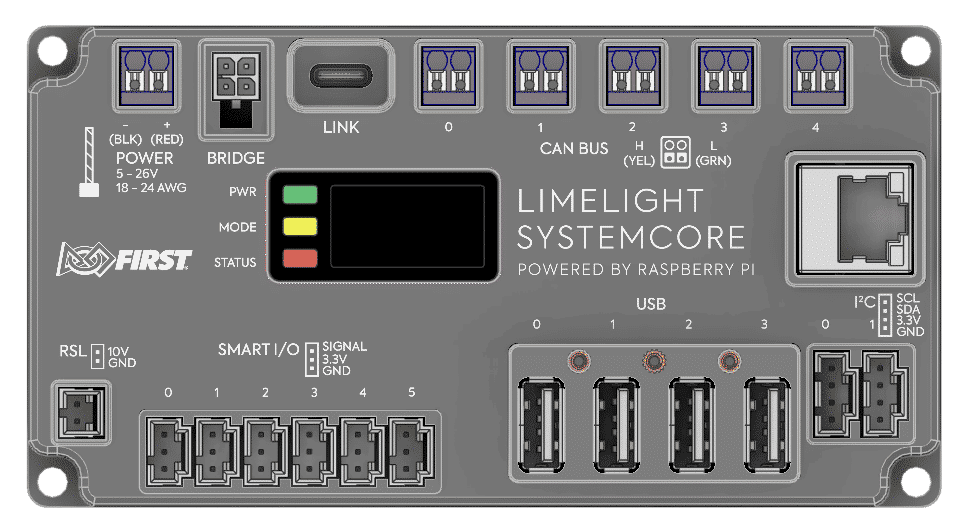
9 |
10 | [Systemcore Specification PDF](https://downloads.limelightvision.io/documents/systemcore_specifications_june15_2025_alpha.pdf)
11 |
12 | [Systemcore Cables PDF](https://downloads.limelightvision.io/documents/systemcore_motioncore_cable_specifications.pdf)
13 |
14 | >**Alpha units do not have port labels**
15 | 
16 |
17 | ## Beta Software Directory
18 |
19 | ### Tooling
20 |
21 | [2027 Alpha 2 WPILib Installer]( https://packages.wpilib.workers.dev/installer/v2027.0.0-alpha-2/)
22 |
23 | [Limelight Hardware Manager 2.0.3](https://downloads.limelightvision.io/software/LimelightHardwareManagerSetup2_0_3.exe)
24 |
25 | [OS Releases, Toolchain, Package Examples, Cross-Compilation Examples](https://github.com/LimelightVision/systemcore-os-public)
26 |
27 | ### Vendor Libraries
28 |
29 | * [CTR Electronics Phoenix 6](CTR-Phoenix.md)
30 | * [REV Robotics](REV.md)
31 | * [AdvantageKit](AdvantageKit.md)
32 | * [ChoreoLib](ChoreoLib.md)
33 | * [PathPlannerLib](PathPlannerLib.md)
34 |
35 | ### Other
36 |
37 | * [AdvantageScope 2027 Alpha](AdvantageScope.md)
38 | * [Elastic 2027 Alpha](Elastic.md)
39 |
40 | ## Alpha 1 Goals
41 |
42 | * Maximize 'drive time' with Systemcore, ideally with Swerve Drive FRC Robots.
43 | * Gather feedback on hardware reliability, ease-of-use, connectors, and more.
44 | * Eliminate as many points of confusion and frustration as possible.
45 |
46 | ## Systemcore Quick Start
47 |
48 | | | |
49 | |---------|-------|
50 | | Built-in Wi-Fi Access Point SSID | SYSTEMCORE |
51 | | Built-in Wi-Fi Access Point Password | PASSWORD |
52 | | Systemcore Wi-Fi Access Point IP | 172.30.0.1 |
53 | | Systemcore USB IP (Windows) | 172.28.0.1 |
54 | | Systemcore USB IP (Linux, Mac) | 172.29.0.1 |
55 | | Systemcore Ethernet IP | Check display |
56 | | Default User | systemcore |
57 | | Default Password | systemcore |
58 | | Default Mount Locations for USB Storage | /U, /V ...|
59 | | CAN Bus Interface Names| can_s0, can_s1, can_s2, can_s3, can_s4 |
60 |
61 | ### Powering On
62 |
63 | Connect your Systemcore to your robot's power distribution board. We recommend the use of 18AWG wire with white Weidmuller ferrules.
64 |
65 | Do not use both power inputs (Bridge + Weidmuller) simultaneously.
66 |
67 | ### Flash Mode
68 |
69 | If the USBC-port is attached before power is applied, Systemcore will boot into flash mode.
70 |
71 | ### Flashing OS Updates
72 | Update to the latest stable Alpha release to get started.
73 |
74 | [Systemcore Flash Tutorial Video (60s)](https://player.vimeo.com/video/1095423117)
75 |
76 | Flashing OS Updates (Windows)
77 |
78 | 1. Download the latest release from the [systemcore-os-public repository](https://github.com/LimelightVision/systemcore-os-public)
79 | 2. Make sure the new [Limelight Hardware Manager 2.0.1](https://downloads.limelightvision.io/software/LimelightHardwareManagerSetup2_0_1.exe) is installed
80 | 3. Open Limelight Hardware Manager
81 | 3. Navigate to the Flash OS Tab
82 | 4. Boot Systemcore into Flash Mode (see 'power' section above). You should see activity in the log window. If you don't see anything, click the 'reinstall drivers' button at .
83 | 5. Select an OS .zip or .img to flash. Wait for extraction to complete.
84 | 6. Refresh drives and select the one marked as Limelight/Systemcore.
85 | 7. Click the “Flash” Button after it starts flashing.
86 | 8. Once complete, remove USB and power from Systemcore
87 |
88 |
89 | >**Full System Images will take several minutes to flash. Systemcore will soon support fast OTA updates.**
90 |
91 |
92 |
93 |
94 | Flashing OS Updates (Mac)
95 |
96 | 1. Download [Balena Etcher](https://etcher.balena.io/).
97 | 2. Spin-up RPIBoot:
98 | ```
99 | brew install libusb
100 | brew install pkg-config
101 | git clone --recurse-submodules --shallow-submodules --depth=1 https://github.com/raspberrypi/usbboot
102 | cd usbboot
103 | make
104 | cd mass-storage-gadget64
105 | sudo ../rpiboot -d .
106 | ```
107 | 3. Boot Systemcore into Flash Mode.
108 | 4. Flash with Etcher.
109 |
110 |
111 |
112 |
113 | Flashing OS Updates (Ubuntu/Debian)
114 |
115 | 1. Download [Balena Etcher](https://etcher.balena.io/).
116 | 2. Spin-up RPIBoot:
117 | ```
118 | apt update
119 | apt install libusb-1.0-0-dev pkg-config build-essential
120 | git clone --recurse-submodules --shallow-submodules --depth=1 https://github.com/raspberrypi/usbboot
121 | cd usbboot
122 | make
123 | cd mass-storage-gadget64
124 | sudo ../rpiboot -d .
125 | ```
126 | 3. Boot Systemcore into Flash Mode.
127 | 4. Flash with Etcher.
128 |
129 |
130 |
131 | > **The new Hardware Manager will soon be cross-platform.**
132 |
133 | > **A browser-based OS update procedure is in development.**
134 |
135 | ### Accessing the Web Interface and Setting Your Team Number
136 |
137 | 1. Boot Systemcore normally.
138 | 2. Connect via USB, Ethernet, or Wi-Fi
139 | 3. Navigate to http://robot.local in a web browser.
140 | 4. Configure your team number in the configuration tab, and click the red "Change Team Number" Button.
141 |
142 | 
143 |
144 | 6. Open the NI DriverStation and configure it with a matching team number
145 | 7. The NI DriverStation should establish communications with Systemcore at this point.
146 |
147 | 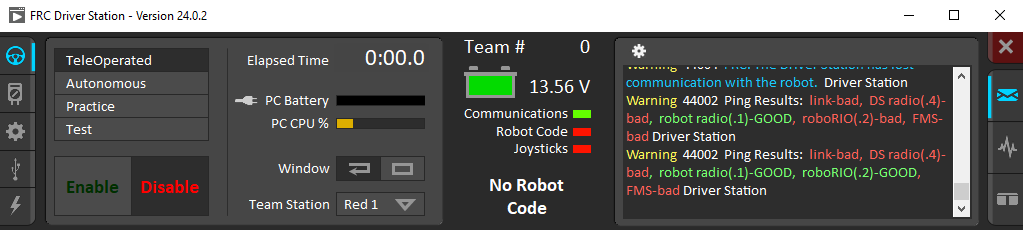
148 |
149 | ### Wi-Fi Configuration
150 |
151 | Release 157 selects a default Wi-Fi channel. This is causing issues in some environments due to interference. Change the channel configuration to 'auto' and set the frequency band to 5Ghz for better connectivity.
152 |
153 | ### Deploying Your First Robot Program to Systemcore (C++/Java)
154 |
155 | 1. Boot and establish connectivity with your Systemcore.
156 | 2. Ensure WPILIB 2027 has been installed.
157 | 3. Open '2027_alpha1 WPILib VS Code'
158 | 4. Make a new WPILib project as you normally would, and make sure to set the correct team number during the project creation step.
159 | 5. Deploy the project as you normally would.
160 | 6. The NI DriverStation should reflect the presence of robot code.
161 |
162 | 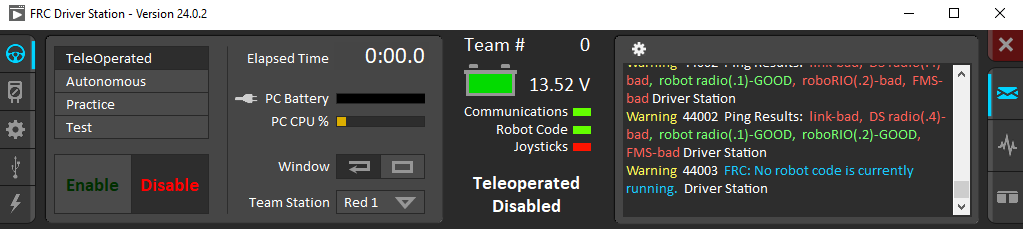
163 |
164 | 7. You're now ready enable.
165 | 8. After initial testing with this new, simple, project, you can return to VS Code and open existing robot projects, which should trigger the Importer to create new 2027 projects based on those existing projects.
166 |
167 | ### Deploying Your First Robot Program to Systemcore (Python)
168 |
169 | See [RobotPy specific notes](robotpy.md)
170 |
171 | ### Exploring On-Robot Telemetry with Elastic and AdvantageScope
172 |
173 | [Package Installation Tutorial Video (30s)](https://player.vimeo.com/video/1095497571)
174 |
175 | 1. Download the Elastic and AdvantageScope IPK packages.
176 | 2. Navigate to the web interface.
177 | 3. Click the "Add Package" card.
178 | 4. Install one package at a time.
179 | 5. Click the new "Elastic" or "AdvantageScope Lite" launch cards.
180 | 6. Use Elastic and AdvantageScope as you normally would. A quick way to add live telemetry to your robot is the use of the SmartDashboard API (subject to change soon) ```SmartDashboard.putNumber("key",value);```.
181 | >**Elastic and AdvantageScope Lite packages will soon be pre-baked into the OS**
182 |
183 | ### Enabling CANivore Support
184 |
185 | [Package Installation Tutorial Video (30s)](https://player.vimeo.com/video/1095497571)
186 |
187 | 1. [Download the CANivore IPK packages.](https://github.com/wpilibsuite/SystemCoreTesting/blob/main/CTR-Phoenix.md#download)
188 | 2. Navigate to the web interface.
189 | 3. Click the "Add Package" card.
190 | 4. Install the usb-kernel package, and then install the usb package.
191 | 5. Powercycle your Systemcore.
192 |
193 |
194 | ### Making Cables
195 |
196 | Check the "Mating Connector" Section of the specification sheet and [this github discussion](https://github.com/wpilibsuite/SystemCoreTesting/discussions/11).
197 |
198 | ### Transitioning from roboRIO
199 | #### I2C
200 |
201 | The I2C pinout does not match that of the roboRIO. Cables such as https://www.revrobotics.com/rev-11-1729/?searchid=4554778&search_query=4+wire+i2c will need to be modified - SCL and SDA will need to be swapped. The Systemcore pinout matches the Qwiic / ControlHub pinout.
202 |
203 | #### IO
204 |
205 | The IO signal pins have a 4.7K pulldown resistor. Limit switches will need to short the SIGNAL pin to the +3.3V pin on Systemcore.
206 |
--------------------------------------------------------------------------------
/testprojects/pwmoutput/gradlew:
--------------------------------------------------------------------------------
1 | #!/bin/sh
2 |
3 | #
4 | # Copyright © 2015-2021 the original authors.
5 | #
6 | # Licensed under the Apache License, Version 2.0 (the "License");
7 | # you may not use this file except in compliance with the License.
8 | # You may obtain a copy of the License at
9 | #
10 | # https://www.apache.org/licenses/LICENSE-2.0
11 | #
12 | # Unless required by applicable law or agreed to in writing, software
13 | # distributed under the License is distributed on an "AS IS" BASIS,
14 | # WITHOUT WARRANTIES OR CONDITIONS OF ANY KIND, either express or implied.
15 | # See the License for the specific language governing permissions and
16 | # limitations under the License.
17 | #
18 | # SPDX-License-Identifier: Apache-2.0
19 | #
20 |
21 | ##############################################################################
22 | #
23 | # Gradle start up script for POSIX generated by Gradle.
24 | #
25 | # Important for running:
26 | #
27 | # (1) You need a POSIX-compliant shell to run this script. If your /bin/sh is
28 | # noncompliant, but you have some other compliant shell such as ksh or
29 | # bash, then to run this script, type that shell name before the whole
30 | # command line, like:
31 | #
32 | # ksh Gradle
33 | #
34 | # Busybox and similar reduced shells will NOT work, because this script
35 | # requires all of these POSIX shell features:
36 | # * functions;
37 | # * expansions «$var», «${var}», «${var:-default}», «${var+SET}»,
38 | # «${var#prefix}», «${var%suffix}», and «$( cmd )»;
39 | # * compound commands having a testable exit status, especially «case»;
40 | # * various built-in commands including «command», «set», and «ulimit».
41 | #
42 | # Important for patching:
43 | #
44 | # (2) This script targets any POSIX shell, so it avoids extensions provided
45 | # by Bash, Ksh, etc; in particular arrays are avoided.
46 | #
47 | # The "traditional" practice of packing multiple parameters into a
48 | # space-separated string is a well documented source of bugs and security
49 | # problems, so this is (mostly) avoided, by progressively accumulating
50 | # options in "$@", and eventually passing that to Java.
51 | #
52 | # Where the inherited environment variables (DEFAULT_JVM_OPTS, JAVA_OPTS,
53 | # and GRADLE_OPTS) rely on word-splitting, this is performed explicitly;
54 | # see the in-line comments for details.
55 | #
56 | # There are tweaks for specific operating systems such as AIX, CygWin,
57 | # Darwin, MinGW, and NonStop.
58 | #
59 | # (3) This script is generated from the Groovy template
60 | # https://github.com/gradle/gradle/blob/HEAD/platforms/jvm/plugins-application/src/main/resources/org/gradle/api/internal/plugins/unixStartScript.txt
61 | # within the Gradle project.
62 | #
63 | # You can find Gradle at https://github.com/gradle/gradle/.
64 | #
65 | ##############################################################################
66 |
67 | # Attempt to set APP_HOME
68 |
69 | # Resolve links: $0 may be a link
70 | app_path=$0
71 |
72 | # Need this for daisy-chained symlinks.
73 | while
74 | APP_HOME=${app_path%"${app_path##*/}"} # leaves a trailing /; empty if no leading path
75 | [ -h "$app_path" ]
76 | do
77 | ls=$( ls -ld "$app_path" )
78 | link=${ls#*' -> '}
79 | case $link in #(
80 | /*) app_path=$link ;; #(
81 | *) app_path=$APP_HOME$link ;;
82 | esac
83 | done
84 |
85 | # This is normally unused
86 | # shellcheck disable=SC2034
87 | APP_BASE_NAME=${0##*/}
88 | # Discard cd standard output in case $CDPATH is set (https://github.com/gradle/gradle/issues/25036)
89 | APP_HOME=$( cd -P "${APP_HOME:-./}" > /dev/null && printf '%s
90 | ' "$PWD" ) || exit
91 |
92 | # Use the maximum available, or set MAX_FD != -1 to use that value.
93 | MAX_FD=maximum
94 |
95 | warn () {
96 | echo "$*"
97 | } >&2
98 |
99 | die () {
100 | echo
101 | echo "$*"
102 | echo
103 | exit 1
104 | } >&2
105 |
106 | # OS specific support (must be 'true' or 'false').
107 | cygwin=false
108 | msys=false
109 | darwin=false
110 | nonstop=false
111 | case "$( uname )" in #(
112 | CYGWIN* ) cygwin=true ;; #(
113 | Darwin* ) darwin=true ;; #(
114 | MSYS* | MINGW* ) msys=true ;; #(
115 | NONSTOP* ) nonstop=true ;;
116 | esac
117 |
118 | CLASSPATH=$APP_HOME/gradle/wrapper/gradle-wrapper.jar
119 |
120 |
121 | # Determine the Java command to use to start the JVM.
122 | if [ -n "$JAVA_HOME" ] ; then
123 | if [ -x "$JAVA_HOME/jre/sh/java" ] ; then
124 | # IBM's JDK on AIX uses strange locations for the executables
125 | JAVACMD=$JAVA_HOME/jre/sh/java
126 | else
127 | JAVACMD=$JAVA_HOME/bin/java
128 | fi
129 | if [ ! -x "$JAVACMD" ] ; then
130 | die "ERROR: JAVA_HOME is set to an invalid directory: $JAVA_HOME
131 |
132 | Please set the JAVA_HOME variable in your environment to match the
133 | location of your Java installation."
134 | fi
135 | else
136 | JAVACMD=java
137 | if ! command -v java >/dev/null 2>&1
138 | then
139 | die "ERROR: JAVA_HOME is not set and no 'java' command could be found in your PATH.
140 |
141 | Please set the JAVA_HOME variable in your environment to match the
142 | location of your Java installation."
143 | fi
144 | fi
145 |
146 | # Increase the maximum file descriptors if we can.
147 | if ! "$cygwin" && ! "$darwin" && ! "$nonstop" ; then
148 | case $MAX_FD in #(
149 | max*)
150 | # In POSIX sh, ulimit -H is undefined. That's why the result is checked to see if it worked.
151 | # shellcheck disable=SC2039,SC3045
152 | MAX_FD=$( ulimit -H -n ) ||
153 | warn "Could not query maximum file descriptor limit"
154 | esac
155 | case $MAX_FD in #(
156 | '' | soft) :;; #(
157 | *)
158 | # In POSIX sh, ulimit -n is undefined. That's why the result is checked to see if it worked.
159 | # shellcheck disable=SC2039,SC3045
160 | ulimit -n "$MAX_FD" ||
161 | warn "Could not set maximum file descriptor limit to $MAX_FD"
162 | esac
163 | fi
164 |
165 | # Collect all arguments for the java command, stacking in reverse order:
166 | # * args from the command line
167 | # * the main class name
168 | # * -classpath
169 | # * -D...appname settings
170 | # * --module-path (only if needed)
171 | # * DEFAULT_JVM_OPTS, JAVA_OPTS, and GRADLE_OPTS environment variables.
172 |
173 | # For Cygwin or MSYS, switch paths to Windows format before running java
174 | if "$cygwin" || "$msys" ; then
175 | APP_HOME=$( cygpath --path --mixed "$APP_HOME" )
176 | CLASSPATH=$( cygpath --path --mixed "$CLASSPATH" )
177 |
178 | JAVACMD=$( cygpath --unix "$JAVACMD" )
179 |
180 | # Now convert the arguments - kludge to limit ourselves to /bin/sh
181 | for arg do
182 | if
183 | case $arg in #(
184 | -*) false ;; # don't mess with options #(
185 | /?*) t=${arg#/} t=/${t%%/*} # looks like a POSIX filepath
186 | [ -e "$t" ] ;; #(
187 | *) false ;;
188 | esac
189 | then
190 | arg=$( cygpath --path --ignore --mixed "$arg" )
191 | fi
192 | # Roll the args list around exactly as many times as the number of
193 | # args, so each arg winds up back in the position where it started, but
194 | # possibly modified.
195 | #
196 | # NB: a `for` loop captures its iteration list before it begins, so
197 | # changing the positional parameters here affects neither the number of
198 | # iterations, nor the values presented in `arg`.
199 | shift # remove old arg
200 | set -- "$@" "$arg" # push replacement arg
201 | done
202 | fi
203 |
204 |
205 | # Add default JVM options here. You can also use JAVA_OPTS and GRADLE_OPTS to pass JVM options to this script.
206 | DEFAULT_JVM_OPTS='"-Xmx64m" "-Xms64m"'
207 |
208 | # Collect all arguments for the java command:
209 | # * DEFAULT_JVM_OPTS, JAVA_OPTS, JAVA_OPTS, and optsEnvironmentVar are not allowed to contain shell fragments,
210 | # and any embedded shellness will be escaped.
211 | # * For example: A user cannot expect ${Hostname} to be expanded, as it is an environment variable and will be
212 | # treated as '${Hostname}' itself on the command line.
213 |
214 | set -- \
215 | "-Dorg.gradle.appname=$APP_BASE_NAME" \
216 | -classpath "$CLASSPATH" \
217 | org.gradle.wrapper.GradleWrapperMain \
218 | "$@"
219 |
220 | # Stop when "xargs" is not available.
221 | if ! command -v xargs >/dev/null 2>&1
222 | then
223 | die "xargs is not available"
224 | fi
225 |
226 | # Use "xargs" to parse quoted args.
227 | #
228 | # With -n1 it outputs one arg per line, with the quotes and backslashes removed.
229 | #
230 | # In Bash we could simply go:
231 | #
232 | # readarray ARGS < <( xargs -n1 <<<"$var" ) &&
233 | # set -- "${ARGS[@]}" "$@"
234 | #
235 | # but POSIX shell has neither arrays nor command substitution, so instead we
236 | # post-process each arg (as a line of input to sed) to backslash-escape any
237 | # character that might be a shell metacharacter, then use eval to reverse
238 | # that process (while maintaining the separation between arguments), and wrap
239 | # the whole thing up as a single "set" statement.
240 | #
241 | # This will of course break if any of these variables contains a newline or
242 | # an unmatched quote.
243 | #
244 |
245 | eval "set -- $(
246 | printf '%s\n' "$DEFAULT_JVM_OPTS $JAVA_OPTS $GRADLE_OPTS" |
247 | xargs -n1 |
248 | sed ' s~[^-[:alnum:]+,./:=@_]~\\&~g; ' |
249 | tr '\n' ' '
250 | )" '"$@"'
251 |
252 | exec "$JAVACMD" "$@"
253 |
--------------------------------------------------------------------------------