├── .nojekyll
├── 05~MXNet
└── README.md
├── 04~PyTorch
├── README.md
└── 回归
│ └── 简单回归.ipynb
├── 06~可视化
├── Dash
│ └── README.md
└── Streamlit
│ └── Streamlit.md
├── 02~Scikit
├── Scipy
│ └── README.md
├── Sklearn
│ └── README.md
├── Pandas
│ └── README.md
└── README.md
├── 10~机器学习平台
├── DuerOS
│ └── README.md
├── 算法系统
│ ├── 在线算法.md
│ ├── 离线算法.md
│ └── README.md
├── Angel.md
└── 联邦学习
│ └── README.md
├── INTRODUCTION.md
├── 03~TensorFlow
└── README.link
├── 01~开发环境
├── Cuda
│ └── 99~参考资料
│ │ └── 2024~GPU-Puzzles
│ │ ├── cuda.png
│ │ ├── robot.png
│ │ ├── GPU_puzzlers_files
│ │ ├── robot.png
│ │ ├── GPU_puzzlers_12_1.svg
│ │ ├── GPU_puzzlers_13_1.svg
│ │ ├── GPU_puzzlers_14_1.svg
│ │ ├── GPU_puzzlers_15_1.svg
│ │ ├── GPU_puzzlers_16_1.svg
│ │ ├── GPU_puzzlers_17_1.svg
│ │ ├── GPU_puzzlers_18_1.svg
│ │ ├── GPU_puzzlers_19_1.svg
│ │ ├── GPU_puzzlers_22_1.svg
│ │ ├── GPU_puzzlers_23_1.svg
│ │ ├── GPU_puzzlers_21_1.svg
│ │ ├── GPU_puzzlers_26_1.svg
│ │ ├── GPU_puzzlers_58_1.svg
│ │ ├── GPU_puzzlers_84_1.svg
│ │ ├── GPU_puzzlers_85_1.svg
│ │ ├── GPU_puzzlers_86_1.svg
│ │ ├── GPU_puzzlers_87_1.svg
│ │ ├── GPU_puzzlers_24_1.svg
│ │ ├── GPU_puzzlers_28_1.svg
│ │ ├── GPU_puzzlers_29_1.svg
│ │ ├── GPU_puzzlers_33_1.svg
│ │ ├── GPU_puzzlers_27_1.svg
│ │ ├── GPU_puzzlers_32_1.svg
│ │ ├── GPU_puzzlers_36_1.svg
│ │ ├── GPU_puzzlers_38_1.svg
│ │ ├── GPU_puzzlers_43_1.svg
│ │ ├── GPU_puzzlers_52_1.svg
│ │ ├── GPU_puzzlers_60_1.svg
│ │ ├── GPU_puzzlers_63_1.svg
│ │ ├── GPU_puzzlers_100_1.svg
│ │ ├── GPU_puzzlers_101_1.svg
│ │ ├── GPU_puzzlers_102_1.svg
│ │ ├── GPU_puzzlers_67_1.svg
│ │ ├── GPU_puzzlers_76_1.svg
│ │ ├── GPU_puzzlers_99_1.svg
│ │ ├── GPU_puzzlers_50_1.svg
│ │ ├── GPU_puzzlers_59_1.svg
│ │ ├── GPU_puzzlers_74_1.svg
│ │ ├── GPU_puzzlers_75_1.svg
│ │ ├── GPU_puzzlers_47_1.svg
│ │ └── GPU_puzzlers_56_1.svg
│ │ └── .gitignore
├── Jupyter
│ └── README.md
├── Conda
│ └── README.md
└── Colab
│ ├── Drive Fuse.ipynb
│ └── Google Driver.ipynb
├── .gitignore
├── 00~AI 工程化
└── Data-centric AI.md
├── _sidebar.md
└── README.md
/.nojekyll:
--------------------------------------------------------------------------------
1 |
--------------------------------------------------------------------------------
/05~MXNet/README.md:
--------------------------------------------------------------------------------
1 |
--------------------------------------------------------------------------------
/04~PyTorch/README.md:
--------------------------------------------------------------------------------
1 |
--------------------------------------------------------------------------------
/06~可视化/Dash/README.md:
--------------------------------------------------------------------------------
1 |
--------------------------------------------------------------------------------
/02~Scikit/Scipy/README.md:
--------------------------------------------------------------------------------
1 |
--------------------------------------------------------------------------------
/02~Scikit/Sklearn/README.md:
--------------------------------------------------------------------------------
1 |
--------------------------------------------------------------------------------
/10~机器学习平台/DuerOS/README.md:
--------------------------------------------------------------------------------
1 |
--------------------------------------------------------------------------------
/INTRODUCTION.md:
--------------------------------------------------------------------------------
1 | # 本篇导读
2 |
--------------------------------------------------------------------------------
/03~TensorFlow/README.link:
--------------------------------------------------------------------------------
1 | https://github.com/wx-chevalier/TensorFlow-Notes
2 |
--------------------------------------------------------------------------------
/10~机器学习平台/算法系统/在线算法.md:
--------------------------------------------------------------------------------
1 | # 在线算法
2 |
3 | 
4 |
--------------------------------------------------------------------------------
/01~开发环境/Cuda/99~参考资料/2024~GPU-Puzzles/cuda.png:
--------------------------------------------------------------------------------
https://raw.githubusercontent.com/wx-chevalier/AI-Toolkits-Notes/master/01~开发环境/Cuda/99~参考资料/2024~GPU-Puzzles/cuda.png
--------------------------------------------------------------------------------
/01~开发环境/Cuda/99~参考资料/2024~GPU-Puzzles/robot.png:
--------------------------------------------------------------------------------
https://raw.githubusercontent.com/wx-chevalier/AI-Toolkits-Notes/master/01~开发环境/Cuda/99~参考资料/2024~GPU-Puzzles/robot.png
--------------------------------------------------------------------------------
/10~机器学习平台/Angel.md:
--------------------------------------------------------------------------------
1 | # Angel
2 |
3 | Angel 3.0 尝试打造一个全栈的机器学习平台,功能特性涵盖了机器学习的各个阶段:特征工程,模型训练,超参数调节和模型服务。
4 |
5 | # Links
6 |
7 | - https://mp.weixin.qq.com/s/9E0FILVyKfvhIQGEVnjZiw
8 |
--------------------------------------------------------------------------------
/01~开发环境/Cuda/99~参考资料/2024~GPU-Puzzles/GPU_puzzlers_files/robot.png:
--------------------------------------------------------------------------------
https://raw.githubusercontent.com/wx-chevalier/AI-Toolkits-Notes/master/01~开发环境/Cuda/99~参考资料/2024~GPU-Puzzles/GPU_puzzlers_files/robot.png
--------------------------------------------------------------------------------
/06~可视化/Streamlit/Streamlit.md:
--------------------------------------------------------------------------------
1 | # Streamlit
2 |
3 | Streamlit 是 Python 编写的开源应用框架,数据科学家用其来构建好看的数据可视化应用。Streamlit 专注于快速原型设计,并且支持各种不同的可视化库(包括 Plotly 和 Bokeh),因此在 Dash 等竞品中脱颖而出。对于需要在实验周期中快速展示的数据科学家来说,Streamlit 是一个可靠的选择。我们在一些项目中使用它,并且只需要花费很少的工作量就能把多个交互式可视化放在一起。
4 |
5 | 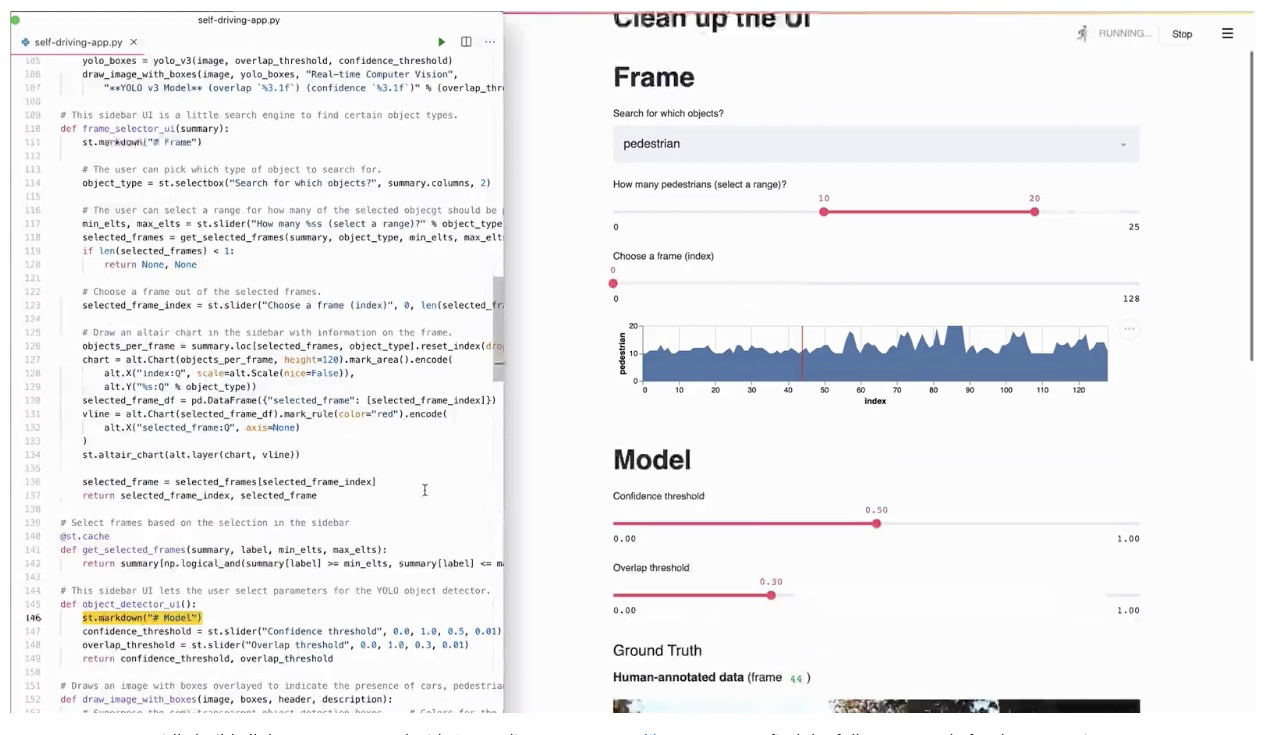
6 |
--------------------------------------------------------------------------------
/01~开发环境/Jupyter/README.md:
--------------------------------------------------------------------------------
1 | # Jupyter Notebook
2 |
3 | 
4 |
5 | 在 Conda 安装之后,Jupyter Notebook 是默认安装好的,直接在工作目录下打开即可
6 |
7 | ```sh
8 | jupyter notebook
9 | ```
10 |
11 | 你可以参阅[Running the Notebook](http://jupyter.readthedocs.io/en/latest/running.html#running)获取更多命令细节。
12 |
13 | # Links
14 |
15 | - http://timstaley.co.uk/posts/making-git-and-jupyter-notebooks-play-nice/
16 |
--------------------------------------------------------------------------------
/02~Scikit/Pandas/README.md:
--------------------------------------------------------------------------------
1 | # Pandas
2 |
3 | # 探索性分析
4 |
5 | ## describe
6 |
7 | 一般来说,面对一个数据集,我们需要做一些探索性分析 (Exploratory data analysis),这个过程繁琐而冗杂。以泰坦尼克号数据集为例,传统方法是先用 Dataframe.describe():
8 |
9 | ```py
10 | import pandas as pd
11 |
12 | data = pd.read_csv('https://raw.githubusercontent.com/datasciencedojo/datasets/master/titanic.csv')
13 | data.describe()
14 | ```
15 |
16 | 通过 describe()方法,我们对数据集可以有一个大体的认知。然后,通过分析各变量之间的关系(直方图,散点图,柱状图,关联分析等等),我们可以进一步探索这个数据集。EDA 这个步骤通常需要耗费大量的时间和精力。
17 |
18 | ## pandas-profile
19 |
20 | 最近发现一个神奇的库 pandas-profiling,一行代码生成超详细数据分析报告,实乃我等数据分析从业者的福音。
21 |
22 | ```sh
23 | import pandas_profiling
24 |
25 | data.profile_report(title='Titanic Dataset')
26 | ```
27 |
--------------------------------------------------------------------------------
/10~机器学习平台/算法系统/离线算法.md:
--------------------------------------------------------------------------------
1 | # 离线算法
2 |
3 | 离线算法(Offline Algorithms),是指基于在执行算法前输入数据已知的基本假设,也就是说,对于一个离线算法,在开始时就需要知道问题的所有输入数据,而且在解决一个问题后就要立即输出结果。
4 |
5 | 从定义中我们都可以看到,离线算法设计的前提是具有问题的完全信息。
6 |
7 | # 应用场景
8 |
9 | ## 时效性在天级别以上的
10 |
11 | 根据面临的问题,在设计算法的时候,如果时效性要求在天级别以上的,通常会采用离线算法设计。例如用户中、长期的画像,就没有必要实时进行更新,天级更新已经能够满足业务需要了。又比如潜力商品的排序,需要一段时间商品交易数据才能有比较好的效果,这一类排序列表的更新也可以采用离线算法设计。还有给商家端的营销建议,如商品折扣建议,如果算法一天给一个商家的某商品推荐多次不同的折扣,那么商家估计会觉得这个建议太不靠谱,所以离线算法能够满足业务需求了。
12 |
13 | ## 新型业务应用的初期算法设计
14 |
15 | 当遇到一个新的算法问题的时候,通常没有经过系统的验证,直接上线在线算法风险会比较大,开发周期也比较长,难以满足业务快速创新的要求。这种时候会在初期版本中考虑先进行离线算法开发,同时在系统链路和效果上进行验证。比如在某个系统或产品中新增算法能力的时候,为了不影响系统的主要链路,通常会考虑采用离线算法,在离线算法产生效果之后,再考虑结合在线算法的升级策略。这样做的目的一方面可以检测智能算法的有效性,另一个方面能降低现有功能和链路的改造代价,是一种能够快速支持业务创新的低成本、有效的策略。例如业务平台红包投放平台第一次上线智能投放能力的时候,就采取了离线策略,为每个人预先算好了红包发放面额,之后要考虑线上成本控制、运营策略控制、用户实时访问的商品信息等因素,能够让动态红包策略更有效,才增加了在线算法的部分。
16 |
17 | # 算法开发
18 |
19 | 离线算法开发通常分为 6 个环节:环境准备(项目和环境配置)-->输入(数据准备、数据读入、数据预处理和特征工程)-->训练(模型选择和训练)-->评估(模型评估)-->输出(预测和结果保存)-->部署(上线和调度)。
20 |
--------------------------------------------------------------------------------
/10~机器学习平台/联邦学习/README.md:
--------------------------------------------------------------------------------
1 | # 联邦学习
2 |
3 | 联邦学习(Federated Learning)是一种新兴的人工智能基础技术,在 2016 年由谷歌最先提出,原本用于解决安卓手机终端用户在本地更新模型的问题,其设计目标是在保障大数据交换时的信息安全、保护终端数据和个人数据隐私、保证合法合规的前提下,在多参与方或多计算结点之间开展高效率的机器学习。其中,联邦学习可使用的机器学习算法不局限于神经网络,还包括随机森林等重要算法。联邦学习有望成为下一代人工智能协同算法和协作网络的基础。
4 |
5 | # 背景分析
6 |
7 | 人工智能面临着很大挑战,尤其是数据挑战。以法律、医疗、金融三个行业为例,法律、金融行业积累下来的数据量都比较少,医院则更是将数据存储在内部,出于保障隐私的原因,无法对外开放。数据孤岛、小数据、数据安全等问题阻碍着这些行业进行数字化转型的步伐。
8 |
9 | 此外,世界上 IT 巨头频频遭到民间和监管的指责,比如 Facebook 近期遭到美国政府巨额罚款,主要原因是用户隐私泄露。隐私、安全及合规,已经变得越来越重要,人工智能技术虽然正在蓬勃发展,但是却很少有人有把合规当做首要任务。世界各地监管日趋严格,欧洲提出 GDPR、美国提出 CCPA,中国的立法也逐渐走向正规化。
10 |
11 | 面对数据孤岛、小数据、用户隐私的保护等导致数据割裂的问题,人工智能如何才能发挥其价值?联邦学习或许是比较合适的解决方案。
12 |
13 | 联邦学习(Federated Learning)是一种新兴的人工智能基础技术,在 2016 年由谷歌最先提出,原本用于解决安卓手机终端用户在本地更新模型的问题,其设计目标是在保障大数据交换时的信息安全、保护终端数据和个人数据隐私、保证合法合规的前提下,在多参与方或多计算结点之间开展高效率的机器学习。
14 |
15 | 简单来说,联邦学习能够将多个数据方之间组成一个联盟,共同参与到全局建模的建设中,各方之间在保护数据隐私和模型参数基础上,仅共享模型加密后的参数,让共享模型达到更优的效果。
16 |
17 | 从安全性上来说,联邦学习是分布式加密机器学习,在参与方数据不出本地,甚至可保证任何底层数据不向对方泄露,能够保护数据安全和隐私的前提下进行联合建模,共同提升建模效果。
18 |
19 | # Links
20 |
21 | - https://mp.weixin.qq.com/s/HspInrQ9OFdhIO0w6j91Ng
22 |
--------------------------------------------------------------------------------
/10~机器学习平台/算法系统/README.md:
--------------------------------------------------------------------------------
1 | # 算法系统
2 |
3 | 在线、离线的概念,是算法实现的部分,也是算法工程化的部分,姑且称之为算法类系统。例如你采用了一个算法,比如 DNN,如果数据输入、模型训练、模型预测的输出全部都是离线完成的,那么这是一个离线算法系统;如果说这个模型的输入、训练、预测中有一个或多个是在线完成的,比如在线的输入、预测和模型训练等,那么这就是一个在线算法系统。
4 |
5 | | | 离线算法 | 在线算法 |
6 | | -------- | ---------------- | ------------------ |
7 | | 初始输入 | 所有输入 | 部分输入 |
8 | | 输入类型 | 静态数据 | 流式数据/动态数据 |
9 | | 计算方式 | 请求之前就计算好 | 请求过来后实时计算 |
10 | | 例子 | 选择排序 | 插入排序 |
11 |
12 | 当然还有一些在线和离线算法应用的的混合算法,在线部分负责长期数据的预训练和预处理,离线部分负责处理短期/实时数据并结合预训练结果打分。比如推荐算法,3D 游戏画面渲染等。
13 |
14 | # 算法系统模式
15 |
16 | - 离线产生数据结果,将数据结果作为服务,确定好合适的接口和服务查询方式,前端请求查询直接获得已经计算好的数据。这种情况适用于结果变化不大的情况,比如用户画像标签、商品标签、评价标签的抽取,这种方案可以考虑使用 PAI(离线训练)+ODPS(离线存储)实现。产品标签挖掘就是一个典型的例子。
17 |
18 | - 离线产生数据结果和模型,在线使用离线的数据、离线模型和实时数据来计算返回的结果,主要是对返回的结果进行调整,比如广告排序和商品排序中,我们可以离线生成初步的排序结果,再根据在线的用户数据和运营限制对返回结果重新排序。这里使用的模型可以根据实际情况进行在线或离线更新,这种方案可以考虑 PAI(离线训练)+ODPS(离线存储)+IGRAPH(在线存储)+TPP(在线策略服务)+RTP(在线预测)实现。典型案例可以参考推荐,如猜你喜欢。
19 |
20 | - 离线产生一个初始的模型,在线进行计算和模型更新,这样的场景比如强化学习的应用,通常会用离线数据训练好一个模型后,在线进行模型更新和预测,这种方案可以考虑 PAI(离线训练)+IGRAPH(在线存储)+TPP(在线策略服务)+RTP(在线预测)实现。典型案例可以参考强化学习应用和生成式的对话系统的设计。
21 |
--------------------------------------------------------------------------------
/01~开发环境/Conda/README.md:
--------------------------------------------------------------------------------
1 | # Conda
2 |
3 | 笔者推荐使用 Anaconda 作为环境搭建工具,并且推荐使用 Python 3.5 版本,可以在[这里](https: // www.continuum.io/downloads)下载。如果是习惯使用 Docker 的小伙伴可以参考[anaconda-notebook](https: // github.com/rothnic/anaconda-notebook)
4 |
5 | ```sh
6 | docker pull rothnic/anaconda-notebook
7 | docker run -p 8888: 8888 - i - t rothnic/anaconda-notebook
8 | ```
9 |
10 | 安装完毕之后可以使用如下命令验证安装是否完毕:
11 |
12 | ```sh
13 | conda - -version
14 | ```
15 |
16 | 安装完毕之后我们就可以创建具体的开发环境了,主要是通过 create 命令来创建新的独立环境:
17 |
18 | ```
19 | conda create - -name snowflakes biopython
20 | ```
21 |
22 | 该命令会创建一个名为 snowflakes 并且安装了 Biopython 的环境,如果你需要切换到该开发环境,可以使用 activate 命令:
23 |
24 | - Linux, OS X: `source activate snowflakes`
25 | - Windows: `activate snowflakes`
26 |
27 | 我们也可以在创建环境的时候指明是用 python2 还是 python3:
28 |
29 | ```
30 | conda create - -name bunnies python = 3 astroid babel
31 | ```
32 |
33 | 环境创建完毕之后,我们可以使用`info`命令查看所有环境:
34 |
35 | ```
36 | conda info - -envs
37 | conda environments:
38 |
39 | snowflakes * /home/username/miniconda/envs/snowflakes
40 | bunnies / home/username/miniconda/envs/bunnies
41 | root / home/username/miniconda
42 | ```
43 |
44 | 当我们切换到某个具体的环境后,可以安装依赖包了:
45 |
46 | ```
47 | conda list # 列举当前环境中的所有依赖包
48 | conda install nltk # 安装某个新的依赖
49 | ```
50 |
--------------------------------------------------------------------------------
/.gitignore:
--------------------------------------------------------------------------------
1 | # Ignore all
2 | *
3 |
4 | # Unignore all with extensions
5 | !*.*
6 |
7 | # Unignore all dirs
8 | !*/
9 |
10 | .DS_Store
11 |
12 | # Logs
13 | logs
14 | *.log
15 | npm-debug.log*
16 | yarn-debug.log*
17 | yarn-error.log*
18 |
19 | # Runtime data
20 | pids
21 | *.pid
22 | *.seed
23 | *.pid.lock
24 |
25 | # Directory for instrumented libs generated by jscoverage/JSCover
26 | lib-cov
27 |
28 | # Coverage directory used by tools like istanbul
29 | coverage
30 |
31 | # nyc test coverage
32 | .nyc_output
33 |
34 | # Grunt intermediate storage (http://gruntjs.com/creating-plugins#storing-task-files)
35 | .grunt
36 |
37 | # Bower dependency directory (https://bower.io/)
38 | bower_components
39 |
40 | # node-waf configuration
41 | .lock-wscript
42 |
43 | # Compiled binary addons (https://nodejs.org/api/addons.html)
44 | build/Release
45 |
46 | # Dependency directories
47 | node_modules/
48 | jspm_packages/
49 |
50 | # TypeScript v1 declaration files
51 | typings/
52 |
53 | # Optional npm cache directory
54 | .npm
55 |
56 | # Optional eslint cache
57 | .eslintcache
58 |
59 | # Optional REPL history
60 | .node_repl_history
61 |
62 | # Output of 'npm pack'
63 | *.tgz
64 |
65 | # Yarn Integrity file
66 | .yarn-integrity
67 |
68 | # dotenv environment variables file
69 | .env
70 |
71 | # next.js build output
72 | .next
73 |
--------------------------------------------------------------------------------
/00~AI 工程化/Data-centric AI.md:
--------------------------------------------------------------------------------
1 | # Data-centric AI
2 |
3 | 
4 |
5 | > Data-centric AI is the discipline of systematically engineering the data used to build an AI system.
6 | > — Andrew Ng
7 |
8 | 传统的搭建 AI 模型的方法主要是去迭代模型,数据相对固定。比如,我们通常会聚焦于几个基准数据集,然后设计各式各样的模型去提高预测准确率。这种方式我们称作以模型为中心(model-centric)。然而,model-centric 没有考虑到实际应用中数据可能出现的各种问题,例如不准确的标签,数据重复和异常数据等。准确率高的模型只能确保很好地「拟合」了数据,并不一定意味着实际应用中会有很好的表现。与 model-centric 不同,Data-centric 更侧重于提高数据的质量和数量。也就是说 Data-centric AI 关注的是数据本身,而模型相对固定。采用 Data-centric AI 的方法在实际场景中会有更大的潜力,因为数据很大程度上决定了模型能力的上限。
9 |
10 | 需要注意的是,「Data-centric」与「Data-driven」(数据驱动),是两个根本上不同的概念。后者仅强调使用数据去指导 AI 系统的搭建,这仍是聚焦于开发模型而不是去改变数据。
11 |
12 | 
13 |
14 | 以往大家研究的重点都在模型。但如今,经过了多年的研究,模型设计已经相对比较成熟,特别是在 Transformer 出现之后(目前我们似乎还看不到 Transformer 的上限)。从 GPT-1 到 ChatGPT/GPT-4,所用的训练数据大体经历了以下变化:小数据(小是对于 OpenAI 而言,对普通研究者来说也不小了)->大一点的高质量数据->更大一点的更高质量数据->高质量人类(指能通过考试的标注者)标注的高质量数据。模型设计并没有很显著的变化(除了参数更多以顺应更多的数据),这正符合了 Data-centric AI 的理念。从 ChatGPT/GPT-4 的成功,我们可以发现,高质量的标注数据是至关重要的。OpenAI 对数据和标签质量的重视程度令人发指。
15 |
16 | 
17 |
18 | 从另一个角度来看,现在的 ChatGPT/GPT-4 模型已经足够强大,强大到我们只需要调整提示(推理数据)来达到各种目的,而模型则保持不变。例如,我们可以提供一段长文本,再加上特定的指令,比方说「summarize it」或者「TL;DR」,模型就能自动生成摘要。在这种新兴模式下,Data-centric AI 变得更为重要,以后很多 AI 打工人可能再也不用训练模型了,只用做提示工程(prompt engineering)。
19 |
20 | 因此,在大模型时代,Data-centric AI 的理念将越来越重要。
21 |
--------------------------------------------------------------------------------
/_sidebar.md:
--------------------------------------------------------------------------------
1 | - 1 00~AI 工程化 [1]
2 | - [1.1 Data centric AI](/00~AI%20工程化/Data-centric%20AI.md)
3 | - 2 01~开发环境 [4]
4 | - [2.1 Colab](/01~开发环境/Colab/README.md)
5 |
6 | - [2.2 Conda](/01~开发环境/Conda/README.md)
7 |
8 | - 2.3 Cuda [1]
9 | - 2.3.1 99~参考资料 [1]
10 | - [2.3.1.1 2022~Windows 搭建 PyTorch & CUDA 环境](/01~开发环境/Cuda/99~参考资料/2022~Windows%20搭建%20PyTorch%20&%20CUDA%20环境.md)
11 | - [2.4 Jupyter](/01~开发环境/Jupyter/README.md)
12 |
13 | - [3 02~Scikit [3]](/02~Scikit/README.md)
14 | - [3.1 Pandas](/02~Scikit/Pandas/README.md)
15 |
16 | - [3.2 Scipy](/02~Scikit/Scipy/README.md)
17 |
18 | - [3.3 Sklearn](/02~Scikit/Sklearn/README.md)
19 |
20 | - [4 03~TensorFlow](/03~TensorFlow/README.md)
21 |
22 | - [5 04~PyTorch](/04~PyTorch/README.md)
23 |
24 | - [6 05~MXNet](/05~MXNet/README.md)
25 |
26 | - 7 06~可视化 [2]
27 | - [7.1 Dash](/06~可视化/Dash/README.md)
28 |
29 | - 7.2 Streamlit [1]
30 | - [7.2.1 Streamlit](/06~可视化/Streamlit/Streamlit.md)
31 | - 8 10~机器学习平台 [6]
32 | - 8.1 API [1]
33 | - [8.1.1 52 Useful Machine Learning & Prediction APIs](/10~机器学习平台/API/52%20Useful%20Machine%20Learning%20&%20Prediction%20APIs.md)
34 | - [8.2 Angel](/10~机器学习平台/Angel.md)
35 | - [8.3 DuerOS](/10~机器学习平台/DuerOS/README.md)
36 |
37 | - [8.4 算法系统 [2]](/10~机器学习平台/算法系统/README.md)
38 | - [8.4.1 在线算法](/10~机器学习平台/算法系统/在线算法.md)
39 | - [8.4.2 离线算法](/10~机器学习平台/算法系统/离线算法.md)
40 | - 8.5 系统设计 [1]
41 | - [8.5.1 Python 深度学习框架回顾](/10~机器学习平台/系统设计/Python%20深度学习框架回顾.md)
42 | - [8.6 联邦学习](/10~机器学习平台/联邦学习/README.md)
43 |
44 | - [9 INTRODUCTION](/INTRODUCTION.md)
--------------------------------------------------------------------------------
/02~Scikit/README.md:
--------------------------------------------------------------------------------
1 | # Introduction
2 |
3 | scikit-learn 是 Python 的一个开源机器学习模块,它建立在 NumPy,SciPy 和 matplotlib 模块之上。值得一提的是,scikit-learn 最先是由 David Cournapeau 在 2007 年发起的一个 Google Summer of Code 项目,从那时起这个项目就已经拥有很多的贡献者了,而且该项目目前为止也是由一个志愿者团队在维护着。scikit-learn 最大的特点就是,为用户提供各种机器学习算法接口,可以让用户简单、高效地进行数据挖掘和数据分析。scikit-learn 主页:[scikit-learn homepage](http://scikit-learn.org/dev/)
4 |
5 | - Numpy 是以矩阵为基础的数学计算模块,纯数学。
6 | - Scipy 基于 Numpy,科学计算库,有一些高阶抽象和物理模型。比方说做个傅立叶变换,这是纯数学的,用 Numpy;做个滤波器,这属于信号处理模型了,在 Scipy 里找。
7 | - Pandas 提供了一套名为 DataFrame 的数据结构,比较契合统计分析中的表结构,并且提供了计算接口,可用 Numpy 或其它方式进行计算。
8 | - sklearn 是机器学习的算法库
9 |
10 | # Quick Start
11 |
12 | 笔者推荐使用 Anaconda 进行安装,最方便的方式就是使用 Docker:
13 |
14 | ```
15 | docker pull rothnic/anaconda-notebook
16 | docker run -p 8888:8888 -i -t rothnic/anaconda-notebook
17 | ```
18 |
19 | # DataSets
20 |
21 | scikit-learn 内包含了常用的机器学习数据集,比如做分类的[iris](https://en.wikipedia.org/wiki/Iris_flower_data_set)和[digit](http://archive.ics.uci.edu/ml/datasets/Pen-Based+Recognition+of+Handwritten+Digits)数据集,用于回归的经典数据集[Boston house prices](http://archive.ics.uci.edu/ml/datasets/Housing)。
22 |
23 | ## iris
24 |
25 | 数据都是以 n 维(n 个特征)矩阵形式存放和展现,iris 数据中每个实例有 4 维特征,分别为:sepal length、sepal width、petal length 和 petal width。显示 iris 数据:
26 |
27 | ```
28 | [[ 5.1 3.5 1.4 0.2]
29 | [ 4.9 3. 1.4 0.2]
30 | ... ...
31 | [ 5.9 3. 5.1 1.8]]
32 | ```
33 |
34 | 如果是对于监督学习,比如分类问题,数据中会包含对应的分类结果,其存在.target 成员中:
35 |
36 | ```
37 | print iris.target
38 | ```
39 |
40 | 对于 iris 数据而言,就是各个实例的分类结果:
41 |
42 | ```
43 | [0, 0, 0, 0, 0, 0, 0, 0, 0, 0, 0, 0, 0, 0, 0, 0, 0, 0, 0, 0, 0, 0, 0,
44 | 0, 0, 0, 0, 0, 0, 0, 0, 0, 0, 0, 0, 0, 0, 0, 0, 0, 0, 0, 0, 0, 0, 0,
45 | 0, 0, 0, 0, 1, 1, 1, 1, 1, 1, 1, 1, 1, 1, 1, 1, 1, 1, 1, 1, 1, 1, 1,
46 | 1, 1, 1, 1, 1, 1, 1, 1, 1, 1, 1, 1, 1, 1, 1, 1, 1, 1, 1, 1, 1, 1, 1,
47 | 1, 1, 1, 1, 1, 1, 1, 1, 2, 2, 2, 2, 2, 2, 2, 2, 2, 2, 2, 2, 2, 2, 2,
48 | 2, 2, 2, 2, 2, 2, 2, 2, 2, 2, 2, 2, 2, 2, 2, 2, 2, 2, 2, 2, 2, 2, 2,
49 | 2, 2, 2, 2, 2, 2, 2, 2, 2, 2, 2, 2]
50 | ```
51 |
52 | # Links
53 |
54 | - [scipy_2015_sklearn_tutorial](https://github.com/amueller/scipy_2015_sklearn_tutorial)
55 |
--------------------------------------------------------------------------------
/01~开发环境/Colab/Drive Fuse.ipynb:
--------------------------------------------------------------------------------
1 | {"nbformat":4,"nbformat_minor":0,"metadata":{"colab":{"name":"drive-fuse.ipynb","version":"0.3.2","provenance":[{"file_id":"1srw_HFWQ2SMgmWIawucXfusGzrj1_U0q","timestamp":1544506594333}],"collapsed_sections":[],"toc_visible":true}},"cells":[{"metadata":{"id":"c99EvWo1s9-x","colab_type":"code","outputId":"20fabe23-2129-4919-d2e0-cfca6c697de5","executionInfo":{"status":"ok","timestamp":1544506783502,"user_tz":-480,"elapsed":36169,"user":{"displayName":"张梓雄","photoUrl":"https://lh3.googleusercontent.com/-cGpkqv2orkY/AAAAAAAAAAI/AAAAAAAAABA/8Np2CaiESqM/s64/photo.jpg","userId":"10651745271081318779"}},"colab":{"base_uri":"https://localhost:8080/","height":122}},"cell_type":"code","source":["# Load the Drive helper and mount\n","from google.colab import drive\n","\n","# This will prompt for authorization.\n","drive.mount('/content/drive')"],"execution_count":1,"outputs":[{"output_type":"stream","text":["Go to this URL in a browser: https://accounts.google.com/o/oauth2/auth?client_id=947318989803-6bn6qk8qdgf4n4g3pfee6491hc0brc4i.apps.googleusercontent.com&redirect_uri=urn%3Aietf%3Awg%3Aoauth%3A2.0%3Aoob&scope=email%20https%3A%2F%2Fwww.googleapis.com%2Fauth%2Fdocs.test%20https%3A%2F%2Fwww.googleapis.com%2Fauth%2Fdrive%20https%3A%2F%2Fwww.googleapis.com%2Fauth%2Fdrive.photos.readonly%20https%3A%2F%2Fwww.googleapis.com%2Fauth%2Fpeopleapi.readonly&response_type=code\n","\n","Enter your authorization code:\n","··········\n","Mounted at /content/drive\n"],"name":"stdout"}]},{"metadata":{"id":"H4SJ-tGNkOeY","colab_type":"code","outputId":"8a5151a8-3c75-4e15-c3ec-4a8116980627","executionInfo":{"status":"ok","timestamp":1544506791918,"user_tz":-480,"elapsed":3638,"user":{"displayName":"张梓雄","photoUrl":"https://lh3.googleusercontent.com/-cGpkqv2orkY/AAAAAAAAAAI/AAAAAAAAABA/8Np2CaiESqM/s64/photo.jpg","userId":"10651745271081318779"}},"colab":{"base_uri":"https://localhost:8080/","height":34}},"cell_type":"code","source":["# After executing the cell above, Drive\n","# files will be present in \"/content/drive/My Drive\".\n","!ls \"/content/drive/My Drive\""],"execution_count":2,"outputs":[{"output_type":"stream","text":["'Colab Notebooks' Data Screencastify Web\n"],"name":"stdout"}]},{"metadata":{"id":"UADu4vFNkjX1","colab_type":"text"},"cell_type":"markdown","source":["You can also use the file browser in the sidebar to browse Drive files. \n",""]},{"metadata":{"id":"S-TfipjZx3m1","colab_type":"text"},"cell_type":"markdown","source":["# New Section"]}]}
--------------------------------------------------------------------------------
/01~开发环境/Cuda/99~参考资料/2024~GPU-Puzzles/.gitignore:
--------------------------------------------------------------------------------
1 | # Byte-compiled / optimized / DLL files
2 | __pycache__/
3 | *.py[cod]
4 | *$py.class
5 |
6 | # C extensions
7 | *.so
8 |
9 | # Distribution / packaging
10 | .Python
11 | build/
12 | develop-eggs/
13 | dist/
14 | downloads/
15 | eggs/
16 | .eggs/
17 | lib/
18 | lib64/
19 | parts/
20 | sdist/
21 | var/
22 | wheels/
23 | pip-wheel-metadata/
24 | share/python-wheels/
25 | *.egg-info/
26 | .installed.cfg
27 | *.egg
28 | MANIFEST
29 |
30 | # PyInstaller
31 | # Usually these files are written by a python script from a template
32 | # before PyInstaller builds the exe, so as to inject date/other infos into it.
33 | *.manifest
34 | *.spec
35 |
36 | # Installer logs
37 | pip-log.txt
38 | pip-delete-this-directory.txt
39 |
40 | # Unit test / coverage reports
41 | htmlcov/
42 | .tox/
43 | .nox/
44 | .coverage
45 | .coverage.*
46 | .cache
47 | nosetests.xml
48 | coverage.xml
49 | *.cover
50 | *.py,cover
51 | .hypothesis/
52 | .pytest_cache/
53 |
54 | # Translations
55 | *.mo
56 | *.pot
57 |
58 | # Django stuff:
59 | *.log
60 | local_settings.py
61 | db.sqlite3
62 | db.sqlite3-journal
63 |
64 | # Flask stuff:
65 | instance/
66 | .webassets-cache
67 |
68 | # Scrapy stuff:
69 | .scrapy
70 |
71 | # Sphinx documentation
72 | docs/_build/
73 |
74 | # PyBuilder
75 | target/
76 |
77 | # Jupyter Notebook
78 | .ipynb_checkpoints
79 |
80 | # IPython
81 | profile_default/
82 | ipython_config.py
83 |
84 | # pyenv
85 | .python-version
86 |
87 | # pipenv
88 | # According to pypa/pipenv#598, it is recommended to include Pipfile.lock in version control.
89 | # However, in case of collaboration, if having platform-specific dependencies or dependencies
90 | # having no cross-platform support, pipenv may install dependencies that don't work, or not
91 | # install all needed dependencies.
92 | #Pipfile.lock
93 |
94 | # PEP 582; used by e.g. github.com/David-OConnor/pyflow
95 | __pypackages__/
96 |
97 | # Celery stuff
98 | celerybeat-schedule
99 | celerybeat.pid
100 |
101 | # SageMath parsed files
102 | *.sage.py
103 |
104 | # Environments
105 | .env
106 | .venv
107 | env/
108 | venv/
109 | ENV/
110 | env.bak/
111 | venv.bak/
112 |
113 | # Spyder project settings
114 | .spyderproject
115 | .spyproject
116 |
117 | # Rope project settings
118 | .ropeproject
119 |
120 | # mkdocs documentation
121 | /site
122 |
123 | # mypy
124 | .mypy_cache/
125 | .dmypy.json
126 | dmypy.json
127 |
128 | # Pyre type checker
129 | .pyre/
130 |
--------------------------------------------------------------------------------
/README.md:
--------------------------------------------------------------------------------
1 | [![Contributors][contributors-shield]][contributors-url]
2 | [![Forks][forks-shield]][forks-url]
3 | [![Stargazers][stars-shield]][stars-url]
4 | [![Issues][issues-shield]][issues-url]
5 | [][license-url]
6 |
7 |
8 |
9 |
10 |
11 |  12 |
13 |
14 |
12 |
13 |
14 |
15 | 在线阅读 >>
16 |
17 |
18 | 代码案例
19 | ·
20 | 参考资料
21 |
22 |
23 |
24 |
25 |
26 |
27 | # AI Toolkits Series
28 |
29 | 本篇是 [AI Series](https://github.com/wx-chevalier/AI-Notes) 系列的一部分,大量交互实践的内容存放在 [AIDL-Workbench](https://github.com/wx-chevalier/AIDL-Workbench) 仓库中。
30 |
31 | # Nav | 关联导航
32 |
33 | # About | 关于
34 |
35 |
36 |
37 | ## Contributing
38 |
39 | Contributions are what make the open source community such an amazing place to be learn, inspire, and create. Any contributions you make are **greatly appreciated**.
40 |
41 | 1. Fork the Project
42 | 2. Create your Feature Branch (`git checkout -b feature/AmazingFeature`)
43 | 3. Commit your Changes (`git commit -m 'Add some AmazingFeature'`)
44 | 4. Push to the Branch (`git push origin feature/AmazingFeature`)
45 | 5. Open a Pull Request
46 |
47 |
48 |
49 | ## Acknowledgements
50 |
51 | - [Awesome-Lists](https://github.com/wx-chevalier/Awesome-Lists): 📚 Guide to Galaxy, curated, worthy and up-to-date links/reading list for ITCS-Coding/Algorithm/SoftwareArchitecture/AI. 💫 ITCS-编程/算法/软件架构/人工智能等领域的文章/书籍/资料/项目链接精选。
52 |
53 | - [Awesome-CS-Books](https://github.com/wx-chevalier/Awesome-CS-Books): :books: Awesome CS Books/Series(.pdf by git lfs) Warehouse for Geeks, ProgrammingLanguage, SoftwareEngineering, Web, AI, ServerSideApplication, Infrastructure, FE etc. :dizzy: 优秀计算机科学与技术领域相关的书籍归档。
54 |
55 | ## Copyright & More | 延伸阅读
56 |
57 | 笔者所有文章遵循[知识共享 署名 - 非商业性使用 - 禁止演绎 4.0 国际许可协议](https://creativecommons.org/licenses/by-nc-nd/4.0/deed.zh),欢迎转载,尊重版权。您还可以前往 [NGTE Books](https://ng-tech.icu/books-gallery/) 主页浏览包含知识体系、编程语言、软件工程、模式与架构、Web 与大前端、服务端开发实践与工程架构、分布式基础架构、人工智能与深度学习、产品运营与创业等多类目的书籍列表:
58 |
59 | [](https://ng-tech.icu/books-gallery/)
60 |
--------------------------------------------------------------------------------
/01~开发环境/Cuda/99~参考资料/2024~GPU-Puzzles/GPU_puzzlers_files/GPU_puzzlers_12_1.svg:
--------------------------------------------------------------------------------
1 |
--------------------------------------------------------------------------------
/01~开发环境/Cuda/99~参考资料/2024~GPU-Puzzles/GPU_puzzlers_files/GPU_puzzlers_13_1.svg:
--------------------------------------------------------------------------------
1 |
--------------------------------------------------------------------------------
/01~开发环境/Cuda/99~参考资料/2024~GPU-Puzzles/GPU_puzzlers_files/GPU_puzzlers_14_1.svg:
--------------------------------------------------------------------------------
1 |
--------------------------------------------------------------------------------
/01~开发环境/Cuda/99~参考资料/2024~GPU-Puzzles/GPU_puzzlers_files/GPU_puzzlers_15_1.svg:
--------------------------------------------------------------------------------
1 |
--------------------------------------------------------------------------------
/01~开发环境/Cuda/99~参考资料/2024~GPU-Puzzles/GPU_puzzlers_files/GPU_puzzlers_16_1.svg:
--------------------------------------------------------------------------------
1 |
--------------------------------------------------------------------------------
/01~开发环境/Cuda/99~参考资料/2024~GPU-Puzzles/GPU_puzzlers_files/GPU_puzzlers_17_1.svg:
--------------------------------------------------------------------------------
1 |
--------------------------------------------------------------------------------
/01~开发环境/Cuda/99~参考资料/2024~GPU-Puzzles/GPU_puzzlers_files/GPU_puzzlers_18_1.svg:
--------------------------------------------------------------------------------
1 |
--------------------------------------------------------------------------------
/01~开发环境/Cuda/99~参考资料/2024~GPU-Puzzles/GPU_puzzlers_files/GPU_puzzlers_19_1.svg:
--------------------------------------------------------------------------------
1 |
--------------------------------------------------------------------------------
/01~开发环境/Cuda/99~参考资料/2024~GPU-Puzzles/GPU_puzzlers_files/GPU_puzzlers_22_1.svg:
--------------------------------------------------------------------------------
1 |
--------------------------------------------------------------------------------
/01~开发环境/Cuda/99~参考资料/2024~GPU-Puzzles/GPU_puzzlers_files/GPU_puzzlers_23_1.svg:
--------------------------------------------------------------------------------
1 |
--------------------------------------------------------------------------------
/04~PyTorch/回归/简单回归.ipynb:
--------------------------------------------------------------------------------
1 | {
2 | "nbformat": 4,
3 | "nbformat_minor": 0,
4 | "metadata": {
5 | "colab": {
6 | "name": "regression.ipynb",
7 | "version": "0.3.2",
8 | "provenance": [],
9 | "include_colab_link": true
10 | },
11 | "kernelspec": {
12 | "name": "python3",
13 | "display_name": "Python 3"
14 | }
15 | },
16 | "cells": [
17 | {
18 | "cell_type": "markdown",
19 | "metadata": {
20 | "id": "view-in-github",
21 | "colab_type": "text"
22 | },
23 | "source": [
24 | " "
25 | ]
26 | },
27 | {
28 | "cell_type": "code",
29 | "metadata": {
30 | "id": "jfBW5ECVh6qv",
31 | "colab_type": "code",
32 | "colab": {
33 | "base_uri": "https://localhost:8080/",
34 | "height": 68
35 | },
36 | "outputId": "b3a8082e-0cc5-4a74-b5cd-0fad49401d2f"
37 | },
38 | "source": [
39 | "#!/usr/bin/env python\n",
40 | "from __future__ import print_function\n",
41 | "from itertools import count\n",
42 | "\n",
43 | "import torch\n",
44 | "import torch.nn.functional as F\n",
45 | "\n",
46 | "POLY_DEGREE = 4\n",
47 | "W_target = torch.randn(POLY_DEGREE, 1) * 5\n",
48 | "b_target = torch.randn(1) * 5\n",
49 | "\n",
50 | "\n",
51 | "def make_features(x):\n",
52 | " \"\"\"Builds features i.e. a matrix with columns [x, x^2, x^3, x^4].\"\"\"\n",
53 | " x = x.unsqueeze(1)\n",
54 | " return torch.cat([x ** i for i in range(1, POLY_DEGREE+1)], 1)\n",
55 | "\n",
56 | "\n",
57 | "def f(x):\n",
58 | " \"\"\"Approximated function.\"\"\"\n",
59 | " return x.mm(W_target) + b_target.item()\n",
60 | "\n",
61 | "\n",
62 | "def poly_desc(W, b):\n",
63 | " \"\"\"Creates a string description of a polynomial.\"\"\"\n",
64 | " result = 'y = '\n",
65 | " for i, w in enumerate(W):\n",
66 | " result += '{:+.2f} x^{} '.format(w, len(W) - i)\n",
67 | " result += '{:+.2f}'.format(b[0])\n",
68 | " return result\n",
69 | "\n",
70 | "\n",
71 | "def get_batch(batch_size=32):\n",
72 | " \"\"\"Builds a batch i.e. (x, f(x)) pair.\"\"\"\n",
73 | " random = torch.randn(batch_size)\n",
74 | " x = make_features(random)\n",
75 | " y = f(x)\n",
76 | " return x, y\n",
77 | "\n",
78 | "\n",
79 | "# Define model\n",
80 | "fc = torch.nn.Linear(W_target.size(0), 1)\n",
81 | "\n",
82 | "for batch_idx in count(1):\n",
83 | " # Get data\n",
84 | " batch_x, batch_y = get_batch()\n",
85 | "\n",
86 | " # Reset gradients\n",
87 | " fc.zero_grad()\n",
88 | "\n",
89 | " # Forward pass\n",
90 | " output = F.smooth_l1_loss(fc(batch_x), batch_y)\n",
91 | " loss = output.item()\n",
92 | "\n",
93 | " # Backward pass\n",
94 | " output.backward()\n",
95 | "\n",
96 | " # Apply gradients\n",
97 | " for param in fc.parameters():\n",
98 | " param.data.add_(-0.1 * param.grad.data)\n",
99 | "\n",
100 | " # Stop criterion\n",
101 | " if loss < 1e-3:\n",
102 | " break\n",
103 | "\n",
104 | "print('Loss: {:.6f} after {} batches'.format(loss, batch_idx))\n",
105 | "print('==> Learned function:\\t' + poly_desc(fc.weight.view(-1), fc.bias))\n",
106 | "print('==> Actual function:\\t' + poly_desc(W_target.view(-1), b_target))"
107 | ],
108 | "execution_count": 1,
109 | "outputs": [
110 | {
111 | "output_type": "stream",
112 | "text": [
113 | "Loss: 0.000876 after 727 batches\n",
114 | "==> Learned function:\ty = +5.23 x^4 +4.25 x^3 +3.78 x^2 +7.39 x^1 -3.62\n",
115 | "==> Actual function:\ty = +5.28 x^4 +4.25 x^3 +3.77 x^2 +7.39 x^1 -3.60\n"
116 | ],
117 | "name": "stdout"
118 | }
119 | ]
120 | }
121 | ]
122 | }
--------------------------------------------------------------------------------
/01~开发环境/Cuda/99~参考资料/2024~GPU-Puzzles/GPU_puzzlers_files/GPU_puzzlers_21_1.svg:
--------------------------------------------------------------------------------
1 |
--------------------------------------------------------------------------------
/01~开发环境/Cuda/99~参考资料/2024~GPU-Puzzles/GPU_puzzlers_files/GPU_puzzlers_26_1.svg:
--------------------------------------------------------------------------------
1 |
--------------------------------------------------------------------------------
/01~开发环境/Cuda/99~参考资料/2024~GPU-Puzzles/GPU_puzzlers_files/GPU_puzzlers_58_1.svg:
--------------------------------------------------------------------------------
1 |
--------------------------------------------------------------------------------
/01~开发环境/Cuda/99~参考资料/2024~GPU-Puzzles/GPU_puzzlers_files/GPU_puzzlers_84_1.svg:
--------------------------------------------------------------------------------
1 |
--------------------------------------------------------------------------------
/01~开发环境/Cuda/99~参考资料/2024~GPU-Puzzles/GPU_puzzlers_files/GPU_puzzlers_85_1.svg:
--------------------------------------------------------------------------------
1 |
--------------------------------------------------------------------------------
/01~开发环境/Cuda/99~参考资料/2024~GPU-Puzzles/GPU_puzzlers_files/GPU_puzzlers_86_1.svg:
--------------------------------------------------------------------------------
1 |
--------------------------------------------------------------------------------
/01~开发环境/Cuda/99~参考资料/2024~GPU-Puzzles/GPU_puzzlers_files/GPU_puzzlers_87_1.svg:
--------------------------------------------------------------------------------
1 |
--------------------------------------------------------------------------------
/01~开发环境/Cuda/99~参考资料/2024~GPU-Puzzles/GPU_puzzlers_files/GPU_puzzlers_24_1.svg:
--------------------------------------------------------------------------------
1 |
--------------------------------------------------------------------------------
/01~开发环境/Cuda/99~参考资料/2024~GPU-Puzzles/GPU_puzzlers_files/GPU_puzzlers_28_1.svg:
--------------------------------------------------------------------------------
1 |
--------------------------------------------------------------------------------
/01~开发环境/Cuda/99~参考资料/2024~GPU-Puzzles/GPU_puzzlers_files/GPU_puzzlers_29_1.svg:
--------------------------------------------------------------------------------
1 |
--------------------------------------------------------------------------------
/01~开发环境/Cuda/99~参考资料/2024~GPU-Puzzles/GPU_puzzlers_files/GPU_puzzlers_33_1.svg:
--------------------------------------------------------------------------------
1 |
--------------------------------------------------------------------------------
/01~开发环境/Colab/Google Driver.ipynb:
--------------------------------------------------------------------------------
1 | {
2 | "nbformat": 4,
3 | "nbformat_minor": 0,
4 | "metadata": {
5 | "colab": {
6 | "name": "google_driver.ipynb",
7 | "version": "0.3.2",
8 | "provenance": [],
9 | "include_colab_link": true
10 | },
11 | "kernelspec": {
12 | "name": "python3",
13 | "display_name": "Python 3"
14 | }
15 | },
16 | "cells": [
17 | {
18 | "cell_type": "markdown",
19 | "metadata": {
20 | "id": "view-in-github",
21 | "colab_type": "text"
22 | },
23 | "source": [
24 | ""
25 | ]
26 | },
27 | {
28 | "cell_type": "code",
29 | "metadata": {
30 | "id": "38kpxgRVl7hS",
31 | "colab_type": "code",
32 | "outputId": "aa6fa1cb-969e-4db2-bec1-99c0494dd006",
33 | "colab": {
34 | "base_uri": "https://localhost:8080/",
35 | "height": 34
36 | }
37 | },
38 | "source": [
39 | "# List files from current working directory\n",
40 | "!ls"
41 | ],
42 | "execution_count": 0,
43 | "outputs": [
44 | {
45 | "output_type": "stream",
46 | "text": [
47 | "sample_data\n"
48 | ],
49 | "name": "stdout"
50 | }
51 | ]
52 | },
53 | {
54 | "cell_type": "code",
55 | "metadata": {
56 | "id": "BnvwQt8AmFpi",
57 | "colab_type": "code",
58 | "outputId": "2e35c9bb-2348-460f-85df-f1df76d359fe",
59 | "colab": {
60 | "base_uri": "https://localhost:8080/",
61 | "height": 156
62 | }
63 | },
64 | "source": [
65 | "from google.colab import drive\n",
66 | "drive.mount(\"/content/drive\")\n",
67 | "\n",
68 | "print('Files in Drive:')\n",
69 | "!ls /content/drive/'My Drive'\n",
70 | "# Newly created drive folder is now lying besides other folders that you might create during this session on this virtual machine. After 12 hours it will all become a pumpkin be deleted."
71 | ],
72 | "execution_count": 0,
73 | "outputs": [
74 | {
75 | "output_type": "stream",
76 | "text": [
77 | "Go to this URL in a browser: https://accounts.google.com/o/oauth2/auth?client_id=947318989803-6bn6qk8qdgf4n4g3pfee6491hc0brc4i.apps.googleusercontent.com&redirect_uri=urn%3Aietf%3Awg%3Aoauth%3A2.0%3Aoob&scope=email%20https%3A%2F%2Fwww.googleapis.com%2Fauth%2Fdocs.test%20https%3A%2F%2Fwww.googleapis.com%2Fauth%2Fdrive%20https%3A%2F%2Fwww.googleapis.com%2Fauth%2Fdrive.photos.readonly%20https%3A%2F%2Fwww.googleapis.com%2Fauth%2Fpeopleapi.readonly&response_type=code\n",
78 | "\n",
79 | "Enter your authorization code:\n",
80 | "··········\n",
81 | "Mounted at /content/drive\n",
82 | "Files in Drive:\n",
83 | "'Colab Notebooks' Data Web\n"
84 | ],
85 | "name": "stdout"
86 | }
87 | ]
88 | },
89 | {
90 | "cell_type": "code",
91 | "metadata": {
92 | "id": "yKixSq4jotiT",
93 | "colab_type": "code",
94 | "colab": {}
95 | },
96 | "source": [
97 | "# Working with files\n",
98 | "# Create directories for the new project\n",
99 | "!mkdir -p drive/kaggle/talkingdata-adtracking-fraud-detection\n",
100 | "\n",
101 | "!mkdir -p drive/kaggle/talkingdata-adtracking-fraud-detection/input/train\n",
102 | "!mkdir -p drive/kaggle/talkingdata-adtracking-fraud-detection/input/test\n",
103 | "!mkdir -p drive/kaggle/talkingdata-adtracking-fraud-detection/input/valid\n",
104 | "\n",
105 | "# Clone to the folder on google drive to have it after 12 hours\n",
106 | "%cd drive/kaggle \n",
107 | "!git clone https://github.com/wxs/keras-mnist-tutorial.git "
108 | ],
109 | "execution_count": 0,
110 | "outputs": []
111 | },
112 | {
113 | "cell_type": "code",
114 | "metadata": {
115 | "id": "6SuFUBCSo345",
116 | "colab_type": "code",
117 | "colab": {}
118 | },
119 | "source": [
120 | "# Import modules\n",
121 | "import imp \n",
122 | "helper = imp.new_module('helper')\n",
123 | "exec(open(\"drive/path/to/helper.py\").read(), helper.__dict__)\n",
124 | "\n",
125 | "fc_model = imp.new_module('fc_model')\n",
126 | "exec(open(\"pytorch-challenge/deep-learning-v2-pytorch/intro-to-pytorch/fc_model.py\").read(), fc_model.__dict__)"
127 | ],
128 | "execution_count": 0,
129 | "outputs": []
130 | }
131 | ]
132 | }
--------------------------------------------------------------------------------
/01~开发环境/Cuda/99~参考资料/2024~GPU-Puzzles/GPU_puzzlers_files/GPU_puzzlers_27_1.svg:
--------------------------------------------------------------------------------
1 |
--------------------------------------------------------------------------------
/01~开发环境/Cuda/99~参考资料/2024~GPU-Puzzles/GPU_puzzlers_files/GPU_puzzlers_32_1.svg:
--------------------------------------------------------------------------------
1 |
--------------------------------------------------------------------------------
/01~开发环境/Cuda/99~参考资料/2024~GPU-Puzzles/GPU_puzzlers_files/GPU_puzzlers_36_1.svg:
--------------------------------------------------------------------------------
1 |
--------------------------------------------------------------------------------
/01~开发环境/Cuda/99~参考资料/2024~GPU-Puzzles/GPU_puzzlers_files/GPU_puzzlers_38_1.svg:
--------------------------------------------------------------------------------
1 |
--------------------------------------------------------------------------------
/01~开发环境/Cuda/99~参考资料/2024~GPU-Puzzles/GPU_puzzlers_files/GPU_puzzlers_43_1.svg:
--------------------------------------------------------------------------------
1 |
--------------------------------------------------------------------------------
/01~开发环境/Cuda/99~参考资料/2024~GPU-Puzzles/GPU_puzzlers_files/GPU_puzzlers_52_1.svg:
--------------------------------------------------------------------------------
1 |
--------------------------------------------------------------------------------
/01~开发环境/Cuda/99~参考资料/2024~GPU-Puzzles/GPU_puzzlers_files/GPU_puzzlers_60_1.svg:
--------------------------------------------------------------------------------
1 |
--------------------------------------------------------------------------------
/01~开发环境/Cuda/99~参考资料/2024~GPU-Puzzles/GPU_puzzlers_files/GPU_puzzlers_63_1.svg:
--------------------------------------------------------------------------------
1 |
--------------------------------------------------------------------------------
/01~开发环境/Cuda/99~参考资料/2024~GPU-Puzzles/GPU_puzzlers_files/GPU_puzzlers_100_1.svg:
--------------------------------------------------------------------------------
1 |
--------------------------------------------------------------------------------
/01~开发环境/Cuda/99~参考资料/2024~GPU-Puzzles/GPU_puzzlers_files/GPU_puzzlers_101_1.svg:
--------------------------------------------------------------------------------
1 |
--------------------------------------------------------------------------------
/01~开发环境/Cuda/99~参考资料/2024~GPU-Puzzles/GPU_puzzlers_files/GPU_puzzlers_102_1.svg:
--------------------------------------------------------------------------------
1 |
--------------------------------------------------------------------------------
/01~开发环境/Cuda/99~参考资料/2024~GPU-Puzzles/GPU_puzzlers_files/GPU_puzzlers_67_1.svg:
--------------------------------------------------------------------------------
1 |
--------------------------------------------------------------------------------
/01~开发环境/Cuda/99~参考资料/2024~GPU-Puzzles/GPU_puzzlers_files/GPU_puzzlers_76_1.svg:
--------------------------------------------------------------------------------
1 |
--------------------------------------------------------------------------------
/01~开发环境/Cuda/99~参考资料/2024~GPU-Puzzles/GPU_puzzlers_files/GPU_puzzlers_99_1.svg:
--------------------------------------------------------------------------------
1 |
--------------------------------------------------------------------------------
/01~开发环境/Cuda/99~参考资料/2024~GPU-Puzzles/GPU_puzzlers_files/GPU_puzzlers_50_1.svg:
--------------------------------------------------------------------------------
1 |
--------------------------------------------------------------------------------
/01~开发环境/Cuda/99~参考资料/2024~GPU-Puzzles/GPU_puzzlers_files/GPU_puzzlers_59_1.svg:
--------------------------------------------------------------------------------
1 |
--------------------------------------------------------------------------------
/01~开发环境/Cuda/99~参考资料/2024~GPU-Puzzles/GPU_puzzlers_files/GPU_puzzlers_74_1.svg:
--------------------------------------------------------------------------------
1 |
--------------------------------------------------------------------------------
/01~开发环境/Cuda/99~参考资料/2024~GPU-Puzzles/GPU_puzzlers_files/GPU_puzzlers_75_1.svg:
--------------------------------------------------------------------------------
1 |
--------------------------------------------------------------------------------
/01~开发环境/Cuda/99~参考资料/2024~GPU-Puzzles/GPU_puzzlers_files/GPU_puzzlers_47_1.svg:
--------------------------------------------------------------------------------
1 |
--------------------------------------------------------------------------------
/01~开发环境/Cuda/99~参考资料/2024~GPU-Puzzles/GPU_puzzlers_files/GPU_puzzlers_56_1.svg:
--------------------------------------------------------------------------------
1 |
--------------------------------------------------------------------------------
"
25 | ]
26 | },
27 | {
28 | "cell_type": "code",
29 | "metadata": {
30 | "id": "jfBW5ECVh6qv",
31 | "colab_type": "code",
32 | "colab": {
33 | "base_uri": "https://localhost:8080/",
34 | "height": 68
35 | },
36 | "outputId": "b3a8082e-0cc5-4a74-b5cd-0fad49401d2f"
37 | },
38 | "source": [
39 | "#!/usr/bin/env python\n",
40 | "from __future__ import print_function\n",
41 | "from itertools import count\n",
42 | "\n",
43 | "import torch\n",
44 | "import torch.nn.functional as F\n",
45 | "\n",
46 | "POLY_DEGREE = 4\n",
47 | "W_target = torch.randn(POLY_DEGREE, 1) * 5\n",
48 | "b_target = torch.randn(1) * 5\n",
49 | "\n",
50 | "\n",
51 | "def make_features(x):\n",
52 | " \"\"\"Builds features i.e. a matrix with columns [x, x^2, x^3, x^4].\"\"\"\n",
53 | " x = x.unsqueeze(1)\n",
54 | " return torch.cat([x ** i for i in range(1, POLY_DEGREE+1)], 1)\n",
55 | "\n",
56 | "\n",
57 | "def f(x):\n",
58 | " \"\"\"Approximated function.\"\"\"\n",
59 | " return x.mm(W_target) + b_target.item()\n",
60 | "\n",
61 | "\n",
62 | "def poly_desc(W, b):\n",
63 | " \"\"\"Creates a string description of a polynomial.\"\"\"\n",
64 | " result = 'y = '\n",
65 | " for i, w in enumerate(W):\n",
66 | " result += '{:+.2f} x^{} '.format(w, len(W) - i)\n",
67 | " result += '{:+.2f}'.format(b[0])\n",
68 | " return result\n",
69 | "\n",
70 | "\n",
71 | "def get_batch(batch_size=32):\n",
72 | " \"\"\"Builds a batch i.e. (x, f(x)) pair.\"\"\"\n",
73 | " random = torch.randn(batch_size)\n",
74 | " x = make_features(random)\n",
75 | " y = f(x)\n",
76 | " return x, y\n",
77 | "\n",
78 | "\n",
79 | "# Define model\n",
80 | "fc = torch.nn.Linear(W_target.size(0), 1)\n",
81 | "\n",
82 | "for batch_idx in count(1):\n",
83 | " # Get data\n",
84 | " batch_x, batch_y = get_batch()\n",
85 | "\n",
86 | " # Reset gradients\n",
87 | " fc.zero_grad()\n",
88 | "\n",
89 | " # Forward pass\n",
90 | " output = F.smooth_l1_loss(fc(batch_x), batch_y)\n",
91 | " loss = output.item()\n",
92 | "\n",
93 | " # Backward pass\n",
94 | " output.backward()\n",
95 | "\n",
96 | " # Apply gradients\n",
97 | " for param in fc.parameters():\n",
98 | " param.data.add_(-0.1 * param.grad.data)\n",
99 | "\n",
100 | " # Stop criterion\n",
101 | " if loss < 1e-3:\n",
102 | " break\n",
103 | "\n",
104 | "print('Loss: {:.6f} after {} batches'.format(loss, batch_idx))\n",
105 | "print('==> Learned function:\\t' + poly_desc(fc.weight.view(-1), fc.bias))\n",
106 | "print('==> Actual function:\\t' + poly_desc(W_target.view(-1), b_target))"
107 | ],
108 | "execution_count": 1,
109 | "outputs": [
110 | {
111 | "output_type": "stream",
112 | "text": [
113 | "Loss: 0.000876 after 727 batches\n",
114 | "==> Learned function:\ty = +5.23 x^4 +4.25 x^3 +3.78 x^2 +7.39 x^1 -3.62\n",
115 | "==> Actual function:\ty = +5.28 x^4 +4.25 x^3 +3.77 x^2 +7.39 x^1 -3.60\n"
116 | ],
117 | "name": "stdout"
118 | }
119 | ]
120 | }
121 | ]
122 | }
--------------------------------------------------------------------------------
/01~开发环境/Cuda/99~参考资料/2024~GPU-Puzzles/GPU_puzzlers_files/GPU_puzzlers_21_1.svg:
--------------------------------------------------------------------------------
1 |
--------------------------------------------------------------------------------
/01~开发环境/Cuda/99~参考资料/2024~GPU-Puzzles/GPU_puzzlers_files/GPU_puzzlers_26_1.svg:
--------------------------------------------------------------------------------
1 |
--------------------------------------------------------------------------------
/01~开发环境/Cuda/99~参考资料/2024~GPU-Puzzles/GPU_puzzlers_files/GPU_puzzlers_58_1.svg:
--------------------------------------------------------------------------------
1 |
--------------------------------------------------------------------------------
/01~开发环境/Cuda/99~参考资料/2024~GPU-Puzzles/GPU_puzzlers_files/GPU_puzzlers_84_1.svg:
--------------------------------------------------------------------------------
1 |
--------------------------------------------------------------------------------
/01~开发环境/Cuda/99~参考资料/2024~GPU-Puzzles/GPU_puzzlers_files/GPU_puzzlers_85_1.svg:
--------------------------------------------------------------------------------
1 |
--------------------------------------------------------------------------------
/01~开发环境/Cuda/99~参考资料/2024~GPU-Puzzles/GPU_puzzlers_files/GPU_puzzlers_86_1.svg:
--------------------------------------------------------------------------------
1 |
--------------------------------------------------------------------------------
/01~开发环境/Cuda/99~参考资料/2024~GPU-Puzzles/GPU_puzzlers_files/GPU_puzzlers_87_1.svg:
--------------------------------------------------------------------------------
1 |
--------------------------------------------------------------------------------
/01~开发环境/Cuda/99~参考资料/2024~GPU-Puzzles/GPU_puzzlers_files/GPU_puzzlers_24_1.svg:
--------------------------------------------------------------------------------
1 |
--------------------------------------------------------------------------------
/01~开发环境/Cuda/99~参考资料/2024~GPU-Puzzles/GPU_puzzlers_files/GPU_puzzlers_28_1.svg:
--------------------------------------------------------------------------------
1 |
--------------------------------------------------------------------------------
/01~开发环境/Cuda/99~参考资料/2024~GPU-Puzzles/GPU_puzzlers_files/GPU_puzzlers_29_1.svg:
--------------------------------------------------------------------------------
1 |
--------------------------------------------------------------------------------
/01~开发环境/Cuda/99~参考资料/2024~GPU-Puzzles/GPU_puzzlers_files/GPU_puzzlers_33_1.svg:
--------------------------------------------------------------------------------
1 |
--------------------------------------------------------------------------------
/01~开发环境/Colab/Google Driver.ipynb:
--------------------------------------------------------------------------------
1 | {
2 | "nbformat": 4,
3 | "nbformat_minor": 0,
4 | "metadata": {
5 | "colab": {
6 | "name": "google_driver.ipynb",
7 | "version": "0.3.2",
8 | "provenance": [],
9 | "include_colab_link": true
10 | },
11 | "kernelspec": {
12 | "name": "python3",
13 | "display_name": "Python 3"
14 | }
15 | },
16 | "cells": [
17 | {
18 | "cell_type": "markdown",
19 | "metadata": {
20 | "id": "view-in-github",
21 | "colab_type": "text"
22 | },
23 | "source": [
24 | ""
25 | ]
26 | },
27 | {
28 | "cell_type": "code",
29 | "metadata": {
30 | "id": "38kpxgRVl7hS",
31 | "colab_type": "code",
32 | "outputId": "aa6fa1cb-969e-4db2-bec1-99c0494dd006",
33 | "colab": {
34 | "base_uri": "https://localhost:8080/",
35 | "height": 34
36 | }
37 | },
38 | "source": [
39 | "# List files from current working directory\n",
40 | "!ls"
41 | ],
42 | "execution_count": 0,
43 | "outputs": [
44 | {
45 | "output_type": "stream",
46 | "text": [
47 | "sample_data\n"
48 | ],
49 | "name": "stdout"
50 | }
51 | ]
52 | },
53 | {
54 | "cell_type": "code",
55 | "metadata": {
56 | "id": "BnvwQt8AmFpi",
57 | "colab_type": "code",
58 | "outputId": "2e35c9bb-2348-460f-85df-f1df76d359fe",
59 | "colab": {
60 | "base_uri": "https://localhost:8080/",
61 | "height": 156
62 | }
63 | },
64 | "source": [
65 | "from google.colab import drive\n",
66 | "drive.mount(\"/content/drive\")\n",
67 | "\n",
68 | "print('Files in Drive:')\n",
69 | "!ls /content/drive/'My Drive'\n",
70 | "# Newly created drive folder is now lying besides other folders that you might create during this session on this virtual machine. After 12 hours it will all become a pumpkin be deleted."
71 | ],
72 | "execution_count": 0,
73 | "outputs": [
74 | {
75 | "output_type": "stream",
76 | "text": [
77 | "Go to this URL in a browser: https://accounts.google.com/o/oauth2/auth?client_id=947318989803-6bn6qk8qdgf4n4g3pfee6491hc0brc4i.apps.googleusercontent.com&redirect_uri=urn%3Aietf%3Awg%3Aoauth%3A2.0%3Aoob&scope=email%20https%3A%2F%2Fwww.googleapis.com%2Fauth%2Fdocs.test%20https%3A%2F%2Fwww.googleapis.com%2Fauth%2Fdrive%20https%3A%2F%2Fwww.googleapis.com%2Fauth%2Fdrive.photos.readonly%20https%3A%2F%2Fwww.googleapis.com%2Fauth%2Fpeopleapi.readonly&response_type=code\n",
78 | "\n",
79 | "Enter your authorization code:\n",
80 | "··········\n",
81 | "Mounted at /content/drive\n",
82 | "Files in Drive:\n",
83 | "'Colab Notebooks' Data Web\n"
84 | ],
85 | "name": "stdout"
86 | }
87 | ]
88 | },
89 | {
90 | "cell_type": "code",
91 | "metadata": {
92 | "id": "yKixSq4jotiT",
93 | "colab_type": "code",
94 | "colab": {}
95 | },
96 | "source": [
97 | "# Working with files\n",
98 | "# Create directories for the new project\n",
99 | "!mkdir -p drive/kaggle/talkingdata-adtracking-fraud-detection\n",
100 | "\n",
101 | "!mkdir -p drive/kaggle/talkingdata-adtracking-fraud-detection/input/train\n",
102 | "!mkdir -p drive/kaggle/talkingdata-adtracking-fraud-detection/input/test\n",
103 | "!mkdir -p drive/kaggle/talkingdata-adtracking-fraud-detection/input/valid\n",
104 | "\n",
105 | "# Clone to the folder on google drive to have it after 12 hours\n",
106 | "%cd drive/kaggle \n",
107 | "!git clone https://github.com/wxs/keras-mnist-tutorial.git "
108 | ],
109 | "execution_count": 0,
110 | "outputs": []
111 | },
112 | {
113 | "cell_type": "code",
114 | "metadata": {
115 | "id": "6SuFUBCSo345",
116 | "colab_type": "code",
117 | "colab": {}
118 | },
119 | "source": [
120 | "# Import modules\n",
121 | "import imp \n",
122 | "helper = imp.new_module('helper')\n",
123 | "exec(open(\"drive/path/to/helper.py\").read(), helper.__dict__)\n",
124 | "\n",
125 | "fc_model = imp.new_module('fc_model')\n",
126 | "exec(open(\"pytorch-challenge/deep-learning-v2-pytorch/intro-to-pytorch/fc_model.py\").read(), fc_model.__dict__)"
127 | ],
128 | "execution_count": 0,
129 | "outputs": []
130 | }
131 | ]
132 | }
--------------------------------------------------------------------------------
/01~开发环境/Cuda/99~参考资料/2024~GPU-Puzzles/GPU_puzzlers_files/GPU_puzzlers_27_1.svg:
--------------------------------------------------------------------------------
1 |
--------------------------------------------------------------------------------
/01~开发环境/Cuda/99~参考资料/2024~GPU-Puzzles/GPU_puzzlers_files/GPU_puzzlers_32_1.svg:
--------------------------------------------------------------------------------
1 |
--------------------------------------------------------------------------------
/01~开发环境/Cuda/99~参考资料/2024~GPU-Puzzles/GPU_puzzlers_files/GPU_puzzlers_36_1.svg:
--------------------------------------------------------------------------------
1 |
--------------------------------------------------------------------------------
/01~开发环境/Cuda/99~参考资料/2024~GPU-Puzzles/GPU_puzzlers_files/GPU_puzzlers_38_1.svg:
--------------------------------------------------------------------------------
1 |
--------------------------------------------------------------------------------
/01~开发环境/Cuda/99~参考资料/2024~GPU-Puzzles/GPU_puzzlers_files/GPU_puzzlers_43_1.svg:
--------------------------------------------------------------------------------
1 |
--------------------------------------------------------------------------------
/01~开发环境/Cuda/99~参考资料/2024~GPU-Puzzles/GPU_puzzlers_files/GPU_puzzlers_52_1.svg:
--------------------------------------------------------------------------------
1 |
--------------------------------------------------------------------------------
/01~开发环境/Cuda/99~参考资料/2024~GPU-Puzzles/GPU_puzzlers_files/GPU_puzzlers_60_1.svg:
--------------------------------------------------------------------------------
1 |
--------------------------------------------------------------------------------
/01~开发环境/Cuda/99~参考资料/2024~GPU-Puzzles/GPU_puzzlers_files/GPU_puzzlers_63_1.svg:
--------------------------------------------------------------------------------
1 |
--------------------------------------------------------------------------------
/01~开发环境/Cuda/99~参考资料/2024~GPU-Puzzles/GPU_puzzlers_files/GPU_puzzlers_100_1.svg:
--------------------------------------------------------------------------------
1 |
--------------------------------------------------------------------------------
/01~开发环境/Cuda/99~参考资料/2024~GPU-Puzzles/GPU_puzzlers_files/GPU_puzzlers_101_1.svg:
--------------------------------------------------------------------------------
1 |
--------------------------------------------------------------------------------
/01~开发环境/Cuda/99~参考资料/2024~GPU-Puzzles/GPU_puzzlers_files/GPU_puzzlers_102_1.svg:
--------------------------------------------------------------------------------
1 |
--------------------------------------------------------------------------------
/01~开发环境/Cuda/99~参考资料/2024~GPU-Puzzles/GPU_puzzlers_files/GPU_puzzlers_67_1.svg:
--------------------------------------------------------------------------------
1 |
--------------------------------------------------------------------------------
/01~开发环境/Cuda/99~参考资料/2024~GPU-Puzzles/GPU_puzzlers_files/GPU_puzzlers_76_1.svg:
--------------------------------------------------------------------------------
1 |
--------------------------------------------------------------------------------
/01~开发环境/Cuda/99~参考资料/2024~GPU-Puzzles/GPU_puzzlers_files/GPU_puzzlers_99_1.svg:
--------------------------------------------------------------------------------
1 |
--------------------------------------------------------------------------------
/01~开发环境/Cuda/99~参考资料/2024~GPU-Puzzles/GPU_puzzlers_files/GPU_puzzlers_50_1.svg:
--------------------------------------------------------------------------------
1 |
--------------------------------------------------------------------------------
/01~开发环境/Cuda/99~参考资料/2024~GPU-Puzzles/GPU_puzzlers_files/GPU_puzzlers_59_1.svg:
--------------------------------------------------------------------------------
1 |
--------------------------------------------------------------------------------
/01~开发环境/Cuda/99~参考资料/2024~GPU-Puzzles/GPU_puzzlers_files/GPU_puzzlers_74_1.svg:
--------------------------------------------------------------------------------
1 |
--------------------------------------------------------------------------------
/01~开发环境/Cuda/99~参考资料/2024~GPU-Puzzles/GPU_puzzlers_files/GPU_puzzlers_75_1.svg:
--------------------------------------------------------------------------------
1 |
--------------------------------------------------------------------------------
/01~开发环境/Cuda/99~参考资料/2024~GPU-Puzzles/GPU_puzzlers_files/GPU_puzzlers_47_1.svg:
--------------------------------------------------------------------------------
1 |
--------------------------------------------------------------------------------
/01~开发环境/Cuda/99~参考资料/2024~GPU-Puzzles/GPU_puzzlers_files/GPU_puzzlers_56_1.svg:
--------------------------------------------------------------------------------
1 |
--------------------------------------------------------------------------------