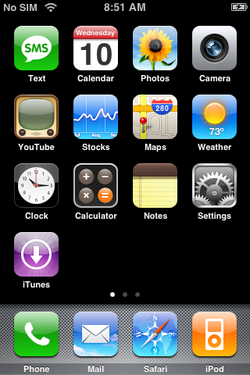
A Partial-Source Project for Simulating iOS on Windows. This emulator is based on custom codes made by me (Every codes as been written from the ground up so no copyright issue with Apple Policy.). It works by using custom image file (.aimg) that contain UI and all ressource of a iPhone OS simulated copy.
6 |

 14 |
15 |
14 |
15 | 22 | Key Emulation 23 | Cydia Pre-Installed 24 | Applx (Command-Line Utility) 25 | Network Support 26 | Custom Build Support 27 |28 |
35 | iPhone OS 1 ==== iPhoneOS_1.0.aimg 36 |41 |iPhone OS 1 (AppStore) ==== iPhoneOS_1.0_store.aimg37 | iPhone OS 1.2 ==== iPhoneOS_1.2.aimg 38 |iPhone OS 1.2 (AppStore) ==== iPhoneOS_1.2_store.aimg39 | iPhone OS 1.3 (Soon!) ==== iPhoneOS_1.3.aimg 40 |
47 | 'ESCAPE'     ===    Power Button
48 | 'PLUS'       ===    Volume + Button
49 | 'MINUS'      ===    Volume - Button
50 | 'BACKSPACE'  ===    Back Button
51 | 'F3'         ===    Mute Ringtone
52 | 'TAB'        ===    Home Button
53 | 'HOME'       ===    Home Button
54 |
55 |
61 |
Applx is a command-line utility. 62 | It's like Android Debug Bridge for iOS.
63 |64 | Commands : 65 | 66 | -recovery This command boot your emulated iPhone into Recovery. 67 | -dfumode This command boot your emulated iPhone into DFU Mode. 68 | -connect This command emulate a computer connected to your iPhone. (And you will see a new mounted iPhone on your Computer) 69 | -keyboard This command toggle the on-display keyboard. 70 | -touchid This simulate a pressed home button. 71 | -keysend This send any keycode to your emulated iPhone! (Example: applx -keysend KEY_VOLUME_UP) 72 | -run This command execute the following bundle id. (Example: applx -run com.apple.example) 73 |74 |
This project is licensed under the "Attribution-NonCommercial-NoDerivatives" (CC BY-NC-ND)
79 |83 |
Every UI and Icons are owned by Apple Inc.
84 |Thank for all collaborators!
85 |Thank from Xavier114
88 | --------------------------------------------------------------------------------