├── test
├── static
│ └── logo.png
├── main.js
├── pages
│ ├── article
│ │ └── article.vue
│ └── index
│ │ └── index.vue
├── pages.json
├── App.vue
├── uni.scss
├── manifest.json
└── common
│ ├── jpress.js
│ └── md5.js
└── README.md
/test/static/logo.png:
--------------------------------------------------------------------------------
https://raw.githubusercontent.com/xieyushi/jpress-uniapp/HEAD/test/static/logo.png
--------------------------------------------------------------------------------
/test/main.js:
--------------------------------------------------------------------------------
1 | import Vue from 'vue'
2 | import App from './App'
3 |
4 | Vue.config.productionTip = false
5 |
6 | App.mpType = 'app'
7 |
8 | const app = new Vue({
9 | ...App
10 | })
11 | app.$mount()
12 |
--------------------------------------------------------------------------------
/test/pages/article/article.vue:
--------------------------------------------------------------------------------
1 |
2 |
3 | {{article.text}}
4 |
5 |
6 |
7 |
19 |
20 |
23 |
--------------------------------------------------------------------------------
/test/pages.json:
--------------------------------------------------------------------------------
1 | {
2 | "pages" : [
3 | //pages数组中第一项表示应用启动页,参考:https://uniapp.dcloud.io/collocation/pages
4 | {
5 | "path" : "pages/index/index",
6 | "style" : {
7 | "navigationBarTitleText" : "uni-app"
8 | }
9 | },
10 | {
11 | "path" : "pages/article/article",
12 | "style" : {}
13 | }
14 | ],
15 | "globalStyle" : {
16 | "navigationBarTextStyle" : "black",
17 | "navigationBarTitleText" : "uni-app",
18 | "navigationBarBackgroundColor" : "#F8F8F8",
19 | "backgroundColor" : "#F8F8F8"
20 | }
21 | }
22 |
--------------------------------------------------------------------------------
/test/App.vue:
--------------------------------------------------------------------------------
1 |
33 |
34 |
37 |
--------------------------------------------------------------------------------
/test/pages/index/index.vue:
--------------------------------------------------------------------------------
1 |
2 |
3 |
4 | {{article.title}}
5 |
6 |
7 |
8 |
9 |
39 |
40 |
55 |
--------------------------------------------------------------------------------
/test/uni.scss:
--------------------------------------------------------------------------------
1 | /**
2 | * 这里是uni-app内置的常用样式变量
3 | *
4 | * uni-app 官方扩展插件及插件市场(https://ext.dcloud.net.cn)上很多三方插件均使用了这些样式变量
5 | * 如果你是插件开发者,建议你使用scss预处理,并在插件代码中直接使用这些变量(无需 import 这个文件),方便用户通过搭积木的方式开发整体风格一致的App
6 | *
7 | */
8 |
9 | /**
10 | * 如果你是App开发者(插件使用者),你可以通过修改这些变量来定制自己的插件主题,实现自定义主题功能
11 | *
12 | * 如果你的项目同样使用了scss预处理,你也可以直接在你的 scss 代码中使用如下变量,同时无需 import 这个文件
13 | */
14 |
15 | /* 颜色变量 */
16 |
17 | /* 行为相关颜色 */
18 | $uni-color-primary: #007aff;
19 | $uni-color-success: #4cd964;
20 | $uni-color-warning: #f0ad4e;
21 | $uni-color-error: #dd524d;
22 |
23 | /* 文字基本颜色 */
24 | $uni-text-color:#333;//基本色
25 | $uni-text-color-inverse:#fff;//反色
26 | $uni-text-color-grey:#999;//辅助灰色,如加载更多的提示信息
27 | $uni-text-color-placeholder: #808080;
28 | $uni-text-color-disable:#c0c0c0;
29 |
30 | /* 背景颜色 */
31 | $uni-bg-color:#ffffff;
32 | $uni-bg-color-grey:#f8f8f8;
33 | $uni-bg-color-hover:#f1f1f1;//点击状态颜色
34 | $uni-bg-color-mask:rgba(0, 0, 0, 0.4);//遮罩颜色
35 |
36 | /* 边框颜色 */
37 | $uni-border-color:#c8c7cc;
38 |
39 | /* 尺寸变量 */
40 |
41 | /* 文字尺寸 */
42 | $uni-font-size-sm:24upx;
43 | $uni-font-size-base:28upx;
44 | $uni-font-size-lg:32upx;
45 |
46 | /* 图片尺寸 */
47 | $uni-img-size-sm:40upx;
48 | $uni-img-size-base:52upx;
49 | $uni-img-size-lg:80upx;
50 |
51 | /* Border Radius */
52 | $uni-border-radius-sm: 4upx;
53 | $uni-border-radius-base: 6upx;
54 | $uni-border-radius-lg: 12upx;
55 | $uni-border-radius-circle: 50%;
56 |
57 | /* 水平间距 */
58 | $uni-spacing-row-sm: 10px;
59 | $uni-spacing-row-base: 20upx;
60 | $uni-spacing-row-lg: 30upx;
61 |
62 | /* 垂直间距 */
63 | $uni-spacing-col-sm: 8upx;
64 | $uni-spacing-col-base: 16upx;
65 | $uni-spacing-col-lg: 24upx;
66 |
67 | /* 透明度 */
68 | $uni-opacity-disabled: 0.3; // 组件禁用态的透明度
69 |
70 | /* 文章场景相关 */
71 | $uni-color-title: #2C405A; // 文章标题颜色
72 | $uni-font-size-title:40upx;
73 | $uni-color-subtitle: #555555; // 二级标题颜色
74 | $uni-font-size-subtitle:36upx;
75 | $uni-color-paragraph: #3F536E; // 文章段落颜色
76 | $uni-font-size-paragraph:30upx;
--------------------------------------------------------------------------------
/test/manifest.json:
--------------------------------------------------------------------------------
1 | {
2 | "name" : "test",
3 | "appid" : "__UNI__8702862",
4 | "description" : "",
5 | "versionName" : "1.0.0",
6 | "versionCode" : "100",
7 | "transformPx" : false,
8 | "app-plus" : {
9 | /* 5+App特有相关 */
10 | "splashscreen" : {
11 | "autoclose" : true,
12 | "waiting" : true
13 | },
14 | "modules" : {},
15 | /* 模块配置 */
16 | "distribute" : {
17 | /* 应用发布信息 */
18 | "android" : {
19 | /* android打包配置 */
20 | "permissions" : [
21 | "",
22 | "",
23 | "",
24 | "",
25 | "",
26 | "",
27 | "",
28 | "",
29 | "",
30 | "",
31 | "",
32 | "",
33 | "",
34 | "",
35 | "",
36 | "",
37 | "",
38 | "",
39 | "",
40 | "",
41 | "",
42 | ""
43 | ]
44 | },
45 | "ios" : {},
46 | /* ios打包配置 */
47 | "sdkConfigs" : {}
48 | }
49 | },
50 | /* SDK配置 */
51 | "quickapp" : {},
52 | /* 快应用特有相关 */
53 | "mp-weixin" : {
54 | /* 小程序特有相关 */
55 | "appid" : "wxb2b2e2d4c3b78617",
56 | "setting" : {
57 | "urlCheck" : true
58 | }
59 | }
60 | }
61 |
--------------------------------------------------------------------------------
/README.md:
--------------------------------------------------------------------------------
1 | # jpress-uniapp 从0开始编写uniapp博客
2 | 应jpress作者海哥的要求.在这里重写一篇从0开始编写uniapp博客的傻瓜式教程,做为一个java程序员,其实我自己,做为一个java程序员,加一点点前端技术,对uniapp也并没有太过熟练的应用,不过在使用jpress大部分作用者都为java程序员的情况下,自己也是一步步从java程序员成长为全栈的, 希望这篇博客,能对大家有所帮助.
3 | 在编写小程序前,请先将jpress的后台程序布置好.记得在系统的接口中开启启用api接口,并且配置上申请的小程序的appid,以及和前端约定一个签名密钥如下图:
4 | 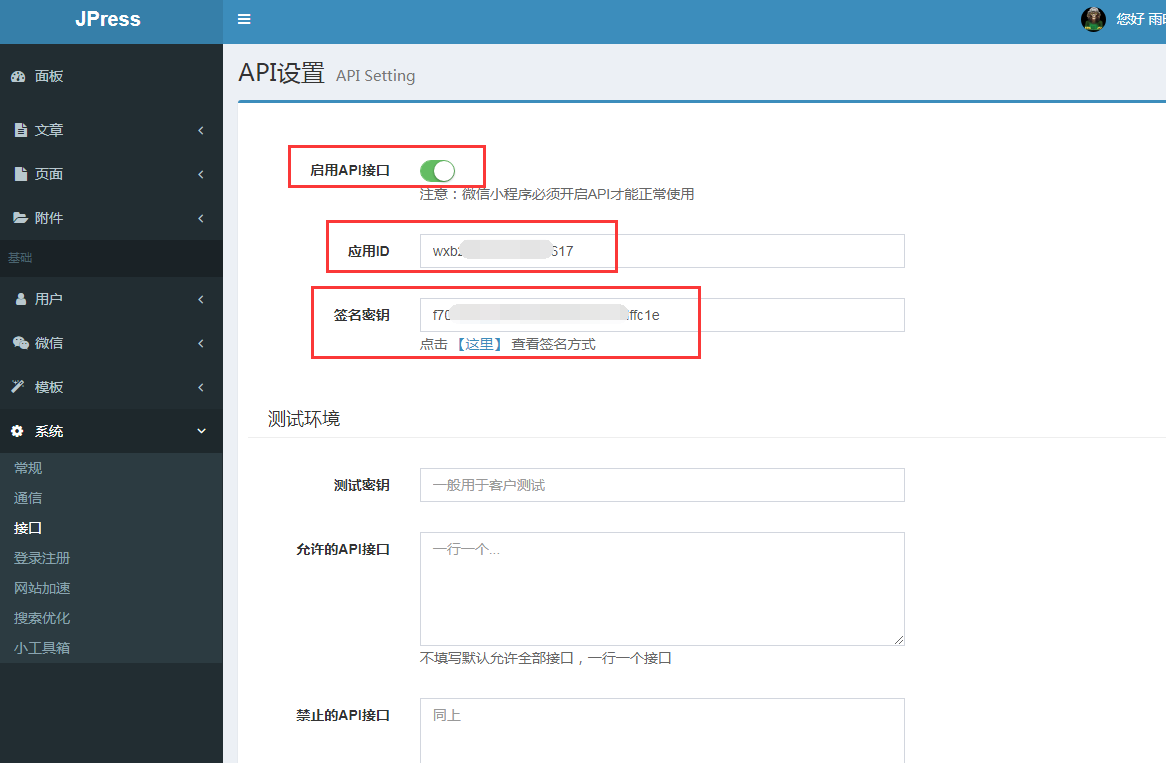
5 | jpress的部署问题,就不再在这里来描述了,大家有问题请找海哥...
6 | 在进入uniapp开发前,大家可以先下载一下海哥写的一个小程序模板,因为里面有对jpress后台的接口的请求的一系列的封装.代码地址是[https://gitee.com/fuhai/jpress-miniprogram-simpleblog](https://gitee.com/fuhai/jpress-miniprogram-simpleblog)
7 | 将项目中的jpress-miniprogram-simpleblog/src/utils/jpress.js,jpress-miniprogram-simpleblog/src/utils/md5.js与
8 | jpress-miniprogram-simpleblog/src/app.js下载下来.我们用uniapp新建项目时是会用到这两个文件的.
9 | 现在开始编写小程序:
10 | #### 一.下载uniapp配套的开发工具:hbuilderX
11 | 下载网址[https://www.dcloud.io/hbuilderx.html](https://www.dcloud.io/hbuilderx.html)
12 | #### 二.新建项目
13 | 安装完成后打开工具,点左上角的文件-新建-项目,在上方选择uni-app(U),选择模板为默认模板,项目我们就暂时命名为test,然后点击创建新建项目:
14 | 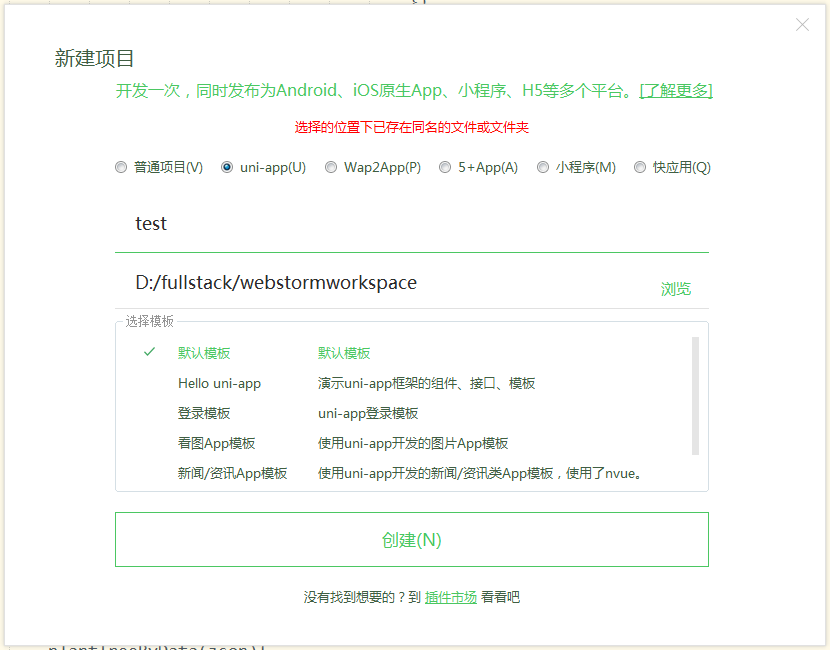
15 | 项目新建好以后目录是这个样子的:
16 | 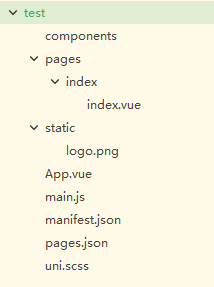
17 | pages下就是访问的页面.新建的只有一个index.vue,static里面放的是静态资源(但是太大的文件不要放在这个里面,因为小程序的代码不能超过两M,在不分包的情况下,一般的小程序太小也不用分包,所以这里就不讲解这个东西了),App.vue里面,是放小程序加载的时候所需要运行的代码,以及加载一些通用的css之类,mainfest.json中是一些uniapp的配置项,pages.json是页面的一些配置,uni.scss这个文件我们暂时不用管.
18 | 这里我们先双击打开mainfest.json,在hbuilderX中双击打开.开始不会是源码视图,而是一个配置界面:
19 | 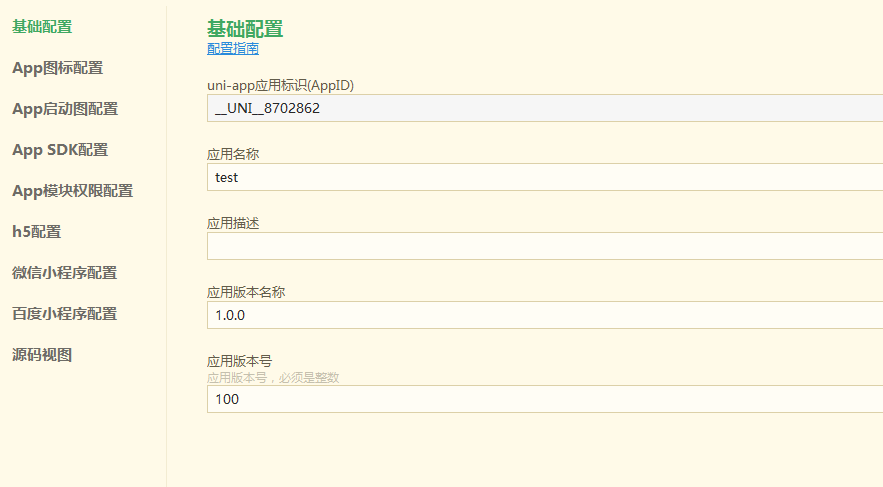
20 | 点击微信小程序配置,然后将自己要开发的小程序appid填写上去,然后点击hbuilderX顶部的运行-运行到小程序模拟器-微信开发者工具(请先提前安装好微信开发者工具),就可以看到这个初始小程序的index界面.
21 | #### 三.加入jpress相关代码
22 | 这里jpress的后台设置了密钥,所以首先会有一个签名的检验.
23 | 将下载下来的app.js中的onLaunch: function () {}中的代码直接复制到test项目中的App.vue的onLaunch: function () {}中:
24 |
25 | ```
26 | jpress.init({
27 | host:'这里填写jpress的外网请求url',
28 | app_id:'这里填写小程序的appid',
29 | app_secret:'这里填写你在jpress后台中设置的密钥'
30 | })
31 | jpress.getAppName()
32 | .then(data => {
33 | if (data.value) {
34 | uni.setStorageSync('appName',data.value);
35 | }
36 | })
37 |
38 |
39 | jpress.getCopyright()
40 | .then(data => {
41 | if (data.value) {
42 | uni.setStorageSync('copyright',data.value);
43 | }
44 | })
45 | ```
46 | 上面的代码中加入了uni的方法.uni.setStorageSync表示将数据放入缓存.原来的app.js中是this.globalData.xxx=xxx这个.在uniapp中.不要再彡了.直接用缓存机制来存储数据会更好.因为如果你不止是做小程序,还做app,做百度小程序,头条,支付宝百度小程序的话.就用uni封装好的方法.这样在跨平台编译的时候,坑会少很多
47 | 在test项目根目录下新建common文件夹,将下载下来的jpress.js与md5.js放入common文件夹中,然后在App.vue中的export default {上面加入一行代码:
48 |
49 | ```
50 | import jpress from "@/common/jpress.js"
51 | ```
52 | 保存后微信开发者工具上会界面刷新,再看Network界面可以看到有url请求了,而且能够得到正常的数据,说明jpress的签名检验也是通过了的.
53 | #### 四.开始编写页面
54 | 好了.到了这里.基本上小程序与jpress的后台已经能够正常访问了.这里,我们一共要编写两个页面,一个是博客的列表页.一个是博客的文章页.这里我们先说一下uniapp的页面结构:
55 | uniapp大部分代码与vue是很类似的.(如果大家不熟悉vue,其实也并没有关系,我就不会vue,但是uniapp我一天就上手了.前提是你至少要有一点前端知识.比如能用layui,easyui,ligerui.等来写一个前后端分离的管理后台什么的,如果只是写过jsp的java程序员,可能你的前端要上手uniapp,还需要一点耐心和时间),但是对于了解vue的同学来说.也同样要注意一些问题:uniapp因为需要跨平台编译,所以有一些vue的属性,也是不支持的,比如不支持函数,过滤器,不支持计算属性传参,等等,这里我就不再一一介绍,大家有时间去uniapp的官网.好好看一看[https://uniapp.dcloud.io/README](https://uniapp.dcloud.io/README)
56 | 我们先来看一下新建的项目中的index.vue默认的代码:
57 |
58 | ```
59 |
60 |
61 |
62 |
63 | {{title}}
64 |
65 |
66 |
67 |
68 |
83 |
84 |
99 | ```
100 | 可以看到index.vue的代码分为三个部分:template,script,style,第一个是html内容代码块.这里一定要记住的是,template标签下,有且只有一个的子元素标签,其它的html代码一定要在这个view标签内(至于为什么.我不知道.我说了.我也不懂vue,另外.这篇博客.是傻瓜式教程.所以我只做说做法,不做去深究原因);而在script标签内,代码块就稍稍复杂一点,export default{}代码块中是页面要运行的js,另外,如果你需要引入插件,组件等等 ,需要在export default代码块上面来引入具体方式参照上面说过的jpress.js的引入方式,在export default{}中有三个参数:data,onLoad,methods,data中直接return了一个json这个json就是在页面上我们要用到的变量,都可以放在这里,onLoad中,要写的是页面加载的时候要运行的js,而methods中则是写页面的公共方法. 这里我们先在export default 代码块之前引入jpress.js:
101 |
102 | ```
103 | import jpress from "@/common/jpress.js"
104 | ```
105 | 然后在methods中添加一个加载文章列表的方法:
106 |
107 | ```
108 | loadArticles(){
109 | jpress.getArticlePage({
110 | page: 1,
111 | })
112 | .then(data => {
113 | console.log(data);
114 | });
115 | }
116 | ```
117 | 然后在onLoad()中添加js代码:
118 |
119 | ```
120 | this.loadArticles();
121 | ```
122 | 这样得到的代码如下:
123 | 
124 | 重新运行小程序.在console控制台上就可以看到数据了.如下图:
125 | 
126 | 这里我们可以看到data的具体json格式,这里我要说的是,请求得到的数据与uni.request是有一点区别的.但是这里是海哥写的jpress封装好的.所以才是这个样子(大家在不熟悉小程序开发的时候.尽量多使用console.log将自己想要研究的对象打印出来,然后看一下json结构,再做其它的操作,避免因为数据结构不了解而浪费的时间和精力).这里面的data.page.list才是我们要的列表数据.在data中添加一个list:
127 | ```
128 | data() {
129 | return {
130 | title: 'Hello',
131 | list:[]
132 | }
133 | },
134 | ```
135 | 然后将list在loadArticles方法中赋值:
136 | 将console.log(data);改为this.list=data.page.list,保存后,小程序页面再次刷新,这里我们可以查看AppData中的值,如下图:
137 | 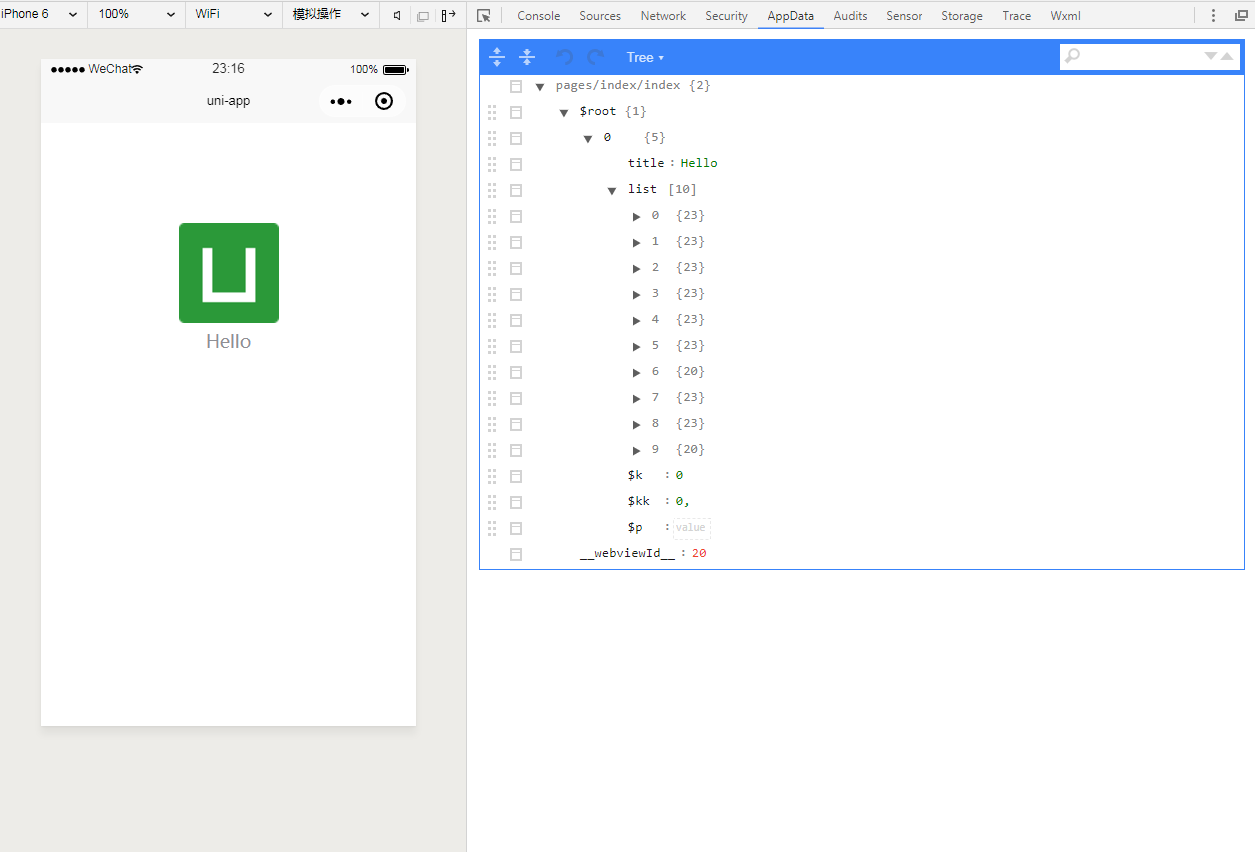
138 | 可以看到当前的页面中.list已经赋值上了.接下来就是将list显示在页面上了.
139 | 将template代码块修改成如下的代码:
140 |
141 | ```
142 |
143 |
144 |
145 | {{article.title}}
146 |
147 |
148 |
149 | ```
150 | 保存后微信开发者工具的界面会再次刷新:
151 | 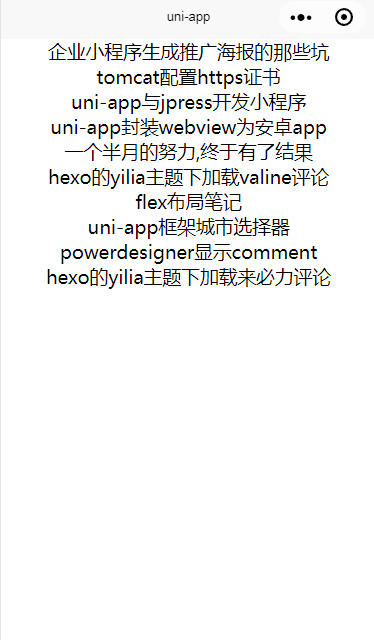
152 | 博客的标题已经加载出来了(样式什么的,请大家自己再去调整,这个.我可手把手教不了太多...大家要是心中没有一个大致的样式,可以参考一下我现在的小程序博客:
153 | 
154 | 当然,大家也可以有自己的想法,而且应该绝大多数,都会比我的更好.)
155 | 接下来.我们先新建博客内容页:
156 | 在项目文件视图中的pages文件夹上点击右键.选择新建页面输入页面名称article,hbuilderX会在pages文件夹下新建一个article文件夹,文件夹中有一个article.vue,这就是我们接下来要用到的文章详情页.
157 | 接下来为列表页添加点击跳转页面的事件:
158 | 在methods:{}代码块中添加点击跳转的事件:
159 |
160 | ```
161 | articleDetail(e){
162 | console.log(e);
163 | }
164 | ```
165 | 再一次看到了console,这里我们先来看看这个到底有什么用,将template中的代码:
166 |
167 | ```
168 |
169 | ```
170 | 改为:
171 |
172 | ```
173 |
174 | ```
175 | 保存后,微信开发者工具界面会刷新,点击任意一条数据.然后查看console的打印内容:
176 | 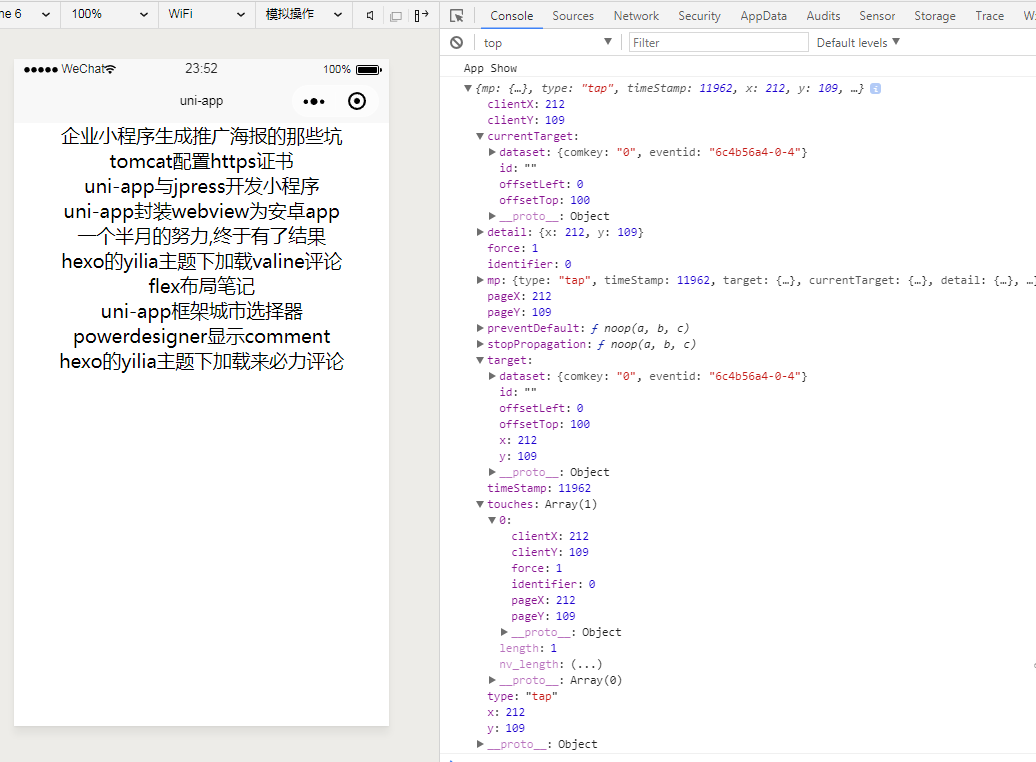
177 | 每一次的点击,你都可以看到,会有这些对象json出来.但是你从这些json数据上,也看不出来.你到底点了哪一条数据,没有jquery.就是这样...你得习惯.那么此时我们如何解决呢.
178 | 将代码:
179 | ```
180 |
181 | ```
182 | 改为:
183 |
184 | ```
185 |
186 | ```
187 | 再次刷新页面然后点击数据.你会看到在console中的json的currentTarget.dataset.index有一个值,这个就是循环的列表的index.这样我们可以通过这个index.知道点击的是列表的第几条数据了.接下来.我们将跳转的方法再做修改:
188 |
189 | ```
190 | articleDetail(e){
191 | uni.setStorageSync('article',this.list[e.currentTarget.dataset.index]);
192 | uni.navigateTo({
193 | url:'/pages/article/article'
194 | })
195 | }
196 | ```
197 | 然后在页面上点击标题就会跳转了.这里上面的两个方法我解释一下,uni.setStorageSync这个方法是将一个键值对存入缓存,便于在跳转到其它的页面上时,这个数据还能被其它页面所读取,而uni.navigateTo则是跳转页面.
198 | 打开的article页面是空的.白板,接下来我们就开始写article里面的内容了,这里我就不再仔细的说了.源码如下:
199 |
200 | ```
201 |
202 |
203 | {{article.text}}
204 |
205 |
206 |
207 |
219 |
220 |
223 | ```
224 | 上面的代码,template中直接在view中展示article.text,在data中创建article数据为一个空json,在onLoad方法中,给this.article赋值,uni.getStorageSync则是通过键名获取缓存中的数据内容.至此,最简易的uniapp编写小程序博客就完成了,当然样式上,还有其它的东西.还需要大家自己去添砖加瓦,不过相信大家看到这里.应该也基本上算是入门了uniapp编写与jpress对接的小程序,这里先展示一下这个项目的效果图:
225 | 
226 | 傻瓜式的教程就到这里了.元素的丰富还需要大家多多去阅读uniapp的文档.另外.有很多的例子,与模板.都在uniapp中有样例,查看代码的方式是在hbuilder中新建项目.然后选择uni-app,然后选择模板为hello uni-app的模板.里面有大量现成的代码,效果,组件,模板等代码,大家只要用心看.一定能学会,并且将这些代码运用在自己的项目中.我也是这样一步一步的看过来的,希望大家有兴趣的话,能认真的学习.另外.将本次教程的源码我也上传一下github,供大家下载.不过在App.vue中的代码jpress.init方法中的三个参数:host,app_id,app_secret,源码中还需要大家自己配置好以后,才能正常运行的哦!源码下载地址是[https://github.com/xieyushi/jpress-uniapp](https://github.com/xieyushi/jpress-uniapp)
227 | 最后,再一次推广我的小程序博客:
228 | 
229 | 也欢迎大家访问我的hexo博客[https://blog.coder666.cn/](https://blog.coder666.cn/)
230 |
231 |
--------------------------------------------------------------------------------
/test/common/jpress.js:
--------------------------------------------------------------------------------
1 | import md5 from './md5.js';
2 |
3 | const apis = {
4 | code2session: "/api/wechat/mp/code2session",
5 | decryptUserInfo: "/api/wechat/mp/decryptUserInfo",
6 |
7 | //user apis
8 | userInfo: "/api/user",
9 | myInfo: "/api/user/me",
10 | userSave: "/api/user/save",
11 |
12 | //article apis
13 | articleInfo: "/api/article",
14 | articleList: "/api/article/list",
15 | articleRelevantList: "/api/article/relevantList",
16 | articlePagination: "/api/article/paginate",
17 | articleCategoryInfo: "/api/article/category",
18 | articleCategories: "/api/article/categories",
19 | articleSave: "/api/article/save",
20 |
21 | //comment
22 | commentPaginate:"/api/article/commentPaginate",
23 | postComment: "/api/article/postComment",
24 |
25 | //page apis
26 | pageInfo: "/api/page",
27 | pageList: "/api/page/list",
28 |
29 | //option apis
30 | optionInfo: "/api/option",
31 |
32 | //others
33 | html2wxml:"/commons/html2wxml",
34 | }
35 |
36 | const config = {
37 | host: "",
38 | app_id: "",
39 | app_secret: "",
40 | sessionId: "",
41 | jwt: ""
42 | }
43 |
44 | const init = conf => {
45 | config.host = conf.host;
46 | config.app_id = conf.app_id;
47 | config.app_secret = conf.app_secret;
48 |
49 | var jwt = wx.getStorageSync("jwt");
50 | if(jwt){config.jwt = jwt}
51 | }
52 |
53 |
54 | const getUrl = (api, paras) => {
55 |
56 | paras = Object.assign({
57 | appId: config.app_id,
58 | t: new Date().getTime()
59 | }, paras);
60 |
61 | //对数据进行签名
62 | var signString = sign(paras);
63 |
64 | //添加签名结果
65 | paras = Object.assign({
66 | sign: signString
67 | }, paras);
68 |
69 | //拼接URL地址
70 | var url = config.host + api + "?"
71 | var arr = Object.keys(paras);
72 | for (var i in arr) {
73 | url = url + (arr[i] + "=" + paras[arr[i]]) + "&";
74 | }
75 |
76 | //remove last '&'
77 | return url.substring(0, url.length - 1);
78 | }
79 |
80 | const createGetRequest = req => {
81 | //default is get
82 | return createRequest(req);
83 | }
84 |
85 | const createPostRequest = req => {
86 | return createRequest(Object.assign({ method: 'POST' }, req));
87 | }
88 |
89 | const createRequest = (req = {
90 | api,
91 | paras,
92 | method,
93 | header,
94 | data,
95 | }) => {
96 |
97 | var url = getUrl(req.api, req.paras);
98 |
99 | var realRequest = {
100 | url: url,
101 | method: (req.method == null ? 'GET' : req.method),
102 | header: Object.assign({ "Jwt": config.jwt }, req.header),
103 | data: req.data,
104 | }
105 |
106 | const p = new Promise((resolve, reject) => {
107 | wx.request(Object.assign({
108 | success: function (res) {
109 | //注意:第一个字母大写
110 | if (res.header.Jwt){
111 | updateJwt(res.header.Jwt);
112 | }
113 | //jpress 请求成功
114 | if (res.data.state == "ok") {
115 | resolve(res.data);
116 | } else {
117 | reject(res.data);
118 | }
119 | },
120 | error: function (e) {
121 | reject({
122 | code: 99,
123 | message: '网络错误'
124 | });
125 | }
126 | }, realRequest))
127 | });
128 |
129 | return {
130 | send: () => p
131 | }
132 | }
133 |
134 | /**
135 | * 对 obj 进行签名,返回签名内容
136 | * 要保证和JPress签名算法一致
137 | */
138 | const sign = obj => {
139 |
140 | var secret = config.app_secret;
141 |
142 | //生成key升序数组,与JPress后台保存一致
143 | var arr = Object.keys(obj);
144 | arr.sort();
145 |
146 | var str = '';
147 | for (var i in arr) {
148 | str += arr[i] + obj[arr[i]].toString();
149 | }
150 |
151 | return md5(str + secret);
152 | }
153 |
154 |
155 | const code2session = code => {
156 |
157 | createRequest({
158 | api: apis.code2session,
159 | paras: { code: code }
160 | })
161 | .send()
162 | .then(data => {
163 | config.sessionId = data.sessionId;
164 | return true;
165 | })
166 | .catch(data => {
167 | return false;
168 | })
169 | }
170 |
171 | const updateJwt = (value) => {
172 | config.jwt = value;
173 | wx.setStorage({
174 | key: 'jwt',
175 | data: value,
176 | })
177 | }
178 |
179 | const decryptUserInfo = (data = {
180 | rawData, signature, encryptedData, iv
181 | },callback) => {
182 |
183 | createPostRequest({
184 | api: apis.decryptUserInfo,
185 | data: Object.assign({ sessionId: config.sessionId }, data)
186 | })
187 | .send()
188 | .then(data => {
189 | updateJwt(data.token);
190 | if (callback) callback(true);
191 | })
192 | .catch(data => {
193 | if (callback) callback(false);
194 | })
195 |
196 | }
197 |
198 |
199 |
200 | ///////////////////////option api start/////////////////////////////////
201 |
202 | /**
203 | * 获取网站配置信息
204 | */
205 | const getOption = key => {
206 | return createGetRequest({
207 | api: apis.optionInfo,
208 | paras: { key: key }
209 | }).send()
210 | }
211 |
212 |
213 | const getAppName = () => {
214 | return getOption('wechat_miniprogram_name')
215 | }
216 |
217 | const getCopyright = () => {
218 | return getOption('wechat_miniprogram_copyright')
219 | }
220 |
221 | const getSlides = () => {
222 | return getOption('wechat_miniprogram_slides')
223 | }
224 |
225 | ///////////////////////option api end/////////////////////////////////
226 |
227 | ///////////////////////user api start/////////////////////////////////
228 |
229 | /**
230 | * 获取用户信息
231 | */
232 | const getUser = id => {
233 | return createGetRequest({
234 | api: apis.userInfo,
235 | paras: { id: id }
236 | }).send()
237 | }
238 |
239 | /**
240 | * 获取登录用户信息(我的信息)
241 | */
242 | const getMyInfo = () => {
243 | return createGetRequest({
244 | api: apis.myInfo
245 | }).send()
246 | }
247 |
248 | /**
249 | * 用户信息保存
250 | */
251 | const doUserSave = userData => {
252 | return createPostRequest({
253 | api: apis.userSave,
254 | data: userData,
255 | }).send()
256 | }
257 |
258 |
259 | ///////////////////////user api end/////////////////////////////////
260 |
261 |
262 | ///////////////////////article api start/////////////////////////////////
263 |
264 | /**
265 | * 获取文章信息
266 | */
267 | const getArticle = id => {
268 | return createGetRequest({
269 | api: apis.articleInfo,
270 | paras: { id: id }
271 | }).send()
272 | }
273 |
274 | /**
275 | * 获取文章列表
276 | */
277 | const getArticleList = (paras = {
278 | flag,
279 | hasThumbnail,
280 | orderBy,
281 | count
282 | }) => {
283 | return createGetRequest({
284 | api: apis.articleList,
285 | paras: paras
286 | }).send()
287 | }
288 |
289 |
290 | /**
291 | * 获取文章的相关文章
292 | */
293 | const getArticleRelevantList = (paras = {articleId,count}) => {
294 | return createGetRequest({
295 | api: apis.articleRelevantList,
296 | paras: paras
297 | }).send()
298 | }
299 |
300 |
301 | /**
302 | * 分页获取文章内容
303 | */
304 | const getArticlePage = (paras = {
305 | categoryId,
306 | orderBy,
307 | page,
308 | }) => {
309 | return createGetRequest({
310 | api: apis.articlePagination,
311 | paras: paras
312 | }).send()
313 | }
314 |
315 | /**
316 | * 获取文章分类信息
317 | */
318 | const getArticleCategory = (paras = {
319 | id,
320 | slug,
321 | type,
322 | }) => {
323 | return createGetRequest({
324 | api: apis.articleCategoryInfo,
325 | paras: paras
326 | }).send()
327 | }
328 |
329 | /**
330 | * 获取文章分类信息
331 | */
332 | const getArticleCategories = type => {
333 | return createGetRequest({
334 | api: apis.articleCategories,
335 | paras: {type:type}
336 | }).send()
337 | }
338 |
339 | /**
340 | * 保存文章
341 | */
342 | const doArticleSave = articleData => {
343 | return createPostRequest({
344 | api: apis.articleSave,
345 | data: articleData,
346 | }).send()
347 | }
348 |
349 |
350 | const getCommentPage = (paras = {
351 | articleId,
352 | page
353 | }) => {
354 | return createGetRequest({
355 | api: apis.commentPaginate,
356 | paras: paras
357 | }).send()
358 | }
359 |
360 | /**
361 | * 发布评论
362 | */
363 | const doPostComment = (paras = {
364 | articleId,
365 | pid
366 | },content) => {
367 | return createPostRequest({
368 | api: apis.postComment,
369 | paras: paras,
370 | data: content,
371 | }).send()
372 | }
373 |
374 | ///////////////////////article api end/////////////////////////////////
375 |
376 |
377 | ///////////////////////page api start/////////////////////////////////
378 |
379 | /**
380 | * 获取页面信息
381 | */
382 | const getPage = id => {
383 | return createGetRequest({
384 | api: apis.pageInfo,
385 | paras: { id: id }
386 | }).send()
387 | }
388 |
389 | /**
390 | * 获取页面列表
391 | */
392 | const getPageList = flag => {
393 | return createGetRequest({
394 | api: apis.pageList,
395 | paras: { flag: flag }
396 | }).send()
397 | }
398 |
399 | ///////////////////////page api end/////////////////////////////////
400 |
401 |
402 | const isLogined = () => {
403 | return config.jwt != "";
404 | }
405 |
406 |
407 |
408 |
409 | module.exports = {
410 | config: config,
411 | getUrl:getUrl,
412 |
413 | init: init, //初始化
414 | createGetRequest: createGetRequest, //构建一个Get API请求
415 | createPostRequest: createPostRequest, //构建一个Post API请求
416 | createRequest: createRequest, //构建一个API请求,默认是get请求
417 | wxLogin: code2session, //进行用户code初始化
418 | wxGetUserInfo: decryptUserInfo, //进行用户注册 或 初始化当前用户信息
419 | isLogined: isLogined,
420 |
421 |
422 | // 配置相关 //
423 | getOption: getOption,
424 | getAppName: getAppName,
425 | getCopyright: getCopyright,
426 | getSlides: getSlides,
427 |
428 |
429 | // 用户相关 //
430 | getUser: getUser,
431 | getMyInfo: getMyInfo,
432 | doUserSave: doUserSave,
433 |
434 | // 文章相关 //
435 | getArticle: getArticle,
436 | getArticleList: getArticleList,
437 | getArticleRelevantList:getArticleRelevantList,
438 | getArticlePage: getArticlePage,
439 | getArticleCategory: getArticleCategory,
440 | getArticleCategories: getArticleCategories,
441 | doArticleSave: doArticleSave,
442 | doPostComment: doPostComment,
443 | getCommentPage: getCommentPage,
444 |
445 | // 页面相关 //
446 | getPage: getPage,
447 | getPageList: getPageList,
448 | }
449 |
--------------------------------------------------------------------------------
/test/common/md5.js:
--------------------------------------------------------------------------------
1 | /*
2 | * JavaScript MD5 1.0.1
3 | * https://github.com/blueimp/JavaScript-MD5
4 | *
5 | * Copyright 2011, Sebastian Tschan
6 | * https://blueimp.net
7 | *
8 | * Licensed under the MIT license:
9 | * http://www.opensource.org/licenses/MIT
10 | *
11 | * Based on
12 | * A JavaScript implementation of the RSA Data Security, Inc. MD5 Message
13 | * Digest Algorithm, as defined in RFC 1321.
14 | * Version 2.2 Copyright (C) Paul Johnston 1999 - 2009
15 | * Other contributors: Greg Holt, Andrew Kepert, Ydnar, Lostinet
16 | * Distributed under the BSD License
17 | * See http://pajhome.org.uk/crypt/md5 for more info.
18 | */
19 |
20 | /*jslint bitwise: true */
21 | /*global unescape, define */
22 |
23 |
24 | /*
25 | * Add integers, wrapping at 2^32. This uses 16-bit operations internally
26 | * to work around bugs in some JS interpreters.
27 | */
28 | function safe_add(x, y) {
29 | var lsw = (x & 0xFFFF) + (y & 0xFFFF),
30 | msw = (x >> 16) + (y >> 16) + (lsw >> 16);
31 | return (msw << 16) | (lsw & 0xFFFF);
32 | }
33 |
34 | /*
35 | * Bitwise rotate a 32-bit number to the left.
36 | */
37 | function bit_rol(num, cnt) {
38 | return (num << cnt) | (num >>> (32 - cnt));
39 | }
40 |
41 | /*
42 | * These functions implement the four basic operations the algorithm uses.
43 | */
44 | function md5_cmn(q, a, b, x, s, t) {
45 | return safe_add(bit_rol(safe_add(safe_add(a, q), safe_add(x, t)), s), b);
46 | }
47 | function md5_ff(a, b, c, d, x, s, t) {
48 | return md5_cmn((b & c) | ((~b) & d), a, b, x, s, t);
49 | }
50 | function md5_gg(a, b, c, d, x, s, t) {
51 | return md5_cmn((b & d) | (c & (~d)), a, b, x, s, t);
52 | }
53 | function md5_hh(a, b, c, d, x, s, t) {
54 | return md5_cmn(b ^ c ^ d, a, b, x, s, t);
55 | }
56 | function md5_ii(a, b, c, d, x, s, t) {
57 | return md5_cmn(c ^ (b | (~d)), a, b, x, s, t);
58 | }
59 |
60 | /*
61 | * Calculate the MD5 of an array of little-endian words, and a bit length.
62 | */
63 | function binl_md5(x, len) {
64 | /* append padding */
65 | x[len >> 5] |= 0x80 << (len % 32);
66 | x[(((len + 64) >>> 9) << 4) + 14] = len;
67 |
68 | var i, olda, oldb, oldc, oldd,
69 | a = 1732584193,
70 | b = -271733879,
71 | c = -1732584194,
72 | d = 271733878;
73 |
74 | for (i = 0; i < x.length; i += 16) {
75 | olda = a;
76 | oldb = b;
77 | oldc = c;
78 | oldd = d;
79 |
80 | a = md5_ff(a, b, c, d, x[i], 7, -680876936);
81 | d = md5_ff(d, a, b, c, x[i + 1], 12, -389564586);
82 | c = md5_ff(c, d, a, b, x[i + 2], 17, 606105819);
83 | b = md5_ff(b, c, d, a, x[i + 3], 22, -1044525330);
84 | a = md5_ff(a, b, c, d, x[i + 4], 7, -176418897);
85 | d = md5_ff(d, a, b, c, x[i + 5], 12, 1200080426);
86 | c = md5_ff(c, d, a, b, x[i + 6], 17, -1473231341);
87 | b = md5_ff(b, c, d, a, x[i + 7], 22, -45705983);
88 | a = md5_ff(a, b, c, d, x[i + 8], 7, 1770035416);
89 | d = md5_ff(d, a, b, c, x[i + 9], 12, -1958414417);
90 | c = md5_ff(c, d, a, b, x[i + 10], 17, -42063);
91 | b = md5_ff(b, c, d, a, x[i + 11], 22, -1990404162);
92 | a = md5_ff(a, b, c, d, x[i + 12], 7, 1804603682);
93 | d = md5_ff(d, a, b, c, x[i + 13], 12, -40341101);
94 | c = md5_ff(c, d, a, b, x[i + 14], 17, -1502002290);
95 | b = md5_ff(b, c, d, a, x[i + 15], 22, 1236535329);
96 |
97 | a = md5_gg(a, b, c, d, x[i + 1], 5, -165796510);
98 | d = md5_gg(d, a, b, c, x[i + 6], 9, -1069501632);
99 | c = md5_gg(c, d, a, b, x[i + 11], 14, 643717713);
100 | b = md5_gg(b, c, d, a, x[i], 20, -373897302);
101 | a = md5_gg(a, b, c, d, x[i + 5], 5, -701558691);
102 | d = md5_gg(d, a, b, c, x[i + 10], 9, 38016083);
103 | c = md5_gg(c, d, a, b, x[i + 15], 14, -660478335);
104 | b = md5_gg(b, c, d, a, x[i + 4], 20, -405537848);
105 | a = md5_gg(a, b, c, d, x[i + 9], 5, 568446438);
106 | d = md5_gg(d, a, b, c, x[i + 14], 9, -1019803690);
107 | c = md5_gg(c, d, a, b, x[i + 3], 14, -187363961);
108 | b = md5_gg(b, c, d, a, x[i + 8], 20, 1163531501);
109 | a = md5_gg(a, b, c, d, x[i + 13], 5, -1444681467);
110 | d = md5_gg(d, a, b, c, x[i + 2], 9, -51403784);
111 | c = md5_gg(c, d, a, b, x[i + 7], 14, 1735328473);
112 | b = md5_gg(b, c, d, a, x[i + 12], 20, -1926607734);
113 |
114 | a = md5_hh(a, b, c, d, x[i + 5], 4, -378558);
115 | d = md5_hh(d, a, b, c, x[i + 8], 11, -2022574463);
116 | c = md5_hh(c, d, a, b, x[i + 11], 16, 1839030562);
117 | b = md5_hh(b, c, d, a, x[i + 14], 23, -35309556);
118 | a = md5_hh(a, b, c, d, x[i + 1], 4, -1530992060);
119 | d = md5_hh(d, a, b, c, x[i + 4], 11, 1272893353);
120 | c = md5_hh(c, d, a, b, x[i + 7], 16, -155497632);
121 | b = md5_hh(b, c, d, a, x[i + 10], 23, -1094730640);
122 | a = md5_hh(a, b, c, d, x[i + 13], 4, 681279174);
123 | d = md5_hh(d, a, b, c, x[i], 11, -358537222);
124 | c = md5_hh(c, d, a, b, x[i + 3], 16, -722521979);
125 | b = md5_hh(b, c, d, a, x[i + 6], 23, 76029189);
126 | a = md5_hh(a, b, c, d, x[i + 9], 4, -640364487);
127 | d = md5_hh(d, a, b, c, x[i + 12], 11, -421815835);
128 | c = md5_hh(c, d, a, b, x[i + 15], 16, 530742520);
129 | b = md5_hh(b, c, d, a, x[i + 2], 23, -995338651);
130 |
131 | a = md5_ii(a, b, c, d, x[i], 6, -198630844);
132 | d = md5_ii(d, a, b, c, x[i + 7], 10, 1126891415);
133 | c = md5_ii(c, d, a, b, x[i + 14], 15, -1416354905);
134 | b = md5_ii(b, c, d, a, x[i + 5], 21, -57434055);
135 | a = md5_ii(a, b, c, d, x[i + 12], 6, 1700485571);
136 | d = md5_ii(d, a, b, c, x[i + 3], 10, -1894986606);
137 | c = md5_ii(c, d, a, b, x[i + 10], 15, -1051523);
138 | b = md5_ii(b, c, d, a, x[i + 1], 21, -2054922799);
139 | a = md5_ii(a, b, c, d, x[i + 8], 6, 1873313359);
140 | d = md5_ii(d, a, b, c, x[i + 15], 10, -30611744);
141 | c = md5_ii(c, d, a, b, x[i + 6], 15, -1560198380);
142 | b = md5_ii(b, c, d, a, x[i + 13], 21, 1309151649);
143 | a = md5_ii(a, b, c, d, x[i + 4], 6, -145523070);
144 | d = md5_ii(d, a, b, c, x[i + 11], 10, -1120210379);
145 | c = md5_ii(c, d, a, b, x[i + 2], 15, 718787259);
146 | b = md5_ii(b, c, d, a, x[i + 9], 21, -343485551);
147 |
148 | a = safe_add(a, olda);
149 | b = safe_add(b, oldb);
150 | c = safe_add(c, oldc);
151 | d = safe_add(d, oldd);
152 | }
153 | return [a, b, c, d];
154 | }
155 |
156 | /*
157 | * Convert an array of little-endian words to a string
158 | */
159 | function binl2rstr(input) {
160 | var i,
161 | output = '';
162 | for (i = 0; i < input.length * 32; i += 8) {
163 | output += String.fromCharCode((input[i >> 5] >>> (i % 32)) & 0xFF);
164 | }
165 | return output;
166 | }
167 |
168 | /*
169 | * Convert a raw string to an array of little-endian words
170 | * Characters >255 have their high-byte silently ignored.
171 | */
172 | function rstr2binl(input) {
173 | var i,
174 | output = [];
175 | output[(input.length >> 2) - 1] = undefined;
176 | for (i = 0; i < output.length; i += 1) {
177 | output[i] = 0;
178 | }
179 | for (i = 0; i < input.length * 8; i += 8) {
180 | output[i >> 5] |= (input.charCodeAt(i / 8) & 0xFF) << (i % 32);
181 | }
182 | return output;
183 | }
184 |
185 | /*
186 | * Calculate the MD5 of a raw string
187 | */
188 | function rstr_md5(s) {
189 | return binl2rstr(binl_md5(rstr2binl(s), s.length * 8));
190 | }
191 |
192 | /*
193 | * Calculate the HMAC-MD5, of a key and some data (raw strings)
194 | */
195 | function rstr_hmac_md5(key, data) {
196 | var i,
197 | bkey = rstr2binl(key),
198 | ipad = [],
199 | opad = [],
200 | hash;
201 | ipad[15] = opad[15] = undefined;
202 | if (bkey.length > 16) {
203 | bkey = binl_md5(bkey, key.length * 8);
204 | }
205 | for (i = 0; i < 16; i += 1) {
206 | ipad[i] = bkey[i] ^ 0x36363636;
207 | opad[i] = bkey[i] ^ 0x5C5C5C5C;
208 | }
209 | hash = binl_md5(ipad.concat(rstr2binl(data)), 512 + data.length * 8);
210 | return binl2rstr(binl_md5(opad.concat(hash), 512 + 128));
211 | }
212 |
213 | /*
214 | * Convert a raw string to a hex string
215 | */
216 | function rstr2hex(input) {
217 | var hex_tab = '0123456789abcdef',
218 | output = '',
219 | x,
220 | i;
221 | for (i = 0; i < input.length; i += 1) {
222 | x = input.charCodeAt(i);
223 | output += hex_tab.charAt((x >>> 4) & 0x0F) +
224 | hex_tab.charAt(x & 0x0F);
225 | }
226 | return output;
227 | }
228 |
229 | /*
230 | * Encode a string as utf-8
231 | */
232 | function str2rstr_utf8(input) {
233 | return unescape(encodeURIComponent(input));
234 | }
235 |
236 | /*
237 | * Take string arguments and return either raw or hex encoded strings
238 | */
239 | function raw_md5(s) {
240 | return rstr_md5(str2rstr_utf8(s));
241 | }
242 | function hex_md5(s) {
243 | return rstr2hex(raw_md5(s));
244 | }
245 | function raw_hmac_md5(k, d) {
246 | return rstr_hmac_md5(str2rstr_utf8(k), str2rstr_utf8(d));
247 | }
248 | function hex_hmac_md5(k, d) {
249 | return rstr2hex(raw_hmac_md5(k, d));
250 | }
251 |
252 | export default function md5(string, key, raw) {
253 | if (!key) {
254 | if (!raw) {
255 | return hex_md5(string);
256 | }
257 | return raw_md5(string);
258 | }
259 | if (!raw) {
260 | return hex_hmac_md5(key, string);
261 | }
262 | return raw_hmac_md5(key, string);
263 | }
264 |
265 |
266 |
267 |
--------------------------------------------------------------------------------