├── .github
├── FUNDING.yml
└── workflows
│ └── release.yml
├── image
├── folder-note1.png
├── folder-note2.png
├── Item-card-view.png
├── folder-note1s.png
└── style-card-strip.png
├── .gitignore
├── manifest.json
├── versions.json
├── tsconfig.json
├── rollup.config.js
├── doc
├── update-old-version.md
├── ccard-recipes.md
├── change-log.md
├── folder-note-methods.md
└── ccard-syntax.md
├── package.json
├── src
├── ccard-block.ts
├── main.ts
├── settings.ts
├── folder-brief.ts
├── card-item.ts
└── folder-note.ts
├── styles.css
└── README.md
/.github/FUNDING.yml:
--------------------------------------------------------------------------------
1 | custom: ["https://www.buymeacoffee.com/xpgo"]
--------------------------------------------------------------------------------
/image/folder-note1.png:
--------------------------------------------------------------------------------
https://raw.githubusercontent.com/xpgo/obsidian-folder-note-plugin/HEAD/image/folder-note1.png
--------------------------------------------------------------------------------
/image/folder-note2.png:
--------------------------------------------------------------------------------
https://raw.githubusercontent.com/xpgo/obsidian-folder-note-plugin/HEAD/image/folder-note2.png
--------------------------------------------------------------------------------
/image/Item-card-view.png:
--------------------------------------------------------------------------------
https://raw.githubusercontent.com/xpgo/obsidian-folder-note-plugin/HEAD/image/Item-card-view.png
--------------------------------------------------------------------------------
/image/folder-note1s.png:
--------------------------------------------------------------------------------
https://raw.githubusercontent.com/xpgo/obsidian-folder-note-plugin/HEAD/image/folder-note1s.png
--------------------------------------------------------------------------------
/image/style-card-strip.png:
--------------------------------------------------------------------------------
https://raw.githubusercontent.com/xpgo/obsidian-folder-note-plugin/HEAD/image/style-card-strip.png
--------------------------------------------------------------------------------
/.gitignore:
--------------------------------------------------------------------------------
1 | # Intellij
2 | *.iml
3 | .idea
4 |
5 | # npm
6 | node_modules
7 | package-lock.json
8 |
9 | # build
10 | main.js
11 | *.js.map
--------------------------------------------------------------------------------
/manifest.json:
--------------------------------------------------------------------------------
1 | {
2 | "id": "folder-note-plugin",
3 | "name": "Folder Note",
4 | "version": "0.7.3",
5 | "minAppVersion": "0.9.12",
6 | "description": "Click a folder node to show a note describing the folder.",
7 | "author": "xpgo",
8 | "authorUrl": "https://github.com/xpgo/obsidian-folder-note",
9 | "isDesktopOnly": false
10 | }
11 |
--------------------------------------------------------------------------------
/versions.json:
--------------------------------------------------------------------------------
1 | {
2 | "0.1.0": "0.9.7",
3 | "0.2.0": "0.9.7",
4 | "0.3.0": "0.9.7",
5 | "0.4.0": "0.9.7",
6 | "0.5.0": "0.9.7",
7 | "0.6.0": "0.9.7",
8 | "0.6.1": "0.9.7",
9 | "0.6.2": "0.9.7",
10 | "0.6.3": "0.9.7",
11 | "0.6.4": "0.9.7",
12 | "0.6.5": "0.9.7",
13 | "0.6.6": "0.9.7",
14 | "0.7.0": "0.10.13",
15 | "0.7.1": "0.10.13",
16 | "0.7.2": "0.10.13",
17 | "0.7.3": "0.10.13"
18 | }
19 |
--------------------------------------------------------------------------------
/tsconfig.json:
--------------------------------------------------------------------------------
1 | {
2 | "compilerOptions": {
3 | "baseUrl": ".",
4 | "inlineSourceMap": true,
5 | "inlineSources": true,
6 | "module": "ESNext",
7 | "target": "es5",
8 | "allowJs": true,
9 | "noImplicitAny": true,
10 | "moduleResolution": "node",
11 | "importHelpers": true,
12 | "lib": [
13 | "dom",
14 | "es5",
15 | "scripthost",
16 | "es2015"
17 | ]
18 | },
19 | "include": [
20 | "**/*.ts"
21 | ]
22 | }
23 |
--------------------------------------------------------------------------------
/rollup.config.js:
--------------------------------------------------------------------------------
1 | import typescript from '@rollup/plugin-typescript';
2 | import {nodeResolve} from '@rollup/plugin-node-resolve';
3 | import commonjs from '@rollup/plugin-commonjs';
4 |
5 | export default {
6 | input: 'src/main.ts',
7 | output: {
8 | dir: '.',
9 | sourcemap: 'inline',
10 | format: 'cjs',
11 | exports: 'default'
12 | },
13 | external: ['obsidian'],
14 | plugins: [
15 | typescript(),
16 | nodeResolve({browser: true}),
17 | commonjs(),
18 | ]
19 | };
--------------------------------------------------------------------------------
/doc/update-old-version.md:
--------------------------------------------------------------------------------
1 | # Tips for updating from older version
2 |
3 | For those who use the plugin with version < 0.4.0, please use the following steps to update:
4 |
5 | 1. Go to the Obsidian's Community Plugin page, and update the Folder Note Plugin to the latest version.
6 | 2. Disable and then Enable the Plugin to refresh plugin settings.
7 | 3. Go to the Folder Note Plugin settings page, set the **Note File Method** to a different method, and then set it back to your choice in order to let the settings take effect.
8 | 4. Reopen Obsidian.
9 | 5. If you have any problem in updating the plugin, please leave an issue on the GitHub repo or a message on the Obsidian's forum page: [Folder Note Plugin: Add description note to folder](https://forum.obsidian.md/t/folder-note-plugin-add-description-note-to-folder/12038).
10 |
11 |
--------------------------------------------------------------------------------
/package.json:
--------------------------------------------------------------------------------
1 | {
2 | "name": "folder-note-plugin",
3 | "version": "0.9.7",
4 | "description": "This is a folder note plugin for Obsidian (https://obsidian.md)",
5 | "main": "main.js",
6 | "scripts": {
7 | "dev": "rollup --config rollup.config.js -w",
8 | "build": "rollup --config rollup.config.js"
9 | },
10 | "keywords": [],
11 | "author": "",
12 | "license": "MIT",
13 | "devDependencies": {
14 | "@rollup/plugin-commonjs": "^15.1.0",
15 | "@rollup/plugin-node-resolve": "^9.0.0",
16 | "@rollup/plugin-typescript": "^6.0.0",
17 | "@types/node": "^14.14.30",
18 | "@types/yaml": "^1.9.7",
19 | "obsidian": "https://github.com/obsidianmd/obsidian-api/tarball/master",
20 | "rollup": "^2.39.0",
21 | "tslib": "^2.0.3",
22 | "typescript": "^4.1.5",
23 | "yaml": "^1.10.0"
24 | }
25 | }
26 |
--------------------------------------------------------------------------------
/doc/ccard-recipes.md:
--------------------------------------------------------------------------------
1 | # ccard Sample Recipes
2 |
3 | ## Use multiple `ccard` code blocks in a note to display more.
4 |
5 | There can be multiple `ccard` code blocks in a note file. for example, the following code block shows overview of different folders in a single note file.
6 |
7 | ```
8 | # All my music notes
9 |
10 | ```ccard
11 | type: folder_brief_live
12 | folder: media/music
13 | ```
14 |
15 | # All my video notes
16 |
17 | ```ccard
18 | type: folder_brief_live
19 | folder: media/video
20 | ```
21 | ```
22 |
23 | ## Show card image for customized attachment folder
24 |
25 | If you changed the attachment folder path in Obsidian's options >> Files & Links, and use wiki link and short link format for images. You have to use `imagePrefix` key to let card image be shown correctly. For example, if your attachment folder path is `/assets` in the root path. There is an image `/assets/image1.png`, and in a note file with path `/folder1/note1`, you use `![[image1.png]]` to include the image. Then in `ccard` code block with `folder_brief_live`, you should use:
26 |
27 | ```
28 | ```ccard
29 | type: folder_brief_live
30 | imagePrefix: 'assets/'
31 | ```
32 | ```
33 |
34 | If you want to use the `imagePrefix` in every folder note, you could insert the above code blocks into the initial content of folder note by the Folder Note Plugin settings.
35 |
36 | For statically defined item data:
37 |
38 | ```
39 | ```ccard
40 | items: [
41 | {
42 | title: 'note 1',
43 | image: 'image1.png'
44 | }
45 | ]
46 | imagePrefix: 'assets/'
47 | ```
48 | ```
49 |
50 | ## Show card image for attachment folder within current folder
51 |
52 | If you set the attachment folder path to be within any local folder, use the following codes in initial content definition for Folder Note Plugin (thanks [ibestvina](https://github.com/ibestvina) for suggestion):
53 |
54 | ```
55 | ```ccard
56 | type: folder_brief_live
57 | imagePrefix: '{{FOLDER_PATH}}/attachments/'
58 | ```
59 | ```
60 |
61 | ## Link to folder note by alias
62 |
63 | Since the folder note path is not the real folder path, if you want to link a folder as a normal note, you can use the alias feature of obsidian by using the following codes in initial content definition for Folder Note Plugin (thanks [ibestvina](https://github.com/ibestvina) for suggestion):
64 |
65 | ```
66 | ---
67 | aliases: [{{FOLDER_NAME}}]
68 | ---
69 | # {{FOLDER_NAME}}
70 |
71 | ```ccard
72 | type: folder_brief_live
73 | imagePrefix: 'attachments/'
74 | ```
75 | ```
76 |
77 | then Obsidian will automatically convert `[[myfolder]]` to `[[myfolder/_about_.md|myfolder]]`.
78 |
79 |
--------------------------------------------------------------------------------
/doc/change-log.md:
--------------------------------------------------------------------------------
1 | # Change log of Folder Note Plugin
2 |
3 |
4 | ## 0.7.x
5 |
6 | - use {{FOLDER_BRIEF_LIVE}} for default inital content (0.7.2)
7 | - add Keyword {{FOLDER_PATH}} for inital content (0.7.1)
8 | - fix multiple usage of some keywords for initial content (0.7.1)
9 | - add imagePrefix key for ccard (0.7.0)
10 | - add noteOnly Key for folder_brief_live (0.7.0)
11 | - fix showing both folder and note for outside mode (0.7.0)
12 | - hide settings according to folder method (0.7.0)
13 |
14 | ## 0.6.x
15 |
16 | - fix inserted card header for folder (0.6.6)
17 | - fix yaml head for note brief (0.6.5)
18 | - use local image path in ccard (0.6.4)
19 | - better folder note brief (0.6.4)
20 | - folder_brief_live use plain text of md paragraph (0.6.3)
21 | - fix the escape of quotes (0.6.2)
22 | - folder_brief_live uses the first paragraph note for its brief (0.6.1)
23 | - folder_brief_live supports wiki style image (0.6.1)
24 | - Add option for the key to create new note (0.6.0)
25 | - Add command for creating a folder based on a note file (0.6.0)
26 |
27 | ## 0.5.x
28 |
29 | - Fix the folder overview card for folder (0.5.2)
30 | - Fix the hiding issue for Outside-Folder method (0.5.1)
31 | - Add automatically rename for Inside-Folder method (0.5.1)
32 | - Add options for three different folder note file method (0.5.0)
33 | - Add options for auto rename (0.5.0)
34 |
35 | ## 0.4.x
36 |
37 | - auto rename folder when the note file name changes.
38 | - move note filename with {{FOLDER_NAME}} to out of folder for better orgnization. (0.4.0)
39 |
40 | ## 0.3.x
41 |
42 | - add keyword {{FOLDER_BRIEF_LIVE}} for inital content to generate folder overview in real time. (0.3.3)
43 | - Insert folder overview by command: ctrl+p, Insert Folder Overview (0.3.2)
44 | - Reorganized source code and fixed a mini bug (0.3.2)
45 | - Fix the command key on Mac (0.3.1)
46 | - Automatically generate card-view of folder overview (Experimental).
47 | - Add keyword {{FOLDER_BRIEF}} for generating the folder overview.
48 |
49 | ## 0.2.x
50 |
51 | - Fix folder and note name check for hiding. (0.2.5)
52 | - Add settings option to hide or unhide folder note file. (0.2.3)
53 | - Fix: failed to create note file when create a new folder. (0.2.2)
54 | - Change: change the default note name to _about_ because of folder rename problem. (0.2.2)
55 | - Add: settings tab (0.2.1)
56 | - Note name and contents can be configured. (0.2.1)
57 |
58 | ## 0.1.0
59 |
60 | - Add description note for a folder: CTRL+Click on a folder node in the file explorer panel.
61 | - Show description note of a folder: Just Click the folder.
62 | - Delete description note of a folder: Just delete the opened note file.
--------------------------------------------------------------------------------
/.github/workflows/release.yml:
--------------------------------------------------------------------------------
1 | name: Release
2 | on:
3 | push:
4 | tags: ["*"]
5 | env:
6 | PLUGIN_NAME: obsidian-folder-note-plugin
7 | jobs:
8 | build:
9 | runs-on: ubuntu-latest
10 | steps:
11 | # Checks-out your repository under $GITHUB_WORKSPACE, so your job can access it
12 | - uses: actions/checkout@v2
13 |
14 | - name: Install modules
15 | run: yarn
16 |
17 | - name: Run build
18 | run: yarn run build
19 |
20 | - name: Package
21 | run: |
22 | mkdir ${{ env.PLUGIN_NAME }}
23 | cp main.js manifest.json styles.css ${{ env.PLUGIN_NAME }}
24 | zip -r ${{ env.PLUGIN_NAME}}.zip ${{ env.PLUGIN_NAME }}
25 | echo "::set-output name=tag_name::$(git tag --sort version:refname | tail -n 1)"
26 |
27 | - name: Create Release
28 | id: create_release
29 | uses: actions/create-release@v1
30 | env:
31 | GITHUB_TOKEN: ${{ secrets.GITHUB_TOKEN }}
32 | VERSION: ${{ github.ref }}
33 | with:
34 | tag_name: ${{ github.ref }}
35 | release_name: ${{ github.ref }}
36 | draft: true
37 | prerelease: false
38 |
39 | - name: Upload artifacts
40 | id: upload-artifacts
41 | uses: actions/upload-release-asset@v1
42 | env:
43 | GITHUB_TOKEN: ${{ secrets.GITHUB_TOKEN }}
44 | with:
45 | upload_url: ${{ steps.create_release.outputs.upload_url }}
46 | asset_path: ./${{ env.PLUGIN_NAME }}.zip
47 | asset_name: ${{ env.PLUGIN_NAME }}-${{ github.ref }}.zip
48 | asset_content_type: application/zip
49 |
50 | - name: Upload main.js
51 | id: upload-main
52 | uses: actions/upload-release-asset@v1
53 | env:
54 | GITHUB_TOKEN: ${{ secrets.GITHUB_TOKEN }}
55 | with:
56 | upload_url: ${{ steps.create_release.outputs.upload_url }}
57 | asset_path: ./main.js
58 | asset_name: main.js
59 | asset_content_type: text/javascript
60 |
61 | - name: Upload manifest.json
62 | id: upload-manifest
63 | uses: actions/upload-release-asset@v1
64 | env:
65 | GITHUB_TOKEN: ${{ secrets.GITHUB_TOKEN }}
66 | with:
67 | upload_url: ${{ steps.create_release.outputs.upload_url }}
68 | asset_path: ./manifest.json
69 | asset_name: manifest.json
70 | asset_content_type: application/json
71 |
72 | - name: Upload styles.css
73 | id: upload-styles
74 | uses: actions/upload-release-asset@v1
75 | env:
76 | GITHUB_TOKEN: ${{ secrets.GITHUB_TOKEN }}
77 | with:
78 | upload_url: ${{ steps.create_release.outputs.upload_url }}
79 | asset_path: ./styles.css
80 | asset_name: styles.css
81 | asset_content_type: text/css
82 |
--------------------------------------------------------------------------------
/doc/folder-note-methods.md:
--------------------------------------------------------------------------------
1 | # Folder Note Methods
2 |
3 | The mechanism of folder note is simple: attaching a note file to a folder. But where do you put the folder note? There are three methods of creating description note for a folder. (See the discussion at [Folder as markdown note](https://forum.obsidian.md/t/folder-as-markdown-note/2902/2) )
4 |
5 |
6 | | Methods | Index-File | Inside-Folder | Outside-Folder |
7 | | -------------------- | ------------------------------------------------------------ | ------------------------------------------------------------ | ------------------------------------------------------------ |
8 | | **Folder Path** | parent/myFolder | parent/myFolder | parent/myFolder |
9 | | **Folder Note Path** | parent/myFolder/\_about\_.md | parent/myFolder/myFolder.md | parent/myFolder.md |
10 | | **Configuration** | - **Note File method:** Index File
- **Index File Name:** \_about\_ (or other name you like) | **Note File method:** Folder Name Inside | **Note File method:** Folder Name Outside |
11 | | **Pros** | - The note file belongs to the folder.
- The note filename keeps the same if you rename a folder. | - The note file belongs to the folder.
- The note file has the same name as folder, the note title looks better. | - The note file has the same name as folder, the note title looks better.
- Wiki-style of linking, easy to insert link like [\[myFolder]] |
12 | | **Cons** | - The note filename and title may looks weird.
- Have to use additional file name for linking. | - Linking outside of the folder will be [\[myFolder/myFolder]].
- The note filename will be changed if you change the folder name. | - The note file does not belong to the folder. You have to move the note file manually if a folder is moved.
- The note filename will be changed if you change the folder name. |
13 |
14 | When CTRL+Click a folder, the plugin will create a description note with the path dependent on the method you choose. When clicking a folder, the plugin will open the attached note for you. You can configure the plugin to hide/show the folder note. The **default** configuration is the **Inside-Folder** method. If you prefer the **Outside-Folder** or **Index-File** method, please change the settings. The **Index-File** method uses a note filename of `_about_.md`, it can be configured to be `index` or others.
15 |
16 | Although there are some Cons for different methods, the plugin try to add some features to help you overcome them.
17 |
18 | - For methods **Inside-Folder** and **Outside-Folder**, the plugin can be configured to try to automatically keep the folder and note name in syncing (Experimental).
19 | - For method **Outside-Folder** , delete a folder will delete its note for you if you turn on the feature in the settings page.
--------------------------------------------------------------------------------
/src/ccard-block.ts:
--------------------------------------------------------------------------------
1 |
2 | import { App, MarkdownView, MarkdownPostProcessorContext} from "obsidian";
3 | import { FolderBrief } from './folder-brief';
4 | import { FolderNote } from './folder-note';
5 | import { CardBlock } from './card-item';
6 | import * as Yaml from 'yaml';
7 |
8 | // ------------------------------------------------------------
9 | // ccards processor
10 | // ------------------------------------------------------------
11 |
12 | export class ccardProcessor {
13 | app: App;
14 |
15 | constructor(app: App) {
16 | this.app = app;
17 | }
18 |
19 | async run(source: string, el: HTMLElement, ctx: MarkdownPostProcessorContext, folderNote: FolderNote) {
20 | // Change cards code to html element
21 | try {
22 | const yaml = Yaml.parse(source);
23 | if (!yaml) return;
24 |
25 | // set default
26 | if (yaml.type === undefined) yaml.type = 'static';
27 | if (yaml.style === undefined) yaml.style = 'card';
28 |
29 | // for different types
30 | if (yaml.type == 'static') {
31 | const docEl = await this.docElemStatic(yaml);
32 | if (docEl) {
33 | el.appendChild(docEl);
34 | }
35 | }
36 | else if (yaml.type == 'folder_brief_live') {
37 | const docEl = await this.docElemFolderBriefLive(yaml, folderNote);
38 | if (docEl) {
39 | el.appendChild(docEl);
40 | }
41 | }
42 | }
43 | catch (error) {
44 | console.log('Code Block: ccard', error)
45 | }
46 | }
47 |
48 | // static
49 | async docElemStatic(yaml: any) {
50 | if (yaml.items && (yaml.items instanceof Array)) {
51 | let cardBlock = new CardBlock();
52 | cardBlock.fromYamlCards(yaml);
53 | const cardsElem = cardBlock.getDocElement(this.app);
54 | return cardsElem;
55 | }
56 | return null;
57 | }
58 |
59 | // folder_brief_live
60 | async docElemFolderBriefLive(yaml: any, folderNote: FolderNote) {
61 | var folderPath = '';
62 | const activeFile = this.app.workspace.getActiveFile();
63 | var notePath = activeFile.path;
64 | if (yaml.folder) {
65 | let folderExist = await this.app.vault.adapter.exists(yaml.folder);
66 | if (folderExist) folderPath = yaml.folder;
67 | }
68 | else {
69 | folderPath = await folderNote.getNoteFolderBriefPath(notePath);
70 | }
71 |
72 | if (folderPath.length > 0) {
73 | const view = this.app.workspace.getActiveViewOfType(MarkdownView);
74 | if (view) {
75 | let folderBrief = new FolderBrief(this.app);
76 |
77 | // brief options
78 | if (yaml.briefMax) {
79 | folderBrief.briefMax = yaml.briefMax;
80 | }
81 | if (yaml.noteOnly != undefined) {
82 | folderBrief.noteOnly = yaml.noteOnly;
83 | }
84 |
85 | // cards options
86 | let briefCards = await folderBrief.makeBriefCards(folderPath, notePath);
87 | briefCards.fromYamlOptions(yaml);
88 |
89 | // generate el
90 | const ccardElem = briefCards.getDocElement(this.app);
91 | return ccardElem;
92 | }
93 | }
94 | return null;
95 | }
96 | }
97 |
--------------------------------------------------------------------------------
/src/main.ts:
--------------------------------------------------------------------------------
1 | import {
2 | Plugin,
3 | MarkdownView
4 | } from 'obsidian';
5 |
6 | import * as Yaml from 'yaml';
7 | import { FolderBrief } from './folder-brief';
8 | import { FolderNote } from './folder-note';
9 | import { ccardProcessor } from './ccard-block';
10 |
11 | import {
12 | FolderNotePluginSettings,
13 | FOLDER_NOTE_DEFAULT_SETTINGS,
14 | FolderNoteSettingTab
15 | } from './settings';
16 |
17 | // ------------------------------------------------------------
18 | // FolderNotePlugin
19 | // ------------------------------------------------------------
20 |
21 | enum NoteFileMethod {
22 | Index, Inside, Outside,
23 | }
24 |
25 | export default class FolderNotePlugin extends Plugin {
26 | settings: FolderNotePluginSettings;
27 | folderNote: FolderNote;
28 |
29 | async onload() {
30 | console.log('Loading Folder Note plugin.');
31 |
32 | // load settings
33 | await this.loadSettings();
34 |
35 | // for ccard rendering
36 | this.registerMarkdownCodeBlockProcessor('ccard', async (source, el, ctx) => {
37 | // run processer
38 | let proc = new ccardProcessor(this.app);
39 | await proc.run(source, el, ctx, this.folderNote);
40 | });
41 |
42 | // for rename event
43 | this.registerEvent(this.app.vault.on('rename',
44 | (newPath, oldPath) => this.handleFileRename(newPath, oldPath)));
45 |
46 | // for remove folder
47 | this.registerEvent(this.app.vault.on('delete',
48 | (file) => this.handleFileDelete(file) ));
49 |
50 | // for settings
51 | this.addSettingTab(new FolderNoteSettingTab(this.app, this));
52 |
53 | // for file explorer click
54 | this.registerDomEvent(document, 'click', (evt: MouseEvent) => {
55 | // get the folder path
56 | const elemTarget = (evt.target as Element);
57 | var folderElem = this.folderNote.setByFolderElement(elemTarget);
58 |
59 | // open the infor note
60 | if (this.folderNote.folderPath.length > 0) {
61 | // any key?
62 | var newKey = false;
63 | if (this.settings.folderNoteKey == 'ctrl') {
64 | newKey = (evt.ctrlKey || evt.metaKey);
65 | }
66 | else if (this.settings.folderNoteKey == 'alt') {
67 | newKey = evt.altKey;
68 | }
69 |
70 | // open it
71 | this.folderNote.openFolderNote(folderElem, newKey);
72 | }
73 | });
74 |
75 | this.addCommand({
76 | id: 'insert-folder-brief',
77 | name: 'Insert Folder Brief',
78 | callback: async () => {
79 | const view = this.app.workspace.getActiveViewOfType(MarkdownView);
80 | if (view) {
81 | const editor = view.sourceMode.cmEditor;
82 | const activeFile = this.app.workspace.getActiveFile();
83 | // generate brief
84 | let folderBrief = new FolderBrief(this.app);
85 | let folderPath = await this.folderNote.getNoteFolderBriefPath(activeFile.path);
86 | let briefCards = await folderBrief.makeBriefCards(folderPath, activeFile.path);
87 | editor.replaceSelection(briefCards.getYamlCode(), "end");
88 | }
89 | },
90 | hotkeys: []
91 | });
92 |
93 | this.addCommand({
94 | id: 'note-to-folder',
95 | name: 'Make Current Note to Folder',
96 | callback: async () => {
97 | const view = this.app.workspace.getActiveViewOfType(MarkdownView);
98 | if (view) {
99 | const activeFile = this.app.workspace.getActiveFile();
100 | this.folderNote.setByNotePath(activeFile.path);
101 | await this.folderNote.newNoteFolder();
102 | }
103 | },
104 | hotkeys: []
105 | });
106 | }
107 |
108 | onunload() {
109 | console.log('Unloading Folder Note plugin');
110 | }
111 |
112 | updateFolderNote() {
113 | this.folderNote = new FolderNote(
114 | this.app,
115 | this.settings.folderNoteType,
116 | this.settings.folderNoteName);
117 | this.folderNote.initContent = this.settings.folderNoteStrInit;
118 | this.folderNote.hideNoteFile = this.settings.folderNoteHide;
119 | }
120 |
121 | async loadSettings() {
122 | this.settings = Object.assign(FOLDER_NOTE_DEFAULT_SETTINGS, await this.loadData());
123 | this.updateFolderNote();
124 | }
125 |
126 | async saveSettings() {
127 | await this.saveData(this.settings);
128 | this.updateFolderNote();
129 | }
130 |
131 | // keep notefile name to be the folder name
132 | async handleFileRename(newPath: any, oldPath: any) {
133 | if (!this.settings.folderNoteAutoRename) return;
134 | this.folderNote.syncName(newPath, oldPath);
135 | }
136 |
137 | // delete folder
138 | async handleFileDelete(pathToDel: any) {
139 | if (!this.settings.folderDelete2Note) return;
140 | this.folderNote.deleteFolder(pathToDel.path);
141 | }
142 | }
143 |
--------------------------------------------------------------------------------
/styles.css:
--------------------------------------------------------------------------------
1 | /* hide the folder note file node */
2 | div.is-folder-note {
3 | display: none;
4 | }
5 |
6 | /* indicate the folder has note */
7 | div.has-folder-note {
8 | color: var(--text-nav-selected);
9 | }
10 |
11 | /*---------------------------------------------
12 | Cute card view
13 | -----------------------------------------------*/
14 |
15 | .cute-card-band {
16 | width: 100%;
17 | max-width: 900px;
18 | margin: 0 auto;
19 | margin-top: 15px;
20 | margin-bottom: 5px;
21 | display: grid;
22 | grid-template-columns: 1fr;
23 | grid-template-rows: auto;
24 | grid-gap: 20px;
25 | }
26 |
27 | @media (min-width: 30em) {
28 | .cute-card-band {
29 | grid-template-columns: 1fr 1fr;
30 | }
31 | }
32 |
33 | @media (min-width: 60em) {
34 | .cute-card-band {
35 | grid-template-columns: repeat(3, 1fr);
36 | }
37 | }
38 |
39 | .cute-card-view {
40 | background: var(--background-accent);
41 | text-decoration: none !important;
42 | color: var(--text-normal);
43 | box-shadow: 0 2px 5px rgba(0, 0, 0, 0.1);
44 | display: flex;
45 | flex-direction: column;
46 | min-height: 100%;
47 | position: relative;
48 | top: 0;
49 | transition: all 0.1s ease-in;
50 | border-radius: 10px;
51 | }
52 |
53 | .cute-card-view:hover {
54 | top: -2px;
55 | box-shadow: 0 4px 5px rgba(0, 0, 0, 0.2);
56 | }
57 |
58 | .cute-card-view article {
59 | padding: 15px;
60 | flex: 1;
61 | display: flex;
62 | flex-direction: column;
63 | justify-content: space-between;
64 | }
65 |
66 | .cute-card-view h1 {
67 | font-size: 1.2rem;
68 | margin: 0;
69 | color: var(--text-accent);
70 | }
71 |
72 | .cute-card-view a {
73 | text-decoration: none !important;
74 | }
75 |
76 | .cute-card-view p {
77 | flex: 1;
78 | line-height: 1.0;
79 | }
80 |
81 | .cute-card-view span {
82 | font-size: 0.8rem;
83 | font-weight: bold;
84 | color: var(--text-faint);
85 | letter-spacing: 0.05em;
86 | }
87 |
88 | .cute-card-view .thumb {
89 | padding-bottom: 60%;
90 | background-size: cover;
91 | background-position: center center;
92 | border-radius: 10px 10px 0px 0px;
93 | }
94 |
95 | .cute-card-view .thumb-color {
96 | padding-bottom: 10%;
97 | background-size: cover;
98 | background-position: center center;
99 | border-radius: 10px 10px 0px 0px;
100 | text-transform: uppercase;
101 | font-size: 1.2rem;
102 | font-weight: bold;
103 | text-align: center;
104 | color: #FFFFFF;
105 | padding: 10px;
106 | }
107 |
108 | .cute-card-view .thumb-color-folder {
109 | background-color: slateblue;
110 | }
111 |
112 | .cute-card-view .thumb-color-note {
113 | background-color: salmon;
114 | }
115 |
116 |
117 |
118 | /*---------------------------------------------
119 | strip card view
120 | -----------------------------------------------*/
121 |
122 | .strip-card-band {
123 | width: 100%;
124 | }
125 |
126 | .strip-card-view {
127 | width: 100%;
128 | max-width: 100%;
129 | margin-top: 1.0rem;
130 | margin-bottom: 1.0rem;
131 | display: -webkit-box;
132 | display: -webkit-flex;
133 | display: -ms-flexbox;
134 | display: flex;
135 | -webkit-box-orient: horizontal;
136 | -webkit-box-direction: normal;
137 | -webkit-flex-direction: row;
138 | -ms-flex-direction: row;
139 | flex-direction: row;
140 | -webkit-box-align: stretch;
141 | -webkit-align-items: stretch;
142 | -ms-flex-align: stretch;
143 | align-items: stretch;
144 | min-height: 8rem;
145 | -webkit-border-radius: 10px;
146 | border-radius: 10px;
147 | overflow: hidden;
148 | -webkit-transition: all .3s ease;
149 | -o-transition: all .3s ease;
150 | transition: all .3s ease;
151 | -webkit-box-shadow: 0 1px 1px 0 rgba(31, 35, 46, 0.15);
152 | box-shadow: 0 1px 1px 0 rgba(31, 35, 46, 0.15);
153 | /* add by xpgo */
154 | background: var(--background-accent);
155 | text-decoration: none !important;
156 | color: var(--text-normal);
157 | }
158 |
159 | .strip-card-view:hover {
160 | -webkit-transform: translate(0px, -2px);
161 | -ms-transform: translate(0px, -2px);
162 | transform: translate(0px, -2px);
163 | -webkit-box-shadow: 0 15px 45px -10px rgba(10, 16, 34, 0.2);
164 | box-shadow: 0 15px 45px -10px rgba(10, 16, 34, 0.2);
165 | }
166 |
167 | .strip-card-view .thumb {
168 | width: 20%;
169 | max-width: 100%;
170 | min-height: 9rem;
171 | -webkit-background-size: cover;
172 | background-size: cover;
173 | background-position: 50% 50%;
174 | }
175 |
176 | .strip-card-view .thumb-color {
177 | width: 20%;
178 | max-width: 100%;
179 | min-height: 9rem;
180 | -webkit-background-size: cover;
181 | background-size: cover;
182 | background-position: center center;
183 | /* add by xpgo */
184 | display: flex;
185 | justify-content: center;
186 | align-items: center;
187 | padding: 10px;
188 | text-transform: uppercase;
189 | font-size: 1.2rem;
190 | font-weight: bold;
191 | text-align: center;
192 | color: #FFFFFF;
193 | }
194 |
195 | .strip-card-view .thumb-color-folder {
196 | background-color: slateblue;
197 | }
198 |
199 | .strip-card-view .thumb-color-note {
200 | background-color: salmon;
201 | }
202 |
203 | .strip-card-view article {
204 | padding: 1rem;
205 | width: 80%;
206 | }
207 |
208 | .strip-card-view h1 {
209 | font-size: 1.5rem;
210 | margin: 0 0 10px;
211 | color: var(--text-accent);
212 | }
213 |
214 | .strip-card-view a {
215 | text-decoration: none !important;
216 | }
217 |
218 | .strip-card-view p {
219 | margin-top: 0;
220 | flex: 1;
221 | line-height: 1.0;
222 | }
223 |
224 | .strip-card-view span {
225 | font-size: 0.8rem;
226 | font-weight: bold;
227 | color: var(--text-faint);
228 | letter-spacing: 0.05em;
229 | }
230 |
--------------------------------------------------------------------------------
/src/settings.ts:
--------------------------------------------------------------------------------
1 | import {
2 | App,
3 | PluginSettingTab,
4 | Setting,
5 | } from 'obsidian';
6 |
7 | import FolderNotePlugin from './main';
8 |
9 | // ------------------------------------------------------------
10 | // Settings
11 | // ------------------------------------------------------------
12 |
13 | export interface FolderNotePluginSettings {
14 | folderNoteHide: boolean;
15 | folderNoteType: string;
16 | folderNoteName: string;
17 | folderNoteKey: string;
18 | folderNoteAutoRename: boolean;
19 | folderDelete2Note: boolean;
20 | folderNoteStrInit: string;
21 | }
22 |
23 | export const FOLDER_NOTE_DEFAULT_SETTINGS: FolderNotePluginSettings = {
24 | folderNoteHide: true,
25 | folderNoteType: 'inside',
26 | folderNoteName: '_about_',
27 | folderNoteKey: 'ctrl',
28 | folderNoteAutoRename: true,
29 | folderDelete2Note: false,
30 | folderNoteStrInit: '# {{FOLDER_NAME}} Overview\n {{FOLDER_BRIEF_LIVE}} \n'
31 | }
32 |
33 | // ------------------------------------------------------------
34 | // Settings Tab
35 | // ------------------------------------------------------------
36 |
37 | export class FolderNoteSettingTab extends PluginSettingTab {
38 | plugin: FolderNotePlugin;
39 |
40 | constructor(app: App, plugin: FolderNotePlugin) {
41 | super(app, plugin);
42 | this.plugin = plugin;
43 | }
44 |
45 | display(): void {
46 | let { containerEl } = this;
47 |
48 | containerEl.empty();
49 | containerEl.createEl('h2', { text: 'Folder Note Plugin: Settings.' });
50 |
51 | new Setting(containerEl)
52 | .setName('Note File Method')
53 | .setDesc('Select the method to put your folder note file. (Read doc for more information.)')
54 | .addDropdown(dropDown =>
55 | dropDown
56 | .addOption('index', 'Index File')
57 | .addOption('inside', 'Folder Name Inside')
58 | .addOption('outside', 'Folder Name Outside')
59 | .setValue(this.plugin.settings.folderNoteType || 'inside')
60 | .onChange((value: string) => {
61 | this.plugin.settings.folderNoteType = value;
62 | this.plugin.saveSettings();
63 | this.display();
64 | }));
65 |
66 | if (this.plugin.settings.folderNoteType == 'index') {
67 | new Setting(containerEl)
68 | .setName('Index File Name')
69 | .setDesc('Set the index file name for folder note. (only for the Index method)')
70 | .addText(text => text
71 | .setValue(this.plugin.settings.folderNoteName)
72 | .onChange(async (value) => {
73 | // console.log('Secret: ' + value);
74 | this.plugin.settings.folderNoteName = value;
75 | await this.plugin.saveSettings();
76 | }));
77 | }
78 |
79 | new Setting(containerEl)
80 | .setName('Inital Content')
81 | .setDesc('Set the inital content for new folder note. {{FOLDER_NAME}} will be replaced with current folder name.')
82 | .addTextArea(text => {
83 | text
84 | .setPlaceholder('About the folder.')
85 | .setValue(this.plugin.settings.folderNoteStrInit)
86 | .onChange(async (value) => {
87 | try {
88 | this.plugin.settings.folderNoteStrInit = value;
89 | await this.plugin.saveSettings();
90 | } catch (e) {
91 | return false;
92 | }
93 | })
94 | text.inputEl.rows = 8;
95 | text.inputEl.cols = 50;
96 | });
97 |
98 | new Setting(containerEl)
99 | .setName('Key for New Note')
100 | .setDesc('Key + Click a folder to create folder note file. ')
101 | .addDropdown(dropDown =>
102 | dropDown
103 | .addOption('ctrl', 'Ctrl + Click')
104 | .addOption('alt', 'Alt + Click')
105 | .setValue(this.plugin.settings.folderNoteKey || 'ctrl')
106 | .onChange((value: string) => {
107 | this.plugin.settings.folderNoteKey = value;
108 | this.plugin.saveSettings();
109 | }));
110 |
111 | new Setting(containerEl)
112 | .setName('Hide Folder Note')
113 | .setDesc('Hide the folder note file in the file explorer panel.')
114 | .addToggle((toggle) => {
115 | toggle.setValue(this.plugin.settings.folderNoteHide);
116 | toggle.onChange(async (value) => {
117 | this.plugin.settings.folderNoteHide = value;
118 | await this.plugin.saveSettings();
119 | });
120 | });
121 |
122 | if (this.plugin.settings.folderNoteType != 'index') {
123 | new Setting(containerEl)
124 | .setName('Auto Rename')
125 | .setDesc('Try to automatically rename the folder note if a folder name is changed. (Experimental)')
126 | .addToggle((toggle) => {
127 | toggle.setValue(this.plugin.settings.folderNoteAutoRename);
128 | toggle.onChange(async (value) => {
129 | this.plugin.settings.folderNoteAutoRename = value;
130 | await this.plugin.saveSettings();
131 | });
132 | });
133 | }
134 |
135 | if (this.plugin.settings.folderNoteType == 'outside') {
136 | new Setting(containerEl)
137 | .setName('Delete Folder Note')
138 | .setDesc('Try to delete folder note when a folder is deleted. (Dangerous)')
139 | .addToggle((toggle) => {
140 | toggle.setValue(this.plugin.settings.folderDelete2Note);
141 | toggle.onChange(async (value) => {
142 | this.plugin.settings.folderDelete2Note = value;
143 | await this.plugin.saveSettings();
144 | });
145 | });
146 | }
147 | }
148 | }
149 |
--------------------------------------------------------------------------------
/doc/ccard-syntax.md:
--------------------------------------------------------------------------------
1 | # ccard Syntax
2 |
3 | ## Introduction
4 |
5 | The code block `ccard` uses YAML syntax for displaying groups of item data in different styles. The mechanism is that if you put a `ccard` code block with data definition in your note file, in the preview mode, the code block will be rendered as different style of views of data.
6 |
7 | It is initially designed for displaying overview of folder contents in Obsidian vault. A folder may contain some notes and subfolders which can be presented with thumb view or list view as the system file explorer does.
8 | Currently, the [Folder Note Plugin for Obsidian](https://github.com/xpgo/obsidian-folder-note-plugin) uses the `ccard` code block to define item data and show them in a card style view. In the future, a list view will be supported.
9 |
10 | The `ccard` code block can be used in any normal note to present whatever content you like. There are some [sample recipes](https://github.com/xpgo/obsidian-folder-note-plugin/blob/main/doc/ccard-recipes.md) which can be used for different requirements.
11 |
12 | The item data of `ccard` can be defined one by one, or automatically generated by some pre-defined keywords. The document introduces the syntax of data definition, generation and presentation.
13 |
14 | ## Item Data
15 |
16 | An item data describes the information of something you want to present, it could be a note file, a folder or a link. An item data includes the following attributes:
17 |
18 | - **title**: the title of the item. (Mandatory)
19 | - **link**: the link URL for the title, it can be a website URL or a obsidian note file path. (Optional)
20 | - **head**: text appear on the item head. (Optional)
21 | - **image**: background image for the head. set as '#FF0000', if you want to set the background as pure color. (Optional)
22 | - **brief**: brief introduction for the item. (Optional)
23 | - **foot**: footnote for the item. (Optional)
24 |
25 | For example, the following image shows two card items with different head styles.
26 |
27 | 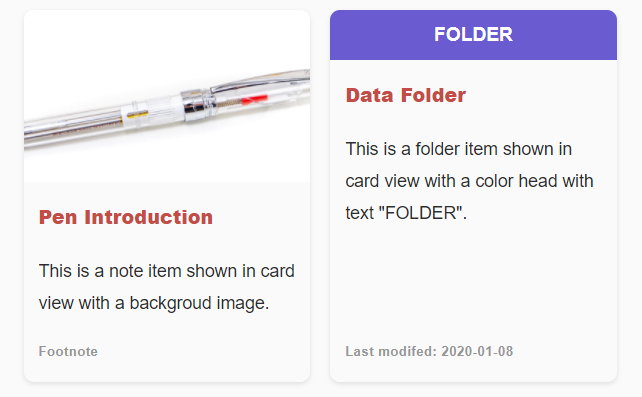
28 |
29 | The item data are defined with YAML codes as:
30 |
31 | ```
32 | ```ccard
33 | items: [
34 | {
35 | title: 'Pen Introduction',
36 | link: 'things/pen.md',
37 | image: 'assets/image-pen.png',
38 | brief: 'This is a note item shown in card view with a backgroud image.',
39 | foot: 'Footnote'
40 | },
41 | {
42 | title: 'Data Folder',
43 | head: 'Folder',
44 | image: '#6B5BD0',
45 | brief: 'This is a folder item shown in card view with a color head with text "FOLDER".',
46 | foot: 'Last modifed: 2020-01-08'
47 | }
48 | ]
49 | ```
50 | ```
51 |
52 | ### TIPS for defining item data
53 |
54 | - Since the the Item Data use YAML codes, if any string of the attributes contains quotes `'`, you should use double quotes: `''` to escape instead of using `\'`
55 | - Use `::` to escape `:`
56 | - Use the key `imagePrefix` if your images are stored in different attachment folders. See [sample recipes](https://github.com/xpgo/obsidian-folder-note-plugin/blob/main/doc/ccard-recipes.md) for more information.
57 |
58 |
59 | ## Item Types
60 |
61 | The item data can be defined or generated with different methods which is specified by the key **type** in the code block. This section introduces different types of methods and their options. In the future, there will be more types.
62 |
63 | ### type: static
64 |
65 | In the above example, all the item data are statically defined in the key **items** as a list. This is the `type: static` method which is also the default type. You can omit or explicitly set the key in the code block:
66 |
67 | ```
68 | ```ccard
69 | type: static
70 | items: [
71 | ...
72 | ]
73 | ```
74 |
75 | ### type: folder_brief_live
76 |
77 | This type will automatically generate item data of folder brief for you. For example, if you put the following code block in a note file:
78 |
79 | ```
80 | ```ccard
81 | type: folder_brief_live
82 | ```
83 | ```
84 |
85 | In the preview mode, this code block will be displayed as a card view of folder overview. If contents in the folder are changed, the card items will changed automatically.
86 |
87 | There are some keys to control the content of `folder_brief_live`:
88 |
89 | #### folder: /folder/path
90 |
91 | The default folder path of `folder_brief_live` is the parent path of the active note file. If you want to generate overview for other folder path, you can set the **folder** key in the code block. For example, the following code block will present an overview for the folder `media/music` in your Obsidian vault.
92 |
93 | ```
94 | ```ccard
95 | type: folder_brief_live
96 | folder: media/music
97 | ```
98 | ```
99 |
100 | There can be multiple `ccard` code blocks in a note file. for example, the following code block shows overview of different folders in a single note file.
101 |
102 | ```
103 | # All my music notes
104 |
105 | ```ccard
106 | type: folder_brief_live
107 | folder: media/music
108 | ```
109 |
110 | # All my video notes
111 |
112 | ```ccard
113 | type: folder_brief_live
114 | folder: media/video
115 | ```
116 | ```
117 |
118 | #### briefMax: 64
119 |
120 | For the brief contents, it tries to read the first paragraph of a note as its brief. If there is no paragraph text, it will use section headings. The default max length of the brief is 64 characters, if you want to increase it, please use the **briefMax** key, for example:
121 |
122 | ```
123 | ```ccard
124 | type: folder_brief_live
125 | folder: media/video
126 | briefMax: 128
127 | ```
128 | ```
129 |
130 |
131 | #### noteOnly: false|true
132 |
133 | The `folder_brief_live` tries to generate folder overview for both sub folders and notes, set the **noteOnly** key to `true` to let it show only notes for the overview, for example:
134 |
135 | ```
136 | ```ccard
137 | type: folder_brief_live
138 | folder: media/video
139 | noteOnly: true
140 | ```
141 | ```
142 |
143 |
144 | ## Key for all types
145 |
146 | You can change the display styles of the item data by the following keys.
147 |
148 | ### style: card|strip
149 |
150 | This `style : card` displays item data in a card style view, it is the default style which can be omitted in the code blocks.
151 |
152 | You can show the item data in strip style by:
153 |
154 | ```
155 | ```ccard
156 | type: folder_brief_live
157 | style: strip
158 | ```
159 | ```
160 |
161 | The following image shows the preview of card and strip style view:
162 |
163 | 
164 |
165 | In the future there will be more styles, such as list, chart or mind map.
166 |
167 | ### col: 3
168 |
169 | It controls how many columns in a row for card style view. The default is 3. For example, the following code block display folder overview with 4 cards in a row.
170 |
171 | ```
172 | ```ccard
173 | type: folder_brief_live
174 | style: card
175 | col: 4
176 | ```
177 | ```
178 |
179 | ### imagePrefix: ''
180 |
181 | It will add a prefix string to every image path defined in the data items. It is useful when all the images are from the same folder or url. For example:
182 |
183 | ```
184 | ```ccard
185 | items: [
186 | {
187 | title: 'test1',
188 | image: 'image1.png',
189 | brief: 'brief for test1',
190 | },
191 | {
192 | title: 'test2',
193 | image: 'assets/image2.png',
194 | brief: 'brief for test2',
195 | }
196 | ]
197 | imagePrefix: 'assets/'
198 | ```
199 | ```
200 |
201 | Now, the image path of the first item will be modified as `assets/image1.png`. However, the second item's image path will not be modified since it starts with the same string of `imagePrefix`. See [sample recipes](https://github.com/xpgo/obsidian-folder-note-plugin/blob/main/doc/ccard-recipes.md) for more information.
202 |
--------------------------------------------------------------------------------
/README.md:
--------------------------------------------------------------------------------
1 | # Folder Note Plugin
2 |
3 | Obsidian Plugin: Add description note to a folder. Generate card-style overview of folder. Make your vault to be a hierarchy note system.
4 |
5 | 
6 |
7 | ## Usage
8 |
9 | - **Add** description note: CTRL+Click on a folder in the file explorer panel.
10 | - **Show** description note: Just Click the folder.
11 | - **Delete** description note: Just delete the opened note file.
12 | - **Settings** : configure the note file method, file name and inital template on the settings panel.
13 | - **Command**: Use some commands to control the folder note plugin.
14 |
15 | ## Features
16 |
17 | - Dispaly and manage folder note easily
18 | - Support 3 different folder note methods
19 | - Automatically keep folder and folder-note name in syncing
20 | - Make a folder by active note file
21 | - Customized initial folder note content
22 | - Card and strip style view of folder content
23 | - ccard code block for elegant view of item data
24 |
25 | ## How it works
26 |
27 | The mechanism is simple: attaching a note file to a folder, and the folder note file will be hidden by CSS rules. But where do you put the folder note? There are three methods of creating description note for a folder: **Inside-Folder**, **Outside-Folder** and **Index-File**, please read [Folder Note Methods](https://github.com/xpgo/obsidian-folder-note-plugin/blob/main/doc/folder-note-methods.md) for more information about the Pros and Cons of each method. The **default** configuration is the **Inside-Folder** method. If you prefer the others, please change the settings.
28 |
29 | When CTRL+Click a folder, the plugin will create a description note with the path dependent on the method you choose. When clicking a folder, the plugin will open the attached note for you. You can configure the plugin to hide/show the folder note. It can also be configured to try to automatically keep the folder and note name in syncing.
30 |
31 | ## Settings
32 |
33 | - **Note File method**: select the folder note file method as mentioned above.
34 | - **Index File Name**: For the *Index-File* method, set the folder note name, like `_overview_` or `index`.
35 | - **Note Initial Content**: set the initial content for a new folder note, you can use some keywords:
36 | - {{FOLDER_NAME}} will be replaced with the folder name.
37 | - {{FOLDER_PATH}} will be replaced with the folder path.
38 | - {{FOLDER_BRIEF}} will be replaced with a ccard code block for card-style overview of current folder, and the content in the ccard can be edited, see [ccard Syntax](https://github.com/xpgo/obsidian-folder-note-plugin/blob/main/doc/ccard-syntax.md) for more information.
39 | - {{FOLDER_BRIEF_LIVE}} will be replaced with a tiny code block which will be rendered to the folder overview in real time.
40 | - **Key for New Note**: set to use CTRL+Click or ALT+Click for creating new folder note.
41 | - **Hide Folder Note**: turn off the setting if you want to show the note file in file explorer.
42 | - **Auto Rename**: For the methods *Inside-Folder* and *Outside-Folder*, the plugin tries to rename the folder note name when a folder name is changed or vice versa. However, this function is experimental, it does not always work. Rename them manually if you have some issue related to the operation.
43 | - **Delete Folder Note**: For the method *Outside-Folder*, delete folder note file when a folder is deleted.
44 |
45 | ## Command
46 |
47 | Use `Ctrl+P` to open Obsidian's command panel, and use the following commands of the plugin:
48 |
49 | - **Insert Folder Overview**: Insert a folder overview code blocks in the current note file.
50 | - **Make Current Note to Folder**: Create a folder based on the current note and attach the note to the new folder as folder note.
51 |
52 | ## Overview of folder
53 |
54 | The plugin can automatically generate a code block of `ccard` in a note file for displaying overview of a folder. The code block can be used and edited in any normal note file. For the syntax of `ccard` code block, please refer to [ccard Syntax](https://github.com/xpgo/obsidian-folder-note-plugin/blob/main/doc/ccard-syntax.md).
55 |
56 | You can use the `ccard` code block in the inital folder note template in the settings page. Alternatively, you can use some keywords in the initial folder note template to generate the code blocks for you:
57 |
58 | **Keyword: {{FOLDER_BRIEF}}**
59 |
60 | The keyword {{FOLDER_BRIEF}} will be replaces with a `ccard` code block which describes an brief overview of the folder. You can edit the codes in the code block to display whatever content you like. If you want to update the overview of a folder, it can be inserted to a note by command: Ctrl+P, Insert Folder Overview.
61 |
62 | **Keyword: {{FOLDER_BRIEF_LIVE}}**
63 |
64 | The keyword {{FOLDER_BRIEF_LIVE}} will be replaced with a `ccard` code block which will be rendered to the folder overview in real time. It is useful when you put some notes with image in a folder, e.g., things collections, it will generate a card view of all the notes with images dynamically.
65 |
66 | **Configuration**
67 |
68 | If you want to configure the content and appearence of the `ccard` code block, please refer to [ccard Syntax](https://github.com/xpgo/obsidian-folder-note-plugin/blob/main/doc/ccard-syntax.md). You can configure the style, colume number, image prefix, folder path, note only, max brief length and more. For example, the following image show different styles of folder overview.
69 |
70 | 
71 |
72 |
73 | ## Change log
74 |
75 | Remember to update the plugin, if you find some issues.
76 | **For updating from version < 0.4.0**, please refer to [Update from old version](https://github.com/xpgo/obsidian-folder-note-plugin/blob/main/doc/update-old-version.md).
77 |
78 |
79 | ### 0.7.x
80 |
81 | - add strip style view of item data (0.7.3)
82 | - use {{FOLDER_BRIEF_LIVE}} for default inital content (0.7.2)
83 | - add Keyword {{FOLDER_PATH}} for inital content (0.7.1)
84 | - fix multiple usage of some keywords for initial content (0.7.1)
85 | - add imagePrefix key for ccard (0.7.0)
86 | - add noteOnly Key for folder_brief_live (0.7.0)
87 | - fix showing both folder and note for outside mode (0.7.0)
88 | - hide settings according to folder method (0.7.0)
89 |
90 | See [more change log](https://github.com/xpgo/obsidian-folder-note-plugin/blob/main/doc/change-log.md).
91 |
92 | ## Plans for future
93 |
94 | - Add more template option for generating the initial content.
95 | - Automatically generate overview contents for the folder note file based on contents in the folder, like the software [Trilium](https://github.com/zadam/trilium) does. (Partially done.)
96 | - More robust renaming operation.
97 | - More style of overview.
98 |
99 | ## Known issues
100 |
101 | - The folder note file may appear when created. Click it again to hide.
102 | - Leave a message on the GitHub repo if you find any issues or want to improve the plugin.
103 |
104 | ## Install
105 |
106 | - On the Obsidian's settings page, browse the community plugins and search 'Folder Note', then install.
107 | - Or manually installing: go to the GitHub release page, copy over `main.js`, `styles.css`, `manifest.json` to your vault `VaultFolder/.obsidian/plugins/folder-note-plugin/`.
108 | - The plugin will be updated continuously, update it through Obsidian's settings page or manually.
109 |
110 | ## Build
111 |
112 | - Clone this repo.
113 | - `npm i` or `yarn` to install dependencies
114 | - `npm run dev` to start compilation in watch mode.
115 |
116 | ## Support
117 |
118 | [ ](https://www.buymeacoffee.com/xpgo)
119 | 
120 | 
121 |
--------------------------------------------------------------------------------
/src/folder-brief.ts:
--------------------------------------------------------------------------------
1 |
2 | import { App, MarkdownView, TFile, } from "obsidian";
3 | import { CardStyle, CardBlock, CardItem } from './card-item'
4 |
5 | // ------------------------------------------------------------
6 | // Folder Brief
7 | // ------------------------------------------------------------
8 |
9 | export class FolderBrief {
10 | app: App;
11 | folderPath: string;
12 | briefMax: number;
13 | noteOnly: boolean;
14 |
15 | constructor(app: App) {
16 | this.app = app;
17 | this.folderPath = '';
18 | this.briefMax = 64;
19 | this.noteOnly = false;
20 | }
21 |
22 | // for cards type: folder_brief
23 | async yamlFolderBrief(yaml: any) {
24 | var folderPath = '';
25 | const activeFile = this.app.workspace.getActiveFile();
26 | var notePath = activeFile.path;
27 | if (yaml.cards.folder) {
28 | folderPath = yaml.cards.folder;
29 | let folderExist = await this.app.vault.adapter.exists(folderPath);
30 | if (!folderExist) folderPath = '';
31 | }
32 | else {
33 | folderPath = activeFile.parent.path;
34 | }
35 |
36 | // generate
37 | if (folderPath.length > 0) {
38 | const view = this.app.workspace.getActiveViewOfType(MarkdownView);
39 | if (view) {
40 | let briefCards = await this.makeBriefCards(folderPath, notePath);
41 | const cardsElem = briefCards.getDocElement(this.app);
42 | return cardsElem;
43 | }
44 | }
45 | return null;
46 | }
47 |
48 | // generate folder overview
49 | async makeBriefCards(folderPath: string, activeNotePath: string) {
50 | // set note name
51 | let cardBlock = new CardBlock();
52 |
53 | // children statistic
54 | let pathList = await this.app.vault.adapter.list(folderPath);
55 | const subFolderList = pathList.folders;
56 | const subFileList = pathList.files;
57 |
58 | // sub folders
59 | if (!this.noteOnly) {
60 | for (var i = 0; i < subFolderList.length; i++) {
61 | var subFolderPath = subFolderList[i];
62 | // have outside folder note?
63 | let noteExists = await this.app.vault.adapter.exists(subFolderPath + '.md');
64 | if (!noteExists) {
65 | let folderCard = await this.makeFolderCard(folderPath, subFolderPath);
66 | cardBlock.addCard(folderCard);
67 | }
68 | }
69 | }
70 |
71 | // notes
72 | for (var i = 0; i < subFileList.length; i++) {
73 | var subFilePath = subFileList[i];
74 | if (!subFilePath.endsWith('.md')) continue;
75 | if (subFilePath == activeNotePath) continue; // omit self includeing
76 | let noteCard = await this.makeNoteCard(folderPath, subFilePath);
77 | cardBlock.addCard(noteCard);
78 | }
79 |
80 | // return
81 | return cardBlock;
82 | }
83 |
84 | // make folder brief card
85 | async makeFolderCard(folderPath: string, subFolderPath: string) {
86 | // title
87 | var subFolderName = subFolderPath.split('/').pop();
88 | let card = new CardItem(subFolderName, CardStyle.Folder);
89 |
90 | // description
91 | let subPathList = await this.app.vault.adapter.list(subFolderPath);
92 | var folderBrief = 'Contains ';
93 | folderBrief += subPathList.folders.length.toString() + ' folders, ';
94 | folderBrief += subPathList.files.length.toString() + ' notes.';
95 | card.setAbstract(folderBrief);
96 |
97 | // footnote, use date in the future
98 | card.setFootnote(subFolderPath.replace(folderPath + '/', ''));
99 |
100 | // return
101 | return card;
102 | }
103 |
104 | // make note brief card
105 | async makeNoteCard(folderPath: string, notePath: string) {
106 | // titile
107 | var noteName = notePath.split('/').pop();
108 | var noteTitle = noteName.substring(0, noteName.length - 3);
109 | let card = new CardItem(noteTitle, CardStyle.Note);
110 | card.setTitleLink(notePath);
111 |
112 | // read content
113 | let file = this.app.vault.getAbstractFileByPath(notePath);
114 | if (file && file instanceof TFile) {
115 | let contentOrg = await this.app.vault.cachedRead(file);
116 | // let content = await this.app.vault.adapter.read(notePath);
117 | // console.log(content);
118 |
119 | // image
120 | var imageUrl = this.getContentImage(contentOrg, folderPath);
121 | if (imageUrl.length > 0) {
122 | card.setHeadImage(imageUrl);
123 | }
124 |
125 | // content?
126 | var contentBrief = this.getContentBrief(contentOrg);
127 | if (contentBrief.length > 0) {
128 | if (contentBrief.length > this.briefMax) {
129 | contentBrief = contentBrief.substring(0, this.briefMax);
130 | contentBrief += '...';
131 | }
132 | card.setAbstract(contentBrief);
133 | }
134 |
135 | // foot note
136 | const fileSt = (file as TFile);
137 | if (fileSt.stat) {
138 | let date = new Date(fileSt.stat.mtime);
139 | card.setFootnote(date.toLocaleString());
140 | }
141 | else {
142 | card.setFootnote(notePath.replace(folderPath + '/', ''));
143 | }
144 | }
145 |
146 | // return
147 | return card;
148 | }
149 |
150 | getContentImage(contentOrg: string, folderPath: string) {
151 | var imageUrl = '';
152 | // for patten: ![xxx.png]
153 | let regexImg = new RegExp('!\\[(.*?)\\]\\((.*?)\\)');
154 | var match = regexImg.exec(contentOrg);
155 | if (match != null) {
156 | imageUrl = match[2];
157 | }
158 | else {
159 | // for patten: ![[xxx.png]]
160 | let regexImg2 = new RegExp('!\\[\\[(.*?)\\]\\]');
161 | match = regexImg2.exec(contentOrg);
162 | if (match != null) imageUrl = match[1];
163 | }
164 | // add image url
165 | if (imageUrl.length > 0) {
166 | if (!imageUrl.startsWith('http')) {
167 | let headPath = folderPath;
168 | let relativePath = false;
169 | while (imageUrl.startsWith('../')) {
170 | imageUrl = imageUrl.substring(3);
171 | headPath = headPath.substring(0, headPath.lastIndexOf('/'));
172 | relativePath = true;
173 | }
174 | if (relativePath) {
175 | imageUrl = headPath + '/' + imageUrl;
176 | }
177 | imageUrl = imageUrl.replace(/\%20/g, ' ')
178 | // imageUrl = this.app.vault.adapter.getResourcePath(imageUrl);
179 | }
180 | }
181 | return imageUrl;
182 | }
183 |
184 | getContentBrief(contentOrg: string) {
185 | // remove some special content
186 | var content = contentOrg.trim();
187 |
188 | // skip yaml head
189 | if (content.startsWith('---\r') || content.startsWith('---\n') ) {
190 | const hPos2 = content.indexOf('---', 4);
191 | if (hPos2 >= 0 && (content[hPos2-1] == '\n' || (content[hPos2-1] == '\r'))) {
192 | content = content.substring(hPos2+4).trim();
193 | }
194 | }
195 |
196 | content = content
197 | // Remove YAML code
198 | // .replace(/^---[\r\n][^(---)]*[\r\n]---[\r\n]/g, '')
199 | // Remove HTML tags
200 | .replace(/<[^>]*>/g, '')
201 | // wiki style links
202 | .replace(/\!\[\[(.*?)\]\]/g, '')
203 | .replace(/\[\[(.*?)\]\]/g, '$1')
204 | // Remove images
205 | .replace(/\!\[(.*?)\][\[\(].*?[\]\)]/g, '')
206 | // Remove inline links
207 | .replace(/\[(.*?)\][\[\(].*?[\]\)]/g, '$1')
208 | // Remove emphasis (repeat the line to remove double emphasis)
209 | .replace(/([\*_]{1,3})(\S.*?\S{0,1})\1/g, '$2')
210 | // Remove blockquotes
211 | .replace(/\n(>|\>)(.*)/g, '')
212 | // Remove code blocks
213 | .replace(/(```[^\s]*\n[\s\S]*?\n```)/g, '')
214 | // Remove inline code
215 | .replace(/`(.+?)`/g, '$1')
216 | .trim()
217 |
218 | // try to get the first paragraph
219 | var contentBrief = '';
220 | content = '\n' + content + '\n';
221 | let regexP1 = new RegExp('\n([^\n|^#|^>])([^\n]+)\n', 'g');
222 | var match = null;
223 | if ((match = regexP1.exec(content)) !== null) {
224 | contentBrief = match[1] + match[2];
225 | }
226 |
227 | // console.log('contentBrief', contentBrief);
228 | contentBrief = contentBrief.trim();
229 |
230 | // use section headings
231 | if (contentBrief.length == 0) {
232 | let regexHead = new RegExp('^#{1,6}(?!#)(.*)[\r\n]', 'mg');
233 | while ((match = regexHead.exec(content)) !== null) {
234 | contentBrief += match[1] + ', ';
235 | if (contentBrief.length > this.briefMax) {
236 | break;
237 | }
238 | }
239 | if (contentBrief.endsWith(', ')) {
240 | contentBrief = contentBrief.substring(0, contentBrief.length-2);
241 | }
242 | }
243 |
244 | // return
245 | return contentBrief;
246 | }
247 | }
248 |
--------------------------------------------------------------------------------
/src/card-item.ts:
--------------------------------------------------------------------------------
1 |
2 | import { App, } from "obsidian";
3 |
4 | // ------------------------------------------------------------
5 | // Card block
6 | // ------------------------------------------------------------
7 |
8 | export enum CardStyle {
9 | Folder, Note, Image,
10 | }
11 |
12 | export class CardBlock {
13 | style: string;
14 | col: number;
15 | cards: CardItem[];
16 | imagePrefix: string;
17 |
18 | constructor() {
19 | this.style = 'card';
20 | this.cards = [];
21 | this.col = -1;
22 | this.imagePrefix = '';
23 | }
24 |
25 | addCard(card: CardItem) {
26 | this.cards.push(card);
27 | }
28 |
29 | clear() {
30 | this.cards = [];
31 | }
32 |
33 | getCardNum() {
34 | return this.cards.length;
35 | }
36 |
37 | getDocElement(app: App) {
38 | const cardDiv = document.createElement('div');
39 | if (this.style == 'strip') {
40 | cardDiv.addClass('strip-card-band');
41 | for (var i in this.cards) {
42 | let cardEl = this.cards[i].getBoxElement(app, this.imagePrefix);
43 | cardEl.addClass('strip-card-view');
44 | cardDiv.appendChild(cardEl);
45 | }
46 | }
47 | else { // default: this.style == 'card'
48 | cardDiv.addClass('cute-card-band');
49 | for (var i in this.cards) {
50 | let cardEl = this.cards[i].getBoxElement(app, this.imagePrefix);
51 | cardEl.addClass('cute-card-view');
52 | cardDiv.appendChild(cardEl);
53 | }
54 | if (this.col > 0) {
55 | cardDiv.setAttr('style' ,
56 | `grid-template-columns: repeat(${this.col}, 1fr);`);
57 | }
58 | }
59 | return cardDiv;
60 | }
61 |
62 | getYamlCode() {
63 | let yamlStr = '';
64 | const nCard = this.getCardNum();
65 | if (nCard > 0) {
66 | yamlStr = '\n```ccard\nitems: [';
67 | for (var i in this.cards) {
68 | yamlStr += '\n {\n'
69 | yamlStr += this.cards[i].getYamlCode(' ');
70 | yamlStr += ' },'
71 | }
72 | // get rid of last period
73 | yamlStr = yamlStr.substring(0, yamlStr.length - 1);
74 | yamlStr += '\n]\n';
75 | if (this.col > 0) {
76 | yamlStr += `col: ${this.col}\n`;
77 | }
78 | yamlStr += '```\n';
79 | }
80 | return yamlStr;
81 | }
82 |
83 | fromYamlCards(yaml: any) {
84 | // parser options
85 | this.fromYamlOptions(yaml);
86 |
87 | // parser items
88 | if (yaml.items) {
89 | this.clear();
90 | const allItems = yaml.items;
91 | for (var i in allItems) {
92 | const cardInfo = allItems[i];
93 | if ('title' in cardInfo) {
94 | let cardItem = new CardItem(cardInfo['title'], CardStyle.Note);
95 | cardItem.fromDict(cardInfo);
96 | this.addCard(cardItem);
97 | }
98 | }
99 | }
100 |
101 | // return
102 | return (this.getCardNum() > 0);
103 | }
104 |
105 | fromYamlOptions(yaml: any) {
106 | if (yaml.style) {
107 | this.style = yaml.style;
108 | }
109 | if (yaml.col) {
110 | this.col = yaml.col;
111 | }
112 | if (yaml.imagePrefix) {
113 | this.imagePrefix = yaml.imagePrefix;
114 | }
115 | }
116 | }
117 |
118 | export class CardItem {
119 | cardStyle: CardStyle;
120 | headText: string;
121 | headImage: string;
122 | title: string;
123 | titleLink: string;
124 | abstract: string;
125 | footnote: string;
126 |
127 | constructor(title: string, style: CardStyle) {
128 | this.title = title;
129 | this.abstract = "No abstract.";
130 | this.cardStyle = style;
131 | }
132 |
133 | setHeadText(text: string) {
134 | this.headText = text;
135 | }
136 |
137 | setHeadImage(linkUrl: string) {
138 | this.headImage = linkUrl;
139 | }
140 |
141 | setTitle(title: string) {
142 | this.title = title;
143 | }
144 |
145 | setTitleLink(linkUrl: string) {
146 | this.titleLink = linkUrl;
147 | }
148 |
149 | setAbstract(abstract: string) {
150 | this.abstract = abstract;
151 | }
152 |
153 | setFootnote(footnote: string) {
154 | this.footnote = footnote;
155 | }
156 |
157 | fromDict(dict: any) {
158 | if ('head' in dict) {
159 | this.headText = dict['head'];
160 | if (this.headText == 'Folder') {
161 | this.cardStyle = CardStyle.Folder;
162 | }
163 | else if (this.headText == 'Note') {
164 | this.cardStyle = CardStyle.Note;
165 | }
166 | }
167 | if ('image' in dict) this.headImage = dict['image'];
168 | if ('link' in dict) this.titleLink = dict['link'];
169 | if ('brief' in dict) this.abstract = dict['brief'];
170 | if ('foot' in dict) this.footnote = dict['foot'];
171 | }
172 |
173 | yamlEscapeQuotes(org: string) {
174 | return org.replace(/'/gi, "''");
175 | }
176 |
177 | getYamlCode(prefix: string) {
178 | var yamlStr = '';
179 | yamlStr += `${prefix}title: '${this.yamlEscapeQuotes(this.title)}'`;
180 | if (this.titleLink) yamlStr += `,\n${prefix}link: '${this.yamlEscapeQuotes(this.titleLink)}'`;
181 | if (this.abstract) yamlStr += `,\n${prefix}brief: '${this.yamlEscapeQuotes(this.abstract)}'`;
182 | if (this.footnote) yamlStr += `,\n${prefix}foot: '${this.yamlEscapeQuotes(this.footnote)}'`;
183 | if (this.headImage) {
184 | yamlStr += `,\n${prefix}image: '${this.yamlEscapeQuotes(this.headImage)}'`;
185 | }
186 | else if (this.headText) {
187 | yamlStr += `,\n${prefix}head: '${this.yamlEscapeQuotes(this.headText)}'`;
188 | }
189 | else {
190 | if (this.cardStyle == CardStyle.Folder) {
191 | yamlStr += `,\n${prefix}head: 'Folder'`;
192 | }
193 | else if (this.cardStyle == CardStyle.Note) {
194 | yamlStr += `,\n${prefix}head: 'Note'`;
195 | }
196 | else {
197 | yamlStr += `,\n${prefix}head: 'Card'`;
198 | }
199 | }
200 | yamlStr += '\n';
201 | return yamlStr;
202 | }
203 |
204 | getBoxElement(app: App, imagePrefix: string) {
205 | let cardEl = document.createElement('div');
206 | // Heading
207 | let headEl = cardEl.appendChild(document.createElement('div'));
208 | if (this.headImage) {
209 | this.cardStyle = CardStyle.Image;
210 | if (this.headImage.startsWith("#")) {
211 | // color
212 | headEl.addClass('thumb-color');
213 | headEl.setAttr('style', `background-color: ${this.headImage};`);
214 | }
215 | else if (this.headImage.contains("://")) {
216 | // app local image
217 | headEl.addClass('thumb');
218 | headEl.setAttr('style', `background-image: url(${this.headImage});`);
219 | } else {
220 | // asset file name?
221 | let imageUrl = this.headImage;
222 | if (imagePrefix.length > 0) {
223 | // skip explicitly path
224 | let urlPathList = imageUrl.split('/').join(' ').trimStart();
225 | let fixPathList = imagePrefix.split('/').join(' ').trimStart();
226 | if (!urlPathList.startsWith(fixPathList)) {
227 | imageUrl = imagePrefix + this.headImage;
228 | }
229 | }
230 | if (!imageUrl.contains('://')) {
231 | imageUrl = app.vault.adapter.getResourcePath(imageUrl);
232 | }
233 | headEl.addClass('thumb');
234 | headEl.setAttr('style', `background-image: url(${imageUrl});`);
235 | }
236 |
237 | if (this.headText) {
238 | headEl.textContent = this.headText;
239 | }
240 | }
241 | else if (this.cardStyle == CardStyle.Folder) {
242 | headEl.addClasses(['thumb-color', 'thumb-color-folder']);
243 | headEl.textContent = 'Folder';
244 | }
245 | else if (this.cardStyle == CardStyle.Note) {
246 | headEl.addClasses(['thumb-color', 'thumb-color-note']);
247 | headEl.textContent = 'Note';
248 | }
249 | // article
250 | let articleEl = cardEl.appendChild(document.createElement('article'));
251 | // Title
252 | if (this.titleLink) {
253 | let titleEl = articleEl.appendChild(document.createElement('a'));
254 | if (this.titleLink.endsWith('.md')) {
255 | titleEl.addClass('internal-link');
256 | }
257 | titleEl.href = this.titleLink;
258 | let h1El = document.createElement('h1');
259 | h1El.textContent = this.title;
260 | titleEl.appendChild(h1El);
261 | }
262 | else {
263 | let titleEl = articleEl.appendChild(document.createElement('h1'));
264 | titleEl.textContent = this.title;
265 | }
266 | // abstract
267 | let briefEl = articleEl.appendChild(document.createElement('p'));
268 | briefEl.textContent = this.abstract;
269 | // footnote
270 | if (this.footnote) {
271 | let footEl = articleEl.appendChild(document.createElement('span'));
272 | footEl.textContent = this.footnote;
273 | }
274 | // close
275 | return cardEl;
276 | }
277 | }
278 |
279 |
--------------------------------------------------------------------------------
/src/folder-note.ts:
--------------------------------------------------------------------------------
1 |
2 | import { App, MarkdownView, TFile, } from "obsidian";
3 | import { FolderBrief } from './folder-brief';
4 |
5 | // ------------------------------------------------------------
6 | // Folder Note
7 | // ------------------------------------------------------------
8 |
9 | enum NoteFileMethod {
10 | Index, Inside, Outside,
11 | }
12 |
13 | export class FolderNote {
14 | app: App;
15 | // copy from settings
16 | method: NoteFileMethod;
17 | indexBase: string;
18 | initContent: string;
19 | hideNoteFile: boolean;
20 | // local vars
21 | folderPath: string;
22 | notePath: string;
23 | noteBase: string;
24 | // for rename
25 | filesToRename: string[];
26 | filesToRenameSet: boolean;
27 |
28 | constructor(app: App, methodStr: string, indexBase: string) {
29 | this.app = app;
30 | this.setMethod(methodStr, indexBase);
31 | this.emptyPath();
32 | // for rename
33 | this.filesToRename = [];
34 | this.filesToRenameSet = false;
35 | }
36 |
37 | // set the method
38 | setMethod(methodStr: string, indexBase: string) {
39 | if (methodStr == 'index') {
40 | this.method = NoteFileMethod.Index;
41 | this.indexBase = indexBase;
42 | }
43 | else if (methodStr == 'inside') {
44 | this.method = NoteFileMethod.Inside;
45 | }
46 | else if (methodStr == 'outside') {
47 | this.method = NoteFileMethod.Outside;
48 | }
49 | }
50 |
51 | // clear
52 | emptyPath() {
53 | this.folderPath = '';
54 | this.notePath = '';
55 | this.noteBase = '';
56 | }
57 |
58 | // set by folder path
59 | setByFolderPath(path: string) {
60 | this.emptyPath();
61 | var folderPath = path.trim();
62 | if (folderPath.length == 0) return;
63 |
64 | // set
65 | this.folderPath = folderPath;
66 | var notePaths = this.getFolderNotePath(folderPath);
67 | this.notePath = notePaths[0];
68 | this.noteBase = notePaths[1];
69 | }
70 |
71 | // set by note, should ends with .md
72 | setByNotePath(path: string) {
73 | this.emptyPath();
74 | var notePath = path.trim();
75 | if (notePath.length == 0) return;
76 | if (!notePath.endsWith('.md')) return;
77 |
78 | // set
79 | this.notePath = notePath;
80 | this.noteBase = this.getFileBaseName(notePath);
81 | this.folderPath = this.getNoteFolderPath(notePath);
82 | }
83 |
84 | // set by folder element
85 | setByFolderElement(folderItemEl: Element) {
86 | var folderPath = '';
87 | var folderName = '';
88 |
89 | var className = folderItemEl.className.toString();
90 | var folderElem = folderItemEl;
91 | if (className.contains('nav-folder-title-content')) {
92 | folderName = folderElem.getText();
93 | folderElem = folderItemEl.parentElement;
94 | folderPath = folderElem.attributes.getNamedItem('data-path').textContent;
95 | }
96 | else if (className.contains('nav-folder-title')) {
97 | folderPath = folderItemEl.attributes.getNamedItem('data-path').textContent;
98 | folderName = folderItemEl.lastElementChild.getText();
99 | }
100 |
101 | // fix the folder path
102 | if (folderPath.length > 0) {
103 | var slashLast = folderPath.lastIndexOf('/');
104 | var folderPathLast = folderPath.split('/').pop();
105 | if (folderPathLast != folderName) {
106 | folderPath = folderPath.substring(0, slashLast + 1) + folderName;
107 | }
108 | }
109 |
110 | // set to mine
111 | this.setByFolderPath(folderPath);
112 |
113 | // return the element in useage
114 | return folderElem;
115 | }
116 |
117 | // get file base name
118 | getFileBaseName(filePath: string) {
119 | var baseName = filePath.split('/').pop();
120 | var dotPos = baseName.lastIndexOf('.');
121 | if (dotPos > 0) baseName = baseName.substring(0, dotPos);
122 | return baseName;
123 | }
124 |
125 | // get folder note path by folder path
126 | getFolderNotePath(folderPath: string) {
127 | var notePath = '';
128 | var noteBaseName = this.indexBase;
129 | if (this.method == NoteFileMethod.Index) {
130 | notePath = folderPath + '/' + noteBaseName + '.md';
131 | }
132 | else {
133 | noteBaseName = folderPath.split('/').pop();
134 | if (this.method == NoteFileMethod.Inside) {
135 | notePath = folderPath + '/' + noteBaseName + '.md';
136 | }
137 | else if (this.method == NoteFileMethod.Outside) {
138 | notePath = folderPath + '.md';
139 | }
140 | }
141 | // console.log('notePath: ', notePath);
142 | return [notePath, noteBaseName];
143 | }
144 |
145 | // get note folder, make sure it is a note file
146 | getNoteFolderPath(notePath: string) {
147 | var folderPath = '';
148 | if (this.method == NoteFileMethod.Index) {
149 | folderPath = notePath.substring(0, notePath.lastIndexOf('/'));
150 | }
151 | else if (this.method == NoteFileMethod.Inside) {
152 | folderPath = notePath.substring(0, notePath.lastIndexOf('/'));
153 | }
154 | else if (this.method == NoteFileMethod.Outside) {
155 | folderPath = notePath.substring(0, notePath.length-3);
156 | }
157 | return folderPath;
158 | }
159 |
160 | // check if it is folder note name
161 | async isFolderNotePath(notePath: string) {
162 | var isFN = false;
163 | if (!notePath.endsWith('.md')) return false;
164 |
165 | if (this.method == NoteFileMethod.Index) {
166 | isFN = notePath.endsWith(`/${this.indexBase}.md`);
167 | }
168 | else if (this.method == NoteFileMethod.Inside) {
169 | var noteBaseName = this.getFileBaseName(notePath);
170 | if (notePath.endsWith(noteBaseName + '/' + noteBaseName + '.md')) {
171 | isFN = true;
172 | }
173 | }
174 | else if (this.method == NoteFileMethod.Outside) {
175 | var folderPath = notePath.substring(0, notePath.length-3);
176 | isFN = await this.app.vault.adapter.exists(folderPath);
177 | }
178 | return isFN;
179 | }
180 |
181 | // check is folder note file?
182 | async isFolderNote(notePath: string) {
183 | var isFN = false;
184 | if (this.method == NoteFileMethod.Index) {
185 | isFN = notePath.endsWith(`/${this.indexBase}.md`);
186 | }
187 | else if (this.method == NoteFileMethod.Inside) {
188 | var noteBaseName = this.getFileBaseName(notePath);
189 | isFN = notePath.endsWith(`${noteBaseName}/${noteBaseName}.md`);
190 | }
191 | else if (this.method == NoteFileMethod.Outside) {
192 | var folderPath = notePath.substring(0, notePath.length-3);
193 | isFN = await this.app.vault.adapter.exists(folderPath);
194 | }
195 | return isFN;
196 | }
197 |
198 | // open note file
199 | async openFolderNote(folderElem: Element, doCreate: boolean) {
200 | // check note file
201 | let folderNoteExists = await this.app.vault.adapter.exists(this.notePath);
202 | if (!folderNoteExists && doCreate) {
203 | await this.newFolderNote();
204 | folderNoteExists = true;
205 | }
206 |
207 | // open the note
208 | if (folderNoteExists) {
209 | this.hideFolderNote(folderElem);
210 | // show the note
211 | this.app.workspace.openLinkText(this.notePath, '', false, { active: true });
212 | }
213 | else if (folderElem.hasClass('has-folder-note')) {
214 | folderElem.removeClass('has-folder-note');
215 | }
216 | }
217 |
218 | // create folder note
219 | async newFolderNote() {
220 | let noteInitContent = await this.expandContent(this.initContent);
221 | await this.app.vault.adapter.write(this.notePath, noteInitContent);
222 | }
223 |
224 | // create folder by note
225 | async newNoteFolder() {
226 | if (this.method == NoteFileMethod.Outside) {
227 | let folderExists = await this.app.vault.adapter.exists(this.folderPath);
228 | if (!folderExists) {
229 | await this.app.vault.adapter.mkdir(this.folderPath);
230 | }
231 | }
232 | else if (this.method == NoteFileMethod.Inside) {
233 | var folderPath = this.notePath.substring(0, this.notePath.length-3);
234 | let folderExists = await this.app.vault.adapter.exists(folderPath);
235 | if (!folderExists) {
236 | await this.app.vault.adapter.mkdir(folderPath);
237 | var newNotePath = folderPath + '/' + this.noteBase + '.md';
238 | await this.app.vault.adapter.rename(this.notePath, newNotePath);
239 | this.app.workspace.openLinkText(newNotePath, '', false, { active: true });
240 | }
241 | }
242 | }
243 |
244 | // expand content template
245 | async expandContent(template: string) {
246 | // keyword: {{FOLDER_NAME}}, {{FOLDER_PATH}}
247 | var folderName = this.folderPath.split('/').pop();
248 | var content = template
249 | .replace(/{{FOLDER_NAME}}/g, folderName)
250 | .replace(/{{FOLDER_PATH}}/g, this.folderPath)
251 | // keyword: {{FOLDER_BRIEF}}
252 | if (content.contains('{{FOLDER_BRIEF}}')) {
253 | let folderBrief = new FolderBrief(this.app);
254 | let briefCards = await folderBrief.makeBriefCards(this.folderPath, this.notePath);
255 | content = content.replace('{{FOLDER_BRIEF}}', briefCards.getYamlCode());
256 | }
257 | // keyword: {{FOLDER_BRIEF_LIVE}}
258 | if (content.contains('{{FOLDER_BRIEF_LIVE}}')) {
259 | const briefLiveCode = '\n```ccard\ntype: folder_brief_live\n```\n';
260 | content = content.replace('{{FOLDER_BRIEF_LIVE}}', briefLiveCode);
261 | }
262 | return content;
263 | }
264 |
265 | // hide folder note
266 | hideFolderNote(folderElem: Element) {
267 | // modify the element
268 | const hideSetting = this.hideNoteFile;
269 | folderElem.addClass('has-folder-note');
270 | var parentElem = folderElem.parentElement;
271 | var fileSelector = ':scope > div.nav-folder-children > div.nav-file > div.nav-file-title';
272 | var isOutsideMethod = (this.method == NoteFileMethod.Outside);
273 | if (isOutsideMethod) {
274 | parentElem = parentElem.parentElement;
275 | fileSelector = ':scope > div.nav-file > div.nav-file-title';
276 | }
277 | var noteBase = this.noteBase;
278 | parentElem.querySelectorAll(fileSelector)
279 | .forEach(function (fileElem) {
280 | var fileNodeTitle = fileElem.firstElementChild.textContent;
281 | // console.log('fileNoteTitle: ', fileNodeTitle);
282 | if (hideSetting && (fileNodeTitle == noteBase)) {
283 | fileElem.addClass('is-folder-note');
284 | }
285 | else if (!isOutsideMethod) {
286 | fileElem.removeClass('is-folder-note');
287 | }
288 | // console.log('isOutsideMethod: ', isOutsideMethod);
289 | }
290 | );
291 | }
292 |
293 | // get the file breif path
294 | async getNoteFolderBriefPath(notePath: string) {
295 | var folderPath = '';
296 | let isFN = await this.isFolderNote(notePath);
297 | if (isFN) {
298 | folderPath = this.getNoteFolderPath(notePath);
299 | }
300 | else {
301 | folderPath = notePath.substring(0, notePath.lastIndexOf('/'));
302 | }
303 | return folderPath;
304 | }
305 |
306 | // delete a folder
307 | async deleteFolder(pathToDel: any) {
308 | if (this.method == NoteFileMethod.Outside && !pathToDel.endsWith('.md')) {
309 | // delete a folder
310 | let myNotePath = pathToDel + '.md';
311 | let noteExists = await this.app.vault.adapter.exists(myNotePath);
312 | if (noteExists) {
313 | await this.app.vault.adapter.trashLocal(myNotePath);
314 | }
315 | }
316 | }
317 |
318 | // sync folder / note name
319 | async syncName(newPath: any, oldPath: any) {
320 | if (this.method == NoteFileMethod.Outside) {
321 | await this.syncNameOutside(newPath, oldPath);
322 | }
323 | else if (this.method == NoteFileMethod.Inside) {
324 | await this.syncNameInside(newPath, oldPath);
325 | }
326 | }
327 |
328 | // sync folder / note name for outside
329 | async syncNameOutside(newPath: any, oldPath: any) {
330 | if (!oldPath.endsWith('.md')) {
331 | // changing folder name
332 | // console.log('changing folder!!!')
333 | // console.log('oldPath: ', oldPath);
334 | // console.log('newPath: ', newPath.path);
335 | let noteExists = await this.app.vault.adapter.exists(oldPath + '.md');
336 | if (noteExists) {
337 | var oldNotePaths = this.getFolderNotePath(oldPath);
338 | var newNotePaths = this.getFolderNotePath(newPath.path);
339 | if (oldNotePaths[1] != newNotePaths[1]) {
340 | await this.app.vault.adapter.rename(oldNotePaths[0], newNotePaths[0]);
341 | }
342 | }
343 | }
344 | else {
345 | // changeing note name
346 | let isFN = await this.isFolderNote(oldPath);
347 | if (isFN) {
348 | // console.log('oldPath: ', oldPath);
349 | // console.log('newPath: ', newPath.path);
350 | var oldFolderPath = this.getNoteFolderPath(oldPath);
351 | var newFolderPath = this.getNoteFolderPath(newPath.path);
352 | await this.app.vault.adapter.rename(oldFolderPath, newFolderPath);
353 | }
354 | }
355 | }
356 |
357 | // sync folder / note name for inside case
358 | async syncNameInside(newPath: any, oldPath: any) {
359 | if (!oldPath.endsWith('.md')) {
360 | // changing folder name
361 | var oldNotePaths = this.getFolderNotePath(oldPath);
362 | var newNotePaths = this.getFolderNotePath(newPath.path);
363 | var oldNotePathNew = newPath.path + '/' + oldNotePaths[1] + '.md';
364 | let noteExists = await this.app.vault.adapter.exists(oldNotePathNew);
365 | if (noteExists) {
366 | if (newNotePaths[0] != oldNotePathNew) {
367 | // put it to rename
368 | this.filesToRename.push(oldNotePathNew);
369 | this.filesToRename.push(newNotePaths[0]);
370 | }
371 | }
372 | }
373 | else if (this.filesToRename.length == 0) {
374 | // changing note name
375 | let isFN = await this.isFolderNote(oldPath);
376 | if (isFN) {
377 | var oldFolderPath = this.getNoteFolderPath(oldPath);
378 | // find the new path
379 | var noteDir = newPath.path;
380 | noteDir = noteDir.substring(0, noteDir.lastIndexOf('/'));
381 | noteDir = noteDir.substring(0, noteDir.lastIndexOf('/'));
382 | var noteBase = newPath.path.split('/').pop();
383 | noteBase = noteBase.substring(0, noteBase.length-3);
384 | var newFolderPath = '';
385 | if (noteDir.length > 0) {
386 | newFolderPath = noteDir + '/' + noteBase;
387 | }
388 | else {
389 | newFolderPath = noteBase;
390 | }
391 | // put it to rename
392 | if (oldFolderPath != newFolderPath) {
393 | this.filesToRename.push(oldFolderPath);
394 | this.filesToRename.push(newFolderPath);
395 | }
396 | }
397 | }
398 | // only do once a time
399 | if (!this.filesToRenameSet && this.filesToRename.length > 0) {
400 | this.filesToRenameSet = true;
401 | setTimeout(() => {
402 | // console.log('rename is running after 1 s.');
403 | if (this.filesToRename.length) {
404 | var oldFolderPath = this.filesToRename[0];
405 | var newFolderPath = this.filesToRename[1];
406 | // console.log('Mod Old Path:', oldFolderPath);
407 | // console.log('Mod New Path:', newFolderPath);
408 | this.app.vault.adapter.rename(oldFolderPath, newFolderPath);
409 | this.filesToRename = [];
410 | this.filesToRenameSet = false;
411 | }
412 | }, 1000);
413 | }
414 | }
415 | }
416 |
--------------------------------------------------------------------------------
](https://www.buymeacoffee.com/xpgo)
119 | 
120 | 
121 |
--------------------------------------------------------------------------------
/src/folder-brief.ts:
--------------------------------------------------------------------------------
1 |
2 | import { App, MarkdownView, TFile, } from "obsidian";
3 | import { CardStyle, CardBlock, CardItem } from './card-item'
4 |
5 | // ------------------------------------------------------------
6 | // Folder Brief
7 | // ------------------------------------------------------------
8 |
9 | export class FolderBrief {
10 | app: App;
11 | folderPath: string;
12 | briefMax: number;
13 | noteOnly: boolean;
14 |
15 | constructor(app: App) {
16 | this.app = app;
17 | this.folderPath = '';
18 | this.briefMax = 64;
19 | this.noteOnly = false;
20 | }
21 |
22 | // for cards type: folder_brief
23 | async yamlFolderBrief(yaml: any) {
24 | var folderPath = '';
25 | const activeFile = this.app.workspace.getActiveFile();
26 | var notePath = activeFile.path;
27 | if (yaml.cards.folder) {
28 | folderPath = yaml.cards.folder;
29 | let folderExist = await this.app.vault.adapter.exists(folderPath);
30 | if (!folderExist) folderPath = '';
31 | }
32 | else {
33 | folderPath = activeFile.parent.path;
34 | }
35 |
36 | // generate
37 | if (folderPath.length > 0) {
38 | const view = this.app.workspace.getActiveViewOfType(MarkdownView);
39 | if (view) {
40 | let briefCards = await this.makeBriefCards(folderPath, notePath);
41 | const cardsElem = briefCards.getDocElement(this.app);
42 | return cardsElem;
43 | }
44 | }
45 | return null;
46 | }
47 |
48 | // generate folder overview
49 | async makeBriefCards(folderPath: string, activeNotePath: string) {
50 | // set note name
51 | let cardBlock = new CardBlock();
52 |
53 | // children statistic
54 | let pathList = await this.app.vault.adapter.list(folderPath);
55 | const subFolderList = pathList.folders;
56 | const subFileList = pathList.files;
57 |
58 | // sub folders
59 | if (!this.noteOnly) {
60 | for (var i = 0; i < subFolderList.length; i++) {
61 | var subFolderPath = subFolderList[i];
62 | // have outside folder note?
63 | let noteExists = await this.app.vault.adapter.exists(subFolderPath + '.md');
64 | if (!noteExists) {
65 | let folderCard = await this.makeFolderCard(folderPath, subFolderPath);
66 | cardBlock.addCard(folderCard);
67 | }
68 | }
69 | }
70 |
71 | // notes
72 | for (var i = 0; i < subFileList.length; i++) {
73 | var subFilePath = subFileList[i];
74 | if (!subFilePath.endsWith('.md')) continue;
75 | if (subFilePath == activeNotePath) continue; // omit self includeing
76 | let noteCard = await this.makeNoteCard(folderPath, subFilePath);
77 | cardBlock.addCard(noteCard);
78 | }
79 |
80 | // return
81 | return cardBlock;
82 | }
83 |
84 | // make folder brief card
85 | async makeFolderCard(folderPath: string, subFolderPath: string) {
86 | // title
87 | var subFolderName = subFolderPath.split('/').pop();
88 | let card = new CardItem(subFolderName, CardStyle.Folder);
89 |
90 | // description
91 | let subPathList = await this.app.vault.adapter.list(subFolderPath);
92 | var folderBrief = 'Contains ';
93 | folderBrief += subPathList.folders.length.toString() + ' folders, ';
94 | folderBrief += subPathList.files.length.toString() + ' notes.';
95 | card.setAbstract(folderBrief);
96 |
97 | // footnote, use date in the future
98 | card.setFootnote(subFolderPath.replace(folderPath + '/', ''));
99 |
100 | // return
101 | return card;
102 | }
103 |
104 | // make note brief card
105 | async makeNoteCard(folderPath: string, notePath: string) {
106 | // titile
107 | var noteName = notePath.split('/').pop();
108 | var noteTitle = noteName.substring(0, noteName.length - 3);
109 | let card = new CardItem(noteTitle, CardStyle.Note);
110 | card.setTitleLink(notePath);
111 |
112 | // read content
113 | let file = this.app.vault.getAbstractFileByPath(notePath);
114 | if (file && file instanceof TFile) {
115 | let contentOrg = await this.app.vault.cachedRead(file);
116 | // let content = await this.app.vault.adapter.read(notePath);
117 | // console.log(content);
118 |
119 | // image
120 | var imageUrl = this.getContentImage(contentOrg, folderPath);
121 | if (imageUrl.length > 0) {
122 | card.setHeadImage(imageUrl);
123 | }
124 |
125 | // content?
126 | var contentBrief = this.getContentBrief(contentOrg);
127 | if (contentBrief.length > 0) {
128 | if (contentBrief.length > this.briefMax) {
129 | contentBrief = contentBrief.substring(0, this.briefMax);
130 | contentBrief += '...';
131 | }
132 | card.setAbstract(contentBrief);
133 | }
134 |
135 | // foot note
136 | const fileSt = (file as TFile);
137 | if (fileSt.stat) {
138 | let date = new Date(fileSt.stat.mtime);
139 | card.setFootnote(date.toLocaleString());
140 | }
141 | else {
142 | card.setFootnote(notePath.replace(folderPath + '/', ''));
143 | }
144 | }
145 |
146 | // return
147 | return card;
148 | }
149 |
150 | getContentImage(contentOrg: string, folderPath: string) {
151 | var imageUrl = '';
152 | // for patten: ![xxx.png]
153 | let regexImg = new RegExp('!\\[(.*?)\\]\\((.*?)\\)');
154 | var match = regexImg.exec(contentOrg);
155 | if (match != null) {
156 | imageUrl = match[2];
157 | }
158 | else {
159 | // for patten: ![[xxx.png]]
160 | let regexImg2 = new RegExp('!\\[\\[(.*?)\\]\\]');
161 | match = regexImg2.exec(contentOrg);
162 | if (match != null) imageUrl = match[1];
163 | }
164 | // add image url
165 | if (imageUrl.length > 0) {
166 | if (!imageUrl.startsWith('http')) {
167 | let headPath = folderPath;
168 | let relativePath = false;
169 | while (imageUrl.startsWith('../')) {
170 | imageUrl = imageUrl.substring(3);
171 | headPath = headPath.substring(0, headPath.lastIndexOf('/'));
172 | relativePath = true;
173 | }
174 | if (relativePath) {
175 | imageUrl = headPath + '/' + imageUrl;
176 | }
177 | imageUrl = imageUrl.replace(/\%20/g, ' ')
178 | // imageUrl = this.app.vault.adapter.getResourcePath(imageUrl);
179 | }
180 | }
181 | return imageUrl;
182 | }
183 |
184 | getContentBrief(contentOrg: string) {
185 | // remove some special content
186 | var content = contentOrg.trim();
187 |
188 | // skip yaml head
189 | if (content.startsWith('---\r') || content.startsWith('---\n') ) {
190 | const hPos2 = content.indexOf('---', 4);
191 | if (hPos2 >= 0 && (content[hPos2-1] == '\n' || (content[hPos2-1] == '\r'))) {
192 | content = content.substring(hPos2+4).trim();
193 | }
194 | }
195 |
196 | content = content
197 | // Remove YAML code
198 | // .replace(/^---[\r\n][^(---)]*[\r\n]---[\r\n]/g, '')
199 | // Remove HTML tags
200 | .replace(/<[^>]*>/g, '')
201 | // wiki style links
202 | .replace(/\!\[\[(.*?)\]\]/g, '')
203 | .replace(/\[\[(.*?)\]\]/g, '$1')
204 | // Remove images
205 | .replace(/\!\[(.*?)\][\[\(].*?[\]\)]/g, '')
206 | // Remove inline links
207 | .replace(/\[(.*?)\][\[\(].*?[\]\)]/g, '$1')
208 | // Remove emphasis (repeat the line to remove double emphasis)
209 | .replace(/([\*_]{1,3})(\S.*?\S{0,1})\1/g, '$2')
210 | // Remove blockquotes
211 | .replace(/\n(>|\>)(.*)/g, '')
212 | // Remove code blocks
213 | .replace(/(```[^\s]*\n[\s\S]*?\n```)/g, '')
214 | // Remove inline code
215 | .replace(/`(.+?)`/g, '$1')
216 | .trim()
217 |
218 | // try to get the first paragraph
219 | var contentBrief = '';
220 | content = '\n' + content + '\n';
221 | let regexP1 = new RegExp('\n([^\n|^#|^>])([^\n]+)\n', 'g');
222 | var match = null;
223 | if ((match = regexP1.exec(content)) !== null) {
224 | contentBrief = match[1] + match[2];
225 | }
226 |
227 | // console.log('contentBrief', contentBrief);
228 | contentBrief = contentBrief.trim();
229 |
230 | // use section headings
231 | if (contentBrief.length == 0) {
232 | let regexHead = new RegExp('^#{1,6}(?!#)(.*)[\r\n]', 'mg');
233 | while ((match = regexHead.exec(content)) !== null) {
234 | contentBrief += match[1] + ', ';
235 | if (contentBrief.length > this.briefMax) {
236 | break;
237 | }
238 | }
239 | if (contentBrief.endsWith(', ')) {
240 | contentBrief = contentBrief.substring(0, contentBrief.length-2);
241 | }
242 | }
243 |
244 | // return
245 | return contentBrief;
246 | }
247 | }
248 |
--------------------------------------------------------------------------------
/src/card-item.ts:
--------------------------------------------------------------------------------
1 |
2 | import { App, } from "obsidian";
3 |
4 | // ------------------------------------------------------------
5 | // Card block
6 | // ------------------------------------------------------------
7 |
8 | export enum CardStyle {
9 | Folder, Note, Image,
10 | }
11 |
12 | export class CardBlock {
13 | style: string;
14 | col: number;
15 | cards: CardItem[];
16 | imagePrefix: string;
17 |
18 | constructor() {
19 | this.style = 'card';
20 | this.cards = [];
21 | this.col = -1;
22 | this.imagePrefix = '';
23 | }
24 |
25 | addCard(card: CardItem) {
26 | this.cards.push(card);
27 | }
28 |
29 | clear() {
30 | this.cards = [];
31 | }
32 |
33 | getCardNum() {
34 | return this.cards.length;
35 | }
36 |
37 | getDocElement(app: App) {
38 | const cardDiv = document.createElement('div');
39 | if (this.style == 'strip') {
40 | cardDiv.addClass('strip-card-band');
41 | for (var i in this.cards) {
42 | let cardEl = this.cards[i].getBoxElement(app, this.imagePrefix);
43 | cardEl.addClass('strip-card-view');
44 | cardDiv.appendChild(cardEl);
45 | }
46 | }
47 | else { // default: this.style == 'card'
48 | cardDiv.addClass('cute-card-band');
49 | for (var i in this.cards) {
50 | let cardEl = this.cards[i].getBoxElement(app, this.imagePrefix);
51 | cardEl.addClass('cute-card-view');
52 | cardDiv.appendChild(cardEl);
53 | }
54 | if (this.col > 0) {
55 | cardDiv.setAttr('style' ,
56 | `grid-template-columns: repeat(${this.col}, 1fr);`);
57 | }
58 | }
59 | return cardDiv;
60 | }
61 |
62 | getYamlCode() {
63 | let yamlStr = '';
64 | const nCard = this.getCardNum();
65 | if (nCard > 0) {
66 | yamlStr = '\n```ccard\nitems: [';
67 | for (var i in this.cards) {
68 | yamlStr += '\n {\n'
69 | yamlStr += this.cards[i].getYamlCode(' ');
70 | yamlStr += ' },'
71 | }
72 | // get rid of last period
73 | yamlStr = yamlStr.substring(0, yamlStr.length - 1);
74 | yamlStr += '\n]\n';
75 | if (this.col > 0) {
76 | yamlStr += `col: ${this.col}\n`;
77 | }
78 | yamlStr += '```\n';
79 | }
80 | return yamlStr;
81 | }
82 |
83 | fromYamlCards(yaml: any) {
84 | // parser options
85 | this.fromYamlOptions(yaml);
86 |
87 | // parser items
88 | if (yaml.items) {
89 | this.clear();
90 | const allItems = yaml.items;
91 | for (var i in allItems) {
92 | const cardInfo = allItems[i];
93 | if ('title' in cardInfo) {
94 | let cardItem = new CardItem(cardInfo['title'], CardStyle.Note);
95 | cardItem.fromDict(cardInfo);
96 | this.addCard(cardItem);
97 | }
98 | }
99 | }
100 |
101 | // return
102 | return (this.getCardNum() > 0);
103 | }
104 |
105 | fromYamlOptions(yaml: any) {
106 | if (yaml.style) {
107 | this.style = yaml.style;
108 | }
109 | if (yaml.col) {
110 | this.col = yaml.col;
111 | }
112 | if (yaml.imagePrefix) {
113 | this.imagePrefix = yaml.imagePrefix;
114 | }
115 | }
116 | }
117 |
118 | export class CardItem {
119 | cardStyle: CardStyle;
120 | headText: string;
121 | headImage: string;
122 | title: string;
123 | titleLink: string;
124 | abstract: string;
125 | footnote: string;
126 |
127 | constructor(title: string, style: CardStyle) {
128 | this.title = title;
129 | this.abstract = "No abstract.";
130 | this.cardStyle = style;
131 | }
132 |
133 | setHeadText(text: string) {
134 | this.headText = text;
135 | }
136 |
137 | setHeadImage(linkUrl: string) {
138 | this.headImage = linkUrl;
139 | }
140 |
141 | setTitle(title: string) {
142 | this.title = title;
143 | }
144 |
145 | setTitleLink(linkUrl: string) {
146 | this.titleLink = linkUrl;
147 | }
148 |
149 | setAbstract(abstract: string) {
150 | this.abstract = abstract;
151 | }
152 |
153 | setFootnote(footnote: string) {
154 | this.footnote = footnote;
155 | }
156 |
157 | fromDict(dict: any) {
158 | if ('head' in dict) {
159 | this.headText = dict['head'];
160 | if (this.headText == 'Folder') {
161 | this.cardStyle = CardStyle.Folder;
162 | }
163 | else if (this.headText == 'Note') {
164 | this.cardStyle = CardStyle.Note;
165 | }
166 | }
167 | if ('image' in dict) this.headImage = dict['image'];
168 | if ('link' in dict) this.titleLink = dict['link'];
169 | if ('brief' in dict) this.abstract = dict['brief'];
170 | if ('foot' in dict) this.footnote = dict['foot'];
171 | }
172 |
173 | yamlEscapeQuotes(org: string) {
174 | return org.replace(/'/gi, "''");
175 | }
176 |
177 | getYamlCode(prefix: string) {
178 | var yamlStr = '';
179 | yamlStr += `${prefix}title: '${this.yamlEscapeQuotes(this.title)}'`;
180 | if (this.titleLink) yamlStr += `,\n${prefix}link: '${this.yamlEscapeQuotes(this.titleLink)}'`;
181 | if (this.abstract) yamlStr += `,\n${prefix}brief: '${this.yamlEscapeQuotes(this.abstract)}'`;
182 | if (this.footnote) yamlStr += `,\n${prefix}foot: '${this.yamlEscapeQuotes(this.footnote)}'`;
183 | if (this.headImage) {
184 | yamlStr += `,\n${prefix}image: '${this.yamlEscapeQuotes(this.headImage)}'`;
185 | }
186 | else if (this.headText) {
187 | yamlStr += `,\n${prefix}head: '${this.yamlEscapeQuotes(this.headText)}'`;
188 | }
189 | else {
190 | if (this.cardStyle == CardStyle.Folder) {
191 | yamlStr += `,\n${prefix}head: 'Folder'`;
192 | }
193 | else if (this.cardStyle == CardStyle.Note) {
194 | yamlStr += `,\n${prefix}head: 'Note'`;
195 | }
196 | else {
197 | yamlStr += `,\n${prefix}head: 'Card'`;
198 | }
199 | }
200 | yamlStr += '\n';
201 | return yamlStr;
202 | }
203 |
204 | getBoxElement(app: App, imagePrefix: string) {
205 | let cardEl = document.createElement('div');
206 | // Heading
207 | let headEl = cardEl.appendChild(document.createElement('div'));
208 | if (this.headImage) {
209 | this.cardStyle = CardStyle.Image;
210 | if (this.headImage.startsWith("#")) {
211 | // color
212 | headEl.addClass('thumb-color');
213 | headEl.setAttr('style', `background-color: ${this.headImage};`);
214 | }
215 | else if (this.headImage.contains("://")) {
216 | // app local image
217 | headEl.addClass('thumb');
218 | headEl.setAttr('style', `background-image: url(${this.headImage});`);
219 | } else {
220 | // asset file name?
221 | let imageUrl = this.headImage;
222 | if (imagePrefix.length > 0) {
223 | // skip explicitly path
224 | let urlPathList = imageUrl.split('/').join(' ').trimStart();
225 | let fixPathList = imagePrefix.split('/').join(' ').trimStart();
226 | if (!urlPathList.startsWith(fixPathList)) {
227 | imageUrl = imagePrefix + this.headImage;
228 | }
229 | }
230 | if (!imageUrl.contains('://')) {
231 | imageUrl = app.vault.adapter.getResourcePath(imageUrl);
232 | }
233 | headEl.addClass('thumb');
234 | headEl.setAttr('style', `background-image: url(${imageUrl});`);
235 | }
236 |
237 | if (this.headText) {
238 | headEl.textContent = this.headText;
239 | }
240 | }
241 | else if (this.cardStyle == CardStyle.Folder) {
242 | headEl.addClasses(['thumb-color', 'thumb-color-folder']);
243 | headEl.textContent = 'Folder';
244 | }
245 | else if (this.cardStyle == CardStyle.Note) {
246 | headEl.addClasses(['thumb-color', 'thumb-color-note']);
247 | headEl.textContent = 'Note';
248 | }
249 | // article
250 | let articleEl = cardEl.appendChild(document.createElement('article'));
251 | // Title
252 | if (this.titleLink) {
253 | let titleEl = articleEl.appendChild(document.createElement('a'));
254 | if (this.titleLink.endsWith('.md')) {
255 | titleEl.addClass('internal-link');
256 | }
257 | titleEl.href = this.titleLink;
258 | let h1El = document.createElement('h1');
259 | h1El.textContent = this.title;
260 | titleEl.appendChild(h1El);
261 | }
262 | else {
263 | let titleEl = articleEl.appendChild(document.createElement('h1'));
264 | titleEl.textContent = this.title;
265 | }
266 | // abstract
267 | let briefEl = articleEl.appendChild(document.createElement('p'));
268 | briefEl.textContent = this.abstract;
269 | // footnote
270 | if (this.footnote) {
271 | let footEl = articleEl.appendChild(document.createElement('span'));
272 | footEl.textContent = this.footnote;
273 | }
274 | // close
275 | return cardEl;
276 | }
277 | }
278 |
279 |
--------------------------------------------------------------------------------
/src/folder-note.ts:
--------------------------------------------------------------------------------
1 |
2 | import { App, MarkdownView, TFile, } from "obsidian";
3 | import { FolderBrief } from './folder-brief';
4 |
5 | // ------------------------------------------------------------
6 | // Folder Note
7 | // ------------------------------------------------------------
8 |
9 | enum NoteFileMethod {
10 | Index, Inside, Outside,
11 | }
12 |
13 | export class FolderNote {
14 | app: App;
15 | // copy from settings
16 | method: NoteFileMethod;
17 | indexBase: string;
18 | initContent: string;
19 | hideNoteFile: boolean;
20 | // local vars
21 | folderPath: string;
22 | notePath: string;
23 | noteBase: string;
24 | // for rename
25 | filesToRename: string[];
26 | filesToRenameSet: boolean;
27 |
28 | constructor(app: App, methodStr: string, indexBase: string) {
29 | this.app = app;
30 | this.setMethod(methodStr, indexBase);
31 | this.emptyPath();
32 | // for rename
33 | this.filesToRename = [];
34 | this.filesToRenameSet = false;
35 | }
36 |
37 | // set the method
38 | setMethod(methodStr: string, indexBase: string) {
39 | if (methodStr == 'index') {
40 | this.method = NoteFileMethod.Index;
41 | this.indexBase = indexBase;
42 | }
43 | else if (methodStr == 'inside') {
44 | this.method = NoteFileMethod.Inside;
45 | }
46 | else if (methodStr == 'outside') {
47 | this.method = NoteFileMethod.Outside;
48 | }
49 | }
50 |
51 | // clear
52 | emptyPath() {
53 | this.folderPath = '';
54 | this.notePath = '';
55 | this.noteBase = '';
56 | }
57 |
58 | // set by folder path
59 | setByFolderPath(path: string) {
60 | this.emptyPath();
61 | var folderPath = path.trim();
62 | if (folderPath.length == 0) return;
63 |
64 | // set
65 | this.folderPath = folderPath;
66 | var notePaths = this.getFolderNotePath(folderPath);
67 | this.notePath = notePaths[0];
68 | this.noteBase = notePaths[1];
69 | }
70 |
71 | // set by note, should ends with .md
72 | setByNotePath(path: string) {
73 | this.emptyPath();
74 | var notePath = path.trim();
75 | if (notePath.length == 0) return;
76 | if (!notePath.endsWith('.md')) return;
77 |
78 | // set
79 | this.notePath = notePath;
80 | this.noteBase = this.getFileBaseName(notePath);
81 | this.folderPath = this.getNoteFolderPath(notePath);
82 | }
83 |
84 | // set by folder element
85 | setByFolderElement(folderItemEl: Element) {
86 | var folderPath = '';
87 | var folderName = '';
88 |
89 | var className = folderItemEl.className.toString();
90 | var folderElem = folderItemEl;
91 | if (className.contains('nav-folder-title-content')) {
92 | folderName = folderElem.getText();
93 | folderElem = folderItemEl.parentElement;
94 | folderPath = folderElem.attributes.getNamedItem('data-path').textContent;
95 | }
96 | else if (className.contains('nav-folder-title')) {
97 | folderPath = folderItemEl.attributes.getNamedItem('data-path').textContent;
98 | folderName = folderItemEl.lastElementChild.getText();
99 | }
100 |
101 | // fix the folder path
102 | if (folderPath.length > 0) {
103 | var slashLast = folderPath.lastIndexOf('/');
104 | var folderPathLast = folderPath.split('/').pop();
105 | if (folderPathLast != folderName) {
106 | folderPath = folderPath.substring(0, slashLast + 1) + folderName;
107 | }
108 | }
109 |
110 | // set to mine
111 | this.setByFolderPath(folderPath);
112 |
113 | // return the element in useage
114 | return folderElem;
115 | }
116 |
117 | // get file base name
118 | getFileBaseName(filePath: string) {
119 | var baseName = filePath.split('/').pop();
120 | var dotPos = baseName.lastIndexOf('.');
121 | if (dotPos > 0) baseName = baseName.substring(0, dotPos);
122 | return baseName;
123 | }
124 |
125 | // get folder note path by folder path
126 | getFolderNotePath(folderPath: string) {
127 | var notePath = '';
128 | var noteBaseName = this.indexBase;
129 | if (this.method == NoteFileMethod.Index) {
130 | notePath = folderPath + '/' + noteBaseName + '.md';
131 | }
132 | else {
133 | noteBaseName = folderPath.split('/').pop();
134 | if (this.method == NoteFileMethod.Inside) {
135 | notePath = folderPath + '/' + noteBaseName + '.md';
136 | }
137 | else if (this.method == NoteFileMethod.Outside) {
138 | notePath = folderPath + '.md';
139 | }
140 | }
141 | // console.log('notePath: ', notePath);
142 | return [notePath, noteBaseName];
143 | }
144 |
145 | // get note folder, make sure it is a note file
146 | getNoteFolderPath(notePath: string) {
147 | var folderPath = '';
148 | if (this.method == NoteFileMethod.Index) {
149 | folderPath = notePath.substring(0, notePath.lastIndexOf('/'));
150 | }
151 | else if (this.method == NoteFileMethod.Inside) {
152 | folderPath = notePath.substring(0, notePath.lastIndexOf('/'));
153 | }
154 | else if (this.method == NoteFileMethod.Outside) {
155 | folderPath = notePath.substring(0, notePath.length-3);
156 | }
157 | return folderPath;
158 | }
159 |
160 | // check if it is folder note name
161 | async isFolderNotePath(notePath: string) {
162 | var isFN = false;
163 | if (!notePath.endsWith('.md')) return false;
164 |
165 | if (this.method == NoteFileMethod.Index) {
166 | isFN = notePath.endsWith(`/${this.indexBase}.md`);
167 | }
168 | else if (this.method == NoteFileMethod.Inside) {
169 | var noteBaseName = this.getFileBaseName(notePath);
170 | if (notePath.endsWith(noteBaseName + '/' + noteBaseName + '.md')) {
171 | isFN = true;
172 | }
173 | }
174 | else if (this.method == NoteFileMethod.Outside) {
175 | var folderPath = notePath.substring(0, notePath.length-3);
176 | isFN = await this.app.vault.adapter.exists(folderPath);
177 | }
178 | return isFN;
179 | }
180 |
181 | // check is folder note file?
182 | async isFolderNote(notePath: string) {
183 | var isFN = false;
184 | if (this.method == NoteFileMethod.Index) {
185 | isFN = notePath.endsWith(`/${this.indexBase}.md`);
186 | }
187 | else if (this.method == NoteFileMethod.Inside) {
188 | var noteBaseName = this.getFileBaseName(notePath);
189 | isFN = notePath.endsWith(`${noteBaseName}/${noteBaseName}.md`);
190 | }
191 | else if (this.method == NoteFileMethod.Outside) {
192 | var folderPath = notePath.substring(0, notePath.length-3);
193 | isFN = await this.app.vault.adapter.exists(folderPath);
194 | }
195 | return isFN;
196 | }
197 |
198 | // open note file
199 | async openFolderNote(folderElem: Element, doCreate: boolean) {
200 | // check note file
201 | let folderNoteExists = await this.app.vault.adapter.exists(this.notePath);
202 | if (!folderNoteExists && doCreate) {
203 | await this.newFolderNote();
204 | folderNoteExists = true;
205 | }
206 |
207 | // open the note
208 | if (folderNoteExists) {
209 | this.hideFolderNote(folderElem);
210 | // show the note
211 | this.app.workspace.openLinkText(this.notePath, '', false, { active: true });
212 | }
213 | else if (folderElem.hasClass('has-folder-note')) {
214 | folderElem.removeClass('has-folder-note');
215 | }
216 | }
217 |
218 | // create folder note
219 | async newFolderNote() {
220 | let noteInitContent = await this.expandContent(this.initContent);
221 | await this.app.vault.adapter.write(this.notePath, noteInitContent);
222 | }
223 |
224 | // create folder by note
225 | async newNoteFolder() {
226 | if (this.method == NoteFileMethod.Outside) {
227 | let folderExists = await this.app.vault.adapter.exists(this.folderPath);
228 | if (!folderExists) {
229 | await this.app.vault.adapter.mkdir(this.folderPath);
230 | }
231 | }
232 | else if (this.method == NoteFileMethod.Inside) {
233 | var folderPath = this.notePath.substring(0, this.notePath.length-3);
234 | let folderExists = await this.app.vault.adapter.exists(folderPath);
235 | if (!folderExists) {
236 | await this.app.vault.adapter.mkdir(folderPath);
237 | var newNotePath = folderPath + '/' + this.noteBase + '.md';
238 | await this.app.vault.adapter.rename(this.notePath, newNotePath);
239 | this.app.workspace.openLinkText(newNotePath, '', false, { active: true });
240 | }
241 | }
242 | }
243 |
244 | // expand content template
245 | async expandContent(template: string) {
246 | // keyword: {{FOLDER_NAME}}, {{FOLDER_PATH}}
247 | var folderName = this.folderPath.split('/').pop();
248 | var content = template
249 | .replace(/{{FOLDER_NAME}}/g, folderName)
250 | .replace(/{{FOLDER_PATH}}/g, this.folderPath)
251 | // keyword: {{FOLDER_BRIEF}}
252 | if (content.contains('{{FOLDER_BRIEF}}')) {
253 | let folderBrief = new FolderBrief(this.app);
254 | let briefCards = await folderBrief.makeBriefCards(this.folderPath, this.notePath);
255 | content = content.replace('{{FOLDER_BRIEF}}', briefCards.getYamlCode());
256 | }
257 | // keyword: {{FOLDER_BRIEF_LIVE}}
258 | if (content.contains('{{FOLDER_BRIEF_LIVE}}')) {
259 | const briefLiveCode = '\n```ccard\ntype: folder_brief_live\n```\n';
260 | content = content.replace('{{FOLDER_BRIEF_LIVE}}', briefLiveCode);
261 | }
262 | return content;
263 | }
264 |
265 | // hide folder note
266 | hideFolderNote(folderElem: Element) {
267 | // modify the element
268 | const hideSetting = this.hideNoteFile;
269 | folderElem.addClass('has-folder-note');
270 | var parentElem = folderElem.parentElement;
271 | var fileSelector = ':scope > div.nav-folder-children > div.nav-file > div.nav-file-title';
272 | var isOutsideMethod = (this.method == NoteFileMethod.Outside);
273 | if (isOutsideMethod) {
274 | parentElem = parentElem.parentElement;
275 | fileSelector = ':scope > div.nav-file > div.nav-file-title';
276 | }
277 | var noteBase = this.noteBase;
278 | parentElem.querySelectorAll(fileSelector)
279 | .forEach(function (fileElem) {
280 | var fileNodeTitle = fileElem.firstElementChild.textContent;
281 | // console.log('fileNoteTitle: ', fileNodeTitle);
282 | if (hideSetting && (fileNodeTitle == noteBase)) {
283 | fileElem.addClass('is-folder-note');
284 | }
285 | else if (!isOutsideMethod) {
286 | fileElem.removeClass('is-folder-note');
287 | }
288 | // console.log('isOutsideMethod: ', isOutsideMethod);
289 | }
290 | );
291 | }
292 |
293 | // get the file breif path
294 | async getNoteFolderBriefPath(notePath: string) {
295 | var folderPath = '';
296 | let isFN = await this.isFolderNote(notePath);
297 | if (isFN) {
298 | folderPath = this.getNoteFolderPath(notePath);
299 | }
300 | else {
301 | folderPath = notePath.substring(0, notePath.lastIndexOf('/'));
302 | }
303 | return folderPath;
304 | }
305 |
306 | // delete a folder
307 | async deleteFolder(pathToDel: any) {
308 | if (this.method == NoteFileMethod.Outside && !pathToDel.endsWith('.md')) {
309 | // delete a folder
310 | let myNotePath = pathToDel + '.md';
311 | let noteExists = await this.app.vault.adapter.exists(myNotePath);
312 | if (noteExists) {
313 | await this.app.vault.adapter.trashLocal(myNotePath);
314 | }
315 | }
316 | }
317 |
318 | // sync folder / note name
319 | async syncName(newPath: any, oldPath: any) {
320 | if (this.method == NoteFileMethod.Outside) {
321 | await this.syncNameOutside(newPath, oldPath);
322 | }
323 | else if (this.method == NoteFileMethod.Inside) {
324 | await this.syncNameInside(newPath, oldPath);
325 | }
326 | }
327 |
328 | // sync folder / note name for outside
329 | async syncNameOutside(newPath: any, oldPath: any) {
330 | if (!oldPath.endsWith('.md')) {
331 | // changing folder name
332 | // console.log('changing folder!!!')
333 | // console.log('oldPath: ', oldPath);
334 | // console.log('newPath: ', newPath.path);
335 | let noteExists = await this.app.vault.adapter.exists(oldPath + '.md');
336 | if (noteExists) {
337 | var oldNotePaths = this.getFolderNotePath(oldPath);
338 | var newNotePaths = this.getFolderNotePath(newPath.path);
339 | if (oldNotePaths[1] != newNotePaths[1]) {
340 | await this.app.vault.adapter.rename(oldNotePaths[0], newNotePaths[0]);
341 | }
342 | }
343 | }
344 | else {
345 | // changeing note name
346 | let isFN = await this.isFolderNote(oldPath);
347 | if (isFN) {
348 | // console.log('oldPath: ', oldPath);
349 | // console.log('newPath: ', newPath.path);
350 | var oldFolderPath = this.getNoteFolderPath(oldPath);
351 | var newFolderPath = this.getNoteFolderPath(newPath.path);
352 | await this.app.vault.adapter.rename(oldFolderPath, newFolderPath);
353 | }
354 | }
355 | }
356 |
357 | // sync folder / note name for inside case
358 | async syncNameInside(newPath: any, oldPath: any) {
359 | if (!oldPath.endsWith('.md')) {
360 | // changing folder name
361 | var oldNotePaths = this.getFolderNotePath(oldPath);
362 | var newNotePaths = this.getFolderNotePath(newPath.path);
363 | var oldNotePathNew = newPath.path + '/' + oldNotePaths[1] + '.md';
364 | let noteExists = await this.app.vault.adapter.exists(oldNotePathNew);
365 | if (noteExists) {
366 | if (newNotePaths[0] != oldNotePathNew) {
367 | // put it to rename
368 | this.filesToRename.push(oldNotePathNew);
369 | this.filesToRename.push(newNotePaths[0]);
370 | }
371 | }
372 | }
373 | else if (this.filesToRename.length == 0) {
374 | // changing note name
375 | let isFN = await this.isFolderNote(oldPath);
376 | if (isFN) {
377 | var oldFolderPath = this.getNoteFolderPath(oldPath);
378 | // find the new path
379 | var noteDir = newPath.path;
380 | noteDir = noteDir.substring(0, noteDir.lastIndexOf('/'));
381 | noteDir = noteDir.substring(0, noteDir.lastIndexOf('/'));
382 | var noteBase = newPath.path.split('/').pop();
383 | noteBase = noteBase.substring(0, noteBase.length-3);
384 | var newFolderPath = '';
385 | if (noteDir.length > 0) {
386 | newFolderPath = noteDir + '/' + noteBase;
387 | }
388 | else {
389 | newFolderPath = noteBase;
390 | }
391 | // put it to rename
392 | if (oldFolderPath != newFolderPath) {
393 | this.filesToRename.push(oldFolderPath);
394 | this.filesToRename.push(newFolderPath);
395 | }
396 | }
397 | }
398 | // only do once a time
399 | if (!this.filesToRenameSet && this.filesToRename.length > 0) {
400 | this.filesToRenameSet = true;
401 | setTimeout(() => {
402 | // console.log('rename is running after 1 s.');
403 | if (this.filesToRename.length) {
404 | var oldFolderPath = this.filesToRename[0];
405 | var newFolderPath = this.filesToRename[1];
406 | // console.log('Mod Old Path:', oldFolderPath);
407 | // console.log('Mod New Path:', newFolderPath);
408 | this.app.vault.adapter.rename(oldFolderPath, newFolderPath);
409 | this.filesToRename = [];
410 | this.filesToRenameSet = false;
411 | }
412 | }, 1000);
413 | }
414 | }
415 | }
416 |
--------------------------------------------------------------------------------