├── slides
├── scope.pdf
└── binding.pdf
├── fonts
├── glyphicons-halflings-regular.eot
├── glyphicons-halflings-regular.ttf
├── glyphicons-halflings-regular.woff
└── glyphicons-halflings-regular.svg
├── partials
├── binding
│ ├── style.html
│ ├── list.html
│ ├── if.html
│ ├── switch.html
│ ├── watch.html
│ ├── sort.html
│ ├── wave.html
│ ├── simple.html
│ ├── region.html
│ ├── array.html
│ └── employee.html
└── scope
│ ├── alias.html
│ ├── isolate.html
│ ├── extend.html
│ ├── newscope.html
│ ├── assign.html
│ ├── eventbus.html
│ └── hierarchy.html
├── README.md
├── js
├── scope
│ ├── alias.js
│ ├── newscope.js
│ ├── extend.js
│ ├── root.js
│ ├── isolate.js
│ ├── hierarchy.js
│ └── eventbus.js
├── binding
│ ├── if.js
│ ├── switch.js
│ ├── list.js
│ ├── simple.js
│ ├── array.js
│ ├── wave.js
│ ├── region.js
│ ├── watch.js
│ ├── sort.js
│ └── employee.js
└── app.js
├── binding.html
├── scope.html
├── docs
├── 02.scope.md
└── 01.binding.md
└── css
├── bootstrap-theme.min.css
├── bootstrap-theme.css.map
└── bootstrap-theme.css
/slides/scope.pdf:
--------------------------------------------------------------------------------
https://raw.githubusercontent.com/xufei/ng-tutor/HEAD/slides/scope.pdf
--------------------------------------------------------------------------------
/slides/binding.pdf:
--------------------------------------------------------------------------------
https://raw.githubusercontent.com/xufei/ng-tutor/HEAD/slides/binding.pdf
--------------------------------------------------------------------------------
/fonts/glyphicons-halflings-regular.eot:
--------------------------------------------------------------------------------
https://raw.githubusercontent.com/xufei/ng-tutor/HEAD/fonts/glyphicons-halflings-regular.eot
--------------------------------------------------------------------------------
/fonts/glyphicons-halflings-regular.ttf:
--------------------------------------------------------------------------------
https://raw.githubusercontent.com/xufei/ng-tutor/HEAD/fonts/glyphicons-halflings-regular.ttf
--------------------------------------------------------------------------------
/fonts/glyphicons-halflings-regular.woff:
--------------------------------------------------------------------------------
https://raw.githubusercontent.com/xufei/ng-tutor/HEAD/fonts/glyphicons-halflings-regular.woff
--------------------------------------------------------------------------------
/partials/binding/style.html:
--------------------------------------------------------------------------------
1 |
2 |
3 | 测试字体大小
4 |
--------------------------------------------------------------------------------
/partials/scope/alias.html:
--------------------------------------------------------------------------------
1 |
2 |
{{instance.a}}
3 |
4 |
--------------------------------------------------------------------------------
/README.md:
--------------------------------------------------------------------------------
1 | AngularJS实例教程 —— 跟徐叔叔一起学Angular
2 | ========
3 |
4 | 现在AngularJS挺火了,但很多新手入门的时候却挺痛苦,很多时候他们没有时间完整看一本书,需要边学边用,很多时候他们学完了,却不知道在业务代码中应该怎样用。作为入门较久,踩坑较多的人,搞这么一个系列教程,希望能让大家快速成长。
5 |
--------------------------------------------------------------------------------
/partials/scope/isolate.html:
--------------------------------------------------------------------------------
1 |
2 |
3 |
4 |
5 |
--------------------------------------------------------------------------------
/js/scope/alias.js:
--------------------------------------------------------------------------------
1 | angular.module("tutor")
2 | .controller("AliasCtrl", function() {
3 | this.a = 1;
4 | this.foo = function() {
5 | alert(this.a);
6 | };
7 | });
--------------------------------------------------------------------------------
/js/binding/if.js:
--------------------------------------------------------------------------------
1 | angular.module("tutor").controller("IfCtrl", ["$scope", function ($scope) {
2 | $scope.condition = 1;
3 |
4 | $scope.change = function() {
5 | $scope.condition = 2;
6 | };
7 | }]);
--------------------------------------------------------------------------------
/js/scope/newscope.js:
--------------------------------------------------------------------------------
1 | angular.module("tutor")
2 | .controller("NewScopeCtrl", ["$scope", function($scope) {
3 | $scope.sum1 = 0;
4 | $scope.sum2 = 0;
5 | $scope.arr = [1, 2, 3];
6 | }]);
--------------------------------------------------------------------------------
/partials/binding/list.html:
--------------------------------------------------------------------------------
1 |
2 | -
3 | {{item.title}}
4 |
5 |
--------------------------------------------------------------------------------
/js/scope/extend.js:
--------------------------------------------------------------------------------
1 | angular.module("tutor").controller("OuterCtrl", ["$scope", function ($scope) {
2 | $scope.a = 1;
3 |
4 | $scope.data = {
5 | a: 1
6 | };
7 | }]);
8 |
9 | angular.module("tutor").controller("InnerCtrl", ["$scope", function ($scope) {
10 | }]);
--------------------------------------------------------------------------------
/js/scope/root.js:
--------------------------------------------------------------------------------
1 | angular.module("tutor").controller("RootCtrl", ["$scope", "$rootScope", function ($scope, $rootScope) {
2 | $scope.log = "";
3 |
4 | $rootScope.$watch("rootA", function(newVal) {
5 | if (newVal) {
6 | $scope.log += newVal + "\n";
7 | }
8 | });
9 | }]);
--------------------------------------------------------------------------------
/partials/binding/if.html:
--------------------------------------------------------------------------------
1 |
2 |
3 | - if 1
4 | - if 2
5 |
6 | - show 1
7 | - show 2
8 |
9 |
10 |
11 |
--------------------------------------------------------------------------------
/js/scope/isolate.js:
--------------------------------------------------------------------------------
1 | angular.module("tutor").controller("IsolateCtrl", ["$scope", function ($scope) {
2 | $scope.log = "";
3 |
4 | var child = $scope.$new();
5 | child.a = 1;
6 |
7 | child.$watch("a", function(newValue) {
8 | $scope.log += newValue + "\n";
9 | });
10 |
11 | $scope.change = function() {
12 | child.a++;
13 | };
14 | }]);
--------------------------------------------------------------------------------
/partials/binding/switch.html:
--------------------------------------------------------------------------------
1 |
2 |
3 |
A
4 |
B
5 |
default
6 |
7 |
8 |
9 |
10 |
--------------------------------------------------------------------------------
/js/binding/switch.js:
--------------------------------------------------------------------------------
1 | angular.module("tutor").controller("SwitchCtrl", ["$scope", function ($scope) {
2 | $scope.condition = "";
3 |
4 | $scope.a = function() {
5 | $scope.condition = "A";
6 | };
7 |
8 | $scope.b = function() {
9 | $scope.condition = "B";
10 | };
11 |
12 | $scope.c = function() {
13 | $scope.condition = "C";
14 | };
15 | }]);
--------------------------------------------------------------------------------
/js/binding/list.js:
--------------------------------------------------------------------------------
1 | angular.module("tutor").controller("ListCtrl", ["$scope", function($scope) {
2 | $scope.items = [];
3 |
4 | for (var i=0; i<10; i++) {
5 | $scope.items.push({
6 | title:i
7 | });
8 | }
9 |
10 | $scope.selectedItem = $scope.items[0];
11 |
12 | $scope.select = function(item) {
13 | $scope.selectedItem = item;
14 | };
15 | }]);
--------------------------------------------------------------------------------
/partials/scope/extend.html:
--------------------------------------------------------------------------------
1 |
2 |
3 |
outer a1:{{a}}
4 |
5 | inner a1:{{a}}
6 |
7 |
8 |
9 |
10 | outer a2:{{a}}
11 |
12 |
13 |
14 | inner a2:{{a}}
15 |
16 |
--------------------------------------------------------------------------------
/partials/binding/watch.html:
--------------------------------------------------------------------------------
1 |
2 |
{{a}}
3 |
4 |
5 |
6 |
7 |
8 |
11 |
12 |
13 |
--------------------------------------------------------------------------------
/js/binding/simple.js:
--------------------------------------------------------------------------------
1 | angular.module("tutor").controller("SimpleCtrl", ["$scope", function ($scope) {
2 | $scope.tom = {
3 | name: "Tom",
4 | gender: 1
5 | };
6 |
7 | $scope.formatGender = function(gender) {
8 | if (gender == 0)
9 | return "女";
10 |
11 | if (gender == 1)
12 | return "男";
13 | };
14 |
15 | $scope.abs = function(number) {
16 | return Math.abs(number);
17 | };
18 | }]);
--------------------------------------------------------------------------------
/partials/binding/sort.html:
--------------------------------------------------------------------------------
1 |
--------------------------------------------------------------------------------
/partials/binding/wave.html:
--------------------------------------------------------------------------------
1 |
--------------------------------------------------------------------------------
/partials/binding/simple.html:
--------------------------------------------------------------------------------
1 |
2 |
3 |
{{a}}
4 |
5 |
6 |
7 |
8 |
9 |
10 |
11 |
12 |
13 |
{{price + "(元)"}}
14 |
15 |
16 |
17 |
18 |
{{price}}(元)
19 |
20 |
21 |
22 |
{{formatGender(tom.gender)}}
23 |
24 |
25 |
26 |
{{abs(-1)}}
27 |
--------------------------------------------------------------------------------
/partials/scope/newscope.html:
--------------------------------------------------------------------------------
1 |
2 |
outer: {{sum1}}
3 |
4 | -
5 | {{item}}
6 |
7 |
inner: {{sum1}}
8 |
9 |
10 |
11 |
outer: {{sum2}}
12 |
13 | -
14 | {{item}}
15 |
16 |
inner: {{sum2}}
17 |
18 |
19 |
--------------------------------------------------------------------------------
/js/binding/array.js:
--------------------------------------------------------------------------------
1 | angular.module("tutor").controller("ArrayCtrl", ["$scope", function ($scope) {
2 | $scope.arr1 = [1, 2, 3];
3 | $scope.arr2 = [1, 1, 3];
4 |
5 | $scope.arr3 = [
6 | [11, 12, 13],
7 | [21, 22, 23],
8 | [31, 32, 33]
9 | ];
10 |
11 | $scope.arr4 = [{
12 | name: "Tom",
13 | age: 5
14 | }, {
15 | name: "Jerry",
16 | age: 2
17 | }];
18 |
19 | $scope.obj = {
20 | a: 1,
21 | b: 1,
22 | c: 3
23 | };
24 |
25 | $scope.add = function () {
26 | $scope.arr1.push($scope.arr1.length + 1);
27 | };
28 | }]);
--------------------------------------------------------------------------------
/partials/scope/assign.html:
--------------------------------------------------------------------------------
1 |
2 |
outer a:{{a}}
3 |
4 | inner a:{{a}}
5 |
6 |
7 |
8 |
9 |
10 |
outer data.a:{{data.a}}
11 |
12 | inner data.{{data.a}}
13 |
14 |
15 |
16 |
17 |
18 |
outer a:{{a}}
19 |
20 | inner a:{{a}}
21 |
22 |
23 |
--------------------------------------------------------------------------------
/js/binding/wave.js:
--------------------------------------------------------------------------------
1 | angular.module("tutor").controller("WaveCtrl", ["$scope", "$timeout", function ($scope, $timeout) {
2 | $scope.staticItems = [];
3 | $scope.dynamicItems = [];
4 |
5 | for (var i = 0; i < 720; i++) {
6 | $scope.staticItems.push(Math.ceil(100 * (1 + Math.sin(i * Math.PI / 180))));
7 | }
8 |
9 | var counter = 0;
10 |
11 | function addItem() {
12 | var newItem = Math.ceil(100 * (1 + Math.sin((counter++) * Math.PI / 180)));
13 |
14 | if ($scope.dynamicItems.length > 500) {
15 | $scope.dynamicItems.splice(0, 1);
16 | }
17 |
18 | $scope.dynamicItems.push(newItem);
19 |
20 | $timeout(function () {
21 | addItem();
22 | }, 10);
23 | }
24 |
25 | addItem();
26 | }]);
--------------------------------------------------------------------------------
/js/binding/region.js:
--------------------------------------------------------------------------------
1 | angular.module("tutor").controller("RegionCtrl", ["$scope", function($scope) {
2 | $scope.provinceArr = ["江苏", "云南"];
3 | $scope.cityArr = [];
4 |
5 | $scope.$watch("selectedProvince", function(province) {
6 | // 真正有用的代码在这里,实际场景中这里可以是调用后端服务查询的关联数据
7 | switch (province) {
8 | case "江苏": {
9 | $scope.cityArr = ["南京", "苏州"];
10 | break;
11 | }
12 | case "云南": {
13 | $scope.cityArr = ["昆明", "丽江"];
14 | break;
15 | }
16 | }
17 | });
18 |
19 | $scope.selectProvince = function(province) {
20 | $scope.selectedProvince = province;
21 | };
22 |
23 | $scope.selectCity = function(city) {
24 | $scope.selectedCity = city;
25 | };
26 | }]);
--------------------------------------------------------------------------------
/js/binding/watch.js:
--------------------------------------------------------------------------------
1 | angular.module("tutor").controller("WatchCtrl", ["$scope", function ($scope) {
2 | $scope.log = "";
3 |
4 | $scope.a = 1;
5 |
6 | $scope.$watch("a", function(newValue, oldValue) {
7 | $scope.log += oldValue + " -> " + newValue + "\n";
8 | });
9 |
10 | $scope.changeA = function() {
11 | $scope.a++;;
12 | };
13 |
14 | $scope.arr = [0];
15 |
16 | $scope.$watch("arr", function(newValue) {
17 | $scope.log += ("change:" + newValue.join(",")) + "\n";
18 | });
19 |
20 | $scope.changeArr = function() {
21 | $scope.arr = [7, 8];
22 | };
23 |
24 | $scope.$watch("arr", function(newValue) {
25 | $scope.log += ("deep:" + newValue.join(","))+ "\n";
26 | }, true);
27 |
28 | $scope.addItem = function() {
29 | $scope.arr.push($scope.arr.length);
30 | };
31 | }]);
--------------------------------------------------------------------------------
/js/binding/sort.js:
--------------------------------------------------------------------------------
1 | angular.module("tutor").controller("SortCtrl", ["$scope", "$timeout", function ($scope, $timeout) {
2 | $scope.arr = [72, 14, 10, 63, 4, 25, 55, 2, 4, 43];
3 |
4 | $scope.sort = function () {
5 | if (!sort($scope.arr)) {
6 | $timeout(function() {
7 | $scope.sort();
8 | }, 500);
9 | }
10 | };
11 |
12 | function sort(array) {
13 | // 喵的,写到这个才发现yield是多么好啊
14 | for (var i = 0; i < array.length; i++) {
15 | for (var j = array.length; j > 0; j--) {
16 | if (array[j] < array[j - 1]) {
17 | var temp = array[j - 1];
18 | array[j - 1] = array[j];
19 | array[j] = temp;
20 |
21 | return false;
22 | }
23 | }
24 | }
25 |
26 | return true;
27 | }
28 | }]);
--------------------------------------------------------------------------------
/partials/binding/region.html:
--------------------------------------------------------------------------------
1 |
2 |
3 | -
4 | {{province}}
5 |
6 |
7 |
8 | -
9 | {{city}}
10 |
11 |
12 |
18 |
--------------------------------------------------------------------------------
/partials/binding/array.html:
--------------------------------------------------------------------------------
1 |
2 |
3 |
6 |
7 |
8 |
9 |
12 |
13 |
14 |
15 |
16 | -
17 | {{$index}}
18 |
21 |
22 |
23 |
24 |
25 |
26 |
27 |
28 |
29 | | Name |
30 | Age |
31 |
32 |
33 |
34 |
35 | | {{child.name}} |
36 | {{child.age}} |
37 |
38 |
39 |
40 |
41 |
42 |
43 |
44 | - {{key}}: {{value}}
45 |
46 |
--------------------------------------------------------------------------------
/partials/scope/eventbus.html:
--------------------------------------------------------------------------------
1 |
2 |
15 |
16 |
Root
17 |
18 |
A
19 |
20 | A1
21 |
22 |
23 |
24 | A2
25 |
26 |
27 |
28 |
B
29 |
30 | B1
31 |
32 |
33 | B2
34 |
35 |
36 |
--------------------------------------------------------------------------------
/partials/scope/hierarchy.html:
--------------------------------------------------------------------------------
1 |
2 |
21 |
22 |
Root
23 |
24 |
A
25 |
26 | A1
27 |
28 |
29 |
30 | A2
31 |
32 |
33 |
34 |
B
35 |
36 | B1
37 |
38 |
39 | B2
40 |
41 |
42 |
--------------------------------------------------------------------------------
/binding.html:
--------------------------------------------------------------------------------
1 |
2 |
3 |
4 | angularjs binding
5 |
6 |
7 |
8 |
9 |
10 |
11 |
12 |
13 |
14 |
15 |
16 |
17 |
18 |
19 |
20 |
21 |
22 |
23 |
24 |
25 |
26 |
27 |
28 |
34 |
35 |
36 |
37 |
38 |
--------------------------------------------------------------------------------
/js/scope/hierarchy.js:
--------------------------------------------------------------------------------
1 | angular.module("tutor")
2 | .controller("Level1Ctrl", ["$scope", "$timeout", function($scope, $timeout) {
3 | $scope.state = "normal";
4 |
5 | $scope.$on("emit1-0", function(e) {
6 | $scope.state = "emit";
7 |
8 | $timeout(function() {
9 | $scope.$broadcast("broadcast0-1", 1);
10 | }, 3000);
11 | });
12 | }])
13 | .controller("Level2Ctrl", ["$scope", "$timeout", function($scope, $timeout) {
14 | $scope.state = "normal";
15 |
16 | $scope.$on("broadcast0-1", function(e) {
17 | e.preventDefault();
18 |
19 | $scope.state = "broadcast";
20 |
21 | $timeout(function() {
22 | $scope.$broadcast("broadcast1-2", 1);
23 | }, 3000);
24 | });
25 |
26 | $scope.$on("emit2-1", function(e) {
27 | e.stopPropagation();
28 |
29 | $scope.state = "emit";
30 |
31 | $timeout(function() {
32 | $scope.$emit("emit1-0", 1);
33 | }, 3000);
34 |
35 | });
36 | }])
37 |
38 | .controller("Level3Ctrl", ["$scope", "$timeout", function($scope, $timeout) {
39 | $scope.state = "normal";
40 |
41 | $scope.test = function() {
42 | $scope.state = "emit";
43 |
44 | $timeout(function() {
45 | $scope.$emit("emit2-1", 1);
46 | }, 3000);
47 | };
48 |
49 | $scope.$on("broadcast0-1", function(e) {
50 | if (e.defaultPrevented) {
51 | console.log("hehe");
52 | }
53 | });
54 |
55 | $scope.$on("broadcast1-2", function(e) {
56 | $scope.state = "broadcast";
57 | });
58 | }]);
--------------------------------------------------------------------------------
/js/scope/eventbus.js:
--------------------------------------------------------------------------------
1 | angular.module("tutor").factory("EventBus", function() {
2 | var eventMap = {};
3 |
4 | var EventBus = {
5 | on : function(eventType, handler) {
6 | //multiple event listener
7 | if (!eventMap[eventType]) {
8 | eventMap[eventType] = [];
9 | }
10 | eventMap[eventType].push(handler);
11 | },
12 |
13 | off : function(eventType, handler) {
14 | for (var i = 0; i < eventMap[eventType].length; i++) {
15 | if (eventMap[eventType][i] === handler) {
16 | eventMap[eventType].splice(i, 1);
17 | break;
18 | }
19 | }
20 | },
21 |
22 | fire : function(event) {
23 | var eventType = event.type;
24 | if (eventMap && eventMap[eventType]) {
25 | for (var i = 0; i < eventMap[eventType].length; i++) {
26 | eventMap[eventType][i](event);
27 | }
28 | }
29 | }
30 | };
31 | return EventBus;
32 | });
33 |
34 | angular.module("tutor")
35 | .controller("Level3Ctrl1", ["$scope", "$timeout", "EventBus", function($scope, $timeout, EventBus) {
36 | $scope.state = "normal";
37 |
38 | $scope.test = function() {
39 | $scope.state = "event";
40 |
41 | $timeout(function() {
42 | EventBus.fire({type: "notice.from.Lv3ctrl1", data:{}});
43 | }, 3000);
44 | };
45 | }])
46 | .controller("Level3Ctrl2", ["$scope", "$timeout", "EventBus", function($scope, $timeout, EventBus) {
47 | $scope.state = "normal";
48 |
49 | EventBus.on("notice.from.Lv3ctrl1", function(evt) {
50 | $scope.state = "event";
51 | });
52 | }]);
--------------------------------------------------------------------------------
/scope.html:
--------------------------------------------------------------------------------
1 |
2 |
3 |
4 | angularjs scope
5 |
6 |
7 |
8 |
9 |
10 |
11 |
12 |
13 |
14 |
15 |
16 |
17 |
18 |
19 |
20 |
21 |
22 |
23 |
24 |
25 |
26 |
27 |
28 |
29 |
30 | {{rootA}}
31 |
32 |
33 |
34 |
35 |
36 |
37 |
38 |
48 |
49 |
--------------------------------------------------------------------------------
/js/app.js:
--------------------------------------------------------------------------------
1 | angular.module("tutor", []);
2 |
3 | angular.module("tutor").controller("BindingCtrl", ["$scope", function($scope) {
4 | $scope.items = [{
5 | title: "Simple Binding",
6 | url: "partials/binding/simple.html"
7 | }, {
8 | title: "Array",
9 | url: "partials/binding/array.html"
10 | }, {
11 | title: "Watch",
12 | url: "partials/binding/watch.html"
13 | }, {
14 | title: "List",
15 | url: "partials/binding/list.html"
16 | }, {
17 | title: "Style",
18 | url: "partials/binding/style.html"
19 | }, {
20 | title: "If",
21 | url: "partials/binding/if.html"
22 | }, {
23 | title: "Switch",
24 | url: "partials/binding/switch.html"
25 | }, {
26 | title: "Region",
27 | url: "partials/binding/region.html"
28 | }, {
29 | title: "Employee",
30 | url: "partials/binding/employee.html"
31 | }, {
32 | title: "Wave",
33 | url: "partials/binding/wave.html"
34 | }, {
35 | title: "Sort",
36 | url: "partials/binding/sort.html"
37 | }];
38 |
39 | $scope.selectedItem = $scope.items[0];
40 |
41 | $scope.change = function(item) {
42 | $scope.selectedItem = item;
43 | };
44 | }]);
45 |
46 | angular.module("tutor").controller("ScopeCtrl", ["$scope", function($scope) {
47 | $scope.items = [{
48 | title: "extend",
49 | url: "partials/scope/extend.html"
50 | }, {
51 | title: "assign",
52 | url: "partials/scope/assign.html"
53 | }, {
54 | title: "alias",
55 | url: "partials/scope/alias.html"
56 | }, {
57 | title: "new scope",
58 | url: "partials/scope/newscope.html"
59 | }, {
60 | title: "isolate",
61 | url: "partials/scope/isolate.html"
62 | }, {
63 | title: "hierarchy",
64 | url: "partials/scope/hierarchy.html"
65 | }, {
66 | title: "event bus",
67 | url: "partials/scope/eventbus.html"
68 | }];
69 |
70 | $scope.selectedItem = $scope.items[0];
71 |
72 | $scope.change = function(item) {
73 | $scope.selectedItem = item;
74 | };
75 | }]);
--------------------------------------------------------------------------------
/js/binding/employee.js:
--------------------------------------------------------------------------------
1 | angular.module("tutor").controller("EmployeeCtrl", ["$scope", function ($scope) {
2 | $scope.editing = false;
3 |
4 | $scope.employees = [];
5 | $scope.selectedEmployee = null;
6 | $scope.editingEmployee = {};
7 |
8 | $scope.provinceArr = ["江苏", "云南"];
9 | $scope.cityArr = [];
10 | $scope.countyArr = [];
11 |
12 | $scope.formatGender = function (gender) {
13 | if (gender == 0)
14 | return "女";
15 |
16 | if (gender == 1)
17 | return "男";
18 | };
19 |
20 | $scope.$watch("selectedEmployee", function (employee) {
21 | $scope.editingEmployee = employee || {};
22 | });
23 |
24 | $scope.$watch("editingEmployee.province", function (province) {
25 | // 真正有用的代码在这里,实际场景中这里可以是调用后端服务查询的关联数据
26 | switch (province) {
27 | case "江苏":
28 | {
29 | $scope.cityArr = ["南京", "苏州"];
30 | break;
31 | }
32 | case "云南":
33 | {
34 | $scope.cityArr = ["昆明", "丽江"];
35 | break;
36 | }
37 | }
38 | });
39 |
40 | $scope.selectEmployee = function (employee) {
41 | $scope.selectedEmployee = employee;
42 | };
43 |
44 | $scope.create = function () {
45 | $scope.state = "New";
46 | $scope.editing = true;
47 |
48 | $scope.editingEmployee = {};
49 | };
50 |
51 | $scope.modify = function () {
52 | $scope.state = "Modify";
53 | $scope.editing = true;
54 |
55 | $scope.editingEmployee = angular.extend({}, $scope.selectedEmployee);
56 | };
57 |
58 | $scope.remove = function () {
59 | if (confirm("确认删除此员工吗?")) {
60 | for (var i = 0; i < $scope.employees.length; i++) {
61 | if ($scope.employees[i] == $scope.selectedEmployee) {
62 | $scope.employees.splice(i, 1);
63 | $scope.selectedEmployee = null;
64 | break;
65 | }
66 | }
67 | }
68 | };
69 |
70 | $scope.ok = function () {
71 | if ($scope.state === "New") {
72 | $scope.employees.push($scope.editingEmployee);
73 | $scope.selectedEmployee = $scope.editingEmployee;
74 | }
75 | else if ($scope.state === "Modify") {
76 | $scope.selectedEmployee = angular.extend($scope.selectedEmployee, $scope.editingEmployee);
77 | }
78 | $scope.state = "View";
79 | $scope.editing = false;
80 | };
81 |
82 | $scope.cancel = function () {
83 | $scope.state = "View";
84 | $scope.editing = false;
85 |
86 | $scope.editingEmployee = $scope.selectedEmployee;
87 | };
88 |
89 | $scope.okDisabled = function () {
90 | if ($scope.editing && ($scope.editingEmployee.name) && ($scope.editingEmployee.name.length >= 5)) {
91 | return false;
92 | }
93 | else {
94 | return true;
95 | }
96 | };
97 | }]);
--------------------------------------------------------------------------------
/partials/binding/employee.html:
--------------------------------------------------------------------------------
1 |
2 |
员工列表
3 |
4 |
5 |
6 |
7 | | 姓名 |
8 | 年龄 |
9 | 性别 |
10 | 出生地 |
11 | 民族 |
12 |
13 |
14 |
15 |
17 | | {{employee.name}} |
18 | {{employee.age}} |
19 | {{(employee.gender == "1") ? "男" : "女"}} |
20 | {{employee.province}}省{{employee.city}}市 |
21 | {{(employee.minority == "yes") ? employee.nation : "汉族"}} |
22 |
23 |
24 |
25 |
26 |
109 |
110 |
--------------------------------------------------------------------------------
/docs/02.scope.md:
--------------------------------------------------------------------------------
1 | ## 作用域与事件
2 |
3 | 学习Angular,首先要理解其作用域机制。
4 |
5 | Angular应用是分层的,主要有三个层面:视图,模型,视图模型。其中,视图很好理解,就是直接可见的界面,模型就是数据,那么视图模型是什么呢?是一种把数据包装给视图调用的东西。
6 |
7 | 所谓作用域,也就是视图模型中的一个概念。
8 |
9 | ### 根作用域
10 |
11 | 在第一章中,有这么一个很简单的数据绑定例子:
12 |
13 | ```HTML
14 |
15 | {{rootA}}
16 | ```
17 |
18 | 当时我们解释过,这个例子能够运行的的原因是,它的rootA变量被创建在根作用域上。每个Angular应用默认有一个根作用域,也就是说,如果用户未指定自己的控制器,变量就是直接挂在这个层级上的。
19 |
20 | 作用域在一个Angular应用中是以树的形状体现的,根作用域位于最顶层,从它往下挂着各级作用域。每一级作用域上面挂着变量和方法,供所属的视图调用。
21 |
22 | 如果想要在代码中显式使用根作用域,可以注入$rootScope。
23 |
24 | 怎么证实刚才的例子中,$rootScope确实存在,而且变量真的在它上面呢?我们来写个代码:
25 |
26 | ```JavaScript
27 | function RootService($rootScope) {
28 | $rootScope.$watch("rootA", function(newVal) {
29 | alert(newVal);
30 | });
31 | }
32 | ```
33 |
34 | 这时候我们可以看到,这段代码并未跟界面产生任何关系,但里面的监控表达式确实生效了,也就是说,观测到了根作用域上rootA的变更,说明有人给它赋值了。
35 |
36 | ### 作用域的继承关系
37 |
38 | 在开发过程中,我们可能会出现控制器的嵌套,看下面这段代码:
39 |
40 | ```HTML
41 |
42 |
{{a}}
43 |
44 | {{a}}
45 |
46 |
47 | ```
48 |
49 | ```JavaScript
50 | function OuterCtrl($scope) {
51 | $scope.a = 1;
52 | }
53 |
54 | function InnerCtrl($scope) {
55 | }
56 | ```
57 |
58 | 注意结果,我们可以看到界面显示了两个1,而我们只在OuterCtrl的作用域里定义了a变量,但界面给我们的结果是,两个a都有值。这里内层的a值显然来自外层,因为当我们对界面作出这样的调整之后,就只有一个了:
59 |
60 | ```HTML
61 |
62 | {{a}}
63 |
64 |
65 |
66 | {{a}}
67 |
68 | ```
69 |
70 | 这是为什么呢?在Angular中,如果两个控制器所对应的视图存在上下级关系,它们的作用域就自动产生继承关系。什么意思呢?
71 |
72 | 先考虑在纯JavaScript代码中,两个构造函数各自有一个实例:
73 |
74 | ```JavaScript
75 | function Outer() {
76 | this.a = 1;
77 | }
78 |
79 | function Inner() {
80 | }
81 |
82 | var outer = new Outer();
83 | var inner = new Inner();
84 | ```
85 |
86 | 在这里面添加什么代码,能够让inner.a == 1呢?
87 |
88 | 熟悉JavaScript原型的我们,当然毫不犹豫就加了一句:Inner.prototype = outer;
89 |
90 | ```JavaScript
91 | function Outer() {
92 | this.a = 1;
93 | }
94 |
95 | function Inner() {
96 | }
97 |
98 | var outer = new Outer();
99 | Inner.prototype = outer;
100 | var inner = new Inner();
101 | ```
102 |
103 | 于是就得到想要的结果了。
104 |
105 | 再回到我们的例子里,Angular的实现机制其实也就是把这两个控制器中的$scope作了关联,外层的作用域实例成为了内层作用域的原型。
106 |
107 | 以此类推,整个Angular应用的作用域,都存在自顶向下的继承关系,最顶层的是$rootScope,然后一级一级,沿着不同的控制器往下,形成了一棵作用域的树,这也就像封建社会:天子高高在上,分茅裂土,公侯伯子男,一级一级往下,层层从属。
108 |
109 | ### 简单变量的取值与赋值
110 |
111 | 既然作用域是通过原型来继承的,自然也就可以推论出一些特征来。比如说这段代码,点击按钮的结果是什么?
112 |
113 | ```HTML
114 |
115 |
{{a}}
116 |
117 | {{a}}
118 |
119 |
120 |
121 | ```
122 |
123 | ```JavaScript
124 | function OuterCtrl($scope) {
125 | $scope.a = 1;
126 | }
127 |
128 | function InnerCtrl($scope) {
129 | }
130 | ```
131 |
132 | 点了按钮之后,两个a不一致了,里面的变了,外面的没变,这是为什么?原先两层不是共用一个a吗,怎么会出现两个不同的值?看这句就能明白了,相当于我们之前那个例子里,这样赋值了:
133 |
134 | ```JavaScript
135 | function Outer() {
136 | this.a = 1;
137 | }
138 |
139 | function Inner() {
140 | }
141 |
142 | var outer = new Outer();
143 | Inner.prototype = outer;
144 | var inner = new Inner();
145 |
146 | inner.a = inner.a + 1;
147 | ```
148 |
149 | 最后这句,很有意思,它有两个过程,取值的时候,因为inner自身上面没有,所以沿着原型往上取到了1,然后自增了之后,赋值给自己,这个赋值的时候就不同了,敬爱的林副主席教导我们:有a就赋值,没有a,创造一个a也要赋值。
150 |
151 | 所以这么一来,inner上面就被赋值了一个新的a,outer里面的仍然保持原样,这也就导致了刚才看到的结果。
152 |
153 | 初学者在这个问题上很容易犯错,如果不能随时很明确地认识到这些变量的差异,很容易写出有问题的程序。既然这样,我们可以用一些别的方式来减少变量的歧义。
154 |
155 | ### 对象在上下级作用域之间的共享
156 |
157 | 比如说,我们就是想上下级共享变量,不创建新的,该怎么办呢?
158 |
159 | 考虑下面这个例子:
160 |
161 | ```JavaScript
162 | function Outer() {
163 | this.data = {
164 | a: 1
165 | };
166 | }
167 |
168 | function Inner() {
169 | }
170 |
171 | var outer = new Outer();
172 | Inner.prototype = outer;
173 |
174 | var inner = new Inner();
175 |
176 | console.log(outer.data.a);
177 | console.log(inner.data.a);
178 |
179 | // 注意,这个时候会怎样?
180 | inner.data.a += 1;
181 |
182 | console.log(outer.data.a);
183 | console.log(inner.data.a);
184 | ```
185 |
186 | 这次的结果就跟上次不同了,原因是什么呢?因为两者的data是同一个引用,对这个对象上面的属性修改,是可以反映到两级对象上的。我们通过引入一个data对象的方式,继续使用了原先的变量。把这个代码移植到AngularJS里,就变成了下面这样:
187 |
188 | ```HTML
189 |
190 |
{{data.a}}
191 |
192 | {{data.a}}
193 |
194 |
195 |
196 | ```
197 |
198 | ```JavaScript
199 | function OuterCtrl($scope) {
200 | $scope.data = {
201 | a: 1
202 | };
203 | }
204 |
205 | function InnerCtrl($scope) {
206 | }
207 | ```
208 |
209 | 从这个例子我们就发现了,如果想要避免变量歧义,显式指定所要使用的变量会是比较好的方式,那么如果我们确实就是要在上下级分别存在相同的变量该怎么办呢,比如说下级的点击,想要给上级的a增加1,我们可以使用$parent来指定上级作用域。
210 |
211 | ```HTML
212 |
213 |
{{a}}
214 |
215 | {{a}}
216 |
217 |
218 |
219 | ```
220 |
221 | ```JavaScript
222 | function OuterCtrl($scope) {
223 | $scope.a = 1;
224 | }
225 |
226 | function InnerCtrl($scope) {
227 | }
228 | ```
229 |
230 | ### 控制器实例别名
231 |
232 | 从Angular 1.2开始,引入了控制器实例的别名机制。在之前,可能都需要向控制器注入$scope,然后,控制器里面定义可绑定属性和方法都是这样:
233 |
234 | ```JavaScript
235 | function CtrlA($scope) {
236 | $scope.a = 1;
237 | $scope.foo = function() {
238 | };
239 | }
240 | ```
241 |
242 | ```HTML
243 |
244 |
{{a}}
245 |
246 |
247 | ```
248 |
249 | 其实$scope的注入是一个比较冗余的概念,没有必要把这种概念过分暴露给用户。在应用中出现的作用域,有的是充当视图模型,而有些则是处于隔离数据的需要,前者如ng-controller,后者如ng-repeat。在最近版本的AngularJS中,已经可以不显式注入$scope了,语法是这样:
250 |
251 | ```JavaScript
252 | function CtrlB() {
253 | this.a = 1;
254 | this.foo = function() {
255 | };
256 | }
257 | ```
258 |
259 | 这里面,就完全没有$scope的身影了,那这个控制器怎么使用呢?
260 |
261 | ```HTML
262 |
263 |
{{instanceB.a}}
264 |
265 |
266 | ```
267 |
268 | 注意我们在引入控制器的时候,加了一个as语法,给CtrlB的实例取了一个别名叫做instanceB,这样,它下属的各级视图都可以显式使用这个名称来调用其属性和方法,不易引起歧义。
269 |
270 | 在开发过程中,为了避免模板中的变量歧义,应当尽可能使用命名限定,比如a.b,出现歧义的可能性就比单独的b要少得多。
271 |
272 | ### 不请自来的新作用域
273 |
274 | 在一个应用中,最常见的会创建作用域的指令是ng-controller,这个很好理解,因为它会实例化一个新的控制器,往里面注入一个$scope,也就是一个新的作用域,所以一般人都会很自然地理解这里面的作用域隔离关系。但是对于另外一些情况,就有些困惑了,比如说,ng-repeat,怎么理解这个东西也会创建新作用域呢?
275 |
276 | 还是看之前的例子:
277 |
278 | ```JavaScript
279 | $scope.arr = [1, 2, 3];
280 | ```
281 |
282 | ```HTML
283 |
286 | ```
287 |
288 | 在ng-repeat的表达式里,有一个item,我们来思考一下,这个item是个什么情况。在这里,数组中有三个元素,在循环的时候,这三个元素都叫做item,这时候就有个问题,如何区分每个不同的item,可能我们这个例子还不够直接,那改一下:
289 |
290 | ```HTML
291 | outer: {{sum1}}
292 |
293 | -
294 | {{item}}
295 |
296 |
inner: {{sum1}}
297 |
298 |
299 | ```
300 |
301 | 这个例子运行一下,我们会发现每个item都会独立改变,说明它们确实是区分开了的。事实上,Angular在这里为ng-repeat的每个子项都创建了单独的作用域,所以,每个item都存在于自己的作用域里,互不影响。有时候,我们是需要在循环内部访问外层变量的,回忆一下,在本章的前面部分中,我们举例说,如果两个控制器,它们的视图有包含关系,内层控制器的作用域可以通过$parent来访问外层控制器作用域上的变量,那么,在这种循环里,是不是也可以如此呢?
302 |
303 | 看这个例子:
304 |
305 | ```HTML
306 | outer: {{sum2}}
307 |
308 | -
309 | {{item}}
310 |
311 |
inner: {{sum2}}
312 |
313 |
314 | ```
315 |
316 | 果然是可以的。很多时候,人们会把$parent误认为是上下两级控制器之间的访问通道,但从这个例子我们可以看到,并非如此,只是两级作用域而已,作用域跟控制器还是不同的,刚才的循环可以说是有两级作用域,但都处于同一个控制器之中。
317 |
318 | 刚才我们已经提到了ng-controller和ng-repeat这两个常用的内置指令,两者都会创建新的作用域,除此之外,还有一些其他指令也会创建新的作用域,很多初学者在使用过程中很容易产生困扰。
319 |
320 | 第一章我们提到用ng-show和ng-hide来控制某个界面块的整体展示和隐藏,但同样的功能其实也可以用ng-if来实现。那么这两者的差异是什么呢,所谓show和hide,大家很好理解,就是某个东西原先有,只是控制是否显式,而if的含义是,如果满足条件,就创建这块DOM,否则不创建。所以,ng-if所控制的界面块,只有条件为真的时候才会存在于DOM树中。
321 |
322 | 除此之外,两者还有个差异,ng-show和ng-hide是不自带作用域的,而ng-if则自己创建了一级作用域。在用的时候,两者就是有差别的,比如说内部元素访问外层定义的变量,就需要使用类似ng-repeat那样的$parent语法了。
323 |
324 | 相似的类型还有ng-switch,ng-include等等,规律可以总结,也就是那些会动态创建一块界面的东西,都是自带一级作用域。
325 |
326 | ### “悬空”的作用域
327 |
328 | 一般而言,在Angular工程中,基本是不需要手动创建作用域的,但真想创建的话,也是可以做到的。在任意一个已有的作用域上调用$new(),就能创建一个新的作用域:
329 |
330 | ```JavaScript
331 | var newScope = scope.$new();
332 | ```
333 |
334 | 刚创建出来的作用域是一个“悬空”的作用域,也就是说,它跟任何界面模板都不存在绑定关系,创建它的作用域会成为它的$parent。这种作用域可以经过$compile阶段,与某视图模板进行融合。
335 |
336 | 为了帮助理解,我们可以用DocumentFragment作类比,当作用域被创建的时候,就好比是创建了一个DocumentFragment,它是不在DOM树上的,只有当它被append到DOM树上,才能够被当做普通的DOM来使用。
337 |
338 | 那么,悬空的作用域是不是什么用处都没有呢?也不是,尽管它未与视图关联,但是它的一些方法仍然可以用。
339 |
340 | 我们在第一章里提到了$watch,这就是定义在作用域原型上的。如果我们想要监控一个数据的变化,但这个数据并非绑定到界面上的,比如下面这样,怎么办?
341 |
342 | ```JavaScript
343 | function IsolateCtrl($scope) {
344 | var child = {
345 | a: 1
346 | };
347 |
348 | child.a++;
349 | }
350 | ```
351 |
352 | 注意这个child,它并未绑定到$scope上,如果我们想要在a变化的时候做某些事情,是没有办法做的,因为直到最近的某些浏览器中,才实现了Object.observe这样的对象变更观测方法,之前某些浏览器中要做这些,会比较麻烦。
353 |
354 | 但是我们的$watch和$eval之类的方法,其实都是实现在作用域对象上的,也就是说,任何一个作用域,即使没有与界面产生关联,也是能够使用这些方法的。
355 |
356 | ```JavaScript
357 | function IsolateCtrl($scope) {
358 | var child = $scope.$new();
359 | child.a = 1;
360 |
361 | child.$watch("a", function(newValue) {
362 | alert(newValue);
363 | });
364 |
365 | $scope.change = function() {
366 | child.a++;
367 | };
368 | }
369 | ```
370 |
371 | 这时候child里面a的变更就可以被观测到,并且,这个child只有本作用域可以访问到,相当于是一个增强版的数据模型。如果我们要做一个小型流程引擎之类的东西,作用域对象上提供的这些方法会很有用。
372 |
373 | ### 作用域上的事件
374 |
375 | 我们刚才提到使用$parent来处理上下级的通讯,但其实这不是一种好的方式,尤其是在不同控制器之间,这会增加它们的耦合,对组件复用很不利。那怎样才能更好地解耦呢?我们可以使用事件。
376 |
377 | 提到事件,可能很多人想到的都是DOM事件,其实DOM事件只存在于上层,而且没有业务含义,如果我们想要传递一个明确的业务消息,就需要使用业务事件。这种所谓的业务事件,其实就是一种消息的传递。
378 |
379 | 假设有如图所示的应用:
380 |
381 | 
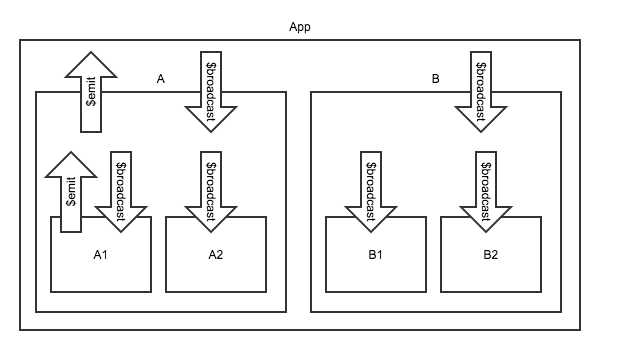
382 |
383 | 这张图中有一个应用,下面存在两个视图块A和B,它们分别又有两个子视图。这时候,如果子视图A1想要发出一个业务事件,使得B1和B2能够得到通知,过程就会是:
384 |
385 | - 沿着父作用域一路往上到达双方共同的祖先作用域
386 | - 从祖先作用域一级一级往下进行广播,直到到达需要的地方
387 |
388 | 刚才的图形体现了界面的包含关系,如果把这个图再立体化,就会是下面这样:
389 |
390 | 
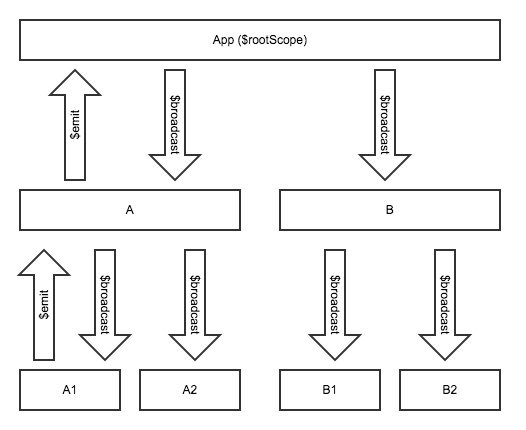
391 |
392 | 对于这种事件的传播方式,可以有个类似的比喻:
393 |
394 | 比如说,某军队中,1营1连1排长想要给1营2连下属的三个排发个警戒通知,他的通知方向是一级一级向上汇报,直到双方共同的上级,也就是1营指挥人员这里,然后再沿着二连这个路线向下去通知。
395 |
396 | - 从作用域往上发送事件,使用scope.$emit
397 |
398 | ```JavaScript
399 | $scope.$emit("someEvent", {});
400 | ```
401 |
402 | - 从作用域往下发送事件,使用scope.$broadcast
403 |
404 | ```JavaScript
405 | $scope.$broadcast("someEvent", {});
406 | ```
407 |
408 | 这两个方法的第二个参数是要随事件带出的数据。
409 |
410 | 注意,这两种方式传播事件,事件的发送方自己也会收到一份。
411 |
412 | 使用事件的主要作用是消除模块间的耦合,发送方是不需要知道接收方的状况的,接收方也不需要知道发送方的状况,双方只需要传送必要的业务数据即可。
413 |
414 | ### 事件的接收与阻止
415 |
416 | 无论是$emit还是$broadcast发送的事件,都可以被接收,接收这两种事件的方式是一样的:
417 |
418 | ```JavaScript
419 | $scope.$on("someEvent", function(e) {
420 | // 这里从e上可以取到发送过来的数据
421 | });
422 | ```
423 |
424 | 注意,事件被接收了,并不代表它就中止了,它仍然会沿着原来的方向继续传播,也就是:
425 |
426 | - $emit的事件将继续向上传播
427 | - $broadcast的事件将继续向下传播
428 |
429 | 有时候,我们希望某一级收到事件之后,就让它停下来,不再传播,可以把事件中止。这时候,两种事件的区别就体现出来了,只有$emit发出的事件是可以被中止的,$broadcast发出的不可以。
430 |
431 | 如果想要阻止$emit事件的继续传播,可以调用事件对象的stopPropagation()方法。
432 |
433 | ```JavaScript
434 | $scope.$on("someEvent", function(e) {
435 | e.stopPropagation();
436 | });
437 | ```
438 |
439 | 但是,想要阻止$broadcast事件的传播,就麻烦了,我们只能通过变通的方式:
440 |
441 | 首先,调用事件对象的preventDefault()方法,然后,在收取这个事件对象的时候,判断它的defaultPrevented属性,如果为true,就忽略此事件。这个过程比较麻烦,其实我们一般是不需要管的,只要不监听对应的事件就可以了。在实际使用过程中,也应当尽量少使用事件的广播,尤其是从较高的层级进行广播。
442 |
443 | *上级作用域*
444 | ```JavaScript
445 | $scope.$on("someEvent", function(e) {
446 | e.preventDefault();
447 | });
448 | ```
449 |
450 | *下级作用域*
451 | ```JavaScript
452 | $scope.$on("someEvent", function(e) {
453 | if (e.defaultPrevented) {
454 | return;
455 | }
456 | });
457 | ```
458 |
459 | ### 事件总线
460 |
461 | 在Angular中,不同层级作用域之间的数据通信有多种方式,可以通过原型继承的一些特征,也可以收发事件,还可以使用服务来构造单例对象进行通信。
462 |
463 | 前面提到的这个军队的例子,有些时候沟通效率比较低,特别是层级多的时候。想象一下,刚才这个只有三层,如果更复杂,一个排长的消息都一定要报告到军长那边再下发到其他基层主官,必定贻误军情,更何况有很多下级根本不需要知道这个消息。
464 | 那怎么办呢,难道是直接打电话沟通吗?这个效率高是高,就是容易乱,这也就相当于界面块之间的直接通过id调用。
465 |
466 | Angular的作用域树类似于传统的组织架构树,一个大型企业,一般都会有若干层级,近年来有很多管理的方法论,比如说组织架构的扁平化。
467 |
468 | 我们能不能这样:搞一个专门负责通讯的机构,大家的消息都发给它,然后由它发给相关人员,其他人员在理念上都是平级关系。
469 |
470 | 这就是一个很典型的订阅发布模式,接收方在这里订阅消息,发布方在这里发布消息。这个过程可以用这样的图形来表示:
471 |
472 | 
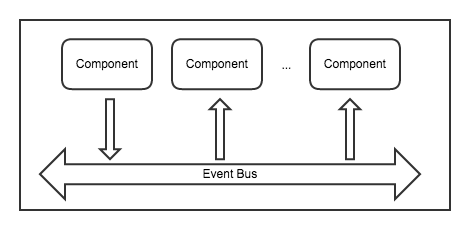
473 |
474 | 代码写起来也很简单,把它做成一个公共模块,就可以被各种业务方调用了:
475 |
476 | ```JavaScript
477 | app.factory("EventBus", function() {
478 | var eventMap = {};
479 |
480 | var EventBus = {
481 | on : function(eventType, handler) {
482 | //multiple event listener
483 | if (!eventMap[eventType]) {
484 | eventMap[eventType] = [];
485 | }
486 | eventMap[eventType].push(handler);
487 | },
488 |
489 | off : function(eventType, handler) {
490 | for (var i = 0; i < eventMap[eventType].length; i++) {
491 | if (eventMap[eventType][i] === handler) {
492 | eventMap[eventType].splice(i, 1);
493 | break;
494 | }
495 | }
496 | },
497 |
498 | fire : function(event) {
499 | var eventType = event.type;
500 | if (eventMap && eventMap[eventType]) {
501 | for (var i = 0; i < eventMap[eventType].length; i++) {
502 | eventMap[eventType][i](event);
503 | }
504 | }
505 | }
506 | };
507 | return EventBus;
508 | });
509 | ```
510 |
511 | 事件订阅代码:
512 |
513 | ```JavaScript
514 | EventBus.on("someEvent", function(event) {
515 | // 这里处理事件
516 | var c = event.data.a + event.data.b;
517 | });
518 | ```
519 |
520 | 事件发布代码:
521 |
522 | ```JavaScript
523 | EventBus.fire({
524 | type: "someEvent",
525 | data: {
526 | aaa: 1,
527 | bbb: 2
528 | }
529 | });
530 | ```
531 |
532 | 注意,如果在复杂的应用中使用事件总线,需要慎重规划事件名,推荐使用业务路径,比如:"portal.menu.selectedMenuChange",以避免事件冲突。
533 |
534 | ### 小结
535 |
536 | 在本章,我们学习了作用域相关的知识,以及它们之间传递数据的方式。作用域在整个Angular应用中形成了一棵树,以$rootScope为根部,开枝散叶。这棵树独立于DOM而存在,又与DOM相关联。事件在整个树上传播,如蜂飞蝶舞。
537 |
538 | 总体来说,使用AngularJS对JavaScript的基本功是有一定要求的,因为这里面大部分实现都依赖于纯JavaScript语法,比如原型继承的使用。如果对这一块有充分的认识,理解Angular的作用域就会比较容易。
539 |
540 | 一个大型单页应用,需要对部件的整合方式和通信机制作良好的规划,为它们建立良好的秩序,这对于确保整个应用的稳定性是非常必要的。
541 |
542 | > 首要问题不是自由,而是建立合法的公共秩序。人类可以无自由而有秩序,但不能无秩序而有自由。——缪尔·亨廷顿
543 |
544 | 本章所涉及的所有Demo,参见[在线演示地址](https://xufei.github.io/ng-tutor/scope.html)
545 |
546 | [代码库](https://github.com/xufei/ng-tutor)
547 |
548 | 演讲幻灯片下载:点[这里](https://xufei.github.io/ng-tutor/slides/scope.pdf)
549 |
550 |
--------------------------------------------------------------------------------
/docs/01.binding.md:
--------------------------------------------------------------------------------
1 | ## 数据绑定与监控
2 |
3 | 在业务开发的过程中,我们可能会大量使用DOM操作,这个过程很繁琐,但是有了AngularJS,基本上就可以解脱了,做到这一点的关键是数据绑定。那什么是数据绑定,怎样绑定呢?本节将从多种角度,选取业务开发过程中的各种场景来举例说明。
4 |
5 | ### 基于单一模型的界面同步
6 |
7 | 有时候,我们会有这样的需求,界面上有个输入框,然后有另外一个地方,要把这个文本原样显示出来,如果没有数据绑定,这个代码可能很麻烦了,比如说,我们要监听输入框的各种事件,键盘按键、复制粘贴等等,然后再把取得的值写入对应位置。但是如果有数据绑定,这个事情就非常简单。
8 |
9 | ```HTML
10 |
11 | {{a}}
12 | ```
13 |
14 | 这么小小一段代码,就实现了我们想要的功能,是不是很可爱?这中间的关键是什么呢,就是变量a,在这里,变量a充当了数据模型的角色,输入框的数据变更会同步到模型上,然后再分发给绑定到这个模型的其他UI元素。
15 |
16 | 注意,任意绑定到数据模型的输入元素,它的数据变更都会导致模型变更,比如说,我们有另外一个需求,两个输入框,我们想要在任意一个中输入的时候,另外一个的值始终跟它保持同步。如果用传统的方式,需要在两个输入框上都添加事件,但是有了数据绑定之后,这一切都很简单:
17 |
18 | ```HTML
19 |
20 |
21 | ```
22 |
23 | 这样的代码就可以了,核心要素还是这个数据模型b。
24 |
25 | 到目前为止的两个例子都很简单,但可能有人有问题要问,因为我们什么js都没有写,这个a跟b是哪里来的,为什么就能起作用呢?对于这个问题,我来作个类比。
26 |
27 | 比如大家写js,都知道变量可以不声明就使用:
28 |
29 | ```JavaScript
30 | a = 1;
31 | ```
32 |
33 | 这时候a被赋值到哪里了呢,到了全局的window对象上,也就是说其实相当于:
34 |
35 | ```JavaScript
36 | window.a = 1;
37 | ```
38 |
39 | 在AngularJS里,变量和表达式都附着在一种叫做作用域(scope)的东西上,可以自己声明新的作用域,也可以不声明。每个Angular应用默认会有一个根作用域($rootScope),凡是没有预先声明的东西,都会被创建到它上面去。
40 |
41 | 作用域的相关概念,我们会在下一章里面讲述。在这里,我们只需要知道,如果在界面中绑定了未定义的某变量,当它被赋值的时候,就会自动创建到对应的作用域上去。
42 |
43 | 前面我们在例子中提到的{{}}这种符号,称为插值表达式,这里面的内容将会被动态解析,也可以不使用这种方式来进行绑定,Angular另有一个ng-bind指令用于做这种事情:
44 |
45 | ```HTML
46 |
47 | {{a}}
48 |
49 | ```
50 |
51 | ### 对模型的二次计算
52 |
53 | 嗯,有时候,实际情况没有这么简单,比如说,我们可能会需要对数据作一点处理,比如,在每个表示价格的数字后面添加一个单位:
54 |
55 | ```HTML
56 |
57 | {{price + "(元)"}}
58 | ```
59 |
60 | 当然我们这个例子并不好,因为,其实你可以把无关的数据都放在绑定表达式的外面,就像这样:
61 |
62 | ```HTML
63 |
64 | {{price}}(元)
65 | ```
66 |
67 | 那么,考虑个稍微复杂一些的。我们经常会遇到,在界面上展示性别,但是数据库里面存的是0或者1,那么,总要对它作个转换。有些比较老土的做法是这样,在模型上添加额外的字段给显示用:
68 |
69 | 这是原始数据:
70 |
71 | ```JavaScript
72 | var tom = {
73 | name: "Tom",
74 | gender: 1
75 | };
76 | ```
77 |
78 | 被他转换之后,成了这样:
79 |
80 | ```JavaScript
81 | var tom = {
82 | name: "Tom",
83 | gender: 1,
84 | genderText: "男"
85 | };
86 | ```
87 |
88 | 转换函数内容如下:
89 |
90 | ```JavaScript
91 | if (person.gender == 0)
92 | person.genderText = "女";
93 |
94 | if (person.gender == 1)
95 | person.genderText = "男";
96 | ```
97 |
98 | 这样的做法虽然能够达到效果,但破坏了模型的结构,我们可以做些改变:
99 |
100 | ```HTML
101 | {{formatGender(tom.gender)}}
102 | ```
103 |
104 | ```JavaScript
105 | $scope.formatGender = function(gender) {
106 | if (gender == 0)
107 | return "女";
108 |
109 | if (gender == 1)
110 | return "男";
111 | }
112 | };
113 | ```
114 |
115 | 这样我们就达到了目的。这个例子让我们发现,原来,在绑定表达式里面,是可以使用函数的。像我们这里的格式化函数,其实作用只存在于视图层,所以不会影响到真实数据模型。
116 |
117 | 注意:这里有两个注意点。
118 |
119 | 第一,在绑定表达式里面,只能使用自定义函数,不能使用原生函数。举个例子:
120 |
121 | ```HTML
122 | {{Math.abs(-1)}}
123 | ```
124 |
125 | 这句就是有问题的,因为Angular的插值表达式机制决定了它不能使用这样的函数,它是直接用自己的解释器去解析这个字符串的,如果确实需要调用原生函数,可以用一个自定义函数作包装,在自定义函数里面可以随意使用各种原生对象,就像这样:
126 |
127 | ```HTML
128 | {{abs(-1)}}
129 | ```
130 |
131 | ```JavaScript
132 | $scope.abs = function(number) {
133 | return Math.abs(number);
134 | };
135 | ```
136 |
137 | 第二,刚才我们这个例子只是为了说明可以这么用,但不表示这是最佳方案。Angular为这类需求提供了一种叫做filter的方案,可以在插值表达式中使用管道操作符来格式化数据,这个我们后面再细看。
138 |
139 | ### 数组与对象结构的绑定
140 |
141 | 有时候,我们的数据并不总是这么简单,比如说,有可能会需要把一个数组的数据展示出来,这种情况下可以使用Angular的ng-repeat指令来处理,这个东西相当于一个循环,比如我们来看这段例子:
142 |
143 | ```JavaScript
144 | $scope.arr1 = [1, 2, 3];
145 |
146 | $scope.add = function() {
147 | $scope.arr1.push($scope.arr1.length + 1);
148 | };
149 | ```
150 |
151 | ```HTML
152 |
153 |
156 | ```
157 |
158 | 这样就可以把数组的内容展示到界面上了。数组中的数据产生变化时,也能够实时更新到界面上来。
159 |
160 | 有时候,我们会遇到数组里有重复元素的情况,这时候,ng-repeat代码不能起作用,原因是Angular默认需要在数组中使用唯一索引,那假如我们的数据确实如此,怎么办呢?可以指定它使用序号作索引,就像这样:
161 |
162 | ```JavaScript
163 | $scope.arr2 = [1, 1, 3];
164 | ```
165 |
166 | ```HTML
167 |
170 | ```
171 |
172 | 也可以把多维数组用多层循环的方式迭代出来:
173 |
174 | ```JavaScript
175 | $scope.arr3 = [
176 | [11, 12, 13],
177 | [21, 22, 23],
178 | [31, 32, 33]
179 | ];
180 | ```
181 |
182 | ```HTML
183 |
184 | -
185 | {{$index}}
186 |
189 |
190 |
191 | ```
192 |
193 | 如果是数组中的元素是对象结构,也不难,我们用个表格来展示这个数组:
194 |
195 | ```JavaScript
196 | $scope.arr4 = [{
197 | name: "Tom",
198 | age: 5
199 | }, {
200 | name: "Jerry",
201 | age: 2
202 | }];
203 | ```
204 |
205 | ```HTML
206 |
207 |
208 |
209 | | Name |
210 | Age |
211 |
212 |
213 |
214 |
215 | | {{child.name}} |
216 | {{child.age}} |
217 |
218 |
219 |
220 | ```
221 |
222 | 有时候我们想遍历对象的属性,也可以使用ng-repeat指令:
223 |
224 | ```JavaScript
225 | $scope.obj = {
226 | a: 1,
227 | b: 2,
228 | c: 3
229 | };
230 | ```
231 |
232 | ```HTML
233 |
234 | - {{key}}: {{value}}
235 |
236 | ```
237 |
238 | 注意,在ng-repeat表达式里,我们使用了一个(key, value)来描述键值关系,如果只想要值,也可以不用这么写,直接按照数组的写法即可。对象值有重复的话,不用像数组那么麻烦需要指定$index做索引,因为它是对象的key做索引,这是不会重复的。
239 |
240 | ### 数据监控
241 |
242 | 有时候,我们不是直接把数据绑定到界面上,而是先要赋值到其他变量上,或者针对数据的变更,作出一些逻辑的处理,这个时候就需要使用监控。
243 |
244 | 最基本的监控很简单:
245 |
246 | ```JavaScript
247 | $scope.a = 1;
248 |
249 | $scope.$watch("a", function(newValue, oldValue) {
250 | alert(oldValue + " -> " + newValue);
251 | });
252 |
253 | $scope.changeA = function() {
254 | $scope.a++;
255 | };
256 | ```
257 |
258 | 对作用域上的变量添加监控之后,就可以在变更时得到通知了。如果说新赋值的变量跟原先的相同,这个监控就不会被执行。比如说刚才例子中,继续对a赋值为1,不会进入监控函数。
259 |
260 | 以上这种方式可以监控到最直接的赋值,包括各种基本类型,以及复杂类型的引用赋值,比如说下面这个数组被重新赋值了,就可以被监控到:
261 |
262 | ```JavaScript
263 | $scope.arr = [0];
264 |
265 | $scope.$watch("arr", function(newValue) {
266 | alert("change:" + newValue.join(","));
267 | });
268 |
269 | $scope.changeArr = function() {
270 | $scope.arr = [7, 8];
271 | };
272 | ```
273 |
274 | 但这种监控方式只能处理引用相等的判断,对于一些更复杂的监控,需要更细致的处理。比如说,我们有可能需要监控一个数组,但并非监控它的整体赋值,而是监控其元素的变更:
275 |
276 | ```JavaScript
277 | $scope.$watch("arr", function(newValue) {
278 | alert("deep:" + newValue.join(","));
279 | }, true);
280 |
281 | $scope.addItem = function() {
282 | $scope.arr.push($scope.arr.length);
283 | };
284 | ```
285 |
286 | 注意,这里我们在$watch函数中,添加了第三个参数,这个参数用于指示对数据的深层监控,包括数组的子元素和对象的属性等等。
287 |
288 | ### 样式的数据绑定
289 |
290 | 刚才我们提到的例子,都是跟数据同步、数据展示相关,但数据绑定的功能是很强大的,其应用场景取决于我们的想象力。
291 |
292 | 不知道大家有没有遇到过这样的场景,有一个数据列表,点中其中某条,这条就改变样式变成加亮,如果用传统的方式,可能要添加一些事件,然后在其中作一些处理,但使用数据绑定,能够大幅简化代码:
293 |
294 | ```JavaScript
295 | function ListCtrl($scope) {
296 | $scope.items = [];
297 |
298 | for (var i=0; i<10; i++) {
299 | $scope.items.push({
300 | title:i
301 | });
302 | }
303 |
304 | $scope.selectedItem = $scope.items[0];
305 |
306 | $scope.select = function(item) {
307 | $scope.selectedItem = item;
308 | };
309 | }
310 | ```
311 |
312 | ```HTML
313 |
314 | -
315 | {{item.title}}
316 |
317 |
318 | ```
319 |
320 | 在本例中,我们使用了一个循环来迭代数组中的元素,并且使用一个变量selectedItem用于标识选中项,然后关键点在于这个ng-class的表达式,它能够根据当前项是否为选中项,作出一个判断,生成对应的样式名。这是绑定的一个典型应用了,基于它,能把一些之前需要依赖于某些控件的功能用特别简单的方式做出来。
321 |
322 | 除了使用ng-class,还可以使用ng-style来对样式作更细致的控制,比如:
323 |
324 | ```HTML
325 |
326 |
327 | 测试字体大小
328 |
329 | ```
330 |
331 | ### 状态控制
332 |
333 | 有时候,我们除了控制普通的样式,还有可能要控制某个界面元素的显示隐藏。我们用ng-class或者ng-style当然都是可以控制元素的显示隐藏的,但Angular给我们提供了一种快捷方式,那就是ng-show和ng-hide,它们是相反的,其实只要一个就可以了,提供两个是为了写表达式的方便。
334 |
335 | 利用数据绑定,我们可以很容易实现原有的一些显示隐藏功能。比如说,当列表项有选中的时候,某些按钮出现,当什么都没选的时候,不出现这些按钮。
336 |
337 | 主要的代码部分还是借用上面那个列表,只添加一些相关的东西:
338 |
339 | ```HTML
340 |
341 |
342 | ```
343 |
344 | 把这个代码放在刚才的列表旁边,位于同一个controller下,点击列表元素,就能看到绑定状态了。
345 |
346 | 有时候,我们也想控制按钮的可点击状态,比如刚才的例子,那两个按钮直接显示隐藏,太突兀了,我们来把它们改成启用和禁用。
347 |
348 | ```HTML
349 |
350 |
351 | ```
352 |
353 | 同理,如果是输入框,可以用同样的方式,使用ng-readonly来控制其只读状态。
354 |
355 | ### 流程控制
356 |
357 | 除了使用ng-show和ng-hide来控制元素的显示隐藏,还可以使用ng-if,但这个的含义与实现机制都大为不同。所谓的show和hide,意味着DOM元素已经存在,只是控制了是否显示,而if则起到了流程控制的作用,只有符合条件的DOM元素才会被创建,否则不创建。
358 |
359 | 比如下面的例子:
360 |
361 | ```JavaScript
362 | function IfCtrl($scope) {
363 | $scope.condition = 1;
364 |
365 | $scope.change = function() {
366 | $scope.condition = 2;
367 | };
368 | }
369 | ```
370 |
371 | ```HTML
372 |
373 |
374 | - if 1
375 | - if 2
376 |
377 | - show 1
378 | - show 2
379 |
380 |
381 |
382 |
383 | ```
384 |
385 | 这个例子初始的时候,创建了三个li,其中一个被隐藏(show 2),当点击按钮,condition变成2,仍然是三个li,其中,if 1没有了,if 2创建出来了,show 1隐藏了,show 2显示了。
386 |
387 | 所以,我们现在看到的是,if的节点是动态创建的。与此类似,我们还可以使用ng-switch指令:
388 |
389 | ```JavaScript
390 | function SwitchCtrl($scope) {
391 | $scope.condition = "";
392 |
393 | $scope.a = function() {
394 | $scope.condition = "A";
395 | };
396 |
397 | $scope.b = function() {
398 | $scope.condition = "B";
399 | };
400 |
401 | $scope.c = function() {
402 | $scope.condition = "C";
403 | };
404 | }
405 | ```
406 |
407 | ```HTML
408 |
409 |
410 |
A
411 |
B
412 |
default
413 |
414 |
415 |
416 |
417 |
418 | ```
419 |
420 | 这个例子跟if基本上是一个意思,只是语法更自然些。
421 |
422 | ### 数据联动
423 |
424 | 在做实际业务的过程中,很容易就碰到数据联动的场景,最典型的例子是省市县的三级联动。很多前端教程或者基础面试题以此为例,综合考察其中所运用到的知识点。
425 |
426 | 如果是用Angular做开发,很可能这个就不成其为一个考点了,因为实现起来非常容易。
427 |
428 | 我们刚才已经实现了一个单级列表,可以借用这段代码,做两个列表,第一个的数据变动,对第二个的数据产生过滤。
429 |
430 | ```JavaScript
431 | function RegionCtrl($scope) {
432 | $scope.provinceArr = ["江苏", "云南"];
433 | $scope.cityArr = [];
434 |
435 | $scope.$watch("selectedProvince", function(province) {
436 | // 真正有用的代码在这里,实际场景中这里可以是调用后端服务查询的关联数据
437 | switch (province) {
438 | case "江苏": {
439 | $scope.cityArr = ["南京", "苏州"];
440 | break;
441 | }
442 | case "云南": {
443 | $scope.cityArr = ["昆明", "丽江"];
444 | break;
445 | }
446 | }
447 | });
448 |
449 | $scope.selectProvince = function(province) {
450 | $scope.selectedProvince = province;
451 | };
452 |
453 | $scope.selectCity = function(city) {
454 | $scope.selectedCity = city;
455 | };
456 | }
457 | ```
458 |
459 | ```HTML
460 |
461 |
462 | -
463 | {{province}}
464 |
465 |
466 |
467 | -
468 | {{city}}
469 |
470 |
471 |
472 | ```
473 |
474 | 这段代码看起来比刚才复杂一些,其实有价值的代码就那个$watch里面的东西。这是什么意思呢?意思是,监控selectedProvince这个变量,只要它改变了,就去查询它可能造成的更新数据,然后剩下的事情就不用我们管了。
475 |
476 | 如果是绑定到下拉框上,代码更简单,因为AngularJS专门作了这种考虑,ng-options就是这样的设置:
477 |
478 | ```HTML
479 |
480 |
481 | ```
482 |
483 | 从这个例子我们看到,相比于传统前端开发方式那种手动监听事件,手动更新DOM的方式,使用数据绑定做数据联动简直太容易了。如果要把这个例子改造成三级联动,只需对selectedCity也做一个监控就行了。
484 |
485 | ### 一个综合的例子
486 |
487 | 了解了这些细节之后,我们可以把它们结合起来做一个比较实际的综合例子。假设我们在为一家小店创建雇员的管理界面,其中包含一个雇员表格,以及一个可用于添加或编辑雇员的表单。
488 |
489 | 雇员包含如下字段:姓名,年龄,性别,出生地,民族。其中,姓名通过输入框输入字符串,年龄通过输入框输入整数,性别通过点选单选按钮来选择,出生地用两个下拉框选择省份和城市,民族可以选择汉族和少数民族,如果选择了少数民族,可以手动输入民族名称。
490 |
491 | 这个例子恰好能把我们刚才讲的绑定全部用到。我们先来看看有哪些绑定关系:
492 |
493 | - 雇员表格可以选中某行,该行样式会高亮
494 | - 如果选中了某行,其详细数据将会同步到表单上
495 | - 如果点击过新增或修改按钮,当前界面处于编辑中,则表单可输入,否则表单只读
496 | - 修改和删除按钮的可点击状态,取决于表格中是否有选中的行
497 | - 出生地点的省市下拉框存在联动关系
498 | - 民族名称的输入框,其可见性取决于选择了汉族还是少数民族的单选按钮
499 | - 新增修改删除、确定取消,这两组按钮互斥,永远不同时出现,其可见性取决于当前是否正在编辑。
500 | - 确定按钮的可点击状态,取决于当前表单数据是否合法
501 |
502 | 如果想做得精细,还有更多可以使用绑定的地方,不过上面这些已经足够我们把所有知识用一遍了。
503 |
504 | 这个例子的代码就不贴了,可以自行查看。
505 |
506 | ### 数据绑定的拓展运用
507 |
508 | 现在我们学会了数据绑定,可以借助这种特性,完成一些很别致的功能。比如说,如果想在页面上用div模拟一个正弦波,只需要把波形数据生成出来,然后一个绑定就可以完成了。
509 |
510 | ```JavaScript
511 | $scope.staticItems = [];
512 |
513 | for (var i=0; i<720; i++) {
514 | $scope.staticItems.push(Math.ceil(100 * (1 + Math.sin(i * Math.PI / 180))));
515 | }
516 | ```
517 |
518 | 如果我们想让这个波形动起来,也很容易,只需要结合一个定时器,动态生成这个波形数据就可以了。为了形成滚动效果,当波形采点数目超过某个值的时候,可以把最初的点逐个拿掉,保持总的数组长度。
519 |
520 | ```JavaScript
521 | $scope.dynamicItems = [];
522 |
523 | var counter = 0;
524 |
525 | function addItem() {
526 | var newItem = Math.ceil(100 * (1 + Math.sin((counter++) * Math.PI / 180)));
527 |
528 | if ($scope.dynamicItems.length > 500) {
529 | $scope.dynamicItems.splice(0, 1);
530 | }
531 |
532 | $scope.dynamicItems.push(newItem);
533 |
534 | $timeout(function () {
535 | addItem();
536 | }, 10);
537 | }
538 |
539 | addItem();
540 | ```
541 |
542 | 这个例子对应的HTML代码如下:
543 |
544 | ```HTML
545 |
560 | ```
561 |
562 | 有时候我们经常看到一些算法可视化的项目,比如把排序算法用可视化的方式展现出来,如果使用AngularJS的数据绑定,实现这种效果可谓易如反掌:
563 |
564 | ```HTML
565 |
566 |
574 |
575 |
578 |
579 | ```
580 |
581 | ```JavaScript
582 | $scope.arr = [2, 4, 5, 63, 4, 5, 55, 2, 4, 43];
583 |
584 | $scope.sort = function () {
585 | if (!sort($scope.arr)) {
586 | $timeout(function() {
587 | $scope.sort();
588 | }, 500);
589 | }
590 | };
591 |
592 | function sort(array) {
593 | // 喵的,写到这个才发现yield是多么好啊
594 | for (var i = 0; i < array.length; i++) {
595 | for (var j = array.length; j > 0; j--) {
596 | if (array[j] < array[j - 1]) {
597 | var temp = array[j - 1];
598 | array[j - 1] = array[j];
599 | array[j] = temp;
600 |
601 | return false;
602 | }
603 | }
604 | }
605 |
606 | return true;
607 | }
608 | ```
609 |
610 | 看,就这么简单,一个冒泡排序算法的可视化过程就写好啦。
611 |
612 | 甚至,AngularJS还允许我们在SVG中使用数据绑定,使用它,做一些小游戏也是很容易的,比如我写了个双人对战的象棋,这里有[演示地址](https://xufei.github.io/ng-chess/chess.html),可以查看源码,是不是很简单?
613 |
614 | ### 小结
615 |
616 | 刚才我们已经看到数据绑定的各种使用场景了,这个东西带给我们的最大好处是什么呢?我们回顾一下之前写Web界面,有一部分时间在写HTML和CSS,一部分时间在写纯逻辑的JavaScript,还有很多时间在把这两者结合起来,比如各种创建或选取DOM,设置属性,添加等等,这些事情都是很机械而繁琐的,数据绑定把这个过程简化了,代码也跟着清晰了。
617 |
618 | 数据绑定是一种思维方式,一切的核心就是数据。数据的变更导致界面的更新,如果我们想要更新界面,只需改变数据即可。
619 |
620 | 佛曰:命由己造,相由心生,世间万物皆是化相,心不动,万物皆不动,心不变,万物皆不变。
621 |
622 | 佛曰:种如是因,收如是果,一切唯心造。
623 |
624 | 本章所涉及的所有Demo,参见[在线演示地址](https://xufei.github.io/ng-tutor/binding.html)
625 |
626 | 演讲幻灯片下载:点[这里](https://xufei.github.io/ng-tutor/slides/binding.pdf)
627 |
628 |
--------------------------------------------------------------------------------
/css/bootstrap-theme.min.css:
--------------------------------------------------------------------------------
1 | /*!
2 | * Bootstrap v3.2.0 (http://getbootstrap.com)
3 | * Copyright 2011-2014 Twitter, Inc.
4 | * Licensed under MIT (https://github.com/twbs/bootstrap/blob/master/LICENSE)
5 | */.btn-default,.btn-primary,.btn-success,.btn-info,.btn-warning,.btn-danger{text-shadow:0 -1px 0 rgba(0,0,0,.2);-webkit-box-shadow:inset 0 1px 0 rgba(255,255,255,.15),0 1px 1px rgba(0,0,0,.075);box-shadow:inset 0 1px 0 rgba(255,255,255,.15),0 1px 1px rgba(0,0,0,.075)}.btn-default:active,.btn-primary:active,.btn-success:active,.btn-info:active,.btn-warning:active,.btn-danger:active,.btn-default.active,.btn-primary.active,.btn-success.active,.btn-info.active,.btn-warning.active,.btn-danger.active{-webkit-box-shadow:inset 0 3px 5px rgba(0,0,0,.125);box-shadow:inset 0 3px 5px rgba(0,0,0,.125)}.btn:active,.btn.active{background-image:none}.btn-default{text-shadow:0 1px 0 #fff;background-image:-webkit-linear-gradient(top,#fff 0,#e0e0e0 100%);background-image:-o-linear-gradient(top,#fff 0,#e0e0e0 100%);background-image:-webkit-gradient(linear,left top,left bottom,from(#fff),to(#e0e0e0));background-image:linear-gradient(to bottom,#fff 0,#e0e0e0 100%);filter:progid:DXImageTransform.Microsoft.gradient(startColorstr='#ffffffff', endColorstr='#ffe0e0e0', GradientType=0);filter:progid:DXImageTransform.Microsoft.gradient(enabled=false);background-repeat:repeat-x;border-color:#dbdbdb;border-color:#ccc}.btn-default:hover,.btn-default:focus{background-color:#e0e0e0;background-position:0 -15px}.btn-default:active,.btn-default.active{background-color:#e0e0e0;border-color:#dbdbdb}.btn-default:disabled,.btn-default[disabled]{background-color:#e0e0e0;background-image:none}.btn-primary{background-image:-webkit-linear-gradient(top,#428bca 0,#2d6ca2 100%);background-image:-o-linear-gradient(top,#428bca 0,#2d6ca2 100%);background-image:-webkit-gradient(linear,left top,left bottom,from(#428bca),to(#2d6ca2));background-image:linear-gradient(to bottom,#428bca 0,#2d6ca2 100%);filter:progid:DXImageTransform.Microsoft.gradient(startColorstr='#ff428bca', endColorstr='#ff2d6ca2', GradientType=0);filter:progid:DXImageTransform.Microsoft.gradient(enabled=false);background-repeat:repeat-x;border-color:#2b669a}.btn-primary:hover,.btn-primary:focus{background-color:#2d6ca2;background-position:0 -15px}.btn-primary:active,.btn-primary.active{background-color:#2d6ca2;border-color:#2b669a}.btn-primary:disabled,.btn-primary[disabled]{background-color:#2d6ca2;background-image:none}.btn-success{background-image:-webkit-linear-gradient(top,#5cb85c 0,#419641 100%);background-image:-o-linear-gradient(top,#5cb85c 0,#419641 100%);background-image:-webkit-gradient(linear,left top,left bottom,from(#5cb85c),to(#419641));background-image:linear-gradient(to bottom,#5cb85c 0,#419641 100%);filter:progid:DXImageTransform.Microsoft.gradient(startColorstr='#ff5cb85c', endColorstr='#ff419641', GradientType=0);filter:progid:DXImageTransform.Microsoft.gradient(enabled=false);background-repeat:repeat-x;border-color:#3e8f3e}.btn-success:hover,.btn-success:focus{background-color:#419641;background-position:0 -15px}.btn-success:active,.btn-success.active{background-color:#419641;border-color:#3e8f3e}.btn-success:disabled,.btn-success[disabled]{background-color:#419641;background-image:none}.btn-info{background-image:-webkit-linear-gradient(top,#5bc0de 0,#2aabd2 100%);background-image:-o-linear-gradient(top,#5bc0de 0,#2aabd2 100%);background-image:-webkit-gradient(linear,left top,left bottom,from(#5bc0de),to(#2aabd2));background-image:linear-gradient(to bottom,#5bc0de 0,#2aabd2 100%);filter:progid:DXImageTransform.Microsoft.gradient(startColorstr='#ff5bc0de', endColorstr='#ff2aabd2', GradientType=0);filter:progid:DXImageTransform.Microsoft.gradient(enabled=false);background-repeat:repeat-x;border-color:#28a4c9}.btn-info:hover,.btn-info:focus{background-color:#2aabd2;background-position:0 -15px}.btn-info:active,.btn-info.active{background-color:#2aabd2;border-color:#28a4c9}.btn-info:disabled,.btn-info[disabled]{background-color:#2aabd2;background-image:none}.btn-warning{background-image:-webkit-linear-gradient(top,#f0ad4e 0,#eb9316 100%);background-image:-o-linear-gradient(top,#f0ad4e 0,#eb9316 100%);background-image:-webkit-gradient(linear,left top,left bottom,from(#f0ad4e),to(#eb9316));background-image:linear-gradient(to bottom,#f0ad4e 0,#eb9316 100%);filter:progid:DXImageTransform.Microsoft.gradient(startColorstr='#fff0ad4e', endColorstr='#ffeb9316', GradientType=0);filter:progid:DXImageTransform.Microsoft.gradient(enabled=false);background-repeat:repeat-x;border-color:#e38d13}.btn-warning:hover,.btn-warning:focus{background-color:#eb9316;background-position:0 -15px}.btn-warning:active,.btn-warning.active{background-color:#eb9316;border-color:#e38d13}.btn-warning:disabled,.btn-warning[disabled]{background-color:#eb9316;background-image:none}.btn-danger{background-image:-webkit-linear-gradient(top,#d9534f 0,#c12e2a 100%);background-image:-o-linear-gradient(top,#d9534f 0,#c12e2a 100%);background-image:-webkit-gradient(linear,left top,left bottom,from(#d9534f),to(#c12e2a));background-image:linear-gradient(to bottom,#d9534f 0,#c12e2a 100%);filter:progid:DXImageTransform.Microsoft.gradient(startColorstr='#ffd9534f', endColorstr='#ffc12e2a', GradientType=0);filter:progid:DXImageTransform.Microsoft.gradient(enabled=false);background-repeat:repeat-x;border-color:#b92c28}.btn-danger:hover,.btn-danger:focus{background-color:#c12e2a;background-position:0 -15px}.btn-danger:active,.btn-danger.active{background-color:#c12e2a;border-color:#b92c28}.btn-danger:disabled,.btn-danger[disabled]{background-color:#c12e2a;background-image:none}.thumbnail,.img-thumbnail{-webkit-box-shadow:0 1px 2px rgba(0,0,0,.075);box-shadow:0 1px 2px rgba(0,0,0,.075)}.dropdown-menu>li>a:hover,.dropdown-menu>li>a:focus{background-color:#e8e8e8;background-image:-webkit-linear-gradient(top,#f5f5f5 0,#e8e8e8 100%);background-image:-o-linear-gradient(top,#f5f5f5 0,#e8e8e8 100%);background-image:-webkit-gradient(linear,left top,left bottom,from(#f5f5f5),to(#e8e8e8));background-image:linear-gradient(to bottom,#f5f5f5 0,#e8e8e8 100%);filter:progid:DXImageTransform.Microsoft.gradient(startColorstr='#fff5f5f5', endColorstr='#ffe8e8e8', GradientType=0);background-repeat:repeat-x}.dropdown-menu>.active>a,.dropdown-menu>.active>a:hover,.dropdown-menu>.active>a:focus{background-color:#357ebd;background-image:-webkit-linear-gradient(top,#428bca 0,#357ebd 100%);background-image:-o-linear-gradient(top,#428bca 0,#357ebd 100%);background-image:-webkit-gradient(linear,left top,left bottom,from(#428bca),to(#357ebd));background-image:linear-gradient(to bottom,#428bca 0,#357ebd 100%);filter:progid:DXImageTransform.Microsoft.gradient(startColorstr='#ff428bca', endColorstr='#ff357ebd', GradientType=0);background-repeat:repeat-x}.navbar-default{background-image:-webkit-linear-gradient(top,#fff 0,#f8f8f8 100%);background-image:-o-linear-gradient(top,#fff 0,#f8f8f8 100%);background-image:-webkit-gradient(linear,left top,left bottom,from(#fff),to(#f8f8f8));background-image:linear-gradient(to bottom,#fff 0,#f8f8f8 100%);filter:progid:DXImageTransform.Microsoft.gradient(startColorstr='#ffffffff', endColorstr='#fff8f8f8', GradientType=0);filter:progid:DXImageTransform.Microsoft.gradient(enabled=false);background-repeat:repeat-x;border-radius:4px;-webkit-box-shadow:inset 0 1px 0 rgba(255,255,255,.15),0 1px 5px rgba(0,0,0,.075);box-shadow:inset 0 1px 0 rgba(255,255,255,.15),0 1px 5px rgba(0,0,0,.075)}.navbar-default .navbar-nav>.active>a{background-image:-webkit-linear-gradient(top,#ebebeb 0,#f3f3f3 100%);background-image:-o-linear-gradient(top,#ebebeb 0,#f3f3f3 100%);background-image:-webkit-gradient(linear,left top,left bottom,from(#ebebeb),to(#f3f3f3));background-image:linear-gradient(to bottom,#ebebeb 0,#f3f3f3 100%);filter:progid:DXImageTransform.Microsoft.gradient(startColorstr='#ffebebeb', endColorstr='#fff3f3f3', GradientType=0);background-repeat:repeat-x;-webkit-box-shadow:inset 0 3px 9px rgba(0,0,0,.075);box-shadow:inset 0 3px 9px rgba(0,0,0,.075)}.navbar-brand,.navbar-nav>li>a{text-shadow:0 1px 0 rgba(255,255,255,.25)}.navbar-inverse{background-image:-webkit-linear-gradient(top,#3c3c3c 0,#222 100%);background-image:-o-linear-gradient(top,#3c3c3c 0,#222 100%);background-image:-webkit-gradient(linear,left top,left bottom,from(#3c3c3c),to(#222));background-image:linear-gradient(to bottom,#3c3c3c 0,#222 100%);filter:progid:DXImageTransform.Microsoft.gradient(startColorstr='#ff3c3c3c', endColorstr='#ff222222', GradientType=0);filter:progid:DXImageTransform.Microsoft.gradient(enabled=false);background-repeat:repeat-x}.navbar-inverse .navbar-nav>.active>a{background-image:-webkit-linear-gradient(top,#222 0,#282828 100%);background-image:-o-linear-gradient(top,#222 0,#282828 100%);background-image:-webkit-gradient(linear,left top,left bottom,from(#222),to(#282828));background-image:linear-gradient(to bottom,#222 0,#282828 100%);filter:progid:DXImageTransform.Microsoft.gradient(startColorstr='#ff222222', endColorstr='#ff282828', GradientType=0);background-repeat:repeat-x;-webkit-box-shadow:inset 0 3px 9px rgba(0,0,0,.25);box-shadow:inset 0 3px 9px rgba(0,0,0,.25)}.navbar-inverse .navbar-brand,.navbar-inverse .navbar-nav>li>a{text-shadow:0 -1px 0 rgba(0,0,0,.25)}.navbar-static-top,.navbar-fixed-top,.navbar-fixed-bottom{border-radius:0}.alert{text-shadow:0 1px 0 rgba(255,255,255,.2);-webkit-box-shadow:inset 0 1px 0 rgba(255,255,255,.25),0 1px 2px rgba(0,0,0,.05);box-shadow:inset 0 1px 0 rgba(255,255,255,.25),0 1px 2px rgba(0,0,0,.05)}.alert-success{background-image:-webkit-linear-gradient(top,#dff0d8 0,#c8e5bc 100%);background-image:-o-linear-gradient(top,#dff0d8 0,#c8e5bc 100%);background-image:-webkit-gradient(linear,left top,left bottom,from(#dff0d8),to(#c8e5bc));background-image:linear-gradient(to bottom,#dff0d8 0,#c8e5bc 100%);filter:progid:DXImageTransform.Microsoft.gradient(startColorstr='#ffdff0d8', endColorstr='#ffc8e5bc', GradientType=0);background-repeat:repeat-x;border-color:#b2dba1}.alert-info{background-image:-webkit-linear-gradient(top,#d9edf7 0,#b9def0 100%);background-image:-o-linear-gradient(top,#d9edf7 0,#b9def0 100%);background-image:-webkit-gradient(linear,left top,left bottom,from(#d9edf7),to(#b9def0));background-image:linear-gradient(to bottom,#d9edf7 0,#b9def0 100%);filter:progid:DXImageTransform.Microsoft.gradient(startColorstr='#ffd9edf7', endColorstr='#ffb9def0', GradientType=0);background-repeat:repeat-x;border-color:#9acfea}.alert-warning{background-image:-webkit-linear-gradient(top,#fcf8e3 0,#f8efc0 100%);background-image:-o-linear-gradient(top,#fcf8e3 0,#f8efc0 100%);background-image:-webkit-gradient(linear,left top,left bottom,from(#fcf8e3),to(#f8efc0));background-image:linear-gradient(to bottom,#fcf8e3 0,#f8efc0 100%);filter:progid:DXImageTransform.Microsoft.gradient(startColorstr='#fffcf8e3', endColorstr='#fff8efc0', GradientType=0);background-repeat:repeat-x;border-color:#f5e79e}.alert-danger{background-image:-webkit-linear-gradient(top,#f2dede 0,#e7c3c3 100%);background-image:-o-linear-gradient(top,#f2dede 0,#e7c3c3 100%);background-image:-webkit-gradient(linear,left top,left bottom,from(#f2dede),to(#e7c3c3));background-image:linear-gradient(to bottom,#f2dede 0,#e7c3c3 100%);filter:progid:DXImageTransform.Microsoft.gradient(startColorstr='#fff2dede', endColorstr='#ffe7c3c3', GradientType=0);background-repeat:repeat-x;border-color:#dca7a7}.progress{background-image:-webkit-linear-gradient(top,#ebebeb 0,#f5f5f5 100%);background-image:-o-linear-gradient(top,#ebebeb 0,#f5f5f5 100%);background-image:-webkit-gradient(linear,left top,left bottom,from(#ebebeb),to(#f5f5f5));background-image:linear-gradient(to bottom,#ebebeb 0,#f5f5f5 100%);filter:progid:DXImageTransform.Microsoft.gradient(startColorstr='#ffebebeb', endColorstr='#fff5f5f5', GradientType=0);background-repeat:repeat-x}.progress-bar{background-image:-webkit-linear-gradient(top,#428bca 0,#3071a9 100%);background-image:-o-linear-gradient(top,#428bca 0,#3071a9 100%);background-image:-webkit-gradient(linear,left top,left bottom,from(#428bca),to(#3071a9));background-image:linear-gradient(to bottom,#428bca 0,#3071a9 100%);filter:progid:DXImageTransform.Microsoft.gradient(startColorstr='#ff428bca', endColorstr='#ff3071a9', GradientType=0);background-repeat:repeat-x}.progress-bar-success{background-image:-webkit-linear-gradient(top,#5cb85c 0,#449d44 100%);background-image:-o-linear-gradient(top,#5cb85c 0,#449d44 100%);background-image:-webkit-gradient(linear,left top,left bottom,from(#5cb85c),to(#449d44));background-image:linear-gradient(to bottom,#5cb85c 0,#449d44 100%);filter:progid:DXImageTransform.Microsoft.gradient(startColorstr='#ff5cb85c', endColorstr='#ff449d44', GradientType=0);background-repeat:repeat-x}.progress-bar-info{background-image:-webkit-linear-gradient(top,#5bc0de 0,#31b0d5 100%);background-image:-o-linear-gradient(top,#5bc0de 0,#31b0d5 100%);background-image:-webkit-gradient(linear,left top,left bottom,from(#5bc0de),to(#31b0d5));background-image:linear-gradient(to bottom,#5bc0de 0,#31b0d5 100%);filter:progid:DXImageTransform.Microsoft.gradient(startColorstr='#ff5bc0de', endColorstr='#ff31b0d5', GradientType=0);background-repeat:repeat-x}.progress-bar-warning{background-image:-webkit-linear-gradient(top,#f0ad4e 0,#ec971f 100%);background-image:-o-linear-gradient(top,#f0ad4e 0,#ec971f 100%);background-image:-webkit-gradient(linear,left top,left bottom,from(#f0ad4e),to(#ec971f));background-image:linear-gradient(to bottom,#f0ad4e 0,#ec971f 100%);filter:progid:DXImageTransform.Microsoft.gradient(startColorstr='#fff0ad4e', endColorstr='#ffec971f', GradientType=0);background-repeat:repeat-x}.progress-bar-danger{background-image:-webkit-linear-gradient(top,#d9534f 0,#c9302c 100%);background-image:-o-linear-gradient(top,#d9534f 0,#c9302c 100%);background-image:-webkit-gradient(linear,left top,left bottom,from(#d9534f),to(#c9302c));background-image:linear-gradient(to bottom,#d9534f 0,#c9302c 100%);filter:progid:DXImageTransform.Microsoft.gradient(startColorstr='#ffd9534f', endColorstr='#ffc9302c', GradientType=0);background-repeat:repeat-x}.progress-bar-striped{background-image:-webkit-linear-gradient(45deg,rgba(255,255,255,.15) 25%,transparent 25%,transparent 50%,rgba(255,255,255,.15) 50%,rgba(255,255,255,.15) 75%,transparent 75%,transparent);background-image:-o-linear-gradient(45deg,rgba(255,255,255,.15) 25%,transparent 25%,transparent 50%,rgba(255,255,255,.15) 50%,rgba(255,255,255,.15) 75%,transparent 75%,transparent);background-image:linear-gradient(45deg,rgba(255,255,255,.15) 25%,transparent 25%,transparent 50%,rgba(255,255,255,.15) 50%,rgba(255,255,255,.15) 75%,transparent 75%,transparent)}.list-group{border-radius:4px;-webkit-box-shadow:0 1px 2px rgba(0,0,0,.075);box-shadow:0 1px 2px rgba(0,0,0,.075)}.list-group-item.active,.list-group-item.active:hover,.list-group-item.active:focus{text-shadow:0 -1px 0 #3071a9;background-image:-webkit-linear-gradient(top,#428bca 0,#3278b3 100%);background-image:-o-linear-gradient(top,#428bca 0,#3278b3 100%);background-image:-webkit-gradient(linear,left top,left bottom,from(#428bca),to(#3278b3));background-image:linear-gradient(to bottom,#428bca 0,#3278b3 100%);filter:progid:DXImageTransform.Microsoft.gradient(startColorstr='#ff428bca', endColorstr='#ff3278b3', GradientType=0);background-repeat:repeat-x;border-color:#3278b3}.panel{-webkit-box-shadow:0 1px 2px rgba(0,0,0,.05);box-shadow:0 1px 2px rgba(0,0,0,.05)}.panel-default>.panel-heading{background-image:-webkit-linear-gradient(top,#f5f5f5 0,#e8e8e8 100%);background-image:-o-linear-gradient(top,#f5f5f5 0,#e8e8e8 100%);background-image:-webkit-gradient(linear,left top,left bottom,from(#f5f5f5),to(#e8e8e8));background-image:linear-gradient(to bottom,#f5f5f5 0,#e8e8e8 100%);filter:progid:DXImageTransform.Microsoft.gradient(startColorstr='#fff5f5f5', endColorstr='#ffe8e8e8', GradientType=0);background-repeat:repeat-x}.panel-primary>.panel-heading{background-image:-webkit-linear-gradient(top,#428bca 0,#357ebd 100%);background-image:-o-linear-gradient(top,#428bca 0,#357ebd 100%);background-image:-webkit-gradient(linear,left top,left bottom,from(#428bca),to(#357ebd));background-image:linear-gradient(to bottom,#428bca 0,#357ebd 100%);filter:progid:DXImageTransform.Microsoft.gradient(startColorstr='#ff428bca', endColorstr='#ff357ebd', GradientType=0);background-repeat:repeat-x}.panel-success>.panel-heading{background-image:-webkit-linear-gradient(top,#dff0d8 0,#d0e9c6 100%);background-image:-o-linear-gradient(top,#dff0d8 0,#d0e9c6 100%);background-image:-webkit-gradient(linear,left top,left bottom,from(#dff0d8),to(#d0e9c6));background-image:linear-gradient(to bottom,#dff0d8 0,#d0e9c6 100%);filter:progid:DXImageTransform.Microsoft.gradient(startColorstr='#ffdff0d8', endColorstr='#ffd0e9c6', GradientType=0);background-repeat:repeat-x}.panel-info>.panel-heading{background-image:-webkit-linear-gradient(top,#d9edf7 0,#c4e3f3 100%);background-image:-o-linear-gradient(top,#d9edf7 0,#c4e3f3 100%);background-image:-webkit-gradient(linear,left top,left bottom,from(#d9edf7),to(#c4e3f3));background-image:linear-gradient(to bottom,#d9edf7 0,#c4e3f3 100%);filter:progid:DXImageTransform.Microsoft.gradient(startColorstr='#ffd9edf7', endColorstr='#ffc4e3f3', GradientType=0);background-repeat:repeat-x}.panel-warning>.panel-heading{background-image:-webkit-linear-gradient(top,#fcf8e3 0,#faf2cc 100%);background-image:-o-linear-gradient(top,#fcf8e3 0,#faf2cc 100%);background-image:-webkit-gradient(linear,left top,left bottom,from(#fcf8e3),to(#faf2cc));background-image:linear-gradient(to bottom,#fcf8e3 0,#faf2cc 100%);filter:progid:DXImageTransform.Microsoft.gradient(startColorstr='#fffcf8e3', endColorstr='#fffaf2cc', GradientType=0);background-repeat:repeat-x}.panel-danger>.panel-heading{background-image:-webkit-linear-gradient(top,#f2dede 0,#ebcccc 100%);background-image:-o-linear-gradient(top,#f2dede 0,#ebcccc 100%);background-image:-webkit-gradient(linear,left top,left bottom,from(#f2dede),to(#ebcccc));background-image:linear-gradient(to bottom,#f2dede 0,#ebcccc 100%);filter:progid:DXImageTransform.Microsoft.gradient(startColorstr='#fff2dede', endColorstr='#ffebcccc', GradientType=0);background-repeat:repeat-x}.well{background-image:-webkit-linear-gradient(top,#e8e8e8 0,#f5f5f5 100%);background-image:-o-linear-gradient(top,#e8e8e8 0,#f5f5f5 100%);background-image:-webkit-gradient(linear,left top,left bottom,from(#e8e8e8),to(#f5f5f5));background-image:linear-gradient(to bottom,#e8e8e8 0,#f5f5f5 100%);filter:progid:DXImageTransform.Microsoft.gradient(startColorstr='#ffe8e8e8', endColorstr='#fff5f5f5', GradientType=0);background-repeat:repeat-x;border-color:#dcdcdc;-webkit-box-shadow:inset 0 1px 3px rgba(0,0,0,.05),0 1px 0 rgba(255,255,255,.1);box-shadow:inset 0 1px 3px rgba(0,0,0,.05),0 1px 0 rgba(255,255,255,.1)}
--------------------------------------------------------------------------------
/css/bootstrap-theme.css.map:
--------------------------------------------------------------------------------
1 | {"version":3,"file":"bootstrap-theme.css","sources":["less/theme.less","less/mixins/vendor-prefixes.less","bootstrap-theme.css","less/mixins/gradients.less","less/mixins/reset-filter.less"],"names":[],"mappings":"AAeA;;;;;;EAME,0CAAA;EC+CA,6FAAA;EACQ,qFAAA;EC5DT;AFiBC;;;;;;;;;;;;EC0CA,0DAAA;EACQ,kDAAA;EC7CT;AFqCC;;EAEE,wBAAA;EEnCH;AFwCD;EG/CI,0EAAA;EACA,qEAAA;EACA,+FAAA;EAAA,wEAAA;EAEA,wHAAA;ECnBF,qEAAA;EJ8BA,6BAAA;EACA,uBAAA;EA+B2C,2BAAA;EAA2B,oBAAA;EE7BvE;AFAC;;EAEE,2BAAA;EACA,8BAAA;EEEH;AFCC;;EAEE,2BAAA;EACA,uBAAA;EECH;AFEC;;EAEE,2BAAA;EACA,wBAAA;EEAH;AFeD;EGhDI,0EAAA;EACA,qEAAA;EACA,+FAAA;EAAA,wEAAA;EAEA,wHAAA;ECnBF,qEAAA;EJ8BA,6BAAA;EACA,uBAAA;EE0BD;AFxBC;;EAEE,2BAAA;EACA,8BAAA;EE0BH;AFvBC;;EAEE,2BAAA;EACA,uBAAA;EEyBH;AFtBC;;EAEE,2BAAA;EACA,wBAAA;EEwBH;AFRD;EGjDI,0EAAA;EACA,qEAAA;EACA,+FAAA;EAAA,wEAAA;EAEA,wHAAA;ECnBF,qEAAA;EJ8BA,6BAAA;EACA,uBAAA;EEkDD;AFhDC;;EAEE,2BAAA;EACA,8BAAA;EEkDH;AF/CC;;EAEE,2BAAA;EACA,uBAAA;EEiDH;AF9CC;;EAEE,2BAAA;EACA,wBAAA;EEgDH;AF/BD;EGlDI,0EAAA;EACA,qEAAA;EACA,+FAAA;EAAA,wEAAA;EAEA,wHAAA;ECnBF,qEAAA;EJ8BA,6BAAA;EACA,uBAAA;EE0ED;AFxEC;;EAEE,2BAAA;EACA,8BAAA;EE0EH;AFvEC;;EAEE,2BAAA;EACA,uBAAA;EEyEH;AFtEC;;EAEE,2BAAA;EACA,wBAAA;EEwEH;AFtDD;EGnDI,0EAAA;EACA,qEAAA;EACA,+FAAA;EAAA,wEAAA;EAEA,wHAAA;ECnBF,qEAAA;EJ8BA,6BAAA;EACA,uBAAA;EEkGD;AFhGC;;EAEE,2BAAA;EACA,8BAAA;EEkGH;AF/FC;;EAEE,2BAAA;EACA,uBAAA;EEiGH;AF9FC;;EAEE,2BAAA;EACA,wBAAA;EEgGH;AF7ED;EGpDI,0EAAA;EACA,qEAAA;EACA,+FAAA;EAAA,wEAAA;EAEA,wHAAA;ECnBF,qEAAA;EJ8BA,6BAAA;EACA,uBAAA;EE0HD;AFxHC;;EAEE,2BAAA;EACA,8BAAA;EE0HH;AFvHC;;EAEE,2BAAA;EACA,uBAAA;EEyHH;AFtHC;;EAEE,2BAAA;EACA,wBAAA;EEwHH;AF7FD;;ECbE,oDAAA;EACQ,4CAAA;EC8GT;AFvFD;;EGvEI,0EAAA;EACA,qEAAA;EACA,+FAAA;EAAA,wEAAA;EACA,6BAAA;EACA,wHAAA;EHsEF,2BAAA;EE6FD;AF3FD;;;EG5EI,0EAAA;EACA,qEAAA;EACA,+FAAA;EAAA,wEAAA;EACA,6BAAA;EACA,wHAAA;EH4EF,2BAAA;EEiGD;AFvFD;EG1FI,0EAAA;EACA,qEAAA;EACA,+FAAA;EAAA,wEAAA;EACA,6BAAA;EACA,wHAAA;ECnBF,qEAAA;EJ4GA,oBAAA;EC9CA,6FAAA;EACQ,qFAAA;EC4IT;AFlGD;EG1FI,0EAAA;EACA,qEAAA;EACA,+FAAA;EAAA,wEAAA;EACA,6BAAA;EACA,wHAAA;EF2CF,0DAAA;EACQ,kDAAA;ECqJT;AF/FD;;EAEE,gDAAA;EEiGD;AF7FD;EG5GI,0EAAA;EACA,qEAAA;EACA,+FAAA;EAAA,wEAAA;EACA,6BAAA;EACA,wHAAA;ECnBF,qEAAA;EFgOD;AFrGD;EG5GI,0EAAA;EACA,qEAAA;EACA,+FAAA;EAAA,wEAAA;EACA,6BAAA;EACA,wHAAA;EF2CF,yDAAA;EACQ,iDAAA;EC0KT;AF9GD;;EAWI,2CAAA;EEuGH;AFlGD;;;EAGE,kBAAA;EEoGD;AF1FD;EACE,+CAAA;EC3FA,4FAAA;EACQ,oFAAA;ECwLT;AFlFD;EGtJI,0EAAA;EACA,qEAAA;EACA,+FAAA;EAAA,wEAAA;EACA,6BAAA;EACA,wHAAA;EH8IF,uBAAA;EE8FD;AFzFD;EGvJI,0EAAA;EACA,qEAAA;EACA,+FAAA;EAAA,wEAAA;EACA,6BAAA;EACA,wHAAA;EH8IF,uBAAA;EEsGD;AFhGD;EGxJI,0EAAA;EACA,qEAAA;EACA,+FAAA;EAAA,wEAAA;EACA,6BAAA;EACA,wHAAA;EH8IF,uBAAA;EE8GD;AFvGD;EGzJI,0EAAA;EACA,qEAAA;EACA,+FAAA;EAAA,wEAAA;EACA,6BAAA;EACA,wHAAA;EH8IF,uBAAA;EEsHD;AFtGD;EGlKI,0EAAA;EACA,qEAAA;EACA,+FAAA;EAAA,wEAAA;EACA,6BAAA;EACA,wHAAA;ED2QH;AFnGD;EG5KI,0EAAA;EACA,qEAAA;EACA,+FAAA;EAAA,wEAAA;EACA,6BAAA;EACA,wHAAA;EDkRH;AFzGD;EG7KI,0EAAA;EACA,qEAAA;EACA,+FAAA;EAAA,wEAAA;EACA,6BAAA;EACA,wHAAA;EDyRH;AF/GD;EG9KI,0EAAA;EACA,qEAAA;EACA,+FAAA;EAAA,wEAAA;EACA,6BAAA;EACA,wHAAA;EDgSH;AFrHD;EG/KI,0EAAA;EACA,qEAAA;EACA,+FAAA;EAAA,wEAAA;EACA,6BAAA;EACA,wHAAA;EDuSH;AF3HD;EGhLI,0EAAA;EACA,qEAAA;EACA,+FAAA;EAAA,wEAAA;EACA,6BAAA;EACA,wHAAA;ED8SH;AF9HD;EGnJI,+MAAA;EACA,0MAAA;EACA,uMAAA;EDoRH;AF1HD;EACE,oBAAA;EC/IA,oDAAA;EACQ,4CAAA;EC4QT;AF3HD;;;EAGE,+BAAA;EGpME,0EAAA;EACA,qEAAA;EACA,+FAAA;EAAA,wEAAA;EACA,6BAAA;EACA,wHAAA;EHkMF,uBAAA;EEiID;AFvHD;ECjKE,mDAAA;EACQ,2CAAA;EC2RT;AFjHD;EG1NI,0EAAA;EACA,qEAAA;EACA,+FAAA;EAAA,wEAAA;EACA,6BAAA;EACA,wHAAA;ED8UH;AFvHD;EG3NI,0EAAA;EACA,qEAAA;EACA,+FAAA;EAAA,wEAAA;EACA,6BAAA;EACA,wHAAA;EDqVH;AF7HD;EG5NI,0EAAA;EACA,qEAAA;EACA,+FAAA;EAAA,wEAAA;EACA,6BAAA;EACA,wHAAA;ED4VH;AFnID;EG7NI,0EAAA;EACA,qEAAA;EACA,+FAAA;EAAA,wEAAA;EACA,6BAAA;EACA,wHAAA;EDmWH;AFzID;EG9NI,0EAAA;EACA,qEAAA;EACA,+FAAA;EAAA,wEAAA;EACA,6BAAA;EACA,wHAAA;ED0WH;AF/ID;EG/NI,0EAAA;EACA,qEAAA;EACA,+FAAA;EAAA,wEAAA;EACA,6BAAA;EACA,wHAAA;EDiXH;AF9ID;EGvOI,0EAAA;EACA,qEAAA;EACA,+FAAA;EAAA,wEAAA;EACA,6BAAA;EACA,wHAAA;EHqOF,uBAAA;EC1LA,2FAAA;EACQ,mFAAA;EC+UT","sourcesContent":["\n//\n// Load core variables and mixins\n// --------------------------------------------------\n\n@import \"variables.less\";\n@import \"mixins.less\";\n\n\n\n//\n// Buttons\n// --------------------------------------------------\n\n// Common styles\n.btn-default,\n.btn-primary,\n.btn-success,\n.btn-info,\n.btn-warning,\n.btn-danger {\n text-shadow: 0 -1px 0 rgba(0,0,0,.2);\n @shadow: inset 0 1px 0 rgba(255,255,255,.15), 0 1px 1px rgba(0,0,0,.075);\n .box-shadow(@shadow);\n\n // Reset the shadow\n &:active,\n &.active {\n .box-shadow(inset 0 3px 5px rgba(0,0,0,.125));\n }\n}\n\n// Mixin for generating new styles\n.btn-styles(@btn-color: #555) {\n #gradient > .vertical(@start-color: @btn-color; @end-color: darken(@btn-color, 12%));\n .reset-filter(); // Disable gradients for IE9 because filter bleeds through rounded corners\n background-repeat: repeat-x;\n border-color: darken(@btn-color, 14%);\n\n &:hover,\n &:focus {\n background-color: darken(@btn-color, 12%);\n background-position: 0 -15px;\n }\n\n &:active,\n &.active {\n background-color: darken(@btn-color, 12%);\n border-color: darken(@btn-color, 14%);\n }\n\n &:disabled,\n &[disabled] {\n background-color: darken(@btn-color, 12%);\n background-image: none;\n }\n}\n\n// Common styles\n.btn {\n // Remove the gradient for the pressed/active state\n &:active,\n &.active {\n background-image: none;\n }\n}\n\n// Apply the mixin to the buttons\n.btn-default { .btn-styles(@btn-default-bg); text-shadow: 0 1px 0 #fff; border-color: #ccc; }\n.btn-primary { .btn-styles(@btn-primary-bg); }\n.btn-success { .btn-styles(@btn-success-bg); }\n.btn-info { .btn-styles(@btn-info-bg); }\n.btn-warning { .btn-styles(@btn-warning-bg); }\n.btn-danger { .btn-styles(@btn-danger-bg); }\n\n\n\n//\n// Images\n// --------------------------------------------------\n\n.thumbnail,\n.img-thumbnail {\n .box-shadow(0 1px 2px rgba(0,0,0,.075));\n}\n\n\n\n//\n// Dropdowns\n// --------------------------------------------------\n\n.dropdown-menu > li > a:hover,\n.dropdown-menu > li > a:focus {\n #gradient > .vertical(@start-color: @dropdown-link-hover-bg; @end-color: darken(@dropdown-link-hover-bg, 5%));\n background-color: darken(@dropdown-link-hover-bg, 5%);\n}\n.dropdown-menu > .active > a,\n.dropdown-menu > .active > a:hover,\n.dropdown-menu > .active > a:focus {\n #gradient > .vertical(@start-color: @dropdown-link-active-bg; @end-color: darken(@dropdown-link-active-bg, 5%));\n background-color: darken(@dropdown-link-active-bg, 5%);\n}\n\n\n\n//\n// Navbar\n// --------------------------------------------------\n\n// Default navbar\n.navbar-default {\n #gradient > .vertical(@start-color: lighten(@navbar-default-bg, 10%); @end-color: @navbar-default-bg);\n .reset-filter(); // Remove gradient in IE<10 to fix bug where dropdowns don't get triggered\n border-radius: @navbar-border-radius;\n @shadow: inset 0 1px 0 rgba(255,255,255,.15), 0 1px 5px rgba(0,0,0,.075);\n .box-shadow(@shadow);\n\n .navbar-nav > .active > a {\n #gradient > .vertical(@start-color: darken(@navbar-default-bg, 5%); @end-color: darken(@navbar-default-bg, 2%));\n .box-shadow(inset 0 3px 9px rgba(0,0,0,.075));\n }\n}\n.navbar-brand,\n.navbar-nav > li > a {\n text-shadow: 0 1px 0 rgba(255,255,255,.25);\n}\n\n// Inverted navbar\n.navbar-inverse {\n #gradient > .vertical(@start-color: lighten(@navbar-inverse-bg, 10%); @end-color: @navbar-inverse-bg);\n .reset-filter(); // Remove gradient in IE<10 to fix bug where dropdowns don't get triggered\n\n .navbar-nav > .active > a {\n #gradient > .vertical(@start-color: @navbar-inverse-bg; @end-color: lighten(@navbar-inverse-bg, 2.5%));\n .box-shadow(inset 0 3px 9px rgba(0,0,0,.25));\n }\n\n .navbar-brand,\n .navbar-nav > li > a {\n text-shadow: 0 -1px 0 rgba(0,0,0,.25);\n }\n}\n\n// Undo rounded corners in static and fixed navbars\n.navbar-static-top,\n.navbar-fixed-top,\n.navbar-fixed-bottom {\n border-radius: 0;\n}\n\n\n\n//\n// Alerts\n// --------------------------------------------------\n\n// Common styles\n.alert {\n text-shadow: 0 1px 0 rgba(255,255,255,.2);\n @shadow: inset 0 1px 0 rgba(255,255,255,.25), 0 1px 2px rgba(0,0,0,.05);\n .box-shadow(@shadow);\n}\n\n// Mixin for generating new styles\n.alert-styles(@color) {\n #gradient > .vertical(@start-color: @color; @end-color: darken(@color, 7.5%));\n border-color: darken(@color, 15%);\n}\n\n// Apply the mixin to the alerts\n.alert-success { .alert-styles(@alert-success-bg); }\n.alert-info { .alert-styles(@alert-info-bg); }\n.alert-warning { .alert-styles(@alert-warning-bg); }\n.alert-danger { .alert-styles(@alert-danger-bg); }\n\n\n\n//\n// Progress bars\n// --------------------------------------------------\n\n// Give the progress background some depth\n.progress {\n #gradient > .vertical(@start-color: darken(@progress-bg, 4%); @end-color: @progress-bg)\n}\n\n// Mixin for generating new styles\n.progress-bar-styles(@color) {\n #gradient > .vertical(@start-color: @color; @end-color: darken(@color, 10%));\n}\n\n// Apply the mixin to the progress bars\n.progress-bar { .progress-bar-styles(@progress-bar-bg); }\n.progress-bar-success { .progress-bar-styles(@progress-bar-success-bg); }\n.progress-bar-info { .progress-bar-styles(@progress-bar-info-bg); }\n.progress-bar-warning { .progress-bar-styles(@progress-bar-warning-bg); }\n.progress-bar-danger { .progress-bar-styles(@progress-bar-danger-bg); }\n\n// Reset the striped class because our mixins don't do multiple gradients and\n// the above custom styles override the new `.progress-bar-striped` in v3.2.0.\n.progress-bar-striped {\n #gradient > .striped();\n}\n\n\n//\n// List groups\n// --------------------------------------------------\n\n.list-group {\n border-radius: @border-radius-base;\n .box-shadow(0 1px 2px rgba(0,0,0,.075));\n}\n.list-group-item.active,\n.list-group-item.active:hover,\n.list-group-item.active:focus {\n text-shadow: 0 -1px 0 darken(@list-group-active-bg, 10%);\n #gradient > .vertical(@start-color: @list-group-active-bg; @end-color: darken(@list-group-active-bg, 7.5%));\n border-color: darken(@list-group-active-border, 7.5%);\n}\n\n\n\n//\n// Panels\n// --------------------------------------------------\n\n// Common styles\n.panel {\n .box-shadow(0 1px 2px rgba(0,0,0,.05));\n}\n\n// Mixin for generating new styles\n.panel-heading-styles(@color) {\n #gradient > .vertical(@start-color: @color; @end-color: darken(@color, 5%));\n}\n\n// Apply the mixin to the panel headings only\n.panel-default > .panel-heading { .panel-heading-styles(@panel-default-heading-bg); }\n.panel-primary > .panel-heading { .panel-heading-styles(@panel-primary-heading-bg); }\n.panel-success > .panel-heading { .panel-heading-styles(@panel-success-heading-bg); }\n.panel-info > .panel-heading { .panel-heading-styles(@panel-info-heading-bg); }\n.panel-warning > .panel-heading { .panel-heading-styles(@panel-warning-heading-bg); }\n.panel-danger > .panel-heading { .panel-heading-styles(@panel-danger-heading-bg); }\n\n\n\n//\n// Wells\n// --------------------------------------------------\n\n.well {\n #gradient > .vertical(@start-color: darken(@well-bg, 5%); @end-color: @well-bg);\n border-color: darken(@well-bg, 10%);\n @shadow: inset 0 1px 3px rgba(0,0,0,.05), 0 1px 0 rgba(255,255,255,.1);\n .box-shadow(@shadow);\n}\n","// Vendor Prefixes\n//\n// All vendor mixins are deprecated as of v3.2.0 due to the introduction of\n// Autoprefixer in our Gruntfile. They will be removed in v4.\n\n// - Animations\n// - Backface visibility\n// - Box shadow\n// - Box sizing\n// - Content columns\n// - Hyphens\n// - Placeholder text\n// - Transformations\n// - Transitions\n// - User Select\n\n\n// Animations\n.animation(@animation) {\n -webkit-animation: @animation;\n -o-animation: @animation;\n animation: @animation;\n}\n.animation-name(@name) {\n -webkit-animation-name: @name;\n animation-name: @name;\n}\n.animation-duration(@duration) {\n -webkit-animation-duration: @duration;\n animation-duration: @duration;\n}\n.animation-timing-function(@timing-function) {\n -webkit-animation-timing-function: @timing-function;\n animation-timing-function: @timing-function;\n}\n.animation-delay(@delay) {\n -webkit-animation-delay: @delay;\n animation-delay: @delay;\n}\n.animation-iteration-count(@iteration-count) {\n -webkit-animation-iteration-count: @iteration-count;\n animation-iteration-count: @iteration-count;\n}\n.animation-direction(@direction) {\n -webkit-animation-direction: @direction;\n animation-direction: @direction;\n}\n.animation-fill-mode(@fill-mode) {\n -webkit-animation-fill-mode: @fill-mode;\n animation-fill-mode: @fill-mode;\n}\n\n// Backface visibility\n// Prevent browsers from flickering when using CSS 3D transforms.\n// Default value is `visible`, but can be changed to `hidden`\n\n.backface-visibility(@visibility){\n -webkit-backface-visibility: @visibility;\n -moz-backface-visibility: @visibility;\n backface-visibility: @visibility;\n}\n\n// Drop shadows\n//\n// Note: Deprecated `.box-shadow()` as of v3.1.0 since all of Bootstrap's\n// supported browsers that have box shadow capabilities now support it.\n\n.box-shadow(@shadow) {\n -webkit-box-shadow: @shadow; // iOS <4.3 & Android <4.1\n box-shadow: @shadow;\n}\n\n// Box sizing\n.box-sizing(@boxmodel) {\n -webkit-box-sizing: @boxmodel;\n -moz-box-sizing: @boxmodel;\n box-sizing: @boxmodel;\n}\n\n// CSS3 Content Columns\n.content-columns(@column-count; @column-gap: @grid-gutter-width) {\n -webkit-column-count: @column-count;\n -moz-column-count: @column-count;\n column-count: @column-count;\n -webkit-column-gap: @column-gap;\n -moz-column-gap: @column-gap;\n column-gap: @column-gap;\n}\n\n// Optional hyphenation\n.hyphens(@mode: auto) {\n word-wrap: break-word;\n -webkit-hyphens: @mode;\n -moz-hyphens: @mode;\n -ms-hyphens: @mode; // IE10+\n -o-hyphens: @mode;\n hyphens: @mode;\n}\n\n// Placeholder text\n.placeholder(@color: @input-color-placeholder) {\n &::-moz-placeholder { color: @color; // Firefox\n opacity: 1; } // See https://github.com/twbs/bootstrap/pull/11526\n &:-ms-input-placeholder { color: @color; } // Internet Explorer 10+\n &::-webkit-input-placeholder { color: @color; } // Safari and Chrome\n}\n\n// Transformations\n.scale(@ratio) {\n -webkit-transform: scale(@ratio);\n -ms-transform: scale(@ratio); // IE9 only\n -o-transform: scale(@ratio);\n transform: scale(@ratio);\n}\n.scale(@ratioX; @ratioY) {\n -webkit-transform: scale(@ratioX, @ratioY);\n -ms-transform: scale(@ratioX, @ratioY); // IE9 only\n -o-transform: scale(@ratioX, @ratioY);\n transform: scale(@ratioX, @ratioY);\n}\n.scaleX(@ratio) {\n -webkit-transform: scaleX(@ratio);\n -ms-transform: scaleX(@ratio); // IE9 only\n -o-transform: scaleX(@ratio);\n transform: scaleX(@ratio);\n}\n.scaleY(@ratio) {\n -webkit-transform: scaleY(@ratio);\n -ms-transform: scaleY(@ratio); // IE9 only\n -o-transform: scaleY(@ratio);\n transform: scaleY(@ratio);\n}\n.skew(@x; @y) {\n -webkit-transform: skewX(@x) skewY(@y);\n -ms-transform: skewX(@x) skewY(@y); // See https://github.com/twbs/bootstrap/issues/4885; IE9+\n -o-transform: skewX(@x) skewY(@y);\n transform: skewX(@x) skewY(@y);\n}\n.translate(@x; @y) {\n -webkit-transform: translate(@x, @y);\n -ms-transform: translate(@x, @y); // IE9 only\n -o-transform: translate(@x, @y);\n transform: translate(@x, @y);\n}\n.translate3d(@x; @y; @z) {\n -webkit-transform: translate3d(@x, @y, @z);\n transform: translate3d(@x, @y, @z);\n}\n.rotate(@degrees) {\n -webkit-transform: rotate(@degrees);\n -ms-transform: rotate(@degrees); // IE9 only\n -o-transform: rotate(@degrees);\n transform: rotate(@degrees);\n}\n.rotateX(@degrees) {\n -webkit-transform: rotateX(@degrees);\n -ms-transform: rotateX(@degrees); // IE9 only\n -o-transform: rotateX(@degrees);\n transform: rotateX(@degrees);\n}\n.rotateY(@degrees) {\n -webkit-transform: rotateY(@degrees);\n -ms-transform: rotateY(@degrees); // IE9 only\n -o-transform: rotateY(@degrees);\n transform: rotateY(@degrees);\n}\n.perspective(@perspective) {\n -webkit-perspective: @perspective;\n -moz-perspective: @perspective;\n perspective: @perspective;\n}\n.perspective-origin(@perspective) {\n -webkit-perspective-origin: @perspective;\n -moz-perspective-origin: @perspective;\n perspective-origin: @perspective;\n}\n.transform-origin(@origin) {\n -webkit-transform-origin: @origin;\n -moz-transform-origin: @origin;\n -ms-transform-origin: @origin; // IE9 only\n transform-origin: @origin;\n}\n\n\n// Transitions\n\n.transition(@transition) {\n -webkit-transition: @transition;\n -o-transition: @transition;\n transition: @transition;\n}\n.transition-property(@transition-property) {\n -webkit-transition-property: @transition-property;\n transition-property: @transition-property;\n}\n.transition-delay(@transition-delay) {\n -webkit-transition-delay: @transition-delay;\n transition-delay: @transition-delay;\n}\n.transition-duration(@transition-duration) {\n -webkit-transition-duration: @transition-duration;\n transition-duration: @transition-duration;\n}\n.transition-timing-function(@timing-function) {\n -webkit-transition-timing-function: @timing-function;\n transition-timing-function: @timing-function;\n}\n.transition-transform(@transition) {\n -webkit-transition: -webkit-transform @transition;\n -moz-transition: -moz-transform @transition;\n -o-transition: -o-transform @transition;\n transition: transform @transition;\n}\n\n\n// User select\n// For selecting text on the page\n\n.user-select(@select) {\n -webkit-user-select: @select;\n -moz-user-select: @select;\n -ms-user-select: @select; // IE10+\n user-select: @select;\n}\n",null,"// Gradients\n\n#gradient {\n\n // Horizontal gradient, from left to right\n //\n // Creates two color stops, start and end, by specifying a color and position for each color stop.\n // Color stops are not available in IE9 and below.\n .horizontal(@start-color: #555; @end-color: #333; @start-percent: 0%; @end-percent: 100%) {\n background-image: -webkit-linear-gradient(left, @start-color @start-percent, @end-color @end-percent); // Safari 5.1-6, Chrome 10+\n background-image: -o-linear-gradient(left, @start-color @start-percent, @end-color @end-percent); // Opera 12\n background-image: linear-gradient(to right, @start-color @start-percent, @end-color @end-percent); // Standard, IE10, Firefox 16+, Opera 12.10+, Safari 7+, Chrome 26+\n background-repeat: repeat-x;\n filter: e(%(\"progid:DXImageTransform.Microsoft.gradient(startColorstr='%d', endColorstr='%d', GradientType=1)\",argb(@start-color),argb(@end-color))); // IE9 and down\n }\n\n // Vertical gradient, from top to bottom\n //\n // Creates two color stops, start and end, by specifying a color and position for each color stop.\n // Color stops are not available in IE9 and below.\n .vertical(@start-color: #555; @end-color: #333; @start-percent: 0%; @end-percent: 100%) {\n background-image: -webkit-linear-gradient(top, @start-color @start-percent, @end-color @end-percent); // Safari 5.1-6, Chrome 10+\n background-image: -o-linear-gradient(top, @start-color @start-percent, @end-color @end-percent); // Opera 12\n background-image: linear-gradient(to bottom, @start-color @start-percent, @end-color @end-percent); // Standard, IE10, Firefox 16+, Opera 12.10+, Safari 7+, Chrome 26+\n background-repeat: repeat-x;\n filter: e(%(\"progid:DXImageTransform.Microsoft.gradient(startColorstr='%d', endColorstr='%d', GradientType=0)\",argb(@start-color),argb(@end-color))); // IE9 and down\n }\n\n .directional(@start-color: #555; @end-color: #333; @deg: 45deg) {\n background-repeat: repeat-x;\n background-image: -webkit-linear-gradient(@deg, @start-color, @end-color); // Safari 5.1-6, Chrome 10+\n background-image: -o-linear-gradient(@deg, @start-color, @end-color); // Opera 12\n background-image: linear-gradient(@deg, @start-color, @end-color); // Standard, IE10, Firefox 16+, Opera 12.10+, Safari 7+, Chrome 26+\n }\n .horizontal-three-colors(@start-color: #00b3ee; @mid-color: #7a43b6; @color-stop: 50%; @end-color: #c3325f) {\n background-image: -webkit-linear-gradient(left, @start-color, @mid-color @color-stop, @end-color);\n background-image: -o-linear-gradient(left, @start-color, @mid-color @color-stop, @end-color);\n background-image: linear-gradient(to right, @start-color, @mid-color @color-stop, @end-color);\n background-repeat: no-repeat;\n filter: e(%(\"progid:DXImageTransform.Microsoft.gradient(startColorstr='%d', endColorstr='%d', GradientType=1)\",argb(@start-color),argb(@end-color))); // IE9 and down, gets no color-stop at all for proper fallback\n }\n .vertical-three-colors(@start-color: #00b3ee; @mid-color: #7a43b6; @color-stop: 50%; @end-color: #c3325f) {\n background-image: -webkit-linear-gradient(@start-color, @mid-color @color-stop, @end-color);\n background-image: -o-linear-gradient(@start-color, @mid-color @color-stop, @end-color);\n background-image: linear-gradient(@start-color, @mid-color @color-stop, @end-color);\n background-repeat: no-repeat;\n filter: e(%(\"progid:DXImageTransform.Microsoft.gradient(startColorstr='%d', endColorstr='%d', GradientType=0)\",argb(@start-color),argb(@end-color))); // IE9 and down, gets no color-stop at all for proper fallback\n }\n .radial(@inner-color: #555; @outer-color: #333) {\n background-image: -webkit-radial-gradient(circle, @inner-color, @outer-color);\n background-image: radial-gradient(circle, @inner-color, @outer-color);\n background-repeat: no-repeat;\n }\n .striped(@color: rgba(255,255,255,.15); @angle: 45deg) {\n background-image: -webkit-linear-gradient(@angle, @color 25%, transparent 25%, transparent 50%, @color 50%, @color 75%, transparent 75%, transparent);\n background-image: -o-linear-gradient(@angle, @color 25%, transparent 25%, transparent 50%, @color 50%, @color 75%, transparent 75%, transparent);\n background-image: linear-gradient(@angle, @color 25%, transparent 25%, transparent 50%, @color 50%, @color 75%, transparent 75%, transparent);\n }\n}\n","// Reset filters for IE\n//\n// When you need to remove a gradient background, do not forget to use this to reset\n// the IE filter for IE9 and below.\n\n.reset-filter() {\n filter: e(%(\"progid:DXImageTransform.Microsoft.gradient(enabled = false)\"));\n}\n"]}
--------------------------------------------------------------------------------
/css/bootstrap-theme.css:
--------------------------------------------------------------------------------
1 | /*!
2 | * Bootstrap v3.2.0 (http://getbootstrap.com)
3 | * Copyright 2011-2014 Twitter, Inc.
4 | * Licensed under MIT (https://github.com/twbs/bootstrap/blob/master/LICENSE)
5 | */
6 |
7 | .btn-default,
8 | .btn-primary,
9 | .btn-success,
10 | .btn-info,
11 | .btn-warning,
12 | .btn-danger {
13 | text-shadow: 0 -1px 0 rgba(0, 0, 0, .2);
14 | -webkit-box-shadow: inset 0 1px 0 rgba(255, 255, 255, .15), 0 1px 1px rgba(0, 0, 0, .075);
15 | box-shadow: inset 0 1px 0 rgba(255, 255, 255, .15), 0 1px 1px rgba(0, 0, 0, .075);
16 | }
17 | .btn-default:active,
18 | .btn-primary:active,
19 | .btn-success:active,
20 | .btn-info:active,
21 | .btn-warning:active,
22 | .btn-danger:active,
23 | .btn-default.active,
24 | .btn-primary.active,
25 | .btn-success.active,
26 | .btn-info.active,
27 | .btn-warning.active,
28 | .btn-danger.active {
29 | -webkit-box-shadow: inset 0 3px 5px rgba(0, 0, 0, .125);
30 | box-shadow: inset 0 3px 5px rgba(0, 0, 0, .125);
31 | }
32 | .btn:active,
33 | .btn.active {
34 | background-image: none;
35 | }
36 | .btn-default {
37 | text-shadow: 0 1px 0 #fff;
38 | background-image: -webkit-linear-gradient(top, #fff 0%, #e0e0e0 100%);
39 | background-image: -o-linear-gradient(top, #fff 0%, #e0e0e0 100%);
40 | background-image: -webkit-gradient(linear, left top, left bottom, from(#fff), to(#e0e0e0));
41 | background-image: linear-gradient(to bottom, #fff 0%, #e0e0e0 100%);
42 | filter: progid:DXImageTransform.Microsoft.gradient(startColorstr='#ffffffff', endColorstr='#ffe0e0e0', GradientType=0);
43 | filter: progid:DXImageTransform.Microsoft.gradient(enabled = false);
44 | background-repeat: repeat-x;
45 | border-color: #dbdbdb;
46 | border-color: #ccc;
47 | }
48 | .btn-default:hover,
49 | .btn-default:focus {
50 | background-color: #e0e0e0;
51 | background-position: 0 -15px;
52 | }
53 | .btn-default:active,
54 | .btn-default.active {
55 | background-color: #e0e0e0;
56 | border-color: #dbdbdb;
57 | }
58 | .btn-default:disabled,
59 | .btn-default[disabled] {
60 | background-color: #e0e0e0;
61 | background-image: none;
62 | }
63 | .btn-primary {
64 | background-image: -webkit-linear-gradient(top, #428bca 0%, #2d6ca2 100%);
65 | background-image: -o-linear-gradient(top, #428bca 0%, #2d6ca2 100%);
66 | background-image: -webkit-gradient(linear, left top, left bottom, from(#428bca), to(#2d6ca2));
67 | background-image: linear-gradient(to bottom, #428bca 0%, #2d6ca2 100%);
68 | filter: progid:DXImageTransform.Microsoft.gradient(startColorstr='#ff428bca', endColorstr='#ff2d6ca2', GradientType=0);
69 | filter: progid:DXImageTransform.Microsoft.gradient(enabled = false);
70 | background-repeat: repeat-x;
71 | border-color: #2b669a;
72 | }
73 | .btn-primary:hover,
74 | .btn-primary:focus {
75 | background-color: #2d6ca2;
76 | background-position: 0 -15px;
77 | }
78 | .btn-primary:active,
79 | .btn-primary.active {
80 | background-color: #2d6ca2;
81 | border-color: #2b669a;
82 | }
83 | .btn-primary:disabled,
84 | .btn-primary[disabled] {
85 | background-color: #2d6ca2;
86 | background-image: none;
87 | }
88 | .btn-success {
89 | background-image: -webkit-linear-gradient(top, #5cb85c 0%, #419641 100%);
90 | background-image: -o-linear-gradient(top, #5cb85c 0%, #419641 100%);
91 | background-image: -webkit-gradient(linear, left top, left bottom, from(#5cb85c), to(#419641));
92 | background-image: linear-gradient(to bottom, #5cb85c 0%, #419641 100%);
93 | filter: progid:DXImageTransform.Microsoft.gradient(startColorstr='#ff5cb85c', endColorstr='#ff419641', GradientType=0);
94 | filter: progid:DXImageTransform.Microsoft.gradient(enabled = false);
95 | background-repeat: repeat-x;
96 | border-color: #3e8f3e;
97 | }
98 | .btn-success:hover,
99 | .btn-success:focus {
100 | background-color: #419641;
101 | background-position: 0 -15px;
102 | }
103 | .btn-success:active,
104 | .btn-success.active {
105 | background-color: #419641;
106 | border-color: #3e8f3e;
107 | }
108 | .btn-success:disabled,
109 | .btn-success[disabled] {
110 | background-color: #419641;
111 | background-image: none;
112 | }
113 | .btn-info {
114 | background-image: -webkit-linear-gradient(top, #5bc0de 0%, #2aabd2 100%);
115 | background-image: -o-linear-gradient(top, #5bc0de 0%, #2aabd2 100%);
116 | background-image: -webkit-gradient(linear, left top, left bottom, from(#5bc0de), to(#2aabd2));
117 | background-image: linear-gradient(to bottom, #5bc0de 0%, #2aabd2 100%);
118 | filter: progid:DXImageTransform.Microsoft.gradient(startColorstr='#ff5bc0de', endColorstr='#ff2aabd2', GradientType=0);
119 | filter: progid:DXImageTransform.Microsoft.gradient(enabled = false);
120 | background-repeat: repeat-x;
121 | border-color: #28a4c9;
122 | }
123 | .btn-info:hover,
124 | .btn-info:focus {
125 | background-color: #2aabd2;
126 | background-position: 0 -15px;
127 | }
128 | .btn-info:active,
129 | .btn-info.active {
130 | background-color: #2aabd2;
131 | border-color: #28a4c9;
132 | }
133 | .btn-info:disabled,
134 | .btn-info[disabled] {
135 | background-color: #2aabd2;
136 | background-image: none;
137 | }
138 | .btn-warning {
139 | background-image: -webkit-linear-gradient(top, #f0ad4e 0%, #eb9316 100%);
140 | background-image: -o-linear-gradient(top, #f0ad4e 0%, #eb9316 100%);
141 | background-image: -webkit-gradient(linear, left top, left bottom, from(#f0ad4e), to(#eb9316));
142 | background-image: linear-gradient(to bottom, #f0ad4e 0%, #eb9316 100%);
143 | filter: progid:DXImageTransform.Microsoft.gradient(startColorstr='#fff0ad4e', endColorstr='#ffeb9316', GradientType=0);
144 | filter: progid:DXImageTransform.Microsoft.gradient(enabled = false);
145 | background-repeat: repeat-x;
146 | border-color: #e38d13;
147 | }
148 | .btn-warning:hover,
149 | .btn-warning:focus {
150 | background-color: #eb9316;
151 | background-position: 0 -15px;
152 | }
153 | .btn-warning:active,
154 | .btn-warning.active {
155 | background-color: #eb9316;
156 | border-color: #e38d13;
157 | }
158 | .btn-warning:disabled,
159 | .btn-warning[disabled] {
160 | background-color: #eb9316;
161 | background-image: none;
162 | }
163 | .btn-danger {
164 | background-image: -webkit-linear-gradient(top, #d9534f 0%, #c12e2a 100%);
165 | background-image: -o-linear-gradient(top, #d9534f 0%, #c12e2a 100%);
166 | background-image: -webkit-gradient(linear, left top, left bottom, from(#d9534f), to(#c12e2a));
167 | background-image: linear-gradient(to bottom, #d9534f 0%, #c12e2a 100%);
168 | filter: progid:DXImageTransform.Microsoft.gradient(startColorstr='#ffd9534f', endColorstr='#ffc12e2a', GradientType=0);
169 | filter: progid:DXImageTransform.Microsoft.gradient(enabled = false);
170 | background-repeat: repeat-x;
171 | border-color: #b92c28;
172 | }
173 | .btn-danger:hover,
174 | .btn-danger:focus {
175 | background-color: #c12e2a;
176 | background-position: 0 -15px;
177 | }
178 | .btn-danger:active,
179 | .btn-danger.active {
180 | background-color: #c12e2a;
181 | border-color: #b92c28;
182 | }
183 | .btn-danger:disabled,
184 | .btn-danger[disabled] {
185 | background-color: #c12e2a;
186 | background-image: none;
187 | }
188 | .thumbnail,
189 | .img-thumbnail {
190 | -webkit-box-shadow: 0 1px 2px rgba(0, 0, 0, .075);
191 | box-shadow: 0 1px 2px rgba(0, 0, 0, .075);
192 | }
193 | .dropdown-menu > li > a:hover,
194 | .dropdown-menu > li > a:focus {
195 | background-color: #e8e8e8;
196 | background-image: -webkit-linear-gradient(top, #f5f5f5 0%, #e8e8e8 100%);
197 | background-image: -o-linear-gradient(top, #f5f5f5 0%, #e8e8e8 100%);
198 | background-image: -webkit-gradient(linear, left top, left bottom, from(#f5f5f5), to(#e8e8e8));
199 | background-image: linear-gradient(to bottom, #f5f5f5 0%, #e8e8e8 100%);
200 | filter: progid:DXImageTransform.Microsoft.gradient(startColorstr='#fff5f5f5', endColorstr='#ffe8e8e8', GradientType=0);
201 | background-repeat: repeat-x;
202 | }
203 | .dropdown-menu > .active > a,
204 | .dropdown-menu > .active > a:hover,
205 | .dropdown-menu > .active > a:focus {
206 | background-color: #357ebd;
207 | background-image: -webkit-linear-gradient(top, #428bca 0%, #357ebd 100%);
208 | background-image: -o-linear-gradient(top, #428bca 0%, #357ebd 100%);
209 | background-image: -webkit-gradient(linear, left top, left bottom, from(#428bca), to(#357ebd));
210 | background-image: linear-gradient(to bottom, #428bca 0%, #357ebd 100%);
211 | filter: progid:DXImageTransform.Microsoft.gradient(startColorstr='#ff428bca', endColorstr='#ff357ebd', GradientType=0);
212 | background-repeat: repeat-x;
213 | }
214 | .navbar-default {
215 | background-image: -webkit-linear-gradient(top, #fff 0%, #f8f8f8 100%);
216 | background-image: -o-linear-gradient(top, #fff 0%, #f8f8f8 100%);
217 | background-image: -webkit-gradient(linear, left top, left bottom, from(#fff), to(#f8f8f8));
218 | background-image: linear-gradient(to bottom, #fff 0%, #f8f8f8 100%);
219 | filter: progid:DXImageTransform.Microsoft.gradient(startColorstr='#ffffffff', endColorstr='#fff8f8f8', GradientType=0);
220 | filter: progid:DXImageTransform.Microsoft.gradient(enabled = false);
221 | background-repeat: repeat-x;
222 | border-radius: 4px;
223 | -webkit-box-shadow: inset 0 1px 0 rgba(255, 255, 255, .15), 0 1px 5px rgba(0, 0, 0, .075);
224 | box-shadow: inset 0 1px 0 rgba(255, 255, 255, .15), 0 1px 5px rgba(0, 0, 0, .075);
225 | }
226 | .navbar-default .navbar-nav > .active > a {
227 | background-image: -webkit-linear-gradient(top, #ebebeb 0%, #f3f3f3 100%);
228 | background-image: -o-linear-gradient(top, #ebebeb 0%, #f3f3f3 100%);
229 | background-image: -webkit-gradient(linear, left top, left bottom, from(#ebebeb), to(#f3f3f3));
230 | background-image: linear-gradient(to bottom, #ebebeb 0%, #f3f3f3 100%);
231 | filter: progid:DXImageTransform.Microsoft.gradient(startColorstr='#ffebebeb', endColorstr='#fff3f3f3', GradientType=0);
232 | background-repeat: repeat-x;
233 | -webkit-box-shadow: inset 0 3px 9px rgba(0, 0, 0, .075);
234 | box-shadow: inset 0 3px 9px rgba(0, 0, 0, .075);
235 | }
236 | .navbar-brand,
237 | .navbar-nav > li > a {
238 | text-shadow: 0 1px 0 rgba(255, 255, 255, .25);
239 | }
240 | .navbar-inverse {
241 | background-image: -webkit-linear-gradient(top, #3c3c3c 0%, #222 100%);
242 | background-image: -o-linear-gradient(top, #3c3c3c 0%, #222 100%);
243 | background-image: -webkit-gradient(linear, left top, left bottom, from(#3c3c3c), to(#222));
244 | background-image: linear-gradient(to bottom, #3c3c3c 0%, #222 100%);
245 | filter: progid:DXImageTransform.Microsoft.gradient(startColorstr='#ff3c3c3c', endColorstr='#ff222222', GradientType=0);
246 | filter: progid:DXImageTransform.Microsoft.gradient(enabled = false);
247 | background-repeat: repeat-x;
248 | }
249 | .navbar-inverse .navbar-nav > .active > a {
250 | background-image: -webkit-linear-gradient(top, #222 0%, #282828 100%);
251 | background-image: -o-linear-gradient(top, #222 0%, #282828 100%);
252 | background-image: -webkit-gradient(linear, left top, left bottom, from(#222), to(#282828));
253 | background-image: linear-gradient(to bottom, #222 0%, #282828 100%);
254 | filter: progid:DXImageTransform.Microsoft.gradient(startColorstr='#ff222222', endColorstr='#ff282828', GradientType=0);
255 | background-repeat: repeat-x;
256 | -webkit-box-shadow: inset 0 3px 9px rgba(0, 0, 0, .25);
257 | box-shadow: inset 0 3px 9px rgba(0, 0, 0, .25);
258 | }
259 | .navbar-inverse .navbar-brand,
260 | .navbar-inverse .navbar-nav > li > a {
261 | text-shadow: 0 -1px 0 rgba(0, 0, 0, .25);
262 | }
263 | .navbar-static-top,
264 | .navbar-fixed-top,
265 | .navbar-fixed-bottom {
266 | border-radius: 0;
267 | }
268 | .alert {
269 | text-shadow: 0 1px 0 rgba(255, 255, 255, .2);
270 | -webkit-box-shadow: inset 0 1px 0 rgba(255, 255, 255, .25), 0 1px 2px rgba(0, 0, 0, .05);
271 | box-shadow: inset 0 1px 0 rgba(255, 255, 255, .25), 0 1px 2px rgba(0, 0, 0, .05);
272 | }
273 | .alert-success {
274 | background-image: -webkit-linear-gradient(top, #dff0d8 0%, #c8e5bc 100%);
275 | background-image: -o-linear-gradient(top, #dff0d8 0%, #c8e5bc 100%);
276 | background-image: -webkit-gradient(linear, left top, left bottom, from(#dff0d8), to(#c8e5bc));
277 | background-image: linear-gradient(to bottom, #dff0d8 0%, #c8e5bc 100%);
278 | filter: progid:DXImageTransform.Microsoft.gradient(startColorstr='#ffdff0d8', endColorstr='#ffc8e5bc', GradientType=0);
279 | background-repeat: repeat-x;
280 | border-color: #b2dba1;
281 | }
282 | .alert-info {
283 | background-image: -webkit-linear-gradient(top, #d9edf7 0%, #b9def0 100%);
284 | background-image: -o-linear-gradient(top, #d9edf7 0%, #b9def0 100%);
285 | background-image: -webkit-gradient(linear, left top, left bottom, from(#d9edf7), to(#b9def0));
286 | background-image: linear-gradient(to bottom, #d9edf7 0%, #b9def0 100%);
287 | filter: progid:DXImageTransform.Microsoft.gradient(startColorstr='#ffd9edf7', endColorstr='#ffb9def0', GradientType=0);
288 | background-repeat: repeat-x;
289 | border-color: #9acfea;
290 | }
291 | .alert-warning {
292 | background-image: -webkit-linear-gradient(top, #fcf8e3 0%, #f8efc0 100%);
293 | background-image: -o-linear-gradient(top, #fcf8e3 0%, #f8efc0 100%);
294 | background-image: -webkit-gradient(linear, left top, left bottom, from(#fcf8e3), to(#f8efc0));
295 | background-image: linear-gradient(to bottom, #fcf8e3 0%, #f8efc0 100%);
296 | filter: progid:DXImageTransform.Microsoft.gradient(startColorstr='#fffcf8e3', endColorstr='#fff8efc0', GradientType=0);
297 | background-repeat: repeat-x;
298 | border-color: #f5e79e;
299 | }
300 | .alert-danger {
301 | background-image: -webkit-linear-gradient(top, #f2dede 0%, #e7c3c3 100%);
302 | background-image: -o-linear-gradient(top, #f2dede 0%, #e7c3c3 100%);
303 | background-image: -webkit-gradient(linear, left top, left bottom, from(#f2dede), to(#e7c3c3));
304 | background-image: linear-gradient(to bottom, #f2dede 0%, #e7c3c3 100%);
305 | filter: progid:DXImageTransform.Microsoft.gradient(startColorstr='#fff2dede', endColorstr='#ffe7c3c3', GradientType=0);
306 | background-repeat: repeat-x;
307 | border-color: #dca7a7;
308 | }
309 | .progress {
310 | background-image: -webkit-linear-gradient(top, #ebebeb 0%, #f5f5f5 100%);
311 | background-image: -o-linear-gradient(top, #ebebeb 0%, #f5f5f5 100%);
312 | background-image: -webkit-gradient(linear, left top, left bottom, from(#ebebeb), to(#f5f5f5));
313 | background-image: linear-gradient(to bottom, #ebebeb 0%, #f5f5f5 100%);
314 | filter: progid:DXImageTransform.Microsoft.gradient(startColorstr='#ffebebeb', endColorstr='#fff5f5f5', GradientType=0);
315 | background-repeat: repeat-x;
316 | }
317 | .progress-bar {
318 | background-image: -webkit-linear-gradient(top, #428bca 0%, #3071a9 100%);
319 | background-image: -o-linear-gradient(top, #428bca 0%, #3071a9 100%);
320 | background-image: -webkit-gradient(linear, left top, left bottom, from(#428bca), to(#3071a9));
321 | background-image: linear-gradient(to bottom, #428bca 0%, #3071a9 100%);
322 | filter: progid:DXImageTransform.Microsoft.gradient(startColorstr='#ff428bca', endColorstr='#ff3071a9', GradientType=0);
323 | background-repeat: repeat-x;
324 | }
325 | .progress-bar-success {
326 | background-image: -webkit-linear-gradient(top, #5cb85c 0%, #449d44 100%);
327 | background-image: -o-linear-gradient(top, #5cb85c 0%, #449d44 100%);
328 | background-image: -webkit-gradient(linear, left top, left bottom, from(#5cb85c), to(#449d44));
329 | background-image: linear-gradient(to bottom, #5cb85c 0%, #449d44 100%);
330 | filter: progid:DXImageTransform.Microsoft.gradient(startColorstr='#ff5cb85c', endColorstr='#ff449d44', GradientType=0);
331 | background-repeat: repeat-x;
332 | }
333 | .progress-bar-info {
334 | background-image: -webkit-linear-gradient(top, #5bc0de 0%, #31b0d5 100%);
335 | background-image: -o-linear-gradient(top, #5bc0de 0%, #31b0d5 100%);
336 | background-image: -webkit-gradient(linear, left top, left bottom, from(#5bc0de), to(#31b0d5));
337 | background-image: linear-gradient(to bottom, #5bc0de 0%, #31b0d5 100%);
338 | filter: progid:DXImageTransform.Microsoft.gradient(startColorstr='#ff5bc0de', endColorstr='#ff31b0d5', GradientType=0);
339 | background-repeat: repeat-x;
340 | }
341 | .progress-bar-warning {
342 | background-image: -webkit-linear-gradient(top, #f0ad4e 0%, #ec971f 100%);
343 | background-image: -o-linear-gradient(top, #f0ad4e 0%, #ec971f 100%);
344 | background-image: -webkit-gradient(linear, left top, left bottom, from(#f0ad4e), to(#ec971f));
345 | background-image: linear-gradient(to bottom, #f0ad4e 0%, #ec971f 100%);
346 | filter: progid:DXImageTransform.Microsoft.gradient(startColorstr='#fff0ad4e', endColorstr='#ffec971f', GradientType=0);
347 | background-repeat: repeat-x;
348 | }
349 | .progress-bar-danger {
350 | background-image: -webkit-linear-gradient(top, #d9534f 0%, #c9302c 100%);
351 | background-image: -o-linear-gradient(top, #d9534f 0%, #c9302c 100%);
352 | background-image: -webkit-gradient(linear, left top, left bottom, from(#d9534f), to(#c9302c));
353 | background-image: linear-gradient(to bottom, #d9534f 0%, #c9302c 100%);
354 | filter: progid:DXImageTransform.Microsoft.gradient(startColorstr='#ffd9534f', endColorstr='#ffc9302c', GradientType=0);
355 | background-repeat: repeat-x;
356 | }
357 | .progress-bar-striped {
358 | background-image: -webkit-linear-gradient(45deg, rgba(255, 255, 255, .15) 25%, transparent 25%, transparent 50%, rgba(255, 255, 255, .15) 50%, rgba(255, 255, 255, .15) 75%, transparent 75%, transparent);
359 | background-image: -o-linear-gradient(45deg, rgba(255, 255, 255, .15) 25%, transparent 25%, transparent 50%, rgba(255, 255, 255, .15) 50%, rgba(255, 255, 255, .15) 75%, transparent 75%, transparent);
360 | background-image: linear-gradient(45deg, rgba(255, 255, 255, .15) 25%, transparent 25%, transparent 50%, rgba(255, 255, 255, .15) 50%, rgba(255, 255, 255, .15) 75%, transparent 75%, transparent);
361 | }
362 | .list-group {
363 | border-radius: 4px;
364 | -webkit-box-shadow: 0 1px 2px rgba(0, 0, 0, .075);
365 | box-shadow: 0 1px 2px rgba(0, 0, 0, .075);
366 | }
367 | .list-group-item.active,
368 | .list-group-item.active:hover,
369 | .list-group-item.active:focus {
370 | text-shadow: 0 -1px 0 #3071a9;
371 | background-image: -webkit-linear-gradient(top, #428bca 0%, #3278b3 100%);
372 | background-image: -o-linear-gradient(top, #428bca 0%, #3278b3 100%);
373 | background-image: -webkit-gradient(linear, left top, left bottom, from(#428bca), to(#3278b3));
374 | background-image: linear-gradient(to bottom, #428bca 0%, #3278b3 100%);
375 | filter: progid:DXImageTransform.Microsoft.gradient(startColorstr='#ff428bca', endColorstr='#ff3278b3', GradientType=0);
376 | background-repeat: repeat-x;
377 | border-color: #3278b3;
378 | }
379 | .panel {
380 | -webkit-box-shadow: 0 1px 2px rgba(0, 0, 0, .05);
381 | box-shadow: 0 1px 2px rgba(0, 0, 0, .05);
382 | }
383 | .panel-default > .panel-heading {
384 | background-image: -webkit-linear-gradient(top, #f5f5f5 0%, #e8e8e8 100%);
385 | background-image: -o-linear-gradient(top, #f5f5f5 0%, #e8e8e8 100%);
386 | background-image: -webkit-gradient(linear, left top, left bottom, from(#f5f5f5), to(#e8e8e8));
387 | background-image: linear-gradient(to bottom, #f5f5f5 0%, #e8e8e8 100%);
388 | filter: progid:DXImageTransform.Microsoft.gradient(startColorstr='#fff5f5f5', endColorstr='#ffe8e8e8', GradientType=0);
389 | background-repeat: repeat-x;
390 | }
391 | .panel-primary > .panel-heading {
392 | background-image: -webkit-linear-gradient(top, #428bca 0%, #357ebd 100%);
393 | background-image: -o-linear-gradient(top, #428bca 0%, #357ebd 100%);
394 | background-image: -webkit-gradient(linear, left top, left bottom, from(#428bca), to(#357ebd));
395 | background-image: linear-gradient(to bottom, #428bca 0%, #357ebd 100%);
396 | filter: progid:DXImageTransform.Microsoft.gradient(startColorstr='#ff428bca', endColorstr='#ff357ebd', GradientType=0);
397 | background-repeat: repeat-x;
398 | }
399 | .panel-success > .panel-heading {
400 | background-image: -webkit-linear-gradient(top, #dff0d8 0%, #d0e9c6 100%);
401 | background-image: -o-linear-gradient(top, #dff0d8 0%, #d0e9c6 100%);
402 | background-image: -webkit-gradient(linear, left top, left bottom, from(#dff0d8), to(#d0e9c6));
403 | background-image: linear-gradient(to bottom, #dff0d8 0%, #d0e9c6 100%);
404 | filter: progid:DXImageTransform.Microsoft.gradient(startColorstr='#ffdff0d8', endColorstr='#ffd0e9c6', GradientType=0);
405 | background-repeat: repeat-x;
406 | }
407 | .panel-info > .panel-heading {
408 | background-image: -webkit-linear-gradient(top, #d9edf7 0%, #c4e3f3 100%);
409 | background-image: -o-linear-gradient(top, #d9edf7 0%, #c4e3f3 100%);
410 | background-image: -webkit-gradient(linear, left top, left bottom, from(#d9edf7), to(#c4e3f3));
411 | background-image: linear-gradient(to bottom, #d9edf7 0%, #c4e3f3 100%);
412 | filter: progid:DXImageTransform.Microsoft.gradient(startColorstr='#ffd9edf7', endColorstr='#ffc4e3f3', GradientType=0);
413 | background-repeat: repeat-x;
414 | }
415 | .panel-warning > .panel-heading {
416 | background-image: -webkit-linear-gradient(top, #fcf8e3 0%, #faf2cc 100%);
417 | background-image: -o-linear-gradient(top, #fcf8e3 0%, #faf2cc 100%);
418 | background-image: -webkit-gradient(linear, left top, left bottom, from(#fcf8e3), to(#faf2cc));
419 | background-image: linear-gradient(to bottom, #fcf8e3 0%, #faf2cc 100%);
420 | filter: progid:DXImageTransform.Microsoft.gradient(startColorstr='#fffcf8e3', endColorstr='#fffaf2cc', GradientType=0);
421 | background-repeat: repeat-x;
422 | }
423 | .panel-danger > .panel-heading {
424 | background-image: -webkit-linear-gradient(top, #f2dede 0%, #ebcccc 100%);
425 | background-image: -o-linear-gradient(top, #f2dede 0%, #ebcccc 100%);
426 | background-image: -webkit-gradient(linear, left top, left bottom, from(#f2dede), to(#ebcccc));
427 | background-image: linear-gradient(to bottom, #f2dede 0%, #ebcccc 100%);
428 | filter: progid:DXImageTransform.Microsoft.gradient(startColorstr='#fff2dede', endColorstr='#ffebcccc', GradientType=0);
429 | background-repeat: repeat-x;
430 | }
431 | .well {
432 | background-image: -webkit-linear-gradient(top, #e8e8e8 0%, #f5f5f5 100%);
433 | background-image: -o-linear-gradient(top, #e8e8e8 0%, #f5f5f5 100%);
434 | background-image: -webkit-gradient(linear, left top, left bottom, from(#e8e8e8), to(#f5f5f5));
435 | background-image: linear-gradient(to bottom, #e8e8e8 0%, #f5f5f5 100%);
436 | filter: progid:DXImageTransform.Microsoft.gradient(startColorstr='#ffe8e8e8', endColorstr='#fff5f5f5', GradientType=0);
437 | background-repeat: repeat-x;
438 | border-color: #dcdcdc;
439 | -webkit-box-shadow: inset 0 1px 3px rgba(0, 0, 0, .05), 0 1px 0 rgba(255, 255, 255, .1);
440 | box-shadow: inset 0 1px 3px rgba(0, 0, 0, .05), 0 1px 0 rgba(255, 255, 255, .1);
441 | }
442 | /*# sourceMappingURL=bootstrap-theme.css.map */
443 |
--------------------------------------------------------------------------------
/fonts/glyphicons-halflings-regular.svg:
--------------------------------------------------------------------------------
1 |
2 |
3 |
--------------------------------------------------------------------------------