'"
122 | }],
123 | "max-params": [1, 6]
124 | }
125 |
126 | }
127 |
--------------------------------------------------------------------------------
/modules/my-ajax/ajax.js:
--------------------------------------------------------------------------------
1 | // import createXHR from './xhr'
2 |
3 | function createXHR() {
4 | if (typeof XMLHttpRequest !== 'undefined') {
5 | return new XMLHttpRequest()
6 | } else if (typeof ActiveXObject !== 'undefined') {
7 | if (typeof arguments.callee.activeXString !== 'undefined') {
8 | var versions = ['MSXML2.XMLHttp.6.0', 'MSXML2.XMLHttp.3.0', 'MSXML2.XMLHttp']
9 | var i, len
10 | for (i = 0, len = versions.length; i < len; i++) {
11 | try {
12 | new ActiveXObject(versions[i])
13 | arguments.callee.activeXString = versions[i]
14 | break
15 | } catch (error) {
16 |
17 | }
18 | }
19 | }
20 | return new ActiveXObject(arguments.callee.activeXString)
21 | } else {
22 | throw new Error('No XHR Object available.')
23 | }
24 | }
25 |
26 | function ajax(options) {
27 | var methods = ['get', 'post', 'put', 'delete']
28 | var options = options || {}
29 | options.baseUrl = options.baseUrl || ''
30 | if (options.method && options.url) {
31 | return xhrConnection(
32 | options.method,
33 | options.baseUrl + options.url,
34 | maybeData(options.data),
35 | options
36 | )
37 | }
38 | return methods.reduce(function (acc, method) {
39 | acc[method] = function (url, data) {
40 | return xhrConnection(
41 | method,
42 | options.baseUrl + url,
43 | maybeData(data),
44 | options
45 | )
46 | }
47 | return acc
48 | }, {})
49 | }
50 |
51 | function maybeData(data) {
52 | return data || null
53 | }
54 |
55 | function xhrConnection(type, url, data, options) {
56 | var returnMethods = ['then', 'catch', 'always']
57 | var promiseMethods = returnMethods.reduce(function (promise, method) {
58 | promise[method] = function (callback) {
59 | promise[method] = callback
60 | return promise
61 | }
62 | return promise
63 | }, {})
64 | var xhr = new createXHR()
65 | var featuredUrl = getUrlWithData(url, data, type)
66 | xhr.open(type, featuredUrl, true)
67 | xhr.withCredentials = options.hasOwnProperty('withCredentials')
68 | setHeaders(xhr, options.headers)
69 | xhr.addEventListener('readystatechange', ready(promiseMethods, xhr), false)
70 | xhr.send(objectToQueryString(data))
71 | promiseMethods.abort = function () {
72 | return xhr.abort()
73 | }
74 | return promiseMethods
75 | }
76 |
77 | function getUrlWithData(url, data, type) {
78 | if (type.toLowerCase() !== 'get' || !data) {
79 | return url
80 | }
81 | var dataAsQueryString = objectToQueryString(data)
82 | var queryStringSeparator = url.indexOf('?') > -1 ? '&' : '?'
83 | return url + queryStringSeparator + dataAsQueryString
84 | }
85 |
86 | function setHeaders(xhr, headers) {
87 | headers = headers || {}
88 | if (!hasContentType(headers)) {
89 | headers['Content-Type'] = 'application/x-www-form-urlencoded'
90 | }
91 | Object.keys(headers).forEach(function (name) {
92 | (headers[name] && xhr.setRequestHeader(name, headers[name]))
93 | })
94 | }
95 |
96 | function hasContentType(headers) {
97 | return Object.keys(headers).some(function (name) {
98 | return name.toLowerCase() === 'content-type'
99 | })
100 | }
101 |
102 | function ready(promiseMethods, xhr) {
103 | return function handleReady() {
104 | if (xhr.readyState === xhr.DONE) {
105 | xhr.removeEventListener('readystatechange', handleReady, false)
106 | promiseMethods.always.apply(promiseMethods, parseResponse(xhr))
107 |
108 | if (xhr.status >= 200 && xhr.status < 300) {
109 | promiseMethods.then.apply(promiseMethods, parseResponse(xhr))
110 | } else {
111 | promiseMethods.catch.apply(promiseMethods, parseResponse(xhr))
112 | }
113 | }
114 | }
115 | }
116 |
117 | function parseResponse(xhr) {
118 | var result
119 | try {
120 | result = JSON.parse(xhr.responseText)
121 | } catch (e) {
122 | result = xhr.responseText
123 | }
124 | return [result, xhr]
125 | }
126 |
127 | function objectToQueryString(data) {
128 | return isObject(data) ? getQueryString(data) : data
129 | }
130 |
131 | function isObject(data) {
132 | return Object.prototype.toString.call(data) === '[object Object]'
133 | }
134 |
135 | function getQueryString(object) {
136 | return Object.keys(object).reduce(function (acc, item) {
137 | var prefix = !acc ? '' : acc + '&'
138 | return prefix + encode(item) + '=' + encode(object[item])
139 | }, '')
140 | }
141 |
142 | function encode(value) {
143 | return encodeURIComponent(value)
144 | }
145 |
--------------------------------------------------------------------------------
/src/my-promise/README.md:
--------------------------------------------------------------------------------
1 | # Promise
2 |
3 | >overwrite `Promise()`
4 |
5 |
6 | ## 思路
7 |
8 | Promise是CommonJS的规范之一,拥有resolve、reject、done、fail、then等方法,能够帮助我们控制代码的流程
9 |
10 | 详细点击 [Promise解析](http://es6.ruanyifeng.com/#docs/promise)
11 |
12 | 源码来源 [Promise源码](https://github.com/stefanpenner/es6-promise/blob/master/lib/es6-promise.js)
13 |
14 | ## 图示
15 |
16 | 
17 |
18 | ## 进展
19 | - [x] `Promise`
20 | - [x] `Promise.prototype.then()`
21 | - [x] `Promise.prototype.catch()`
22 | - [x] `Promise.resolve()`
23 | - [x] `Promise.reject()`
24 | - [x] `Promise.all()`
25 | - [x] `Promise.race()`
26 | - [x] `Promise构造函数接受一个函数作为参数,该函数的两个参数分别是resolve和reject`
27 |
28 | ## Promise状态
29 | - pending(等待状态)
30 | - resolved(完成状态,又称fulfill)
31 | - rejected(已拒绝状态)
32 |
33 | ## 重写注意事项
34 | - promise必须实现then方法,then可以说是promise的核心,返回值也是一个promise对象,同一个promise的then可以调用多次
35 |
36 | - then方法接受两个参数,两个参数都是函数。一个是resolved时的回调,一个是rejected时的回调,第二个参数属于可选。
37 |
38 | - Promise.all() 将多个 Promise 实例,包装成一个新的 Promise 实例,类似与操作
39 |
40 | - Promise.race() 将多个 Promise 实例,包装成一个新的 Promise 实例,类似或操作
41 |
42 | ## 简单架子
43 | ```javascript
44 | // 异步的三个状态,pending,fulfill以及rejected
45 | var PENDING = 0;
46 | var FULFILLED = 1;
47 | var REJECTED = 2;
48 | /**
49 | * @class Promise
50 | * @param {[type]} resolver [function]
51 | */
52 | function Promise(resolver) {};
53 | Promise.prototype = {
54 | constructor: Promise,
55 | then: then
56 | };
57 | /**
58 | * [initializePromise 初始化Promise并执行resolver回调]
59 | * @param {[type]} promise [Promise对象]
60 | * @param {[type]} resolver [resolver回调]
61 | */
62 | function initializePromise(promise, resolver) {};
63 | /**
64 | * [_resolve resolve处理]
65 | * @param {[type]} promise [Promise对象]
66 | * @param {[type]} value [回调参数]
67 | */
68 | function _resolve (promise, value) {};
69 | /**
70 | * [_resolve reject处理]
71 | * @param {[type]} promise [Promise对象]
72 | * @param {[type]} value [回调参数]
73 | */
74 | function _reject(promise, reason) {};
75 | /**
76 | * [then 异步回调]
77 | * @param {[function]} resolve [resolve回调]
78 | * @param {[function]} reject [reject回调]
79 | */
80 | function resolve (object) {};
81 | function reject (reason) {};
82 | function then (resolve, reject) {};
83 | /**
84 | * [nextTick 下一进程处理]
85 | * @param {Function} callback [回调函数]
86 | * @param {[type]} value [回调参数值]
87 | */
88 | function nextTick (callback, value) {};
89 |
90 | ```
91 |
92 | ## JavaScript 语言特点
93 |
94 | 1. 单线程,而这个线程中拥有唯一的一个事件循环。(web worker 这里不参与讨论)
95 | 2. 代码的执行过程中,除了依靠函数调用栈来搞定函数的执行顺序外,还依靠任务队列(task queue)来搞定另外一些代码的执行。
96 | 3. 一个线程中,事件循环是唯一的,但是任务队列可以拥有多个。
97 | 4. 任务队列又分为 macro-task(宏任务)与 micro-task(微任务),在最新标准中,它们被分别称为 task 与 jobs 。
98 | 5. setTimeout/Promise 等我们称之为任务源。而进入任务队列的是他们指定的具体执行任务。
99 | ```javascript
100 | // setTimeout 中的回调函数才是进入任务队列的任务
101 | setTimeout(function() {
102 | console.log('xxxx');
103 | })
104 | ```
105 | 6. 来自不同任务源的任务会进入到不同的任务队列。其中 setTimeout 与 setInterval 是同源的。
106 | 7. 事件循环的顺序,决定了 JavaScript 代码的执行顺序。它从 script (整体代码)开始第一次循环。之后全局上下文进入函数调用栈。直到调用栈清空(只剩全局),然后执行所有的 micro-task 。当所有可执行的 micro-task 执行完毕之后。循环再次从 macro-task 开始,找到其中一个任务队列执行完毕,然后再执行所有的 micro-task,这样一直循环下去。
107 | 8. 其中每一个任务的执行,无论是 macro-task 还是 micro-task,都是借助函数调用栈来完成。
108 |
109 | ## macrotask 与 microtask 类别具体分类
110 |
111 | ```js
112 | // macrotasks
113 | script(整体代码), setImmediate, setTimeout, setInterval, I/O, UI rendering
114 |
115 | // microtasks
116 | process.nextTick, Promises, Object.observe, MutationObserver
117 | ```
118 |
119 | ## DEMO
120 |
121 | ```javascript
122 | setImmediate(function () {
123 | console.log(1);
124 | }, 0);
125 | setTimeout(function () {
126 | console.log(2);
127 | }, 0);
128 | new Promise(function (resolve) {
129 | console.log(3);
130 | resolve();
131 | console.log(4);
132 | }).then(function () {
133 | console.log(5);
134 | });
135 | console.log(6);
136 | process.nextTick(function () {
137 | console.log(7);
138 | });
139 | console.log(8);
140 | // 3 4 6 8 7 5 1 2
141 | ```
142 |
143 | ## 执行过程如下:
144 |
145 | 1. JavaScript引擎首先会从macrotask queue中取出第一个任务,即 script (整段代码)
146 | 2. 执行完毕后,将microtask queue中的所有任务取出,按顺序全部执;
147 | 3. 然后再从macrotask queue中取下一个,
148 | 执行完毕后,
149 | 4. 再次将microtask queue中的全部取出;
150 | 循环往复,直到两个queue中的任务都取完。
151 |
152 | ## 解释:
153 | 1. 代码开始执行时,所有这些代码在 `macrotask queue` 中,取出来执行之。
154 | 2. 后面遇到了 `setTimeout`,又加入到`macrotask queue`中,
155 | 3. 然后,遇到了 `promise.then`,放入到了另一个队列 `microtask queue`。
156 | 4. 整个`execution context stack` 执行完后,
157 | 5. 取 `microtask queue` 中的任务了。
158 |
159 | 因此 `promise.then` 的回调比 `setTimeout` 先执行。
160 |
161 | ## 参考
162 |
163 | [Event loops](https://html.spec.whatwg.org/multipage/webappapis.html#event-loops)
164 |
165 | ## question
166 |
167 | **Q:`process.nextTick` 也会放入 `microtask quque`,为什么优先级比 `promise.then` 高呢?**
168 |
169 | **A:process.nextTick 永远大于 promise.then**
170 | 在 Node 中,_tickCallback 在每一次执行完 TaskQueue 中的一个任务后被调用,而这个 _tickCallback 中实质上干了两件事:
171 | 1. nextTickQueue中所有任务执行掉(长度最大1e4,Node版本v6.9.1)
172 | 2. 第一步执行完后执行 `_runMicrotasks`函数,执行 `microtask` 中的部分(`promise.then` 注册的回调)所以很明显 `process.nextTick > promise.then`”
173 | 。
174 |
--------------------------------------------------------------------------------
/src/Vue移动端开发的那些坑.md:
--------------------------------------------------------------------------------
1 | ### 1. IOS移动端 原始输入法问题
2 |
3 | IOS原始输入法,中文输入时,无法触发keyup事件,而keyup时对应的enter事件也无法触发
4 |
5 | 解决方案:
6 |
7 | 1. 将keyup监听替换成值的watch
8 | 2. 让使用者安装三方输入法,比如搜狗输入法(不太现实)
9 |
10 | ### 2. IOS移动端click事件300ms的延迟响应
11 |
12 | 移动设备上的web网页是有300ms延迟的,玩玩会造成按钮点击延迟甚至是点击失效。这是由于区分单击事件和双击屏幕缩放的历史原因造成的,
13 |
14 | 2007年苹果发布首款iphone上IOS系统搭载的safari为了将适用于PC端上大屏幕的网页能比较好的展示在手机端上,使用了双击缩放(double tap to zoom)的方案,比如你在手机上用浏览器打开一个PC上的网页,你可能在看到页面内容虽然可以撑满整个屏幕,但是字体、图片都很小看不清,此时可以快速双击屏幕上的某一部分,你就能看清该部分放大后的内容,再次双击后能回到原始状态。
15 |
16 | 双击缩放是指用手指在屏幕上快速点击两次,iOS 自带的 Safari 浏览器会将网页缩放至原始比例。
17 |
18 | 原因就出在浏览器需要如何判断快速点击上,当用户在屏幕上单击某一个元素时候,例如跳转链接,此处浏览器会先捕获该次单击,但浏览器不能决定用户是单纯要点击链接还是要双击该部分区域进行缩放操作,所以,捕获第一次单击后,浏览器会先Hold一段时间t,如果在t时间区间里用户未进行下一次点击,则浏览器会做单击跳转链接的处理,如果t时间里用户进行了第二次单击操作,则浏览器会禁止跳转,转而进行对该部分区域页面的缩放操作。那么这个时间区间t有多少呢?在IOS safari下,大概为300毫秒。这就是延迟的由来。造成的后果用户纯粹单击页面,页面需要过一段时间才响应,给用户慢体验感觉,对于web开发者来说是,页面js捕获click事件的回调函数处理,需要300ms后才生效,也就间接导致影响其他业务逻辑的处理。
19 |
20 | 解决方案:
21 |
22 | - fastclick可以解决在手机上点击事件的300ms延迟
23 | - zepto的touch模块,tap事件也是为了解决在click的延迟问题
24 | - 触摸事件的响应顺序为 touchstart --> touchmove --> touchend --> click,也可以通过绑定ontouchstart事件,加快对事件的响应,解决300ms延迟问题
25 |
26 | ### 3. 一些情况下对非可点击元素如(label,span)监听click事件,ios下不会触发,css增加cursor:pointer就搞定了。
27 |
28 | ### 4. 移动端input元素聚焦问题
29 |
30 | 问题出现场景重现: 项目需要写一个搜索组件,相关代码如下
31 |
32 | ```html
33 |
34 |
51 |
52 | ```
53 | 当我进行keyup事件的时候,其对应的enter事件,不能实现失焦功能。而实际项目中需要�实现失焦,那么只能通过操作$el节点了。
54 |
55 | 解决方案:在�对应的enter事件时进行DOM操作
56 |
57 | ```javascript
58 | searchEnterFn (e) {
59 | document.getElementsByClassName('y-search-input')[0].blur()
60 | // dosomething yourself
61 | }
62 | ```
63 |
64 | ### 5. fixed定位缺陷
65 |
66 | ios下fixed元素容易定位出错,软键盘弹出时,影响fixed元素定位
67 | android下fixed表现要比iOS更好,软键盘弹出时,不会影响fixed元素定位
68 | ios4下不支持position:fixed
69 | 解决方案: 可用iScroll插件解决这个问题
70 |
71 | ### 6. 阻止旋转屏幕时自动调整字体大小
72 |
73 | ```css
74 | * {
75 | -webkit-text-size-adjust: none;
76 | }
77 | ```
78 |
79 | ### 7. calc的兼容处理
80 |
81 | CSS3中的calc变量在iOS6浏览器中必须加-webkit-前缀,目前的FF浏览器已经无需-moz-前缀。
82 | Android浏览器目前仍然不支持calc,所以要在之前增加一个保守尺寸:
83 |
84 | ```css
85 | div {
86 | width: 95%;
87 | width: -webkit-calc(100% - 50px);
88 | width: calc(100% - 50px);
89 | }
90 | ```
91 |
92 | ### 8. 在移动端修改难看的点击的高亮效果,iOS和安卓下都有效
93 |
94 | ```css
95 | * {
96 | -webkit-tap-highlight-color: rgba(0,0,0,0);
97 | }
98 | ```
99 | 不过这个方法在现在的安卓浏览器下,只能去掉那个橙色的背景色,点击产生的高亮边框还是没有去掉,有待解决!
100 |
101 | 一个CSS3的属性,加上后,所关联的元素的事件监听都会失效,等于让元素变得“看得见,点不着”。IE到11才开始支持,其他浏览器的当前版本基本都支持。详细介绍见这里:[https://developer.mozilla.org/zh-CN/docs/Web/CSS/pointer-events](https://developer.mozilla.org/zh-CN/docs/Web/CSS/pointer-events)
102 |
103 | ```css
104 | pointer-events: none;
105 | ```
106 |
107 | ### 9. IOS下取消input在输入的时候英文首字母的默认大写
108 |
109 | ```html
110 |
111 | ```
112 |
113 | ### 10. 禁止 IOS 弹出各种操作窗口
114 |
115 | ```css
116 | -webkit-touch-callout: none;
117 | ```
118 |
119 | ### 11. 消除transition闪屏问题
120 |
121 | ```css
122 | /*设置内嵌的元素在 3D 空间如何呈现:保留 3D*/
123 | -webkit-transform-style: preserve-3d;
124 | /*(设置进行转换的元素的背面在面对用户时是否可见:隐藏)*/
125 | -webkit-backface-visibility: hidden;
126 | ```
127 |
128 | ### 12. IOS系统中文输入法输入英文时,字母之间可能会出现一个六分之一的空格
129 |
130 | 解决方案:通过正则去除
131 |
132 | ```javascript
133 | this.value = this.value.replace(/\u2006/g, '');
134 | ```
135 |
136 | ### 13. 禁止IOS和Android用户选中文字
137 |
138 | ```css
139 | -webkit-user-select: none;
140 | ```
141 |
142 | ### 14. CSS动画页面闪白,动画卡顿
143 |
144 | 解决方法:
145 | 1.尽可能地使用合成属性transform和opacity来设计CSS3动画,不使用position的left和top来定位
146 | 2.开启硬件加速
147 |
148 | ```css
149 | -webkit-transform: translate3d(0, 0, 0);
150 | -moz-transform: translate3d(0, 0, 0);
151 | -ms-transform: translate3d(0, 0, 0);
152 | transform: translate3d(0, 0, 0);
153 | ```
154 |
155 | ### 15. input的placeholder会出现文本位置偏上的情况
156 |
157 | input 的placeholder会出现文本位置偏上的情况:PC端设置line-height等于height能够对齐,而移动端仍然是偏上,解决是设置line-height:normal
158 |
159 | ### 16. 往返缓存问题
160 |
161 | 点击浏览器的回退,有时候不会自动执行js,特别是在mobilesafari中。这与往返缓存(bfcache)有关系。
162 |
163 | 解决方法 :
164 | ```javascript
165 | window.onunload = function(){};
166 | ```
167 |
168 | ### 17. 微信端安卓手机window.location.reload()缓存问题
169 |
170 | 安卓的微信浏览器中reoad后请求的一直是第一次打开页面时请求的数据,请求被缓存
171 |
172 | 解决方法:
173 | ```javascript
174 | window.location.href = "window.location.href + 随机数" // 一定要加随机数,不然没啥用
175 | ```
176 |
177 | 只针对微信浏览器作此设置
178 | ```javascript
179 | // true为微信浏览器,false则不是
180 | const IS_WEIXIN = window.navigator.userAgent.toLowerCase().match(/MicroMessenger/i) === 'micromessenger'
181 | ```
182 |
183 | ### 17. 移动端白屏问题
184 |
185 | 1. 网络问题
186 | 2. 静态资源加载,缓存问题
187 |
188 | ```html
189 |
190 | ```
191 |
--------------------------------------------------------------------------------
/src/my-mvvm/test.js:
--------------------------------------------------------------------------------
1 | function observe (data) {
2 | if (!data || typeof data !== 'object') {
3 | return;
4 | }
5 | Object.keys(data).forEach(key => {
6 | observeProperty(data, key, data[key])
7 | })
8 | }
9 | function observeProperty (obj, key, val) {
10 | observe(val);
11 | Object.defineProperty(obj, key, {
12 | enumerable: true, // 可枚举
13 | configurable: true, // 可重新定义
14 | get: function () {
15 | return val;
16 | },
17 | set: function (newVal) {
18 | if (val === newVal || (newVal !== newVal && val !== val)) {
19 | return;
20 | }
21 | console.log('数据更新啦 ', val, '=>', newVal);
22 | val = newVal;
23 | }
24 | });
25 | }
26 | function Compile (el, value) {
27 | this.$val = value;
28 | this.$el = this.isElementNode(el) ? el : document.querySelector(el);
29 | if (this.$el) {
30 | this.compileElement(this.$el);
31 | }
32 | }
33 | Compile.prototype = {
34 | compileElement: function (el) {
35 | let self = this;
36 | let childNodes = el.childNodes;
37 | [].slice.call(childNodes).forEach(node => {
38 | let text = node.textContent;
39 | let reg = /\{\{((?:.|\n)+?)\}\}/;
40 | // 如果是element节点
41 | if (self.isElementNode(node)) {
42 | self.compile(node);
43 | }
44 | // 如果是text节点
45 | else if (self.isTextNode(node) && reg.test(text)) {
46 | // 匹配第一个选项
47 | self.compileText(node, RegExp.$1.trim());
48 | }
49 | // 解析子节点包含的指令
50 | if (node.childNodes && node.childNodes.length) {
51 | self.compileElement(node);
52 | }
53 | })
54 | },
55 | // 指令解析
56 | compile: function (node) {
57 | let nodeAttrs = node.attributes;
58 | let self = this;
59 |
60 | [].slice.call(nodeAttrs).forEach(attr => {
61 | var attrName = attr.name;
62 | if (self.isDirective(attrName)) {
63 | var exp = attr.value;
64 | node.innerHTML = typeof this.$val[exp] === 'undefined' ? '' : this.$val[exp];
65 | node.removeAttribute(attrName);
66 | }
67 | });
68 | },
69 | // {{ test }} 匹配变量 test
70 | compileText: function (node, exp) {
71 | node.textContent = typeof this.$val[exp] === 'undefined' ? '' : this.$val[exp];
72 | },
73 | // element节点
74 | isElementNode: function (node) {
75 | return node.nodeType === 1;
76 | },
77 | // text纯文本
78 | isTextNode: function (node) {
79 | return node.nodeType === 3
80 | },
81 | // x-XXX指令判定
82 | isDirective: function (attr) {
83 | return attr.indexOf('x-') === 0;
84 | }
85 | }
86 |
87 | console.log('=========修改__proto__==========');
88 | // 获取Array原型
89 | const arrayProto = Array.prototype;
90 | const arrayMethods = Object.create(arrayProto);
91 | const newArrProto = [];
92 | [
93 | 'push',
94 | 'pop',
95 | 'shift',
96 | 'unshift',
97 | 'splice',
98 | 'sort',
99 | 'reverse'
100 | ].forEach(method => {
101 | // 原生Array的原型方法
102 | let original = arrayMethods[method];
103 |
104 | // 将push,pop等方法重新封装并定义在对象newArrProto的属性上
105 | // 这里需要注意的是封装好的方法是定义在newArrProto的属性上而不是其原型属性
106 | // newArrProto.__proto__ 没有改变
107 | newArrProto[method] = function mutator() {
108 | console.log('监听到数组的变化啦!');
109 |
110 | // 调用对应的原生方法并返回结果(新数组长度)
111 | return original.apply(this, arguments);
112 | }
113 | })
114 |
115 | let list = [1, 2];
116 | // 将我们要监听的数组的原型指针指向上面定义的空数组对象
117 | // newArrProto的属性上定义了我们封装好的push等方法
118 | list.__proto__ = newArrProto;
119 | list.push(3); // 监听到数组的变化啦! 3
120 |
121 | // 这里的list2没有被重新定义原型指针,所以这里会正常执行原生Array上的原型方法
122 | let list2 = [1, 2];
123 | list2.push(3); // 3
124 | console.log('===============ES6==============');
125 |
126 |
127 | class NewArray extends Array {
128 | constructor(...args) {
129 | // 调用父类Array的constructor()
130 | super(...args)
131 | }
132 | push (...args) {
133 | console.log('监听到数组的变化啦!');
134 |
135 | // 调用父类原型push方法
136 | return super.push(...args)
137 | }
138 | // ...
139 | }
140 |
141 | let list3 = [1, 2];
142 |
143 | let arr = new NewArray(...list3);
144 | console.log(arr)
145 | // (2) [1, 2]
146 |
147 | arr.push(3);
148 | // 监听到数组的变化啦!
149 | console.log(arr)
150 | // (3) [1, 2, 3]
151 |
152 | console.log('=============prototype===========');
153 |
154 | /**
155 | * 寄生式继承 继承原型
156 | * 传递参数 subClass 子类
157 | * 传递参数 superClass 父类
158 | */
159 | function inheritObject(o){
160 | //声明一个过渡函数
161 | function F(){}
162 | //过渡对象的原型继承父对象
163 | F.prototype = o;
164 | return new F();
165 | }
166 | function inheritPrototype(subClass,superClass){
167 | //复制一份父类的原型副本保存在变量
168 | var p = inheritObject(superClass.prototype);
169 | //修正因为重写子类原型导致子类的constructor
170 | p.constructor = subClass;
171 | //设置子类的原型
172 | subClass.prototype = p;
173 | }
174 |
175 | function ArrayOfMine () {
176 | var args = arguments
177 | , len = args.length
178 | , i = 0
179 | , args$1 = []; // 保存所有arguments
180 | for (; i < len; i++) {
181 | // 判断参数是否为数组,如果是则直接concat
182 | if (Array.isArray(args[i])) {
183 | args$1 = args$1.concat(args[i]);
184 | }
185 | // 如果不是数组,则直接push到
186 | else {
187 | args$1.push(args[i])
188 | }
189 | }
190 | // 接收Array.apply的返回值,刚接收的时候arr是一个Array
191 | var arr = Array.apply(null, args$1);
192 | // 将arr的__proto__属性指向 ArrayOfMine的 prototype
193 | arr.__proto__ = ArrayOfMine.prototype;
194 | return arr;
195 | }
196 | inheritPrototype(ArrayOfMine, Array);
197 | // 重写父类Array的push,pop等方法
198 | ArrayOfMine.prototype.push = function () {
199 | console.log('监听到数组的变化啦!');
200 | return Array.prototype.push.apply(this, arguments);
201 | }
202 | var list4 = [1, 2];
203 | var newList = new ArrayOfMine(list4, 3);
204 | console.log(newList, newList.length, newList instanceof Array, Array.isArray(newList));
205 | newList.push(4);
206 | console.log(newList, newList.length, newList instanceof Array, Array.isArray(newList));
207 |
208 | // function Father() {
209 | // // 这里我们暂且就先假定参数只有一个
210 | // this.args = arguments[0];
211 | // return this.args;
212 | // }
213 | // Father.prototype.push = function () {
214 | // this.args.push(arguments);
215 | // console.log('我是父类方法');
216 | // }
217 | // function ArrayOfMine () {
218 | // Father.apply(this, arguments);
219 | // }
220 | // inheritPrototype(ArrayOfMine, Father);
221 | // // 重写父类Array的push,pop等方法
222 | // ArrayOfMine.prototype.push = function () {
223 | // console.log('监听到数组的变化啦!');
224 | // return Father.prototype.push.apply(this, arguments);
225 | // }
226 | // var list4 = [1, 2];
227 | // var newList = new ArrayOfMine(list4, 3);
228 | // console.log(newList, newList instanceof Father);
229 | // newList.push(3);
230 | // console.log(newList, newList instanceof Father);
231 |
232 | console.log('============数组特殊属性===========');
233 | var arr1 = [1];
234 | arr1[5] = 1;
235 | console.log(arr1.length === 6); // true
236 | // 以及
237 | var arr2 = [1,2,3];
238 | arr2.length = 1
239 | console.log(arr2);
240 | // [1] 此时元素2,3被删除了
241 |
--------------------------------------------------------------------------------
/src/my-promise/promise.js:
--------------------------------------------------------------------------------
1 | var PENDING = 0;
2 | var FULFILLED = 1;
3 | var REJECTED = 2;
4 | // 空操作
5 | function noop() {};
6 | // isArray
7 | var _isArray = undefined;
8 | if (!Array.isArray) {
9 | _isArray = function (a) {
10 | return Object.prototype.toString.call(a) === '[object Array]';
11 | }
12 | }
13 | else {
14 | _isArray = Array.isArray
15 | }
16 | var isArray = _isArray;
17 |
18 | /**
19 | * @class Promise
20 | * @param {[type]} resolver [function]
21 | */
22 | function Promise(resolver) {
23 | this._state = PENDING;
24 | this._result = undefined;
25 | this._subscribers = [];
26 | // 初始化跑一遍resolver()
27 | if (noop !== resolver) {
28 | typeof resolver !== 'function' && needsResolver();
29 | this instanceof Promise ? initializePromise(this, resolver) : needsNew();
30 | }
31 | };
32 | Promise.resolve = resolve;
33 | Promise.reject = reject;
34 | Promise.all = all;
35 | Promise.race = race;
36 |
37 | Promise.prototype = {
38 | constructor: Promise,
39 | then: then,
40 | 'catch': function _catch(onRejection) {
41 | return this.then(null, onRejection);
42 | }
43 | };
44 | function needsResolver() {
45 | throw new TypeError('You must pass a resolver function as the first argument to the promise constructor')
46 | }
47 | function needsNew() {
48 | throw new TypeError("Failed to construct 'Promise': Please use the 'new' operator, this object constructor cannot be called as a function.")
49 | }
50 | /**
51 | * [initializePromise 初始化Promise并执行resolver回调]
52 | * @param {[type]} promise [Promise对象]
53 | * @param {[type]} resolver [resolver回调]
54 | */
55 | function initializePromise(promise, resolver) {
56 | try {
57 | resolver(function resolvePromise(value) {
58 | _resolve(promise, value);
59 | }, function rejectPromise(reason) {
60 | _reject(promise, reason);
61 | });
62 | } catch (e) {
63 | _reject(promise, e);
64 | }
65 | }
66 | /**
67 | * [_resolve resolve处理]
68 | * @param {[type]} promise [Promise对象]
69 | * @param {[type]} value [回调参数]
70 | */
71 | function _resolve (promise, value) {
72 | if (promise._state !== PENDING) {
73 | return;
74 | }
75 | promise._result = value;
76 | promise._state = FULFILLED;
77 | }
78 | /**
79 | * [_resolve reject处理]
80 | * @param {[type]} promise [Promise对象]
81 | * @param {[type]} value [回调参数]
82 | */
83 | function _reject(promise, reason) {
84 | if (promise._state !== PENDING) {
85 | return;
86 | }
87 | promise._result = reason;
88 | promise._state = REJECTED;
89 | }
90 | function ErrorObject () {
91 | this.error = null;
92 | }
93 | var TRY_CATCH_ERROR = new ErrorObject();
94 | /**
95 | * [then 异步回调]
96 | * @param {[function]} resolve [resolve回调]
97 | * @param {[function]} reject [reject回调]
98 | */
99 | function then (resolve, reject) {
100 | var _arguments = arguments;
101 | var parent = this;
102 | var child = new this.constructor(noop);
103 |
104 | var _state = parent._state;
105 | var callback = _arguments[_state - 1];
106 | if (child._state !== PENDING) {
107 | // noop
108 | } else if (_state === FULFILLED) {
109 | _resolve(child, parent._result);
110 | } else if (_state === REJECTED) {
111 | _reject(child, parent._result);
112 | }
113 | if (typeof callback === 'function') {
114 | try {
115 | nextTick(callback, parent._result);
116 | } catch (e) {
117 | TRY_CATCH_ERROR.error = e;
118 | return TRY_CATCH_ERROR;
119 | }
120 | }
121 | return child;
122 | }
123 |
124 | function resolve (object) {
125 | var Constructor = this;
126 | // 如果传进来的参数是一个Promise对象,则直接返回该参数
127 | if (object && typeof object === 'object' && object.constructor === Constructor) {
128 | return object;
129 | }
130 |
131 | var promise = new Constructor(noop)
132 | _resolve(promise, object);
133 | return promise;
134 | }
135 |
136 | function reject (reason) {
137 | var Constructor = this;
138 | var promise = new Constructor(noop);
139 | _reject(promise, reason);
140 | return promise
141 | }
142 |
143 | function all (entries) {
144 | return new Enumerator(this, entries).promise;
145 | }
146 |
147 | function Enumerator (Constructor, input) {
148 | this._instanceConstructor = Constructor;
149 | this.promise = new Constructor(noop);
150 |
151 | if (isArray(input)) {
152 | this._input = input;
153 | this.length = input.length;
154 |
155 | this._result = new Array(this.length);
156 |
157 | if (this.length === 0) {
158 | _resolve(this.promise, this._result);
159 | } else {
160 | this._enumerate();
161 | }
162 | }
163 | else {
164 | _reject(this.promise, validationError())
165 | }
166 | }
167 | function validationError() {
168 | return new Error('Array Methods must be provided an Array');
169 | }
170 | Enumerator.prototype._enumerate = function () {
171 | var _input = this._input;
172 | var promise = this.promise;
173 | for (var i = 0, l = _input.length; i < l; i++) {
174 | var currentPromise = _input[i];
175 | if (!(currentPromise instanceof Promise) || currentPromise._state === PENDING) {
176 | currentPromise = resolve(currentPromise);
177 | promise._result[i] = currentPromise._result;
178 | }
179 | if (currentPromise._state === REJECTED) {
180 | promise._result = currentPromise._result;
181 | }
182 | promise._state = currentPromise._state;
183 | }
184 | }
185 |
186 | function race (entries) {
187 | var Constructor = this;
188 |
189 | if (!isArray(entries)) {
190 | return new Constructor(function(_, reject) {
191 | return reject(new TypeError('You must pass an array to race.'))
192 | });
193 | }
194 | else {
195 | return new Constructor(function (resolve, reject) {
196 | var length = entries.length;
197 | for (var i = 0; i < length; i++) {
198 | Constructor.resolve(entries[i]).then(resolve, reject);
199 | }
200 | });
201 | }
202 | }
203 |
204 | /**
205 | * [nextTick 下一进程处理]
206 | * @param {Function} callback [回调函数]
207 | * @param {[type]} value [回调参数值]
208 | */
209 | function nextTick (callback, value) {
210 | setTimeout(callback, 0, value);
211 | }
212 |
213 | /**
214 | * var browserWindow = typeof window !== 'undefined' ? window : undefined;
215 | * var browserGlobal = browserWindow || {};
216 | * var BrowserMutationObserver = browserGlobal.MutationObserver || browserGlobal.WebKitMutationObserver;
217 | * var isNode = typeof self === 'undefined' && typeof process !== 'undefined' && ({}).toString.call(process) === '[object process]';
218 | *
219 | * // test for web worker but not in IE10
220 | * var isWorker = typeof Uint8ClampedArray !== 'undefined' && typeof importScripts !== 'undefined' && typeof MessageChannel !== 'undefined';
221 | */
222 |
223 |
224 | /**
225 | *
226 | // node
227 | function useNextTick() {
228 | // node version 0.10.x displays a deprecation warning when nextTick is used recursively
229 | // see https://github.com/cujojs/when/issues/410 for details
230 | return function () {
231 | return process.nextTick(flush);
232 | };
233 | }
234 |
235 | // vertx
236 | function useVertxTimer() {
237 | if (typeof vertxNext !== 'undefined') {
238 | return function () {
239 | vertxNext(flush);
240 | };
241 | }
242 |
243 | return useSetTimeout();
244 | }
245 |
246 | function useMutationObserver() {
247 | var iterations = 0;
248 | var observer = new BrowserMutationObserver(flush);
249 | var node = document.createTextNode('');
250 | observer.observe(node, { characterData: true });
251 |
252 | return function () {
253 | node.data = iterations = ++iterations % 2;
254 | };
255 | }
256 |
257 | // web worker
258 | function useMessageChannel() {
259 | var channel = new MessageChannel();
260 | channel.port1.onmessage = flush;
261 | return function () {
262 | return channel.port2.postMessage(0);
263 | };
264 | }
265 |
266 | function useSetTimeout() {
267 | // Store setTimeout reference so es6-promise will be unaffected by
268 | // other code modifying setTimeout (like sinon.useFakeTimers())
269 | var globalSetTimeout = setTimeout;
270 | return function () {
271 | return globalSetTimeout(flush, 1);
272 | };
273 | }
274 | var len = 0;
275 | var queue = new Array(1000);
276 | function flush() {
277 | for (var i = 0; i < len; i += 2) {
278 | var callback = queue[i];
279 | var arg = queue[i + 1];
280 |
281 | callback(arg);
282 |
283 | queue[i] = undefined;
284 | queue[i + 1] = undefined;
285 | }
286 |
287 | len = 0;
288 | }
289 | */
290 |
--------------------------------------------------------------------------------
/src/my-mvvm/observeArray.md:
--------------------------------------------------------------------------------
1 | ## 数组监听
2 |
3 | ## 一、整体思路
4 |
5 | 1. 定义变量arrayProto接收Array的prototype
6 | 2. 定义变量arrayMethods,通过`Object.create()`方法继承arrayProto
7 | 3. 重新封装数组中`push`,`pop`等常用方法。(这里我们只封装我们需要监听的数组的方法,并不做JavaScript原生Array中原型方法的重写的这么一件暴力的事情)
8 | 4. 更多的奇淫技巧探究
9 |
10 | ## 二、监听数组变化实现
11 |
12 | 这里我们首先需要确定的一件事情就是,我们只需要监听我们需要监听的数据数组的一个变更,而不是针对原生Array的一个重新封装。
13 |
14 | 其实代码实现起来会比较简短,这一部分代码我会直接带着注释贴出来
15 |
16 | ```JavaScript
17 | // 获取Array原型
18 | const arrayProto = Array.prototype;
19 | const arrayMethods = Object.create(arrayProto);
20 | const newArrProto = [];
21 | [
22 | 'push',
23 | 'pop',
24 | 'shift',
25 | 'unshift',
26 | 'splice',
27 | 'sort',
28 | 'reverse'
29 | ].forEach(method => {
30 | // 原生Array的原型方法
31 | let original = arrayMethods[method];
32 |
33 | // 将push,pop等方法重新封装并定义在对象newArrProto的属性上
34 | // 这里需要注意的是封装好的方法是定义在newArrProto的属性上而不是其原型属性
35 | // newArrProto.__proto__ 没有改变
36 | newArrProto[method] = function mutator() {
37 | console.log('监听到数组的变化啦!');
38 |
39 | // 调用对应的原生方法并返回结果(新数组长度)
40 | return original.apply(this, arguments);
41 | }
42 | })
43 |
44 | let list = [1, 2];
45 | // 将我们要监听的数组的原型指针指向上面定义的空数组对象
46 | // newArrProto的属性上定义了我们封装好的push,pop等方法
47 | list.__proto__ = newArrProto;
48 | list.push(3); // 监听到数组的变化啦! 3
49 |
50 | // 这里的list2没有被重新定义原型指针,所以这里会正常执行原生Array上的原型方法
51 | let list2 = [1, 2];
52 | list2.push(3); // 3
53 | ```
54 | 目前为止我们已经实现了数组的监听。从上面我们看出,当我们将需要监听的数组的原型指针指向newArrProto对象上的时候(newArrProto的属性上定义了我们封装好的push,pop等方法)。这样做的好处很明显,不会污染到原生Array上的原型方法。
55 |
56 | ## 三、更多的奇淫技巧
57 |
58 | ### 1、分析实现的机制
59 |
60 | 从上面我们看出,其实我们做了一件非常简单的事情,首先我们将需要监听的数组的原型指针指向newArrProto,然后它会执行原生Array中对应的原型方法,与此同时执行我们自己重新封装的方法。
61 |
62 | 那么问题来了,这种形式咋这么眼熟呢?这不就是我们见到的最多的继承问题么?子类(newArrProto)和父类(Array)做的事情相似,却又和父类做的事情不同。但是直接修改`__proto__`隐式原型指向总感觉心里怪怪的(因为我们可能看到的多的还是prototype),心里不(W)舒(T)服(F)。
63 |
64 | 
65 |
66 | 那么接下来的事情就是尝试用继承(常见的prototype)来实现数组的变更监听。对于继承这一块可以参考我之前写过的一篇文章[浅析JavaScript继承](https://my.oschina.net/qiangdada/blog/745061)。
67 |
68 | ### 2、利用ES6的extends实现
69 |
70 | 首先这里我们会通过ES6的关键字extends实现继承完成Array原型方法的重写,咱总得先用另外一种方式来实现一下我们上面实现的功能,证明的确还有其他方法可以做到这件事。OK,废话不多说,直接看代码
71 |
72 | ```JavaScript
73 | class NewArray extends Array {
74 | constructor(...args) {
75 | // 调用父类Array的constructor()
76 | super(...args)
77 | }
78 | push (...args) {
79 | console.log('监听到数组的变化啦!');
80 |
81 | // 调用父类原型push方法
82 | return super.push(...args)
83 | }
84 | // ...
85 | }
86 |
87 | let list3 = [1, 2];
88 |
89 | let arr = new NewArray(...list3);
90 | console.log(arr)
91 | // (2) [1, 2]
92 |
93 | arr.push(3);
94 | // 监听到数组的变化啦!
95 | console.log(arr)
96 | // (3) [1, 2, 3]
97 | ```
98 |
99 | ### 3、ES5及以下的方法能实现么?
100 |
101 | OK,终于要回到我们常见的带有prototype的继承了,看看它究竟能不能也实现这件事情呢。这里我们直接上最优雅的继承方式-寄生式组合继承,看看能不能搞定这件事情。代码如下
102 |
103 | ```JavaScript
104 | /**
105 | * 寄生式继承 继承原型
106 | * 传递参数 subClass 子类
107 | * 传递参数 superClass 父类
108 | */
109 | function inheritObject(o){
110 | //声明一个过渡函数
111 | function F(){}
112 | //过渡对象的原型继承父对象
113 | F.prototype = o;
114 | return new F();
115 | }
116 | function inheritPrototype(subClass,superClass){
117 | //复制一份父类的原型副本保存在变量
118 | var p = inheritObject(superClass.prototype);
119 | //修正因为重写子类原型导致子类的constructor指向父类
120 | p.constructor = subClass;
121 | //设置子类的原型
122 | subClass.prototype = p;
123 | }
124 |
125 | function ArrayOfMine (args) {
126 | Array.apply(this, args);
127 | }
128 | inheritPrototype(ArrayOfMine, Array);
129 | // 重写父类Array的push,pop等方法
130 | ArrayOfMine.prototype.push = function () {
131 | console.log('监听到数组的变化啦!');
132 | return Array.prototype.push.apply(this, arguments);
133 | }
134 | var list4 = [1, 2];
135 | var newList = new ArrayOfMine(list4);
136 | console.log(newList, newList.length, newList instanceof Array, Array.isArray(newList));
137 | newList.push(3);
138 | console.log(newList, newList.length, newList instanceof Array, Array.isArray(newList));
139 | ```
140 | 目前我们这么看来,的的确确是利用寄生式组合继承完成了一个类的继承,那么console.log的结果又是如何的呢?是不是和我们预想的一样呢,直接看图说话吧
141 |
142 | 
143 |
144 | 
145 |
146 | 我擦嘞,这特么什么鬼,教练,我们说好的,不是这个结果。这是典型的买家秀和卖家秀吗?
147 |
148 | 那么我们来追溯一下为什么会是这种情况,我们预想中的情况应该是这样的
149 |
150 | ```JavaScript
151 | newList => [1, 2] newList.length => 2 Array.isArray(newList) => true
152 | ```
153 | push执行之后的理想结果
154 |
155 | ```JavaScript
156 | newList => [1, 2, 3] newList.length => 3 Array.isArray(newList) => true
157 | ```
158 |
159 | 我们先抛弃Array的apply之后的结果,我们先用同样的方式继承我们自定义的父类Father,代码如下
160 |
161 | ```JavaScript
162 | function inheritObject(o){
163 | function F(){};
164 | F.prototype = o;
165 | return new F();
166 | }
167 | function inheritPrototype(subClass,superClass){
168 | var p = inheritObject(superClass.prototype);
169 | p.constructor = subClass;
170 | subClass.prototype = p;
171 | }
172 |
173 | function Father() {
174 | // 这里我们暂且就先假定参数只有一个
175 | this.args = arguments[0];
176 | return this.args;
177 | }
178 | Father.prototype.push = function () {
179 | this.args.push(arguments);
180 | console.log('我是父类方法');
181 | }
182 | function ArrayOfMine () {
183 | Father.apply(this, arguments);
184 | }
185 | inheritPrototype(ArrayOfMine, Father);
186 | // 重写父类Array的push,pop等方法
187 | ArrayOfMine.prototype.push = function () {
188 | console.log('监听到数组的变化啦!');
189 | return Father.prototype.push.apply(this, arguments);
190 | }
191 | var list4 = [1, 2];
192 | var newList = new ArrayOfMine(list4, 3);
193 | console.log(newList, newList instanceof Father);
194 | newList.push(3);
195 | console.log(newList, newList instanceof Father);
196 | ```
197 |
198 | 结果如图
199 |
200 | 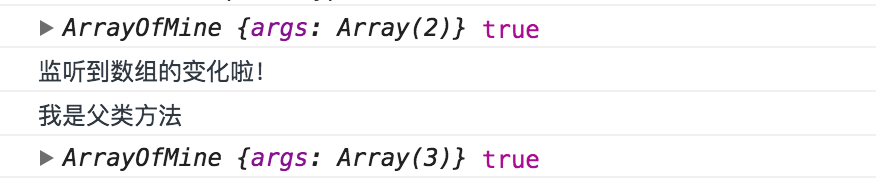
201 |
202 | 结果和我们之前预想的是一样的,我们自己定义的类的话,这种做法是可以行的通的,那么问题就来了,为什么将父类改成Array就行不通了呢?
203 |
204 | 为了搞清问题,查阅各种资料后。得出以下结论:
205 | 因为`Array`构造函数执行时不会对传进去的this做任何处理。不止`Array`,`String`,`Number`,`Regexp`,`Object`等等JS的内置类都不行。。这也是著名问题 ES5及以下的JS无法完美继承数组 的来源,不清楚的小伙伴可以Google查查这个问题。那么,为什么不能完美继承呢?
206 |
207 | + 数组有个响应式的length,一方面它会跟进你填入的元素的下表进行一个增长,另一方面如果你将它改小的话,它会直接将中间的元素也删除掉
208 |
209 | ```JavaScript
210 | var arr1 = [1];
211 | arr1[5] = 1;
212 | console.log(arr1.length === 6); // true
213 | // 以及
214 | var arr2 = [1,2,3];
215 | arr2.length = 1
216 | console.log(arr2);
217 | // [1] 此时元素2,3被删除了
218 | ```
219 |
220 | + 数组内部的`[[class]]` 属性,这个属性是我们用`Array.isArray(someArray)`和`Object.prototype.String.call(someArray)` 来判定someArray是否是数组的根源,而这又是内部引擎的实现,用任何JS方法都是无法改变的。而为啥要用这两种方法进行数组的判定,相信大家从前面的代码结果可以看出来,利用`instanceof`去判定是否为数组,结果是有问题的。
221 |
222 | 因为数组其响应式的length属性以及内部的`[[class]]`属性我们无法再JS层面实现,这就导致我们无法去用任何一个对象来“模仿”一个数组,而我们想要创建一个ArrayOfMine继承Array的话又必须直接用Array的构造函数,而上面我提到了Array构造函数执行时是不会对传进去的this做任何处理,也就是说这样你根本就不能继承他。而利用`__proto__`隐式原型的指针变更却能实现,因为他是一个非标准的属性(已在ES6语言规范中标准化),详请请点击链接[`__proto__`](https://developer.mozilla.org/en-US/docs/Web/JavaScript/Reference/Global_Objects/Object/proto)。
223 |
224 | 所以要实现最上面我们实现的功能,我们还是需要用到`__proto__`属性。变更后代码如下
225 |
226 | ```JavaScript
227 | function inheritObject(o){
228 | function F(){}
229 | F.prototype = o;
230 | return new F();
231 | }
232 | function inheritPrototype(subClass,superClass){
233 | var p = inheritObject(superClass.prototype);
234 | p.constructor = subClass;
235 | subClass.prototype = p;
236 | }
237 |
238 | function ArrayOfMine () {
239 | var args = arguments
240 | , len = args.length
241 | , i = 0
242 | , args$1 = []; // 保存所有arguments
243 | for (; i < len; i++) {
244 | // 判断参数是否为数组,如果是则直接concat
245 | if (Array.isArray(args[i])) {
246 | args$1 = args$1.concat(args[i]);
247 | }
248 | // 如果不是数组,则直接push到
249 | else {
250 | args$1.push(args[i])
251 | }
252 | }
253 | // 接收Array.apply的返回值,刚接收的时候arr是一个Array
254 | var arr = Array.apply(null, args$1);
255 | // 将arr的__proto__属性指向 ArrayOfMine的 prototype
256 | arr.__proto__ = ArrayOfMine.prototype;
257 | return arr;
258 | }
259 | inheritPrototype(ArrayOfMine, Array);
260 | // 重写父类Array的push,pop等方法
261 | ArrayOfMine.prototype.push = function () {
262 | console.log('监听到数组的变化啦!');
263 | return Array.prototype.push.apply(this, arguments);
264 | }
265 | var list4 = [1, 2];
266 | var newList = new ArrayOfMine(list4, 3);
267 | console.log(newList, newList.length, newList instanceof Array, Array.isArray(newList));
268 | newList.push(4);
269 | console.log(newList, newList.length, newList instanceof Array, Array.isArray(newList));
270 | ```
271 | 结果如图
272 |
273 | 
274 |
275 | 自此,我所知道几种实现数组监听的方法便得于实现了。
276 |
277 | ## 总结
278 |
279 | 总结以上几点方案,基于[上篇文章](https://my.oschina.net/qiangdada/blog/906220)的基础,完整的数组监听代码如下
280 | ```JavaScript
281 | // Define Property
282 | function def (obj, key, val, enumerable) {
283 | Object.defineProperty(obj, key, {
284 | value: val,
285 | enumerable: !!enumerable,
286 | configurable: true,
287 | writable: true
288 | })
289 | }
290 | // observe array
291 | let arrayProto = Array.prototype;
292 | let arrayMethods = Object.create(arrayProto);
293 | [
294 | 'push',
295 | 'pop',
296 | 'shift',
297 | 'unshift',
298 | 'splice',
299 | 'sort',
300 | 'reverse'
301 | ].forEach(method => {
302 | // 原始数组操作方法
303 | let original = arrayMethods[method];
304 | def(arrayMethods, method, function () {
305 | let arguments$1 = arguments;
306 | let i = arguments.length;
307 | let args = new Array(i);
308 |
309 | while (i--) {
310 | args[i] = arguments$1[i]
311 | }
312 | // 执行数组方法
313 | let result = original.apply(this, args);
314 | // 因 arrayMethods 是为了作为 Observer 中的 value 的原型或者直接作为属性,所以此处的 this 一般就是指向 Observer 中的 value
315 | // 当然,还需要修改 Observer,使得其中的 value 有一个指向 Observer 自身的属性,__ob__,以此将两者关联起来
316 | let ob = this.__ob__;
317 | // 存放新增数组元素
318 | let inserted;
319 | // 为add 进arry中的元素进行observe
320 | switch (method) {
321 | case 'push':
322 | inserted = args;
323 | break;
324 | case 'unshift':
325 | inserted = args;
326 | break;
327 | case 'splice':
328 | // 第三个参数开始才是新增元素
329 | inserted = args.slice(2);
330 | break;
331 | }
332 | if (inserted) {
333 | ob.observeArray(inserted);
334 | }
335 | // 通知数组变化
336 | ob.dep.notify();
337 | // 返回新数组长度
338 | return result;
339 | })
340 |
341 | })
342 | ```
343 | mvvm库的完整代码链接:
344 |
345 | `github`- [https://github.com/xuqiang521/overwrite/tree/master/my-mvvm](https://github.com/xuqiang521/overwrite/tree/master/my-mvvm)
346 |
347 | `码云`- [https://git.oschina.net/qiangdada_129/overwrite/tree/master/my-mvvm](https://git.oschina.net/qiangdada_129/overwrite/tree/master/my-mvvm)
348 |
349 | `在线JS Bin预览地址`-[http://jsbin.com/tixekufaha/edit?html,js,output](http://jsbin.com/tixekufaha/edit?html,js,output)
350 |
351 | 
352 |
353 | 喜欢的话走波`star`,`star`是我继续下去最大的动力了
354 |
355 | 以上便是这篇文章的所有内容了,如果有哪里写的有问题,还请各位小伙伴拍砖指出,共同进步学习!
356 |
--------------------------------------------------------------------------------
/src/my-mvvm/mvvm.js:
--------------------------------------------------------------------------------
1 | // Define Property
2 | function def (obj, key, val, enumerable) {
3 | Object.defineProperty(obj, key, {
4 | value: val,
5 | enumerable: !!enumerable,
6 | configurable: true,
7 | writable: true
8 | })
9 | }
10 |
11 | /**
12 | * @class 双向绑定类 MVVM
13 | * @param {[type]} options [description]
14 | */
15 | function MVVM (options) {
16 | this.$options = options || {};
17 | let data = this._data = this.$options.data;
18 | let self = this;
19 |
20 | Object.keys(data).forEach(key => {
21 | self._proxyData(key);
22 | });
23 | observe(data, this);
24 | new Compile(options.el || document.body, this);
25 | }
26 | MVVM.prototype = {
27 | /**
28 | * [属性代理]
29 | * @param {[type]} key [数据key]
30 | * @param {[type]} setter [属性set]
31 | * @param {[type]} getter [属性get]
32 | */
33 | _proxyData: function (key, setter, getter) {
34 | let self = this;
35 | setter = setter ||
36 | Object.defineProperty(self, key, {
37 | configurable: false,
38 | enumerable: true,
39 | get: function proxyGetter() {
40 | return self._data[key];
41 | },
42 | set: function proxySetter(newVal) {
43 | self._data[key] = newVal;
44 | }
45 | })
46 | },
47 | $set: set,
48 | $delete: del
49 | }
50 | function set (target, key, val) {
51 | if (Array.isArray(target) && typeof key === 'number') {
52 | target.length = Math.max(target.length, key);
53 | target.splice(key, 1, val);
54 | return val;
55 | }
56 | if (hasOwn(target, key)) {
57 | target[key] = val;
58 | return val;
59 | }
60 | let ob = (target).__ob__;
61 | if (!ob) {
62 | target[key] = val;
63 | return val;
64 | }
65 | defineReactive$$1(ob.value, key, val);
66 | ob.dep.notify();
67 | return val;
68 | }
69 | function del (target, key) {
70 | if (Array.isArray(target) && typeof key === 'number') {
71 | target.splice(key, 1);
72 | return;
73 | }
74 | let ob = (target).__ob__;
75 | if (!hasOwn(target, key)) {
76 | return;
77 | }
78 | delete target[key];
79 | if (!ob) {
80 | return;
81 | }
82 | ob.dep.notify();
83 | }
84 | // observe array
85 | let arrayProto = Array.prototype;
86 | let arrayMethods = Object.create(arrayProto);
87 | [
88 | 'push',
89 | 'pop',
90 | 'shift',
91 | 'unshift',
92 | 'splice',
93 | 'sort',
94 | 'reverse'
95 | ].forEach(method => {
96 | // 原始数组操作方法
97 | let original = arrayMethods[method];
98 | def(arrayMethods, method, function () {
99 | let arguments$1 = arguments;
100 | let i = arguments.length;
101 | let args = new Array(i);
102 |
103 | while (i--) {
104 | args[i] = arguments$1[i]
105 | }
106 | // 执行数组方法
107 | let result = original.apply(this, args);
108 | // 因 arrayMethods 是为了作为 Observer 中的 value 的原型或者直接作为属性,所以此处的 this 一般就是指向 Observer 中的 value
109 | // 当然,还需要修改 Observer,使得其中的 value 有一个指向 Observer 自身的属性,__ob__,以此将两者关联起来
110 | let ob = this.__ob__;
111 | // 存放新增数组元素
112 | let inserted;
113 | // 为add 进arry中的元素进行observe
114 | switch (method) {
115 | case 'push':
116 | inserted = args;
117 | break;
118 | case 'unshift':
119 | inserted = args;
120 | break;
121 | case 'splice':
122 | // 第三个参数开始才是新增元素
123 | inserted = args.slice(2);
124 | break;
125 | }
126 | if (inserted) {
127 | ob.observeArray(inserted);
128 | }
129 | // 通知数组变化
130 | ob.dep.notify();
131 | // 返回新数组长度
132 | return result;
133 | })
134 |
135 | })
136 | // arrayMethods所有的枚举属性名
137 | const arrayKeys = Object.getOwnPropertyNames(arrayMethods);
138 | // 判断当前环境是否可以使用 __proto__
139 | const hasProto = '__proto__' in {};
140 | console.log(arrayMethods)
141 | // 直接将对象的 proto 指向 src这一组方法
142 | function protoAugment (target, src) {
143 | target.__proto__ = src;
144 | }
145 |
146 | // 遍历这一组方法,依次添加到对象中,作为隐藏属性(即 enumerable: false,不能被枚举)
147 | function copyAugment (target, src, keys) {
148 | for (let i = 0, l = keys.length; i < l; i++) {
149 | let key = keys[i];
150 | def(target, key, src[key]);
151 | }
152 | }
153 | // 返回一个布尔值,指示对象是否具有指定的属性作为自身(不继承)属性
154 | function hasOwn (obj, key) {
155 | return hasOwnProperty.call(obj, key)
156 | }
157 | /**
158 | * @class 发布类 Observer that are attached to each observed
159 | * @param {[type]} value [vm参数]
160 | */
161 | function Observer(value) {
162 | this.value = value;
163 | this.dep = new Dep();
164 | def(value, '__ob__', this);
165 | if (Array.isArray(value)) {
166 | let augment = hasProto
167 | ? protoAugment
168 | : copyAugment;
169 | augment(value, arrayMethods, arrayKeys);
170 | this.observeArray(value);
171 | } else {
172 | this.walk(value);
173 | }
174 | }
175 |
176 | Observer.prototype = {
177 | walk: function (obj) {
178 | let self = this;
179 | Object.keys(obj).forEach(key => {
180 | defineReactive$$1(obj, key, obj[key]);
181 | });
182 | },
183 | observeArray: function (items) {
184 | for (let i = 0, l = items.length; i < l; i++) {
185 | observe(items[i]);
186 | }
187 | }
188 | }
189 |
190 | function defineReactive$$1 (obj, key, val) {
191 | let dep = new Dep();
192 | let childOb = observe(val);
193 | Object.defineProperty(obj, key, {
194 | enumerable: true,
195 | configurable: true,
196 | get: function() {
197 | if (Dep.target) {
198 | dep.depend();
199 | if (childOb) {
200 | childOb.dep.depend();
201 | }
202 | }
203 |
204 | return val;
205 | },
206 | set: function(newVal) {
207 | if (val === newVal || (newVal !== newVal && val !== val)) {
208 | return;
209 | }
210 | val = newVal;
211 | // 监听子属性
212 | childOb = observe(newVal);
213 | // 通知数据变更
214 | dep.notify();
215 | }
216 | })
217 | }
218 |
219 | function observe(value, asRootData) {
220 | if (!value || typeof value !== 'object') {
221 | return;
222 | }
223 | let ob;
224 | if (hasOwn(value, '__ob__') && value.__ob__ instanceof Observer) {
225 | ob = value.__ob__;
226 | } else {
227 | ob = new Observer(value);
228 | }
229 | return ob
230 | }
231 |
232 | /**
233 | * @class 依赖类 Dep
234 | */
235 | let uid = 0;
236 | function Dep() {
237 | // dep id
238 | this.id = uid++;
239 | // array 存储Watcher
240 | this.subs = [];
241 | }
242 | Dep.target = null;
243 | Dep.prototype = {
244 | /**
245 | * [添加订阅者]
246 | * @param {[Watcher]} sub [订阅者]
247 | */
248 | addSub: function (sub) {
249 | this.subs.push(sub);
250 | },
251 | /**
252 | * [移除订阅者]
253 | * @param {[Watcher]} sub [订阅者]
254 | */
255 | removeSub: function (sub) {
256 | let index = this.subs.indexOf(sub);
257 | if (index !== -1) {
258 | this.subs.splice(index ,1);
259 | }
260 | },
261 | // 通知数据变更
262 | notify: function () {
263 | console.log('notify');
264 | this.subs.forEach(sub => {
265 | // 执行sub的update更新函数
266 | sub.update();
267 | });
268 | },
269 | // add Watcher
270 | depend: function () {
271 | Dep.target.addDep(this);
272 | }
273 | }
274 | /**
275 | * Watcher.prototype = {
276 | * get: function () {
277 | * Dep.target = this;
278 | * let value = this.getter.call(this.vm, this.vm);
279 | * Dep.target = null;
280 | * return value;
281 | * },
282 | * addDep: function (dep) {
283 | * dep.addSub(this);
284 | * }
285 | * }
286 | */
287 | /**
288 | * @class 指令解析类 Compile
289 | * @param {[type]} el [element节点]
290 | * @param {[type]} vm [mvvm实例]
291 | */
292 | function Compile(el, vm) {
293 | this.$vm = vm;
294 | this.$el = this.isElementNode(el) ? el : document.querySelector(el);
295 |
296 | if (this.$el) {
297 | this.$fragment = this.nodeFragment(this.$el);
298 | this.compileElement(this.$fragment);
299 | // 将文档碎片放回真实dom
300 | this.$el.appendChild(this.$fragment)
301 | }
302 | }
303 | Compile.prototype = {
304 | compileElement: function (el) {
305 | let self = this;
306 | let childNodes = el.childNodes;
307 | [].slice.call(childNodes).forEach(node => {
308 | let text = node.textContent;
309 | let reg = /\{\{((?:.|\n)+?)\}\}/;
310 |
311 | // 如果是element节点
312 | if (self.isElementNode(node)) {
313 | self.compile(node);
314 | }
315 | // 如果是text节点
316 | else if (self.isTextNode(node) && reg.test(text)) {
317 | // 匹配第一个选项
318 | self.compileText(node, RegExp.$1);
319 | }
320 | // 解析子节点包含的指令
321 | if (node.childNodes && node.childNodes.length) {
322 | self.compileElement(node);
323 | }
324 | });
325 | },
326 | // 文档碎片,遍历过程中会有多次的dom操作,为提高性能我们会将el节点转化为fragment文档碎片进行解析操作
327 | // 解析操作完成,将其添加回真实dom节点中
328 | nodeFragment: function (el) {
329 | let fragment = document.createDocumentFragment();
330 | let child;
331 |
332 | while (child = el.firstChild) {
333 | fragment.appendChild(child);
334 | }
335 | return fragment;
336 | },
337 | // 指令解析
338 | compile: function (node) {
339 | let nodeAttrs = node.attributes;
340 | let self = this;
341 |
342 | [].slice.call(nodeAttrs).forEach(attr => {
343 | let attrName = attr.name;
344 | if (self.isDirective(attrName)) {
345 | let exp = attr.value;
346 | let dir = attrName.substring(2);
347 | // 事件指令
348 | if (self.isEventDirective(dir)) {
349 | compileUtil.eventHandler(node, self.$vm, exp, dir);
350 | }
351 | // 普通指令
352 | else {
353 | compileUtil[dir] && compileUtil[dir](node, self.$vm, exp);
354 | }
355 |
356 | node.removeAttribute(attrName);
357 | }
358 | });
359 | },
360 | // {{ test }} 匹配变量 test
361 | compileText: function (node, exp) {
362 | compileUtil.text(node, this.$vm, exp);
363 | },
364 | // element节点
365 | isElementNode: function (node) {
366 | return node.nodeType === 1;
367 | },
368 | // text纯文本
369 | isTextNode: function (node) {
370 | return node.nodeType === 3
371 | },
372 | // x-XXX指令判定
373 | isDirective: function (attr) {
374 | return attr.indexOf('x-') === 0;
375 | },
376 | // 事件指令判定
377 | isEventDirective: function (dir) {
378 | return dir.indexOf('on') === 0;
379 | }
380 | }
381 | // 定义$elm,缓存当前执行input事件的input dom对象
382 | let $elm;
383 | let timer = null;
384 | // 指令处理集合
385 | const compileUtil = {
386 | html: function (node, vm, exp) {
387 | this.bind(node, vm, exp, 'html');
388 | },
389 | text: function (node, vm, exp) {
390 | this.bind(node, vm, exp, 'text');
391 | },
392 | class: function (node, vm, exp) {
393 | this.bind(node, vm, exp, 'class');
394 | },
395 | model: function(node, vm, exp) {
396 | this.bind(node, vm, exp, 'model');
397 |
398 | let self = this;
399 | let val = this._getVmVal(vm, exp);
400 | // 监听input事件
401 | node.addEventListener('input', function (e) {
402 | let newVal = e.target.value;
403 | $elm = e.target;
404 | if (val === newVal) {
405 | return;
406 | }
407 | // 设置定时器 完成ui js的异步渲染
408 | clearTimeout(timer);
409 | timer = setTimeout(function () {
410 | self._setVmVal(vm, exp, newVal);
411 | val = newVal;
412 | })
413 | });
414 | },
415 | bind: function (node, vm, exp, dir) {
416 | let updaterFn = updater[dir + 'Updater'];
417 |
418 | updaterFn && updaterFn(node, this._getVmVal(vm, exp));
419 |
420 | new Watcher(vm, exp, function(value, oldValue) {
421 | updaterFn && updaterFn(node, value, oldValue);
422 | });
423 | },
424 | // 事件处理
425 | eventHandler: function(node, vm, exp, dir) {
426 | let eventType = dir.split(':')[1];
427 | let fn = vm.$options.methods && vm.$options.methods[exp];
428 |
429 | if (eventType && fn) {
430 | node.addEventListener(eventType, fn.bind(vm), false);
431 | }
432 | },
433 | /**
434 | * [获取挂载在vm实例上的value]
435 | * @param {[type]} vm [mvvm实例]
436 | * @param {[type]} exp [expression]
437 | */
438 | _getVmVal: function (vm, exp) {
439 | let val = vm;
440 | exp = exp.split('.');
441 | exp.forEach(key => {
442 | key = key.trim();
443 | val = val[key];
444 | });
445 | return val;
446 | },
447 | /**
448 | * [设置挂载在vm实例上的value值]
449 | * @param {[type]} vm [mvvm实例]
450 | * @param {[type]} exp [expression]
451 | * @param {[type]} value [新值]
452 | */
453 | _setVmVal: function (vm, exp, value) {
454 | let val = vm;
455 | exps = exp.split('.');
456 | exps.forEach((key, index) => {
457 | key = key.trim();
458 | if (index < exps.length - 1) {
459 | val = val[key];
460 | }
461 | else {
462 | val[key] = value;
463 | }
464 | });
465 | }
466 | }
467 | // 指令渲染集合
468 | const updater = {
469 | htmlUpdater: function (node, value) {
470 | node.innerHTML = typeof value === 'undefined' ? '' : value;
471 | },
472 | textUpdater: function (node, value) {
473 | node.textContent = typeof value === 'undefined' ? '' : value;
474 | },
475 | classUpdater: function () {},
476 | modelUpdater: function (node, value, oldValue) {
477 | if ($elm === node) {
478 | return false;
479 | }
480 | $elm = undefined;
481 | node.value = typeof value === 'undefined' ? '' : value;
482 | }
483 | }
484 |
485 | /**
486 | * @class 观察类
487 | * @param {[type]} vm [vm对象]
488 | * @param {[type]} expOrFn [属性表达式]
489 | * @param {Function} cb [回调函数(一半用来做view动态更新)]
490 | */
491 | function Watcher(vm, expOrFn, cb) {
492 | this.vm = vm;
493 | expOrFn = expOrFn.trim();
494 | this.expOrFn = expOrFn;
495 | this.cb = cb;
496 | this.depIds = {};
497 |
498 | if (typeof expOrFn === 'function') {
499 | this.getter = expOrFn
500 | }
501 | else {
502 | this.getter = this.parseGetter(expOrFn);
503 | }
504 | this.value = this.get();
505 | }
506 | Watcher.prototype = {
507 | update: function () {
508 | this.run();
509 | },
510 | run: function () {
511 | let newVal = this.get();
512 | let oldVal = this.value;
513 | if (newVal === oldVal) {
514 | return;
515 | }
516 | this.value = newVal;
517 | // 将newVal, oldVal挂载到MVVM实例上
518 | this.cb.call(this.vm, newVal, oldVal);
519 | },
520 | get: function () {
521 | Dep.target = this; // 将当前订阅者指向自己
522 | let value = this.getter.call(this.vm, this.vm); // 触发getter,将自身添加到dep中
523 | Dep.target = null; // 添加完成 重置
524 | return value;
525 | },
526 | // 添加Watcher to Dep.subs[]
527 | addDep: function (dep) {
528 | if (!this.depIds.hasOwnProperty(dep.id)) {
529 | dep.addSub(this);
530 | this.depIds[dep.id] = dep;
531 | }
532 | },
533 | parseGetter: function (exp) {
534 | if (/[^\w.$]/.test(exp)) return;
535 |
536 | let exps = exp.split('.');
537 |
538 | // 简易的循环依赖处理
539 | return function(obj) {
540 | for (let i = 0, len = exps.length; i < len; i++) {
541 | if (!obj) return;
542 | obj = obj[exps[i]];
543 | }
544 | return obj;
545 | }
546 | }
547 | }
548 | // trim() 对于各浏览器兼容的处理
549 | if (!String.prototype.trim) {
550 | String.prototype.trim = function () {
551 | return this.replace(/(^\s+)|(\s+$)/g,"");
552 | };
553 | }
554 |
--------------------------------------------------------------------------------
/src/my-mvvm/README.md:
--------------------------------------------------------------------------------
1 | # 实现一个属于我们自己的简易MVVM库
2 |
3 | ## 前言
4 | 本文所有代码都已经push到本人github个人仓库overwrite->my-mvvm
5 |
6 |
7 | 我们知道的,常见的数据绑定的实现方法
8 |
9 | + 数据劫持(vue):通过[`Object.defineProperty()`](https://developer.mozilla.org/en-US/docs/Web/JavaScript/Reference/Global_Objects/Object/defineProperty) 去劫持数据每个属性对应的`getter`和`setter`
10 | + 脏值检测(angular):通过特定事件比如`input`,`change`,`xhr请求`等进行脏值检测。
11 | + 发布-订阅模式(backbone):通过发布消息,订阅消息进行数据和视图的绑定监听。[my-observer](https://github.com/xuqiang521/overwrite/tree/master/my-observer)
12 |
13 | 一言不合先上代码和效果图吧
14 |
15 | `code`
16 | ```html
17 |
18 |
19 |
20 |
21 |
22 |
23 | example
24 |
25 |
26 |
27 |
28 |
{{b}}
29 |
30 |
31 |
{{ a }}
32 |
33 |
317 |
318 |
{{ a }}
319 |
 按照步骤走的我已经实现了指令解析!
333 |
334 | 这里我们只是实现了指令的解析以及视图的初始化,并没有实现数据变化的订阅以及视图的更新。完整的Compile则实现了这些功能,详细代码如下
335 |
336 | ```javascript
337 | /**
338 | * @class 指令解析类 Compile
339 | * @param {[type]} el [element节点]
340 | * @param {[type]} vm [mvvm实例]
341 | */
342 | function Compile(el, vm) {
343 | this.$vm = vm;
344 | this.$el = this.isElementNode(el) ? el : document.querySelector(el);
345 |
346 | if (this.$el) {
347 | this.$fragment = this.nodeFragment(this.$el);
348 | this.compileElement(this.$fragment);
349 | // 将文档碎片放回真实dom
350 | this.$el.appendChild(this.$fragment)
351 | }
352 | }
353 | Compile.prototype = {
354 | compileElement: function (el) {
355 | let self = this;
356 | let childNodes = el.childNodes;
357 | [].slice.call(childNodes).forEach(node => {
358 | let text = node.textContent;
359 | let reg = /\{\{((?:.|\n)+?)\}\}/;
360 |
361 | // 如果是element节点
362 | if (self.isElementNode(node)) {
363 | self.compile(node);
364 | }
365 | // 如果是text节点
366 | else if (self.isTextNode(node) && reg.test(text)) {
367 | // 匹配第一个选项
368 | self.compileText(node, RegExp.$1);
369 | }
370 | // 解析子节点包含的指令
371 | if (node.childNodes && node.childNodes.length) {
372 | self.compileElement(node);
373 | }
374 | });
375 | },
376 | // 文档碎片,遍历过程中会有多次的dom操作,为提高性能我们会将el节点转化为fragment文档碎片进行解析操作
377 | // 解析操作完成,将其添加回真实dom节点中
378 | nodeFragment: function (el) {
379 | let fragment = document.createDocumentFragment();
380 | let child;
381 |
382 | while (child = el.firstChild) {
383 | fragment.appendChild(child);
384 | }
385 | return fragment;
386 | },
387 | // 指令解析
388 | compile: function (node) {
389 | let nodeAttrs = node.attributes;
390 | let self = this;
391 |
392 | [].slice.call(nodeAttrs).forEach(attr => {
393 | var attrName = attr.name;
394 | if (self.isDirective(attrName)) {
395 | var exp = attr.value;
396 | var dir = attrName.substring(2);
397 | // 事件指令
398 | if (self.isEventDirective(dir)) {
399 | compileUtil.eventHandler(node, self.$vm, exp, dir);
400 | }
401 | // 普通指令
402 | else {
403 | compileUtil[dir] && compileUtil[dir](node, self.$vm, exp);
404 | }
405 |
406 | node.removeAttribute(attrName);
407 | }
408 | });
409 | },
410 | // {{ test }} 匹配变量 test
411 | compileText: function (node, exp) {
412 | compileUtil.text(node, this.$vm, exp);
413 | },
414 | // element节点
415 | isElementNode: function (node) {
416 | return node.nodeType === 1;
417 | },
418 | // text纯文本
419 | isTextNode: function (node) {
420 | return node.nodeType === 3
421 | },
422 | // x-XXX指令判定
423 | isDirective: function (attr) {
424 | return attr.indexOf('x-') === 0;
425 | },
426 | // 事件指令判定
427 | isEventDirective: function (dir) {
428 | return dir.indexOf('on') === 0;
429 | }
430 | }
431 | // 定义$elm,缓存当前执行input事件的input dom对象
432 | let $elm;
433 | let timer = null;
434 | // 指令处理集合
435 | const compileUtil = {
436 | html: function (node, vm, exp) {
437 | this.bind(node, vm, exp, 'html');
438 | },
439 | text: function (node, vm, exp) {
440 | this.bind(node, vm, exp, 'text');
441 | },
442 | class: function (node, vm, exp) {
443 | this.bind(node, vm, exp, 'class');
444 | },
445 | model: function(node, vm, exp) {
446 | this.bind(node, vm, exp, 'model');
447 |
448 | let self = this;
449 | let val = this._getVmVal(vm, exp);
450 | // 监听input事件
451 | node.addEventListener('input', function (e) {
452 | let newVal = e.target.value;
453 | $elm = e.target;
454 | if (val === newVal) {
455 | return;
456 | }
457 | // 设置定时器 完成ui js的异步渲染
458 | clearTimeout(timer);
459 | timer = setTimeout(function () {
460 | self._setVmVal(vm, exp, newVal);
461 | val = newVal;
462 | })
463 | });
464 | },
465 | bind: function (node, vm, exp, dir) {
466 | let updaterFn = updater[dir + 'Updater'];
467 |
468 | updaterFn && updaterFn(node, this._getVmVal(vm, exp));
469 |
470 | new Watcher(vm, exp, function(value, oldValue) {
471 | updaterFn && updaterFn(node, value, oldValue);
472 | });
473 | },
474 | // 事件处理
475 | eventHandler: function(node, vm, exp, dir) {
476 | let eventType = dir.split(':')[1];
477 | let fn = vm.$options.methods && vm.$options.methods[exp];
478 |
479 | if (eventType && fn) {
480 | node.addEventListener(eventType, fn.bind(vm), false);
481 | }
482 | },
483 | /**
484 | * [获取挂载在vm实例上的value]
485 | * @param {[type]} vm [mvvm实例]
486 | * @param {[type]} exp [expression]
487 | */
488 | _getVmVal: function (vm, exp) {
489 | let val = vm;
490 | exp = exp.split('.');
491 | exp.forEach(key => {
492 | key = key.trim();
493 | val = val[key];
494 | });
495 | return val;
496 | },
497 | /**
498 | * [设置挂载在vm实例上的value值]
499 | * @param {[type]} vm [mvvm实例]
500 | * @param {[type]} exp [expression]
501 | * @param {[type]} value [新值]
502 | */
503 | _setVmVal: function (vm, exp, value) {
504 | let val = vm;
505 | exps = exp.split('.');
506 | exps.forEach((key, index) => {
507 | key = key.trim();
508 | if (index < exps.length - 1) {
509 | val = val[key];
510 | }
511 | else {
512 | val[key] = value;
513 | }
514 | });
515 | }
516 | }
517 | // 指令渲染集合
518 | const updater = {
519 | htmlUpdater: function (node, value) {
520 | node.innerHTML = typeof value === 'undefined' ? '' : value;
521 | },
522 | textUpdater: function (node, value) {
523 | node.textContent = typeof value === 'undefined' ? '' : value;
524 | },
525 | classUpdater: function () {},
526 | modelUpdater: function (node, value, oldValue) {
527 | // 不对当前操作input进行渲染操作
528 | if ($elm === node) {
529 | return false;
530 | }
531 | $elm = undefined;
532 | node.value = typeof value === 'undefined' ? '' : value;
533 | }
534 | }
535 | ```
536 | 
537 |
538 | 好了,到这里两个和Watcher相关的“菇凉”已经出场了
539 |
540 | ### 3、实现Watcher
541 | 作为一个和Observer和Compile都有关系的“蓝银”,他做的事情有以下几点
542 |
543 | * 通过Dep接收数据变动的通知,实例化的时候将自己添加到dep中
544 | * 属性变更时,接收dep的notify,调用自身update方法,触发Compile中绑定的更新函数,进而更新视图
545 |
546 | 这里的代码比较简短,所以我决定直接上代码
547 | ```javascript
548 | /**
549 | * @class 观察类
550 | * @param {[type]} vm [vm对象]
551 | * @param {[type]} expOrFn [属性表达式]
552 | * @param {Function} cb [回调函数(一半用来做view动态更新)]
553 | */
554 | function Watcher(vm, expOrFn, cb) {
555 | this.vm = vm;
556 | expOrFn = expOrFn.trim();
557 | this.expOrFn = expOrFn;
558 | this.cb = cb;
559 | this.depIds = {};
560 |
561 | if (typeof expOrFn === 'function') {
562 | this.getter = expOrFn
563 | }
564 | else {
565 | this.getter = this.parseGetter(expOrFn);
566 | }
567 | this.value = this.get();
568 | }
569 | Watcher.prototype = {
570 | update: function () {
571 | this.run();
572 | },
573 | run: function () {
574 | let newVal = this.get();
575 | let oldVal = this.value;
576 | if (newVal === oldVal) {
577 | return;
578 | }
579 | this.value = newVal;
580 | // 将newVal, oldVal挂载到MVVM实例上
581 | this.cb.call(this.vm, newVal, oldVal);
582 | },
583 | get: function () {
584 | Dep.target = this; // 将当前订阅者指向自己
585 | let value = this.getter.call(this.vm, this.vm); // 触发getter,将自身添加到dep中
586 | Dep.target = null; // 添加完成 重置
587 | return value;
588 | },
589 | // 添加Watcher to Dep.subs[]
590 | addDep: function (dep) {
591 | if (!this.depIds.hasOwnProperty(dep.id)) {
592 | dep.addSub(this);
593 | this.depIds[dep.id] = dep;
594 | }
595 | },
596 | parseGetter: function (exp) {
597 | if (/[^\w.$]/.test(exp)) return;
598 |
599 | let exps = exp.split('.');
600 |
601 | // 简易的循环依赖处理
602 | return function(obj) {
603 | for (let i = 0, len = exps.length; i < len; i++) {
604 | if (!obj) return;
605 | obj = obj[exps[i]];
606 | }
607 | return obj;
608 | }
609 | }
610 | }
611 | ```
612 | 
613 |
614 | 没错就是Watcher这么一个简短的“蓝银”却和Observer和Compile两位“菇凉”牵扯不清
615 |
616 | ### 4、实现MVVM
617 |
618 | 可以说MVVM是Observer,Compile以及Watcher的“boss”了,他才不会去管他们员工之间的关系,只要他们三能给干活,并且干好活就行。他需要安排给Observer,Compile以及Watche做的事情如下
619 |
620 | * Observer实现对MVVM自身model数据劫持,监听数据的属性变更,并在变动时进行notify
621 | * Compile实现指令解析,初始化视图,并订阅数据变化,绑定好更新函数
622 | * Watcher一方面接收Observer通过dep传递过来的数据变化,一方面通知Compile进行view update
623 |
624 | 具体实现如下
625 | ```javascript
626 | /**
627 | * @class 双向绑定类 MVVM
628 | * @param {[type]} options [description]
629 | */
630 | function MVVM (options) {
631 | this.$options = options || {};
632 | let data = this._data = this.$options.data;
633 | let self = this;
634 |
635 | Object.keys(data).forEach(key => {
636 | self._proxyData(key);
637 | });
638 | observe(data, this);
639 | new Compile(options.el || document.body, this);
640 | }
641 | MVVM.prototype = {
642 | /**
643 | * [属性代理]
644 | * @param {[type]} key [数据key]
645 | * @param {[type]} setter [属性set]
646 | * @param {[type]} getter [属性get]
647 | */
648 | _proxyData: function (key, setter, getter) {
649 | let self = this;
650 | setter = setter ||
651 | Object.defineProperty(self, key, {
652 | configurable: false,
653 | enumerable: true,
654 | get: function proxyGetter() {
655 | return self._data[key];
656 | },
657 | set: function proxySetter(newVal) {
658 | self._data[key] = newVal;
659 | }
660 | })
661 | }
662 | }
663 | ```
664 | 至此,一个属于我们自己的`mvvm`库也算是完成了。由于本文的代码较多,又不太好分小部分抽离出来讲解,所以我将代码的解析都直接写到了代码中。文中一些不够严谨的思考和错误,还请各位小伙伴们拍砖指出,大家一起纠正一起学习。
665 |
666 | ## 三、源码链接
667 |
668 | `github`-[https://github.com/xuqiang521/overwrite](https://github.com/xuqiang521/overwrite)
669 |
670 | `码云`-[https://git.oschina.net/qiangdada_129/overwrite](https://git.oschina.net/qiangdada_129/overwrite)
671 |
672 | 
673 |
674 | 如果喜欢欢迎各位小伙伴们`star`,`overwrite`将不断更新哦
675 |
--------------------------------------------------------------------------------