polygonsList)
52 | {
53 | shapetype = ShapeTypes.Polygon;
54 | this.polygons = polygonsList;
55 | this.count = this.polygons.Count;
56 | }
57 |
58 | public ShapeTypes ShapeType
59 | {
60 | get { return this.shapetype; }
61 | }
62 |
63 | public int Count
64 | {
65 | get { return this.count; }
66 | }
67 |
68 | public Bitmap DrawBMP(BBOX boundarybox, Bitmap bmp)
69 | {
70 | int width = bmp.Width;
71 | int height = bmp.Height;
72 | Graphics graphic = Graphics.FromImage(bmp);
73 | Pen mypen = new Pen(Color.Black);
74 |
75 | Random ran = new Random();
76 | int r = ran.Next(0, 255);
77 | int g = ran.Next(0, 255);
78 | int b = ran.Next(0, 255);
79 | Color brushcolor = Color.FromArgb(r, g, b);
80 |
81 | switch (shapetype)
82 | {
83 | case ShapeTypes.Point:
84 | for (int i = 0; i < points.Count; i++)
85 | {
86 | System.Drawing.Point bmpPoint = points[i].GetBMPPoint(boundarybox, width, height);
87 | Brush mybrush = new SolidBrush(Color.Green);
88 | Rectangle rect = new Rectangle(bmpPoint.X, bmpPoint.Y, 2, 2);
89 | graphic.DrawRectangle(mypen, rect);
90 | graphic.FillRectangle(mybrush, rect);
91 | }
92 | break;
93 | case ShapeTypes.Polyline:
94 | for (int i = 0; i < polylines.Count; i++)
95 | {
96 | System.Drawing.Point[] bmpPoints = polylines[i].GetBMPPoints(boundarybox, width, height);
97 | graphic.DrawLines(mypen, bmpPoints);
98 | }
99 | break;
100 | case ShapeTypes.Polygon:
101 | for (int i = 0; i < polygons.Count; i++)
102 | {
103 | System.Drawing.Point[] bmpPoints = polygons[i].GetBMPPoints(boundarybox, width, height);
104 | Brush mybrush = new SolidBrush(brushcolor);
105 | graphic.DrawPolygon(mypen, bmpPoints);
106 | graphic.FillPolygon(mybrush, bmpPoints);
107 | }
108 | break;
109 | default:
110 | break;
111 | }
112 | return bmp;
113 | }
114 |
115 | public Bitmap DrawBMP(BBOX boundarybox, Bitmap bmp, string style)
116 | {
117 | int width = bmp.Width;
118 | int height = bmp.Height;
119 | Graphics graphic = Graphics.FromImage(bmp);
120 | Pen mypen = new Pen(Color.Black);
121 |
122 | Color brushcolor = Color.Gray;
123 | switch (style)
124 | {
125 | case "Red":
126 | brushcolor = Color.Red;
127 | break;
128 | case "Green":
129 | brushcolor = Color.Green;
130 | break;
131 | case "Blue":
132 | brushcolor = Color.Blue;
133 | break;
134 | case "Cyan":
135 | brushcolor = Color.Cyan;
136 | break;
137 | case "Magenta":
138 | brushcolor = Color.Magenta;
139 | break;
140 | case "Yellow":
141 | brushcolor = Color.Yellow;
142 | break;
143 | default:
144 | break;
145 | }
146 |
147 | switch (shapetype)
148 | {
149 | case ShapeTypes.Point:
150 | for (int i = 0; i < points.Count; i++)
151 | {
152 | Point bmpPoint = points[i].GetBMPPoint(boundarybox, width, height);
153 | Brush mybrush = new SolidBrush(Color.Green);
154 | Rectangle rect = new Rectangle(bmpPoint.X, bmpPoint.Y, 2, 2);
155 | graphic.DrawRectangle(mypen, rect);
156 | graphic.FillRectangle(mybrush, rect);
157 | }
158 | break;
159 | case ShapeTypes.Polyline:
160 | for (int i = 0; i < polylines.Count; i++)
161 | {
162 | Point[] bmpPoints = polylines[i].GetBMPPoints(boundarybox, width, height);
163 | graphic.DrawLines(mypen, bmpPoints);
164 | }
165 | break;
166 | case ShapeTypes.Polygon:
167 | for (int i = 0; i < polygons.Count; i++)
168 | {
169 | Point[] bmpPoints = polygons[i].GetBMPPoints(boundarybox, width, height);
170 | Brush mybrush = new SolidBrush(brushcolor);
171 | graphic.DrawPolygon(mypen, bmpPoints);
172 | graphic.FillPolygon(mybrush, bmpPoints);
173 | }
174 | break;
175 | default:
176 | break;
177 | }
178 | return bmp;
179 | }
180 | }
181 | }
182 |
--------------------------------------------------------------------------------
/Properties/Resources.resx:
--------------------------------------------------------------------------------
1 |
2 |
3 |
62 |
63 |
64 |
65 |
66 |
67 |
68 |
69 |
70 |
71 |
72 |
73 |
74 |
75 |
76 |
77 |
78 |
79 |
80 |
81 |
82 |
83 |
84 |
85 |
86 |
87 |
88 |
89 |
90 |
91 |
92 |
93 |
94 |
95 |
96 |
97 |
98 |
99 |
100 |
101 |
102 |
103 |
104 |
105 |
106 |
107 |
108 |
109 | text/microsoft-resx
110 |
111 |
112 | 2.0
113 |
114 |
115 | System.Resources.ResXResourceReader, System.Windows.Forms, Version=4.0.0.0, Culture=neutral, PublicKeyToken=b77a5c561934e089
116 |
117 |
118 | System.Resources.ResXResourceWriter, System.Windows.Forms, Version=4.0.0.0, Culture=neutral, PublicKeyToken=b77a5c561934e089
119 |
120 |
121 |
122 | ..\capability.xml;System.String, mscorlib, Version=4.0.0.0, Culture=neutral, PublicKeyToken=b77a5c561934e089;gb2312
123 |
124 |
125 | <!DOCTYPE html><html lang="en" xmlns="http://www.w3.org/1999/xhtml"><head><meta charset="utf-8" /><title>WMS ERROR</title></head><body>出错啦!HTTP异常代码:400 错<!DOCTYPE html><html lang="en" xmlns="http://www.w3.org/1999/xhtml"><head><meta charset="utf-8" /><title>CWPWMS ERROR</title></head><body>出错啦!HTTP异常代码:400 错误信息:
126 |
127 |
128 | </body></html>
129 |
130 |
--------------------------------------------------------------------------------
/README.md:
--------------------------------------------------------------------------------
1 | # WMS-Server
2 | A server which implements OGC Web Map Service (WMS) (http://www.opengeospatial.org/standards/wms) by C#
3 |
4 |
5 | ## 一、什么是WMS
6 | WMS(Web Map Service,Web地图服务)是OGC(Open GIS Consortium,开放地理信息系统协会)制定的一种能够从地理信息动态生成具有地理空间位置数据的地图图像的服务标准。WMS标准将由地理信息图示表达的“地图”定义为计算机屏幕上显示的数字图像文件,因此WMS产生的地图一般以图像格式提供,如PNG、GIF 或BMP;或按SVG(Scalable Vector Graphics)或WebCGM(Web Computer Graphics Metafile)格式提供基于矢量的图形元素。
7 | WMS标准定义了三个基本操作:第一个操作是GetCapabilities,用于返回服务级元数据,它是对服务信息内容和要求参数的一种描述;第二个操作是GetMap,用于返回一个地图图像,其地理空间参考和大小参数是明确定义的;可选的第三个操作是GetFeatureInfo,返回显示在地图上的某些具体要素的信息。本文只实现WMS的两个必选操作。
8 | 用户可以通过使用标准的网络浏览器或地图客户端(如Gaia)以统一资源定位符(Uniform Resources Locators,URL)的形式发出请求来调用网络地图服务的操作。URL的内容取决于被请求的操作的要求。特别是当请求一幅地图时,URL需要指出地图所要显示的地理信息(图层)、地图的覆盖范围、指定的空间参照系以及输出图像的宽度和高度;当利用同样的地理信息参数和输出范围(Boundary Box,BBOX)产生两幅或多幅地图时,其结果可以准确地被叠加以产生复合地图。
9 |
10 | ## 二、WMS的capability.xml
11 | 在实现WMS时,首先要需要根据OGC制定的WMS实现规范写一个capability的xml文档,里面提供了WMS的服务级元数据,包括服务信息内容和要求参数等。在用户向服务器发送GetCapabilities请求时,服务器返回此xml文档,用户通过阅读这个xml文档可以了解到WMS提供了哪些数据、具体实现了规范中的哪些功能等。而诸如Gaia等地图客户端会通过分析capability.xml自动得到提供的图层和实现的格式、样式等(图1)。
12 |
13 |
14 |
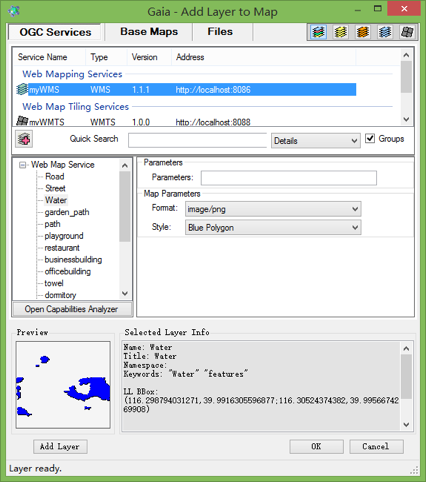
15 |
图1 Gaia客户端对于capability的分析
18 |
19 | capability.xml有两个一级标签,分别是和。其中标签记录了此WMS服务的名字、关键词等基本信息,同时给出了服务提供人的联系信息,包括所在地、单位、E-mail等,方便用户在需要时与服务提供人联系。
20 | 标签是capability.xml的核心内容。标签下有三个主要子标签、和。标签记录了WMS所支持的请求的内容,包括返回的格式和请求URL前缀。标签说明了异常的格式。标签先记录了WMS整体上支持的坐标系和边界范围(BoundingBox),再详细记录了每个空间数据图层的关键词、坐标系、边界范围、可以选择的样式
87 |
88 |
89 |
90 | Street
91 | Street
92 |
93 |
94 | features
95 | Street
96 |
97 | EPSG:4326
98 |
99 |
100 |
105 |
106 |
107 |
108 | Water
109 | Water
110 |
111 |
112 | Water
113 | features
114 |
115 | EPSG:4326
116 |
117 |
118 |
122 |
126 |
130 |
134 |
138 |
142 |
143 |
144 |
145 | garden_path
146 | garden_path
147 |
148 |
149 | features
150 | garden_path
151 |
152 | EPSG:4326
153 |
154 |
155 |
160 |
161 |
162 |
163 | path
164 | path
165 |
166 |
167 | features
168 | path
169 |
170 | EPSG:4326
171 |
172 |
173 |
178 |
179 |
180 |
181 | playground
182 | playground
183 |
184 |
185 | features
186 | playground
187 |
188 | EPSG:4326
189 |
190 |
191 |
195 |
199 |
203 |
207 |
211 |
215 |
216 |
217 |
218 | restaurant
219 | restaurant
220 |
221 |
222 | features
223 | restaurant
224 |
225 | EPSG:4326
226 |
227 |
228 |
232 |
236 |
240 |
244 |
248 |
252 |
253 |
254 |
255 | businessbuilding
256 | businessbuilding
257 |
258 |
259 | features
260 | businessbuilding
261 |
262 | EPSG:4326
263 |
264 |
265 |
269 |
273 |
277 |
281 |
285 |
289 |
290 |
291 |
292 | officebuilding
293 | officebuilding
294 |
295 |
296 | features
297 | officebuilding
298 |
299 | EPSG:4326
300 |
301 |
302 |
306 |
310 |
314 |
318 |
322 |
326 |
327 |
328 |
329 | towel
330 | towel
331 |
332 |
333 | features
334 | towel
335 |
336 | EPSG:4326
337 |
338 |
339 |
344 |
345 |
346 |
347 | dormitory
348 | dormitory
349 |
350 |
351 | features
352 | dormitory
353 |
354 | EPSG:4326
355 |
356 |
357 |
361 |
365 |
369 |
373 |
377 |
381 |
382 |
383 |
384 | constructionsite
385 | constructionsite
386 |
387 |
388 | features
389 | constructionsite
390 |
391 | EPSG:4326
392 |
393 |
394 |
398 |
402 |
406 |
410 |
414 |
418 |
419 |
420 |
421 | teachingbuilding
422 | teachingbuilding
423 |
424 |
425 | features
426 | teachingbuilding
427 |
428 | EPSG:4326
429 |
430 |
431 |
435 |
439 |
443 |
447 |
451 |
455 |
456 |
457 |
458 | scenepoint
459 | scenepoint
460 |
461 |
462 | features
463 | scenepoint
464 |
465 | EPSG:4326
466 |
467 |
468 |
469 |
470 |
471 | servicebuilding
472 | servicebuilding
473 |
474 |
475 | features
476 | servicebuilding
477 |
478 | EPSG:4326
479 |
480 |
481 |
485 |
489 |
493 |
497 |
501 |
505 |
506 |
507 |
508 | importantbuilding
509 | importantbuilding
510 |
511 |
512 | features
513 | importantbuilding
514 |
515 | EPSG:4326
516 |
517 |
518 |
522 |
526 |
530 |
534 |
538 |
542 |
543 |
544 |
545 | gate
546 | gate
547 |
548 |
549 | features
550 | gate
551 |
552 | EPSG:4326
553 |
554 |
555 |
556 |
557 |
558 |
559 |
560 |
--------------------------------------------------------------------------------